Files
■ Data collections created by users
■ The File System is one of the most important parts of the OS to a
user
File Systems
■ Provide a means to store data organized as files as well as a
collection of functions that can be performed on files
■ Maintain a set of attributes associated with the file ■ Typical operations include:
■ Create ■ Delete ■ Open ■ Close ■ Read ■ Write
File Structure
■
Files can be structured as a collection of records or
as a sequence of bytes
■
UNIX, Linux, Windows, Mac OS’s consider files as a
sequence of bytes
■
Other OS’s, notably many IBM mainframes, adopt
the collection-of-records approach; useful for DB
■
COBOL supports the collection-of-records file and
can implement it even on systems that don’t
provide such files natively.
Structure Terms
Field
■ basic element of data ■ contains a single value ■ fixed or variable length
File
■ collection of related fields
that can be treated as a unit by some application program
■ One field is the key – a
unique identifier
Record
Database
■ collection of similar
records
■ treated as a single entity ■ may be referenced by
name
■ access control restrictions
usually apply at the file level
■ collection of related data ■ relationships among
elements of data are explicit
■ designed for use by a
number of different applications
■ consists of one or more
File Management
System Objectives
■
Meet the data management needs of the user
■Guarantee that the data in the file are valid
■Optimize performance
■
Provide I/O support for a variety of storage device types
■Minimize the potential for lost or destroyed data
■
Provide a standardized set of I/O interface routines to
user processes
■
Provide I/O support for multiple users in the case of
Minimal User Requirements
File System Architecture
■
Notice that the top layer consists of a number of
different file formats: pile, sequential, indexed
sequential, …
■
These file formats are consistent with the
collection-of- records approach to files and
determine how file data is accessed
■
Even in a byte-stream oriented file system it’s
possible to build files with record-based structures
but it’s up to the application to design the files and
build in access methods, indexes, etc.
Layered File System
Architecture
■ File Formats – Access methods provide the interface to
users
■ Logical I/O ■ Basic I/O
■ Basic file system ■ Device drivers
Device Drivers
■
Lowest level
■
Communicates directly with peripheral devices
■
Responsible for starting I/O operations on a device
■Processes the completion of an I/O request
Basic File System
■
Also referred to as the physical I/O level
■
Primary interface with the environment outside the
computer system
■
Deals with blocks of data that are exchanged with
disk or other mass storage devices.
■ placement of blocks on the secondary storage device ■ buffering blocks in main memory
Basic I/O Supervisor
■ Responsible for all file I/O initiation and termination
■ Control structures that deal with device I/O, scheduling, and
file status are maintained
■ Selects the device on which I/O is to be performed
■ Concerned with scheduling disk and tape accesses to optimize
performance
■ I/O buffers are assigned and secondary memory is allocated at
this level
Logical I/O
This level is the interface between the
logical commands issued by a program
and the physical details required by the
disk.
Logical units of data versus physical
blocks of data to match disk
Access Method
■
Level of the file system closest to the user
■Provides a standard interface between
applications and the file systems and devices that
hold the data
■
Different access methods reflect different file
structures and different ways of accessing and
processing the data
Elements of File
Management
File Organization and Access
■ File organization is the logical structuring of the records as
determined by the way in which they are accessed
■ In choosing a file organization, several criteria are important:
■ short access time ■ ease of update
■ economy of storage ■ simple maintenance ■ reliability
■ Priority of criteria depends on the application that will use the
The Pile
■ Least complicated form
of file organization
■ Data are collected in the
order they arrive
■ Each record consists of
one burst of data
■ Purpose is simply to
accumulate the mass of data and save it
■ Record access is by
The
Sequential File
■ Most common form of file
structure
■ A fixed format is used for
records
■ Key field uniquely
identifies the record & determines storage order
■ Typically used in batch
applications
■ Only organization that is
easily stored on tape as well as disk
Indexed
Sequential File
■ Adds an index to the
file to support random access
■ Adds an overflow file ■ Greatly reduces the
time required to access a single record
■ Multiple levels of
indexing can be used to provide greater efficiency in access
Indexed File
■ Records are accessed only
through their indexes
■ Variable-length records can be
employed
■ Exhaustive index contains one
entry for every record in the main file
■ Partial index contains entries to
records where the field of interest exists
■ Used mostly in applications
where timeliness of information is critical
■ Examples would be airline
reservation systems and inventory control systems
Direct or Hashed File
■ Access directly any block of a known
address
■ Makes use of hashing on the key value ■ Often used where:
■ very rapid access is required ■ fixed-length records are used
■ records are always accessed
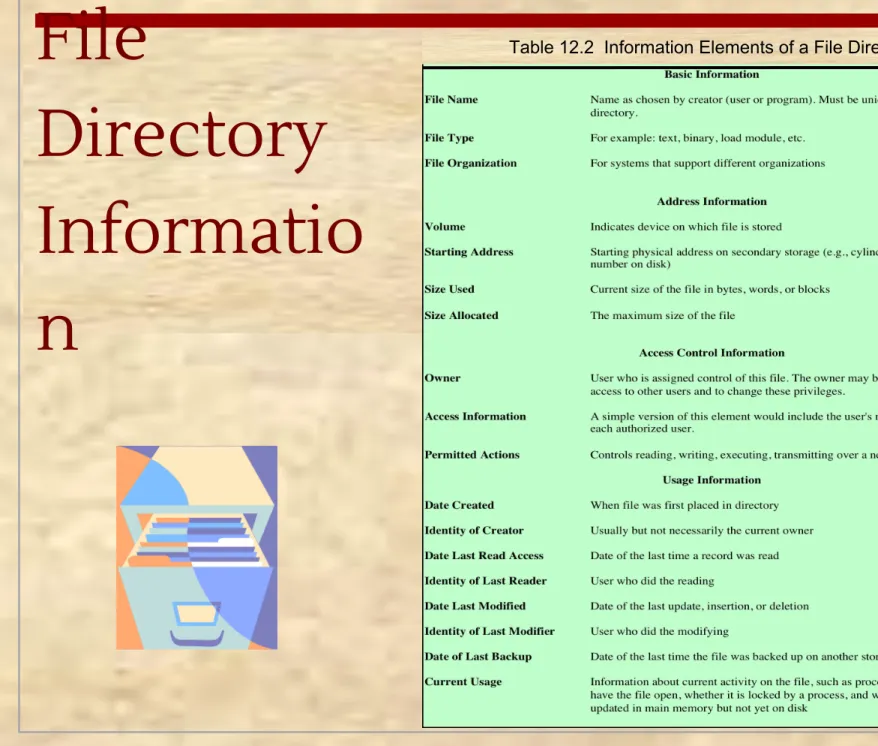
File
Directory
Informatio
n
Operations Performed
on a Directory
■ To understand the requirements for a file structure, it is helpful
to consider the types of operations that may be performed on the directory:
Tree-Structur
ed Directory
■ Master directory with user directories underneath it ■ Each user directory may have subdirectories and files as entriesExample of
Tree-Structure
d Directory
Access
Rights
■ None■ the user would not be
allowed to read the user directory that includes the file
■ Knowledge
■ the user can determine that
the file exists and who its owner is and can then petition the owner for additional access rights
■ Execution
■ the user can load and execute
a program but cannot copy it
■ Reading
■ the user can read the file for
any purpose, including copying and execution
■ Appending
■ the user can add data to the
file but cannot modify or delete any of the file’s contents
■ Updating
■ the user can modify, delete,
and add to the file’s data
■ Changing protection
■ the user can change the
access rights granted to other users
■ Deletion
■ the user can delete the file
Record Blocking
2) Variable-Length Spanned Blocking – variable-length records are
packed into blocks with no unused space
3) Variable-Length Unspanned
Blocking – variable-length records are used, but spanning is not
■ Blocks are the unit of I/O with secondary storage
■ for I/O to be
performed records must be organized as blocks
▪
Given the size of a block, three methods ofblocking can be used:
1)
Fixed-Length Blocking –fixed-length records are used, and an integral number of
records (or bytes) are stored in a block
Internal fragmentation – unused space at the end of each block for records, but not for bytes
File Allocation
▪
Disks are divided into physical blocks (sectors on a track)▪
Files are divided into logical blocks (subdivisions of the file)▪
Logical block size = some multiple of a physical block size▪
The operating system or file management system is responsible for allocating blocks to files▪
Space is allocated to a file as one or more portions (contiguous set of allocated disk blocks). A portion is the logical block size▪
File allocation table (FAT)▪
data structure used to keep track of the portions assigned to a filePreallocation vs
Dynamic Allocation
■ A preallocation policy requires that the maximum size of a file
be declared at the time of the file creation request
■ For many applications it is difficult to estimate reliably the
maximum potential size of the file
■ tends to be wasteful because users and application programmers
tend to overestimate size
■ Dynamic allocation allocates space to a file in portions as
Portion Size
■ In choosing a portion size there is a trade-off between
efficiency from the point of view of a single file versus overall system efficiency
■ Items to be considered:
1) contiguity of space increases performance, especially for Retrieve_Next operations, and greatly for
transactions running in a transaction-oriented operating system
2) having a large number of small portions increases the size of tables needed to manage the allocation
information
3) having fixed-size portions simplifies the reallocation of space
4) having variable-size or small fixed-size portions
Summarizing the
Alternatives
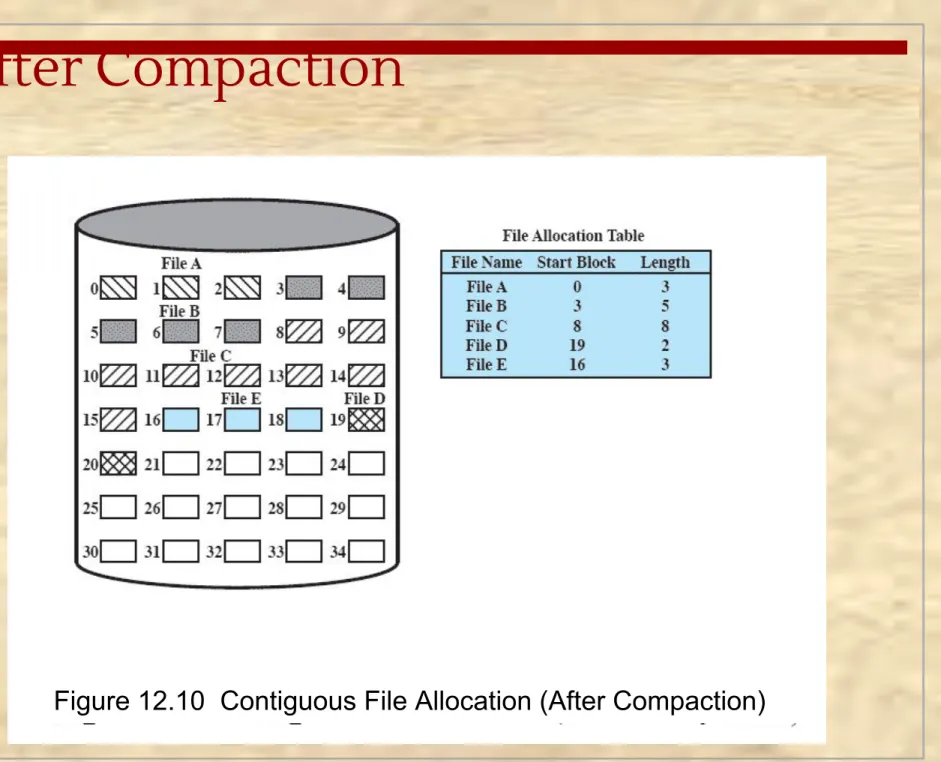
Contiguous File Allocation
▪
A singlecontiguous set of blocks is
allocated to a file at the time of file creation
▪
Preallocation strategy using variable-size portions▪
Is the best from the point of view of the individualAfter Compaction
Chained
Allocation
▪
Allocation is on an individual block basis▪
Each block contains a pointer to the next block in the chain▪
The file allocation table needs just a single entry for each file▪
No externalfragmentation to worry about
▪
Better for sequential filesChained Allocation After
Consolidation
Indexed Allocation with
Block Portions
Indexed Allocation with
Variable Length Portions
Free Space Management
■ Just as allocated space must be managed, so must the
unallocated space
■ To perform file allocation, it is necessary to know which blocks
are available
■ A disk allocation table is needed in addition to a file allocation
Bit Tables (Bit Vectors)
■ This method uses a vector containing one bit for each block on
the disk
■ Each entry of a 0 corresponds to a free block, and each 1
Chained Free Portions
■ The free portions may be chained together by using a pointer
and length value in each free portion
■ Negligible space overhead because there is no need for a disk
allocation table
Indexing
■ Treats free space as a file and uses an index table as it would
for file allocation
■ For efficiency, the index should be on the basis of
variable-size portions rather than blocks
■ This approach provides efficient support for all of the file
Review
■ File systems can support files organized as a sequence of bytes
or as a sequence of records
■ Access methods depend on file organization
■ Disk storage of files can be contiguous, linked or indexed
■ Logical blocks of a file are mapped to one or more disk sectors
to create physical blocks.
■ Directories map user names to internal names ■ File Allocation Tables map files to disk locations
Volumes
■
A collection of addressable sectors in
secondary memory that an OS or application
can use for data storage
■
The sectors in a volume need not be
consecutive on a physical storage device
■
they need only appear that way to the OS or
application
■
A volume may be the result of assembling
Access Control
■ In a system with multiple users, it’s important to protect one
user’s objects (files, directories) from other users.
■ Two levels of protections:
■ Logon verifications: guarantees you have the right to log onto
the system
■ Access determination: guarantees you have permission to
access a specific object
■ Access matrix, access lists, capability lists: techniques for
Access Matrix
■ The basic elements are:■ subject – an entity capable ofaccessing objects
■ object – anything to which
access is controlled
■ access right – the way in
which an object is accessed by a subject
Access
Control Lists
■ A matrix may be
decomposed by columns, yielding access control lists
■ The access control list
lists users and their permitted access rights
Capability
Lists
■ Decomposition by
rows yields capability tickets
■ A capability ticket
specifies authorized objects and
UNIX File
Management
■ In the UNIX file system, sixtypes of files are distinguished:
Inodes
■ All types of UNIX files are administered by the OS by means of
inodes
■ An inode (index node) is a control structure that contains the
key information needed by the operating system for a particular file
■ Several file names may be associated with a single inode
■ an active inode is associated with exactly one file ■ each file is controlled by exactly one inode
File Allocation
■ File allocation is done on a block basis
■ Allocation is dynamic, as needed, rather than using
preallocation
■ An indexed method is used to keep track of each file, with part
of the index stored in the inode for the file
■ In all UNIX implementations the inode includes a number of
direct pointers and three indirect pointers (single, double, triple)
Capacity of a FreeBSD File with 4
Kbyte Block Size
UNIX
Directories
and Inodes
■ Directories are structured in a hierarchical tree■ Each directory can
contain files and/or other directories
■ A directory that is
inside another
directory is referred
Volume Structure
■A UNIX file
system
resides on a
single logical
disk or disk
partition and
is laid out
with the
following
elements:
Access Control Lists
in UNIX
■ FreeBSD allows the administrator to assign a list of UNIX user
IDs and groups to a file
■ Any number of users and groups can be associated with a file,
each with three protection bits (read, write, execute)
■ A file may be protected solely by the traditional UNIX file
access mechanism
■ FreeBSD files include an additional protection bit
that indicates whether the file has an extended ACL
Linux Virtual
File System
(VFS)
■ Presents a single, uniform file
system interface to user processes
■ Defines a common file model
that is capable of
representing any conceivable file system’s general feature and behavior
■ Assumes files are objects that
share basic properties
regardless of the target file system or the underlying processor hardware
The Role of VFS
Within the Kernel
Windows File System
■ The developers of Windows NT designed a new file system, the
New Technology File System (NTFS) which is intended to meet high-end requirements for workstations and servers
■ Key features of NTFS:
■ recoverability ■ security
■ large disks and large files ■ multiple data streams ■ journaling
■ compression and encryption ■ hard and symbolic links
NTFS Volume
and File Structure
Table 12.5
Windows NTFS Partition
and Cluster Sizes
NTFS Volume Layout
■ Every element on a volume is
a file, and every file consists of a collection of attributes
■ even the data contents of a
file is treated as an attribute
Master File Table (MFT)
■ The heart of the Windows file system is the MFT
■ The MFT is organized as a table of 1,024-byte rows, called
records
■ Each row describes a file on this volume, including the MFT
itself, which is treated as a file
■ Each record in the MFT consists of a set of attributes that serve
to define the file (or folder) characteristics and the file contents
Windows NTFS Components
Summary
■ A file management system:
■ is a set of system software that provides services to users and applications in the use
of files
■ is typically viewed as a system service that is served by the operating system
■ Files:
■ consist of a collection of records
■ if a file is primarily to be processed as a whole, a sequential file organization is the
simplest and most appropriate
■ if sequential access is needed but random access to individual file is also desired, an
indexed sequential file may give the best performance
■ if access to the file is principally at random, then an indexed file or hashed file may
be the most appropriate
■ directory service allows files to be organized in a hierarchical fashion
■ Some sort of blocking strategy is needed
■ Key function of file management scheme is the management of disk
space
■ strategy for allocating disk blocks to a file