Author: iolo Labs Study #: WS‐001
iolo
Labs
Research
Study
Windows
Startup:
Observed
Changes
Over
T ime
Introduction ...1 Background ...1 Purpose of study ...1 Methodology and Procedures ...2 Testing environment...2 Factors observed...2 Results and Discussion ...3 Windows startup time ...3 Number of unnecessary startup tasks ...3 Impact of unnecessary startup tasks on CPU usage ....4 Conclusion...5 Further Research...5 References ...5
I
N T RO D U C T I O N
Background
When a PC is started, part of its sequence of actions is to load programs and services that are configured to open with the Windows operating system. Once these startup tasks finish loading, the PC is ready to use. Some of these applications and services in Windows startup perform necessary and critical functions, but others are not needed by the operating system and may not be desired by users. This is because Windows startup can include: • Windows services that are automatically configured to start based on a default operating system configuration, but do not apply to the intended use of the computer. • Pre‐installed software with startup commands pre‐loaded; some of these programs may be unwanted or unused by users. • Installed software that automatically adds commands to startup. Users may or may not want these programs to automatically launch at startup, but many program installations don't give an option. • Free downloaded programs bundled with third‐party applications that are configured to automatically add themselves to startup, unknown to the user. • Tracking software and potentially dangerous programs, which are often designed to hide themselves in startup locations.
Purpose
of
study
Many users have reported frustration with increasingly longer startup times—the longer they have had their PCs, the longer the PCs take to start. 1,2 This study was designed to measure whether startup time lengthens over a period of time and, if so, what factors may contribute to this impact. The study is designed to quantify changes over time by observing machines starting from a brand‐new PC to one that is two years old, which has been reported as the average age that computers are discarded. 3
M
E T H O D O LOGY
A N D
P
ROC E D U R ES
Testing
environment
For testing, simulations were developed based on observation of real PCs obtained from real users. Both physical machines and PC snapshots were obtained to develop computer models of the average state of PCs at specific ages (or "machine states"), ranging from a new machine to one that is twenty‐four months old. The study defines each of the machine states as follows: 0 month A PC that simulates the typical state of a computer that is either brand‐new or recently had its operating system installed. 3 month A PC that simulates the typical state of a computer that has been used for three months. 6 month A PC that simulates the typical state of a computer that has been used for six months. 24 month A PC that simulates the typical state of a computer that has been used for twenty‐four months. All the simulations were: • Created and tested using commercial virtualization software. • Based on the machine class "Home Office." At the time of testing, a "Home Office" class was defined with the following configurations: 32‐bit Windows XP operating system, 2 GHz CPU, and 1 GB RAM. • Installed with the latest version of a 3rd party internet security product. • Verified to be free of parasites, such as viruses, adware, spyware, and other malicious software.
Factors
observed
Experimenters observed and measured the following: • Windows startup time • Number of startup tasks classed as unnecessary in the iolo Labs tune‐up database • Startup impact on CPU usage
R
ES U LTS
A N D
D
I S C U S S I O N
Windows
startup
time
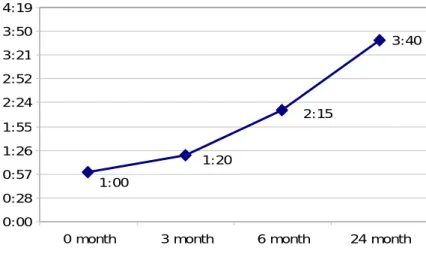
Windows startup time is the length of time it takes for a PC to completely start up. MEASUREMENT: Startup time was measured from when the PC is powered on to when the CPU reaches its minimum average idle state (until the average deviation in CPU usage percentage has stabilized). iolo Labs uses a proprietary formula to capture when this usage percentage has stabilized. RESULTS: 0 month: 1:00 minute 3 month: 1:20 minutes 6 month: 2:15 minutes 24 month: 3:40 minutes Figure 1 illustrates the rise in startup time, from one minute to 3 minutes, 40 seconds – a 267% increase.
Figure 1: Windows startup time
3:40 1:00 1:20 2:15 0:00 0:28 0:57 1:26 1:55 2:24 2:52 3:21 3:50 4:19
0 month 3 month 6 month 24 month
Number
of
unnecessary
startup
tasks
Startup tasks are the programs and services that Windows loads at boot‐time. MEASUREMENT: Unnecessary startup tasks are those defined in the iolo Labs tune‐up database to be automatically opening programs that are not essential to the normal operation of the PC. These tasks are typically running in order to provide quick access to programs. RESULTS: 0 month: 0 tasks 3 month: 4 tasks 6 month: 6 tasks 24 month: 12 tasks
Figure 2: Number of unnecessary startup tasks
12 6 4 6 8 10 12 14
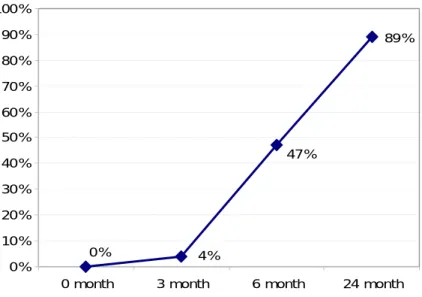
CPU usage is the amount of time the CPU spends processing user applications and high‐level Windows functions. MEASUREMENT: The startup impact on CPU usage is measured by the percentage of increased CPU usage caused by unnecessary programs that begin loading after the Windows shell is in memory until the time all of these programs have finished loading. For example, if the maximum CPU usage during post‐shell startup with no unnecessary programs is 10% and a collection of unnecessary startup programs are introduced that represent a 47% startup impact, the total sustained average CPU usage during post‐shell startup becomes 57%. RESULTS: 0 month: 0% of CPU usage 3 month: 4% of CPU usage 6 month: 47% of CPU usage 24 month: 89% of CPU usage Figure 3 shows the portion of CPU utilization consumed by unnecessary startup tasks. At 24 months, the majority ‐ 89% ‐ of the CPU usage is due to the impact of unneeded startup tasks.
Figure 3: Unnecessary startup tasks impact on CPU Usage
89% 0% 4% 47% 0% 10% 20% 30% 40% 50% 60% 70% 80% 90% 100%
0 month 3 month 6 month 24 month
C
O N C LU S I O N
The study found that over a two‐year period: • Windows startup time more than doubled, with an increase of 267% • The number of unnecessary startup tasks increased, from none to 12 • The impact of unnecessary startup tasks sharply increased, accounting for 89% of the CPU usage The anecdotal user reports of long startup times 4 are supported by these results; the study confirms that Windows startup time does significantly lengthen over time and with use. Further, the study identifies correlated increases in factors related to startup time – the number of unnecessary startup tasks and the impact such tasks have on CPU usage both escalate. The implications of this study are that by reducing the number of unnecessary startup tasks, the amount of time it take for Windows startup processing can be reduced and the impact on CPU usage can be significantly reduced.
F
U RT H E R
R
ES EA RC H
This study presents initial findings related to Windows startup. Further testing will: • Examine other factors that impact Windows startup time. • Include testing based on other machine classes and machine states.
R
E F E R E N C E S1 Stross, Randall. 2008, November 2. "30 Seconds to Boot Up? That's 29 Too Many." New York Times, p. BU.4.
2 Scottberg, Erin. 2009, March. "Make Your PC Boot Faster." Popular Mechanics 186.3, p. 105‐107. 3 Greenpeace. The e‐waste problem. Retrieved from