Daphne E. Zaborowski. Resource Type and Catalog Search.A Master’s Paper for the M.S. in I.S. degree. April, 2013.43pages.Advisor: Bradley Hemminger
This paper examines whether or not people search differently, in terms of strategy and metadata, depending on the format of the resource. The University of North Carolina at Chapel Hill online library catalog was used as a case study. In order to explore this question, interface and literature reviews were conducted along with a semi-structured interview of catalog users. Additionally, the overall design of the catalog was evaluated in terms of helpfulness when searching for non-book items.
Headings:
Semantic Gap
Faceted Search
Aggregated Search
Natural Search Interfaces
Library Catalog
RESOURCE TYPE AND CATALOG SEARCH
by
Daphne E Zaborowski
A Master’s paper submitted to the faculty of the School of Information and Library Science of the University of North Carolina at Chapel Hill
in partial fulfillment of the requirements for the degree of Master of Science in
Information Science.
Chapel Hill, North Carolina
April 2012
Approved by
_______________________________________
Contents
1.0 Introduction ... 2
2.0 Literature Review ... 4
2.1Searching for Non-Text Resources ... 4
2.2Metadata and Semantic Gap ... 6
2.3Search Interface Design: Past and Future ... 7
2.4Technology and Interface Design ... 8
3.0 Interface Review... 10
3.1 University of North Carolina at Chapel Hill Catalog ... 10
3.2 Comparison to other Academic Library Catalogs ... 13
3.3 Comparison to Specialty Interfaces ... 14
3.4 Comparison to Google ... 16
4.0Research ... 19
4.1 Introduction ... 19
4.2 Methodology ... 20
4.3 Participants ... 21
4.4 Procedures ... 22
4.5 Limitations ... 22
4.5 Findings ... 23
5.0 Recommendations ... 33
5.1 Recommendations for Catalog... 33
6.0 Conclusions ... 34
Bibliography ... 37
Appendices ... 39
1.0 Introduction
This paper will attempt to answer the following questions: do people search differently
depending on resource type and if so, what interfaces and content description can
facilitate differentiation in search approach. The research question will be addressed by
examining the existing literature, analyzing the interfaces used for searching for various
types of resources, looking at descriptive statistics from the University of North Carolina
at Chapel Hill (UNC) online catalog, and conducting a semi-structured interview using a
sample of UNC catalog users.
The central question that this paper will address is: do people search differently when
searching for books versus other resource types (e.g., music, films, photographs, journal
articles, etc.)? And, secondarily, if people do search differently based on resource type,
what types of content description and interfaces might be appropriate for each of the
resource types.
It is hypothesized that people do search differently depending on the resource typeon the
basis that people would describe a journal article, for example, using different terms than
would be used to describe a book.Journal articles have specific characteristics and
structure with reference terms like “issue” and “volume numbers,” that differ from
resources, such as audio or video, are not text-based. In addition it is hypothesized due to
the variance in search approach for different item types, that search approaches must be
2.0 Literature Review
To better understand search by resource type, literature covering search patterns were
reviewed. Literature topics reviewed included: web search patterns based on resource
type; the relationship between multimedia resource types and metadata; interface design;
and technology that supports new search interfaces.
2.1
Searching for Non-Text Resources
A study conducted by Tjondronegoro and Jansen in 2006, looked at web log data of
multimedia web searches. Tjondronegoro and Jansen (2006) found that multimedia
searches possessed certain characteristics:
1) The search times were in general short.
2) The searches tended to be about people.
3) Images were the most commonly searched for media type.
In a study from 2005, Jansen found that web search queries for images, as well as search
session length, tended to be longer than queries for audio or video. Additionally,
Tjondronegoro and Jansen found, from comparing their 2006 study to a similar and older
study, that video searching was becoming more popular; the trend was that video search
reported that YouTube content had been viewed more than 1 trillion times (“Statistics -
YouTube,” n.d.).
Although these findings are based on web search data from over six years ago, rather than
recent online catalog data, the research indicates that users do search differently. No more
recent or more relevant data was discovered on this topic. These findings were captured
by session length, session duration, and query length, depending on resource type.
Tjondronegoro and Jansen (2006) showed that multimedia searches often were most
often of people. However, this finding may not be consistent among academic library
patrons. Within an academic setting, a user might be more likely to conduct a search on a
topic.
Another trend discussed by Tjondronegoro and Jansen is that search interfaces were
moving towards a model that was federated or “media-agnostic.” Federated searches are
similar to aggregated search in that they allow the user to search many engines at once
(Tjondronegoro et al., 2009). However, aggregated searches do not allow the user to
manually select which engines to search and which not to search (Diaz, Lalmas, &
Shokouhi, 2010). What federated and aggregated have in common is an approach that
gives the user one interface for multiple document genres. In the following Interface
Review section, the aggregated search model will be discussed within an academic
2.2
Metadata and Semantic Gap
Multimedia poses a unique challenge in information retrieval due to what is known as the
semantic gap. An approach to solving the problems that multimedia information retrieval
pose is through the use of ontologies. The disparity between what information a machine
can extract from a digital multimedia object, and how a person would interpret a video,
audio track, or photograph is known as the semantic gap (Suárez-Figueroa, Atemezing, &
Corcho, 2013). Text-based objects like journal articles and books can be indexed through
extraction, whereas, the information that is extracted from multimedia like textures and
fragments cannot be transferred into something of meaning to a user (Suárez-Figueroa et
al., 2013). One such ontology addressing the semantic gap is the Ontology for Media
Resources (Suárez-Figueroa et al., 2013). The core set of elements in the Ontology for
Media Resources includes elements that fall into the following categories: identification,
creation, content description, relational, rights, distribution, fragment, and technical
properties. The scheme is as follows:
• Identification: identifier, title, language, locator
• Creation: contributor, creator, date, location
• Content description: description, keyword, genre, rating
• Relational: relation, collection
• Rights: copyright, policy
• Distribution: publisher, targetAudience
• Technical Properties: frameSize, compression, duration, format, samplingRate,
framRate, averageBitRate, numTracks
Some of the groups are self-explanatory like technical properties, rights, and creation.
Groups like distribution are a little more ambiguous. The Ontology for Media
Resources is a W3C recommendation for publishing metadata about multimedia
objects on the Web (“Ontology for Media Resources 1.0,” n.d.).
2.3
Search Interface Design: Past and Future
Early search interface research in the 1990s showed that giving the user more control in
the search yielded better search results (Wilson, 2012). Researchers studying the effects
of relevance feedback in user studies found that the interfaces that allowed the user to
interact more with the search, by adding relevant terms from relevant documents, was
significantly more effective than the interfaces with less interaction (Wilson, 2012).
In terms of the framework…the ground-breaking studies in the mid to late 1990s showed the initial value of having Control SUI features to help modify and manipulate a search. This change highlights a transition from SUIs that simply provide Input to, or have Informational displays about, an efficient and effective search system (Section 3.1), to SUIs where the Control and Personalisation makes the system efficient and effective (Wilson, 2012, pg 27).
Modern search interfaces employ many techniques that allow the user to interact with the
search results. For example through sorting, filtering, and grouping (Wilson, 2012).
Sorting is an example of arranging the data in a way that makes sense to the user, while
filtering and grouping are ways of narrowing the search and reducing the number of
results, usually through using faceted metadata. Facets offer an alternative to
Hearst et al. wrote in 2006 that information seekers want results that are displayed in a
manner that makes sense, and that there are two approaches to organizing results (Hearst,
2006). Two approaches to organizing results are clustering and facets. Clustering is the
approach of grouping items that are similar in the search results. The use of facets is an
approach that allows the user to broaden or narrow the search results by selecting or
deselecting metadata attributes. Faceted interfaces often have hierarchical structure,
which makes for more predictive navigation by the user. Clusters can be less intuitive. An
interesting finding cited by Hearst et al. was that users preferred the hierarchical faceted
search to the free-text search that is used by most web search engines (Hearst, 2006).
2.4
Technology and Interface Design
Search interface design and technology, or information retrieval systems, influence one
another. As search technology improves, design will improve as well. Some technologies
that have influenced design include context-based retrieval or query by example. These
systems let the user input non-textual queries and retrieve items with similar qualities.
For example, a user may submit a picture of a bicycle and gets results containing more
images of bicycles. Query by humming was first implemented in the 1990s (Wilson,
2012). Google and specialty search engines are using these technologies.
More recently in 2011 Hearst wrote about natural search interfaces (Hearst, 2011). She
explains that technology will largely determine interface design and that users desire
interfaces that reflect how they interact with information without technology. Hearst
text, speech input, and social search. An obstacle that Hearst describes that is especially
intriguing is the notion of natural language queries. Hearst cites a need for search engines
and interfaces that can handle natural language queries based on studies indicating that
users prefer using natural language queries over keyword search, and the trend in queries
becoming increasingly longer (Hearst, 2011).
Conclusions from the literature review include that the use of multimedia is expanding,
creating a need for the semantic gap, or the discrepancy between computer interpretation
and human interpretation, to be bridged. The semantic gap has been bridged through the
use of ontologies and retrieval system using technologies, which employ a
3.0 Interface Review
The interface review is aimed at looking at how organizations other than the University
of North Carolina at Chapel Hill library system have attempted to use user interface
design to make searches for non-book and non-text items easier for the user. Academic
library interfaces as well as commercial interfaces will be analyzed.
3.1 University of North Carolina at Chapel Hill Catalog
The University of North Carolina (UNC) at Chapel Hill online catalog can be found at
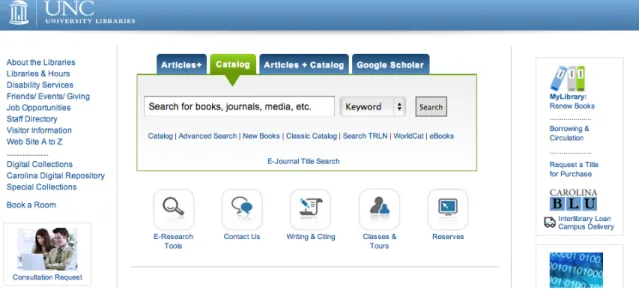
www.lib.unc.edu. On the homepage there is a basic keyword search with the options to
search the article+ database, the whole catalog, which is the default, the catalog along
with article titles, and to search through Google scholar.
Figure 1: Screenshot of www.lib.unc.edu catalog search interface taken in March of
2013.
Notably, below the search bar there are several icons, including an icon for searching
reserves. The reserves icon will take the user to a different interface that allows him or
her to sign in to look at e-reserves or to select the option to either search the general
reserves or health sciences reserves. Each reserve page has a different interface. Interface
design, in general, is more successful when there is uniformity in the design. The UNC
catalog allows the user to conduct an advanced search, which he or she can refine by
resource type. Not only does UNC allow the user to conduct an advanced search, when
querying the catalog, there is an autosuggest feature that will complete the query with the
resource type in square brackets.
Figure 2: Screenshot of UNC Catalog: resource type autosuggest taken in March of
2013.
This is an interesting approach that both helps the user refine his or her query and also
informs the user about the catalog query terminology and notation. Another relatively
new feature of the UNC online catalog is the request-an-item button, which is denoted by
a graphic of a truck and the word “request.” This icon shows up on the homepage along
with the search results. This allows the user to easily request an item without having to
navigate to the request page and enter the item.
UNC’s catalog lets users narrow searches through the use of faceted metadata. UNC’s
catalog has hierarchical facets meaning that there are different levels, and that the user
can get more specific with each level. The top-level facets are: availability, location,
format, subject, publication year, author, language, call number range, region, new titles,
3.2 Comparison to other Academic Library Catalogs
To compare the UNC catalog to the catalogs of other institutions, the online catalogs of
nine universities with well-regarded libraries were examined during the interface review.
The online library catalog interfaces at the following universities were analyzed: Stanford
University, Columbia University, Cornell University, Duke University, Princeton
University, West Point University, Emory University, Harvard University, and Yale
University. The catalogs were surveyed in order to determine similarities among the
interfaces in general structure and differences when searching for specific resource types.
Most interfaces had similar facets, search options, and even appearance, most likely
arriving at the same design decisions or imitating other successful designs.
Each catalog web interface includes an introductory page to the catalog that has a search
bar that allows the user to conduct a broad keyword search. Additionally, each interface
has the option to narrow the search by selecting a tab above the search box. Most pages
have three to five tabs. Common tabs are: databases, e-journals, articles, and a tab that
links to the libraries’ site.
Once the user conducts a search, he or she is able to narrow the search through the use of
facets on the aggregated search results page. Most catalogs do have a facet for format but
some do not. Two of the interfaces allowed for users to search for images through
selecting the image tab. One catalog had an advanced search option that allows the user
to filter by many facets, including format type. In addition to the similarities in the search
Some of the catalogs have an image to represent the item, such as a book cover, but many
do not have images of the items. Image representation is something that UNC had
recently added to the catalog.
Harvard University’s catalog strayed somewhat from this standard design. One of the
first level search options allows the user to search by image. The default for searching for
images is through using the Virtual Information Access (VIA), which is a catalog that is
centered on arts and cultural items. VIA allows the user to display results in a grid, which
is the default, with additional list and combination views (“VIA Search,” n.d.).
3.3 Comparison to Specialty Interfaces
Outside of academia, a stock images website was looked at. Corbis Images is a popular
stock photography and image site with a clean interface (“Corbis Images – Premium
Quality Stock Photography and Illustrations,” n.d.). The homepage has a search bar,
similar to what was seen in the academic catalogs. When entering a free-text query into
the search bar, ‘AutoComplete’ is displayed as the default, but can be turned off. Not all
the academic libraries were using autosuggest; a minority of academic libraries are using
autosuggest.
The University of North Carolina at Chapel Hill online catalog does include autosuggest.
UNC uses autosuggest much like Amazon.com in that it will not only complete the
uses a grid display for images results, showing a small-medium sized thumbnail of the
image. The display can be altered to show more images on one page, leaving the
thumbnails the same size. Also, images can be sorted by recency, location, as well as
other characteristics.
The facets or “filters” that Corbis Images uses are: categories, people, image attributes,
composition, and date added. As filters are added, they are displayed at the top of the
facets column, allowing the user to clear all filters or select individual filters to remove.
Interestingly, image attributes allows the user to refine his or her search to select photos
with certain colors, which may be well-suited for designers who are searching based on
content and aesthetic aspects of an image.
When an image is previewed, the user can click on “see more similar images like this,”
which allows the user to find more images with content and style that are similar to the
image that he or she is viewing. Although the algorithm used for this feature is unknown,
the engine is most likely using image recognition or perhaps filtering by colors or
metadata tags. The user can refine his or her search through the use of tags as well.
Another stock image site looked at was iStockphoto. iStockphoto has stock photos,
illustrations, video, and audio. All of the aforementioned format searches display
thumbnails except for the audio, which displays search results as a list of tracks that have
a play button (“iStock Photo: Royalty Free Stock Photography, Vector Art Images, Music
Figure 4: Screenshot of iStockphoto audio search results taken in March of 2013.
Once the play button is clicked, a track bar appears which allows the user to jump to
different parts of the track. It is interesting that a similar results display is used for stock
photos, illustrations, and video. Each is displayed in a grid with either an image or in the
case of the video, a frame.
3.4 Comparison to Google
Because Google (www.google.com) is such a dominant interface, it was reviewed along
with the library and specialized interfaces. Although web search differs from catalog
search, users are acquainted with the Google search interface and search options. Google
has a very simple main search interface that allows for aggregated search. Once the user
has conducted a search, he or she can narrow the search and enter a more genre-specific
search engine like images, news, shopping, videos, etc. Each one of these specialized
Features and functions noted during the review of Google’s specialized interfaces were:
• Shopping Search Engine Interface
Google uses facets once the user navigates to a shopping search engine and
interface. The user can narrow the results by store or location when using the
shopping interface.
• Image Search Engine Interface
The image search engine displays images in a grid and lets the user see “related
searches.” After clicking on an image, the user can click “image details,” which
takes the user to a page that has similar images, information about image content
(the person, subject, etc. portrayed), and pages containing that image.
• Maps Search Engine Interface
The maps menu item will display results, such as local businesses or
organizations, as a map with points. The new menu displays results from news
sources.
• YouTube Video Interface
Google acquired YouTube in 2006. The interface has a search bar and a button to
upload across the main top menu. On the left, there are few personal menu
options, if logged in. These options include: watch later, watch history, playlists,
what to watch (recommendations), my subscriptions, and social. If logged out,
the menu options are not personalized. Instead there is a menu with items popular
on YouTube arranged by subject: music, sports, gaming, movies, TV shows,
news, and spotlight. And there is another menu with some suggested, assumingly
popular, when signed out, and personalized, when signed in. Additionally,
YouTube will indicate if a query has been searched in the past by showing the
autosuggest query in purple.
Search results show a still from the video with a stamp to indicate length in
minutes and a bolded title. Statistics about the video also appear including when it
4.0
Research
4.1 Introduction
The purpose of this research is to shed light on at how people search for different types of
resources using the UNC library catalog as a case study. An investigation into how the
UNC library catalog search interface addresses non-book resources and how users search
for these resources was completed through 1) interviews and 2) examining data to
determine how often non-book items were searched. Questions were asked about past
experiences and hypothetical experiences using the UNC online catalog, the
interviewee’s search strategy, the metadata used in the search, and any problems or
suggestions for the catalog.
Although, as discussed in the interface review section, the UNC catalog does help users
find resources of various formats through autosuggest and the use of facets, the catalog
does not incorporate features that Google or some of the specialty interfaces use to help
4.2 Methodology
The two-page survey took approximately 15 minutes to complete the questions and to
discuss interviewee’s past experiences searching for non-book items in the UNC online
catalog (see appendix A).
The survey asks two groups of questions:
1) Basic demographic questions (age, gender, affiliation with the university).
2) Questions about the interviewee’s experience with the UNC library catalog in
terms of search strategies, metadata used in searching, things the user found
difficult or helpful, and any suggestions.
Age was broken down by generations (Trower, 2009). The sample that participated in
this interview was small but if the study were to be replicated on a larger scale, it would
be useful to see if there were any significant differences between people’s evaluation of
the catalog based on age or gender.
The interview script asks the interviewee to identify each resource type he or she has
searched for as categorized by UNC catalog. The resources available in the catalog are
the following: Archival materials Art Audio Audio (CD) Audio (cassette) Blu ray disc Cassette (music) CD (music) Ebook
Geospatial data Internet resource
Journal or magazine Kit Map
Micro opaque Microfiche Microforms
Motion picture reel Newspaper Printed music Realia Serial Slides Software Statistical dataset Theses and dissertations Video DVD
Electronic journal Filmstrip
Online video Vinyl record
Questions about the interviewee’s experiences were left open ended to allow participants
to fully explain ideas. When designing this research project, an online survey and
in-person interview were explored as options. Ultimately it was decided that an interview
had an advantage over a survey because the interviewer could rephrase questions and ask
follow up questions to ensure depth and clarity in participant responses. If the participant
had never used the catalog, a hypothetical search scenario would be created.
Descriptive statistics about frequency of search by item type was looked at using the
School of Information and Library Science and UNC’s Library System’s web log data
from catalog searches. The Hemminger research team had extracted the data from the
catalog XML records in order to create a dataset containing the number records viewed
by resource.
4.3 Participants
A sample of 10 participants was selected through email recruitment. In order to be
eligible to participate, participants had to be at least 18 years of age and affiliated with
the University of North Carolina at Chapel Hill. The library catalog is primarily used by
students and faculty but can be used by staff and members of the community as well.
Three participants were male and seven were female. Participants fell into the following
searching for non-book items in the catalog.
4.4 Procedures
Participants were selected by sending a recruitment email to the UNC School of
Information and Library Science master’s students email list and the all-student listserv.
After contact was made with the participant, a short in-person interview was scheduled.
The survey questions were administered and there was a discussion, which was guided by
the questions, about the interviewee’s experience using the UNC online library catalog.
The contenting process took five to 10 minutes and the interview itself took 10 to 15
minutes, sometimes longer, depending on how in-depth the interviewee wanted to explain
his or her experiences with the catalog.
4.5 Limitations
The research project was conducted over the course of a semester so the sample size was
small (10 participants). If time had not been a limitation it would have been advantageous
to conduct more interviews. Not only would it have been beneficial to obtain a larger
sample, targeted enrollment could have helped this research as well. In order to
participate, interviewees had to be affiliated with the university and at least 18 years of
age. Ideally, a sample of faculty and graduate students, the primary group conducting
research on campus would have been surveyed. In addition to including faculty members,
getting a sample of faculty and graduate students from different disciplines would have
been helpful as well. There are items in the catalog, like GPS datasets, that only
materials may be searching differently than a lawyer. The rationale behind getting a
larger and more diverse sample is that it would better reflect the needs of the population
using the UNC catalog to conduct research.
When the idea for this research was initially being developed, it was hoped that more of
the web log data from the existing library web log dataset could have been analyzed to
further address the research question. The dataset could have been visualized to examine
the general pattern of searches depending on resource type (i.e., broadening versus
narrowing). The number of steps taken or query attempts could have been compared
among items of various format types. And a deeper examination of the metadata could
have been conducted by looking at the types of metadata being used for each format (e.g.,
concrete versus abstract) or the usefulness of metadata by format type.
4.5 Findings
Web Log Data Previous Research
The School of Information and Library Science and the UNC Library System has been
conducting research on the UNC catalog and has published previous research about the
findings. A web log dataset has been used for research, which consists of five years of
search data that was collected between 2009 and 2012. Xi Niu, a doctoral student,
reported on facet popularity in her dissertation citing that the most popular format facets
were: eBook, Book, Videos and DVDs, Online, and Audio, respectively (Niu &
result of a search. Books by far are the most frequently searched for items followed by
video DVDs and eBooks. The next most popular format was journals that had two format
types ‘journal or magazine’ and ‘serials.’ Not all resources had just one format. For
example some resources were a hybrid like ‘geospatial data’ and ‘internet resource.’
The following graphs show the frequency of search by resource type from the described
dataset.
Figure 5: Bar graph showing the number of searches for books.
Graphs continued on following pages. 0
20000 40000 60000 80000 100000 120000 140000
Figure 6: Bar graph showing the number of searches of frequently searched for items. 0
1000 2000 3000 4000 5000 6000 7000
Frequently Searched Formats
Interview Findings
Even with a small sample, it was fortuitous that the interviewees had a variety of
information needs. Most interviewees felt that the UNC library catalog worked pretty
well especially in comparison to other university catalogs. Part of the interview asked
participants what non-book resources they had used the catalog to search for in the past.
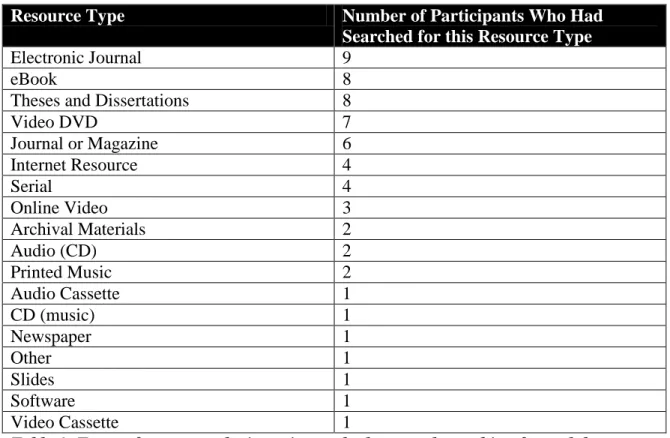
Of the 10 participants, the interviewees reported searching for the following types of
non-book resources:
Resource Type Number of Participants Who Had
Searched for this Resource Type
Electronic Journal 9
eBook 8
Theses and Dissertations 8
Video DVD 7
Journal or Magazine 6
Internet Resource 4
Serial 4
Online Video 3
Archival Materials 2
Audio (CD) 2
Printed Music 2
Audio Cassette 1
CD (music) 1
Newspaper 1
Other 1
Slides 1
Software 1
Video Cassette 1
Table 1: Types of resources the interviewees had reported searching for and the frequency at which they were reported being searched for.
It is notable that the most popular items among this sample are electronic books, journals
When discussing specific instances of search, interviewees recalled using the following
types of metadata to search for different items. The metadata used is shown in the
following table:
Resource Type Metadata Used
eBook Title, Author
Video DVD Title, Language, Country, Location
Electronic Journal Keywords from Title, Journal Title, Article Title, Discipline, Subject, Keywords (general)
CD (music) Composer, Artist, Country
Theses and Dissertations Advisor, Key Words, Subject, Collection Archival Materials (none/navigation), Subject
Printed Music Location, Format
Internet Resources Title
Journal or Magazine Title, Article Title, Author
Audio Cassette Format
Table 2: Metadata reported being used when searching for non-book resources.
It is notable that title was not used for all the searches. Theses and dissertations, CD
(music), archival materials, and audio cassette did not include title. However, overall
title was the most popular piece of metadata. Interestingly, certain types of metadata
could possibly be format-specific like composer versus artists for music, or in the case of
a DVD, director versus actor. In this specific sample interviewed, advisor was specific to
theses and dissertations and country or language was reported being important to video
and music searches.
Search Strategies
- When looking for journals the participant would first see if he or she could find the
journal electronically and if not, then would look to see if he or she could request an
electronic copy or find it in the stacks and as a last resort he or she might request
using interlibrary loan.
- When looking for DVDs a participant would often use the Media Resource Center
(MRC) website to browse for DVDs.
- When searching for articles or journals on a certain subject a participant would look
at a list of journals by subject or look through the list of journal titles.
Difficulties
The participants interviewed had a variety of information needs. Some difficult
information tasks were described:
- Searching for music by a composer from a certain country.
- Searching for master’s papers on a certain topic.
- Browsing movies and TV shows from a certain country.
- Finding papers on a certain subject from a particular discipline.
- Finding sheet music where the native metadata is in a foreign language.
- Narrowing a search so that only available items show up in the results.
Some of the described information needs or tasks were expressed by multiple
interviewees especially the searching for materials by academic subject and running into
problems with finding unavailable items. Sometimes the task was possible but maybe the
functionality was not working correctly or it was not intuitive. It was hard to tell if the
Interviewees reported some catalog features that helped make their searches easier or
commented on what they thought the catalog was doing well:
- Many people commented that searching for DVDs was especially easy. Some
reported using the MRC website and the extra features the MRC page offered for
searching.
- Many interviewees commented that searching for online journal articles was easy.
- The citation builder was cited as a successful feature.
- Searching by specific collection was helpful.
Suggestions
In addition to reporting difficulties with conducting certain information tasks or what
made it easier to search, interviewees also had suggestions about what would make it
easier for them to use the catalog.
- Thumbnail icon before item name to indicate format [1].
- Map showing where items are located in the library [1].
- Better integration between databases [3].
- Fix relevance algorithm or sorting so that title-match works better [3].
- Allow users to narrow search so that only available items show up in results [2].
- Allow users to type in format type, especially less-used format types, into search bar
instead of having to use the facet [1].
- Have a link from the catalog record to the finding aid for archival materials [1].
- The number of times the suggestion was made is included in brackets.
Some interviewees had more suggestions than others. Some of the participants could not
think of particular functions that made the catalog effective but felt that, overall, the task
of finding items was easy. Some suggestions were suggested by more than one
interviewee, especially the suggestion for there to be better integration between
databases. Some suggestions were about features that he or she would like to see the
catalog have more of, and others were about functionality. Additionally, it was often
mentioned that the search results were not always relevant, indicating that the ranking
algorithm might not be working well with the query.
Discussion Convenience
One finding was that people tend to prefer items that are easily accessible. For example
electronic journal articles were preferred to journal articles that may have to be located in
the stacks or requested. Additionally, several interviewees expressed that it would be
more convenient if there were a facet so that you could search for resources that were
available. Oftentimes a search for an item would be conducted, and then the item would
be checked out. It would be easier for users to be able to only search through available
The context and information need tended to influence the search strategy. For example, if
a student were assigned to find historical documents from a certain year, the user would
be more likely to start with an archival collection. If a user was looking for music to
listen to in his or her free time, he or she might be more likely to browse. Journals were
more closely associated with searching for a certain topic while DVDs were associated
with browsing for entertainment. The associated information tasks shaped the search
behavior.
Usability
Some of the issues encountered by the individuals interviewed expressed trouble with
overall search interface. Perhaps facets were not obviously located or it was not intuitive
how to navigate to a list of journals by subject. The usability issues appeared to be
general and not associated with one resource or one type of task. Issues with usability are
common, but can usually be remedied through attention to user interface design.
Relevance
While oftentimes the UNC catalog search interface itself had all the necessary facets and
search options, non-relevant resources were retrieved. This was a common comment
from interviewees, indicating that the relevance algorithm on the back end was not
always performing optimally. The interface or its features alone cannot remedy issues
5.0 Recommendations
5.1 Recommendations for Catalog
From an improvements point of view, adding more features overall was not a solution
indicated by the interviews. Instead it was found that most participants desired
streamlining the existing catalog rather than adding additional features. Search interface
design should be intuitive and this can be a challenge with a collection as large as UNC’s
and with the range of electronic and non-electronic items available.
Although generally there was not an overwhelming expression for the need to add
additional features within this sample, some simple additions were suggested.
Suggestions included adding icons before the title so that it would be easier to tell the
item format without having to read the title. Because the library catalog is unlike a web
search engine in that it points users to a physical space to collect items, suggestions about
location were discussed. One suggestion was the inclusion of a map that might show the
user where an item is located in the library. Several people suggested adding additional
facets that would allow the user to limit searches to only available items. In addition to
these specific suggestions, convenience, usability, robust metadata, and relevance could
6.0 Conclusions
This research was aimedat answering the question: do people search differently based on
resource type? However, after conducting the interviews, it became apparent that people
searched differently when using the UNC catalog depending on the resource type. It is
difficult to tell if the reason people search differently by resource type is determined by
1) how the item is conceptualized, 2) the information tasks associated with that item, 3)
or the way the catalog handles each item. Most likely it is a combination of these three
factors.
When conducting this research the initial goal was to look at how people search for
different resource types. However, after interviewing the 10 subjects, it became apparent
that most of the interviewees were relatively content with the catalog but all had had
problems searching for something at some point. Most suggestions seemed to be focused
on making using the library catalog use more intuitive and revising the relevance
algorithm, rather than adding more features.
Another common suggestion, and often cited as one that might not be solvable, was
providing better integration between the UNC catalog and the third-party databases. This
may be more of an issue of interoperability and data integration. It has been concluded
integrates with many third-party and in-house databases. It has also been concluded that
there is a lot of data to manage, making designing an intuitive aggregated search interface
difficult.
The second part of the research question is to discern what interfaces and types of
descriptions of catalog items might help facilitate better search for non-book items. A
good foundation for the catalog such as rich metadata, and a well-performing back end
are essential. Both of these allow users to conduct searches and retrieve relevant results.
Interface design should allow searching to be intuitive and simple. From the interviews
conducted, the consensus was, in many ways, that less is more no matter what type of
resource is being searched. Specialty interfaces or specialty search engines could be
beneficial for format-specific items. The articles+ tab, for example, provides users with
an engine just for finding articles, making searching by title easy. Additionally, the Media
Resource Center’s Film Finder interface only displays the fields and parameters relevant
to video. Perhaps further research could be conducted comparing an interface like the
film finder to the general catalog interface to determine if one is preferred over the other
for searching for films. The results of such a study might give some insight into whether
more specialized interfaces for collection or resource could be beneficial.
Overall the UNC catalog is an excellent resource for students conducting research or
interested in checking out items of personal interest. The catalog maps to items that are
electronic as well objects with physical locations. The catalog searches numerous
collections and links to third-party databases and resources. Improving catalog search is
Bibliography
Corbis Images – Premium Quality Stock Photography and Illustrations. (n.d.). Retrieved
March 17, 2013, from http://www.corbisimages.com/
Diaz, F., Lalmas, M., & Shokouhi, M. (2010). From federated to aggregated search.
SIGIR 2010 Tutorial. Retrieved from
http://www.slideshare.net/mounialalmas/from-federated-to-aggregated-search
Hearst, M. (2006). Clustering versus Faceted Categories for Information Exploration.
Communications of the ACM, 49(2), 59–61.
Hearst, M. (2011). “Natural” Search User Interfaces. Communications of the ACM,
54(11), 60–67.
iStock Photo: Royalty Free Stock Photography, Vector Art Images, Music & Video Stock
Footage | iStock. (n.d.). Retrieved March 17, 2013, from
http://www.istockphoto.com/
Kules, B., Capra, R., & Sierra, T. (2009). What Do Exploratory Searchers Look at in a
Faceted Search Interface? In Joint Conference on Digital Libraries. Presented at
the JCDL, Austin, TX: Association for Computing Machinery.
Niu, X., & Hemminger, B. M. (2010). Beyond text querying and ranking list: How
people are searching through faceted catalogs in two library environments.
Proceedings of the American Society for Information Science and Technology,
Ontology for Media Resources 1.0. (n.d.). Retrieved March 17, 2013, from
http://www.w3.org/TR/mediaont-10/
Statistics - YouTube. (n.d.). Retrieved March 27, 2013, from
http://www.youtube.com/yt/press/statistics.html
Suárez-Figueroa, M. C., Atemezing, G. A., & Corcho, O. (2013). The landscape of
multimedia ontologies in the last decade - Springer. Multimedia Tools and
Applications, 62(2), 377–399.
Tjondronegoro, D., Spink, A., & Jansen, B. J. (2009). A study and comparison of
multimedia Web searching: 1997–2006. Journal of the American Society for
Information Science and Technology, 60(9), 1756–1768.
Trower, C. (2009, October 16). Traditionalists, Boomers, Xers, and Millennials.
Retrieved from
http://www.brown.edu/Administration/Provost/Advance/Trower%20Generations
%20and%20Mentoring.pdf
VIA Search. (n.d.). Retrieved March 17, 2013, from
http://via.lib.harvard.edu/via/deliver/advancedsearch?_collection=via
Wilson, M. L. (2012). Search User Interface Design. San Rafael, California: Morgan &
Appendices
1. Appendix A: Interview
1. Age
a. 18-31 b. 32-47 c. 48-66 d. 67 or older 2. Gender
a. Male b. Female
3. Affiliation with the university a. Faculty
b. Staff
c. Student (graduate) d. Student (undergraduate) e. Alumni
f. Other g. Not affiliated
4. Do you use the online library catalog? [If no, skip to 9b] a. Yes
b. No
5. If yes, have you ever searched for items other than books (i.e., journals, e-books, dvds, audio, etc.)? [If no, skip to 9b]
a. Yes b. No
□ Vinyl record □ Video cassette □ Video DVD □ Theses and dissertations □ Statistical dataset □ Software □ Slides □ Serial □ Realia
□ Online video □ Newspaper □ Cassette (music) □ CD (music) □ Motion picture reel
□ Microforms □ Microfiche □ Micro opaque □ Map
□ Journal or magazine □ Internet resource □ Geospatial data □ Filmstrip
□ Electronic journal □ Blu ray disc □ Audio (cassette) □ Audio (CD) □ Audio □ Art
□ Archival materials □ Other:___________
7. If you use the catalog, do you feel that the interface is conducive to searching for non-book items?
a. Yes b. No c. Not sure
8. For searching for non-book items would it help if the catalog interface were different or had more features? If so, what feature do you think you would like?
________________________________________________________________________ ________________________________________________________________________ 9.
a. [If uses the catalog and has searched for a non-book item] Think of a time when you were searching for ________. What was your search strategy? What terms or facets did you use to search? Was it easy to find your item? Did you run into any difficulties? What would have made it easier? Were there things that you wish the catalog could do? [Repeat for each resource searched checked in 6]
Metadata:_________________________________________________________ Easy/Difficulties:____________________________________________________ Solutions:_________________________________________________________ Features:__________________________________________________________
b. [If does not use the online catalog or uses catalog but only uses it for books] Imagine that you are using the online catalog to search for CD (an item of the interviewee’s choice). What would be your search strategy? What terms or facets would you use to search? Are there things that you wish the catalog could do to help you find this item?