725
Multifunction Process Calibrator
Users Manual
October, 1998 Rev.3, 5/04
customer of a Fluke authorized reseller, and does not apply to fuses, disposable batteries, or to any product which, in Fluke’s opinion, has been misused, altered, neglected, contaminated, or damaged by accident or abnormal conditions of operation or handling. Fluke warrants that software will operate substantially in accordance with its functional specifications for 90 days and that it has been properly recorded on non-defective media. Fluke does not warrant that software will be error free or operate without interruption.
Fluke authorized resellers shall extend this warranty on new and unused products to end-user customers only but have no authority to extend a greater or different warranty on behalf of Fluke. Warranty support is available only if product is purchased through a Fluke authorized sales outlet or Buyer has paid the applicable international price. Fluke reserves the right to invoice Buyer for importation costs of repair/replacement parts when product purchased in one country is submitted for repair in another country.
Fluke’s warranty obligation is limited, at Fluke’s option, to refund of the purchase price, free of charge repair, or replacement of a defective product which is returned to a Fluke authorized service center within the warranty period.
To obtain warranty service, contact your nearest Fluke authorized service center to obtain return authorization information, then send the product to that service center, with a description of the difficulty, postage and insurance prepaid (FOB Destination). Fluke assumes no risk for damage in transit. Following warranty repair, the product will be returned to Buyer, transportation prepaid (FOB Destination). If Fluke determines that failure was caused by neglect, misuse, contamination, alteration, accident, or abnormal condition of operation or handling, including overvoltage failures caused by use outside the product’s specified rating, or normal wear and tear of mechanical components, Fluke will provide an estimate of repair costs and obtain authorization before commencing the work. Following repair, the product will be returned to the Buyer transportation prepaid and the Buyer will be billed for the repair and return transportation charges (FOB Shipping Point).
THIS WARRANTY IS BUYER'S SOLE AND EXCLUSIVE REMEDY AND IS IN LIEU OF ALL OTHER WARRANTIES, EXPRESS OR IMPLIED, INCLUDING BUT NOT LIMITED TO ANY IMPLIED WARRANTY OF MERCHANTABILITY OR FITNESS FOR A PARTICULAR PURPOSE. FLUKE SHALL NOT BE LIABLE FOR ANY SPECIAL, INDIRECT, INCIDENTAL OR CONSEQUENTIAL DAMAGES OR LOSSES, INCLUDING LOSS OF DATA, ARISING FROM ANY CAUSE OR THEORY.
Since some countries or states do not allow limitation of the term of an implied warranty, or exclusion or limitation of incidental or consequential damages, the limitations and exclusions of this warranty may not apply to every buyer. If any provision of this Warranty is held invalid or unenforceable by a court or other decision-maker of competent jurisdiction, such holding will not affect the validity or enforceability of any other provision.
Fluke Corporation P.O. Box 9090 Everett, WA 98206-9090 U.S.A. Fluke Europe B.V. P.O. Box 1186 5602 BD Eindhoven The Netherlands 11/99
Table of Contents
Title Page Introduction ... 1 Contacting Fluke... 1 Standard Equipment ... 3 Safety Information... 3Getting Acquainted with the Calibrator ... 8
Input and Output Terminals ... 8
Keys ... 10
Display ... 13
Getting Started ... 14
Shut Down Mode ... 14
Contrast Adjustment ... 16
Using Measure Mode... 17
Measuring Electrical Parameters (Upper Display) ... 17
Current Measurement with Loop Power... 17
Using Thermocouples... 20
Using Resistance-Temperature Detectors (RTDs) ... 23
Measuring Pressure ... 26
Zeroing with Absolute Pressure Modules ... 27
Using Source Mode... 29
Sourcing 4 to 20 mA ... 29
Simulating a 4- to 20-mA Transmitter... 29
Sourcing Other Electrical Parameters ... 29
Simulating Thermocouples ... 32
Simulating RTDs... 32
Sourcing Pressure ... 35
Setting 0 % and 100 % Output Parameters ... 37
Stepping and Ramping the Output ... 37
Manually Stepping the mA Output... 37
Auto Ramping the Output ... 38
Storing and Recalling Setups... 38
Calibrating a Transmitter ... 39
Calibrating a Pressure Transmitter... 41
Calibrating an I/P Device... 43
Testing an Output Device... 45
Remote Control Commands... 46
Replacing the Batteries ... 49
Replacing the Fuses ... 49
Maintenance... 50
Cleaning the Calibrator... 50
Service Center Calibration or Repair... 50
Replacement Parts ... 51
External Fluke Pressure Module Compatibility ... 53
Specifications... 56
DC Voltage Measurement... 56
DC Voltage Source ... 56
Millivolt Measurement and Source*... 56
DC mA Measurement and Source ... 57
Ohms Measurement... 57
Ohms Source ... 57
Frequency Measurement ... 57
Frequency Source... 58
Temperature, Thermocouples... 58
Loop Power Supply... 59
RTD Excitation (simulation) ... 59
Temperature, RTD Ranges, and Accuracies (ITS-90) ... 59
Pressure Measurement... 60
List of Tables
Table Title Page
1. Summary of Source and Measure Functions... 2
2. International Symbols ... 7
3. Input/Output Terminals and Connectors ... 9
4. Key Functions ... 11
5. Thermocouple Types Accepted ... 21
6. RTD Types Accepted... 24
7. mA Step Values ... 38
8A. Remote Control Upper Display ... 46
8B. Remote Control Lower Display ... 46
8C. "S" Commands Select Sensor Type ... 48
9. Replacement Parts ... 51
10. Fluke Pressure Module Compatibility ... 53
List of Figures
Figure Title Page
1. Standard Equipment ... 6
2. Input/Output Terminals and Connectors ... 8
3. Keys... 10
4. Elements of a Typical Display... 13
5. Voltage-to-Voltage Test ... 15
6. Adjusting the Contrast ... 16
7. Measuring Voltage and Current Output ... 17
8. Connections for Supplying Loop Power... 18
9. Measuring Electrical Parameters ... 19
10. Measuring Temperature with a Thermocouple ... 22
11. Measuring Temperature with an RTD, Measuring 2-, 3-, and 4-Wire Resistance ... 25
12. Gage and Differential Pressure Modules ... 26
13. Connections for Measuring Pressure... 28
14. Connections for Simulating a 4- to 20-mA Transmitter ... 30
15. Electrical Sourcing Connections ... 31
18. Connections for Sourcing Pressure... 36
19. Calibrating a Thermocouple Transmitter ... 40
20. Calibrating a Pressure-to-Current (P/I) Transmitter... 42
21. Calibrating a Current-to-Pressure (I/P) Transmitter... 44
22. Calibrating a Chart Recorder... 45
23. Replacing the Battteries ... 50
Multifunction Process Calibrator
Introduction
Your Fluke 725 Multifunction Process Calibrator (referred to as “the calibrator”) is a handheld, battery-operated instrument that measures and sources electrical and physical parameters. See Table 1.
In addition to the functions in Table 1, the calibrator has the following features and functions:
• A split-screen display. The upper display allows you
to measure volts, current, and pressure only. The lower display allows you to measure and source volts, current, pressure, resistance temperature detectors, thermocouples, frequency, and ohms.
• Calibrates a transmitter using the split-screen.
• A thermocouple (TC) input/output terminal and
internal isothermal block with automatic reference-junction temperature compensation.
• Stores and recalls setups.
• Manual stepping and automatic stepping and
ramping.
• Controls the calibrator remotely from a PC running a
terminal emulator program.
Contacting Fluke
To order accessories, receive operating assistance, or get the location of the nearest Fluke distributor or Service Center, call: USA: 1-888-99-FLUKE (1-888-993-5853) Canada: 1-800-36-FLUKE (1-800-363-5853) Europe: +31 402-675-200 Japan: +81-3-3434-0181 Singapore: +65-738-5655
Anywhere in the world: +1-425-446-5500
Table 1. Summary of Source and Measure Functions
Function Measure Source
dc V 0 V to 30 V 0 V to 10 V dc mA 0 to 24 mA 0 to 24 mA Frequency 1 CPM to 10 kHz 1 CPM to 10 kHz Resistance 0 Ω to 3200 Ω 15 Ω to 3200 Ω Thermocouple Types E, J, K, T, B, R, S, L, U, N, mV RTD (Resistance-Temperature Detector) Pt100 Ω (385) Pt100 Ω (3926) Pt100 Ω (3916) Pt200 Ω (385) Pt500 Ω (385) Pt1000 Ω (385) Ni120
Pressure 27 modules ranging from 10 in. H2O to
10,000 psi
27 modules ranging from 10 in. H2O to
10,000 psi using an external pressure source (hand pump)
Standard Equipment
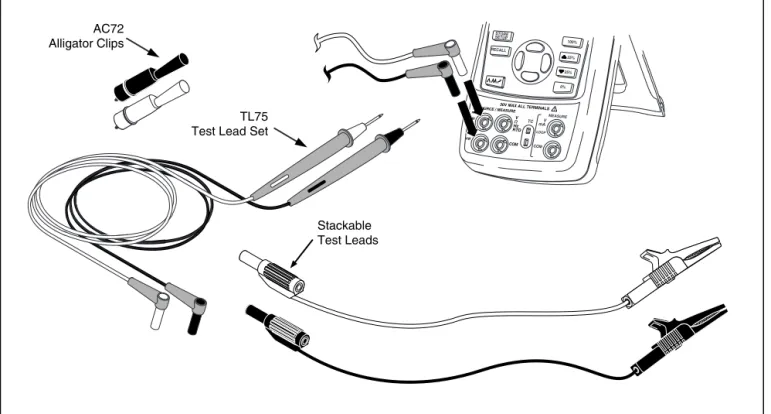
The items listed below and shown in Figure 1 are included with your calibrator. If the calibrator is damaged or something is missing, contact the place of purchase immediately. To order replacement parts or spares, see the user-replaceable parts list in Table 9.
• TL75 test leads (one set)
• AC70A alligator clips (one set)
• Stackable alligator clip test leads (one set)
• 725 Product Overview Manual
• 725 CD-ROM (contains Users Manual)
• Spare fuse
Safety Information
The calibrator is designed in accordance with IEC1010-1, ANSI/ISA S82.01-1994 and CAN/CSA C22.2 No. 1010.1-92. Use the calibrator only as specified in this manual, otherwise the protection provided by the calibrator may be impaired.
A Warning identifies conditions and actions that pose hazard(s) to the user; a Caution identifies conditions and actions that may damage the calibrator or the equipment under test.
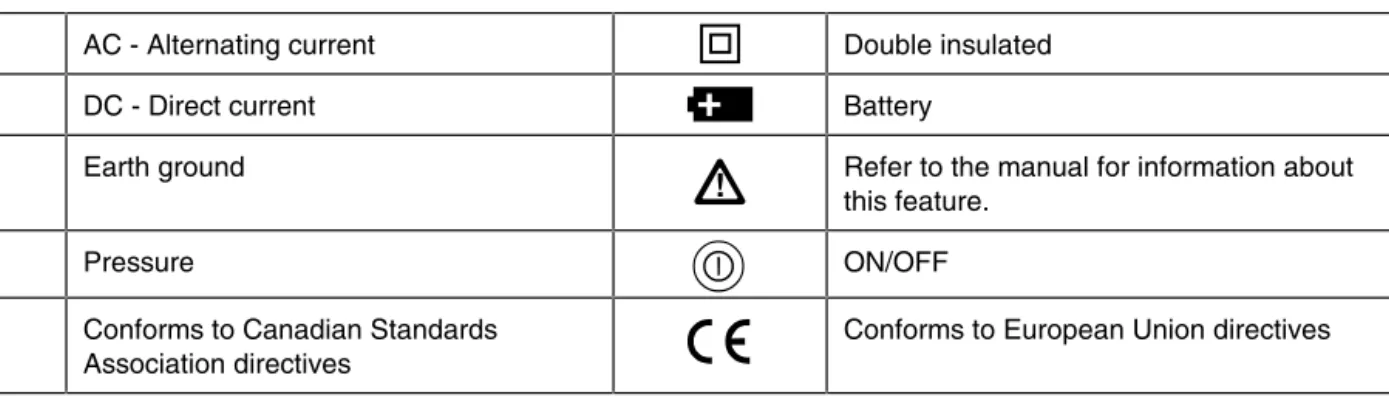
International symbols used on the calibrator and in this manual are explained in Table 2.
W
Warning
To avoid possible electric shock or personal injury:
• Do not apply more than the rated voltage, as marked on the calibrator, between the terminals, or
between any terminal and earth ground (30 V 24 mA max all terminals).
• Before each use, verify the calibrator’s operation by measuring a known voltage.
• Follow all equipment safety procedures.
• Never touch the probe to a voltage source when the test leads are plugged into the current terminals.
• Do not use the calibrator if it is damaged. Before you use the calibrator, inspect the case. Look for
cracks or missing plastic. Pay particular attention to the insulation surrounding the connectors.
• Select the proper function and range for your measurement.
• Make sure the battery door is closed and latched before you operate the calibrator.
• Remove test leads from the calibrator before you open the battery door.
• Inspect the test leads for damaged insulation or exposed metal. Check test leads continuity. Replace
damaged test leads before you use the calibrator.
• When using the probes, keep your fingers away from the probe contacts. Keep your fingers behind the
finger guards on the probes.
• Connect the common test lead before you connect the live test lead. When you disconnect test leads,
disconnect the live test lead first.
• Do not use the calibrator if it operates abnormally. Protection may be impaired. When in doubt, have the
calibrator serviced.
W
Warning
• When using a pressure module, make sure the process pressure line is shut off and depressurized
before you connect it or disconnect it from the pressure module.
• Use only 4 AA batteries, properly installed in the calibrator case, to power the calibrator.
• Disconnect test leads before changing to another measure or source function.
• When servicing the calibrator, use only specified replacement parts.
• To avoid false readings, which could lead to possible electric shock or personal injury, replace the
battery as soon as the battery indicator (M) appears.
Caution
To avoid possible damage to calibrator or to equipment under test:
• Disconnect the power and discharge all high-voltage capacitors before testing resistance or continuity.
100% 25% 25% RECALL STORE SETUP 0% Stackable Test Leads TL75
Test Lead Set AC72
Alligator Clips
V mA
MEASURE
SOURCE / MEASURE30V MAX ALL TERMINALS
4W 3W V Hz RTD mA+ mA-TC COM COM LOOP sh01f.eps
Table 2. International Symbols
AC - Alternating current Double insulated
DC - Direct current Battery
Earth ground Refer to the manual for information about
this feature.
Pressure
O
ON/OFFConforms to Canadian Standards Association directives
Getting Acquainted with the Calibrator
Input and Output Terminals
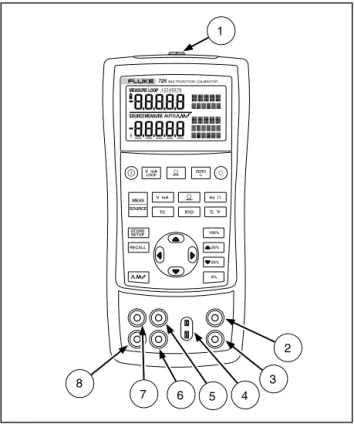
Figure 2 shows the calibrator input and output terminals. Table 3 explains their use.
V mA LOOP V mA TC RTD ˚C ˚F Hz 100% 25% 25% RECALL ZERO MEAS SOURCE STORE SETUP 0% MULTIFUNCTION CALIBRATOR 725 8 7 6 5 4 3 2 1 sh05f.eps
Table 3. Input/Output Terminals and Connectors
No Name Description
A
Pressure moduleconnector
Connects the calibrator to a pressure module or the calibrator to a PC for a remote control connection.
B
,
C
MEASURE V, mAterminals
Input terminals for measuring voltage, current, and supplying loop power.
D
TC input/output Terminal for measuring or simulating thermocouples. This terminal accepts a miniaturepolarized thermocouple plug with flat, in-line blades spaced 7.9 mm (0.312 in) center to center.
E
,
F
SOURCE/ MEASUREV, RTD, Hz, Ω
terminals
Terminals for sourcing or measuring voltage, resistance, frequency, and RTDs.
G
,
H
SOURCE/ MEASUREmA terminals, 3W, 4W
Terminals for sourcing and measuring current, and performing 3W and 4W RTD measurements.
Keys
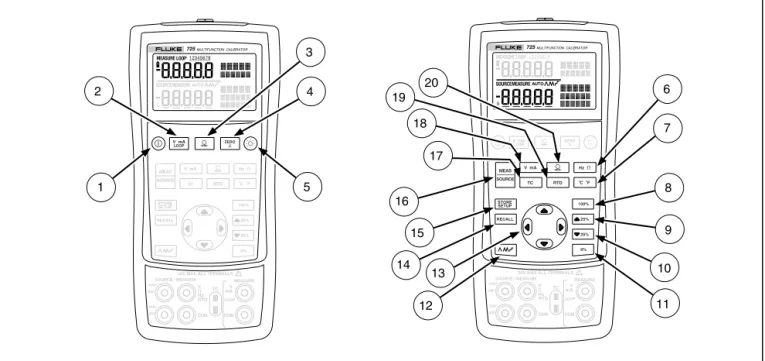
Figure 3 shows the calibrator keys and Table 4 explains their use. V mA LOOP V mA TC RTD ˚C ˚F Hz 100% 25% 25% RECALL ZERO MEAS SOURCE STORE SETUP 0% MULTIFUNCTION CALIBRATOR 725 V mA LOOP V mA TC RTD ˚C ˚F Hz 100% 25% 25% RECALL ZERO MEAS SOURCE STORE SETUP 0% MULTIFUNCTION CALIBRATOR 725 1 8 9 10 2 3 4 6 7 5 12 11 13 14 15 16 17 18 19 20 V mA MEASURE SOURCE / MEASURE
30V MAX ALL TERMINALS
4W 3W V Hz RTD mA+ mA-TC COM COM LOOP V mA MEASURE SOURCE / MEASURE
30V MAX ALL TERMINALS
4W 3W V Hz RTD mA+ mA-TC COM COM LOOP sh41f.eps Figure 3. Keys
Table 4. Key Functions
No Name Description
A
O
Turns the power on or off.B
l
Selects voltage, mA or Loop Power measurement function in the upper display.C
A
Selects the pressure measurement function in the upper display. Repeated pushes cyclethrough the different pressure units.
D
K
Zeros the pressure module reading. This applies to both upper and lower displays.E
C
Turns backlight on or off. Turns Contrast Adjust mode on when powering up.F
F
Toggles frequency and ohms measurement and sourcing functions.G
D
Toggles between Centigrade or Fahrenheit when in TC or RTD functions.H
G
Recalls from memory a source value corresponding to 100 % of span and sets it as thesource value. Press and hold to store the source value as the 100 % value.
I
H
Increments output by 25 % of span.J
I
Decrements output by 25 % of span.K
J
Recalls from memory a source value corresponding to 0 % of span and sets it as thesource value. Press and hold to store the source value as the 0 % value.
Table 4. Key Functions (cont.)
No Name Description
L
L
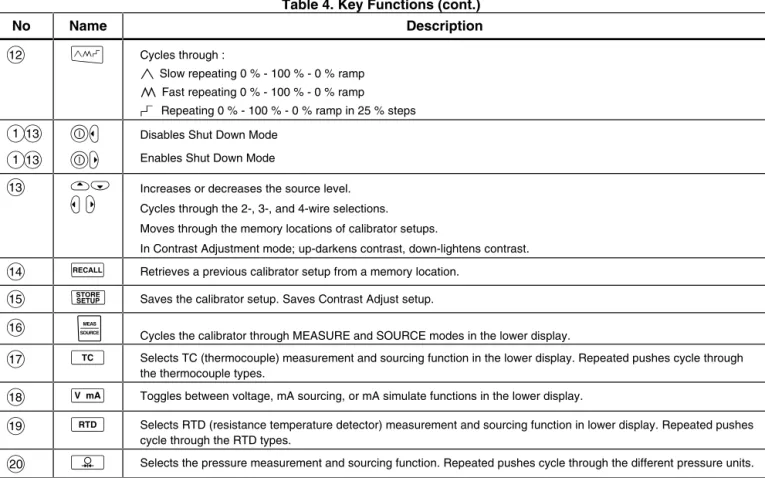
Cycles through :E Slow repeating 0 % - 100 % - 0 % ramp
P Fast repeating 0 % - 100 % - 0 % ramp
N Repeating 0 % - 100 % - 0 % ramp in 25 % steps
AM
AM
OY
OZ
Disables Shut Down Mode Enables Shut Down Mode
M
XW
Y
Z
Increases or decreases the source level.Cycles through the 2-, 3-, and 4-wire selections.Moves through the memory locations of calibrator setups.
In Contrast Adjustment mode; up-darkens contrast, down-lightens contrast.
N
Q
Retrieves a previous calibrator setup from a memory location.O
S
Saves the calibrator setup. Saves Contrast Adjust setup.P
Cycles the calibrator through MEASURE and SOURCE modes in the lower display.Q
T
Selects TC (thermocouple) measurement and sourcing function in the lower display. Repeated pushes cycle throughthe thermocouple types.
R
V
Toggles between voltage, mA sourcing, or mA simulate functions in the lower display.S
R
Selects RTD (resistance temperature detector) measurement and sourcing function in lower display. Repeated pushescycle through the RTD types.
T
U
Selects the pressure measurement and sourcing function. Repeated pushes cycle through the different pressure units.Display
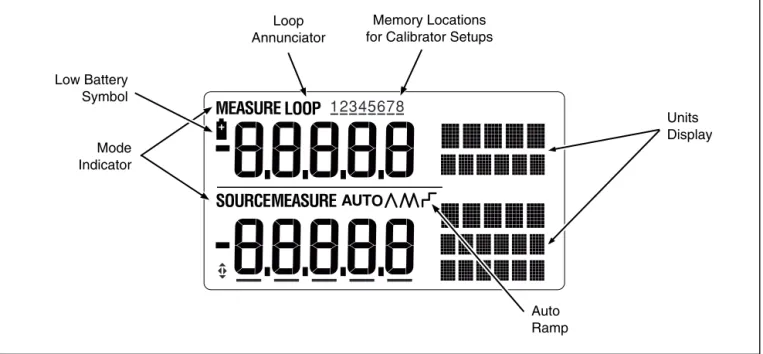
Figure 4 shows the elements of a typical display.
Low Battery Symbol
Loop Annunciator
Memory Locations for Calibrator Setups
Units Display Auto Ramp Mode Indicator sh07f.eps
Getting Started
This section acquaints you with some basic operations of the calibrator.
Proceed as follows to perform a voltage-to-voltage test: 1. Connect the calibrator’s voltage output to its voltage
input as shown in Figure 5.
2. Press
O
to turn on the calibrator. Press l toselect dc voltage (upper display).
3. If necessary, press
M
for SOURCE mode (lowerdisplay). The calibrator is still measuring dc voltage, and you can see the active measurements in the upper display.
4. Press V to select dc voltage sourcing.
5. Press Y and Z to select a digit to change. Press X
to select 1 V for the output value. Press and hold
J to enter 1 V as the 0 % value.
6. Press X to increase the output to 5 V. Press and
hold G to enter 5 V as the 100 % value.
7. Press H and I to step between 0 and 100 %
in 25 % step increments.
Shut Down Mode
The calibrator comes with the Shut Down mode enabled for a time duration set to 30 minutes (displayed for about 1 second when the calibrator is initially turned on). When the Shut Down mode is enabled, the calibrator will automatically shut down after the time duration has elapsed from the time the last key was pressed. To disable the Shut Down
mode, press O and Y simultaneously. To enable the
mode, press O and Z simultaneously. To adjust the
time duration, press O and Z simultaneously, then
press X and/or W to adjust the time between 1 and
V mA LOOP V mA TC RTD ˚C ˚F Hz 100% 25% 25% RECALL ZERO MEAS SOURCE STORE SETUP 0% MULTIFUNCTION CALIBRATOR 725 sh39f.eps
Contrast Adjustment
Note
Available with V2.1 Firmware or greater. To
identify firmware version, press and hold J
when powering up. The firmware version will be shown in the upper units display for about 1 second after initialization.
To adjust the contrast, proceed as follows:
1. Press C and O until Contst Adjust is displayed as
shown in Figure 6.
2. Press and hold X to darken contrast.
3. Press and hold W to lighten contrast.
4. Press S to save the contrast level.
V mALOOP V mA TC RTD ˚C ˚F Hz 100% 25% 25% RECALL ZERO MEAS SOURCE STORE SETUP 0% MULTIFUNCTION CALIBRATOR 725 1 4 2 3 sh06f.eps
Using Measure Mode
Measuring Electrical Parameters (Upper Display)
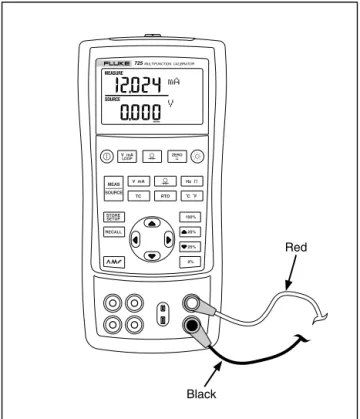
To measure the current or voltage output of a transmitter, or to measure the output of a pressure instrument, use the upper display and proceed as follows:
1. Press l to select volts or current. LOOP should
not be on.
2. Connect the leads as shown in Figure 7.
Current Measurement with Loop Power
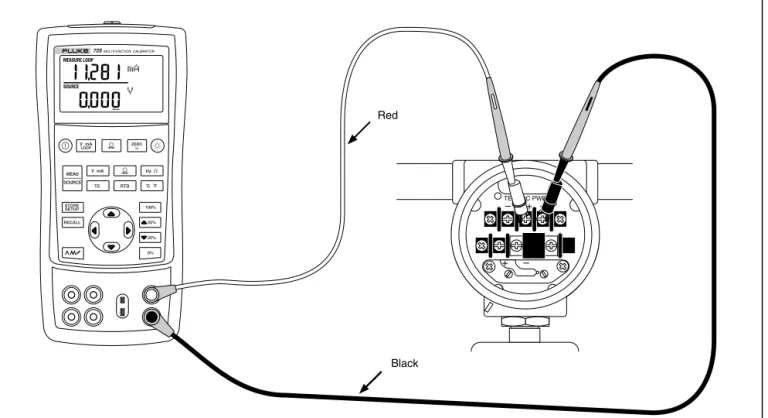
The loop power function activates a 24 V supply in series with the current measuring circuit, allowing you to test a transmitter when it is disconnected from plant wiring. To measure current with loop power, proceed as follows: 1. Connect the calibrator to the transmitter current loop
terminals as shown in Figure 8.
2. Press l while the calibrator is in current
measurement mode. LOOP appears and an internal 24 V loop supply turns on.
V mA LOOP V mA TC RTD ˚C ˚F Hz 100% 25% 25% RECALL ZERO MEAS SOURCE STORE SETUP 0% MULTIFUNCTION CALIBRATOR 725 Black Red sh42f.eps
Red TEST DC PWR + – + – – + Black V mA LOOP V mA TC RTD ˚C ˚F Hz 100% 25% 25% RECALL ZERO MEAS SOURCE STORE SETUP 0% MULTIFUNCTION CALIBRATOR 725 sh18f.eps
Measuring Electrical Parameters (Lower Display)
To measure the electrical parameters using the lower display, proceed as follows:
1. Connect the calibrator as shown in Figure 9.
2. If necessary, press
M
for MEASURE mode (lowerdisplay)
3. Press V for dc voltage or current, or F for
frequency or resistance. V mALOOP
V mA TC RTD ˚C ˚F Hz 100% 25% 25% RECALL ZERO MEAS SOURCE STORE SETUP 0% MULTIFUNCTION CALIBRATOR 725 sh43f.eps
Measuring Temperature
Using Thermocouples
The calibrator supports ten standard thermocouples, including type E, N, J, K, T, B, R, S, L, or U. Table 5 summarizes the ranges and characteristics of the supported thermocouples.
To measure temperature using a thermocouple, proceed as follows:
1. Attach the thermocouple leads to the appropriate TC miniplug, then to the TC input/output as shown in Figure 10. One pin is wider than the other. Do not try to force a miniplug in the wrong polarization.
Note
If the calibrator and the thermocouple plug are at different temperatures, wait one minute or more for the connector temperature to stabilize after you plug the miniplug into the TC input/output.
2. If necessary, press
M
for MEASURE mode.3. Press T for the TC display. If desired, continue
pressing this key to select the desired thermocouple type.
If necessary, you can toggle between °C or °F
Table 5. Thermocouple Types Accepted
Type Positive Lead
Positive Lead (H)
Color Negative Lead Specified Range
Material ANSI* IEC** Material (°C)
E Chromel Purple Violet Constantan -200 to 950
N Ni-Cr-Si Orange Pink Ni-Si-Mg -200 to 1300
J Iron White Black Constantan -200 to 1200
K Chromel Yellow Green Alumel -200 to 1370
T Copper Blue Brown Constantan -200 to 400
B Platinum (30 % Rhodium) Gray Platinum (6 % Rhodium) 600 to 1800
R Platinum (13 % Rhodium) Black Orange Platinum -20 to 1750
S Platinum (10 % Rhodium) Black Orange Platinum -20 to 1750
L Iron Constantan -200 to 900
U Copper Constantan -200 to 400
*American National Standards Institute (ANSI) device negative lead (L) is always red. **International Electrotechnical Commission (IEC) device negative lead (L) is always white.
V mA
MEASURE
SOURCE / MEASURE
30V MAX ALL TERMINALS
4W 3W V Hz RTD mA+ mA-TC COM COM LOOP Process Temperature
Warning
30 V maximum to
TC TC Miniplug sh12f.epsUsing Resistance-Temperature Detectors (RTDs)
The calibrator accepts RTD types shown in Table 6. RTDs are characterized by their resistance at 0 °C (32 °F),
which is called the “ice point” or R0. The most common R0
is 100 Ω. The calibrator accepts RTD measurement inputs
in two-, three-, or four-wire connections, with the three-wire connection the most common. A four-wire configuration provides the highest measurement
precision, and two-wire provides the lowest measurement precision.
To measure temperature using an RTD input, proceed as follows:
1. If necessary, press
M
for MEASURE mode.2. Press R for the RTD display. If desired, continue
pressing this key to select the desired RTD type.
3. Press X or W to select a 2-, 3-, or 4- wire
connection.
4. Attach the RTD to input terminals as shown in Figure 11.
5. If necessary, you can toggle between °C or °F
Table 6. RTD Types Accepted
RTD Type Ice Point (R0) Material α Range (°C)
Pt100 (3926) 100 Ω Platinum 0.003926 Ω/°C -200 to 630 Pt100 (385) 100 Ω Platinum 0.00385 Ω/°C -200 to 800 Ni120 (672) 120 Ω Nickel 0.00672 Ω/°C -80 to 260 Pt200 (385) 200 Ω Platinum 0.00385 Ω/°C -200 to 630 Pt500 (385) 500 Ω Platinum 0.00385 Ω/°C -200 to 630 Pt1000 (385) 1000 Ω Platinum 0.00385 Ω/°C -200 to 630 Pt100 (3916) 100 Ω Platinum 0.003916 Ω/°C -200 to 630
The Pt100 commonly used in U.S. industrial applications is Pt100 (3916), α = 0.003916 Ω/°C. (Also designated as JIS
RTD Resistance to be measured RTD RTD 2W 3W 4W V mA MEASURE SOURCE / MEASURE 30V MAX ALL TERMINALS
4W 3W V Hz RTD mA+ mA-TC COM COM LOOP V mA MEASURE SOURCE / MEASURE 30V MAX ALL TERMINALS
4W 3W V Hz RTD mA+ mA-TC COM COM LOOP V mA MEASURE SOURCE / MEASURE 30V MAX ALL TERMINALS
4W 3W V Hz RTD mA+ mA-TC COM COM LOOP sh15f.eps
Measuring Pressure
Many ranges and types of pressure modules are available from Fluke. See “Accessories” near the back of this manual. Before you use a pressure module, read its instruction sheet. The modules vary in use, media, and accuracy.
Figure 12 shows the gage and differential modules. Differential modules also work in gage mode by leaving the low fitting open to atmosphere.
To measure pressure, attach the appropriate pressure module for the process pressure to be tested
Proceed as follows to measure pressure:
W
Warning
To avoid a violent release of pressure in a pressurized system, shut off the valve and slowly bleed off the pressure before you attach the pressure module to the pressure line.
Differential
High Low
15 PSID/G
BURST PRESSURE 45 PSIG
PRESSURE MODULE 700P04 1 bar 100 kPa RANGE Gage RANGE100 PSIG
BURST PRESSURE 300 PSIG
PRESSURE MODULE
700P06 7 bar 700 kPa
gj11f.eps
Figure 12. Gage and Differential Pressure Modules
Caution
To avoid mechanically damaging the pressure module, never apply more than 10 ft.-lb. (13.5 Nm) of torque between the pressure module fittings, or between the fittings and the body of the module. Always apply appropriate torque between the pressure module fitting and connecting fittings or adapters.
To avoid damaging the pressure module from overpressure, never apply pressure above the rated maximum printed on the pressure module.
To avoid damaging the pressure module from corrosion, use it only with specified
materials. Refer to the printing on the pressure module or the pressure module instruction sheet for the acceptable material compatibility.
1. Connect a pressure module to the calibrator as shown in Figure 13. The threads on the pressure modules accept standard ¼ NPT pipe fittings. Use the supplied ¼ NPT to ¼ ISO adapter if necessary.
2. Press A. The calibrator automatically senses
which pressure module is attached and sets its range accordingly.
3. Zero the pressure module as described in the module’s Instruction Sheet. Modules vary in zeroing procedures depending on module type, but all require
pressing K.
If desired, continue pressing A to change pressure
display units to psi, mmHg, inHg, cmH2O@4 °C,
cmH2O@20 °C, inH2O@4 °C, inH2O@20 °C, mbar,
bar, kg/cm2
, or kPa.
Zeroing with Absolute Pressure Modules
To zero, adjust the calibrator to read a known pressure. This can be barometric pressure, if it is accurately known, for all but the 700PA3 module. The maximum range of 700PA3 is 5 psi; therefore the reference pressure must be applied with a vacuum pump. An accurate pressure standard can also apply a pressure within range for any absolute pressure module. To adjust the calibrator reading, proceed as follows:
1. Press K, REF Adjust will appear to the right of the
pressure reading.
2. Use X to increase or W to decrease the calibrator
reading to equal the reference pressure.
3. Press Kagain to exit zeroing procedure.
The calibrator stores and automatically reuses the zero offset correction for one absolute pressure module so that the module is not rezeroed every time you use it.
Differential Module Tank H L Isolation Valve Gage Module V mALOOP V mA TC RTD ˚C ˚F Hz 100% 25% 25% RECALL ZERO MEAS SOURCE STORE SETUP 0% MULTIFUNCTION CALIBRATOR 725 sh37f.eps
Using Source Mode
In SOURCE mode, the calibrator generates calibrated signals for testing and calibrating process instruments; supplies voltages, currents, frequencies, and resistances; simulates the electrical output of RTD and thermocouple temperature sensors; and measures gas pressure from an external source, creating a calibrated pressure source.
Sourcing 4 to 20 mA
To select the current sourcing mode, proceed as follows: 1. Connect the test leads in the mA terminals (left
column).
2. If necessary, press
M
for SOURCE mode.3. Press V for current and enter the desired current
you want by pressing X and W keys.
Simulating a 4- to 20-mA Transmitter
Simulate is a special mode of operation in which the calibrator is connected into a loop in place of a transmitter and supplies a known, settable test current. Proceed as follows:
1. Connect the 24 V loop power source as shown in Figure 14.
2. If necessary, press
M
for SOURCE mode.3. Press V until both mA and SIM display.
4. Enter the desired current by pressing X and W
keys.
Sourcing Other Electrical Parameters
Volts, ohms, and frequency are also sourced and shown in the lower display.
To select an electrical sourcing function, proceed as follows:
1. Connect the test leads as shown in Figure 15, depending on the source function.
2. If necessary, press
M
for SOURCE mode.3. Press V for dc voltage, or F for frequency or
resistance.
4. Enter the desired output value by pressing X and
W keys. Press Y and Z to select a different digit to
Loop Power Supply Readout or Controller +24 V Black Red
+
–
V mA LOOP V mA TC RTD ˚C ˚F Hz 100% 25% 25% RECALL ZERO MEAS SOURCE STORE SETUP 0% MULTIFUNCTION CALIBRATOR 725 sh17f.epsV mA
MEASURE
SOURCE / MEASURE
30V MAX ALL TERMINALS
4W 3W V Hz RTD mA+ mA-TC COM COM LOOP V mA MEASURE SOURCE / MEASURE
30V MAX ALL TERMINALS
4W 3W V Hz RTD mA+ mA-TC COM COM LOOP Red Black
+
–
+
–
Red Black Common Common V mA Hz + mA sh16f.epsSimulating Thermocouples
Connect the calibrator TC input/output to the instrument under test with thermocouple wire and the appropriate thermocouple mini-connector (polarized thermocouple plug with flat, in-line blades spaced 7.9 mm [0.312 in] center to center). One pin is wider than the other. Do not try to force a miniplug in the wrong polarization. Figure 16 shows this connection. Proceed as follows to simulate a thermocouple:
1. Attach the thermocouple leads to the appropriate TC miniplug, then to the TC input/output as shown in Figure 16.
2. If necessary, press
M
for SOURCE mode.3. Press T for the TC display. If desired, continue
pressing this key to select the desired thermocouple type.
4. Enter the temperature you want by pressing X and
W keys. Press Y and Z to select a different digit to
edit.
Simulating RTDs
Connect the calibrator to the instrument under test as shown in Figure 17. Proceed as follows to simulate an RTD:
1. If necessary, press
M
for SOURCE mode.2. Press R for the RTD display.
Note
Use the 3W and 4W terminals for measurement only, not for simulation. The calibrator simulates a 2-wire RTD at its front panel. To connect to a 3-wire or 4-3-wire transmitter, use the stacking cables to provide the extra wires. See Figure 17.
3. Enter the temperature you want by pressing X and
W keys. Press Y and Z to select a different digit to
edit.
4. If the 725 display indicates ExI HI, the excitation current from your device under test exceeds the limits of the 725.
TEST DC PWR + + – – + Color depends on type of TC V mA LOOP V mA TC RTD ˚C ˚F Hz 100% 25% 25% RECALL ZERO MEAS SOURCE STORE SETUP 0% MULTIFUNCTION CALIBRATOR 725 TC TC Miniplug sh20f.eps
V mA LOOP V mA TC RTD ˚C ˚F Hz 100% 25% 25% RECALL ZERO MEAS SOURCE STORE SETUP 0% MULTIFUNCTION CALIBRATOR 725 BLACK SENSOR TERMINALS BLACK RED 1 2 3 4 sh40f.eps
Sourcing Pressure
The calibrator sources pressure by measuring pressure supplied by a pump or other sources, and displaying the pressure in the SOURCE field. Figure 20 shows how to connect a pump to a Fluke pressure module which makes it a calibrated source.
Many ranges and types of pressure modules are available from Fluke. See “Accessories” near the back of this manual. Before you use a pressure module, read its Instruction Sheet. The modules vary in use, media, and accuracy.
Attach the appropriate pressure module for the process pressure to be tested.
Proceed as follows to source pressure:
W
Warning
To avoid a violent release of pressure in a pressurized system, shut off the valve and slowly bleed off the pressure before you attach the pressure module to the pressure line.
Caution
To avoid mechanically damaging the pressure module, never apply more than 10 ft.-lb. (13.5 Nm) of torque between the pressure module fittings, or between the fittings and the body of the module. Always apply appropriate torque between the pressure module fitting and connecting fittings or adapters.
To avoid damaging the pressure module from overpressure, never apply pressure above the rated maximum printed on the pressure module.
To avoid damaging the pressure module from corrosion, use it only with specified
materials. Refer to the printing on the pressure module or the pressure module instruction sheet for the acceptable material compatibility.
1. Connect a pressure module to the calibrator as shown in Figure 18. The threads on the pressure modules accept standard ¼ NPT pipe fittings. Use the supplied ¼ NPT to ¼ ISO adapter if necessary.
2. Press U (lower display). The calibrator
automatically senses which pressure module is attached and sets its range accordingly. 3. Zero the pressure module as described in the
module’s Instruction Sheet. Modules vary in zeroing procedures depending on module type.
4. Pressurize the pressure line with the pressure source to the desired level as shown on the display.
If desired, continue pressing U to change pressure
display units to psi, mmHg, inHg, cmH2O@4 °C,
cmH2O@20 °C, inH2O@4 °C, inH2O@20 °C, mbar,
bar, kg/cm2 , or kPa. V mA LOOP V mA TC RTD ˚C ˚F Hz 100% 25% 25% RECALL ZERO MEAS SOURCE STORE SETUP 0% MULTIFUNCTION CALIBRATOR 725 sh19f.eps
Setting 0 % and 100 % Output
Parameters
For current output, the calibrator assumes that 0 % corresponds to 4 mA and 100 % corresponds to 20 mA. For other output parameters, you must set the 0 % and 100 % points before you can use the step and ramp functions. Proceed as follows:
1. If necessary, press
M
for SOURCE mode.2. Select the desired source function and use the arrow keys to enter the value. Our example is temperature
source using 100 °C and 300 °C values for source.
3. Enter 100 °C and press and hold J to store the
value.
4. Enter in 300 °C and press and hold G to store the
value.
You can now use this setting for the following:
• Manually stepping an output with 25 % increments.
• Jump between the 0 and 100 % span points by
momentarily pushing J or G.
Stepping and Ramping the Output
Two features are available for adjusting the value of source functions.
• Stepping the output manually with the H and I
keys, or in automatic mode.
• Ramping the output.
Stepping and ramping apply to all functions except pressure, which requires that you use an external pressure source.
Manually Stepping the mA Output
To manually step current output you can do the following:
• Use H or I to step the current up or down in
25 % steps.
• Touch momentarily either J to go to 0 %, or G
Auto Ramping the Output
Auto ramping gives you the ability to continuously apply a varying stimulus from the calibrator to a transmitter, while your hands remain free to test the response of the transmitter.
When you press L, the calibrator produces a
continuously repeating 0 % - 100 % - 0 % ramp in your choice of three ramp waveforms:
•
E
0 % - 100 % - 0 % 40-second smooth ramp•
P
0 % - 100 % - 0 % 15-second smooth ramp•
N
0 % - 100 % - 0 % Stair-step ramp in 25 %steps, pausing 5 seconds at each step. Steps are listed in Table 7.
To exit ramping, press any button. Table 7. mA Step Values
Step 4 to 20 mA 0 % 4.000 25 % 8.000 50 % 12.000 75 % 16.000 100 % 20.000
Storing and Recalling Setups
You can store up to eight of your settings in a nonvolatile memory and recall the settings for later use. A low battery condition or a battery change does not jeopardize the stored settings. Proceed as follows:
1. After you create a calibrator setup, press S. In the
display, the memory locations appear.
2. Press Y or Z to select locations one through eight. An
underscore appears below the selected memory location.
3. Press S, only the stored memory location will be
displayed. The setup is stored. To recall setups, proceed as follows.
1. Press Q. The memory locations appear on the
display.
2. Press Y or Z to select the appropriate location and
Calibrating a Transmitter
Use the measurement (upper display) and source (lower display) modes to calibrate a transmitter. This section applies to all but pressure transmitters. The following example shows how to calibrate a temperature transmitter.
Connect the calibrator to the instrument under test as shown in Figure 19. Proceed as follows to calibrate a transmitter
1. Press l for current (upper display). If required,
press l again to activate loop power.
2. Press T (lower display). If desired, continue
pressing this key to select the desired thermocouple type.
3. If necessary, press
M
for SOURCE mode.4. Set your zero and span parameters by pressing X
and W keys. Enter these parameters by pressing and
holding J and G. For more information on
setting parameters, see “Setting 0 % and 100 %” earlier in this manual.
5. Perform test checks at 0-25-50-75-100 % points by
pressing H or I. Adjust the transmitter as
Red TEST DC PWR + – + – – + Black V mA LOOP V mA TC RTD ˚C ˚F Hz 100% 25% 25% RECALL ZERO MEAS SOURCE STORE SETUP 0% MULTIFUNCTION CALIBRATOR 725 sh44f.eps
Calibrating a Pressure Transmitter
The following example shows how to calibrate a pressure transmitter.
Connect the calibrator to the instrument under test as shown in Figure 20. Proceed as follows:
1. Press l for current (upper display). If required,
press l again to activate loop power.
2. Press U (lower display).
3. If necessary, press
M
for SOURCE mode.4. Zero the pressure module.
5. Perform checks at 0 % and 100 % of span and adjust the transmitter as necessary.
Hand Pump S I G N A L T E S T + – Pressure Module Red Black Measure mA Source Pressure 24 V Loop Power Enabled MULTIFUNCTION CALIBRATOR 725 V mALOOP V mA TC RTD ˚C ˚F Hz 100% 25% 25% RECALL ZERO MEAS SOURCE STORE SETUP 0% sh34f.eps
Calibrating an I/P Device
The following test allows you to calibrate a device that controls pressure. Proceed as follows:
1. Connect the test leads to the instrument under test as shown in Figure 21. The connections simulate a current-to-pressure transmitter and measures the corresponding output pressure.
2. Press A (upper display).
3. Press V for sourcing current (lower display).
4. If necessary, press
M
for SOURCE mode.5. Enter the desired current by pressing X and W
S I G N A L T E S T + – Pressure Module Red Black Measure Pressure Source mA V mA LOOP V mA TC RTD ˚C ˚F Hz 100% 25% 25% RECALL ZERO MEAS SOURCE STORE SETUP 0% MULTIFUNCTION CALIBRATOR 725 sh28f.eps
Testing an Output Device
Use the source functions to test and calibrate actuators, recording, and indicating devices. Proceed as follows: 1. Connect the test leads to the instrument under test
as shown in Figure 22.
2. Press V for current or dc voltage, or F for
frequency or resistance (lower display).
3. If necessary, press
M
for SOURCE mode.V mA LOOP V mA TC RTD ˚C ˚F Hz 100% 25% 25% RECALL ZERO MEAS SOURCE STORE SETUP 0% MULTIFUNCTION CALIBRATOR 725 Black Red 0 to 1 V dc Input sh25f.eps
Remote Control Commands
You can control the calibrator remotely from a PC running a terminal emulator program. The remote control
commands give access to all capabilities of the calibrator with the exception of pressure measurement. See Table 8A-8C for the remote commands and explanations. The Fluke 700SC Serial Interface Cable Assembly (PN 667425) plugs into the pressure module connector and
terminates in a DB-9 connector which plugs directly into a PC serial port. A DB-9 to DB-25 adapter is required to connect to a PC.
The remote control interface on the 725 is activated by turning the calibrator off, then turning it on again while
depressing the
M
key. The calibrator will initialize with itsremote port enabled. The terminal emulator connected to the calibrator should be set up for: 9600 baud, no parity, 8 data bits, and 1 stop bit.
Table 8A. Remote Control Upper Display
Serial Input Description
j mA measurement L mA Loop Power E Volts measurement
B Single broadcast of most recent upper display value and units
Table 8B. Remote Control Lower Display
Serial Input Description
A mA measurement a mA source I mA 2W Sim V Volts measurement v Volts source M mV measurement m mV source
Table 8B. Remote Control Lower Display (cont)
Serial Input Description
k KHz source
H Hz measurement
h Hz source
P CPM measurement
p CPM source
O Ohms measurement (default 2W)
o Select Ohms source
W 2-wire measurement (Ohms and RTDs)
X 3-wire measurement (Ohms and RTDs)
Y 4-wire measurement (Ohms and RTDs)
T Thermocouple measurement (default Type J) use “S” command to select sensor type
t Thermocouple source (default Type J) use “S” command to select sensor type
C Selects Centigrade ( T/C-RTD)
F Selects Fahrenheit ( T/C-RTD)
R RTD measurement mode (default Pt100 385) use “S” command to select sensor type
r RTD measurement mode (default Pt100 385) use “S” command to select sensor type
u Increment display source value
d Decrement display source value
< The < arrow key PC keyboard selects left arrow on 725
Table 8B. Remote Control Lower Display (cont)
Serial Input Description
0-9 Enter a source value using ascii characters 0,1,2,...9,-,.terminated by <CR> (carriage return)
-,. <CR>
b Single Broadcast of most recent lower display value and units
Table 8C. "S" Commands Select Sensor Type Selection Entry
Serial Input
No. Thermocouple Type RTD Type
S 1 J Pt100 (3926) 2 K Pt100 (385) 3 T Pt100 (3916) 4 E Pt200 (385) 5 R Pt500 (385) 6 S Pt1000 (385) 7 B Ni120 8 L 9 U A N B mV
Replacing the Batteries
W
Warning
To avoid false readings, which could lead to possible electric shock or personal injury, replace the batteries as soon as the battery
indicator (M) appears.
Figure 23 shows you how to replace the battery.
Replacing the Fuses
The calibrator comes equipped with two 0.05A, 250V, socketed fuses to protect the calibrator.
W
Warning
To avoid electrical shock, remove the test leads from the calibrator before opening the battery door. Close and latch the battery door before using the calibrator.
The fuses can be removed and checked for resistance. A
value of < 10 Ω is good. Problems while measuring using
the right jacks indicate that F3 may have opened. If you can’t measure or source current with the left jacks, F4 may have opened. To replace the fuses, refer to Figure 23 and perform the following steps:
1. Turn the calibrator off, remove the test leads from the terminals, and hold the calibrator face down.
2. Using a flat-blade screwdriver, turn the battery door screws 1/4-turn counterclockwise and remove the battery door.
3. Remove and replace the damaged fuse.
4. Replace the battery door and secure it by turning the screws 1/4-turn clockwise.
Battery and Compartment
Fuse
Compartment
sh38f.eps
Figure 23. Replacing the Battteries
Maintenance
Cleaning the Calibrator
W
WarningTo avoid personal injury or damage to the calibrator, use only the specified
replacement parts and do not allow water into the case.
Caution
To avoid damaging the plastic lens and case, do not use solvents or abrasive cleansers. Clean the calibrator and pressure modules with a soft cloth dampened with water or water and mild soap.
Service Center Calibration or Repair
Calibration, repairs, or servicing not covered in this manual should be performed only by qualified service personnel. If the calibrator fails, check the batteries first, and replace them if needed.
Verify that the calibrator is being operated in accordance with the instructions in this manual. If the calibrator is faulty, send a description of the failure with the calibrator. Pressure modules do not need to accompany the calibrator unless the module is faulty also. Be sure to
pack the calibrator securely, using the original shipping container if it is available. Send the equipment postage paid and insured, to the nearest Service Center. Fluke assumes no responsibility for damage in transit. The Fluke 725 calibrator covered by the warranty will be promptly repaired or replaced (at Fluke’s option) and returned to you at no charge. See the back of the title page for warranty terms. If the warranty period has expired, the calibrator will be repaired and returned for a fixed fee. If the calibrator or pressure module is not covered under the warranty terms, contact an authorized service center for a price quote for repair.
To locate an authorized service center, refer to “Contacting Fluke” at the beginning of the manual.
Replacement Parts
Table 9 lists the part number of each replaceable part. Refer to Figure 24.
Table 9. Replacement Parts
Item Description PN Qty.
1 Case top 664232 1 2 LCD mask 664273 1 3 Elastomeric strips 802063 2 4 Input/output bracket 691391 1 6 Mounting screws 494641 11 7 Backlight 690336 1 8 LCD 690963 1 9 Keypad 690955 1 10 Case bottom 664235 1 11 AA alkaline batteries 376756 4 12 Case screws 832246 4 13 Battery door 664250 1 14 Accessory mount 658424 1 15 Tilt stand 659026 1
16 Battery door 1/4-turn
fasteners
948609 2
17 TL75 series test leads 855742 1
18 Test lead, red
Test lead, black
688051 688066 1 1 19 725 Product Overview Manual 1549644 1
20 AC72 alligator clip, red
AC72 alligator clip, black
1670641 1670652
1 1
21 CD ROM, contains User
Manual
1549615 1
22 Input Decal 690948 1
1 8 6 6 9 19 10 12 13 2 18 20 17 3 4 5 3 7 16 11 14 15 21 23 22 zi45f.eps
Accessories
For more information about these accessories and their prices, contact your Fluke representative. Pressure Modules and Fluke model numbers (see Table 10) are listed below. (Differential models also operate in gage mode.) Contact your Fluke representative about new pressure modules not listed here.
• 700HTP 0 to 10,000 PSI Pump
• 700PTP -11.6 to 360 PSI Pump
• 700TC1 and 700TC2 Thermocouple Mini-plug Kits
External Fluke Pressure Module Compatibility The output of Fluke 700P pressure modules can cause the 725’s 5 digit display to overflow, or else produce values that are too low to be read if inappropriate units are selected. This is prevented by displaying OL on the display per the following table.
Table 10. Fluke Pressure Module Compatibility
Pressure Unit Module Compatibility
Psi Available on all pressure ranges
In. H20 All ranges through 3000 psi
cm. H20 All ranges through 1000 psi
Bar 15 psi and above
Mbar All ranges through 1000 psi
KPa Available on all pressure ranges
In.Hg. Available on all pressure ranges
mm. Hg All ranges through 1000 psi
Kg/cm2
Table 11. Pressure Modules
Fluke Model Number Range Type and Media
Fluke-700P00 0 to 1” H2O differential, dry
Fluke-700P01 0 to 10” H2O differential, dry
Fluke-700P02 0 to 1 psi differential, dry
Fluke-700P22 0 to 1 psi differential, wet
Fluke-700P03 0 to 5 psi differential, dry
Fluke-700P23 0 to 5 psi differential, wet
Fluke-700P04 0 to 15 psi differential, dry
Fluke-700P24 0 to 15 psi differential, wet
Fluke-700P05 0 to 30 psi gage, wet
Fluke-700P06 0 to 100 psi gage, wet
Fluke-700P27 0 to 300 psi gage, wet
Fluke-700P07 0 to 500 psi gage, wet
Fluke-700P08 0 to 1,000 psi gage, wet
Table 11. Pressure Modules (cont.)
Fluke Model Number Range Type and Media
Fluke-700P29 0 to 3,000 psi gage, wet
Fluke-700P30 0 to 5,000 psi gage, wet
Fluke-700P31 0 to 10,000 psi gage, wet
Fluke-700PA3 0 to 5 psi absolute, wet
Fluke-700PA4 0 to 15 psi absolute, wet
Fluke-700PA5 0 to 30 psi absolute, wet
Fluke-700PA6 0 to 100 psi absolute, wet
Fluke-700PV3 0 to -5 psi vacuum, dry
Fluke-700PV4 0 to -15 psi vacuum, dry
Fluke-700PD2 ±1 psi dual range, dry
Fluke-700PD3 ±5 psi dual range, dry
Fluke-700PD4 ±15 psi dual range, dry
Fluke-700PD5 −15/+30 psi dual range, wet
Fluke-700PD6 −15/+100 psi dual range, wet
Specifications
Specifications are based on a one year calibration cycle
and apply from +18 °C to +28 °C unless stated otherwise.
All specifications assume a 5 minute warmup period.
DC Voltage Measurement Range Resolution Accuracy, (% of Reading + Counts) 30 V (upper display) 0.001 V 0.02 % + 2 20 V (lower display) 0.001 V 0.02 % + 2 90 mV 0.01 mV 0.02 % + 2 Temperature coefficient -10 °C to 18 °C, +28 °C to 55 °C: ±0.005 % of range per °C DC Voltage Source Range Resolution Accuracy, (% of Reading + Counts) 100 mV 0.01 mV 0.02 % + 2 10 V 0.001 V 0.02 % + 2 Temperature coefficient -10 °C to 18 °C, +28 °C to 55 °C: ±0.005 % of range per °C Maximum load: 1 mA
Millivolt Measurement and Source*
Range Resolution Accuracy
-10 mV to 75 mV 0.01 mV ±(0.025 % + 1 count)
Maximum input voltage: 30 V
Temperature coefficient -10 °C to 18 °C, +28 °C to
55 °C: ±0.005 % of range per °C
*Select this function by pressing T. The signal is
DC mA Measurement and Source Range Resolution Accuracy, (% of Reading + Counts) 24 mA 0.001 mA 0.02 % + 2 Temperature coefficient -10 °C to 18 °C, +28 °C to 55 °C: ±0.005 % of range per °C Drive capability: 1000 Ω at 20 mA Ohms Measurement Accuracy ±Ω*
Ohms Range 4-Wire 2- and 3-Wire
0 to 400 Ω 0.1 0.15 400 to 1.5 kΩ 0.5 1.0 1.5 to 3.2 kΩ 1 1.5 Temperature coefficient -10 °C to 18 °C, +28 °C to 55 °C: ±0.005 % of range per °C Excitation Current: 0.2 mA Maximum input voltage: 30 V
* 2-wire: Does not include lead resistance.
3-wire: Assumes matched leads with a total resistance
not exceeding 100 Ω.
Ohms Source
Ohms Range
Excitation Current from Measurement Device Accuracy ±Ω 15 to 400 Ω 0.15 to 0.5 mA 0.15 15 to 400 Ω 0.5 to 2 mA 0.1 400 to 1.5 kΩ 0.05 to 0.8 mA 0.5 1.5 to 3.2 kΩ 0.05 to 0.4 mA 1 Temperature coefficient -10 °C to 18 °C, +28 °C to
55 °C: ± 0.005 % of resistance range per °C
Resolution
15 to 400 Ω 0.1 Ω
400 to 3.2 kΩ 1 Ω
Frequency Measurement
Range Resolution Accuracy
2.0 to 1000.0 CPM 0.1 CPM ± (0.05 % + 1 count)
1 to 1000 Hz 0.1 Hz ± (0.05 % + 1 count)
1.0 to 10.0 kHz 0.01 kHz ± (0.05 % + 1 count)
Sensitivity: 1V peak-to-peak minimum Waveform: squarewave
Frequency Source
Range Resolution Accuracy (% of output frequency) 2.0 to 1000.0 CPM 0.1 CPM ± 0.05 % 1 to 1000 Hz 1 Hz ± 0.05 % 1.0 to 10.0 kHz 0.1 kHz ± 0.25 %Waveform: 5 V p-p squarewave, -0.1 V offset
Temperature, Thermocouples
Type Range
Measure and Source Accuracies (ITS-90) J -200 to 0 °C 0 to 1200 °C 1.0 °C 0.7 °C K -200 to 0 °C 0 to 1370 °C 1.2 °C 0.8 °C T -200 to 0 °C 0 to 400 °C 1.2 °C 0.8 °C E -200 to 0 °C 0 to 950 °C 0.9 °C 0.7 °C R -20 to 0 °C 0 to 500 °C 500 to 1750 °C 2.5 °C 1.8 °C 1.4 °C S -20 to 0 °C 0 to 500 °C 500 to 1750 °C 2.5 °C 1.8 °C 1.5 °C B 600 to 800 °C 800 to 1000 °C 1000 to 1800 °C 2.2 °C 1.8 °C 1.4 °C L -200 to 0 °C 0 to 900 °C 0.85 °C 0.7 °C U -200 to 0 °C 0 to 400 °C 1.1 °C 0.75 °C N -200 to 0 °C 0 to 1300 °C 1.5 °C 0.9 °C XK -200 to -100 °C -100 to 800 °C 0.5 °C 0.6 °C BP 0 to 800 °C 800 to 2500 °C 1.2 °C 2.5 °C Resolution: J, K, T, E, L, N, U, XK, BP: 0.1 °C, 0.1 °F B, R, S: 1 °C, 1 °F
Loop Power Supply
Voltage: 24 V
Maximum current: 22 mA Short circuit protected
RTD Excitation (simulation)
Allowable Excitation by RTD type
Ni 120 0.15 to 3.0 mA Pt 100-385 0.15 to 3.0 mA Pt 100-392 0.15 to 3.0 mA Pt 100-JIS 0.15 to 3.0 mA Pt 200-385 0.15 to 3.0 mA Pt 500-385 0.05 to 0.80 mA Pt 1000-385 0.05 to 0.40 mA
Temperature, RTD Ranges, and Accuracies (ITS-90)
Accuracy
Type Range °C Measure 4-Wire °C Measure 2- and 3-Wire* °C Source °C
Ni120 -80 to 260 0.2 0.3 0.2 Pt100-385 - 200 to 800 0.33 0.5 0.33 Pt100-392 -200 to 630 0.3 0.5 0.3 Pt100-JIS -200 to 630 0.3 0.5 0.3 Pt200-385 -200 to 250 250 to 630 0.2 0.8 0.3 1.6 0.2 0.8 Pt500-385 -200 to 500 500 to 630 0.3 0.4 0.6 0.9 0.3 0.4 Pt1000-385 -200 to 100 100 to 630 0.2 0.2 0.4 0.5 0.2 0.2 Resolution: 0.1 °C, 0.1 °F
Allowable excitation current (source): Ni120, Pt100-385, Pt100-392, Pt100-JIS, Pt200-385: 0.15 to 3.0 mA Pt500-385: 0.05 to 0.80 mA; Pt1000-385: 0.05 to 0.40 mA
RTD Source: Addresses pulsed transmitters and PLCs with pulses as short as 5 ms. * 2-wire: Does not include lead resistance.
Pressure Measurement
Range Resolution Accuracy Units
Determined by pressure module
5 digits Determined by
pressure module
psi, inH2O@4 °C, inH2O@20 °C, kPa, cmH2O@4 °C,
cmH2O@20 °C, bar, mbar, kg/cm2, mmHg, inHg
General Specifications
Operating temperature -10 °C to 55 °C
Storage temperature - 20 °C to 71 °C
Operating altitude 3000 meters above mean sea level
Relative Humidity (% RH operating without condensation) 90 % (10 to 30 °C)
75 % (30 to 40 °C)
45 % (40 to 50 °C)
35 % (50 to 55 °C)
uncontrolled < 10 °C
Vibration Random, 2 g, 5 to 500 Hz
Safety EN 61010-1:1993, ANSI/ISA S82.01-1994; CAN/CSA C22.2
No 1010.1:1992
Power requirements 4 AA alkaline batteries
Size 96 x 200 x 47 mm. (3.75 x 7.9 x 1.86 in)
Index
—0—
0% output parameter, setting, 36
—1—
100% output parameter, setting, 36
—4—
4 to 20 mA transmitter simulating, 28
—A—
Accessories, 52 Auto ramping output, 37
—B—
Battery, replacing, 48—C—
Calibration, 49 Cleaning calibrator, 49 Connectionsfor pressure measurement, 25 for pressure sourcing, 35
—D—
Display, 13—E—
Electrical parameters measurement, 18 sourcing, 28—G—
Getting started, 14—I—
I/P device, calibrating, 42 Input terminals, 8
Input/output terminals and connectors (table), 9
—K—
Key functions (table), 11 Keys, 10
—L—
Loop power simulating, 28 supplying, 16—M—
Measure functions, summary (table), 2 Measure mode, 16
Measuring pressure, 25
temperature with RTDs, 22
temperature with thermocouples, 19
—O—
Output device, testing, 44 Output terminals, 8
—P—
Parts list, 50
Pressure modules available, 52 Pressure modules, zeroing, 26 Pressure transmitter, calibrating, 40
—R—
Recalling setups, 37
Remote control commands, 45 Repair, 49 RTD simulating, 31 RTD measuring, 22 types, 22
—S—
Safety information, 3 Servicing, 49 Setup recalling, 37 storing, 37 Thermocouple, 31 Simulating loop power, 28 RTD, 31 thermocouples, 31Source functions, summary (table), 2
Source mode, 28 Sourcing 4 to 20 mA, 28 electrical parameters, 28 pressure, 34 thermocouples, 31 Specifications, 55 Standard equipment, 3 Stepping output, 36 Storing setups, 37
—T—
Temperature measuring with RTD, 22measuring with thermocouple, 19 Terminals input, 8 output, 8 Thermocouple measuring, 19 measuring temperature, 19 sourcing, 31 types, 19 Transmitter 4 to 20 mA, simulating, 28 Transmitter, calibrating, 38