radius attribute nas-port-type
radius attribute nas-port-type
To configure subinterfaces such as Ethernet, virtual LANs (VLAN), stacked VLAN (Q-in-Q), virtual circuit (VC), and VC ranges, use the radius attribute nas-port-type command in subinterface configuration mode. To disable the subinterface configuration, use the no form of this command.
radius attribute nas-port-type port number no radius attribute nas-port-type port number
Syntax Description
Defaults NAS-Port-Type is not configured.
Command Modes Subinterface configuration
Command History
Usage Guidelines You can override the attribute 61 configured globally at a subinterface level.
To set a different extended attribute 61 value for a subinterface, such as for Ethernet, VLAN, Q-in-Q, VC, or VC ranges, select a value for that port type. An extended attribute 61 setting at a subinterface level will override the global extended attribute 61 value.
Examples The following example shows how to override the global value set for an extended attribute 61 by setting a separate value of type 30 (PPP over ATM [PPPoA]) on a specific ATM subinterface:
Router# configure terminal
Router(config)#
value Number assigned for a port type.
• The port number must be assigned a number 1–40 to set a customized extended NAS-Port Type and configure a specific service port type. Choosing a number outside of this range will force the default NAS port format e string to be used to configure the value for attribute 5 that is sent for that session.
• You can set a specific service port type with the radius-server attribute nas-port format command.
Note This setting will override a global NAS-Port-Type session format.
Release Modification
12.3(7)XI This command was introduced.
12.2(28)SB This command was integrated into Cisco IOS Release 12.2(28)SB. 12.2(33)SRC This command was integrated into Cisco IOS Release 12.2(33)SRC.
radius attribute nas-port-type
Router(config-if-atm-vc)#
Router(config-if-atm-vc)# radius attribute nas-port-type 30
Related Commands Command Description
radius-server attribute 61 extended
Enables extended, non-RFC-compliant NAS-Port-Type attribute (RADIUS attribute 61).
radius-server attribute nas-port format
Sets the NAS-Port format used for RADIUS accounting features and restores the default NAS-Port format, or sets the global attribute 61 session format e string or configures a specific service port type for attribute 61 support.
radius-server accounting system host-config
radius-server accounting system host-config
To enable the router to send a system accounting record for the addition and deletion of a RADIUS server, use the radius-server accounting system host-config command in global configuration mode. To to disable system accounting records, use the no form of this command:
radius-server accounting system host-config no radius-server accounting system host-config
Command Default The command-level default is not enabled.
Command Modes Global configuration mode (config)
Command History
Usage Guidelines The radius-server accounting system host-config command is used when configuring RADIUS system accounting on the global RADIUS server.
Examples The following example shows how RADIUS system accounting is configured with the radius-server accounting system host-config command to enable system accounting records on a RADIUS server and private server hosts when they are added or deleted:
Router> enable
Router# configure terminal Router(config)# aaa new-model
Router(config)# radius-server accounting system host-config Router(config)# aaa group server radius radgroup1
Router(config-sg-radius)# server-private 172.16.1.11 key cisco Router(config-sg-radius)# accounting system host-config
Related Commands
Release Modification
12.4 This command was introduced in Cisco IOS Release 12.4.
Command Description
aaa new-model Enables AAA network security services.
aaa group server radius
Adds the RADIUS server
server-private Enters the hostname or IP address of the RADIUS server and hidden server key.
accounting system host-config
Enables the generation of system accounting records for private server hosts when they are added or deleted.
radius-server attribute 11 default direction
radius-server attribute 11 default direction
To specify the default direction of filters from RADIUS, use the radius-server attribute 11 default direction command in global configuration mode. To remove this functionality from your configuration, use the no form of this command.
radius-server attribute 11 defaultdirection [inbound | outbound]
no radius-server attribute 11 default direction[inbound | outbound]
Syntax Description
Command Default This command is disabled by deault.
Command Modes Global configuration (config)
Command History
Usage Guidelines Use the radius-server attribute 11 default direction command to change the default direction of filters from RADIUS (RADIUS attribute 11 (Filter-Id) indicates the name of the filter list for the user). Enabling this command allows you to change the filter direction to inbound—which stops traffic from entering a router and prevents resource consumption—rather than keeping the outbound default direction, where filtering occurs only as the traffic is about to leave the network.
Examples The following example shows how to configure RADIUS attribute 11 to change the default direction of filters. In this example, the filtering is applied to inbound packets only.
radius-server attribute 11 default direction inbound
The following is an example of a RADIUS user profile (Merit Daemon format) that includes RADIUS attribute 11 (Filter-Id):
client Password = "password1" Service-Type = Framed, Framed-Protocol = PPP, Filter-Id = "myfilter.out"
inbound (Optional) Filtering is applied to inbound packets only.
outbound (Optional) Filtering is applied to outbound packets only.
Release Modification
12.2(4)T This command was introduced.
12.2(28)SB This command was integrated into Cisco IOS Release 12.2(28)SB. 12.2(33)SRA This command was integrated into Cisco IOS release 12.(33)SRA. 12.2(31)SB3 This command was integrated into Cisco IOS Release 12.2(31)SB3. 12.2SX This command is supported in the Cisco IOS Release 12.2SX train. Support
in a specific 12.2SX release of this train depends on your feature set, platform, and platform hardware.
radius-server attribute 188 format non-standard
radius-server attribute 188 format non-standard
To send the number of remaining links in the multilink bundle in the accounting-request packet, use the
radius-server attribute 188 format non-standard command in global configuration mode. To disable the sending of the number of links in the multilink bundle in the accounting-request packet, use the no
form of this command.
radius-server attribute 188 format non-standard no radius-server attribute 188 format non-standard
Syntax Description This command has no arguments or keywords.
Defaults RADIUS attribute 188 is not sent in accounting “start” and “stop” records.
Command Modes Global configuration
Command History
Usage Guidelines Use this command to send attribute 188 in accounting “start” and “stop” records.
Examples The following example shows a configuration that sends RADIUS attribute 188 in accounting-request packets:
radius-server attribute 188 format non-standard
Release Modification
12.1 This command was introduced.
12.2(33)SRA This command was integrated into Cisco IOS release 12.(33)SRA.
12.2SX This command is supported in the Cisco IOS Release 12.2SX train. Support in a specific 12.2SX release of this train depends on your feature set, platform, and platform hardware.
radius-server attribute 25
radius-server attribute 25
To include the class attribute in access-request, use the radius-server attribute 25 command in global configuration mode. To disable class RADIUS configuration, use the no form of this command.
radius-server attribute 25 access-request include no radius-server attribute 25access-request include
Syntax Description
Command Default The class atrribute in access-request is not included.
Command Modes Global configuration (config)
Command History
Usage Guidelines Attribute 25 refers to class attribute.
Examples The following example shows how to include the class attribute in access-request:
Router# configure terminal
Router(config)# radius-server attribute 25 access-request include
Related Commands
access-request Specifies the default authorization action. include Specifies the framed-protocol attribute type.
Release Modification
15.0(1)M This command was introduced in a release earlier than Cisco IOS Release 15.0(1)M.
12.2(33)SRC This command was integrated into a release earlier than Cisco IOS Release 12.2(33)SRB.
12.2(33)SXI This command was integrated into a release earlier than Cisco IOS Release 12.2(33)SXI.
Cisco IOS XE 2.1 This command was integrated into Cisco IOS XE Release 2.1.
Command Description
radius-server attribute 11 direction default
radius-server attribute 31
radius-server attribute 31
To configure Calling-Station-ID (attribute 31) options, use the radius-server attribute 31 command in global configuration mode. To disable the Calling-Station-ID (attribute 31) options, use the no form of this command.
radius-server attribute 31 {append-circuit-id | mac format {default | ietf | unformatted} |
remote-id | sendnas-port-detail [mac-only]}
no radius-server attribute 31 {append-circuit-id | mac format {default | ietf | unformatted} |
remote-id | sendnas-port-detail [mac-only]}
Syntax
Description
Command Default The Calling-Station-ID (attribute 31) is not sent.
Command Modes Global configuration (config)
Command History
append-circuit-id Appends the PPPoE tag circuit-id and the nas-port-id to the calling-station-id.
mac format Specifies the format of the MAC address in the Calling Station ID. Select one of the following three options:
• default (Example: 0000.4096.3e4a) • ietf (Example: 00-00-40-96-3E-4A) • unformatted (Example: 000040963e4a)
remote-id Sends the remote ID as the Calling Station ID in the accounting records and
access requests.
send nas-port-detail Includes all NAS port details in the Calling Station ID.
mac-only (Optional) Includes the MAC address only, if available, in the Calling
Station ID.
Release Modification
12.2(28)SB This command was introduced.
12.2(31)SB2 The mac format default, the mac format ietf, the mac format
unformatted, and the send nas-port-detail [mac-only] keyword options were added.
12.2(33)SRC This command was integrated into Cisco IOS Release 12.2(33)SRC. 15.0(1)M This command was integrated into Cisco IOS Release 15.0(1)M.
radius-server attribute 31
Usage Guidelines • For PPP over Ethernet over ATM (PPPoEoA) sessions:
When the send nas-port-detail keyword and the mac-only option are configured, the
Calling-Station-ID (attribute 31) information is sent in Access and Accounting requests in the following format:
host.domain:vp_descr:vpi:vci
• For PPP over Ethernet over Ethernet (PPPoEoE) sessions:
When the send nas-port-detail keyword and the mac-only option are configured, the
Calling-Station-ID (attribute 31) information is sent in Access and Accounting requests in the following format:
mac_addr
• For PPP over ATM sessions:
When the send nas-port-detail keyword and the mac-only option are configured, the
Calling-Station-ID (attribute 31) information is sent in Access and Accounting requests in the following format:
host.domain:vp_descr:vpi:vci
• For Intelligent Services Gateway RADIUS Proxy sessions:
When DHCP lease query is used, ISG RADIUS proxy recieves MAC address as well as MSISDN as the Calling-Station-ID (attribute 31) from the downstream device. Therefore, ISG RADIUS proxy must be configured to choose one of them as the Calling Station ID and send it to the ISG accounting records.
The following example shows how to specify the MAC address in the Calling Station ID to be displayed in IETF format:
Router(config)# radius-server attribute 31 mac format ietf
The following example shows how to allow the remote ID to be sent as the Calling Station ID:
Router(config)# radius-server attribute 31 remote-id
The following example shows how to allow the NAS port details to be included in the Calling Station ID:
Router(config)# radius-server attribute 31 send nas-port-detail
The following example shows how to allow only the MAC address, if available, to be included in the Calling-Station-ID:
Router(config)# radius-server attribute 31 send nas-port-detail mac-onl
Related Commands Command Description
radius-server attribute nas-port-id include
Uses the DHCP relay agent information option 60 and option 82 and configures the NAS-Port-ID to authenticate a user.
radius-server attribute 31 mac format
radius-server attribute 31 mac format
To configure a nondefault MAC address format in the calling line ID (CLID) of a DHCP accounting packet, use the radius-server attribute 31 mac format command in global configuration mode. To set the format back to the default MAC address format, use the no form of this command.
radius-server attribute 31 mac format {default | ietf | unformatted}
no radius-server attribute 31 mac format {default | ietf | unformatted}
Syntax Description
Command Default If not configured, the format is set to the default format.
Command Modes Global configuration (config)
Command History
Usage Guidelines The CLID (attribute 31) is used to carry a variety of information, such as phone numbers, IP addresses, and MAC addresses.
Note The radius-server attribute 31 send nas-port-detail mac-only command must also be configured or the CLID will not be sent in the request even if the radius-server attribute 31 mac format command is configured.
Examples The following example shows that the RADIUS calling station ID has been set to “unformatted”:
Router# radius-server attribute 31 mac format unformatted
Related Commands
default Sets the MAC address format to the default format (for example,
aaaa.bbbb.cccc)
ietf Internet Engineering Task Force (IETF) format (for example, aa-aa-bb-bb-cc-cc).
unformatted Unformatted raw MAC address (for example, aaaabbbbcccc).
Release Modification
12.2S, 12.3 This command was introduced.
Command Description
radius-server attribute 31 send nas-port-detail mac-only
radius-server attribute 32 include-in-access-req
radius-server attribute 32 include-in-access-req
To send RADIUS attribute 32 (NAS-Identifier) in an access-request or accounting-request, use the
radius-server attribute 32 include-in-access-req command in global configuration mode. To disable sending RADIUS attribute 32, use the no form of this command.
radius-server attribute 32 include-in-access-req [format]
no radius-server attribute 32 include-in-access-req
Syntax Description
Defaults RADIUS attribute 32 is not sent in access-request or accounting-request packets.
Command Modes Global configuration
Command History
Usage Guidelines Using the radius-server attribute 32 include-in-access-req command makes it possible to identify the network access server (NAS) manufacturer to the RADIUS server by sending RADIUS attribute 32 (NAS-Identifier) in an access-request or accounting-request. If you configure the format argument, the string sent in attribute 32 will include an IP address, a hostname, or a domain name; otherwise, the Fully Qualified Domain Name (FQDN) is sent by default.
Examples The following example shows a configuration that sends RADIUS attribute 32 in the access-request with the format configured to identify a Cisco NAS:
radius-server attribute 32 include-in-access-req format cisco %h.%d %i ! The following string will be sent in attribute 32 (NAS-Identifier). "cisco router.nlab.cisco.com 10.0.1.67"
format (Optional) A string sent in attribute 32 containing an IP address (%i), a hostname (%h), or a domain name (%d).
Release Modification
12.1 T This command was introduced.
12.2(33)SRA This command was integrated into Cisco IOS release 12.(33)SRA.
12.2SX This command is supported in the Cisco IOS Release 12.2SX train. Support in a specific 12.2SX release of this train depends on your feature set, platform, and platform hardware.
radius-server attribute 4
radius-server attribute 4
To configure an IP address for the RADIUS attribute 4 address, use the radius-server attribute 4
command in global configuration mode. To delete an IP address as the RADIUS attribute 4 address, use the no form of this command.
radius-server attribute 4 ip-address no radius-server attribute 4 ip-address
Syntax Description
Defaults If this command is not configured, the RADIUS NAS-IP-Address attribute will be the IP address on the interface that connects the network access server (NAS) to the RADIUS server.
Command Modes Global configuration
Command History
Usage Guidelines Normally, when the ip radius-source interface command is configured, the IP address on the interface that is specified in the command is used as the IP address in the IP headers of the RADIUS packets and as the RADIUS attribute 4 address inside the RADIUS packets.
However, when the radius-server attribute 4 command is configured, the IP address in the command is used as the RADIUS attribute 4 address inside the RADIUS packets. There is no impact on the IP address in the IP headers of the RADIUS packets.
If both commands are configured, the IP address that is specified in the radius-server attribute 4
command is used as the RADIUS attribute 4 address inside the RADIUS packets. The IP address on the interface that is specified in the ip radius-source interface command is used as the IP address in the IP headers of the RADIUS packets.
Some authentication, authorization, and accounting (AAA) clients (such as PPP, virtual private dial-up network [VPDN] or Layer 2 Tunneling Protocol [L2TP], Voice over IP [VoIP], or Service Selection Gateway [SSG]) may try to set the RADIUS attribute 4 address using client-specific values. For example, on an L2TP network server (LNS), the IP address of the L2TP access concentrator (LAC) could be specified as the RADIUS attribute 4 address using a VPDN or L2TP command. When the radius-server attribute 4 command is configured, the IP address specified in the command takes precedence over all IP addresses from AAA clients.
ip-address IP address to be configured as RADIUS attribute 4 inside RADIUS packets.
Release Modification
12.3(3)B This command was introduced.
12.3(7)T This command was integrated into Cisco IOS Release 12.3(7)T. 12.2(28)SB This command was integrated into Cisco IOS Release 12.2(28)SB. 12.2(33)SRC This command was integrated into Cisco IOS Release 12.2(33)SRC.
radius-server attribute 4
Examples The following example shows that the IP address 10.0.0.21 has been configured as the RADIUS NAS-IP-Address attribute:
radius-server attribute 4 10.0.0.21
radius-server host 10.0.0.10 auth-port 1645 acct-port 1646 key cisco
The following debug radius command output shows that 10.0.0.21 has been successfully configured.
Router# debug radius
RADIUS/ENCODE(0000001C): acct_session_id: 29 RADIUS(0000001C): sending
RADIUS(0000001C): Send Access-Request to 10.0.0.10:1645 id 21645/17, len 81 RADIUS: authenticator D0 27 34 C0 F0 C4 1C 1B - 3C 47 08 A2 7E E1 63 2F RADIUS: Framed-Protocol [7] 6 PPP [1] RADIUS: User-Name [1] 18 "[email protected]"
RADIUS: CHAP-Password [3] 19 *
RADIUS: NAS-Port-Type [61] 6 Virtual [5] RADIUS: Service-Type [6] 6 Framed [2] RADIUS: NAS-IP-Address [4] 6 10.0.0.21
UDP: sent src=11.1.1.1(21645), dst=10.0.0.10(1645), length=109 UDP: rcvd src=10.0.0.10(1645), dst=10.1.1.1(21645), length=40
RADIUS: Received from id 21645/17 10.0.0.10:1645, Access-Accept, len 32 RADIUS: authenticator C6 99 EC 1A 47 0A 5F F2 - B8 30 4A 4C FF 4B 1D F0 RADIUS: Service-Type [6] 6 Framed [2] RADIUS: Framed-Protocol [7] 6 PPP [1] RADIUS(0000001C): Received from id 21645/17
Related Commands Command Description
ip radius-source interface
Forces RADIUS to use the IP address of a specified interface for all outgoing RADIUS packets.
radius-server attribute 44 extend-with-addr
radius-server attribute 44 extend-with-addr
To add the accounting IP address before the existing session ID, use the radius-server attribute 44 extend-with-addr command in global configuration mode. To remove this command from your configuration, use the no form of this command.
radius-server attribute 44 extend-with-addr noradius-server attribute 44 extend-with-addr
Syntax Description This command has no arguments or keywords.
Defaults This command is not enabled.
Command Modes Global configuration
Command History
Usage Guidelines The radius-server attribute 44 extend-with-addr command adds Acct-Session-Id (attribute 44) before the existing session ID (NAS-IP-Address).
When multiple network access servers (NAS) are being processed by one offload server, enable this command on all NASs and the offload server to ensure a common and unique session ID.
Note This command should be enabled only when offload servers are used.
Examples The following example shows how to configure unique session IDs among NASs:
aaa new-model
aaa authentication ppp default group radius radius-server host 10.100.1.34
radius-server attribute 44 extend-with-addr
Related Commands
Release Modification
12.2(4)T This command was introduced.
12.2(28)SB This command was integrated into Cisco IOS Release 12.2(28)SB. 12.2(33)SRC This command was integrated into Cisco IOS Release 12.2(33)SRC.
Command Description
radius-server attribute 44 include-in-access-req
Sends RADIUS attribute 44 (Acct-Session-Id) in access-request packets before user authentication.
radius-server attribute 44 include-in-access-req
radius-server attribute 44 include-in-access-req
To send RADIUS attribute 44 (Accounting Session ID) in access request packets before user authentication (including requests for preauthentication), use the radius-server attribute 44 include-in-access-req command in global configuration mode. To remove this command from the configuration, use the no form of this command.
radius-server attribute 44 include-in-access-req [vrf vrf-name]
noradius-server attribute 44 include-in-access-req [vrf vrf-name]
Syntax Description
Defaults RADIUS attribute 44 is not sent in access-request packets.
Command Modes Global configuration (config)
Command History
Usage Guidelines There is no guarantee that the Accounting Session IDs will increment uniformly and consistently. In other words, between two calls, the Accounting Session ID can increase by more than one.
The vrf vrf-name keyword and argument specify Accounting Session IDs per Virtual Private Network (VPN) routing and forwarding (VRF), which allows multiple disjoined routing or forwarding tables, where the routes of a user have no correlation with the routes of another user.
vrf vrf-name (Optional) Per VRF configuration.
Release Modification
12.0(7)T This command was introduced.
12.2(1)DX The vrf keyword and vrf-name argument were introduced on the Cisco 7200 series and Cisco 7401ASR.
12.2(2)DD This command was integrated into Cisco IOS Release 12.2(2)DD. 12.2(4)B This command was integrated into Cisco IOS Release 12.2(4)B. 12.2(13)T This command was integrated into Cisco IOS Release 12.2(13)T. 12.2(28)SB This command was integrated into Cisco IOS Release 12.2(28)SB. 12.2(33)SRA This command was integrated into Cisco IOS release 12.(33)SRA.
12.2SX This command is supported in the Cisco IOS Release 12.2SX train. Support in a specific 12.2SX release of this train depends on your feature set, platform, and platform hardware.
12.2(33)SXH This command was integrated into Cisco IOS Release 12.2(33)SXH. 12.2(33)SXI This command was integrated into Cisco IOS Release 12.2(33)SXI. Cisco IOS XE
Release 2.6
radius-server attribute 44 include-in-access-req
Examples The following example shows a configuration that sends RADIUS attribute 44 in access-request packets:
aaa new-model
aaa authentication ppp default group radius radius-server host 10.100.1.34
radius-server attribute 44 sync-with-client
radius-server attribute 44 sync-with-client
To configure the offload server to synchronize accounting session information with the network access server (NAS) clients, use the radius-server attribute 44 sync-with-client command in global
configuration mode. To disable this functionality, use the no form of this command.
radius-server attribute 44 sync-with-client no radius-server attribute 44 sync-with-client
Syntax Description This command has no arguments or keywords.
Command Default This command is not enabled.
Command Modes Global configuration
Command History
Usage Guidelines Use the radius-server attribute 44 sync-with-client command to allow the offload server to synchronize accounting session information with the NAS clients. The NAS-IP-Address, the
Acct-Session-Id, and the Class attribute are transmitted from the client to the offload server via Layer 2 Forwarding (L2F) options.
Examples The following example shows how to configure the offload server to synchronize accounting session information with the NAS clients:
radius-server attribute 44 sync-with-client
Related Commands
Release Modification
12.2(4)T This command was introduced.
12.2(28)SB This command was integrated into Cisco IOS Release 12.2(28)SB. 12.2(33)SRC This command was integrated into Cisco IOS Release 12.2(33)SRC.
Command Description
radius-server attribute 44 extend-with-addr
Adds the accounting IP address before the existing session ID.
radius-server attribute 44 include-in-access-req
Sends RADIUS attribute 44 (Acct-Session-Id) in access-request packets before user authentication.
radius-server attribute 55 include-in-acct-req
radius-server attribute 55 include-in-acct-req
To send the RADIUS attribute 55 (Event-Timestamp) in accounting packets, use the radius-server attribute 55 include-in-acct-req command in global configuration mode. To remove this command from your configuration, use the no form of this command.
radius-server attribute 55 include-in-acct-req no radius-server attribute 55 include-in-acct-req
Syntax Description This command has no arguments or keywords.
Defaults RADIUS attribute 55 is not sent in accounting packets.
Command Modes Global configuration
Command History
Usage Guidelines Use the radius-server attribute 55 include-in-acct-req command to send RADIUS attribute 55 (Event-Timestamp) in accounting packets. The Event-Timestamp attribute records the time that the event occurred on the NAS; the timestamp sent in attribute 55 is in seconds since January 1, 1970 00:00 UTC.
Note Before the Event-Timestamp attribute can be sent in accounting packets, you must configure the clock on the router. (For information on setting the clock on your router, refer to section “Performing Basic System Management” in the chapter “System Management” of the Cisco IOS Configuration
Fundamentals and Network Management Configuration Guide.)
To avoid configuring the clock on the router every time the router is reloaded, you can enable the clock calendar-valid command. (For information on this command, refer to the Cisco IOS Configuration Fundamentals and Network Management Command Reference.)
Examples The following example shows how to enable your router to send the Event-Timestamp attribute in accounting packets. (To see whether the Event-Timestamp was successfully enabled, use the debug radius command.)
Release Modification
12.1(5)T This command was introduced.
12.2(33)SRA This command was integrated into Cisco IOS release 12.(33)SRA.
12.2SX This command is supported in the Cisco IOS Release 12.2SX train. Support in a specific 12.2SX release of this train depends on your feature set, platform, and platform hardware.
radius-server attribute 55 include-in-acct-req
Related Commands Command Description
clock calendar-valid Configures a system as an authoritative time source for a network based on its hardware clock (calendar).
radius-server attribute 6
radius-server attribute 6
To provide for the presence of the Service-Type attribute (attribute 6) in RADIUS Access-Accept messages, use the radius-server attribute 6 command in global configuration mode. To make the presence of the Service-Type attribute optional in Access-Accept messages, use the no form of this command.
radius-server attribute 6 {mandatory | on-for-login-auth | support-multiple | voicevalue}
no radius-server attribute 6 {mandatory | on-for-login-auth | support-multiple | voicevalue}
Syntax Description
Command Default If this command is not configured, the absence of the Service-Type attribute is ignored, and the authentication or authorization does not fail. The default for the voice keyword is 12.
Command Modes Global configuration
Command History
Usage Guidelines If this command is configured and the Service-Type attribute is absent in the Access-Accept message packets, the authentication or authorization fails.
The support-multiple keyword allows for multiple instances of the Service-Type attribute to be present in an Access-Accept packet. The default behavior is to disallow multiple instances, which results in an Access-Accept packet containing multiple instances being treated as though an Access-Reject was received.
mandatory Makes the presence of the Service-Type attribute mandatory in RADIUS
Access-Accept messages.
on-for-login-auth Sends the Service-Type attribute in the authentication packets. Note The Service-Type attribute is sent by default in RADIUS
Accept-Request messages. Therefore, RADIUS tunnel profiles should include “Service-Type=Outbound” as a check item, not just as a reply item. Failure to include Service-Type=Outbound as a check item can result in a security hole.
support-multiple Supports multiple Service-Type values for each RADIUS profile.
voicevalue Selects the Service-Type value for voice calls. The only value that can be entered is 1. The default is 12.
Release Modification
12.2(11)T This command was introduced. 12.2(13)T The mandatory keyword was added.
12.2SX This command is supported in the Cisco IOS Release 12.2SX train. Support in a specific 12.2SX release of this train depends on your feature set, platform, and platform hardware.
radius-server attribute 6
Examples The following example shows that the presence of the Service-Type attribute is mandatory in RADIUS Access-Accept messages:
Router(config)# radius-server attribute 6 mandatory
The following example shows that attribute 6 is to be sent in authentication packets:
Router(config)# radius-server attribute 6 on-for-login-auth
The following example shows that multiple Service-Type values are to be supported for each RADIUS profile:
Router(config)# radius-server attribute 6 support-multiple
The following example shows that Service-Type values are to be sent in voice calls:
radius-server attribute 61 extended
radius-server attribute 61 extended
To enable extended, non-RFC-compliant NAS-Port-Type attribute (RADIUS attribute 61), use the
radius-server attribute 61 extended command in global configuration mode. To disable extended, non-RFC-compliant NAS-Port-Type attribute (RADIUS attribute 61), use the no form of this command.
radius-server attribute 61 extended no radius-server attribute 61 extended
Syntax Description This command has no arguments or keywords.
Defaults Extended attribute 61 is disabled by default.
Command Modes Global configuration (config)
Command History
Usage Guidelines RADIUS Attribute 61 (Network-attached storage (NAS) port-type, a number) is sent in an
access-request to indicate the type of physical port of the NAS, which is authenticating the user with number.
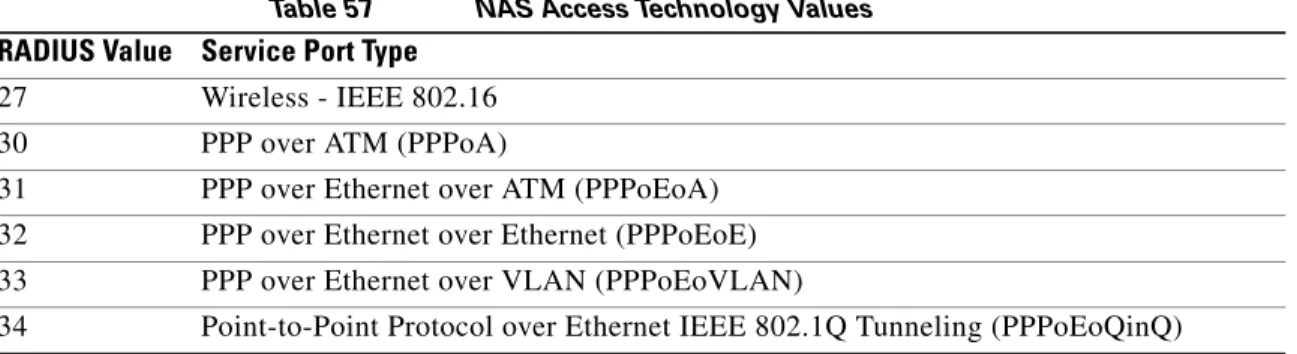
Table 57 NAS Access Technology Values
The Value “Virtual” refers to a connection to the NAS through a transport protocol, instead of through a physical port. For example, if a user telnetted into a NAS, the value “Virtual” would be reflected as the NAS value.
There is no specific NAS value for IP sessions. The NAS value depends on the underlying transport technology values described in Table 57 or “Virtual” is used for IP sessions. For example, if PPP is the
Release Modification
12.3(7)XI1 This command was introduced.
12.2(28)SB This command was integrated into Cisco IOS Release 12.2(28)SB. 12.2(33)SRC This command was integrated into Cisco IOS Release 12.2(33)SRC.
RADIUS Value Service Port Type 27 Wireless - IEEE 802.16
30 PPP over ATM (PPPoA)
31 PPP over Ethernet over ATM (PPPoEoA) 32 PPP over Ethernet over Ethernet (PPPoEoE) 33 PPP over Ethernet over VLAN (PPPoEoVLAN)
radius-server attribute 61 extended
• All PPPoA, PPPoE, PPPoEoE, PPPoEoA sessions are identified as “Virtual”. • All PPPoEoVLAN and PPPoEoQinQ sessions are identified as VLAN.
• RFC-compliant values, such as Virtual (value 5) and Ethernet (value 15) are sent to the authentication, authorization, and accounting (AAA) records.
Examples The following example shows how to configure global support for extended attribute 61 ports and how to specify different format e strings globally for two different types of ports:
• Type 30 (which is PPPoA) • Type 33 (which is PPPoEoVLAN)
Router# configure terminal
Router(config)#
Router(config)# radius-server attribute 61 extended
Router(config)# radius-server attribute nas-port format e SSSSAPPPUUUUUUUUUUUUUUUUUUUUUUUU
Router(config)# radius-server attribute nas-port format e SSSSAPPPIIIIIIIICCCCCCCCCCCCCCCC type 30
Router(config)#
Router(config)# radius-server attribute nas-port format e SSSSAPPPVVVVVVVVVVVVVVVVVVVVVVVV type 33
Router(config)#
Related Commands Command Description
radius attribute nas-port-type
Configures subinterfaces such as Ethernet, VLANS, stacked VLAN (Q-in-Q), VC and VC ranges.
radius-server attribute nas-port format
Sets the NAS-Port format used for RADIUS accounting features and restores the default NAS-Port format, or sets the global attribute 61 session format e string or configures a specific service port type for attribute 61 support.
radius-server attribute 69 clear
radius-server attribute 69 clear
To receive nonencrypted tunnel passwords in attribute 69 (Tunnel-Password), use the radius-server attribute 69 clear command in global configuration mode. To disable this feature and receive encrypted tunnel passwords, use the no form of this command.
radius-server attribute 69 clear no radius-server attribute 69 clear
Syntax Description This command has no arguments or keywords.
Defaults RADIUS attribute 69 is not sent and encrypted tunnel passwords are sent.
Command Modes Global configuration
Command History
Usage Guidelines Use the radius-server attribute 69 clear command to receive nonencrypted tunnel passwords, which are sent in RADIUS attribute 69 (Tunnel-Password). This command allows tunnel passwords to be sent in a “string” encapsulated format, rather than the standard tag/salt/string format, which enables the encrypted tunnel password.
Some RADIUS servers do not encrypt Tunnel-Password; however the current NAS (network access server) implementation will decrypt a non-encrypted password that causes authorization failures. Because nonencrypted tunnel passwords can be sent in attribute 69, the NAS will no longer decrypt tunnel passwords.
Note Once this command is enabled, all tunnel passwords received will be nonencrypted until the command is manually disabled.
Examples The following example shows how to enable attribute 69 to receive nonencrypted tunnel passwords. (To see whether the Tunnel-Password process is successful, use the debug radius command.)
radius-server attribute 69 clear
Release Modification
12.1(5)T This command was introduced.
12.2(33)SRA This command was integrated into Cisco IOS release 12.(33)SRA.
12.2SX This command is supported in the Cisco IOS Release 12.2SX train. Support in a specific 12.2SX release of this train depends on your feature set, platform, and platform hardware.
radius-server attribute 77
radius-server attribute 77
To send connection speed information to the RADIUS server in the access request, use the radius-server attribute 77 command in global configuration mode. To prevent connection speed information from being included in the access request, use the no form of this command.
radius-server attribute 77 {include-in-access-req | include-in-acct-req} no radius-server attribute 77 {include-in-access-req | include-in-acct-req}
Syntax
Description
Defaults RADIUS attribute 77 is sent to the RADIUS server in the access request.
Command Modes Global configuration
Command History
Usage Guidelines RADIUS attribute 77 is sent to the RADIUS server in the access request by default.
RADIUS attribute 77 allows RADIUS authentication based on connection speed. Sessions can be accepted or denied based on the allowed connection speed configured for a particular user on the RADIUS server.
RADIUS attribute 77 includes the following information: • The accounting start/stop request
• The VC class name defined with the class-int command • The VC class name defined with the class-vc command • The VC class name defined with the class-range command
The VC class name may include letters, numbers, and the characters “:” (colon), “;” (semicolon), “-” (hyphen) and “,” (comma).
Examples The following example disables the inclusion of RADIUS attribute 77 in the access request:
no radius-server attribute 77 include-in-access-req
include-in-access-req Specifies that attribute 77 will be included in access requests.
include-in-acct-req Specifies that attribute 77 will be included in accounting requests.
Release Modification
12.2(2)BX This command was introduced.
radius-server attribute 77
Related Commands Command Description
class-int Assigns a VC class to an ATM main interface or subinterface.
class-range Assigns a VC class to an ATM PVC range.
radius-server attribute 8 include-in-access-req
radius-server attribute 8 include-in-access-req
To send the IP address of a user to the RADIUS server in the access request, use the radius-server attribute 8 include-in-access-req command in global configuration mode. To disable sending of the user IP address to the RADIUS server during authentication, use the no form of this command.
radius-server attribute 8 include-in-access-req no radius-server attribute 8 include-in-access-req
Syntax Description This command has no arguments or keywords.
Defaults This feature is disabled.
Command Modes Global configuration
Command History
Usage Guidelines Using the radius-server attribute 8 include-in-access-req command makes it possible for a network access server (NAS) to provide the RADIUS server with a hint of the user IP address in advance of user authentication. An application can be run on the RADIUS server to use this hint and build a table (map) of user names and addresses. Using the mapping information, service applications can begin preparing user login information to have available upon successful user authentication.
When a network device dials in to a NAS that is configured for RADIUS authentication, the NAS begins the process of contacting the RADIUS server in preparation for user authentication. Typically, the IP address of the dial-in host is not communicated to the RADIUS server until after successful user authentication. Communicating the device IP address to the server in the RADIUS access request allows other applications to begin to take advantage of that information.
As the NAS is setting up communication with the RADIUS server, the NAS assigns an IP address to the dial-in host from a pool of IP addresses configured at the specific interface. The NAS sends the IP address of the dial-in host to the RADIUS server as attribute 8. At that time, the NAS sends other user information, such as the username, to the RADIUS server.
After the RADIUS server receives the user information from the NAS, it has two options:
• If the user profile on the RADIUS server already includes attribute 8, the RADIUS server can override the IP address sent by the NAS with the IP address defined as attribute 8 in the user profile. The address defined in the user profile is returned to the NAS.
Release Modification
12.2(11)T This command was introduced.
12.2(28)SB This command was integrated into Cisco IOS Release 12.2(28)SB. 12.2(33)SRA This command was integrated into Cisco IOS release 12.(33)SRA.
12.2SX This command is supported in the Cisco IOS Release 12.2SX train. Support in a specific 12.2SX release of this train depends on your feature set, platform, and platform hardware.
radius-server attribute 8 include-in-access-req
• If the user profile does not include attribute 8, the RADIUS server can accept attribute 8 from the NAS, and the same address is returned to the NAS.
The address returned by the RADIUS server is saved in memory on the NAS for the life of the session. If the NAS is configured for RADIUS accounting, the accounting start packet sent to the RADIUS server includes the same IP address as in attribute 8. All subsequent accounting packets, updates (if
configured), and “stop” packets will also include the same IP address as in attribute 8.
Note Configuring the NAS to send the host IP address in the RADIUS access request assumes that the login host is configured to request an IP address from the NAS server. It also assumes that the login host is configured to accept an IP address from the NAS. In addition, the NAS must be configured with a pool of network addresses at the interface supporting the login hosts.
Examples The following example shows a NAS configuration that sends the IP address of the dial-in host to the RADIUS server in the RADIUS access request. The NAS is configured for RADIUS authentication, authorization, and accounting (AAA). A pool of IP addresses (async1-pool) has been configured and applied at interface Async1.
aaa new-model
aaa authentication login default group radius aaa authentication ppp default group radius aaa authorization network default group radius
aaa accounting network default start-stop group radius !
ip address-pool local !
interface Async1
peer default ip address pool async1-pool !
ip local pool async1-pool 209.165.200.225 209.165.200.229 !
radius-server host 172.31.71.146 auth-port 1645 acct-port 1646 radius-server retransmit 3
radius-server attribute 8 include-in-access-req radius-server key radhost
radius-server attribute 30 original-called-number
radius-server attribute 30 original-called-number
To allow network providers to accurately match the billing function with the actual number dialed (Original Called Number (OCN)), and not the translated number to which the switch reports, use the
radius-server attribute 30 original-called-number command in global configuration mode.
radius-server attribute 30 original-called-number no radius-server attribute 30 original-called-number
Command Default The command-level default is not enabled. The translated number is sent to the NAS.
Command Modes Global configuration (config)
Command History
Usage Guidelines The ITU-T Q.931 attribute is the connection control protocol of the ISDN. Some switches can send a translated dialed number identification service (DNIS) number to the network access server (NAS) instead of the OCN. These switches eventually inform the NAS about the OCN in its Q931 attribute. However, some network providers require the OCN in its Q.931 attribute.
The radius-server attribute 30 original-called-number command allows the OCN with its Q.931 attribute to be sent to the RADIUS Called-Station-ID, which is a check mechanism administrators use to deny or accept access from users based on the NAS (when available). This OCN is used instead of the redirected translated number reported as the DNIS by ISDN.
Examples The following example enables the radius-server attribute 30 original-called-number in global configuration mode:
aaa new-model
radius-server attribute 30 original-called-number
Release Modification
radius-server attribute data-rate send 0
radius-server attribute data-rate send 0
Note Effective with Cisco IOS Release 12.4, the radius-server attribute data-rate send 0 command is not available in Cisco IOS software.
To enable the data transmit and receive rate of RADIUS server attributes 197 and 255 in accounting records, use the radius-server attribute data-rate send 0 command in global configuration mode.
radius-server attribute data-rate send 0 no radius-server attribute data-rate send 0
Syntax Description This command has no arguments or keywords.
Command Default The default value for RADIUS server attributes 197 and 255 is zero.
Command Modes Global configuration (config)
Command History
Usage Guidelines RADIUS attribute 197 is the Ascend-Data-Rate in an accounting-request packet. This attribute specifies the receive baud rate of the connection in bits per second over the course of the connection's lifetime. RADIUS attribute 255 is the Ascend-Xmit-Rate in an accounting-request packet. This attribute specifies the transmit baud rate of the connection in bits per second over the course of the connection’s lifetime. The connection is authenticated for both RADIUS attributes 197 and 255 if the following conditions are met:
• The session has ended or has failed to authenticate because the accounting-request packet has the RADIUS attribute: Acct-Status-Type=Stop.
• The Auth parameter is set to a value other than RADIUS or LOGOUT.
Note RADIUS attribute 197 does not appear in the user profile.
Examples The following example enables the radius-server attribute data-rate send 0 command in global configuration mode:
Release Modification
12.3 This command was introduced.
radius-server attribute list
radius-server attribute list
To define an accept or reject list name, use the radius-serverattributelist command in global configuration mode. To remove an accept or reject list name from your configuration, use the no form of this command.
radius-serverattributelistlist-name noradius-serverattributelistlist-name
Syntax Description
Command Default List names are not defined.
Command Modes Global configuration (config)
Command History
Usage Guidelines A user may configure an accept or reject list with a selection of attributes on the network access server (NAS) for authorization or accounting so unwanted attributes are not accepted and processed. The
radius-serverattributelist command allows users to specify a name for an accept or reject list. This command is used in conjunction with the attribute (server-group configuration) command, which adds attributes to an accept or reject list.
Note The list name must be the same as the list name defined in the accounting or authorization
configuration command.
list-name Name for an accept or reject list.
Release Modification
12.2(1)DX This command was introduced.
12.2(2)DD This command was integrated into Cisco IOS Release 12.2(2)DD. 12.2(4)B This command was integrated into Cisco IOS Release 12.2(4)B. 12.2(4)T This command was integrated into Cisco IOS Release 12.2(4)T. 12.2(13)T Platform support was added for the Cisco 7401 ASR router. 12.2(28)SB This command was integrated into Cisco IOS Release 12.2(28)SB. 12.2(33)SRA This command was integrated into Cisco IOS Release 12.(33)SRA.
12.2SX This command is supported in the Cisco IOS Release 12.2SX train. Support in a specific 12.2SX release of this train depends on your feature set, platform, and platform hardware.
Cisco IOS XE Release 3.3S.
radius-server attribute list
Examples The following example shows how to configure the reject list “bad-list” for RADIUS authorization and accept list “usage-only” for RADIUS accounting:
Router(config)# aaa new-model
Router(config)# aaa authentication ppp default group radius-sg
Router(config)# aaa authorization network default group radius-sg
Router(config)# aaa group server radius radius-sg
Router(config-sg-radius)# server 10.1.1.1
Router(config-sg-radius)# authorization reject bad-list
Router(config-sg-radius)# accounting accept usage-only
Router(config-sg-radius)# exit
Router(config)# radius-server host 10.1.1.1 key mykey1
Router(config)# radius-server attribute list usage-only
Router(config-radius-attrl)# attribute 1,40,42-43,46
Router(config-radius-attrl)# exit
Router(config)# radius-server attribute list bad-list
Router(config-radius-attrl)# attribute 22,27-28,56-59
Note Although you cannot configure more than one access or reject list per server group for authorization or accounting, you can configure one list for authorization and one list for accounting per server group.
Related Commands Command Description
aaa group server radius Groups different RADIUS server hosts into distinct lists and distinct methods.
accounting (server-group configuration)
Specifies an accept or reject list for attributes that are to be sent to the RADIUS server in an accounting request.
attribute (server-group configuration)
Adds attributes to an accept or reject list.
authorization (server-group configuration)
Specifies an accept or reject list for attributes that are returned in an Access-Accept packet from the RADIUS server.
radius-server attribute nas-port extended
radius-server attribute nas-port extended
The radius-server attribute nas-port extended command is replaced by the radius-server attribute nas-port format command. See the description of the radius-server attribute nas-port format
radius-server attribute nas-port format
radius-server attribute nas-port format
To set the NAS-Port format used for RADIUS accounting features and restore the default NAS-port format, or to set the global attribute 61 session format e string or configure a specific service port type for attribute 61 support, use the radius-server attribute nas-port format command in global
configuration mode. To stop sending attribute 61 to the RADIUS server, use the no form of this command.
NAS-Port for RADIUS Accounting Features and Restoring Default NAS-Port Format
radius-server attribute nas-port format format no radius-server attribute nas-port format format
Extended NAS-Port Support
radius-server attribute nas-port format format [string] [type nas-port-type]
no radius-server attribute nas-port format format [string] [type nas-port-type]
Syntax Description
Defaults Standard NAS-Port format for NAS-Port for RADIUS accounting features and restoring default NAS-Port format or extended NAS-Port support.
Command Modes
format NAS-Port format. Possible values for the format argument are as follows: • a—Standard NAS-Port format
• b—Extended NAS-Port format • c—Carrier-based format
• d—PPPoX (PPP over Ethernet or PPP over ATM) extended NAS-Port format
• e—Configurable NAS-Port format
string (Optional) Represents all of a specific port typefor format e. It is possible to specify multiple values with this argument.
type nas-port-type (Optional) Allows you to globally specify different format strings to represent specific physical port types.
You may set one of the extended NAS-Port-Type attribute values:
• type 30—PPP over ATM (PPPoA)
• type 31—PPP over Ethernet (PPPoE) over ATM (PPPoEoA) • type 32—PPPoE over Ethernet (PPPoEoE)
• type 33—PPPoE over VLAN (PPPoEoVLAN)
radius-server attribute nas-port format
Command History
Usage Guidelines The radius-server attribute nas-port format command configures RADIUS to change the size and format of the NAS-Port attribute field (RADIUS IETF attribute 5).
The following NAS-Port formats are supported:
• Standard NAS-Port format—This 16-bit NAS-Port format indicates the type, port, and channel of the controlling interface. This is the default format used by Cisco IOS software.
• Extended NAS-Port format—The standard NAS-Port attribute field is expanded to 32 bits. The upper 16 bits of the NAS-Port attribute display the type and number of the controlling interface; the lower 16 bits indicate the interface that is undergoing authentication.
• Shelf-slot NAS-Port format—This 16-bit NAS-Port format supports expanded hardware models requiring shelf and slot entries.
• PPP extended NAS-Port format—This NAS-Port format uses 32 bits to indicate the interface, virtual path identifier (VPI), and virtual channel indicator (VCI) for PPPoA and PPPoEoA, and the interface and VLAN ID for PPPoE over Institute of Electrical and Electronic Engineers (IEEE) standard 802.1Q VLANs.
Format e
Before Cisco IOS Release 12.2(4)T formats a through c did not work with Cisco platforms such as the AS5400. For this reason, a configurable format e was developed. Format e requires you to explicitly define the usage of the 32 bits of attribute 25 (NAS-Port). The usage is defined with a given parser character for each NAS-Port field of interest for a given bit field. By configuring a single character in a
Release Modification
11.3(7)T This command was introduced.
11.3(9)DB The PPP extended NAS-Port format was added.
12.1(5)T The PPP extended NAS-Port format was expanded to support PPPoE over ATM and PPPoE over IEEE 802.1Q VLANs.
12.2(4)T Format e was introduced.
12.2(11)T Format e was extended to support PPPoX information. 12.3(3) Format e was extended to support Session ID U.
12.3(7)XI1 Format e was extended to allow the format string to be NAS-Port-Type attribute specific. The following keyword and arguments were added:
string,type nas-port-type.
12.2(28)SB This command was integrated into Cisco IOS Release 12.2(28)SB. 12.2(33)SRA This command was integrated into Cisco IOS Release 12.(33)SRA. 12.2SX This command is supported in the Cisco IOS Release 12.2SX train. Support
in a specific 12.2SX release of this train depends on your feature set, platform, and platform hardware.
radius-server attribute nas-port format
row, such as x, only one bit is assigned to store that given value. Additional characters of the same type, such as x, will provide a larger available range of values to be stored. Table 58 shows how the ranges may be expanded:
It is imperative that you know what the valid range is for a given parameter on a platform that you want to support. The Cisco IOS RADIUS client will bitmask the determined value to the maximum
permissible value on the basis of configuration. Therefore, if one has a parameter that turns out to have a value of 8, but only 3 bits (xxx) are configured, 8 and 0x7 will give a result of 0. Therefore, you must always configure a sufficient number of bits to capture the value required correctly. Care must be taken to ensure that format e is configured to properly work for all NAS port types within your network environment.
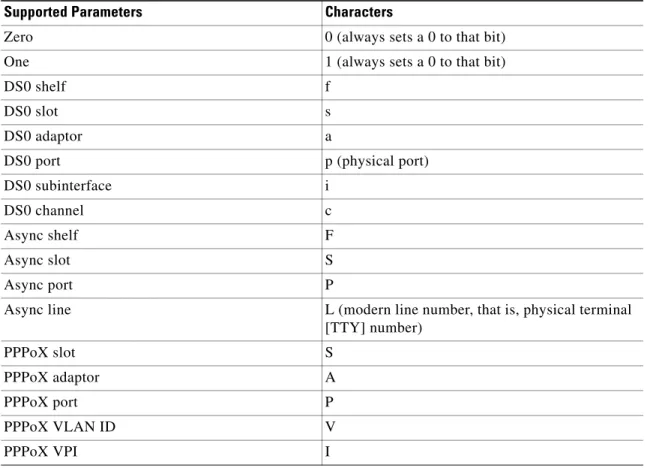
Table 59 shows the supported parameters and their characters:
Table 58 Format e Ranges
Character Range x 0–1 xx 0–3 xxx 0–7 xxxx 0–F xxxxx 0–1F
Table 59 Supported Parameters and Characters
Supported Parameters Characters
Zero 0 (always sets a 0 to that bit)
One 1 (always sets a 0 to that bit)
DS0 shelf f
DS0 slot s
DS0 adaptor a
DS0 port p (physical port)
DS0 subinterface i
DS0 channel c
Async shelf F
Async slot S
Async port P
Async line L (modern line number, that is, physical terminal [TTY] number) PPPoX slot S PPPoX adaptor A PPPoX port P PPPoX VLAN ID V PPPoX VPI I
radius-server attribute nas-port format
All 32 bits that represent the NAS-Port must be set to one of the above characters because this format makes no assumptions for empty fields.
Access Router
The DS0 port on a T1-based card and on a T3-based card will give different results. On T1-based cards, the physical port is equal to the virtual port (because these are the same). So, p and d will give the same information for a T1 card. However, on a T3 system, the port will give you the physical port number (because there can be more than one T3 card for a given platform). As such, d will give you the virtual T1 line (as per configuration on a T3 controller). On a T3 system, p and d will be different, and one should capture both to properly identify the physical device. As a working example for the
Cisco AS5400, the following configuration is recommended:
Router (config)# radius-server attribute nas-port format e SSSSPPPPPPPPPsssspppppccccc This will give one an asynchronous slot (0–16), asynchronous port (0–512), DS0 slot (0–16), DS0 physical port (0–32), DS0 virtual port (0–32), and channel (0–32). The parser has been implemented to explicitly require 32-bit support, or it will fail.
Finally, format e is supported for channel-associated signaling (CAS), PRI, and BRI–based interfaces.
Note This command replaces the radius-server attribute nas-port extended command. Extended NAS-Port-Type Attribute Support
This command allows you to configure a specific service port type for extended attribute 61 support which overrides the default global setting.
Examples In the following example, a RADIUS server is identified, and the NAS-Port field is set to the PPP extended format:
radius-server host 192.0.2.96 auth-port 1645 acct-port 1646 radius-server attribute nas-port format d
The following example shows how to configure global support for extended NAS-Port-Type ports and how to specify two separate format e strings globally for two different types of ports:
• type 30 (which is PPPoA) • type 33 which is (PPPoEoVLAN)
Router# configure terminal
Router(config)#
Router(config)# radius-server attribute 61 extended
Router(config)# radius-server attribute nas-port format e SSSSAPPPUUUUUUUUUUUUUUUUUUUUUUUU
Router(config)# radius-server attribute nas-port format e SSSSAPPPIIIIIIIICCCCCCCCCCCCCCCC type 30
Router(config)#
Router(config)# radius-server attribute nas-port format e SSSSAPPPVVVVVVVVVVVVVVVVVVVVVVVV type 33
PPPoX VCI C
Session ID U
Table 59 Supported Parameters and Characters
radius-server attribute nas-port format
Related Commands Command Description
radius attribute nas-port-type
Configures subinterfaces such as Ethernet, vLANs, stacked VLAN (Q-in-Q), virtual circuit (VC), and VC ranges.
radius-server attribute 61 extended
Enables extended, non-RFC-compliant NAS-Port-Type attribute (RADIUS attribute 61).
vpdn aaa attribute Enables the LNS to send PPP extended NAS-Port format values to the RADIUS server for accounting.
radius-server authorization
radius-server authorization
To set the default framed protocol in the RADIUS packet to Point-toPoint Protocol (PPP), use the
radius-server authorization command in global configuration mode. To disable the authorization, use the no form of this command.
radius-server authorization default framed-protocol ppp no radius-server authorization default framed-protocol ppp
Syntax Description
Command Default The defualt framed protocol in the RADIUS packet to PPP is not set.
Command Modes Global configuration (config)
Command History
Examples The following example shows how to set the default framed protocol in RADIUS packet to PPP:
Router# configure terminal
Router(config)# radius-server authorization default framed-protocol ppp
Related Commands
default Specifies the default authorization action.
framed-protocol Specifies the framed-protocol attribute type.
ppp Specifies the service port type for the default authorization action.
Release Modification
15.0(1)M This command was introduced in a release earlier than Cisco IOS Release 15.0(1)M.
12.2(33)SRB This command was integrated into a release earlier than Cisco IOS Release 12.2(33)SRB.
12.2(33)SXI This command was integrated into a release earlier than Cisco IOS Release 12.2(33)SXI.
Cisco IOS XE 2.3 This command was integrated into Cisco IOS XE Release 2.3.
Command Description
radius-server attribute 6
Provides for the presence of the Service-Type attribute (attribute 6) in RADIUS Access-Accept messages.
radius-server authorization missing Service-Type
radius-server authorization missing Service-Type
The radius-server authorization missing Service-Type command is replaced by the radius-server attribute 6 command. See the radius-server attribute 6 command for more information.
radius-server backoff exponential
radius-server backoff exponential
To configure the router for exponential backoff retransmit of accounting requests, use the radius-server backoff exponential command in global configuration mode. To disable this functionality, use the no
form of this command.
radius-server backoff exponential [max-delayminutes] [backoff-retryretransmits]
noradius-server backoff exponential [max-delayminutes] [backoff-retryretransmits]
Syntax Description
Command Default This command is not enabled.
Command Modes Global configuration (config)
Command History
Usage Guidelines The radius-server backoff exponential command is used to keep accounting records on a router for up to 24 hours. After enabling this command, the router will try to send the normal retransmissions for the number of times the retransmits argument is configured. Thereafter, the router will continue to retransmit accounting requests with an interval that doubles on each retransmit failure until a configured maximum interval is reached.
While the router is in “retransmit mode,” it will store all accounting records that are generated during that period in its memory; the accounting records will be sent to the RADIUS server after the router comes back up before the retransmit mode is complete.
Examples The following example shows how to configure your router for exponential backoff retransmit of accounting requests:
aaa new-model
aaa authentication login default group radius aaa authentication ppp default group radius aaa authorization exec default group radius
max-delay minutes (Optional) Number of retransmissions done in exponential max-delay mode. Valid range for the minutes argument is 1 through 120; if this option is not specified, the default value (60 minutes) will be used.
backoff-retry retransmits
(Optional) Number of retransmissions done in exponential backoff mode in addition to normal and max-delay retransmissions. Valid range for the
retransmits argument is 1 through 50; if this option is not specified, the default value (5 retransmits) will be used.
Release Modification
12.2(15)B This command was introduced on the Cisco 6400-NRP-1, Cisco 7200 series, and Cisco 7400 series.
radius-server backoff exponential
aaa authorization network default group radius
aaa accounting send stop-record authentication failure aaa accounting update periodic 1
aaa accounting network default start-stop group radius ! interface BRI1/0 ip address 10.0.0.2 255.0.0.0 encapsulation ppp no ip mroute-cache dialer idle-timeout 0 dialer-group 1
isdn switch-type basic-5ess !
radius-server host 172.107.164.206 auth-port 1645 acct-port 1646 backoff exponential max-delay 60 backoff-retry 32
radius-server backoff exponential max-delay 60 backoff-retry 32 radius-server retransmit 3
radius-server key rad123 end
Related Commands Command Description
backoff exponential Configures the router for exponential backoff retransmit of accounting requests per RADIUS server group.