Rational
®Rational
ClearQuest
Using
Project
Tracker
Version7.0
Windows
GI11-6377-00
Rational
®Rational
ClearQuest
Using
Project
Tracker
Version7.0
Windows
GI11-6377-00
Beforeusingthisinformation,besuretoreadthegeneralinformationunder.“Notices,”onpage31. Thiseditionappliestoversion7.0.0.0ofIBMRationalClearQuest(productnumber5724G36)andtoall
Contents
Tables
.
.
.
.
.
.
.
.
.
.
.
.
.
.
. v
About
this
book
.
.
.
.
.
.
.
.
.
.
. vii
Whoshouldreadthisbook . . . vii
Typographicalconventions . . . vii
Relatedinformation . . . viii
ContactingIBMCustomerSupportforRational softwareproducts . . . viii
DownloadingtheIBMSupportAssistant. . . . ix
Chapter
1.
About
Project
Tracker
.
.
.
. 1
Linkingaprojectplanwithadatabase. . . 1
ImportingRationalClearQuestrecordstocreatenew MicrosoftProjecttasks . . . 1
ExportingMicrosoftProjecttaskstocreate ClearQuestrecords . . . 1
SynchronizingaprojectplanwithaRational ClearQuestdatabase. . . 2
Creatingamappingconfiguration . . . 2
CreatingrecordsinaRationalClearQuestdatabase . 2
Chapter
2.
Installing
and
upgrading
Project
Tracker
.
.
.
.
.
.
.
.
.
.
.
. 5
Prerequisitesandplatformdependencies . . . 5
InstallingProjectTracker . . . 5
UpdatingtheRationalClearQuestdatabaseschema foryourproject . . . 5
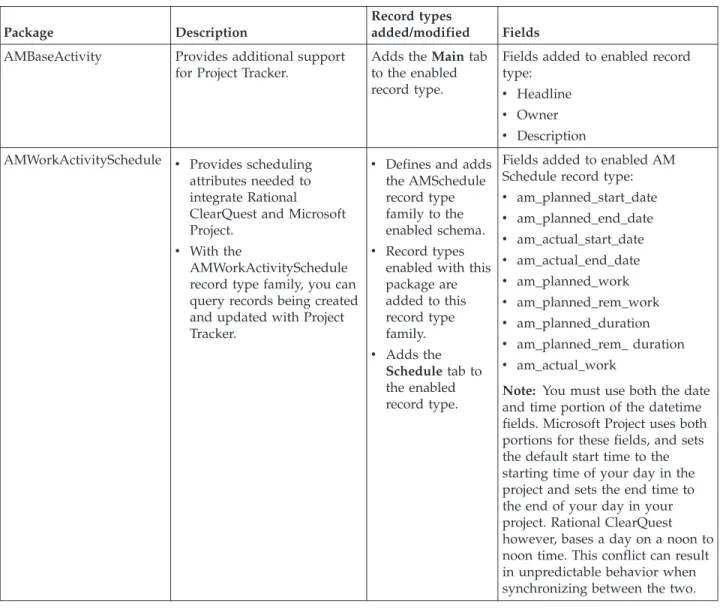
AboutRationalClearQuestpackages . . . 5
MigratingdatafromanearlierversionofProject Tracker . . . 6
UpgradingfromapreviousreleaseofProjectTracker 7
Chapter
3.
Linking
a
project
plan
to
a
Rational
ClearQuest
database
.
.
.
.
. 9
SelectingtheRationalClearQuestdatabaseand choosingcustomfields . . . 9
ConfigureyourviewinMicrosoftProjecttodisplay RationalClearQuestrelateddata . . . 10
MappingtheRationalClearQuestUsernamefieldto theProjectResourcefield. . . 10
UpdatingtheRationalClearQuestrecordtypes . . 10
Chapter
4.
Setting
up
field
mappings
11
Supporteddatatypes . . . 11Usingmappingconfigurations . . . 11
Creatingtaskfieldmappings . . . 12
Deletingmappings . . . 12
Enablingparent/childmapping . . . 13
Chapter
5.
Importing
records
from
Rational
ClearQuest
.
.
.
.
.
.
.
.
. 15
ImportingrecordsfromaRationalClearQuest database . . . 15
MatchingresourceswithRationalClearQuestusers 16 Savingandviewingthelogfile. . . 16
ViewingnewtasksintheMicrosoftProjectplan . . 16
Creatingandusingqueriesforimports . . . 17
Savingamastercopyoftheprojectplan. . . . 17
Chapter
6.
Exporting
tasks
from
Microsoft
Project
.
.
.
.
.
.
.
.
.
. 19
RationalClearQuestrecordtypesandrequiredfields 19 ExportingtaskstoRationalClearQuest . . . 19
Savingamastercopyoftheprojectplan. . . 20
Viewingnewrecordsinthedatabase . . . 20
Assigningresources . . . 21
Summarytasks,milestones,oronlyfilteredrowsare notexported . . . 21
Changingfieldvaluesbyowners . . . 21
Enteringrequiredfieldswhenthetaskhasnoentry 21
Chapter
7.
Synchronizing
data
.
.
.
. 23
SynchronizingMicrosoftProjectplansand ClearQuestdatabases . . . 23
Synchronizingtheprojectplanwiththedatabase 23 Synchronizinglinkedtasksandrecords . . . . 24
MatchingresourceswithRationalClearQuest users . . . 24
Savingandviewingthelogfile. . . 25
Rulesforresolvingconflictinginformation . . . . 25
Settingsynchronizationprecedence . . . 25
Overridingthesynchronizationrules . . . 25
Chapter
8.
Additional
administrative
procedures
.
.
.
.
.
.
.
.
.
.
.
.
. 27
ChangingrequiredfieldsinRationalClearQuest . . 27
Nestingprojectplans . . . 27
Tasknametruncatedwhentransferred . . . 27
RemovinganownerfromtheRationalClearQuest database . . . 27
DeletingtheactualenddatefromaRational ClearQuestrecord . . . 28
Usingfunctionstogethertoensureupdated information . . . 28
Updatingaprojectplan . . . 28
UpdatingaRationalClearQuestdatabase . . . 28
UpdatingtheRationalClearQuestrecordtypes list . . . 28
Deletingtasksandrecords . . . 29
Appendix.
Notices
.
.
.
.
.
.
.
.
.
. 31
Tables
1. RationalClearQuestpackagedescriptions 6 2. Datatypes . . . 11
About
this
book
Thisuserguideexplains howtoinstall,configure,anduseIBM®Rational® ClearQuest® ProjectTracker.
Who
should
read
this
book
Projectmanagers, individualcontributors,and teammanagerswhoare familiar with Microsoft® Projectandadefecttrackingsystem.
Typographical
conventions
Thismanualusesthefollowingtypographicalconventions:
v ccase–home–dirrepresentsthedirectoryintowhichRational ClearCase,Rational
ClearCase LT,orRational ClearCaseMultiSitehasbeen installed.By default,this directoryis/opt/rational/clearcaseontheUNIXsystemandLinux,and
C:\ProgramFiles\Rational\ClearCaseonWindows.
v cquest-home-dirrepresentsthedirectory intowhichRationalClearQuesthasbeen
installed.By default,this directoryis/opt/rational/clearquestontheUNIX systemandLinux,andC:\ProgramFiles\Rational\ClearQuestonWindows. v Boldisusedfornamestheuser canenter;forexample,commandnamesand
branchnames.
v Asans-seriffontisusedforfilenames,directorynames,andfileextensions.
v Aserifboldfont isusedforGUIelements;forexample,menunamesand
namesofcheckboxes.
v Italicisusedforvariables,documenttitles,glossary terms,andemphasis.
v A monospacedfont isusedfor examples. Whereuser input needsto be
distinguishedfromprogramoutput,boldisusedforuserinput. v
Nonprintingcharactersappearasfollows:<EOF>,<NL>.
v Keynamesandkeycombinationsare capitalizedandappearasfollows:Shift,
Ctrl+G.
v []Bracketsencloseoptionalitemsinformatandsyntax descriptions.
v {}Bracesenclosealistfromwhichyoumustchooseaniteminformatand
syntaxdescriptions.
v |Averticalbarseparatesitemsinalistofchoices.
v ...Inasyntaxdescription, anellipsisindicatesyoucanrepeattheprecedingitem
orlineoneormore times.Otherwise,itcanindicateomittedinformation. Note: Incertaincontexts,youcanuse“...”within apathnameasawildcard,
similarto“*”or“?”.For moreinformation,seethewildcards_ccase referencepage.
v Ifacommandoroptionnamehasa shortform,a“slash”(/)character
indicatestheshortest legalabbreviation.For example: lsc/heckout
Related
information
More Information Online documentation Help files Administration Project Management Orientation Database DesignInstallation Guide(Rational Desktop Products) Installation Guide(Rational Server Products)
Installation Guide(UNIX)
Administrator's Guide(Rational ClearQuest) Administrator's Guide(Rational ClearQuest MultiSite)
Upgrade Guide(Rational Suite)
Using Project Tracker (Windows platforms;
see online documentation) Introduction
Release Notes (See online documentation)
Designer tutorials (See online documentation)
Administrator's Guide (Rational ClearQuest) API Reference (See online documentation)
Contacting
IBM
Customer
Support
for
Rational
software
products
Ifyouhavequestionsaboutinstalling,using,ormaintainingthisproduct,contact IBM CustomerSupportasfollows:
The IBMsoftwaresupportInternet siteprovides youwith self-helpresourcesand electronicproblemsubmission.TheIBMSoftwareSupportHomepageforRational productscanbe foundathttp://www.ibm.com/software/rational/support/. Voice Supportisavailable toallcurrentcontractholdersbydialinga telephone number inyourcountry(whereavailable).For specificcountryphonenumbers, go tohttp://www.ibm.com/planetwide/.
Note: WhenyoucontactIBM CustomerSupport,pleasebe preparedtosupplythe
followinginformation:
v Yourname,companyname,ICNnumber,telephonenumber,and e-mail
v Youroperatingsystem,versionnumber,andanyservicepacksor patches
youhaveapplied
v Productnameand releasenumber
v YourPMRnumber(if youarefollowingupona previouslyreported
problem)
Downloading
the
IBM
Support
Assistant
TheIBM SupportAssistant(ISA)isa locallyinstalledserviceabilityworkbench that makesitbotheasier andsimplertoresolve softwareproductproblems.ISAisa free,stand-alone applicationthatyoudownloadfromIBMand installonany number ofmachines.ItrunsonAIX, (RedHatEnterpriseLinuxAS),HP-UX, Solaris, andWindowsplatforms.
ISAincludesthesefeatures: v Federatedsearch
v Datacollection
v Problemsubmission
v Educationroadmaps
For moreinformationaboutISA,includinginstructionsfordownloadingand installingISAandproductplug-ins,gototheISASoftwareSupportpage. IBM SupportAssistant:http://www.ibm.com/software/support/isa/
Chapter
1.
About
Project
Tracker
IBM RationalClearQuestProjectTrackerisanadd-intoMicrosoftProjectthat integrates RationalClearQuestfunctionality.ProjectTrackercanbeusedwith Microsoft Project2000,2002,or2003.
YoucanuseProjectTrackertoexporttasksfroma MicrosoftProjectprojectplanto createnew databaserecordsinIBMRational ClearQuest.Youcanalso import recordsfromRational ClearQuesttocreatenew projectplantasks inMicrosoft Project.Recordsand tasksarelinkedsothatyoucansynchronizethem periodically.
Linking
a
project
plan
with
a
database
Whenyouset upaMicrosoft Projectprojectplantoworkwith ProjectTracker,you createa linkbetweenthatprojectplananda RationalClearQuestdatabase.The linkensures thatfutureimport,export,andsynchronize operationsarealways performedagainstthesame database.Formoreinformationaboutlinking,see Chapter3,“Linking aprojectplantoaRationalClearQuestdatabase,” onpage9.
Importing
Rational
ClearQuest
records
to
create
new
Microsoft
Project
tasks
Inmostcases,eachtaskin theprojectplancorrespondstoa singlerecordinthe Rational ClearQuestdatabase.
Youcancreatenewtasks inaprojectplanfromrecordsinaRationalClearQuest database.YoucanalsoconfigureProjectTrackertopreserveparent/child
relationshipswhenimportingrecordsfromRationalClearQuest. When
parent/child mappingisenabled,ProjectTracker setsimportedtasks assubtasksof theirdesignatedparenttask.
For moreinformation,seeChapter5,“ImportingrecordsfromRational ClearQuest,”onpage15.
Exporting
Microsoft
Project
tasks
to
create
ClearQuest
records
Youcanalsocreatenew recordsin aRationalClearQuestdatabasethatcorrespond toprojectplantasks.FieldsinthenewlycreatedRationalClearQuestrecordare initializedfromtheprojectplantask.
Youcanexportparent(summary)tasks andchild(subtasks)toa Rational ClearQuestdatabase.IntheRationalClearQuestdatabase,thechild recordsare linkedto theparentrecord bymeansofa RationalClearQuestfieldoftype REFERENCE.
ProjectTracker doesnotcreatedatabase recordsformilestones, whichindicatethe completionofa projectphase.
For moreinformation,seeChapter6,“ExportingtasksfromMicrosoftProject,” on page19.
Synchronizing
a
project
plan
with
a
Rational
ClearQuest
database
Whenchangeshavebeenmadeto bothataskanditslinkedrecord,resolution behaviorisdeterminedbyprecedence informationthatyousetinthePrecedence fieldof theTaskField Mappingwindow.Threeoptionsareavailable:
v RationalClearQuesttakesprecedence.
v MicrosoftProjecttakesprecedence.
v
Promptuser.
Alogfileisavailabletotrackupdatedinformation,and,ifnecessary,toreverse changes.
The synchronizefunctionreplicateschanges betweenexistingpairsof linkedtasks and records,butdoesnotcreatenewrecordsorprojecttasks.Youmustusethe importandexportfunctionstocreateprojecttasksfromdatabase recordandto createdatabase recordsfromnew projecttasks.
For moreinformation,seeChapter7,“Synchronizing data,”onpage23.
Creating
a
mapping
configuration
Project Trackersupportstwotypesoffieldmappings:
v Automaticallymappedfields, whichinclude variousschedulingfields.
v Optionalfields.AnyfieldinaRationalClearQuestrecord oftheappropriate
datatypecanbemappedtoa fieldinMicrosoftProject.
Youcancustomizemappings betweenRationalClearQuestandMicrosoftProject for bothtypesoffields.AsinglefieldinMicrosoftProjectcanbe mappedonlytoa single fieldinRationalClearQuest.
For moreinformation,seeChapter4,“Settingupfieldmappings,”onpage11.
Creating
records
in
a
Rational
ClearQuest
database
TounderstandhowinformationisexchangedbetweenMicrosoftProjectand Rational ClearQuest,it ishelpfultoknowhowtocreaterecordsinaRational ClearQuestdatabase.
TeammemberscreaterecordsbyenteringdatainformsthatRationalClearQuest generates.Therecordsarestored intheRationalClearQuestdatabase.Theforms consist ofpagesand fieldsthatvaryaccordingtothetypeofactivity beingtracked. The MainandSchedule pagesareRational ClearQuestformsusedforsubmitting informationtoProjectTracker.
YourRational ClearQuestadministratorcustomizestheseformsforyourproject. v TheMainpageincludestheHeadline,Description,andOwner fields.The
Schedulepageisdividedintwosectionsand includesfields forplannedand actualdates.
v ThePlannedsectionontheSchedulepageincludesmostlyread-onlyfields that
storeschedulingdataprovidedfromtheprojectplan. TheActualsection containsdatathatisprovidedandupdatedbytheteammemberwhoisusing RationalClearQuest.
Whentheprojectmanagerimportsarecord fromRationalClearQuesttocreate new tasks,informationontheMainpageandintheActualsectionofthe Schedule pageiscopied totheprojectplan.
Whentheprojectmanagerexportstasks tocreatenewrecordsinRational
ClearQuest, informationiscopied intheMainpageand inthePlannedsectionof theSchedulepage.
Insomecases,correspondingfieldsmight bemappedtoeachother;thatis,the textthatappearsintheprojecttaskmight bedifferentfromthetextthatappears in thedatabaserecord, butProjectTrackerrecognizesthefieldsasequivalent.For example,youcansetQAintheProjectResource fieldofaprojectplanasthe equivalentof QualityEngineerintheUsernamefieldina ClearQuestdatabase record.
Rational ClearQuestassignsa uniqueidentification(ID)number foreveryrecord. ThisIDisusedtolinktherecord withitsassociatedprojectplantask,sothat informationexchangedbetweenthem.Formore information,seeChapter7, “Synchronizing data,”onpage23.
Chapter
2.
Installing
and
upgrading
Project
Tracker
Thischapterexplainshowtohow toinstallandupgradeProject Tracker.
Prerequisites
and
platform
dependencies
Theseproductsmustbe installedbefore youset upProjectTracker. v RationalClearQuest
v MicrosoftProject
v The.NETFramework(available throughWindows
® Updates)
ProjectTracker usesCOMtocommunicatewithRationalClearQuest, whichmeans platforms supportedbyProjectTrackerare definedbyMicrosoftProject,notby Rational ClearQuest.TheRational ClearQuestservercanbe deployedona Windows machineora UNIX®machinethatusesanyofthesupportedRational ClearQuestdatabases.AllthatisrequiredisthattheWindowsclientmachinehave theRational ClearQuestclientand MicrosoftProjectinstalled.
Installing
Project
Tracker
Toinstall ProjectTrackerforthefirsttime:
1. Rational ClearQuestProjectTracker isinstalledwithRational ClearQuestwhen
the.NETFrameworkand MicrosoftProjectarealreadyinstalledonthe workstation. Ifthe.NET FrameworkandMicrosoftProjectare notinstalled whenyouinstallRational ClearQuest,installthese productsandreinstall Rational ClearQuestif youdecidetouseProjectTracker.For instructionsto install RationalClearQuestfromadownloadorreleasearea,seetheIBM RationalDesktopProductsInstallationGuide.
2. UpdatetheRational ClearQuestdatabase schemaforyour project.Applythe
latestversions ofboththeAMBaseActivityandAMWorkActivitySchedule packagestoeachRationalClearQuestrecordtype thatyouwanttouseto exchangeinformationwithMicrosoft Project.Formoreinformation,see “UpdatingtheRationalClearQuestdatabaseschemaforyourproject.”
Updating
the
Rational
ClearQuest
database
schema
for
your
project
Two RationalClearQuestpackagesmustbe appliedtotheRationalClearQuest database schemathatisusedforyourproject.TheseRational ClearQuestpackages must beapplied inthefollowingorder:
1. AMBaseActivity
2. AMWorkActivitySchedule
For informationaboutthecontentsofthesepackages,see“About Rational ClearQuestpackages.”
About
Rational
ClearQuest
packages
Rational ClearQuestpackagescontaindefinitionsof newdatabasefieldsand relatedinformation.Whenthey areappliedtothedefinitionofa Rational ClearQuestrecord type,theyaddnew fieldstothatrecord type.Thepackages definefields,suchasPlannedStartDateandActualWork.
Youmust applythelatestversionsofboththeAMBaseActivity and
AMWorkActivitySchedule packagestoeachRationalClearQuestrecordtype that youwanttousetoexchangeinformationwithMicrosoft Project.Toapply these packages,usetheRational ClearQuestPackage wizardintheRational ClearQuest Designerapplication.
For moreinformationaboutRationalClearQuestpackages,seetheIBMRational ClearQuestMultiSite Administrator’sGuideand totheHelpforRational ClearQuest Designer.
Table1 describesAMBaseActivityandAMWorkActivitySchedulepackages. Table1.RationalClearQuestpackagedescriptions
Package Description
Recordtypes
added/modified Fields AMBaseActivity Providesadditionalsupport
forProjectTracker.
AddstheMaintab totheenabled recordtype.
Fieldsaddedtoenabledrecord type:
v
Headline
v
Owner
v Description
AMWorkActivitySchedule v Providesscheduling
attributesneededto integrateRational ClearQuestandMicrosoft Project.
v Withthe
AMWorkActivitySchedule recordtypefamily,youcan queryrecordsbeingcreated andupdatedwithProject Tracker.
v Definesandadds
theAMSchedule recordtype familytothe enabledschema. v Recordtypes
enabledwiththis packageare addedtothis recordtype family. v Addsthe
Scheduletabto theenabled recordtype.
FieldsaddedtoenabledAM Schedulerecordtype: v am_planned_start_date
v am_planned_end_date
v am_actual_start_date
v am_actual_end_date
v am_planned_work
v am_planned_rem_work v am_planned_duration v am_planned_rem_duration
v am_actual_work
Note: Youmustuseboththedate andtimeportionofthedatetime fields.MicrosoftProjectusesboth portionsforthesefields,andsets thedefaultstarttimetothe startingtimeofyourdayinthe projectandsetstheendtimeto theendofyourdayinyour project.RationalClearQuest however,basesadayonanoonto noontime.Thisconflictcanresult inunpredictablebehaviorwhen synchronizingbetweenthetwo.
Migrating
data
from
an
earlier
version
of
Project
Tracker
YoucanmigrateProjectTracker datatothisversionoftheproduct.Whenyou opena projectplanand modifyitbyusingnewfeatures,youarepromptedto migrate tothecurrentversion.
Tomigrate thedata:
2. Openaprojectplan.
3. Modifytheprojectplan.Youarepromptedtodecidewhethertoconvertthe
projectplan.
v IfyouclickNo,yourchangesare lostand thedataisnotmigrated.Youneed
tomodify theprojectplanwiththeolderversionofProjectTracker. v IfyouclickYes,theAssignCustomFieldswindowopens.Selecttwomore
Custom fieldsintheMicrosoftProjectplantostoredatarelatedtoRational ClearQuest.
4. ClickOK.
Upgrading
from
a
previous
release
of
Project
Tracker
Toupgradefroma previousreleaseofProject Tracker: 1. ClickStart >Run.
2. ToupgradefromProjectTrackerVersion2003.06.14 (orearlier)toeitherVersion
2003.06.15or Version7.0:
v AttheRunprompt,unregistertheoldProjectTrackerDLLbyentering:
regsvr32 /u CQMSPInt.dll v
Thenrenameor deletetheCQMSPInt.dllfile.(IfyouinstalledaBetaversion,
youcanremoveIBM RationalProjectTracker withAdd/Remove Programs intheControlPanel.)
3. ToupgradefromProjectTrackerVersion2003.06.15 toVersion7.0:
v Useregasm /unregistercqmspint.dll(insteadof regsvr32/uCQMSPInt.dll)
Chapter
3.
Linking
a
project
plan
to
a
Rational
ClearQuest
database
Aftertheinstallationiscomplete, youortheprojectmanagerresponsibleforeach projectplanmustlinka MicrosoftProjectplanwith aRational ClearQuest database.Thelinking processinvolvesthefollowingtasks:
1. ConfigureeachprojectplanwithinformationaboutRationalClearQuest. This
informationincludeswhichRationalClearQuestdatabasetoexchangedata with andwhichMicrosoftProjectfieldsto usetostoreRational ClearQuest relateddata.
2. ConfiguretheviewinsideMicrosoft ProjecttodisplayRationalClearQuest
relateddata.
Afterthelinkisestablished,ProjectTrackerexchanges informationbetweenthe projectplanandtheRationalClearQuestdatabase.Youcanlinka projectplanto onlyoneRationalClearQuestdatabase.Aftera linkismade,itcannotberemoved. Youmight wanttoworkwith theRational ClearQuestadministratorthefirsttime youestablishtheselinks,toensurethattheprerequisitesaremet andthat
everythingisworkingproperly.
Selecting
the
Rational
ClearQuest
database
and
choosing
custom
fields
Whenlinkinga MicrosoftProjectprojectplanwith aRational ClearQuestdatabase, thefirst stepistoopenyourprojectplanandselectthecorrectdatabase.Then selectfieldstostore RationalClearQuestdata.
ToselectaRational ClearQuestdatabase: 1. OpentheMicrosoft Projectprojectplan.
2. ClickTools>ClearQuest>AdministrativeTasks >LinktoClearQuest
Database.
3. IntheClearQuestLoginwindow,logontotheappropriateRational ClearQuest
database.Provideyour username,password, theRational ClearQuestdatabase name;click OK.
4. IntheSelectCustomTaskFieldswindow,selectfiveCustomfieldsinthe
MicrosoftProject planinwhichtostoredatarelatedtoRationalClearQuest. EachTextfieldisdefined, bydefault,asText1, Text2,Text3,Text4,Text5. 5. ProjectTrackerdirects youtoaddtwocolumns toyourMicrosoft projectplan::
Text1(CQRecord ID)andText2(CQRecord Type).
Note: TheMicrosoftProjectcolumndefinitionwindowcontains threeother
fieldnamesinthelist:(CQIntegrationData,CQIntegrationData2, and CQIntegrationData3).Donotaddinsert thesethreecolumnsintothe project.They containinternaldatatosupport theRational ClearQuestto Projectintegrationandtheyshouldnotbe modified.
6. ClickOK.
Configure
your
view
in
Microsoft
Project
to
display
Rational
ClearQuest
related
data
AfterselectingtheMicrosoftProjectfields,youarepromptedtoaddcolumnsto your MicrosoftProjectview.Thisisa standardMicrosoftProjectoperation,
described intheHelpforMicrosoft Project.Usetheseinstructionstoaddacolumn for theCQ RecordIDandtheCQRecordType.
Mapping
the
Rational
ClearQuest
Username
field
to
the
Project
Resource
field
Afteryouaddcolumns totheprojectplan,theRationalClearQuestownerfieldis automaticallymappedtotheResourcesNamesfieldinMicrosoftProject.
The sameperson(orrole)assignedtoa taskintheprojectplanmustbe assigned tothelinkedRational ClearQuestdatabase record.Notethatif multipleresources are listedintheResourceNamesfieldinMicrosoftProject,RationalClearQuest considersthefirstresourceinthelisttobetheowner.
Toensurecorrect assignments,a resourceintheProjectResourcefieldinMicrosoft Project mustbelinkedtoa userintheUsernamefieldofthedatabaserecord.Valid resourcenamesfortheprojectmustbe mappedtovalidusernamesforthe
Rational ClearQuestdatabase.
Whenyourunanimport,export,orsynchronizefunction, ProjectTrackerverifies thatthefirst entryintheResource NamesfieldinMicrosoft Projectisthesameas theentryintheownerfieldinRational ClearQuest.Iftheentriesaredifferent, Project Trackercheckswhethertheywerepreviouslymappedtoeachother.Ifthey were notmappedtoeachother,ProjectTrackerprompts youtotakeoneofthe followingactions:
v Associatetheresourcenamewitha validuser name
v
Associatetheuser namewith avalidresourcename
v Createanewresourcenametobemappedtotheusername
v CanceltheSynchronizefunction
Updating
the
Rational
ClearQuest
record
types
Before youcanexchangedatabetweenRationalClearQuestandMicrosoft Project, youmustdeterminewhichRationalClearQuestrecord typesare available.
Toseetherecordtypes, clickTools>ClearQuest>AdministrativeTasks> UpdatetheClearQuestRecordTypes Listand clickOK.
An accuratelistofvaluesavailablefortheCQRecord TypefieldinMicrosoft Project isdisplayed.Arecord typeisavailableif theappropriateRational
ClearQuestpackagesareapplied toit.Thevalueofthis fieldcontrolsthetype of Rational ClearQuestrecordcreatedforeachMicrosoft Projecttask.
Chapter
4.
Setting
up
field
mappings
Thischapterdescribeshowto createand maintainmappingsbetweenRational ClearQuestandMicrosoft Projecttaskfields.
ProjectTracker usestwokindsofmappings:automaticand optional.
Automatic fieldsaremappedfromRational ClearQuestand cannotbe changed. However, youcanchangetheprecedencesettingsforautomatic fields.Automatic fields includevariousschedulingfieldsthatRationalClearQuestpackagesadd. Optionalfieldsare thosefieldsusedforyourproject.YoucanmapanyRational ClearQuestfieldtoa fieldinMicrosoftProjectthathastheappropriatedatatype. Optionalfieldmappings applytoallrecordtypesthatProjectTrackerimportsto and exportsfromMicrosoftProject.
Supported
data
types
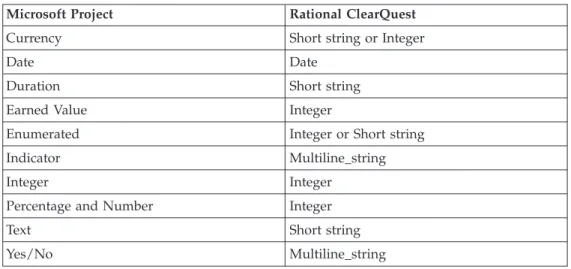
Table2 liststheMicrosoftProjectdatatypesthatmaptoProjectTracker datatypes. Table2.Datatypes
MicrosoftProject RationalClearQuest
Currency ShortstringorInteger
Date Date
Duration Shortstring
EarnedValue Integer
Enumerated IntegerorShortstring
Indicator Multiline_string
Integer Integer
PercentageandNumber Integer
Text Shortstring
Yes/No Multiline_string
Using
mapping
configurations
Youcancreatespecificfieldmappings fromRationalClearQuesttoMicrosoft Projects foreachrecordtype.Thesefieldsdo nothavetoappearinallrecord types. Forexample,youcanmaptheovertimefieldinthetaskrecordtype,but do nothavetoaddandmapthisfieldinthedefectrecordtype.
Attention: Whenyouplanyour mappingconfigurations,makesurethedatatype
forthefieldinMicrosoft ProjectissupportedinRationalClearQuest. IfRational ClearQuestdoesnotsupportthedatatype,orifthedatatypesdonotmatch,you cannotsynchronizetheinformation.Inthis situation,ProjectTrackerdoesnot displaya warningorerrormessage.
Toopenthemappingconfigurationwindow,clickTools>ClearQuest> AdministrativeTasks >MappingConfiguration.Usethiswindow toperform these tasks:
v Createtaskfieldmappings.
v ChangeprecedencesettingstoresolveconflictintheSynchronizeprocess.For
moreinformation,see“Rules forresolvingconflictinginformation” onpage25. v Deletemappings.
v
Enableparent/childmapping.Parent/childmappingpreservesthisrelationship
amongRationalClearQuestrecordsora summarytask/subtaskrelationship amongMicrosoftProjectplantasks whenexportingnewtasks orimportingnew records.
Note: Donotmodify theRational ClearQuestRecordIDfieldortheRational
ClearQuestRecordType field.Even thoughthesefieldscanbe mappedand areableto beedited,youshouldnotmodifythesefieldsbecausedata corruptionorunpredictablebehaviorbetweenRationalClearQuestand MicrosoftProjectcanoccur.
Creating
task
field
mappings
Thissectionexplainshow tomapan existingRationalClearQuestfieldtoa Microsoft Projectfield.ForinformationaboutcreatingRationalClearQuestfields, seetheIBMRationalClearQuestMultiSiteAdministrator’sGuideorconsultyour Rational ClearQuestadministrator.
Note: YoucannotmapafieldfromMicrosoft ProjecttoRationalClearQuestby
addinga fieldtoMicrosoftProjectandsynchronizing theinformation.The followingprocedureistheonlymethod foraddingfieldstoRational ClearQuestrecordtypes.
1. Toaddataskfieldmapping,clickTools>ClearQuest>AdministrativeTasks
>MappingConfiguration.
2. IntheMappingConfigurationwindow,selectarecordtype.
3. ClickAdd.
TheAddTaskFieldMappingwindowlistsall RationalClearQuestfieldsthat canbemappedtoyour MicrosoftProjectPlan. Italso presentsprecedence settings,whichareusedtoresolveconflictsduring synchronization. 4. Selecta RationalClearQuestfieldtomap.TheAddTaskFieldMapping
windowdisplays theMicrosoftProjectfieldsthatcanbeusedwith theRational ClearQuestfielddatatypeand forwhicha validmappingcanbemade.Select a Projectfield.
5. Selecta precedencesettingandclickOK.
6. Thenew mappingisdisplayed ontheTaskFieldMappingpage.ClickClose.
7. Adda newcolumntoyourMicrosoft Projectplanforthenew projectfieldfor
whichyouhavejustcreateda mapping.
Youmust synchronizeyourMicrosoft Projectplanand RationalClearQuest database beforeyoucantransfer databetweenthenew projectfieldandRational ClearQuestrecords.
Deleting
mappings
Toremovea mappingbetweenfieldsinMicrosoftProjectand aRational ClearQuestdatabase:
1. ClickTools>ClearQuest>AdministrativeTasks >MappingConfigurationto
opentheMappingConfigurationwindow.
2. On theTaskFieldMappingpage,selecttherowthatcontainsthefieldnames
youwanttoworkwith.
3. ClickDelete.Youarepromptedtoverifyyour action.ClickYes.
4. IntheMappingConfigurationwindow,clickClose.
5. InMicrosoftProject,removeorhidethecolumnforthefieldwhosemapping
youhavejustdeleted.
Thenew settingsareineffectthenext timeyouusetheSynchronizecommand.
Enabling
parent/child
mapping
Whenparent/childmappingisenabled,theserelationshipsamongRational ClearQuestrecordsarepreservedassummarytask/subtasks relationshipsamong Microsoft Projecttasks.Beforeyoufollowtheprocedureinthissection,usethe Rational ClearQuestDesignertoaddnewreference fields.Theseparentreference fields mustbe createdforallrecordtypestowhichthepackageswereappliedand theymust havethesame name(aswellastheirchildrenreferencelist).For
instructions,seethe″Addinga newfield″and ″Usingfieldstolinkrecords″inthe chapteraboutcustomizingschemasintheIBMRationalClearQuestMultiSite Administrator’s Guide.
1. ClickTools>ClearQuest>AdministrativeTasks >MappingConfigurations.
2. On theParent/ChildMappingpage,selectoneofthereference fieldsthatyou
addedbyusingtheRational ClearQuestDesignerintheClearQuestParent ReferenceField.
3. SelecttheEnableParent/ChildFieldMappingcheckbox.
4. IntheMappingConfigurationwindow,clickClose.
Thenew settingsareineffectthenext timeyouusetheSynchronizefunction. Note: Theseare theonlyreferencefields thatyoucanmapwithProjectTracker.
Youcannotmanuallymapreferencefields.
Chapter
5.
Importing
records
from
Rational
ClearQuest
ThischapterexplainshowtoimportrecordsfromaRationalClearQuestdatabase tocreatenew tasksina projectplan.
TheImport functionusesnewRational ClearQuestrecordstocreateMicrosoft Projecttasks; theUpdate functionworkswith recordsand tasksthatwere already linked.
Importing
records
from
a
Rational
ClearQuest
database
Whenyouimportrecords,youcancreateanew projectplanbybuildingonthe informationavailable inaRational ClearQuestdatabase.Youcanalsoaddnew tasks toanexistingprojectplan.
Tocreatenew projectplantasks fromRationalClearQuestrecords: 1. Opentheprojectplan.
2. ClickTools>ClearQuest>Import NewRecordsfromClearQuest.
InSelectRecordstoImportwindow,. youcanselectanexistingqueryforthe Rational ClearQuestdatabase orcreateanewquery(See“Creatingandusing queriesfor imports”onpage17).Whenyourunaquery,ProjectTracker displaystheresultsfromtheClearQuestdatabase.
3. ClickRunto runthequeryintheRational ClearQuestdatabase.
4. (Optional)Toreviewaparticular recordbeforeimportingit,youcanopenthe
record formsstoredin theRational ClearQuestdatabase.Double-clickthe record intheSelectRecordsto Importwindow.Closethewindowtocontinue importing.
5. Selecttherecordsyouwanttoimportand clickOK.
TheImportNewClearQuestRecordsToMSProjectPlanTaskswindowopens, andyoucanstarttheimportprocess.
6. ClickStart.
Thetasks arelistedwhiletheyarebeingcreatedastherecordsarecopiedfrom theRationalClearQuestdatabase.TheProgresswindowliststheIDandname ofeachrecord beingimported.Toreturntoyour projectplan,clickClose when youarefinishedimporting.
Note: IfyourRational ClearQuestdatabase containsacustom statefulrecordtype
thatyouwishtohaveimportedintoMicrosoftProject,usetheSelect RecordstoImportinto MicrosoftProject fromtheImport NewRecords FromClearQuestmenu.First,editanexistingqueryorcreateanew query andaddafilteronrecordtype.Thenselectallrecordtypesthatyouwishto importforthefilter.Youmayalsowanttoaddrecord_typeasadisplay fieldsothatyouknowtherecord typewhenyouimport.
Matching
resources
with
Rational
ClearQuest
users
Duringtheimportprocess,ProjectTrackercheckseachRationalClearQuestrecord toverify thattheentryintheOwnerfield(sometimescalledtheRational
ClearQuestuser field)matchesaResource nameintheprojectplan.IfProject Tracker encountersan Ownernamethatisnotusedintheprojectplan,it
interrupts theimportprocessandopens theSelectResourceMatchingClearQuest User window.
v
IfyouseeaResourcenameinMicrosoftProjectthatisequivalenttotheOwner
fieldinthelinkedRational ClearQuestrecord,selectthatnamefromthelistand clickChangeResource Name.
Theimportfunction cannotchangethevalue intheRational ClearQuest database.Attheendoftheprocess,theOwnerfieldinthedatabaserecordand theResource namefieldintheprojectplantaskmust havethesame entry. ProjectTrackeralsochanges theResource nameinthelistofvalidResource namesintheMicrosoft ProjectResourceSheetandtheMicrosoftProjectAssign Resourceswindow(click Tools>Assign Resources).Tofind theResource Sheet, usetheMicrosoftProjectHelp.
v
Ifyoudonotseeamatching resourcename, selectCreateResource.Project
TrackerfillsintheResourcename fieldintheprojectplantaskwith theentry thatisintheOwnerfieldoftheRationalClearQuestRecord.ProjectTrackeralso addsthenewentrytothelistofResourcenamesusedintheprojectplan. v IfyouclickCreate AllResources,ProjectTrackerfills intheResourcenamefield
intheprojectplantaskwiththeentryintheOwnerfieldforallRational ClearQuestdatabase recordsthatare beingimported.ProjectTrackerdoesnot openthe“SelectResourcematchingRational ClearQuestuser”window again duringthatimportprocess.
Saving
and
viewing
the
log
file
AsProjectTracker importstheRational ClearQuestrecords,itcreatesa progress loglisting eachrecordandthevalue ofeachfieldthatistransferred.
Youcansave thelogasarichtextformat(.rtf) fileandreviewittoverify thatall of theinformationthatwas importedisappropriateandinthecorrectformatfor your projectplan.Youcanopen thesavedfileinanytexteditoror wordprocessor. Itisalsoa goodpracticetokeepall logfiles inaseparate folderincasequestions arise abouttaskscreatedbytheimportprocess.
Tosave andread theprogresslogfile,click SaveLogintheImportNewRecords fromClearQuestwindowand specifythepathname.
Viewing
new
tasks
in
the
Microsoft
Project
plan
Asit importstherecordsselectedbythequeryintotheprojectplan,itcreates new projecttasks. InformationfromthefollowingRationalClearQuestfieldsiscopied tocreatea correspondingprojectplantask:
v TaskName/Headline
v AssignedResource
v ActualWork
v PlannedWork
v ActualStartDate
v ActualFinishDate
WhentheRationalClearQuestrecordsareconverted,thenewlycreatedtasks appearat theendoftheprojectplan.Youcanrepositionthenewtasksinthe projectplan, aslongastheyremainnonsummary tasks.
Thenew tasksinclude aCQType value.Thisvalue describesthetypeof record thatwas importedasdefinedinRationalClearQuest, forexample,Defector Enhancement.
Theprojectplannowincludesthenewtasks importedfromtheRational ClearQuestdatabase.
Creating
and
using
queries
for
imports
Aqueryisarequesttoretrievedatabaserecordsthatmeet thecriteriaspecified,for example,allrecordsofa certaintypeorall recordswhosevalue inafieldequalsor exceeds aspecifiedvalue, orallrecordscreatedaftera certaintime.
Youcanrunexistingpersonal andpublicqueries, modifyandrunanexisting query,and usetheClearQuestQuerywizardtocreateand runa newquery. Thequeries thatProjectTrackerusesareidenticaltoRational ClearQuestqueries; existingqueries mighthavebeencreatedwith RationalClearQuest. Ifyoudonot knowhowtocreateand usedatabase queries,seetheIBMRationalClearQuest Introduction.Formoreinformationaboutrunningaquery,seetheHelpinRational ClearQuest.
Toopena RationalClearQuestquerywindow,clickTools>ClearQuest >Import New RecordsfromClearQuest.
IntheWorkspacesectionatthetopofthewindow,youcanselecta personalor publicquery.
Afteryouselecta query,click Run.Ifyouwanttoseethecriteriausedtocreate thequerybeforeyourunit,click Edit.
Note: Forrecordstobe insertedintoProjectTracker foranyrecord typeotherthan
defect,createaquerytoretrievetheserecordsfromwithinRational
ClearQuest.Youcannotcreatea newquerytoretrieveanyrecord typeother thandefectusingtheProjectTrackerintegration.
Saving
a
master
copy
of
the
project
plan
Keep asecuremastercopyofthelastofficialversionoftheMicrosoftProject projectplan.Alwaysusethis mastercopyforallProjectTrackerfunctions.
Insomesituations,youmightwanttodistributeseveralcopiesoftheprojectplan. However, youcannotsafelyexportrecordsfromeachcopytotheRational
ClearQuestdatabase,becausechanges inonecopyoftheprojectplanmight conflictwith changesinanotherversion.Theprojectmanagermust beresponsible forintegrating changesfromallsourcesinto themastercopyof theprojectplan and usingthis mastercopytoexporttotheRationalClearQuestdatabase.
Chapter
6.
Exporting
tasks
from
Microsoft
Project
Thischapterexplainshowtoexporttasksfroma projectplanto createnew records ina RationalClearQuestdatabase.Italsodescribes howtosaveand reviewlog files createdduringtheexportprocess.
Rational
ClearQuest
record
types
and
required
fields
Whenyouexportprojectplantaskstocreatenew databaserecords,selecta Rational ClearQuestrecordtypeforeachnew record.
Depending ontherecord typeselected,youmight needtoentervaluesin
additionalrequiredfieldsforthatrecord type.Forexample,ifyouareexportinga taskand selectEnhancementRequestastheCQ RecordType, entera customer nameanda customerpriorityforthatrecord.Toentertheinformation,usethe submit forms.
Teammemberswho workwithRationalClearQuestusetheCQ recordtype andits requiredfieldstofindand analyzerecordsinthedatabase.For example,a
manager mightwanttocreateareportofallrecentenhancementrequestsandsort thembypriority.Thisoptionispossibleonlyif,during theexportprocess,you identified tasksthatrepresentenhancementrequestasEnhancementRequestrecord typesandmake anentry(High,Medium,orLow)intheCustomerPriorityfield.
Exporting
tasks
to
Rational
ClearQuest
Tasks fromaprojectplancanbeexportedfromMicrosoftProjectto createnew recordsinthedatabase.
Toexporttasks totheRational ClearQuestdatabase: 1. Opentheprojectplan.
2. IntheCQType fieldforaparticulartask,selecta validrecordtypefromthe
list.Repeatthisforeachtaskyouwanttoexport.
3. Click Tools>ClearQuest >ExportNewTasksToClearQuest.
4. IntheExportNewTaskstoClearQuestwindow,clickStart.
5. Ifanyfieldsare requiredforanyoftherecordtypesthatyouareexporting,
ProjectTracker promptsyouto adddatatothenewrecord beingcreated. v IfyouclickNo,thetaskisnotexportedtotheRational ClearQuestdatabase
(althoughitremainsintheprojectplan).
v IfyouclickYes,ProjectTrackerdisplays theformsusedinRational
ClearQuesttosubmitand modifydataforthatrecordtype.
6. On theRationalClearQuestforms,clickeachpagethatdisplays aredsquare,
and makeanentryineachrequiredfield(highlightedinred).Youcanalso enterinformationintheotherfieldsontheseforms.Afteryoucompletethe requiredfieldsforall tasksbeingexported,ProjectTrackerbeginstheexport process anddisplaysthenameofeachexportedtaskintheProgresswindow. 7. Click OKtosavethechangestothedatabaseand toyourprojectplan.
8. Select theShowall loggedinformation checkboxat anytimetoseefull
detailsaboutanexportedtaskand itsvalues.TheProgresswindow displays informationabouteachfieldineachexportedtask,includingthevalue ofthe
field.Whenthecheckboxiscleared,theExportNewTasksToClearQuest window displaysonlythenameofthetaskbeingcopiedtothedatabase. Whentheexportprocessiscomplete,clickOKtomake thechanges permanent inthedatabase.
9. Duringtheexportprocess,ProjectTrackercheckseachprojectplantaskto
verify thattheentryintheResourcename fieldmatchesoneoftheOwner fieldentriesalreadyinuseinthedatabase(theOwnerfieldisalsocalledthe user field).
Ifit encountersa Resourcenameinaprojectplantaskthatisnotinuseinthe database,Project TrackeropenstheSelectMatchingClearQuestUserwindow. v IfyouseeanOwnernamethatisequivalenttotheResourcefieldinthe
linkedprojectplantask,selectthatnamefromthelistandclickOK.Project TrackercopiestheentryintheOwnerfieldof thedatabase recordand replacesit intotheResourcenamefieldoftheprojectplantask.
v Ifyoudonotseeamatching username,click Cancel.Contactyour Rational
ClearQuestadministratortocreatethecorrectusernameinthedatabase. 10. WhenyoureturntotheExportingNewTaskstoClearQuestwindow,click
Save Log,tosave theinformationinarichtextformat(.rtf)file(see“Saving and viewingthelogfile” onpage25).
11. Click Closewhenexportingiscomplete.Thetaskyouexportedincludesa
uniqueRationalClearQuestRecordID.
Saving
a
master
copy
of
the
project
plan
Keep asecuremastercopyofthelastofficialversionoftheMicrosoft Project projectplanandalways usethis mastercopyforallProjectTrackerfunctions. The projectmanager mustbe responsibleforintegratingchanges fromallsources into themastercopyof theprojectplanandforusingthismastercopytoexport datatotheRational ClearQuestdatabase.Multiple projectmanagersmaywantto changecopiesoftheprojectplan.However, thesemanagerscannotsafelyexport recordsfromeachcopytotheRational ClearQuestdatabase,becausechanges in one copyoftheprojectplanmightconflictwith changesinanotherversion.
Viewing
new
records
in
the
database
Project Trackercreatesa newRationalClearQuestrecordforeachtaskand transfersthefollowingfieldsfromtheMicrosoftProjecttasktotherecord: v TaskName
v PlannedStartDate
v PlannedFinishDate
v PlannedWork
v ActualWork
v
RemainingWork
v ActualStartDate
v ActualFinishDate
v AssignedResource
Theplannedstart andenddatesfromtheprojectplantaskappearontheSchedule pageforthis record.Thesedatesare theresponsibility oftheprojectmanagerwho creates theprojectplan.
Assigning
resources
Microsoft Projectallowsseveralresourcestobeassignedtoa task,butRational ClearQuestallowsonlyoneresourcetobeassigned.Ifmorethanoneresourceis listed intheprojectplantask,ProjectTrackercarriesoveronlythefirstone.
Summary
tasks,
milestones,
or
only
filtered
rows
are
not
exported
ProjectTracker doesnotexportMicrosoftProjectsummarytasks,milestones, or onlyfilteredrows.Asummarytaskisa collectionof detailtasksthatisusedto summarize aphaseofaproject,butdoesnotinvolveworkindependent ofthe tasks thatitsummarizes.Amilestone marksa significanteventordeadline,but it hasneitherworknordurationassociatedwith it.ProjectTrackercreatesdatabase recordsfordetail tasks,butnotforsummarytasks ormilestones.
Microsoft ProjectfiltersdonotaffecttherowsexportedtoRational ClearQuest. Whenafilterisappliedand therowsdisplayedinMicrosoft Projectarelimited,all therows(andnotjustthefilteredrows)areexportedtoRational ClearQuest.
Changing
field
values
by
owners
AfterataskisexportedtoRational ClearQuest,some,butnotall,fieldsinthe resultingrecord canbe modifiedbytherecordowner.
Theowner istheteammemberresponsibleforperformingthetask.Thefieldsthat canbe modifiedarethose forwhichtheteammemberislikelytohavecorrect information,suchastheactualstart dateand theremainingwork.Thefieldsthat cannotbemodifiedarethose forwhichtheprojectmanagerismostlikelytohave correctinformation,suchastheplannedstartand enddate.
Entering
required
fields
when
the
task
has
no
entry
Whenthefieldinataskisblankandcorresponds toarequiredfieldinthe database record,ProjectTrackerpromptsyouforanentry.Whenyoumakean entry,thatvalue isincludedinthedatabaserecord,butthefieldintheprojectplan taskisstillblank.Whenthissituationoccurs, runthesynchronizefunction to ensurethatthetaskandtherecord havethesamevalue.
Chapter
7.
Synchronizing
data
Thischapterexplainshowtoupdateprojectplantasks withinformationfrom Rational ClearQuestdatabaserecordsandhowtosave andviewthelogfiles.It describes thebasicstepsfora bidirectionalsynchronizationoftheprojectplanand theRational ClearQuestdatabase.
Thechapteralso describestherulesthatare usedtoresolve conflictsthatarise during synchronization.
Synchronizing
Microsoft
Project
plans
and
ClearQuest
databases
ToupdateyourprojectplanorRationalClearQuestdatabase,clickTools> ClearQuest >SynchronizePlanwithClearQuest.Threeoptionsareavailable: v SynchronizeClearQuestandProject
v UpdateProjectfromClearQuest
v UpdateClearQuestfromProject
Thedefaultoption isSynchronizeClearQuestandProject.Itisatwo-waytransfer of information;updatesflowfromtheRationalClearQuestdatabasetotheproject plan, andthenfromtheprojectplantotheRationalClearQuestdatabase.When thetransfer iscomplete, thelinkedrecordsandtasks containthesame information. Use thisfunctionwith caution,becauseitchangesboththeRational ClearQuest database andtheprojectplan.AfterthechangesaresavedtotheRational
ClearQuestdatabase,youneedthehelpoftheRationalClearQuestadministrator tomake anycorrections.
TheUpdate ProjectfromClearQuestoptionupdatesallmappedfieldswithin Microsoft ProjectfromRationalClearQuest. Nochanges arepropagatedfrom Microsoft ProjecttoRationalClearQuest.
TheUpdate ClearQuestfromProject optionupdatesRationalClearQuestrecords with informationfromMicrosoftProject.
Synchronizing
the
project
plan
with
the
database
Duringa project,youoftenupdatetheprojectplantorespondtochangesin requirements, priorities,andresources.YoucanusetheSynchronizePlanwith ClearQuest commandtoconvey thesechangestomembers throughProject Tracker.ThecommanddoesnotaddrecordstoRationalClearQuestnordoesit removerecordsfromtheMicrosoftProjectplanorRationalClearQuest.Youmust usetheimportfunction toaddrecords.Toremoverecords,youmustdeletethem manually.
For example,ifrevisingtheprojectplanchangesthePlannedStartDateand PlannedEndDateforsometasks,thesynchronizefunction copiesthose changesto theappropriaterecordsintheRationalClearQuestdatabase.Whenteammembers next runa ToDoListqueryontheRationalClearQuestdatabase,theyseealistof tasks thatarescheduledforthefuture, andtherecordsforthosetasksinclude the updatedplanningdates.
Project TrackerfirstpullsinformationfromlinkedRational ClearQuestdatabase recordsinordertoupdatethefollowingvaluesin theprojectplantasks: v TaskName/Headline
v AssignedResource
v ActualWork
v PlannedWork
v RemainingWork
v
ActualStartDate
v ActualFinishDate
Project Trackerusesinformationfromthefollowingvaluesintheprojectplantask and toupdatethelinkedRational ClearQuestdatabase records:
v TaskName/Headline
v AssignedResource
v PlannedStartDate
v PlannedFinishDate
v PlannedWork
v
RemainingWork
v PlannedDuration
v RemainingDuration
v ActualWork
v ActualStartDate
v ActualFinishDate
NotethatMicrosoftProjectfiltersdo notaffecttherowssynchronizedtoRational ClearQuest. Whena filterisapplied andtherowsdisplayed inMicrosoftProject are limited,alltherows(and notjustthefilteredrows)are synchronizedto Rational ClearQuest.
Notealsothatif ataskinMicrosoft Projectcontainsafieldwith datalargerthan canbe containedwithintheassociatedRational ClearQuestfield,thattaskwillnot be synchronized.An errormessagewilldisplaylistingtheproblem.
Synchronizing
linked
tasks
and
records
Tosynchronize theRational ClearQuestdatabaseandtheMicrosoftProjectplan: 1. Opentheprojectplan.
2. ClickTools >ClearQuest >SynchronizePlanWithClearQuest.
3. SelectSynchronizeClearQuestandProject.
4. (Optional)Todisplaydetailsaboutthechangedvalues,selecttheShowall
loggedinformationcheck box
5. ClickStart.Aseachtaskissynchronized,youseethelogtransactionsthatare
created.
Matching
resources
with
Rational
ClearQuest
users
Duringthesynchronizeprocess,ProjectTracker twicecomparesentriesinthe Owner fieldofRationalClearQuestdatabaserecordswith thecorresponding entriesintheResourcename fieldofthelinkedMicrosoft Projectplantasks to verify thattheyarethesame.Thiscomparisonhappens firstwhenthesynchronize
function extractsmodifieddatabase recordstoupdateprojectplantasks,andagain whenthefunction selectsmodifiedprojecttasksto updatedatabaserecords. IfProjectTracker encountersan OwnernameinaRational ClearQuestrecord that isnotinuseintheprojectplan,it interruptsthesynchronize functionand opens theSelectResourcematching ClearQuestuser window.Formoreinformation,see “Matchingresourceswith RationalClearQuestusers”onpage16
Saving
and
viewing
the
log
file
Afterthesynchronizeprocessiscomplete,ProjectTracker promptsyoutosave changes. Becausethechanges totheRationalClearQuestdatabasearealready committed, savethechangestotheprojectplan.Saving thechanges ensuresthat informationshared betweentheRational ClearQuestdatabaseandtheprojectplan remainsconsistent.
1. ClickOK tosavetheprojectplan.
2. InthePlanningWizard window,specifywhethertosave theprojectplanwith
orwithoutabaselineandclick Save.
3. IntheSynchronizePlanWithClearQuestwindow,click SaveLogtosavethe
loginrichtextformat(.rtf)file.Youcanopenthesavedfileusinganytypeof texteditororword processor.
4. ClickClose whenyouarefinished.
Rules
for
resolving
conflicting
information
Sometimes conflictinginformationisencounteredwhensynchronizingtheproject planwiththeRational ClearQuestdatabasebecause dataischangedindependently inthetwosystems.Forexample,theprojectmanagermight changethestartdate fora taskinMicrosoftProject,andtheteammemberresponsibleforthattask might enteradifferentdateintheRational ClearQuestdatabase.
Tosolve thisproblem,youcanapplya setofsynchronizationrulesforeach corresponding RationalClearQuestandProjectfield.Youset theserulesonthe TaskFieldMappingpageorintheMappingConfigurationwindow.
Setting
synchronization
precedence
Tospecifya precedenceorderforresolvingconflictsbetweeninformationin Rational ClearQuestandinformationinMicrosoftProject:
1. Opentheprojectplan.
2. ClickTools>ClearQuest>AdministrativeTasks >MappingConfiguration.
3. IntheMappingConfigurationwindow,clicktheTaskFieldMappingtab.
4. Highlight thefieldyouwanttoworkwith andclickEdit.
5. IntheEditFieldMappingwindow,selectthepreferredconflictresolution
behaviorandclickOK.
Overriding
the
synchronization
rules
Insomecases,youmight wanttooverride thesynchronizationrules.Todo this, view thelogof thetasks thatwereupdatedorsynchronized(see“Savingand viewingthelogfile”onpage25),andmanuallyupdatethetasks andrecordsby usingMicrosoft ProjectandRationalClearQuest.
Chapter
8.
Additional
administrative
procedures
Thischapterdescribesadministrativeproceduresthatyoumayneedtoensure data iscorrectlysynchronizedbetweentheprojectplanand theRational ClearQuest database.Italso providesadditionalinformationthatyoucanusefor
troubleshooting.
Changing
required
fields
in
Rational
ClearQuest
IftheRational ClearQuestadministratorchanges theRational ClearQuestdatabase schematoaddnewrequiredfieldsormakeexistingfieldsrequired, the
administratormust workcloselywiththeprojectmanagertoensurethatevery taskintheMicrosoft Projectprojectplanhasanentryinthisfield.
Ifonetaskin theMicrosoft Projectprojectplandoesnothaveanentryinthe newlycreated requiredfield,thattaskcannotbe exportedorsynchronized.Project Tracker displaysanerrormessageandfailstoexportorsynchronizethattask.
Nesting
project
plans
AfteraprojectplanislinkedtoaRational ClearQuestdatabase,it isnotpossibleto nest otherprojectplansinthelinkedplan.Ifyoutrytodoso, runningthe
synchronize functioncausesruntimeerrorsand unpredictablebehavior. Insteadofnesting aprojectinthelinkedproject,enterthenew tasksintoyour linkedproject.
Task
name
truncated
when
transferred
TheRational ClearQuestHeadlinefieldcancontainupto125 characters.Ifyou exporta projectplantaskwhoseTaskNameexceeds 125characters,onlythefirst 125 aretransferredto theHeadlinefieldoftheRationalClearQuestrecord.Youcan seewhenthisoccursintheprogresslog.
Ifyouusetheexportfunction andthenthesynchronizefunction,thetruncated version mightreappearintheprojectplanTaskNamefield.Duringthe
synchronize process,thetruncatedversionthatwas transferredtotheHeadline fieldintheRational ClearQuestrecord iscopied backtotheprojectplanTask Name field,overwritingthelongerversion.
Removing
an
owner
from
the
Rational
ClearQuest
database
TheRational ClearQuestadministratorcanremovenamesfromthelistofactive users.Thislistconsistsofthose usernamesthatarevalidentriesin theOwner fieldof theRational ClearQuestdatabase.
However, whenanameisremovedfromthelistofactiveRational ClearQuest users,itisnotremovedfromthelistofusersthatProjectTrackerrecognizesduring theimport,export,andsynchronize processes.TheRational ClearQuest
administratormust notifyeveryprojectmanagerwhena RationalClearQuestuser isremovedfromtheactiveuserslist.Theprojectmanager canthen removethe resourcenamefromProjectTracker.
Duringanyoftheseprocesses,whenProjectTrackerfindsaResourcenameinthe projectplanthatdoesnotmatcha recognizedRationalClearQuestownername, it displays alistofrecognizedRational ClearQuestusers.Thelistincludesthename of theRational ClearQuestuser whowas removedfromthelistofactiveusers. Selecting thisuser storesthenameof someonewhonolongerworks ontheproject in theResourcenamefieldoftheprojectplantask.
Deleting
the
actual
end
date
from
a
Rational
ClearQuest
record
ARational ClearQuestuser canmodifytheActualEndDatefieldina Rational ClearQuestdatabaserecord tomakeitblank.IftheSynchronizefunctionisrun, thatblank isnotcopiedinto theActualFinishDatefieldinthelinkedrecord inthe projectplan. Instead,whateverdatewasintheActualFinishDate fieldremains there. MicrosoftProjectdoesnotletProjectTrackercopy anemptyfieldtoan ActualFinishDatefieldthatalreadyhasa value.
TodeterminewhethertheActualEndDatefieldisblank,youortheRational ClearQuestadministratorcanruna queryoftheRational ClearQuestrecords.
Using
functions
together
to
ensure
updated
information
The synchronizefunctionworksonlywithtasks thatwerelinkedtorecordsduring an importorexportprocess.Tasksthatdo nothavea linkedrecordandrecords thatdo nothavea linkedtaskareignored.
Toensurethata projectplanand aRational ClearQuestdatabase arefullyupdated, youmightneed tousemorethanonefunction.
Updating
a
project
plan
Ifteammembershaveaddednew recordsto theRational ClearQuestdatabase, transfer thoserecordstotheprojectplanasnewtasks.Anyrecordsthatwere added sincethelast timethattheimportfunction ranareignoredbecausetheyare notyet linkedtoprojectplantasks.
Toensurethatbothnew andmodifiedrecordsintheRational ClearQuestdatabase are reflectedintheprojectplan,youmight needtousetheimportfunctionto transfer thenewrecords,and thenusethesynchronize functiontocapturechanged informationfromexistingrecords.
Updating
a
Rational
ClearQuest
database
Iftheprojectmanageradded newtaskstotheMicrosoftProjectplan, transfertasks totheRational ClearQuestdatabase asnew records.
Toensurethatbothnew andmodifiedtasksarereflectedintheRational
ClearQuestdatabase,usetheexportfunction totransferthenewtasks,and then usethesynchronizefunctiontocapturechangedinformationfromexistingtasks.
Updating
the
Rational
ClearQuest
record
types
list
Duringa project,theRational ClearQuestsystemsadministratormightaddnew record typestotheRational ClearQuestdatabase andremoveobsoleteones. Ifthis happens, usetheUpdateClearQuestRecordTypesListcommand.Whenyouuse this command,ProjectTrackerupdatestheClearQuestRecordTypesListforthat projectplantoincludenew validrecordtypes.Alternatively,youcanconvertthe
record typefora newtasktooneofthetypesalreadyonthelist.Youcannot importtherecordunlessyouchooseoneofthesemethods.
Toupdatethelist,click Tools>ClearQuest >AdministrativeTasks>Update ClearQuest RecordTypesList.
Deleting
tasks
and
records
Whenyoudeletea taskfromtheprojectplan,ProjectTrackerdoesnotdeletethe corresponding RationalClearQuestrecord.YoucanleavetheRationalClearQuest record inthedatabase,oryoucanremoveitinRational ClearQuest.Youmust track alltasksdeletedfromtheprojectplanand takethecorrectaction ineach case.
Thelogcreatedbythesynchronizefunctionincludesa messagethatindicates whena linkedtaskcannotbefoundfora RationalClearQuestdatabaserecord.To find thesemessagesand verifythattheappropriate resultwasachieved,seethe log.
Whenyoudeletea recordfromtheRationalClearQuestdatabase,youcanleave thetaskintheprojectplan,oryoucanremoveit inMicrosoftProject.Youmust track allrecordsdeletedfromtheRational ClearQuestdatabase andtakethe correctaction ineachcase.
Appendix.
Notices
Thisinformationwasdevelopedforproductsandservices offeredintheU.S.A. IBM maynotoffertheproducts,services,orfeaturesdiscussedinthisdocumentin othercountries.Consultyour localIBMrepresentativeforinformationonthe productsand servicescurrentlyavailableinyourarea.Anyreferencetoan IBM product, program,orserviceisnotintendedtostateorimplythatonlythatIBM product, program,orservicemaybe used.Anyfunctionallyequivalentproduct, program, orservicethatdoesnotinfringeanyIBMintellectualpropertyrightmay be usedinstead.However, itistheuser’sresponsibility toevaluateandverifythe operationofanynon-IBMproduct,program, orservice.
IBM mayhavepatentsorpendingpatent applicationscoveringsubjectmatter described inthisdocument.Thefurnishingofthisdocumentdoesnotgrantyou anylicensetothesepatents.Youcansend licenseinquiries,inwriting,to: IBM DirectorofLicensing
IBM CorporationNorthCastleDrive Armonk,NY10504-1785
U.S.A.
For licenseinquiriesregardingdouble-byte(DBCS)information,contacttheIBM IntellectualProperty Departmentinyourcountryorsendinquiries,in writing,to: IBM WorldTradeAsiaCorporationLicensing
2-31 Roppongi3-chome,Minato-ku Tokyo106,Japan
Thefollowingparagraphdoesnotapplyto theUnited Kingdomor anyother country wheresuchprovisionsareinconsistentwithlocallaw:
INTERNATIONALBUSINESSMACHINESCORPORATIONPROVIDES THIS PUBLICATION″ASIS″WITHOUTWARRANTYOFANYKIND,EITHER EXPRESSORIMPLIED,INCLUDING,BUTNOTLIMITED TO,THEIMPLIED WARRANTIESOFNON-INFRINGEMENT,MERCHANTABILITYORFITNESS FORAPARTICULARPURPOSE.Somestatesdo notallowdisclaimerofexpress or impliedwarrantiesincertaintransactions,therefore,thisstatementmaynotapply toyou.
Thisinformationcouldinclude technicalinaccuraciesortypographicalerrors. Changes areperiodicallymadetotheinformationherein;these changeswillbe incorporatedinneweditionsof thepublication.IBM maymakeimprovements and/or changesintheproduct(s)and/ortheprogram(s)describedinthis publication atanytimewithoutnotice.
Anyreferencesinthisinformationtonon-IBMWebsitesareprovidedfor
convenienceonlyanddonotinanymannerserveasanendorsementofthoseWeb sites.Thematerialsat thoseWebsitesarenotpartof thematerials forthisIBM productanduseofthoseWebsitesisatyour ownrisk.
IBM mayuseordistribute anyoftheinformationyousupplyinanywayit believes appropriatewithoutincurringanyobligationtoyou.
Licenseesof thisprogramwhowishtohaveinformationaboutit forthepurpose of enabling:(i)theexchangeofinformationbetweenindependentlycreated
programs andotherprograms(includingthis one)and(ii)themutualuseofthe informationwhichhasbeenexchanged,shouldcontact:
IBM Corporation DepartmentBCFB 20Maguire Road Lexington,MA02421 U.S.A.
Such informationmaybeavailable,subjecttoappropriatetermsandconditions, includinginsomecases,paymentof afee.
The licensedprogramdescribedinthis documentandalllicensedmaterial
available foritareprovidedbyIBMundertermsoftheIBMCustomerAgreement, IBM InternationalProgramLicenseAgreementoranyequivalentagreement betweenus.
Anyperformancedatacontained hereinwas determinedinacontrolled
environment.Therefore,theresultsobtained inotheroperatingenvironmentsmay vary significantly.Somemeasurementsmayhavebeenmadeondevelopment-level systemsandthereisnoguaranteethatthesemeasurementswillbethesameon generallyavailable systems.Furthermore,somemeasurementmayhavebeen estimatedthrough extrapolation.Actualresultsmayvary.Usersof thisdocument shouldverifytheapplicabledatafortheirspecific environment.
Informationconcerningnon-IBMproductswasobtained fromthesuppliers of those products,theirpublished announcementsorotherpubliclyavailablesources. IBM hasnottestedthoseproductsandcannotconfirmtheaccuracy of
performance, compatibilityoranyotherclaims relatedtonon-IBMproducts. Questionsonthecapabilitiesofnon-IBMproductsshouldbe addressedtothe suppliers ofthoseproducts.
COPYRIGHT LICENSE:
Thisinformationcontainssampleapplicationprogramsinsourcelanguage,which illustrates programmingtechniquesonvariousoperatingplatforms.Youmaycopy, modify, anddistributethese sampleprogramsinanyformwithoutpaymentto IBM, forthepurposesofdeveloping,using,marketing ordistributingapplication programs conformingtotheapplicationprogramminginterface fortheoperating platformforwhichthesampleprogramsarewritten.Theseexampleshavenot been thoroughlytestedunderallconditions.IBM,therefore,cannotguaranteeor imply reliability,serviceability,or functionoftheseprograms.Youmaycopy, modify, anddistributethese sampleprogramsinanyformwithoutpaymentto IBM forthepurposesofdeveloping,using,marketing,ordistributingapplication programs conformingtoIBM’sapplicationprogramminginterfaces.
Eachcopy oranyportionofthese sampleprogramsoranyderivativework,must include acopyright noticeasfollows:
(c)(yourcompanyname)(year).Portionsofthiscodeare derivedfromIBMCorp. Sample Programs.(c)CopyrightIBM Corp._entertheyearoryears_.Allrights reserved.
Additional legalnotices aredescribedinthelegal_information.htmlfilethatis includedinyourRational softwareinstallation.