Configuring Dialogic
®
Host Media Processing
Software Release 3.0
for Windows
®
Software
Executive Summary
Designing a telephony and/or multimedia system with a software model allows for flexible system designs to match specific customer requirements. Dialogic® HMP Software is an excellent platform to build your solution to the customers’ specific requirements.
Knowing how to configure a Dialogic HMP Software runtime license enables you to choose the exact functionality that benefits your customers using Dialogic® Host Media Processing Software Release 3.0 for Windows®, including the support of the Dialogic® HMP Interface Boards that provide PSTN connectivity for building converged TDM and IP solutions.
Table of Contents
Configuring Media and Interface Resources ... 2
Types of Resources ... 2
Media Resources ... 2
IP Network Interface Resources ... 2
IP Call Control Resources ... 2
Summary of Available Resources ... 3
Rules for Combining Resources ... 3
Combining Resources to Create Basic IP Media Sessions ... 4
Multimedia with IVR Session Example ... 4
Voice Mail Session Example ... 4
Speech-Enabled IVR Session Example ... 4
T.38 Fax Session Example ... 4
Combining Resources to Create Sessions for a Call Center ... 4
RTP Session Using G.729 Example ... 4
RTP Session Using G.711 Example ... 4
IVR/Auto-Attendant Session Using G.711 Example ... 4
Combining Resources to Create Sessions for a Conference Server ... 5
Provisioning Examples ... 6
Unified Messaging Server Example ... 7
IP Call Center Example ... 8
Hybrid Call Center Example ... 8
Summary of Dialogic HMP Software 3.0 Resources ... 10
Configuring Media and Interface Resources
Dialogic® Host Media Processing Software Release 3.0 for Windows® has a flexible software license model for resource provisioning rather than the fixed quantities model that is delivered in hardware boards. Choosing a customized “package” of resources for each license based on the types of resources available and the rules for com-bining them is a relatively straightforward task.
Note: Information in this document is valid for Dialogic HMP Software 3.0. This information is subject to change in future releases of the software.
Types of Resources
The two general classes of resources available in Dialogic HMP Software 3.0 are Media and Interface.
Media Resources
Media resources are used for voice and video applications, such as video mail, video portal, voice mail, or Interactive Voice Response (IVR). The five types of Media resources are as follows:
• Voice for functions such as play/record, tones, call progress, etc.
• Continuous Speech Processing (CSP) as an add-on to voice resources and required for speech enablement. See the Rules for Combining Resources section for more information.
• Conference • Fax Termination
• A Multimedia resource for play/record of H.263 video and G.711 audio streams
Access to Media resources is available through the Dialogic® R4 API and Dialogic® MM API. IP Network Interface Resources
Interface resources are grouped in two categories: • IP Media Streaming
• IP Call Control
IP Media Streaming Resources
IP Media Streaming resources provide the functional-ity required to stream media between Dialogic HMP Software 3.0 and IP clients using the Real-time Transport Protocol (RTP). Two types of licensable resources are offered with Dialogic HMP Software:
• Basic RTP G.711 — Acts as a “pipe” to establish an RTP connection between Dialogic HMP Software 3.0 and one remote IP endpoint. Each Voice over IP (VoIP) call into the server running Dialogic HMP Software 3.0 requires one RTP resource. This resource provides RTP streaming using the ITU-T G.711 voice coder.
• Enhanced RTP — Enables customers to implement the G.723.1, G.729a, and G.729ab coders for stream-ing over RTP. A Basic RTP G.711 resource is required for each Enhanced RTP to become operational. See the Rules for Combining Resources section for more information.
IP Call Control Resources
The IP Call Control resources are required to access IP Call Control functionality provided through the H.323 and SIP protocol stacks from RADVISION, which are included with Dialogic HMP Software. Access to IP Call Control resources is available through the Dialogic® Global Call API. Both H.323 and SIP are included in a single resource.
The use of the Global Call API is optional, and is enabled when IP Call Control resources are licensed with Dialogic HMP Software. Alternatively, customers can choose to use their own call control stacks.
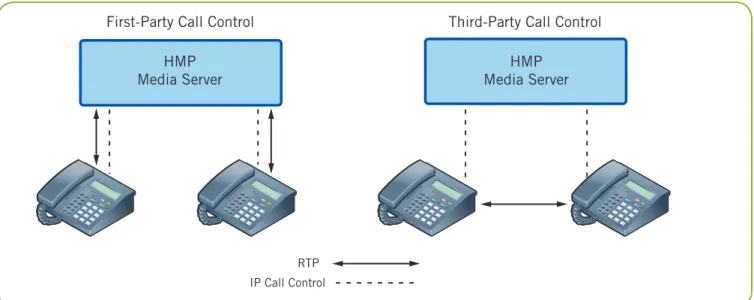
IP Call Control resources can be used in two modes: first party call control and third party call control. When used in first-party mode, the IP Call Control resources are directly tied to a corresponding number of RTP connections — each call that is controlled by Dialogic HMP Software 3.0 is routed through the media server. (For example, 60 RTP G.711 connections will require 60 IP Call Control resources.)
Dialogic also supports third party call control, giving developers the ability to set up SIP sessions without RTP media, thus enabling a “back-back” user agent (B2BUA) type application. The RTP media stream goes directly from one SIP endpoint to another. This allows for many more endpoints to be controlled by Dialogic HMP Software 3.0 than media streams passing through the media server itself (see Figure 1). Third-party mode is only available for SIP call control.
When IP Call Control resources are used in first-party mode, they must be used on IP connections. For example, on a system with 60 licensed Basic RTP G.711 resources, 60 IP Call Control resources are required. When licensed in third-party mode, the number of IP
Call Control resources must be equal to (and can be greater than) the number of RTP sessions.
Note: A server must operate either in first- or third-party mode when using IP Call Control. Summary of Available Resources
In summary, eight types of resources are available with Dialogic HMP Software 3.0:
Media
• Voice • Speech • Conference • Fax Termination • Multimedia
IP Network Interface
• IP Media Streaming — Basic RTP – G.711 — Enhanced RTP • IP Call Control
Rules for Combining Resources
Some resources cannot be used alone, and must be combined with other resources. The following table lists the resources and identifies if a resource is required for using it.
Resource Requires the Resource(s)
Speech Voice
Enhanced RTP Basic RTP G.711
Multimedia Basic RTP G.711
Voice, conferencing, or fax used in an IP-only Basic RTP G.711 environment and used with an external endpoint
(without Dialogic® HMP Interface Boards)
Note: Voice resources and Conferencing resources used to record a conference would not require a Basic RTP G.711 resource.
HMP Media Server First-Party Call Control
RTP IP Call Control
HMP Media Server Third-Party Call Control
Combining Resources to Create Basic IP
Media Sessions
Dialogic HMP Software 3.0 resources are combined to enable various sessions in an application, just as they would if telephony boards were in use. The following are examples of sessions (examples are for IP-based media servers):
• Multimedia with IVR • Voice mail
• Speech-enabled IVR • T.38 fax
Multimedia with IVR Session Example
A single multimedia (audio/video) session using H.263 as the video coder and G.711 as the audio coder along with SIP-based call control using the Global Call API requires:
• A Multimedia resource for play/record of H.263 video and G.711 audio streams
• A Voice resource to provide media resources for DTMF detection
• A Basic RTP G.711 resource
• An IP Call Control resource for SIP call control using the Global Call API
Voice Mail Session Example
A single voice mail session using G.729 and the H.323 call control stack requires:
• A Voice resource to provide media resources for play/ record and DTMF detection
• A Basic RTP G.711 resource
• An Enhanced RTP resource for G.729 support • An IP Call Control resource for Global Call API
support of H.323 and SIP
Speech-Enabled IVR Session Example
A single speech-enabled IVR session using G.711 and the SIP call control stack requires:
• A Voice resource to provide media resources for play/ record
• A Speech resource for speech enablement via CSP • A Basic RTP G.711 resource
• An IP Call Control resource for Global Call API support
T.38 Fax Session Example
A single fax session using the Global Call API requires: • A Fax resource
• A Basic RTP G.711 resource
• An IP Call Control resource for Global Call API support
Note: Fax sessions never require Enhanced RTP resourc-es.
Combining Resources to Create Sessions
for a Call Center
For a call center, two kinds of sessions are basic: RTP sessions in which a customer calls an agent or an agent calls another agent, and IVR or auto-attendant sessions. Global Call API is used in the following examples. RTP Session Using G.729 Example
A single voice call session using G.729 requires:
• A Voice resource to provide a Media resource for the call
• A Basic RTP G.711 resource
• An Enhanced RTP resource for G.729 support • An IP Call Control resource for Global Call API
support
RTP Session Using G.711 Example
A single voice call session using G.711 requires:
• A Voice resource to provide Media resources for the call
• A Basic RTP G.711 resource
• An IP Call Control resource for Global Call API support
IVR/Auto-Attendant Session Using G.711 Example A single IVR/auto-attendant session using G.711 requires:
• A Voice resource to provide Media resources for the call to the IVR/auto attendant
• A Basic RTP G.711 resource
• An IP Call Control resource for Global Call API support
Since the IVR/auto attendant is not speech-enabled, only a Voice resource is required.
Combining Resources to Create Sessions
for a Conference Server
A conference server usually requires one type of session, but provision for different coders may be needed. In addition, a conference is often recorded. The ability to record a conference requires a single Voice resource and one additional Conference resource.
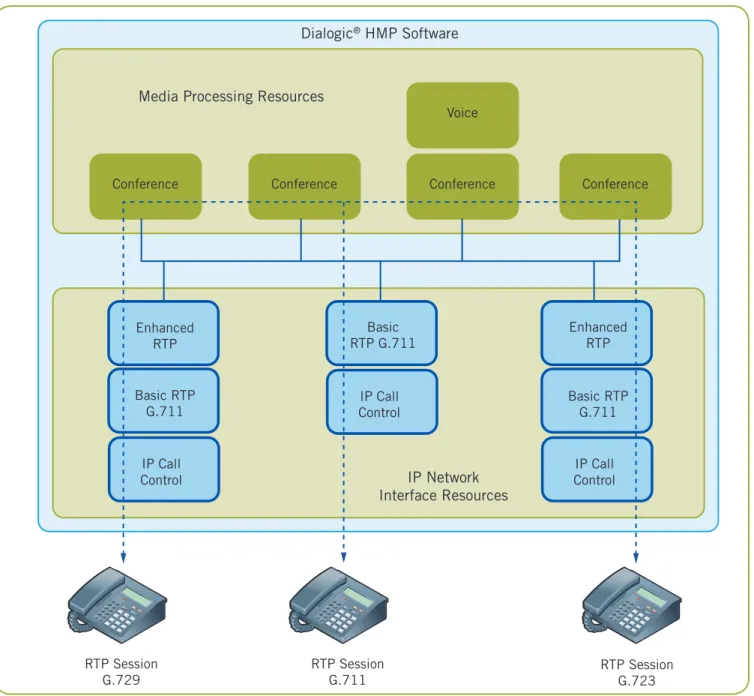
The following is a list of resources needed for a three- session conference, assuming three endpoints: one using G.711, one using G.723, and one using G.729. The conference also must be recorded.
• A Voice resource to provide a Media resource for recording the conference
• Four Conferencing resources, one for each of the three conference participants, plus one to connect the Voice resource to the conference so that it can be recorded • Three Basic RTP G.711 resources, one for each
conferee
• Two Enhanced RTP resources for G.723 and G.729 support
• Three IP Call Control resources for Global Call API support
Figure 2 shows how these resources are grouped.
Conference
Basic RTP G.711 IP Call Control
RTP Session G.729
Enhanced RTP Basic
RTP G.711
IP Call Control IP Call
Control Basic RTP
G.711 Enhanced
RTP
RTP Session
G.711 RTP SessionG.723
Conference
Conference Conference
Voice
IP Network Interface Resources Media Processing Resources
Dialogic® HMP Software
The number of Enhanced RTP resources governs the number of RTP sessions that will allow the use of low- bit-rate coders and lower bandwidth usage. The number of Enhanced RTP resources must be equal to or less than the number of Basic RTP G.711 resources. The number of IP Call Control resources must equal the number of Basic RTP G.711 resources if Global Call API support is required.
Provisioning Examples
The common types of solutions in which Dialogic HMP Software 3.0 is used include unified messaging servers and IP call centers. Hypothetical examples for provisioning such solutions are provided.
Voice Mail
Session G.729 IVR Session G.711Speech-Enabled
T.38 Fax Session G.711
T.38 Fax Gateway Voice
IP Call Control Basic RTP
G.711 Basic
RTP G.711
IP Call Control IP Call
Control Basic RTP
G.711 Enhanced
RTP
T.38 Fax Voice
Speech
IP Network Interface Resources Media Processing Resources
Dialogic® HMP Software
Unified Messaging Server Example
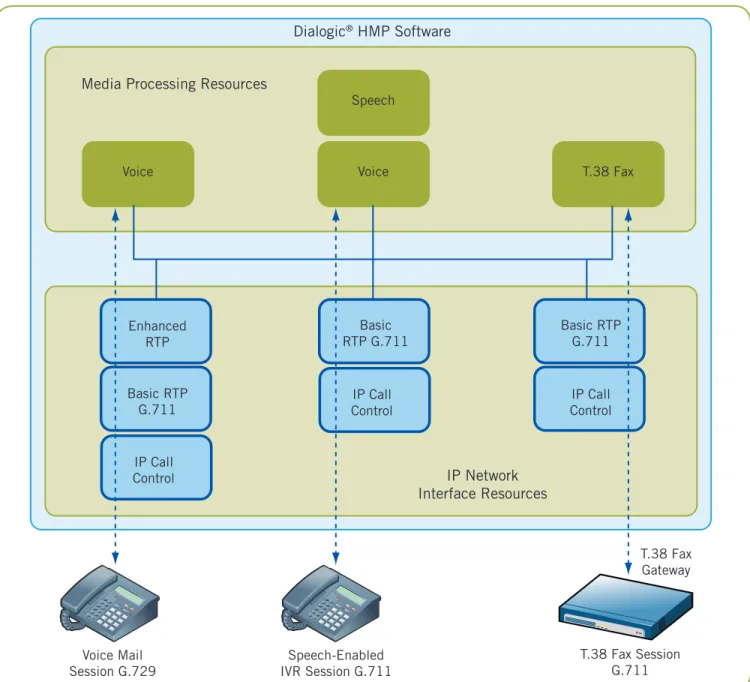
Table 1 provides the requirements for a unified messaging server and the required Dialogic HMP Software 3.0 resources.
Scenario Requirements Resource Required
A unified messaging server with 120 sessions, 120 Basic RTP G.711 resources with 60 Enhanced RTP resources 60 of which use low bit rate coders
Use of the Dialogic Global Call API 120 IP Call Control resources
A maximum of 30 users of voice applications, 30 Voice resources and 10 Speech resources such as IVR and voice mail, 10 of which are
speech enabled
30 conference participants 30 Conference resources
5 fax sessions 5 Fax resources
Table 1. Unified Messaging Server Requirements
Figure 3 shows how these resources are grouped.
RTP Session
G.729 RTP SessionG.711
IVR/AA Session G.711 IP Call Control Basic RTP
G.711 Basic
RTP G.711
IP Call Control IP Call
Control Basic RTP
G.711 Enhanced
RTP
Voice
IP Network Interface Resources Media Processing Resources
Dialogic® Host Media Processing Software
IP Call Center Example
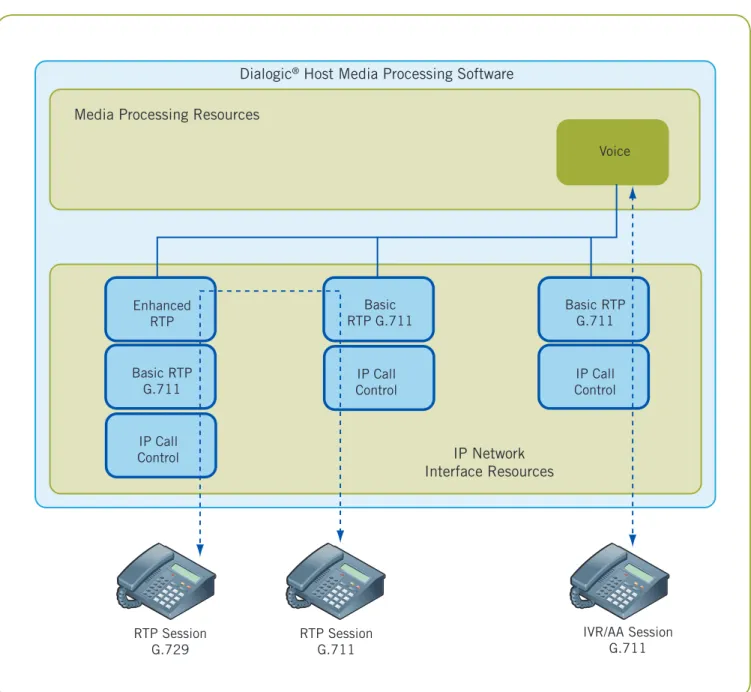
Table 2 provides the requirements for an IP call center and the required Dialogic HMP Software 3.0 resources.
Scenario Requirements Resource Required
An IP call center with 40 agents and 80 trunk lines 120 Basic RTP G.711 resources with 60 Enhanced RTP resources for incoming calls, requiring 120 sessions, 60 of
which will allow the use of low-bit-rate coders
Use of the Dialogic Global Call API 120 IP Call Control resources
A maximum of 80 voice ports to enable playing of 80 Voice resources and 30 Speech resources prompts or recording messages, with 30 possible
speech-enabled sessions
30 conferencing sessions for coaching and monitoring 30 Conference resources A maximum of 20 conference ports for agent 20 Conference resources coaching and monitoring
Table 2. IP Call Center Requirements
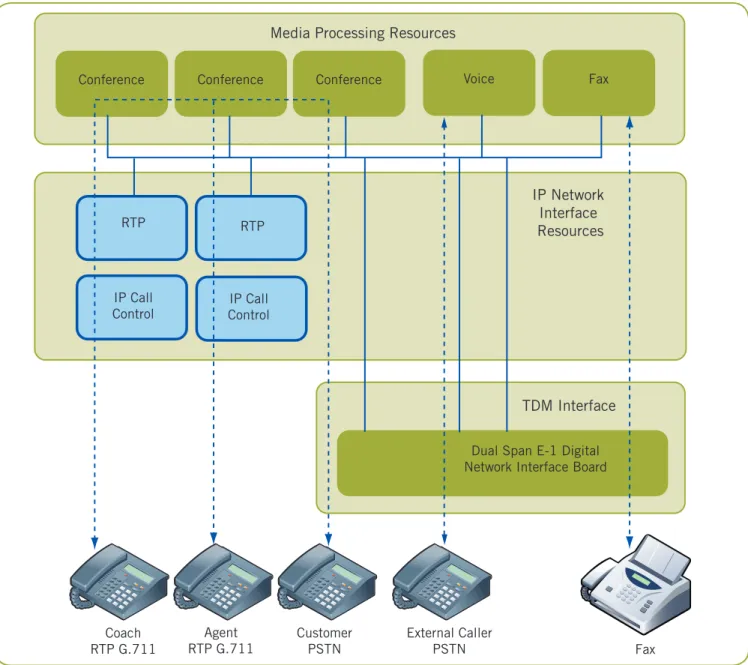
Figure 4 shows how these resources are grouped. Hybrid Call Center Example
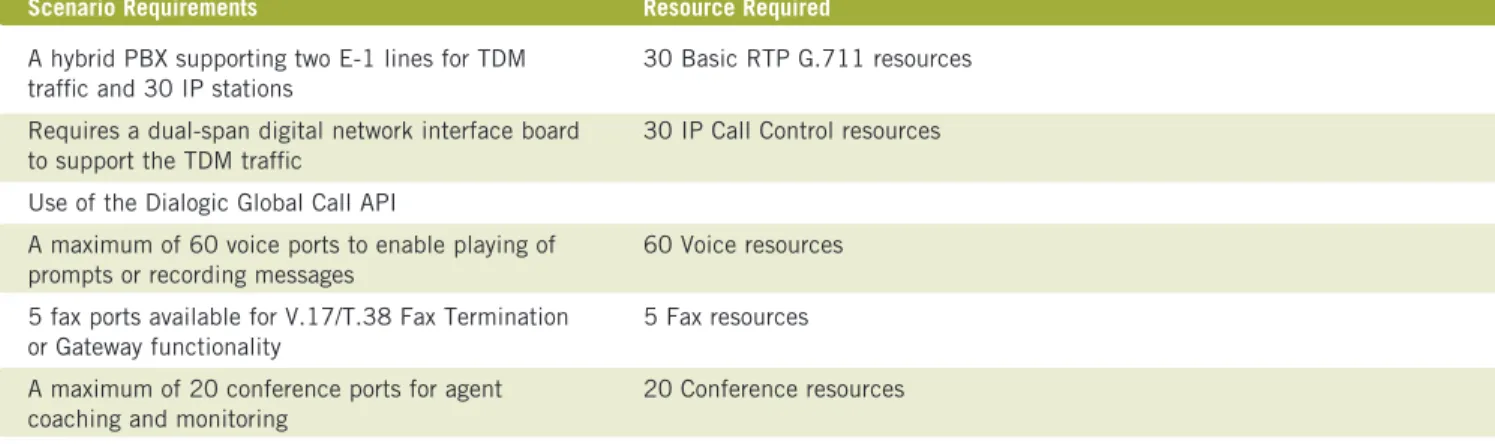
Table 3 provides the requirements for a hybrid call center and the required Dialogic HMP Software 3.0 resources.
Scenario Requirements Resource Required
A hybrid PBX supporting two E-1 lines for TDM 30 Basic RTP G.711 resources traffic and 30 IP stations
Requires a dual-span digital network interface board 30 IP Call Control resources to support the TDM traffic
Use of the Dialogic Global Call API
A maximum of 60 voice ports to enable playing of 60 Voice resources prompts or recording messages
5 fax ports available for V.17/T.38 Fax Termination 5 Fax resources orGateway functionality
A maximum of 20 conference ports for agent 20 Conference resources coaching and monitoring
Table 3. Hybrid Call Center Requirements
RTP
IP Call Control IP Call
Control RTP
Fax
Conference Voice
Media Processing Resources
Dual Span E-1 Digital Network Interface Board
TDM Interface
Conference Conference
Coach RTP G.711
Agent
RTP G.711 CustomerPSTN
External Caller
PSTN Fax
IP Network Interface Resources
Summary of Dialogic HMP Software 3.0 Resources
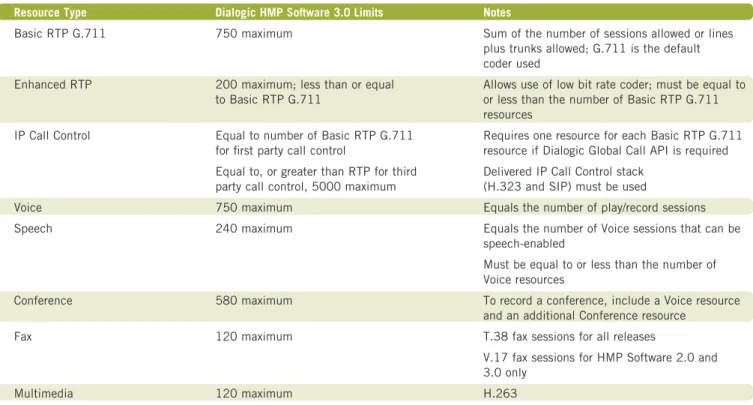
Table 4 provides a summary of the information required for configuring licenses for Dialogic HMP Software 3.0. Dialogic HMP Software 3.0 has different licensing limitations based on which release is in use; these limitations are also detailed in Table 4.
Resource Type Dialogic HMP Software 3.0 Limits Notes
Basic RTP G.711 750 maximum Sum of the number of sessions allowed or lines
plus trunks allowed; G.711 is the default coder used
Enhanced RTP 200 maximum; less than or equal Allows use of low bit rate coder; must be equal to to Basic RTP G.711 or less than the number of Basic RTP G.711
resources
IP Call Control Equal to number of Basic RTP G.711 Requires one resource for each Basic RTP G.711 for first party call control resource if Dialogic Global Call API is required Equal to, or greater than RTP for third Delivered IP Call Control stack
party call control, 5000 maximum (H.323 and SIP) must be used
Voice 750 maximum Equals the number of play/record sessions
Speech 240 maximum Equals the number of Voice sessions that can be
speech-enabled
Must be equal to or less than the number of Voice resources
Conference 580 maximum To record a conference, include a Voice resource
and an additional Conference resource
Fax 120 maximum T.38 fax sessions for all releases
V.17 fax sessions for HMP Software 2.0 and 3.0 only
Multimedia 120 maximum H.263
Table 4. Summary of Dialogic HMP Software 3.0
For More Information
General information, proof points, and case studies about the products described in this application note —
www.dialogic.com
Montreal, Quebec CANADA H4M 2V9
INFORMATION IN THIS DOCUMENT IS PROVIDED IN CONNECTION WITH PRODUCTS OF DIALOGIC CORPORATION OR ITS SUBSIDIARIES (“DIALOGIC”). NO LICENSE, EXPRESS OR IMPLIED, BY ESTOPPEL OR OTHERWISE, TO ANY INTELLECTUAL PROPERTY RIGHTS IS GRANTED BY THIS DOCUMENT. EXCEPT AS PROVIDED IN A SIGNED AGREEMENT BETWEEN YOU AND DIALOGIC, DIALOGIC ASSUMES NO LIABILITY WHATSOEVER, AND DIALOGIC DISCLAIMS ANY EXPRESS OR IMPLIED WARRANTY, RELATING TO SALE AND/OR USE OF DIALOGIC® PRODUCTS INCLUDING LIABILITY OR WARRANTIES RELATING TO FITNESS FOR A PARTICULAR PURPOSE, MERCHANTABILITY, OR INFRINGEMENT OF ANY INTELLECTUAL PROPERTY RIGHT OF A THIRD PARTY.
Dialogic products are not intended for use in medical, life saving, life sustaining, critical control or safety systems, or in nuclear facility applications. Dialogic may make changes to specifications, product descriptions, and plans at any time, without notice.
Dialogic is a registered trademark of Dialogic Corporation. Dialogic’s trademarks may be used publicly only with permission from Dialogic. Such permission may only be granted by Dialogic’s legal department at 9800 Cavendish Blvd., 5th Floor, Montreal, Quebec, Canada H4M 2V9. Any authorized use of Dialogic’s trademarks will be subject to full respect of the trademark guidelines published by Dialogic from time to time and any use of Dialogic’s trademarks requires proper acknowledge-ment.
Windows is a registered trademark of Microsoft Corporation in the United States and/or other countries. Other names of actual companies and products mentioned herein are the trademarks of their respective owners. Dialogic encourages all users of its products to procure all necessary intellectual property licenses required to implement their concepts or applications, which licenses may vary from country to country.