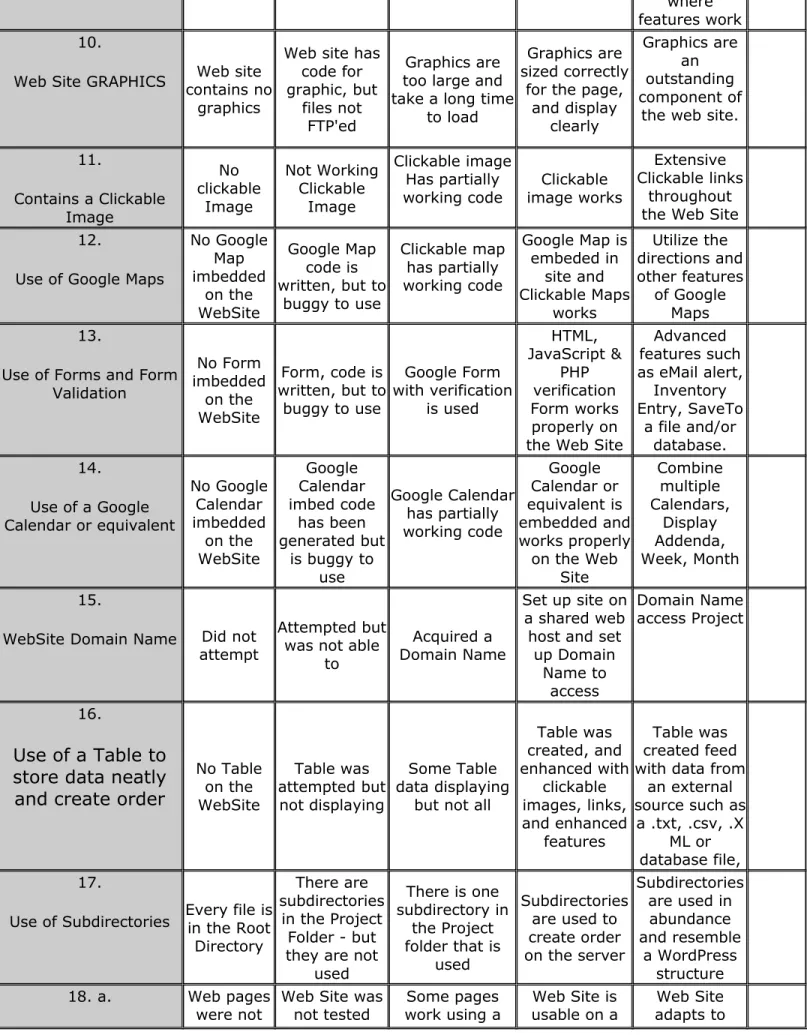
Rubric for CIS-2140 Programming for the Internet
Project should be a web page that hangs off your class Web site page. 25 Points can be earned toward 25% of your grade. The Objectives should include:
1.
Web Site Header
2.
Web Site Footer
3.
Web Site Navigation
4.
Use a Menu for Navigation
5.
Favicon
6. External CSS
7. External JS
8. External Links to other sites & Internal Links to pages within the site
9. 10 pages demonstrating types of pages that can be created or are typically found
10.
Contain many types of Graphics
11.
Contains a clickable image
12.
Use of Google Maps
13.
Use of a Google Form or equivalent
14.
Use of a Calendar
15.
Used a supporting Google Site for Content, Graphics collection and Outlines
16.Use of a Table to organize data & neatly arrange data components on web page
17.Have code in different directories (ex. Assignments are in their own directory,
Images are in their own directory, etc.)
18.Validate the pages of your web site - include comments in Project Outline
a.
Test how your web pages will look on Computer, Phone,
Tablet
http://responsinator.com
b.
UseLorem Ipsum Generator
to have text on your page to test wrapping http://designerstoolbox.com/designresources/greek/?lorem=pac.
HTML Validator
http://validator.w3.org
d.
CSS validator
http://jigsaw.w3.org/css-validator
19.
Check the pageSPEED TRACKER in your Chrome
Browser
https://developers.google.com/web-toolkit/speedtracer/get-started#downloading
20.Website has good flow
Everything from CIS 151 or 1151 Web Dev ( listed above) PLUS
upgraded Objectives in the Intro to Programming where we use PHP. These
inclusions or changes are:
Include & Require PHP - to reduce redundancy for:
Headers #1
Navigation #2
Footers #3
JavaScript for the Menu System #4
JavaScript used to enhance the site # 7
Read from a .TXT file replaced #8
Read from an .XML file replaced #9
Read Client information (ex browser type, time, etc.) and adjust web page #7
Form with verification #13
Write to a .TXT file#16 & #20
Write to a .XML file #16 & #20
Read from a MySQL table/database#16 & # 20
Extra Credit - Set up your own Domain Name #15
Use a shared web host to read and write records to a database #21
Project Objective Objective
Missing Accomplish Did Not AccomplishmentSome Accomplished Exemplary Points
Point Breakdown 0 pts 0 pts .5 pts 1 pts 1+ pts Earned
1.
Web Site HEADER Header is missing
Was not an actual Header
tag/div
Header was on some but not all
pages of the WebSite
Header is stored in an external file and called by PHP Require for
all pages
Header is in an external PHP
required file and works well
on a Tablet or Phone 2.
Web Site FOOTER
Footer is missing
Footer is not an actual Footer
tag/div
Footer is on some pages but not all
pages of the WebSite
Footer is stored in an external file and called by PHP Require for all pages of web
site
Footer is in an external PHP file required file
and works well on a Tablet or Phone contains links, copyright, and additional
information
3.
WebSite NAVIGATION No definedNavigation
Links to pages but not in
defined Navigation
tag/div
Some pages contain Navigation
but not all pages of the WebSite
Navigation is on all pages of web site in a defined
Navigation tag/div
Navigation is in an external PHP required file and works well on a Tablet or Phone 4.
Use a Menu for Navigation No Navigation JavaScript is ued Navigation does
not work Navigation workson some pages
JavaScript Navigation works on all
pages jQuery or equivalent is used for Navigation UI 5.
Web Site Favicon and incorporates Social
Media
Favicon is missing
Favicon was not FTP'ed, No Social Media
links
FTP'ed Favicon and Social Media But only to limited
pages
Favicon & Social Media displays
on each page
Graphical Favicon or extended Favicon used, Social Media API 6.
Web Site CSS No CSS is
attempted CSS file is notFTP'ed
CSS file has been created and uploaded but it
does not work correctly on every
page
External CSS3 is used and
works
Extensive CSS3 is used on site
7. WebSite JavaScript No JavaScript was attempted
JS file is not FTP'ed
JS file has been created and uploaded but it does not work on
pages correctly
Multiple uses for JavaScript
Extensive use of JavaScript and
jQuery to enhance the user experience 8.
Links No links are on web site
Links are on web site but are
not working or point to a C:\ or
Local Host
Some links work as designed
Most links are working as
designed
Extensive use of Links and creative ways
they save keystrokes
9.
Ten page WebSite
Web site only has a
page
Web site only
has 2 pages Web site has afew workable Web Pages
Web site has 10 pages or
equivalent work
where features work 10.
Web Site GRAPHICS contains noWeb site graphics
Web site has code for graphic, but
files not FTP'ed
Graphics are too large and take a long time
to load
Graphics are sized correctly
for the page, and display clearly Graphics are an outstanding component of
the web site.
11.
Contains a Clickable Image No clickable Image Not Working Clickable Image Clickable image Has partially
working code image worksClickable
Extensive Clickable links
throughout the Web Site 12.
Use of Google Maps
No Google Map imbedded on the WebSite Google Map code is written, but to
buggy to use
Clickable map has partially working code
Google Map is embeded in site and Clickable Maps works Utilize the directions and other features of Google Maps 13.
Use of Forms and Form Validation
No Form imbedded
on the WebSite
Form, code is written, but to
buggy to use
Google Form with verification is used HTML, JavaScript & PHP verification Form works properly on the Web Site
Advanced features such as eMail alert,
Inventory Entry, SaveTo
a file and/or database. 14.
Use of a Google Calendar or equivalent
No Google Calendar imbedded on the WebSite Google Calendar imbed code has been generated but
is buggy to use Google Calendar has partially working code Google Calendar or equivalent is embedded and works properly on the Web
Site Combine multiple Calendars, Display Addenda, Week, Month 15.
WebSite Domain Name Did not attempt
Attempted but was not able
to
Acquired a Domain Name
Set up site on a shared web host and set
up Domain Name to access Domain Name access Project 16.
Use of a Table to
store data neatly
and create order
No Table on the WebSite Table was attempted but not displaying Some Table data displaying
but not all
Table was created, and enhanced with clickable images, links, and enhanced features Table was created feed with data from
an external source such as
a .txt, .csv, .X ML or database file, 17.
Use of Subdirectories Every file isin the Root Directory
There are subdirectories
in the Project Folder - but they are not
used
There is one subdirectory in
the Project folder that is
used
Subdirectories are used to create order on the server
Subdirectories are used in abundance and resemble
a WordPress structure
18. a. Web pages
were not
Web Site was not tested
Some pages work using a
Web Site is usable on a
Test on
Tablet/Phone/Appliance looked at on a tablet
or phone
with Responsinator
or equivalent software
Phone/Tablet Tablet orPhone
being viewed on differently appliances and works well on the
major systems: PC,
Tablet/Phone 18. b.
Use Lorem Ipsum to demonstrate how page
looks & functions
Web pages have no content
Web pages have minimal
content
Web pages have some
content
Good content demonstrating
the page look, feel and
functionality
Variety of content to demonstrate how the page
looks, feels and functions 18. c.
HTML Validator
Did not validate HTML pages
Did not include validation information
Validated some
HTML pages Validated allHTML pages
Made major corrections from the validation run 18. d.
CSS Validator
Did not validate CSS pages
Did not include validation information
Validated some
CSS pages Validated allCSS pages
Made major corrections from the validation run 19.
Speed Tracker Did not runSpeed Tracker
Did not include Speed
Tracker information
Ran Speed Tracker on some pages
Ran Speed Tracker on all
pages
Made major corrections from the Speed Tracker
reports 20.
Read & Write to Server-Side files
Not able to or not attempted
Not able to access
Able to read external files
such as .txt, .csv, .X
ML
Able to read and write to external files
Able to read and write to a
Database table
21.
Shared Web Host attemptDid not
Attempted but was not able
to
Used JilMac's Shared Web Host Account
Set up a web site to read & write records to a Database.
Set up their own Shared Web Site and
had project running OTHER Examples:
Minify Code, Google Analytics