Document Number: 325650-004
Intel Built-in Visuals
Product Guide
July 2013
Revision 004
2 325650/ Product Guide INFORMATION IN THIS DOCUMENT IS PROVIDED IN CONNECTION WITH INTEL® PRODUCTS. NO LICENSE, EXPRESS OR IMPLIED, BY ESTOPPEL OR OTHERWISE, TO ANY INTELLECTUAL PROPERTY RIGHTS IS GRANTED BY THIS DOCUMENT. EXCEPT AS PROVIDED IN INTEL’S TERMS AND CONDITIONS OF SALE FOR SUCH PRODUCTS, INTEL ASSUMES NO LIABILITY
WHATSOEVER, AND INTEL DISCLAIMS ANY EXPRESS OR IMPLIED WARRANTY, RELATING TO SALE AND/OR USE OF INTEL PRODUCTS INCLUDING LIABILITY OR WARRANTIES RELATING TO FITNESS FOR A PARTICULAR PURPOSE, MERCHANTABILITY, OR INFRINGEMENT OF ANY PATENT, COPYRIGHT OR OTHER INTELLECTUAL PROPERTY RIGHT. Intel products are not intended for use in medical, life saving, or life sustaining applications.
Intel may make changes to specifications and product descriptions at any time, without notice.
Designers must not rely on the absence or characteristics of any features or instructions marked "reserved" or "undefined." Intel reserves these for future definition and shall have no responsibility whatsoever for conflicts or incompatibilities arising from future changes to them.
The Intel® HD Graphics may contain design defects or errors known as errata which may cause the product to deviate from published specifications. Current characterized errata are available on request.
Contact your local Intel sales office or your distributor to obtain the latest specifications and before placing your product order. Intel and the Intel logo are trademarks or registered trademarks of Intel Corporation or its subsidiaries in the United States and other countries.
*Other names and brands may be claimed as the property of others. Copyright © 2013, Intel Corporation. All rights reserved.
325650/ Product Guide 3
Contents
1
Introduction ...5
2
Intel
®HD Graphics ...6
3
Intel
®Clear Video HD Technology ...7
4
Intel
®Quick Sync Video ...8
5
InTru™3D Technology ...9
6
Intel
®Advanced Vector Extensions (Intel
®AVX) ... 10
7
Collage Display ... 11
8
Intel
®Iris™ Graphics and Iris™ Pro Graphics for Embedded ... 12
9
Features ... 13
9.1
Supported Operating Systems ... 15
9.2
Feature Support by Platform ... 16
Tables
Table 1. Graphics Versions by Generation ...6
Table 2. New Features - 4
THGen ... 13
Table 3. Existing Features – 2
nd/ 3
rdGen ... 14
4 325650/ Product Guide
Revision History
Document
Number Revision Number Description Revision Date
325650 001 Initial release. June 2011
325650 002 Update for 3rd Gen HD Graphics October 2012
325650 003 Updated for 4th Gen HD Graphics March 2013
325650 004 Updated to add Intel® Iris™ graphics information July 2013
Introduction
325650/ Product Guide 5
1
Introduction
Intel
®Built-in Visuals combines cutting-edge 3D graphics, stunning HD visuals,
advanced video capabilities and enhanced display connectivity all built-in to the
processor, delivering seamless visual experiences without the need of a discrete
graphics card. It integrates high-performance graphics and media processing on the
processor, putting two key embedded application components – CPU processing and
graphics – on a single chip.
Intel® HD Graphics
6 325650/ Product Guide
2
Intel
®
HD Graphics
Intel
®HD Graphics is the next-generation graphics technology available on the Intel
®Core™ processor family. It is graphics built into the CPU providing best-in-class
compute, integrated media and graphics performance over the previous generation
while creating additional headroom for tomorrow’s embedded usages. It delivers an
enhanced visual experience, including excellent 3D performance and support for three
independent displays.
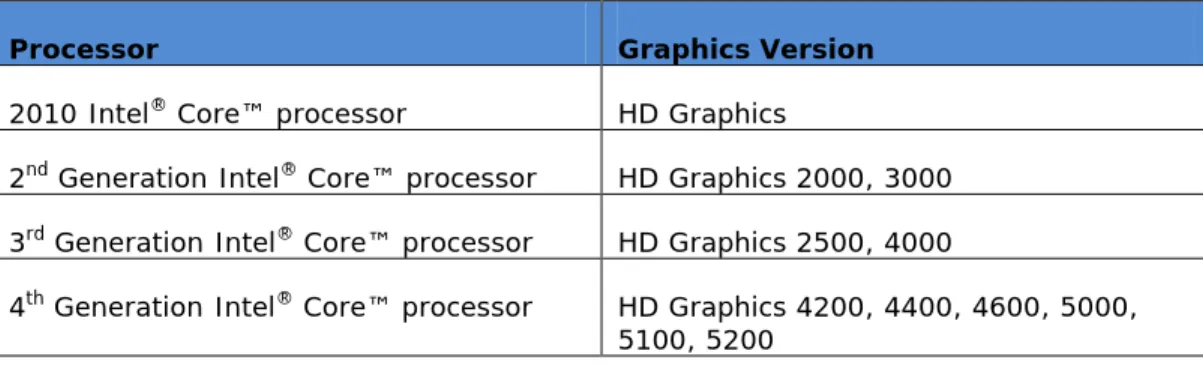
Table 1. Graphics Versions by Generation
Processor
Graphics Version
2010 Intel
®Core™ processor
HD Graphics
2
ndGeneration Intel
®Core™ processor
HD Graphics 2000, 3000
3
rdGeneration Intel
®Core™ processor
HD Graphics 2500, 4000
4
thGeneration Intel
®Core™ processor
HD Graphics 4200, 4400, 4600, 5000,
5100, 5200
Intel® Clear Video HD Technology
325650/ Product Guide 7
3
Intel
®
Clear Video HD
Technology
Intel
®Clear Video HD Technology (Intel
®CVT HD) is a collection of video playback and
enhancement features that improve the end user’s viewing experience. These features
are a combination of industry standardized playback and image enhancement features
as well as additional Intel
®specific features. It integrates a wide array of image
processing technologies including noise and jitter removal, total color control, contrast
and skin tone enhancements and intelligent color space mapping, ensuring colors and
images are viewed the way they are meant to be seen.
Intel® Quick Sync Video
8 325650/ Product Guide
4
Intel
®
Quick Sync Video
In the video creation and editing space, Intel
®Quick Sync Video provides accelerated
media conversion equating to improved compatibility between devices and file
formats. It uses hardware on the processor instead of software to accelerate video
decoding and encoding, reducing video conversion time and enabling the processor to
complete other tasks, improving overall performance.
InTru™3D Technology
325650/ Product Guide 9
5
InTru™3D Technology
Users can now enjoy the ultimate in 3D visuals with InTru™3D. Stereoscopic 3D
Blu-ray* playback support is available using active shutter 3D glasses in full high
definition 1080p resolution over the HDMI* V1.4 interface.
Intel® Advanced Vector Extensions (Intel® AVX)
10 325650/ Product Guide
6
Intel
®
Advanced Vector
Extensions (Intel
®
AVX)
Intel
®Advanced Vector Extensions is a new 256-bit instruction set extension to SSE
and is designed for applications that are Floating Point (FP) intensive. Introduced with
the 3rd Generation Intel
®Core™ processor, it improves performance due to wider
vectors, new extensible syntax, and rich functionality. This results in better
management of data and general purpose applications such as image, audio/video
processing, scientific simulations, financial analytics and 3D modeling and analysis.
Collage Display
325650/ Product Guide 11
7
Collage Display
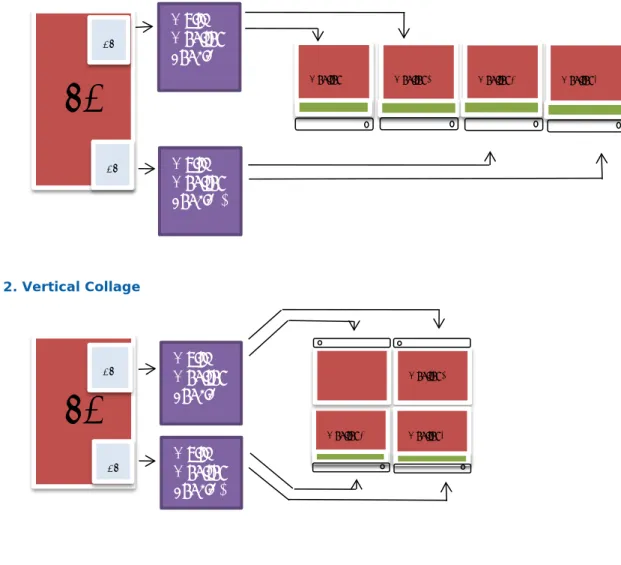
The Collage Display feature allows display of a screen across multiple displays with
each display showing a portion of a larger screen image. A user can implement this
feature to connect multiple displays to a single system and see picture/video across
multiple displays with higher quality/resolution (up-to 4K).
If multiple displays are placed horizontally its known as Horizontal Collage Display
(i.e., positioning displays one next to another where one image stretches across
panels, as shown in Figure 1). If multiple displays are placed vertically its known as
Vertical Collage Display (i.e., where the upper part of the image is shared by one
display panel and the lower part of the image by another display panel, as shown in
Figure 2).
Figure 1. Horizontal Collage
Figure 2. Vertical Collage
Multi-Monitor
dongle 1
PC
Monitor 1 DP DPMulti-Monitor
dongle 2
Monitor 2 Monitor 3 Monitor 4
Monitor 3
Multi-Monitor
dongle 1
PC
DP DPMulti-
Monitor
dongle 2
Monitor 2 Monitor 4Intel® Iris™ Graphics and Iris™ Pro Graphics for Embedded
12 325650/ Product Guide
8
Intel
®
Iris™ Graphics and Iris™
Pro Graphics for Embedded
Intel
®Iris™ Graphics Powers Built-in Beautiful
Intel Iris graphics brings you a built-in, eye-popping visual experience—no extra
graphics card required
Intel
®Iris™ graphics, together with the
4th generation Intel
®Core™ processor
, delivers amazing
and vibrant multimedia experiences. Get immersed in high-speed, stunning, 3D gaming. Do
advanced photo and video editing quickly and easily. Sit back and enjoy the best in movies with
gorgeous HD and brilliant 4K Ultra HD display.
Intel Iris graphics is Intel’s newest and most powerful graphics product, built right in to the
processors. With double the performance of the previous generation of Intel
®graphics, Intel Iris
graphics lets you enjoy heightened immersive experiences when playing games optimized
specifically for Intel Iris graphics.
1From the newly released
GRID 2
to the world renowned
StarCraft II: Heart of the Swarm,
Intel Iris graphics provides you with an immersive gaming
experience with faster 3D rendering, more complex shading, and fluid character motion.
At home or on the go, Intel Iris graphics powers built-in beautiful.
Intel Iris Pro graphics and Intel Iris graphics are available on specific versions of Intel 4
thFeatures
325650/ Product Guide 13
9
Features
All combined, the Intel
®Core™ processors with built-in visuals boasts a competitive
advantage, ideal to suit the needs of a broad embedded market whether that be in the
Retail, Digital Signage, Gaming, Industrial, Military, Aerospace, Government, Digital
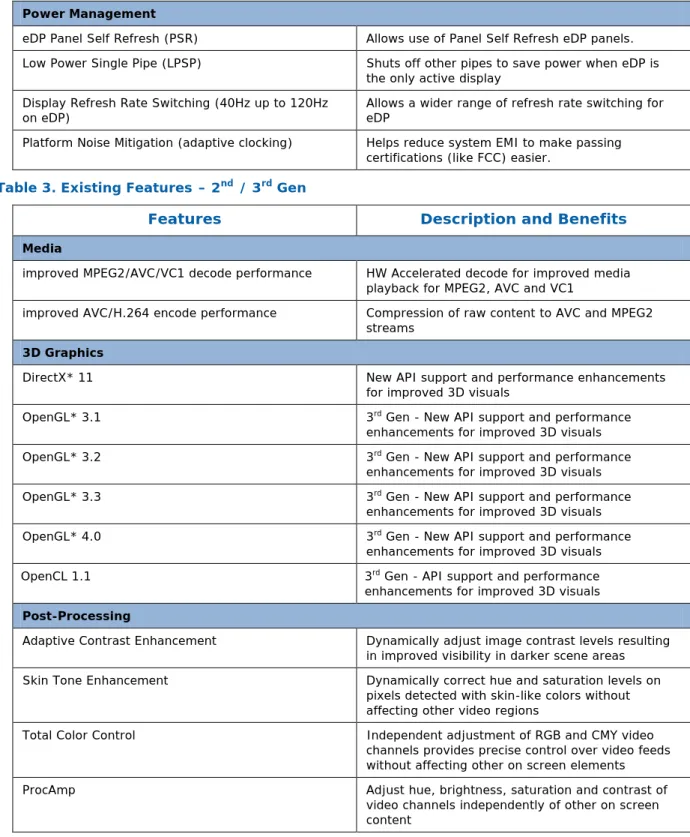
Security/Surveillance or Medical segments. Table 2 describes the new built-in visual
features introduced in the 4
thGeneration Intel
®Core™ processor as well as those best
suited for the embedded computing market. Table 3 describes the existing built-in
visual features in the 2
ndand 3
rdGeneration Intel
®Core™ processor.
For a comprehensive list of supported features, refer to the Intel
®Graphics Software
for Intel
®HD Graphics Family Product Requirements Document (PRD). The latest
Intel
®HD Graphics Driver packages are available for download at
http://www.intel.com
.
Table 2. New Features - 4
THGen
Features
Description and Benefits
Graphics
Intel® Iris™ Pro graphics and Intel® Iris™ graphics Highest performance Intel graphics and media built
in to certain SKUs of the 4th generation Intel® Core™
embedded processors. Media
Accelerated support for SVC h.264 encode/decode -
Baseline profile Adds Scalable Video Coding capability Accelerated support for MJPEG Adds Motion JPEG capability
3D Graphics
DirectX* 11.1 New API support and performance enhancements for improved 3D visuals
OpenCL 1.2 API support and performance enhancements for
improved 3D visuals Display
Improved 3 independent displays 3 non-symmetric, independent and concurrent display support with fewer restrictions
Post Processing
Gamut Color Conversion w/ compression & expansion Improves color Spatial Noise Reduction Improves image quality
Video Stabilization Improves video playback by eliminating shakiness in videos
Frame Rate Conversion w/ 24p frame interpolation Improves video quality during playback 12bcp Precision Processing Pipeline Higher quality processing pipeline
Features
14 325650/ Product Guide
Power Management
eDP Panel Self Refresh (PSR) Allows use of Panel Self Refresh eDP panels. Low Power Single Pipe (LPSP) Shuts off other pipes to save power when eDP is
the only active display Display Refresh Rate Switching (40Hz up to 120Hz
on eDP) Allows a wider range of refresh rate switching for eDP Platform Noise Mitigation (adaptive clocking) Helps reduce system EMI to make passing
certifications (like FCC) easier.
Table 3. Existing Features – 2
nd/ 3
rdGen
Features
Description and Benefits
Media
improved MPEG2/AVC/VC1 decode performance HW Accelerated decode for improved media playback for MPEG2, AVC and VC1
improved AVC/H.264 encode performance Compression of raw content to AVC and MPEG2 streams
3D Graphics
DirectX* 11 New API support and performance enhancements
for improved 3D visuals
OpenGL* 3.1 3rd Gen - New API support and performance
enhancements for improved 3D visuals
OpenGL* 3.2 3rd Gen - New API support and performance
enhancements for improved 3D visuals
OpenGL* 3.3 3rd Gen - New API support and performance
enhancements for improved 3D visuals
OpenGL* 4.0 3rd Gen - New API support and performance
enhancements for improved 3D visuals
OpenCL 1.1 3rd Gen - API support and performance
enhancements for improved 3D visuals Post-Processing
Adaptive Contrast Enhancement Dynamically adjust image contrast levels resulting in improved visibility in darker scene areas Skin Tone Enhancement Dynamically correct hue and saturation levels on
pixels detected with skin-like colors without affecting other video regions
Total Color Control Independent adjustment of RGB and CMY video channels provides precise control over video feeds without affecting other on screen elements
ProcAmp Adjust hue, brightness, saturation and contrast of
video channels independently of other on screen content
Features
325650/ Product Guide 15
Display
Embedded DisplayPort* (eDP) Dedicated Embedded DisplayPort (eDP) support on low-power CPUs and support for eDP on PCH for low-power and scalable CPU’s offers design flexibility
HDMI v1.4 with Stereoscopic 3D Support for HDMI v1.4 displays with Stereoscopic 3D functionality
12bpc Color Depth (DisplayPort* and HDMI) Increased color depth for improved accuracy and vividness
3 independent displays 3rd Gen - 3 non-symmetric independent and
concurrent display support
Collage Display Display a single large framebuffer on multiple displays
Power Management
Render Standby Impressive power savings allows reduction of core graphics voltage down to 0V
Extended Power Saving State (Power Reduction During
Idle) Power savings technology allowing powering down of High Definition Audio bus when not in use to help meet Energy Star requirements
9.1
Supported Operating Systems
The following operating systems are supported:
- Microsoft* Windows* XP
- Microsoft* Windows* 7 Starter/Home Basic/Home Premium/Professional/Ultimate
- Microsoft* Windows* Embedded Standard 7
- Microsoft* Windows* 8
- Microsoft* Windows* Embedded Standard 8
- Microsoft* Windows* Embedded POSReady 8
- Microsoft* Windows* Embedded Standard 2009
- Microsoft* Windows* Embedded POSReady 2009
- Linux*
1,2Notes:
1. Intel does not develop distribution-specific drivers for Intel
®HD Graphics. All
Linux driver components are up-streamed to their respective repositories once a
quarter. Information on these components is posted on
www.intellinuxgraphics.com
under the Downloads section. Distributions may pick
up components as they choose.
2. Linux driver features represent only a subset of those supported by the Intel
®HD
Graphics driver. For additional information, visit
www.intellinuxgraphics.com
.
Features
16 325650/ Product Guide
9.2
Feature Support by Platform
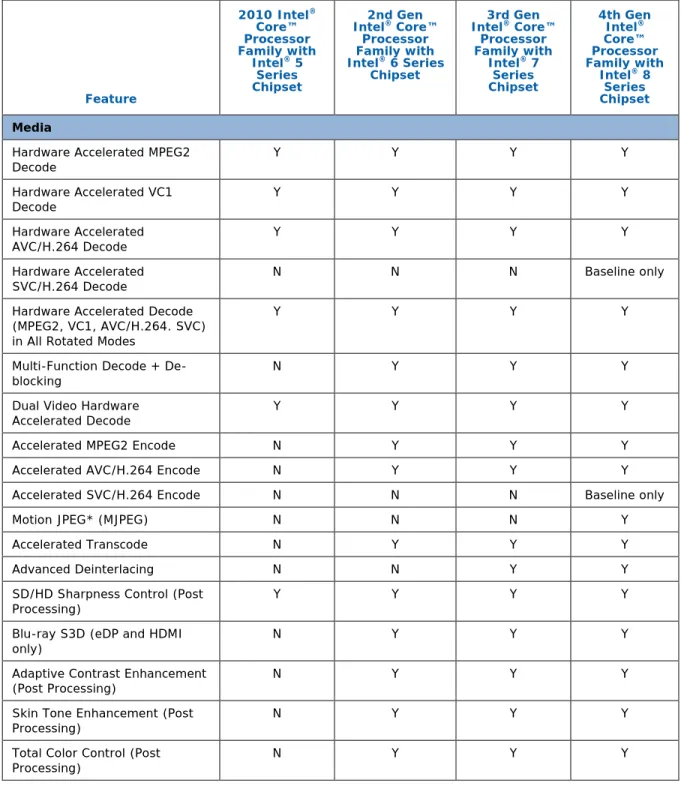
Table 4 represents a subset of the features available on these platforms. Some
features are also Operating System dependent. Refer to the Software Graphics
Product Requirements Document or embedded Technical Product Spec. for full details.
Table 4. Feature Support by Platform
Feature 2010 Intel® Core™ Processor Family with Intel® 5 Series Chipset 2nd Gen Intel® Core™ Processor Family with Intel® 6 Series Chipset 3rd Gen Intel® Core™ Processor Family with Intel® 7 Series Chipset 4th Gen Intel® Core™ Processor Family with Intel® 8 Series Chipset Media
Hardware Accelerated MPEG2
Decode Y Y Y Y Hardware Accelerated VC1 Decode Y Y Y Y Hardware Accelerated AVC/H.264 Decode Y Y Y Y Hardware Accelerated
SVC/H.264 Decode N N N Baseline only
Hardware Accelerated Decode (MPEG2, VC1, AVC/H.264. SVC) in All Rotated Modes
Y Y Y Y
Multi-Function Decode +
De-blocking N Y Y Y
Dual Video Hardware
Accelerated Decode Y Y Y Y
Accelerated MPEG2 Encode N Y Y Y
Accelerated AVC/H.264 Encode N Y Y Y
Accelerated SVC/H.264 Encode N N N Baseline only
Motion JPEG* (MJPEG) N N N Y
Accelerated Transcode N Y Y Y
Advanced Deinterlacing N N Y Y
SD/HD Sharpness Control (Post
Processing) Y Y Y Y
Blu-ray S3D (eDP and HDMI
only) N Y Y Y
Adaptive Contrast Enhancement
(Post Processing) N Y Y Y
Skin Tone Enhancement (Post
Processing) N Y Y Y
Total Color Control (Post
Features
325650/ Product Guide 17
12bpc Color Depth (DisplayPort*
and HDMI) Y Y Y Y
Gamut Color Conversion w/
compression & expansion N N N Y
Spatial Noise Reduction N N N Y
Video Stabilization N N N Y
Frame Rate Conversion w/ 24p
frame interpolation N N N Y
12bcp Precision Processing
Pipeline N N N Y
Sharpness-adaptive Scaling N N N Y
Display/Audio
DisplayPort 1.1a Audio Support
(LPCM 2 channel & AC3) Y Y Y Y
HDMI v1.4 with Stereoscopic 3D N Y Y Y
Dual Stream Audio Y Y Y Y
HDCP 1.3(for basic Blu-ray
playback) N Y Y Y
Embedded DisplayPort* (eDP) Y Y Y Y
Integrated LVDS Y Y Y N
Dual LVDS (Integrated LVDS +
SDVO LVDS) Y Y Y N
EDID-less display support Y Y Y Y
Wireless Display1 Y Y Y Y
SDVO-DVI Support Y Y Y N
SDVO-LVDS Support Y Y Y N
SDVO-HDMI Support N N N N
SDVO-TV Out Support Y N N N
SDVO-CRT Support Y Y Y N
Support for External Digital
Displays (DVI, HDMI, DP) Y Y Y Y
Support for Analog CRT Y Y Y Y2
Three active displays N N Y Y (improved)
3D Graphics DirectX 9.0c Y Y Y Y DirectX 9.0L Y Y Y Y DirectX* 10.0 Y Y Y Y DirectX* 10.1 N Y Y Y DirectX* 11.0 N Y Y Y
Features 18 325650/ Product Guide DirectX* 11.1 N N N Y OpenGL* 2.1 Y Y Y Y OpenGL* 3.0 N Y Y Y OpenGL* 3.1 N N Y Y OpenGL* 3.2 N N Y Y OpenGL* 3.3 N N Y Y OpenGL* 4.0 N N Y Y Open CL 1.1 N N Y Y Open CL 1.2 N N N Y Power Management Intel® Graphics Dynamic
Frequency Y Y Y Y
Render Standby Y Y Y Y
Intel® Display Refresh Rate
Switching – For Seamless and Static Panel Displays
Y Y Y Y
Intel® Graphics Performance
Modulation Technology Y Y Y Y
Intel® Display Power Savings
Technology (DPST) Y Y Y Y
Intel® Smart 2D Display
Technology (S2DDT) Y Y Y Y
Intel® Rapid Memory Power
Management Y Y Y Y
Intel® Automatic Display
Brightness (ADB) Y Y Y Y
Extended Power Saving State N Y Y Y
eDP Panel Self Refresh (PSR) N N N Y
Low Power Single Pipe (eDP) N N N Y
Display Refresh Rate Switching
(40Hz up to 120Hz on eDP) N N N Y
Platform Noise Mitigation
(adaptive clocking) N N N Y
1 Intel® Wireless Display is not Plan of Record for embedded long life support, requires Intel® My
WiFi Technology and is supported only on Mobile products. Contact your local FAE for interest in this feature.