ø Mobile E-mail Solutions
1.
Executive Summary
. . . .
4
2.
Introduction
. . . .
5
3.
Overview Of The Different Mobile E-mail Solutions
. . . .
6
3.1
BlackBerry
®Enterprise Solution from O2
. . . .
6
3.2
Microsoft
®Direct Push Email Solution
. . . .
8
3.3
Good Mobile
TMMessaging Solution from Motorola Good Technology Group
. . .
10
4.
Comparison Of The Different Mobile E-mail Solutions
. . . .
11
4.1
Deployment
. . . .
11
4.2
Support and Management
. . . .
12
4.3
Features and Functionality
. . . .
14
4.4
Security
. . . .
14
4.5
Device Support
. . . .
17
4.6
Supported Messaging Solutions
. . . .
17
4.7
Mobilising Enterprise Applications
. . . .
17
4.8
Cost Elements
. . . .
18
5.
Mobile E-mail Solutions and O2’s Data Services
. . . .
19
5.1
O2 Bearer Service
. . . .
20
5.2
O2 Mobile Web Service
. . . .
22
5.3
O2 Mobile Web VPN Service
. . . .
25
5.4
BlackBerry from O2 Service
. . . .
27
6.
Appendix A: Windows Mobile 6 and Exchange Server 2007 Features
. .
28
7.
References
. . . .
29
8.
Glossary of Terms
. . . .
30
An increasing number of people are now working, on a regular basis, away from the office environment and as a consequence organisations are faced with a requirement to provide mobile access to e-mail, calendar, contacts, and other enterprise resources such as Intranet pages and line of business applications. Furthermore, it is becoming clear that organisations that have deployed Mobile E-mail solutions are starting to gain a competitive advantage and are able to be more responsive to the needs of their customers.
In recent years all the necessary components for a successful deployment of a Mobile E-mail solution have come together:
• Mobile E-mail solutions have evolved and now offer the capabilities and management required by organisations.
• GPRS and 3G cellular communications have been introduced.
• Powerful “feature rich” handheld devices are now readily available.
In recognition of the fact that organisations have differing requirements O2 has developed a portfolio of Mobile E-mail solutions which offer a wide range of functionality and that enable organisations to capitalise on their existing investment in messaging and
information systems:
• Organisations may not have a systems management solution in place and will therefore consider carefully the support and management capabilities of the different Mobile E-mail solutions.
• Organisations may wish to use applications that are designed to work on specific “handheld platforms” (i.e. Windows Mobile, BlackBerry, Palm or Symbian).
• The Mobile E-mail system must have the capability to work with the existing messaging system – Microsoft Exchange, Lotus Domino or Novell Groupwise etc.
• Initially, organisations may wish to deploy Mobile E-mail solutions with the minimum of changes to their IT infrastructure in order that they can assess the business benefits.
This white paper considers three Mobile E-mail solutions that are offered by O2 (i.e. BlackBerry®Enterprise
Solution from O2, Microsoft®Direct Push Email Solution
and GoodTMMobile E-mail from Motorola Good
Technology Group) and also details the implications of using the solutions in conjunction with O2’s data services.
Mobile E-mail solutions have evolved and now offer capabilities that enable organisations to improve their business responsiveness and effectiveness.
To help organisations embrace Mobile E-mail O2 offers a number of Mobile E-mail solutions that take account of customer requirements:
• Productivity: people can work on the move like they do in the office and access key applications.
• A single device can be used for voice and data.
• Easy to integrate with existing messaging systems – such as Microsoft Exchange or Lotus Domino.
• Easy to deploy and maintain.
• Security: meet strict security needs.
• Easy to use: the solutions are designed to be intuitive to use.
• Competitive advantage: organisations can respond quicker and make key decisions more quickly.
• Effective real time communications.
The information presented is at a level which should enable organisations to get a feel for which solution will best meet their needs – based on their existing corporate infrastructure and their business objectives. O2’s sales and consultancy teams will also be able to provide help and guidance when customers are assessing their needs and options.
Overview of the different
Mobile E-mail solutions
2. Introduction
This section of the report provides an overview of the three Mobile E-mail solutions.
A more in depth description of the solutions is provided in a number of BlackBerry, Microsoft and Motorola Good Technology Group white papers. O2 data sheets contain information which will also be of interest to
organisations.
Figure 1: BlackBerry Enterprise Solution from O2 Architecture [2]
3.1 BlackBerry
®Enterprise
Solution from O2
The BlackBerry Enterprise Solution from O2 is a solution designed to permit people to stay connected to both people and information [1].
The BlackBerry Enterprise Solution from O2 consists of BlackBerry smartphones, BlackBerry smartphone
software, BlackBerry desktop software (optional) and the BlackBerry Enterprise Server. Figure 1 shows the
BlackBerry Enterprise Solution from O2 architecture.
3. Overview Of The Different
The key component of the BlackBerry Enterprise Solution from O2 is the BlackBerry Enterprise Server. The
BlackBerry Enterprise Server is the BlackBerry software installed on a server and acts as the centralised link between wireless devices, enterprise applications and wireless networks. The BlackBerry Enterprise Server consists of services that provide functionality and components that monitor services and processes, route, compress, and encrypt data, and communicate with the BlackBerry Infrastructure over the wireless network [3]. It is worth noting that all data, such as e-mail and Web browsing data, sent to and from the end user devices is encrypted using Advanced Encryption Standard (AES) or Triple Data Encryption Standard (3DES) encryption. As a consequence end to end security is provided by the BlackBerry Enterprise Solution from O2.
The BlackBerry Enterprise Solution from O2 supports Over the Air (OTA) deployment of the messaging solution and other business applications.
The BlackBerry Enterprise Solution from O2 is designed to provide BlackBerry smartphone users with secure wireless access to a full suite of productivity enhancing tools, including the following [1]:
• Email messages – new messages are pushed to users in real time.
• Applications.
• Internet and corporate Intranet.
• Organiser features (e.g. calendar, contacts PIM, tasks, corporate address lookup).
• Cellular phone functionality.
• Short messaging service (SMS).
The BlackBerry Enterprise Solution from O2 can be used with a wide range of messaging solutions: Microsoft Exchange 5.5, Microsoft Exchange 2000, Microsoft Exchange 2003, Microsoft Exchange 2007, Microsoft Small Business Server, Lotus Domino mail 5.0.3 or later and Novell GroupWise.
3.2 Microsoft
®Direct Push Email Solution
Microsoft’s Direct Push Email Solution helps companies improve business performance by extending to mobile workers mobile versions of core desktop applications, such as Microsoft Office, which includes the Microsoft Outlook messaging and collaboration client [4].
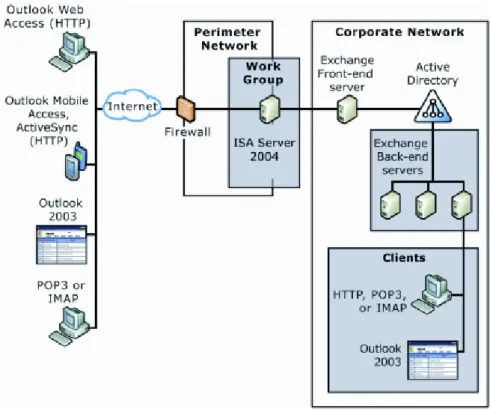
Figure 2: Microsoft Direct Push Email Solution.
In order to use Microsoft’s Direct Push Email Solution organisations must be using Exchange Server 2003 with Service Pack 2 or later as this includes native support for push e-mail. Windows Mobile devices using Windows Mobile 5.0 or 6 are also required.
Figure 2 shows the Microsoft Direct Push Email Solution architecture.
Overview of the different
Mobile E-mail solutions
Any firewall or reverse proxy can be used to provide secure access to Microsoft Exchange. However, Microsoft recommends, as a best practice, that an ISA Server be deployed as an advanced firewall/reverse proxy. In this configuration all of the Exchange servers are within the corporate network and the ISA server acts as the advanced firewall in the perimeter network that is exposed to Internet traffic.
With Direct Push, organisations can get near real time access to their e-mail without requiring any additional software or third-party services. The Exchange Server synchronizes e-mail messages with a Windows Mobile as soon as they are received. With Direct Push, users gain immediate access to messages because the mobile device becomes a dynamically-updated copy of the user’s mailbox. This Direct Push experience is also provided for Calendar changes, Contact updates and Tasks.
The communication channel between the mobile device and Exchange Server is encrypted end-to-end using 128-bit SSL.
The Microsoft solution is designed to provide end users with secure wireless access to a full suite of productivity enhancing tools, including the following:
• Ability to keep the Calendar, Contacts, Tasks, and Inbox up-to-date using Direct Push Technology. It is also possible to browse the corporate global address book over-the-air with Exchange 2003 SP2.
• Protect device data and manage devices using the Windows Mobile and Exchange 2003 SP2 (or greater). With this combination, IT administrators can remotely manage and enforce select corporate IT policies over-the-air via the Exchange 2003 SP2 console. Businesses can mandate policies like requiring PIN passwords for every device.
Windows Mobile works with Exchange Server 2003 or greater to help provide businesses with secure Mobile E-mail and Personal Information Management (PIM) and does not depend on either third-party middleware servers or third-party network operations centres (NOCs) [4].
It should be noted that some of the Mobile 6 features and enhancements are only available if Microsoft Exchange 2007 is being used – refer to Appendix A for further details.
Overview of the different
Mobile E-mail solutions
3.3 Good
TMMobile E-mail Solution from
Motorola Good Technology Group
The Good Mobile E-mail solution allows mobile users to stay connected in real time to their corporate data systems. The Good Mobile E-mail solution consists of compatible devices with Good client software and a Good
Messaging Server. Figure 3 shows the Good Mobile E-mail Architecture.
Figure 3: Good Mobile E-mail Solution Architecture [5].
Good Mobile E-mail is part of the Good System, which consists of the following components (refer to Figure 3):
• Good Messaging Server: the Good Messaging Server is the add-on software that is installed on a server and that monitors the user’s enterprise mailbox and synchronises any mailbox activity with the Good Security Operations Centre which then passes the e-mail and data through the wireless network to the user’s handheld using a true-push architecture [5].
• Good Messaging Client: provides up-to-date wireless access to all enterprise e-mail and Personal
Information Management (PIM) applications (e.g., e-mail, calendar, contacts and more) and support for attachments [5].
Good Mobile E-mail features end-to-end security to protect against unauthorised access to the system, hostile capture of information as it travels through the wireless network and unauthorised information retrieval off the handheld [5]. The Good System combines industry security standards, such as AES and FIPS 140-2, with Good’s own patent-pending security technologies. The Good Mobile E-mail solution supports Over the Air (OTA) deployment of the messaging solution and other business applications.
The Good Mobile E-mail solution is designed to provide users with a secure wireless access to a full suite of productivity enhancing tools including the following:
• Email messages – new messages are pushed to users in real time.
• Web based applications.
• Internet and corporate Intranet.
• Organiser features (e.g. calendar, contacts PIM, tasks, corporate address lookup).
• Cellular phone functionality.
• Short messaging service (SMS).
The Good Mobile E-mail solution can be used with Microsoft Exchange 2000, Microsoft Exchange 2003 and Lotus Domino mail 6.0.3 and above.
It is likely that organisations will consider a number of factors ahead of deploying a mobility solution:
• Deployment aspects.
• Support and management.
• Features and functionality.
• Security.
• Device support.
• Supported messaging solutions (i.e. Microsoft Exchange or Lotus Domino for instance).
• How enterprise applications can be mobilised.
• The cost associated with deploying and supporting the solution.
A top level comparison of the three Mobile E-mail solutions is provided in sections 4.1 to 4.8.
4.1 Deployment
A major consideration for most organisations will be how easy it is to deploy the Mobile E-mail solution – both the “back end” infrastructure and the end user device software.
Organisations may have a requirement to deploy devices remotely without the requirement to rely on desktop software:
• Users may not work in an office environment.
• Users may not have a desktop PC.
• IT resource is required to support users with desktop software.
All three solutions support Over the Air (OTA) deployment of the messaging solution. This “zero touch” approach to provisioning is likely to prove attractive to the IT departments of many organisations.
4.1.1 BlackBerry Enterprise Solution from O2
As detailed in section 3.1 a BlackBerry Enterprise Server must be deployed in the corporate infrastructure if the BlackBerry solution is to be utilised. Deploying the BlackBerry Enterprise Server is straight forward and this work can be undertaken by the organisations IT team or O2’s Consultancy Team.
It is possible to provision devices in a number of ways:
• Wirelessly:Over the Air (OTA) provisioning allows faster and easier roll-out to end users. As a consequence many IT departments will not have a requirement to deploy desktop software.
• BlackBerry®Desktop Software:end users connect
their BlackBerry smartphone to their PC in order to activate the device to work with the corporate messaging solution.
The BlackBerry®Mobile Data System allows BlackBerry
smartphone users wireless access to the Intranet, Internet and enterprise application data using their BlackBerry smartphones – refer to section 4.7.1 for more detailed information. It is possible to install, deploy, upgrade and delete applications over the Air (OTA) via BlackBerry Mobile Data System.
Overview of the different
Mobile E-mail solutions
4. Comparison Of The Different
Mobile E-mail Solutions
4.1.2 Microsoft Direct Push Email
For successful deployment the following are required:
• Microsoft Exchange Server 2003 with Service Pack 2 (which is a free download) or Microsoft Exchange 2007.
• Microsoft Windows Mobile 5.0/6 based devices that have the Messaging and Security Feature Pack installed.
Organisations may have few or no changes to make to back-end infrastructure. However, it should be noted that Microsoft recommend, as best practice, that an ISA Server be deployed as an advanced firewall. In this configuration all of the Exchange servers are within the corporate network and the ISA server acts as the advanced firewall in the perimeter network that is exposed to Internet traffic (refer to Figure 2).
4.1.3 Good Mobile E-mail from Motorola
Good Technology Group
A Good Messaging server and Good Management server must be deployed. Deploying the Good servers is straight forward and this work can be undertaken by the
organisations IT team or O2’s Consultancy Team. The Good Mobile E-mail solution incorporates a secure Over the Air (OTA) provisioning capability and it is envisaged that many organisations will choose to provision users in this manner. It is also possible to install the Good software from a memory card or from the handheld’s flash memory.
Over the Air (OTA) provisioning and management of security, productivity and other business applications is provided by the Good Mobile E-mail solution.
4.2 Support and Management
The ability to support and manage the Mobile E-mail solution will be a critical consideration for IT departments of most organisations. All three solutions provide a management capability:
• BlackBerry Enterprise Solution from O2: very good support and management capabilities. It is possible to apply a wide range of policies to a group of users or individual users.
• Microsoft Direct Push Email Solution: full integration with Active Directory and Exchange means that support and management is simplified.
• Good Mobile E-mail solution: very good support and management capabilities. It is possible to apply a wide range of policies to a group of users or individual users.
4.2.1 BlackBerry Enterprise Solution from O2
The BlackBerry Manager Console is the primary interface for managing the BlackBerry Enterprise Server and its users, groups and servers. It is possible to view and manage servers, roles, groups, users, software configurations and local port configurations. The BlackBerry Enterprise Server software includes:
• Centralized administration console – provides a common interface for managing all components of the BlackBerry Enterprise Solution.
• Role-based administration – allows tasks to be
delegated to lower-level administrators, while ensuring strict control over access to sensitive operations.
• Group-based administration – eases administrative tasks by assigning properties and performing tasks across groups, such as IT policies, email filters, application pushes and more.
The BlackBerry Enterprise Server supports more than 100 over the air wireless IT policies and commands that enable IT administrators to:
• Impose device lock-down.
• Wipe data from lost or stolen devices.
• Define and wirelessly enforce security settings such as Bluetooth lockout and controlling access to voice calling.
• User group lists can be created and changes can be made to affect the whole group at once e.g. IT policies, email filters, application pushes,
synchronisation settings, access controls, software configurations etc.
4.2.2 Microsoft Direct Push Email
and Exchange System Manager.
Windows Mobile 6, when used in conjunction with Exchange Server 2007, provides additional deployment, monitoring and administration capabilities:
• Increased policy management and flexibility for assigning policies to groups and individuals.
• Microsoft Office Outlook Web Access, mobile self servicing option for common administrative tasks, including:
• Device wipe.
• Managing partnerships.
• PIN recovery.
• Out of the box user reporting through Internet Information Server (IIS) logs.
• Monitoring with Microsoft Operations Manager (MOM).
4.2.3 Good Mobile E-mail from Motorola
Good Technology Group
The Good Management Console simplifies user and server administration. IT managers can distribute management tasks across a hierarchy of administrators by using role based administration, which includes a set of roles with varying permissions for administering the Good Messaging Server and users.
The Web based Good Monitoring Portal provides support people with useful information such as which type of device is being used by a user and whether they are in or out of cellular coverage.
Policies governing security, synchronisation and software applications can be set at the Good Management Console for global, group and individual handheld users. These policies are synchronised continuously.
The following functionality is also provided:
• Advanced password management.
• Handheld feature control to limit the use of features such as Bluetooth and WiFi.
• Application lockdown to ensure that only approved applications are on the device.
• Encryption management of storage cards and other device databases.
• Data erase of all device information, when triggered by a security need.
4.3 Features and Functionality
The features and functionality of the Mobile E-mail solutions is dependent on a number of factors including the device that is being used.
O2’s sales team will be able to provide documentation and discuss the features that are supported by the solutions offered by O2. This is not documented in this report, as the feature set is constantly changing as different versions of the products and devices are released. However, all the solutions provide the core functionality required from a Mobile E-mail solution:
• Full two way wireless synchronisation with the messaging server (i.e. Microsoft Exchange or Lotus Domino for instance).
• Email wireless synchronisation and the ability to create, send, receive, view and delete e-mails.
• Calendar wireless synchronisation and the capability to create appointments.
• Contact wireless synchronisation.
• Tasks wireless synchronisation.
• Global address lookup (GAL).
• The ability to view attachments. In the case of BlackBerry smartphones these are rendered on a server and then viewed on the device.
The end user experience with BlackBerry smartphones is very good and the Good Mobile E-mail client user interface is a definite strength of the solution.
Microsoft Windows Mobile based devices incorporate a number of key applications such as Word, Powerpoint and Excel – users who are familiar with using Microsoft desktop operating systems will soon be up and running with the Windows Mobile devices.
4.4 Security
Security is a very important consideration for IT managers and encompasses a number of key items including the following:
• Secure communication of data.
• Securing the handheld itself:
• User authentication.
• Data erase.
• Device feature disablement.
All three Mobile E-mail solutions incorporate security features.
The security features of the solutions are constantly being enhanced by the solution vendors. O2’s sales team will be able to provide documentation and discuss the features that are supported by the solutions offered by O2.
4.4.1 BlackBerry Enterprise Solution from O2
The BlackBerry Enterprise Server is deployed behind the corporate firewall and all connectivity to the Network Operations Centre (NOC) is via outbound initiated bi-directional connections – an organisations firewall must be configured to allow an outbound initiated connection on TCP port 3101. As a consequence there are no inbound firewall holes.
All data, such as e-mail and Web browsing data, sent to and from the end user devices is encrypted using Advanced Encryption Standard (AES) or Triple Data Encryption Standard (3DES) encryption. As a consequence end to end security is provided by the BlackBerry Enterprise Solution from O2.
The IT department can enforce particular security settings and these can be delivered and enforced wirelessly. These are digitally signed to ensure integrity and cannot be changed or disabled by BlackBerry smartphone users. Typically IT departments will enforce that a password is required and will also set that a password will need to be entered if the device has not been used for a particular time period. If Content Protection is enabled on a device, then user data on the device is stored encrypted using AES-256. Thus, even if someone reads the user data directly from the device hardware, it is not technically feasible to decrypt the data without the device password.
A lost or stolen BlackBerry smartphone can be remotely locked or even erased by the BlackBerry Enterprise Server administrator, provided that the Server can communicate with the device. The administrator can also remotely change the device password and delete applications
4.4.2 Microsoft Direct Push Email
Encrypted protection of the data transport layer is provided by Microsoft’s Mobile Direct Push Email Solution. E-mail and PIM updates are sent directly to a mobile device over HTTPS (a secure Internet transfer protocol). When a mobile device initiates a data session it establishes a Secure Socket Layer (SSL) RC4 or 3DES connection with the Exchange server and reports that it is ready to receive data.
Although not mandatory Microsoft recommend that an ISA Server be deployed as an advanced firewall. In this configuration all of the Exchange servers are within the corporate network and the ISA server acts as the advanced firewall in the perimeter network that is exposed to Internet traffic.
The IT system administrator can enforce that passwords are used and can also set that a particular timeout policy will be utilised.
If a mobile device is reported lost or stolen it is possible for the IT administrator to remotely “wipe” the device back to the factory default settings. The IT administrator initiates the wipe command which is received as part of the normal Exchange update and executes the
command. It should be noted that if Mobile 5.0 devices are being used data held on external memory cards is not wiped. If Mobile 6 devices are being used and the messaging environment is Exchange 2007 data held on external memory cards is wiped.
IT administrators can configure the number of allowed attempts to access a device. If this number is exceeded a hard reset occurs and all e-mail, PIM data,
A number of security enhancements are provided if Mobile 6 devices are used in conjunction with Microsoft Exchange 2007:
• Enhanced Personal Identification Number (PIN) strength: prevents users from choosing a PIN that contains a simple PIN or that has too few digits.
• Password/Pin expiration: permits the expiration time of a password or PIN to be set.
• User PIN reset: lets users request a rest.
• Password history: helps prevent the re-use of a password.
Windows Mobile Update (WMU) is a new service, delivered as part of Windows Mobile 6, which will provide the foundation to help keep devices more secure and protected, enabling rapid distribution of critical security fixes. Although this functionality is incorporated in every Windows Mobile 6 device, the client settings are not turned on by default.
Windows Mobile 6 includes the capability to enable encryption of data stored in external removable cards for Windows Mobile 6 devices. As a consequence other people cannot access the data on the storage card because it is encrypted.
It should be noted that only e-mail and PIM related data is sent out of the Windows Mobile device via the secure SSL or 3DES connection. Windows Mobile devices incorporate native support for Virtual Private Networks (VPNs) including Point-to-Point Tunneling Protocol (PPTP) and Layer 2 Tunneling Protocol (L2TP) with IP Security Protocol (IPSec). These VPN clients can be easily configured to work with a Microsoft VPN server. Third party VPN clients are also available for use on Windows Mobile devices and organisations should contact their VPN vendor to determine which VPN client should be used.
4.4.3 Good Mobile E-mail from Motorola
Good Technology Group
Good Mobile E-mail features end-to-end security to protect against unauthorised access to the system. The Good System combines industry security standards, such as AES and FIPS 140-2, with Good’s own patent-pending security technologies.
Good Mobile E-mail also uses a shared encryption key to ensure that only the sending and receiving parties can read the data. Every message is encrypted behind the corporate firewall and decrypted only when it reaches the correct handheld. At no point are the data or the
encryption key accessible within the Good Security Operations Centre or over the wireless network. Communication between the Good Messaging Server and the Good Security Operations Centre is encrypted using SSL to protect messages travelling over the Internet. IT managers can define password characteristics and can enforce a password policy on user handhelds. Global and individual policies can be set. If a handheld device is lost or stolen the IT manager can wirelessly erase all data from the handheld.
Good Mobile E-mail allows IT departments to control virtually all aspects of a devices hardware and software functionality. The IT department can set which applications can be used by users and can also lock down devices – as an example the IT department may wish to disable the Bluetooth or WiFi capability of a device.
It should be noted that only e-mail and PIM related data is sent out of the handheld via the secure SSL
connection. If end users are browsing Internet Web pages or using other applications the data will not be protected unless other security measures are put in place. Good Mobile Intranet can be utilised to provide additional security. Secure Web browsing to the Intranet, Internet and web based business applications is provided by the Good Mobile Intranet solution – this software is subject to an additional license cost.
4.5 Device Support
O2’s sales team will be able to provide details of what devices are offered and supported by O2.
At a top level the following types of devices are supported:
• BlackBerry Enterprise Solution from O2: BlackBerry smartphones. Handsets from other manufacturers such as Nokia and Sony Ericsson – the handset manufacturer must provide a BlackBerry®ConnectTM
client for use with their device. It should be noted that the functionality offered via BlackBerry Connect clients may not be the same as BlackBerry smartphones.
• Microsoft Direct Push Email solution: Windows Mobile 5.0/6 devices such as the O2 XDA range.
• Good Mobile E-mail: support for selected accredited devices.
4.6 Supported Messaging Solutions
The Mobile E-mail solutions can be used in conjunction with the following messaging solutions:
• BlackBerry Enterprise Solution from O2: Microsoft Exchange 5.5, Microsoft Exchange 2000, Microsoft Exchange 2003, Microsoft Exchange 2007, Microsoft Small Business Server, Lotus Domino mail 5.0.3 or later and Novell GroupWise.
• Microsoft Direct Push Email: Exchange 2003 with SP2, Microsoft Small Business Server (assuming Microsoft Exchange 2003 with SP2 is being used) and Microsoft Exchange 2007.
• Good Mobile E-mail: support for Microsoft Exchange 2000, Microsoft Exchange 2003 and Lotus Domino 6.0.3 and above.
However, it may be attractive to organisations to utilise the same underlying security, compression and
transmission technology that is provided by the Mobile E-mail solution to mobilise corporate applications.
4.7.1 BlackBerry Enterprise Solution from O2
The BlackBerry Mobile Data System allows BlackBerry smartphone users to wirelessly access Intranet, Internet and enterprise application data via their BlackBerry smartphones. BlackBerry Mobile Data System is an application development framework for the BlackBerry Enterprise Solution and uses the same BlackBerry push delivery model and security features used for BlackBerry email to deliver corporate data wirelessly.
BlackBerry Mobile Data System software provides organisations with a framework for developing,
deploying and managing applications for the BlackBerry Enterprise Solution from O2:
• Multiple development options and developer tools (i.e. BlackBerry Mobile Data System Studio, BlackBerry®
Java®Development Environment and browser
development tools).
• Standard mechanisms and protocols to simplify integration with applications and systems.
• Centralised deployment and management of
applications using familiar BlackBerry Enterprise Server administration tools.
• Over-the-air (OTA) application installation, deployment, upgrade and deletion facilities.
• Optimised wireless data transmissions for increased performance.
4.7.2 Microsoft Direct Push Email
Microsoft’s Visual Studio.NET integrated development environment (IDE) is the number one development platform utilised by Corporate Developers today. Developers who have been using this environment for developing PC applications can use those same skills to develop for Windows Mobile devices.
4.7.3 Good Mobile E-mail from Motorola
Good Technology Group
The Good Mobile Intranet solution, which is licensed separately, can be used to provide access to a wide variety of enterprise information. The Intranet information or application must be specifically web formatted for use with Good Mobile Intranet. Good Mobile Intranet enables companies to extend data to mobile users through a complete platform that includes the Good Mobile Intranet Client and Server,
administration tools and support for a broad range of open standards and technologies.
4.8 Cost Elements
The cost to an organisation of deploying a Mobile E-mail solution will be dependent on a number of factors including the following:
• The handheld devices which are to be deployed.
• Licensing costs of the software: the BlackBerry Enterprise Solution from O2 and the Good Mobile E-mail solution will incur licensing costs – although these may be included in the overall solution offered by O2.
• Additional servers and operating system licenses may have to be procured.
• A consultancy cost if O2 or another 3rd party installs back-end infrastructure and undertakes other activities such as training.
• Cellular costs:
• The BlackBerry Enterprise Solution from O2 has a dedicated BlackBerry tariff which allows
unlimited UK use for a flat-rate.
• O2 offers a wide range of data tariffs, including group bundles, that can be used in conjunction with the Good Mobile E-mail and Microsoft Direct Push Email Solutions
• IT management and support costs: as detailed in section 4.2 the BlackBerry and Good Mobile E-mail solutions offer good support and management capabilities.
O2’s sales team will be able to provide help and guidance when organisations are considering which solution best meets their particular requirements.
This section of the report considers the implications of using the Mobile E-mail solutions in conjunction with a number of O2’s data service offerings.
In the context of this white paper five O2 data service offerings will be considered:
• O2 Bearer Service: O2 provides private circuit(s) to connect the customer network to O2’s network. The customer can select between 2 Bearer Service products:
a. DataLink – consists of a single leased line and a router installed on the customer premises. b. Resilient DataLink – resilience is provided via the
use of two leased lines and two routers.
• O2 Mobile Web service: full Internet access is provided.
• O2 Mobile Web Virtual Private Network (VPN) service: this service was specifically introduced to allow customers to access their Local Area Network (LAN) environment via VPN technology.
• BlackBerry from O2 service: this service allows
organisations to access their e-mail and other Personal Information Management (PIM) data via BlackBerry smartphones.
It should be noted that each data network connected to O2’s data network is an “access point”, identified by a unique Access Point Name (APN). The access point may be classed as either private or public.
An APN is the unique identifier of the external IP network to which the DataLink is connected. End user devices are configured to use a particular APN and this in turn determines which data service is utilised:
• O2 Bearer Service: the Access Point Name is chosen by the customer but will normally be in the form of a registered Internet domain name (e.g.
anycompany.co.uk or anycompany.com). In many instances organisations already have a registered Internet domain name, which is used as the basis for that customer’s APN. An APN may be formed by adding a prefix to the registered domain name (e.g. gprs.anycompany.com).
• O2 Mobile Web: the APN for this service is
mobile.o2.co.uk
• O2 Mobile Web VPN: the APN for this service is
vpn.o2.co.uk
• BlackBerry from O2 service: the APN for this service is
blackberry.net
5. Mobile E-mail Solutions
and O2’s Data Services
5.1 O2 Bearer Service
O2’s Bearer Service offers business customers a high quality private mobile data connection to their own private domain.
O2’s Bearer Service can be used to support both GPRS and 3G data traffic (e.g. the same infrastructure supports both 3G and GPRS users).
The key aspects of O2’s Bearer Service are as follows:
• Each connection is defined by a unique, private APN.
• Connectivity is provided via a physical leased line that connects the O2 network with the customer’s LAN.
• Customers can define which Subscriber Identification Module (SIM) cards are able to access their APN.
• The service can be configured to precisely match customer’s physical, logical and security requirements.
• The service does not provide any direct access to the Internet.
• All private Bearer Services connect to resilient GPRS Gateway Support Nodes (GGSN’s) in the O2 network. The installation of this service offers customers the opportunity to design the mobile data connectivity service of their choice. Almost every aspect of the service can be configured to the customer’s requirements as this is a private service that connects customers to the O2 GPRS and 3G networks directly, using physical leased line infrastructure.
Customer configuration choices include:
• Access Point Name (normally the same as their Internet registered Domain Name).
• Private (restricted) or Public (open) APN access.
• O2 or customer hosted RADIUS authentication.
• Dynamic or static mobile device IP allocation.
• Private or Public IP Addresses for the mobile devices. This service is designed for customers that require a private connection to their company LAN, which will offer them the highest quality of service and most consistent data communications performance.
O2’s Bearer Service is delivered and managed end-to-end by O2 to ensure the smoothest service delivery and shortest problem resolution timescales. O2 proactively monitor the status of the service and produce detailed usage reports to ensure suitable service levels are maintained at all times.
The leased line infrastructure offers the highest level of availability via two basic types of physical connection: DataLink and Resilient DataLink.
Standard connectivity for Bearer Service customers is delivered via a single leased line (128 kbit/s, 256 kbit/s, 512 kbit/s and 2 Mbit/s bandwidths are available), terminating on a single router that is installed at the customer’s premises. Once installed the router presents a single Ethernet or Token Ring connection to the
customers LAN.
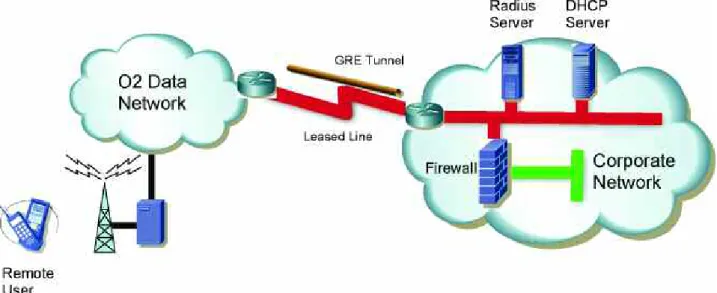
Figure 4 details, at a top level, a typical data Bearer Service connection.
Figure 4: Typical Data Bearer Service Connection.
Each DataLink can support multiple APNs, each with its own Bearer Service definition. This is useful where customers wish to provide separacy of service to different internal departments, external customers or application user bases.
For those customers requiring the very highest levels of availability, O2 offers a Resilient DataLink leased line option to Bearer Service customers. Two links and routers are provided as part of this solution.
The two links and routers can be terminated at the same site. However, it is strongly recommended that they are deployed in different computer rooms which are served by different exchanges and duct routes. LAN connectivity is required between the two O2 routers and Hot Standby Routing Protocol (HSRP) provides resilience against router failure by allowing two or more routers to share the same virtual IP address (and MAC address) on the same Ethernet LAN segment.
5.1.1 O2 Bearer Service and the BlackBerry
Enterprise Solution from O2
Not applicable.
The BlackBerry Enterprise Solution from O2 utilises infrastructure specifically designed and deployed by O2 to support this solution.
5.1.2 O2 Bearer Service and Microsoft
Direct Push Email Solution
Microsoft’s Direct Push Email Solution can be used in conjunction with O2’s Bearer Service.
It should be noted that only e-mail and PIM related data is sent out of the Windows Mobile device via the secure SSL or 3DES connection. If end users are browsing Internet Web pages or using other applications the data will not be protected by the SSL or 3DES connection. Many organisations will not consider this an issue as the customer network is connected to O2’s network via a leased line rather than the Internet.
If organisations do require additional security Virtual Private Network (VPN) technology can be deployed:
• Windows Mobile devices incorporate native support for VPNs including Point-to-Point Tunneling Protocol (PPTP) and Layer 2 Tunneling Protocol (L2TP) with IP Security Protocol (IPSec). These VPN clients can be easily configured to work with a Microsoft VPN server.
• Third party VPN clients are available for use on Windows Mobile devices and organisations should contact their VPN vendor to determine which VPN client should be used in conjunction with their VPN solution.
5.1.3 O2 Bearer Service and Good Mobile
Messaging Solution
Not applicable.
O2’s Good Mobile E-mail solution will only be offered in conjunction with O2’s Mobile Web and Mobile Web VPN services.
5.2 O2 Mobile Web Service
O2’s Mobile Web service is designed to enable O2’s customers to access Internet content via the GPRS and 3G bearers (refer to Figure 5).
The key aspects of the service are as follows:
• This is a public service and can be used by any O2 post-pay customer.
• The Access Point Name associated with the service is “mobile.o2.co.uk”.
• Users are allocated a dynamic, private unregistered IP address. However, it should be noted that users of O2’s Mobile Web service will be allocated a public IP address, via an O2 Internet facing firewall, when they access Internet resources. The public IP addresses will be allocated in the range 193.113.235.161 to 193.113.235.190.
• Users can surf the Internet, access FTP servers, access e-mail and generally utilise Internet resources.
• The service incorporates an optimisation capability which improves the performance of Internet applications.
This service is similar to broadband services offered by many Internet Service Providers to residential and business customers but does have some important differences:
• The throughput performance available to users is not fixed and will depend on a number of factors
including the data device being used, how many other people are using data in the same area and the capabilities of the O2 network in a given geographic location. An O2 White Paper, “GPRS – How It Works”, considers in detail what affects the throughput of the GPRS bearer.
• The O2 Mobile Web service uses private IP addressing and Port Address Translation (PAT) when users access Internet resources. PAT was defined by the Internet Engineering Task Force (IETF) as a way to convert private IP addresses to public routable Internet
addresses and enables organisations to minimise the number of Internet IP addresses they require (e.g. by using PAT companies can connect thousands of systems/users to the Internet via a few public IP addresses). The use of PAT has implications as although PAT provides many benefits, some applications, including IPSec VPNs, can experience issues when PAT is being used.
• Devices are issued a dynamic, private unregistered IP address, which is not directly visible from the Internet. This means that user’s devices are hidden from hackers and other undesirables and affords users some protection when accessing the Internet.
• By default Mobile Web users enjoy an optimised experience when accessing Internet content at no extra cost. This network hosted optimisation can speed up the delivery of Web pages by optimising graphic images and compressing text content. It can however degrade the image quality in Web pages and
interfere with some other Internet applications. If this is experienced, the optimisation platform can be bypassed by changing the user name in the Mobile Web settings of the handset/device, as follows:
• Default settings – includes optimisation:
• User name:faster
• Password: password
• No optimisation required:
• User name: bypass
• Password: password
The Mobile Web APN is associated with all new O2 post pay SIM cards. If customers do not wish this APN to be available to users they should specify this requirement prior to SIMs being provisioned.
O2 plan to introduce an anti-spam filtering capability in the near future.
5.2.1 O2 Mobile Web Service and the
BlackBerry Enterprise Solution from O2
Not applicable.
The BlackBerry Enterprise Solution from O2 utilises infrastructure specifically designed and deployed by O2 to support this solution.
5.2.2 O2 Mobile Web Service and Microsoft
Direct Push Email Solution
Microsoft’s Direct Push Email Solution can be used in conjunction with O2’s Mobile Web Service.
It should be noted that only e-mail and PIM related data is sent out of the Windows Mobile device via the secure SSL or 3DES connection. If end users are browsing Internet Web pages or using other applications the data will not be protected by the SSL or 3DES connection unless other security measures are put in place. If organisations do require additional security Virtual Private Network (VPN) technology can be deployed:
• Windows Mobile devices incorporate native support for VPNs including Point-to-Point Tunneling Protocol (PPTP) and Layer 2 Tunneling Protocol (L2TP) with IP Security Protocol (IPSec). These VPN clients can be easily configured to work with a Microsoft VPN server.
• Third party VPN clients are available for use on Windows Mobile devices and organisations should contact their VPN vendor to determine which VPN client should be used in conjunction with their VPN solution.
As detailed in the earlier text O2’s Mobile Web service incorporates an optimisation capability. If organisations decide to use the Microsoft Mobile E-mail solution without SSL or 3DES encryption, not a recommended configuration, then Microsoft Exchange will need to be configured so that HTTP virtual server compression is not used.
5.2.3 O2 Mobile Web Service and Good
Mobile E-mail Solution
The Good Mobile E-mail solution can be used in conjunction with O2’s Mobile Web Service. Secure browsing can be provided via Good Mobile Intranet – if Good Mobile Intranet is procured all Internet and Intranet data is sent to the corporate network via a secure SSL connection.
5.3 O2 Mobile Web VPN Service
O2’s Mobile Web VPN service was specifically developed to allow customers to use their VPN solutions with GPRS and 3G – assuming the customers VPN solution can be utilised via people connected to the Internet (refer to Figure 6).
The key aspects of the service are as follows:
• This is a public service and can be used by any O2 post-pay customer.
• The APN associated with the service is
Figure 6: A VPN Tunnel Established between a Remote User and the Corporate LAN
• Users cannot directly “surf” the Internet, access FTP servers, access e-mail or utilise Internet resources:
• At the request of customers the service was set-up so only VPN protocols can be used when users first establish their GPRS or 3G connection e.g. the firewall associated with the service will block all other traffic.
• Once the VPN session is in place users will be able to browse the Intranet/Internet and access other resources – assuming the corporate security policy allows such transactions to take place.
• Split tunnelling will not work as users are not able to access Internet resources directly. The O2 Mobile Web VPN service does not include any optimisation capability, delivers public registered IP addresses to mobile devices and allows access only to VPN applications. The service offers businesses the ability to provide secure LAN access to their users via the Internet and control their usage through the application of their internal IT policy.
Access to Mobile Web VPN can be requested via O2 Customer Services and is usually provisioned within 24 hours.
5.3.1 O2 Mobile Web VPN Service and the
BlackBerry Enterprise Solution from O2
Not applicable.
The BlackBerry Enterprise from O2 Solution utilises infrastructure specifically designed and deployed by O2 to support this solution.
5.3.2 O2 Mobile Web VPN Service and
Microsoft Direct Push Email Solution
Microsoft’s Direct Push Email Solution can be used in conjunction with O2’s Mobile Web VPN Service.
It should be noted that only e-mail and PIM related data is sent out of the Windows Mobile device via the secure SSL or 3DES connection. This is significant as the O2 Mobile Web VPN service will not allow data transfer unless a VPN technology, such as SSL, is being used. End users will not be able to directly browse Internet Web pages or use other applications unless a “VPN tunnel” is in place.
Windows Mobile devices incorporate native support for VPNs including Point-to-Point Tunneling Protocol (PPTP) and Layer 2 Tunneling Protocol (L2TP) with IP Security Protocol (IPSec). These VPN clients can be easily configured to work with a Microsoft VPN server.
Third party VPN clients are available for use on Windows Mobile devices and organisations should contact their VPN vendor to determine which VPN client should be used in conjunction with their VPN solution.
5.3.3 O2 Mobile Web VPN Service
and Good Mobile E-mail
Solution
The Good Mobile E-mail Solution can be used in conjunction with O2’s Mobile Web VPN Service. Secure browsing can be provided via Good Mobile Intranet.
5.4 BlackBerry from O2 Service
The BlackBerry from O2 service was specifically designed and developed to allow organisations to access their corporate e-mail and PIM data via BlackBerry smartphones or smartphones which incorporate a BlackBerry Connect client. Organisations must deploy a BlackBerry Enterprise Server and also ensure that the firewall is configured to allow an outbound-initiated connection on TCP port 3101.
The APN associated with the service is blackberry.net. BlackBerry from O2 is a complete solution that provides the following [6]:
• A range of BlackBerry smartphones which provide an all in one voice and data solution.
• BlackBerry Desktop Software for users PC’s. Corporate IT teams may not decide to deploy this software as end users can be provisioned Over the Air.
• BlackBerry Enterprise Server.
• O2’s data network and international network of data partners.
• Technical Support Team for effective ongoing resolution of issues.
• Approved BlackBerry partners – O2 has a network of experienced partners who O2 recommend for the deployment of applications via the BlackBerry platform.
• O2 Professional Services – option of support from a technical team at O2.
The BlackBerry Enterprise Solution from O2 is offered with a choice of voice tariffs enabling businesses to choose a calling plan which best meets their requirements.
5.4.1 BlackBerry from O2 Service and the
BlackBerry Enterprise Solution from O2
All data, such as e-mail and Web browsing data, sent to and from the end user BlackBerry devices is encrypted using Advanced Encryption Standard (AES) or Triple Data Encryption Standard (3DES) encryption.
As a consequence end to end security is provided by the BlackBerry Enterprise Solution from O2.
5.4.2 BlackBerry from O2 Service and
Microsoft Direct Push Email Solution
Not applicable.
The BlackBerry from O2 Service can only be used to support BlackBerry solutions.
5.4.3 BlackBerry from O2 Service and Good
Mobile E-mail Solution
Not applicable.
The BlackBerry from O2 Service can only be used to support BlackBerry solutions.
Windows Mobile 6 provides new capabilities some of which are only available if Exchange 2007 is being used. The table below outlines those new capabilities that require Exchange 2007 [7].
6. Appendix A: Windows Mobile 6 and Exchange
Server 2007 Features
Advanced Mobile Communications
Feature Exchange 2003 SP2 Exchange 2007
Global Address Lookup for phone
✓
✓
E-mail Flags
✓
“Fetch” e-mail without full sync
✓
Manage Out Of Office (OOF) notifications
✓
View Attendee Acceptance Status
✓
Increased Mobile Productivity
Forward from appointments
✓
Server e-mail search
✓
Document Access (SharePoint/UNC)
✓
Global Address Lookup for e-mail
✓
✓
Integrated Mobile Business Performance
Storage Card Wipe
✓
New Device Lock Policies
✓
Simplified Mobile Administration
✓
Increased policy management and flexibility
✓
Outlook Web Access (OWA) Self Service
✓
User reporting through ISS
✓
Integrated monitoring
✓
[1] Research In Motion “Introduction to Administering and Supporting BlackBerry Enterprise Server software version 4.1”, 2006.
[2] O2 “BlackBerry Enterprise Server 4.1 Features Overview”, February 2006. [3] Research In Motion “BlackBerry Enterprise Server for Exchange – Feature and Technical
Overview”, 30th November 2004.
[4] Microsoft “Mobile E-mail and Business Application Solutions with Windows Mobile: Addressing Key Questions”, Microsoft White Paper, July 2006. [5] Good Technology “Good Mobile E-mail”, Product White Paper, 2006.
[6] O2 “BlackBerry Enterprise Solution from O2”, O2 Sales Brochure, 2006. [7] Microsoft “Windows Mobile 6 Product Reference Guide”, 15th March 2007.
7. References
3G Third Generation mobile phone service (AKA: UMTS)
APN Access Point Name
DHCP Dynamic Host Configuration Protocol
FTP File Transfer Protocol
GGSN GPRS Gateway Support Nodes
GPRS General Packet Radio Service
GSM Global System for Mobile Communications
HSRP Hot Standby Routing Protocol
IP Internet Protocol
IPSEC Internet Protocol Security
LAN Local Area Network
L2TP Layer 2 Tunnelling Protocol
OOF Out Of Office
OWA Outlook Web Access
PAT Port Address Translation
PIM Personal Information Management
PPTP Point-to-Point Tunnelling Protocol
RADIUS Remote Access Dial In User Service
RIM Research In Motion
SIM Subscriber Identification Module
S/MIME Secure/Multipurpose Internet Mail Extensions
SMS Short Message Service
SSL Secure Sockets Layer
TCP Transmission Control Protocol
UDP User Datagram Protocol
UMTS Universal Mobile Telephone Service
UNC Universal Naming Convention
VPN Virtual Private Network
XML Extensible Markup Language
8. Glossary of Terms
©2007 Research In Motion Limited. All rights reserved. The RIM and BlackBerry families of related marks, images and symbols are the exclusive properties of and trademarks of Research In Motion Limited. RIM, Research In Motion and BlackBerry are registered Community Trade Marks and may be pending or registered in other countries. All other brands, product names, company names, trademarks and service marks are the properties of their respective owners.
©2007 Good Technology, Inc. All rights reserved. Good, Good Technology, the Good logo, Good Mobile E-mail, Good Mobile Intranet, and Powered by Good are trademarks of Good Technology, Inc. MOTOROLA and the Stylized M Logo are registered in the U.S. Patent and Trademark Office. All other trademarks are the property of their respective owners. Microsoft, Outlook, Windows Mobile, Media Player, MSN Hotmail, Excel and Powerpoint are either registered trademarks or trademarks of Microsoft Corporation in the United States and/or other countries.
![Figure 1: BlackBerry Enterprise Solution from O2 Architecture [2]](https://thumb-us.123doks.com/thumbv2/123dok_us/8550784.2307674/6.892.113.788.636.980/figure-blackberry-enterprise-solution-o-architecture.webp)
![Figure 3: Good Mobile E-mail Solution Architecture [5].](https://thumb-us.123doks.com/thumbv2/123dok_us/8550784.2307674/10.892.13.884.9.173/figure-good-mobile-e-mail-solution-architecture.webp)