LiteSpeed
™
for SQL Server
®
8.0.2
Release Notes
December 09, 2014
These release notes provide information about the LiteSpeed™for SQL Server®8.0.2 release.
About LiteSpeed™ for SQL Server® 8.0 New and Updated Features
Resolved Issues Known Issues
System Requirements Product Licensing Getting Started Globalization About Dell
About LiteSpeed
™
for SQL Server
®
8.0
LiteSpeed for SQL Server 8.0 is a major release, with new features and functionality. See New and Updated Features. LiteSpeed for SQL Server, or LiteSpeed, is a fast and flexible backup and recovery solution that allows DBAs to easily maintain complete control over the backup and recovery process. Its low-impact, high-performance compression and encryption technology enables users to reduce storage costs and protect data, while improving both backup and disaster recovery times. With the improved compression and LiteSpeed's Fast Compression technology, LiteSpeed for SQL Server can further reduce disk space and backup time up to another 85% over traditional, compressed full backup solutions. The result is a unique backup and recovery approach, unmatched in flexibility, that greatly reduces backup times, creates a significantly smaller storage footprint, and maintains a high level of recoverability.
Key Benefits
l Cloud backup for Amazon S3
l Automated Restore can be used to restore the most recent database backups
l Reduce storage requirements to save valuable disk space with Fast Compression (up to 85% compression
over traditional full backup solutions)
l Optimize use of available server resources with LiteSpeed's Adaptive Compression l Reduce backup times to improve maintenance windows
l Reduce restore times to avoid excessive downtime
l Easily configure backup jobs and maintenance plans on multiple instances by deploying LiteSpeed
Backup Templates
l Easily configure and monitor Log Shipping using the Create LiteSpeed Log Shipping Plan Wizard and
Monitoring tab in the LiteSpeed UI Console
l Recover data and schema from backups using LiteSpeed's Object Level Recovery l Undo critical transactions using LiteSpeed's Transaction Log Reader
l View backup performance across the enterprise using LiteSpeed's centralized reporting repository l Easily manage SQL Agent jobs across multiple servers using LiteSpeed's Job Manager
l Easily configure maintenance plans across the enterprise using LiteSpeed's Maintenance Plan Designer l Leverage LiteSpeed's advanced engine tuning, including CPU Affinity, CPU Throttling, and
Threading options
l Analyze your environment for best backup performance and identify bottlenecks using LiteSpeed's
Backup Analyzer
l Eight highly optimized levels of compression, including our latest levels for maximum compression l Secure data using backup encryption: AES (128-bit, 192-bit, 256-bit), 3DES (168-bit), RC4 (128-bit), and
RC2 (40-bit, 56-bit, 112-bit, 128-bit)
New and Updated Features
New and updated features in LiteSpeed for SQL Server 8.0.2:
l Amazon S3 Cloud Backup support—LiteSpeed now supports backing up to and restoring from the
Amazon S3 cloud from both on-prem SQL Servers and from Amazon Elastic Compute Cloud (Amazon EC2) instances.
l Updated User Interface—The UI has been updated.
l Automated Restore Immediate Execution Option—An immediate execution option has been added to
Automated Restore.
l Database Backup Support for Fast Compression—Fast Compression is now available for
Multi-Database backup in the UI.
l Multi-Database Restore—Multi-database restores can now be done using Automated Restore. l Dell Rebrand—The product name has been renamed to LiteSpeed for SQL Server (removing the
NetVault name).
l Backup Performance Improvements—Backup speed and size for small backups has improved. l Fast Compression—some options are now deprecated. The "Check full backup" and "Check for full in
alternate folder" options are no longer available. Fast Compression will always check for the full backup in the folder where it was created.
l SQL Server 7 is no longer supported.
l The Licensing Option is now available from the Instance context menu in Backup Manager.
l Re-execute both Failed and Successful Backups—You can now re-execute both failed and successful
l Improved Cluster Installer—LiteSpeed includes an improved cluster installer option that allows for an
install to a single node in the cluster.
l Automated Restore Change—Automated Restore now allows you to specify any SQL Server instance even
if it is not registered in the LiteSpeed console or if it is offline.
Resolved Issues
In LiteSpeed 8.0.2
The following is a list of issues addressed in release 8.0.2.
Table 1: Backup resolved issues
Resolved Issue Issue ID
Small backup files no longer increase in size to 32 MB when running LiteSpeed in some environments.
116333
Table 2: Log Shipping resolved issues
Resolved Issue Issue ID
Existing Log Shipping advanced options are now properly displayed when editing Log Shipping plans.
116329
Log Shipping backups now use a .TRN extension instead of a temporary backup file extension of .WRK when backup is in progress.
116439
Table 3: Log Reader resolved issues
Resolved Issue Issue ID
The LiteSpeedOptionsdialog for the Log Reader now properly allows users to change the “Check log file every X seconds” option.
116346
The tab control in the LiteSpeed user-interface for the Log Reader now properly responds to mouse clicks.
116345
Table 4: Other resolved issues
Resolved Issue Issue ID
In LiteSpeed 8.0.1
The following is a list of issues addressed in release 8.0.1.
Table 5: Restore resolved issues
Resolved Issue Issue ID
In rare cases, LiteSpeed could hang on an Attached File restore. 115440 When using the OLRMAP=1 option when backing up, the Object Level Recovery operation can be
slow.
115440
Table 6: Log Shipping resolved issue
Resolved Issue Issue ID
Log Shipping cleanup could not properly remove transaction log backup files due to the read-only attribute. Now, cleanup works properly because the read read-only attribute is removed before deleting the backup files.
115925
Log Shipping transaction log backup files could be copied before they are completed by the subscribers. Now, LiteSpeed prevents any in-progress backups from being copied until they are complete.
115895
Table 7: Drive detection resolved issues
Resolved Issue Issue ID
A backup drive type detection regression issue in LiteSpeed 8.0 has been resolved to ensure that backups properly detect the destination drive type in order to optimize for best performance.
115928
Table 8: Double Click Restore resolved issues
Resolved Issue Issue ID
A Double Click Restore regression issue in LiteSpeed 8.0 has been resolved to properly handle backups larger than 4 GB.
115410
In LiteSpeed 8.0
Table 9: Fast Compression resolved issues
Resolved Issue Issue ID
Fast Compression reuses file names of prior backups once they have been deleted by SmartCleanup.
115014
Ability to use the same path for striping backup in Maintenance Plans and Backup Wizards 113519, 113520
Table 10: Log Reader resolved issues
Resolved Issue Issue ID
Removing columns from Summary tab caused exception. 113265
Table 11: Log Shipping resolved issues
Resolved Issue Issue ID
Create plan may fail with “The INSERT statement conflicted with the FOREIGN KEY constraint "FK_LogShippingPublisher_LiteSpeedDatabase" on case-sensitive SQL Server.
111900
Table 12: Maintenance Plans resolved issues
Resolved Issue Issue ID
Clean Up History task does not remove history from central repository if LiteSpeed is not installed there.
112947
Ability to not delete empty subfolders within “Delete files older than” in Clean Up Maintenance Plans task.
112386
No backup file on main destination made when the network path for mirror backup was not found.
111936
The %A variable does not work to name a file or folder "Sunday." 115008 Maintenance Plans may generate duplicated report files. 115122
Table 13: Restore resolved issues
Resolved Issue Issue ID
Describe Transaction log backup options to make it clear that NO_TRUNCATE will cause database to be in restoring state.
114745
Automated restore may fail with “Failed extract LSN number value from XML” for pre-7.x LiteSpeed backups.
113935
Ability to restore attached files to new directories that do not exist at the moment of a restore. 112048 Failed to restore tape backup. 115420
Table 14: Automated Restore resolved issues
Resolved Issue Issue ID
Ability to exclude databases that are part of a replication plan. 107675
Table 15: Other resolved issues
Resolved Issue Issue ID
Information on other resolved issues may be found in the Dell Knowledge Base under
Knowledge Base Article 127199. These resolved issues include the following change requests: 112365, 112362, 112320, 112213, 111035, and 111027.
n/a
Known Issues
The following is a list of issues, including those attributed to third-party products, known to exist at the time of release.
Table 16: Version compatibility known issues
Known Issue Issue ID
Database backups created with LiteSpeed Version 8.x cannot be restored using older versions of LiteSpeed. However, backups created with previous versions of LiteSpeed for SQL Server can be restored with LiteSpeed 8.0.
N/A
Table 17: Console known issues
Known Issue Issue ID
On Windows 8.1, console logging cannot be enabled when UAC is enabled. The workaround is to run LiteSpeed with the “Run as Administrator” option to enable console logging.
113540
Table 18: Backup and restore known issues
Known Issue Issue ID
Mirroring is not supported for TSM backups. 49305 LiteSpeed incorrectly writes successful backup details to the SQL Server error log or event
viewer if DBCC TRACEON (3226) is run with the backup. These details are not written for a native backup.
38972
Table 19: Activity logging known issues
Known Issue Issue ID
NT AUTHORITY\SYSTEM account must be added to the sysadmin server role on the local instances of SQL Server 2012 or higher in this very rare scenario:
Known Issue Issue ID
l The central repository is on the same server as the Local repository and l You selectedLocal Systemon the Service Account wizard page of the Instance
Configuration Wizard and
l You selected to use Windows authentication for the repositories.
Otherwise, the local instance will not report to the central repository.
Workaround:Instead of adding NT AUTHORITY\SYSTEM account to the sysadmin server role, you can either provide a Windows domain account on the Service Account wizard page or use SQL Server Authentication for the local and central repositories.
Table 20: Backup analyzer known issues
Known Issue Issue ID
The LiteSpeed for SQL Server Backup Analyzer backs up the requested amount of data for analysis and then automatically aborts the backup process. This generates VDI error messages in the LiteSpeed SQL Server error log. Please ignore them.
79697
Table 21: Log shipping known issues
Known Issue Issue ID
The publisher and subscriber servers must have the same version of LiteSpeed. 52230 In the native SQL Server 2000 log shipping plans, if the monitoring server is not the same as
the subscriber server, information about the restore time is based on the restore job history and may be different from the actual restore time.
98644
Table 22: Object Level Recovery known issues
Known Issue Issue ID
Object Level Recovery does not support UDT SQL Server data types. 46004
Table 23: Maintenance plans known issues
Known Issue Issue ID
Legacy native plans on SQL Server 2008 may fail due to Microsoft backward compatibility issue. Seehttp://support.microsoft.com/kb/955626.
60281
LiteSpeed does not support regular expressions with the IgnoreCase option. To ignore case, use ([Aa][Bb][Cc]) instead of (?i:abc.
94513
Table 24: Log Reader known issues
Known Issue Issue ID
User information displays only for operations in sessions that are currently active. The online log and backups do not contain user information and only contain the SPID for the transaction.
37112
Table 25: Licensing known issues
Known Issue Issue ID
Trial licenses are read as expired on Windows 8.1 and higher when LiteSpeed core engine debug logging is enabled.
114174
System Requirements
Before installing LiteSpeed for SQL Server 8.0.2, ensure that your system meets the following minimum hardware and software requirements.
Hardware Requirements
Table 26: List of hardware requirementsRequirements Details
Processor Follow the recommendations for the SQL Server version used. Disk Space 250 MB of disk space for installation
Note:The disk space required may vary based on options selected during installation.
Memory Follow the recommendations for the SQL Server version used.
Note:The memory required may vary based on the following:
l Applications that are running on your system l Size and complexity of the database
l Amount of database activity
l Number of concurrent users accessing the database
Monitor SVGA with a minimum resolution of 1024x768
Software Requirements
Table 27: List of software requirementsRequirements Details
Operating System Microsoft Windows 2000 Server 32-bit (Service Pack 4)
Microsoft Windows Server 2003 32-bit and 64-bit (x64, Itanium) (All Service Packs)
Microsoft Windows Server 2003 R2 32-bit and 64-bit (x64) (All Service Packs) Microsoft Windows Server 2008 32-bit and 64-bit (x64, Itanium)
Requirements Details
(All Service Packs)
Microsoft Windows Server 2008 R2 64-bit (x64, Itanium) (All Service Packs) Microsoft Windows Server 2012 64-bit (x64) (All Service Packs)
Microsoft Windows Server 2012 R2 64-bit (x64) (All Service Packs) Microsoft Windows XP 32-bit and 64-bit (x64) (All Service Packs) Microsoft Windows Vista 32-bit and 64-bit (x64) (All Service Packs) Microsoft Windows 7 32-bit and 64-bit (x64) (All Service Packs) Microsoft Windows 8 32-bit and 64-bit (x64) (All Service Packs) Microsoft Windows 8.1 32-bit and 64-bit (x64) (All Service Packs) Database SQL Server 2000 32-bit and 64-bit (Itanium) (All Service Packs)
SQL Server 2005 32-bit and 64-bit (x64, Itanium) (All Service Packs) SQL Server 2008 32-bit and 64-bit (x64, Itanium) (All Service Packs) SQL Server 2008 R2 32-bit and 64-bit (x64, Itanium) (All Service Packs) SQL Server 2012 32-bit and 64-bit (x64) (All Service Packs)
SQL Server 2014 32-bit and 64-bit (x64) (All Service Packs)
Additional Software .Net Framework 4.0 installed before you install the LiteSpeed UI Console. .Net Framework 3.5 or .Net Framework 3.5 SP1 installed before you install LiteSpeed Core Cloud Components.
If using Tivoli Storage Manager (TSM), the TSM API and Backup/Archive Client version 5.3 or later should be installed.
Microsoft Internet Explorer 6.0 or later. Adobe Reader 8 or later to view PDF guides.
Supported Cluster Requirements
l Microsoft Cluster Service 2003 l Windows Server 2008 Failover Cluster l Windows Server 2008 R2 Failover Cluster l Windows Server 2012 Failover Cluster l Windows Server 2012 R2 Failover Cluster l HP PolyServe Matrix Sever 3.6.1
l Veritas Storage Foundation HA for Windows 5.0
Supported Storage Appliances
VMware and Hyper-V Environments
LiteSpeed has been tested and is certified to work under VMware and Hyper-V environments.
Upgrade and Compatibility
For information about registering LiteSpeed and for upgrade instructions, please see the LiteSpeed Installation Guide.
Repository Compatibility
If receiving the message "The version of the <RepositoryDatabaseName> on server <ServerName> is greater than the version of this release of LiteSpeed for SQL Server", please see the online Help topic "Upgrade Repositories". The message is an indication that the statistics agent on the older server does not match the newer version of LiteSpeed and must be upgraded.
In addition, there are special considerations if you are upgrading from LiteSpeed 4.x. Review the following before upgrading from LiteSpeed 4.x to LiteSpeed 5.0 or later.
Maintenance Plans
LiteSpeed 5.x and later do not support SSMS plug-in functionality. However, the LiteSpeed UI Console allows you to read SSMS plug-in maintenance plans and upgrade them to SSIS LiteSpeed maintenance plans. There are two ways to remove old backup files for maintenance plans: the 'Clean up maintenance plans' task and the 'Remove files older than' option in the 'Back Up Database' task. The 'Remove files older than' option removes both LiteSpeed 4.8 and LiteSpeed 5.x/6.x backup files for legacy plans. However, for SSIS maintenance plans it only removes LiteSpeed 5.x/6.x backup files. The 'Clean up maintenance plans' task removes LiteSpeed 4.8 and LiteSpeed 5.x/6.x backup files.
LiteSpeed Activity
The timeline on the LiteSpeed Activity tab does not display activity from certain kinds of jobs if you upgrade from LiteSpeed 4.x. You can manually correct this by followingSolution 45390on SupportLink.
Log Shipping
Versions 5.1 and later of LiteSpeed do not support LiteSpeed 4.x log shipping plans. If you are upgrading and have LiteSpeed 4.x log shipping plans, you must follow Solution 45391on SupportLink to update your log shipping plans. If you do not follow these instructions, your log shipping plans will fail after the upgrade is complete.
SQL Server 4.8 5.0 5.0.1 5.0.2 5.1.0–6.5.1 6.5.2 7.x 8.x
2000 • • • • •
2005 • • • • • • •
2008 / R2 • • • • • • •
2012 • • •
2014 • •
Product Licensing
Version 6 and later of LiteSpeed uses a new license format that differs from previous 4.x/5.x versions of LiteSpeed.
For existing customers:
l If you purchased LiteSpeed and received your new license, enter the License Key and Site Message
value during the installation or register LiteSpeed later.
l If you purchased LiteSpeed but have not received your new LiteSpeed license, please go to
https://www.dell.com/support/licensingand request your upgrade.
l If you have any other licensing questions related to your purchase, please go to
https://www.dell.com/support/licensing.
For trial customers:
l If you want to purchase LiteSpeed or require a trial extension, please contact your sales representative
or send an email [email protected].
Getting Started
Contents of the Release Package
The LiteSpeed for SQL Server release package contains the following products:
l LiteSpeed.msi—32-bit installer l LiteSpeed-x64.msi—64-bit installer
l LiteSpeed-IA64.msi—Itanium 64-bit installer
Installation Instructions
Double-click on the appropriate installer (.msi file) and follow the on-screen directions. See the LiteSpeed
Installation Guidefor full details on installing LiteSpeed. TheInstallation Guideis located on the product web site and the Dell Support Portal.
Additional Resources
Get the latest product information, find helpful resources, and join a discussion with the LiteSpeed Dell team and other community members. Join the LiteSpeed community at:
http://en.community.dell.com/techcenter/data-protection/.
Globalization
This section contains information about installing and operating this product in non-English configurations, such as those needed by customers outside of North America. This section does not replace the materials about supported platforms and configurations found elsewhere in the product documentation.
This release is Unicode-enabled and supports any character set. It supports simultaneous operation with multilingual data. This release is targeted to support operations in the following regions: North America, Western Europe and Latin America, Central and Eastern Europe, Far-East Asia, Japan.
This release has the following known capabilities or limitations: Note: LiteSpeed for SQL Server 4.84 has been localized in Japanese. LiteSpeed for SQL Server 5.0 and more recent releases are English only versions.
About Dell
Dell listens to customers and delivers worldwide innovative technology, business solutions and services they trust and value. For more information, visitwww.software.dell.com.
Contacting Dell
Technical support:Online support
Product questions and sales:
(800) 306-9329
Email:
Technical Support Resources
Technical support is available to customers who have purchased Dell software with a valid maintenance contract and to customers who have trial versions. To access the Support Portal, go to
http://software.dell.com/support/.
The Support Portal provides self-help tools you can use to solve problems quickly and independently, 24 hours a day, 365 days a year. In addition, the portal provides direct access to product support engineers through an online Service Request system.
l Create, update, and manage Service Requests (cases) l View Knowledge Base articles
l Obtain product notifications
l Download software. For trial software, go toTrial Downloads. l View how-to videos
l Engage in community discussions l Chat with a support engineer
Third-Party Contributions
This product contains the third-party components listed below. For third-party license information, go to
http://software.dell.com/legal/license-agreements.aspx. Source code for components marked with an asterisk (*) is available athttp://opensource.dell.com.
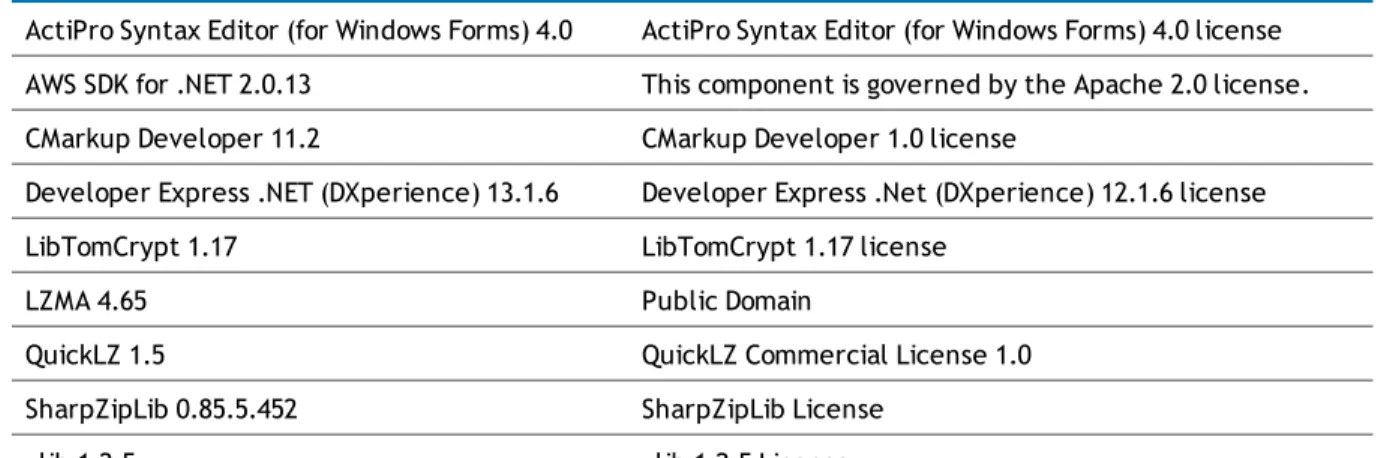
Table 28: List of third-party contributions
Component License or acknowledgement
ActiPro Syntax Editor (for Windows Forms) 4.0 ActiPro Syntax Editor (for Windows Forms) 4.0 license AWS SDK for .NET 2.0.13 This component is governed by the Apache 2.0 license. CMarkup Developer 11.2 CMarkup Developer 1.0 license
Developer Express .NET (DXperience) 13.1.6 Developer Express .Net (DXperience) 12.1.6 license LibTomCrypt 1.17 LibTomCrypt 1.17 license
LZMA 4.65 Public Domain
QuickLZ 1.5 QuickLZ Commercial License 1.0 SharpZipLib 0.85.5.452 SharpZipLib License
Copyright
©2014 Dell Inc.ALL RIGHTS RESERVED.
This guide contains proprietary information protected by copyright. The software described in this guide is furnished under a software license or nondisclosure agreement. This software may be used or copied only in accordance with the terms of the applicable agreement. No part of this guide may be reproduced or
transmitted in any form or by any means, electronic or mechanical, including photocopying and recording for any purpose other than the purchaser’s personal use without the written permission of Dell Software Inc. The information in this document is provided in connection with Dell Software products. No license, express or implied, by estoppel or otherwise, to any intellectual property right is granted by this document or in connection with the sale of Dell Software products. EXCEPT AS SET FORTH IN DELL SOFTWARE’S TERMS AND CONDITIONS AS SPECIFIED IN THE LICENSE AGREEMENT FOR THIS PRODUCT, DELL SOFTWARE ASSUMES NO LIABILITY WHATSOEVER AND DISCLAIMS ANY EXPRESS, IMPLIED OR STATUTORY WARRANTY RELATING TO ITS PRODUCTS INCLUDING, BUT NOT LIMITED TO, THE IMPLIED WARRANTY OF MERCHANTABILITY, FITNESS FOR A PARTICULAR PURPOSE, OR NON-INFRINGEMENT. IN NO EVENT SHALL DELL BE LIABLE FOR ANY DIRECT, INDIRECT, CONSEQUENTIAL, PUNITIVE, SPECIAL OR INCIDENTAL DAMAGES (INCLUDING, WITHOUT LIMITATION, DAMAGES FOR LOSS OF PROFITS, BUSINESS INTERRUPTION OR LOSS OF INFORMATION) ARISING OUT OF THE USE OR INABILITY TO USE THIS DOCUMENT, EVEN IF DELL SOFTWARE HAS BEEN ADVISED OF THE POSSIBILITY OF SUCH DAMAGES. Dell Software makes no representations or warranties with respect to the accuracy or completeness of the contents of this document and reserves the right to make changes to specifications and product descriptions at any time without notice. Dell Software does not make any commitment to update the information
contained in this document.
If you have any questions regarding your potential use of this material, contact: Dell Inc.
Attn: LEGAL Dept 5 Polaris Way Aliso Viejo, CA 92656
Refer to our web site (software.dell.com) for regional and international office information.
Patents
LiteSpeed is protected by U.S. Patent # 8,260,750. Additional patents pending.
Trademarks
Dell, the Dell logo, and LiteSpeed are trademarks of Dell Inc.and/or its affiliates. Other trademarks and trade names may be used in this document to refer to either the entities claiming the marks and names or their products. Dell disclaims any proprietary interest in the marks and names of others.
Legend
CAUTION:A CAUTION icon indicates potential damage to hardware or loss of data if instructions are not followed.
WARNING:A WARNING icon indicates a potential for property damage, personal injury, or death.