Thank you for your interest in our Better Impact software!
This document has been prepared to list the functions of Better Impact software and, if helpful, to assist you in comparing it to other software you might be considering.
Current as of August 13, 2015 Volunteer Profiles
Volunteer
Impact Option 2 Option 3
Find volunteers with a portion of their name from any screen ✓
General contact information ✓
Volunteer photograph ✓
Number of custom fields allowed - short text Unlimited
Number of custom fields allowed - long text Unlimited
Number of custom fields allowed - date Unlimited
Number of custom fields allowed - numeric Unlimited
Number of custom fields allowed - check box Unlimited
Number of custom fields allowed - drop down list Unlimited
Number of custom fields allowed - file upload Unlimited
Number of custom vetting fields that facilitate volunteer self scheduling Unlimited
Alerts when certifications or similar elements are soon to expire* ✓
Hide selected fields from the volunteer's view in their portal ✓
Track volunteer interests ✓
Track volunteer availability ✓
Select a record and then take actions like view, edit, delete or e-mail ✓
Select multiple records and make data changes to all selected records ✓
Volunteer profiles can contain fields common across all departments ✓
Volunteer profiles can contain fields unique to specific departments ✓E
Export all volunteer profile data or selected portions of it into csv files or spreadsheets ✓
Maximum number of volunteer profiles allowed Unlimited
Organization Profiles
Volunteer Impact
Option 2
Option 3
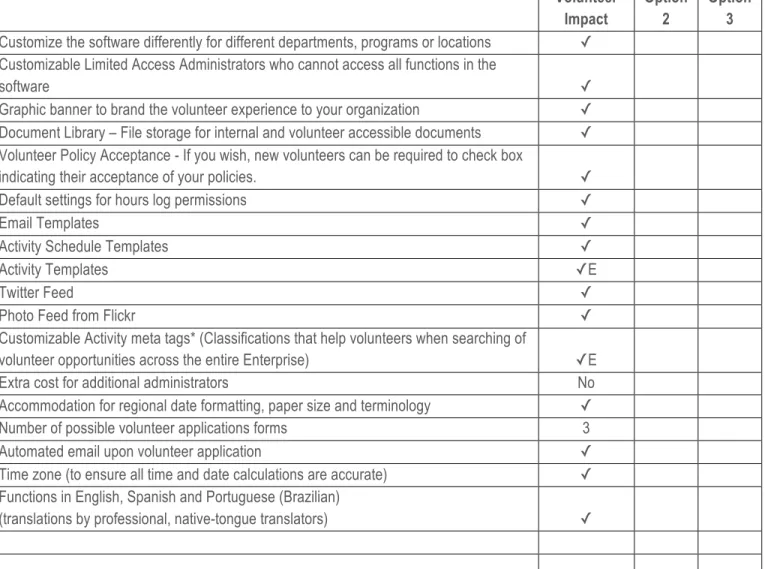
Customize the software differently for different departments, programs or locations ✓
Customizable Limited Access Administrators who cannot access all functions in the
software ✓
Graphic banner to brand the volunteer experience to your organization ✓
Document Library – File storage for internal and volunteer accessible documents ✓
Volunteer Policy Acceptance - If you wish, new volunteers can be required to check box
indicating their acceptance of your policies. ✓
Default settings for hours log permissions ✓
Email Templates ✓
Activity Schedule Templates ✓
Activity Templates ✓E
Twitter Feed ✓
Photo Feed from Flickr ✓
Customizable Activity meta tags* (Classifications that help volunteers when searching of
volunteer opportunities across the entire Enterprise) ✓E
Extra cost for additional administrators No
Accommodation for regional date formatting, paper size and terminology ✓
Number of possible volunteer applications forms 3
Automated email upon volunteer application ✓
Time zone (to ensure all time and date calculations are accurate) ✓
Functions in English, Spanish and Portuguese (Brazilian)
Scheduling
Volunteer Impact
Option 2
Option 3
Calendar that displays current schedules, open slots and placed volunteers ✓
Prequalified volunteers can self-schedule according to your needs and preset rules ✓
Calendar can be viewed by day, week or month ✓
Scheduling conflicts are displayed ✓
Volunteers with expired certifications can’t register for opportunities that require them ✓
View all volunteers who are currently active, available and ready to volunteer for a shift ✓
Ongoing slots can use patterns, like “Weekdays, 9-12 and 12-3” ✓
Shifts and positions can be set to accept a predefined maximum number of volunteers ✓
At-a-glance view of which days need schedule slots filled & how many ✓
Find qualifying volunteers for each position using previously created (or new) searches ✓
Filters or suggestions for the most qualified volunteer based on skills, availability, etc. ✓
Print schedules by date range, volunteer, opportunity and organization ✓
Copy opportunities to save data entry ✓
Create schedules for new roles from pre-saved templates ✓E
Groups can be scheduled such that the group consumes the appropriate number of
spots on the shift ✓
View schedules on screen ✓
Gaps in schedule displayed visually and numerically ✓
Tracking and Reporting
VI Opt 2 Opt 3
Touch screen time-clock with feedback and output reporting ✓
Mobile phone hours reporting with feedback and output reporting ✓
View and print volunteer hours and volunteer numbers by date range, volunteer,
position and department ✓
View and print volunteer hours and volunteer numbers by type of role across a region
or entire enterprise ✓E
Filter reporting by multiple criteria, including volunteer profile data ✓
Track and report on the outputs related to relevant volunteer activities ✓
Track volunteer reported incidents or comments by volunteer, position and department ✓
Questionnaires associated with volunteer shifts ✓
Track expenses incurred by volunteers ✓
Volunteers can log hours through their volunteer portal and generate an hours report
(admin verification if needed) ✓
Generate reports based on any profile data including custom fields ✓
Save frequently used searches* ✓
Build your own comparison reports on hours outputs* ✓
Track efficiencies (outputs per hour of volunteer time) ✓
View reports on screen ✓
Export reports as PDF, Word or Excel ✓
Communications
Volunteer
Impact Option 2 Option 3
Email individual volunteers directly from the software ✓
Email volunteers directly from inside software ✓
Email volunteers based on a customizable set of filters ✓
Merge ‘First Name’ into email ✓
Email template that can be saved and used as needed ✓
Text formatting (font*, size and colors) supported in emails ✓
Links and attachments supported in emails ✓
Volunteer Portal
Volunteer Impact
Option 2
Option 3 Selected opportunities appear online on a unique and branded page for your
organization ✓
Volunteers can complete an application online ✓
Update contact details ✓
Update profile information ✓
Sign up or apply for specific roles or shifts ✓
Self schedule into shifts if pre-vetted (option as decided by administrator) ✓
Download shifts to Outlook, Google or Other calendar ✓
Automated opt-in email reminders ✓
See who else is scheduled on a shift (If you allow it and only as other volunteers opt-in
to having the name and/or picture visible) ✓
Log hours and generate an hours report (admin verification if needed) ✓
Provide outcome reporting after a shift ✓
Provide feedback after a shift ✓
Access schedule, hours logging and sign up for additional shifts through a mobile
interface ✓
Document library ✓
Your organization’s Flickr Feed ✓
Your organization’s Twitter Feed ✓
Synopsis of hours logged this week, this month, this year and lifetime (if applicable) ✓
Volunteers can share opportunities through social networking ✓
Volunteer Portal pages compliant with WCAG 2.0 AA accessibility standards ✓
Administrators can upload an organization branded graphic banner to the volunteer
portal and change it whenever they want ✓
Functions in English, Spanish and Portuguese (Brazilian)
Administrator Support
VI Opt 2 Opt 2
Internal phone support (We’re getting closer to 5x24 but not there yet) 5 x 23
Internal email and ticketed support 7 x 24
Client suggestion forum ✓
Online user's manual ✓
Searchable knowledgebase ✓
Video tutorials ✓
Member community (a private section of a community we offer freely to all leaders of
volunteers) ✓
On-site training ✓
Web based support and training ✓
International volunteer management consultants on the support team ✓
Technology and Security
VI Opt 2 Opt 3
Completely web-based. No installation on your computers required ✓
Hosting facility certification CSAE 3416
Regional points of presence to speed up content delivery ✓
Nightly offsite backup ✓
5 year uptime (exclusive of planned upgrades and maintenance) 99.985
Data encrypted in transit over the internet (backwards compatible to 128bit) 256bit SSL
Passwords encrypted (such that not even the vendor can read them) ✓
24x7x365 server monitoring to detect and prevent intrusion attempts on servers ✓
Web Browser Compatibility
VI Opt 2 Opt 3
Windows IE supported (Administrator & Volunteer) ✓
Windows Firefox supported (Administrator & Volunteer) ✓
Windows Chrome supported (Administrator & Volunteer) ✓
Mac Firefox supported ✓
Mac Safari supported ✓
Mac Chrome supported ✓