www.novell.com/documentation
NCP Server for Linux Administration
Guide
Open Enterprise Server 11 SP2
January 2014
Legal Notices
Novell, Inc., makes no representations or warranties with respect to the contents or use of this documentation, and specifically disclaims any express or implied warranties of merchantability or fitness for any particular purpose. Further, Novell, Inc., reserves the right to revise this publication and to make changes to its content, at any time, without obligation to notify any person or entity of such revisions or changes.
Further, Novell, Inc., makes no representations or warranties with respect to any software, and specifically disclaims any express or implied warranties of merchantability or fitness for any particular purpose. Further, Novell, Inc., reserves the right to make changes to any and all parts of Novell software, at any time, without any obligation to notify any person or entity of such changes.
Any products or technical information provided under this Agreement may be subject to U.S. export controls and the trade laws of other countries. You agree to comply with all export control regulations and to obtain any required licenses or classification to export, re-export or import deliverables. You agree not to export or re-export to entities on the current U.S. export exclusion lists or to any embargoed or terrorist countries as specified in the U.S. export laws. You agree to not use deliverables for prohibited nuclear, missile, or chemical biological weaponry end uses. See the Novell International Trade Services Web page (http://www.novell.com/info/exports/) for more information on exporting Novell software. Novell assumes no responsibility for your failure to obtain any necessary export approvals.
Copyright © 2005–2014 Novell, Inc. All rights reserved. No part of this publication may be reproduced, photocopied, stored on a retrieval system, or transmitted without the express written consent of the publisher.
Novell, Inc.
1800 South Novell Place Provo, UT 84606 U.S.A.
www.novell.com
Online Documentation: To access the latest online documentation for this and other Novell products, see the Novell Documentation Web page (http://www.novell.com/documentation/oes11).
Novell Trademarks
For Novell trademarks, see the Novell Trademark and Service Mark list (http://www.novell.com/company/legal/trademarks/ tmlist.html).
Third-Party Materials
Contents 3
Contents
About This Guide 11
1 NCP Server for Linux Overview 13
1.1 How NCP Server Works. . . 13
1.2 Benefits of NCP Server . . . 13
1.3 What's Next . . . 14
2 What’s New or Changed in NCP 15 2.1 What’s New or Changed in NCP (OES 11 SP1 January 2014 Patches) . . . 15
2.2 What’s New or Changed in NCP (OES 11 SP2) . . . 15
2.3 What’s New or Changed in NCP (OES11 SP1) . . . 16
2.4 What’s New or Changed in NCP (OES11) . . . 17
3 Installing and Configuring NCP Server for Linux 19 3.1 Installation Requirements for NCP Server for Linux. . . 19
3.1.1 Supported Platforms . . . 20
3.1.2 NCP Server and Dynamic Storage Technology . . . 20
3.1.3 Static Hostname and the NCP File Server Name . . . 20
3.1.4 64-Bit Support . . . 20
3.1.5 NetIQ eDirectory 8.8 SP8 . . . . 20
3.1.6 eDirectory Rights Needed by a Container Administrator . . . 21
3.1.7 Novell Storage Services . . . 21
3.1.8 Novell Samba . . . 21
3.1.9 Linux User Management . . . 22
3.1.10 Novell AFP . . . 22
3.1.11 Novell Cluster Services for Linux . . . 22
3.1.12 SLP . . . 22
3.1.13 Novell iManager 2.7.7 for Linux . . . 24
3.1.14 Novell Remote Manager for Linux . . . 24
3.1.15 SFCB . . . 24
3.1.16 Other OES 11 SP2 Services . . . 24
3.2 Installing NCP Server . . . 24
3.2.1 Preparing for the OES 11 SP2 Install . . . 25
3.2.2 Installing NCP Server during OES 11 Installation . . . 25
3.2.3 Installing NCP Server on an Existing OES 11 SP2 Server . . . 26
3.3 Updating NCP Server. . . 27
3.4 Configuring Global NCP Server Parameters . . . . 27
3.4.1 Directory Cache Management for NCP Server . . . 29
3.4.2 Dynamic Storage Technology for NCP Server . . . 29
3.4.3 Locks Management for File Access on NCP Server . . . 30
3.4.4 Logs for NCP Server Events . . . 31
3.4.5 NCP Communications . . . 31
3.4.6 NCP Server Environment . . . 32
3.4.7 NCP Volumes . . . 32
3.4.8 NCP Volumes Low-Space Warning . . . 33
3.4.9 TCP Connections. . . 33
3.4.10 Managing Audit Settings . . . 34
3.5 Restarting the Novell NCP/NSS IPC (ncp2nss) Daemon. . . 34
3.6 Restarting the NetIQ eDirectory (ndsd) Daemon . . . 35
3.7 Configuring the NCP Server Local Code Page . . . 35
3.7.1 Using Novell Remote Manager for Linux to Configure the Local Code Page . . . 35
3.7.2 Editing the /etc/opt/novell/ncpserv.conf File to Configure the Local Code Page . . . 36
3.8 Configuring the Execute Only File Attribute for NCP Server . . . 36
3.8.1 Using Novell Remote Manager for Linux to Configure the Execute Attribute Support. . . 36
3.8.2 Editing the /etc/opt/novell/ncpserv.conf File to Configure the Execute Attribute Support . . . 37
3.9 Configuring Sendfile Support for NCP Server . . . 37
3.9.1 Using Novell Remote Manager for Linux to Configure Sendfile Support . . . 37
3.9.2 Editing the /etc/opt/novell/ncpserv.conf File to Configure Sendfile Support . . . 38
3.10 Configuring Opportunistic Locking for NCP Server . . . 38
3.10.1 Using Novell Remote Manager for Linux to Configure Oplocks . . . 39
3.10.2 Editing the /etc/opt/novell/ncpserv.conf File to Configure Oplocks . . . 39
3.11 Configuring Cross-Protocol File Locks for NCP Server . . . 40
3.11.1 Using Novell Remote Manager for Linux to Configure Cross-Protocol Locks . . . 40
3.11.2 Editing the /etc/opt/novell/ncpserv.conf File to Configure Cross-Protocol Locks. . . 41
3.12 Modifying the NCP File Server Name . . . 41
3.12.1 Understanding the NCP File Server Name . . . 42
3.12.2 Modifying the NCP File Server Name Parameter . . . 42
3.13 Modifying the sys: Volume Mount Point . . . 43
4 Migrating Data from NSS Volumes to NCP Volumes on Linux File Systems 45 4.1 Guidelines for Migrating Data from an NSS Volume on NetWare to an NCP Volume on Linux . . . . 45
4.1.1 Trustees and Trustee Rights . . . 45
4.1.2 User Quotas. . . 45
4.1.3 Deleted Files . . . 46
4.1.4 Encryption . . . 46
4.1.5 Distributed File Services . . . 46
4.2 Planning Your Migration . . . 47
4.2.1 System Requirements for the OES 11 SP2 Server . . . 47
4.2.2 Supported Platforms for the Source NSS Volume . . . 47
5 Using NCP Server and NCP Volumes in a Virtualized Environment 49 6 Planning for NCP Server and NCP Volumes 51 6.1 NCP Volumes on Linux . . . 51
6.2 Security Issues . . . 51
6.2.1 POSIX Permissions on the NSS File System . . . 51
6.2.2 POSIX Permissions on Linux File Systems . . . 52
6.3 Novell Dynamic Storage Technology . . . 52
6.4 User Quotas on Linux POSIX File Systems . . . . 52
7 Management Tools for NCP Server 53 7.1 Novell Remote Manager for Linux . . . 53
7.1.1 Installing Novell Remote Manager for Linux . . . 53
Contents 5
8 Managing NCP Server 65
8.1 Using Novell Remote Manager to Monitor NCP Server . . . 65
8.2 Using NCPCON to Monitor NCP Server . . . . 65
8.3 Using NCPTOP to Monitor NCP Server . . . 67
9 Managing Connections for NCP Volumes and NSS Volumes 69 9.1 Understanding Connections . . . 69
9.1.1 Connection Information . . . 69
9.1.2 Connection Listing . . . 70
9.1.3 Detailed Connection Information . . . 71
9.2 Managing User Login for NCP Server . . . 72
9.2.1 Enabling Login . . . 72
9.2.2 Disabling Login . . . 72
9.3 Sending Messages to Logged-In Users . . . 72
9.3.1 Enabling or Disabling Broadcast Message Support . . . 73
9.3.2 Broadcasting a Message to All Users . . . 73
9.3.3 Sending a Message to a Specific User . . . 73
9.3.4 Configuring the Novell Client for Sending and Receiving Messages. . . 74
9.4 Viewing Connections for NCP Server . . . 75
9.4.1 Using Novell Remote Manager to View Connections . . . 75
9.4.2 Using NCPCON to View Connections . . . 76
9.5 Sorting Entries in the Connection Listing . . . 77
9.6 Clearing Not-Logged-In Connections to NCP Server. . . 77
9.7 Auditing Closed User Connections and Deleted eDirectory User Entries . . . 78
9.8 Clearing Connections to NCP Server. . . 80
9.8.1 Using Novell Remote Manager to Clear NCP Connections. . . 80
9.8.2 Using NCPCON to Clear NCP Connections . . . 80
9.9 Finding the Connection for an Open File . . . 80
9.10 Viewing Open Files for an NCP Server Connection, and Closing All Open Files . . . 81
9.11 Viewing Open Files for an NCP Server Connection, and Closing a Specific Open File. . . 81
10 Managing NCP Volumes 85 10.1 Understanding NCP Volumes . . . 85
10.1.1 NCP Shares as NCP Volumes . . . 86
10.1.2 NSS Volumes as NCP Volumes . . . 86
10.1.3 Understanding Time Stamps on Linux. . . 86
10.2 Creating NCP Volumes on Linux File Systems . . . 87
10.2.1 Using Novell Remote Manager to Create an NCP Volume on a Linux File System . . . 87
10.2.2 Using NCPCON to Create an NCP Volume . . . 89
10.2.3 Using NSSMU to Create an NCP Volume on a Linux File System . . . 89
10.3 Mounting NCP Volumes . . . 89
10.3.1 Using Novell Remote Manager to Mount an NCP Volume . . . 90
10.3.2 Using NCPCON to Mount an NCP Volume . . . 90
10.3.3 Using the ncpmount(8) Command from a Client . . . 90
10.4 Dismounting NCP Volumes . . . 91
10.4.1 Using NCPCON to Dismount an NCP Volume . . . 91
10.4.2 Using Novell Remote Manager to Dismount an NCP Volume . . . 91
10.5 Viewing the Size of an NCP Volume . . . 91
10.6 Purging Deleted Files from an NSS Volume . . . 92
10.6.1 Using NCPCON to Purge Deleted Files . . . 92
10.6.2 Using Management Tools to Purge Deleted Files . . . 92
10.7 Removing an NCP Volume . . . 93
10.7.1 Using Novell Remote Manager to Remove an NCP Volume. . . 93
10.8 Configuring Inherit POSIX Permissions for an NCP Volume . . . 94
10.8.1 Configuring the Inherit POSIX Permissions for a New NCP Volume. . . 95
10.8.2 Configuring the Inherit POSIX Permissions Setting for an Existing NCP Volume . . . 95
10.8.3 Configuring Inherit POSIX Permissions for a Clustered NCP Volume. . . 97
10.9 Configuring the NCP/NSS Bindings for an NSS Volume . . . 97
10.9.1 Understanding the NCP/NSS Bindings Parameter . . . 97
10.9.2 Enabling the NCP/NSS Bindings for an NSS Volume . . . 98
10.9.3 Disabling the NCP/NSS Bindings for an NSS Volume . . . 99
10.10 Generating Inventories for Directories or NCP Volumes . . . 100
10.10.1 Generating a File Inventory Report . . . 101
10.10.2 Generating an NCP Volume Inventory Report. . . 102
10.10.3 Viewing a Saved NCP Volume Report . . . 104
10.10.4 Emailing a Saved NCP Volume Report (OES 11 SP1 and Earlier) . . . 104
10.10.5 Generating a Customized Report . . . 104
11 Configuring NCP Volumes with Novell Cluster Services 109 11.1 Planning for NCP Volumes in a Cluster Environment . . . 109
11.1.1 Novell Open Enterprise Server (OES) 11 SP2 . . . 109
11.1.2 Novell Cluster Services for Linux . . . 109
11.1.3 NCP Server and Dynamic Storage Technology . . . 110
11.1.4 Shareable Devices. . . 110
11.1.5 LVM Volume Groups . . . 110
11.1.6 File Systems . . . 110
11.1.7 Novell iManager 2.7.7 . . . 110
11.1.8 Novell Remote Manager for Linux . . . 110
11.2 Clustering an NCP Volume on a Linux POSIX File System . . . 110
11.2.1 Gathering Information for Clustering the NCP Volume . . . 111
11.2.2 Creating and Cluster-Enabling a Linux LVM Volume Group Clustered Resource. . . 112
11.2.3 Creating a Shared NCP Volume on the Linux POSIX Cluster Resource . . . 113
11.2.4 Configuring an LVM Cluster Resource with NSSMU . . . 115
11.2.5 Modifying the Load Script for the LVM Volume Group Cluster Resource . . . 116
11.2.6 Modifying the Unload Script for the LVM Volume Group Cluster Resource . . . 116
11.2.7 Activating the Script Changes . . . 117
11.3 Sample Load, Unload, and Monitor Scripts for a Cluster-Enabled NCP Volume . . . 117
11.3.1 Sample Load Script for an NCP Volume Cluster Resource. . . 118
11.3.2 Sample Unload Script for an NCP Volume Cluster Resource . . . 119
11.3.3 Sample Monitor Script for an NCP Volume Cluster Resource. . . 119
12 Managing File System Trustees, Trustee Rights, and Attributes on NCP Volumes 121 12.1 NCP on Linux Security . . . 121
12.2 Understanding File System Trustees, Trustee Rights, and Attributes . . . 124
12.2.1 Directory and File Trustee Rights . . . 124
12.2.2 Directory and File Attributes . . . . 124
12.3 Managing File System Rights with NCPCON. . . 125
12.3.1 Viewing File and Directory Rights . . . 125
12.3.2 Adding File and Directory Rights . . . 125
12.3.3 Removing File and Directory Rights . . . 125
12.4 Managing File or Directory Trustees and Rights with iManager . . . 126
Contents 7
13 Using Opportunistic Locking for NCP File Handling 129
13.1 Understanding Opportunistic Locking for NCP Connections . . . 129
13.1.1 Level 2 OpLocks . . . 129
13.1.2 Level 1 OpLocks . . . 130
13.1.3 Guidelines for Using OpLocks . . . 130
13.2 Configuring OpLocks for NCP Server . . . 131
13.3 Configuring File Caching in the Novell Client . . . 132
13.4 Configuring OpLocks for NSS Volumes . . . 132
13.5 Configuring Mask Behavior for Range Locks . . . 132
13.6 Additional Information . . . 132
14 Using the Inventory to Monitor NCP Volumes 133 14.1 Understanding the Volume Inventory . . . 133
14.1.1 Inventory Summary . . . 133
14.1.2 Available Space Trends . . . . 134
14.1.3 Graphical Profiles . . . 134
14.1.4 Tabular Profiles . . . 136
14.1.5 Inventory Detail Reports . . . 136
14.1.6 Custom Scans . . . 136
14.2 Accessing the Volume Inventory . . . 137
14.3 Viewing Statistics for the Volume . . . 138
14.4 Using Inventory Detail Reports to Move, Copy, or Delete Files on the Volume . . . 138
14.5 Generating a Custom Inventory Report for DST Shadow Volumes . . . 139
15 Troubleshooting for the NCP Server and NCP Volumes 141 15.1 Mismatching VOLUME IDs in NCS and NCP for the New Volumes Created in a Cluster Pool . . . . 141
15.2 NCP Clients Cannot Connect to the Server . . . . 141
15.3 ncpcon nss Command or ncpcon volume <volume_name> Output Reports Mounted NSS Volume as "not NSS" . . . 142
15.4 Error 601 When Deleting an NCP Volume . . . 142
15.5 Cross-Protocol Locking Stops Working . . . 142
15.6 Error on Copying or Deleting Files When Extended Attributes Are Not Enabled . . . 142
15.7 NCP Client Fails to Map a User's Home Directory . . . 143
15.8 File Level Trustees Are Deleted When a File is Modified. . . 143
16 Security Considerations for NCP Server 145 16.1 UDP Port 524 . . . 145
16.2 Soft Links . . . 145
16.3 Hard Links . . . 146
16.4 Log Files. . . 146
16.5 Audit Logs . . . 147
A Commands and Utilities for NCP Server and NCP Volumes 149 A.1 NCPCON . . . 149
A.1.1 Syntax . . . 150
A.1.2 Getting Help . . . 151
A.1.3 Starting and Stopping NCPCON Interactive Mode . . . 151
A.1.4 Monitoring NCP Server . . . 151
A.1.5 Managing NCP Server in a Cluster . . . 152
A.1.6 Managing NCP Threads . . . 153
A.1.8 Managing Audit Settings . . . 154
A.1.9 Managing Log Settings . . . 154
A.1.10 Managing NCP Volumes . . . 155
A.1.11 Managing File System Trustees and Trustee Rights for NCP Volumes . . . 158
A.1.12 Managing NSS Volumes in a Cluster . . . 160
A.1.13 Renaming a Mount Point Path for a Clustered NSS Volume. . . 160
A.1.14 Managing TCP Connections . . . 160
A.1.15 Purging Deleted Files on NSS Volumes on Linux . . . 160
A.1.16 Managing User Login. . . 160
A.1.17 Sending Messages to Logged-In Users. . . 161
A.1.18 Managing NCP Server Connections . . . 161
A.1.19 Viewing or Closing Open Files. . . 164
A.1.20 Managing Dynamic Storage Technology . . . 165
A.1.21 Managing Dynamic Storage Technology on Novell Cluster Services for Linux Clusters . . . 169
A.2 NCPCON SET Parameters . . . 172
A.2.1 Directory Cache Management for NCP Server . . . 173
A.2.2 Dynamic Storage Technology for NCP Server . . . 174
A.2.3 Locks Management for File Access on NCP Server . . . 175
A.2.4 Logs of NCP Server Events . . . 176
A.2.5 NCP Communications . . . 177
A.2.6 NCP Server Environment . . . 177
A.2.7 NCP Volumes . . . 178
A.2.8 NCP Volumes Low-Space Warning . . . 179
A.2.9 Enabling or Disabling UID Updates . . . 179
A.3 NCP2NSS Command. . . 180
A.4 ShadowFS Command . . . 180
A.5 Virtual NCP Server Object Script . . . 181
B Additional NCP Server Commands and Options 183 B.1 NCP2NSS Command Options . . . 183
B.2 NCPCON Commands and Options . . . 183
B.2.1 Hidden Options . . . 183
B.2.2 Hidden Commands . . . 184
B.3 NCPTOP Command Line Options . . . . 184
C RPM Files for NCP Server 185 D NCP Error Codes 187 D.1 00 0x00 SUCCESS . . . 188
D.2 01 0x01 NOT CONNECTED . . . 188
D.3 119 0x77 BUFFER TOO SMALL . . . . 188
D.4 120 0x78 VOLUME FLAG NOT SET . . . 188
D.5 121 0x79 NO ITEMS FOUND . . . 189
D.6 125 0x7d CONNECTION NOT LOGGED IN . . . 189
D.7 126 0x7e NCP BOUNDARY CHECK FAILED . . . 189
D.8 128 0x80 LOCK FAIL . . . 189
D.9 132 0x84 NO CREATE PRIVILEGE . . . 190
Contents 9
D.16 146 0x92 ALL NAME EXIST . . . 191
D.17 147 0x93 NO READ PRIVILEGE . . . 191
D.18 148 0x94 NO WRITE PRIVILEGE . . . 191
D.19 150 0x96 NO ALLOC SPACE . . . 192
D.20 152 0x98 INVALID VOLUME . . . 192
D.21 153 0x99 DIRECTORY FULL . . . 192
D.22 154 0x9a RENAME ACROSS VOLUME . . . 192
D.23 155 0x9b BAD DIR HANDLE . . . 193
D.24 156 0x9c INVALID PATH . . . 193
D.25 156 0x9d NO SUCH EXTENSION . . . . 193
D.26 160 0xa0 DIRECTORY NOT EMPTY . . . 193
D.27 162 0xa2 IO LOCKED . . . 194
D.28 168 0xa8 ACCESS DENIED . . . 194
D.29 169 0xA9 LINK IN PATH . . . 194
D.30 191 0xbf INVALID NAMESPACE . . . 194
D.31 242 0xf2 NO OBJECT READ RIGHTS . . . 195
D.32 251 0xfb UNKNOWN REQUEST . . . . 195
D.33 253 0xfd BAD STATION NUMBER . . . . 195
D.34 254 0xfe DIRECTORY LOCKED . . . 195
D.35 255 0xff NO FILES FOUND . . . 195
D.36 255 0xff BAD PARAMETER. . . 196
D.37 255 0xff FILE EXISTS . . . 196
D.38 255 0xff NO FILES FOUND . . . 196
D.39 255 0xff NOT VALID CONNECTION . . . 196
D.40 255 0xff CREATE FILE INVALID NAME . . . 196
E Documentation Updates 199 E.1 January 2014 . . . 199
E.2 May 2013 (OES 11 SP1) . . . 200
E.3 April 2013 (OES 11 SP1) . . . 200
E.4 January 2013 (OES 11 SP1) . . . 200
About This Guide 11
About This Guide
Novell NCP Server services for Novell Open Enterprise Server (OES) 11 SP2 enable users to access data on Linux file systems with the Novell Client by using the Novell trustee model for access control.
The following topics are included in this documentation:
Chapter 1, “NCP Server for Linux Overview,” on page 13
Chapter 2, “What’s New or Changed in NCP,” on page 15
Chapter 3, “Installing and Configuring NCP Server for Linux,” on page 19
Chapter 4, “Migrating Data from NSS Volumes to NCP Volumes on Linux File Systems,” on page 45
Chapter 5, “Using NCP Server and NCP Volumes in a Virtualized Environment,” on page 49
Chapter 6, “Planning for NCP Server and NCP Volumes,” on page 51
Chapter 7, “Management Tools for NCP Server,” on page 53
Chapter 8, “Managing NCP Server,” on page 65
Chapter 9, “Managing Connections for NCP Volumes and NSS Volumes,” on page 69
Chapter 10, “Managing NCP Volumes,” on page 85
Chapter 11, “Configuring NCP Volumes with Novell Cluster Services,” on page 109
Chapter 12, “Managing File System Trustees, Trustee Rights, and Attributes on NCP Volumes,” on page 121
Chapter 13, “Using Opportunistic Locking for NCP File Handling,” on page 129
Chapter 14, “Using the Inventory to Monitor NCP Volumes,” on page 133
Chapter 15, “Troubleshooting for the NCP Server and NCP Volumes,” on page 141
Chapter 16, “Security Considerations for NCP Server,” on page 145
Appendix A, “Commands and Utilities for NCP Server and NCP Volumes,” on page 149
Appendix B, “Additional NCP Server Commands and Options,” on page 183
Appendix C, “RPM Files for NCP Server,” on page 185
Appendix D, “NCP Error Codes,” on page 187
Appendix E, “Documentation Updates,” on page 199
Audience
This guide is intended for administrators who install, configure, and manage NCP Server and NCP volumes.
Feedback
We want to hear your comments and suggestions about this manual and the other documentation included with this product. Please use the User Comments feature at the bottom of each page of the online documentation.
Documentation Updates
The latest version of the OES 11: NCP Server for Linux Administration Guide is available on the OES documentation Web site (http://www.novell.com/documentation/oes11).
Additional Information
For information on NCP features supported by NCP Server for Linux, see the Novell Client 4.91 SP5 for Windows XP/2003 Installation and Administration Guide, the Novell Client 2 SP1 for Windows Administration Guide, and the Novell Client 2.0 SP3 for Linux Administration Guide.
1
NCP Server for Linux Overview 13
1
NCP Server for Linux Overview
On Novell Open Enterprise Server (OES) 11 SP2 servers, the NetWare Core Protocol (NCP) Server provides the same services that are available with NCP Server on NetWare. With NCP Server, you can define NCP volumes (NCP shares on Linux POSIX file systems) and use Novell Storage Services (NSS) volumes on Linux. Access to both types of volumes is controlled by using the Novell trustee model. Windows and Linux workstations running Novell Client software can access data and manage file sharing on OES 11 SP2 servers just as they do on NetWare servers.
Section 1.1, “How NCP Server Works,” on page 13
Section 1.2, “Benefits of NCP Server,” on page 13
Section 1.3, “What's Next,” on page 14
1.1
How NCP Server Works
NCP has been used for years to manage access to the primary NetWare server resources. NCP makes procedure calls to the NetWare File Sharing Protocol (NFSP) that services requests for NetWare file and print resources. NCP is the principal protocol for transmitting information between a NetWare server and its clients.
NCP handles login requests and many other types of requests to the file system and the printing system. NCP is a client/server LAN protocol. Workstations create NCP requests and use TCP/IP to send them over the network. At the server, NCP requests are received, unpacked, and interpreted. Services included with NCP are file access, file locking, security, tracking of resource allocation, event notification, synchronization with other servers, connection and communication, print services and queue management, and network management.
Novell Client software must be used to initiate a connection between a Windows or Linux workstation running Novell Client software and a Linux server running NCP Server services. Security and authentication issues require that linking clients to servers be a client/server application. Intelligence at both ends of the connection works together to verify that clients are who they claim to be, and that file controls are followed when using shared server files.
1.2
Benefits of NCP Server
Using NCP and Novell Client software together exceeds the level of security and utility found in Windows, Macintosh, UNIX, or Linux networking. NCP and Novell Client software offer great benefits in ways that appeal to users and to managers.
If you look at the list of file attributes provided by NCP and NSS and then compare those to the file attributes in Windows, Macintosh, UNIX, or Linux networks, you find that NCP and NSS provide much more control over files.
Some of the benefits provided by NCP Server on Linux include:
Users can log in to the Linux network from the Novell Client workstation just like they do with NetWare. This means that for users familiar with a NetWare environment, there is no need to reeducate or retrain. There is also no need to reconfigure Novell Client workstations to access your Linux network.
Users and administrators can map drives to volumes and directories on Linux servers just like they do on NetWare.
NetWare-style login scripts can be created for users to automate drive mappings and other network functions.
The file and directory attributes and rights that exist on NetWare are now available and configurable on Linux.
Volume limits for individual users can be set and administered on Linux.
Directory limits can be administered in the same way for all users.
The Novell Client provides the same functions to users of OES 11 SP2 servers as it does for users of NetWare servers.
1.3
What's Next
For information about enhancements to NCP Server in this release, see Chapter 2, “What’s New or Changed in NCP,” on page 15.
For information on installing and configuring NCP Server on Linux, see Chapter 3, “Installing and Configuring NCP Server for Linux,” on page 19.
2
What’s New or Changed in NCP 15
2
What’s New or Changed in NCP
This section describes enhancements and changes in NCP since the initial release Novell Open Enterprise Server (OES) 11.
Section 2.1, “What’s New or Changed in NCP (OES 11 SP1 January 2014 Patches),” on page 15
Section 2.2, “What’s New or Changed in NCP (OES 11 SP2),” on page 15
Section 2.3, “What’s New or Changed in NCP (OES11 SP1),” on page 16
Section 2.4, “What’s New or Changed in NCP (OES11),” on page 17
2.1
What’s New or Changed in NCP (OES 11 SP1 January 2014
Patches)
Interoperability with Partnering Vendors
Interoperability with some antivirus and Hierarchical Storage Management (HSM) partner products has been improved in OES 11 SP1.
2.2
What’s New or Changed in NCP (OES 11 SP2)
NCP in OES 11 SP2 has been modified to run on 64-bit SUSE Linux Enterprise Server (SLES) 11 SP3. In addition to bug fixes, OES 11 SP2 provides the following enhancements and changes for NCP:
Changes to the NCP Delete Mechanism
The file and folder delete functions for the NSS file system in NCP were modified to use the POSIX APIs. This change leads to generating three new Vigil NSS auditing events, namely, OPEN, MODIFY, and CLOSE when NCP is used to delete a file or folder on an NSS file system. These are generated in addition to the DELETE event.
Path Visibility is Updated Immediately When a Folder or File is Deleted
NCP Server has been modified to immediately update the path visibility when a folder or file is deleted, if the logged in or mapped user had trustee rights assigned on it. The deleted file or folder and its parent path are no longer displayed unless the user has rights set at a higher level in the directory tree. In previous releases, the parent path remains visible until the NCP Server is restarted.Command Options to Clear All NCP Server Connections
Two new command options have been added to manage NCP server connections: connections clearALL and connections clearALL except <connection_number>. These parameters help the NCP server clear all user connections that are open. You can optionally specify connection numbers that you do not want to close in the exception list. NCP server exempts those connections from closing. Specify multiple connection numbers by separating them with commas. For more information, see “Managing NCP Server Connections” in the OES 11 SP2: NCP Server for Linux Administration Guide.
Command Options to Update UID Number for non-LUM Users
UID_UPDATE_ENABLEDControls the maintenance thread to update UIDs. UID_UPDATE_PERIOD
Sets the frequency in hours. This option is applicable only if UID_UPDATE_ENABLED is set to 1. For more information, see “Enabling or Disabling UID Updates” in the in the OES 11 SP2: NCP Server for Linux Administration Guide.
NOTE: These command options are also available in OES 2 SP3 (April 2013 Patches) and OES 11 SP1 (April 2013 Patches).
NCPCON's Whitespace Support in File Path and Trustee Names
The ncpcon utility allows spaces in file path or trustee names. If the file path or trustee names contain spaces, enclose them within double or single quotes. This change affects the following commands: rights, irm, files, create shadow_volume, remove shadow_volume, and shift.
For more information, see “Commands and Utilities for NCP Server and NCP Volumes” in the OES 11 SP2: NCP Server for Linux Administration Guide.
Auditing Closed User Connections and Deleted eDirectory User Entries
NCP audits the graceful and forced termination of user connections, and deleted eDirectory user entries for connections. For more information, see “Auditing Closed User Connections and Deleted eDirectory User Entries” in the OES 11 SP2: NCP Server for Linux Administration Guide.
2.3
What’s New or Changed in NCP (OES11 SP1)
NCP in OES 11 SP1 has been modified to run on 64-bit SUSE Linux Enterprise Server (SLES) 11 SP2. In addition to bug fixes, NCP provides the following enhancements and behavior changes in the OES 11 SP1 release:
What’s New or Changed in NCP 17 NCP servers with SLP every 30 minutes regardless of the eDirectory advertise-life-time setting. For information about setting the eDirectory advertise-life-time parameter in a cluster, see SLP in the OES 11 SP1: Novell Cluster Services 2.1 for Linux Administration Guide.
Introduced NCP_TCP_KEEPALIVE_INTERVAL parameter to configure keep alive timeout for all the TCP client connections accepted by the NCP server.
The maximum value of CONCURRENT_ASYNC_REQUESTS parameter has been increased to 256 from the earlier value of 128.
The default value of CONCURRENT_ASYNC_REQUESTS and ADDITIONAL_SSG_THREADS has been increased to 25.
Added a new switch /v to ncpcon volumes command to list the volume IDs.
NCP server does not support NFS and AFP namespaces and hence it will not return these namespaces in response to NCP requests regardless of what namespaces are supported on that volume by NSS.
Configuration options are provided to update UID number for non-LUM users.
2.4
What’s New or Changed in NCP (OES11)
This section describes enhancements to the Novell NCP Server for Novell Open Enterprise Server (OES) 11.
LOCK_RANGE_MASK parameter introduced to acquire a lock above the 0x7fffffffffffffff region limitation set by Linux files system. For more information about LOCK_RANGE_MASK, see Locks Management for File Access on NCP Server in the OES 11: NCP Server for Linux Administration Guide.
Included AUDITING_SUPPORT parameter to indicate whether auditing support is enabled for NCP.
Included LOG_LOCK_STATISTIC parameter that will display a message in the ncpserv.log file if the NCP volume lock is held for more than the configured time.
An upgrade to Novell eDirectory 8.8 SP7 is available in the April 2013 Scheduled Maintenance for OES 11. For information about the eDirectory upgrade, see TID 7011599 (http://
www.novell.com/support/kb/doc.php?id=7011599) in the Novell Knowledgebase.
There will be no further eDirectory 8.8 SP6 patches for the OES platform. Previous patches for Novell eDirectory 8.8 SP6 are available on Novell Patch Finder (http://download.novell.com/ patch/finder/#familyId=112&productId=29503).
3
Installing and Configuring NCP Server for Linux 19
3
Installing and Configuring NCP Server
for Linux
This section describes how to install and configure NCP Server for Linux on a Novell Open Enterprise Server (OES) 11 SP2 server.
Section 3.1, “Installation Requirements for NCP Server for Linux,” on page 19
Section 3.2, “Installing NCP Server,” on page 24
Section 3.3, “Updating NCP Server,” on page 27
Section 3.4, “Configuring Global NCP Server Parameters,” on page 27
Section 3.5, “Restarting the Novell NCP/NSS IPC (ncp2nss) Daemon,” on page 34
Section 3.6, “Restarting the NetIQ eDirectory (ndsd) Daemon,” on page 35
Section 3.7, “Configuring the NCP Server Local Code Page,” on page 35
Section 3.8, “Configuring the Execute Only File Attribute for NCP Server,” on page 36
Section 3.9, “Configuring Sendfile Support for NCP Server,” on page 37
Section 3.10, “Configuring Opportunistic Locking for NCP Server,” on page 38
Section 3.11, “Configuring Cross-Protocol File Locks for NCP Server,” on page 40
Section 3.12, “Modifying the NCP File Server Name,” on page 41
Section 3.13, “Modifying the sys: Volume Mount Point,” on page 43
3.1
Installation Requirements for NCP Server for Linux
Make sure your system satisfies the required software and configuration settings that are specified in this section.
Section 3.1.1, “Supported Platforms,” on page 20
Section 3.1.2, “NCP Server and Dynamic Storage Technology,” on page 20
Section 3.1.3, “Static Hostname and the NCP File Server Name,” on page 20
Section 3.1.4, “64-Bit Support,” on page 20
Section 3.1.5, “NetIQ eDirectory 8.8 SP8,” on page 20
Section 3.1.6, “eDirectory Rights Needed by a Container Administrator,” on page 21
Section 3.1.7, “Novell Storage Services,” on page 21
Section 3.1.8, “Novell Samba,” on page 21
Section 3.1.9, “Linux User Management,” on page 22
Section 3.1.10, “Novell AFP,” on page 22
Section 3.1.11, “Novell Cluster Services for Linux,” on page 22
Section 3.1.13, “Novell iManager 2.7.7 for Linux,” on page 24
Section 3.1.14, “Novell Remote Manager for Linux,” on page 24
Section 3.1.15, “SFCB,” on page 24
Section 3.1.16, “Other OES 11 SP2 Services,” on page 24
3.1.1
Supported Platforms
NCP Server for Linux supports OES 2 Linux and later.
3.1.2
NCP Server and Dynamic Storage Technology
NCP Server for Linux provides the NCP services for NSS volumes on Linux and for NCP volumes on Linux POSIX file systems. Dynamic Storage Technology (DST) is a component of NCP Server. Using DST is optional, but NCP Server must be installed and running for DST to work.
For information about managing Dynamic Storage Technology, see the OES 11 SP2: Dynamic Storage Technology Administration Guide.
3.1.3
Static Hostname and the NCP File Server Name
During the OES 11 SP2 install, you assign a static IP address (IPv4 or IPv6), a host name, and a domain name to the server. NCP Server uses the server hostname (such as server1) as the NCP File Server Name, and generally considers that the hostname never changes. If you modify the host name after the installation, you must also modify the NCP File Server Name parameter. For information, see Section 3.12, “Modifying the NCP File Server Name,” on page 41.
IMPORTANT: Modifying the IP address or host name for an existing server impacts most services, not just NCP Server.
3.1.4
64-Bit Support
Selecting NCP Server as part of a 64-bit installation automatically installs 64-bit NCP server.
3.1.5
NetIQ eDirectory 8.8 SP8
NCP Server manages data access for NCP volumes, Dynamic Storage Technology (DST) shadow volumes, and NSS volumes. NCP Server restricts data access to users who have User objects defined in NetIQ eDirectory. For information about configuring eDirectory and users, see the NetIQ eDirectory 8.8 SP8 What’s New Guide.
IMPORTANT: The server’s root user is the only local user who can access data without authenticating in eDirectory.
Installing and Configuring NCP Server for Linux 21
3.1.6
eDirectory Rights Needed by a Container Administrator
A container administrator (or non-administrator user) needs the following eDirectory rights to install and manage the NCP and Dynamic Storage Technology service on an OES 11 SP2 server:
Object Create right on the container where the NCP Server objects are.
Object Create right where the cluster container will be.
A container administrator (or non-administrator user) needs the following eDirectory rights to manage an NCP volume on an OES 11 SP2 server:
Object Write and Modify rights on the Volume object.
For example, to create an NCP volume NCPVOL1 in the sales.mycompany.com container, the
administrator must have Create right on the sales Container object and the Write and Modify rights on the NCPVOL1 Volume object.
The container administrator must be Linux-enabled with Linux User Management (LUM) and be added to the LUM admingroup for the server. For more information, see the OES 11 SP2: Installation Guide.
NOTE: If the eDirectory administrator user name or password contains special characters such as #, +, and =, ensure that you escape each special character by preceding it with a backslash(\) when you enter credentials. You do not need a backslash for other special characters such as !,@,$,%,^,&,*,(,), and-.
3.1.7
Novell Storage Services
NSS requires NCP Server; however, NSS is not required for using NCP Server with NCP volumes on Linux file systems.
In its initial release, Dynamic Storage Technology supports only NSS volumes being used as shadow volumes. If you plan to use DST, you need to install NSS when you install NCP Server and Dynamic Storage Technology.
For information about installing NSS, see “Installing and Configuring Novell Storage Services” in the
OES 11 SP2: NSS File System Administration Guide for Linux.
3.1.8
Novell Samba
You can install and configure Novell Samba to provide file access for CIFS/Samba users to NCP volumes. For information about configuring Samba services, see the OES 11 SP2: Novell Samba Administration Guide.
If both NCP users and Samba/CIFS users access the same NCP volume or NSS volume, you should enable cross-protocol file locking for NCP. For information, see Section 3.11, “Configuring Cross-Protocol File Locks for NCP Server,” on page 40.
NCP uses the sambasharemodes.so library file to support the cross-protocol file locking capability that coordinates access to files by NCP users and CIFS/Samba users. NCP updates that are released through the OES 11 SP2 and later update channels and in support packs include the
sambasharemodes.so library file that you need for NCP. Patches for Linux Samba are also released separately through the SUSE Linux Enterprise Server 11 SP2 and later update channels. For 64-bit OES 2 Linux and later, there is a risk of breaking the cross-protocol locks functionality if the sambasharemodes.so library file is modified from the version released with NCP.
3.1.9
Linux User Management
Users must be Linux-enabled with Linux User Management in order to access data via CIFS/Samba protocols. Linux User Management is selected and installed automatically when you install NCP Server and Dynamic Storage Technology. For information about Linux-enabling users with Linux User Management, see the OES 11 SP2: Novell Linux User Management Administration Guide.
3.1.10
Novell AFP
Cross-protocol file locking is supported for the Novell Apple Filing Protocol (AFP) service that provides AFP access for Macintosh users to NSS volumes. This allows NCP users and AFP users to access files on an NSS volume and prevents them from concurrently modifying files by locking the file across protocols. It requires the following setup:
NCP Server for Linux is installed and running.
NSS for Linux is installed and running.
Novell AFP is installed and running.
Linux Samba is installed. It can be running or not running.
The NCP cross-protocol file locking attribute is enabled. For information, see Section 3.11, “Configuring Cross-Protocol File Locks for NCP Server,” on page 40.
For information about installing and using Novell AFP for Linux, see theOES 11 SP2: Novell AFP for Linux Administration Guide.
3.1.11
Novell Cluster Services for Linux
NCP Server supports the sharing of NSS volumes on Linux, NCP volumes on Linux POSIX file systems, and DST shadow volumes in clusters with Novell Cluster Services for Linux. NCP Server itself is not clustered, and must be installed and configured on each OES 11 SP2 node in the cluster where you plan to fail over these volumes.
For information about configuring NCP volumes in cluster resources, see Chapter 11, “Configuring NCP Volumes with Novell Cluster Services,” on page 109.
For information about configuring DST shadow volumes in cluster resources, see “Configuring DST Shadow Volume Pairs with Novell Cluster Services” in the OES 11 SP2: Dynamic Storage Technology Administration Guide.
For information about configuring NSS volumes in cluster resources, see “Configuring and Managing Cluster Resources for Shared NSS Pools and Volumes” in the OES 11 SP2: Novell Cluster Services for Linux Administration Guide.
For information about installing and managing Novell Cluster Services for Linux, see the OES 11 SP2: Novell Cluster Services for Linux Administration Guide.
3.1.12
SLP
Installing and Configuring NCP Server for Linux 23 SLP is not automatically installed when you select Novell Cluster Services. SLP is installed as part of the eDirectory configuration during the OES 11 SP2 installation. You can enable and configure SLP on the eDirectory Configuration - NTP & SLP page. For information, see “Specifying SLP
Configuration Options” in the OES 11 SP2: Installation Guide.
When the SLP daemon (slpd) is not installed and running on a cluster node, any cluster resource that contains the ncpcon bind command goes comatose when it is migrated or failed over to the node because the bind cannot be executed without SLP.
The SLP daemon (slpd) must also be installed and running on all nodes in the cluster when you manage the cluster or cluster resources.
NCP Server re-registers cluster resource virtual NCP servers with SLP based on the setting for the eDirectory advertise-life-time (n4u.nds.advertise-life-time) parameter. The parameter is set by default to 3600 seconds (1 hour) and has a valid range of 1 to 65535 seconds.
You can use the ndsconfig set command to set the n44.nds.advertise-life-time parameter. To reset the parameter in a cluster, perform the following tasks on each node of the cluster:
1 Log in to the node as the root user, then open a terminal console.
2 Take offline all of the cluster resources on the node, or cluster migrate them to a different server. At a command prompt, enter
cluster offline <resource_name> or
cluster migrate <resource_name> <target_node_name>
3 Modify the eDirectory SLP advertising timer parameter (n4u.nds.advertise-life-time), then restart ndsd and slpd. At a command prompt, enter
ndsconfig set n4u.nds.advertise-life-time=<value_in_seconds> rcndsd restart
rcslpd restart
4 Bring online all of the cluster resources on the node, or cluster migrate the previously migrated resources back to this node.
cluster online <resource_name> or
cluster migrate <resource_name> <node_name> 5 Repeat the previous steps on the other nodes in the cluster.
OpenSLP stores the registration information in cache. You can configure the SLP Directory Agents to preserve a copy of the database when the SLP daemon (slpd) is stopped or restarted. This allows SLP to know about registrations immediately when it starts.
For more information about configuring and managing SLP, see “Configuring OpenSLP for eDirectory” in the NetIQ eDirectory 8.8 SP8 Administration Guide.
3.1.13
Novell iManager 2.7.7 for Linux
Novell iManager 2.7.7 for Linux is required for managing eDirectory users, Samba services,
Universal Password, Linux User Management, Novell Storage Services, and Novell Cluster Services for Linux. It is not necessary to install iManager on every server, but it must be installed somewhere on the network. For information about installing and using Novell iManager, see the NetIQ® iManager Installation Guide.
3.1.14
Novell Remote Manager for Linux
Novell Remote Manager for Linux is required for managing NCP Server services, NCP volumes, and Dynamic Storage Technology. It is installed by default when you install NCP Server and Dynamic Storage Technology.
For information about using Novell Remote Manager for Linux, see the OES 11 SP2: Novell Remote Manager Administration Guide. For information about management options for NCP Server, see Section 7.1.4, “Quick Reference for the NCP Server Plug-In for Novell Remote Manager for Linux,” on page 54.
3.1.15
SFCB
SUSE Linux Enterprise Server (SLES) 11 uses the open source CIMOM (or CIM server) from the SBLIM project called Small Footprint CIM Broker (SFCB). OES 11 and SLES 11 provide SFCB as the default CIMOM and SFCC for CIM client functionality.
OpenWBEM, which was used as the CIMOM in OES 2, has been replaced by SFCB as the CIMOM. For information, see “OES Services That Require LUM-Enabled Access” in the.OES 11 SP2: Planning and Implementation Guide
3.1.16
Other OES 11 SP2 Services
Ensure that you install and configure additional OES 11 SP2 services that might be required by each of the other services mentioned in this section. Refer to the individual guides for those services for information about how to install and manage them.
3.2
Installing NCP Server
Section 3.2.1, “Preparing for the OES 11 SP2 Install,” on page 25
Section 3.2.2, “Installing NCP Server during OES 11 Installation,” on page 25
Installing and Configuring NCP Server for Linux 25
3.2.1
Preparing for the OES 11 SP2 Install
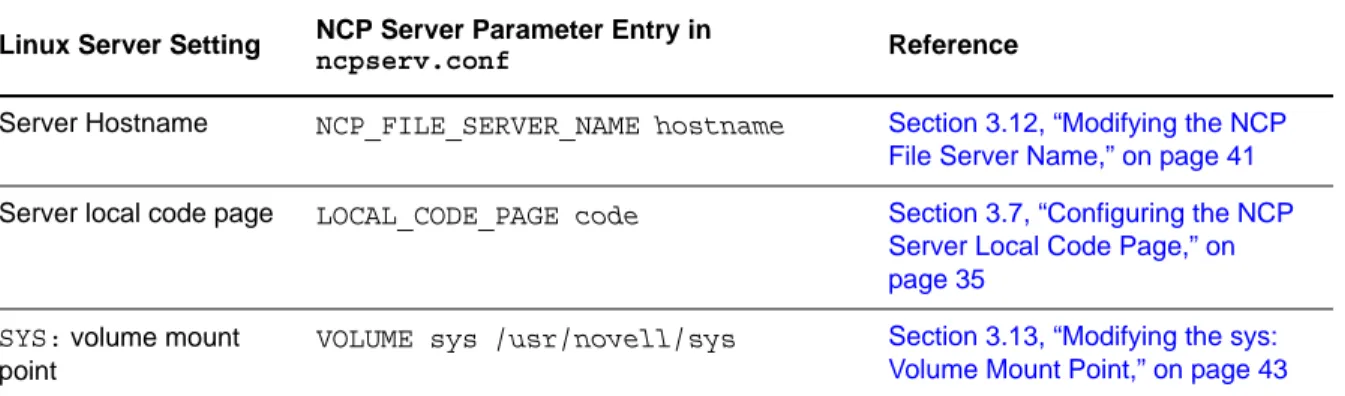
Table 3-1 identifies settings for the OES 11 SP2 server that are used as the default settings for NCP Server at install time, and are written to the /etc/opt/novell/ncpserv.conf file. This file specifies parameters that enable file systems on Linux to be available to workstations that connect to it via the Novell Client or the Microsoft NCP Client. It helps enforce the Novell trustee model of file access for NCP users and CIFS/Samba users.
You can change the settings for these parameters as needed to ensure that workstations on the network can access the server. If you later modify the settings for the server, you must also reconfigure them for NCP Server.
Table 3-1 Server Settings Used by NCP Server
3.2.2
Installing NCP Server during OES 11 Installation
NCP Server for Linux can be installed during the OES 11 SP2 installation. For general installation instructions, see the OES 11 SP2: Installation Guide.
1 During the YaST install, on the Install Settings page, click Software to view details. 2 Select NCP Server / Dynamic Storage Technology option from the OES options.
When you select Novell NCP Server / Dynamic Storage Technology, the following additional OES Services options are automatically selected:
Novell Backup / Storage Management Services
NetIQ eDirectory
Novell Linux User Management
Novell Remote Manager (NRM) for Linux Linux Server Setting NCP Server Parameter Entry in
ncpserv.conf Reference
Server Hostname NCP_FILE_SERVER_NAME hostname Section 3.12, “Modifying the NCP File Server Name,” on page 41
Server local code page LOCAL_CODE_PAGE code Section 3.7, “Configuring the NCP
Server Local Code Page,” on page 35
SYS: volume mount point
VOLUME sys /usr/novell/sys Section 3.13, “Modifying the sys: Volume Mount Point,” on page 43
3 If you plan to use NSS volumes, select Novell Storage Services from the OES Services options. IMPORTANT: DST shadow volumes are supported only for Novell Storage Services volumes. 4 If you plan to provide access for CIFS/Samba users to NSS volumes on Linux, NCP volumes on
Linux POSIX file systems, or DST shadow volumes, select Novell Samba from the OES Services options.
5 (Optional) Select Novell iManager from the OES Services options.
You must install Novell iManager somewhere in your network, but it is not necessary to install it on every server.
6 If you plan to configure NSS volumes on Linux, NCP volumes on Linux POSIX file systems, or DST shadow volumes on a cluster node, select Novell Cluster Services (NCS) from the OES Services options.
7 Click Finish to continue with the installation.
3.2.3
Installing NCP Server on an Existing OES 11 SP2 Server
You can optionally install NCP Server for Linux at any time after the initial OES 11 SP2 installation. Make sure to select the following options, just as you would for a new installation:
Novell Backup / Storage Management Services
Installing and Configuring NCP Server for Linux 27
Novell Linux User Management
Novell NCP Server / Dynamic Storage Technology
Novell Remote Manager (NRM) for Linux
Novell Samba (This is required only for CIFS/Samba users.)
Novell Storage Services (This is required only where you are planning to use NSS volumes on Linux.)
For general instructions for installing and configuring OES 11 SP2 components on an existing OES 11 SP2 server, see “Installing or Configuring OES 11 SP2 on an Existing Server” in the OES 11 SP2: Installation Guide.
3.3
Updating NCP Server
NCP uses the sambasharemodes.so library file to support the cross-protocol file locking capability that coordinates access to files by NCP users and CIFS/Samba users. NCP updates that are released through the OES 11 SP2 and later update channels and in support packs include the
sambasharemodes.so library file that you need for NCP. Patches for Linux Samba are also released separately through the SUSE Linux Enterprise Server 11 SP2 and later update channels. For 64-bit OES 2 Linux and later, there is a risk of breaking the cross-protocol locks functionality if the sambasharemodes.so library file is modified from the version released with NCP.
3.4
Configuring Global NCP Server Parameters
Section 3.4.1, “Directory Cache Management for NCP Server,” on page 29
Section 3.4.2, “Dynamic Storage Technology for NCP Server,” on page 29
Section 3.4.3, “Locks Management for File Access on NCP Server,” on page 30
Section 3.4.4, “Logs for NCP Server Events,” on page 31
Section 3.4.5, “NCP Communications,” on page 31
Section 3.4.6, “NCP Server Environment,” on page 32
Section 3.4.7, “NCP Volumes,” on page 32
Section 3.4.8, “NCP Volumes Low-Space Warning,” on page 33
Section 3.4.9, “TCP Connections,” on page 33
Section 3.4.10, “Managing Audit Settings,” on page 34
Section 3.4.11, “Managing NCP Threads,” on page 34
NCP Server provides several global parameters for the SET utility that can be used to customize NCP Server for a given server. Initially, the parameters and default settings are in force, but the parameters are not explicitly added to the /etc/opt/novell/ncpserv.conf file. After you modify its default setting, an entry for the parameter and its new setting are added to the file. The parameter entry remains in the file even if you modify the setting back to the default.
IMPORTANT: If you use NCP Server in a cluster, make sure to set the same global policies on each OES 11 SP2 node in the cluster where you plan to fail over the shared volumes.
There are three methods available for modifying parameter settings:
Novell Remote Manager: You can view or modify server-level parameters by using Novell Remote Manager for Linux. Select Manage NCP Services > Manage Server, then select the Parameter Value link for the parameter in order to modify the setting. When you modify settings from Novell Remote Manager, NCP Server automatically restarts the NetIQ eDirectory daemon and the Novell NCP/NSS IPC daemon (if NSS is installed).
Command Line: You can also modify the setting from its default value by using the ncpcon set command.
ncpcon set parameter_name=value
Replace parameter_name and value with the settings you want to change. NCP Server
automatically restarts the NetIQ eDirectory daemon and the Novell NCP/NSS IPC daemon (if NSS is installed). These commands are dynamic.
Edit the Configuration File: You can also modify the setting from its default value by adding the parameter to the /etc/opt/novell/ncpserv.conf file, then specifying the new value. If you modify the /etc/opt/novell/ncpserv.conf file, you must restart the NetIQ eDirectory daemon to make the changes go into effect. For information, see Section 3.6, “Restarting the NetIQ eDirectory (ndsd) Daemon,” on page 35.
When NSS is installed and running, and you modify values for any of the NCP Server parameters by directly editing the /etc/opt/novell/ncpserv.conf file, you must manually restart ncp2nss. For information, see Section 3.5, “Restarting the Novell NCP/NSS IPC (ncp2nss) Daemon,” on page 34.
The following sections identify the global NCP Server parameters with their default values and valid options. For additional information about each parameter, see Section A.2, “NCPCON SET
Parameters,” on page 172.
Section 3.4.1, “Directory Cache Management for NCP Server,” on page 29
Section 3.4.2, “Dynamic Storage Technology for NCP Server,” on page 29
Section 3.4.3, “Locks Management for File Access on NCP Server,” on page 30
Section 3.4.4, “Logs for NCP Server Events,” on page 31
Section 3.4.5, “NCP Communications,” on page 31
Section 3.4.6, “NCP Server Environment,” on page 32
Section 3.4.7, “NCP Volumes,” on page 32
Section 3.4.8, “NCP Volumes Low-Space Warning,” on page 33
Section 3.4.9, “TCP Connections,” on page 33
Section 3.4.10, “Managing Audit Settings,” on page 34
Installing and Configuring NCP Server for Linux 29
3.4.1
Directory Cache Management for NCP Server
Table 3-2 Server Parameter Information for Directory Cache Management
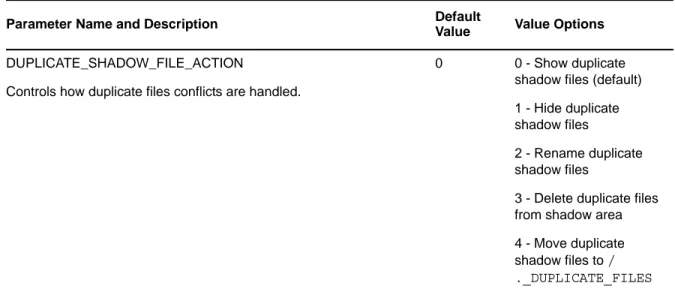
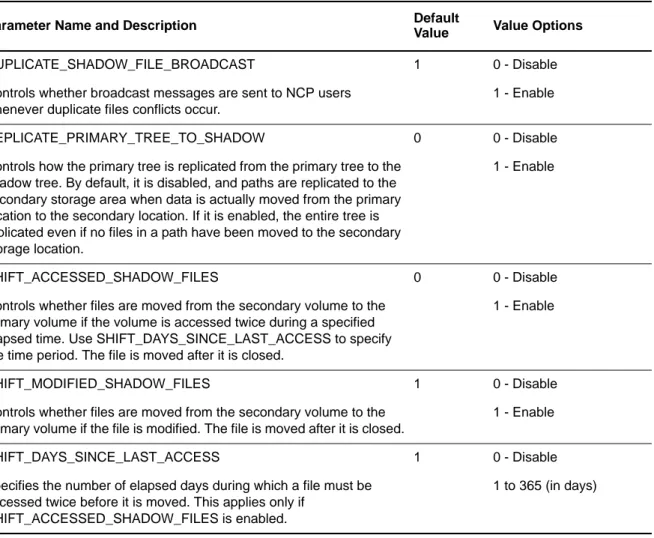
3.4.2
Dynamic Storage Technology for NCP Server
For information about configuring global policies for DST, see the OES 11 SP2: Dynamic Storage Technology Administration Guide.
Table 3-3 Server Parameter Information for Dynamic Storage Technology
Parameter Name and Description Default
Value Value Options MAXIMUM_CACHED_FILES_PER_SUBDIRECTORY
Controls the maximum number of file entries that can be cached by the system for a given folder in the directory cache.
10240 Minimum is 512 files.
MAXIMUM_CACHED_FILES_PER_VOLUME
Controls the maximum number of file entries that can be cached by the system for a given volume in the directory cache.
256000 Minimum is 2048 files.
MAXIMUM_LAZY_CLOSE_FILES
When a file is closed by the client, the NCP engine waits before closing the file just in case a client wants to reopen the file. This is called a “lazy close.” This parameter controls the maximum number of file handles that can be lazy closed in the directory cache.
4096 16 to 64000
MAXIMUM_CACHED_SUBDIRECTORIES_PER_VOLUME
Controls the maximum number of folder entries that can be cached by the system for a volume in the directory cache.
102400 4096
LOG_CACHE_STATISTICS
Controls whether cache statistics are logged in the ncpserv.log file.
0 0 - Disable
1 - Enable
Parameter Name and Description Default
Value Value Options DUPLICATE_SHADOW_FILE_ACTION
Controls how duplicate files conflicts are handled.
0 0 - Show duplicate
shadow files (default) 1 - Hide duplicate shadow files
2 - Rename duplicate shadow files
3 - Delete duplicate files from shadow area 4 - Move duplicate shadow files to / ._DUPLICATE_FILES
3.4.3
Locks Management for File Access on NCP Server
Table 3-4 Server Parameter Information for Locks ManagementDUPLICATE_SHADOW_FILE_BROADCAST
Controls whether broadcast messages are sent to NCP users whenever duplicate files conflicts occur.
1 0 - Disable
1 - Enable
REPLICATE_PRIMARY_TREE_TO_SHADOW
Controls how the primary tree is replicated from the primary tree to the shadow tree. By default, it is disabled, and paths are replicated to the secondary storage area when data is actually moved from the primary location to the secondary location. If it is enabled, the entire tree is replicated even if no files in a path have been moved to the secondary storage location.
0 0 - Disable
1 - Enable
SHIFT_ACCESSED_SHADOW_FILES
Controls whether files are moved from the secondary volume to the primary volume if the volume is accessed twice during a specified elapsed time. Use SHIFT_DAYS_SINCE_LAST_ACCESS to specify the time period. The file is moved after it is closed.
0 0 - Disable
1 - Enable
SHIFT_MODIFIED_SHADOW_FILES
Controls whether files are moved from the secondary volume to the primary volume if the file is modified. The file is moved after it is closed.
1 0 - Disable
1 - Enable
SHIFT_DAYS_SINCE_LAST_ACCESS
Specifies the number of elapsed days during which a file must be accessed twice before it is moved. This applies only if
SHIFT_ACCESSED_SHADOW_FILES is enabled.
1 0 - Disable
1 to 365 (in days)
Parameter Name and Description Default
Value Value Options
Parameter Name and Description Default
Value Value Options CROSS_PROTOCOL_LOCKS
Controls cross-protocol file locking support with Samba. Cross-protocol locks help prevent the same file from being
concurrently accessed for modifications from both a Samba and NCP client.
1 1 - Enable
0 - Disable
OPLOCK_SUPPORT_LEVEL
Controls NCP opportunistic locking, which allows the client to cache file data for better performance.
2 0 - Disable
1 - Exclusive locks 2 - Shared and exclusive
Installing and Configuring NCP Server for Linux 31
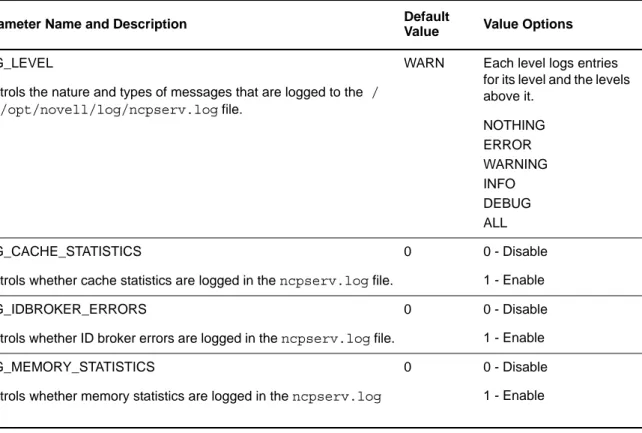
3.4.4
Logs for NCP Server Events
Table 3-5 Server Parameter Information for Logging NCP Server Events
3.4.5
NCP Communications
Table 3-6 Server Parameter Information for Communications
LOCK_RANGE_MASK 1 By default this parameter
is turned on. Setting the parameter value to 0 turns off this parameter and does not permit locking beyond the 0x7fffffffffffffff region.
Parameter Name and Description Default
Value Value Options
Parameter Name and Description Default
Value Value Options LOG_LEVEL
Controls the nature and types of messages that are logged to the / var/opt/novell/log/ncpserv.log file.
WARN Each level logs entries for its level and the levels above it. NOTHING ERROR WARNING INFO DEBUG ALL LOG_CACHE_STATISTICS
Controls whether cache statistics are logged in the ncpserv.log file.
0 0 - Disable
1 - Enable LOG_IDBROKER_ERRORS
Controls whether ID broker errors are logged in the ncpserv.log file.
0 0 - Disable
1 - Enable LOG_MEMORY_STATISTICS
Controls whether memory statistics are logged in the ncpserv.log file.
0 0 - Disable
1 - Enable
Parameter Name and Description Default
Value Value Options FIRST_WATCHDOG_PACKET
Controls how long to wait in minutes of inactivity before checking to see if an NCP connection is still alive.
0 0 - Disable
3.4.6
NCP Server Environment
Table 3-7 Server Parameter Information for the NCP Server Environment
3.4.7
NCP Volumes
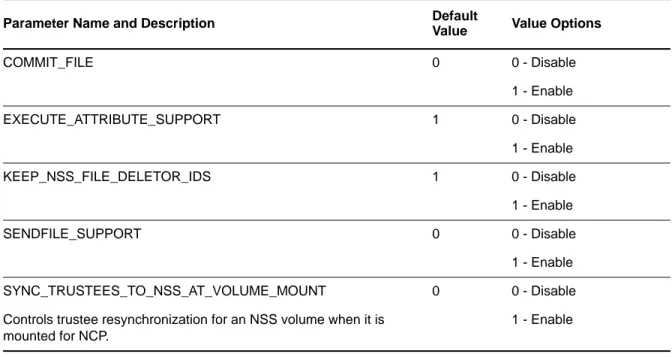
Table 3-8 Server Parameter Information for Volume and File Management
DISABLE_BROADCAST
Controls the ability to broadcast messages from the NCP Server.
0 0 - Disable
1 - Enable
Parameter Name and Description Default
Value Value Options
Parameter Name and Description Default
Value Value Options LOCAL_CODE_PAGE
Controls which base code page is used by the NCP Server. For more information, see Section 3.7, “Configuring the NCP Server Local Code Page,” on page 35.
CP437 Valid language codes
NCP_FILE_SERVER_NAME
This parameter is set by eDirectory when the NCP Server is installed, and must not be modified arbitrarily.
For information, see Section 3.12, “Modifying the NCP File Server Name,” on page 41.
Server hostname
This setting must match the server hostname, such as server1.
Parameter Name and Description Default
Value Value Options
COMMIT_FILE 0 0 - Disable
1 - Enable
EXECUTE_ATTRIBUTE_SUPPORT 1 0 - Disable
1 - Enable
KEEP_NSS_FILE_DELETOR_IDS 1 0 - Disable
1 - Enable
SENDFILE_SUPPORT 0 0 - Disable
1 - Enable
Installing and Configuring NCP Server for Linux 33
3.4.8
NCP Volumes Low-Space Warning
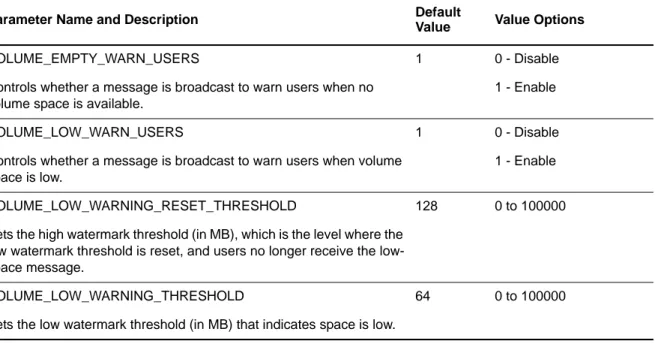
Table 3-9 Server Parameter Information for Volume Low-Space Warning
3.4.9
TCP Connections
Table 3-10 Server Parameter Information for the TCP Connections
VOLUME_GONE_WARN_USERS
Controls whether a message is broadcast to warn users when the volume path is no longer present.
1 0 - Disable
1 - Enable
Parameter Name and Description Default
Value Value Options
Parameter Name and Description Default
Value Value Options VOLUME_EMPTY_WARN_USERS
Controls whether a message is broadcast to warn users when no volume space is available.
1 0 - Disable
1 - Enable
VOLUME_LOW_WARN_USERS
Controls whether a message is broadcast to warn users when volume space is low.
1 0 - Disable
1 - Enable
VOLUME_LOW_WARNING_RESET_THRESHOLD
Sets the high watermark threshold (in MB), which is the level where the low watermark threshold is reset, and users no longer receive the low-space message.
128 0 to 100000
VOLUME_LOW_WARNING_THRESHOLD
Sets the low watermark threshold (in MB) that indicates space is low.
64 0 to 100000
Parameter Name and Description Default
Value Value Options NCP_TCP_KEEPALIVE_INTERVAL
Allows you to configure the keep-alive timeout for all TCP client connections accepted by the NCP server. The TCP keep-alive packet is sent by the server if the client is inactive for t this amount of time. This parameter also helps the NCP server to clear unwanted connections. The actual time taken to clear the unwanted NCP connections also depends on other system-wide TCP keep-alive parameters, like net.ipv4.tcp_keepalive_probes and
net.ipv4.tcp_keepalive_intv. These parameters can be controlled by using the sysctl command.
8 minutes Valid range: 3 minutes to 240 minutes
3.4.10
Managing Audit Settings
Table 3-11 Server Parameter Information for the Auditing Support
3.4.11
Managing NCP Threads
Table 3-12 Server Parameter Information for the NCP Thread
3.5
Restarting the Novell NCP/NSS IPC (ncp2nss) Daemon
If NSS is installed, NCP Server runs the Novell NCP/NSS IPC (/etc/init.d/ncp2nss) daemon in order to synchronize its settings with NSS. When you modify NCP Server settings by using Novell Remote Manager for Linux, NCP Server automatically restarts ncp2nss so that the new settings are immediately synchronized with NSS. If you modify values for any of the NCP Server parameters by directly editing the /etc/opt/novell/ncpserv.conf file, you must manually restart ncp2nss.
1 On the OES 11 SP2 server, open a terminal console, then log in as the root user. 2 At the terminal console prompt, enter
/etc/init.d/ncp2nss restart
If ncp2nss restarts successfully, the following messages are displayed in the terminal console: Shutting down Novell NCP/NSS IPC daemon...
Exited
Parameter Name and Description Default
Value Value Options AUDITING_SUPPORT
Indicates whether auditing support is enabled for NCP. The default value is 0, which indicates that auditing is turned off.
0 Valid values: 0 and 1
Parameter Name and Description Default
Value Value Options ADDITIONAL_SSG_THREADS
Sets the number of additional SSG Threads (above the fixed 25 NCP threads) that can be used to serve incoming NCP file service requests. These threads are used when the 25 NCP threads are busy and taking more than the expected time to finish.
25 Valid range: 7 to 103
CONCURRENT_ASYNC_REQUESTS
Sets the maximum number of the Async eDirectory NCP request threads that can be created.
Installing and Configuring NCP Server for Linux 35
3.6
Restarting the NetIQ eDirectory (ndsd) Daemon
When you modify NCP Server settings by using Novell Remote Manager for Linux, NCP Server automatically restarts the NetIQ eDirectory daemon to apply the new settings. If you modify the / etc/opt/novell/ncpserv.conf file, you must restart the NetIQ eDirectory daemon to make the changes go into effect.
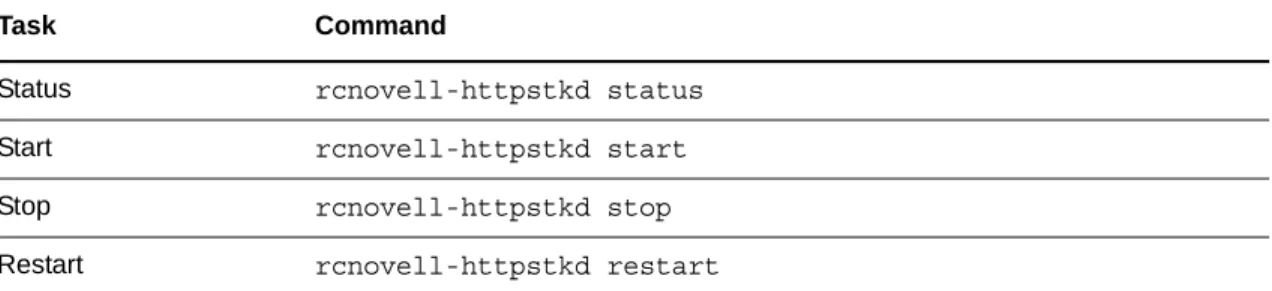
Use the following steps to stop and start ndsd when a single instance is running. 1 Use the following commands to stop ndsd:
rcndsd stop
2 Use the following commands to start ndsd: rcndsd start
3.7
Configuring the NCP Server Local Code Page
NCP Server supports most commonly used code pages. NCP Server by default uses the code page corresponding to the code page used by the Linux server operating system that is specified at install time.
For example, if the Linux server is installed as a Japanese server, NCP Server uses the shift-JIS as its local code page. If the Linux server is installed as a French server, NCP Server uses the CP850 as its local code page.
Some examples of code page are CP437, CP850, CP737, CP866, CP874, CP949, SJIS, BIG5, and GBK. For a complete list of available code pages, open a terminal console, then enter
iconv --list | more
If you want NCP Server to use a code page that might be different than the one that is set for the Linux server, you must specify that code page in the /etc/opt/novell/ncpserv.conf configuration file. After you modify the initial setting, the code page for NCP Server does not change if you change the code page used for the Linuxserver. You must modify the settings separately as needed.
Section 3.7.1, “Using Novell Remote Manager for Linux to Configure the Local Code Page,” on page 35
Section 3.7.2, “Editing the /etc/opt/novell/ncpserv.conf File to Configure the Local Code Page,” on page 36
3.7.1
Using Novell Remote Manager for Linux to Configure the Local Code
Page
To set the code page parameter by using Novell Remote Manager for Linux:
1 In a Web browser, access Novell Remote Manager for Linux on the server, then log in as the root user.
The URL is the IP address of the server (such as 192.168.1.1) and port 8009. https://192.168.1.1:8009
2 Select Manage NCP Services > Manage Server to view the Server Parameter Information. 3 Click the link for the LOCAL_CODE_PAGE setting.