M
Instruction
Set
29
Section 29. Instruction Set
HIGHLIGHTS
This section of the manual contains the following major topics:
29.1 Introduction ... 29-2 29.2 Instruction Formats ... 29-4 29.3 Special Function Registers as Source/Destination ... 29-6 29.4 Q Cycle Activity ... 29-7 29.5 Instruction Descriptions... 29-8 29.6 Design Tips ... 29-45 29.7 Related Application Notes... 29-47 29.8 Revision History ... 29-48
PICmicro MID-RANGE MCU FAMILY
29.1
Introduction
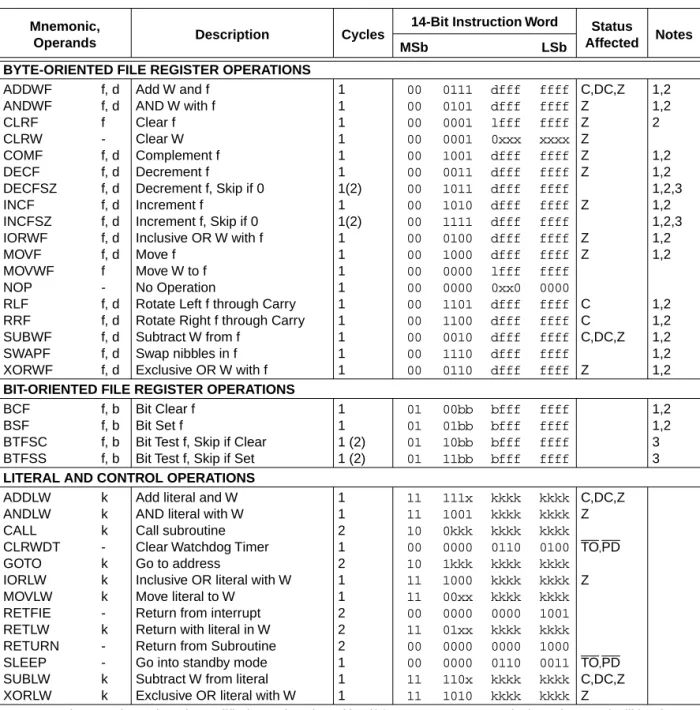
Each midrange instruction is a 14-bit word divided into an OPCODE which specifies the instruc-tion type and one or more operands which further specify the operainstruc-tion of the instrucinstruc-tion. The
midrange Instruction Set Summary in Table 29-1 lists the instructions recognized by the MPASM
assembler. The instruction set is highly orthogonal and is grouped into three basic categories: • Byte-oriented operations
• Bit-oriented operations • Literal and control operations
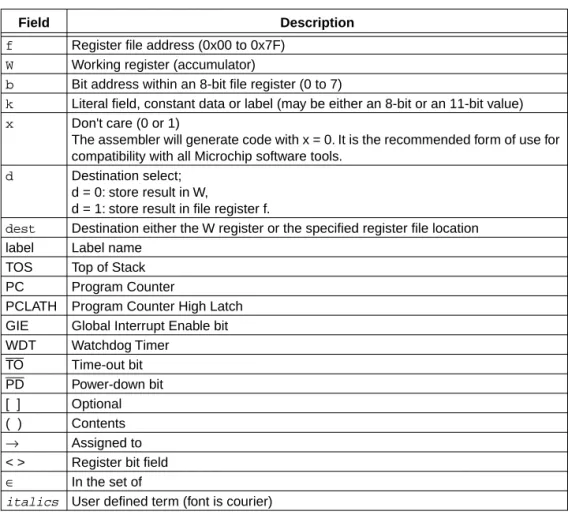
Table 29-2 gives the opcode field descriptions.
For byte-oriented instructions, 'f' represents a file register designator and 'd' represents a des-tination designator. The file register designator specifies which file register is to be used by the instruction.
The destination designator specifies where the result of the operation is to be placed. If 'd' is zero, the result is placed in the W register. If 'd' is one, the result is placed in the file register specified in the instruction.
For bit-oriented instructions, 'b' represents a bit field designator which selects the number of the bit affected by the operation, while 'f' represents the number of the file in which the bit is located. For literal and control operations, 'k' represents an eight or eleven bit constant or literal value. All instructions are executed in one single instruction cycle, unless a conditional test is true or the program counter is changed as a result of an instruction. In these cases, the execution takes two instruction cycles with the second cycle executed as an NOP. One instruction cycle consists of four oscillator periods. Thus, for an oscillator frequency of 4 MHz, the normal instruction
execu-tion time is 1 µs. If a conditional test is true or the program counter is changed as a result of an
Section 29. Instruction Set
Instruction
Set
29
Table 29-1: Midrange Instruction SetMnemonic,
Operands Description Cycles
14-Bit Instruction Word Status
Affected Notes
MSb LSb
BYTE-ORIENTED FILE REGISTER OPERATIONS
ADDWF ANDWF CLRF CLRW COMF DECF DECFSZ INCF INCFSZ IORWF MOVF MOVWF NOP RLF RRF SUBWF SWAPF XORWF f, d f, d f -f, d f, d f, d f, d f, d f, d f, d f -f, d f, d f, d f, d f, d
Add W and f AND W with f Clear f Clear W Complement f Decrement f
Decrement f, Skip if 0 Increment f
Increment f, Skip if 0 Inclusive OR W with f Move f
Move W to f No Operation
Rotate Left f through Carry Rotate Right f through Carry Subtract W from f
Swap nibbles in f Exclusive OR W with f
1 1 1 1 1 1 1(2) 1 1(2) 1 1 1 1 1 1 1 1 1 00 00 00 00 00 00 00 00 00 00 00 00 00 00 00 00 00 00 0111 0101 0001 0001 1001 0011 1011 1010 1111 0100 1000 0000 0000 1101 1100 0010 1110 0110 dfff dfff lfff 0xxx dfff dfff dfff dfff dfff dfff dfff lfff 0xx0 dfff dfff dfff dfff dfff ffff ffff ffff xxxx ffff ffff ffff ffff ffff ffff ffff ffff 0000 ffff ffff ffff ffff ffff C,DC,Z Z Z Z Z Z Z Z Z C C C,DC,Z Z 1,2 1,2 2 1,2 1,2 1,2,3 1,2 1,2,3 1,2 1,2 1,2 1,2 1,2 1,2 1,2
BIT-ORIENTED FILE REGISTER OPERATIONS
BCF BSF BTFSC BTFSS f, b f, b f, b f, b
Bit Clear f Bit Set f
Bit Test f, Skip if Clear Bit Test f, Skip if Set
1 1 1 (2) 1 (2) 01 01 01 01 00bb 01bb 10bb 11bb bfff bfff bfff bfff ffff ffff ffff ffff 1,2 1,2 3 3
LITERAL AND CONTROL OPERATIONS
ADDLW ANDLW CALL CLRWDT GOTO IORLW MOVLW RETFIE RETLW RETURN SLEEP SUBLW XORLW k k k -k k k -k -k k
Add literal and W AND literal with W Call subroutine Clear Watchdog Timer Go to address
Inclusive OR literal with W Move literal to W
Return from interrupt Return with literal in W Return from Subroutine Go into standby mode Subtract W from literal Exclusive OR literal with W
1 1 2 1 2 1 1 2 2 2 1 1 1 11 11 10 00 10 11 11 00 11 00 00 11 11 111x 1001 0kkk 0000 1kkk 1000 00xx 0000 01xx 0000 0000 110x 1010 kkkk kkkk kkkk 0110 kkkk kkkk kkkk 0000 kkkk 0000 0110 kkkk kkkk kkkk kkkk kkkk 0100 kkkk kkkk kkkk 1001 kkkk 1000 0011 kkkk kkkk C,DC,Z Z
TO,PD
Z
TO,PD
C,DC,Z Z
Note 1: When an I/O register is modified as a function of itself (e.g., MOVF PORTB, 1), the value used will be that
value present on the pins themselves. For example, if the data latch is '1' for a pin configured as input and is driven low by an external device, the data will be written back with a '0'.
PICmicro MID-RANGE MCU FAMILY
29.2
Instruction Formats
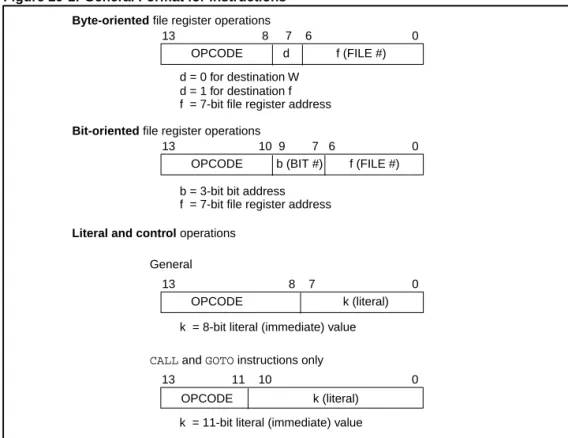
Figure 29-1 shows the three general formats that the instructions can have. As can be seen from the general format of the instructions, the opcode portion of the instruction word varies from 3-bits to 6-bits of information. This is what allows the midrange instruction set to have 35 instruc-tions.
All instruction examples use the following format to represent a hexadecimal number: 0xhh
where h signifies a hexadecimal digit. To represent a binary number:
00000100b
where b is a binary string identifier.
Figure 29-1: General Format for Instructions
Note 1: Any unused opcode is Reserved. Use of any reserved opcode may cause unex-pected operation.
Note 2: To maintain upward compatibility with future midrange products, do not use the
OPTION and TRIS instructions.
Byte-oriented file register operations
13 8 7 6 0
d = 0 for destination W
OPCODE d f (FILE #)
d = 1 for destination f f = 7-bit file register address
Bit-oriented file register operations
13 10 9 7 6 0 OPCODE b (BIT #) f (FILE #) b = 3-bit bit address
f = 7-bit file register address
Literal and control operations
13 8 7 0 OPCODE k (literal) k = 8-bit literal (immediate) value
13 11 10 0 OPCODE k (literal)
General
Section 29. Instruction Set
Instruction
Set
29
Table 29-2: Instruction Description ConventionsField Description
f Register file address (0x00 to 0x7F)
W Working register (accumulator)
b Bit address within an 8-bit file register (0 to 7)
k Literal field, constant data or label (may be either an 8-bit or an 11-bit value)
x Don't care (0 or 1)
The assembler will generate code with x = 0. It is the recommended form of use for compatibility with all Microchip software tools.
d Destination select;
d = 0: store result in W,
d = 1: store result in file register f.
dest Destination either the W register or the specified register file location
label Label name
TOS Top of Stack
PC Program Counter
PCLATH Program Counter High Latch
GIE Global Interrupt Enable bit
WDT Watchdog Timer
TO Time-out bit
PD Power-down bit
[ ] Optional
( ) Contents
→ Assigned to
< > Register bit field
∈ In the set of
PICmicro MID-RANGE MCU FAMILY
29.3
Special Function Registers as Source/Destination
The Section 29. Instruction Set’s orthogonal instruction set allows read and write of all file regis-ters, including special function registers. Some special situations the user should be aware of are explained in the following subsections:
29.3.1
STATUS Register as Destination
If an instruction writes to the STATUS register, the Z, C, DC and OV bits may be set or cleared as a result of the instruction and overwrite the original data bits written. For example, executing
CLRF STATUS will clear register STATUS, and then set the Z bit leaving 0000 0100b in the reg-ister.
29.3.2
PCL as Source or Destination
Read, write or read-modify-write on PCL may have the following results:
Read PC: PCL → dest; PCLATH does not change;
Write PCL: PCLATH → PCH;
8-bit destination value → PCL
Read-Modify-Write: PCL→ ALU operand
PCLATH → PCH;
8-bit result → PCL
Where PCH = program counter high byte (not an addressable register), PCLATH = Program counter high holding latch, dest = destination, W register or register file f.
29.3.3
Bit Manipulation
All bit manipulation instructions will first read the entire register, operate on the selected bit and then write the result back (read-modify-write (R-M-W)) the specified register. The user should keep this in mind when operating on some special function registers, such as ports.
Note: Status bits that are manipulated by the device (including the interrupt flag bits) are set or cleared in the Q1 cycle. So there is no issue with executing R-M-W instructions on registers which contain these bits.
Section 29. Instruction Set
Instruction
Set
29
29.4
Q Cycle Activity
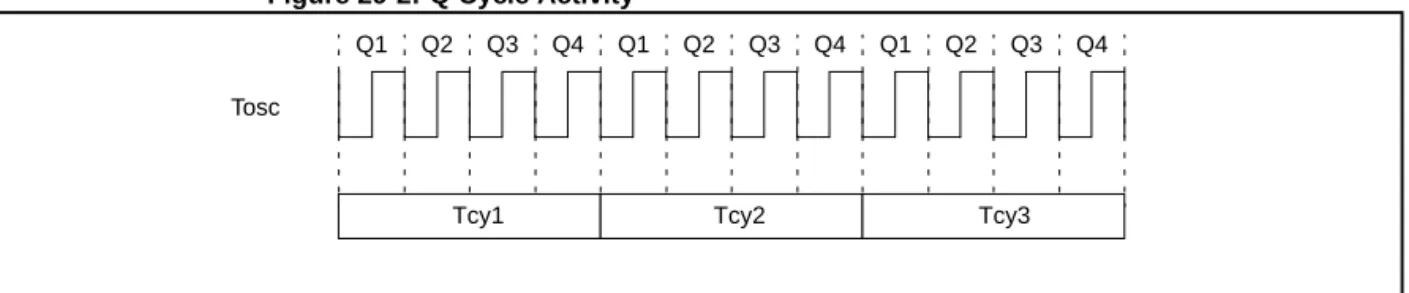
Each instruction cycle (Tcy) is comprised of four Q cycles (Q1-Q4). The Q cycle is the same as
the device oscillator cycle (TOSC). The Q cycles provide the timing/designation for the Decode,
Read, Process Data, Write etc., of each instruction cycle. The following diagram shows the rela-tionship of the Q cycles to the instruction cycle.
The four Q cycles that make up an instruction cycle (Tcy) can be generalized as: Q1: Instruction Decode Cycle or forced No Operation
Q2: Instruction Read Cycle or No Operation Q3: Process the Data
Q4: Instruction Write Cycle or No Operation
Each instruction will show the detailed Q cycle operation for the instruction.
Figure 29-2: Q Cycle Activity
Q1 Q2 Q3 Q4 Q1 Q2 Q3 Q4 Q1 Q2 Q3 Q4
Tcy1 Tcy2 Tcy3
PICmicro MID-RANGE MCU FAMILY
29.5
Instruction Descriptions
ADDLW
Add Literal and WSyntax: [ label ] ADDLW k
Operands: 0 ≤ k ≤ 255
Operation: (W) + k → W
Status Affected: C, DC, Z
Encoding: 11 111x kkkk kkkk
Description: The contents of the W register are added to the eight bit literal 'k' and the result is
placed in the W register.
Words: 1
Cycles: 1
Q Cycle Activity:
Q1 Q2 Q3 Q4
Decode Read
literal 'k'
Process data
Write to W register
Example1 ADDLW 0x15
Before Instruction
W = 0x10
After Instruction
W = 0x25
Example 2 ADDLW MYREG
Before Instruction
W = 0x10
Address of MYREG † = 0x37
† MYREG is a symbol for a data memory location
After Instruction
W = 0x47
Example 3 ADDLW HIGH (LU_TABLE)
Before Instruction
W = 0x10
Address of LU_TABLE † = 0x9375
† LU_TABLE is a label for an address in program memory
Instruction
Set
29
ADDWF
Add W and fSyntax: [ label ] ADDWF f,d
Operands: 0 ≤ f ≤ 127
d ∈ [0,1]
Operation: (W) + (f) → destination
Status Affected: C, DC, Z
Encoding: 00 0111 dfff ffff
Description: Add the contents of the W register with register 'f'. If 'd' is 0 the result is stored in the
W register. If 'd' is 1 the result is stored back in register 'f'.
Words: 1
Cycles: 1
Q Cycle Activity:
Q1 Q2 Q3 Q4
Decode Read
register 'f'
Process data
Write to destination
Example 1 ADDWF FSR, 0
Before Instruction
W = 0x17 FSR = 0xC2
After Instruction
W = 0xD9 FSR = 0xC2
Example 2 ADDWF INDF, 1
Before Instruction
W = 0x17 FSR = 0xC2
Contents of Address (FSR) = 0x20
After Instruction
W = 0x17 FSR = 0xC2
Contents of Address (FSR) = 0x37
Example 3 ADDWF PCL
Case 1: Before Instruction
W = 0x10 PCL = 0x37
ANDLW
And Literal with WSyntax: [ label ] ANDLW k
Operands: 0 ≤ k ≤ 255
Operation: (W).AND. (k) → W
Status Affected: Z
Encoding: 11 1001 kkkk kkkk
Description: The contents of W register are AND’ed with the eight bit literal 'k'. The result is
placed in the W register.
Words: 1
Cycles: 1
Q Cycle Activity:
Q1 Q2 Q3 Q4
Decode Read literal 'k'
Process data
Write to W register
Example 1 ANDLW 0x5F
Before Instruction
W = 0xA3
After Instruction
W = 0x03
; 0101 1111 (0x5F) ; 1010 0011 (0xA3) ;---- ---; 0000 0011 (0x03)
Example 2 ANDLW MYREG
Before Instruction
W = 0xA3
Address of MYREG † = 0x37
† MYREG is a symbol for a data memory location
After Instruction
W = 0x23
Example 3 ANDLW HIGH (LU_TABLE)
Before Instruction
W = 0xA3
Address of LU_TABLE † = 0x9375
† LU_TABLE is a label for an address in program memory
After Instruction
Instruction
Set
29
ANDWF
AND W with fSyntax: [ label ] ANDWF f,d
Operands: 0 ≤ f ≤ 127
d ∈ [0,1]
Operation: (W).AND. (f) → destination
Status Affected: Z
Encoding: 00 0101 dfff ffff
Description: AND the W register with register 'f'. If 'd' is 0 the result is stored in the W register. If
'd' is 1 the result is stored back in register 'f'.
Words: 1
Cycles: 1
Q Cycle Activity:
Q1 Q2 Q3 Q4
Decode Read
register 'f'
Process data
Write to destination
Example 1 ANDWF FSR, 1
Before Instruction
W = 0x17 FSR = 0xC2
After Instruction
W = 0x17 FSR = 0x02
; 0001 0111 (0x17) ; 1100 0010 (0xC2) ;---- ---; 0000 0010 (0x02)
Example 2 ANDWF FSR, 0
Before Instruction
W = 0x17 FSR = 0xC2
After Instruction
W = 0x02 FSR = 0xC2
; 0001 0111 (0x17) ; 1100 0010 (0xC2) ;---- ---; 0000 0010 (0x02)
Example 3 ANDWF INDF, 1
Before Instruction
W = 0x17 FSR = 0xC2
Contents of Address (FSR) = 0x5A
BCF
Bit Clear fSyntax: [ label ] BCF f,b
Operands: 0 ≤ f ≤ 127
0 ≤ b ≤ 7
Operation: 0 → f<b>
Status Affected: None
Encoding: 01 00bb bfff ffff
Description: Bit 'b' in register 'f' is cleared.
Words: 1
Cycles: 1
Q Cycle Activity:
Q1 Q2 Q3 Q4
Decode Read
register 'f'
Process data
Write register 'f'
Example 1 BCF FLAG_REG, 7
Before Instruction
FLAG_REG = 0xC7
After Instruction
FLAG_REG = 0x47
; 1100 0111
; 0100 0111
Example 2 BCF INDF, 3
Before Instruction
W = 0x17
FSR = 0xC2
Contents of Address (FSR) = 0x2F
After Instruction
W = 0x17 FSR = 0xC2
Instruction
Set
29
BSF
Bit Set fSyntax: [ label ] BSF f,b
Operands: 0 ≤ f ≤ 127
0 ≤ b ≤ 7
Operation: 1 → f<b>
Status Affected: None
Encoding: 01 01bb bfff ffff
Description: Bit 'b' in register 'f' is set.
Words: 1
Cycles: 1
Q Cycle Activity:
Q1 Q2 Q3 Q4
Decode Read
register 'f'
Process data
Write register 'f'
Example 1 BSF FLAG_REG, 7
Before Instruction
FLAG_REG =0x0A
After Instruction
FLAG_REG =0x8A
; 0000 1010
; 1000 1010
Example 2 BSF INDF, 3
Before Instruction
W = 0x17 FSR = 0xC2
Contents of Address (FSR) = 0x20
After Instruction
W = 0x17 FSR = 0xC2
BTFSC
Bit Test, Skip if ClearSyntax: [ label ] BTFSC f,b
Operands: 0 ≤ f ≤ 127
0 ≤ b ≤ 7
Operation: skip if (f<b>) = 0
Status Affected: None
Encoding: 01 10bb bfff ffff
Description: If bit 'b' in register 'f' is '0' then the next instruction is skipped.
If bit 'b' is '0' then the next instruction (fetched during the current instruction execu-tion) is discarded, and a NOP is executed instead, making this a 2 cycle instruction.
Words: 1
Cycles: 1(2)
Q Cycle Activity:
Q1 Q2 Q3 Q4
Decode Read
register 'f'
Process data
No operation
If skip (2nd cycle):
Q1 Q2 Q3 Q4
No operation
No operation
No operation
No operation
Example 1 HERE
FALSE TRUE
BTFSC GOTO • • •
FLAG, 4 PROCESS_CODE
Case 1: Before Instruction
PC = addressHERE FLAG= xxx0 xxxx
After Instruction
Since FLAG<4>= 0, PC = addressTRUE
Case 2: Before Instruction
PC = addressHERE FLAG= xxx1 xxxx
After Instruction
Since FLAG<4>=1, PC = addressFALSE
Instruction
Set
29
BTFSS
Bit Test f, Skip if SetSyntax: [ label ] BTFSS f,b
Operands: 0 ≤ f ≤ 127
0 ≤ b < 7
Operation: skip if (f<b>) = 1
Status Affected: None
Encoding: 01 11bb bfff ffff
Description: If bit 'b' in register 'f' is '1' then the next instruction is skipped.
If bit 'b' is '1', then the next instruction (fetched during the current instruc-tion execuinstruc-tion) is discarded and a NOP is executed instead, making this a 2 cycle instruction.
Words: 1
Cycles: 1(2)
Q Cycle Activity:
Q1 Q2 Q3 Q4
Decode Read
register 'f'
Process data
No operation
If skip (2nd cycle):
Q1 Q2 Q3 Q4
No operation
No operation
No operation
No operation
Example 1 HERE
FALSE TRUE
BTFSS GOTO • • •
FLAG, 4 PROCESS_CODE
Case 1: Before Instruction
PC = addressHERE FLAG= xxx0 xxxx
After Instruction
Since FLAG<4>= 0, PC = addressFALSE
Case 2: Before Instruction
PC = addressHERE FLAG= xxx1 xxxx
After Instruction
Since FLAG<4>=1, PC = addressTRUE
CALL
Call SubroutineSyntax: [ label ] CALL k
Operands: 0 ≤ k ≤ 2047
Operation: (PC)+ 1→ TOS,
k → PC<10:0>,
(PCLATH<4:3>) → PC<12:11>
Status Affected: None
Encoding: 10 0kkk kkkk kkkk
Description: Call Subroutine. First, the 13-bit return address (PC+1) is pushed onto the
stack. The eleven bit immediate address is loaded into PC bits <10:0>. The
upper bits of the PC are loaded from PCLATH<4:3>. CALL is a two cycle
instruction.
Words: 1
Cycles: 2
Q Cycle Activity: 1st cycle:
Q1 Q2 Q3 Q4
Decode Read literal 'k'
Process data
No operation
2nd cycle:
Q1 Q2 Q3 Q4
No operation
No operation
No operation
No operation
Example 1 HERE CALL THERE
Before Instruction
PC = AddressHERE
After Instruction
TOS = Address HERE+1 PC = Address THERE
Instruction
Set
29
CLRF
Clear fSyntax: [ label ] CLRF f
Operands: 0 ≤ f ≤ 127
Operation: 00h → f
1 → Z
Status Affected: Z
Encoding: 00 0001 1fff ffff
Description: The contents of register 'f' are cleared and the Z bit is set.
Words: 1
Cycles: 1
Q Cycle Activity:
Q1 Q2 Q3 Q4
Decode Read
register 'f'
Process data
Write register 'f'
Example 1 CLRF FLAG_REG
Before Instruction
FLAG_REG=0x5A
After Instruction
FLAG_REG=0x00
Z = 1
Example 2 CLRF INDF
Before Instruction
FSR = 0xC2
Contents of Address (FSR)=0xAA
After Instruction
FSR = 0xC2
Contents of Address (FSR)=0x00
CLRW
Clear WSyntax: [ label ] CLRW
Operands: None
Operation: 00h → W
1 → Z
Status Affected: Z
Encoding: 00 0001 0xxx xxxx
Description: W register is cleared. Zero bit (Z) is set.
Words: 1
Cycles: 1
Q Cycle Activity:
Q1 Q2 Q3 Q4
Decode Read
register 'f'
Process data
Write register 'W'
Example 1 CLRW
Before Instruction
W = 0x5A
After Instruction
W = 0x00
Instruction
Set
29
CLRWDT
Clear Watchdog TimerSyntax: [ label ] CLRWDT
Operands: None
Operation: 00h → WDT
0 → WDT prescaler count,
1 → TO
1 → PD
Status Affected: TO, PD
Encoding: 00 0000 0110 0100
Description: CLRWDT instruction clears the Watchdog Timer. It also clears the
pres-caler count of the WDT. Status bits TO and PD are set.
Words: 1
Cycles: 1
Q Cycle Activity:
Q1 Q2 Q3 Q4
Decode No
operation
Process data
Clear WDT Counter
Example 1 CLRWDT
Before Instruction
WDT counter= x WDT prescaler =1:128
After Instruction
WDT counter=0x00 WDT prescaler count=0
TO = 1
PD = 1
WDT prescaler =1:128
COMF
Complement fSyntax: [ label ] COMF f,d
Operands: 0 ≤ f ≤ 127
d ∈ [0,1]
Operation: (f) → destination
Status Affected: Z
Encoding: 00 1001 dfff ffff
Description: The contents of register 'f' are 1’s complemented. If 'd' is 0 the result is
stored in W. If 'd' is 1 the result is stored back in register 'f'.
Words: 1
Cycles: 1
Q Cycle Activity:
Q1 Q2 Q3 Q4
Decode Read
register 'f'
Process data
Write to destination
Example 1 COMF REG1, 0
Before Instruction
REG1= 0x13
After Instruction
REG1= 0x13
W = 0xEC
Example 2 COMF INDF, 1
Before Instruction
FSR = 0xC2
Contents of Address (FSR)=0xAA
After Instruction
FSR = 0xC2
Contents of Address (FSR)=0x55
Example 3 COMF REG1, 1
Before Instruction
REG1= 0xFF
After Instruction
REG1= 0x00
Instruction
Set
29
DECF
Decrement fSyntax: [ label ] DECF f,d
Operands: 0 ≤ f ≤ 127
d ∈ [0,1]
Operation: (f) - 1 → destination
Status Affected: Z
Encoding: 00 0011 dfff ffff
Description: Decrement register 'f'. If 'd' is 0 the result is stored in the W register. If 'd' is 1 the
result is stored back in register 'f'.
Words: 1
Cycles: 1
Q Cycle Activity:
Q1 Q2 Q3 Q4
Decode Read
register 'f'
Process data
Write to destination
Example 1 DECF CNT, 1
Before Instruction
CNT = 0x01
Z = 0
After Instruction
CNT = 0x00
Z = 1
Example 2 DECF INDF, 1
Before Instruction
FSR = 0xC2
Contents of Address (FSR) = 0x01 Z = 0
After Instruction
FSR = 0xC2
Contents of Address (FSR) = 0x00 Z = 1
Example 3 DECF CNT, 0
Before Instruction
CNT = 0x10
DECFSZ
Decrement f, Skip if 0Syntax: [ label ] DECFSZ f,d
Operands: 0 ≤ f ≤ 127
d ∈ [0,1]
Operation: (f) - 1 → destination; skip if result = 0
Status Affected: None
Encoding: 00 1011 dfff ffff
Description: The contents of register 'f' are decremented. If 'd' is 0 the result is placed
in the W register. If 'd' is 1 the result is placed back in register 'f'. If the result is 0, then the next instruction (fetched during the current instruction execution) is discarded and a NOP is executed instead, mak-ing this a 2 cycle instruction.
Words: 1
Cycles: 1(2)
Q Cycle Activity:
Q1 Q2 Q3 Q4
Decode Read
register 'f'
Process data
Write to destination
If skip (2nd cycle):
Q1 Q2 Q3 Q4
No operation
No operation
No operation
No operation
Example HERE DECFSZ CNT, 1
GOTO LOOP CONTINUE •
• •
Case 1: Before Instruction
PC = addressHERE
CNT = 0x01
After Instruction
CNT = 0x00
PC = address CONTINUE
Case 2: Before Instruction
PC = addressHERE
CNT = 0x02
After Instruction
CNT = 0x01
Instruction
Set
29
GOTO
Unconditional BranchSyntax: [ label ] GOTO k
Operands: 0 ≤ k ≤ 2047
Operation: k → PC<10:0>
PCLATH<4:3> → PC<12:11>
Status Affected: None
Encoding: 10 1kkk kkkk kkkk
Description: GOTO is an unconditional branch. The eleven bit immediate value is loaded
into PC bits <10:0>. The upper bits of PC are loaded from PCLATH<4:3>.
GOTO is a two cycle instruction.
Words: 1
Cycles: 2
Q Cycle Activity: 1st cycle:
Q1 Q2 Q3 Q4
Decode Read literal 'k'<7:0>
Process data
No operation
2nd cycle:
Q1 Q2 Q3 Q4
No operation
No operation
No operation
No operation
Example GOTO THERE
After Instruction
INCF
Increment fSyntax: [ label ] INCF f,d
Operands: 0 ≤ f ≤ 127
d ∈ [0,1]
Operation: (f) + 1 → destination
Status Affected: Z
Encoding: 00 1010 dfff ffff
Description: The contents of register 'f' are incremented. If 'd' is 0 the result is placed in
the W register. If 'd' is 1 the result is placed back in register 'f'.
Words: 1
Cycles: 1
Q Cycle Activity:
Q1 Q2 Q3 Q4
Decode Read
register 'f'
Process data
Write to destination
Example 1 INCF CNT, 1
Before Instruction
CNT = 0xFF
Z = 0
After Instruction
CNT = 0x00
Z = 1
Example 2 INCF INDF, 1
Before Instruction
FSR = 0xC2
Contents of Address (FSR) = 0xFF
Z = 0
After Instruction
FSR = 0xC2
Contents of Address (FSR) = 0x00 Z = 1
Example 3 INCF CNT, 0
Before Instruction
Instruction
Set
29
INCFSZ
Increment f, Skip if 0Syntax: [ label ] INCFSZ f,d
Operands: 0 ≤ f ≤ 127
d ∈ [0,1]
Operation: (f) + 1 → destination, skip if result = 0
Status Affected: None
Encoding: 00 1111 dfff ffff
Description: The contents of register 'f' are incremented. If 'd' is 0 the result is placed in
the W register. If 'd' is 1 the result is placed back in register 'f'. If the result is 0, then the next instruction (fetched during the current instruction execution) is discarded and a NOP is executed instead, making this a 2 cycle instruction.
Words: 1
Cycles: 1(2)
Q Cycle Activity:
Q1 Q2 Q3 Q4
Decode Read
register 'f'
Process data
Write to destination
If skip (2nd cycle):
Q1 Q2 Q3 Q4
No operation
No operation
No operation
No operation
Example HERE INCFSZ CNT, 1
GOTO LOOP CONTINUE •
• •
Case 1: Before Instruction
PC = addressHERE
CNT = 0xFF
After Instruction
CNT = 0x00
PC = address CONTINUE
Case 2: Before Instruction
PC = addressHERE
CNT = 0x00
After Instruction
CNT = 0x01
IORLW
Inclusive OR Literal with WSyntax: [ label ] IORLW k
Operands: 0 ≤ k ≤ 255
Operation: (W).OR. k → W
Status Affected: Z
Encoding: 11 1000 kkkk kkkk
Description: The contents of the W register is OR’ed with the eight bit literal 'k'. The result is
placed in the W register.
Words: 1
Cycles: 1
Q Cycle Activity:
Q1 Q2 Q3 Q4
Decode Read
literal 'k'
Process data
Write to W register
Example 1 IORLW 0x35
Before Instruction
W = 0x9A
After Instruction
W = 0xBF
Z = 0
Example 2 IORLW MYREG
Before Instruction
W = 0x9A
Address of MYREG † = 0x37
† MYREG is a symbol for a data memory location
After Instruction
W = 0x9F
Z = 0
Example 3 IORLW HIGH (LU_TABLE)
Before Instruction
W = 0x9A
Address of LU_TABLE † = 0x9375
† LU_TABLE is a label for an address in program memory
Instruction
Set
29
IORWF
Inclusive OR W with fSyntax: [ label ] IORWF f,d
Operands: 0 ≤ f ≤ 127
d ∈ [0,1]
Operation: (W).OR. (f) → destination
Status Affected: Z
Encoding: 00 0100 dfff ffff
Description: Inclusive OR the W register with register 'f'. If 'd' is 0 the result is placed in
the W register. If 'd' is 1 the result is placed back in register 'f'.
Words: 1
Cycles: 1
Q Cycle Activity:
Q1 Q2 Q3 Q4
Decode Read
register 'f'
Process data
Write to destination
Example 1 IORWF RESULT, 0
Before Instruction
RESULT=0x13
W = 0x91
After Instruction
RESULT=0x13
W = 0x93
Z = 0
Example 2 IORWF INDF, 1
Before Instruction
W = 0x17
FSR = 0xC2
Contents of Address (FSR) = 0x30
After Instruction
W = 0x17 FSR = 0xC2
Contents of Address (FSR) = 0x37
Z = 0
Example 3 IORWF RESULT, 1
MOVLW
Move Literal to WSyntax: [ label ] MOVLW k
Operands: 0 ≤ k ≤ 255
Operation: k → W
Status Affected: None
Encoding: 11 00xx kkkk kkkk
Description: The eight bit literal 'k' is loaded into W register. The don’t cares will assemble as 0’s.
Words: 1
Cycles: 1
Q Cycle Activity:
Q1 Q2 Q3 Q4
Decode Read
literal 'k'
Process data
Write to W register
Example 1 MOVLW 0x5A
After Instruction
W = 0x5A
Example 2 MOVLW MYREG
Before Instruction
W = 0x10
Address of MYREG † = 0x37
† MYREG is a symbol for a data memory location
After Instruction
W = 0x37
Example 3 MOVLW HIGH (LU_TABLE)
Before Instruction
W = 0x10
Address of LU_TABLE † = 0x9375
† LU_TABLE is a label for an address in program memory
After Instruction
Instruction
Set
29
MOVF
Move fSyntax: [ label ] MOVF f,d
Operands: 0 ≤ f ≤ 127
d ∈ [0,1]
Operation: (f) → destination
Status Affected: Z
Encoding: 00 1000 dfff ffff
Description: The contents of register ’f’ is moved to a destination dependent upon the
status of ’d’. If ’d’ = 0, destination is W register. If ’d’ = 1, the destination is file register ’f’ itself. ’d’ = 1 is useful to test a file register since status flag Z is affected.
Words: 1
Cycles: 1
Q Cycle Activity:
Q1 Q2 Q3 Q4
Decode Read
register 'f'
Process data
Write to destination
Example 1 MOVF FSR, 0
Before Instruction
W = 0x00 FSR = 0xC2
After Instruction
W = 0xC2 Z = 0
Example 2 MOVF INDF, 0
Before Instruction
W = 0x17
FSR = 0xC2
Contents of Address (FSR) = 0x00
After Instruction
W = 0x17 FSR = 0xC2
Contents of Address (FSR) = 0x00
Z = 1
MOVWF
Move W to fSyntax: [ label ] MOVWF f
Operands: 0 ≤ f ≤ 127
Operation: (W) → f
Status Affected: None
Encoding: 00 0000 1fff ffff
Description: Move data from W register to register 'f'.
Words: 1
Cycles: 1
Q Cycle Activity:
Q1 Q2 Q3 Q4
Decode Read
register 'f'
Process data
Write register 'f'
Example 1 MOVWF OPTION_REG
Before Instruction
OPTION_REG=0xFF
W = 0x4F
After Instruction
OPTION_REG=0x4F
W = 0x4F
Example 2 MOVWF INDF
Before Instruction
W = 0x17 FSR = 0xC2
Contents of Address (FSR) = 0x00
After Instruction
W = 0x17 FSR = 0xC2
Instruction
Set
29
NOP
No OperationSyntax: [ label ] NOP
Operands: None
Operation: No operation
Status Affected: None
Encoding: 00 0000 0xx0 0000
Description: No operation.
Words: 1
Cycles: 1
Q Cycle Activity:
Q1 Q2 Q3 Q4
Decode No operation
No operation
No operation
Example HERE NOP
: Before Instruction
PC = addressHERE
After Instruction
OPTION
Load Option RegisterSyntax: [ label ] OPTION
Operands: None
Operation: (W) → OPTION
Status Affected: None
Encoding: 00 0000 0110 0010
Description: The contents of the W register are loaded in the OPTION register. This
instruction is supported for code compatibility with PIC16C5X products. Since OPTION is a readable/writable register, the user can directly address it.
Words: 1
Cycles: 1
To maintain upward compatibility with future PIC16CXX products, do not use this instruction.
Instruction
Set
29
RETFIE
Return from InterruptSyntax: [ label ] RETFIE
Operands: None
Operation: TOS → PC,
1 → GIE
Status Affected: None
Encoding: 00 0000 0000 1001
Description: Return from Interrupt. The 13-bit address at the Top of Stack (TOS) is
loaded in the PC. The Global Interrupt Enable bit, GIE (INTCON<7>), is automatically set, enabling Interrupts. This is a two cycle instruction.
Words: 1
Cycles: 2
Q Cycle Activity: 1st cycle:
Q1 Q2 Q3 Q4
Decode No
operation
Process data
No operation
2nd cycle:
Q1 Q2 Q3 Q4
No operation
No operation
No operation
No operation
Example RETFIE
After Instruction
PC = TOS GIE = 1
RETLW
Return with Literal in WSyntax: [ label ] RETLW k
Operands: 0 ≤ k ≤ 255
Operation: k → W;
TOS → PC
Status Affected: None
Encoding: 11 01xx kkkk kkkk
Description: The W register is loaded with the eight bit literal 'k'. The program counter is
loaded 13-bit address at the Top of Stack (the return address). This is a two cycle instruction.
Words: 1
Cycles: 2
Q Cycle Activity: 1st cycle:
Q1 Q2 Q3 Q4
Decode Read
literal 'k'
Process data
Write to W register
2nd cycle:
Q1 Q2 Q3 Q4
No operation
No operation
No operation
No operation
Example HERE
TABLE
CALL TABLE ; W contains table ; offset value
• ; W now has table value •
•
ADDWF PC ;W = offset RETLW k1 ;Begin table RETLW k2 ;
• • •
RETLW kn ; End of table
Before Instruction
W = 0x07
After Instruction
W = value of k8
Instruction
Set
29
RETURN
Return from SubroutineSyntax: [ label ] RETURN
Operands: None
Operation: TOS → PC
Status Affected: None
Encoding: 00 0000 0000 1000
Description: Return from subroutine. The stack is POPed and the top of the stack
(TOS) is loaded into the program counter. This is a two cycle instruc-tion.
Words: 1
Cycles: 2
Q Cycle Activity: 1st cycle:
Q1 Q2 Q3 Q4
Decode No
operation
Process data
No operation
2nd cycle:
Q1 Q2 Q3 Q4
No operation
No operation
No operation
No operation
Example HERE RETURN
After Instruction
RLF
Rotate Left f through CarrySyntax: [ label ] RLF f,d
Operands: 0 ≤ f ≤ 127
d ∈ [0,1]
Operation: See description below
Status Affected: C
Encoding: 00 1101 dfff ffff
Description: The contents of register 'f' are rotated one bit to the left through the Carry
Flag. If 'd' is 0 the result is placed in the W register. If 'd' is 1 the result is stored back in register 'f'.
Words: 1
Cycles: 1
Q Cycle Activity:
Q1 Q2 Q3 Q4
Decode Read
register 'f'
Process data
Write to destination
Example 1 RLF REG1,0
Before Instruction
REG1= 1110 0110
C = 0
After Instruction
REG1=1110 0110 W =1100 1100
C =1
Example 2 RLF INDF, 1
Case 1: Before Instruction
W = xxxx xxxx FSR = 0xC2
Contents of Address (FSR) = 0011 1010
C = 1
After Instruction
W = 0x17 FSR = 0xC2
Contents of Address (FSR) = 0111 0101 Register f C
Instruction
Set
29
RRF
Rotate Right f through CarrySyntax: [ label ] RRF f,d
Operands: 0 ≤ f ≤ 127
d ∈ [0,1]
Operation: See description below
Status Affected: C
Encoding: 00 1100 dfff ffff
Description: The contents of register 'f' are rotated one bit to the right through the Carry
Flag. If 'd' is 0 the result is placed in the W register. If 'd' is 1 the result is placed back in register 'f'.
Words: 1
Cycles: 1
Q Cycle Activity:
Q1 Q2 Q3 Q4
Decode Read
register 'f'
Process data
Write to destination
Example 1 RRF REG1,0
Before Instruction
REG1= 1110 0110 W = xxxx xxxx
C = 0
After Instruction
REG1= 1110 0110 W = 0111 0011
C = 0
Example 2 RRF INDF, 1
Case 1: Before Instruction
W = xxxx xxxx FSR = 0xC2
Contents of Address (FSR) = 0011 1010
C = 1
After Instruction
W = 0x17 FSR = 0xC2
Contents of Address (FSR) = 1001 1101 Register f C
SLEEP
Syntax: [ label ] SLEEP
Operands: None
Operation: 00h → WDT,
0 → WDT prescaler count,
1 → TO,
0 → PD
Status Affected: TO, PD
Encoding: 00 0000 0110 0011
Description: The power-down status bit, PD is cleared. Time-out status bit, TO is set.
Watchdog Timer and its prescaler count are cleared.
The processor is put into SLEEP mode with the oscillator stopped.
Words: 1
Cycles: 1
Q Cycle Activity:
Q1 Q2 Q3 Q4
Decode No
operation
No operation
Go to sleep
Example: SLEEP
Instruction
Set
29
SUBLW
Subtract W from LiteralSyntax: [ label ] SUBLW k
Operands: 0 ≤ k ≤ 255
Operation: k - (W) → W
Status Affected: C, DC, Z
Encoding: 11 110x kkkk kkkk
Description: The W register is subtracted (2’s complement method) from the eight bit
literal 'k'. The result is placed in the W register.
Words: 1
Cycles: 1
Q Cycle Activity:
Q1 Q2 Q3 Q4
Decode Read
literal 'k'
Process data
Write to W register
Example 1: SUBLW 0x02
Case 1: Before Instruction
W = 0x01
C = x
Z = x
After Instruction
W = 0x01
C = 1 ; result is positive
Z = 0
Case 2: Before Instruction
W = 0x02
C = x
Z = x
After Instruction
W = 0x00
C = 1 ; result is zero
Z = 1
Case 3: Before Instruction
W = 0x03
C = x
Z = x
SUBWF
Subtract W from fSyntax: [ label ] SUBWF f,d
Operands: 0 ≤ f ≤ 127
d ∈ [0,1]
Operation: (f) - (W) → destination
Status Affected: C, DC, Z
Encoding: 00 0010 dfff ffff
Description: Subtract (2’s complement method) W register from register 'f'. If 'd' is 0 the
result is stored in the W register. If 'd' is 1 the result is stored back in reg-ister 'f'.
Words: 1
Cycles: 1
Q Cycle Activity:
Q1 Q2 Q3 Q4
Decode Read
register 'f'
Process data
Write to destination
Example 1: SUBWF REG1,1
Case 1: Before Instruction
REG1= 3 W = 2
C = x
Z = x
After Instruction
REG1= 1 W = 2
C = 1 ; result is positive
Z = 0
Case 2: Before Instruction
REG1= 2 W = 2
C = x
Z = x
After Instruction
REG1= 0 W = 2
C = 1 ; result is zero
Instruction
Set
29
SWAPF
Swap Nibbles in fSyntax: [ label ] SWAPF f,d
Operands: 0 ≤ f ≤ 127
d ∈ [0,1]
Operation: (f<3:0>) → destination<7:4>,
(f<7:4>) → destination<3:0>
Status Affected: None
Encoding: 00 1110 dfff ffff
Description: The upper and lower nibbles of register 'f' are exchanged. If 'd' is 0 the
result is placed in W register. If 'd' is 1 the result is placed in register 'f'.
Words: 1
Cycles: 1
Q Cycle Activity:
Q1 Q2 Q3 Q4
Decode Read
register 'f'
Process data
Write to destination
Example 1 SWAPF REG, 0
Before Instruction
REG1= 0xA5
After Instruction
REG1= 0xA5 W = 0x5A
Example 2 SWAPF INDF, 1
Before Instruction
W = 0x17 FSR = 0xC2
Contents of Address (FSR) = 0x20
After Instruction
W = 0x17 FSR = 0xC2
Contents of Address (FSR) = 0x02
Example 3 SWAPF REG, 1
TRIS
Load TRIS RegisterSyntax: [ label ] TRIS f
Operands: 5 ≤ f ≤ 7
Operation: (W) → TRIS register f;
Status Affected: None
Encoding: 00 0000 0110 0fff
Description: The instruction is supported for code compatibility with the PIC16C5X
prod-ucts. Since TRIS registers are readable and writable, the user can directly address them.
Words: 1
Cycles: 1
Example
To maintain upward compatibility with future PIC16CXX products, do not use this instruction.
Instruction
Set
29
XORLW
Exclusive OR Literal with WSyntax: [ label] XORLW k
Operands: 0 ≤ k ≤ 255
Operation: (W).XOR. k → W
Status Affected: Z
Encoding: 11 1010 kkkk kkkk
Description: The contents of the W register are XOR’ed with the eight bit literal 'k'. The
result is placed in the W register.
Words: 1
Cycles: 1
Q Cycle Activity:
Q1 Q2 Q3 Q4
Decode Read
literal 'k'
Process data
Write to W register
Example 1 XORLW 0xAF ; 1010 1111 (0xAF)
Before Instruction ; 1011 0101 (0xB5)
W = 0xB5 ; ---
---After Instruction ; 0001 1010 (0x1A)
W = 0x1A
Z = 0
Example 2 XORLW MYREG
Before Instruction
W = 0xAF
Address of MYREG † = 0x37
† MYREG is a symbol for a data memory location
After Instruction
W = 0x18
Z = 0
Example 3 XORLW HIGH (LU_TABLE)
Before Instruction
W = 0xAF
Address of LU_TABLE † = 0x9375
XORWF
Exclusive OR W with fSyntax: [ label ] XORWF f,d
Operands: 0 ≤ f ≤ 127
d ∈ [0,1]
Operation: (W).XOR. (f) → destination
Status Affected: Z
Encoding: 00 0110 dfff ffff
Description: Exclusive OR the contents of the W register with register 'f'. If 'd' is 0 the
result is stored in the W register. If 'd' is 1 the result is stored back in regis-ter 'f'.
Words: 1
Cycles: 1
Q Cycle Activity:
Q1 Q2 Q3 Q4
Decode Read
register 'f'
Process data
Write to destination
Example 1 XORWF REG, 1 ; 1010 1111 (0xAF)
Before Instruction ; 1011 0101 (0xB5)
REG= 0xAF W = 0xB5
; --- ---; 0001 1010 (0x1A)
After Instruction
REG= 0x1A W = 0xB5
Example 2 XORWF REG, 0 ; 1010 1111 (0xAF)
Before Instruction ; 1011 0101 (0xB5)
REG= 0xAF W = 0xB5
; --- ---; 0001 1010 (0x1A)
After Instruction
REG= 0xAF W = 0x1A
Instruction
Set
29
Question 1: How can I modify the value of W directly? I want to decrement W.Answer 1:
There are a few possibilities, two are:
1. For the midrange devices, there are several instructions that work with a literal and W. For
instance, if it were desired to decrement W, this can be done with an ADDLW 0xFF. (the 0x
prefix denotes hex to the assembler)
2. Notice that all of the instructions can modify a value right where it sits in the file register.
This means you can decrement it right where it is. You do not even need to move it to W. If you want to decrement it AND move it somewhere else, then you make W the
DESTI-NATION of the decrement (DECF register,W) then put it where you want it. It is the same
number of instructions as a straight move, but it gets decremented along the way.
Question 2: Is there any danger in using the TRIS instruction for the PIC16CXXX since there is a warning in the Data book suggesting it not be used?
Answer 2:
For code compatibility and upgrades to later parts, the use of the TRIS instruction is not
recom-mended. You should note the TRIS instruction is limited to ports A, B and C. Future devices may
not support these instructions.
Question 3: Do I have to switch to Bank1 of data memory before using the TRIS instruc-tion (for parts with TRIS registers in the memory map)?
Answer 3:
No. The TRIS instruction is Bank independent. Again the use of the TRIS instruction is not
rec-ommended.
Question 4: I have seen references to “Read-Modify-Write” instructions in your data sheet, but I do not know what that is. Can you explain what it is and why I need to know this?
Answer 4:
An easy example of a Read-Modify-Write (R-M-W) instruction is the bit clear instruction BCF. You
might think that the processor just clears the bit, which on a port output pin would clear the pin. What actually happens is the whole port (or register) is first read, THEN the bit is cleared, then the new modified value is written back to the port (or register). Actually, any instruction that depends on a value currently in the register is going to be a Read-Modify-Write instruction. This
includes ADDWF, SUBWF, BCF, BSF, INCF, XORWF, etc... Instructions that do not depend on
the current register value, like MOVWF, CLRF, and so on are not R-M-W instructions.
One situation where you would want to consider the affects of a R-M-W instruction is a port that is continuously changed from input to output and back. For example, say you have TRISB set to all outputs, and write all ones to the PORTB register, all of the PORTB pins will go high. Now, say
you turn pin RB3 into an input, which happens to go low. A BCF PORTB,6 is then executed to
Question 5: When I perform a BCF other pins get cleared in the port. Why? Answer 5:
There are a few possibilities, two are:
1. Another case where a R-M-W instruction may seem to change other pin values
unexpect-edly can be illustrated as follows: Suppose you make PORTC all outputs and drive the pins low. On each of the port pins is an LED connected to ground, such that a high output
lights it. Across each LED is a 100 µF capacitor. Let's also suppose that the processor is
running very fast, say 20 MHz. Now if you go down the port setting each pin in order; BSF
PORTC,0 then BSF PORTC,1 then BSF PORTC,2 and so on, you may see that only the last pin was set, and only the last LED actually turns on. This is because the capacitors take a while to charge. As each pin was set, the pin before it was not charged yet and so was read as a zero. This zero is written back out to the port latch (R-M-W, remember) which clears the bit you just tried to set the instruction before. This is usually only a concern at high speeds and for successive port operations, but it can happen so take it into consid-eration.
2. If this is on a PIC16C7X device, you may not have configured the I/O pins properly in the
ADCON1 register. If a pin is configured for analog input, any read of that pin will read a zero, regardless of the voltage on the pin. This is an exception to the normal rule that the pin state is always read. You can still configure an analog pin as an output in the TRIS reg-ister, and drive the pin high or low by writing to it, but you will always read a zero. Therefore if you execute a Read-Modify-Write instruction (see previous question) all analog pins are read as zero, and those not directly modified by the instruction will be written back to the port latch as zero. A pin configured as analog is expected to have values that may be nei-ther high nor low to a digital pin, or floating. Floating inputs on digital pins are a no-no, and can lead to high current draw in the input buffer, so the input buffer is disabled.
Instruction
Set
29
This section lists application notes that are related to this section of the manual. These applica-tion notes may not be written specifically for the Mid-Range MCU family (that is they may be writ-ten for the Base-Line, or High-End families), but the concepts are pertinent, and could be used (with modification and possible limitations). The current application notes related to the instruc-tion set are: