Abstract
Human faces are attractive and effective in every-day communica-tion. In human-computer interaction, because of the lack of suffi-cient knowledge and appropriate tools to model and animate realistic 3D faces, 2D cartoon faces are feasible alternatives with the extra appeal of ‘beyond realism’ features.
We discuss CharToon, an interactive system to design and animate 2D cartoon faces. We give illustrations (also movies on CD) of the expressive and artistic effects which can be produced. CharToon is fully implemented in Java, allows real-time animation on PCs and through the Web. It has been used with success by different types of users.
Keywords: Cartoon animation, facial animation, computer-aided
in-betweening, performer-driven animation.
1 INTRODUCTION
Computer facial animation has been a flourishing research topic
for more than 25 years, aiming at models which can be animated and used to (re-)produce facial expressions reflecting emotions and mouth movements for spoken text [10, 19, 28]. Besides the needs of the film- and entertainment industry, there has been grow-ing interest from the area of human-computer interaction technol-ogy. A talking head is a pleasing experience for a computer user, in contrast to traditional user interfaces. It is proven that a synthetic human face attracts the user’s attention, improves the effectiveness of using the system and even has influence on the contents of us-ers’ ‘answus-ers’ given to the computer [37]. There are still many es-sential questions to be answered concerning such a ‘human interface’. What face should one use: realistic or cartoon-like; 3D or 2D; of a famous person or a generic one; of what sex and with what features? What expressional repertoire should the face have, and how should the expressions be shown, blended and concate-nated?
Most of the research on facial modelling and animation has been aiming at (re-)producing realistic faces [20, 32, 33]. In spite of enormous efforts, no easy-to-use technology has emerged yet for producing faces with full realism and for faithfully animating them.
Even the most flattering demos of synthetic faces [4, 32] eliminate essential features like the hair, rely on a texture-map of a real face and use face-tracking devices to drive the synthetic face based on the facial motion of a performer [11, 38]. The cost and time of pro-ducing synthetic ‘realistic’ 3D faces with the present tools is a for-bidding factor for many applications.
On the other hand, in many application fields realism is not of major importance. One would like to have an attractive, expressive face with easy to recognise distinctive communicational (e.g. pay-ing attention), cognitive (e.g. agreepay-ing) and emotional (e.g. sur-prise) expressions. The world of non-realism does have further advantages:
• expressions can be exaggerated by non-realistic features, well-known from traditional animations and strip-books; • there is much freedom in designing more or less
antropomor-phic faces;
• non-realistic faces often have some artistic touch, which makes them more appealing than just seeing a – perfect or not – real face;
• once obviously a face is not pretending to be a ‘realistic’ one, the expectations and judgement of the user are adjusted; • last but not least, the technological aspects of animated
non-realistic faces allow real-time and Web-based applications. We have been motivated by the above observations, when we – next to maintaining a physically-based 3D ‘realistic’ facial model [14] –, started to experiment with 2D cartoon-like faces. Our major interest was to explore the dynamism of facial expressions. To de-sign 2D faces and animate them, we were looking for a tool which fulfils the following requirements:
• is ‘light’ and easy to use;
• accepts face tracker data as ascii input; • allows subtle control of the animation; • runs on Unix machines as well as on PCs.
As we could not find an appropriate tool, we had to develop it our-selves. The first version of CharToon is ready, has allowed us as well as artists to make a great variety of non-realistic animated fac-es, has been used for ‘useful purposes’ as well as for experiment-ing and havexperiment-ing fun.
In this paper we give an account for our CharToon system, to be used to design and animate 2D cartoon faces. In the next chapter we give an overview of related work, from research groups and commercial software companies. Then we introduce the features of CharToon in detail, which is followed by discussion and exam-ples (with colour plates at the end) of possible kinds of non-photo-realistic faces and animations supported by the tools. Most of the examples are snapshots from short films (available on the CD, for samples see [5]). Following the examples we list some application domains. Finally we sum up the features and benefits of our sys-tem, and outline future work and possible extensions.
Animated CharToon Faces
Zsófia Ruttkay Han Noot
[email protected], [email protected]
2 RELATED WORK
Non-photorealistic rendering has become a very popular topic
re-cently both in research circles and in the film and animation indus-try. This is well reflected by the special sessions and tutorials at recent Siggraph conferences and the success of first examples of computer-generated animations with artistic rendering styles such as 2D ink paint [16], 3D painted worlds [1, 7, 25] or sketchy 2D [6]. (For a complete overview of research and experiments in non-pho-torealistic rendering and animation, see [18].)
The main reason for this shift in the use of computers is possi-bly the recognition that ‘realistic’ computer-generated images, in spite of the enormous development in rendering, do give a synthet-ic, perfect and cold impression. This is disappointing not only in ar-tistic applications, but even in engineering designs where it is important to provide a pleasing, attractive and familiar impression of the product for potential customers [18]. These considerations hold also for facial animation, where the complexity of the real hu-man face and the lack of knowledge/practical tools to model it pro-vide further motivation to turn to non-photorealistic faces. This can be the reason for earlier work on 2D cartoon faces [2, 30, 34] and general light-weight 2D animation systems [15, 24, 26, 27, 35]. The first two facial animation systems do not allow the design of dynamical expressions: in [2] cartoon faces can be animated by im-age morphing, in ComicChat [30] stills are used. Our system is es-pecially equipped for facial animation, and in this application field is superior to the listed general ones, serving a wider domain of 2D animations. Comparing CharToon to Inkwell [24], there are simi-larities in the main objectives (light and easy to use, flexible anima-tion system) and the technical soluanima-tions (exploiting layers, allowing the manipulation of motion functions, grouping/hierarchy of com-ponents). While Inkwell has several nice features which CharToon lacks, CharToon offers extras which are especially useful for facial animation: special skeleton-driven components and an extensive set of building blocks to design faces; the support to re-use compo-nents and pieces of animations, a separate graphical editor to design and manipulate animations and real-time performance. Similar ar-guments hold for MoHo [26], a recent general, light and vector-based 2D animation system. While skeleton-vector-based motion (with in-verse kinematics) is supported in MoHo, it is not possible to manip-ulate time-curves of parameters. Also, there is no player to generate real-time animation from ascii files.
Editing animations with CharToon can be seen as extension to
parametric keyframing, supported by all commercial animation
packages. In CharToon, editing operations are allowed on pieces of parameter curves. Moreover, CharToon is being extended with con-straint mechanisms, which will provide a basis for manipulating an-imations on a higher level and in a descriptive way.
Current commercial facial animation packages all assume a 3D facial model, which can be animated either by re-using a set of pre-defined expressions without the possibility of fine-tuning them [12], or by tracking the facial motion of a performer [13]. In the latter case, the editing operations are performed as Bezier curve op-erations.
This also applies for most of the general motion warping [39] and signal processing based motion curve transformations [3] tech-niques. An exception is the work on constraint-based motion
ad-aptation [17], which uses the combination of motion signal
processing methods and constraint-based direct manipulation, in order to be able to modify an existing motion to meet certain re-quirements. There is a big literature of motion synthesis and
mo-tion control systems based on some general constraints and
principles of (realistic) physical motion [21, 23]. CharToon is more general in the sense that any object, with non-realistic dynamical characteristics can be animated.
From the technical point of view, by using vector-based graphics to achieve real-time performance and possibilities for Web applica-tions, CharToon is in line with the current research in the W3C to incorporate real-time vector-based animation into Web pages [31].
3 THE CHARTOON SYSTEM
3.1 Architecture
CharToon is a collection of Java programs by which one can inter-actively construct parametrized 21/
2D drawings and a set of time curves to animate the drawings. CharToon consists of 3 compo-nents:
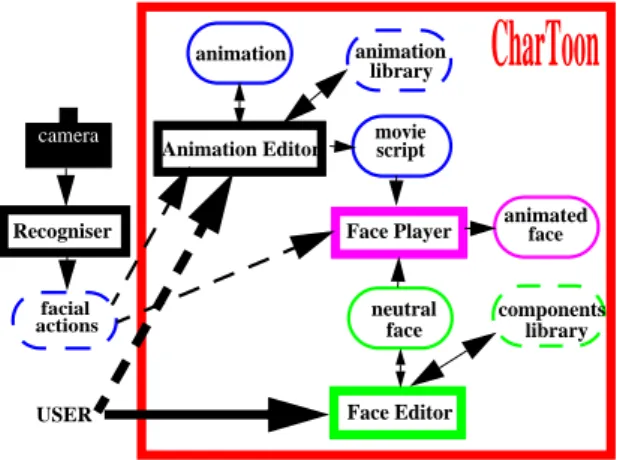
Face Editor is a 21/
2D drawing program with which one can de-fine the structure, the geometry, the colours and the potential mo-tions of the face. A collection of extensible building blocks facilitate the construction of faces.
Figure 1: Architecture of CharToon
Animation Editor is an interactive ‘animation composing’
pro-gram, to define the time-behaviour of a drawing's animation param-eters, provided by Face Editor. Animations can be saved as a script (for later re-use), or a movie script can be generated.
Face Player actually generates the frames of an animation, on
the basis of the animation parameter values in the movie script file provided by Animation Editor and the face description file provid-ed by Face Editor.
These programs exchange ascii data with each other and possi-bly with other programs outside CharToon (see Figure 1).
The programs usually are used together in an integrated frame-work, making it easy to design a face and test its motion in an inter-woven and incremental way. But the components can be run independently, exchanging data with other programs. E.g. Face Player can be run with data gained from an application such as a face tracker, or Animation Editor can be used to post-process ani-mation produced by a text editor or obtained as tracked data.
3.2 The Face Editor
How faces are created
Face Editor is the component of the CharToon system by which drawings (of a face) are created. The program is intended for the generation of 2D faces with a cartoonish or schematic appearance which can later be animated (see Plate 2).
Drawings are build up from pre-cooked components (see Plate 1, Figure 2). Generally speaking, components are elementary geo-metrical shapes like polygons, ellipses and splines or they are
com-camera Recogniser Animation Editor Face Player Face Editor facial
actions neutralface
animated face components library animation library
CharToon
animation movie script USERbinations of those shapes. One can include ‘.gif’ images too, e.g. to use hand-painted and scanned designs as backgrounds.
One includes a basic component in the drawing by selecting it from a menu and dragging it into place (see Plate 1). After a com-ponent is included, it can be edited, i.e. its appearance – size, shape, colour – can be changed within the limits of the component’s gen-eral nature.
While creating a component of a drawing, one also specifies its potential dynamical behaviour, to be used when animating it. The possibilities are:
• change location;
• scale in the horizontal- and/or vertical direction; • change visibility;
• and most importantly: most of the components can change shape according to changing position of control points they contain.
While creating a face, it is possible to test how the face will move. In the so called Test Mode the user can drag the control points around one after the other and see the effect.
The building blocks
The elementary building blocks are the basic components. The components are defined similar to vector-based graphical objects, by points. The defining points can be of four kinds:
• master control points which are used to animate the object,
as the position of the control points is given by animation parameters;
• slave control points which each are assigned to a master
con-trol point and move as their master concon-trol point does; • frozen points which never move;
• fixed points which may move, if driven by some control
point, otherwise they remain in place.
When the user inserts a control point, he defines the horizontal and/ or vertical range for its potential position. During an animation, the control points are to be positioned within the defined range.
From the point of view of how basic components can change shape dynamically, there are two kinds: contour-animated basic
components and skeleton-animated basic components.
Contour-animated basic components are (one and only one) polyline,
pol-ygon (closed polyline), ellipse or image. They are defined by points on their contour. Their shape changes directly according to changes in the position of the control points on their contour. In ad-dition, polygons and ellipses can be empty or filled. Naturally, one can also use variants of these components which never change shape.
Skeleton-animated basic components consist of a skeleton
and a body, both of which are a polygon or polyline. Only the skel-eton contains control points and possibly also fixed points, while the body contains only fixed or frozen points. When the skeleton moves (i.e. its control points change position) the fixed points of the body move in synchrony with the skeleton. The way in which body points are coupled to the skeleton leads to the distinction be-tween point skeleton and edge skeleton (basic) components.
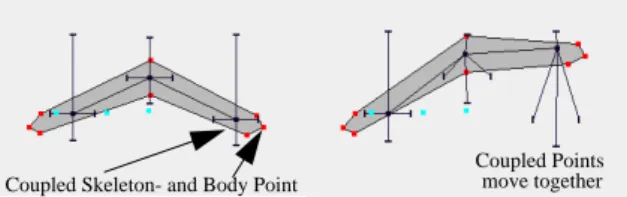
Point skeleton components (see Figure 3) work as follows:
When a component is created, each (fixed) point of the body is au-tomatically assigned to the closest point of the skeleton. This skel-eton point may be a fixed or a control point. In the latter case, it will drive the movement of the point of the body during animation. Namely, the initial vector from the point on the skeleton to the point on the body will remain the same, no matter how the skeleton point moves.
When a body point is closest to a fixed point, it remains in place. This last feature gives an easy way to roughly mimic the ef-fect of skeletons with joints.
Figure 3: Point skeleton with joint, to be used as eyebrow. Figure 2: Stages in the construction of a face: First the static background is constructed from non-animated polygons (left), next animated components (middle) are included to produce the final face (right).
Polygon for nose Filled Polygons for hat and face
Left- and Right Brow
Eye
Animated Filled Poly
Mouth
Static Background Animated Components Animated Face
Coupled Skeleton- and Body Point
Coupled Points move together
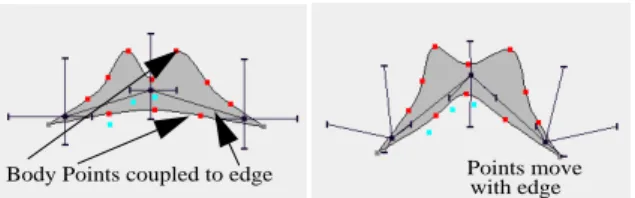
In case of edge skeleton components (see Figure 4) each body point is coupled to an edge of the skeleton. Initally, body points are projected on skeleton edges. When thereafter the skeleton moves, the initial projection of the body point on the skeleton is made to move in such a way that the ratio of the distances of this projection to the endpoints of the skeleton edge on which the projection lies is kept constant. (Note that the skeleton may change length when its CPs are moved!) The body point then follows the motion of its in-itial projection in such a way that:
• It stays at the same distance from the skeleton edge as it had initially.
• Its actual projection always coincides with the moving initial projection.
The most striking consequence is that in principle all body points of an edge skeleton component can move.
Figure 4: Edge skeleton component neutral and deformed, to be used as upper lip.
There are no simple and definitive rules to tell which type of skel-eton component to use for a given effect. In general, the effect of a point skeleton is easier to comprehend, as the (local) shape of the body is preserved. If the body has a subtle shape, it can be preserved only by a point skeleton with many control points, which makes the animation task complex. Hence in such cases a simpler edge-skel-eton may provide a good solution.
After having inserted a basic component, the user is free to add all kinds of points to it which make sense for the type of component. Hence a great variety of objects can be defined, differing in shape and skeleton (potential deformation).
For typical features in a face such as a mouth or eyebrow, com-posite components are provided.
Composite components are made of one or more, possibly
hi-erarchically grouped basic components as building blocks. There are composite components provided to make eyebrows, eyes and mouths of different complexity. When using a composite compo-nent, the user can transform (scale, drag,...) it as a unit, but he is also free to adapt it by editing its basic building elements.
The user is also supported in defining his own composite build-ing blocks and store them in a library for later re-use. Such a so-called user defined composite component can be any, hierarchi-cally ordered assembly of basic components, composite compo-nents and other user defined composites. In a drawing, user defined composites behave as any other composite component, they can be similarly selected, transformed and edited.
Face editing functions
Components as a unit can be manipulated by the general copy/drag/ scale/flip type operations. Basic components can be modified as de-scribed above, by selecting one (may be one as a lower-level build-ing block of a composite component) and then choosbuild-ing from a set of choices generated according to the type of the sub-component.
Polygons and polylines can be turned into smooth shapes by de-fining spline interpolation on its points instead of straight lines. This effect can be limited to sequences of points too.
Lines (smooth or curved) between two points can be turned in-visible.
Components can be placed in 10 layers, both in the background and in the foreground. In the background only non-animated com-ponents can be placed.
Visibility of the component and skeletons can be set forever or be defined as an animation parameter.
Last but not least, existing control points can be fine-tuned: dragged, ranges (in x and/or y direction) set, granularity defined, la-belled, etc.
3.3 The Animation Editor
How an animation is created
Animation Editor is a graphical editor for the specification and modification of animation parameter values for computer facial (or other) models. In the particular case of faces produced by Face Ed-itor, the parameters are x and/or y coordinates of control points. The information on the parameters – name, extreme vales and neutral value – is taken by reading in a face profile file containing the rel-evant data. Profile files are generated by Face Editor.
Animation Editor operates on a window which looks like a mu-sical score (see Figure 5). There is a 'staff' for every animation pa-rameter; the lines on each staff reflect the values the parameter can take. The behaviour in time of an animation parameter is specified by placing points on its staff. Between the specified values – knot
points – linear interpolation takes place. Though in principle it
would be possible to use smooth interpolation, we have not yet committed ourselves to this because of two reasons:
• In case of facial movement, there are no accepted interpolation types like the easy-in/out one in body animation.
• Wwe wanted to provide complete freedom to define and exper-iment with facial movements. Linear interpolation allows to approximate different curves (e.g. sinusoid), which would not be the case if a higher-order interpolation would be enforced. Knot points can be inserted, moved and deleted by mouse-opera-tions, at any time for each channel.
Face Player can be activated from Animation Editor in order to see how the animated face would look like or move. At each editing operation, the face is updated according to the snapshot defined by the parameters at the time corresponding to the cursor’s horizontal position. The animation being made can be tested, by playing (se-lections of) the animation.
An animation can be saved and further processed or re-used lat-er. For a finished animation, a movie script file can be generated by sampling the parameter curves at a rate which is set by the user, containing parameter values for each frame.
Animation editing functions
The processing of animations is facilitated by editing operations which can be performed on a time slice of certain selected staves. One can do cut and paste operations, time- and value scaling and flip on a portion of one or more curves. Cut and paste is supported between different parameter channels, hence e.g. it is possible to
Body Points coupled to edge Points move with edge
‘copy’ motion defined for one half of the face to the other half, or defined for the upper mouth to define the motion of a moustache.
Different views (zoom, hide, overview) and grouping of the staves help to focus on certain animation parameters.
One can open several animations, possibly made for different faces, and by cut & paste re-use (parts of) one animation to make a new one for a different face.
There also is a facility to switch on and off an arbitrary number of audio channels. If the audio is first annotated with (ascii) labels (e.g. using a program like SGI's Soundtrack), Animation Editor will display these labels at their proper place in time. Thereby one can synchronize the audio with the animation parameters.
3.4 Face Player
Face Player is a movieplayer to play animations based on the movie script file provided by Animation Editor and on the basis of the face description file produced by Face Editor. Typically, Face Player is started up from Animation Editor to see the effect of the animation being made (see Figure 5), or alone, to play a finished animation.
Face Player takes ascii data as input to generate the pictures with the animated face. Hence it is possible to animate a face real-time. Face Player can play movies from a file, but can also obtain parameters from an IPC mechanism which transfers data from an application (e.g. face-tracker) in real-time.
Components can be drawn in separate threads, which makes it is possible to deal with different sources of animation parameters for different components.
An applet version of Face Player can be tried out from [5].
3.5 Implementation
CharToon is implemented in Java 1.1, because of the following considerations:
• portability between Unix-, Windows- and Macintosh plat-forms;
• possibility of producing animations for Web-applications, by embedding Face Player in an applet [5] which runs locally, and to which only the ascii data has to be transmitted;
• its interface and graphics tools (the AWK toolkit) where (just) sufficient;
• there is support for multi-threading which opens the possibility of driving animations from multiple sources.
The implementation has proven to be fast enough to render simple faces at 25 frames/second frame rate on 200 Mhz Pentium II PCs. As the graphical rendering speed of Java 2D is too slow for real-time animation, we could not profit from its extra rendering facili-ties.
The first version of CharToon, with on-line help facilities and complete manual is finished, and is running on Windows, Macin-tosh and Unix machines. An applet version of Face Player is avail-able at [5]. Currently we are investigating possible commercial partners to develop it further into a stand-alone low-price product or to integrate it into an existing complex animation package.
F
igure 5: Snapshot of an Animation Editor window, with Face Player showing the face to be animated. The time curve for the Right_Out_Tear parameter is a hand-edited extension to recorded data shown in the other 3 staves.4 NPAR with CharToon
4.1 Feature and expression repertoire
CharToon separates the appearance, the dynamism (possible de-formations) and the behaviour of a face. The first two aspects are incorporated in the definition of the face, while the latter in the ani-mation. CharToon technically supports the re-use of facial compo-nents and pieces of animations as building blocks. Based on careful analysis of specific facial features of the basic expressions – happi-ness, surprise, fear, sadhappi-ness, anger and disgust – , for each feature (eye, mouth, eyebrow,...) different alternative designs were pro-duced, forming together the feature repertoire. For each feature, the deformation for the basic expressions were given (in terms of animation parameters), forming the expression repertoire. The al-ternatives for a feature differ concerning deformation control mech-anism and/or structure. E.g. the functionally simplest eyebrows are the ones which do not change shape but may be moves up/down, and the most complex ones have 4 control points, with which one can produce subtly deformed eyebrow shapes.Two feature repertoire elements with the same deformation control mechanism have ‘identical dynamical possibilities’, as there
is a one-to-one correspondence of the control parameters. However, the difference in structure (basic components used) will produce a difference in the deformed form.
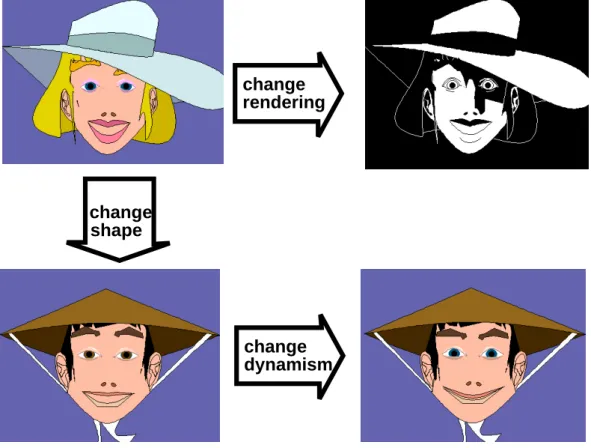
Once a feature is selected from the repertoire, the designer may adapt it by changing its
a) rendering, b) shape and c) dynamical ranges.
As the first type of change does not affect the dynamism, expres-sions from the expression repertoire can be re-used and will produce the same result. The last two types of changes both result in changes in the deformed shape, and thus when changing one aspect, in case of complex shape and/or control mechanims, the other may have to be modified too in order to achieve a desired deformation effect. If these changes are done with care, the expression repertoire for the original feature can be re-used and will produce similar expressions, but with a different ‘look’ and/or exaggerated. In this way, one can design quickly a big variety of faces, and experiment with the vari-ations in appearance and dynamism (see Figure 6).
Figure 6: Variants of a face, all built up from identical feature repertoire elements. The variants are gained by changing the rendering, the shape and colour of the building blocks and the dynamism (ranges of control parameters). All the four faces show the identical ‘happiness’ expression from the expression repertoire.
change
rendering
change
dynamism
change
shape
4.2 Non-photorealistic 2D faces
The functionalities of Face Editor, though at first sight seemingly limited, do allow a great variety of cartoonish faces (see Figure 6, 7 and 8; Plate 4 and 5). As for the complexity and realism of the face to be produced, one has a choice for each facial element as: • faithful (approximation of) shape from a photo;
• exaggerated shape of a realistic feature (e.g. very thick lips); • replaced by simple forms (ellipse as mouth, straight lines as
eyebrows);
• added feature which does not correspond to any feature on the real face (e.g. halo around the head).
As for rendering style, faces can be designed as: • line drawings;
• flat faces with smooth filled shapes;
• paper cut-outs, by using not so smooth shapes;
• a combination of realistic or painterly static background (scanned painting/photo) and dynamic features (mouth, mov-ing eyes,...),
• ‘pseudo 3D’ faces, where shadows (dynamic components which are animated too) give the illusion of 3D.
The colouring of the components in a drawing can be done with full colours, or with black and white, or with grey scales. Finally, by carefully using the layering option of CharToon, the effect of depth in the background and 3D context for the head can be achieved.
4.3 Non-realistic animation
In order to achieve expressiveness and appealing animations, usu-ally a non-photorealistic face must be animated in a non-realistic way. To begin with, usually features of the cartoonish face do not match the real features of the face.
Moreover, it is easy to define features with ‘beyond realism’ deformation capabilities: eyeballs can bulge, eyebrows can be pulled extremely high, a face can grow fat or shrink narrow. Also, non-facial features can be animated to strengthen a facial expres-sion, e.g. hair rising up and a cap flying above the head in case of surprise.
It is, naturally, possible to compile a (non-realistic) animation from scratch. However, the different set of features and deforma-tion possibilities allow inventive re-use of realistic (captured) data to drive a cartoon face:
• a ‘realistic’ range can be extended to achieve exaggerated motion;
• features corresponding to static (or hardly moving) ones in the real face can be animated, usually to emphasize the motion of some dynamic feature;
• the captured data can be extended with animation made from scratch for elements (falling tears) not present in reality; • in general, there is a variety of ways to map the motion of
cap-tured features of a real face on a set of features of a cartoon face: an animation parameter can be the max., average or some other function of values gained from several data channels. Moreover, the style of motion of one or more features can be changed:
• a normally smooth motion can be turned into ‘trembling’ motion, or the changes can be made sharp;
• a jerky motion (e.g. noisy captured motion) can be smoothed; • speed can be changed;
• physically impossible motion patterns can be achieved (e.g. jumping features, non-coupled motion of ‘anatomically con-nected’ elements).
All the above animation effects can be achieved with the imple-mented version of Animation Editor, by manipulation animation data (knot points) directly.
With the next version (being implemented), it is possible to de-fine and (re-) use pieces of motion on a high, conceptual level. For an animator it would be very helpful to be able to define the facial repertoire of a character, especially when inventing non-realistic animations for cartoon-like faces. In the next version one will be able to define different characteristics of the facial repertoire: • the general dynamical characteristics of a cartoon face, in
terms of limits of change of speed and value on parameters; • the behavioural repertoire of the character to be animated, such
as symmetric eyebrow movement, as typical for the character; • any expression for a face – even ones without a realistic
corre-spondence – can be defined.
These characteristics will be automatically enforced, and prede-fined building blocks (e.g. a smile) can be re-used in the course of editing an animation for the face. Moreover several, non-identical expressions of the same kind can be generated, avoiding the un-pleasant effect of using identical pieces of animations whenever an expression is to be produced. Thus the facial animation editing tool has two usages:
• to sculpture the dynamism and ‘mimic repertoire’ of a face to be animated;
• to make animations for a face with a given mimic repertoire, meeting certain further requirements set for the particular ani-mation.
The animation building blocks will not be stored as a piece of ani-mation (as in the present implementation), but will be defined in terms of constraints which the corresponding animation has to sat-isfy. E.g. in case of a smile, both mouth-corners should be pulled up for some time, and then after a short while the expression should be released. The durations and final location of the mouth corners are not set to a specific value, but some limits are prescribed. Moreo-ver, if one wishes to have a perfectly symmetrical smile, the motion of the two mouth corners should be perfectly ‘mirrored’. Otherwise a) b) c) d)
some degree of asynchrony is allowed. As this example further sug-gests, there are in general many concrete pieces of animation which satisfy the criteria for an expressions. This separation of the decla-ration of the dynamical potential of a face (how components can be deformed), the expression repertoire of the face (in what way are the features deformed in case of expressions) and a piece of anima-tion which fulfils the criteria provides the interesting possibilities to experiment with faces of different geometry but of more or less identical facial repertoire as well as re-using pieces of animations for faces with different facial dynamism and repertoire.
4.4 Examples and demos
CharToon has been used by three groups of people: the system de-velopers, professional animators and researchers in human ergo-nomics at a third party. In Figure 8, some of the resulting designs are shown. Below we discuss animations made by them, with col-our snapshot illustrations. Most of the complete animations can be seen on the CD. Samples are available on-line [5].
• Lily (see Plate 4) is an animation of a single subtly drawn
car-toonish female face in ‘flat smooth’ style, with dynamic com-ponents to demonstrate how basic human expressions can be achieved by exaggerated and non-realistic features (e.g. change of face width). The artist wanted to have subtle control of the deformation of the features, which was achieved by using 93 control parameters.
• NineFaces (see Plate 5) is a collection of 9 very stylistic
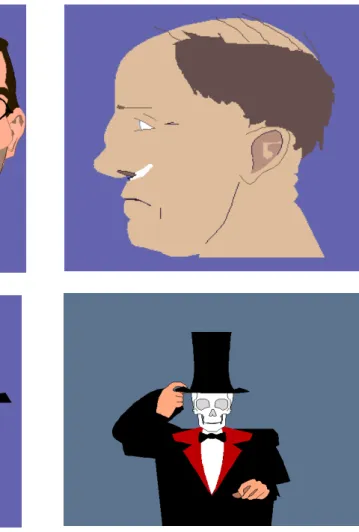
human and non-human heads, which can be animated to exhibit some basic expressions and talking. The faces have 6-12 control parameters each. The goal was to show that with simple design (straight lines) and control (often only scaling and replacement of features) attractive and expressive faces can be made. Such faces could be used on Web pages, as sim-ple representatives of users in multi-user environments, or in applications for kids.
• LineHeads (see Plate 6) are two heads, each made of a couple
of curves (with partially invisible pieces), controlled by a skel-eton with few control points. The pen drawing style and the somewhat unpredictable deformation of the curves give inter-esting effects. Moreover, this is also an example how 3D trans-formations can be mimicked, to achieve that the two faces turn towards each other.
• Scenery (see Plate 7) is an example to demonstrate that
Char-Toon can be used for non-facial designs and animations: the windmill turns, clouds and trees move according to blowing wind. By the careful of use of layers, an illusion of depth is achieved.
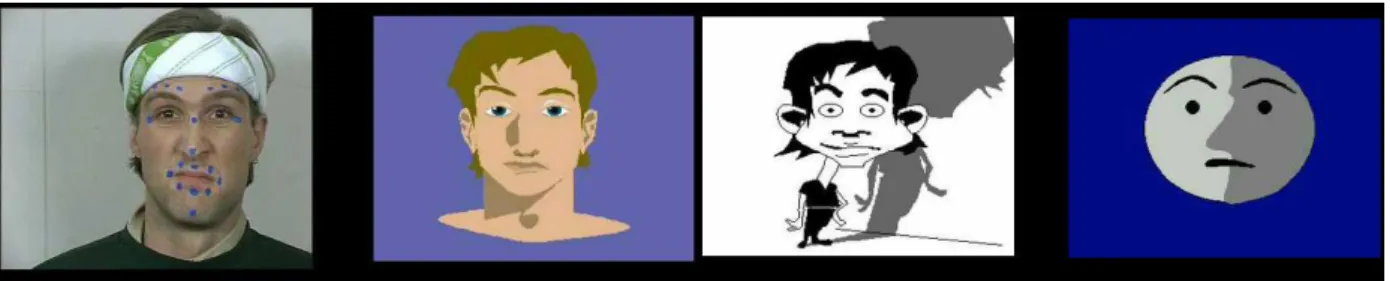
• The last example compares three non-photorealistic faces, all driven by performer data. In Plate 3 (and Figure 7) the same snapshots are shown for each face. In a) the real face is shown, with the blue dots which are tracked. In b) a ‘close-to-realistic’ drawing of the face is shown, while in c) a cartoon version is
given. Both b) and c) faces use structures with control points representing (some of the) blue dots. In this case not only the features and the rendering style are non-photorealistic, but the ranges for the control points are exaggerated. Thus the very same (performer) data produced exaggerated motion of e.g. the eyebrows. It took 2 hours for the animator to turn face b) into c) in Face Editor, and then by re-using the captured data a long animation was produced for the new face in a couple of min-utes. In d) a cartoonish moon is shown with an expression pro-duced by using the captured data.
The first 4 animations were all made from scratch, and demonstrate different benefits of faces made by CharToon: expressiveness, ease of control, funny or artistic look. The first two movies have sound, which demonstrates the added value of sonic effects.
In the last case, CharToon has been used to make animations on the basis of performer data. The tracked points may correspond to feature points used in ISO MPEG4 coding [22], but other codings [8] or arbitrary sets of feature points can be dealt with.
4.5 Possible applications
There are several potential applications for faces produced by Char-Toon.
• Animated faces to be used on Web pages, as guides, represen-tations of the owner (in different moods), representation (with different expressions) of status or diagnosis of a complex sys-tem.
• Telecommunication/telepresence: animation for non-realistic faces can be broadcasted through low bandwidth channels. • The multi-thread implementation of Face Player gives support
for net based rendering of interactions between avatars which are controlled from different remote places but shown on a sin-gle screen.
• Talking faces with speech synthesis or text in speech bubbles. • Faces with adapted lip-sync for the hearing impaired. • Games for kids.
• Short animations.
Human ergonomists have tested the expressive effect of CharToon faces [36], and found that the experimental subjects could recognise as well as reconstruct emotions on different non-realistic faces like the ones in Plate 3 just as good as on photos.
CharToon can be used to ‘put 2D expressions on 3D faces’. The first such experiment [9] with avatars in VRML worlds has been en-couraging.
The composite components of Face Editor have been designed especially for producing facial features. However, Face Editor can be used for other application domains where the deformation and motion of vector-based objects is to be controlled directly, by more or less independent parameters.
5 CONCLUSIONS AND FUTURE WORK
CharToon is a vector-based animation system, consisting of sepa-rate programs to design 21/2D drawings with dynamic potentials, make animations and play those. The major advantages are dedicat-ed support to make animatdedicat-ed faces quickly, high spededicat-ed in rendering allowing real-time animation also on the Web, ease of use and plat-form-independency. CharToon supports a great variety of non-pho-torealistic effects both in the look and the movement of the faces.
CharToon has been tested by different users, including artists who had hardly any experience with computers before. After hav-ing understood the principles behind CharToon, they could produce nice designs of faces, including the dynamical capabilities, in a cou-ple of hours. Artists seem to like the ease with which one can trans-form faces and animations.
Currently we are improving CharToon in two respects. In order to gain (more) drawing speed and additional rendering facilities, we are building an extension of Face Editor (and Face Player) using the ‘Magician’ OpenGL Java Interface, and replace Java AWT draw-ing primitives by OpenGL ones. We expect (based on experiments in comparable situations) greatly increased drawing-speed. Fur-thermore, we will get an opportunity to provide support in Char-Toon for more sophisticated rendering options like line-styles and texture.
In order to lift the animation editing task to a higher, conceptual level, an experimental new version is being implemented, using in-terval constraints. We expect that with the new version animations can be produced faster and easier, and the new facilities will inspire animators when inventing non-realistic facial motions.
CharToon in its present form provides the option for the user to build his own library of composite components. A big and system-atic repertoire of facial features like eye-brows, eyes, mouths has been developed, each with a repertoire of expressions. The user, once he knows what and how subtle expressions the face has to be able to present, can design it by selecting and editing the specific components. It is an interesting question if certain ‘design recipes’ could be given how to ‘mix and match’ repertoire elements, both with respect to the intended expressiveness and rendering of the face to be produced.
An even more challenging issue is to investigate how anima-tions designed for a face with ‘standard’ components (e.g. ones which confirm to the MPEG4 standard [22] and thus can be driven by performer data) can be re-used for faces with more or less so-phisticated building blocks. We hope to come up with a set of map-ping functions for many of the building blocks, which tell how an animation for the ‘standard’ component should drive the motion of the component in question. In this way not only a non-photorealis-tic face could be designed quickly, but could be animated quickly by mapping existing animations to the components of the face. Such a mapped animation could be sufficient for certain applica-tions, but for artistic or subtle effects it could be processed further in Animation Editor.
Acknowledgment
We thank A. Lelièvre, Zs. Paál, B. Kiers, J. Hendrix and K. Thóris-son for making some of the demos shown as examples, for M. Savoney and J. Hendrix for turning captured date into animations, and for the FASE group at TUD for providing captured data. We are indebted to Chris Thórisson for his ToonFace system [34] which in-spired us to develop our system, and for his many useful sugges-tions on earlier versions of CharToon. Finally, we thank Paul ten Hagen for his useful remarks on this paper and throughout the project. The final version of the paper reflects several suggestions of the referees. The work has been carried out as part of the ongoing FASE project, sponsored by STW under nr. CWI 66.4088.
References
[1] Ansel, K. (1999) The making of the painted world: ‘What dreams may come’, Proc. of Abstracts and Applications Siggraph’99, 204.
[2] Brennan, S. (1985) Caricature Generator: The dynamic ex-aggerationoffacesbycomputer,LEONARDO,18(3),170-178 [3] Bruderlin, A., Williams, L. (1995) Motion signal
process-ing, Motion warpprocess-ing, Proc. of Siggraph’'95, 97-104. [4] Charette, P., Sagar, M. (1999) The Jester, Film from the
Electronic Theater at Siggraph’99, Pacific Title Mirage Studio, URL: http://www.pactitle.com/
[5] CharToon Home Page, (1999) http://www.cwi.nl/Char-Toon
[6] Curtis, C. (1998) Loose and sketchy animation. Proc. of Abstracts and Applications Siggraph’98, 317.
[7] Daniels, E. (1999) Deep canvas in Disney’s Tarzan, Proc. of Abstracts and Applications Siggraph’99, 200
[8] Ekman, P., Friesen, W. (1978) Facial Action Coding Sys-tem. Consulting Psychology Press Inc. Palo Alto, Califor-nia
[9] Elians, A., Van Ballegooij, A. (2000) Avatars in VRML worlds with expressions, http://blaxxun.cwi.nl:4499/ VRML_Experiments/FASE/
[10] Essa, I. (1994) Analysis, Interpretation, and Synthesis of Facial Expressions. PhD thesis, MIT Medial Laboratory, available as MIT Media Lab Perceptual Computing Techreport #272 from http://www-white.media.mit.edu/ vismod/
[11] Essa, I., Basu, S., Darrel, T, Pentland, A. (1996) Modeling, tracking and interactive animation of faces and heads using input from video, Proc. of Computer Animation'96:68-79. [12] FaceWorks (1998) DIGITAL FaceWorks Animation
Crea-tion Guide, Digital
[13] FAMOUS Home Page (1989) http://www.famoust-ech.com/
[14] FASE Project Home Page (1998) http://www.cwi.nl/ FASE/Project/
[15] Fekete, J. D., Bizouarn, E., Cournaire, E., Galas, T., Taillefer, F. (1995) TicTacToon: A paperless system for professional 2D animation, Proc. of Siggraph’95, 79-90. [16] Gainey, D. (1999) Fishing, shown at Electronic Theater of
Siggraph’99.
[17] Gleicher, M., Litwinowicz, P. (1996) Constraint-based motion adaptation, Apple TR 96-153.
[18] Green. S. (1999) Non-photorealistic rendering, Sig-graph’99 course 17.
[19] Griffin, P., Noot, H. (1993) The FERSA project for lip-sync animation, Proc. of IMAGE’COM 93, 111-120.
[20] Guenter, B., Grimm, C., Wood, D., Malvar, H., Pighin, F. (1998) Making faces, Proc. of Siggraph’98, pp. 55-66 [21] Hodgins, J., Wooten, W. L., Borgan, D. C., O'Brien, J. F.
(1995) Animating human athletics, Proc. of Siggraph’95, 71-78.
[22] Information Technology – Generic coding of audio-visual objects – Ppart 2: visual, ISO/IEC 14496-2 Final Draft In-ternational Standard, Atlantic City, 1998.
[23] Kokkevis, E., Metaxas, D., Badler, N. (1996) User-control-led physics-based animation for articulated figures, Proc. of Computer Animation'96, 16-25.
[24] Litwinowicz, P.C. (1991). Inkwell: a 2/1/2-D animation system, Computer Graphics, Vol. 25. No. 4. 113-122. [25] Litwinowicz, P. (1997) Processing images and video for an
impressionist effect. Proc. of Siggraph’97, 407-414. [26] Lost Marble (1999) Moho, http://www.lostmarble.com/
aboutmoho.html
[27] Owen, M., Willis, P. (1994) Modelling and interpolating cartoon characters, Proc. of Computer Animation '94, 148-155.
[28] Parke,F., Waters, K. (1996) Computer Facial Animation, A. K. Peters.
[29] Ruttkay, Zs. (1999) Constraint-based facial animation, CWI Report INS R9907, 1999. Also available from ftp:// ftp.cwi.nl/pub/CWIreports/INS/INS-R9907.ps.Z.
[30] Salesin, D., Kurlander, D. Skelly, T. (1996) Comic Chat, Proc. of Siggraph’96, 225-236.
[31] SVG (1999) http://www.w3.org/1999/07/30/WD-SVG-19990730/
[32] Takacs, B. (1999) Digital cloning system, Abstracts and Applications Proc of Siggraph’99. 188.
[33] Terzopoulos, D., Waters, K.(1993). Analysis and synthesis of facial image sequences using physical and anatomical models, IEEE Trans. Pattern Analysis and Machine Intelli-gence, 15(6):569-579, June 1993.
[34] Thórisson, K. (1996) ToonFace: A system for creating and animating interactive cartoon faces, M.I.T. Media Labora-tory Technical Report, 96-01
[35] Van Reeth, F. (1996) Integrating 21/
2-D computer anima-tion techniques for supporting tradianima-tional animaanima-tion, Proc. of Computer Animation'96, 118-125
[36] Van Veen, H., Smeele, P., Werkhoven, P.: Report on the MCCW (Mediated Communication in Collaborative Work) Project of the Telematica Institute, TNO, January 2000. [37] Walker, J., Sproull, L., Subramani, R. (1994) Using a
hu-man face in an interface, Proc. of CHI’94, 85-91.
[38] Williams, L.(1990) Performance-driven facial animation, Proc. of Siggraph'90, Computer Graphics 24(3), 235-242. [39] Witkin, A., Popovic, Z. (1995) Motion warping, Proc. of