ISSN: 2249-2593
http://www.internationaljournalssrg.org
Page 10Content Filtering using Internet Proxy Servers
Swati Saxena
Asst. Professor
Mangalmay Institute of Engineering & Technology, Greater Noida 9716611932
C-114, Gamma 1. Greater Noida, U.P. (India)
Abstract
Content filtering has been around since the internet has been around. Content filtering is the process of removing certain content from the internet before it gets to the user that requested that page. There are many different reasons you would want to block certain content from users. One popular example is having internet access at work locations; another is making sure students at schools of all type do not go to inappropriate sites that are prohibited in the school policy. Here at Brigham Young University of Idaho we have a content filter in place that makes sure the pages students and faculty are appropriate. Another example is filtering content in homes to protect the children from certain places on the internet. There are many different types of sites that you might want to filter out. The most popular is pornography. Many places also filter out other sites as well, here are some examples: chat, email,
games, personal; guns, bombs, news,
advertisements, and etc. this paper will show how filtering content can be helpful to raise productivity in school and jobs. This paper will also show how it will help children not go to bad sites and help parents control what their children see on the internet.
I.
Content Filtering Basics
There are many different ways you can filter websites using content filtering programs. One method is buying a program you install on your personal computer and it scans all traffic going out and coming in from the internet. The benefit of this method is it is very simple and easy. But there are some disadvantages. For example most of them now have monthly subscriptions, if you do not pay the filtering stops. Another disadvantage is the filter program is on the same machine as the user, so the user can try stopping the program which can be fairly easy or hard. And another disadvantage is most computers have virus and malware scanners running on them and adding content filtering will just make the computer run more slowly [3]. Another method is buying filtering service through your internet provider. Some
Internet providers provide this service for free but the majority of them charge a monthly fee. The benefit of this method is that it is very easy and you do not have to do anything on your end. The disadvantage is that you have no control over the type of filtering. Most internet providers only worry about blocking pornographic websites. If more categories need to be blocked this method might not be for you.
The last method I will talk about is having a dedicated content filtering computer that is constantly monitoring the network and making sure that everything going in and out is appropriate. This method has many benefits. One is the filtering is taken place on a remote computer that can by physically locked up so people do not have access to turn it off or to break in. Another benefit is that you can scan every word and picture that goes into your office, school, or home because you do not have to worry about slowing the computer down. This computer is dedicated to just scanning so you will be able to scan more pages per second without slowing down the content coming from the internet. Another benefit is you are the one in control and can add certain sites, phrases, words, and urls that you do or do not want being displayed. There is a disadvantage to this method as well, you need to invest some money in buying a dedicated computer to scan the content, but in the long run you will save money buying your own computer then having to pay a monthly fee is you are going to be needing it for many years . Another disadvantage is you will have to install and setup the programs yourself.
II.
Content Filtering Software Packages
in Linux
The two most popular content filtering packages in Linux are squid Guard and Dans Guardian. These programs are used to filter the internet and regulate what gets sent to the users. They also keep a log of what sites are accessed so you can go in and see if people are trying to go to bad websites. These two programs are similar and also very different. They both require a proxy server to pass the internet content through them before it arrives at the user. But one is a lot faster and gives little options and the other gives more options but needs to have a fast computer to process the websites [1]. I will also briefly talk about two popular proxy servers used in Linux, squid and
ISSN: 2249-2593
http://www.internationaljournalssrg.org
Page 11 tiny proxy. Finally I will talk about Ubuntu ChristianEdition, a Linux distribution that includes DansGuardian and you only need to install it on a computer and setup the content to be blocked and you are ready to start filtering content. To see an example of how you would implement a content filtering computer in your office, school, or home see figure 3. You have all the computers send website requests to the content filtering proxy server which then send the requests out to the internet [2]. When the content comes back it has to pass through the content filtering proxy server and it will then check to make sure it is appropriate. If it is not appropriate it will display an error page similar to the one in figure 4.
III.
Squid Guard
The basic content filtering package in Linux is squid Guard. It is an open-source software package for use in non-commercial settings. If you want to use it in commercial settings you will need to buy a license by contacting the developers. Squid Guard is a combined filter, redirector and access controller plug-in for squid. Squid Guard can be used in many ways to block content from getting to the users [5]. On their website they list many ways it can be used. Here are some examples listed on their website (http://www.squidguard.org). “Limit the web access for some users to a list of accepted/well known web servers only; Block access to some listed web servers and addresses for some users; Block access to URLS matching a list of regular expressions; Redirect blocked pages to an intelligent CGI based info page; redirect advertisements to a blank image; Have different rules for different user groups; and much more [5].”
IV.
Installing and Configuration Squid
guard
Installing squid Guard is not very hard in most circumstances. On Ubuntu distributions you just need to run “aptitude install squid guard” and it will install all the necessary programs and setup thedefault settings for it to run. Other distributions that are rpm based like Redhat, Centos, SUSE, and others can download and install the rpm file from the squid Guard’s website[5]. Other Linux distributions will need to download and compile the program on their computer. Before you can start squid Guard you will need to setup some basic filters to start filtering content. All of the configuration files for squid Guard are located in /etc/squid guard, /etc/squid or if you compiled the program they will be located in /usr/local/squid Guard. The main configuration file is named squidGuard.conf. Inside the main configuration file there are many different options. I will only talk about some of them. One of the things you can do
with squid Guard is setup different times when certain sites are blocked and other sites are approved. For example in a workplace environment you would setup the company’s work hours and during that time you would block categories like chat, shopping, social and dating, games, etc. But before and after company time squid Guard would allow these websites to be accessed. Another thing that is nice about squid Guard is you can point to other files that contain lists of websites and ip addresses. For example you could have a file called banned-chat and inside have a list of chat websites that you would like to block [5]. In these files you need to put each website or ip address on a separate line. In the end of the document I will talk about Blacklists and where you can get thousands or millions of websites already categorized to help filter the internet. The benefits of squid Guard are that if you do not have a fast processor you are still able to filter out millions of websites without seeing much delay on your network. The disadvantage of squid Guard is you will never be able to block all websites in the internet. Squid Guard only blocks a website if the web address matches one of them in the bad lists or a regular expression. You need to constantly update your blacklists so you have the latest list of bad websites in order to make sure you can block the majority of the websites.
V.
DansGuardian
A more advanced content filtering package in Linux is DansGuardian. It is an open-source software package for use in non-commercial settings. If you want to use it in commercial settings you will need to buy a license by contacting the developers or you can buy a product called Smooth Guardian. DansGuardian can run on multiple platforms, Linux, FreeBSD, OpenBSD, NetBSD, Mac OS X, HP-UX and Solaris. It can filter websites just like squid Guard, but beside the same features as squid Guard it can do a lot more. It also reads all content being passed through the network and if it sees certain words or phrases it will block the pages even if the web address is not in the list. This makes it a true web content filter. Because of this you do not have to be constantly updating your blacklist because even if new websites come available on the internet, of they are pornographic for example they will always have certain words and phrases. (Smack, 2006) This makes filtering the web easier and you have more control of what websites can be displayed on the computers. You can also replace certain words or phrases on web pages. For example you can remove bad language and replace themwith less offensive words or just the word ***censored***. DansGuardian also comes setup to use clamav, a virus scanning program in Linux, so all content is passed through the virus scanner as well to make sure no malicious content reaches your users. Even though it
ISSN: 2249-2593
http://www.internationaljournalssrg.org
Page 12 has a lot more benefits than squidGuard it still has onedisadvantage. By adding all these options you will need to have a pretty fast computer that will be able to look through every single website that is viewed to look for those phrases and words. If you only have a couple of computers accessing the internet a common desktop machine with a Pentium 4 or equivalent would be sufficient. But if you have more than 5 or 10 computers trying to load pages all day you would want to have a dual processor or even a quad processor in the filtering machine to help process all of the web pages being accessed so the people accessing the internet do not notice any slowness.
VI.
Installing and Configuring
DansGuardian
Installing DansGuardian is not very hard in most circumstances. On Ubuntu distributions you just need to run “aptitude install dansguardian” and it will install all the necessary programs and setup the default settings for it to run. Other distributions that are rpm based like Redhat, CentOS, SUSE, and others can download and install the rpm file from the DansGuardian’s website. Other Linux distributions will need to download and compile the program on their computer. Before you can start DansGuardian you will need to setup some basic filters to start filtering content. All of the files needed to configure DansGuardian are located in /etc/dansguardian. The main configuration files are named dansguardian.conf and dansguardianf1.conf. There are also a handful of other configuration files in the same directory. Inside it are general options for dansguardian. The other files are used to add sites to the banned lists or the exception lists. In the configuration file dansguardian.conf you can set the basic settings for the content filter. Things like what port to listen to, the page to redirect if a bad page is found see figure 4 for an example. Another important setting is the maximum content filter page size. DansGuardian [1] by default will not scan pages over 256 Kb, if you want you can raise this limit to make sure even bigger pages will get scanned but you need to make sure you have a powerful computer with a lot of memory. In this file is also where you can turn on or off the virus scanning. You can have it email someone when a virus is found.
The other main configuration file dansguardianf1.conf is where you can set the naughtiness limit. This is the configuration on blocking pages that have certain phrases in them. In DansGuardian [1] you have words and phrases in the weightphraselist file and each word or phrase has a number assigned to them to show how bad or good they are. For example the word “breast” by itself might have 50 assigned to it, but the phrase “breast cancer” would have -100. That way you would not block health care pages. This is the best feature of
dansguardian, it lets you scan for certain words and phrases in the web pages. You do not need to have every bad site listed to block. The naughtiness limit is the maximum number a page can have in order to pass through the filter. The default is 50 and it is meant for young children. It recommends 100 for old children and 160 for young adults. But you can put any number from 0 and up. In this file you can also set it up so you can bypass a blocked page for a certain amount of time are you put in the secret key? The configuration files that start with banned are lists of sites, extensions, phrases and ip addresses to block. There are also a list of files that start with exception that are listed sites, extensions, phrases and ip addresses to let through. There is also a pics configuration file. This uses the Platform for Internet Content Selection (PICS). Lots of internet websites include metadata in their website describing what kind of content they are displaying. In the pics file you can setup what levels for each category of site. It also supports the IRCA and the RSAC which are also ways to describe what kind of content you have on your website. It does have some problems with this system, in a research paper done by three university students they wrote “Those Web sites whose descriptor rating values are lower than those supplied by the user can be retrieved. For instance, if a parent sets the violence value to 2 and the nudity value to 1, those Web sites whose descriptor values for these two descriptors are lower than or equal to 2 and 1 respectively can be retrieved while those above cannot. This simple point separation has at least two underlying assumptions. First, it assumes that the user knows the meanings of each descriptor value, e.g., value 2 on the violence rating descriptor corresponds to destruction of realistic objects. Second, the user agrees with the label bureau’s rating associated with the descriptor for a Web site.”(Jacob, 1999) Neither the parent nor the people who made the website might be using the same guidelines for what is a 2 on violence compared to the number 3. It is a good thing to have to help judge a website but this should not be the only thing to filter a web page. The last thing I would like to talk about is the contentregexplist. In this configuration file you can list words or phrases that should be converted to other phrases or words. I had put in the replacement of “Gosh” for the word “God”, that way I would not see people using this in a bad way. But I found out when I was reading religious material online it would replace the word even though it was used in a good way. The best way to use this is in a phrase, that way you know that the word is being used in a bad way, or things that might be offensive to the people that access your internet. As you can see DansGuardian has a lot more ways to block bad sites that squid Guard [5] and why it is important to have a more robust machine to handle the load [1]. On DansGuardian’s website it said a Pentium 150 MHz is sufficient to filter websites
ISSN: 2249-2593
http://www.internationaljournalssrg.org
Page 13 but that was when everyone was using a 56K modemto access the internet. I have been using a Pentium 3 500 Celeron and I could tell that the internet was running slower than normal. You can always try to use an older machine to filter and then increase the processing power if needed.
VII.
Internet Proxy Servers
Internet proxy servers can be used to help organizations in many ways besides helping on filtering content. They were originally formed to help conserve bandwidth when the connections to the internet were small. They would copy a website people would visit on its hard drive and when someone wanted to see the website again it would just give them the copy it had stored locally. That way it didn’t have to use the internet connection to retrieve it again. It would also check to make sure the copy it had was the same version on the internet [3]. The proxy servers also know how to read more than just normal web pages, they can decode secure web pages and then encrypt them so it can be sent to the person who requested it. This is useful for filtering because people cannot get around the filtering software through secure websites. Both of the filtering methods I mentioned above need a proxy server to give the internet content to DansGuardian or squidGuard[1][5]. They can be configure to cache the content they retrieve to help conserve bandwidth or they can be setup to just pass the internet content through to the filtering software. Below I will mention two popular proxy servers used in conjunction with filtering software.
VIII.
Squid
Squid was created by Duane Wessels in 1996. It was funded by the National Laboratory for Applied Network Research Appliance. It is still being maintained today and Duane Wessels is still one of the main people in charge of its development (Wessels, 2004). This is the most popular and best internet proxy server for Linux. It is very reliable, well documented in case you have problems, and you can join the squid mailing list to receive answers to specific questions you might have.
IX.
Tiny proxy
This internet proxy does not have a caching option. It was made to be very small and very efficient in passing pages through the proxy server so other programs could scan the content and decide what to do with it. It is not as popular as squid and is not maintain as well as squid either. The latest version came out in August of 2004. It can be used if the machine you are using to filter content is having
troubles filtering pages fast enough. Some of the how-to’s and tutorials on the internet to step people on setting up dansguardian recommend using tiny proxy. It is very simple to setup and works great with dansguardian. If you do want to also cache remote content locally to help save bandwidth and speed up your internet connection you should use squid over tiny proxy[4].
X.
Ubuntu Christian Edition
Finally I would like to mention a little about a new Linux distribution that has came out in the past year. It
can be found at
http://www.whatwouldjesusdownload.com/christianub untu. It comes with DansGuardian installed and has a custom GUI/visual control to configure the settings. This is useful for people who don’t have experience in running commands and editing files in the command prompt. [1][2] It is useful if you just have one computer at your place you would like to filter but if you need to have other computers use it to filter as well you might be better off installing a Linux distribution of your choice and then installing one of the options above on it. Normally you do not want to have GUI interface like windows on a server that is processing a lot of content through your network because the graphical user interface can take up some of the memory and processing power of the machine. This means the filtering software does not have all the power it could have to filter [1] [2]. This Linux distribution also has some custom applications for Christians, like a virtual rosary or bible memorizer, which might or might not be very useful.
XI.
Blacklists
Blacklists are lists of ip addresses, websites, and phrases that people have collected and grouped into different categories. There are all sorts of categories, sports, news, advertisements, spyware, pornography, adult, health, video games, internet games, etc. Many have over 2 or 3 million different sites. This is useful to insert into your rules in squid Guard or DansGuardian. If you are only filtering out website by their address you need to make sure you have the latest list of sites to make sure you don’t have stale data. Things are constantly changing on the internet and you should try to download the latest blacklist file every week or month to stay up to date. Most places charge a monthly or yearly fee to let you download their blacklist. URLBlacklist.com allows you to download their blacklist once to try it out and then you need to subscribe to download more recent versions.
ISSN: 2249-2593
http://www.internationaljournalssrg.org
Page 14XII.
Setting Up Other Computers to
Use Your Content Filtering
Server
There are two ways you can setup the computers to pass through your content filtering server. One is called the transparent setup and the other is called manually setting it up [4]. I will briefly go over each way because each one has its advantages and disadvantages. The easiest and most secure way is the transparent way. You put the content filtering server physically in between the computers and the way out to the internet so everything has to pass through the content filtering server, see figure 3 for an example. This involves routing your wireless and wired traffic through the filtering machine and then having it go though the gateway and out to the internet. One of the best ways of doing this is using iptables, a firewall for Linux machines. [3] In the configuration you would add lines in to tell it to forward any traffic going to port 80 for example, which is the default port for websites, and tell it to send it to where DansGuardian or squid Guard is listening for it[1][5]. Then your content filtering software will use the proxy server, squid or tiny proxy to go and retrieve the content and then it will be able to send the content to the user that requested it. This is very useful because now people have to choice and have to use it to access any website. But in the beginning when you are still customizing your content filtering server if it is blocking good pages it is more difficult to turn it off for a little bit until you work out all of the problems. The other method is you need to go to every computer and in the proxy settings in the internet browsers you need to type in the location of your content filtering server’s address [3]. You can lock down these settings in the browser so others cannot change them (see reference “Add Web Porn filtering and Other Content Filtering to Linux Desktops” for more information), but there are still ways around this method. The user could download another internet browser that doesn’t know about the proxy server and will go right past the content filtering. This method is good though when you first are trying out your content filtering server. The first couple of weeks you will find that maybe you are blocking too much content or maybe you are not blocking enough. If you manually setup the browsers to go through your proxy server you can easily turn it off until you can change the settings to get it to work like you need.
XIII.
Conclusion
As a parent I know that I can feel confident that I can have control over what my children can retrieve off the internet and I also know that offices and schools can also be able to track and filter websites from the
internet. These are great methods and great programs that we should learn about and put into practice. I have found that the best option is to install DansGuardian as the Content Filtering program and make sure you have lots of weight phrases and websites to block so you know that even if you do not have a new website listed to be blocked, it still will be blocked due to the words being used in the web pages. I am grateful for all of the information the internet has to provide us with, and we shouldn’t have to see things we do not want to see by accident. We can have control over this if we take precautions and are ready for these unexpected websites. Content filtering can help businesses keep employees on track at work and not doing non work related things on the internet. They can help schools protect children from offensive material and also content filtering can be used in the homes to help parents teach their children correct values.
XIV.
Appendix
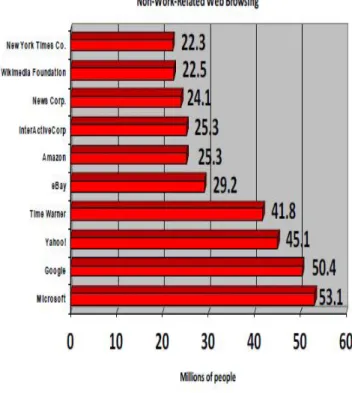
Figure 1: Non-Work-Related Web Browsing (Sarrel, 2007)
ISSN: 2249-2593
http://www.internationaljournalssrg.org
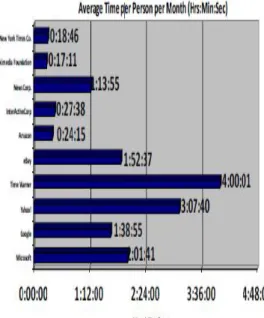
Page 15 Figure 2: Non-Work-Related Web Browsing, AverageTime per Person per Month (Sarrel, 2007)
Figure 3: Content Filtering Example
Figure 4: Example of a blocked page, this example is From DansGuardian
XV. References
[1] DansGuardian. 24 Aug 2007 <http://dansguardian.org> Emmack, D. 2006. Add web porn filtering and other content filtering to Linux desktops.
[2] Linux J. 2006, 151 (Nov. 2006), 9. Jacob, V., Krishnan, R., Ryu, Y. U., Chandrasekaran, R., and Hong, S. 1999. “Filtering objectionable internet content.” International Conference on Information Systems.
[3] Association for Information Systems, Atlanta, GA, 274-278. Hunter, C. D. 2000. “Internet filter effectiveness (student paper panel): testing over and under inclusive blocking decisions of four popular filters.
[4] In Proceedings of the Tenth Conference on Computers”, Freedom and Privacy: Challenging the Assumptions (Toronto, Ontario, Canada, April 04 - 07, 2000). CFP '00. ACM, New York, NY, 287-294. Sarrel, Matthew D. "Web Content Filtering."
[5] PC Magazine 26.16 (2007): 80-. SquidGuard. 19 September 2007 <http://www.squidguard.org> Tampone, Kevin. "Web Surfing at Work Becoming More Prominent." Business Journal (Central New York) 19.40; 40 (2005): 15-6. Tiny proxy – A lightweight
HTTP/HTTPS proxy. 10 August 2004
<http://tinyproxy.sourceforge.net> Wessels, Duane. “Squid, the Definitive Guide. First Edition” O’Reilly (April 2004), 1-10