2018 International Conference on Computer, Communication and Network Technology (CCNT 2018) ISBN: 978-1-60595-561-2
Automatic Generation of Software Interface Based on XML Technology
Li-li XIA*, Si-fang LIU, Sheng LIANG and Gao-feng PAN
China Satellite Maritime Tracking and Control Department, Jiangyin 214431, China
*Corresponding author
Keywords: Software interface, XML, Custom control, Automatic generation.
Abstract. The software interface is a kind of operable and observable visual display form for the user. In the development of a remote monitoring system, the software interface is faced with many sets of equipment, complicated mode and many parameters, which brings great difficulty to design the software interface. This paper presents a kind of XML file as the medium, with custom control as a means to automatically arrange the control as a container, to design the interface flexibly, which is simple, flexible and greatly improve the work efficiency. This method is advanced, easy and the interface configuration is flexible, and it has good application value.
Introduction
The software interface is a graphical display form provided by the application program to the user. The interface elements generally consists of controls such as edit boxes, text boxes, buttons, tags and graphics, which are used to view data information and set control information. So the software interface is to give users the most intuitive visual experience, in addition to improving the software operability, convenience, the programmers often spend at least half of the energy for the software interface art, to attract users to promote the software market, such as some commercial software. However, small debugging software, such as software simulator, spend too much energy for the interface design, is worth the candle. This paper presents a kind of XML file as the medium, to customize the control as a means to automatically arrange the control as a container, to achieve a large data software interface automatically generated, greatly improves the efficiency of software development, and has been successfully applied to a certain type software simulator, and achieves good results.
Software Design
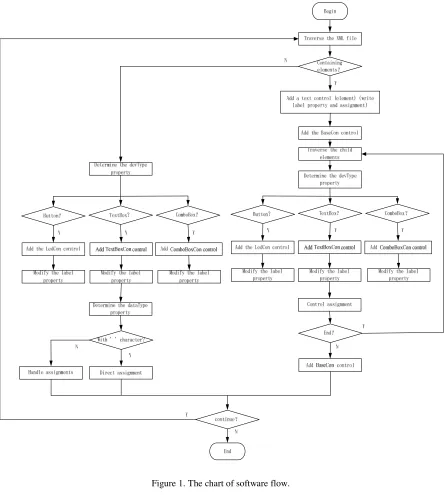
In the development of a type of equipment remote monitoring system, it needs software simulator to build a closed-loop test environment in the laboratory, after the completion of the software preparation work. However, because the monitoring and control equipment with multiple sets of systems, each system has a variety of operating modes and subsystems, each work mode corresponding to the subsystems have a lot of monitoring data. Such a large amount of data, such as the use of conventional software interface design method, will be a huge project, this article provides a simple way to achieve software interface design, software flow shown in Figure 1.
Figure 1. The chart of software flow.
Figure 2. The diagram of XML language example.
Custom Controls
controls to combine some of the controls To form a comprehensive representation of control. Custom controls include four: text boxes, selection boxes, indicators and empty controls, as shown in Figure 3.
[image:3.612.127.482.108.149.2]text boxes selection boxes indicator light
Figure 3. The image of custom control.
Text box controls: In C #, select Add User Controls, name TextBoxCon, place a TextBox and two Label controls, the TextBox for displaying data values, one for Displaying data properties, and another for Display Data Units.
Select the box control: In C #, select Add User Control, named ComboBoxCon, place a ComboBox and a Label control, and the ComboBox to display the selectable data.
Indicator Control: In C #, select Add User Control, named LedCon, place a Button, imageList, and Label control. The imageList is used to place two images that are staggered, the Button object's imageindex property associates with the imageList, Display data attributes.
Empty display control: In C #, select Add User Control, named BaseCon, place the Label control, set the control size attribute, for the sub-element and no sub-element data isolation, increase the readability of the data, to achieve interface layout With the XML file structure.
XML Compilation
In an interactive software interface, the interface control can be divided into display controls and input controls, the display control is in accordance with a certain refresh rate of the received data to display the control, it is necessary to refresh so that such controls generally do not provide user input; Input control provides user input function for the user to send control instructions in the XML file definition need to distinguish processing; conventional software interface is not a single interface structure, generally contains the main interface and sub-interface, the design can be defined by a number of XML file to achieve interface mapping.
According to the above two principles, in the design of XML documents, through a main XML file as a program guide, the main XML file contains two nodes, a node under the sub-node corresponds to a display control interface only XML file name (XML), the other node under the sub-node for a specific input control interface for the XML file name (control XML), the main program is running the first read the XML file, respectively, the display, control XML file name Read into memory, easy to generate XML file when the interface traversal. For the explicit and control XML node definition according to the number of container controls to distinguish, such as the interface using three containers, the definition of three nodes, respectively, corresponding to three containers, node properties defined as Con_Panel container name; sub-node content for the Con_Name is the control name, Con_DataAttr is the control property, Con_Unit is the unit of measure, and the other content that the user needs to define the attribute.
Interface Automatic Generation
child node, then the first display control, by defining the Label attribute which can set the display content, after traversing the child nodes, processing methods with the node processing methods.
Application Examples[5]
[image:4.612.82.534.283.582.2]To a type of remote monitoring system design, for example, it is to complete the remote set of equipment status monitoring and design, in the absence of the actual object of the software debugging state, especially in the key code or the overall test state, software features and performance can not be guaranteed , To the scene debugging and testing to bring great workload. In this case, to design a targeted software simulator to simulate the actual operation of the object state, and builds a software closed-loop test environment. The simulator design method is to design the XML file by characterizing the schema information by using the menu content to generate the XML file dictionary which calls the characterization information of the device according to the keyword search way. Through the design of various custom controls, (FlowLayoutPanel) control for the container, to achieve the structure of the interface elements automatically generated; through the interface control and XML file parallel interpretation of the way to achieve the interface parameters of data changes in the automatic framing, software running interface shown in Figure 5.
Figure 4. The interface of software simulator.
Conclusions
References
[1]Zhenjiang Wang. XML programming. China Railway Publishing House [M] .Beijing, 2006.
[2]Zhaoping Hao. Discussion on Application and Development Trend of XML [J]. Computer Engineering Application Technology, 2009 (9): 23-29.
[3]Xiaoke Wang, Jun Wang. C # development of actual combat 1200 cases [M]. Tsinghua University Press, Beijing, 2011.
[4]Cheng Yin, Licheng Chen. Visual C # 2010 development authority guide [M]. Tsinghua University Press. Beijing, 2012.