2018 International Conference on Computer, Communication and Network Technology (CCNT 2018) ISBN: 978-1-60595-561-2
Selecting Right File Systems for Platform Virtualization:
A Quantitative Study
Cong DAI
1, Bing-jie LI
2,*and Jin-lei JIANG
11
Department of Computer Science and Technology, Tsinghua University, Beijing 100084, China
2
101 Research Institute, Ministry of Civil Affairs, Beijing 100070, China
*Corresponding author
Keywords: Virtualization, Virtual machine, File system, Cloud computing, IO performance.
Abstract. Platform virtualization technology has got wide application nowadays due to such appealing features as reduced complexity and cost of resource maintenance, improved reliability and security, enhanced flexibility in resource provisioning and consumption, and easier migration to the cloud. File system is a key component of operating system that provides a friendly way for users to manipulate their data. In a platform virtualization environment, file systems for guest and host machines matter, for they can largely affect the performance of applications. Though platform virtualization solutions have gained wide adoption, this problem does not get enough attention and people usually select file systems in the same way as they do for a physical environment. To deal with the problem and to help users make a good decision, this paper takes 5 popular file systems (i.e., ext2, ext3, ext4, JFS, and ReiserFS) and quantitatively tests the performance of their combinations using IOzone. Based on the results, some suggestions are given on file systems selection for guest and host machines.
Introduction
Enterprises today face more challenges than ever. To deal with the challenges, they turn more and more to information and communication technology (ICT), thus driving the rapid development of ICT industry. With a history of more than 50 years, virtualization is a technology that has been widely used by enterprises in data centers and is generally considered as an effective way to deal with many challenges (e.g., resource underutilization, application isolation, device management, and reducing carbon emission) faced by enterprises[1]. With the rapid development of cloud computing[2,3], virtualization has also become one of the core technologies that back up cloud services. As a result, there are many off-the-shelf software packages and services available, for example, XEN[4], KVM[5], VMware vSphere (ESX/ESXi), Microsoft Hyper-V, Amazon Elastic Compute Cloud (EC2), and Google Compute Engine (GCE), to name but just a few.
The advantage of virtualization technology lies in such features as reduced complexity and cost of resource maintenance, improved reliability and security, and enhanced flexibility in resource provisioning and consumption. It achieves the purpose by introducing new abstraction layers that separate a service request from the underlying physical delivery of that service. In practice, virtualization can be done at different levels, ranging from hardware (e.g., computer hardware platform, storage device, and network) to software (e.g., operation system, program library, and applications). In this paper we focus on virtualization done at the computer hardware platform level. Such a type of virtualization is usually termed hardware or platform virtualization and here we use the term platform virtualization to call it. In a typical platform virtualization scenario, multiple virtual machines (termed guest machines) can be created and run on one physical machine (termed host machine). From the perspective of end users, a guest machine operates like a real computer with an operating system (OS).
we should fully understand the impact of the newly introduced abstract layers. In this paper, we try to understand the data access behavior of virtual machines (VMs) in a virtualized environment. Roughly speaking, there are two kinds of data access methods in a VM[7], namely through emulated block devices and using network file system clients in the guest. The former approach is widely used because it is more flexible and has many outstanding features. This paper focuses on a special case of the emulated block devices approach: the emulated block device is backed by a disk image file stored on direct attached storage (DAS). Such a case is selected because it is widely used in the home and small office settings and yet is not well understood as other cases.
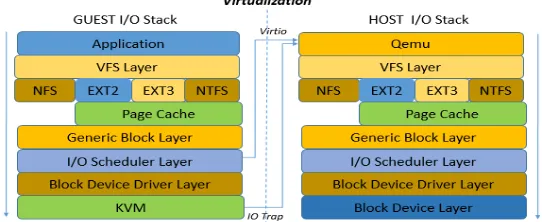
[image:2.612.170.441.305.416.2]In the case selected, the guest OS usually formats the emulated block device with a certain file system, forming a nested file system environment. Figure1 shows an example IO stack of such a platform virtualization environment, where both the guest and the host run Linux OS and have their own file systems. From the figure we can see that new overhead is introduced for applications running in the guest machine because, from the perspective of I/O stack, they undergo more layers than before. Though platform virtualization solutions have gained wide adoption, the problem of file system selection (especially for the guest) does not get enough attention. As a result, there lacks a reference way to do file system selection and people usually fulfill the task in the same way as they do for a physical environment. This approach, as pointed out in [6], may lead to bad performance for some cases.
Figure 1. An example IO stack of a virtual environment, where both guest and host machines run Linux system.
To deal with this problem, this paper, following the way in [6], takes 5 popular file systems used in Linux (i.e., ext2, ext3, ext4, JFS, and ReiserFS) and quantitatively tests the performance of their combinations using IOzone 3.420. The results, on the one hand, confirm the argument that file systems for guest and host machines matter, and on the other hand, provide a good reference for users to select the most proper file systems for their own virtualization environment as well as form a good basis for designing new guest-specific file systems.
The rest of the paper is organized as follows. In the coming section, we provide a brief overview of the related work. After that, Section 3 explains our methodology to do the experiments and Section 4 analyzes the experimental results. The paper ends in Section 5 with some conclusions and future work.
Related Work
It is a lasting effort to study file systems and to improve the IO performance of virtualization. As a result, much work has been done. In this section, we will give a brief overview of these work.
File System Research
File system is a key component of operating system that provides a friendly way for users to manipulate their data. Along with the evolution of computer system, many different kinds of file systems are developed, among which ext2, ext3, ext4, JFS, and ReiserFS are the most popular ones used in Linux OS.
performance might be harmed. To avoid such a case, this paper tries to present some quantitative results to help users select the most proper file systems for their settings and workload.
As the gap between processor speed and disk latency increases, virtualization performance is largely determined by disk I/O behavior. To improving I/O performance, some researcher deal with the problem at 3 storage transport mode: Full Virtualization, Para-Virtualization and Device Assignment.
I/O Performance in Full Virtualization
In full virtualization mode, some of key performance points are application workloads and file system. Around these, much work has been done. Drew[8] collected file system trace from several different environment, consisting of instructional workload, research workload, web workload and personal Windows NT workload, and providing some optimizing strategy in designing file system layout. Norman[5] proposed a method for classification of workload signature to identify servers which benefit most from dynamic migration, and execute the virtual machine migration which reduce the amount of physical capacity required for a workload by as much as 50%. These works collect application features, and design suitable software environment for applications. But this method cannot be a universal solution for all application. Some works on file system can be more universal. Duy Le[6] propose a test work on nested file system influence which finds that choice of nested file systems on both hypervisor and guest levels has significant performance impact on I/O performance, and gives some advices for system administrator by they test result. This work is an interest views in I/O performance improving, but their test has not considered the R/W block size factor.
I/O Performance in Para-Virtualization
In para-virtualization mode, guest OS can realize the virtualization environment. Russell[9] proposed a virtio, a series of efficient Linux para-virtualization driver which can be adapted for different hypervisors implementations using shim layer, and achieve close to native IO speed. Based on virtio, Asia He[10] improves IO performance by reduce redundancy layer in virtual IO stack, and achieve effective results in random read/write of SATA device.
I/O Performance in Device Assignment
In device assignment mode, Intel VT-d and AMD Vi[11,12] give their hardware virtualization solutions by IOMMU, which pass hardware to guest directly to achieve high-end usage and high performance. At the same time, SR-IOV[13] allows a PCIe device to appear to be multiple separate physical PCIe devices in guest operating system, providing IO device virtualization.
As the full virtualization mode is more common in datacenter, we focus on improving IO performance in file system layer of full virtualization.
Methodology
To assess the impact of file systems (and their combination) on the application performance, we set up an experimental environment with one physical machine. The machine has one Intel CoreTM i5-2400 3.10 GHz quad-core processor, 4 GB DDRIII RAM, and 1 TB HDD (hard disk drive). The software settings are shown in Table 1.
Table 1. Software settings of the experimental environment.
Machine Settings
Host
Ubuntu 13.10 (3.11.0-15-generic) Qemu 1.5.0
Libvirt 1.1.1 Virt-manager 0.9.5 Guest ArchLinux (3.11.6-1-generic)
Experimental Results
Sequential Workload
[image:4.612.90.520.517.700.2]Figure2 and Figure3 show the IO performance of sequential read and sequential write workload respectively. From the figures we can see that the record size does not affect the IO performance much whereas the type of file system does. For the sequential write workload, the combination of JFS on the host and ext3/ext4 on the guest presents higher write throughput whereas the combination of ReiserFS on both the host and the guest shows the worst performance. For the sequential read test, the combination of ext3/ext4 on both the host and the guest presents a little higher performance. Therefore, we can conclude that deploying JFS on the host is a good choice for sequential-write-dominating workloads and that the combination of ext3/ext4 on both machines should be used for sequential-read-dominating workloads.
Figure 2. The IO performance of sequential read workload.
Random Workload
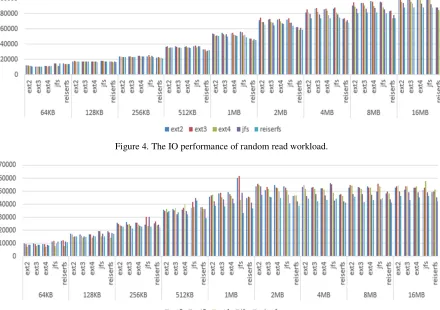
[image:5.612.84.533.151.308.2]Figure4 and Figure5 show the IO performance of random read and random write workload respectively. We can see from the figures that the IO performance varies greatly. When the record size is small, the IO performance is low because the small record size means more IO transactions for the same file. In this case ReiserFS performs better, for it is specially optimized for small files. In the case of big record size, it seems ext4 in the guest performs better.
[image:5.612.84.524.174.484.2]Figure 4. The IO performance of random read workload.
Figure 5. The IO performance of random write workload.
Result Analysis
Based on the above experimental results, we can give the following suggestions for users to select proper file systems for the guest and host machines when they set up their own virtualization environment:
a) For the file server workload, which is dominated by sequential read of files of various sizes, we suggest using ext3 on the guest and ext4 on the host.
b) For the Web server workload, which is dominated by random read of small files and sequential write of log files, we suggest using ext3 on the guest and JFS on the host.
c) For the database server workload, which involves more random read/write operations of small files, we suggest using ext2 on the guest and ReiserFS on the host.
d) As for other workloads, users should analyze the operations involved first and then make a decision according to their own analytical result as well as the outputs of our experiments.
Conclusions and Future Work
performance. Our results, on the one hand, can help users select “right” file systems for guest and host machines to gain high performance, and on the other hand, provide a good basis for further IO optimization in a virtual computing environment.
In the future, we will do two things. The first one is to conduct the same tests on SSD that has different physical characteristics and is likely to become popular soon. It is expected that the new features of SSD would bring about new impacts on the performance of file systems combinations. The second one is to design new file systems or at least optimize existing ones for the guest. As revealed by our results, some features that are useful in the host environment may not work well in the guest. They can sometimes introduce new overhead.
Acknowledgement
This work is co-supported by National Key R&D Program of China (2016YFB0201900), and Natural Science Foundation of China (61572280, 61672312).
References
[1]E. Kotsovinos. Virtualization: Blessing or Curse? Communications of the ACM, 1, 54(2011):
61-65.
[2]R. Buyya, C. S. Yeo, S. Venugopal, J. Broberg and I. Brandic, Cloud computing and emerging IT
platforms: Vision, hype, and reality for delivering computing as the 5th utility, Future Generation Computer Systems, 6, 25(2009): 599-616.
[3]M. Armbrust, A. Fox, R. Griffith, A. D. Joseph, R. Katz, A. Konwinski, G. Lee, D. Patterson, A.
Rabkin, I. Stoica and M. Zaharia, A View of Cloud Computing, Communications of the ACM, 4, 53(2010): 50-58.
[4]P. Barham, B. Dragovic, K. Fraser, S. Hand, T. Harris, A. Ho, R. Neugebauer, I. Pratt, and A.
Warfield. Xen and the art of virtualization, Proceedings of the 19th ACM Symposium on Operating Principles, (2003), October 19-22: New York, USA.
[5]A. Kivity, Y. Kamay, D. Laor, U. Lublin, and A. Liguori. KVM: the Linux virtual machine
monitor, Proceedings of the 2007 Ottawa Linux Symposium, (2007), June 27-30: Ottawa, Canada.
[6]D. Le, H. Huang, and H. Wang. Understanding Performance Implications of Nested File Systems
in a Virtualized Environment, Proceedings of the 10th USENIX Conference on File and Storage Technologies, (2012), February 15-17: San Jose, USA.
[7]V. Tarasov, D. Hildebrand, G. Kuenning, and E. Zadok. Virtual Machine Workloads: The Case
for New Benchmarks for NAS, Proceedings of the 11th USENIX Conference on File and Storage Technologies, (2013), February 12-15: San Jose, USA.
[8]Drew Roselli. A Comparison of File System Workloads. Proceeding of 2000 USENIX Annual
Technical Conference. San Diego, California, USA, June 18–23, 2000.
[9]R. Russell, Virtio: Towards a De-Facto standard for virtual I/O devices, Operating System
Review, 2008, 42(5): 95-103.
[10]Asias He. Virtio-blk Performance Improvement. KVM FORUM 2012. Nov 8, 2012, Barcelona,
Spain.
[11]Intel Virtualization Technology for Directed I/O Architecture Specification, 2006,
ftp://download.intel.com/technology/computing/- vptech/Intel(r)_VT_for_Direct_IO.pdf.
[12]AMD I/O Virtualization Technology (IOMMU) Specification, 2006,
http://www.amd.com/us-en/assets/content_type/white_papers_and_ tech_docs/34434.pdf.
[13]PCI SIG: PCI-SIG Single Root I/O Virtualization.