
Vulnerability Management may seem like a
daunting task. This minibook is a quick guide to
understanding how to protect your network and
data with VM – from finding out about network
threats, to selecting a solution that helps you
quickly discover and fix vulnerabilities. This book
also tells you about the industry’s leading VM
solution – QualysGuard.
An electronic version of this book is available at
www.qualys.com/dummies.
ISBN: 978-0-470-69457-2 Not for resale
Control the
security risks affecting
your network
Qualys Limited Edition
⻬ Find listings of all our books
⻬ Choose from many different subject categories
⻬ Sign up for eTips at
etips.dummies.com
Vulnerability
Management
A Reference
for the
Rest of Us!
®FREE eTips at dummies.com®
Explanations in plain English
‘Get in, get out’ information
Icons and other navigational aids
Top ten lists
A dash of humour and fun
Successfully discover how to
manage vulnerabilities and
protect your network!
Why organizations
need VM
Options for VM
How to get the best
VM solution for your
business
Vulnerability
Management
FOR
DUMmIES
‰Vulnerability Management For Dummies®
Published by
John Wiley & Sons, Ltd
The Atrium Southern Gate Chichester West Sussex PO19 8SQ England
E-mail (for orders and customer service enquires): [email protected]
Visit our Home Page on www.wiley.com
Copyright © 2008 by John Wiley & Sons Ltd, Chichester, West Sussex, England
All Rights Reserved. No part of this publication may be reproduced, stored in a retrieval system or transmitted in any form or by any means, electronic, mechanical, photocopying, recording, scanning or otherwise, except under the terms of the Copyright, Designs and Patents Act 1988 or under the terms of a licence issued by the Copyright Licensing Agency Ltd, 90 Tottenham Court Road, London, W1T 4LP, UK, without the permission in writing of the Publisher. Requests to the Publisher for per-mission should be addressed to the Perper-missions Department, John Wiley & Sons, Ltd, The Atrium, Southern Gate, Chichester, West Sussex, PO19 8SQ, England, or emailed to [email protected], or faxed to (44) 1243 770620.
Trademarks: Wiley, the Wiley Publishing logo, For Dummies, the Dummies Man logo, A Reference for the Rest of Us!, The Dummies Way, Dummies Daily, The Fun and Easy Way, Dummies.com and related trade dress are trademarks or registered trademarks of John Wiley & Sons, Inc. and/or its affiliates in the United States and other countries, and may not be used without written permission. All other trademarks are the property of their respective owners. Wiley Publishing, Inc., is not associated with any product or vendor mentioned in this book.
LIMIT OF LIABILITY/DISCLAIMER OF WARRANTY: THE PUBLISHER, THE AUTHOR, AND ANYONE ELSE INVOLVED IN PREPARING THIS WORK MAKE NO REPRESENTATIONS OR WAR-RANTIES WITH RESPECT TO THE ACCURACY OR COMPLETENESS OF THE CONTENTS OF THIS WORK AND SPECIFICALLY DISCLAIM ALL WARRANTIES, INCLUDING WITHOUT LIMITATION WARRANTIES OF FITNESS FOR A PARTICULAR PURPOSE. NO WARRANTY MAY BE CREATED OR EXTENDED BY SALES OR PROMOTIONAL MATERIALS. THE ADVICE AND STRATEGIES CON-TAINED HEREIN MAY NOT BE SUITABLE FOR EVERY SITUATION. THIS WORK IS SOLD WITH THE UNDERSTANDING THAT THE PUBLISHER IS NOT ENGAGED IN RENDERING LEGAL, ACCOUNTING, OR OTHER PROFESSIONAL SERVICES. IF PROFESSIONAL ASSISTANCE IS REQUIRED, THE SERVICES OF A COMPETENT PROFESSIONAL PERSON SHOULD BE SOUGHT. NEITHER THE PUBLISHER NOR THE AUTHOR SHALL BE LIABLE FOR DAMAGES ARISING HERE-FROM. THE FACT THAT AN ORGANIZATION OR WEBSITE IS REFERRED TO IN THIS WORK AS A CITATION AND/OR A POTENTIAL SOURCE OF FURTHER INFORMATION DOES NOT MEAN THAT THE AUTHOR OR THE PUBLISHER ENDORSES THE INFORMATION THE ORGANIZATION OR WEBSITE MAY PROVIDE OR RECOMMENDATIONS IT MAY MAKE. FURTHER, READERS SHOULD BE AWARE THAT INTERNET WEBSITES LISTED IN THIS WORK MAY HAVE CHANGED OR DISAPPEARED BETWEEN WHEN THIS WORK WAS WRITTEN AND WHEN IT IS READ.
Wiley also publishes its books in a variety of electronic formats. Some content that appears in print may not be available in electronic books.
ISBN: 978-0-470-69457-2
Introduction
W
elcome to Vulnerability Management For Dummies! Most of the successful attacks through a business net-work could be prevented with vulnerability management. This book is all about what you can do to automatically manage vulnerabilities and keep your network safe from attack.About This Book
This book simply explains the essential steps of vulnerability management and shows you how to select the right tools.
Foolish Assumptions
In writing this book, we assume that you:
Are somewhat familiar with information technology and networking.
Want to understand the risks of networking and buggy software.
Are thinking about using a vulnerability management application to improve your network security.
After reading this book you’ll know more about how to do net-work vulnerability management.
How to Use This Book
This book is divided into five succinct parts:
Part I: Understanding the Need for Vulnerability Management.Start here if you need a primer.
Part III: Considering Your Options for Vulnerability Management.Understand the pros and cons of different options for automating vulnerability management.
Part IV: QualysGuard: Vulnerability Management On Demand.Introducing QualysGuard, the effective Software-as-a-Service way to automate the vulnerability management process.
Part V: Ten Best Practices for Doing Vulnerability Management. A ten-point checklist for removing vulnera-bilities in your key resources.
Dip in and out of this book as you like – go to any part that interests you immediately; or read it from cover to cover.
Icons Used in This Book
We highlight crucial text for you with the following icons: This icon targets hints and shortcuts to help you get the best from vulnerability management solutions.
Memorize these pearls of wisdom – and remember how much better it is to read them here than to have your boss give a know-it-all lecture.
The bomb means ‘whoops’. It signals common errors that happen all the time. Avoid these at all cost.
You can skip information next to this icon if you’re not into it. Don’t worry – you don’t have to be a security whiz or hot-rod programmer to do vulnerability management.
Where to Go from Here
Part I
Understanding the
Need for Vulnerability
Management
In This Part
Understanding the risks posed by cyber criminals
Reviewing the sources of software vulnerabilities
Surveying international trends in vulnerabilities
Defining vulnerability management as the way to remove risks
T
o a cyber criminal, vulnerabilities on a network are hidden, high-value assets. When exposed, these vulnera-bilities can be targeted for exploitation, which may result in unauthorized entry into a network, can expose confidential information, provide fuel for stolen identities, trigger theft of business secrets, violate privacy provisions of laws and regu-lations, or paralyze business operations.New vulnerabilities appear every day due to flaws in software, faulty configuration of applications and IT gear, and (dare we say it?) good old human error. Whatever their source, vulnera-bilities don’t go away by themselves. Their detection,
Who’s at Risk?
The challenge for every business is to maintain a safe, open, and interconnected network – making it easy to exchange information with customers, suppliers, and business partners around the world.
Unfortunately, making this information both highly available and secure is hard work. Worms, viruses, and other security risks constantly threaten the theft of information and disrup-tion of business operadisrup-tions. Moreover, the dramatic increase in new vulnerabilities discovered each day – and the speed with which new threats are created – make this challenge even steeper.
Every single business with an Internet connection is at risk due to network vulnerabilities. Whether you’re a small busi-ness, a multinational corporation, or a government – it makes no difference, you’re at risk.
The solution is to immunize your network from these security threats by eliminating their origin: network vulnerabilities.
How Vulnerabilities Expose Your
Network to Danger
Where do vulnerabilities
come from?
Programming mistakes cause most vulnerabilities in software. A common mistake is failing to check the size of data buffers– a kind of storage bin of memory where a computer process executes its functions. When a buffer overflows, it overwrites data in adjacent memory buffers. This corrupts the stack or heap areas of memory, which may allow the execution of an attacker’s code on that machine via a virus, worm, or other unpleasant exploit.
Computer scientists estimate that about 5 to 20 bugs are pres-ent in every thousand lines of software code, so it’s no surprise to see regular announcements of new vulnerabilities with related patches and workarounds. Your risk of vulnerabilities grows with use of General Public License software, particularly because implementers plug in untested modules of object-oriented programming code. When the quality of code is mar-ginal, bad, or just plain wrong, experts call it ‘non-robust’. Modules of code placed in the public domain may include non-robust implementations of Internet protocol standards, making them easy targets for attack when used in a real-world network. Vulnerabilities must be identified and eliminated on a regular basis because new vulnerabilities are discovered every day. For example, Microsoft releases advisories and patches on the second Tuesday of each month – commonly called ‘Patch Tuesday’.
The exploitation of vulnerabilities via the Internet is a huge problem requiring immediate proactive control and manage-ment. That’s why companies need to use VM – to detect and eliminate vulnerabilities in order to reduce overall security risk and prevent exposure.
Looking more closely
at attack trends
Endless public disclosures in the news of data breaches reveal the unauthorized exposure of millions of confidential con-sumer records worldwide. This is adequate proof why organi-zations must do more to protect networks from attack. But a dramatic change in the security threat landscape is raising the bar for organizations large and small that want to actively minimize successful attacks on their vulnerabilities.
Recent data show that exploits are no longer restricted to tra-ditional risks of generic viruses, worms, Trojans, and other single-vector attacks. According to global research conducted by Symantec Corporation, a fundamental change in threats reveals movement ‘away from nuisance and destructive attacks towards activity motivated by financial gain’. The report characterizes five new trends (you can read the details at www.symantec.com), including:
Increased professionalism and commercialization of malicious activities.
Threats that are increasingly tailored for specific regions.
Increasing numbers of multistaged attacks.
Attackers targeting victims by first exploiting trusted entities.
Convergence of attack methods.
The fallout from cyber attacks now poses serious financial risk, so your organization needs to stop malware and other attacks by deploying layers of security technology such as anti-virus/anti-spyware software, firewall, intrusion detec-tion/prevention, VPN, and encryption. Technologies like these are essential components of network security, yet while they’re effective in their own spheres of purpose, none per-form the most fundamental of all security measures: vulnera-bility management.
Detecting and Removing
Vulnerabilities
Vulnerability management has evolved from simply running a scanner on an application, computer, or network to detect common weaknesses. Scanning is an essential element of vul-nerability management, but VM includes other technologies and workflow that contribute to a bigger picture required for controlling and removing vulnerabilities. The primary objec-tives of VM are to:
Identify and fix faults in the software that affect security, performance, or functionality.
Alter functionality or address a new security threat, such as updating an antivirus signature.
Change a software configuration to make it less suscepti-ble to attack, run faster, or improve functionality.
Use the most effective means to thwart automated attacks (such as worms, bots, and so on).
Enable the effective improvement and management of security risks.
Document the state of security for audit and compliance with laws, regulations, and business policy.
need to automate and simplify as much as they can for each element of VM, which we cover in Part II.
Getting Organized to Do VM
As you get ready to do vulnerability management, be sure to organize priorities for security. The fancy term for this step is policy management. Policy management determines the controls required to ensure security, such as standard
VM can automatically document
regulatory compliance
A major benefit of vulnerability man-agement is the built-in reports pro-vided by VM software. Some of these reports are good enough for docu-mentation demanded by auditors checking for regulatory compliance. Security is a growing requirement for financial transactions, health care information, and information used in many other forms of business auto-mation solutions.
Legal network security requirements are seen in a growing number of government and industry-specific regulations for safeguarding the con-fidentiality, integrity, and availability of electronic data from information security breaches. Organizations that don’t fully comply and stay up-to-date with security regulations face serious potential consequences – including fines and civil (sometimes criminal) penalties. Part III tells you more about VM and compliance.
As you find out more about VM in this book, keep related regulations for
compliance in the back of your mind – especially as they relate to your company. The regulations may specify use of certain VM-related processes or technologies. VM-related technologies provide reports such as those from scanning and patch management systems. The network and IT department use these reports to document network secu-rity audits and remediation, including detailed, prioritized lists of existing vulnerabilities related to severity of risk, and verification of vulnerabilities that were fixed with patches or work-arounds.
configurations for all security devices and applications includ-ing antivirus, firewall, and intrusion detection/prevention. Policies and controls should include servers, network serv-ices, applications, and endpoints.
Policy management used to be a manual, cumbersome
Part II
Doing Vulnerability
Management
In This Part
Ensuring security policies work with VM
Tracking inventory and categorizing assets
Scanning systems for vulnerabilities
Verifying vulnerabilities against inventory
Classifying and ranking risks
Pre-testing and applying patches, fixes, and workarounds
Rescanning to verify compliance
V
ulnerability management (VM) means systematically finding and eliminating network vulnerabilities. Many of the steps or processes for VM use technology. Other steps need IT staff for implementation and follow-up. Integrating these processes produces stronger network security and protection of your organization’s systems and data. To focus efforts for successful VM, your organization needs to govern all activity with clear security policies.Putting Security Policies
to Work with VM
VM make it easier to define actions that guide decision-making about setting up your VM program. The result of good policies makes it easier and faster for you and the IT security team to discover vulnerabilities, remediate those security holes, and produce documentation to satisfy audit require-ments for compliance.
Policy creation and management for an enterprise starts at the top of an organization and requires executive oversight to ensure systematic implementation. Here are some key considerations:
Policies determine the nature of controls used to ensure security, such as standard configurations for all security devices and applications including antivirus, firewall, and intrusion detection and prevention. IT security experts should create a matrix with a short list of configurations and features so that policy makers can understand their options for security controls.
Policies and controls apply to servers, network services, applications, and endpoints.
Policy makers need to determine the business impact of vulnerability on each asset (or asset group). For example, a system that hosts the lunch menu probably isn’t as impor-tant as the system that maintains customer information or financial data. Prioritization weighs the business risks and importance of each asset, which affects the urgency and completion order of vulnerability remediation.
Some organizations already use software for policy manage-ment, risk correlation, and enterprise security management. Look for VM solutions that include an application program-ming interface(API) to allow automatic integration of existing security policies with vulnerability management.
Step 1: Track Inventory
and Categorize Assets
Tracking inventory and categorizing assets establishes an evaluation baseline. In this step, you create and continuously maintain a database of all Internet Protocol (IP) devices attached to the network. Here is where you connect the actual assets in your network with the policies determining relative business value for these assets.
Identifying your inventory
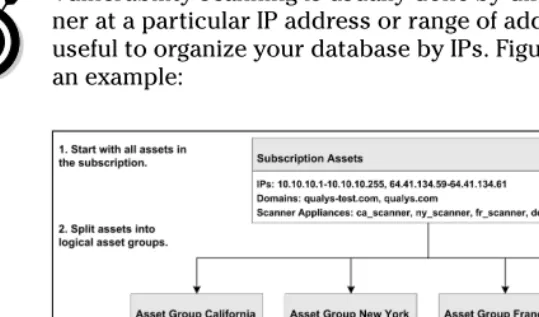
[image:16.504.85.355.238.397.2]Vulnerability scanning is usually done by directing the scan-ner at a particular IP address or range of addresses, so it’s useful to organize your database by IPs. Figure 2-1 provides an example:
Figure 2-1: Creating the network asset database.
Elements in the asset groups include all hardware, software, applications, services, and configurations. Tracking this level of detail provides the following benefits:
The data enables your organization to identify which vulnerabilities affect particular subsets of the IT infrastructure.
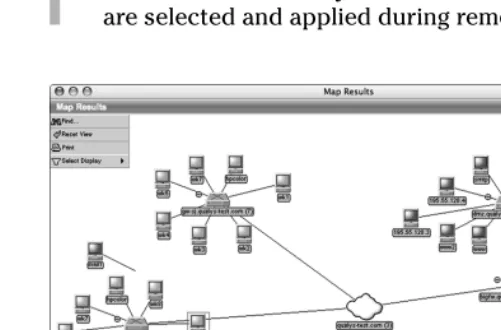
map of the network devices discovered during the VM discovery process.
[image:17.504.86.337.137.302.2]An accurate inventory ensures that the correct patches are selected and applied during remediation.
Figure 2-2: Automated mapping and tracking of each network asset.
Prioritizing assets by business risk
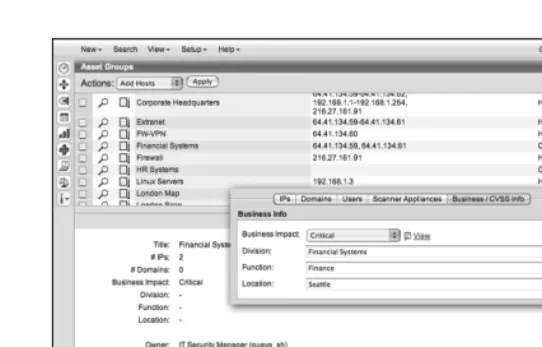
An automated VM system provides the ability to assign priori-ties of business risk to each network asset. It’s much easier to leave the correlation of vulnerabilities, policies, and proce-dures for remediation to computers – and far more accurate than using a notebook. An input control screen for a VM data-base, such as the one shown in Figure 2-3, automatically clari-fies assignment of business risk to specific network assets in relation to security risks.
The VM asset tracking system incorporates these business risks when you manage and use the system. Figure 2-3 shows automatic assignment of these values to classes of assets in particular sections of an organization.
Figure 2-3: Assigning priorities to network assets by business risk.
Step 2: Scan Systems
for Vulnerabilities
Vulnerability management has many steps, but scanning is the foundational process for finding and fixing network vulnerabil-ities. Your choice of scanning technology is the most impor-tant element of an effective system for VM.
A vulnerability scan tests the effectiveness of security policy and controls by examining the network infrastructure for vul-nerabilities. A scan provides two benefits:
1. The scan systematically tests and analyses IP devices, services, and applications for known security holes. 2. A post-scan report reveals actual vulnerabilities and
states what you need to fix in order of priority.
Launching a scan
eBay case study
Industry:Technology
Headquarters:San Jose, California
Locations:Worldwide
Major Brands:eBay, Skype, PayPal, Shopping.com, Rent.com
Employees:13,000+
Annual Revenue:$5.9+ billion
Stock Symbol:EBAY (NASD)
‘QualysGuard has made the job of audit-ing our network much easier. We used to have to dig through results and do a lot of manual analysis to get meaningful reports, and those were inconsistent. Qualys takes care of that nightmare.’ – Senior Manager, Information Security
Objectives:
Reliably identify network vulnerabil-ities across the global network.
Audit the network security of busi-ness partners and help those part-ners quickly remediate vulnera-bilities and eliminate risks.
Rollout an automated solution that finds the most recent vulnerabilities
without requiring constant and time-consuming staff research.
Provide senior management with
the ability to audit and review the security posture (the industry term for status) at any time.
Results:
After a careful market evaluation, eBay selected QualysGuard for both network-perimeter scanning and auditing vulnerabilities on the network within the corporate fire-wall, and on partner networks.
eBay now has a default vulnerabil-ity management standard to evalu-ate security throughout both eBay’s and partner networks.
Simplified reporting gives senior executives a concise, real-time view into the company’s security risks. QualysGuard enables eBay execs to measure the changes in those risks as they implement security measures.
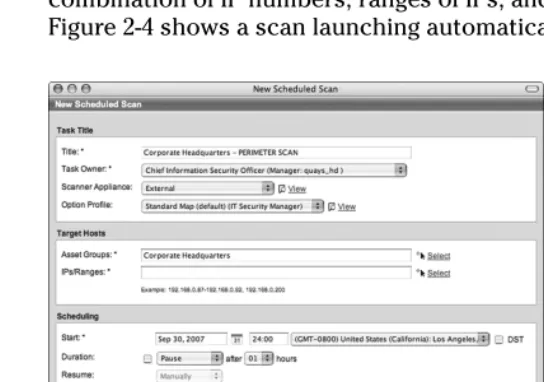
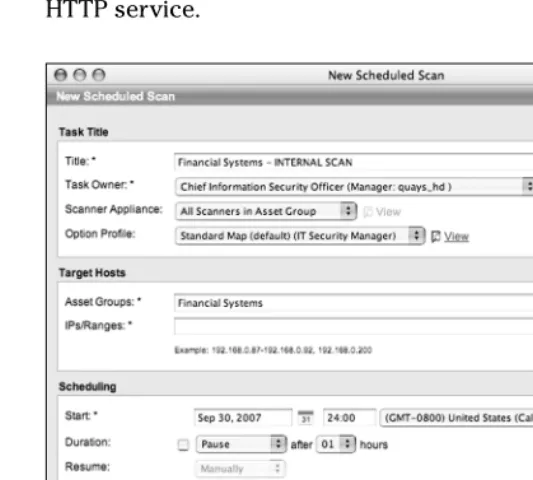
request. The scan request needs to indicate the particular hosts you want to check for vulnerabilities, specified as any combination of IP numbers, ranges of IPs, and asset groups. Figure 2-4 shows a scan launching automatically.
Figure 2-4: Launching a scan automatically.
Here’s what you need to gather before the launch:
At a minimum, you need the IPs (or IP ranges) for your organization’s domains and sub-networks.
If you want to scan specific devices, you need to identify them by IP before launching the scan.
Options for scanning tools
You have many options for scanning tools. All use a vulnera-bility database of known risks, but these databases vary in coverage and effective quality. Some require software applica-tions that you install and maintain, such as the Nessus public domain scanner. These can require significant time and resources – plus they carry typical operational overhead. By contrast, software applications may also be hosted by a vendor and used by businesses with a Web browser over the Internet. This delivery model is called Software-as-a-Service
(SaaS), and businesses are beginning to use SaaS for a variety of applications – including VM. A VM solution with SaaS pro-vides the capability to perform the scans on demand over the Internet. You simply log in to your account and manage every-thing online. A SaaS service works without special software and is always up-to-date with the most recent and comprehensive set of vulnerability signatures. As a result, you don’t have to worry about updates to scanning technology because they’re automatically applied in the VM system. We talk about the ben-efits of using SaaS for VM in more detail in Part III.
Public enemy #1: Threats from
rogue wireless devices
Organizations of all sizes use wire-less access points, and doing so has un-tethered computing and provided huge benefits of mobility. But mobil-ity has also accelerated the de-perimeterization of corporate net-works. This means that rogue devices can easily bypass traditional network security controls like firewalls and intrusion prevention. A common prob-lem occurs when a department installs an unauthorized wireless access point for the convenience of its staff – and inadvertently exposes
the entire organization’s network and assets to worms, viruses, and other risks via unprotected endpoints.
What to scan?
The simple answer to what to scan is this: pretty much any-thing that’s connected to your organization’s network. Here’s a list of what to scan:
Web Servers:Apache, Microsoft ISS; iPlanet; Lotus Domino; IpSwitch; Zeus; full support for virtual hosting.
SMTP/POP Servers:Sendmail; Microsoft Exchange; Lotus Domino; Netscape Messaging Server; QMail.
FTP Servers:IIS FTP Server; WuFTPd; WarFTPd.
Firewalls:Check Point Firewall-1/VPN-1 and NG; Cisco PIX; Juniper NetScreen; Gauntlet; CyberGuard; Raptor.
Databases:Oracle; Sybase; MS SQL; PostgreSQL; MySQL.
eCommerce:Icat; EZShopper; Shopping Cart; PDGSoft; Hassan Consulting Shopping; Perishop.
LDAP Servers:Netscape; IIS; Domino; Open LDAP.
Load Balancing Servers: Cisco CSS, Alteon, F5 BIG IP; IBM Network Dispatcher; Intel Routers; Administrable.
Switches and Hubs:Cisco; 3Com; Nortel Networks; Cabletron; Lucent; Alcatel.
Wireless Access Points:Cisco; 3Com; Symbol; Linksys; D-Link; Netgear; Avaya; Apple Airport; Nokia; Siemens.
Identifying the vulnerability
shortlist
The VM solution you select needs to provide the capability to scan for and fix vulnerabilities in a broad range of categories, including:
Back Doors and Trojan Horses (bypass authentication systems).
Brute force attacks (defies cryptography by systemati-cally trying different keys).
CGI (exploits the Common Gateway Interface).
Databases.
DNS and Bind (exploits Domain Name Services).
E-commerce applications.
File sharing.
File Transfer Protocol.
General Remote Services.
Hardware and network appliances.
Information/Directory Services.
SMB/Netbios Windows (exploits application-layer proto-cols for sharing network services).
SMTP and e-mail applications.
SNMP (exploits Simple Network Management Protocol).
TCP/IP (exploits Transmission Control Protocol and Internet Protocol).
VoIP (exploits Voice-over-IP protocol).
Web servers.
Wireless access points.
X-Windows (exploits display protocol).
Step 3: Verify Vulnerabilities
Against Inventory
You can use the results of a vulnerability scan to verify that vulnerabilities match the actual devices, software, and configu-rations in your network. The value of this step is to minimize efforts spent investigating risks that don’t apply to your net-work configuration. Obviously, this is another task that’s best done automatically. Intelligent scanning applications, such as QualysGuard, are designed to accurately identify risks pertinent to the devices and applications on your network – eliminating common errors known as ‘false positives’ and ‘false negatives’ that can lead to inefficiencies in the VM process.
What to look for in scan results
Scan results need to be:
Comprehensive.
Free of excessive false positive or false negative scan results.
Easy to understand.
False positives inhibit some vulnerability scanning by drowning the scan results with vulnerabilities that don’t match what’s in your inventory. Chasing down false positives is a waste of IT staff time and an inefficient way to do VM. Likewise, a false negative may occur when the VM solution fails to detect a vul-nerability that actually exists in your network. Not knowing about the vulnerability places your network at serious risk of exploitation by hackers.
Improving the odds for
good scan results
Substantial industry- and government-driven efforts are aimed at collating data about network vulnerabilities. The VM solu-tion you choose should incorporate as many of the findings as possible to tap the collective wisdom of vulnerability
researchers. Take a look at:
The Common Vulnerabilities and Exposures website at
www.cve.mitre.org.
The National Institute of Standards and Technology’s National Vulnerability Database at http://nvd.nist. gov. The NIST database takes CVE to the next level with detailed information for each of its vulnerabilities.
SANS (SysAdmin, Audit, Network, Security) Top 20 at
www.sans.org/top20.
The United States Computer Emergency Readiness Team (CERT) Vulnerability Notes Database at www.kb.cert.
org/vuls/.
A particular vulnerability management vendor’s own knowledgebase gleaned from its ongoing research and development efforts.
Group,’ and within that group, all Linux hosts running the HTTP service.
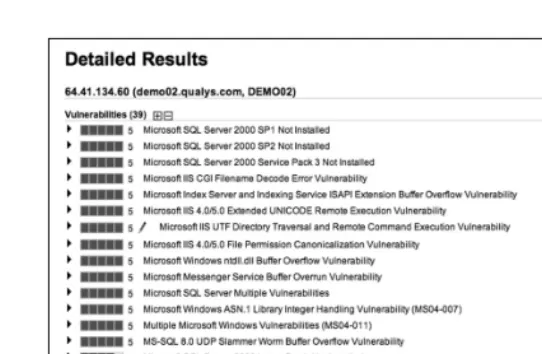
Figure 2-5: Scan report of vulnerabilities identified on the network.
The result of good scanning is accurate, up-to-date, and con-cise vulnerability information that you can trust and apply to assets on your organization’s network.
Employing technologies
to improve scanning
TCP and UDP (user datagram protocol) services, including those on non-default ports and with fake banners. A similar discovery process is used to fingerprint HTTP applications by leveraging software’s version ID, service pack ID, and installed patches. A good scanner correlates OS and HTTP fingerprint tests to quickly find true vulnerabilities and minimize false positives.
Step 4: Classify and Rank Risks
Fixing everything at once is practically impossible. In fact, in large organizations, the amount of vulnerability data can be overwhelming if it’s not properly categorized, segmented, and prioritized in a meaningful fashion. VM workflow allows you to automatically rank vulnerabilities to define the most critical issues that could impact the most critical systems – all the way down to the least critical issues that could impact devices of less importance. In a nutshell, you need to decide what to fix first.
Devising a categorization scheme
You can devise your own category scheme or adopt rating scales from other sources. Microsoft, for example, publishes four categories of risk (see www.microsoft.com/technet/
community/columns/secmgmt/sm0404.mspx?pf=true):
Critical:Exploitation could allow the propagation of an Internet worm without user action.
Important: Exploitation could result in compromise of confidentiality, integrity, or availability of user data or in the integrity or availability of processing resources.
Moderate: Exploitation is serious, but mitigated by fac-tors such as default configuration, auditing, need for user action, or difficulty of exploitation.
Elements for scan reports
A solution for VM should automatically assign a category and a severity level for each vulnerability detected, such as in the sample scan report in Figure 2-6. The system should indicate vulnerabilities, potential vulnerabilities, and information data such as services running on a particular device. A severity level indicates the security risk posed by exploitation of the vulnerability and its degree of difficulty. Results of a success-ful exploitation of vulnerability can vary from disclosure of information about the host to a complete compromise of the host.
Thinking like a hacker
The VM solution you select needs to allow your security team to think like a hacker because it uses the scan-ning technology to identify and fix vulnerabilities inside and outside the firewall.
To duplicate a hacker’s workflow, each scan should work from the out-side looking in. The implication for a scanner is that it’s deployed outside the firewall and audits all of an orga-nization’s hosts facing the Internet. Naturally, the scanner’s platform also needs protection from attacks via the Internet, so be sure to account for this safety factor as you choose a solution.
The VM solution needs to operate by the same steps used as a hacker, including:
1. Information Gathering: Finding out as much about a host as pos-sible without visiting or connect-ing to it, with techniques such as whois, DNS, and IP assignments.
2. Discovery: Identifying hosts in the target subnet, including topology, firewalls, and other devices.
3. Scanning:Finding out the poten-tial targets and vulnerabilities associated with hardware, soft-ware, and their open ports via net-work scanning and port scanning.
Figure 2-6: Scan report of vulnerabilities identified on the network.
Step 5: Pre-test Patches, Fixes,
and Workarounds
After software vendors rewrite pieces of an application, the resulting ‘healed’ software compilation (or patch) can still be vulnerable to other bugs. Software vendors are often pressured to release a patch quickly, and this patch could potentially cause a conflict with other applications on your network. As a result, you need to pre-test patches before applying them to live systems. Some faulty patches have inadvertently crashed business processes.
Guidelines for pre-testing
Follow these tips for pre-testing:
Organizations need to verify cryptographic checksums (a redundancy check to preserve integrity of data), Pretty Good Privacy signatures, and digital certificates to con-firm the authenticity of any patches being deployed. You can further verify this by getting patches directly from the vendor.
Jelly Belly case study
Industry:Manufacturing
Headquarters:Fairfield, California
Locations:Worldwide
Employees:670+
‘We don’t want the hassles of main-taining this type of software. It’s pretty much hands-off to get the benefits with QualysGuard. We have not had any successful attacks since we installed QualysGuard.’ – Network Administrator and Security Specialist
Objectives:
As Jelly Belly brought many of its web operations in-house, the com-pany sought a way to enhance network security to protect its e-commerce business. This required
its small IT staff to be able to con-duct timely and comprehensive security analysis, scanning, and remediation.
Results:
QualysGuard provides vulnerability and risk management monitoring for all of Jelly Belly’s external-facing servers and IT devices, including routers, firewall, website, and e-mail.
Jelly Belly doesn’t need to dedicate staff to keep up with new vulnera-bilities or update the on-demand QualysGuard solution.
Check that the patch corrects the vulnerability without affecting applications and operations of the business process.
Using a VM solution that includes
patching instructions
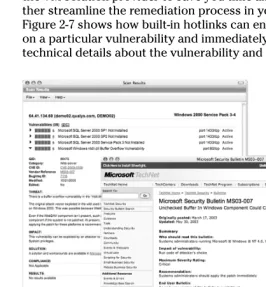
[image:31.504.89.355.278.564.2]Choose a comprehensive VM solution that includes informa-tion for patching vulnerabilities with links to recommended solutions, such as patches and workarounds from the vendors. Preferably, these solutions should be tested and validated by the VM solution provider to save you time and help you fur-ther streamline the remediation process in your organization. Figure 2-7 shows how built-in hotlinks can enable you to click on a particular vulnerability and immediately see background technical details about the vulnerability and how to fix it.
Step 6: Apply Patches, Fixes,
and Workarounds
Finding and fixing security problems is the core of vulnerability management. Traditional manual processes for finding flaws, and suggesting patches and other remediation actions are far too slow, error-prone, and expensive. Sometimes the high cost of patching coupled with the high volume of flaws detected in vendor applications encourages organizations to delay remedi-ation. Organizations may delay updates – even for critical patches – until multiple patches, service packs, or a regular monthly, quarterly, or annual update process is available. Unfortunately, delay can be a fatal strategy because attackers quickly detect potential threats. The window between flaw and exploit is constantly shrinking.
Guidelines for patching
Follow these tips for patching:
Remediate vulnerabilities as quickly as possible and min-imize risk – giving first priority to the most critical issues facing your most critical systems.
Automated patch management and software distribution solutions can help speed this process and keep costs to a minimum. Rollback capability can restore software to a previous state and ensures organizations use appropriate software versions efficiently.
Integrating patch management with other automated VM processes is beneficial. For example, QualysGuard pro-vides one-click links to vulnerability patches, fixes, and workarounds to use during this phase of workflow.
Built-in trouble ticketing
Trouble ticketing enables organizations – especially larger organizations – to automatically distribute and assign vulnera-bility remediation actions to certain individuals or groups. For example, you can have all critically-rated web server risks directed to the web IT security manager, and all lower level risks assigned to other personnel.
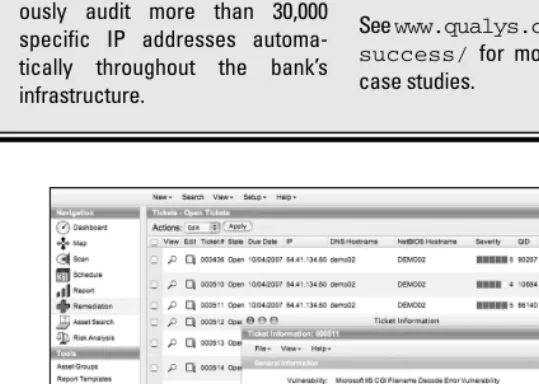
An example of trouble ticketing assignment is shown in Figure 2-8.
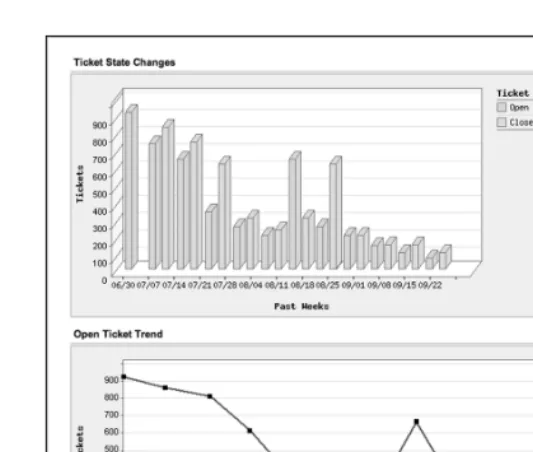
[image:33.504.49.357.280.578.2]Ensure your VM solution enables the IT security team to ana-lyze remediation trends, including long-term trends in ‘open’ and ‘closed’ ticket status (unsolved and solved problems). This facilitates progress tracking and easy analysis of other security metrics you may have in place.
Figure 2-9 shows an example of ticket status tracking and reporting.
Fifth Third Bank case study
Industry:Financial Services
Headquarters:Cincinnati, Ohio
Business:Diversified financial services company
Locations:Operates 18 affiliates with 1,167 full-service banking centers throughout the United States
Employees:21,000+
Annual Revenue:$8.5+ billion
Total Assets:$220 billion in managed assets
‘It’s not about being secure the day the auditors show up. It’s about being secure and compliant every month, week, day, and hour. And QualysGuard helps us to achieve and demonstrate that continu-ous level of security and compliance.’ – Manager of Information Security Vulnerability Management Team
Objectives:
Figure 2-8: One-click assignment of a vulnerability trouble ticket. manual-based scanners that only
allowed the team to run ad-hoc scans, and lacked the ability to cen-trally manage vulnerability data or trend the bank’s risk management progress over time.
The organization wanted to attain more accurate scan results and organize data by business units, system platforms, and any other way needed.
Results:
Fifth Third has 20 QualysGuard
appliances deployed that continu-ously audit more than 30,000 specific IP addresses automa-tically throughout the bank’s infrastructure.
Via QualysGuard’s ability to assign highly-specific asset tags (which quantify the monetary value of an asset based on business purpose), the bank can now examine and report its vulnerability information in any way it needs. The bank can break down its reporting by machine types, business units, and many other ways.
Fifth Third has improved efficiency via the use of QualysGuard’s API to automate report distribution to all IT managers, systems administrators, and others.
Figure 2-9: Long-term trends in trouble ticket workflow.
Step 7: Rescan to
Verify Patching
After applying a patch or completing the remediation process, be sure to rescan IP-connected assets – especially critical assets – as shown in Figure 2-10. This step verifies that the fix worked and that it doesn’t cause other network devices, serv-ices, or applications to malfunction or be exposed to other vulnerabilities.
Figure 2-10: VM report on vulnerabilities for critical assets.
Reporting compliance with
laws and regulations
Verifying fixes with resulting scan reports may provide ade-quate documentation for auditors checking for compliance with security provisions of laws and regulations such as PCI DSS (the Payment Card Industry Data Security Standard), HIPAA (the Health Insurance Portability and Accountability Act), Basel II, Gramm-Leach-Bliley, and Sarbanes-Oxley. Some VM solutions provide custom templates for specific regulations. Figure 2-11 shows an example of compliance documentation.
Reporting compliance
with internal policies
Figure 2-11: VM report documenting compliance with PCI DSS standard.
Time to Choose a Solution for VM
In this part you reviewed the steps to VM. Now it’s time to choose a solution that can:
Map your network and its devices.
Accurately and efficiently scan for the largest potential number of vulnerabilities.
Clearly and comprehensively report scanning results.
Shepherd the remediation process.
Test and confirm that vulnerabilities are fixed.
Using VM reports to ease compliance
You’ve heard all the acronyms: PCI DSS, HIPAA, GLBA, SB 1386, SOX, FISMA, Basel II, CobIT, and many more. These are laws, regulations, and frameworks that tell a broad range of organizations and disci-plines that they must secure person-ally identifiable information stored in or transferred out of their IT systems. Diverse requirements have one thing in common for IT people: work!
Business processes that use data with personally identifiable informa-tion are, by nature, IT-intensive. So be prepared for the auditors who’ll want documentation describing security policies and controls. The auditors will also want to examine documen-tation that verifies compliance with specific requirements of all relevant laws and regulations. Preparing reports customized to those require-ments is where you could spend a substantial amount of time. But guess what? This is where your VM solution can pay off in a big way.
Data used in standard VM reports, such as listing vulnerabilities, sever-ity levels, assets affected, remedia-tion status and history can also be used to satisfy many reporting requirements for security provisions of laws and regulations. Existing reports may suffice. But check with your VM solution provider about custom report templates. Some providers offer templates for major laws and regulations that completely automate the process of creating documentation for compliance.
Part III
Considering Your
Options for Vulnerability
Management
In This Part
Choosing the best path for eliminating network vulnerabilities
Paying a consultant for penetration testing
Running open source or commercial VM software yourself
Using VM Software-as-a-Service
Comparing SaaS to traditional software for VM
V
ulnerability management (VM) is critical for every busi-ness to simplify security compliance requirements and to prevent mass and targeted attacks that take advantage of net-work weaknesses.Choosing the Best Path
to Eliminate Network
Vulnerabilities
The choice of what solution you implement for VM will directly affect your company’s actual state of security and overall com-pliance. As you weigh options for each step of VM, consider these tips:
Automate as much as you can.Many of the steps to vul-nerability management are repetitive and applied to all networked devices in the enterprise. Manually doing these tasks consumes an enormous amount of time and resources. Regulatory requirements may require your company to extend VM to suppliers, business partners, and channel representatives. There’s no way you’ll have enough budget and people on staff to do all these steps manually. Automation is a must – and not only for afford-ability and economies of scale, but also to ensure that VM is done in a rapid, systematic, and comprehensive manner. It’s one of those cases where machines are better than people!
Use solid, safe technology.With VM, we’re talking about preserving the safety and security of your network, appli-cations, and data. Don’t skimp on the technology
required to do the job right. And be especially careful about implementing experimental, unproven solutions into your VM system. When it comes to your business network, systems, and data, safer is better than sorry. Stick with VM technology that has a solid track record and wide use in the user community.
Chose a solution that grows with your business.Change is the only certain aspect of business, so check out a pro-posed VM solution’s ability to scale as your organiza-tion’s requirements grow more complex and demanding. It’s one thing to secure a few machines or a small ment; it’s another to coordinate VM with multiple depart-ments, divisions, business units, and independent business partners – domestic and global.
Option: Pay a Consultant
Consultants are a great resource to assist you in protecting your network and are experts in identifying weaknesses. However, there’s a big difference between VM and simply identifying issues or proving there are weaknesses. Many con-sultants perform what’s called penetration testingor ‘pen test-ing’, which means they try to find vulnerabilities and crack your network. A couple of comprehensive pen tests each year might cost tens or even hundreds of thousands of dollars. A penetration test captures in-depth vulnerability information at a single point in time. The results of this test might be ade-quate for specific compliance instances with a regulation – but providing ongoing, reliable security is a different matter. The shelf life of a penetration test is fleeting:
Results are valid only until the environment changes or until new threats arise – which is daily!
Results are good for a few hours at best. In typical com-panies, administrators reconfigure networks and devices every day. Also, new vulnerabilities are found daily and point-in-time penetration tests are quickly outdated. If you want vulnerability management to help strengthen security, it’s more appropriate to do consistent, daily scans.
Regular assessments quickly become too expensive to outsource for manual processing by penetration testing consultants.
VM is relatively easy when you use an automated solution, so you may want to aim additional resources at fixing any issues detected. Remediation of vulnerabilities can often be time consuming, so consultants can provide great value in assisting you in this complex task.
Option: Run Software Yourself
However, having the control over VM software carries the usual price tag of having to manage it (and secure it). You have to successfully operate and maintain everything – in between everything else on the usual IT and security person’s daily list of things to do.
Tasks for running and maintaining VM software include:
Buying and maintaining the servers and infrastructure to reliably run the VM software applications.
Ensuring the VM applications and infrastructure are always 100 per cent secure and performing at peak operational efficiency.
Integrating the required data exchange between compo-nent software used for VM solutions.
Keeping software maintenance up-to-date with the latest updates and patches from each vendor.
And, of course, responding to alerts and managing the vulnerabilities spotted by your system.
Do-it-yourselfers have two choices. You can download Open Source software or buy commercial solutions.
Open Source software: Free,
but not cheap
Open Source software is usually developed in an open, collab-orative manner. The software is typically free, and users are able to use, change, improve, or share it. However, three considerations about Open Source software don’t bode well for use with VM:
Questionable code.Open Source code is developed by the public, and you can’t be assured of its quality like you can with a commercial vendor. A reputable vendor follows industry standard processes for software code assurance and security, and submits the code to scrutiny by independent testers and validation regimes such as those used for FIPS (Federal Information Processing Standards) or Common Criteria.
risk of non-robustness after the application is deployed into an enterprise’s production environment. And there’s a risk of inadvertently integrating vulnerabilities into the VM system via the untested module. In fact, many instances of modules (or vulnerability checks) have provided false positive and false negative results. Some checks have even disabled systems. If you use Open Source solutions for VM, proceed at your own risk!
Open Source software may be free but it’s not inexpen-sive.Open Source software carries the same operational costs as commercial software. Be ready to pay for equip-ment space, rack and air conditioning, system adminis-tration, deployment and configuration, maintenance and patching (if and when they arrive from community devel-opers), backup and restore, redundancy, failover and uninterrupted power, audit logs, provision for VM appli-cation security and maintenance, capacity planning, and event monitoring. The list goes on!
Training and support is skimpy.Your security staff must know how to operate tools and capabilities of VM – and how to quickly eradicate vulnerabilities found on the net-work. With Open Source software, it’s rare to find pack-aged training and support information together from Open Source forums on the Internet. While many experts collaborate on sharing their tips, it helps to know the people who program the software because they’re often the only source of information – especially for Open Source modules or plug-ins that may not work as described. When you rely on Open Source for VM, gurus are essential for handling technical aspects of the job.
Commercial software: Not cheap,
but has maintenance
The other option for running VM software yourself is to use commercial software. Most people automatically think of com-mercial software as a ‘safe’ option, and it usually constitutes the bulk of installed applications. But commercial software has drawbacks, so consider these points:
You must pay every year for the right to continue using commercial software. Technically, buyers don’t actually own anything except a license granting them ‘entitle-ments’ to using the software.
Maintenance brings higher assurance. Well, maybe. A commercial venture is hopefully developing the VM soft-ware with industry standards for softsoft-ware assurance and security. Ask your vendors about how they do this. On the other hand, mistakes are virtually assured in any soft-ware application so you must regularly and rapidly install updates and new patches. Find out how that process works and how you’ll have to integrate it with your inter-nal process for updates and patching. Check on the provider’s training and support programs to ensure that your security staff will be able to deploy and use the solution.
Commercial software costs the same to run as Open Source solutions.Be ready to pay for the same long list of things that you’d have to pay for with Open Source.
Option: Use
Software-as-a-Service (SaaS)
Software-as-a-Service is an application delivery model offering organizations a low-cost, efficient way to use software applica-tions. With SaaS, third-party developers run their applications on a secure Internet web server, which users operate and con-trol on demand with a web browser. Users save money by paying a periodic subscription fee, instead of paying for soft-ware, regular updates, and ongoing maintenance.
A variety of applications delivered with SaaS include customer relations management, office productivity, human resources, videoconferencing, and accounting. A SaaS provider handles all the technical ‘heavy lifting’ of infrastructure behind the application – you can use it right away without requiring spe-cial technical expertise or training to deploy and use it. No gurus needed either!
Qualys was the first company to offer vulnerability manage-ment via SaaS and is the global leader in providing
QualysGuard. The QualysGuard vulnerability management and policy compliance platform performs more than 150 million IP audits per year for thousands of customers around the globe.
Comparing SaaS to Traditional
Software for VM
Organizations can deploy vulnerability management in several ways. Some do it themselves by purchasing, deploying, and managing software-based vulnerability management products. Some hire consultants to do penetration testing, who often use the same software-based products that hiring organiza-tions could run themselves. A growing number are turning to a proven alternative: doing vulnerability management on demand with SaaS.
As you choose a solution for VM, it’s useful to weigh the pros and cons of each against four key factors: Design, Deployment, Management, and Compliance. Each of these plays a crucial role in determining successful deployment of VM.
Design: Assessing risk from the
outside, looking in
Software-based solutions are installed by users on their enter-prise network and operated manually. This is a familiar process but using software-based solutions for vulnerability management has huge drawbacks:
Software-based solutions don’t provide an outsider’s view of network vulnerabilities, especially for devices on the perimeter.
With SaaS, the application is installed and operated by a trusted third party and may be hosted on a user’s network or on secure external facilities. The latter option enables the SaaS vulnerability management solution to mimic the perspec-tive of a hacker during the network audit process – from the outside, looking in. An externally-hosted SaaS vulnerability management solution can also assess security inside the fire-wall perimeter using a ‘hardened appliance’ (which contains integrated security protection) that can communicate internal audit results to a central secure repository hosted and man-aged by the trusted third party.
Deployment: Keeping operational
burdens to a minimum
When users deploy software-based solutions, they need to provide servers to run the vulnerability management applica-tion. For large enterprises, this may require servers in multi-ple data centers worldwide so deployment can consume a lot of time as network and security staff roll out the required infrastructure. Smooth integration of these resources with enterprise management platforms is often challenging if not impossible.
A SaaS solution has many operational advantages:
SaaS is already ‘up and running’ so deployment is instant, no matter how many sites need vulnerability manage-ment, and no matter where they are in the world.
There are no software agents to install that might conflict with other applications.
SaaS is inherently scalable and immediately begins work-ing for the largest enterprise.
The solution should provide an API allowing for simple integration with enterprise network management platforms.
Figure 3-1: Why people adopt SaaS.
Management: For an effective,
low-cost solution
must be applied on every distributed node, which also require hardware maintenance and backup. Moreover, nodes hosting the software are susceptible to attack.
Vulnerability management with SaaS eliminates all these issues:
Secure SaaS hosting means that updates are automatic and instant for the entire enterprise.
Enterprise-wide collation of vulnerability data is automatic.
The total cost of ownership (TCO) is lower with SaaS due to the elimination of manual deployment, management, and reporting.
Compliance: Audits and reports
for a variety of policies and
regulations
Demonstrating compliance with software-based solutions is difficult. In addition to manually collating reports, the data is ‘owned’ by the user and so is subject to extra scrutiny and skepticism by auditors. By contrast, fully automated SaaS vul-nerability reporting is trusted by auditors because it’s col-lected and held by a secure third party. SaaS provides
Part IV
QualysGuard:
Vulnerability Management
On Demand
In This Part
Providing VM on demand
Using a secure SaaS infrastructure for reliable VM
Speeding follow-through with prioritized remediation
Automating document compliance
Trying QualysGuard for free
Q
ualysGuard is an on demand vulnerability management solution. It plays a vital role in network security and compliance management. The prospect of malicious intrusion via a network has spurred considerable innovation in network security. Virtually all industry analysts agree that network security should be a product of multiple interventions and layers – virus detection, firewalls, and vulnerability manage-ment. Most analysts also agree that VM is a critical interven-tion, without which virus detection and firewalls may offer a false sense of security.Discovering VM On Demand
Industry experts define VM to include the following criteria. VM should:
Identify both perimeter and internal weaknesses.
Automatically scan using a continually updated database of known attacks.
Be highly accurate, essentially eliminating false positives and false negatives – and be non-intrusive.
Use inference-based scanning to ensure that only applica-ble vulnerabilities are tested for each scan.
Generate concise, actionable, customizable reports, including vulnerability prioritization using severity levels and trend analysis.
Provide tested remedies and workarounds for cases where no remedy as yet exists.
Provide distributed scanning capabilities with consoli-dated reporting and centralized management capabilities.
Offer both trusted (credential-based) and simple password-based authorization techniques for scanning.
Provide user access management to restrict users’ roles and privileges to their function in the organization and network responsibility.
Supply workflow capabilities for prioritizing and tracking remediation efforts.
Enable customers to build compliance reporting.
Integrate seamlessly with customers’ Security Information Management (SIM), Intrusion Detection System (IDS), patch management, and help desk systems. That’s a lot of requirements, but QualysGuard meets every one of them with its SaaS architecture and easy-to-use user interface.
Accessing QualysGuard
and internal network. VM services with QualysGuard are avail-able on demand 24x7 to all subscribers worldwide.
With QualysGuard you can schedule scans to occur automati-cally, including selected scan targets, start time, duration, and occurrence frequency.
VM features in QualysGuard provide a broad array of capabili-ties for finding and eliminating network vulnerabilicapabili-ties. QualysGuard:
Discovers all systems attached to your network.
Identifies and analyses vulnerabilities on all discovered systems.
Reports findings of discovery and vulnerability analysis.
Shepherds the vulnerability remediation process.
Confirms that remedies or workarounds have been applied.
Provides documentation to verify security compliance. Elements of QualysGuard’s architecture (seen in Figure 4-1) include a KnowledgeBase, security operations centers, Internet scanners, scanner appliances, and a secure web interface, which we explain in the following sections.
KnowledgeBase
The core of QualysGuard is its KnowledgeBase.
KnowledgeBase contains the intelligence that powers the QualysGuard vulnerability management service. It’s updated daily with signatures for new vulnerabilities, validated patches, fixes for false positives, and other data that continu-ously improves its effectiveness.
Security Operations Centers
simply by adding more servers. All computers and racked equipment are isolated from other systems in a locked vault.
Internet scanners
QualysGuard Internet scanners carry out perimeter scanning for customers. These remote scanners begin by building an inventory of protocols found on each machine undergoing an audit. After discovering the protocols, the scanner detects which ports are attached to services, such as web servers, databases, and email servers. At that point, the scanners initi-ate an inference-basedvulnerability assessment, based on vulnerabilities that could actually be present (due to operat-ing system and configurations) to quickly identify true vulner-abilities and minimize false positives.
Scanner Appliances
QualysGuard Scanner Appliances are installed by customers to map domains and scan IPs behind the firewall. These are plug-in devices that install within a matter of minutes, gather security audit data inside the firewall, and provide secure communications with Qualys SOCs. These appliances use a hardened operating-system kernel designed to prevent any attacks. In addition, they contain no services or daemons (background software processes) that are exposed to the net-work. These devices poll the SOCs for software updates and new vulnerability signatures, and process job requests.
Secure web interface
Prioritizing Remediation
to Guide and Speed Up
Staff Follow-Through
QualysGuard provides a remediation ticketing capability simi-lar to trouble tickets created by a support call center. As the security manager, you can control the priority-driven policies for these tickets and automatically assign responsibility for fixing them. QualysGuard notes when tickets have been cre-ated and tracks all remediation changes in subsequent scans. The automation of these processes can dramatically speed remediation of vulnerabilities.
Reports from QualysGuard automatically identify and rank vulnerabilities with the QualysGuard Scanning Engine, which assigns one of five severity levels to define the urgency associ-ated with remediation of each vulnerability. Rankings are based on a variety of industry standards such as CVE and NIST. These levels are:
Level 1 (minimal):Information can be collected.
Level 2 (medium):Sensitive information can be col-lected, such as precise version and release numbers of software running on the target machine.
Level 3 (serious):Indications of threats such as directory browsing, denial of service, or partial read of limited files have been detected.
Level 4 (critical): Red-flag indications of file theft, poten-tial backdoors, or readable user lists present on target machines have been discovered.
Level 5 (urgent):Backdoor software has been detected, or read and write access on files, remote execution, or other activities are present.
Details for each vulnerability are displayed in a report, as shown in Figure 4-2.
Figure 4-2: QualysGuard individual vulnerability report.
Automating Compliance
Documents for Auditors
One area that distinguishes QualysGuard from other VM solutions is its very flexible, comprehensive, and intelligent reporting capability. Most other solutions produce rigid reports that reflect, one-for-one, whatever data they gathered during a scan. Few, if any, mechanisms can filter, regroup, or synthesize the data into higher levels of information abstrac-tion. QualysGuard reports, however, are like quality business intelligence reporting – with filtering and sorting that enables you to view data any way you want.
Components of QualysGuard reporting are:
Network assets(IPs and/or asset groups) included in the report.
Trending analysisfor a given network.
Vulnerability datawith detailed specificity.
Filtering and sorting optionsto provide other flexible ways to view your network’s data.
[image:57.504.89.354.185.373.2]The QualysGuard Dashboard provides an instant one-page snapshot of your network’s overall security position, as shown in Figure 4-3.
Figure 4-3: QualysGuard Dashboard.
The Dashboard is a portal to more detailed reports that describe each aspect of vulnerability management processes. QualysGuard provides a range of report templates that auto-matically present VM data and information synthesis typically required by an IT organization for vulnerability remediation. You can easily customize the templates to display specialized reports, formats (such as HTML, XML, PDF), and associated distribution to appropriate staff members, executives, and auditors.
For example, customizable templates automatically generate reports such as:
Rogue devices discovered on the network.
Technical compliance with a specific regulation, such as PCI DSS, HIPAA, Gramm-Leach-Bliley, or Sarbanes-Oxley.
Trouble-ticket status for a particular department or busi-ness process, such as a financial reporting system or an order processing system.
Trend analysis for use in job performance appraisals of network security staff.
Keeping the Costs Down
QualysGuard is cost-effective thanks to automation, which saves both smaller businesses and large multinational organi-zations a huge amount of time compared to the manual execu-tion of continuous processes for VM. QualysGuard’s secure architecture is updated daily with new vulnerability audits, and quarterly with new product features. All updates are done seamlessly to subscribers. The costs of ownership are
assumed by Qualys and distributed across a large subscriber base. This enables users to benefit from an immediately deployable VM capability at a far lower cost than using an internal, software-based solution.
On demand audits versus costly
penetration testing
On-demand security audits are the ideal supplement to or replacement for penetration tests. QualysGuard provides subscribers with unlimited assessments – daily if required – at a fraction of the cost of one penetration test. Differential reporting and trend analysis is automatically included so you can measure your security improvements over time.
Counting the QualysGuard
subscriber benefits
QualysGuard is designed to operate effectively on diverse net-works of any size. It’s the first scalable, cost-effective web service providing proactive on-demand security audits inside and outside the firewall.
QualysGuard enables total control over the security audit and vulnerability management process, including:
Easy deployment with the QualysGuard SaaS architecture.
The ability to easily manage vulnerability management no matter how large your network is.
A fully-automated solution that eliminates traditional labor-intensive operations, saving time and simplifying large-scale vulnerability management.
The rapid identification and visualization of network assets.
Accurate vulnerability detection that eliminates the time-consuming manual work of verifying results and consoli-dating data.
Accessible VM service to authorized users from any-where on the globe.
Sampling Your Free Trial and
Four-Step Program for VM
two-week trial of QualysGuard. All you need to use it is a web browser. Go to www.qualys.com/freetrialand get started! After registration, you receive an e-mail with a secure link to your user name, password, and initial login URL. After check-ing the terms and conditions, you see a welcome screen that looks like Figure 4-4.
Figure 4-4: The QualysGuard welcome screen.
The welcome window guides you through the essential VM steps for auditing your external network (perimeter). You need a brief set-up to use QualysGuard. First time through, keep it simple and enter your network’s top-level domain ID. Later, you may want to try domains, asset groups, and related business units to experience the full power of QualysGuard.
Step 1: Map your network
Step 2: Scan your network
After the map is created, you can scan all devices on your entire network or a designated subset of those devices. To do this, go to the section called Scan, click on ‘Start a Scan’ and do it!
Step 3: Read scan reports
Reports are the key deliverable of QualysGuard – and are the best and most comprehensive in the industry. To automati-cally generate reports, go to the section called Report. First tell QualysGuard what kind of reports you want for Scans and Maps. Next, click on ‘Run Reports’. That’s it.
Step 4: Remediate risks
This is where your work begins because you need to imple-ment fixes for the issues detected. Don’t worry, QualysGuard can guide you through the remediation process. When it tells you about vulnerabilities, QualysGuard also provides hotlinks to remediation patches, fixes, and workarounds. It tells you what to fix first based on business priorities and severity levels. And, by rescanning, QualysGuard can verify that these vulnerabilities have been properly corrected.
Use QualysGuard on a regular basis to help ensure maximum safety and security of your network, applications, and data. As you familiarize yourself with the easy-to-use interface of QualysGuard, you may want to explore generating various reports and trying more comprehensive QualysGuard functionality.
Figure

Related documents