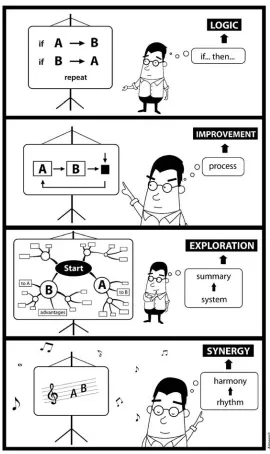
SOFTWARE DEVELOPMENT
RHYTHMS
Harmonizing Agile
Practices for Synergy
Kim Man Lui and Keith C. C. Chan
The Hong Kong Polytechnic University, Hong Kong
CopyrightÓ2008 by John Wiley & Sons, Inc. All rights reserved. Published by John Wiley & Sons, Inc., Hoboken, New Jersey Published simultaneously in Canada
No part of this publication may be reproduced, stored in a retrieval system, or transmitted in any form or by any means, electronic, mechanical, photocopying, recording, scanning, or otherwise, except as permitted under Section 107 or 108 of the 1976 United States Copyright Act, without either the prior written permission of the Publisher, or authorization through payment of the appropriate per-copy fee to the Copyright Clearance Center, Inc., 222 Rosewood Drive, Danvers, MA 01923, 978-750-8400, fax 978-750-4470, or on the web at www.copyright.com. Requests to the Publisher for permission should be addressed to the Permissions Department, John Wiley & Sons, Inc., 111 River Street, Hoboken, NJ 07030, 201-748-6011, fax (201) 748-6008, or online at http:// www.wiley.com/go/permission.
Limit of Liability/Disclaimer of Warranty: While the publisher and author have used their best efforts in preparing this book, they make no representations or warranties with respect to the accuracy or completeness of the contents of this book and specifically disclaim any implied warranties of merchantability or fitness for a particular purpose. No warranty may be created or extended by sales representatives or written sales materials. The advice and strategies contained herein may not be suitable for your situation. You should consult with a professional where appropriate. Neither the publisher nor author shall be liable for any loss of profit or any other commercial damages, including but not limited to special, incidental, consequential, or other damages.
For general information on our other products and services or for technical support, please contact our Customer Care Department within the United States at 800-762-2974, outside the United States at 317-572-3993 or fax 317-572-4002.
Wiley also publishes its books in a variety of electronic formats. Some content that appears in print may not be available in electronic formats. For more information about Wiley products, visit our web site at www.wiley.com.
Library of Congress Cataloging-in-Publication Data:
Lui, Kim Man.
Software development rhythms : using the flexibility of agile software practices in combination/By Kim Man Lui & Keith C.C. Chan.
p. cm. Includes index.
ISBN 978-0-470-07386-5 (cloth)
1. Computer software – Development. I. Chan, Keith C.C. II. Title. QA76. 76. D47L86 2007
005.1–dc22
2007019073
Printed in the United States of America
To my mother and my sister
— K.M.L
To my parents and sisters
and to Emily, Samantha, and Jeremy
CONTENTS
PREFACE xiii
1
NO PROGRAMMER DIES 31.1 Developing Software versus Building a Tunnel 4
1.1.1 The Good Old Days? 5
1.1.2 The More Things Change, the More They Stay the Same? 6
1.1.3 Behind Software Products 7
1.1.4 Deal or No Deal 10
1.2 Do-Re-Mi Do-Re-Mi 12
1.2.1 Iterative Models 14
1.2.2 Code and Fix 16
1.2.3 Chaos 17
1.2.4 Methodology that Matters 21
1.3 Software Development Rhythms 24
1.3.1 Stave Chart by Example 25
1.3.2 Game Theory 28
1.3.3 In–Out Diagram 30
1.3.4 Master–Coach Diagram 31
1.3.5 No Mathematics 32
1.3.6 Where to Explore Rhythms 33
References 34
2
UNDERSTANDING PROGRAMMERS 372.1 Personality and Intelligence 39
2.1.1 Virtuosi 40
2.1.2 Meeting Your Team 41
2.1.3 Recruiting Programmers 43
2.2 Outsourced Programmers 45
2.2.1 Programmers in Their Environments 46
2.2.2 Programmers, Cultures, and Teams 47
2.3 Experienced Management 48
2.3.1 Being Casual about Causal Relationships 49
2.3.2 Not Learning from Experience 50
2.3.3 Doing Things RightRightNow 52
References 54
3
START WITH OPEN SOURCE 553.1 Process and Practice 58
3.1.1 The Four Ps of Projects 60
3.1.2 Agile Values 63
3.1.3 Zero-Point Collaboration 64
3.2 Open-Source Software (OSS) Development 65
3.2.1 Software Cloning 66
3.2.2 Software Quality 67
3.2.3 Starting Processes 68
3.2.4 Open-Source Development Community 69
3.2.5 Ugrammers 70
3.2.6 Participant Roles 71
3.2.7 Rapid Release 72
3.2.8 Blackbox Programming 74
3.2.9 OSS Practices 76
3.3 OSS-Like Development 77
3.3.1 Agile Practices 78
3.3.2 Communication Proximity 79
3.3.3 Loose and Tight Couples 80
3.3.4 Collocated Software Development 81
3.4 Conclusion 82
References 83
4
PLAGIARISM PROGRAMMING 874.1 Plagiarism 89
4.1.1 Existing Code 90
4.1.2 Social Network Analysis 91
4.1.3 Being Plagiarized 92
4.1.4 Turn Everyone into a Programmer 96
4.1.5 Pattern Language 100
4.1.6 Software Team Capability 102
4.1.7 Rough-Cut Design 105
4.1.8 Training Is Not a Solution 107
4.2 Nothing Faster than Plagiarism 107
4.2.1 Immorality 108
4.2.2 Unprecedented Code 110
4.2.3 People Network 111
4.2.4 Rhythm for Plagiarism 112
4.2.5 Plagiarism at Work 114
4.3 Business and Rhythm for Plagiarism 117
4.3.1 15-Minute Business Presentation 118
4.3.2 Marketing Research 120
4.3.3 Chatting Robot 121
4.3.4 Old Song, New Singer 125
References 129
5
PAIR PROGRAMMING 1315.1 Art and Science 132
5.1.1 The Right Partner 133
5.1.2 Noisy Programming 134
5.1.3 Just Training 135
5.1.4 Pay to Watch 135
5.2 Two Worlds 136
5.2.1 Moneyless World 137
5.2.2 Money-Led World 139
5.2.3 Economics 140
5.2.4 Mythical Quality–Time 140
5.2.5 Elapsed Time Accelerated 141
5.2.6 Critical Path Method 142
5.2.7 Why Two, Not Three: The Antigroup Phenomenon 145
5.2.8 Software Requirements Are Puzzles 146
5.3 Programming Task Demands 148
5.3.1 2 and 4 Is 6 148
5.3.2 2 and 4 Is 4 149
5.3.3 2 and 4 Is 3 150
5.3.4 2 and 42 151
5.3.5 2 and 4 is Unknown 152
5.4 Pair Programming Is More than Programming 153
5.4.1 Design by Code 154
5.4.2 Pair Design 156
5.4.3 Rhythmic Pair Programming 158
5.5 Pair Programming Team Coached 161
References 162
6
REPEAT PROGRAMMING 1656.1 Controversies in Pair Programming 167
6.1.1 Is Programming a Unique Work? 168
6.1.2 Are Three Minds Better than Two? 168
6.1.3 Unreplicable Experiments 169
6.2 Repeat Programming 170
6.2.1 Variances 175
6.2.2 Principles 176
6.2.3 Triple Programming Unproductive 177
6.3 Rhythm: Pair–Solo–Pair–Solo 179
6.3.1 Persistence 179
6.3.2 Connection 181
6.3.3 Motivation 185
6.4 An Exception that Proves Brooks’ Law 188
6.4.1 Low Morale 190
6.4.2 Communication Costs 191
6.4.3 Rhythm for Late Projects 192
References 195
7
AGILE TEAMING 1977.1 Project Teams 200
7.1.1 Self-Organizing Teams 202
7.1.2 Teams in a Team 203
7.1.3 Project Team Composition 205
7.1.4 Team Lifecycle versus Learning Curve 206
7.2 Productivity 209
7.2.1 The Illusion of Productivity 210
7.2.2 Collective Code Ownership 210
7.2.3 Accountability, Responsibility, and Transparency 211
7.3 Problems and Problem Owners 212
7.3.1 Rhythm: Trouble–Restructuring 213
7.3.2 Teaming Principles 215
7.4 Failing Projects Rescued 217
7.4.1 Project Traffic Light Reporting 219
7.4.2 A Business Case 220
7.4.3 Steering Committee Meeting 220
7.4.4 Agile Teaming in Action 222
7.5 Beware of Iago 222
References 224
8
INCREMENTAL DESIGN 2258.1 Modeling and Planning 226
8.1.1 Agile Planning 227
8.1.2 Design by Functional Modules 229
8.1.3 Simple Design 231
8.1.4 Total Cost Concept 232
8.2 Rework or Reuse 234
8.2.1 Unpreventable Rework 235
8.2.2 Improvisation 236
8.2.3 Up-Front Design 238
8.3 Just-in-Time Software Development 239
8.3.1 The CMM Rhythm 240
8.3.2 A Factory Tour 243
8.3.3 Walking Worker 244
8.3.4 Just-in-Time Software Development 246
8.3.5 Incremental Design 247
8.4 Requirements Complexity 249
8.4.1 Forgotten Requirements 251
8.4.2 Conflicting Requirements 252
8.4.3 Rapidly Changing Requirements 253
8.4.4 Requirements and Design 254
8.5 Refactoring 254
8.5.1 Refactoring Activities 258
8.5.2 Refactoring by Challenging 259
8.5.3 Refactoring for Design Patterns 261
8.5.4 Making Deliberate Mistakes 263
References 263
9
TEST-DRIVEN DEVELOPMENT 2659.1 Reverse Waterfall 268
9.1.1 Design–Code–Test 268
9.1.2 Test–Code–Design 269
9.2 Test-First Programming 269
9.2.1 Testing and Verification 270
9.2.2 Breakpoint Testing 271
9.2.3 Supporting Practices 272
9.3 Rhythm: Test–Code–Refactor 274
9.3.1 Simple Example 275
9.3.2 Automation 277
9.3.3 Revolution in Consciousness! 278
9.3.4 Test Case for Collaboration 281
9.4 Rapid Software Process Improvement 282
9.4.1 Training Program 283
9.4.2 Project Planning 284
9.4.3 Project Tracking 284
9.4.4 Software Quality 286
9.4.5 Software Configuration 286
9.4.6 People Discipline 288
References 288
EPILOGUE: MEDLEY 291
INDEX 295
This book helps us discover our own software methodologies in a way that respects the software development rhythms of both people and practices.
In the deep dark night, lying down on Kande beach on the shores of Lake Malawi, we looked up into the cloudless sky. Countless tiny stars were blinking at us. A little tired, or perhaps just mesmerized by those distant, mysterious lights, we closed our eyes and began to hear more, the peaceful slap of water on the little beach, and the small, almost concerted sounds of the dark night, throbbing in what seemed like a deep, rhythmic breathing. Nature is an incomprehensible concert of rhythms. Our Earth in its solar orbit spins through space composing the rhythm of day and night, endlessly recycling its four seasons. Following natures rhythm, we wake to learn and sleep to remember, writing and rewriting our own programs in accordance with the very best universal software practice in a flawless symphony of rhythms. From heartbeats to footsteps, rhythms are a sustaining, momentum-creating vital force. In a world where complexity appears very much like chaos, we seek the confidence of being able to assign causes and identify correlations, but sometimes it is only the discovery of rhythms that allows us to see the order that sustains all.
Like any human endeavor, software development is complex and full of generalizations and correlations, but it is devoid of rules. To help us build software, we have disciplined software models and software project manage-ment methodologies. But the fermanage-ment of software developmanage-ment, with con-stantly changing teams and requirements and new tasks, means that there is no guarantee that any past successful method will succeed on the next software project. In fact, some project leaders who appear to adopt no method or methods that are scorned asad hocare able to get their software projects
PREFACE
done on time. The secret of their success is the understanding of software development rhythms.
The knowledge of rhythms gives us a new perspective on some of the thorniest issues in software development. Methods that work for one team fail for another because even the most willing software teams cant achieve success with a new method until they come to understand its rhythms. Yet in the management of complex and multifaceted software development projects, where it is vital to harmonize and synergize both team and individ-ual practices and processes, rhythms are a largely neglected theme.
Rhythms are not another methodology. There are many methodologies, and this book does not seek to introduce a new framework for building software or managing software projects. What is needed today is not more methodologies but greater wisdom in the application of the methodologies that we choose to use. The best way to do this is to understand and work in harmony with the rhythm of whichever methodology the team adopts. To do otherwise, to fail to understand and apply the rhythms of a method, is to make the method itself more burden than benefit, and to make the journey of a project long and difficult.
This book is not for beginners, In fact, we assume that you can already fish and have caught a few in your time. It is for people who want to refine or even rediscover some of the skills and techniques that can so easily be lost when we get into the habit of seeing things from just one perspective. Then, like someone who is fishing casting the line with a supple wrist and a steady rhythm, we hope to help you catch more fish than ever before, and to feel more satisfied as you do it.
Audience
We have tried our best to write a technical book in plain language. Those who are interested in software development and project management (software managers, programmers, researchers, etc.) should have no trouble with these materials as we explain and provide clear examples of any terms that might be outside those areas.
Along with Kent BacksExtreme Programming Explained(2nd edition), this book can serve as an advanced text on agile software development. It describes a number of project episodes and industrial cases suitable for use in case-based learning or for presentation to students as the basis of further work in group projects. This book is also a monograph as it presents many concepts that have not been adequately considered in books and scholarly papers on project management in general and software engineering in particular.
This book does address itself to a wide readership, but it is especially intended for thoughtful readers in search of creative metaphors for project management and new insights into the complex field of software development.
How to Read This Book
Generally, I would suggest that this book be read according to the chapter order. It is presented in two parts. Part I consists of three chapters. Chapter 1 introduces the idea of software development rhythms. Chapters 2 and 3 respectively discuss people and practices, clarifying some fundamental concepts in software development and asking some important questions such asWhyshouldntwe learn from experience?, what are agile values?, How can it be possible to weight different intangible software practices as heavy or light?, and What can we learn from open source software development?
Part II of this book is all about development rhythms. We are used to using the familiar termsprocessandpractices—although not everybody is confident that they know the exact differences. We compose rhythms on the basis of software practices. To effectively demonstrate how software devel-opment rhythms are a powerful metaphor that we can use to analyze when best to use a software methodology, we take a number of more controversial software practices and consider their rhythms and compare them with some other more generally accepted software practices.
Once you have learned how an analysis of software rhythms can harmo-nize practices, you may like, as an intermediate step, to adopt the rhythms proposed in this book or modify them in any way. Feel free. Ultimately, however, it is important to realize that rhythms are not models and that in the end, we should all compose our own rhythms.
Special Acknowledgment
The book covers some topics and ideas that are outside the normal scope of software development. Fortunately, we were able to benefit from the kind advice and guidance of a number of renowned experts in these areas. Their precious time and professional advice were much appreciated. We cannot thank them enough. In alphabetical order, they are
Paul Davies, who critiqued our description of the physicist and pair programming
Don Forsyth, who provided his insights into pair programming from a group dynamics perspective
Michael McClellan, who reviewed the musical notation in this book Richard Schonberger, who reviewed a number of sections connected with
lean manufacturing and engineering projects
Frank Vigneron, who commented on the angels gender
Joel Watson, who reviewed Deal or no deal and the game theory analogy
Philip Zimbado, who advised us about his prison experiment
Many highly experienced software professionals have done us the great honor of looking at one or two chapters of the book and providing valuable feedback. Many thanks to (in alphabetical order): Lawrence Bernstein, Grady Brooch, Magne Jørgensen, Pete McBreen, George Metes, Peter Middleton, Mark Paulk, Ioannis Stamelos, Royce Walker, and Sami Zahran.
Thanks to Martin Kyle for his useful advice on writing better using plain language. We appreciated John Noseks insights on collaborative program-ming. We are delighted to have Angappa Gunasekarans support. We thank Lai Shan Sit for her many funny cartoons illustrating our ideas. We would also like to thank our friends and colleagues, Jun Wang, Zheng Li, Polly Leung, Fei Dong, Ka Wing Wong, Whitney Lesch, and Rosalyn Farkas for their assistance.
Finally, we cannot thank two persons enough. We thank Kent Beck for inspiring our work on software development rhythms. Kent advised us on which topics to choose to focus on and he reviewed the whole manuscript for us. We also thank Paul Petralia, our editor, who told us from the very beginning that he liked the concept of the book and thought that it would motivate people to think about old things in their new ways. Without his encouragement there would not be this book. It is not coincidence that all of us believe that the idea of software development rhythms could be powerful metaphors and effective management tools. Rhythms are not methodologies, they are, rather, a meta-methodology – a methodology about developing new software methodologies!
KIM MAN LUI KEITH C. C. CHAN
Hong Kong January 2008
1
NO PROGRAMMER DIES
The Bible shows the way to go to heaven, not the way the heavens go. —GALILEOGALILEI
There is one question that is so frequently asked in software engineering that it may seem tedious to ask it yet again, but here it is, anyway:What are the basic differences between software development projects and engineering projects (or manufacturing production), that is, say, between producing enterprise information system and building tunnels or manufacturing cars?
The usual, dry, academic answer is that software is a conceptual, intan-gible, invisible artifact. This definition may be useful, but there is another attribute of software projects that distinguish them even more starkly from traditional engineering projects. The distinction, which is rarely mentioned, is that — while engineers may always be in danger —software developers are never killed or injured while working on their projects.
No matter how lousily or messily planned or implemented a software development project may be, nobody in a software team is ever seriously physically hurt at the office computer. There is a clear difference between developing Adobe and digging the Panama Canal, and this may be one reason why so many software development projects are hastily, carelessly, and sloppily managed.
In 2005 the death toll from a tunnel project in western China broke a new record indicating project mismanagement and poor supervision of safety procedures. An investigation reveded that many fatal accidents
Software Development Rhythms: Harmonizing Agile Practices for Synergy By Kim Man Lui and Keith C. C. Chan
Copyright2008 John Wiley & Sons, Inc.
could have been avoided. This brought the issue of the rushed produc-tivity for the project rather than workersand engineerssafety, environ-mental concerns, and social needs under even closer scrutiny. The public severely blamed the chief engineer for the tunnel accidents.
—LOCAL NEWS INCHINA, 2005
In real-world engineering projects, the prospects and costs of death are always looking over our shoulders, holding individuals personally respon-sible for the consequences of their decisions and actions. Thus, project managers must adhere to strict procedures and industrial standards: agreed-on plans, signed confirmations, written workflows, and timing. When an error occurs, a project management model enables us to track the work process, conduct a postmortem review, and identify errors; in addition, this may also involve financial issues of insurance and litigation.
Because life matters1and mistakes incur heavy costs, real-world engi-neering demands discipline, consistency, consideration, commitment to detail, and a strong sense of teamwork. The result is not just greater safety; its also better products. You have to wonder whether software development can afford to continue in its current (often) irresponsible way. Are there any factors in society or the marketplace that will ever make it change? If so, what are they?
1.1 DEVELOPING SOFTWARE VERSUS BUILDING A TUNNEL
Many types of cancer are treated with radiotherapy, in which high-energy rays are used to damage malignant tumors. Given the danger of overdosage, the amount of radiation energy is supposed to be precise, and safely controlled by a computer system. The Therac-25 was developed for this purpose by the Atomic Energy of Canada Limited from a prototype in 1976 to a safety analysis in 1983 (Leveson 1993). Between 1985 and 1987, the Therac-25 overdosed a number of patients, killing five. Subsequent investigations blamed the soft-ware, but theres something strange in this. The programming code for the Therac-25 was built by only one person, who also did most of the testing. This is not even conceivable in a real-world engineering project, but in some software development the programmers are often responsible for their own testing. How did the software development process ever get itself into this mess?
1The ISO 9000, which have often been compared with CMM and CMMI, came from BS5750, which was adopted to control quality problems of bombs going off in munitions factories and bombs not blasting when they should have.
1.1.1 The Good Old Days?
In 2005, a Helios Airways Boeing 737 crashed in Greece, with the loss of all 121 on board. The suspected cause was a series of design defects in the 737 where the planes pressurization warning alarm made the same sound as the improper takeoff and landing alert. Confusion over the reason for the warning may have contributed to the fatal crash. When things start to go wrong, it sometimes doesnt take much to spin them right out of control. Factors that may seem trivial in normal circum-stances, may contribute to tragic outcomes when things arent going according to plan .
Regardless of whether engineering product defects may be unavoidable, we are taught that rigorous development processes do remove as many as possible. A rigorous process normally means the separation between planning and execution. During construction, planned tasks should be designed to be strict to follow and easy to control. Ideally, constructive peer pressure should positively shape workplace behavior to ensure that a development process will beas rigorous as possible.
Adopting that philosophy in engineering management, software devel-opment activities can normally be divided into two types of process—(1) analysis and design as planning and (2) programming as execution, with (2) following (1). This intuitive model, generally referred to as the waterfall modelby Winston Royce (1970), is normally adopted when managing large software projects. These two processes are often chopped into smaller but still ordered processes. Dividing and conquering allows us to better allocate limited resources and control and track project progresses through a number of checkpoints and milestones. The analysis–design process is made up of such activities as software requirements gathering, system analysis and logical design, while the programming process is made up of coding, unit testing, system integration, and user acceptance testing, all of which are basically linked serially, one after the other. For the purpose of discussion, we consider here what is called afour-stage waterfall modelas below:
Requirement!design!coding!testingðR!D!C!TÞ
The nature of the waterfall model makes it easy for a project plan to be executed the same way engineers manage their projects. Focusing on breaking down larger tasks into smaller tasks and putting them in the right order for execution better allows project resources to be allocated and conflicting problems to be resolved. With this idea of the separation between planning and execution behind a waterfall model, a project plan can be reviewed to optimize against
time and resources. With this, we can then identify and weight various risk factors to draw up a contingency plan for a project.
Such a project management paradigm to develop software may sound intuitive, but one could easily discover that it does not encourage the exploration of interrelationships between people, programming tasks, and software practices. It can be difficult for some project managers to compre-hend development synergies between these three elements, particularly in a situation where something can change unexpectedly during execution.
1.1.2 The More Things Change, the More They Stay the Same?
When project requirements are constantly changing, sometimes more rapidly than what we had imagined, and when developers know that what they are building is not what their customers need, they will start to realize that their software can be developed only by progressing in small steps so as to obtain constant feedback all the time. This is, however, easier said than done.
Our thinking is often limited by our past experience. For many software managers, their formative software experience is with the waterfall. Seeking to improve on it, we come up with an enhanced waterfall. As single-phase analysis for user requirements may rarely provide a full solution, more than one phase is often considered necessary, and for this, straightforwardly, we link two or smaller waterfall cycles together in a chain.
R!D!C!T ! R!D!C!T ! R!D!C!T
There is really nothing new here. The same principles behind the waterfall model apply except that, in each cycle, one can plan according to the feedback obtained from what has previously been done. The current cycle will there-fore be less stringent and more flexible than previous cycles.
The waterfall model, if strictly implemented as one cycle or some
bureaucratic procedures for turning back,may not be too popular in the commercial world. Many software teams take the concept of the waterfall model but implement their software projects more flexibly. Some teams adopt the enhanced waterfall model while still others may go even further to adopt an adaptive model so that the length and activities in each iteration can be dynamically adjusted. All these models can be considered as belonging to a waterfall family of models.
In some extreme cases in such a family, to deal with unexpected changes, some software managers would substantially revise their project plans on a weekly basis. Since they know that none of their team members could die or be injured, they are free to revise their plan to cope with any
change when it occurs. Compared to software projects, in engineering projects this would be considered very unusual. It would be more normal to delay the project rather than risk changing what and how we have already planned and managed.
When project variables keep changing, a revision of a project plan is the way out of potential crisis. Many project managers do not care how often the project plans are revised as long as it is necessary. But, what really matters is our way of thinking being limited to the style of waterfall management, which always involves breaking down tasks into many sequential tasks, and resources, responsibilities, and any understanding of any bottleneck are planned along this line. Whenever there is any change, replanning is needed and it is hoped that the revised plans can reflect the situation as quickly as if such changes were already anticipated. This is undesirable as a software team does not manage change in this case; they are, instead, managed by change.
1.1.3 Behind Software Products
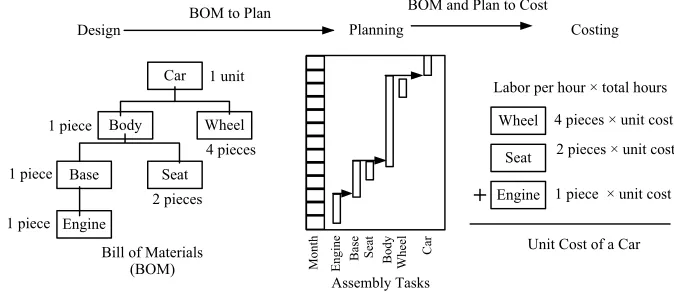
Let us look at the design and planning of manufacturing products and then come back to software products. If a product is supposedly made up of a number of components, subcomponents, and sub-subcomponents, and so on, then one can draw up a hierarchical architecture that consists of the complete product at the top with a hierarchy of subcomponents, which, in turn, are made up of sub-subcomponents, and so forth. This structure is called abill of materials(BOM) and it is at the heart of operations in many assembly plants. It supports assembly task planning in manufacturing resource planning (MRP), as shown in Figure 1.1, where one plans when, what types, and what
Car Body Wheel 4 pieces 1 unit 1 piece Base Seat 2 pieces 1 piece Engine 1 piece Engine Base Seat Body Wheel Car Assembly Tasks Design Planning Month
Engine 1 piece × unit cost Seat 2 pieces × unit cost Wheel 4 pieces × unit cost Labor per hour × total hours
+
Unit Cost of a Car BOM to Plan
Bill of Materials (BOM)
BOM and Plan to Cost
[image:25.441.51.388.441.587.2]Costing
FIGURE 1.1 How bill of materials (BOM) can be used for planning and costing.
quantities of materials or subcomponents are needed for production (Chap-man 2006). The assembly task planning will allow costing to be determined (Figure 1.1). Subcomponent information can be used to do cost rollup calculation for customer quotations and for effective internal control over production costs.
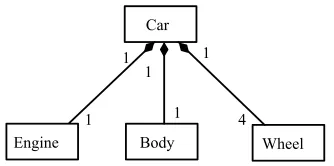
Similar to engineering projects, software is often designed using a class diagram (see Figure 1.2), which resembles a bill of materials. Class diagrams help us understand attributes, methods, and class component relationships. Unfortunately, we could rarely use a class diagram to tell us how to do assembly task planning and costing. It would be good to have an integrated approach to tighten up or clarify what needs to be written and how a project should be planned. Only recently has it become possible to do this to some extent through the concept of auser storyin eXtreme programming (XP), which can be used both for requirements management and project planning.
Compared to software tasks, other engineering tasks are often more tangible. Components built in a typical engineering project can be combined in the order suggested by a bill of materials (BOM) so that work progress can be objectively measured and quality can easily be monitored. This, when compared with software, is more tangible. For instance, as part of an engineering project, one can assemble an engine to the gearshaft and then form the base before installing the wheels and finally carrying out wheel tests. The sequence in which these tasks are performed could be designed in accordance with both physical constraints and economic efficiency, and this sequence somehow solidifies the idea of the separation of planning and execution into two stages.
In software projects, products cannot be assembled with this kind of job sequence as defined with class diagrams in the same way BOMs are, no matter how these products are designed. Programmers can work out login interfaces and main menu interfaces in an order that corresponds to how the users
Car
Body Wheel Engine
1 1 1
[image:26.441.137.304.75.158.2]1 4 1
FIGURE 1.2 Class diagram for a car (simplified) that resembles bill of materials (BOM) but serves a different purpose.
operate the system. But they can also do these later on.2There are virtually no restrictions on the ordering when we build with software components. Walker Royce (2005) of IBM suggests that software managers should manage software in the same way as managing a movie production rather than as a typical engineering production. To make a film, we have to effectively assess how all the elements of scenes of the film work together (actors, timing, lines, sets, props, lighting, sound, etc.) so that scenes of the film will be shot in a way that will minimize production costs and production time so that the film can be completed with the least amount of time and money.
In manufacturing, when two products, designed by two groups of engineers, eventually appear on the same BOM, we can almost speculate that these products should be built in similar ways. Furthermore, since products are built to follow the design as given by a BOM, if there are defects, either they are design problems or the products have not been made to plan. Unfortunately, this same logic that is applicable to manufacturing does not apply to software development (refer to Figure 1.3). Unlike BOMs, class diagrams do not fully address code implementation. Given the same dia-grams, implementation could be done in a variety of ways by different programmers. The programmer will not have to write the same software twice for a second installation, but may have to redo it for a second version, FIGURE 1.3 Degree of differenceis a conceptual term measuring how two products can be built differently using the same design.
2It may make some kind of logical sense that you have to finish writing the login servlet before you start the logout servlet; but in reality you could write and test them in any order,said Robert Martin (2003).
and this can be done even without modifying the class diagrams! For instance, programmers may tune structured query language (SQL) algorithms for better performance when they know the characteristics of real data. Some software teams will adopt the practice of revisiting each others code to detect defects and improve readability. Again, none of this necessarily implies redesigning the class diagrams.
In the case of software projects, not all that is well designed ends well! Worse yet, many software problems cannot be classified as problems even when the class diagrams or code are not written in compliance with the design. Bad code but good design is not that rare! In short, having qualified experienced system analysts do design using data models, unified modeling language (UML) diagrams, and so on, is not the only necessary condition for producing good software; we also need qualified experienced programmers to write code to build the system. Furthermore, with the right design and good-quality code, we need skilled testers to discover bugs in products. Managing these people effectively in a team, whether each member has just one role (e.g., system analyst, programmer, tester) or multiple roles requires a methodology for coordination, collaboration, and communication! Left to themselves, things may go wrong, and once they do, they will go from bad to worse. One cannot expect a bunch of the right technical people sitting together (without proper management or coordination) to produce software on time, within budget, and according to requirements if there is no development framework.
1.1.4 Deal or No Deal
Traditionally, software management emphasizes mainly relatively formal, rigorous, software development processes. Recently, agile development approaches have grown quite popular. There is now an agile or eXtreme version for formal methods, testing, database, tools, or project management. Although this new trend has attracted great attention in the software com-munity, it has not taken over the waterfall model as the dominant approach. In fact, agile practices are often adopted within a waterfall framework. It appears that the waterfall model is either so intuitively better than the others or that software developers have been so used to it that they cannot think of any other ways better.
The popular TV game show Deal or No Deal displays a number of briefcases, each of which contains a different cash prize ranging from just one dollar to millions of dollars. A contestant who wins a game on the show is allowed to pick any of these briefcases as a prize. The contestant, however, is not allowed to open the briefcase until the end of the game. As the game
progresses, aBankeroffers the contestant a deal to buy the chosen briefcase. If the contestant rejects the deal, other cases can be chosen and opened while the banker continues to make offers to the contestant regarding the suitcase the contestant chose at the beginning. The contestant can either accept the bankers offer or take the cash prize inside the briefcase selected at the beginning of the game. It is interesting to note that many contestants who had chosen the right briefcase often accepted a lower-value offer from the bankers. They would have, say, accepted $250,000 dollars, rather than resisting temptations to hold onto the end to win millions. Even in the presence of favorable odds, it is interesting that many people are actually highly risk-averse (Post et al. 2006).
In a study involving 150 volunteers (Tversky and Kahenman 1981), who were asked to choose between a guaranteed $250 or a 75% chance to win $1000 dollars, the overwhelming majority (84%) of the participants took the $250 cash. Interestingly, when the choice was between winning or losing $750 dollars with a 75% chance, 87% preferred to try their luck. Mathematically, the odds were the same but not the subjectsperception of winning and losing.
Daring to take risk for a higher reward is an entrepreneurial attitude. For entrepreneurs to be successful, they need to be risk-takers. They need to understand the odds on success and failure, so that they can spot markets and seize opportunities before others do. If not, they need to have the gamblers
attitude. Compared to an entrepreneur or a gambler, how much risk is a software project manager willing to take when adopting a new development methodology? On the surface, this seems to be a matter of personal prefer-ence. However, it may be a bit more complicated than this. There is a chance that the members of a software team may not be so cooperative. They may try to stick to their usual way of thinking and work consciously or subconsciously toward it. If things do not seem to go as originally expected, these members may well place the blame on the manager. They may say that the manager should have been more prudent and should not have replaced the usual practice with something unproven. Is this prudence? Does fear overwhelm ambition? Or is it politics that has raised its ugly head?
Typically, user requirements continue to change and our competitors act and react much more quickly than we do. Even with all these arguments and hesitation, there is a chance that members of a software team will eventually be willing to adopt a new development methodology. But as software projects rarely go wrong at the beginning, it can take a significant investment of time and money before we realize that the old way isnt working.
Meeting deadlines is often a pressure to make us change our old way of working. Let us look at a real case here. In 1995, TechTrans, a Hong Kong
software house with a technical staff of around 20 that specialized in the development of retail-chain points-of-sales (POS) systems written in C and Clipper, won a software outsourcing contract to redevelop an AS/400 application on a truly client/server platform. The system had to be written in PowerBuilder and Informix. At that time, no TechTrans programmer knew these tools. TechTrans could have used its existing Clipper database model for the Informix relational database. However, PowerBuilder is an event-driven programming tool under Windows 3.0, while Clipper is a program-ming language used to create business applications under the disk operating system (DOS). The project leader asked two developers to pair up to explore how to start their programming. The pair was expected to develop a set of code patterns that the other developers would try to follow. The project was managed using the waterfall model, and both the leader and the team firmly believed that this would be an effective, efficient, and less risky way forward.
1.2 DO-RE-MI DO-RE-MI
Experience keeps people growing professionally. The customers today are different from yesterdays customers, and so are members of a software team. For this, one can only expect software projects, and how they should be managed, to also keep changing. When projects cannot be effectively man-aged using the simple and familiar waterfall model, an iterative approach is used. This can revolutionize the way a software team develops software, but even though resistance to new ways of doing things can be expected, the resistance may be small as there is a familiar simplicity here.
When you read, you begin with A–B–Candwhen you sing, you begin with do-re-mi.3A good place to begin iterative software development is with the waterfall models requirements analysis (R) – design (D) – coding (C) – testing (T). The simplest way to perform iteration is to simply join two smaller waterfalls together as
R!D!C!T!R!D!C!T
One benefit of iterative software development is that it can be adopted flexibly when coping with the inevitable changes that arise from customer feedback, communications, and working software. Because of changes and the issues discovered earlier, we have more realistic views to control projects to ensure that they are within scope, budget, and timeframe. Another benefit is that it breaks a protracted system analysis into more phases, and thereby actual
3From Rodgers and HammersteinsThe Sound of Musicin 1965.
programming can start earlier. This is real progress for software delivery as design diagrams do not cover the details of how to code.
There are at least three ways to implement a simple iterative waterfall model. Most straightforwardly, a system is logically broken down into two or three modules, each of which could be consecutively released for production. It is also possible to implement one or two modules and withdraw the rest. The development approach is referenced as step-by-step or phase-by-phase. A metaphoric example of this approach is given in Figure 1.4.
The second way to implement iterative waterfall model is to review the system nature and functions and to define a kernel and its interface at the beginning (Figure 1.5). The goal of such an iterative cycle is to build new components that could be integrated with a kernel. Different software applications are assembled using the components, which are blackbox to the outside world, but are accessible via their defined interface. Components themselves can be written in several different programming languages as long as they are in full compliance with the interface specifications. This approach to implementing the iterative waterfall model is particularly useful when a number of different applications, each sharing the same reusable login components, are to be developed. Although this can appear to be ambitious, it is a very traditional computing approach. An example is for one to think of an operating system (OS) as a kernel and each application running on the OS, developed with the use of application programming interfaces (APIs), as components so that the computer running the application can serve as a dedicated point-of-sales (POS) or an application server.
C→T D→
R→ R→ D→ C→T R→ D→ C→T FIGURE 1.4 Phase-by-phase development.
FIGURE 1.5 Component-based incremental development.
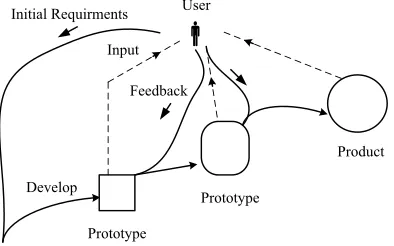
Brooks (1995) captures the spirit of evolutionary software development very well by saying Grow, dont build software. This third way of im-plementing iterative software development is iterative, generative, and incremental (see Figure 1.6). With this approach, a small, immature prototype evolves through constant or regular customer reviews until the software has all the functionalities required. Customers are encouraged to reengineer their requirements so that the final product fits their business needs. With this approach, an early prototype may not even be software. It could be a paper prototype including a set of screen layouts showing the required function-ality. However, the prototype must be sufficiently complete for customers to provide solid feedback.
All these different ways of implementing the iterative waterfall model can be adopted in the same project. They can be integrated to different extents into a hybrid iterative model. One way to do this is to have an outer loop taking a step-by-step approach so that each outer loop has several inner loops that can take, say, the evolutionary approach. Such a double-loop iterative model has been proposed and used with some successes as part of some agile methods such as the scrum (i.e., scrummage meeting, as in rugby)
Q1 .
1.2.1 Iterative Models
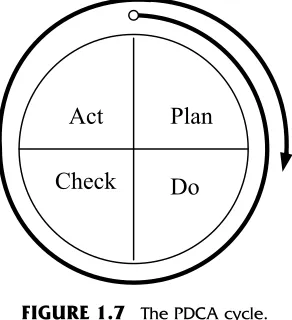
As early as the 1950s, Deming popularized Shewharts closed-loop model in statistical process control for business continual process improvement, to measure and identify sources of variations so that one can identify and manage the areas where improvement is needed. The feedback loop included in so many project management texts has been generally known as theplan– do–check–act(PDCA) cycle. The PDCA cycle is shown in Figure 1.7, which is self-explanatory. The PDCA cycle involves a solid grounding in identifying
User Initial Requirments
Feedback
Develop Input
Product
Prototype
[image:32.441.123.320.79.202.2]Prototype
FIGURE 1.6 Evolutionary software development.
performance metrics and measuring them for analysis. The underlying principles have become the foundation of software project management.
Returning to a basic iteration like R!D!C!T!R!D!C!T, we can see that the iteration does not tell us how to sustain actions! For this reason, a review session is normally needed after each cycle to determine whether we have done as planned so that we can realistically plan what the next cycle should be. In addition to this, we also need to reevaluate the different risk factors that may affect a project so as to ensure that we can better control budgets, resources, and schedules against the original project plan. Clearly, some supporting process areas should be considered to sustain the iteration of R!D!C!T!R!D!C!T so that each iteration delivers solid prog-ress toward the final product until an application is released for production. The PDCA and waterfall model activities, can be combined to establish a complete iterative model — the spiral model — as proposed by Barry Boehm (1988). This spiral model can be modified as shown in Figure 1.8. The sequences of R!D!C!T!R!D!C!T can therefore become, say, R!R!D!R!D!C!T (see Figure 1.8). As expected, processes and practices are required to sustain such a model. It should be noted that this modified spiral model does not contradict the iterative waterfall model of R!D!C!T!R!D!C!T and software teams can choose to substi-tute it with the modified spiral model.
The spiral model was originally proposed to develop different prototypes at various stages of a project until the final product is completed. The use of such model is both generative and evolutionary. In practice, software teams may adopt a spiral model according to project requirements. The implemen-tation of the iterative waterfall model can be flexible, and the three different approaches to implementing such a model can be integrated and hybridized.
Do
Plan
[image:33.441.149.295.79.239.2]Check
Act
FIGURE 1.7 The PDCA cycle.
With these characteristics, the spiral model, which applies the ideas of the PDCA and a combination of these three implementation approaches, can be used rather flexibly with different software projects and thus has been generally accepted as much better than the waterfall model.
1.2.2 Code and Fix
Even though iterative software development approaches have their advan-tages, not all iterative approaches are desirable. The code-and-fix approach, for example, is repetitive. It involves writing code to clarify requirements for better design later. It is a time-buying strategy where the target is to release the software on schedule and to release patches afterward. It is common in software development that project pressure quashes discipline and that when software developers are under time constraints, they will naturally handle this pressure by jumping into coding immediately. Another situation in which developers would adopt a code-and-fix approach is when the appli-cation being developed is so popular that it attracts new, additional, originally unintended users who demand additional expansions in performance and functionalities.
Let us consider a real case as follows. In a retail chain of 45 outlets in a metropolitan area, operational staff might need to split their time between staying in office and visiting other stores. The human resources (HR) department therefore decides to have their information technology (IT)
Objectives, Constraints, Alternatives
Prototype 1, 2 , 3 ...
Development Commitment
Review 1
2 3
Next Phase Planning
Risk Analysis
R R
D
R
D
C
T
FIGURE 1.8 The spiral model (simplified version).
department write a system for them to allow staff to submit trip records electronically. Their goal was to replace manual forms with a database so that the HR department could quickly retrieve information relating to these business trips. The written requirements provided by HR were a brief sample copy of their current form!
The HR system, called TripLog, was written in under a fortnight in Microsoft Access using Delphi 6.0. Since the functionalities of TripLog were rather simple, so the HR staff were quick with their user acceptance testing. As expected, HR occasionally reported minor bugs, but these were quickly fixed.
After 2 months, the HR staff asked the IT team to distribute TripLog to user departments so that they could directly enter data into the system. After an additional 2-month period, the HR department decided to add vacation leave as a type of atripin the TripLog so as to automate leave applications. Now that the number of users had unexpectedly increased, the system became extremely slow. Naturally, users start to request that the IT department to improve system performance and to have TripLog display leave balances.
The IT department decided to rewrite the system in MS SQL Server using Delphi 6.0. This took a month, but this was not the end of the story yet as TripLog continued to be the subject of modifications and eventually its user base included all staff of 150 back offices.
The development of TripLog was not disciplined, but the system was not complicated and the software team managed to do a good job. However, the software team actually redeveloped the system completely. The code-and-fix cycle in this case resembles the following sequence:
Code!use!fixð!codeÞ!use!fixð!codeÞ!use!fix. . .
The activity shown in parentheses may occasionally be required.
The code-and-fix approach is different from the iterative model in that we could not tell when a development activity would occur and when one activity would switch to another. Although there was no sense of rhythm and events appeared to occur randomly, the pattern was iterative. This approach can be considered by some developers to be ad hoc.
1.2.3 Chaos
Timing and patterns are important in any kind of iterative model. There can be huge differences of days and even months in completion dates when the same iterative software activities are followed. In this section, we will see what an iterative model may look like when a cycle is as short as a day.
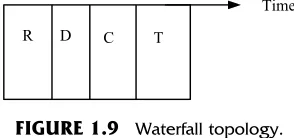
Figure 1.9 shows a four-stage waterfall model over time. If we assume that there is a deadline to meet for each stage, the project can be tracked with four separate milestones. According to Parkinsons law, work expands to fill the time available for its completion. Therefore, it is rare for a software team to complete its tasks on time. Assuming the probability of delay in project schedule be1
2, for four stages, we can be very pessimistic about the chance of completing the project on time as1
2· 12·12· 12¼161. In other words, there is very little chance that a project is able to finish on time. Of course, many project managers would squeeze time from later stages to compensate for earlier delays, but this effectively shortens the time available for the tasks that are to be achieved in later stages. This may lead to sacrificing either quality, functionalities, or both.
To cope with this problem, we can implement an incentive scheme. When developers are able to complete jobs on time (see thetime boxin Figure 1.10), they receive a bonus pay. To implement this effectively, we need to assign different roles to different members of a software team at each stage. It is possible for us to assign different roles to the same developer. For instance, we can assign requirements engineers the role of software testing to test the final
D
R C T
[image:36.441.145.292.79.148.2]Time
FIGURE 1.9 Waterfall topology.
FIGURE 1.10 Waterfall in action.
product and the role of coder to system analysts to enable them to write programs for verification.4
In addition to an incentive scheme and the assignment of different roles, another question arises as to how people in a team communicate and whether such communication is effective. For example, there is a need for well-written documents to be used as a communication tool between two sequential stages. Figure 1.10 illustrates the waterfall in action.
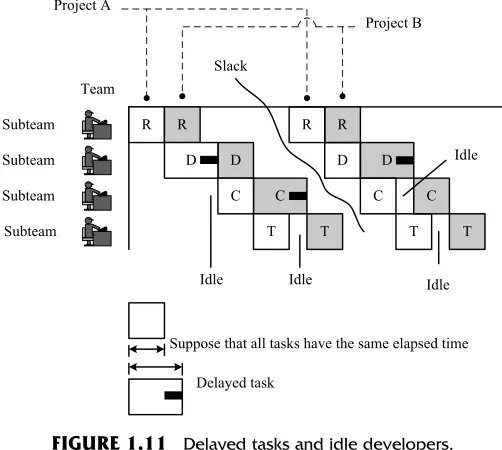
A software team may be involved in several projects at the same time with team members organized as divisions. Figure 1.11 illustrates how two projects can be run by the same team in parallel. Basically, each subteam either handles just one project at a time or the members deal with one projects tasks at a time. However, when documents passed down from a previous
R R
D
C
T R
D
C
T D
C
T R
D
C
T Idle
Idle
Suppose that all tasks have the same elapsed time
Delayed task Slack
Project B Project A
Subteam
Subteam
Subteam
Subteam Team
[image:37.441.95.346.79.304.2]Idle Idle
FIGURE 1.11 Delayed tasks and idle developers.
4The idea of how quality control checkpoint can be integrated into each phase throughout the development as implemented in the V model. As in our simple example, the look resembles aVas shown here:
stage are difficult to understand, incorrect, or incomplete, the responsible subteam has to follow up. Thus, some subteam members will find themselves handling the tasks of two projects at the same time. Although this is quite typical in the real world, this kind of task switching adds no value at all to software development (Poppendieck and Poppendieck 2003). Human con-centration is easy to break and hard to get back. Switching tasks between two projects eats up time (say, 10–15 minutes) as people reenter the flow of thought for a new task. Frequent interruptions are time-wasting.
Figure 1.11 illustrates another issue that is perhaps even more disturbing than task switching. Most staged models require the completion of one stage before it is possible to enter the next. This makes it difficult to plan two projects to avoid any slack-time between them! Compounding this is the fact that delaying some activities in one project willtremendouslyaffect another project. Figure 1.11 illustrates how delayed time andidle timeintertwine even though there is no real idle developer as the project plan can be revised as often as necessary.
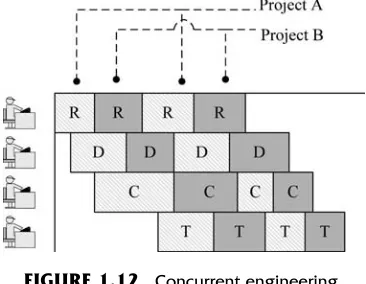
To tackle these problems with the simultaneous management of multiple projects, we are brought to the arena of concurrent engineering. We do not wait for the completion of one task before the other starts (see Figure 1.12), and we allow different development processes to run in parallel. To allow a process to evolve more flexibly, we should not be confined only to documents. Instead, we hold more face-to-face meetings to facilitate proper communica-tions. To manage single projects, we can also adopt concurrent software engineering (Figure 1.13).
[image:38.441.128.311.461.603.2]Concurrent software engineering can be adopted by applying a model for managing single as well as multiple projects (Figure 1.13). The greatest benefit of such a model, called theSashimi model(Raccoon 1995), is that it shortens the iteration cycle.
FIGURE 1.12 Concurrent engineering.
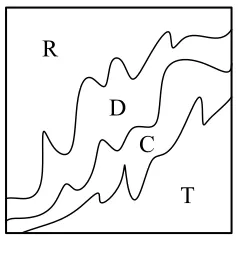
One way to expedite tasks is to shorten iteration cycles. Iteration cycles can be shortened by allowing many things to happen simultaneously. For example, the chaos model (Figure 1.14) looks at a teams activities as a whole, fractally. The model uses a short, small problem-solving loop, but unlike the case with code-and-fix, the chaos model can be very rhythmic as far as we anticipate when things work, when things can be used (i.e., how one loop turns to another), how to sustain the rhythm, and so on.
1.2.4 Methodology that Matters
The following statement was made by a finance director in charge of accounting, administration, personnel, IT, and purchasing departments:My daughter, 15, was already building her home page at school! I just dont understand what our IT team is busy with.
Customers can be users within an organization, or they can be the external client of a software house. They may not see our service the way we do. Building and managing customer relationships are as important as develop-ing quality software. Projects with teamdevelop-ing relations with customers could be twice productive (Bernstein and Yuhas 2005). When it comes to what
R C R D C T
R D C
T T D C R D C T R D C T R D T Involovemnt 0 % 100 % time Simplified
[image:39.441.162.281.472.600.2]as R D C T
FIGURE 1.13 Sashimi model.
R
D
C
T
FIGURE 1.14 Chaos model developed by
Q1 Raccoon (2006).
customer-relations management (CRM) is, Ed Thompson of the Gartner Group presents the following matrix (see Figure 1.15). CRM, according to him, is all about how customers see the development team and how the development team sees them. When customers and developers regard each other as mutually ugly or mutually attractive, nothing can or needs to be done (shown as , in Figure 1.15). But when the mutual perception is ugly– attractive, there is room to improve the customer–developer relationship.
From a developers perspective, ugly customers are reluctant to partici-pate in the development process [i.e., requirements management process and user acceptance testing (UAT)]. Such customers think that what and how software is built is not their concern. Of course, software that is not targeted to specific business processes or domain knowledge demands less user partici-pation. Other than these kinds of customers, there are also customers who are not concerned with the details of software functionalities. For example, some people use Microsoft Word every day but have no interest in knowing anything more than what they already know even though there are better ways of doing things. Customers with that kind of attitude are not helpful. In fact, such attitudes can be harmful to a software team. From the customers perspective, besides return on investment, satisfaction with the product or service, schedules and scheduling, speed of response, ongoing service sup-port, and product quality are major concerns. Much of this is directly related to how a software team builds software, namely, software development methodologies.
[image:40.441.141.298.76.234.2]Generally, customers do not like jargon or complicated flowchart dia-grams. For this reason, the ideas of metaphoric communications or writing short descriptive requirements (see user story in Chapter 3) have been
FIGURE 1.15 Customer–developer relationship.
proposed. In addition, since many users, not trained as programmers, have problems with too many if–then-type requirements, keep them fewer than five.
From time to time, a software team has to give customers progress reports. Some software team will send their customers an enormous, per-plexing updated project plan but customers like a product demo (demon-stration model) or prototype. Instead of a report, it is therefore easier and more effective if an update of the latest progress status is reported by releasing a demonstration of working software. Owing to their organizational culture and operational processes, some customers accept only big-bang implemen-tation, but it is still a good idea to release working software for a demo, or for early training.
In the commercial world, customer requirements are often dynamic. There is often much need for effective exceptional handling ability in an organization. Customers appreciate quick response from developers. How fast a software team can change a software to meet new business require-ments depends on a number of factors. If one is to ignore technical issues and look only at development procedures, one may conclude that the implemen-tation of bureaucratic document control and awkward team structure may make us change our work more slowly than we should.
Modifications can be made with these concerns in place and, after modification, it is necessary to retest the software. Moreover, after modifica-tion, retesting what software has worked is necessary. Testing and retesting are two basic concepts in software testing. Generally speaking, the purpose of testing is to detect faults in executed code that causes a failure, while retesting is done to confirm that the changes do not introduce error to other parts of the code (this is also known asregression testing). Retesting is often boring and tedious. Automating all or some part of the testing could be an answer to some of the problems mentioned here. Coding and testing need to be better integrated here for a more complete solution. Developers need to be able to write automated testing cases while coding.
When some developers leave a team, others will have to take over, and developers who take over will have to spend some time to understand and make changes to a piece of code. To do so, they may have to refer to technical documents or to read the code directly. This takes time as documents may not be written in such a way as to make them easy for other developers to follow. Ideally, developers should rotate jobs among themselves so that each piece of code can be maintained by more than one person. This, however, may not always be feasible.
All these development problems can arise at the same time, making it difficult to respond quickly to changing requirements. Changing our software
development practices overnight will not lead to successes. We have to take small steps first. The iterative model discussed so far may meet this require-ment as it allows us to manage processes, schedules, budgets, and risks. However, it is not complete. There is still something missing. We need to harmonize practices, people, and software, and this leads us to so-called software development rhythms, inspired by Kent Beck who says, in his XP book (Beck and Andres 2005), that rhythms operate at all different scales. A principle such as do–check can be applied to the process of doing before the process of checking or practice for doing before practice for checking. They are still do–check!
1.3 SOFTWARE DEVELOPMENT RHYTHMS
If you drop a frog into a pan of hot water, the frog will leap straight out. But if you put the frog into a pan of cold water and slowly heat it, the frog will sit there until it is cooked, unaware of the gradual changes in temperature. Well, maybe frogs are that dumb and maybe not, but there is an interesting point here. No one likes sudden, unexpected changes and, ironically enough, that includes techies such as software developers.
Suppose that a consultant is hired to coach a software team in a develop-ment methodology that has a number of new software practices. He asks the team to start with two or three practices and to gradually exercise others. Alternatively, he suggests that the team take a maturity approach in which the team advances toward software practices suggested by the methodology. For instance, an onsite customer requires at least one customer representative to be available onsite all the time. We begin with the representatives visiting the developers frequently enough to sustain personal contacts, then being avail-able not less than 2 hours per day and eventually being an onsite customer (Nawrocki et al. 2003). Both approaches are widely used. The secret of making this successful lies in whether we have successfully complemented either way with the right rhythms of a development methodology while it is introduced! For instance, Beck, in his book on eXtreme programming, suggests a
standup meetingto start a day and software integration before calling it a day. Participation of all team members in these meetings is necessary. Developers have to be punctual; otherwise, time is lost in waiting. Not all people in every software team can get it done as easily as we thought. In some extreme cases, people who are not used to the time rhythm dislike the idea of morning meetings. A better way is to organize an informal morning coffee meeting for the whole team and to have a day-end gathering to orally confirm who could not join the coffee meeting the following day. We can see the
rhythm as morning gathering–work–day-end gathering. Once the team gets used to that rhythm, we may easy change tostandup meeting–work–code integration before go home.
Often a development framework can have many such rhythms playing simultaneously. In this case a software team should better get used to a thematic rhythm that actually drives the success of the framework. For example, in the iterative waterfall, the thematic rhythm can be design– programming–design–programming.5 This thematic rhythm must be sus-tained; otherwise, the paradigm could be more harmful than helpful.
To sustain any rhythm, such as A–B–A–B, requires both strategy and execution. Determining what practices between A and B are selected and how they can be harmoniously combined to establish effective development strategies is the same as exploring when software practices work and when they can be used. Adopting the right strategy is only half of the story; we need execution, and we especially need to be able to sustain a rhythm. This issue will be revisited in Section 1.3.2.
1.3.1 Stave Chart by Example
6Most people live within a wall of rationality that is defined by the real and the apparent limits of the world they inhabit(Anderson 1993). Software profes-sionals, by occupation, have been trained for so many years that they are mentally fixed to think in certain patterns. For instance, they often carry a preference of conditional logic when seeing diagrams looking like flowcharts. This is sort of reflection, and hence we are often being limited by what we see (Figure 1.16).
Development rhythm can be expressed in flowcharts as illustrated in Figure 1.16. However, the use of flowcharts may cause us to lose the ability to sustain, harmonize, and, most importantly, synergize. For simplicity and readability, we use stave charts to represent software development rhythms. We believe that the stave chart gives us a stronger sense of exploring deep harmony by putting two or more software practices in harmony. (For instance, in the sequence A–B–A–B depicted in the four different scenario in Figure 1.16, when practices A and B are harmonized to produce synergies,
5For those who have known eXtreme programming (XP), another example is that the thematic rhythm of XP is test–code–refactor; see Chapter 9.
6
Q2 The authors would like to thank Dr. Michael E. McClellan from the Department of Music at The Chinese University of Hong Kong for technical comments on thestave chart by example.
the stave chart is a good choice.) The main purpose, however, is to help us think of software practices in rhythms.
Let us look at a simple rhythm of software practices such as A–B–A–B–A–B.
[image:44.441.83.353.72.526.2]The rhythm starting with A is denoted as . Then we have .
FIGURE 1.16 Different visual representations of the same thing affects our thinking.
Since it is repeatedly moving between A and B, we use the symbol to show repetition. As with many rhythms, we are often concerned about which practice should come at the end. The rhythm will be . Where we dont care about the order of starting and ending, a practice can be expressed as
.7
Now let us look at another example of code–use–fix–(code)–use–fix– (code)–use–fix. Here (code) has an unplanned duration. It can even be skipped. The notation is placed over it to mean unplanned or uncertain practices. The rhythm tells less about when that practice happens and how long it may last. Figure 1.17 illustrates the rhythm of code–fix using a stave chart.
In some cases, we would emphasize pause and interruption. Sometimes, doing and holding onto something for a bit longer will unavoidably incur a stop or interruption. For example, when trying to have a standup meeting for an hour, team members will naturally ask for a regular break after 15 minutes. The symbol indicates an interruption.
If we do not place in Figure 1.18, then we would just write onestandup
instead of three. In this case, we deemphasize any interruption during a standup meeting.
The pause or interruption of an unknown duration can be really prob-lematic. It is not wise to have a long standup meeting in the morning to discuss every project and technical issue that arose yesterday until all issues are resolved. Long meetings fragment, as shown in Figure 1.19. People may ask for breaks to return calls and do not return to the meeting on time. In addition,
FIGURE 1.18 Explained by standup meetings. FIGURE 1.17 Explained by code–fix.
7This a minor point, but technically, if something is enclosed in repeat signs, it will be repeated only once and everything within it should be repeated. So, for this example, the result would be A–B–A–B, nothing more and nothing less. There should be an indication that the section enclosed in the repeat signs should be repeated more times or an indefinite number of times.
urgent matters that should be handled soon may come up in the meeting and the meeting may have to be suspended.
Now we talk about the structure of a rhythm. Consider a rhythm such as . We can interpret this to mean that activity A is done to deliver something for activity B. Another meaning is that A and B are linked by time. Another scenario is a bit more complicated. Some objectives of activities within A are to turn B. Normally, outputs of A are the input for B. But it is possible that A itself is much more important than its outputs and contributes much for B. The slur mark here indicates a special condition in which A itself triggers B.
Some rhythms have a faster tempo (e.g., hourly or daily basis). We use
Vivaceto represent that tempo as . The five lines on which practices or processes (e.g., A and B) appear are written such that, by comparing A with B, the higher it is on the stave chart, the more difficult it is or the more human dynamism is required for a team so that people will pay attention. However,
in the real world, can be for some, but becomes for
others.
The stave chart is self-explanatory. It is not a detailed workflow diagram. Basically, we have not invented any notation, although one of them has been slightly altered. The musical notation here parallels those between the compositional processes that Bach and Mozart used and the pro