INTRODUCTION
In the past, companies recognized that value lay in putting ‘physical assets’ to work. Gradually, more organizations began to recognize the value of ‘human assets’. Today, the new challenge is to recognize the potential of ‘content assets’. Increasingly, content assets are going to be a key source of value.
The dynamics of the development of modern infor-mation and communication technologies (ICT) has been very high in the recent years. These technologies are becoming an integral part of life in the large sec-tions of the community as well as in business units. Organizations and companies must decide on how to harness these technologies for the development of their businesses effectively.
One of the phenomena in the innovation of the current information systems is the practical use of internet technologies (primarily www technologies), in which the personalised web approach is combined
with the efficient management and administration of saved data. Furthermore, the mail system, together with an efficient use of all its options, is also expected to play a pivotal role in the company’s information infrastructure.
AIMS AND METHODOLOGY
The key aim of this paper is to evaluate the ways of using www technology for innovation of information systems (IS) and to highlight the potentially available, but very little used, advanced functions of e-mail systems. At the same time, a critical evaluation is made of the contribution of new technologies from the viewpoint of the companies’ competitiveness.
At first, we must analyse and compare different technologies used for improving cooperative work. Two examples will be presented. In the following chapters, we will focus our attention on the actual
ICT and cooperative work
ICT a možnosti spolupráce
Z. HAVLÍČEK, J. VANĚK
Czech University of Agriculture, Prague, Czech Republic
Abstract: This article deals with the possibilities of making usage of ICT (Information and communication technology) to support cooperation among teams. There are two main approaches: systems based on the www technologies (intranets), and specialised systems, which are dedicated to cooperation (these systems are designated as groupware). Web technolo-gies are the main element of the Internet. They are becoming the most important technology in the presentation layer of current business information systems. The web environment penetrates into all currently used applications. Its integration with all existing systems makes the users locally independent and enables them to use a variety of hardware and software platforms, as well as the advantages of mobile communications. The results of the issues discussed in the article are outli-ned in specific examples.
Key words: www technology, groupware, web site, integration of IS, Novell Groupwise, intranet
Abstrakt: Příspěvek se zabývá možnostmi využití ICT (Informační a komunikační technologie) při podpoře týmové spolupráce. Existují dva základní přístupy: systémy založené na technologiích www (intranety) a specializované systémy určené pro podporu spolupráce (systémy označované jako groupware). Webové technologie jsou hlavním prvkem Inter-netu a stávají se i nejdůležitější technologií v prezentační vrstvě současných podnikových informačních systémů. Webové prostředí proniká do všech používaných aplikací. Jejich integrací se všemi stávajícími systémy se uživatel stává místně nezávislým a může využívat různé hardware i software platformy i výhody mobilní komunikace. Vlastní výsledky řešení uvedené problematiky jsou prezentovány na příkladech.
impacts of the ICT for managing small and medium enterprises (SME).
RESULTS
Based on the literature survey and our own prac-tical experience, it is possible to divide the results into four parts:
– current state of the usage of www technology – cooperation support tools – Groupware – integration of portal solutions in IS – examples of solutions.
CURRENT STATE OF THE USAGE OF WWW TECHNOLOGY
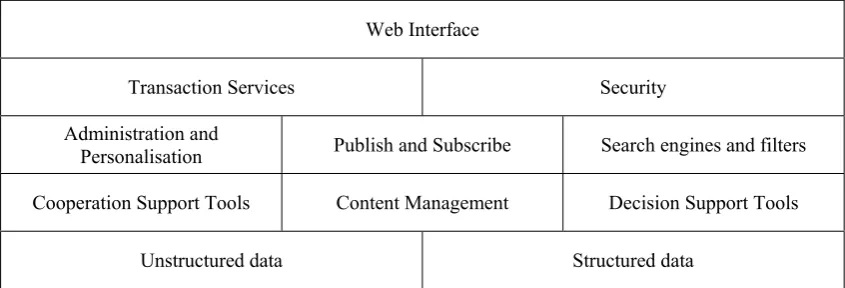
The presentation website of a company is still quite often separated from the information system itself. However, integration of the two is gradually being introduced. Company information systems are progressively changing into so called Company Information Portals. This facility represents a group of www applications that enable its users to access internal (company) or external information in a per-sonalised form (see Figure 1). Many examples of the advantages of different types of web sites have been presented (Havlíček 2004a).
Web interface, transaction services, security, ad-ministration and personalisation. Tools of this kind belong to the so-called portal core services the aim of which is to ensure correct access to other services in the required quality and according to the needs of individual users.
Publish and subscribe. Tools of this group ensure event-managed communications. After publishing a piece of information (i.e. saving it in the system), it
is distributed to the people who have subscribed to this kind of information.
Search engines and filters implement the search in structured as well as unstructured data. These tools work with both the document model, and the data model, which is used for the description of structured data in a company.
Cooperation support tools, the so-called groupware systems, support mainly communications between individual employees and teams at both vertical and horizontal levels. They enable coordination in solv-ing various tasks.
Content management. This group includes tools that support working with unstructured (internal or external) data saved in any electronic format. These tools manage saving and storage of data in a company data storage facility.
Decision support tools make it possible to obtain information from operational data and from other defined internal and external information and data sources. Information acquired in this way is further processed by analytical systems, which are designated as Business Intelligence. The range of tools for DSS is described by Havlíček et al. (2003).
Cooperation support tools – Groupware
The fundamental functions of Groupware include electronic mail, calendar, on-line instant messag-ing and document management (Vaněk, Jarolím 2004).
Electronic mail is becoming more and more signifi-cant today, as confirmed, for example, by Gartner or META Group surveys, which show that electronic mail undoubtedly belongs to technologies the im-plementation of which brings the greatest efficiency to companies.
Web Interface
Transaction Services Security
Administration and
Personalisation Publish and Subscribe Search engines and filters
Cooperation Support Tools Content Management Decision Support Tools
[image:2.595.86.509.597.741.2]Unstructured data Structured data
Calendar is also a widely used function, which supports contacts administration, and a centralized calendar of clients with a possibility of mutual sharing of information so that they can plan deadlines, meet-ings, use of facilities and so forth. The significance of its use in the modern society is so great, that it is proving to be irreplaceable. Nevertheless, the actual level of its use has been relatively small so far – due to the insufficient appreciation of its functional pos-sibilities by the management and to difficulties with its widespread implementation, etc.
On-line communication – Instant Messaging pro-vides another, very efficient, tool for communica-tions by users and user groups – primarily within the company. Implementation of this function is increasingly becoming more frequent. However, there is a problem posed by the general popular-ity of informal implementations of the ICQ type (security, communication control, etc), which tend to contradict with the company policy, provided that such policy exists in the first place. It can then be understood why this function is inevitably and justly diverted to closed user groups in the intranet environment.
Document management supports efficient creation and management of documents in combination with sharing and remote access. Its implementation is still the least used basic function of the groupware products. Where the functions within document management are concerned, there are practically no existing barriers such as those mentioned in the examples above. By contrast, the problem here lies in the approach of the company management, which has an inadequate concept in the field of ICT (i.e. lack of appreciation of the benefits of implementation).
Other important characteristics concerning the level of information infrastructure in relation to groupware are as follows:
Integration with the Directory Facility – this is a very important link between the central storage facility of all information (central administration of net services, security, users, contacts etc.) and the possibility of its management – this is primarily important for eDirectory, and Active Directory.
Mobile appliances support – an important func-tion that does not only represent an increase in the widespread use of appliances of the PDA type (Palm, Pocket PC) but also of modern mobile phones. This naturally includes Smartphone appliances as well.
Native client – this now represents an integrated product with an intuitive and user-friendly interface. Its design and function significantly influence its acceptance by users and its overall implementation
functionality. It contains a comprehensive menu of the functions of a particular system.
Localisation – a full localisation of the product (nowadays this is quite common for all products) is a prerequisite for its successful implementation in Czech environment.
Web client – together with the development of internet applications, the web interface support, representing a possibility of remote access without having to use a client application, has become an indispensable function of all systems. It generally comprises a subgroup of client application functions, which is quite sufficient for basic work. This function is being continuously improved.
Supported platforms – depending on the company, these range from the Windows environment to a mul-tiplatform – such as Windows, Unix and Linux).
Integration of Portal Solutions within IS
The technological evolution of portal applications is very fast. In the course of their practical imple-mentation within a company information system, it is possible to distinguish four logically interconnected phases (Havlíček 2004b):
1. Content aggregation (1998–2001)
2. Application aggregation – Access to applications and services (2000–2003)
3. Content & Services Integration (2002–2005) 4. Smart Enterprise Suite (SES) (2005+)
Phase No. 1 – Content aggregation
Self-maintenance and personalisation are typical features of these applications:
–self-maintenance means that portal users manage their personal information themselves (contact address, interest area, etc)
–personalisation is a process in which the users themselves define what information they want to see on the main page of the portal.
Web applications of the first commercial portals such as “My Atlas”, can serve as an example. However, we have to emphasise that while on the Internet it is the provider who inserts advertisements and links to commercial information, on the Intranet, it is the employer who can force upon us important informa-tion on company events etc, while we have no opinforma-tion to intervene in it.
Phase No. 2 – Application aggregation – Access to applications and services
internet browsers (thin client). Thus, we can eas-ily include these applications in an intranet portal (such an application has been given a name – Web Application Server – WAS). The advantage of WAS is an opportunity to work with company applications from any part of the world (for instance, when in the Internet Café).
Phase No. 3 – Content and services integration
Together with an increasing number of web appli-cations, it is possible, and even quite convenient, to place on the portal some additional company services, such as applications for a holiday or business trip, as well as services which are connected to the net operation (Helpdesk, requests for access to a specific data source, etc.).
Phase No. 4 – Smart Enterprise Suite (SES)
Based on the current conceptions, the fourth phase represents a complex integration of people (or more precisely, of their activities) with company processes and applications. According to the Gartner consul-tancy firm, when planning a full integration solution, it is necessary to consider these factors:
– Content management. SES makes it possible to pub-lish all relevant information (such as documents or tasks) on the portal. At the same time, the published content is classified for various user roles. – Collaboration and community support. A possibility
to create virtual jobs for teams of people working on specific projects, business tenders or marketing campaigns, etc.
– Process management. It is possible to create a ran-dom workflow according to either stable (processing orders) or immediate needs (the so called ad-hoc workflow). There is an option to monitor the proc-esses.
– Business intelligence and data analytics functional-ity. Generating various analytical views of relevant data supports primarily strategic management and decision-making. These views provide answers to questions such as: Which product made the highest profit in a particular region?
– Multichannel access. Access to data and processes in any part of the world and to any facility (rang-ing from desktop computers, laptops and internet kiosks to mobile phones).
– Portal framework – Integration with application portals. An easy integration with web application servers from different manufacturers allows inter-connection of individual economic applications (financial, human resources, business, etc) into one unit without any effort. Gradually, standards providing for interoperability of applications such
as XML, SOAP and web services are being estab-lished.
– Identity management, information rights manage-ment. The employees have access only to informa-tion which is relevant to their task. However, their “computer” identity changes within the individual economic systems. Management of uniform identity across all applications and systems is very demand-ing financially and, for the time bedemand-ing, it is therefore bypassed by simpler and cheaper means.
Example of solution – Novell GroupWise system implementation
An example of a solution for a very extensive network environment is the current implementa-tion of the electronic mail system at the Faculty of Economics and Management (FEM), Czech University of Agriculture Prague (CUA), Czech Republic. The GroupWise system was installed there at the begin-ning of 2004. Its simpler version, NetMail, is used for the student mail system. At present, all university students are using this system actively, the total of 12 000 users.
GroupWise supports the process of secure messag-ing and a range of services, such as system calendar, planning (of business meetings, tasks, sources and facilities), contact and document management, on-line communications and other productive tools for the support of work teams. Users can access the GroupWise system services from their personal computers connected to the local network, through the web browser using any Internet connection, and also via wireless applications such as mobile phones. Security is a crucial feature of the system. All data are saved in databases and encrypted by the means of randomly generated encrypt keys. In order to secure data transmission through the network the GroupWise system utilizes the following secu-rity standards: Secure Socket Layer (SSL), Secure Multipurpose Internet Mail Extension (S/MIME), Public Key Infrastructure (PKI), and Transport Security Layer (TSL). Several anti-spam applications are available, and third party antivirus programs are also supported.
modi-fied according to user needs (graphic modification, or automatic synchronization with other systems, such as alternative mail accounts, on-line help, etc). Mail functions linked to the calendar (messages, tasks, notes, reminders) in combination with the directory (users, organizations, search, connection to mail, etc), are also available. The user environ-ment was set up in such a way that individual users are minimally restricted, while being provided with a high level of security.
Table 1 outlines the settings for the user environ-ment system.
[image:5.595.64.529.84.214.2]Automatic maintenance of mail boxes is set up to empty the trash boxes after 30 days, archives of meetings, tasks and notes after 14 days, and archives of mail boxes after 30 days. In addition, the PEF us-ers have access to applications of files sharing, mail box addresses sharing, POP3, IMAP4 and NNTP (all secured), search in LDAP database and they can work within three modes: on-line, cache and remote. Table 1. Settings for the user environment system
Size of mail box 500 MB
Full mail box alert (upper limit) 80%
Maximum size of sent message 30 MB
Address format (e-mail) [email protected]
Path to mail box files C:/GWarchiv
Sending group messages Yes – only within the mail authority(Restricted to the Dean’s office only)
[image:5.595.70.525.391.746.2]Incoming mail alert Yes
Example of solution – Document Management for the Dean’s Council
The Dean’s Council (DC) at FEM, CUA Prague, meets once a month. All written documents prepared for the DC meeting were sent few days before the event via electronic mail to all members of the Council. Archiving of written material was managed by the Dean’s Secretariat, as well as by each DC member according to his or her needs.
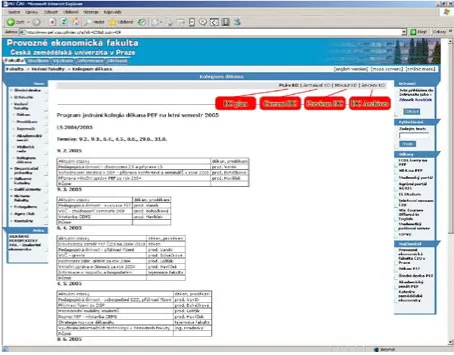
In January 2004, a specific intranet selection for the “Dean´s Council” Menu was placed on the faculty server www.pef.czu.cz. It consisted of four naviga-tion panes:
DC plan Current DC Previous DC DC Archives
Explanation of the content of the individual panes: – DC plan – contains a plan of the DC activities for
one semester. It is inserted before the beginning of the semester.
– Current DC – contains materials prepared for the DC meeting in a particular month, within the struc-ture which is based on the program of the meeting being prepared.
– Previous DC – contains discussed and approved versions of materials of the previous DC meeting plus verified minutes from the DC meeting. – DC Archives – contains discussed and approved
materials in the Division according to the indi-vidual DCs.
The Dean´s Secretariat using a special editorial system operates the content management itself. Comprehensive and suitably arranged documentation is available to users (DC members) – see Figure 2.
CONCLUSION
It is cleat that internet technologies significantly contribute to the overall integration of company
activities. By using facilities of the Web Content Management, it is possible to control and manage the web site content easily. However, it is necessary to approach the practical use of these technologies in companies gradually. Depending on the company goal, it is crucial to gain some experience and make a decision at the right time in order to design a website which is linked to the existing information system, while using operationally undemanding solutions such as editorial systems. An efficient Groupware and, especially, the use of all its integrated functions, also have a great impact on the quality of communication and the company’s competitiveness.
REFERENCES
Havlíček J., Havlíček Z., Vaněk J., Šilerová E., (2003): AGRIS – A Portal with Decision Support System for Agribusiness. Journal of Decision Systems, 12 (2): 177–191; ISBN 2-7462-0738-9.
Havlíček Z. (2004a): Web technology and farmers. Ag-ricultural Economics – Czech, 50 (6): 243–247. Havlíček Z. (2004b): Web content management –
Možnosti při správě a aktualizaci webovských sídel In: Proceedings of the XIII International Confer-ence on Agrarian Prospects, Czech University of Agriculture Prague, 22–23 September, Vol. II: 651–655; ISBN 80-213-1190-8.
Vaněk J., Jarolímek J. (2004): Implementace systému GroupWise na PEF ČZU v Praze (Implementa-tion of the System Groupwise on the FEM CUA Prague). In: Proceeding of the XIIIth International
Conference on Agrarian Prospects, CUA Prague, 22–23 September, Vol. II: 680–685; ISBN 80-213-1190-8.
Arrived on 21st February 2005
Contact address:
Doc. Ing. Zdeněk Havlíček, CSc., Ing. Jiří Vaněk, PhD., Česká zemědělská univerzita v Praze, Kamýcká 129, 165 21 Praha 6-Suchdol, Česká republika