Quando: enabling museum and art gallery practitioners to
develop interactive digital exhibits
STRATTON, Andy, BATES, Christopher
<http://orcid.org/0000-0002-1183-1809> and DEARDEN, Andrew <http://orcid.org/0000-0002-5706-5978>
Available from Sheffield Hallam University Research Archive (SHURA) at:
http://shura.shu.ac.uk/15722/
This document is the author deposited version. You are advised to consult the
publisher's version if you wish to cite from it.
Published version
STRATTON, Andy, BATES, Christopher and DEARDEN, Andrew (2017). Quando:
enabling museum and art gallery practitioners to develop interactive digital exhibits.
In: BARBOSA, Simone, MARKOPOULOS, Panos, PATERNÒ, Fabio, STUMPF,
Simone and VALTOLINA, Stefano, (eds.) End-user development : 6th International
Symposium on End-User Development, IS-EUD 2017, Eindhoven, The Netherlands,
June 13-15, 2017, Proceedings. Lecture Notes in Computer Science (10303). Cham,
Springer, 100-107.
Copyright and re-use policy
See
http://shura.shu.ac.uk/information.html
Sheffield Hallam University Research Archive
Quando: Enabling Museum and Art Gallery
Practitioners to Develop Interactive Digital Exhibits
Andrew Stratton, Chris Bates, Andy Dearden
Cultural Communication & Computing Research Institute, Sheffield Hallam University, UK [email protected], [email protected], [email protected]
Abstract. Museums and Art Galleries are challenged to inspire, engage and involve visitors by presenting their collections within physical exhibitions. Curators and exhibition professionals are increasingly telling stories using digital interactivity. This work introduces Quando, a visual programming based toolset that domain experts can use to create interactive exhibits. A small case study demonstrates the language in use at during an archaeological excavation.
Keywords: Visual Programming; Museums; Programming Environments; End-user Programming
1
Introduction
The nature of museums and galleries is changing as Cultural Heritage Professionals (CHPs), including curators, attempt to bring the past to life by extending visitor exhibits with digital interactivity, including multimedia and new technologies such as augmented reality. CHPs may need, or wish, to create these extensions themselves but, typically, they lack skills and experience in the creation of hardware and software. This paper discusses the design of the Quando toolset, which includes an event based visual programming language designed for the creation of Visitor Interactive Digital Exhibits (VIDEs). Quando supports Museum and Art Gallery Practitioners in authoring interactive behaviour through rules attached to exhibits. Quando uses connections between blocks to simplify the authoring of interactive multimedia elements whilst eliding notions of programming. The visual editor presents a Domain Specific Language (DSL) using terms that are familiar to CHPs and the editor encourages drag-and-drop creation and configuration.
2
Background
The nature of museums and galleries is changing as Cultural Heritage Professionals (CHPs), attempt to bring the past to life by extending visitor exhibits with digital interactivity, including multimedia and new technologies such as augmented reality.
CHPs have a deep knowledge of their collections and the ability to present those collections in ways that tell their story and that allow visitors to understand, analyse and reflect. However, they may lack knowledge of, or experience or interest in, the tools and techniques that are used to build immersive multimedia exhibitions.
There are many different approaches being used to augment, supplement or replace displays of objects, [4, 5, 12]. A common theme is for designers. developers and CHPs to collaborate through the use of approaches including co-design, [1, 7] and the use of supportive frameworks designed to explicitly support the domain of Cultural Heritage [3].
In this work we adopt an approach that seeks to empower CHPs using a visual DSL and block-based editor, with rapid prototyping of executable visitor interactive exhibits, through the co-design of the visual Blocks used to describe behaviour rather than co-design of the behaviour itself. The Quando blocks are similar to the trigger, action approach described in [10], but are also intended to offer a closer match to the domain of Cultural Heritage. The goal of this work is similar to the end goal of EUD (End User Development) stated in [6], i.e. that of ‘empowering’ CHPs ‘to develop’ digital interactivity for visitors ‘themselves’.
3
Quando
Quando is both a DSL and a prototype toolset, including an editor, oriented around a set of visual block tools, building on the Google Blockly visual programming tools [2], that CHPs can use to create VIDEs incorporating interactive media. The augmentations that CHPs may wish to apply to exhibits cover a massive range from playing video or audio on-demand; through physical object and touchless interactions; to location and context-aware tracking of visitors. The range of possible augmentations is large and their style, language and use vary between different contexts making implementation a non-trivial undertaking.
Quando articulates the work of producing interactive exhibits by allowing a programmer to create a library of augmented behavioural components (blocks). Using a visual editor CHPs combine and configure these blocks to define more complex behaviours that enhance visitors' experiences. These behaviours can be revisited by CHPs and updated without resorting to the use of skilled developers.
An Agile methodology was adopted to allow the extension and customisation of Quando based on co-design like feedback from CHPs, including modification of terminology, block design and the client side api/library.
4
Creswell Crags Case Study
Creswell Crags is an area of limestone cliffs and caves in the English Midlands that were inhabited by nomadic groups during the period 55,000 to 10,000 years ago, including the last ice-age when these were some of humanity's most northerly habitations [11]. Together the limestone gorge, caves and findings tell a story about our ancestors lives during the Palaeolithic. Numerous artefacts left by Palaeolithic people have been found in the caves and are deposited in museums across the UK for study and display. The caves contain both fragile early artworks and areas that have yet to be excavated, currently closed to the public. Such preservation measures alongside the dispersal of findings mean that CHPs have to find new, engaging and informative ways to tell their stories in the Visitor Centre.
The Visitor Centre has an exhibition with physical displays, containing local finds, as well as a variety of multimedia including video loops, interactive touch-screens and projected displays that are suitable for visits by schools and other organized groups. The multimedia content was created for the exhibition by external designers and cannot be edited by the museum's staff. The Exhibition and Event organiser was keen for the exhibition to be both updated and updateable.
The work presented here includes the display of media alongside museum display cases where the media are controlled by visitors using gestures that are sensed with a touchless Leap Motion Controller. The Leap Motion is a small, cheap sensor that detects the motions of hands and fingers in three dimensions as they move in front of it. Early adopters and researchers have typically used the Leap in virtual and augmented reality applications. In this work it is used to control media content, replacing more traditional mouse-driven or newer touch-driven interfaces. Significant complexity and some serious software engineering lie behind the use of these apparently simple controllers.
The remit from Creswell Crags was to display excavation media as the excavation is being performed; the system had to:
Hold lists of multimedia artefacts (content) and museum displays Associate artefacts with displays
Detect hand movements made by visitors
Make choices about what media to display and how to display it based on hand movements
The case study followed a qualitative evaluation of an initial prototype of Quando, [9], which included staff from the museum. Having seen the prototype, the part-time Exhibitions and Event Organiser was keen to use Quando, ‘[it] would be brilliant for us to have this…to be able to photograph the excavation whilst it’s happening and then upload it with an explanation of what they found and what it means for the site’.
The full-time Director at Creswell Crags invited the researcher to provide tools to allow staff to create a VIDE for an Archaeological Excavation by Durham University. Discussions with four CHPs identified the need for a ‘more interactive’ exhibit than those already at Creswell, where a large screen projection related to climate was described as ‘just a (video) loop’. Staff also identified a desire for audio ‘ice age sounds’ to be incorporated. Staff were very keen to use the touchless Leap Motion controller, partly due to the expected increased durability of a non-physically handled interface, and also due to perceived hygiene concerns of visitors.
[image:5.595.159.285.502.558.2]Multimedia Blocks such as those shown in Figure 1, which had been used in the previous investigation, [9], were included within a starting ‘library’ for the CHPs:
Fig. 1. Initial Multi Media Quando Blocks
Further discussions with CHPs led to new blocks being created for representing virtual Vitrines/Display Cases, with navigation between Display Cases being represented through visible ‘Labels’. This model is conceptually similar to web page based hyperlinks offering hypertext navigation, but the Creswell staff preferred this terminology.
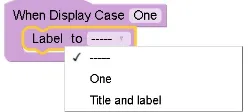
These concepts were implemented as Blocks and evaluated by Creswell staff, who preferred the term ‘Display Cases’ over ‘Vitrines’, so the blocks were redesigned as shown in Figure 2:
Fig. 2. First Pass Case Study Blocks
These Blocks were extended to generate browser compliant JavaScript with associated extensions to the Quando runtime library; allowing a Leap Motion controller to be used to select labels to navigate between Display Cases.
transparency change with a mouse click being triggered if the hover stays over the same label.
A key requirement for the museum include a robust, kiosk based, presentation that could be powered on and off at the mains and required no interaction to start up. The wireless network availability proved to be too restrictive and staff did not have access to override the security restrictions. The wired network was also limited to registered network cards and could not be changed. To solve this issue, two ‘power line’ (Ethernet over power) network connections were installed, one in the Exhibition, and the other in a ‘back office’ accessed through a staff PC. This allowed the staff to develop the interaction remotely through the browser based editor, saving (deploying) any behaviour to the exhibit PC. Content deployment was by physical USB transfer to the exhibit PC.
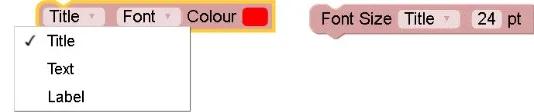
[image:6.595.133.400.360.416.2]Four CHPs were involved in the two week authoring of the interaction, with the editor being mainly used by one member of staff, after a short, one hour, training session. Staff requested further extensions to Quando to allow simple changing of Font characteristics, e.g. colours and size. Blocks were quickly implemented to allow these changes to the Labels, Text and Title within different Display Case Blocks. Figure 3 illustrates these blocks.
Fig. 3. Second Pass Case Study Blocks
The final interaction used images and text contained in a set of six 'Display Cases' with the structure shown in Figure 4:
Fig. 4. Navigation structure of Display Case Blocks
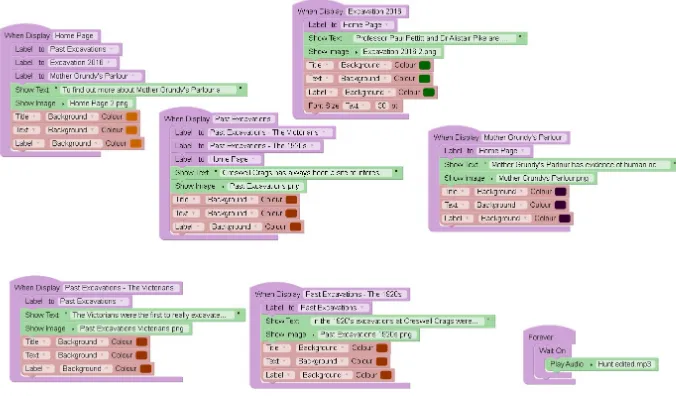
Each of the Display Case Blocks contained the labels, image, text and configuration for style as set by Creswell staff. Figure 6 shows the finished exhibition specification:
Fig. 5. Client Behaviour
As also shown in Figure 6, a new 'Forever' Block was developed at the request of the CHPs to play a continuous audio loop throughout the exhibition space. The Forever block generated code runs asynchronously with the event handling for visitor navigation. The Display block generated code is automatically bound to associated toolset event handling. In this example, only one Display Block will be visible at a time.
[image:7.595.135.473.370.568.2]created; iterations are executed within the Client run time library, but the end users did not need domain access to iteration blocks.
5
Case Study Discussion
From a programmer’s perspective, the behaviour described by the Creswell staff lacked complexity as there was neither error checking nor recovery, little navigation and no abstract data types. However, the language enabled the use of more complex technologies than might be expected from unskilled programmers. These included one instance of looping audio that played through the whole exhibition area whilst others were contained within individual display cases.
Display cases, with the previously mentioned bug avoidance blocks, contained around 14 blocks that the users manipulated, with about 100 required in total to fully implement an exhibit. The resulting generated code was about 140 lines and around 650 ‘words’ of data and code. After fixing the behaviour bug, this has been reduced to fewer than 40 blocks, under 120 lines of generated code and around 550 ‘words’.
After being shown how to create a simple interaction, users added complexity mainly by copying existing behaviours and modifying them. There appears to be a desire to organise behaviours into groups of blocks that can be associated with a single display; this grouping also matches the underlying event based interaction. Copying may also have happened because the prototype had a limited set of blocks and the users had to find ways to work within this limitation.
The structure of the chosen exhibit maps closely to a web like interface, but also include cross display aspects, such as the background audio and also the staff accepted model that the label to a display contains the same text as the display title. Staff were not limited to a two tier structure with a maximum of three links to other displays; this was a structure they created - they could have chosen other structures, such as ring like or fully linked structures; possibly this is a familiar browser model that is encouraged by using a browser based client and editor.
The Leap Motion interface itself was generally a success for developers but visitors had to be given (simple) printed instructions on its use.
The Agile, co design, approach has produced useful results, though with some issues related to the very fast turnaround time. It is worth noting that workarounds could be used to avoid introduced inconsistencies; traditional techniques would either have stalled with no useful toolset and the CHP requested improvements would likely have been delayed for a subsequent investigation.
6
Conclusions
In this paper we have shown that using a simple visual language, non-programmers can design, implement and configure moderately complex interactive multimedia experiences. These experiences can be deployed into settings within museums in which they both disrupt and enhance traditional approaches to displaying and explaining exhibits. The simplicity of the Quando language is not an impediment to its use. CHPs were seen to be capable of modifying and configuring blocks in the editor so that those blocks performed the tasks that they required even when those behaviours were not necessarily built into them by the software developer.
The integration of the visual DSL and editor articulates readily with the ways that professionals working in cultural heritage talk about and understand the idea of an exhibition. Through the DSL they are able to both design and create augmentations for their exhibits and use these to demonstrate areas for future work to software developers.
References
1. Díaz, P., Aedo, I. and Bellucci, A., 2016, September. Integrating user stories to inspire the co-design of digital futures for cultural heritage. In Proceedings of the XVII International Conference on Human Computer Interaction (p. 31). ACM.
2. Fraser, N. (2016). Google blockly - a visual programming editor. URL: https://developers.google.com/blockly/. Accessed January 17.
3. Garzotto, F. and Megale, L., 2006, May. CHEF: a user centered perspective for Cultural Heritage Enterprise Frameworks. In Proceedings of the working conference on Advanced visual interfaces (pp. 293-301). ACM.
4. Grinter, R.E. et al., 2002. Revisiting the visit: Understanding How Technology Can Shape the Museum Visit. In Proceedings of the 2002 ACM conference on Computer supported cooperative work. (pp. 146-155). ACM.
5. Kocsis, A. & Barnes, C., 2008. Making Exhibitions, Brokering Meaning: Designing new connections across communities of practice. In Design Research Society Biennial Conference. (pp. 13).
6. Lieberman, H., Paternò, F., Klann, M. and Wulf, V., 2006. End-user development: An emerging paradigm. In End user development (pp. 1-8). Springer Netherlands.
7. McDermott, F., Maye, L. & Avram, G., 2014. Co-designing a Collaborative Platform with Cultural Heritage Professionals. In Irish HCI conference. (pp. 18–24).
8. Resnick, M. et al., 2009. Scratch: Programming for All. Communications of the ACM, 52, (pp.60–67).
9. Stratton, A. et al., 2016. Investigating Domain Specific Visual Languages for Interactive Exhibitions. In Psychology of Programming 2016, 27th Annual Workshop. (pp 188-191) (pre-print).
10.Ur, B., McManus, E., Pak Yong Ho, M., & Littman, M. L. (2014, April). Practical trigger-action programming in the smart home. In Proceedings of the SIGCHI Conference on Human Factors in Computing Systems (pp. 803-812). ACM.
11.Wall, I. et al., 2009. Creswell Crags. URL: http://www.creswell-crags.org.uk/. Accessed January 17.