CDU-710 SINGLE-ENDED
CDU-712 SINGLE-ENDED/DIFFERENTIAL INTELLIGENT
UNIBUS SCSI HOST ADAPTER
~U~CMD
~
ETECHNOLOGr~~~~~
CDU-710 SINGLE-ENDED
CDU-712 SINGLE-ENDED/DIFFERENTIAL
INTELLIGENT
UNIBUS SCSI HOST ADAPTER
CMD TEC~OLOGY, INC •.
1 Vanderbilt Irvin'e, CA 92718
(714) 454-0800
FCC WARNING
This equipment generates, uses and .can radiate radio. frequency
energy, and if not installed and used in accordance with the
technical manual, may cause interference to radio communications.
It has been tested and found to comply with the limits for a
Class A computing device pursuant to Subpart J of Part 15 of
Federal Communications Commission (FCC) Rules, which are designed to provide reasonable protection against such interference when
operating in a commercial environment. Operation of this
equipment in a residential area is likely to cause interference
in which case the user at his own expense will be required to
take whatever measures may be required to correct the
interference.
Copyright c 1989 CMD Technology
The information in this document is for information purpose and is subject to change without notice.
CMD Technology, Inc. assumes no responsiblilty for any error herein.
CHAPTER 1
CHAPTER 2
CHAPTER 3
CHAPTER 4
CHAPTER 5
APPENDIX A APPENDIX B APPENDIX C APPENDIX D
TABLE OF CONTENTS
INTRODUCTION .•...••••.•....•..•..•.•..•..•.••.. 4
CDU-710 SPECIFICATIONS ••..•.••..••••.••••...•.. 5
2.1 Controller Specifications ••••••••.•••. 5
INSTALLATION •••...••••...•....•••.•.••..••... 6
3.1 3.1.1 3.1.2 3.1.3 3.1.4 3.1.5 3.1.6 3.1.7 3.1.8 3.1.9 3.1.10 3.2 3.2.1 3.3 3.4 3.4.1 3.4.2
CDU-710 Jumper Settings ..•••.••••... 6 CSR Address Selection •..•..•.•••.•.•.. 6 Single-Ended/Differential Selection .•. 7 SCSI Host Adapter ID Selection ••..•••• 8 SCSI Target ID Selection ...•..••..•.•• 8 SCSI Terminator Power Option ••••..•.• 10 Tape Mode Select •..••...••..•••...••• 10 Tape Fast Search Option •.••..••.••..• 11 LED Indicators . . . • . . . . • • • • . . • . . . 11 Disk Auto Boot Selection .••.•••... 12 Power On/Off Protection .•.•••••.•...• 12 CDU-710 Mounting Slot Selection .••.•• 17 NPG Non-Processor Grant Signal ••••.•• 17 DMA Burst Length and Dwell time .•.••. 18 SCSI Bus Cabling and Termination ••... 19 Single-Ended ••....•.•..•.••••••.•...• 19 Differential . . . • . . . • . . . • . . . 19
ON-BOARD UTILITY •••••••.••.••••••••..•••••.••• 21
4.1 4.1.1 4.1.2 4.1.3 4.1.4 4.1.5 4.1.6 4.2 4."2.1 4.3
Disk Utility for CDU-710/M, CDU-710/TM 21 Configure LUN Offset ..••..•••••.••.•• 22 Formatting a Drive ....••..••.••.•...• 23 Qualifying a Drive ••.••.•••.•••...••. 22 Manual Replace Bad Sectors .•••••.•..•• 22 Read, Write and Verify Test ••••••..••• 23 Utility Bootstrap ....••••••••••..•..• 23 Tape Utility for CDU-710/T, CDU-710/TM 26 Configure Tape LUN Offset ••••••....•• 27 ODT Utility .••.••.•••••.•••.••..••.•. 28
SCS I INFORMATION •..•••.•••.•..••••••.•••...• 32
5.1 SCSI Definitions •.••..•.••...•.••••..••• 32 5.2 SCSI Commands •••.••.••..••••••••••.•.•. 33 5.3 SCSI Status •.••..••.•.••.••.••.••....•. 34 5.4 SCSI Messages ••••••.•..•••.••.••••...•• 34 5.5 SCSI Single-Ended Signals •.•••••••.•.•• 35 5.6 SCSI Differential Signals •.•••••••.•..• 36
FIGURE 1 FIGURE 2
TABLE 1
LIST OF FIGURES
Jumper Block Location Diagram . . . . • . . . • • • • • 13
Non~Processor Grant (NPG) location ....•.••••. 17
LIST OF TABLES
Jumper Setting on the CDU-710 •••••.•.•.•••••• 14
[image:5.615.48.563.54.774.2]CHAPTER 1 INTRODUCTION
CDU-710 , CDU-712 UNIBUS SCSI MSCP/TMSCP DISK/TAPE CONTROLLER
The CDU-710 is an intelligent quad-wide Unibus SCSI host which is fully compatible with the DEC Mass Storage Protocol (MSCP) and the DEC Tape Mass Storage Control
(TMSCP).
adapter Control Protocol
The CDU-710 can be used with the PDP-11/84, PDP-ll/70, PDP-11/44, PDP 11/34, PDP 11/24, VAX 11/730, VAX 11/750, VAX 11/780, VAX 8250, VAX 8350, VAX 8550, VAX 8600, VAX 8800 and other DEC computers with a UNIBUS. It supports RSX, RSTS, VMS, UNIX, ULTRIX, DSM-11, and other operating systems which use the DU/MU drivers.
The CDU-710 supports 16K bytes data buffer, command queuing, standard SCSI bus arbitration, disconnect and reconnect, and all required SCSI commands. Up to seven single-ended SCSI target devices (magnetic disk and tape) can be connected to CDU-710 with SCSI bus data transfer rate up to 2M bytes per second.
The CDU-710 supports a variety of SCSI devices including magnetic disk, magnetic tape and optical disk drives. The CDU-710/M is the SCSI. host adapter that supports disk drives only. The CDU-710/T is the SCSI host adapter that supports tape drives only. The CDU-710/TM supports both disk and tape drives, etc.
The CDU-710/M has an on-board utility for users to configure and format drives, scan bad blocks and replace them automatically. The logical unit number offset is stored in an on-board non-volatile RAM (NOVRAM).
The CDU-710 comes standard with an installation manual, and one year warranty.
CHAPTER 2 CDU-710,CDU-712 SPECIFICATIONS
2.1 UNIBUS CONTROLLER SPECIFICATIONS:
Emulation DISK: TAPE:
CSR Address:
CDU-710fM (Disk 9nly) IC P70011B
CDU-710fT (Tape only) IC P70012B (U102)
IC P70012C (U102)
CDU-710fTM
(Disk and Tape) IC P70013A
Interrupt Vector: Command Queuing:
Data Buffer Capacity: Bootstrap:
Formatting:
Software Supported:
Peripheral Interface:
Devices Supported:
System Performance: SCSI Transfer Rate: SCSI Bus Parity:
SCSI Driver/receiver:
SCSI Cable Length:
MSCP (DU driver)
TMSCP (MU driver, same as TK50 and TU81)
772150, 760334, 760354, 760340, 760344, 760350,
774500, 760404, 760444, 760544, 760410, 760450,
Support 30 CSR, please
772150, 760334, 760354 774500, 760404, 760444
Software Programmable 16 commands
16K bytes data buffer
760374, 760360
760504, 760454
see Appendix D
(Disk) (Tape)
Auto bootstrap or utility bootstrap
On-board format and bad block replacement All standard DEC operating systems
that use the DU/MU driver
Small Computer System Interface (SCSI)
Up to 7 SCSI devices CDU-710/T 7 Tape Dives CDU-710/M 7 Disk Drives
CDU-710/TM 4 Disk and 3 Tape Drives
Support disconnect/reconnect 2MB/sec (maximun).
Odd parity
CDU-710 supports Single-ended
CDU-712 supports Single-ended/Differential CDU-710 up to 6 meters (Single-ended)
CDU-712 up to 25 meters (Differential)
Operating Temperature: 5 C to 50 C
Relative Humidity: 10% to ~O%, Non-condensing Power Requirement: +5V DC, 2.8A
3.1
3.1.1
CHAPTER 3 INSTALLATION
CDU-710 Jumper Settings
CSR Address Selection
The CDU-710 has jumpers to select different eSR addresses.
Select the desired address by installing the jumper plugs. The
standard address for the CDU-710/M is 772150. The standard
address for the CDU-710/T is 774500.
A new IC P70012C has been installed at location UI02 of the
CDU-710/T to support 30 tape CSR addresses. Only 8 eSR jumper
settings are shown in the following table. Please refer to
Appendix D for the other 22 CSR jumper settings.
CSR Address Wl1 W15 W12 W13 W14
---
---Standard: 17774500 2-3 IN 1-2 IN 1-2 IN 1-2 IN 2-3
Second: 17760404 2-3 IN 1-2 IN 2-3 IN 1-2 IN 2-3
Third: 17760444 2-3 IN 1-2 IN 1-2 IN 2-3 IN 2-3
Forth: 17760504 2-3 IN 1-2 IN 2-3 IN 2-3 IN 2-3
Fifth: 17760544 2-3 IN 1-2 IN 1-2 IN 1-2 IN 1-2
Sixth: 17760410 2-3 IN 1-2 IN 2-3 IN 1-2 IN 1-2
Seventh: 17760450 2-3 IN 1-2 IN 1-2 IN 2-3 IN 1-2
Eighth: 17760454 2-3 IN 1-2 IN 2-3 IN 2-3 IN 1-2
The old Ie P70012B at location U102 of the CDU-710/T only
supports 8 eSR addresses. The CSR jumper settings are the same as those shown in the above table.
The eSR jumper setting for the CDU-710/M (Disk only) with IC
P70011B at U102:
eSR Address W12 W13 W14
---
---Standard: 17772150 1-2 IN 1-2 IN 2-3 IN
Second: 17760334 2-3 IN 1-2 IN 2-3 IN
Third: 17760354 1-2 IN 2-3 IN 2-3 IN
Forth: 17760374 2-3 IN 2-3 IN 2-3 IN
Fifth: 17760340 1-2 IN 1-2 IN 1-2 IN
Sixth: 17760344 2-3 IN 1-2 IN 1-2 IN
Seventh: 17760350 1-2 IN 2-3 IN 1-2 IN
Eighth: 17760360 2-3 IN 2-3 IN 1-2 IN
The CSR jumper setting for the CDU-710/TM (Disk and Tape) with IC P70.013A at U102:
Tape CSR Address W12 W13
---
---Standard: 17774500 1-2 IN 1-2 IN
Second: 17760404 2-3 IN 1-2 IN
Third: 17760444 1-2 IN 2-3 IN
Disable Tape 2-3' IN 2-3 IN
Disk CSR Address W14 W15
---
---Standard: 17772150 1-2 IN 1-2 IN
Second: 17760334 2-3 IN 1-2 IN
Third: 17760354 1-2 IN 2-3 IN
Disable Disk 2-3 IN 2-3 IN
If users require other CSR addresses than listed, please cousult
CMD Technology.
3.1.2 Single-ended or Differential Mode Selection
When a jumper shunt is installed in W2 pin 2-3 location,
single-ended SCSI drivers and receivers are enabled. When a jumper shunt is installed in W2 pin 1-2 location, the differential drivers and receivers are enabled.
The CDU-710 comes with single-ended SCSI drivers
and a jumper shunt installed in W2 pin 2-3
connector J3 is used for single-ended SCSI.
and receivers
location. The
The CDU-712 comes with both single-ended and differential SCSI
drivers and receivers. A jumper shunt is installed in W2 pin 2-3
location, i.e. single-ended mode is selected. The connector J2 is
used for differential SCSI. Users who want to use CDU-712 in
differential mode need to install a jumper shunt in W2 pin 1-2
location , disconnect the single-ended target devices from the
connector J3 and connect the differential target devices to the
connector J2 of the CDU-712. Whem power is applied to the
CDU-712, the corresponding green LED right next to the selected SCSI
connector will be on. Please refer to section 3.1.8 for LED
indications and Figure 1 for SCSI connectors.
Normally, the power on/off protection selection is jumpered
to match the SCSI mode selected. Please refer to section 3.1.10.
3.1.3 SCSI Host Adapter (Initiator) 1D Selection
Each device (Initiator or Target) on the SCSI bus requires an
unique SCSI .. Identif.ication address (0-7). SCSI ID 7 has the
highest priority on the bus. SCSI ID 0 has the lowest priority on
the bus. The SCSI Host Adapter of CDU-710 is factory configured
to SCSI ID 7. To alter the Host Adapter SCSI ID, users need to
change jumper setting of SWl-3, SWl-4 and SW1-S.
SW1-S SWl-4 SWl-3 Initiator ID
ON ON . ON 7 Highest priority
ON ON OFF 6
ON OFF ON 5
ON OFF OFF 4
OFF ON ON 3
OFF ON OFF 2
OFF OFF ON 1
OFF OFF OFF 0 lowest priority
Note: Do not have more than one device on the SCSI bus with the
same SCSI ID. The CDU-710 should always have a higher priority
than the drives on the SCSI bus.
3.1.4 SCSI Target ID Selection
Each SCSI device on (Initator or Target) on the SCSI bus requires
an unique SCSI ID. Since the CDU-710 SCSI host adapter requires
the highest priority, i t is configured to SCSI ID 7. The SCSI ID
of the target devices should be set from SCSI ID 0 to 6.
The CDU-710jT supports 7 tape drives.
drives should be configured as such:
CDU-710jT Tape Drive SCSI ID VMS
First Tape 0
Second Tap~ 1
Third Tape 2
Forth Tape 3
Fifth Tape 4
Sixth Tape 5
Seventh Tape 6
The SCSI ID of the tape
device name
The CDU-710/M supports 7 disk drives. drives should be configured as such:
CDU-710/M Disk Drive
First Disk Second Disk Third Disk Forth Disk Fifth Disk Sixth Disk Seventh Disk
SCSI ID
o
1 2 3 4 5
6
7
The SCSI ID of the disk
VMS device name
DUAO DUAl DUA2 DUA3 DUA4 DUA5 DUA6
PUAO (CDU-7l0/M)
The CDU-710/TM supports 4 disk drives and 3 tape drives. The SCSI ID of the disk and tape drives should be configured as such:
CDU-710/TM
Disk: First Disk Second Disk Third Disk Forth Disk
Tape: First Tape Second Tape Third Tape
SCSI
0 1 2 3
4 5
6 7
ID VMS device name
DUAO DUAl DUA2 DUA3
MUAO MUAl MUA2
PUAO/PTAO (CDU-710/TM)
When connecting more than one device to the CDU-7l0, be sure that the SCSI Bus is terminated correctly. (see section of SCSI Bus termination.)
3.1.5 SCSI Terminator Power Option
The CDU-710 supplies terminator power to the TERMPWR pin ~pin 26) of single-ended SCSI connector (J3) through a diode, a fuse and jumper block W3 for external SCSI drives. In order to prevent accidental grounding or misconnection of terminator power, no jumper shunt is installed in W3 location. To use this option, users should add a jumper shunt in W3 location. Please make sure that the pin 1 mark of SCSI cable matches with the pin 1 mark of SCSI device's connector before turning on the system power.
W3
W3 OUT IN
Single-ended SCSI terminator power disabled Single-ended SCSI terminator power enabled
The CDU-712 supplies terminator power to the TERMPWR pins (pin 25 and pin 26) of differential SCSI connector (J2) through a diode, a fuse and jumper block WI for external SCSI drives. In order to prevent accidental grounding or misconnection of terminator power, no jumper shunt is installed in WI location. To use this option, users should add a jumper shunt in WI location. Please make sure that the pin 1 mark of SCSI cable matches with the pin 1 mark of SCSI device's connector before turning on the system power.
WI WI
Please CDU-710 enabled.
3.1.6
OUT IN
Differential SCSI terminator power disabled Differential SCSI terminator power enabled
note that when the Exabyte tape drive is connected to the or CDU-712, the terminator power option needs to be
Tape Mode Select
The CDU-710fT will support ANSI variable mode tape format and fixed block mode format. The advantage of ANSI mode is media interchangeable. Tapes written by the CDU-710fT in ANSI variable mode tape format can be read by the SCSI host adapter of other computer systems that follow the ANSI format.
SWl-l SWl-2
OFF OFF
ON OFF
ON ON
TAPE FORMAT SELECT
Fixed Block Mode
ANSI Variable Mode but can read tapes written in Fixed Block Mode
Configuration Chart: SW1-1 SWl-2
EXABYTE Drive GigaTrend DAT Fujitsu 1/2 inch
Wangtek 1/4 inch
Archive 1/4 inch
Tandberg 1/4 inch
Caliper 1/4 inch
ON ON ON OFF OFF OFF OFF
ON ON ON OFF OFF OFF OFF
Note: 1/4 inch tape streaming tape drives which does not support
variable mode will be written in fix block mode even if the
switch is is set to ANSI variable mode.
3.1.7 Tape Fast Search Option
When set to the Tape Fast Search mode, the controller will enable
high speed forward and reverse filemark search. VMS may use this
mode if the user does not attempt a standalone boot or run other
programs that require the controller to keep track of the number
of data records between filernarks. In VMS standalone boot
application, this option need to be disabled. For the ISM-II
operating system, SWl-6 need to be set to ON position.
SWl-6 OFF
ON
Disable Tape Fast Search Enable Tape Fast Search
·3.1.8 LED Indicators
The CDU-710 has three LED's in the front of the board. The LED's are labeled DS2, DS3 and DS4.
LED COLOR
DS2 Green
DS3 Red
DS4 Green
INDICATIONS
Single-ended SCSI mode selected.
Error condition occured.
Power up OK and activity indicator. On power up,
this LED is turned on when the CDU-710 suceeds
in the self-diagnostic testing. The LED blinks to
show controller activity.
The CDU-712 has four LED's in the front of the board. The LED's are labeled DSl, DS2, DS3 and DS4.
LED
DSI
DS2
DS3
DS4
3.1.9
COLOR
Green
Green
Green
INDICATIONS
Dif£erential SCSI mode selected.
Single-ended SCSI mode selected.
Error condition occured.
Power up OK and activity indicator. On power up,
this LED is turned on when the CDU-712 succeeds
in the self-diagnostic testing. The LED blinks to
show controller activity.
Auto-Boot Enable Selection
For PDP-II disk users only, the CDU-710 may be set to provide an
auto-bootstrap at 771000 or 773000 on power up or whenever the
"Boot" switch is pressed. The auto-bootstrap may be enabled by installing a jumper shunt in jumper block W5 pin 2 and pin 3.
WS
Wl1
2-3 IN 1-2 IN
2-3 IN 1-2 IN
Auto-Boot enabled Auto-Boot disabled
Bootstrap address = 771000
Bootstrap address
=
773000If enabled, the bootstrap ROM at 771000 (or 773000) on the
CDU-710 will load the boot block to memory. The boot program then
bootstraps the operating system. Please make sure that there is
no existing boot ROM at that address selected by Wl1. The
controller will only auto-boot DUO: at CSR 772150. ·To boot other devices use Utility boot. (see section on utility Boot)
3.1.10 Power On/Off Protection
Circuits are added (from hardware revision B and up ) to protect
the SCSI bus from glitching when user turns on or off the power
of the CDU-710 or CDU-712. This feature can be very useful when
the CDU-710/712 is used in the multiple host (initiator)
configuration. User can turns off the power of one SCSI host,
while the other host is accessing the shared SCSI devices. To
enable the protection circuit of the single-ended SCSI port, a
jumper shunt need to be installed in W18 pin 2-3. To enable the
protection circuit of the differential SCSI port, a jumper shunt
£1
or u~d sa~e~~pu~ wR~2e~p aq4 u~ ~~ew a~enbs ~~ep 4eq4 a40N
l-I
~ ~
0
0
0
~ ~
0
~ ~
..
rr-~ ~ ~ ~ ~ ~ r~~ :~
:QjJ~
~
qU
~~
U
u
~
U
c~n~
~~. ffi@D~CUffi
OJU U
u u
Ur~
~
1-'-• +m e5.
~
C49~H~~ n~
U
U
e34cC'.~
il ill
0
n ;:
o
U1I, c=:J e59 c=:J CS' - - - - U C24~
f f i 3 - < 1I'.
C36 U47 C28 r I I i
~
M
r4
M
M
II
rtf!
n
~fl
n
n
n
R~I
::co
f-'
~~
u
Yo,
u
U
M
-::,~
8
U
I I
~'9
U U
~
ld
I
1111
Ii
€
(I)
I
: (I) 1 ::l :
0.-I
IIII~
U
ld
U
un72~~"
..
-~U~e~,~U
U
U
I.
~
+ UIIS
~
U99~ ~. ~
n
mn
~ ~IT ~ ~
U9 :i
C17 0
U U U
----un
---US;-!:.or' LJ 037 c::Jc" U20~ ~ ... '"UIIS III
rr-=Dw
I
,:-cJJ~
,
I---,L + R8 DS4
:J
£1
01 u1d sa~R~1pu1 illR~8g1P aq~ U1 ~~u~ a~Rnbs ~~gp ~Rq4 a~oN
~
U[J109 UD
! O!
D
U9.
Ii '.
U7<0
~
n
D
USO[JU44 [JU3. U3I U21
~;;
;~ ~D ~
i
u
~
.
~
u
U
::!
.1:~ltJQO: ~~
I
CSS C48 C32 c:::J c RI7 n n
U![JID
~
[JU87~ ~c:::JD
0
~
0
0
9 cD~
D
U32
~ ~
Ii
ITQ!l~
Ii
O
~ ~ ~ + ~ 19 ~I C6 gr~I
w - c:
n
WII ffi nl W I
'--- m
~:;
~
(]~;O
CI2 C7
~
I+ CS6 14 C49 ~ co ~~ ~
0
C C34 c:::::JC24 c: ~I
c:::::J 15 c::J nl
"'n
c: C26 ~ W ~ueD 171': _ ",. ._. US2 U4Sc::::J U4D W r----1 - I
o
L...J L..J L..J L...J '---l - 41 .1, . . z-~ ; UI12 C59 CSI :tJI
u'"
U U UI I
~ ~ ~ UlJ"~,--,:_ n, ~~~cc<1l.
!
~I
Z;
n·
r:
,..,:
,.
""1 ZI ii'llo!
U107~~~U~W~~~~1 IF~~i
~~n4~ ~n ~n~m~enom
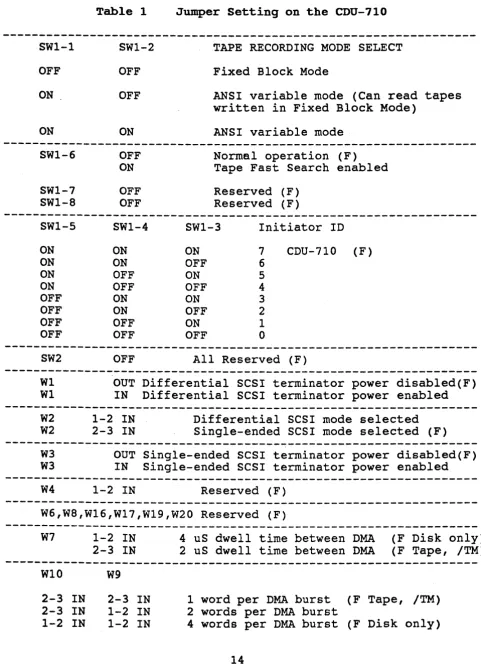
Table 1
SW1-1 SWl-2
OFF OFF
ON OFF
ON ON
Jumper Setting on the CDU-710
TAPE RECORDING MODE SELECT
Fixed Block Mode
ANSI variable mode (Can read tapes written in Fixed Block Mode)
ANSI variable mode
---
SWl-6SWl-7 SWl-8
OFF ON
OFF OFF
Normal operation (F) Tape Fast Search enabled
Reserved (F) Reserved (F)
---
SW1-S SWl-4SWl-3 Initiator ID
ON ON ON 7 CDU-710 (F)
ON ON OFF 6
ON OFF ON 5
ON OFF OFF 4
OFF ON ON 3
OFF ON OFF 2
OFF OFF ON 1
OFF OFF OFF 0
---
SW2 OFFAll Reserved (F)
---
W1W1 OUT Differential SCSI terminator power disabled(F) IN Differential SCSI terminator power enabled
---
W2W2 1-2 IN 2-3 IN Differential SCSI mode selected Single-ended SCSI mode selected (F)
---
W3W3 OUT Single-ended SCSI terminator power disabled(F) IN Single-ended SCSI terminator power enabled
---
W4 1-2 IN Reserved (F)---
W6,W8,W16,W17,W19,W20 Reserved (F)---W7 1-2 IN
2-3 IN
4 uS dwell time between DMA (F Disk only)
2 uS dwell time between DMA (F Tape, /TM)
---
W10 W92-3 IN 2-3 IN 1-2 IN
2-3 IN 1-2 IN 1-2 IN
1 word per DMA burst (F Tape, /TM) 2 words per DMA burst
4 words per DMA burst (F Disk only)
[image:17.615.55.537.94.760.2]FOR CDU-710/T
W5 1-2 IN Reserved (F)
FOR CDU-710/M, CDU-710/TM
W5 2-3 IN Auto-Boot Enabled
W11
1-2 IN Auto-Boot Disabled (F)
2-3 IN 1-2 IN
Bootstrap address = 771000 (F)
Bootstrap address = 773000
---CDU-71o.IT Tape Only with IC P70012C at UI02:
Please refer to Appendix D for the other 22 CSR jumper settings.
Wl1 W15 W12 W13 W14 CSR Address of PDP-11
2-3 IN 1-2 IN 1-2 IN 1-2 IN 2-3 IN Standard CSR: 17774500 2-3 IN 1-2 IN 2-3 IN 1-2 IN 2-3 IN Second CSR: 17760404 2-3 IN 1-2 IN 1-2 IN 2-3 IN 2-3 IN Third CSR: 17760444 2-3 IN 1-2 IN 2-3 IN 2-3 IN 2-3 IN Forth CSR: 17760504 2-3 IN 1-2 IN 1-2 IN 1-2 IN 1-2 IN Fifth CSR: 17760544 2-3 IN 1-2 IN 2-3 IN 1-2 IN 1-2 IN Sixth CSR: 17760410 2-3 IN 1-2 IN 1-2 IN 2-3 IN 1-2 IN Seventh CSR: 17760450 2-3 IN 1~2 IN 2-3 IN 2-3 IN 1-2 IN Eighth CSR: 17760454 The old IC P70012B at location UI02 of the CDU-710/T only supports 8 CSR addresses.
those shown above.
The jumper settings are the same as
---CDU-710/M Disk only with IC P70011B at U102: W12 W13 W14 CSR Address
1-2 IN 1-2 IN 2-3 IN Standard CSR: 17772150 (F) 2-3 IN 1-2 IN 2-3 IN Second CSR: 17760334 1-2 IN 2-3 IN 2-3 IN Third CSR: 17760354 2-3 IN 2-3 IN 2-3 IN Forth CSR: 17760374 1-2 IN 1-2 IN 1-2 IN Fifth CSR: 17760340 2-3 IN 1-2 IN 1-2 IN Sixth CSR: 17760344 1-2 IN 2-3 IN 1-2 IN Seventh CSR: 17760350 2-3 IN 2-3 IN 1-2 IN Eighth CSR: 17760360
W15 1-2 IN Reserved
... ...
---~---CDU-710/TM Tape and Disk with IC P70013A at U102:
W12
1-2 IN
2-3 IN
1-2 IN
2-3 IN
W14
1-2 IN
2-3 IN
1-2 IN 2-3 IN
W18
W18
W13
1-2 IN 1-2 IN
2-3 IN
2-3 IN
W15
1-2 IN 1-2 IN
2-3 IN 2-3 IN
1-2 IN
2-3 IN
CSR Address
Tape Standard CSR: Tape Second CSR: Tape Third CSR: Disable Tape
CSR Address
Disk Standard CSR: Disk £econd CSR: Disk Third CSR: Disable Disk
17774500 (F) 17760404 17760444
17772150 (F) 17760334 17760354
Enable Differential SCSI multiple host protection circuit
Enable Single-ended SCSI multiple host protection circuit (F)
Note: (F) means factory setting.
Note:
J4 connector is used for in house diagnostic only.
3.2 CDU-710 Mounting Slot Selection
The CDU-7l0 can be installed in any priority on the standard
PDP-11 Unibus SPC backplane. The CDU-7l0 is a DMA device and
requires the Nonprocessor Grant (NPG) jumper on the SPC card slot
in _ which . the· controller is being installed be removed. It is
recommended that the CDU-7l0 be placed in front of other devices
on the Unibus except when there is an Ethernet controller which should go first.
The CDU-7l0 should be inserted into C, D, E, F sockets of a
Unibus slot.
3.2.1 NP~ Non-Processor Grant Signal
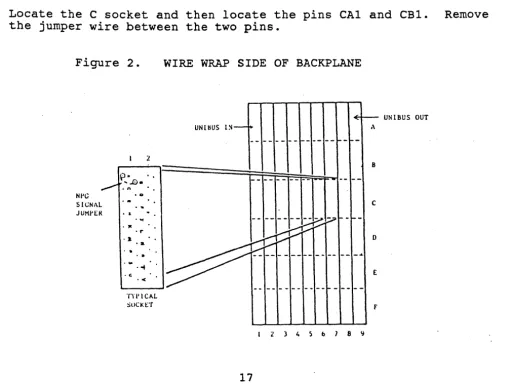
The NPG signal jumper is located at pins CAl to CBl on the Unibus
backplane. Figure 2 is a DDll-DK nine-slot backplane s,een from
the rear.
To locate the NPG jumper do the following:
From the rear of the backplane locate the card slot in which the
board is to be installed. Note: Each card slot is 4 pins wide.
Locate the C socket and then locate the pins CAl and CBl. Remove
the jumper wire between the two pins.
Figure 2. WIRE WRAP SIDE OF BACKPLANE
p- ..
UNlIWS lS-~
~- UNIBUS OUT
A
---~-
-B
r---~.,. ... .£) • •
. . - .. n •
NI'G
SIGNAL
J UHf' I::R
• 0
c
.. & • •
. '"
---~7----·".r·· ...
,...~;:;...---.• ,...~;:;...---.• . .
..--::::::: ...
~vv.
D : : : : : •..~~
~~---.
E.<
-- ---
----~---"f)'I' leAL
[image:20.620.52.562.378.762.2]3.3 DKA Burst Length and Dwell T~e
The Busrt Length determines how many words the CDU-710 transfers
by DMA during each NPR. The Dwell time is the time the CDU-710
waits before i t requests for another NPR.
WI0 W9
2-3 IN 2-3 IN' 1 word per NPR
2-3 IN 1-2 IN 2 words per NPR
1-2 IN 1-2 IN 4 words per NPR
W7 1-2 IN 4 micro second dwell time
2-3 IN 2 micro second dwell time
Factory Settings:
CDU-710/T, CDU-710/TM 1 word per NPR, 2 micro second dwell
time
CDU-710/M, 4 words per NPR, 4 micro second dwell time
IMPORTANT: If the CDU-710 is installed in a VAX BI Unibus (VAX
8350, 8750, etc) the setting must be 1 word per NPR and 2 micro
second dwell time. Data compare errors will occur on the VAX BI
Unibus if the throughput is set to more than the BI Unibus
adapter can handle. On the PDP-11 and Non-BI VAX (VAX-730, 750,
780, and others) Unibus the user may set the controller to 4
words per NPR and 4 micro second Dwell time.
3.4 SCSI Bus Cabling and Termination
3.4.1 Single-Ended
The CDU-710 provides a 50-pin connector (J3), to interface with" external single-ended SCSI devices.
When the CDU-710 and the external SCSI drives are installed in
the same cabinet which meets EMI/RFI shielding requirements, a
50-conductor flat cable or 25-signal twisted-pair cable can be
used for connecting the CDU-710 (J3) and the external SCSI drives
When the CDU-710 and the external SCSI drives are installed in
seperated cabinets, the shielded SCSI cable should be used to
meet FCC requirements.
Note that a minimum conductor size of 28 AWG shall be employed to minimize noise effects and ensure proper distribution of optional
terminator power. The maximum cable length is 6.0 meters or 20
feet in single ended mode.
The SCSI bus signals should be terminated with 220 ohms to +5
volts and 330 ohms to ground at each end of the cable. The
CDU-710 provides on-board removable terminators (RN9,RN10,RN11),
which are next to the connector J3. Therefore, the CDU-710 can
be installed in any position of the SCSI cable. If the CDU-710 is
installed at either end of SCSI cable, the on-board SCSI bus
terminators should remain on the board. Otherwise, the on-board
SCSI bus terminators should be removed.
3.4.2 Differential
The CDU-712 provides an additional 50-pin connector (J2), to
interface with external differential SCSI devices.
When the CDU-712 and the external SCSI drives are installed in
the same cabinet which meets EMI/RFI shielding requirements, a
50-conductor flat cable or 25-signal twisted-pair cable can be
used for connecting the CDU-712 (J2) and the external SCSI drives
When the CDU-712 and the external SCSI drives are installed in
seperated cabinets, the shielded SCSI cable should be used to
meet FCC requirements.
Note that the twisted pair cable is strongly recommended. without
twisted pairs, even at slow data transfer rates and very short
distances, crosstalk between adjacent signals causes spurious
pulses with differential signals. Cables should consist of
conductors of 26AWG or 28AWG. The two wires of a pair should be
connected to the same signal, one to the positive and the other
to the negative signal. The maximum cable length is 25 meters or
Every differential SCSI bus signal pair should be terminated with 330 ohms connected between the negative signal and +5 volts , 330
ohms connected between the positive signal and ground, and 150
ohms connected between the positive and the negative signal at
each end of the SCSI cable. The CDU-712 provides on-board
removable terminators (RN1,RN2,RN3,RN4,RN5,RN6,RN7,RN8) which are
next to the connector J2. Therefore, the CDU-712 can be
installed in any position of the SCSI cable. If the CDU-712 is
installed at either end of SCSI cable, the on-board SCSI bus
terminators should remain on the board. Otherwise, the on-board
SCSI bus terminators should be removed.
CHAPTER 4 ON-BOARD UTILITY
4.1 Disk utility for the CDU-710/M, CDU-710/TM
The CMD Technology Utility Program provides a convenient means of formatting and configuring the drive and configuring the logical unit number offset. The utility program can be started by means of an ODT command. For Example:
PDP-11/24
1.
2.
3.
4.
5.
SYSTEMS
Hit the Boot Switch.
Halt the processor.
17772152/004400 123456 <CR)
17772152/001000 100 <CR)
5000G
iDEPOSIT 123456 TO
i CSR BASE ADDRESS + 2
iDEPOSIT 100 TO
i CSR BASE ADDRESS + 2
i5000 and a G
iThe Utility program ;will begin executing.
Note that the address shown in step 3 is equal to the CSR address selected by jumper W12, W13 and W14 plus 2.
PDP-11/34 SYSTEMS
1. Enter aDT mode
2. From the terminal type
,
·
DEPOSIT 123456 TOL 772152 <CR) I
·
CSR BASE ADDRESS + 2D 123456 <CR)
3. L 772152 <CR) i DEPOSIT 100 TO
D 100 <CR) ; CSR BASE ADDRESS + 2 4. L 5000 <CR) ; 5000 and a S
S <CR)
,
·
The utility program·
will begin executing.For the CDU-710/M, the utility will display:
CMD TECHNOLOGY UTILITY PROGRAM
COPYRIGHT 1987, CMD TECHNOLOGY, INC.
SELECT CSR ADDRESS 1 = 772150
2 = 760334 3 = 760354 4 = 760374 5 = 760340 6 = 760344 7 = 760350 8 = 760360
WHICH CSR
*
;The user will then
;select the number which ;matches with the CSR ;address selected by ;jumpers W12, W13, W14
For the CDU-710/TM, the utility will display:
CMD TECHNOLOGY UTILITY PROGRAM
COPYRIGHT 1987, CMD TECHNOLOGY, INC.
4.1.1
SELECT CSR ADDRESS 1 = 772150
2 = 760334 3 = 760354
4 = 774500 (TAPE) 5 = 760404 (TAPE) 6 = 760444 (TAPE)
WHICH CSR
*
Configure LON Offset
;The user will then
;select the number which ;matches with the CSR ;address selected by ;jumpers W12,W13,W14,W15
LUN Offset: For LSI-11 systems, each MSCP drive requires a
different Logical Unit Number. If there are no other MSCP
controllers in the system, then the LUN offset number
is
0(Drive 0 will be LUN 0, and Drive 1 will be LUN 1). If there
exists another MSCP controller with 4 LUN units (0 to 3), then
the LUN offset should be 4. In this case Drive 0 will be LUN 4
and Drive 1 will be LUN 5. Normally, when the CDU-710 is used in
VMS operating system, the LUN Offset should remain as factory
setting (LUN=O).
The operator now has 6 options to choose from. To specify or to
check the configuration of a drive, the operator types in a 2.
If at any time the operator types in a ctrl C, the command is
aborted and the utility program returns to the main menu. If the
operator types in <CR> with no value, then the parameters will remain unchange.
In order to store any changes permanently, the user must give the
correct password. The password is CMD.
MAIN MENU
1
=
BOOT DRIVE2
=
CONFIGURE LUN OFFSET 3=
FORMAT DRIVE4
=
QUALIFY DRIVE5
=
MANUAL REPLACE BAD SECTORS 6=
READ, WRITE AND VERIFY TESTSELECT OPTION: 2
PRESENT LUN OFFSET = 0, ENTER NEW VALUE:
SAVE NEW CONFIGURATION (Y or N)? Y
ENTER PASSWORD: CMD
COMPLETE.
4.1.2 Format Drive
Formatting a drive will rewrite all the sectors on the drive. In
this option, the CDU-710 issues Format Unit Command to the
selected SCSI disk drive and requests i t to map out the defects
on the Manufacture Defect List (MDL). It is recommended to use
qualify drive option after formatting the drive. In order to
format or qualify the drive, the correct password is needed. The
password is CMD.
1
=
BOOT DRIVE2
=
CONFIGURE LUN OFFSET3
=
FORMAT DRIVE4
=
QUALIFY DRIVE5
=
MANUAL REPLACE BAD SECTORS 6=
READ, WRITE AND VERIFY TESTSELECT OPTION: 3
ENTER DRIVE NUMBER <0 TO 6>: 0
***
WILL DESTROY DATA ON DRIVE 0, ARE YOU SURE? YENTER PASSWORD: CMD
WAIT •.•.•
4.1.3 Qualify Drive
The qualify program will write different patterns into the drive and then verify the pattern. If there is any bad sector, the sector will be automatically replaced.
To ensure a defect free drive, the qualify program should be run at least 10 passes.
1
=
BOOT DRIVE2 = CONFIGURE LUN OFFSET 3 -. FORMAT DRIVE
4
=
QUALIFY DRIVE5
=
MANUAL REPLACE BAD SECTORS 6=
READ, WRITE AND VERIFY TESTSELECT OPTION: 4
ENTER PASSWORD: CMD
QUALIFY DRIVE # <0 TO 6>: 0
***
WILL DESTROY DATA ON THIS DRIVE, ARE YOU SURE?QUALIFY LOOP 1
TO ABORT, ENTER ~C ( CONTROL C).
4.1.4 Manual Replace Bad Sectors
This program allows user to replace bad sectors found in the future.
1
=
BOOT DRIVE2
=
CONFIGURE LUN OFFSET 3=
FORMAT DRIVE4
=
QUALIFY DRIVE5
=
MANUAL REPLACE BAD SECTORS 6=
READ, WRITE AND VERIFY TESTSELECT OPTION
.
.
5ENTER PASSWORD: CMD
ENTER DRIVE NUMBER <0 TO 6>: 0
REPLACE LOGICAL BLOCK NUMBER? XXXXXX
REPLACE LOGICAL BLOCK XXXXXX. ARE YOU SURE? Y
4.1.5 Read, write and Verify Test
This option allows user to test the integrity of the controller
board, drive cable and disk drive. rhe program will generate
random data patterns for testing.
1
=
BOOT DRIVE2 CONFIGURE LUN OFFSET
3
=
FORMAT DRIVE 4 = QUALIFY DRIVE5
=
MANUAL REPLACE BAD SECTORS 6 = READ I WRITE AND VERIFY TESTSELECT OPTION: 6
RANDOM READ WRITE TEST
DO YOU WANT READ ONLY? <Y OR N>
ENTER PASSWORD: CMD
DRIVE NUMBER <0 TO 6>: 0
***
WILL DESTROY DATA ON THIS DRIVE, ARE YOU SURE?TEST FROM BLOCK # <O-XXXXX> ?
TO BLOCK # <XXXXX-YYYYY> ?
TESTING STARTED. TYPE CTRL-C TO ABORT.
4.1.6 Utility Bootstrap
To bootstrap the operating system on drive 0 to 6, just select
option 1 from MAIN MENU.
1 = BOOT DRIVE
2 = CONFIGURE LUN OFFSET
3 = FORMAT DRIVE
4 = QUALIFY DRIVE
5 = MANUAL REPLACE BAD SECTORS
6 = READ, WRITE AND VERIFY TEST
SELECT OPTION: 1
BOOT DRIVE NUMBER <0 TO 6> 0
BOOT DUO. ARE YOU SURE? Y
4.2 Tape Utility for the CDU-710/T, CDU-710/TK
The utility program can be started by means of an ODT command.
For Example:
PDP-ll/24 SYSTEMS
1. Hit the Boot Switch.
2. Halt the processor.
3. 17774502/004700 123456 <CR)
4. 17774502/001000 100 <CR)
5. 5000G
iDEPOSIT 123456 TO
i CSR BASE ADDRESS + 2
iDEPOSIT 100 TO
i CSR BASE ADDRESS + 2
i5000 and a G
iThe Utility program iwill begin executing.
Note that the address shown in step 3 is equal to the CSR address selected by jumper W12, W13, and W14 plus 2.
PDP-l1/34 SYSTEMS
1. Enter ODT mode
2. From the terminal type i DEPOSIT 123456 TO
L 774502 <CR)
,
·
CSR BASE ADDRESS + 2D 123456 <CR)
3. L 774502 <CR)
·
,
DEPOSIT 100 TOD 100 <CR)
·
,
CSR BASE ADDRESS + 24. L 5000 <CR)
·
,
5000 and a SS <CR)
,
·
The Utility program·
will begin executing.,
For the CDU-710/T, the utility will display:
CMD TECHNOLOGY UTILITY PROGRAM
COPYRIGHT 1987, CMD TECHNOLOGY, INC.
SELECT CSR ADDRESS 1 = 774500
2 = 760404 3 -. 760444 4 = 760504 5 = 760544 6 - 760410 7
=
760450 8 = 760454WHICH CSR #
;The user will then
;select the number which ;matches with the CSR ;address selected by ;jumpers W12,W13,W14
For the CDU-710/TM, the utility will display:
CMD TECHNOLOGY UTILITY PROGRAM
COPYRIGHT 1987, CMD TECHNOLOGY, INC.
4.2.1
SELECT CSR ADDRESS 1
=
7721502
=
760334 3=
7603544 = 774500 (TAPE) 5
=
760404 (TAPE) 6=
760444 (TAPE)WHICH CSR #
Configure Tape LON Offset
iThe user will then
;select the number which imatches with the CSR ;address selected by ;jumpers W12,W13,W14,W15
LUN Offset: For PDP-II only, TMSCP requires that each TMSCP
drive has a different Logical Unit Number. If there are no other
TMSCP controllers. in your system, then the LUN offset number is 0
(Drive 0 will be LUN 0, and Drive 1 will be LUN 1). If there
exists another TMSCP controller with 4 LUN units (0 to 3), then
the LUN offset should be 4. In this case Tape Drive 0 will be LUN 4 and Tape Drive 1
will
be LUN 5.The operator now has 1 option to choose from.
To
configure theLUN offset, the operator types in a 1. If at any time the
operator types in a ctrl C, the command is aborted and the
utility program returns to the main menu. If the operator types
in <CR) with no value, then the parameters will remain unchange.
In order to store any changes permanently, the user must give the
MAIN MENU
1 = CONFIGURE LUN OFFSET
SELECT OPTION: 1
PRESENT LUN OFFSET = 0, ENTER NEW VALUE: SAVE NEW CONFIGURATION (Y or N)? Y
ENTER PASSWORD: CMD
COMPLETE.
4.3 ODT Utility
When the CDU-710/M is used in VAX-11/730, 750 I 780 systems, the
ODT utility is required to format or qualify a disk drive.
The addresses of IP and SA registers of CDU-710/M for VAX-l1/730 and VAX-11/750 are listed in the following table.
OCTAL ADDRESS
772150 772152
760334 760336
760354 760356
760374 760376
760340 760342
760344 760346
760350 760352
760360 760362
HEX ADDRESS
FFF468 FFF46A
FFEODC FFEODE
FFEOEC FFEOEE
FFEOFC FFEOFE
FFEOEO FFEOE2
FFEOE4 FFEOE6
FFEOE8 FFEOEA
FFEOFO FFEOF2
The addresses of IP and SA registers of CDU-710/M for VAX-II/780 are listed in the following table.
OCTAL HEX HEX HEX HEX
ADDRESS ADDRESS ADDRESS ADDRESS ADDRESS FOR UBA 1 FOR UBA 2 FOR UBA 3 FOR UBA 4
772150 2013F468 2017F468 201BF468 201FF468 772152 2013F46A 2017F46A 201BF46A 201FF46A
760334 2013EODC 2017EODC 201BEODC 201FEODC 760336 2013EODE 2017EODE 201BEODE 201FEODE
760354 2013EOEC 2017EOEC 201BEOEC 201FEOEC 760356 2013EOEE 2017EOEE 201BEOEE 201FEOEE
760374 2013EOFC 2017EOFC 201BEOFC 201FEOFC 760376 2013EOFE 2017EOFE 201BEOFE 201FEOFE
760340 2013EOEO 2017EOEO 201BEOEO 201FEOEO 760342 2013EOE2 2017EOE2 201BEOE2 201FEOE2
760340 2013EOE4 2017EOE4 201BEOE4 201FEOE4 760342 2013EOE6 2017EOE6 201BEOE6 201FEOE6
760350 2013EOE8 2017EOE8 201BEOE8 201FEOE8 760352 2013EOEA 2017EOEA 201BEOEA 201FEOEA
760350 2013EOFO 2017EOFO 201BEOFO 201FEOFO 760352 2013EOF2 2017EOF2 201BEOF2 201FEOF2
On a VAX-11/730 or VAX-11/750, please follow the example to specify LUN offset, verify LUN offset, format a drive, or qualify a drive. In this example, first CSR address is assumed.
4.3".1 Specify LUN Offset
»>
D/W/P FFF468 0»>
D/W/P FFF46A A72E»>
D*
22»>
D * 04.3.2 Verify LUN Offset
»>
D/W/P FFF468 0»>
D/W/P FFF46A A72E»>
D*
23»>
E*
;WRITE IP ANY VALUE
iWRITE SA, ADDRESS=CSR+2 iWRITE SA WITH COMMAND jWRITE LUN OFFSET VALUE
;WRITE IP ANY VALUE
4.3.3 Format a Drive
»>
D/W/P FFF468»>
D/W/P FFF46A»>
D*
20»>
D*
0»>
D*
0»>
E*
o
A72E
4.3.4 Qualify a Drive
»>
D/W/P FFF468 0»>
D/W/P FFF46A A72E»>
D * 21»>
D*
0»>
E *jWRITE IP ANY VALUE
jWRITE SA, ADDRESS=CSR+2 jWRITE SA WITH COMMAND jSELECT DRIVE 0
jDRIVE SERIAL NUMBER jVALUE=20000, FORMATTING jVALUE=O,FORMAT COMPLETE
jWRITE IP ANY VALUE
jWRITE SA, ADDRESS=CSR+2 iWRITE SA WITH COMMAND iSELECT DRIVE 0
jSHOW CURRENT QUALIFY jLOOP COUNT
On a VAX-ll/780, please follow the example to specify LUN offset,
verify LUN offset, format a drive, or qualify a drive. In this
example, first CSR address of UBA 1 is assumed.
4.3.5 Specify LUN Offset
»>
D/W/P 2013F468 0»>
D/W/P 2013F46A A72E»>
D*
22»>
D*
04.3.6 Verify LUN Offset
»>
D/W/P 2013F468 0»>
D/W/P 2013F46A A72E»>
D*
23»>
E*
30
iWRITE IP ANY VALUE
jWRITE SA, ADDRESS=CSR+2 jWRITE SA WITH COMMAND jWRITE LUN OFFSET VALUE
iWRITE IP ANY VALUE
4.3.7 Format a Drive
»>
D/W/P 2013F468»>
D/W/P 2013F46A»>
D*
20»>
D*
0»>
D*
0»>
E*
4.3.8 Qualify a Drive
»>
D/W/P 2013F468»>
D/W/P 2013F46A»>
D*
21»>
D*
0»>
E*
o
A72E
o
A72E
iWRITE IP ANY VALUE
iWRITE SA, ADDRESS=CSR+2 iWRITE SA WITH COMMAND iSELECT DRIVE 0
iDRIVE SERIAL NUMBER iVALUE=20000, FORMATTING iVALUE=O,FORMAT COMPLETE
iWRITE IP ANY VALUE
iWRITE SA, ADDRESS=CSR+2 iWRITE SA WITH COMMAND ;SELECT DRIVE 0
CHAPTER 5 SCSI INFORMATION
5.1 SCSI DEFINITIONS:
Connect: The function that occurs when an initiator selects a target to start an operation.
Disconnect: The function that occurs when a target release control of the SCSI bus, allowing it to go to the BUS FREE phase.
Initiator: An SCSI device (usually a host system) that requests an operation to be performed by another SCSI device.
LUN: Logic Unit. Number
Peripheral device: A peripheral that can be attatched to an SCSI device (e.g., magnetic disk, magnetic tape, or optical disk).
Reconnect: The function that occurs when a target selects an initiator to continue an operation after a disconnect.
SCSI address: The octal representation of the unique address (0-7) assigned to an SCSI device. This address would normally be assigned and set in the SCSI device during system installation.
SCSI ID: The bit-significant representation of the SCSI address refering to one of the signal lines DB(7-0).
SCSI device: A host computer adqpter or a peripheral controller or an intelligent peripheral that can be attatched to the SCSI bus.
Target: An SCSI device that performs an operation requested by an i~itiator.
5.2 SCSI Commands
SCSI commands used by CDU-710/M or CDU-710/TM for MSCP emulation are listed in the following table.
Code OOh 01h 03h 04h 07h 08h OAh OBh 12h lSh 1Ah 1Bh 2Sh 28h 2Ah 2Bh 3Eh 3Fh
Command Name
Test unit Ready Rezero Unit Request Sense Format Unit (1) Reassign'Block Read
Write Seek Inquiry Mode Select Mode Sense
Start Stop Unit Read Capacity Extended Read Extended Write Extended Seek (2) Read Long (3) Write Long(3)
(1) The Format Unit command is used by the on-board utility only.
(2) These commands are used only when the disk drive capacity is greater than 1 Giga bytes.
(3) These commands are used if the drives support them. SCSI commands used by CDU-710/T or CDU-7l0/TM emulation are listed as follows:
Code OOh Olh 03h 08h OAh lOh llh l2h lSh 19h lAh 1Bh
Command Name
Test Unit Ready Rewind
Request Sense Read
write
write Filemark Space
Inquiry Mode Select Erase
Mode Sense Load/Unload
5.3 SCSI Status
The SCSI status codes used by CDU-7l0 are listed as follows:
Code Status Name
OOh Good
02h Check Condition
OSh Busy
5.4 SCSI Messages
The SCSI Messages used by CDU-7l0 are listed as follows:
Code
OOh Olh 02h 03h 04h OSh 07h OSh 09h SO-FFh
Message Name
Command Complete Extended Message Save Data Pointer Restore Pointer Disconnect
Initiator Detected Error Message Reject
No Operation
Message Parity Error Identify
5.5 SCSI Single-Ended Signals
Pin assignment of the CDU-710 Single-ended SCSI Cable Connector (J3) :
Signal Pin Number
-DB(O) 2
-DB(l) 4
-DB(2) 6
-DB(3) 8
-DB(4) 10
-DB(5) 12
-DB(6) 14
-DB(7) 16
-DB(P) 18
GROUND 20
GROUND 22
GROUND 24
TERMPWR 26
GROUND 28
GROUND 30
-ATN 32
GROUND 34
-BSY 36
-ACK 38
-RST 40
-MSG 42
-SEL 44
-C/D 46
-REQ 48
-I/O 50
5.6 SCSI Differential Signals
Pin assignment of the CDU-712 Differential SCSI Cable Connector
(J2) :
Signal
SHIELD GROUND +DB(O) +DB(l) +DB(2) +DB(3) +DB(4) +DB(5) +DB(6) +DB(7) +DB(P) DIFFSENS GROUND TERMPWR GROUND +ATN GROUND +BSY +ACK +RST +MSG +SEL +C/D +REQ +I/O GROUND
Pin Number
1 3 5 7 9 11 13 15 17 19 21 23 25 27 29 31 33 35 37 39 41 43 45 47 49 2 4 6 8 10 12 14 16 18 20 22 24 26 28 30 32 34 36 38 40 42 44 46 48 50
NOTE: SHIELD GROUND is optional on some cables.
Appendix B Operating Systems Supported by CDU-710
All DEC-compatible products designed by CMD Technology, Inc.
implement MSCP (Mass Storage Control Protocol)/ TMSCP (Tape Mass
Storage Control Protocol). CMD supports its implementation of
MSCP/TMSCP beginning with the indicated version of the following DEC operating systems.
Operating System
VMS Ultrix
UNIX/Berkeley RSX-11M
RSX-11M-PLUS RSTS/E
RT-ll DSM-ll ISM-II TSX VAXELN
Version
4.0 and 5.0 1.2
Appendix C SCSI Devices Supported by CDU-710
Disk drives supported by CDU-710/M,CDU-710/TM SCSI host adapter:
10/18/1989 *** indicates new qualified device.
Magnetic disk drives:
CDC WREN-III, WREN-IV, WREN V, WREN VI
SWIFT (3 1/2"), Sabre (8") ***
CITOH YD-3042, YD-3082
CONNER PERIPHERALS CP-340, CP-3100
.
FUJITSU M2246SA, M2249SA Series
MAXTOR XT-3000 ,XT-4000S, XT-8000S Series
HITACHI DK515C Series
HP
IBM
MICROPOLIS
PRIAM
QUANTUM
RODlME
SIEMENS
SYQUEST
TOSHIBA
97548S/D series ***
320MB, 3 1/2" ***
1370 Series
Model 717, 728, 738
ProDrive 40S/80S
3085S, 5215S, 5180S
Model 2200, 2300
SQ555 ***
MK156FB series
EMULEX MD21, MD23 (SCSI TO ESDI CONTROLLER)
Erasable Optical disk drives:
SONY SMO-D501
RICOH RO-5030E
CD ROM drives:
LMS CM210, CM212 ***
TOSHIBA XM3200 series ***
39
Magneto Optical disk
WORM drives:
1. with Ten X Technology Optical Convertion Unit
MAXTOR
LMSI
MITSUBISHI
PIONEER
RXT-800S, REV. J, K
LD510, LD1200
MW-5U1
DD-55001 etc.
2. wita LASERnRIVE interface
LASERDRIVE Model 800 ser~es
Tape drives supported by CDU-710/T,CDU-710/TM SCSI host adapter:
10/18/1989
EXABYTE
SONY
HP
GIGATREND
ARCHIVE
ASPEN
CALIPER
CIPHER
FUJITSU
LMS
KENNEDY
TANDBERG
TEAC
WANGTEK
***
indicates new qualified device.EXB-8200 8mm helical scan
SDT-1000 OAT, 4mm helical scan
3S450A DAT, 4mm helican scan
***
1200 Series DAT, 4mm helical scan
1/4 II
1/2 ,.
1/4 II
1/4
I.
1/2 ••1/2 I.
1/4 II 1/2 ,.
1/4 •.
1/4 I.
1/4 II
streaming
System 480, 3480 compatible
C1S0SAE streaming, series
ST1S0S-I streaming, series
M2452E, 1/2" cartridge
Independence, 3480 compatible
streaming
9 track, model 9612
TDC3600 ·series
streaming
streaming
Appendix D 30 CSR Addresses Supported by IC P700l2C
1.
e
CSR addresses supported by old IC P700l2B at location UlO2:Address PDP-11 W11 W15 W14 W13 W12
---
---.---
---Standard: 17774500 2-3 IN 1-2 IN 2-3 IN 1-2 IN 1-2 IN
Second: 17760404 2-3 IN 1-2 IN 2-3 IN 1-2 IN 2-3 IN
Third: 17760444 2-3 IN 1-2 IN 2-3 IN 2-3 IN 1-2 IN
Fourth: 17760504 2-3 IN 1-2 IN 2-3 IN 2-3 IN 2-3 IN
Fifth: 17760544 2-3 IN 1-2 IN 1-2 IN 1-2 IN 1-2 IN
Sixth: 17760410 2-3 IN 1-2 IN 1-2 IN 1-2 IN 2-3 IN
Seventh: 17760450 2-3 IN 1-2 IN 1-2 IN 2-3 IN 1-2 IN
Eighth: 17760454 2-3 IN 1-2 IN 1-2 IN 2-3 IN 2-3 IN
2. 30 CSR addresses supported by new IC P700l2C at location UlO2:
Address PDP-11 Wl1 W15 W14 W13 W12
---
---
---1 17774500 2-3 IN 1-2 IN 2-3 IN 1-2 IN 1-2 IN
2 17760404 2-3 IN 1-2 IN 2-3 IN 1-2 IN 2-3 IN
3 17760444 2-3 IN 1-2 IN 2-3 IN 2-3 IN 1-2 IN
4 17760504 2-3 IN 1-2 ·IN 2-3 IN 2-3 IN 2-3 IN
5 17760544 2-3 IN 1-2 IN 1-2 IN 1-2 IN 1-2 IN
6 17760410 2-3 IN 1-2 IN 1-2 IN 1-2 IN 2-3 IN
7 17760450 2-3 IN 1-2 IN 1-2 IN 2-3 IN 1-2 IN
8 17760454 2-3 IN 1-2 IN 1-2 IN 2-3 IN 2-3 IN
---
---
---9 17760414 2-3 IN 2-3 IN 2-3 IN 1-2 IN 1-2 IN
10 17760420 2-3 IN 2-3 IN 2-3 IN 1-2 IN 2-3 IN
11 17760460 2-3 IN 2-3 IN 2-3 IN 2-3 IN 1-2 IN
12 17760510 2-3 IN 2-3 IN 2-3 IN 2-3 IN 2-3 IN
13 17760514 2-3 IN 2-3 IN 1-2 IN 1-2 IN 1-2 IN
14 17760520 2-3 IN 2-3 IN 1-2 IN 1-2 IN 2-3 IN
15 17760550 2-3 IN 2-3 IN 1-2 IN 2-3 IN 1-2 IN
16 17760554 2-3 IN 2-3 IN 1-2 IN 2-3 IN 2-3 IN
---
---
---17 17760560 1-2 IN 1-2 IN 2-3 IN 1-2 IN 1-2 IN
18 17760604 1-2 IN 1-2 IN 2-3 IN 1-2 IN 2-3 IN
19 17760610 1-2 IN 1-2 IN 2-3 IN 2-3 IN 1-2 IN
20 17760614 1-2 IN 1-2 IN 2-3 IN 2-3 IN 2-3 IN
21 17760620 1-2 IN 1-2 IN 1-2 IN 1-2 IN 1-2 IN
22 17760644 1-2 IN 1-2 IN 1-2 IN 1-2 IN 2-3 IN
23 17760650 1-2 IN 1-2 IN 1-2 IN 2-3 IN 1-2 IN
24 17760654 1-2 IN 1-2 IN 1-2 IN 2-3 IN 2-3 IN
---
---
---~-25 17760660 1-2 IN 2-3 IN 2-3 IN 1-2 IN 1-2 IN
26 17760704 1-2 IN 2-3 IN 2-3 IN 1-2 IN 2-3 IN
27 17760710 1-2 IN 2-3 IN 2-3 IN 2-3 IN 1-2 IN
28 17760714 1-2 IN 2-3 IN 2-3 IN 2-3 IN 2-3 IN
29 17760744 1-2 IN 2-3 IN 1-2 IN 1-2 IN 1-2 IN
30 17760750 1-2 IN 2-3 IN 1-2 IN 1-2 IN 2-3 IN