Firebase as BaaS for College Android Application
Divya Sharma
Dept. of Information Technology Mulund College of Commerce, Mumbai, India
Hiren Dand,
PhD Dept. of Information Technology Mulund College of Commerce, Mumbai, IndiaABSTRACT
In the present times, words like 'mobile application' and 'cloud' are making a significant mix. Every day there is some new application in the market with the point of conveying the best execution to their clients. Picking the correct BaaS (Backend as a Service) is vital and it comes down to what your project requires. A sturdy infrastructure is built with mobile backend services such as with Firebase which aids developers by handling the backend of these applications. In this paper, the Android application MCCApp utilizes the features provided by Firebase to show its usage as the best Mobile Backend-as-a-service.
Keywords
Firebase, BaaS, Mobile Application, Android, Real-time database, Back-end
1.
INTRODUCTION
Android applications use various databases for their back-end. The popular ones used commercially have been SQLite, Realm DB, ORMLite, Berkeley DB and Couchbase Lite. [1] Apart from these, the common ones heard of or implemented in projects are MySQL and Microsoft SQL Server. This method requires the application to be deployed on a server and in order to connect these, PHP files are required. Thus, a lot of coding knowledge is required. NoSQL databases gained popularity in the recent years with examples such as Wasp DB, Couchbase Lite, Forest DB and Firebase Database. [2] These gained popularity due to JSON and Key-Value pairings that gave power to the applications in terms of features such as Shared Preferences.
BaaS (Back end as a Service) emerged as the common backend used in today’s date. BaaS gives backend to mobile applications, a programming interface, and instruments for different programming dialects to coordinate with the application backend. It likewise gives extra administrations, for example, cloud-based capacity, message pop-ups, push notifications, user account handling and file management. Web and portable applications request practically equivalent to set of highlights on the backend. For instance, email warning, informal community mixes, message pop-ups, distributed storage and so forth. Every one of these administrations has its own API that must be independently consolidated into an application. This is a tedious practice, a procedure that can be tedious and muddled for applications and can be automatized with a BaaS. The most ideal approach to comprehend the idea driving the BaaS is to picture an extension interfacing the backend to the front end of an application. Some of the best BaaS platforms today are as below:
• Amazon web service Mobile- Free, many features, backed by Amazon and utilized by major apps such as Netflix.
self-hosted backend server which is the SDK for many platforms such as Android.
[image:1.595.317.542.225.360.2]• Back4App- Free to begin with, cloud hosted parse server and many features.
Figure 1: Comparison of Baas platforms [3] material.
2.
FEATURES OF FIREBASE [4] [10]
The services offered by Firebase are divided into 3 main goal-aiding categories:
2.1
Build better apps –Develop Products
[6] [8] [9]
Firebase gives you a chance to construct all the more dominant, secure and versatile applications, utilizing world-class foundation. The services used in MCCApp include:
1. Authentication - Firebase Auth offers various strategies for authentication of the users and provides easy guidelines to code the working.
2. Realtime Database – Uses a cloud-hosted, NoSQL database to offer a great user experience in terms of data accessibility and connectivity.
3. Cloud Storage – Store and share files effectively sorted on the backend.
2.2
Improve app quality – Quality
Products
Firebase gives you bits of knowledge into application execution and dependability, so you can channel your assets adequately. The services used in MCCApp include:
1. Crashlytics – Metrics of the app usage and crash statistics.
2. Performance Monitoring – Examine various parts of the application from time to time.
improving client commitment and maintenance. It allows for blending and matching Firebase items to settle basic application improvement challenges. [5] [6]
3.
EXISTING SYSTEM
This is the scenario in most colleges that is to be overcome with the help of the MCCApp Android Application:
• A notice is printed on a letter head and signed by officials. • The printed notice is taken to all the classes via a peon, which is then announced by the Professors to the students.
• The announcement is made to the departments intended for during the different lecture timings. This leads to double work for the person as he has to make sure all class signatures are obtained on the back of the notice.
• Upon managing to reach all classes, the notice is put up on the notice board.
This app is an exciting release for this institution. It enables the college MCC to be up to date with the current trends in terms of educational content and social community. The backend already contains the data of the MCCians. Thus, user is first verified. If not, the only way to access the app is via Guest Profile. Verified users may register with basic info, providing an Email and Password for loginpurpose. The user Department is automatically detected via the backend. Thus, in My Department Activity the user can see their department name and content based on it. User cannot see another departments posts. If any post can be viewed by all, it will be posted on the overall Notice Board. The administrator may post to the desired area together with attachments. Every post is editable to the admin. Admin may review existing users also. For the case of MCCians not yet updated in the database, admin can unlock their account. Even as it includes so much of information, it is not difficult to use at all. Its interface has been designed to navigate as simply as possible and make it
being the backend that provides all the features in a go. With this, even small institutions can adopt this model and run this application to connect all the members.
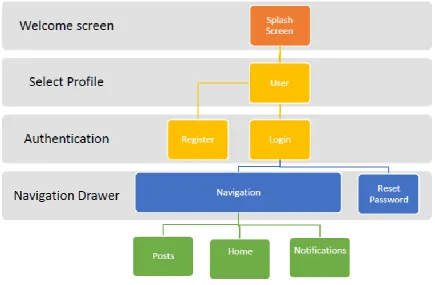
The working modules are described as in the figure below:
4.1
Welcome Screen
This is the first module launched upon the start of the application. It checks whether the user is logged in to the app or not. If not, it navigates to the Select Profile Intent, else it navigates to the Dashboard:
if (!isLoggedIn) {
Intent i = new Intent(getApplicationContext(), ChooseProfileActivity.class);
startActivity(i);}
else {
Intent toNavigationActivity =
newIntent(getApplicationContext(), DashboardActivity.class);
startActivity(toNavigationActivity);}
4.2
Profile
This activity allows the user to select a profile from the given that are:
• Student - A MCCian will provide the unique PIN number • Faculty - Provides unique ID
• Alumni - Was a MCCian so will provide previously owned unique PIN
• Guest - No verification necessary
Fig 2: MCCApp Navigation
Authentication, as well as server-side scripting. [5][7][8] Upon verification, the user can now move on to the Authentication activity.
4.3
Authentication
The Authentication feature of Firebase allows the verified users to register with the application [10], or log in to an existing account. [7] In case the user forgets the password, Firebase’s Reset Password feature kicks in. The user should be verified if a MCCian. Non-MCCians should be able to access the basic information via the Guest profile. All users must be able to see the overall College Posts and receive
Notifications. This is done with the help of SharedPreferences where each user type is assigned a ROLE in Constants:
public static String KEY ROLE =”ROLE”;
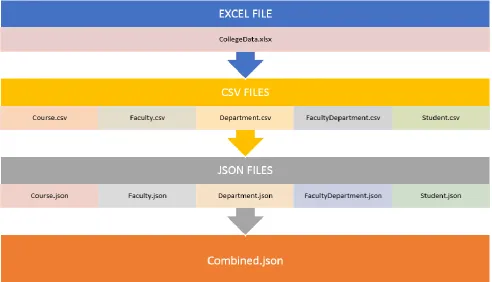
[image:3.595.46.554.508.756.2]Figure 4: MCCApp Database Files
This file produced is uploaded onto Firebase using the Import feature to load the data onto the database to produce the given keys with their values. Each file here acts like an individual table. The other tables are added via code.
5.1
POJOs
POJOs (Plain Old Java Objects) are the classes which are being used for transferring data. In MCCApp, data is fetched from Firebase and kept in POJO Objects.
package com.devdroid.mccapp.pojo;
/** * Created by Divya on 19-Apr-18. */
public class MCCNotification{
private String notificationText; private String notificationDate;
public String getNotificationText(){
return notificationText;
}
public void setNotificationText(String notificationText) {
this.notificationText = notificationText;
}
public String getNotificationDate() {
return notificationDate;
}
public void setNotificationDate(String notificationDate) {
this.notificationDate = notificationDate; }}
5.2
Storage Bucket
Figure 5: MCCApp Storage Bucket
5.3
Debugging
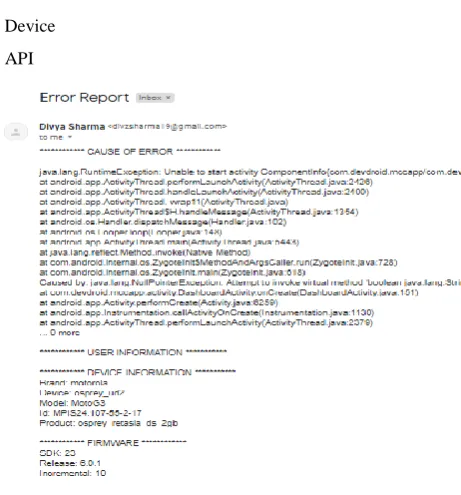
MCCApp faces crashes due to bugs at endless moments. Thus, being able to debug is essential. The process itself is systematic as you have to understand your code to be able to debug. Firstly, the app should run in debug mode. Breakpoints may be inserted where necessary. This allows you to inspect the values and expressions line by line. Firebase Crash Reports aid in the developer console. Despite its features, the Crash Report was taking at least half an hour to appear on the Console. Thus, it was essential to come up with a faster and efficient way of handling exceptions to avoid abrupt crashes. The ExceptionHandler class created caught any sort of exception causing a crash, and instead opens the Email Intent. Here, the Stack Trace is feeded automatically and the user simply clicks Send for the developer to receive all details. These include:
• User Name
• Brand • Device
• API
Figure 6: MCCApp Error Report via Email
6.
CONCLUSIONS
MCCApp Android Application was made such that Mulund College of Commerce finally gets its own App. Today, applications are so common, making it a requirement for institutes to reach out to the users. The main aim of the project was to enhance user interaction, allowing for basic information to be conveyed, as well as real-time updates. Firebase as the backend allowed for the smooth agile process implemented. The developed system:
1 Allows users to access the app based on the profile.
2 Verifies MCCians.
3 Students and Faculty can see their respective Department.
4 Confessions corner can be unlocked for Students and Faculty.
5 Admin can upload and manage posts.
6 Alumni can register for future event updates.
Thus the MCCApp Android Application is an effective and efficient app fulfilling the needs required by an organization. The posts allow College events to be noted by all users. Data is going to be preserved carefully for longer period hence it gives more reliability. More comfortable for all users because of its simplicity. Users can get the required information via the fragments. At the end, the basic requirements of the application for our college were covered as per the requirements analysis.
7.
REFERENCES
[1] Roukounaki, K. (2014, September 10). Five popular databases for mobile. Retrieved from Developer Economics: https://www.developereconomics.com/five-popular-databases-for-mobile
[2] Esplin, C. (2016, October 4). What is Firebase? Retrieved from How To Firebase:
https://howtofirebase.com/what-is-firebase-fcb8614ba442
![Figure 1: Comparison of Baas platforms [3] material.](https://thumb-us.123doks.com/thumbv2/123dok_us/9300510.428737/1.595.317.542.225.360/figure-comparison-baas-platforms-material.webp)