326
Content Customization for Micro Learning using Human Augmented AI
Techniques
Ayush Shah1, Tamer Abuelsaad2, Jae-Wook Ahn2, Prasenjit Dey2, Ravi Kokku2, Ruhi Sharma Mittal1, Aditya Vempaty2, Mourvi Sharma1
1IBM Research - India,2IBM Research - Yorktown Heights, NY, USA
[email protected],{tamera, jaewook.ahn}@us.ibm.com {prasenjit.dey, ruhi.sharma}@in.ibm.com,[email protected]
{ravi.kokku, mourvi}@gmail.com
Abstract
Visual content has been proven to be effective for micro-learning compared to other media. In this paper, we discuss leveraging this ob-servation in our efforts to build audio-visual content for young learners’ vocabulary learn-ing. We attempt to tackle two major issues in the process of traditional visual curation tasks. Generic learning videos do not necessarily sat-isfy the unique context of a learner and/or an educator, and hence may not result in maximal learning outcomes. Also, manual video cura-tion by educators is a highly labor-intensive process. To this end, we present a customiz-able micro-learning audio-visual content cura-tion tool that is designed to reduce the human (educator) effort in creating just-in-time learn-ing videos from a textual description (learn-ing script). This provides educators with con-trol of the content while preparing the learn-ing scripts. As a use case, we automatically generate learning videos with British National Corpus’ (BNC) frequently spoken vocabulary words and evaluate them with experts. They positively recommended the generated learn-ing videos with an average ratlearn-ing of 4.25 on a Likert scale of 5 points. The inter-annotator agreement between the experts for the video quality was substantial (Fleiss Kappa=0.62) with an overall agreement of 81%.
1 Introduction
Various studies have shown that learning with audio-visual content leads to better retention and engagement than just reading text or listening to spoken content (Parkinson, 2012;Lankow et al., 2012). The flipped-classroom model (Bishop and Verleger,2013) makes a case for increased use of videos in learning, where students can use audio-visual content to learn concepts at their own pace, freeing up the educator’s time to prepare for other personalized one-on-one interactions with their
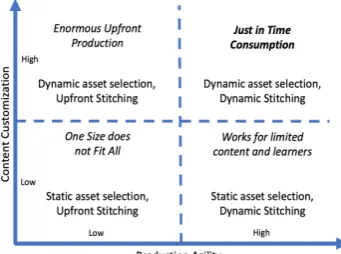
Figure 1: Framework for Content Creation
The trade-off between the agility of content pro-duction and content customization exposes a wide design space (as depicted in Figure 1). Most learner-oblivious content falls into the bottom left quadrant, which works well when the content does not require customization (like content including hard facts such as the place or year an event oc-curred, the name of an inventor etc.). Solutions in the bottom right quadrant enable flexible and efficient creation of content at run-time, allow-ing for more flexibility of content presentation, although it requires upfront planning of all the content. Solutions in the top left quadrant re-quire content to be curated upfront for many pos-sible customized scenarios (which could be pro-hibitively expensive), so that they can be just se-lected at run-time. For young learners, especially, high content customization is desirable, which of-ten cannot be generated upfront since the con-text in which a learning moment occurs cannot be known a priori. Our ideal goal is to be able to operate in the top right quadrant to ensure max-imal learning outcomes. To this end, we ex-plore a solution that enables just-in-time produc-tion of audio-visual content for vocabulary learn-ing when supplied with learnlearn-ing scripts. Our sys-tem processes alearning scriptin natural language (selected by the educator based on their learn-ing requirements), along with an image library, to semi-automatically generate a multi-modal learn-ing video: with voice-over and contextual images synchronized in a way that the video is coherent and easily comprehended by young children. A learning-script is the textual manuscript for the learning-video. The voice-over is generated us-ing a text-to-speech engine and hence can be cus-tomized to different requirements of a friendly or familiar speech model (e.g. that of a favourite
car-toon character) for a child to maximize engage-ment. Using an audio-visual format, the same concept can be presented in a multitude of ways customized to each child’s unique learning trajec-tory, context, and interests. Educators are familiar with a child’s learning trajectory and areas of in-terest, and hence our solution allows customizing a default textual script or write a new script. The system takes this customized textual script, uses NLP techniques to extract relevant features and their representative images, uses human assistance toverifyimages, and finally creates a video. Since this content is created for children, human veri-fication process is critical to ensure that no inap-propriate image content has inadvertently crept in as the system automatically pulls relevant images from the image repository based on textual fea-tures of the script. As automatic safe image search becomes more readily feasible, human assistance could be reduced further. More importantly, this approach achieves our main goal of reducing the content creation load for educators because it is much easier toverify created content than to cre-atenew content from scratch.
The rest of the paper is organized as follows. We review the related work in Section2. In Sec-tion3, we explain our proposed system and all the system components. In Section4, we describe the experiment and evaluation results of our model. In Section5, we present the future work and finally, we conclude in Section6.
2 Related Work
Our goal is to create just-in-time learning-videos using textual input and an image library mined from the Internet. In this section, we discuss prior work related to these different aspects.
Word Concreteness: Using NLP techniques
with word-concreteness we derive meaningful search phrases from textual scripts which help cu-rate visuals for aptly representing the script. Many previous studies have shown the importance of word-concreteness as a measure and come up with ways to compute this score (Hessel et al., 2018; Kiela et al., 2018). Also, some work has been done in assisting and evaluating creative writ-ing (Roemmele and Gordon,2018;Somasundaran et al.,2018).
Personalized Learning: Prior work has
how semantic-web based learning objectives can be decomposed into content units, which on re-assembly produce content-sequence personalized to the needs of each student. This serves as a valu-able complimentary effort to scale our approach based on the semantic web and learner models. Our focus remains on generating learning-videos by combining various available media, when pro-vided with scripts.
Automated Visual Generation: There have
been some efforts aimed at creating slideshows given a script, like My Simple Slideshow1. This tool identifies keywords from the text correspond-ing to which they have images. These image cut-outs are brought together on the screen to create a visual description similar to the text. However, the combination of different individual images may not convey the overall intended meaning of the sentence. Hence, it is important to contextualize the images based on the sentence context or bring in images which represent multiple connected key-words. Scene construction has also been con-sidered in a project ‘Imagine This’(Gupta et al., 2018). The authors have identified various entities and actions present in a script, and then used those to create a scene by combining image segments. This is based on first training over a database con-sisting of the constituent scene objects and actions from a densely annotated video dataset. Since we focus on building slideshows, and not complete motion videos we circumvent the problem of gen-erating continuous frames. Rather than creating or combining images and scenes, we construct search terms to get the most relevant images.
3 Solution Overview
We explore human-assisted just-in-time curation of learning content for micro-learning. Our solu-tion enables educators to generate learning videos for vocabulary words very easily: First, we auto-matically create sample scripts for a vocabulary word based on definitions and usage sentences from Simple English Wiktionary2 and allow ed-ucators to edit them. Alternatively, they can also write their own scripts if they are not satisfied with the generated script. Once a script is chosen, the system uses a set of natural language processing (NLP) techniques to derive a list of relevant search terms or concepts. The search terms are then used
1
https://www.mysimpleshow.com/
[image:3.595.313.521.60.235.2]2https://simple.wiktionary.org
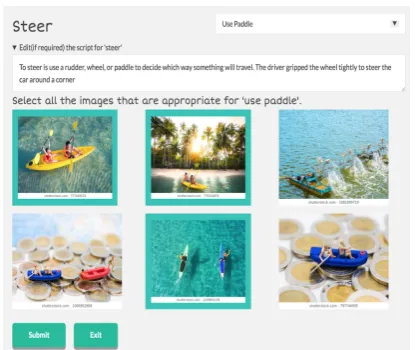
Figure 2: Sample screen for Script and Image Verifica-tion. The green boxes represent selected images.
to fetch images from an image repository (such as Shutterstock3) and display them to the educa-tor for validation. During the validation phase, the educator selects the images they prefer for each search term. With time, the educator preferences are learned and the images presented for valida-tion are ranked in a personalized manner.
A sample screen for script and image verifica-tion is shown in Figure2for the word ‘steer’. The available script, can be edited, and the correspond-ing search terms drop down (top right) gets popu-lated accordingly. The screen shows Image Verifi-cation for the search term ‘use paddle’ extracted from the script. The educators can simply tap on the images which look appropriate. Once the image validation phase is completed, the system aligns and stitches selected images along with the speech synthesized script. The output is a learning video personalized to the given script. Notably, the tasks of mining and ranking relevant visual content (which is heavy-weight for humans) are relatively easily done by the machine, and the tasks of veri-fying the appropriateness of the content (which is often heavy-weight for machines) is done by hu-mans.
3.1 Terminology
• A learning-script is the manuscript for the learning-video. It can be a textual/contextual description or definition of a vocabulary word/concept. We often refer to a learning-script asscript, and to the learning-video as video.
• A vocabulary-word is the word/concept for which given a script, the system generates a learning-video.
• Image labels are the words or phrases as-signed to images to describe them. Im-age repositories often assign multiple la-bels/keywords for every image.
• A slice is a part of the learning-script that maps to a search term. A learning-script can have multiple slices.
• Concretenessrefers to how palpable a word is or how much is it perceptible through senses. The concreteness score of a word measures its concreteness, the higher the value the more concrete a word is.
• A concrete word is a word that has a con-creteness score exceeding a given threshold. We use concreteness scores from (Brysbaert et al.,2014)
• Grammar templates are templates derived from Dependency Parsing and Part of Speech (POS). We construct grammar templates to extract terms related to concrete words.
• Asearch treeconsists of search terms. Each child node in the tree is a substring of the par-ent search term.
• Theprioritized search termsare the Level Or-der Traversal of the Search Tree.
Word Concreteness: Word concreteness is an
established term in the field of psychology (Paivio et al.,1968;Kounios and Holcomb,1994). Some studies have relied on crowd-sourcing to com-pute average concreteness scores for a majority of the commonly used words in the English lan-guage (Brysbaert et al., 2014). Multi-modal ma-chine learning techniques also utilize concreteness scores for improving performance (Young et al., 2014).
3.2 System Architecture
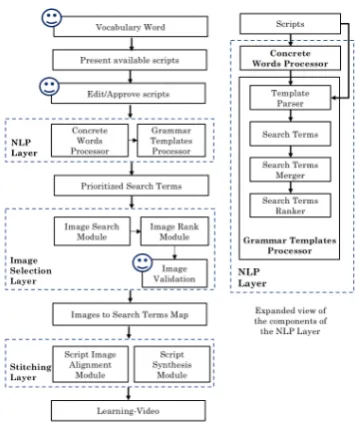
[image:4.595.327.506.59.271.2]An educator selects a vocabulary-word to be taught. The available scripts are displayed. The educator selects a script and optionally edits it. The script is then passed to the NLP Layer. Fig-ure3shows the system architecture and layer-wise components, with a face indicating the compo-nents requiring human intervention.
Figure 3: System Architecture
3.2.1 NLP Layer
The NLP layer processes the learning-script to provide prioritized search terms on a sentence level. First, sentence tokenization is performed. Next, each sentence is examined, using the Con-crete Words Processor, to identify any concrete words present. Concrete words imply a higher likelihood of finding appropriate images in an image repository. However, the concrete words by themselves might not adhere to script usage context and therefore make for poor search terms. For example consider the script “Many people prefer to commute to work via public transport as it is cheaper than having a car”. The con-crete words obtained from the Concon-crete Words Processor are shown in Figure 5. If a concrete word like ‘work’ was solely used, it will produce images that are not contextually appropriate to the sentence. However, if ‘commute work’ is used, it could yield more contextual results. Therefore, to construct contextually appropriate search terms, it is important that some context from the script is used to support the concrete words. To this end, we construct grammar templates, such as Noun Templates and Prepositional Templates. The expanded view of the NLP layer components is shown in the Figure3.
Grammar Templates Processor: The
Figure 4: Dependency relations for a part of the script snippet for ‘commute’.
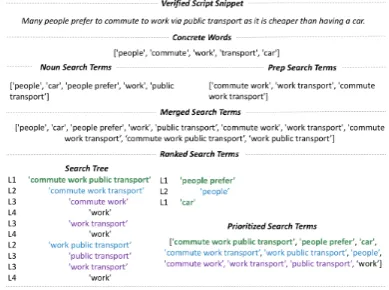
Figure 5: Script snippet processing for ‘commute’
added to the Search Terms. Each match must include one or more of the identified Concrete Words. Stop-words are omitted from all the Search Terms. Figure 5 shows a detailed exam-ple of the script for the word ‘commute’ as it is processed through the NLP Layer.
Grammatical Relationships:We use a 3-tuple
representation of the form(arrow tail POS, depen-dency relation, arrow head POS) for expressing the grammatical relationship between two words (represented by arcs in Figure 4). For instance consider the two words ‘public’ (arrow head of the relation arc) and ‘transport’ (arrow tail of the rela-tion arc) from Figure 4. In this case the 3-tuple relationship is represented as(Noun, amod, Adj). A three word relationship is considered a combi-nation of two two-word relationships. Therefore we extend the notation to represent a three word relationship using a 5-tuple representation in the form (POS, Dependency Relation, POS, Depen-dency Relation, POS). In this case the middle POS is the head of the first dependency relation and the tail of the second. Consider the example of ‘com-mute to work’ from the Figure4. The correspond-ing representation becomes(Verb, prep, Adp, pobj, Noun).
Template Parser:In this paper, we discuss two
grammar templates that we implemented, how-ever, others can be constructed and utilized by our framework. We construct templates in the 3-tuple and 5-tuple format defined above. In the tuple we
fix a few elements and put ‘*’ in the rest of them to represent an any element match. This indicates that any value in position of ‘*’ is acceptable.
Our genericNoun Templatesare(Noun,*,*)and (*,*,Noun). If a concrete word is a noun, then the Noun Template checks if it is part of a Noun Phrase. If so, the Noun Phrase is added to the Search Terms. Further, the Dependency Parser is used to check the relations of the Noun or Noun Phrase. A sample dependency relation is shown in Figure4. This was obtained using an online visu-alization tool Displacy4.
The related terms are added along with the Noun or Noun Phrase to the Search Terms. For ex-ample in Figure4, for the noun term ‘people’, a search term constructed is ‘people prefer’. The re-lation (Noun, nsubj, Verb) matches the template (Noun,*,*). nsubj refers to the nominal subject relationship. Similarly for the noun term ‘trans-port’ the search term ‘public trans‘trans-port’ is added. This acts as a noun phrase and(Noun, amod, Adj) also matches the template(Noun,*,*). Here amod refers to the adjectival modifier relationship. The Search Terms coming from the Noun Templates have been shown in Figure 5 as Noun Search Terms.
Prep refers to the prepositional modifier depen-dency. For Prep Templates the adjectives, verbs and nouns having the prep relations are consid-ered along with their corresponding object re-lationships. If these contain a concrete word then they are added to the Search Terms. We define the prep templates in the 5-tuple format (*,prep,*,obj,*) and (*,obj,*,prep,*). Words are added to the search terms for any relations that match these templates. For example, in the Fig-ure4the relation ‘commute to work’ has the form (Verb, prep, Adp, pobj, Noun), which passes the first prep template. Please note that pobj (object of preposition), belongs to the obj (object) rela-tionship. Removing ‘to’ which is a stop word, we add ‘commute work’ to the Search Terms. The Search Terms contributed by the Prep Templates
[image:5.595.83.278.159.304.2]are shown in Figure5as Prep Search Terms. InSearch Terms Merger(Figure3), the Search Terms are checked for overlap. The merged terms are added to the Merged Search Terms. For ex-ample, for search terms ‘commute work transport’ and ‘public transport’. In this case these would be merged into ‘commute work public transport’ (Figure 5). Further, all the remaining concrete words which were not part of any templates are individually added as search terms. For example, in the commute example, ‘car’ does not have any matching templates and is added as such to the Merged Search Terms. We believe that chains of contextually related words represent the intent of a given sentence much better than individual words. The merged chains shape the Prioritized Search Terms.
InSearch Terms Ranker(Figure3) the Merged Search Terms are used to create a Search Tree, where each child search term in the tree is a sub-string of the parent search term. A Level Or-der Traversal (or Breadth First Traversal) of this tree would yield the Prioritized Search Terms.The search terms which are substrings of other search terms are given less priority (lower level in the tree). These Prioritized Search Terms are provided as the output of the NLP Layer. For example in the Search Tree shown in Figure5the search terms at L1 (Level-1) are the Search Terms which do not have any other larger encapsulating Search Terms. The L2 (Level-2) search terms are put after L1 search terms in the Prioritized Search List, and similarly the later levels follow.
3.2.2 Image Selection Layer
This layer takes the Prioritized Search Terms as its input. The search terms are used to retrieve im-ages from the image repository. The imim-ages for every search term are ranked in an order personal-ized to the validator’s preferences. These ranked images are then rendered on the tool for valida-tion. The Image Rank Module is implemented using a Random Forest binary classifier (classes: accept, reject), which is trained on image labels and whether they were approved or rejected by a validator (human). After enough training samples are received (for our case approx 100-200 images across 20 vocabulary words), the recall probabil-ity is used to rank future image search results for each search term in descending order. The clas-sifier learns over time and thereby improves its ranking. With the aforementioned training set we
were able to repeatedly achieve a recall accuracy of 0.86 or higher in identifying images which are likely to be selected by the validator. The val-idator looks through the images and selects the ones which he/she thinks is appropriate consider-ing the script and search term (Figure2). A search term without valid images is considered irrelevant and is ignored. Once the validation is completed, the verification step concludes. The output of this layer is a mapping between the Prioritized Search Terms and the verified images. An example map-ping for ‘steer’ is shown in Figure6.
3.2.3 Stitching Layer
This layer is responsible for the final production of the learning-video (Figure3). First, the Script Image Alignment Module aligns the images to the script based on the Search Terms’ script ordi-nal positions. Second, the Script Synthesis Mod-ule prepares a Text-to-Speech (TTS) audio for all the Script Slices. An example of Script Slices is shown in Figure6. Finally, this layer combines the synthesized audio with the image ordering, pro-ducing a Learning Video.
Script Image Alignment Module: The
ap-pears on utterance of the word ‘paddle’. However, it should be noted that the exact slicing rules and grid formation could easily be changed keeping the overall flow intact.
Timestamps are assigned for the appearance of each image in the grid based on the timestamps ob-tained from the corresponding audio of the slices. The stitching layer combines all the images based on the timestamps. The audio obtained using TTS is added to the video. Background music is also added to make the experience more engaging. The output of the stitching layer is a learning-video for the given script.
4 Experiment and Evaluation
In this section, we first present the setup of the experiment we conducted for evaluating our ap-proach. The result & discussion follows in the fur-ther subsections.
4.1 Experimental Setup
We selected ten vocabulary words from the British National Corpus (BNC) frequently spoken list. The words were: Barrier,Clinic,Commute, Cus-tomer,Facility,Pedestrian,Serve,Steer,Stir, and Weave. We obtained the definitions and usage sen-tences from Simple English Wiktionary. These were combined to form sample scripts. For Ex-ample, the script forSteerderived was: “To steer is use a rudder, wheel, or paddle to decide which way something will travel. The driver gripped the wheel tightly to steer the car around a corner.”
As described in the Approach Section, we de-rived the Prioritized Search Terms from the NLP Layer. These Search Terms were then used to search for images from Shuterstock. These images were sent for human verification using our author-ing tool (Figure 2). The verified images consti-tuted the verified image library. These were then combined using our approach to generate learning videos for all ten words. The layer-wise outputs forSteeris shown in Figure6.
4.2 Experiment Design
In our experiment, we sent out Google Forms to participants, asking them to rate the generated videos and provide comments. The participants were proficient in using the English language and included native and non-native English speakers. The study included diverse professionals; includ-ing educators, college students, engineers,
doc-Figure 6: Creation of learning video for ‘steer’
tors and information technology researchers. Each form took feedback on one of the ten generated videos. The participants were allowed to provide feedback on as many words as they liked. We posed the same question for every word. For ex-ample, for the word ‘steer’ we asked ‘Would you recommend this video to someone who does not know “steer”?’ The responses were taken on a Likert scale of five points, where five indicated strong affirmation, and one indicated strong reluc-tance.
4.3 Results and Discussion
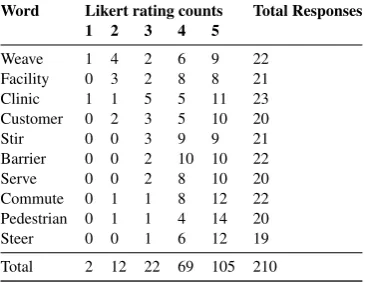
We received a total of 210 responses from a total of 28 unique participants. The distribution of the scores received are in Table1
Word Likert rating counts Total Responses 1 2 3 4 5
Weave 1 4 2 6 9 22
Facility 0 3 2 8 8 21
Clinic 1 1 5 5 11 23
Customer 0 2 3 5 10 20
Stir 0 0 3 9 9 21
Barrier 0 0 2 10 10 22
Serve 0 0 2 8 10 20
Commute 0 1 1 8 12 22
Pedestrian 0 1 1 4 14 20
Steer 0 0 1 6 12 19
[image:7.595.315.519.61.206.2]Total 2 12 22 69 105 210
Table 1: Likert Score distribution for learning videos
[image:7.595.307.490.479.620.2]We consider ratings of 4 and 5 as promoters. The promoter ratings amount to 82.8% of the total responses. The ratings of 1 and 2 we consider as detractorsand these amount to 6.7%. The 3 rating is considered asneutral. Neutral rating is given by 10.4% of total responses.
N P S= %promoters−%detractors (1)
Using the Net Promoter Score (NPS) formula above, our NPS is 76%. Per video summarized measures have been reported in Table 2. Also, the overall average Likert rating was 4.25 out of 5 when combined across all videos.
Word Avg. Score (Likert) #Responses SD #Images #Search Terms
Weave 3.82 22 1.30 6 3 Facility 4.00 21 1.05 3 2 Clinic 4.04 23 1.15 3 2 Customer 4.15 20 1.04 3 2 Stir 4.29 21 0.72 3 2 Barrier 4.36 22 0.66 3 2 Serve 4.40 20 0.68 6 3 Commute 4.41 22 0.80 6 3 Pedestrian 4.55 20 0.83 3 2 Steer 4.58 19 0.61 9 4
Averages 4.25 21 0.93 4.50 2.50
Table 2: Feedback on learning videos
17 unique participants gave feedback on all words, contributing 10 responses each. For the 17 people who provided feedback on all 10 videos, we computed the inter-annotator agreement using Fleiss Kappa (Fleiss et al., 2013). Since the rat-ing on the Likert scale of 5 can be subjective and a rating of 4 may be the same as a rating of 5 for someone else, we classify the responses into two classes ‘yes’ and ‘no’. The class ‘yes’ indi-cates that the reviewers would indeed recommend the video for learning a vocabulary word, and the class ‘no’ indicates otherwise. We consider the rating of 4, and, 5 in the ‘yes’ class and 1, and, 2 in the ‘no’ class. The responses with rating of 3 were equally distributed at random between the two classes. The free-marginal Kappa value came out to be 0.62, with an overall percentage agree-ment of 81%.
An observation we make from Table 2, besides the word weave, there is a correlation between the number of images and the average rating; the higher the number of images the higher the aver-age score. The number of imaver-ages is correlated to the number of search terms identified in the script. We plan to take this under advisement for future work in this domain. The participants raised some concerns about the videos. The following is a summary of their comments regarding the scripts
and the images.
Script Related Comments: For our experiment,
we used the scripts as obtained from Simple En-glish Wiktionary i.e. the combination of the defi-nition and usage sentence. Hence, a common ob-servation was that at times the usage sentence did not coherently follow the definition sentence. This could be addressed in one of two ways, a careful refinement of scripts by educators or video tent presentation changes. An example of the con-tent presentation changes could be to divide the video into two logical sections: ‘Definition’ and ‘Sample usage sentence’. Before the definition is presented the video would explicitly say ‘Def-inition’ and ‘Example sentence’ for sample usage sentence(s).
Visual Related Comments: The scripts we used
for words like ‘weave’ happen to describe a pro-cess. Processes are not easily represented by showing a sequence of images, and rather neces-sitate the need to have small video clips. We plan to incorporate this suggestion, and discuss it fur-ther in Section5. The number of images that peo-ple preferred for a given script were also variable. This again, would be addressed when the educa-tors use our tool and perform the Image Verifica-tion task themselves. They would then simply pick the images for the search terms they find most suit-able for their learning environment. Accordingly the number of images would change based on the search terms.
5 Future Work
We believe that the problem of reducing human ef-fort in learning content creation, and hence foster-ing dynamic contextual content creation, is appli-cable in multiple domains. To explore this broad applicability, our future work will be focused on several topics:
Personalized script recommendation: In our
scorpions are relevant in teaching the concept of arachnid). If a curriculum of vocabulary words to be taught, is available, a recommendation system could be leveraged for selection of the next best video for a learner (Mbipom et al.,2018).
Visual curation: Harvesting images from the
open Web, or even a curated image repository, has drawbacks, especially for learning and age appro-priateness. Unless a human inspects each image, it could be deemed inappropriate for learning or for a particular learner age group. Utilizing work from image scene identification (Vailaya et al., 2001;Bosch et al., 2006) and image understand-ing (Eakins, 2002), could help reduce the human effort for flagging inappropriate images. Further image scene identification could pair image con-cepts with learning-script concon-cepts or vocabulary word supporting concepts (for example, Amphib-ian and Frog).
Once labeled images are retrieved, personalizing the selection of images based on learner likes and dislikes is an area of interest. As humans, we in-dividually gravitate towards certain things, which can have an impact on learning. For example, a student that has arachnophobia might benefit from images of plush toy Arachnids rather than real Arachnids (or a balance between real versus illus-trated).
Further, knowing words a learner mastered ver-sus words struggling with, based on learner model, can be powerful in selecting images that link mul-tiple concepts for the learner. For example, the learner mastered the wordspider, but is struggling with the word arachnid. Purposefully choosing spiderimage(s) as a way to explainarachnidscan help accelerate mastery. Using reading complex-ity tests, such as Flesch-Kincaid5, script reading complexity scores can be exposed in our tool (Fig-ure 2) to allow the educator to select/craft age-appropriate scripts.
Script understanding:A better understanding of
the script (by the system) can help to improve the search and curation for visuals. Hill and Anna have looked at concreteness as a dimension of lex-ical meaning (2014) and have used multi-modal models for concrete and abstract concept mean-ings (Hill et al.,2014). Recent advances have tried to come up with adaptive algorithms to quantify visual concreteness of words and topics in these
5https://en.wikipedia.org/wiki/
Flesch-Kincaid_readability_tests
multi-modal datasets (Hessel et al.,2018). Adap-tive concreteness scores for words, in context with the scripts can help refine search terms generated by our system. This in turn, would reduce the hu-man effort in the validation step.
Audio: Attributes of a voice can be
captivat-ing or repulsive to the human ear. Identifycaptivat-ing the right voice and tone to synthesize the learning-script with can play a significant role in learning. Achieving this will rely on collecting learner be-havioral data or external input sources, such as teacher selection.
Interactive Learning: Learning videos do not
have to be a one-way street; rather they can also be used to assess the learner’s knowledge and/or engagement. Injecting assessment/engagement questions can help drive a point to the learner as well as assess the learner’s connections with the generated content. Feedback collected can shape creation of the next learning video. The key here is inserting such content at the opportune moment of the learning script.
6 Conclusion
Creating customized and just-in-time learning content in an agile manner completely shifts the paradigm of micro-learning. Our solution ap-proach is generic enough to be used in any con-tent creation scenario where it is possible to have scripted text, and there is a repository of images (or open Internet) to choose from. The key direc-tion of this research is to provide the right system in the hands of learning designers so that they can be more efficient and agile with their essential role of making learning effective, engaging, and fun.
References
Isabel L Beck, Margaret G McKeown, and Linda Ku-can. 2013. Bringing words to life: Robust vocabu-lary instruction. Guilford Press.
Jacob Lowell Bishop and Matthew A Verleger. 2013. The flipped classroom: A survey of the research. InASEE National Conference Proceedings, Atlanta, GA, volume 30, pages 1–18.
Anna Bosch, Andrew Zisserman, and Xavier Mu˜noz. 2006. Scene classification via plsa. In Computer Vision – ECCV 2006, pages 517–530.
John P. Eakins. 2002. Towards intelligent image re-trieval. Pattern Recognition, 35(1):3 – 14.
Joseph L Fleiss, Bruce Levin, and Myunghee Cho Paik. 2013. Statistical methods for rates and proportions. John Wiley & Sons.
Tanmay Gupta, Dustin Schwenk, Ali Farhadi, Derek Hoiem, and Aniruddha Kembhavi. 2018. Imagine this! scripts to compositions to videos. InThe Euro-pean Conference on Computer Vision (ECCV).
Jack Hessel, David Mimno, and Lillian Lee. 2018.
Quantifying the visual concreteness of words and topics in multimodal datasets. InProceedings of the 2018 Conference of the North American Chapter of the Association for Computational Linguistics: Hu-man Language Technologies, Volume 1 (Long Pa-pers), pages 2194–2205. Association for Computa-tional Linguistics.
Felix Hill and Anna Korhonen. 2014. Concreteness and subjectivity as dimensions of lexical meaning. In Proceedings of the 52nd Annual Meeting of the Association for Computational Linguistics (Volume 2: Short Papers), volume 2, pages 725–731.
Felix Hill, Roi Reichart, and Anna Korhonen. 2014. Multi-modal models for concrete and abstract con-cept meaning. Transactions of the Association of Computational Linguistics, 2(1):285–296.
Jelena Jovanovi´c, Dragan Gaˇsevi´c, and Vladan Devedˇzi´c. 2006. Dynamic assembly of personalized learning content on the semantic web. In The Se-mantic Web: Research and Applications, pages 545– 559.
Douwe Kiela, Alexis Conneau, Allan Jabri, and Max-imilian Nickel. 2018. Learning visually grounded sentence representations. In Proceedings of the 2018 Conference of the North American Chapter of the Association for Computational Linguistics: Hu-man Language Technologies, Volume 1 (Long Pa-pers), pages 408–418. Association for Computa-tional Linguistics.
John Kounios and Phillip J Holcomb. 1994. Concrete-ness effects in semantic processing: Erp evidence supporting dual-coding theory. Journal of Experi-mental Psychology: Learning, Memory, and Cogni-tion, 20(4):804.
Jason Lankow, Josh Ritchie, and Ross Crooks. 2012. Infographics: The power of visual storytelling. John Wiley & Sons.
Blessing Mbipom, Stewart Massie, and Susan Craw. 2018. An e-learning recommender that helps learn-ers find the right materials.
Allan Paivio, John C Yuille, and Stephen A Madigan. 1968. Concreteness, imagery, and meaningfulness values for 925 nouns. Journal of experimental psy-chology, 76(1p2):1.
Mike Parkinson. 2012. The power of visual communi-cation. Billion Dollar Graphics.
Frederick F Reichheld. 2003. The one number you need to grow. Harvard business review, 81(12):46– 55.
Melissa Roemmele and Andrew Gordon. 2018. Lin-guistic features of helpfulness in automated support for creative writing. In Proceedings of the First Workshop on Storytelling, pages 14–19.
Swapna Somasundaran, Michael Flor, Martin Chodorow, Hillary Molloy, Binod Gyawali, and Laura McCulla. 2018. Towards evaluating narrative quality in student writing. Transactions of the Association for Computational Linguistics, 6:91–106.
A. Vailaya, M. A. T. Figueiredo, A. K. Jain, and Hong-Jiang Zhang. 2001. Image classification for content-based indexing. IEEE Transactions on Image Pro-cessing, 10(1):117–130.