Microsoft Press
A Division of Microsoft Corporation One Microsoft Way
Redmond, Washington 98052-6399 Copyright © 2004 by Brian Komar
All rights reserved. No part of the contents of this book may be reproduced or transmitted in any form or by any means without the written permission of the publisher.
Library of Congress Cataloging-in-Publication Data pending. ISBN 0-7356-2021-0
Printed and bound in the United States of America. 1 2 3 4 5 6 7 8 9 QWT 9 8 7 6 5 4 Distributed in Canada by H.B. Fenn and Company Ltd.
A CIP catalogue record for this book is available from the British Library.
Microsoft Press books are available through booksellers and distributors worldwide. For further information about international editions, contact your local Microsoft Corporation office or contact Microsoft Press International directly at fax (425) 936-7329. Visit our Web site at www.microsoft.com/learning/. Send comments to [email protected].
Active Directory, ActiveX, Microsoft, Outlook, and Windows are either registered trademarks or trademarks of Microsoft Corporation in the United States and/or other countries. Other product and company names men-tioned herein may be the trademarks of their respective owners.
The example companies, organizations, products, domain names, e-mail addresses, logos, people, places, and events depicted herein are fictitious. No association with any real company, organization, product, domain name, e-mail address, logo, person, place, or event is intended or should be inferred.
This book expresses the author’s views and opinions. The information contained in this book is provided without any express, statutory, or implied warranties. Neither the authors, Microsoft Corporation, nor its resellers or distributors will be held liable for any damages caused or alleged to be caused either directly or indirectly by this book.
Acquisitions Editor: Martin DelRe Project Editor: Denise Bankaitis Technical Editor: Ronald Beckelaar Indexer: Julie Kawabata
Contents
Acknowledgments . . . xvii
Introduction . . . xix
Part I
Foundations of PKI
1
Basics
of
Cryptography
3
Encryption Types . . . 3Algorithms and Keys . . . 4
Data Encryption. . . 5
Symmetric Encryption . . . 5
Asymmetric Encryption. . . 7
Combining Symmetric and Asymmetric Encryption . . . 10
Digital Signing of Data . . . 12
The Hash Process . . . 12
Hash Algorithms . . . 12
Combining Asymmetric Signing and Hash Algorithms . . . 13
Case Study: Microsoft Applications and Their Encryption Algorithms . . . 14
Opening the EFS White Paper . . . 14
Case Study Questions . . . 15
Additional Information . . . 15
2
Primer to PKI
17
Certificates . . . 17 X.509 Version 1 . . . 18 X.509 Version 2 . . . 20 X.509 Version 3 . . . 21 Certification Authorities . . . 27 Root CA . . . 28 Intermediate CA . . . 29 Policy CA . . . 29 Issuing CA . . . 31Certificate Revocation Lists . . . 31
Types of CRLs . . . 31
Revocation Reasons . . . 32
What do you think of this book? We want to hear from you!
Microsoft is interested in hearing your feedback about this publication so we can continually improve our books and learning resources for you. To partcipate in a brief online survey, please visit: www.microsoft.com/learning/booksurvey/
Case Study: Inspecting an X.509 Certificate . . . 33
Opening the Certificate File . . . 33
Case Study Questions . . . 33
Additional Information . . . 34
3
Policies
and
PKI
35
Security Policy. . . 36Defining Effective Security Policies . . . 37
Resources for Developing Security Policies . . . 37
Defining PKI-Related Security Policies . . . 38
Certificate Policy . . . 39
Contents of a Certificate Policy. . . 40
Certificate Policy Example . . . 40
Certificate Practice Statement (CPS) . . . 42
CPS: Introduction . . . 43
CPS: General Provisions . . . 44
CPS: Identification and Authentication . . . 44
CPS: Operational Requirements . . . 45
CPS: Physical, Procedural, and Personnel Security Controls . . . 46
CPS: Technical Security Controls . . . 46
CPS: Certificate and Certificate Revocation List (CRL) Profiles . . . 47
CPS: Specification Administration . . . 47
Case Study: Planning Policy Documents . . . 47
Design Requirements . . . 47
Case Study Questions . . . 48
Additional Information . . . 48
Part II
Establishing a PKI
4
Preparing an Active Directory Environment
51
Preparing a Windows 2000 Active Directory Environment . . . 51Microsoft Exchange Modifications. . . 52
Extending the Schema . . . 58
Modifying Membership in Cert Publishers . . . 60
Preparing a Windows Server 2003 Active Directory Environment . . . 63
Preparing Non–Active Directory Environments . . . 64
Case Study: Preparing Active Directory . . . 64
Network Details . . . 65
Case Study Questions . . . 65
Contents vii
5
Designing a Certification Authority Hierarchy
67
Determining the Number of Tiers in a CA Hierarchy . . . 67
A Single-Tier CA Hierarchy . . . 67
A Two-Tier CA Hierarchy . . . 68
A Three-Tier CA Hierarchy . . . 69
A Four-Tier CA Hierarchy . . . 70
Organizing Issuing CAs . . . 71
Choosing an Architecture . . . 73
Gathering Required Information . . . 74
Identifying PKI-Enabled Applications . . . 74
Determining Security Requirements . . . 76
Determining Technical Requirements . . . 78
Determining Business Requirements . . . 85
Determining External Requirements . . . 85
Case Study: Identifying Requirements . . . 87
Case Study Questions . . . 88
Additional Information . . . 89
6
Implementing a CA Hierarchy
91
Preparing Configuration Scripts for Installation . . . 93CAPolicy.inf File . . . 93
Pre-Installation Scripts. . . 102
Post-Installation Scripts . . . 106
Implementing an Enterprise Root CA. . . 113
Creating a CAPolicy.inf File . . . 114
Installing Internet Information Services . . . 115
Installing Certificate Services . . . 116
Post-Installation Configuration . . . 117
Enabling Auditing. . . 118
Implementing a Standalone Root CA . . . 119
Creating a CAPolicy.inf File . . . 120
Installing Certificate Services . . . 121
Post-Installation Configuration . . . 122
Object Access Auditing . . . 123
Implementing an Offline Policy CA. . . 124
Pre-Installation Configuration . . . 124
Creating a CAPolicy.inf File . . . 125
Installing Certificate Services . . . 125
Post-Installation Configuration . . . 130
Implementing an Online Issuing CA. . . 131
Pre-Installation Configuration . . . 131
Creating a CAPolicy.inf File . . . 133
Installing IIS . . . 134
Installing Certificate Services . . . 134
Post-Installation Configuration . . . 138
Object Access Auditing . . . 139
Verifying Installation . . . 140
Case Study: Deploying a PKI . . . 141
Case Study Questions . . . 142
Additional Information . . . 144
7
Securing a CA Hierarchy
145
Designing CA Configuration Security Measures . . . 145Designing Physical Security Measures . . . 148
Securing the CA’s Private Key . . . 150
Private Key Stored in the Local Machine Store . . . 150
Private Keys Stored on Smart Cards . . . 151
Private Keys Stored on Hardware Security Modules . . . 152
Hardware Security Modules . . . 152
Categories of HSMs . . . 153
HSM Vendors . . . 154
HSM Deployment Methods. . . 158
Case Study: Planning HSM Deployment . . . 162
Scenario. . . 163
Case Study Questions . . . 164
Additional Information . . . 165
8
Designing Certificate Templates
167
Certificate Template Versions. . . 167Version 1 Certificate Templates . . . 167
Version 2 Certificate Templates . . . 170
Enrolling Certificates Based on Certificate Templates. . . 171
Modifying Certificate Templates . . . 171
Modifying Version 1 Certificate Template Permissions . . . 171
Modifying Version 2 Certificate Templates . . . 172
Best Practices for Certificate Template Design . . . 182
Case Study: Certificate Template Design. . . 183
Requirements . . . 183
Case Study Questions . . . 183
Contents ix
9
Certificate Validation
187
Certificate Validation Process. . . 187
Certificate Validity Checks . . . 188
Certificate Revocation . . . 189
Types of CRLs . . . 189
CRL Retrieval Process . . . 190
Revocation Reasons . . . 190
Revoking a Certificate . . . 191
Building Certificate Chains . . . 192
Exact Match . . . 193
Key Match . . . 194
Name Match . . . 195
Designing PKI Object Publication . . . 196
Choosing Publication Protocols. . . 196
Choosing Publication Points . . . 197
Choosing Publication Intervals . . . 199
Troubleshooting Publication Points . . . 201
Certutil . . . 202
PKI Health Tool . . . 202
Case Study: Choosing Publication Points . . . 204
Design Requirements . . . 204
Case Study Questions . . . 205
Additional Information . . . 205
10
Role Separation
207
Common Criteria Roles . . . 207Common Criteria Levels . . . 207
The Windows Server 2003 Implementation of Common Criteria . . . 210
Assigning Common Criteria Roles . . . 215
Implementing Certificate Manager Restrictions . . . 217
Enforcing Common Criteria Role Separation . . . 218
Other PKI Management Roles. . . 220
Local Administrator . . . 220
Enterprise Admins . . . 221
Certificate Template Manager. . . 222
Enrollment Agent. . . 226
Key Recovery Agent . . . 227
Case Study: Planning PKI Management Roles . . . 228
Scenario . . . 228
Case Study Questions . . . 229
11
Planning and Implementing Disaster Recovery
233
Developing Required Documentation. . . 234
Choosing a Backup Method . . . 235
System State Backups . . . 236
Manual Backups . . . 236
Performing System State Backups . . . 237
Performing Manual Backups. . . 238
Using the Certification Authority Console. . . 238
Using Certutil . . . 239
Other Backup Methods . . . 241
Restoration Procedures . . . 242
Reinstalling Certificate Services . . . 242
Restoring System State Backups . . . 244
Restoring Manual Backups . . . 245
Evaluating Backup Methods . . . 245
Hardware Failure . . . 246
Certificate Services Failure . . . 246
Server Replacement . . . 247
Case Study: Replacing Server Hardware . . . 248
Scenario. . . 249
Case Study Questions . . . 249
Additional Information . . . 250
12
Deploying Certificates
251
Certificate Enrollment Methods . . . 253Choosing an Enrollment Method . . . 255
Choosing Among Manual Enrollment Methods . . . 255
Choosing Among Automatic Enrollment Methods . . . 255
Publishing Certificate Templates for Enrollment . . . 256
Performing Manual Enrollment . . . 257
Using the Certificate Request Wizard . . . 265
Performing Automatic Enrollment . . . 267
Automatic Certificate Request Settings . . . 267
Autoenrollment Settings . . . 268
Performing Scripted Enrollment . . . 270
Certreq.exe. . . 270
Custom Scripting. . . 273
Case Study: Selecting a Deployment Method. . . 274
Scenario. . . 275
Case Study Questions . . . 275
Contents xi
13
Creating Trust Between Organizations
279
Methods of Creating Trust . . . 279
Certificate Trust Lists . . . 280
Common Root CAs . . . 282
Cross Certification . . . 284
Bridge CAs . . . 285
Qualified Subordination Conditions . . . 288
Name Constraints . . . 289
Basic Constraints . . . 292
Application Policies . . . 294
Certificate Policies . . . 296
Guidelines for Qualified Subordination Conditions . . . 299
Implementing Qualified Subordination . . . 299
Implementing the Policy.inf File. . . 301
Acquiring a Partner’s CA Certificate. . . 302
Generating the Cross Certification Authority Certificate . . . 302
Publishing to Active Directory . . . 304
Verifying Qualified Subordination . . . 304
Case Study: Trusting Certificates from Another Forest . . . 305
Case Study Questions . . . 306
Additional Information . . . 307
Part III
Deploying Application-Specific Solutions
14
Archiving Encryption Keys
311
Roles in Key Archival . . . 312The Key Archival Process . . . 312
The Key Recovery Process . . . 314
Requirements for Key Archival . . . 315
Defining Key Recovery Agents . . . 316
Enabling a CA for Key Archival . . . 320
Enabling Key Archival in a Certificate Template . . . 322
Performing Key Recovery . . . 322
Certutil . . . 322
Key Recovery Tool . . . 323
Importing the Recovered Private Key . . . 325
Best Practices . . . 326
Case Study: Lucerne Publishing . . . 327
Scenario. . . 328
Case Study Questions . . . 328
15
Smart Card Deployment
331
Using Smart Cards in an Active Directory Environment . . . 331
Smart Cards and Kerberos. . . 332
Requirements for Smart Card Certificates . . . 333
Planning Smart Card Deployment . . . 334
Increasing the Assurance of Smart Card Certificates . . . 335
Identifying the Required Certificate Templates . . . 335
Determining Certificate Distribution Methods . . . 336
Designing Certificate Templates for Smart Cards . . . 338
Deploying a Smart Card Management System . . . 342
Procedures . . . 342
Enabling ActiveX Controls. . . 342
Requesting Smart Card Certificates on Behalf of Other Users. . . 345
Enabling Autoenrollment . . . 346
Implementing Additional Security for Smart Cards . . . 347
Requiring Smart Cards for Interactive Logon . . . 347
Requiring Smart Cards for Remote Access . . . 348
Defining Smart Card Removal Behavior . . . 348
Using Smart Cards for Administrative Tasks . . . 348
Best Practices . . . 349
Case Study: City Power and Light . . . 350
Case Study Questions . . . 352
Additional Information . . . 353
16
Encrypting File System
355
EFS Processes . . . 356How Windows Chooses an EFS Encryption Certificate . . . 356
Local EFS Encryption . . . 357
Remote EFS Encryption Using SMB. . . 358
Remote EFS Encryption Using WebDAV . . . 359
EFS Decryption . . . 359
EFS Data Recovery . . . 360
One Application, Two Recovery Methods . . . 361
Data Recovery . . . 362
Key Recovery . . . 366
Deploying EFS . . . 366
Enabling and Disabling EFS . . . 366
Certificate Templates for EFS Encryption . . . 367
Certificate Enrollment . . . 370
Contents xiii
Case Study: Lucerne Publishing . . . 372
Scenario. . . 373
Design Requirements . . . 373
Proposed Solution . . . 373
Case Study Questions . . . 375
Additional Information . . . 375
17
Implementing SSL Encryption for Web Servers
377
How SSL Works . . . 377Certificate Requirements for SSL . . . 380
Choosing a Web Server Certificate Provider . . . 380
Placement of Web Server Certificates . . . 381
Single Web Server . . . 381
Clustered Web Servers . . . 382
Web Server Protected by ISA with Server Publishing . . . 383
Web Server Protected by ISA with Web Publishing . . . 383
Choosing a Certificate Template . . . 385
Issuing Web Server Certificates . . . 386
Issuing Web Server Certificates to Forest Members . . . 386
Issuing Web Server Certificates to Non-Forest Members. . . 389
Issuing Web Server Certificates to Third-Party Web Servers and Web Acceleration Devices . . . 393
Certificate-Based Authentication . . . 394
Defining Certificate Mappings . . . 395
Choosing Where to Perform Certificate Mappings . . . 396
Performing Certificate-Based Authentication . . . 397
Configure IIS to Use Active Directory Mappings . . . 397
Configure IIS to Use IIS Certificate Mappings . . . 402
Best Practices . . . 404
Case Study: The Phone Company . . . 406
Scenario. . . 406
Case Study Questions . . . 408
Additional Information . . . 408
18
Secure E-Mail
411
Securing E-Mail . . . 411Secure Multipurpose Internet Mail Extensions (S/MIME) . . . 412
SSL for Internet Protocols . . . 415
Choosing Certification Authorities . . . 419
Choosing Commercial CAs . . . 419
Choosing Certificate Templates . . . 421
A Combined Signing and Encryption Template . . . 421
Dual Certificates for E-Mail. . . 422
Choosing Deployment Methods . . . 425
Enabling Secure E-Mail . . . 426
Enabling Outlook . . . 427
Enabling OWA . . . 428
Enabling Outlook Express. . . 429
Sending Secure E-Mail . . . 430
Migrating from Previous Exchange Server Versions . . . 431
Upgrade to Exchange 2000 . . . 431
Enable Key Archival at the Windows Server 2003 Enterprise CA . . . 432
Install an Encryption Certificate at the Enterprise CA . . . 432
Enable Foreign Certificate Import at the Enterprise CA . . . 432
Export the Exchange KMS Database . . . 433
Import the Exchange KMS Database into Enterprise CA Database . . . 435
Best Practices . . . 435
Case Study: Adventure Works . . . 436
Scenario. . . 437
Case Study Questions . . . 438
Additional Information . . . 439
19
Virtual Private Networking
441
Certificate Deployment for VPN. . . 441Point-to-Point Tunneling Protocol (PPTP) . . . 441
Layer Two Tunneling Protocol (L2TP) with IP Security. . . 444
Certificate Template Design . . . 446
User Authentication . . . 446
Server Authentication . . . 447
IPSec Endpoint Authentication . . . 448
Deploying a VPN Solution. . . 449
IAS Server Configuration . . . 450
VPN Server Configuration . . . 454
Create a VPN Connection Object. . . 456
Best Practices . . . 459
Case Study: Lucerne Publishing . . . 460
Scenario. . . 461
Case Study Questions . . . 462
Contents xv
20
Wireless Networking
467
Threats Introduced by Wireless Networking . . . 467
Protecting for Wireless Communications . . . 468
MAC Filtering . . . 468
Wired Equivalent Privacy . . . 469
Wi-Fi Protected Access. . . 470
802.1x Authentication Types . . . 470
EAP/TLS Authentication . . . 471
PEAP Authentication . . . 471
How 802.1x Authentication Works . . . 471
Planning Certificates for 802.1x Authentication . . . 473
Computer Certificates for RADIUS Servers . . . 473
User Certificates for Clients . . . 474
Computer Certificates for Clients . . . 474
Deploying Certificates to Users and Computers . . . 475
RADIUS Server . . . 475
Client Computers . . . 476
Users . . . 476
Implementing 802.1x Authentication . . . 477
Configuring the RADIUS Server . . . 477
Configuring the Wireless Access Point . . . 483
Connecting to the Wireless Network . . . 483
Best Practices . . . 486
Case Study: Margie’s Travel. . . 486
Scenario. . . 487
Case Study Questions . . . 488
Additional Information . . . 489
21
Code Signing
491
How Code Signing Works . . . 491Certification of Code Signing Certificates. . . 493
Commercial Certification . . . 494
Corporate Certification. . . 495
Planning Deployment of Code Signing Certificates . . . 496
Certificate Template Design . . . 496
Planning Enrollment Methods . . . 497
Performing Code Signing . . . 497
Gathering the Required Tools . . . 497
Using Signcode.exe . . . 498
Verifying the Signature. . . 502
Internet Explorer . . . 502
The Check Trust Program (Chktrust.exe) . . . 503
Best Practices . . . 504
Case Study: Lucerne Publishing . . . 505
Scenario. . . 505
Case Study Questions . . . 506
Additional Information . . . 506
Appendix: Case Study Answers
509
Chapter 1: Basics of Cryptography . . . 509Chapter 2: Primer to PKI . . . 510
Chapter 3: Policies and PKI . . . 511
Chapter 4: Preparing an Active Directory Environment . . . 512
Chapter 5: Designing a Certification Authority Hierarchy . . . 513
Chapter 6: Implementing a CA Hierarchy . . . 515
Chapter 7: Securing a CA Hierarchy . . . 518
Chapter 8: Designing Certificate Templates. . . 519
Chapter 9: Certificate Validation . . . 521
Chapter 10: Role Separation . . . 521
Chapter 11: Planning and Implementing Disaster Recovery . . . 524
Chapter 12: Issuing Certificates . . . 525
Chapter 13: Creating Trust Between Organizations . . . 527
Chapter 14: Archiving Encryption Keys . . . 528
Chapter 15: Smart Card Deployment . . . 529
Chapter 16: Encrypting File System . . . 531
Chapter 17: Implementing SSL Encryption for Web Servers . . . 532
Chapter 18: Secure E-Mail . . . 533
Chapter 19: Virtual Private Networking . . . 535
Chapter 20: Wireless Networking . . . 537
Chapter 21: Code Signing . . . 539
Index . . . 541
What do you think of this book? We want to hear from you!
Microsoft is interested in hearing your feedback about this publication so we can continually improve our books and learning resources for you. To partcipate in a brief online survey, please visit: www.microsoft.com/learning/booksurvey/
Acknowledgments
When you work on a book project, several people are involved in the writing pro-cess one way or another, and I am going to try my best to thank everyone who helped me through the research, envisioning, and writing of this book. If I did miss anyone, it is only because there were so many people who played a part in making this book a reality!
The first group of people that I want to thank is the PKI product and testing team, current members and past members, from Microsoft: David Cross, Vic Heller, Laudon Williams, Trevor Freeman, Phil Hallin, Darren Canavor, Sergio Dutra, Krish Shenoy, Larry Talbot, Mike Danseglio, and Vishal Agarwal. All of you helped me get my head around several of the specifics of the Microsoft PKI. I especially want to thank David Cross and Trevor Freeman who assisted me with the three white papers that I wrote for Microsoft during the beta phase of Microsoft Windows Server 2003. The informal discussions we shared on content and best practices greatly assisted me in thinking “outside the box” when looking at PKI solutions. I would not be where I am today without the guidance and mentoring you provided, and continue to provide, to me!
The second group of people that I have to thank is Microsoft Consulting Ser-vices and my clients over the last two years. Lori Woehler, Christi Droz, and John Howie have all assisted me in developing a great PKI offering for our clients. I would like to thank some of Microsoft’s great PKI consultants, Carsten Kinder, Ayman AlRashed, and Ian Hellen, for the continual exchange of ideas and recom-mendations for solving our clients’ PKI deployment requirements. Finally, from this group, I also have to thank my engagement managers and especially my clients, for believing in the methodologies that my company uses for PKI deployments.
A book is only as good as the project team that helps the author translate thoughts to words on a page. I want to specifically thank the following individuals:
■ Martin DelRe for bringing the book proposal to Microsoft Press.
■ Denise Bankaitis for keeping the project flowing (especially with my attempt-ing to write parts of this book on every continent, or so it seemed).
■ David Cross and Ronald Beekelaar for your outstanding technical review of the
content. Although the reviews took me hours to incorporate, the book is much stronger because of your efforts and knowledge.
■ Brenda Pittsley, Sandi Resnick, and Erika Kauppi for your copy edits and
reviews of the finalized content. Your attention to detail is so very much appreciated.
■ Dan Latimer and Joel Panchot for the long hours you spent on the book’s
lay-out and art. Your commitment to quality has made a noticeable difference in the book’s appearance.
■ Kristen McCarthy for helping me with the initial drafts of each chapter and for
attempting to cure me of my horrible habit of using passive voice. Kristen, you make me shine as an author because of your efforts to clean up my words. Finally, I have to thank a group of developers from my customers and Microsoft that provided me with a certificate enrollment script that simply amazes me. Ryan Hurst, Doug McDorman, Gary Cole, Ken Jackson, and Carlos Lopez all contributed to the enrollment script used in several examples of this book, and with-out their knowledge, dedication, and superior coding skills, the book would have been missing a crucial component for assisting in the deployment of certificates to users and computers.
Introduction
Welcome to Microsoft Windows Server 2003 PKI and Certificate Security. This book provides detailed information about designing and implementing public key infra-structure (PKI) solutions with the Windows Server 2003 certification authority (CA). This book is based on the white papers and guidelines produced by the Microsoft PKI product team and on my experience working with Microsoft Consulting Services at customer sites over the past two years.
About This Book
Although you are welcome to read the book from cover to cover, it is divided into three self-contained parts. Each part contains chapters that build on the lessons and practices described within that part. Each chapter ends with a case study that enforces the critical concepts discussed in the chapter, allowing you to validate how well you understand the concepts of the chapter.
Note The answers for the case study questions are available in the Appen-dix, “Case Study Answers” in both the print copy of the book and the eBook, which can be found on the Microsoft Windows Server 2003 PKI and Certifi-cate Security Companion CD.
The three parts of this book are:
■ Part 1, “Foundations of PKI.” Part 1 provides an overview of cryptography
and PKI concepts and culminates with one of the most important chapters in the book, “Policies and PKI.” Part 1 ensures that you understand the relation-ship between a PKI and your organization’s security policies. Without strong policies and procedures, a PKI is simply a collection of application servers, rather than a mechanism for securing your network and its applications.
■ Part 2, “Establishing a PKI.” Part 2 provides a framework for designing and
implementing a PKI within your organization, including detailed information on preparing your Active Directory environment and designing and imple-menting your organization’s certification authority (CA) hierarchy. Part 2 includes information on designing and implementing a CA hierarchy, design-ing certificate templates, planndesign-ing deployment of certificates to users and com-puters, and disaster recovery recommendations. When you complete Part 2 you will have a CA hierarchy that is ready to deploy certificates for any PKI-enabled application used by your organization.
■ Part 3, “Deploying Application-Specific Solutions.” Part 3 provides
detailed information on deploying certificates for specific PKI-enabled applica-tions. Each chapter in this section offers details on the types of certificates required for the specific application, recommendations on how to deploy the certificates to the required users and computers, and provides best practices for deploying each PKI-enabled application.
Microsoft Windows Server 2003 PKI and Certificate
Security Companion CD
The companion CD with this book contains a variety of tools, scripts, and white papers to help you deploy a Windows Server 2003 PKI and issue certificates to com-puters running Windows 2000, Windows XP, and Windows Server 2003. Many of these tools are from the Microsoft Windows Server 2003 Resource Kit (Microsoft Press, 2004). The included tools can be implemented on computers running either the Windows XP or Windows Server 2003 operating systems. Specifically, the tools are on the CD in the Resource Kit Tools folder, and the scripts and batch files are in the Resources folder in a sub-folder based on the chapter in which the script or batch file is referenced. Some of the Case Studies in the book require additional files. These additional files are found on the CD in the Case Studies folder in a sub-folder based on the chapter requiring the additional files. The companion CD further includes a fully searchable electronic version (eBook) of the book. To view the elec-tronic version of the book, you'll need Adobe Acrobat or Adobe Reader. To obtain more information about these products or to download Adobe Reader, visit www.adobe.com.
Resource Kit Support Policy
Microsoft does not support the tools and scripts supplied on the Microsoft Windows Server 2003 PKI and Certificate Security companion CD. Microsoft does not guaran-tee the performance of the tools or scripting examples, or any bug fixes for these tools and scripts. However, Microsoft Press provides a way for customers who pur-chase this book to report any problems with the software and receive feedback on such issues—just send e-mail to [email protected]. This e-mail address is only for issues related to Microsoft Windows Server 2003 PKI and Certificate Secu-rity. Microsoft Press also provides corrections for books and companion CDs through the World Wide Web at: www.microsoft.com/learning/support/. To connect directly to the Microsoft Knowledge Base and enter a query regarding a question or issue you might have, go to: www.microsoft.com/learning/support/search.asp. For issues related to the Windows operating system, please refer to the support informa-tion included with your product.
Part I
3
Chapter 1
Basics of Cryptography
This chapter will introduce the fundamentals of cryptography and provide a basic understanding of the type of encryption and signing that takes place in public key infrastructure (PKI)–enabled applications. This overview is not an in-depth look at cryptographic functions.
More Info For more information on cryptography, check out Cryptography
and Network Security: Principles and Practice, Third Edition, by William Stall€
ings, or Practical Cryptography, by Niels Ferguson and Bruce Schneier, which are referenced in the “Additional Information” section at the end of this chapter.
Encryption Types
Cryptography supports symmetric encryption and asymmetric encryption for crypto-graphic functions.
■ Symmetric encryption. The same key is used for encryption and
decryp-tion. The key must be exchanged so that both the data sender and the recipient can access the plaintext data.
■ Asymmetric encryption. Two mathematically related keys, a key pair
con-sisting of a public key and a private key, are used in the encryption and decryption processes.
■ If the public key is used for encryption, the associated private key is used
for decryption.
■ If the private key is used for encryption, the associated public key is used
Note Only one person can hold the private key, but the public key can be distributed freely. The public key, as an attribute of a digital certificate, is often published in a network-accessible directory (such as Active Directory) to allow easier access.
Algorithms and Keys
When data is encrypted with cryptography, two inputs are required for encryption: an algorithm and a key.
■ Algorithm. An algorithm defines how data is transformed when original
plaintext data is converted into ciphertext. Both the data sender and the recip-ient must know the algorithm used for data transformation so that the same algorithm is used to decrypt the ciphertext back into the original plaintext data.
■ Key. A key is used as an input to the algorithm, along with the plaintext
data, so that the algorithm can convert plaintext data into ciphertext or decrypt ciphertext back into plaintext data.
All applications determine how these inputs are distributed between the sender and recipient. Although it is not a security issue if an attacker identifies the algorithm used to encrypt the data, interception of the key is considered a security risk.
To enable encryption, a PKI-enabled application must do the following:
■ Identify the algorithms that are supported by the application. In some
cases, the application must allow for algorithm negotiation so that the sender and recipient can negotiate the strongest form of encryption.
■ Generate a key for use with the algorithm. In the best circumstances, the
key is a one-time key—that is, it is only used for a single encryption and decryption process. When a key is reused many times, it becomes easier for attackers to determine the key, through a process called differential cryptanal-ysis. Differential cryptanalysis allows an attacker to determine the encryption key by supplying the encryption algorithm and several samples of ciphertext produced with the encryption key.
■ Determine a key distribution method. The key must be securely
transmit-ted from the sender to the recipient—that is, it must be protectransmit-ted against inter-ception during this transmission and might have to be transmitted out-of-band (not on the network) or in an encrypted state.
Chapter 1: Basics of Cryptography 5
Data Encryption
Encryption protects data against inspection by unauthorized people. This section will describe how symmetric encryption and asymmetric encryption processes work and how some applications combine symmetric and asymmetric processes.
Symmetric Encryption
As mentioned, symmetric encryption uses the same key for both encryption and decryption. The algorithms associated with symmetric encryption are able to encrypt large amounts of data in little time thanks to the use of a single key and the fact that symmetric encryption algorithms are much simpler when compared to asymmetric encryption algorithms. (See Figure 1.1.)
Note Symmetric encryption is often referred to as bulk encryption because of its speed encrypting large amounts of plaintext data.
Plain Text Symmetric Key
Cipher Text Symmetric Key
Plain Text
Figure 1-1 The symmetric encryption process
When data is encrypted with a symmetric algorithm, the data sender generates a random symmetric key. The length of the key, typically in bits, is determined by the algorithm and the application using the symmetric algorithm.
Once the symmetric key is generated, the key is used to encrypt the plaintext data into an encrypted state, referred to as ciphertext. The ciphertext is then sent or made available to the data recipient.
Note The symmetric key must be securely transmitted to the recipient before the recipient can decrypt the ciphertext. The transmission of the symmetric key is the biggest security risk when using symmetric encryp€ tion algorithms. If the symmetric key is intercepted, attackers can decrypt all data.
When a recipient receives the encrypted ciphertext and the symmetric key, he or she can use the symmetric key to decrypt the data back into its original plaintext format.
Symmetric Algorithms
Many of the most commonly used encryption algorithms are symmetric because of their ability to encrypt large amounts of data in little time. Symmetric algorithms used by PKI-enabled applications include:
Note This is not an exhaustive list of symmetric encryption protocols.
■ Data Encryption Standard (DES). An encryption algorithm that encrypts
data with a 56-bit, randomly generated symmetric key.
■ Data Encryption Standard XORed (DESX). DESX is a stronger variation of
the DES encryption algorithm. Rather than encrypting the plaintext directly, the plaintext is processed through an Exclusive Or (XOR) function with 64 bits of additional key material before the resulting data is encrypted with the DES algo-rithm. The output of the DES algorithm is also transformed with an XOR func-tion with another 64 bits of key material. This helps protect the data against key search attacks based on the relatively short length of the DES 56-bit key.
■ Rivest’s Cipher version 2 (RC2) (40 bit). A variable key-size block cipher
with an initial block size of 64 bits that uses an additional string of 40 bits called a salt. The salt is appended to the encryption key, and this lengthened key is used to encrypt the message.
■ RC2 (128 bit). A variation on the RC2 (40-bit) cipher, where the salt length
is increased to 88 bits.
■ RC4. A variable key-size stream cipher with byte-oriented operations. The
algorithm is based on the use of a random permutation and is commonly used for the encryption of traffic to and from secure Web sites using the SSL protocol.
■ Triple DES (3DES). A variation on the DES encryption algorithm in which
DES encryption is applied three times to the plaintext. The plaintext is encrypted with key A, decrypted with key B, and encrypted again with key C. A common form of 3DES uses only two keys: the plaintext is encrypted with key A, decrypted with key B, and encrypted again with key A.
■ Advanced Encryption Standard (AES). Developed as a successor to DES,
rather than using a 56-bit key, AES is able to use 128-bit, 192-bit, and 256-bit keys.
Chapter 1: Basics of Cryptography 7
Note AES was developed in response to a call for proposals by the National Institute of Standards and Technology (NIST) for encryption of unclassified data. Several algorithms were proposed, and the algorithm ulti€ mately selected was the Rijndael algorithm. More information on AES is pro€ vided in the “Additional Information” section at the end of this chapter.
Asymmetric Encryption
Asymmetric encryption increases the security of the encryption process by utilizing two separate but mathematically related keys known as a public key and a private key. The encryption process is more secure because the private key is possessed only by the user or computer that generates the key pair. The public key can be dis-tributed to any person who wishes to send encrypted data to the private key holder.
Asymmetric encryption’s use of two keys and the complexity of the asymmetric encryption algorithm makes the encryption process much slower. Studies have shown that symmetric encryption is at least 100 times faster than asymmetric encryp-tion when using software-based cryptography and can be as much as 10,000 times faster when using hardware-based cryptography.
When data is encrypted with asymmetric encryption, the key pair used is owned by the data recipient. The use of this key pair ensures that only the recipient has access to the necessary private key to decrypt the data, limiting data encryption to the recipient. (See Figure 1-2.)
Active Directory 1
Public Key
2 3 4
Plain Text Recipient's Cipher Text Recipient's Plain Text
Public Key Private Key
1. The data sender obtains the recipient’s public key. This can be sent to the data originator by the recipient or retrieved from a directory, such as Active Directory.
2. The plaintext data is passed through an asymmetric encryption algorithm, using the recipient’s public key as the encryption key. The encryption algo-rithm creates the encrypted ciphertext.
3. The ciphertext is sent or made available to the recipient. There is no need to send the key, as the recipient already has the private key required to decrypt the ciphertext.
4. The recipient decrypts the ciphertext with his or her private key, and the result-ing plaintext is the original plaintext created by the data originator.
!
Important It is very rare for an application to only use an asymmetric encryption algorithm. Typically, the data is encrypted with a symmetric algo€ rithm, and then only the symmetric encryption key is encrypted with the asymmetric encryption algorithm. This combination is discussed later in this chapter in the section titled “Combining Symmetric and Asymmetric Encryption.”Asymmetric Signing Process
Asymmetric algorithms can be used to protect data from modification and prove the data creator’s identity. In this scenario, the public and private key roles are reversed, requiring use of the originator’s key pair.
Note Proof of the originator’s identity is accomplished because only the originator has access to the private key of the key pair. Of course, this is subject to the method used to protect the originator’s private key. A hardware-protected private key, such as a private key stored on a smart card, provides more assurance than a private key stored in the user’s local certificate store.
Figure 1-3 shows how asymmetric signing proves the sender’s identity and pre-vents the data from being modified.
Chapter 1: Basics of Cryptography 9 4 Active Directory 3 Public Key 4 2 1
Plain Text Private Key Cipher Text Public Key Plain Text
Figure 1-3 The asymmetric signing process
1. The plaintext data is passed through an asymmetric encryption algorithm, using the originator’s private key as the encryption key. The result of the encryption algorithm is the encrypted ciphertext.
2. The ciphertext is sent or made available to the recipient.
3. The data recipient obtains the originator’s public key. The public key can be sent with the ciphertext, or the recipient can obtain the public key from a trusted source, such as a directory.
4. The recipient decrypts the ciphertext with the originator’s public key. The resulting plaintext is the original plaintext created by the data originator. Decryption by the public key of the originator’s key pair proves that the data was created by the originator. It also proves that the data was not modified in transit, as any modification results in a decryption process failure.
Asymmetric Algorithms
The following asymmetric algorithms are used in PKI-enabled applications when encrypting or digitally signing data.
■ Diffie-Hellman key agreement. This algorithm is not based on encryption
and decryption but instead relies on mathematical functions that enable two parties to generate a shared secret key for exchanging information online con-fidentially. When the Diffie-Hellman key agreement is used between two hosts, the two hosts agree on a public value (v) and a large prime number (p). Each
host chooses his or her own secret value and, using their three inputs (the public value, the prime number, and their secret value), they arrive at a public value that can be exchanged. These two public values are used to calculate a shared secret key used by both hosts to encrypt data sent between them.
■ Rivest Shamir Adleman (RSA). This algorithm can be used for encrypting
and signing data. The encryption and signing processes are performed through a series of modular multiplications. The security of the RSA algorithm can be increased by using longer key lengths, such as 1,024 bits or higher—the longer the key length, however, the slower the encryption or signing process.
Note Both Diffie-Hellman and RSA can be used for key exchange, allowing secure transmission or negotiation of a symmetric key between the data originator and recipient.
■ Digital Signature Algorithm (DSA). This algorithm can be used only for
signing data; it cannot be used for encryption. The DSA signing process is per-formed through a series of calculations based on a selected prime number. Although intended to have a maximum key size of 1,024 bits, longer key sizes are now supported.
RSA and DSA are only comparable in the creation and validation of digital sig-natures.
■ When DSA is used, the process of creating the digital signature is faster than
the validation process.
■ When RSA is used, the opposite is true. It takes longer to generate the digital
signature than it does to validate it.
When a developer of an application must decide whether to use RSA or DSA for digital signing, the decision often comes down to which operation is performed more frequently. For example, if you are signing a device driver for use by Microsoft Windows, it is better to use RSA because it is more common for the signature to be validated than created. On the other hand, if you are creating several documents that might be referenced by others, you get better performance using DSA to sign the documents.
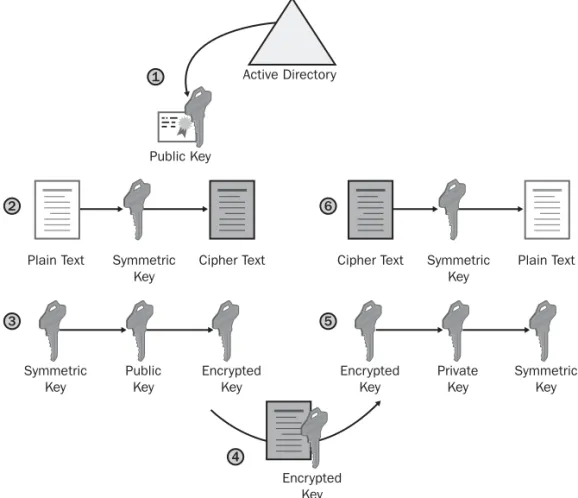
Combining Symmetric and Asymmetric Encryption
In most applications, symmetric and asymmetric encryption are combined to take advantage of each method’s strengths. (See Figure 1-4.) When symmetric and asym-metric encryption are combined, the following takes place:
Chapter 1: Basics of Cryptography 11
■ Symmetric encryption is used to convert the plaintext to ciphertext. This takes
advantage of the symmetric encryption speed.
■ Asymmetric encryption is used to exchange the symmetric key used for
encryption. This takes advantage of the security of asymmetric encryption, ensuring that only the intended recipient can decrypt the symmetric key.
Active Directory 1
Public Key
2 6
Plain Text Symmetric Cipher Text Cipher Text Symmetric Plain Text
Key Key
3 5
Symmetric Public Encrypted Encrypted Private Symmetric
Key Key Key Key Key Key
Encrypted Key 4
Figure 1-4 Combining symmetric and asymmetric encryption
1. The sender retrieves the recipient’s public key. The sender retrieves the public key from a trusted source, such as Active Directory.
2. The sender generates a symmetric key and uses this key to encrypt the original data.
3. The symmetric key is encrypted with the recipient’s public key to prevent the symmetric key from being intercepted during transmission.
4. The encrypted symmetric key and encrypted data are provided to the intended recipient.
5. The recipient uses his or her private key to decrypt the encrypted symmetric key. 6. The encrypted data is decrypted with the symmetric key, which results in the
recipient obtaining the original data.
Digital Signing of Data
The goal of cryptography is three-fold: to keep data secret, to protect data against modification, and to prove the source of the data. While encryption can keep data secret and protect data against modification, only digital signing proves the source of the data, in addition to protecting the data from modification. Digital signing pro-tects data in the following ways:
■ The digital signing process uses a hash algorithm to identify whether the
orig-inal data has been modified in any way.
■ A digital signature applied to the resulting message digest identifies who
signed the message digest. This signing prevents users from denying they signed the message digest, as only they have access to the private key used to sign the message digest. The inability for signers to deny that a signature is theirs is known as non-repudiation.
The Hash Process
A hash algorithm takes a plaintext document as input and produces a mathematical result for the two inputs. This mathematical result is referred to as a hash value, mes-sage digest, or digest. If a single character is changed in the plaintext document, the resulting message digest will no longer match the original message digest.
Note It is technically possible for two data inputs to produce the same digest with the hash algorithm. Although possible, it is mathematically improbable.
Hash Algorithms
The following hash algorithms are commonly used in PKI-enabled applications to produce a hash value:
■ Message Digest 5 (MD5). This algorithm takes a message of any length and
produces a 128-bit message digest.
■ Secure Hash Algorithm 1 (SHA1). This algorithm takes data that is less
Chapter 1: Basics of Cryptography 13
Although the SHA1 algorithm is slightly slower than MD5, it is considered harder to find two data inputs that result in the same has value when you use the SHA1 algorithm.
Combining Asymmetric Signing and Hash Algorithms
Most applications that perform digital signing use a combination of asymmetric sign-ing and hash algorithms. While the hash algorithm provides a mechanism to deter-mine whether the original message has been modified in any way, the addition of a digital signature protects the resulting digest from modification and proves that the digest was created by the originator of the data.
Figure 1-5 shows the interaction of hash algorithms and asymmetric signing in the digital signing process:
1
Plain Text Private
Key Encrypted Digest Digest Digest Function 2 3 Encrypted Digest Encrypted Digest Digest Digest
Compare Plain Text
4 5 6 7 Digest Function Public Key
Figure 1-5 Digital signing with asymmetric signing and hash algorithms
1. The originator creates a plaintext data file.
2. The originator’s software runs a hash algorithm against the plaintext message to create a message digest.
3. The digest is encrypted using the originator’s private key.
4. The plaintext message and the encrypted digest are sent or made available to the recipient.
Note When using digital signing, no encryption is applied to the plaintext data. The plaintext can be modified, but modification invalidates the encrypted digest sent with the message.
5. The recipient decrypts the encrypted digest by using the sender’s public key. The public key can be retrieved from a directory where the public key is stored (such as Active Directory) or included with the signed data.
6. The recipient runs the same hash algorithm used by the sender to create his or her own digest of the message. This digest is created against the plaintext mes-sage received from the originator.
7. The two digests are compared. If the digests differ, the message or digest has been modified during transmission.
Case Study: Microsoft Applications and Their
Encryption Algorithms
In this case study, you will research the encryption and hash algorithms supported by Encrypting File System (EFS). The research involves reviewing white papers available on the Internet (or the compact disc that accompanies this book if you do not have Internet connectivity).
Opening the EFS White Paper
Use the following procedure to open the “Encrypting File System in Windows XP and Windows Server 2003” white paper:
1. Insert the accompanying compact disc in your CD-ROM drive. 2. Open Windows Explorer.
3. Open the folder CD:\Case Studies\Chapter1\.
4. In the CD:\Case Studies\Chapter1 folder, double-click Encrypting File System in Windows XP and Windows Server 2003.htm.
Note Alternatively, you can locate the “Encrypting File System in Windows XP and Windows Server 2003” white paper at www.microsoft.com/technet
Chapter 1: Basics of Cryptography 15
5. From the Edit menu, click Find (on This Page).
6. In the Find dialog box, in the Find What box, type Default Encryption Algorithm and click Find Next.
7. In the Find dialog box, click Cancel.
Case Study Questions
1. Based on the encryption algorithms discussed in the “Default Encryption Algo-rithms” section of the white paper, does EFS use symmetric or asymmetric encryption?
2. What encryption algorithm is used to encrypt EFS data on a Windows 2000 workstation?
3. What encryption algorithms can be used to encrypt EFS data on Windows XP? 4. How does the application of Windows XP, Service Pack 1, affect EFS
encryp-tion?
5. What Group Policy setting enables the use of 3DES and AES encryption algo-rithms?
6. What asymmetric encryption algorithm is used to protect the File Encryption Key (FEK) in EFS?
7. A developer in your organization has a laptop that dual boots between Win-dows 2000, Professional, and WinWin-dows XP, Professional. Both operating sys-tems have the latest service packs and security updates. The user’s Outlook data file is encrypted, and the same EFS key pair is used in both operating sys-tems to provide access to the Outlook data file.
This morning, your developer was unable to access the Outlook data file when working in Windows 2000, but you are still able to create new encrypted files. Fearing that the Outlook data file was corrupt, he booted into Windows XP and was able to access the data file. What is the probable cause of this problem?
Additional Information
■ Microsoft Official Curriculum, Course 2821: “Designing and Managing a Windows
Public Key Infrastructure” (www.microsoft.com/traincert/syllabi/2821afinal.asp)
■ Cryptography and Network Security: Principles and Practice, Third
Edi-tion, by William Stallings (http://vig.prenhall.com/catalog/academic/product /0,4096,0130914290,00.html)
■ Practical Cryptography, by Niels Ferguson and Bruce Schneier
(www.wiley.com/WileyCDA/WileyTitle/productCd-047122894X.html)
■ “Cryptography and PKI Basics” (www.microsoft.com/technet/prodtechnol
/windows2000serv/deploy/confeat/cryptpki.mspx)
■ “Cryptography and Microsoft Public Key Infrastructure” (www.microsoft.com
/technet/security/topics/crypto/cryptpki.mspx)
■ “Differential Cryptanalysis” (http://en.wikipedia.org/wiki/Differential_cryptanalysis) ■ “Specification for the Advanced Encryption Standard (AES)” (http://csrc.nist.gov
/publications/fips/fips197/fips-197.pdf)
■ Microsoft Windows Server 2000 Resource Kit, Chapter 14: “Cryptography for
Net-work and Information Security” (www.microsoft.com/resources/documentation /windows/2000/server/reskit/en-us/distsys/part2/dsgch14.mspx)
■ “Encrypting File System in Windows XP and Windows Server 2003”
Chapter 2
Primer to PKI
Before learning how to design and implement public key infrastructure (PKI)– enabled applications with the Windows Server 2003 PKI, you’ll need to know some of the basics about PKI. This chapter looks at the following building blocks of a PKI:
■ Certificate. A digital representation of the user, computer, service, or
net-work device on the netnet-work referred to as the subject of the certificate.
■ Certification Authority. A computer on the network that issues certificates
to users, computers, services, or network devices.
■ Certificate Revocation List. A listing of certificates that are revoked by the
CA. The revocation date and reason are recorded in the certificate revocation list.
Certificates
Certificates provide the foundation of a public key infrastructure (PKI). These are electronic credentials, issued by a certification authority (CA), that are associated with a public and private key pair.
A certificate is a digitally signed collection of information roughly 2 to 4 KB in size. A certificate typically includes the following:
■ Information about the user, computer, or network device that holds the private
key corresponding to the issued certificate. The user, computer, or network device is referred to as the subject of the certificate.
■ Information about the issuing CA.
■ The public key of the certificate’s associated public and private key pair. ■ The names of the encryption and/or digital signing algorithms supported by
the certificate.
■ A list of X.509 version 3 extensions included in the issued certificate.
■ Information for determining the revocation status and validity of the certificate.
The CA must ensure the identity of the requestor before issuing a certificate. Identity validation can be based on the user’s security credentials or require an
in-person interview to validate requestor identity. Once identity is confirmed, the CA issues the certificate and digitally signs the certificate with its private key to prevent content modification.
Note It is nearly impossible for another user, computer, network device, or service to impersonate the subject of a certificate because impersonation requires access to the certificate holder’s private key. Impersonation is not possible if an attacker has access to the certificate only.
Three versions of digital certificates can be used in a PKI:
■ X.509 version 1 certificates ■ X.509 version 2 certificates ■ X.509 version 3 certificates
X.509 Version 1
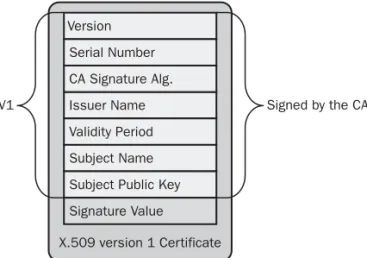
The X.509 version 1 certificate was defined in 1988. Its advanced age means you rarely see version 1 certificates in networking. The exceptions are some of the older root certificates and older Exchange Key Management Service (KMS) deployments. The X.509 version 1 format defines the certificate fields, as shown in Figure 2-1.
X.509 version 1 Certificate Version Serial Number CA Signature Alg. Issuer Name Validity Period Subject Name Subject Public Key Signature Value
V1 Signed by the CA
Chapter 2: Primer to PKI 19
An X.509 version 1 certificate contains the following fields:
■ Version. Contains a value indicating that the certificate is an X.509 version 1
certificate.
■ Serial Number. Provides a numeric identifier that is unique for each
CA-issued certificate.
■ CA Signature Algorithm. The name of the algorithm the CA uses to sign the
contents of a digital certificate. Figure 2-1 shows the fields included when cre ating the digital signature.
■ Issuer Name. The distinguished name of the certificate’s issuing CA. Typi
cally, the distinguished name is represented in an X.500 or distinguished name format specified in the X.509 specification and Request for Comment (RFC) 3280, “Internet X.509 Public Key Infrastructure Certificate and Certificate Revo cation List (CRL) Profile.”
■ Validity Period. The range of time for which the certificate is considered
valid. In some offerings, the validity period is split into two fields: Valid From and Valid To.
■ Subject Name. The name of the computer, user, network device, or service
represented by the certificate. Typically, the subject name is represented in an X.500 or distinguished name format specified in the X.509 specification, but it can include other name formats, such as an RFC 822, “Standard for the Format of ARPA Internet Text Messages,” e-mail name format.
■ Subject Public Key. The public key of the certificate holder. The public key
is provided to the CA in a certificate request and is included in the issued cer tificate. This field also contains the public key algorithm identifier, which indi cates which public key algorithm is used to generate the key pair associated with the certificate.
■ Signature Value. Contains the signature value that results from the CA signa
ture algorithm used to sign the digital certificate.
In a version 1 certificate, the Issuer Name and Subject Name fields allow certif icates to be organized into a chain of certificates that starts at the certificate issued to a user, computer, network device, or service and terminates with a root CA cer tificate.
Note Certificate chaining is fully discussed in Chapter 9, “Certificate Vali-dation.”
X.509 Version 2
Although the X.509 version 1 certificate format provides basic information about the certificate holder, the format offers little information about the certificate issuer. By including only the issuer, issuer name, CA signature algorithm, and signature value, the version 1 format does not provide any provisions for CA renewal.
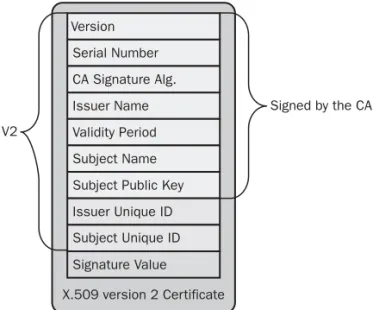
When a CA’s certificate is renewed, two certificates possess the same Issuer Name field value. Likewise, it is possible for another organization to create a CA with the same issuer name. To address this, the X.509 version 2 certificate format was introduced in 1993. The version 2 format introduced two new fields to the cer tificate. (See Figure 2-2.)
X.509 version 2 Certificate
Signed by the CA V2
Figure 2-2 The X.509 version 2 certificate fields
The X.509 version 2 certificate format introduced the following fields:
■ Issuer Unique ID. An optional field that contains a unique identifier, typi
cally a hexadecimal string, for the issuing CA as defined by the issuing CA. When a CA renews its certificate, a new Issuer Unique ID is generated for that certificate version. Version Serial Number CA Signature Alg. Issuer Name Validity Period Subject Name Subject Public Key Issuer Unique ID Subject Unique ID Signature Value
Chapter 2: Primer to PKI 21
■ Subject Unique ID. An optional field that contains a unique identifier, typi
cally a hexadecimal string, for the certificate’s subject as defined by the issuing CA. If the subject is also a CA, this unique identifier is placed in the Issuer Unique ID.
The Issuer Unique ID and Subject Unique ID fields improved the certificate chaining process. The process now finds the CA certificate by matching the issuer name in the issued certificate to the subject name in the CA certificate and performs a second check by matching the Issuer Unique ID in the issued certificate with the Subject Unique ID of the CA certificate.
This additional level of matching allows a distinction between CA certificates when the CA renews a certificate. This method also allows for a distinction between CAs with the same subject name. (The likelihood of CA certificates with the same name increases when simple names are used—for example, CN=Root CA rather than CN=Fabrikam Industries Inc. Corporate Root CA,O=Fabrikam,C=NL.)
Although the addition of the Issuer Unique ID and Subject Unique ID aids in chain building, it’s still possible for collisions to occur when two certificates share the same Subject Name and Subject Unique ID fields.
Note Although the X.509 version 2 format improved on the version 1 for-mat, the standard was not widely supported. In fact, RFC 3280, “Internet X.509 Public Key Infrastructure Certificate and Certificate Revocation List (CRL) Profile,” recommends the omission of these X.590 version 2 fields.
X.509 Version 3
Released in 1996, the X.509 version 3 format introduced extensions to address the problems associated with matching the Issuer Unique ID with the Subject Unique ID, as well as other certificate-validation issues. An X.509 version 3 certificate can contain one or more certificate extensions. (See Figure 2-3.)
Note In addition to introducing the Issuer Unique ID and Subject Unique ID fields, the X.509 version 2 certificate’s Version field changed to a value of 2 to indicate the version number.
Planning
Testing
Resolution
Deployment
y
analyze the inventory that the Collector tool gathered
Perform risk analysis and prioritize applications
Test prioritized applications with input from subject matter experts (SMEs)
Use Application Verifier and Application Compatibility Administrator to find and test compatibility fixes
Use Application Compatibility Administrator
to create compatibility databases (.sdb files)
Distribute compatibility databases to target computers, post to a network share, or add
to a disk image
Register each compatibility database by running Sdbinst.exe on each target computer
See the section “Compatibility Inventory” in this chapter
See the section “Testing the Applications” in this chapter and http://www.microsoft.com windows/appcompatibility/toolkit.mspx for he performing risk analysis and prioritizing See the section “Testing the Applications” in this chapter
See the section “Finding Resolutions” in this chapter
See the section “Compatibility Databases” in this chapter
See the section “Distributing Compatibility Fixes” in this chapter
See the section “Distributing Compatibility Fixes” in this chapter
Figure 2-3 The X.509 version 3 certificate fields
Each extension in an X.509 version 3 certificate is composed of three parts:
■ Extension Identifier. An object identifier (OID) that indicates the format
and definitions of the extension.
■ Criticality Flag. An indicator that identifies whether the information in an
extension is important. If an application cannot recognize the critical exten sion, the certificate cannot be accepted or used. If the criticality flag is not set, an application can use the certificate even when the application does not rec ognize the extension.
Chapter 2: Primer to PKI 23
■ Extension Value. The value assigned to the extension. The value varies
depending on the specific extension.
In an X.509 version 3 certificate, the following certificate extensions can exist:
■ Authority Key Identifier. This extension can contain one of two values.
The value can be either
■ The subject of the CA and serial number of the CA certificate that issued
the current certificate.
■ A hash of the public key of the CA certificate that issued the current cer
tificate.
■ Subject Key Identifier. This extension contains a hash of the current certif
icate’s public key.
Note The use of the Authority Key Identifier and Subject Key Identifier in certificate chaining and validation is described in Chapter 9, “Certificate Validation.”
■ Key Usage. A CA, user, computer, network device, or service can have more
than one certificate. The Key Usage extension defines the security services for which a certificate can be used. The options can be used in any combination and can include the following:
■ Digital Signature. The public key can be used to verify signatures.
This key is also used for client authentication and data-origin validation.
■ Non-Repudiation. The public key can be used to validate the signer’s
identity, preventing a signer from denying that he/she signed a package.
■ Key Encipherment. The public key can be used for key transport for
processes, such as symmetric key exchange. This Key Usage value is used when an RSA key is used for key management.
■ Data Encipherment. The public key can be used to directly encrypt
data, rather than exchanging a symmetric key for data encryption.
■ Key Agreement. The public key can be used for key transport for pro
cesses such as symmetric key exchange. This value is used when a Diffie-Hellman key is used for key management.