Abstract— Nowadays computer network attacks are carried out by professionals targeting organizations’ vulnerabilities. Many attacks are successful because of the growing complexity of vulnerable information technology requiring support. It therefore comes as no surprise that cyber security protection solutions on offer are increasing exponentially. Consequently, understanding the role of these solutions in the context of how they are deployed requires network managers of the future to have in-depth knowledge, know-how and practical experience.
In 2014, Munich University of Applied Sciences Germany, initiated an ICT security project DECAMP (Open Distributed European Virtual Campus on ICT Security). The purpose of this Project is to develop and implement online EU courses on ICT security with a strong practical orientation. Implementing these goals required the development of a set of solutions to offer students the possibility of working in virtual labs. The aim: supporting their cyber security education with hands-on lab experience.
One of the solutions for facilitating hands-on lab experience was developed based on the Moodle education platform interfaced with the OpenStack cloud computing platform. This paper presents the Moodle-OpenStack solution.On the one hand, it supports the lab experiments that are designed to show how various attacks are performed and how they influence the network components. On the other hand it gives students the opportunity of understanding how to protect networks and their applications by using the most relevant protection tools. The approach is based on large, preconfigured and complex network configurations featuring a variety of protection tools and network components. The paper advocates the use of practical education for future secure network administrators.
Index Terms— ICT Security, Virtual campus, Green Mobility, Integrating Virtual Laboratories in Moodle, OpenStack
Manuscript received December 21, 2016; revised December 27, 2016. The DECAMP Project is supported by the EU under the “Erasmus+ Strategic Partnerships” grant, Agreement number 2014-1-DE01-KA203-000695. Our thanks also go to our DECAMP Associated Partner Siemens AG, Corporate Technology, Research and Technology Center, Department IT Security, CT RTC ITS (www.siemens.com) for its kind financial support in facilitating all the objectives of the DECAMP Project.
Alexandru Soceanu is professor with the Department of Computer Science and Mathematics, Munich University of Applied Sciences, Germany, Phone: +49 89 1265 3759, e-mail: [email protected].
Maksym Vasylenko is researcher with the Department of Computer Science and Mathematics, Munich University of Applied Sciences, Germany, e-mail: [email protected].
Alexandru Gradinaru is assistant professor with the Department of Automation and Computer Science, University Politehnica of Bucharest Romania, Phone: +40 743696871, e-mail: [email protected]
I. INTRODUCTION
ODAY anybody who is able to spell the word ‘security’ immediately gets a well-paid job,” said Dr William Simpson from the Institute of Defense Analyses, USA, during the 7th International Conference on Complexity, Informatics and Cybernetics, IMCIC 2016, held in Orlando, March 2016. The reason: Nowadays, computer network attacks are carried out by professionals targeting organizations’ vulnerabilities. Their attacks are successful because of the growing complexity of the vulnerable information technology (IT) requiring support. It therefore comes as no surprise that the offer of cyber security protection solutions is increasing exponentially. Consequently, understanding the role of these solutions in the context of their deployment requires future network managers to have in-depth knowledge, know-how and practical experience. All in all, easier said than done. The protection concepts of companies and organizations, no matter what size they are, has to be all-encompassing. It needs to include the protection of data, along with every communication channel and network component. A security manager therefore needs to be a security professional right from the outset rather than an IT graduate with general training. He/she needs to be in a position to effectively address the new demands placed on cyber security without spending a huge amount of time in acquiring new skills and new knowledge of IT security.
Moreover, the slew of sophisticated attacks announced daily by the media, and the strong dependence of all types of enterprises on IT is causing the demand for security experts to accelerate dramatically. It is not that long ago that IT security was completely underestimated, not only by decision makers in companies, state-owned and private organizations, but also in universities [14]. Gradually, however, people have come to understand the singular risks posed by cyber attacks. The yearly damage goes into billions of dollars.
Hence – and also fairly recently – universities have recognized the need for educating their computer science students in the intricacies of IT security. They also soon realized that reading tutorials, white papers, books or participating in webinars is far from sufficient for learning about network security and putting this knowledge into practice [1], [2]. This is a domain where hands-on practice is imperative. Indeed, this is the only way to understand: 1) what form attacks can take and what the results of the various types of attacks can be, as well as 2) the role of various protection tools and how they interrelate.
Improving Cybersecurity Skills Using Network
Security Virtual Labs
Alexandru Soceanu, Maksym Vasylenko, Alexandru Gradinaru
In the last two to three years, universities have therefore gradually begun to offer hands-on experience using so-called virtual laboratories [3], [4]. As a matter of fact, Europe recognizes that it still has huge deficits in this respect.
II. OPEN DISTRIBUTED EUROPEAN CAMPUS ON ICT SECURITY
Munich University of Applied Sciences (MUAS), Germany, initiated an ICT security project called DECAMP in 2014. This abbreviation is short for: Open Distributed European Virtual Campus on ICT Security. The purpose of this Project is to develop and implement online EU courses on ICT security with a strong practical orientation [13].
MUAS’ Department of Computer Science and Mathematics has assumed the role of coordinator under this EU-wide Project. It is the first ever ERASMUS+ project in Germany on this field It will run for three years and is co-funded by the ERASMUS+ Programme of the European Union which has contributed around half a million Euros. Part of the costs must be obtained through sponsoring. MUAS’ sponsor is Siemens, Germany. Since 2013, IT Security, meaning improving cyber resilience, reducing cybercrime and developing an EU cyber defense policy, has been assigned top priority to EU projects.
Under DECAMP, specially selected computer science faculties from six EU countries (Germany, Finland, Italy, Romania, Spain, UK) have grouped together to form an international strategic partnership. Their goal: from 2017 onwards, their students are to be given the option of taking ICT security courses offered by six EU universities – all online based on virtual labs. Each of these universities will mutually recognize the ECTS credits obtained by students from the other five partner universities.
All six partners complement each other strategically, with ICT security expertise in different areas. Together they have set about developing and implementing a new model for an Open Technology Online Campus. A virtual campus is being created by means of an innovative network of the Moodle learning environments of the six partners. This will allow students of these universities reciprocal access to selected courses. As an open platform, DECAMP presents a range of special features, such as novel, practically oriented blended learning online courses for transnational learning, as well as innovative hands-on virtual and real laboratories.
The DECAMP Project is therefore in a position to respond effectively to the need of the industry, government and private communities for experts who are well trained and equipped to protect their networks and their network-based applications.
III. ROLE OF AN ONLINE NETWORK SECURITY PLATFORM IN EDUCATION
Hands-on experiments in network security can only take place within hermetic environments isolated from productive networks [5]. The financial and human resources endeavours involved in creating environments that can also facilitate reconfiguration capacity, flexibility and scalability are very high. For this reason, some of the very few solutions which exist for such platforms today are based on
virtualization techniques and open source software packages.
Using virtual network components – designed to reproduce features which are almost identical to the physical ones – constitutes a potential solution for creating virtual labs for educational purposes. However, even though the financial costs of such lab equipment can be reduced to a minimum, building these types of environments and offering them to a large number of students from different universities in Europe is a major challenge involving the following tasks, as for instance:
a) Integrating the virtual labs into a standard educational platform, such as Moodle [6], or Coursera, used by the students at their home universities.
b) Implementing special access control to the online virtual labs and course materials, while taking into consideration the fact that all partner universities have their own access rules, and that they allow only their registered students to access university resources.
c) Offering sufficient lab resources so that many student groups from the local as well as from all partner universities can perform independent lab experiments in parallel without influencing each other.
d) Offering skeletons of lab network structures which can be used to carry out a wide range of advanced security experiments within a limited number of hours (a lab session is usually limited to 1,5 hours). The DECAMP Project addressed all these challenges and has already announced the first rollout of its classes commencing in March 2017, see also [13]. Some of the solutions adopted and implemented for supporting hands-on labs are presented in the next sections.
IV. SOLUTIONS ADOPTED BY DECAMP FOR SUPPORTING VIRTUAL SECURITY LABS
The challenges a) & b) were solved by choosing Moodle educational platform [6]. This is almost exclusively used by the majority of the European universities.
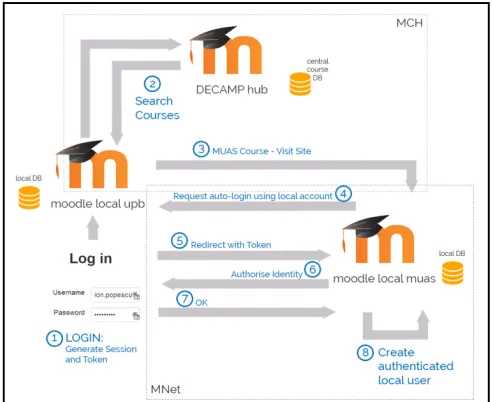
Fig. 1 Case study: Access control to the European distributed Moodle platforms; A student from University Politehnica of Bucharest (upb)
accesses Moodle platform from Munich University (muas)
Moodle Platforms of all partner universities were interconnected using MNet plug-in. This plug-in allows students to be authenticated and authorized by their local Single Sign On authorization system (ex.: Shibboleth) using their local credentials. This facilitates the prior accessing of authorized students only of the required class materials and virtual labs placed and maintained by a partner university. Thus, the final solution implemented at all the partners’ sites is a mixture between two existing Moodle plug-ins, specifically MNet (Moodle Network) and the MCH (Moodle Community Hub) (see Fig. 1). A Moodle Community Hub provides a directory of courses for public use or for private communities, while MNet allows links to be established and resources shared between multiple Moodle sites. The procedure is illustrated in Figure 1 and described in detail in [10].
Challenge c) was solved by implementing two solutions: 1. Offering general, preconfigured network components
based on VMs and open source software and placed on a public FTP server or on Google Drive. Students can download the network components on their notebooks, activate the components (routers, hosts, servers, etc.), and download the prepared network configuration files required for familiarizing themselves with specific lab security attacks (Reconnaissance: IP spoofing, port scanning; DoS/DDoS: SYN/ICMP flood, ARP-, RIP- OSPF-poisoning, Man-in-the-Middle etc.). Students are free to implement additional components if required by the lab instruction manual. In adopting this procedure, the students have the advantage of being able to use the lab network structure outside the university as well, e.g. while they are at home or doing internships in companies. They are therefore not dependent on having a fast Internet connection or any Internet at all.
2. Using a plain Hypervisor server (ex.: VBox, KVM, or Headless) placed and maintained at the university. It accommodates several copies of the same network structure configuration. The student groups can access the labs via local Moodle using local university network or Internet. Moodle will carry out the
authentication and authorization procedure and transfer the access to the place of the university partner where the labs are implemented. This procedure has the advantage of allowing students to be connected not only to the required virtual lab, but also to the Moodle platform where they will find all the necessary step-by-step instructions for carrying out the lab, as well as the theoretical background knowledge required to understand the technology behind the lab experiment. In addition, the Moodle platform offers the corresponding space for inserting the lab results of the individual students. It also facilitates instructors in evaluating the results included. Similar to all educational platforms, Moodle also supports students with supplementary features, such as discussion forums, help videos, FAQ catalogues, etc. Finally, access to the labs and class materials can be restricted only to authorized students permitted by the special Moodle settings [10]. The integration of Moodle and the Hypervisor platform containing the virtual labs is supported by the “Resource Learning Tools Interoperability” (LTI) plug-in module [9]. However, the implementation of this solution requires the development of an additional Lab Management Application (LMA). LMA runs on a server which includes a VNC Java Applet and a Database [12]. LMA manages the VM reservation system, controls VMs through the Hypervisor’s VM Management API, and provides VNC Java Applet with connection parameters to the users.
The rapidly rise of “successful” attacks against many organizational networks on a global scale and the devastating damage they inflict clearly demonstrates that networks are not sufficiently protected or/and that manifold protection techniques are not used correctly or even not at all. We therefore deduce from such cases reported by media on a daily basis that the education of our future security experts needs to break through the confines of merely experimenting and understanding how a network can be attacked and what the results of the attack on the network components may be. In other words, generating attacks such as reconnaissance, DoS, DDoS, MIM, ARP/RIP/OSPF poisoning etc., and analyzing the result of these attacks using the virtual lab skeleton is simply not enough.
These conclusions have led us to formulate the solution for challenge d).
The students must gain profound experience with various types of protection tools in complex relationships with sophisticated attacks and various types of network structures. Consequently, the requirements formulated by challenge d) necessitate a new solution for implementing future virtual labs.
It is therefore imperative that some labs include not only reconfigurable and scalable network configurations but also preconfigured protection tools, such as firewalls, Intrusion Prevention Systems, Identification Systems, Network Management Systems, NetFlow Systems, Sandboxes, SDN Controllers, SDN Switches, VPN, Policy Engines, etc.
be realized for universities without entailing huge financial outlays. However, such a collection of VMs preconfigured with the corresponding open source software tools requires an administration platform which is much more complex than the plain Hypervisor server mentioned for challenge c).
When considering how to implement labs of this kind we looked at the open source OpenStack platform
decision fell on OpenStack as this is an open source framework that enables efficient and dynamic management of virtualization, manages all the resources with great flexibility and ease, i.e. storage, CPUs, hard disk, network traffic, IP addresses, accounting, quotas
etc. As OpenStack is an open source package all the partner universities may implement it, thereby creating a so standard virtual lab platform within the partnership campus. In addition, Moodle offers a very straightforward possibility for creating an interface to the OpenStack platform.
V. IMPLEMENTING ADVANCED VIRTUAL SECURITY L WITH OPENSTACK SUPPORT
The OpenStack snapshot mechanism allows images from running VM instances to be saved [11
snapshot is a VM image saved with all the customizations made until the time of the snapshot. Snapshots can be made using the OpenStack graphic interface or by running dedicated CLI commands. Teaching staff can use snapshots to customize any generic image in accordance with specific lab requirements, e.g. a network configuration or specific preinstalled software packages. They can then save this image state as a snapshot which will be the starting point for all the students assigned to that activity. In order to enable our students during the limited time of a lab session to concentrate on the security experiment during the limited time of a lab session rather than on problems concerning the installation of VMs or of the open source software pac we implemented two types of preconfigured OpenStack images and saved them as snapshots:
1) Preconfigured various lab configurations comprising network components or/and individual protection tool/lab (example: FW or IPS, or NMS, etc.); see Fig.2.
[image:4.595.306.545.183.348.2]OPENSTACK VMs MOODLE LAB 1 LAB 1 USER 1 LAB N . . . . USER 2 USER N
Fig. 1 Preconfigured lab configurations
2) A preconfigured set of network components and protection tools in the form of a pool of VMs (example: Routers, PCs, NGFW, NGIPS, Sandbox, OpenNMS, OpenVPN, etc.). The configuration of the network (network components and protection tools) for the lab be realized for universities without entailing huge financial outlays. However, such a collection of VMs preconfigured ware tools requires an administration platform which is much more complex than the plain Hypervisor server mentioned for challenge c).
When considering how to implement labs of this kind we looked at the open source OpenStack platform [7]. The l on OpenStack as this is an open source framework that enables efficient and dynamic management of virtualization, manages all the resources with great flexibility and ease, i.e. storage, CPUs, hard disk, network per student group, As OpenStack is an open source package all the partner universities may implement it, thereby creating a so-called standard virtual lab platform within the partnership campus. offers a very straightforward possibility for creating an interface to the OpenStack platform.
D VIRTUAL SECURITY LABS TACK SUPPORT
The OpenStack snapshot mechanism allows images from 11]. In essence, a snapshot is a VM image saved with all the customizations made until the time of the snapshot. Snapshots can be made using the OpenStack graphic interface or by running dedicated CLI commands. Teaching staff can use snapshots neric image in accordance with specific lab requirements, e.g. a network configuration or specific preinstalled software packages. They can then save this image state as a snapshot which will be the starting point for vity. In order to enable our students during the limited time of a lab session to concentrate on the security experiment during the limited time of a lab session rather than on problems concerning the installation of VMs or of the open source software packages, we implemented two types of preconfigured OpenStack Preconfigured various lab configurations comprising network components or/and individual protection tool/lab (example: FW or IPS, or NMS, etc.); see Fig.2.
OPENSTACK IMAGES
. . .
LAB N LAB 1
LAB 2
Preconfigured lab configurations
A preconfigured set of network components and protection tools in the form of a pool of VMs (example: Routers, PCs, NGFW, NGIPS, Sandbox, OpenNMS,
. The configuration of the network (network components and protection tools) for the lab
experiments is left to the students/researchers who are creating these lab projects using the preconfigured VMs to allow them to factor in the investigations they want carry out (see Fig.3 ). These types of labs are reserved for advanced students whose task is to verify several versions of correlated protection solutions in the case of very advanced attacks. The platforms are also ideal for verifying/comparing the functionality and efficiency of various commercial, virtualized software packages for network and network application protection, e.g. [8] versus Palo Alto Networks
OPENSTACK VMs MOODLE
VM PO O L
PRO JECT 1
USER 1
PRO JECT N
. . . . . .
[image:4.595.309.543.459.652.2]USER N
Fig. 2 Preconfigured network components and protection tools as VMs
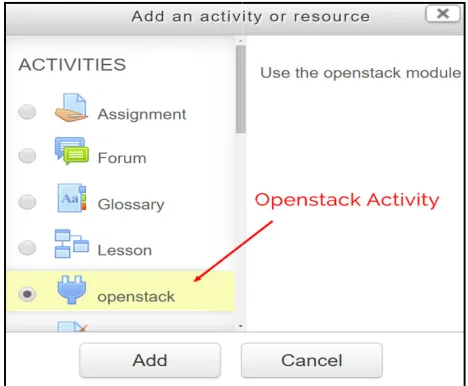
In addition to the preconfigured OpenStack and installed lab images, we developed an OpenStack
[image:4.595.47.291.552.719.2]order to allow students to deploy preconfigured VMs and/or VMs containing lab network configurations directly from Moodle. The plug-in creates a new Moodle activity that can be added and accessed by the students in the same way that a common assignment can be added (
Fig. 3 OpenStack activity in
The OpenStack-Moodle plug
official SDK for PHP provided by OpenStack. proides various bindings that enables devel
connect to OpenStack APIs in a simple and consistent manner. Using OpenStack communication APIs allows custom coded functionality handling, user
configuration features to be integrated.
The plug-in installation was performed in the following stages:
experiments is left to the students/researchers who are creating these lab projects using the preconfigured VMs to allow them to factor in the investigations they want to carry out (see Fig.3 ). These types of labs are reserved for advanced students whose task is to verify several versions of correlated protection solutions in the case of very advanced attacks. The platforms are also ideal for
nctionality and efficiency of various commercial, virtualized software packages for network and network application protection, e.g.: Cisco
Networks [15].
OPENSTACK VMs OPENSTACK IMAGES
ROUTER PC NGIPS SANDBOX . . . NMS NG FIREWALL NETWORK e.g Internet
Preconfigured network components and protection tools as VMs
In addition to the preconfigured OpenStack and installed lab images, we developed an OpenStack-Moodle plug-in in order to allow students to deploy preconfigured VMs and/or twork configurations directly from in creates a new Moodle activity that can be added and accessed by the students in the same way that a common assignment can be added (see Fig. 4.).
in the Moodle activity list
plug-in was developed using the official SDK for PHP provided by OpenStack. The SDK proides various bindings that enables developers to easily connect to OpenStack APIs in a simple and consistent OpenStack communication APIs allows custom coded functionality handling, user-mapping and
tion features to be integrated.
a) copying the files in the mod directory of the Moodle installation where all the activities can be found,
b) updating the Moodle database with the data required by the plug-in,
c) activating the installation by accessing the
Notifications section, and clicking the update button on the
page where the new OpenStack-Moodle plug-in is listed as pending installation.
The configuration of the plug-in is implemented using standard Moodle Settings menu. The Moodle administrator needs to provide Host URL of OpenStack server, credentials of privileged user and OpenStack region.
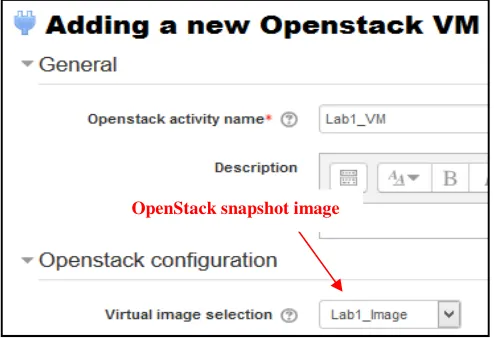
[image:5.595.304.551.47.174.2]Following plug-in configuration, an activity can be added to the course. In the configuration form of the activity (see Fig. 5), teaching staff can define an activity name, select a preconfigured image from a list of available snapshots in OpenStack at that moment in time, and save the snapshot in Moodle.
Fig. 4 OpenStack-Moodle plug-in: activity configuration form
[image:5.595.306.552.246.421.2]After the snapshot has been selected and all the other required fields are complete, the activity can now be saved. Students will now have a lab activity in their Moodle course directly related to a snapshot in the OpenStack server (see Fig. 6).
Fig. 5 OpenStack activity on Moodle course page
Students can practically clone and deploy this image as a private VM instance using the user interface provided (see Fig. 7) by clicking on the Start the Virtual Machine button. They can then use this VM as their own private preconfigured virtual lab.
Fig. 6 OpenStack-Moodle plug-in: activity page with VM controls
Deploying a VM on an OpenStack server takes some time. The process finishes by displaying details about the VM started in the activity page (see Fig. 8).
Fig. 7 OpenStack-Moodle plug-in: activity page with VM access details
Students can delete the VM from the same page if it is not needed anymore or suspend it if they need to return at a later point in time to working with that particular VM. At this point please note that the number of students all running labs based on VM instances at the same time depends on the amount of OpenStack resources. Our estimates (see Table 1) are based on network security lab types presented in Fig. 2 and Fig. 3.
TABLEI
MEMORY REQUIREMENTS FOR OPENSTACK VMS
Component RAM Quantity Total RAM
Switch/Router (Vyos) 256 MB 4 1 GB SDN Switch (Open vSwitch) 128 MB 4 512 MB
PC (Kali Linux) 512 MB 3 1.5 GB
NM Server (OpenNMS) 1 GB 1 1 GB
IPS Sensor (SNORT) 1 GB 1 1 GB
Firewall 512 MB 1 512 MB
SDN Controller (Ryu) 512 MB 1 512 MB
Sandbox (Cuckoo) 2 GB 1 2 GB
Total 16 8 GB
If we consider that a normal lab session might have twenty students (i.e. ten groups of two) and not all VM`s are used at the same time, we anticipate that 64 GB RAM on OpenStack server will be sufficient for a smooth operation.
Offering students this kind of infrastructure (see Fig. 2 and Fig. 3) means that they are able to experiment hands-on with various types of real life security scenarios, for example:
[image:5.595.47.294.281.450.2] [image:5.595.305.547.559.682.2]- Experiencing how the attacks are structured and how are they classified
- Setting the most important parameters of the protection tools: NGFW, NGIPS, OpenNMS, RADIUS, Sandbox, OpenVPN, etc.
- Generating various attacks against the protected virtual networks configurations
- Analyzing the result of the attacks based on the behavior of the network components and on the reports of the protection tools. Being better able to assess the limitations of the individual protection tools helps to understand how to orchestrate the overall mitigation protection strategy of the network more efficiently.
- Understanding how the protection tools work together and how they complement each other - Understanding how and why advanced attack
threats penetrate the protection tools
- Learning what kind of features need to be set on the protection tools so that attacks may be blocked or their effect diminished
- Understanding why today the network protection is built from so many complementary tools and is based on so many required security rules
- Learning how to recover after successful attacks which affected the network components,
- Learning how to limit damage from the attack to the rest of the network components and resources which were not affected.
The following general types of lab experiments have been designated by DECAMP partners for being offered to the students and researchers:
A)Carry out attacks on preconfigured networks structures (see Fig. 2):
1) Legacy network structures containing routers, switches, hosts with various operating systems and applications running (DNS, FTP, DHCP, etc.) 2) Software Defined Networks (SDN) structures
containing Open vSwitch, POX/Ryu controllers and hosts running different applications
3) Mixed legacy and SDN network structures. This type of network structure has recently emerged, frequently within cloud data centers.
B) Protection against attacks on network structures (legacy, SDN and mixed) built by the students using preconfigured components and tools with various kinds of protection (see Fig.3). A minimum set of open source protection tools is preconfigured and runs on the corresponding VMs, such as IPS-Snort, FW-Untangle, RADIUS, OpenVPN, Sandbox-Cooke, OpenNMS, NetFlow-NfSen, Role/Attribute Policy Engine.
C) Attacks analysis to network based applications as well as the protection methods used against these attacks for following type of applications: WEB applications, e-Health applications using IEEE 11073-20601 and HL7 set of protocols, cloud computing applications.
VI. CONCLUSION AND FURTHER WORK
Nowadays, there is a vast array of hardware and software tools offered on the market for protecting networks and their applications from various types of attacks. Due to the
diversity of attacks and their complexity, security protection needs to go way beyond the deployment of one single tool. The choice of adequate protection tools for an organization, the maintenance of these tools, as well the development of security rules which are to be respected by all employees require a deep knowledge of the way in which cyber attacks are carried out, what kind of damage they can do, and the way protection tools work and how they interrelate.
As presented, the DECAMP Project provides an answer to these challenges as it encompasses an adequate, technical and practically-oriented education of future network managers at the European level in the form of a distributed campus for ICT security training. The virtual hand-on labs developed mainly use open source software, a Moodle education platform used on a pan-European scale by academia, and the open source IaaS OpenStack platform. The Moodle-OpenStack lab structures presented offers DECAMP students the possibility of learning and experimenting with aspects of the secure protection of various types of networking structures and network applications.
The development of additional preconfigured labs, as presented in this paper, is ongoing, with the aim of ensuring that all DECAMP labs offered within the framework of the different courses are based on the platform solution described: Moodle interfaced with OpenStack.
REFERENCES
[1] J.- M. M. Waldrop, “Education online: The virtual lab”, Nature, Intern. Weekly Journal of Science, July, 2013, http://www.nature.com /news/education-online-the-virtual-lab-1.13383, accessed 5th Oct.
2016.
[2] Zhao & Forouraghi, “An Interactive and Personalized Cloud-Based Virtual learning System”, J.F. Wang and R. Lau (eds.), Advances in WEB-Based Learning ICWL 2013, Springer, 2013, pp. 101-110. [3] Le Xu, D. Huang, W-T. Tsai, „Cloud-Based Virtual Laboratory for
Network Security Education”, IEEE Trans. on Ed., Aug., 2014. [4] Y.-S. Bhosale, J.L.M. Livingstone, “V-Lab: A Mobile Virtual Lab for
Network Security Studies”, Intern. Journal of Computer Applications , Volume 93, No. 20, May 2014 .
[5] Nikita Mandavgane, “Cloud-Based fundamental Laboratory for Network Security”, Intern. Journal of Innovative Research in Computer and Comm. Engineering, Vol. 4, Issue 4, April 2016. [6] Moodle LTI Plugin, https://docs.moodle.org/28/en/LTI_Provider,
accessed 10th November, 2016.
[7] OpenStack Project, http://www.openstack.org, accessed 5th Oct. 2016.
[8] Cisco Virtual Internet Routing Lab, http://virl.cisco.com, accessed 15th Nov., 2016.
[9] IMS Global Learning Tools Interoperability Background https://www.imsglobal.org/activity/learning-tools-interoperability, accessed 15th Nov. 2016.
[10] A. Gradinaru, F. Moldoveanu, A. Soceanu, et. al., “Access Control to the Resources of an Open Distributed European Virtual Campus Platform”, 11th Intern. Conf. on eLearning and Software for Education, eLSE, Bucharest, April, 2015.
[11] OpenStack Operations Guide, http://docs.openstack.org/ops-guide/, accessed 20th Nov. 2016.
[12] A. Soceanu, M. Vasylenko, A. Gradinaru:”Teaching/Researching Practically Oriented ICT Security Topics using Green Mobility Solutions within a Virtual Campus”, 7th International Conference on Complexity, Informatics and Cybernetics: IMCIC 2016, Orlando, USA, March 2016.
[13] DECAMP Project,www.myDECAMP.eu, accessed 20th Nov. 2016.
[14] Sarah White: “Cybersecurity skills aren’t being taught in college”, Infoworld, by IDG, Dec. 13, 2016, www.infoworld.com/article/ 3149103/it-training/cybersecurity-skills-arent-being-taught-in-college.html, accessed 15th Dec. 2016.