Automatic Web Publishing
Òscar Sànchez i Vilar
A dissertation submitted to the University of Dublin, in partial fulfillment of the requirements for the degree of
Master of Science in Networks and Distributed Systems
Declaration
I declare that the work described in this dissertation is, except where otherwise stated, entirely my own work and has not been submitted as an exercise for a degree at this or any other university.
Signed:
Permission to lend and/or copy
I agree that Trinity College Library may lend or copy this dissertation upon request.
Signed:
Acknowledgments
En anglès…
I would like to express my heart felt gratitude to those that gave me the opportunity to undertake this M.Sc. at Trinity College. In particular:
To my mother and my grandmother, because they deserve it.
To my supervisors, Dr. Pádraig Cunningham and Dr. Vinny Cahill, and the other lecturers at Trinity, for their support through the whole year.
To the Barcelona School of Informatics, for their financial support. To Eircom, for the project.
To Catherine and Danny, for their help and for all we have shared this year in Dublin.
And in catalan…
M’agradaria expressar el meu més sentit agraïment a aquells que m’han brindat l’oportunitat de realitzar aquest màster al Trinity College. En particular:
A la meva mare i la meva àvia, perquè ho mereixen.
Als meus supervisors, Dr. Pádraig Cunningham and Dr. Vinny Cahill, i la resta de proferssors al Trinity, pel seu suport durant tot l’any
A la Facultat d’Informàtica de Barcelona, pel seu ajut econòmic A Eircom, pel projecte
Abstract
Research and Development departments of most important companies are currently producing technical documents and papers as a result of their own investigation projects. This type of documents normally develop concepts and ideas that often lead to a contribution to knowledge (or possibly to simple information) that may be interesting for other research projects in the department or for further investigation. In that kind of environments, a system for publishing and sharing information become a requirement for the success of the department.
Although many approaches to solve this problem have already been considered, such as shared system files and mailing lists, all of them offer to the user limited services and require extra input information to know which documents are of interest to each user. Besides, the growing demand for web based interactive solutions and for personalization has made them become obsolete.
1. INTRODUCTION ... ... 2
1.1 THE PROJECT... ... 2
1.2 THE STRUCTURE OF THE DOCUMENT... 3
2. DIGITAL LIBRARIES ... ... 5
2.1 INTRODUCTION... ... 5
2.2 BENEFITS... ... .... 8
2.3 DISADVANTAGES... ... 10
2.4 RESEARCH AREAS... ... 11
2.5 EIRCOM’S R&D DIGITAL LIBRARY... 12
3. TECHNOLOGIES... ... 14
3.1 DYNAMICALLY GENERATED WEB PAGES... 14
3.1.1 CGI and Fast CGI ... ... 15
3.1.2 Server Side Includes ... ... 16
3.1.3 Proprietary server extensions ... 17
3.1.4 Server-side JavaScript ... ... 18
3.1.5 Java TM Servlets ... ... 18
3.1.6 JavaServer Pages TM... ... 21
3.1.6.1 Java Beans... ... 24
3.1.6.2 HttpSessions ... ... 25
3.1.7 Active Server Pages... ... 26
3.1.8 PHP ... ... . 27
3.2 WEB SERVER JSP CONTAINER... ... 27
3.3 WEB APPLICATION AND WEB APPLICATION ARCHIVE (WAR) ... 28
3.4 PRESENTATION... ... 29
3.4.1 Cascading Style Sheets ... ... 29
3.4.2 Dynamic HTML... ... 30
3.5 INFORMATION STORAGE... ... 31
3.5.1 Cookies (client-side storage) ... 31
3.5.2 Database (server-side storage) ... 33
4. SYSTEM REQUIREMENTS... ... 36
4.1 THE PROBLEM... ... 36
4.2 PROJECT PROPOSAL... ... 37
4.3 EXISTING SYSTEM... ... 37
4.4 ADDITIONAL REQUIREMENTS... ... 38
5. ANALYSIS... ... ... 40
5.1 USE CASE DIAGRAM... ... 40
5.2 OBJECT MODEL... ... 41
6. DESIGN ... ... ... 42
6.1 SYSTEM ARCHITECTURE... ... 42
6.1.2.1 Search and browsing facilities ... 47
6.1.2.2 Building collections ... ... 48
6.1.3 Eircom R&D system ... ... 52
6.1.3.1 User Profiling ... ... 54
6.2 DATABASE DESIGN... ... 55
7. IMPLEMENTATION ... ... 57
7.1 MG AND GREENSTONE MODULES... 57
7.2 R&D MODULE... ... 58
7.2.1 Distributed users ... ... 58
7.2.2 Publication of documents ... . 59
7.2.3 Addition and deletion of categories... 61
7.2.4 Change profile... ... 64
7.2.5 Librarian’s extra functions ... 66
8. EVALUATION ... ... 68
8.1 FURTHER WORK... ... 69
9. REFERENCES ... ... 72
APPENDIX A ... ... ... 76
A.1 WEB APPLICATION DESCRIPTOR (WEB.XML) ... 76
A.2 DHTML CODE FOR LOGIN PAGE... ... 76
FIGURE 3—1: JSP DESIGN MODEL 1 ... ... 22
(from Professional JSP, Wrox Press) FIGURE 3—2: JSP DESIGN MODEL 2 ... ... 23
(from Professional JSP, Wrox Press) FIGURE 3—3: JAVABEAN EXAMPLE... ... 24
FIGURE 3—4: USEBEAN EXAMPLE... ... 25
FIGURE 3—5: CSS EXAMPLE... ... 30
FIGURE 3—6: DATABASE CONNECTION POOL... 34
FIGURE 5—1: USE CASE DIAGRAM... ... 40
FIGURE 5—2: OBJECT MODEL DIAGRAM... .... 41
FIGURE 6—1: SYSTEM ARCHITECTURE... ... 43
FIGURE 6—2: INTERNAL MG STRUCTURE... ... 44
FIGURE 6—3: GREENSTONE SEARCH INTERFACE... 47
FIGURE 6—4: GREENSTONE COLLECTION STRUCTURE... 48
FIGURE 6—6: GREENSTONE INDEX.TXT CONFIGURATION FILE... 51
FIGURE 6—7: GREENSTONE SUB.TXT CONFIGURATION FILE... 51
FIGURE 6—8: DATABASE SCHEMA... ... 56
FIGURE 7—1: UPLOADING A DOCUMENT... ... 60
FIGURE 7—2: CATEGORIES... ... 61
FIGURE 7—3: JAVASCRIPT CODE EXAMPLE... 62
FIGURE 7—4: JAVASCRIPT CODE TO GENERATE THE HIERARCHY OF CATEGORIES...63
FIGURE 7—5: ADDCATUSER.JSP... ... 65
FIGURE 7—6: CHANGE PROFILE... ... 66
1. Introduction
1.1 The project
This project was proposed by Eircom’s Research and Development Division. Its final aim is to investigate and implement a system to address some of the problems that often arise in environments in which scientific investigation is carried out.
Effective dissemination of information throughout a group of researchers is a key issue for the success of any research body. This is a significant issue since different projects can be related to each other, or results of an investigation might be relevant for the direction of other projects. Even old investigations may be of interest, so a repository of such documents becomes a real need for such groups. The web (Intranet for private corporation domains) has proved to be an appropriate media for this purpose due to its distinctive characteristics (available to most of the users within the organisation, capacity of storage, aptitude to manage different electronic formats, etc). Browsing facilities have proved to be essential in this context. Documents can be linked with appropriate collections (indexed by author, topic, date, etc), consequently making it easier to search a given document. Another helpful facility to help the collaboration between different investigations is the ability to search for words and or phrases that occur in any document included in the knowledge repository. This greatly reduces the effort spent locating relevant documents for a researcher.
published work. Thus, some guidance to potentially interesting documents is desirable to keep researchers from spending a great deal of time and effort looking for information.
This document presents a solution to these problems: a web-enabled networked digital library with support for multiple distributed users.
1.2 The structure of the document
Chapter 1: Introduction briefly introduces the project and the how this
report is structured in different chapters.
Chapter 2: Digital libraries investigates what is a digital library, its benefits
and disadvantages, the state of the art and examines the similarities and differences with the solution proposed in the document.
Chapter 3: Technologies explores the technologies available to develop a
web application with the required attributes and analyses their pros and cons, explaining the choice made. As we will see, the main criteria have been the grade of scalability the technology permits, its portability, its market support and perspectives.
Chapter 4: System requirements establishes the requirements of the
system, based on the project proposal and the meetings with Eircom that have been held during the course of the project. The existing system is outlined and the advantages of proposed solution are made evident.
Chapter 5: Analysis presents two of the diagrams that are created in the
diagrams, elaborated in UML notation, are the use case view and the object model of the system.
Chapter 6: Design explains how the system is organized and the design
decision that have been taken. It presents each of the subsystems that the solution makes use of, and describes in detail the implications of their use in the overall system. Section 6.1.3,Eircom R&D system is examined in depth since it implements most of the requirements stated in Chapter 4, System Requirements.
Chapter 7: Implementation describes how the designed system has finally
been implemented, the decisions made at this stage of the development process, and gives a short overview of the system interface.
Chapter 8: Evaluation gives a brief discussion of the performance issues of
the system, assessing its strengths and weaknesses, and finally suggests further work that could be carried out as an extension to this project.
Appendix A includes some examples and code referenced from the
discussion
2. Digital libraries
2.1 Introduction
economically available for use by a defined community or set of communities."
This definition gives an idea about the breath of the concept and partially explains why the terminology in the field is so confused, since the term “digital library” is commonly used to simply refer to the notion of “collection,” without reference to its organization, intellectual accessibility, or service attributes. A significant example of this extent is the simplistic definition by Peter J. Nürnberg [Nurnberg, et al]:” A physical library deals primarily with physical data, whereas a digital library deals primarily with digital data”.
Much of the confusion is no doubt attributable to differences of perspective. Digital libraries bring together facets of many disciplines, and therefore experts with different background are involved, including computer scientists, database vendors, commercial document suppliers, publishers, etc.
It’s noteworthy that, although “electronic library” is an accepted synonym for digital library, this is not similarly accepted for “virtual library”. Collier defines a “virtual library” as “an electronic library in which the users and the holdings are totally distributed, yet still managed as a coherent whole” [Collier]. Therefore, a virtual library can be considered as an extension to the digital library since it has no defined location (i.e. virtual).
Licklider described the research and development needed to build a truly usable digital library. The book introduces the first notion of collections of documents using digital technologies. It is difficult to determine exactly when the first digital library came into being, mainly because of the lack of unanimous agreement about what can be considered a digital library. The development of automated libraries (libraries that manage their resources with computer technology) experienced real progress in the 1970’s and matured in the 1980’s, but it wasn’t until the beginning of the 1990’s when the first real digital libraries started to be functional. This is because a series of technical developments took place that removed the technological impediments to creating digital libraries.
Several technical report searching and indexing system have been developed in the past. Early in the 1990’s, the physics e-print [Ginsparg] allows scientist to submit documents by email in TeX format, along with bibliographic information to index the documents. Developed in 1994, the HARVEST system in Computer Science extracts indexing information from documents and indexes them. Other examples of such systems can be found in [Ian].
2.2 Benefits
As introduced in the previous section, the motivation to build digital libraries was, from the beginning, to improve the paradigm of information delivered by physical libraries. This section outlines some of the benefits of digital libraries.
• Finding of information
One of the greatest advantages introduced by digital library is the ability to search the full content of the documents stored in it. While traditional libraries narrow this ability to search to a small number of metadata fields associated with the document (the fundamental tool for representing catalog records in computers is the MARC format [MARC]), readers of a digital library can be endowed with a means to search for word or phrases in the whole collection of electronic documents. Although older material is often available only in image format, since essentially all modern material is now printed via computers, it can generally be provided in text form and be searched. This solves the difficulties of searching in printed material.
• Availability of information
or mis-shelved. This implies that documents can be used by simultaneous users (assuming copyright permission is available).
• Access to information
The use of digital libraries allows that a single electronic copy can be accessed from a great many locations; since libraries contain much information that is unique, researchers that want to consult a document have to physically move to the documents’ location. With the use of digital libraries, these documents are delivered with electronic speed to the user’s desk.
• Preservation
future computers. This is the only reliable way to recreate a digital documents original functionality, look, and feel” [Rothenberg],
• Updates of information
Updating a digital library is much easier than updating a physical library, since the only thing to do is to store the new document in the collection and, possibly, add some information to the library’s indexes. Better yet, some libraries projects, such as the New Zealand Digital Library project, “gathers material from public repositories without any participation by authors or their institutions “ and therefore it automates the task of updating the library [Ian].
• Format of the information
Printed documents used in traditional libraries have limitations when working with them, for instance, with statistical data. The digital library can provide information in any format (graphics, databases, video, etc) and they can even be locally modified when permitted by copyright. Furthermore, information delivered to users can be customised or adapted to user’s needs, for instance, in larger type size for those with limited sight, in different formats according with the user’s software, etc.
2.3 Disadvantages
words, an therefore, a typical digital library would use at least fifty times as much paper as at present. Another issue for digital libraries is the copyright law, since the copyright holder can loose control of his published material: there is an obvious need for a unified schema to lend copyrighted material via a digital library (different countries have different copyright laws). The current system is not valid either for authors or for publishers: if libraries acquire a copy of the document and then each user can have its own copy, authors would only get paid for one copy, and publishers and editors would disappear. Another problem is the digitalisation of existing material. In addition to the resources that need to be utilised in order to digitalise the vast amount of existing printed material, libraries continue to acquire new print materials, and some of them, such as the Library Congress, do it faster than it digitalises old material.
2.4 Research areas
innovative applications areas”. New partners have joint the initiative, namely the National Library of Medicine (NLM), the Library of Congress (LOC), the National Endowment for the Humanities (NEH) and the Federal Bureau of Investigation (FBI) [DLI2]. There are countless other initiatives on digital libraries. The most significant ones are the Digital Library Federation (DLF), “a consortium of research libraries that are transforming themselves and their institutional roles by exploiting network and digital technologies”, and the IEEE Digital Library Task Force, whose focus “is to promote research in the theory and practice of all aspects of digital libraries”. The research carried out by these bodies, as well as by private corporations and universities encompass a range of interrelated technical, social and political issues. Currently, the main threads of research on digital libraries are: the object model (the structural relationship among components of the library and the user’s view of these components); the user interfaces and human-computer interaction, since it is understood that major advances in usability will come from innovation in the interfaces and not the underlying databases or processing engines; information discovery (strategies and methods on finding information, as introduced in [Ian]); preservation of digital material to address technology obsolescence; format of the digital material and digitalisation of the existed printed material (a hot area of research is the support for searches in non-textual material, such as audio tracks and images); natural language processing, to provide better paradigms to search; and interoperability, exploring how to get different digital libraries to work together; a further investigation in these research areas has been carried out by Williams Y. Arms [Williams].
2.5 Eircom’s R&D Digital library
solution to solve a problem that arises in many research bodies: the effective dissemination of information throughout the group. In addition, a fully operative application is expected to be implemented to address this issue in a concrete environment: the Eircom’s Research and Development Division. Most of the requirements identified for the application are in close relation with the forces that motivate digital library research and that define digital libraries, such as full-text indexing of documents, search facilities, etc. In addition, other functionalites not covered by common digital libraries are needed. The system should provide the users with an automated tool to add documents to the library (in a “traditional” digital library this action is performed by a librarian or a team of librarians, but not by the library readers or users). In addition, a mechanism to recommend documents of potential to users is to be explored and implemented.
3. Technologies
This chapter analyses and assesses the technologies that are available to implement the proposed solution; since the application is to be used in an intranet environment, all the technologies examined here are web
technologies.
3.1 Dynamically Generated Web Pages
There are numerous ways to construct server-side dynamic applications. In this section, different technologies that can be used to construct this type of system are investigated and assessed.
3.1.1 CGI and Fast CGI
FastCGI is a language independent, scalable, open extension to CGI that provides better performance without the limitations of server specific APIs [FastCGI]. Like CGI, FastCGI applications run in separate, isolated processes (so a buggy FastCGI application cannot crash or corrupt the core server or other applications). FastCGI is conceptually very similar to CGI, with a major difference: FastCGI processes are persistent; they need to be started prior to serving any requests, and after finishing one, they wait for a new request instead of exiting. If it dies, a FastCGI manager automatically restarts the process. To control all processes created by FastCGI, a process manager is needed. This process manager works with heuristics to estimate when new instances of applications need to be created. This makes FastCGI applications difficult to develop, because special directives need to be included in the web server configuration files.
3.1.2 Server Side Includes
Server Side Includes are directives which one can place into HTML documents to execute other programs or output data such as environment variables and file statistics.
doubles the server load for every viewing of that page. SSI creates a security risk because SSI directives can execute system programs.
3.1.3 Proprietary server extensions
Most web servers offer a native API (Application Programming interface) to allow the developer to access performance-enhancing features by embedding non-HTML commands within their HTML files. These commands are then processed when the file is requested and generate a combination of HTTP headers and HTML that is sent to the client, in a similar manner to the way SSI works.
3.1.4 Server-side JavaScript
As with SSI, JavaScript can also be embedded in HTML files at the server side. These directives provide the developer with a means to connect to different relational databases, to share information at an application level and to access the file system on the server. Since HTML pages with server-side JavaScript eventually produce an HTML document to be sent to the client, they can include client-side JavaScript, as every HTML document does.
HTML pages that use server-side JavaScript are compiled into bytecode executable files. A web server that contains the JavaScript runtime engine runs these application executables. Development of JavaScript applications is comprised of two stages. In the first one, HTML pages (which can contain both client-side and server-side JavaScript statements) and JavaScript files are created and compiled into a single executable. In the second step, and once the page is requested by the user, the runtime engine executes any server-side statements to dynamically generate the HTML page to return to the client.
There are several drawbacks to server-side JavaScript, such as the intrinsic limitations of the language (object model, data types) and the need to have a web server that contains the JavaScript runtime engine.
3.1.5 Java TM Servlets
and compiled to an architecture independent bytecode, designed to enhance web servers’ functionality.
loaded again until the servlet changes, and a modified servlet can be re-loaded without restarting the server. These requests may be concurrent, i.e. more than one can occur at the same time. By default, there must be only one instance of a servlet class per servlet definition in a container. Consequently, it could imply concurrency problem among requests if accessing shared data; this is solved by using the SingleThreadModel interface, that guarantees that one thread at a time will execute through a given servlet instance’s service method by serializing requests or by maintaining a pool of servlet instances. The servlet instance is kept in memory at the container’s discretion. When the container decides that a servlet should be unload (the policy differs among implementations), it must allow the servlet to release any resources it is using and save its state. It is done by calling the servlet’s destroy method, but it’s not allowed to call it until all threads in the service method finish or time out. The servlet’s class may then become eligible for garbage collection.
Even more, the servlet API has interfaces that easy programmer’s difficulties to deal with sessions (it is necessary to associate series of different requests from a particular user) over a stateless protocol such us HTTP. One of these interfaces is the HttpSession, which allows the servlet container to track user sessions, without requiring the developer to do it. Another interface, called ServletContext, defines a servlet’s view of the web application, and allows a servlet to access resources available to it; there is one instance of this interface associated with each web application.
In functionality, servlets lie somewhere between Common Gateway Interface (CGI) programs and proprietary server extensions such as the Netscape Server API (NSAPI) or Apache Modules. Servlets have the following advantages over other server extension mechanisms:
process for each request, the threads model is used, thus requiring only lightweight context switches among requests.
• they use a standard API that is supported by virtually all web servers.
• they have all the advantages of the Java programming language, including ease of development, strong type-check and security, and platform independence.
• they provide facilities to deal with session and security issues • they can access the large set of APIs available for the Java platform.
3.1.6 JavaServer Pages TM
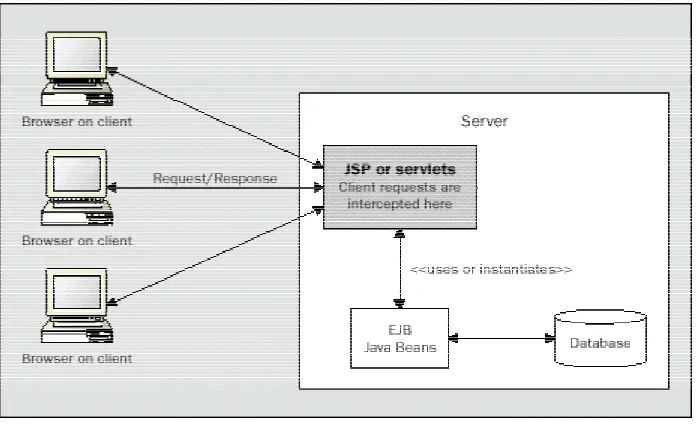
JavaServer Pages™ technology is the Java™ platform technology for building web applications [JSPSpec]. JavaServer Pages TM are part of the Java 2 Enterprise Edition (J2EE). From an architectural point of view, JSP can be seen as a high-level abstraction of servlets that is implemented as an extension of the Servlet API (the first time a JSP is invoked, a servlet is generated by the container). They can be used in a cooperative and complementary manner, as we will see later on this section The use of JSP implies a change in the way web applications are developed: instead of generating HTML code from a program, the actual program is embedded in the HTML document. Thus, a JSP document is a text-based file that intermixes template data (HTML tags) with dynamic actions to generate a response to a request from a client.
designer from a software developer. JSP allow page creators to make changes to the HTML document without serious risk of breaking the Java code. Nevertheless, this approach, called page-centric, in which the request invocations are made directly to the JSP page, is not ideal, since software developers and graphics designers have to share the same text file. Nevertheless it is suited for small projects with only one or two developers.
Figure 3—1: JSP Design Model 1
Indiscriminate use of this architecture usually leads to a significant amount of Java code embedded in the page; the use of JavaBeans (helper or worker beans) allows us to remove part of this Java code by encapsulating data access and business logic, as shown in Figure 3—1: JSP Design Model 1.
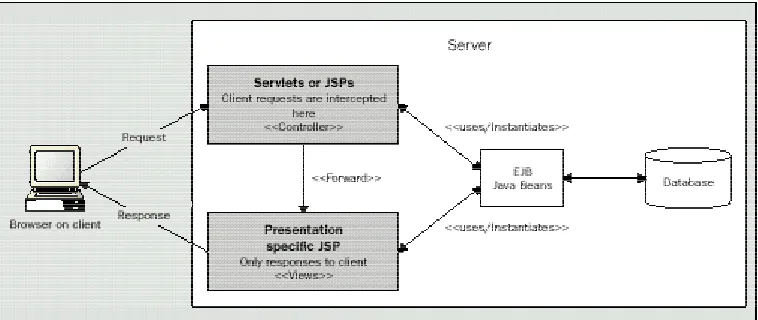
approach, JSPs are used to generate the presentation layer, and either JSPs or Servlets to implement programming tasks. The front-end component acts as the controller performing all the computation and setting all data and objects that the view (JSP), with only presentation responsibilities, will retrieve later on to generate the dynamic content.
Figure 3—2: JSP Design Model 2
3.1.6.1 Java Beans
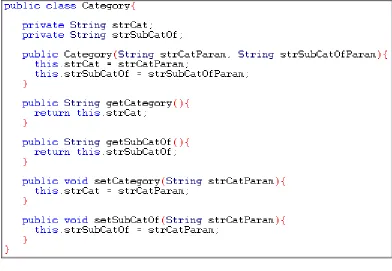
[image:31.595.139.531.268.539.2]The JavaServer Pages (JSP) component model is centred on Java software components called Beans, which must adhere to the JavaBeans API. A Java Bean is nothing more than a java class that has been programmed following a set of intuitive conventions dictated by the JavaBeans specification. Figure 3—3: JavaBean example shows a simple JavaBean used in this project.
Figure 3—3: JavaBean example
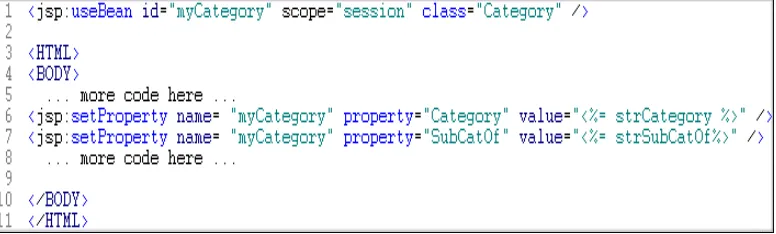
JavaBean worker. This refactoring leaves a much cleaner JSP with less code, and then a better separation between presentation and content. Figure 3—4: UseBean example shows how to use a simple bean from a JSP. Another advantage that arises from the use of JavaBeans is that they are reusable software components, since they can be called from different JSPs.
Figure 3—4: UseBean example
3.1.6.2 HttpSessions
3.1.7 Active Server Pages
Active Server Pages is an open, compile-free application environment
in which you can combine HTML, scripts, and reusable ActiveX server
components to create dynamic and powerful Web-based business solutions.
Active Server Pages enables server side scripting for IIS with native support
for both VBScript and Jscript. [ASP]
Active Server Pages (ASP) technology is similar in concept to Netscape's server-side JavaScript, but is implemented as an ISAPI application integrated into Microsoft’s Internet Information Server, which implies that ASP technology is basically restricted to Microsoft Windows-based platforms (although ASP technology is available on other platforms through third-party porting products).
Java Server Pages are the counterpart from Sun to Microsoft’s ASP. These technologies, similar in concept, have many differences that led me to choose JSP as the server-side technology used in the application discussed here. Some of these differences include:
JSP are platform and server Independent
JSP technology uses the Java language for scripting, while ASP pages use Microsoft VBScript or Jscript, thus allowing the user to access a wide collection of Java API’s and all the J2EE services (besides other advantages, such strong-type check mechanism, security, protection against system crashes, etc )
3.1.8 PHP
“PHP: Hypertext Pre-processor” (PHP) is an open-source, server-side scripting language for creating dynamic Web pages. Its syntax is C-like, but is a distinct scripting language that works with many web servers. PHP code appears in the HTML pages embedded within simple delimiters, in a similar way to SSI, JSP and ASP do. Although it has support for many databases, and for interfacing to other services using protocols such as IMAP, SNMP, NNTP, POP3, HTTP, scripts to control the application logic have to be written within the HTML document, requiring a developer to create the dynamic pages. As considered in section 3.1.6 JavaServer Pages TM, this prevents a proper definition of roles within the web development team, compromising the application maintenance.
3.2 Web server and JSP Container
A servlet container is a runtime shell that manages and invokes servlets on behalf of users. Jakarta-Tomcat, developed by Apache Software Foundation, is a servlet container with a JSP environment, compliant with Java Servlet 2.2 API and Java Server Pages 1.1 specification. As a servlet container, it manages and contains servlets through their lifecycle and provides the network services (along with a web server) to set requests and responses. As a JSP environment, it delivers requests from clients to the requested JSP page and requests from the JSP page to the client. There are basically two types of servlet containers: stand-alone servlet containers (integral part of a Java-based web server) and servlet containers that need to be installed as and add-on component to a web server via that server’s native extension API. Within this second option, containers can be classified into in-process or out-of-process, depending on whether the process executing the Java Virtual Machine that runs the container is opened inside the web server's address space or not. While in-process containers provide good performance but are limited in scalability, out-of-process containers have worse response time but better scalability. Jakarta-tomcat can operate in either of the three modes; for this project, bearing in mind that Apache Web Server is not a Java-based web server, the decision to be made was between the defined add-on modes; since the difference in performance is not significant for the project requirements, the out-of-process mode has been used.
3.3 Web application and Web Application Archive (WAR)
runtime. [ServletAPI]. This archive file is created by using standard JAR tools. The standard extension used for web application archives is .war.
The web application deployment descriptor (DD) conveys the elements and configuration information of a web application between Developers, Assemblers, and Deployers. These descriptors are XML files specified by a Document Type Definition (DTD). This DDT can be found at [ServletAPI]. The web application deployment descriptor created for this project can be found in Appendix A.1 Web application descriptor (web.xml)
3.4 Presentation
One of the requirements of the system is to integrate its interface with the Eircom’s Research and Development Intranet; one additional requirement posed by the use of the subsystems described in chapter 6 Design is the interface integration between them; therefore, great effort has to be put in the presentation of the application. Two technologies have been used to achieve this goal, Cascading Style Sheets and Dynamic HTML.
3.4.1 Cascading Style Sheets
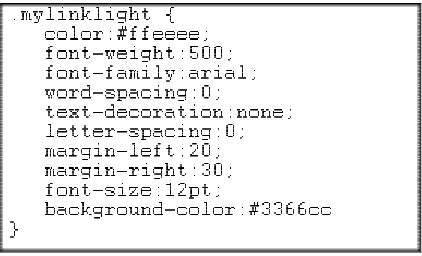
document, in a similar way JSP Model2 does), he has more control over formatting than using HTML, and can ensure a uniform appearance across an application. By integrating existing CSS in the site, the seamless integration of the application has been achieved. The only problems are that not all browsers support CSS properly; one on every 20 users have browsers that don’t support style sheets.
[image:37.595.220.431.344.472.2]A style sheet is simply a text file, with the .css extension, which is written according to the grammar defined in the various recommendations. This grammar defines rules that allow the developer to assign presentation attributes to HTML tags or to define classes of attributes that can be assigned to HTML objects [CSS].
Figure 3—5: CSS Example
3.4.2 Dynamic HTML
DHTML has been used to create some dynamic effects in the pages of the application, as well as to generate the windows that allow the user to navigate across different hierarchies (see chapter 7 Implementation).
technologies and therefore is an entirely client-side technology that doesn’t require any plugin in the web browser to create these effects. The basic drawback to this technology is that the main browsers (Microsoft Internet Explorer and Netscape Navigator) haven’t implemented DHTML the same way, making it difficult to develop effects that work in the same manner in both browsers. An example of DHTML, used in the login page, can be found in A.2 DHTML code for login page.
3.5 Information storage
As mentioned in chapter 4 System Requirements, information about users must be stored in order to implement a recommendation system. Two approaches to keep such information can be followed: use client-side technologies such as cookies or maintain a database in the server. The next subsections examine these approaches.
3.5.1 Cookies (client-side storage)
A cookie is introduced to the client by including a Set-Cookie header as part of the HTTP response; typically this will be generated by server-side technologies such as the ones discussed in the previous sections (3.1 Dynamically Generated Web Pages). The syntax for this header is:
Set-Cookie: NAME=VALUE; expires=DATE; path=PATH; domain=DOMAIN_NAME; secure
Where:
• NAME is the name of the cookie,
• VALUE is the value associated to the cookie, • DATE defines the valid life-time of the cookie,
• DOMAIN_NAME and PATH define to which URL’s the cookie must be sent back, • SECURE marks the cookie to only be transmitted if the communications channel with the host is a secure one.
(For more information on these fields, see [Cookies])
Table 3-1: Cookie syntax header
3.5.2 Database (server-side storage)
Microsoft Access has been chosen as the relational database management system to store application information since it was the only one accessible from the web site where the application was to be installed. Details about database design are discussed in section 6.2 Database Design. To act on the database, the Java Database Connectivity (JDBCTM) 2.0 API has been used, since it provides access to “virtually any tabular data source” from programs written in Java, facilitating portability. To use the JDBC API with a particular database management system, a JDBC technology-based driver is needed. Nevertheless, a JDBC-ODBC Bridge driver can also be used, making most Open Database Connectivity (ODBC) drivers available to programmers using the JDBC API and thus enabling the programmer to access any ODBC data source from Java. The Bridge is implemented as the sun.jdbc.odbc Java package and contains a native library used to access ODBC. Whenever possible, Sun recommends the use of a pure Java JDBC driver instead of the Bridge and an ODBC driver, since this configuration completely eliminates the client configuration required by ODBC, as well as eliminating the potential that the JVM could be crashed by errors in the native code.
executeBatch(). For those Statements that return data from the data source (“select” commands), a ResultSet interface is provided to implement typical methods to move along the ResultSet, to retrieve columns from it, etc. [Java 2 API]
[image:41.595.172.467.390.581.2]To improve database access time, a connection pool mechanism has been used. A connection pool is a cache of open connections that can be used and reused, thus cutting down on the overhead of creating and destroying database connections. This overhead is considerable, since an application can easily spend several seconds every time it needs to establish a connection. For short database transactions, more system resources may be consumed connecting to the database than executing the actual transaction. Figure 3—6: Database Connection Pool shows a scheme of this mechanism.
Figure 3—6: Database Connection Pool
4. System Requirements
According to Merlin Dorfman and Richard H. Thayer, a software requirement can be defined as: “ A software capability needed by the user to solve a problem or achieve an objective or a software capability that must be met or possessed by a system or system component to satisfy a contract, specification, standard, or other formally imposed documentation."
This section analyses the different requirements this project has to meet, by examining different sources of information to determine them.
4.1 The problem
4.2 Project proposal
The main functionality expected from this project was established from the following project proposal:
This project will investigate the design of an automated system for the publication of technical documents on the World Wide Web. The system will allow its distributed users to commit documents for publication on the web and will then take care of all aspects of making the document available via the web including automatic forwarding of the documents for review prior to publication (if required), linking the document from appropriate document collections, building search indices to allow documents to be retrieved based on content or keywords, possibly publishing the document in different formats, etc. The web interface to the system should be designed to guide readers to documents of potential interest based on their past use of the system and stated interests and might provide features such as automatic generation of reports of new documents that become available, email notifications of new documents to potential readers, etc.
This proposal has been refined during the course of the project. Some aspects have been discarded after analysing the problem in depth, such as the publication of the document in different formats: there is no real need to do that, bearing in mind that the researcher can download the document and convert it to the format he is interested in using available converter tools. Having different versions of the same document in the server complicate the maintenance of the system without any advantage on the other hand. New functions have been required as well. The most significant is that the user must have a means to search for words or phrases within the whole collection of documents in order to ease his search for relevant documents to his research.
4.3 Existing system
section is far from optimal and doesn’t address all the aspects mentioned above. The only means a researcher has to obtain information about other’s research is to browse through a set of individually managed pages and follow the existing links. Each time a new document is to be published, first of all the researcher has to launch an ftp client to store the file/s in an appropriate directory in the web server. Then, he has to edit by hand the HTML page where the document is to be placed; no further action is taken. Therefore, potentially interested readers are not notified about the presence of the new document, nor is the document linked to a proper collection to ease the search for the document. The rest of the researchers have no means to search for words or phrases within the document. Another drawback of this is the lack of a uniform interface, since each user is responsible for the maintenance of their own page.
4.4 Additional requirements
Some non-functional requirements were deduced in the early meetings held at Eircom’s premises.
The system was to be deployed in the Research and Development Division’s Intranet site. Therefore, in addition to having to be a web-enabled application, its interface must integrate with the existing interface of the site.
The application must operate in a Microsoft’s Internet Information System 4.0 running on Microsoft’s Window’s NT 4.0.
The mail system for the notifications function is cc:Mail.
Portability: a commonly accepted definition for a portable application is:
“An application is portable across a class of environments to the degree that the effort required to transport and adapt it to a new environment in the class is less than the effort of redevelopment”.
All design decisions have been taken bearing in mind that the initial environment for which the application was developed might change in the future, and trying to minimise the effort needed to migrate to a new environment. Thus, whenever possible, standards (a commonly accepted specification for a procedure or for required characteristics of an object) have been followed.
Scalability: An application is considered to be scalable if, unchanged, it
5. Analysis
Once the requirements of the system have been examined, the system analysis phase may be undertaken. There are two basic steps to be covered when following an Object Oriented approach: to create a set of use case diagrams and to decide the data model of the system. These steps are covered in the following sections.
5.1 Use case diagram
During the first stage in the OO analysis the requirements are refined into a set of use case diagrams. The following figure (Figure 5—1: Use case diagram) shows the use-cases established for Eircom’s R&D Digital Library:
A use case diagram describes who are the external components in the system (mostly live persons or other applications) and what activities they perform using it. Two external components (a.k.a. actors) have been identified: the librarian and users. These actors define roles that may be mapped to users (for instance, a single user can be granted both roles). As shown in Figure 5—1: Use case diagram, librarians can perform all the operations plain users can, plus management of users (addition, deletion or update) as well as collection management (creating new collections, building collections or deleting collections).
5.2 Object model
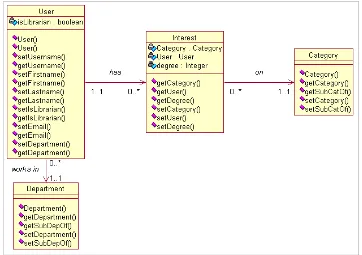
[image:48.595.123.485.479.734.2]Another task to be performed in the analysis stage of the development process is to model the domain of the application, i.e. to represent a static structure of the system. The object model, a.k.a. class diagram, shows the existence of classes and their relationships in the logical view of the system. A class in the diagram is a collection of objects with common structure, common behaviour, common relationships and common semantics.
6. Design
As stated in section 4 System Requirements it is expected that the system will provide the user with a means to perform searches for words that appear in any part of the document within the whole collection of documents. Two approaches to implement this functionality must be considered. One is to operate directly on the source files with a pattern matcher like grep or it is possible to create data structures with information extracted from the source documents (indexes, trees, etc) to ease the retrieval task. Both have pros and cons: grep is simple to use and does not require any programming effort, but it does not scale well with the size of the collection; on the other hand, processing the collection to create the mentioned data structures is a scalable solution as long as the data structures are scalable, but this implies developing a complex system. One example of a retrieval mechanism that makes use of a fast exhaustive searching is the GLIMPSE (GLobal IMPlicit Search) system [GLIMPSE], which scans the entire text for each query within a reasonable search time. Nevertheless, this system is intended to search for files in a UNIX file system. Hence, it cannot be considered for the proposes of this project.
As we will see in this chapter, the proposed solution uses a public domain system, mg, to perform this task. The provision of this functionality to the system and the use of the mg software have turned out to be determinant to the rest of the system design.
6.1 System architecture
among them. Each of these modules is thoroughly examined in the following subsections.
Figure 6—1: System architecture
The system requirement to allow the user to perform full-text searches of all the documents determined the overall architecture of the system; it demanded to use an indexing tool (mg, section 6.1.1), and this tool in turn demanded to use the greenstone software to provide a web interface to it. Finally, the use of this software determined how the top-level module was to be developed.
6.1.1 The mg system
one is used to compress and index a collection of documents (creating a database out of them) and the second is an interactive query tool (this query tool operates only on the indexes to do the searching, so the original collection of documents is no longer needed, thus requiring far less storage space).
[image:51.595.114.503.305.701.2]The text compression and index construction process is carried out by the command mg-build collection-name. This script uses some others, basically, mg_get, mg_passes and mg-query.
At the text compression stage, the mg_get script provides raw documents to the mg_build command. It accepts as a parameter the name of a collection and outputs all the documents to be stored, adding a ^B at the end of each document. The user has to implement a new version of this command to deal with different types of documents. After it, mg_passes is invoked several times with different parameters to create different structures. This script compresses the text using a “Huffman coder for text compression” (Huffman coding calculates the output representation of a symbol, based on a probability distribution, assigning short codewords for likely symbols and long ones for rare ones) and a “zero-order word-based semi-static model for ASCII text” (which first creates a lexicon with all the words and then compresses the text using the parameters accumulated in the first phase).
Once the text and images have been compressed, they have to be indexed; the mg system uses the inversion method, which creates different inverted files during the process and merges them. Then, the index is compressed, even if this is not a very important step for the final result since the size of the index is typically around 0.1 times the size of the original collection.
Finally, the command mgquery allows the user to query all documents in the system, through its command-line interface. The system supports four type of queries:
Boolean queries: The user can type terms to search for linked with Boolean connectors.
Ranked queries: The system searches for several terms without connectors, and then returns an ordered list of documents by closest matches with a similarity score.
Number of document: The user can ask the system for a certain document, giving its number, since all documents in the collection are classified with one.
Nevertheless, and despite being a very useful tool, the mg system has several drawbacks. Firstly, it has a simple command-line interface, as it’s intended to be a retrieval engine. Secondly, the system can only handle a single interactive session at a time so it doesn’t allow concurrent users. Finally, it only works with a static document collection: the whole collection of documents has to be indexed before any search on the documents can be done, and once a collection is built, no updates to the collection can be done; to add a new document, the entire collection has to be rebuild, which can be time-consuming for large collections. To solve some of these limitations, another system, the greenstone software, has been developed on top of it. The next section explores this software, analysing its functionality and limitations.
6.1.2 Greenstone system
Greenstone is a GPL Digital Library Software package for building multimedia collections and making them available via a browser and uses mg as its kernel. It is the result of an ongoing research project in the Computer Science Department at Waikako University in New Zealand, started in 1995, and it is publicly available through the Internet [Greenstone]. The aim of the project is “not to run a new library but to develop the underlying technology and make it available so that others can use it to create their own collections”.
about the documents) can be associated to documents. Source documents can be in any format from which ASCII text can be extracted in order to index them.
6.1.2.1 Search and browsing facilities
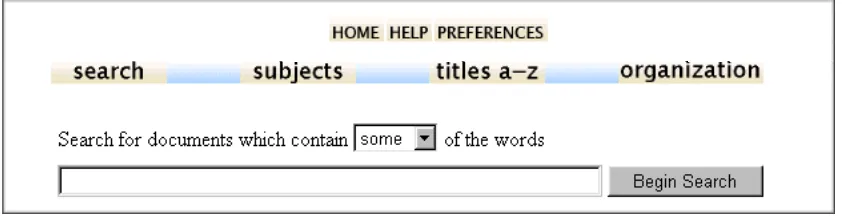
[image:54.595.103.524.626.734.2]The system provides browsing and powerful search facilities to find information in a collection. It automatically organises documents according to metadata associated with them; thus, no links have to be inserted by hand. Searching is full-text (making the entire text of all documents available for searching), and depending on the metadata fields associated to documents in a collection, the user can choose between indexes to be search (title, author, etc). Figure 6—3: Greenstone search interface shows these facilities for a demonstration collection. The metadata defined for this collection is shown in the navigation bar: subject, title and organisation. Users can type several search words in the search box and search for some or all of them, depending on what they select from the “list box” above the search box. In case the user chooses to search for some of the words that are likely to appear in the document he is looking for, the list of documents that the system return is ordered according to how many search words it contains, considering rare words more relevant than common ones. Quotation marks must be used when looking for phrases within documents.
The greenstone software also allows advanced users to configure the system, create new collections, update them, add metadata to documents, etc. This is the trickiest part of the system, since most of this operations must be carried out dealing with configuration files and command-line instructions. Section 6.1.3 Eircom R&D system, describes a system that provides a web interface to this mechanism, and automates most of the processes that would have to be carried out manually if working with this software.
6.1.2.2 Building collections
[image:55.595.230.387.456.575.2]To be able to build a collection, the user needs to know how the greenstone software is structured in the file system and where he can locate the configuration files used by the system. Figure 6—4: Greenstone collection structure shows this.
Figure 6—4: Greenstone collection structure
The archives directory stores documents in GML format
The building directory stores the indexes during the building process
The etc directory stores configuration files about the collection
The images directory stores images used in the collection
The import directory stores the source files for the collection
This is a two stages process. First, source documents have to be converted to a format that can be indexed, i.e. text has to be extract from the document. This step, called import, takes every file stored in the import directory and converts it to a GML file (Greenstone Markup Language), which is basically a text file with metadata associated, and stores it in the
archives directory. Once the new material has been imported, the collection
should be rebuilt. This step, carried out by the command buildcol, creates the indexes for both searching and browsing. The MG software is used to do the searching. The buildcol process invokes the MG module mgbuild (see 6.1.1 The mg system) to create the set of indexes on associated metadata and to compress the information contained in the GML files.
Every collection in the library must have a configuration file (etc/collect.cfg) that defines which metadata is defined for the documents in the collection and therefore which indexes must be created for the collection. It has also to be specified the types of the source documents that the collection will comprise, so that an appropriated “plugin” (Perl module) to convert the raw material to GML documents.
The most important commands that can be used in the configuration file are shown in the following table:
Creator
the creator of the collection
indexes document:Title document:text
the indexes defined on the collection. This collection defines an index on the Title of the document and another one on the text of the documents. Therefore, users will be able to search for words or phrases that appear either on the title or in the text.
plugin IndexPlug plugin HTMLPlug
List of plugins to control the import process. IndexPlugin mission is to associate metadata to documents, while HTMLplugin converts documents form HTML to GML format.
classify Hierarchy hfile=sub.txt metadata=Subject sort=Title
[image:56.595.106.502.523.736.2]describes which files define metadata about the documents. This command specifies that the file named sub.txt contains the subject associated with the documents. The structure of this file is analysed at the end of this chapter.
As introduced in Table 6-1: Collection configuration commands, IndexPlug associates metadata to files. This is done by manually writing a file defining which metadata values are to be associated to each file in the collection; every single file to be added to the collection must appear in this file, called index.txt, with its metadata, otherwise it won’t be included in the collection (see Figure 6—6: Greenstone index.txt configuration file) Other configuration files that have to be updated manually are sub.txt and org.txt, stored in the etc directory. The first one is used to maintain a hierarchy of categories upon which a document can be classified and therefore linked into appropriated collections. The second one, with identical structure, is used to maintain the organisational structure of the division.
[image:57.595.101.522.378.581.2]The following figure (Figure 6—5: R&D Collection configuration file) shows the configuration file used for the default collection in Eircom R&D Division.
Figure 6—5: R&D Collection configuration file
subject, is and identifier for the category of document that has been
associated with the document. This field must match with an entry in the
sub.txt configuration file. Finally, the same pattern applies for the third field
[image:58.595.127.485.206.285.2]in the file, organization, which is used to classify documents upon the company’s organisation chart based on the author of the document.
Figure 6—6: Greenstone index.txt configuration file
[image:58.595.200.416.510.574.2]Figure 6—7: Greenstone sub.txt configuration file plots the structure of this file. The identifier used in the index.txt file to classify documents depending on their category (or subject) is duplicated in this file, as each entry in the file must specify this value in its two firsts fields (this is required by the design of the greenstone software). Finally, a description for that code must be provided. Note that the structure of the org.txt is identical to this one.
Figure 6—7: Greenstone sub.txt configuration file
conceived to be mono-user: a “librarian” has to store the source files in the directories afore mentioned, then he has to create the configuration files manually and then build the collection; there are no mechanisms available to add files to a collection through a web interface; since it is mono-user, there is no concept of users in the system and therefore no recommendation schema can be defined. The next section (6.1.3 Eircom R&D system) describes a system designed to address these drawbacks.
6.1.3 Eircom R&D system
This module, built on the greenstone software, has been conceived in order to address the problems and limitations discussed above, so that the application fulfils the system requirements. The functionality this system is responsible of is:
• To introduce the concept of users. The system keeps track of
authorised users by storing a record in the database for each of them. Users must log onto the system to be authenticated and to have access to the library. Once the user has logged in, the system, using HttpSessions, maintains this information during the course of the session. Users can be managed by a librarian.
• To automate the publication of documents: users are provided
configuration files in the greenstone software (i.e. index.txt), as described in Section 6.1.2.2.
• To allow users to change their profile: As mentioned before, once
the user has logged in, information about him or her is maintained by the system. This information (first name, last name, email, department, if they have librarian rights or not, and the stated user interests in categories of documents) is available for updating at any moment. If the user selects to update its profile, his or her details are shown on the screen, along with a list of categories to which he or she is subscribed and with a list of all available categories to which the user might like to subscribe. Through this screen, the user can update his or her interests, which are automatically updated for further interactions with the system.
• To add and delete categories of documents in a distributed way.
Users can update at any moment the categories of documents defined in the system, by adding new categories at any level of the hierarchy or by deleting them. These changes transparently update the configuration files of the greenstone software, which turns out to be an onerous task when it has to be maintained manually.
• To send notifications about new documents to potentially interested
6.1.3.1 User Profiling
Users of the digital library are in need of a recommendation service that permits them to be up to date with relevant documents available in the library. If the system implements such mechanism, it has to keep track of its users interests by means of a method called user profiling. The recommendations are then done based on this profile. Two approaches to this method must be considered: content-based, in which the system tries to recommend items similar to those a given user has liked in the past, and collaborative, in which the system identifies users whose tastes are similar to those of the given user and then recommends items they have liked. This second approach has been discarded for this solution, because of its shortcomings: firstly, when a new document appears in the collection, no information about this document is available (no other users have read it, so the system doesn’t know whether other users are interested in the document or not, and if they are, to what extend); secondly, it is difficult to deal with users who have unusual interests compared to the rest of the users.
Therefore, a content-based recommendation schema has been followed, as introduced in this section. Users are provided with a mechanism whereby they can manipulate their profile stating the categories of documents they are interested in. In addition, users are automatically considered to be interested in a category of documents when they add a document on that category to the library.
6.2 Database Design
The database, stored in the server-side, has been created to automatically generate the configuration files used by the greenstone software and to implement the functionally assigned to the Eircom R&D system. A brief description of its tables is noteworthy.
Categories: describes the categories of the documents that have
been defined in the system. Since categories are structured hierarchically, two fields are needed: the name of the category (Category) and which category the category subcategory of (SubCatOf). Top-level categories (those without parent) leave this second field as null. A third field (IndexCod) is used to generate the configuration file about categories.
Departments: same structure as Categories, but about departments.
Users: information about users is needed in order to: let users log onto
Interests: information about users interests in certain categories of documents must be stored in order to send them notifications when a new document of a category they are interested in is added to the library. Since the cardinality of the relationship is N:N (a user can be interested in multiple categories and a category may be of interest of multiple users), this information cannot be stored in either of the tables in a normalised form and therefore the use of this table is justified.
Figure 6—8: Database Schema shows the database design introduced in the previous paragraphs
7. Implementation
This chapter describes how the system presented over the previous chapters has been implemented, focusing in the top-level module of the system. The description of this module covers how the functionality assigned to this module in the design chapter has been transformed into a working solution.
7.1 mg and greenstone modules
While the mg system has been used as is, without any modification, the greenstone software has been adapted in different ways in order to allow seamless integration with the top-level module, the R&D system. Although it offers a set of files to customise its interface, these files only deal with the interface for the functionality offered by the software, which is to be expected. Therefore, these files have had to be restructured to plug the functionality added by the new module. These configuration files are stored in the gsdl/macros directory in the application tree; their extension is .dm and are organised as a set of macros used by the system to generate the html files. A macro associates a value to a label with the following pattern: _namemacro_{content}. Macros can appear as well as content for other macros. An example of these files is included in appendix A.3 Greenstone home page configuration file. This file defines the content for the home page of the library.
that these files are structured in packages with macros that overwrite other macros defined in other packages, made this task last longer than planned.
7.2 R&D module
A detailed description about this system and how it interacts with the user has been covered in 6.1.3 Eircom R&D system. The following pages cover the programming decisions taken to implement each of the functions previously analysed.
7.2.1 Distributed users
instance of the DBConnectionManager class, which is used to create and manage the pool of Connections introduced in section 3.5.2 Database (server-side storage). This servlet is configured to be loaded on Tomcat’s start-up; this way, the servlet (and therefore the DBConnectionManager) is loaded before any interaction with the system is carried out.
7.2.2 Publication of documents
MulipartRequest object has been created, methods are provided to getFile(), getParameter(), readAndSaveFile(),…
Figure 7—1: Uploading a document
class as a bean, MailBean.java. It loops over the users that have been selected from the database and for each of them, it sets the bean’s properties (recipient, body, subject, etc) to customise the email sent to each user.
7.2.3 Addition and deletion of categories
Several functions of the system need to present the hierarchy of categories currently available in the system to the user. Some of them, such as “Add Category” and “Delete Category”, also allow the user to modify these categories of documents. In order not to replicate the code in different pages, a JSP (Categories.jsp) and a servlet (CatsRec.java) have been implemented in such a way that they can customise their output depending on the operation the user wants to perform. Figure 7—2: Categories shows this customisation depending on the action being executed.
[image:68.595.104.512.371.736.2]
The use of two components (the JSP and the servlet) is justified since
HTML (in fact, JavaScript code) output has to be generated (by the jsp) and also some business logic has to be programmed (by the servlet), as discussed in 3.1.6 JavaServer Pages TM. The JSP obtains the information from the servlet and then it displays it. The servlet has to create a hierarchical structure from a relational table from the database. The interface that it exposes to the JSP returns a String with the JavaScript that the JSP generates in the response object and that is returned to the user. This JavaScript code is responsible for popping a window with the hierarchy that allows the user to expand or contract nodes dynamically without having to regenerate the structure. Figure 7—3: JavaScript code example introduces the pattern to create dynamic trees showing how to create a tree with two children, one of them being a tree itself with one child, and Figure 7—4: JavaScript code to generate the hierarchy of categories shows the code to generate the tree shown in Figure 7—2: Categories. This solution proves to be very efficient, since no unnecessary reloads or queries to the database are carried out.
<SCRIPT LANGUAGE="JavaScript1.2"> <!--
var mySubTree = new Tree();
mySubTree.addTreeItem("subTree item a");
var myTree = new Tree();
myTree.addTreeItem(mySubTree); myTree.addTreeItem("my tree item A");
[image:69.595.100.513.459.608.2]//--> </SCRIPT>
Figure 7—3: JavaScript code example