(q(4s)¥))
PASCAL
S
stem
II "
"
0
Userls
Manual
March 1979
~~
nslltute for
I"---~
nforMa.lLon
**************************************
*
UCSD (MINI-MICRO C~PUrER) PASCAL*
*
VERSION 11.0 MARCH 1979*
*
Institute for Infonnation Systans*
*
UCSD Mailcode C-021*.
*
La Jolla, CA 92093*
*
(714) 452-4526*
**************************************
Release serial number:
3612
-***************************************************************
*
Copyright (c) 1978 Regents of the University of California,*
*
San Diego Campus. This software, its source, object, and*
*
all other fonns, is the property of the Institute for*
*
Infbrmation Systems and may be used or copied by others*
*
only with written authorization from the Institute for*
*
Infonnation Systems. All rights reserved.*
JI.3CLAIMER: These doc\.lTlents and/or the software they describe are subject to change and/or correction without notice. The UCSD Pascal Project cannot be held responsible for ~plementations on processors where
the ~plementation work was not done at UCSD. Users with systems obtained from sources other than UCSD must contact their supplier for support. UCSD does
not support users who have obtained their copy of the software from other than UCSD.
ACKNCHlLEDGEMENTS:
The ~rk. de·scribed in these notes has been supported significantly by the following organizations:
United States Navy Personnel Research and Development Center, Sperry Univac MinicOOlputer Operations, EDUCCl1,
Digital Equipnent Corporation, Processor Technology Inc., Springer-Verlag, Terak Corporation, General Automation Corporation, The UCSD Computer Center, grants from the University of California Instructional Improvement Program, Tektronix Corporation, Micropolis Inc., Phillips Research Labs, Lawrence Livermore Labs, Pascal Computing.
The work described in these notes has been made possible by the drive and direction of the Director of the lIS:
Kenneth L. Bowles
Documentation Authors:
Gillian M. Ackland, S. Dale Ander, Lucia A. Bennett, Paymond S. Ca usey, Charles "Chip" Chapin,
J. Greg Davidson, Gary J. Dismukes, JUlie E. Erwin, S1awn M. Fanning, Mary K. Landauer, J. Raoul Ludwig, Joel J. iv1cCorrnack, Mark D. Overgaard,
Keith A. Shillington, David A. Smith, Roger T. Sumner, Dennis J. Volper.
Sbftware Authors:
Lucia A. Bennett, Marc Bernard, J. Greg Davidson, Barry Demchak, Gary J. Dismukes, William P. Franks,
Julie E. Erwin, Robert J. Hofkin, Albert A. Hoffman, Richard S. Kaufmann, Peter A. Lawrence, Joel J. ~~Gormack,
Robert A. Nance, Mark D. Overgaard, David A. Reisner, Keith A. Shillington, David M. Steinore, Roger T. Sumner, Steven S. Thompson, David B. Wollner.
Collected and Editai by:
*********************
*
TABLE OF CONTENTS*
*********************
Version 11.0 March 1979
SECTION PAGE
o ADDENDA, ERRl\T~ AND NOTES
1 NOTES ON OTHER ~lATERIALS AVAILABLE • • • • • • • • i
2 BRINGING UP THE PASCAL SYSTEM
1 ON PDP-11 . • • • • • • • • • • • • • • • • • iii
2 ON 8080/Z80 SYSTEM WITH CP/M AND 3740 DISKS. v
3 DIFFERENCES AMONG IMPLEMENTATION~ FOR DIFFERENT PROCESSORS • • viii
4 CHliNGES IN RB:EHT RELEASES • • • • • • • • • • • • • • • • • ix
1 THE UCSG PASCAL SYSTEM
1 2 3 4 5 6 7 8 9
INTRODUCTION .Il.ND OVERVIEW • FILE HANDLE R • • • • •
SCREEN ffiIENTED EDITOR
1 INTRODUCTION • • • • • 2 GETTING STARTED • • •
3 DElAILED DESCRIPTION OF COMMANDS
4 REFERENC E • • • • • • • • • • • • •
5 EXPERr1ENTAL LARGE FILE VEfiSIJN (L2) YET ANOTHER LINE OR IENTED EDITOR - YALOE
DEBUGGER • • • • PA5:AL CrnPILER • BASIC CQv1PILER LINKER • • • • .
ASSEJ~BLER 1 7 31 33 37 55 1;:,,'1 . / . 63
. . • • 75
. . . . 77 25
91 95
2 THE UCSD PASCAL LANGUAGE
2
INTRINSICS • . • • STRING • • •
2 INPUT/OUTPUT •
3 MISCELU NECUS •
4
• • • • • • 115 117 . . • • • • • . • 121
127
5 CHARACTER ARRAY MANIPULATION • • • • • 131
133 133
DIFFERENCES BETIlEEH UCSD'S PASCAL AND STANDARD PASCAL •
1 CASE STATEMENTS • • • • • • • • •
10
1 1
12 13 14 15 16 17 18 19 20 21 22
PROGRA~ HEADINGS
READ AND READU~
RESET . . . • . . • . •
REtlRITE . . . • • • .
SEG1ENT PROCEDURES . • . .
SEw . . . .
STRINGS . . . .
WRITE AND WRI TELN . . . .
IMPLEMENTATION SIZE LIMITATIONS EXTENrED CCMPARISONS • • . . LONG INTEGERS . . . • • .
UNITS . . . .
TABLE CF UCSD INTRINSICS
• • • • • 146 • • • • 146 148 149 • • • • • • • • • • 149 150
151
• · • . 153
• 154 · 155 155 • • • • 155 • 155
3 IivfPLE~ENTORS' GUIDES
D RAWLINE . . . • . . . • • • • • • • • 159
2 FILE FORMATS . . . .
SPECIAL UCSD PASCAL SYNTAX (USE OF) • • • • •
163-3
4
5
6
1 SEGMENT PROCEDURES • . . . .
2 U N I T S . . .
3 LONG INTEGERS . . . • . . . INTERPRETER NOTES . . . .
INTRODUCTION TO THE PASCAL ?sEUDO~~ACHINE .
BITE SWAPPING . . . • • • . . • . . .
4 UTILITY PROGRA~S
1
2 LIBRARIAN
. . .
.
.
·
.
·
.
. .
· ·
3 SETUP - SYSTEi-l RECONFIGURATION
4 BOOTSTRAP COPIER
. . ·
. ·
.
.
5 PA1CH/DUMP
.
. .
· ·
·
6 RT11 TO PASCAL CONVERSION
KIT
.
·
.
.
.
7 GOTOXY PROCEDURE BINDER
8 DUPLICATE DIRECTORY
·
·
.
·
.
9 P-CCCE DISASSEMBLER .
10 LIBRARY MAP
.
. .
.
.
.
.
.
.
5 TABLES
EXECUTION ERRCRS IORESULTS . . • . UNITNUMBERS • . .
RESERVED WORD LIST . . . . . SYNTAX ERRORS . . . •
ASSEMBLER SYNTAX ERRORS . . . .
AMERICAN STANDARD CODE for INFORMATION INTERCHANGE
P~~ACHINE OP-CCDES . • . . . . UCSD PASCAL SYNTAX DIAGRAMS . . . • . . . . • . .
· 165
• 167 lSi
• • • . 125
· 203 · 217
·
·
221· ·
225· ·
.... ~ ....c...Jj
· · ·
235· ·
239·
241· ·
245·
·
·
247·
253. . . 263
• • 265
· 257
• • • 269
• • 271
[image:5.621.55.505.56.718.2]******************* **** *********** ****
*
MATERIALS AVAILABLE* *
Section A.1*
*********************** ***************
As the UCSD Pascal system has grown, we have found that to distribute all of the software which is useful to all users for all systems, has become a.n unbearable task. To attempt to alleviate the large number of diskettes the release software requires, and to
alleviate the number of pages of doclJJJentation sent to each subscriber, we have started to split the s~ystem into a number of seperately
available sections.
The major section is the section which contains the operating
sy~tem and all the support routines that go with it. We include a number of useful utilities which should enable the subscriber to do all types of developmental work. The master release (as from herein it shall be named) contains the interpreter for the initial system ordered, the UCSD Pascal operating system, the Pascal compiler, two text editors (one for screen devices, one for general purpose), a BASIC compiler, the Linker, the Assembler for the appropriate machine (at least). Other utilities include: a generalized file utility (the File handler),a generalize patch and dump routine, a set of programs to enable the subscriber to configure the systen to run most
intelligently with any terminal, a desk calculator, and a librarian.
Software which is not included in the master release is
generally available from the lIS as a supplemental package at a nominal handling charge (dependent on the amount of material involved with the package). The sorts of software available are: interpreters for
machines other than the machine the master release was ordered for, which will be accompanied by the assembler for that machine, in some cases we have assemblers for machines for which we do not yet have
-************************** *****************
*
THE FIRST TIME THROUGH* *
Section A.2. 1*
************************** *****************
Version 11.0 March 1979
Welcome to UCSD PASCAL. If you put the Adva,nced System I
diskette in your booting drive l w'ent through your normal
boot-strapping procedure, and were greeted in a. similar fashion, you do not need to read this section.
If this is not the case then here are a few of the prcblems we encountered with 1.4, and 1.5 coming up in strange and f~reign lands:
1.) Some revisions of the LSI-11 refuse to boot wi th the clock running. If you have a switchable clocK, turn it off to
bootstrap; if and when the system greets you wi th the welcome message and the date, turn the clock back on.
2.) You do rot have enough memory. The minimum requirement for memory is 24K 16-bit words.
3.)
You have a system configured for RK-05 hard-disk and you have an unformatted disk on line. The system will hang waiting fora reply from the disk which cannot be generated if the disk is unfonnatted. Take the disk off-line and try again.
4.) You have a system configured for RK and RX anj the RX or RK is not present. Both must be present at the standard DEC UNIBUS
or QBUS addresses for these devices.
5.)
We haven't encountered your problem before. Call:-*********************************** *****************
*
808e/Z80 WITH CPIM & 3740 DISKS*
*
Section A. 2.2*
*********************************** *****************
Version 1.5 Septanber 1973
THE CPIM IMPLEMENTATION Of UCSD PASCAL
BOO1ING PASCAL
To get Pascal running und.er your version of CP ltv:, a two-disk bootstrap is used. First, boot CP 1M in the usual manner. On the CP I tvi disk distributed with the Pascal system is a file called PASCAL.COM. PIP this file over to the booted disk, then execute it.
When the program asks for a Pascal disk, put the disk labeled PASCAL: in drive A and any disk in drive
B.
The system may not boot if there is no disk in drive B, or if you have a 1-drive system and yourCPIM drivers wait on a request to drive B. Then hit [return]. In
about 15 seconds the Pascal welcoming message should appear. (Note: we have discovered that some drives, possibly as a resul t of being double-buffered, cannot keep up with a 2 to 1 interleaving and hence are extremely slow. The bootstrap then may take about 30 or 40 seconds. We intend to alleviate this problem in the next release, but persons with such drives will have to bear with slow disk accesses for the present. )
If all has gone well, Welcome to the Wonderful World of Pascal. If not, please call to notify us of your problem.
~1CI)IFICATIONS TO CPIM
The Pascal systan will operate under an Lnmodified CP/rv1 system, but it is advisable to create a special CPIM for use with Pascal in order to have Pascal running in the environment for which it was des igne:i .
1. If there is no disk in a drive and an access is made from that 1isk, the driver should not wait to perform thnt access until a disk is inserted, as the Pascal system often attempts to reaj from empty drives when searching for a particular disk. Instead, simply return_a 1 to indicate a bad I/O operati.on"
2. If you have a· keyboard interrupt handler, it should
recognize the character [cntrl-fJ as a "flush-output" toggle and signal
The ke~oard interrupt handler should also recognize the ,iaracter [cntrl- s] as a "stop output" toggle and wait until it receiv~s another [cntrl-s] before allowing program execution to continue.
If your keyboar1 has no alphalock, the input driver can use any charac~er not used for some other purpose as an alphalock toggle.
[Cntrl-p], [return], [cntrl-i], [cntrl-s], [cntrl-fJ, [cntrl-cl or any character in SYSCOMA.CRTINFO should be excluded fram consideration. We suggest [cntrl-a].
Pascal expects the tab character ([cntrl-i]) to cause the terminal cursor to advance to the nearest eight column. If the
terminal does not d0 this itself, then the driver in the BIOS should.
CREATING A BOOTSTRAP ON A PASCAL DISK
Note: These instructions are for a standard BIOS with 512-byte olocks. For instructions for a non-standard BIOS, reference file
READ.ME on the CP/M disk in the distribution packet.
On the CP/M disk are two programs, PGEN.COM and ?INIT.AS~. 'The ?rogram PGEN.COM is a program usej to write out a buffer (Which will be
: lIed by boot code and BIOS) to track O. PINIT. A.S-1 is the boot code ~t reads SYSTEM.MICRO from a Pascal disk, loads the BIOS into the
~rect place, and starts the interpreter's boot routine.
You must create a file PBCCT.HEX, which will require a slight modification of your current BeCT program. PBOOT will reside on track
0, sector 1 and, when executed, will load track 0, sectors 2 thru , 3
into memory starting at location (~SIZE-48)*1C24 + CEAOOH, and jump to
that location.
You then need to edit PINIT.AS~, changing MSIZE to match your system. Assemble the file, creating PINIT.HEX.
The next step is to stitch together the one-sector coot, ?ascal int~rpreter loader, EIOS, and the program to wr:te this information out to sector O. The following is a session with DDT perfonos all this. This session was used to create a 4eK system. input is in lowercase, and comments are off to the right.
the
that User
A)ddt pgen.com load PGEN.COM into memory. PSOOT, PINIT, and BIOS will be overlayed into PGEN's data area, after which a memory L~a~e will be saved.
DDT VERS 1.3
NEXT PC
-h900 0
ogoO 0900
-r900
NEXT PC
0980 0000
-ipinit48.hex -h980 BAOO
C380 4F80
-r4f80
NEXT PC
OA7d BACe
-ibios48.hcx -hd8) beOO
C380 4F80
-r4fcO
NEXT PC
OF76 0000 -[cntrl-cJ
A>sav€ 16 pgen48.com
A>pgen48
PGEN VI.O
PUT BOOTER?(Y/N)y
PBOOT starts at location 0, and we want to read it in at location 900H
re ad in PIDOT
set. t PINIT48. HEX'; as input file
PINIT starts at loc:ation: BAOoo in a 43K system (in general (MSlZE-48)*1f)24 + BAOOH), anj we want it at location 980H
rEa]: it i.n
and lastl y reod BICS into location D80H
leave DDT •••
... and save the program.
sample execution of the program ...
WRITING BOOTER TO DRIVE A, TYPE RETURN
put a Pascal disk (preferably a copy of the master) in drive Abefore hitting [return].
A GAIN? (Y IN) n
GET BCOTER?(Y/N)n
REBOOTING
CP/~,TYPE RETURN
A>
put the CP/M disk back in drive A
************************************* *************** * !)IFFERENCES AMO~ IMPt.F.MENTATIONS * * Section A.3 * ************************************* 1**************
Version II.O March 1979
The following is a list of differences between PDP11 Pascal and
8080/Z80 Pascal, the items describe the way it is on the
8080/Z80, and how that differs from the documented system.
1. The definition of div is different (thereby changing the values returned by rood):
a div b
=
floor(a/b) a mod--
b=
a - b*(a div b)--2. The I/O drivers are all written for synchronous operation. This means that [break] has no effect. [Cntrl-s] and [cntrl-f] will not perform as described unless you have a keyboard interrupt handler, and this handler is modified as specified below in Modifications to CPM.
Tnis also means that UNITBUSY, UNITCLEAR, and UNITtiA IT are meaning less. (In the future it may be possib le to uSe the
UNITBUSY and UNITCLEAR operations on th~ keyboard, but this is
~urrently infeasible.)
3. The interpreter is called SYSTD1. MICRO instead of SYSTEM. PDP-l1.
4. T.~e CPIM implementations have bootstiaps that are not ac~essible to Pascal, hence the program BOOTER will not worK. See the
3ppropr iate section of this docunent for instruc tions~n
copying and/or creating a bootstrap.
5.
Tnere are no long integer functions available with the Z801808C*********************************** ***************
*
CHANGES MADE IN RECENT RELEASES* *
Section A.4*
f**~******************************* ***************
Ver'sion 11.0 March 1979
SUMMARY OF DIFFERENCES BETWEEN UCSD PASCAL RELEASES 1.5 AND II .0
The following additions, improvements and/or corrections apply
to Version 11.0. Reference the (section II) preceding each entry for a more detailed description. For information regarding differences be-tween previous releases refer to the system documentation for those releases.
( 1. 1 )
OPERATING SYSTEM
( 1. 1 ) C(ompile will now prompt the user for the file to compile, as well as the output file, if the workfile
is empty.
(1.2) FILE HANDLER
Substantial modifications have been made in the syntax of user responses to filer prcm.pts. The symbol "$" means t same name'. This
symbol may be used on the right-hand side of a transfer command expression. If the filer detects as some time that two volumes on line have the same name, the warning message:
Warning: units N & M have the same name'
will appear beneath the prompt line. This messcge will remain until some action is taken to convince the filer that this is no longer true.
R(emove command prompts for verification always.
K(runch command allows space to be opened anywhere on the disk.
Three different editors are currently provided with the UCSD PASCAL system: YALOE, "EDITOR"(E.6) , and the new L.2 EDITOR. EDITOR is a substantially more powerful (and even easier to use) editor than YALOE, but it makes some assumptions about the run-time environment.
The L.2 EDITOR (eventually to become the standard release editor) will handle files of arbitrary size, however it is in its experimental form and-recommended for brave users only.
EDITOR requires a reasonably powerful CRT terminal with the following features:
XYADRESSING go directly to a given row and column on the screen
NDFS - non-destructive forward space (the inverse of back-space)
I..F - doW1 on e line (and if at the bot tom of the screen
RLF
scrolls up)
- reverse 1 ine feed (up one 1 ine; not reauirej t~
reverse scroll)
Typing "E" at the main command level will execute the file SYSTEM. EDITOR. Selection of either YALOE or EDITCR(E.6 or L.2) as ~he system editor is made in the Filer by C(h~nging the selected fi:e's
arne to SYSTEM.EDITOR.
Proper use of EDITOR requires that the system disk be left on-line ~hile editing.
'l"lt :nain purpose of release 11.0 is to establish compatibil i ty 3t
tr~ P-code level among all the interpreters maintained by the Pascal
Pr~cj€:ct. This requires changing the P-rrJC:lchine supported on the PDP-11 and ZHO/8080 processors, Lhereby invalidating all 1.5 or earlier
cO,defiles. No functional enhancements in the system software have been pl anned for II. C, although a number of evolutionary improvements have been made. Chly two changes have been made which '!lay affect 1.5 level s()urce progra-ns;
1) the volt..rne 'REMOTE:' has be"en spl i t. into tt,..o volumes
--'R81IN:' anj 'REi"10lIT:'. Programs using 'RE1~OTE:' ~-Jill have to be zrodifiei to reflect this change.
2) Us€'r programs (rather sophisticated ones presumably) ~klich
c211ed the system procedure FBLCCKIO must be changed to accomocE.te an additional param€tcr. Uses of BLOCKREAD and BLOCKWRITE are unaffected.
Evolutionary enhancements provided in 11.0 2re intended lar~ely
to improve the ability of the system to operate in in small memory
(4bK), and small disk (160 block mini-floppy) environments. Thes2 irqJrovements include:
1) T:1e Pascal compiler will run in swapping mode ~utomati·~ally
(without th-= (*$3+*) directive) if it determir'les that no useful prograrn could be compiled without swapping.
2) Codefiles for system programs ~re no longer required to reside on the system disk. The operating system will, at initialize time,
(looking first on '*' volune) scan on-lne volunes f:>r the files: SYSTEM. EDITOR, SYSTF11.FlLER, SYST8'l.CCl1PILER, SYSTEvLLIHKE:R, :;3(),j
3YSTEM.AS3~BLER, and remember where they were faun1. Furt~er~ore, if
cnc of these files cannot be found when it is actually i:1v:>i<ed "Jy the user, the system will look 3gain at that time.
]1e issue of byte-sex - (high ot~d€r byte nLmlbEred 0 or 1?) r;2s al so be:en addressGd. If the programmer wishes to have the compiler gelE.r&te code for a machine of the opposite sex to t.he one he is running on, the pseudo-canment (*$F+*) (flip) will cause thE codefil€
to be generated f~r a machine of the opposite sex. (See section 3.6)
TIl~ rest of this document concerns only those users vmo
find themselves concerned with the P...,~achine in~ernal s. i\
,;PCCU:: Changes:
Decimal val1je I.5 II.O
157 S2P unused
1cC LeA LSA Load String Address
167 LOO unu~~
16S
MVB
LDO Load Global2CB S1P LPA Loc:d Packed array Address
209 IXB unused
210
BIT
unusedCperators with new or changed functional behavior:
1) LSA - puts address of length byte of string constant, whi~h compiler has aligned to a word, on top-of-stack.
2) LPA - puts address of first data byte of string constant, ',-vnich compiler has aligned to a ~rd, on top-of -stack.
;) INC now adds its parameter (II of Y.Ords) to the top of stack, ~ is now used only for addresses.
4) Other operators/standard procedures affected: LDB, 518, MVR,
i"iVL, SCN, FLC, UNITREAD, UNIT~RI1E, BLOCKIO. These now use address
****** ***** *** *** **** *** *** ** *
**
**
**** **** ***
INTRODUCTION AND OVERVIEW* *
Section 1.1*
••••• _*********************** ***************
Version 11.0 February 1979
The UCSD Pascal system described in this document is a system intended to run on stand alone micro- and mini-computers. This system is highly machine independent since it runs on a pseudo-machine
interpreter corrrnonly referred to as the nP-machinen • All systell software is written in Pascal, except for the P-machine interpreter and a few run-t~e support routines written in assembler for
efficiency, resulting in relatively straightforward software maintenance and enhancement.
The system is designed to be used primarily with a CRT terminal acting as the CONSOLE device; however, the system is flexible enough to be reconfigured for slower hard-copy terminals. The system does require some kind of fast mass storage such as a floppy disk system or better. For further information regarding compatability between
various types of equipment and this system see the "SETUP" docLlTlent in Section 4.3. This document is intended for programmers who are
familiar with the Pascal programming language and have some experience in writing computer programs. Some additional reading suggestions follow: .
Tne following is a tutorial book on PASCAL:
Kenneth L. Bowles,
(Microcomputer) Problem Solving Using PASCAL Springer-Verlag, New York, (c)1977
We suggest the following book as a PASCAL reference guide:
Kathleen Jensen and Niklaus Wirth, PASCAL User Manual and Report Springer-Verlag, New York, (c)1975
For documentation concerning the differences between UCSD Pascal and Standard Pascal see Section 2.2.
1.1.1 THE UCSD PASCAL SYST~: AN OVERVIEW
wi ttl no branches to lower levels) correspond to the lower levels of the system. While a user is in a particular level, the system displays a list of available canmands called the "prompt-line". If
the system is running on a CRT screen type terminal, then the prampt-line will usually appear at the top of the screen. Commands are usually invoked by typing a single character from the CONSOLE device. For example, the prompt-line for the outermost level of the system is:
COmmand: E(dit, R(un, F(ile, C(amp, L(ink, X(ecute, A(ssem, D(ebug, ? [II.OJ
By typing "F" the user will "descend" a level wi thin the
structure diagran into a level called the "Filer". Upon entering the Filer, another prompt-line detailing the set of commands available at the Filer level of the system is displayed. The Q(uit command causes the user to exit frem the Filer and "ascend" back to the outermost command level of the system. Now the user is back at the level in the system from which he started after bootstrapping the machine. Some commands within the system prompt the user for the name of some file.
L~ these cases, the user enters the name of the file followed by a
carriage return. If an error is made in typing a portion of the file . name, the backspace key (or equivalent key depending upon the system
configuration) may be used to "back over" and erase the erroneous part. The line delete key (rubout key) may be used to erase the entire file name, thereby allowing the user to completely start over. If the user decides not to accept any file name whatsoever, "escape" from this command is by entering a file name of zero characters, i.e. type <cr>.
Somet~es there are more commands than will fit on the screen. If this is true, a question mark (?) will appear at the end of the line, typing
"'?"
will cause a different prcmpt to appear, such that more of the available commands will be displayed to the user.A concept central to the design of the entire UCSD Pascal
system ccmmand st.ructur e is the concept of the "workfile". A workfile can be thought of as a "scratch-pad" area used for development of
programs and only one workfile is allowed at anyone time. !f a user wishes to begin a new workfile, the contents of the old one can be saved, under a separate file name, for later reference by usi~g tte S(ave ccmmand in the Filer level of the system. when that file ~s
later retrieved fer further wor~ on the contents, it is possible that a number of files (usually source and code) will be retrieved together and in total they comprise the work-file.
1. 1.2 OUTERMOST LEVEL COr+1ANDS: AN OVERVIEW
A. E(dit
textfile. See Section 1.3 for details. The \.o.t)rkfile text (if present) is read into the editor buffer, otherwise the Editor prompts for a file.
B. F(iler
"F" places the. user in a level of the system called the Filer. -This section of the system contains commands uSed primarily for -maintenance of the disk directory. For more documentation on the
Filer level including canmands associated with the "getting", "s aving", and "clearing" of the user's workfile see Section 1.2.
C. C(omp
This command initiates the system compiler to compile the users workfile. If there is no work-file currently the user is askej for a source text file name. If a syntax error within the source is
detected, the compiler will stop and display the error number and the surrounding text of the program. By typing a space, the user can cause the compiler to continue the compilation. Typing an <esc> C!3uses the compiler to abort
&
return to Command level. Typing 'E' will, call the editor placing _the cursor, if the system editor is the screen editor, near the offending symbol. If the compilation is successful, (i.e. no compilation errors were encountered) a codefile called *SYSTEM.WRK.CODE is written out onto the user's disk and becomes part of the workfile. For more documentation on the use of the UCSD Pascal compiler see Section 1.6.D. R (un
This command causes the codefile associated with the current-workfile to be executed. If no such code file currently exists, the compiler is called in the same manner as described in C above. If the compilation requires linkage to separately compiled code the linker will automatically be invoked and will assume the use of the file *SYSTEM.LIBRARY. After a successful compilation, the program is executed.
E. X(ecute
F. A(ssem
Just like C(omp except the system assembler is invoked rather than the system compiler. See Section 1.9 for more information on the system assembler.
G. D(ebug
This command causes the current workfile to be executed. If the program in the workfile has not been compiled, the compiler will be called as in the case of the R(un command. However if a run-time error occurs, or a user-defined break-point or halt is encountered, the
Debugger program is called. The Debugger is a program which allows the user to examine the contents of variables within the program. See section 1.5 Debugger for more details.
H. L( ink
This command starts the system linker program explicitly to allow users to link routines from libraries other than
*SYSTEM.LmRARY. See section 1.8 for more infonnation on the Linker.
1.1.3 UTILITY PROGRAMS
There are many functions needed by users of any operating system. To attempt to make all these functions system functions would result in a terrible proliferation of command letters at the base node level. In order to keep the COMMAND line Simple, we have restricted the functions available on it to what we feel is the bare minimum for program and text development. The other useful, but much less often used functions are available through the X(ecute command. The sort ~f fLmct"ions which are available are the desk calculator, the patch/dump utility, the terminal configuration setup program, a bootstrap mover, a librarian and many others. For a complete list of the utility pr·:grams now available with the UCSD Pascal system, reference Section 4 in the Table of Contents. Any programs' which you write and feel woul: be a useful addition to our library of utilities will be wel~ome
contributions.
1.1.ll AN INTRODUCTION TO THE UCSD PASCAL SYSTEM
r.5
is the first release which contains the fully intergrated and implemented concept of separate compilation and assembly. 1.40 was the first to support multiple types of processors. 1.3 was the fi~st 'releasable system.tht;-P~sc3l software will also run on that new real machine.
One class of differences among versions of the system is due to aspects of the pseudo-machine that are not identicaly emulated by the implementations for different types of processors. Section A contains a chart of differences between processors the system currently runs on.
Another class of differences stems fran variations in the . system 1/0 environments rather than in the host processor. Included
here are differ'ence in system console terminal types (Le. hard-copy vs CRT vs storage tube) or comnand conventions and capabilities (eg.
"intelligent" vs "dumb" CRT's). The system is intended to be able to cope with this sort of variation.
In the PDP-11 world these mass storage variations are not too serious, primarily because there is considerable motivation to be compatible with DEC devices and media. We have written and support drivers for a few DEC incompatible devices but make no claim to
support users who want to develop their own such drivers. See section
A
for warnings about problems you might encounter.The situation in the 8080/Z80 world is much more chaotic. Since is would not be practical for the Project to write and support drivers for the vast mul titude of 808'0/Z80 I/O environments that exist, we have chosen to take advantage of the widespread implementation of Digital Research's CP/M operating system by structuring the pseudo-machine'S 1/0 operations as calls on CP/M's Basic I/O Subsystem (BIOS)
primitives. Therefore, any I/O configuration on which CP/M has been implemented should also be able to support the Pascal system. We do not guarantee this. For example, Intel MDS disk controllers cannot read disks generated here and some BIOS's we have encountered do not completely meet all the requirements specified for CP/M. UCSD plans to support some of the larger distribution 8080-based machines directly.
Our dominant mode of distribution is on 3740 compatible diskettes. One of the distribution diskettes for Z80/8C80 systems will be CP/M oriented. This disk will be used, via a somewhat awkwa~d two- step process, to bring up UCSD Pascal on a particular CP/M configuration. Look to section A for details on this process. It also describes the configuration of a modified BIOS, which will bett€r support the needs of the Pascal system. Finally, directions are given for making it possible to boot directly to Pascal rather than indirectly through a
CP/M program.
Sf STEM • CQo1PlLER SYSTEM. ED ITO R S15 TEM • FILER SYSTEM. LINKER SYSTEl-i.STARTUP SYSTEM. SW AID ISK SYSTEM.CHARSET SYSTEM. LIBRARY . SYSTEl-i. WRK. TEXT
SYSTEM.WRK.CODE
SYS TEM • WRK • U.f'
a
SYSTEM.LST.1EXT
In most cases these files contain the system segment of the name they carry. That is to say that the EDITOR, FILER, LINKER, CCMPlLER, ASSEMBLER are the files that are invoked by the main level of the system when 'E', 'F', etc. is typed. Some of the files are machine specific. PDP-11 and MICRO are-the files which contain the
interpreters for the particular machine being used. CHARSET is a file which appears on disks meant for TERAK computers only and contains the definition f~r the soft character set, and the data for the Triton logo prompt. LIBRARY is a file containing separately assembl~j or compiled routines for use by the Linker in producing executable code files. PASCAL contains the operating system, and the Debugger. SWAPDISK is a file used by some of the system segments during
open/close operations on files if a memory shortage exists. It is a 2048 byte file which gets a portion of memory swapped to it when a directory needs to be read into core. When the directory work is complete, the memory is restored to its original state. STARTUP is a file which can be created at the user's option. If it exists on a disk, the operating system considers it a runnable code-file, and executes it at initialize time. This allows the user to have a program that runs before the main command prompt comes up, and will run anytime the I(nitialize command is typed. WRK.TEXT and wRK.CCDE are the current file after some action has occurred to the work-file. They appear after having done some text editing on a ~ork-fi:e (SYSTEM.WRK.TEXT) or compiling a work- file (SYSTEM.WRK.CSDE). To crange the edi t.or which is invoked by "E", one s imply names the codefile which is to respond to the 'E(dit' command SYST2~.E~::~R. This is true for all system segrrents which have named :iles associated with their command. .
All other files on the disk are user generated (in one :ashicn or another). The other important parts of a disk are relatively
1 .2. 1 FILES
*************** ***************
*
FILEHANDLER* *
Section 1.2*
*************** ***************
Version 11.0 February 1979
A fil e is a collection of information which is stored on the disk and referenced by a filename. Each disk has a directory which contains the filenCJTles. a'nd locations of each file on the disk. The Filehandler, or Filer, uses the information contained in the disk directory to manipulate files.
One of the attributes of a file is its type. The type of the file determines the way in which it can be used. File types 3re assigned based on part of the file na~e.
Reserved type suffixes for filenames are:
1.2.2 VOLUMES
• TEXT
.BACK
. CODE
• DATA
. FOTO
. GRAF
. BAD
• INFO
Human readcble text .
Machine executable cod e .
Data .
A file containing one graphic screen-image .
Intended to be a file containing a
compressed graphic L~age. Currently unused .
An unmovable file covering a physically damaged area of a disk.
Debugger infor~ation .
A volume is any 1/0 device, such as the printer, the keyboard, or a disk. A "block-structured" device is one that can have a
directory and files, usually a disk of some sort. A non-
block-structured device does not have internal" structur e; it simply produces or consumes a stream of data. The printer and the keyboard, for
-- -
---
---:!n it Number
1 2 3 4 5 6 7 8 9-12
Vol LITle ID
CONSOLE: SYSTERM: GRAPHIC:
<vol LIIle nane): <volLllle name):
PRINTER: REMIN:
REMOUT:
<volLlTle name):
rescription
screen and keyboard with echo screen and keyboard without echo the graphic 'side' of the screen the system disk
the alternate disk the line printer serial line input serial line output additional disk drives
FIGURE 1
1.2.3 THE 'WORKFILE'
The workfile is a scratch-pad copy of the file being worked with. It is used by the Filer, in the Editor, and by the Compiler. When the text part of a workfile is charged, the system stores it on ,jisk under the nane '*SYSTEM.WRK. 'lEXT', and when a code version is
first created, it is named '*SYSTEM.WRK.CODE'. T.~ere may at times exist other portions of the work-file, with appropriate names.
1.2.4
FILE
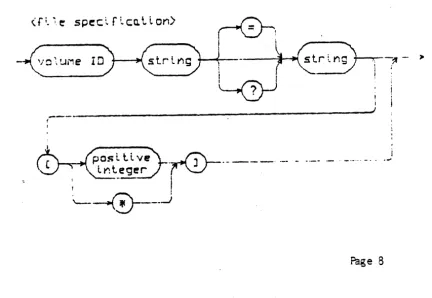
SPECIFICATIONMany Filer commands require the user to respond with at least one file specification. The diagram below illustrates the syntax of file specification.
<r~~~ speclrLc~llon)
'/O~!.JMe ID
I I
-_._---_.1
{ I.r0---..
_--1
I
'----
---0--~_..J [image:25.621.67.500.446.744.2]FIGURE 2
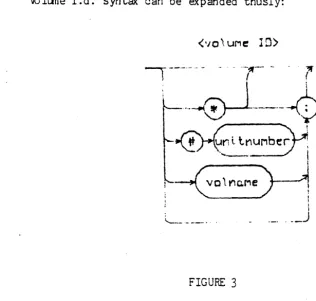
Vo lune i.d. syntax can be expanded thusly:
[image:26.629.81.397.91.392.2]'-_.-
._--_.
FIGURE 3
Volume names for block-structured volumes ca1be assigned by the user. A volume name must be 7 or less characters long and may not contain ':', '$', '?' or ','. Reserved volume names for non- block-structured devices are given in Figure 1. The character
,*'
is the volune ID of the 'system disk', the disk upon which the system 1,laS booted. The character ':', when used alone, is the volume ID of the'default disk'. The system disk and default disk are equivalent unless the default prefix (see material on P(refix) has been changed.
'#<unit number>' is equivalent to the name of the volume in the drive at that time.
A legal filename can consist of up to 15 characters. In order for the file to be run the last
5
characters must be .TEXT, or .CODE. Without these suffixes the file may be executed but not put in the workfile. Lower-case letters are translated to upper-case, and blanks and non-printing cha:racters are removed. fran the filename. Legal characters for filenames are the alphanumerics and the specialtJARNING:
The 11.0 Filer will not be able to access filenames contai~ing the characters '$', ':', ':', '?', and' ,4. If filenames contain these characters, then they should be changed before attempting to uSe those files with the II.O System.
The wildcard characters, ':' and '?', are used to specifY - subsets of the directory. The Filer performs the requested action on - all files meeting the specifications. A file specification containing
the subset-specifying string
'DOC=TEXT'
notifies the Filer to perform the requested action on all files whose names begin with the string'DOC'
and end with the string 'TEXT'. If a '?' is used in place of an'=',
the Filer requests verification before affecting each filemeeting the specified criteria. Either or both strings may be empty. For example, a subset specification of the form '=<string>' or
'<string>=' or even ':' is valid. This last case, where both subset-specifying strings are empty, is interpreted by the Filer to specify every file on the volume, so typing ':' or '?' alone causes the Filer to perform the appropriate action on every file in the directory.
EXAMPLE:
Given an example directory for volume MYDISK:
NAUGiTYBITS
MOLD. TEXT USELESS. COtE MOLD.COCE NEVERMORE. TEXT
GOONS
6 23-Jun-54 4 29-Jun-54
10 19-May-54 4 29-Jun-54 . 12 5-Apr-54
5 1C-Sep-52
Prompt: Remove what file?
Response: Typing 'N:' generates the message:
MYDISK: NAUGiTYBI 'IS MYDISK:NEVERMORE.TEXT
Update directory?
removed removed
Typing 'N?' generates the message:
Remove NAUGHTYBITS: ?
After the user types a response, the Filer asks:
Remove NEVERMORE. lEX!: ?
. EXAMPLE:
Prompt: Dir listing of What vol?
Response: Typing
'=TEXT'
causes the Filer to listMOLD.1EXT 4 29-Jun-54
NEVERMORE. TEXT 12 5-Apr-54
The subset-s~cifying strings may not 'overlap'. For example,
GOON=NS would not specify the file GOONS, whereas GOON=S would be a
valid (although pointless) specification.
The size specification information is predominantly useful in
the commands T(ransfer section 1.2.5.11 and M(ake section 1.2.5.17.
1.2.5 COMMANDS AND USE
Type
"P'
at the Command level to enter the Fil er and the following prompt is displayed:Filer: G(et, S(ave, W(hat, NCew, L(dir, R(em, C(hng, T(rans, D(ate, Q(uit [A ]
Typing '?' in response to this prompt displays more Filer commands:
Filer: B(ad-blks, Eext-dir, K(rnch, MCake, P(refix, V(els, X(amine, Z(ero
In the Filer, answering a Yes/No question with any~haracter other than 'Y' constitutes a 'No' answer. Typing an <esc> will return
the user to the outer level of. the Fil ~ .
For each command requiring a file specification, refer to the file specification diagram (Figure 2). In many cases, the entire file specification is not necessary, and in some cases, certain parts of the file specification are not valid. Follow the specification with <carriage return>. See the required ccmmand in the following section.
W1enever a Fil er command requests a file specification, the user may specify as many files as desired, by separating the file specifications with commas, and terminating this 'file list' with a
carriage return. Commands operating on single filenames will keep reading filenames from the file list and operating on them until there are none left. Commands operating on two filenames (such as C(hange and T(rans) will take file specifications in pairs and operate on each peir until only one or none remains. If one filename remains, the Filer will prompt for the second member of the pair. If an error is detected in the list, the remainder of the list will be flushed.
1.2.5.1 G(et
Loads the designated file into the workfile.
The entire file specification is not necessary. If the volume ID is not given, the default disk is assumed. Wildcards are not
allowed, and the size specification option is ignored.
EXA'-1PLE :
Given the example directory:
FlLERDCC2. TEXT
ABSUR D. C OCE
HYTYPER. CODE
STAS IS. TEXT
LETTER 1 • TE XT
FILER. roC. TEXT STASIS. CODE
?rompt: Get what file?
Response: STASIS
The Filer responds with the message
since both text and code file exist. Had the user typed '·STASIS. '!EXT' or 'STAS1S« CODE', the result would have been the same -both text and code ver·sions w::>uld have been loaded. In the event that only one of the versions exists, as in the case of A.OlIT, then that version w:Juld be loaded" regardle.ss o'f whether text or code was requested. Typing 'ABSURD .. TEXT" in respon.se to the prompt VtOuld generate the message: "Code file loaded' e. Working with the file may
.~ cause the fil es SYSTEM. WRK. xxxx to be created I' as part of the
workfile. These files will go away when the S(ave command is used. If the system is rebooted before the S(ave command is used, the name of the workfile will be forgotten.
1 .2. 5. 2 S (ave
Saves the workfile under the filename specified by the user.
The entire file specification is not necessary. If the volume
ID
is not given, the default disk is assumed. Wildcards are not allowed, and the size specification option is ignored.EXAMPLE:
Prompt:
Save as what file?
Response: Type a filename of 10 or less characters, observing the filename conventions in section 1.2.4 'FILES' . This causes the
FILER to automatically remove any old file having the given name, and
The FILER automatically appends the suffixes .TEXT and .CODE to files of the appropriate type. Explicitly typing AFILE. TEXT in response to the prompt will cause the FILER to save this file as AFILE.TEXT.TEXT. Any illegal characters in the filename will be ignored, with the exception of ': '. If the file specification
includes volume id, the Filer assumes that the user wishes to save the workfile on another volume. For example, typing:
RED: EYE
in response to 'Save as W1at file?' will generate
MYDISK:SYSTEM.WRK.TEXT
->
RED: EYE. TEXTRED:EYE constitutes a file specification, and a 'Y' answer to
this prompt will cause the Filer to attempt a transfer of the workfile to the specified volume and file. (see section 1.2.5.11 T(ransfer.)
1.2.5.3 N(ew
Clears the workfile. Creating a blank, unnamed workfile. It will remain unnamed until it is saved.
If there is already a workfile present, the user is prompted:
Prcxnpt:
Throw aW'ay current workfile?
Response: 'Y' will clear the workfile wtlile 'N' ret lrn s the user to the outer leve~ of the FILER.
If <workfile narne).BACK exists, then the user is prompted:
Prompt:
remove <workfile narne).BACK ?
1.2.5.4 Q(uit
1.2.5.5 W(hat
Identifies the name and state (saved or not) of the workfile .
. 1.2.5.6 V(olumes
Lists volunes currently on-line, with their associated unit (device) numbers~
A typical display mjght be:
Vo lumes on-line: 1 CONSOLE:
2 SYSTERM: 4 II MYDISK:
6 PRINTER:
8 REMOTE:
9 II BIG:
Root vol is - MYDISK: Prefix is - MYDISK:
The system volume is the default volume unless the prefix (see P(refix) has been changed. Block-structured devices are indicated by
, II ' •
1.2.5.7 L(dir
Lists a disk directory, or some subset thereof, to the volume and file specified ( de fault is CONSOLE:).
The user may list any subset of the directory, using the 'wildcard' option, and may also write the directory, or any subset thereof, to a volume or filename other than CONSOLE. File
specification will therefore be discussed in terms of source file specification and destination file specification.
Source file specification consists of a mandatory volume ID, and optional subset-specifying strings, which may be empty. Source file specifications are separated from destination file
Destination file specification consists of a volume ID, and, if the volume is a block-structured device, a filename.
The most frequent use of this command is to list the entire directory of a volume. The following display, which represents a complete directory listing for the example disk MYDISK, would be generated by typing any valid volume ID for MYDISK (see Figure 2) in response to the prompt,
Dir listing of what vol?
MYDISK:
FILERDCC2. TEXT 28 1-Sep-78
ABSURD. CODE 18 1-5ep-78
HYTYPER.CODE 12 1-Sep-78
STASIS. TEXT 8 1-5ep-78
LETTER1.TEXT 18 1-Sep-78
ASSEMDOC.TEXT 20 1-5ep-78
FILERDCC1.TEXT 24 1-Sep-78
STASIS. CODE 6 1-Sep-78
10/10 files <listed/in-dir>, 144 blocks used, 350 unused, 200 in largest (The bottom line of the display informs the user that 10 files
out of 10 files on the disk have been listed, that 130 disk blocks have been used, that 364 disk blocks remain unused, and that the largest area available is 200 blocks.)
EXAMPLE:
L(dir transaction involving wildcards:
Prompt: Dir listing of what vol?
User response: #4:FIL:TEXT
generates the following display:
MYDISK:
FILERDCC2. TEXT 28 1-Sep-78 FILEROCC 1. TEXT 24 1-5ep-78
EXAMPLE:
L(dir transaction involving writing the directory subset to a
device other than CONSOLE:
Prompt: Dir listing of what vol?
User res}X)nse: *FTI.=TEXT, FRINTER: causes
MYDISK:
FlLERDOC2.TEXT 28 1-Sep-78
FlLERDOC1.TEXT 24 1-Sep-78
2/10 files <listed/in-dir>, 62 blocks used, 364 unused, 200 in largest
to be written to the Printer.
EXAMPLE :
L(dir transaction involving writing the directory subset to a block-structured device:
Prompt: Dir listing of what vol ?
User response: H4:FIL=TEXT,#5:TRASH creates the file TRASH on the volume associated with unit 5. TRASH would contain:
MYDISK:
FlLERDOC2.TEXT 28 1-Sep-78
FILERIXX: 1. TEXT 24 1-Sep-78
2/10 files <listed/in-dir>, 62 blocks used, 364 unused, 200 in largest 1.2.5.8 E(xtended list
Lists the directory in more detail than the L(dir command.
All files and unused areas are listed along with (in this order) their block length, last modification date, the starting block
address, the number of bytes in the last block of the file, and the filekind. All wildcard options and prompts are as in the L(dir
command. An example display is shown below.
MYDISK:
FlLERDOC2. TEXT 28 1-Sep-78 6 512 Textfile
ABSJRD. CODE 18 1-Sep-78 34 512 Codefile
- <UNUSED> 10 52
<UNUSED> 200 148
STASIS.COCE 6 1-Sep-78 348 512 Codefile
<UNUSED> 154 354
10/10 files <listed/in-dir>, 138 blocks used, 364 unused, 200 in largest 1.2.5.9 C(hange
Changes file or volune name.
Th is canmand requi res tw::> fil e specificat ion s. The first of these specifies the file to be changed, the second, to what it will be changed. The first specification is separated from the second
specification by either a <ret> or a comma (',').
Any
volume IDinfonmation in the second file specification is ignored, since obviously the 'old file' and the 'new file' are on the same volume! Size specification information is ignored.
Given the eKample file
F5.TEXT,
residing on the volume occupying unit 5:Prompt: Change what file?
Us~ Response: tl5 :F5.TEXT ,HOOHAH
changes the nane in the directory from 'F5. TEXT' to 'HOCHAH'. Filekinds are originally determined by the filename, the C(hange
command does not affect thefilekind. In the above case, HOOHAH ~uld still be a text file. However, since the G(et command searches for the suffix
'.TEXT'
in order to load a text file into the workfile, HOOHAH would need to be renamed HCOHAH. TEXT in order to be loaded intothe workfile.
Wildcard specifications are legal in the C(hange command. If
a wildcard character is used in the first file speCification, the~ a wildcard must be used in the second file specification. Tne subset-specifying strings in the first file specification are replaced by the analogous strings (henceforward called replacement strings) given in the second file specification. The Filer wi-II not change the filename if the change would have the effect of making the filename too long (>15 characters). Given a directory of example disk NOTSANE:
EXAMPLE:
POEMS. TEXT MAUNDER. TEXT MALPRACTICE MAKEJ. .. ISTS. TEXT
Prompt: Olange what file?
User response: NOTSANE :MA=T EXT , XX:GAACK,
causes the Filer to report
NOTSANE:MAUNDER.TEXT
NOTSANE:MAKELISTS.TEXT
->
->
XXUNDER.GAACK XXKELISTS. GAACK1he subset-specifYing strings may be empty, as may the
replacement strings. The Filer considers the file specification '=' (Where both subset-specifying strings are empty) to specify every file
on the disk. Responding to the C(hange prompt with '=,Z=Z' would cause
every filename on the disk to have a 'Z' added at front and back.
Responding to the prompt with 'Z=Z,=' would replace each terminal and
initial 'Z' with nothing. Given the filenames:
EXAMPLE:
THIS. TEXT THAT. TEXT
Prompt Change what file?
User Response: T=T,=
The result would be to change. 'THIS.lEXT' to 'HIS. TEX', and 'THA T . TEXT' to ' HA T . TEX' .
The volume name may also be changed by specifying a volume
ID
to be changed,. and a volune ID to change to.
EXA~PLE:
Prompt Charge what fi Ie?
User Response: NOTSANE:,WRKDISK:
1.2.5.10 R(emove
Removes file entries from the directory.
This command requires one file sPecification for each file the user wishes to remove. Wildcards are legal. Size specification
information is ignored. Given the example files (assuming that they are on the default volume):
EXAMPLE:
AARD V AR K. TEXT
ANDROID. CODE QUINT. TEXT
AMAZING. CODE
Prompt: Remove what file?
User Resp'nse: AMAZING. CODE
removes the fil e Ar..1AZING. CODE from the volLme directory.
Note: To remove SYSTEM.WRK. TEXT and/or SYSTEM.WRK. roDE the N(ew command should be used, or the system may get confused.
Fortunately, before finalizing any wildcard removes, the Filer prompts the user with
Prompt: Update directory?
Response: 'Y' 'causes all specified files to be re'Tloved. ,~, returns the user to the outer level of the Filer without any removes havil'l!; occurr~.
EXAMPLE :
As noted before, wildcard removes are legal.
Prompt: Remove what fi Ie?
causes the Filer to remove AMAZING. CODE and ANDROID.CODE. WARNING: Remember that the Filer considers the file specification t _ t
(where both subset- specifying strings are empty) to specify every file on the volume. Typing an ':' alone will cause the Filer to remove every file on your directory!!
1.2.5.11 T(ransfer
Copies the specified file to the given destination.
This command requires the user to type two file
specifications, one for the source file; and one for the destination file, separated with ej. ther a comna or <ret>. Wildcards are
pennitted, and size specification infonnation is recognized for the destination file.
Assume that the user wishes to transfer the file FARKLE.TEXT from the disk MYDISK to the disk BACKUP.
EXAMPLE:
Prompt: Transfer what file?
User Response: MYDISK:FARKLE.TEXT
Prompt: To where?
(Note:
en
a one-drive machine, DO NOT remove your source disk until you are prompted to insert the destination disk)User Response: BACKUP:NAME.TEXT
Prompt: Put in BACKUP:
Type <space> to continue
The user should remove the source disk, insert the destination disk and type a <space>. The Filer then notifies the user:
MYDISK:FARKLE.TEXT -> BACKUP: NAME. TEXT
It is often convenient to transfer a file without changing the name, and without retyping the file name. The Filer enables the user to do this by allowing the character '$' to replace the filename in the destination file specification. In the above example, had the user wished to save the file FARKLE.TEXT on BACKUP under the name FARKLE. TEXT, she could have typed:
MYDISK:FARKLE. TEXT ,BACXUP: $
WARNING: Avoid typing the second file specification with the
filename completely omitted! For example, a response to the Transfer
prompt of the form:
MYDISK:FARKLE. TEXT ,BACKUP:
generates the message:
Destroy BACKUP: ?
'Y' answer causes the directory of BACKUP to be wiped out!
Files may be transferred to volumes that are not blocK structured, such as CONSOLE: and PRINTER:, by specifying the appropriate volume ID (see Figure 1) in the destination file
specification. A file name on a non- block-structured device is ignored. It is generally a good idea to make certain that the destination volume is on-line.
EXAMPLE:
Prompt: Transfer wnat file?
User Response: FARKLE. TEXT
Prompt: To where?
User Response: PRI~TER:
causes FARKLE.TEXT to be written to the printer.
The wildcarti capability is allowed for T(ransfer. If the S0urce file specification contains a wildcard character, and the destination file specification involves a block-structured device, then the destination file specification must also contain a wildcard character. The subset-specifying strings in the source file
specification will be replaced by the analogous strings in the destination file specification (henceforward known as replacement
strings). Any of the sUbset-specifying or replacement strings may be . empty. Reulember that the Filer considers the file specification ,-, . to specify €'Jery file on the volune.
EXAMPLE:
Given the volume MYDISK containing the files PAUCITY, PARITY and PENALTY, and the destination ODDNAMZ:
Prompt: Transfer what file?
User Response: P=TY,ODDNAMZ:V=S
would cause the Filer to reply:
MYDISK: PAUCITY MYDISK:PARITY MYDISK:PENALTY
--) ODDNAMZ:VAUCIS
-->
ODDN~~Z:VARIS-->
ODDNAMZ:VENALSUsing '=' as the source filename specification will cause the Filer to attempt to transfer every file on the disk. This will
probably overflow the output buffer. (There are easier ways to transfer whole disks. If you wish to do this, please refer to the material in this section on volume- to- volume transfers.)
Using ':' as the destination filename specification will have the effect of replacing the subset-specifyir~ strings in the source specification with nothing.
A
brief reminder: '?' may be used in place of '='. The only difference is that '?' causes the user to be asked for verification before the operation is performed.A file can be transferred from a volume to the same volume by
If the user specifies the sane filename for both source and destination on a same-disk transfer, then the Filer rewrites the file to the size-specified area, and removes the older copy.
EXAMPLE:
Prompt: Trans fer what fi Ie?
User Response: n4:QUIZZES.!EXT,#4:QUIZZES.TEXT[20]
causes the Filer to rewrite QUIZZES. TEXT in the first 20-block area encountered (counting up from block 0) and to remove the previous version of QUIZZES.
TEXT.
It is also possible to do entire.volume-to-volume transfers. The file specifications for both source and destination should consist of volume ID only. Transferring a block-structured volume to another block- structured volume causes the destination volume to be 'wiped out' so that it becomes an exact copy of the source volume.
Assume that the user desires an extra copy of the disk MY9ISK: and is willing to sacrifice disk EXTRA:
EXAMPLE:
Prompt: Transfer what file?
User Response: MYDISK:,EXTRA:
Prompt: Destroy EXTRA: ?
WARNING: If the user types 'Y', the directory of EXTRA: will be destroyed! An 'N' response will return the user to the outer-revel of the Filer, and a 'Y' will cause EXTRA to become an exact ~opy of t-1YDISK. Often this. is desirable for backup purposes, since it is relatively easy to copy a disk this way, and the volume name can be changed (see C(hng) if desired.
1 . 2. ,. 12 D ( ate
Lists current system date, and enables the user to change the date.
Prompt: Date Set: <1 .. 31 >-<JAN .. DEC>-<OO .. 99> Today is 19-Aug-78
New date?
The user may enter the correct date in the format given. -After typing <ret>, the new date will be displayed. Typing only a "return does not affect the current date. The hyphens are delimiters
for the day" month and year fields, and it is possible to affect only one or two of these fields. FQr example, the year could be changed by typing '--79', the month by typi.ng '-Sep', etc. The entire month-name can be entered, but will be truncated by the Filer. Slash ('I')
is also acceptable as a delimiter. The most common input will be a single number, which will be interpreted as a new day. For example, if yesterday was the 19th of August, the user would want to type D20<ret>, which would have the desired effect of changing the date to the 20th of August. The day-month-year order is inviolate, however.
This date will be associated with any files saved during the current session and will be the date displayed for those files when the directory is listed.
1.2.5.13 PCrefix
Changes the current default t~ the volume specified.
This command requires the user to type a volume ID. An entire file specification may be entered, but only the volume ID will be used. It is not necessary for the specified volume to be on-line.
To determine the current default volume, the user may respond to the prompt wi th ':'. To return the prefix to the booted or "Roo tIT volume, user may respond with H*"
1.2.5.14 BCad bloCKS
Scans the disk and detects bad blocks.
Prompt: Bad block scan of what vol?
Response: <vol1.JT1e ID>
Prompt: Scan for 494 blocks ? <yIn>
Response may be "Y" for yes if you want to scan for the entire length of the disk. If you only wish to check a smaller portion of the disk, type "N" and you will then be prompted for the nunber of blocks you want the filer to scan for. The purpose of this part of the command is for disks where the filer has no idea of how 'long' the device is.
Checks each block on the indicated volume for errors and lists the number of each bad block. Bad blocks can often be, fixed or marked (see eX(amine).
1.2.5.15 eX(amine
Attempts to physically recover suspected bad blocks.
This command requires the user to type a volume I~. The volume must be on-line.
EXAMPLE:
Prompt Examine blocks on what volume?
Response : <volume ID> generates the
Prompt: Block-range?
The user should have just done a bad block scan, and should enter the block number(s) returned by the bad block scan. If any files are endangered, the following pr,~pt should appear:
Prompt: File(s) endangered: <filenane)
Fix them?
Blcxk <block-number> may be ok
in which case the bad block has probably been fixed, or
Block <block~umber > is bad
in which case the FILER will offer the user the option of marking the block(s) BAD. Blocks which are marked BAD will not be -shifted during a K(runch 1 and will be rendered effectively hannless.
An '~p respon.se to. the 'fix them? 1 prompt returns the user to
the outer level of the FILER.
WARNING: A block which is 'fixed' ma
![Figure 3.9 >Replace(4]: L(it VCfy <targ> <sub> =>](https://thumb-us.123doks.com/thumbv2/123dok_us/944609.607505/63.620.76.518.62.538/figure-replace-it-vcfy-targ.webp)