Insights into the use and affordances of
social and collaborative applications for
student projects
Omolola O. Bankole, Isabella M. Venter
University of the Western Cape, Cape Town, South Africa
ABSTRACT
The use of social and collaborative computing has the potential of assisting learning and improving the ability to work together as part of a team. Team work is a graduate attribute that students need to acquire before transitioning from university into the workplace. The aim of this exploratory research was to provide insights into the use of social and collaborative applications by Computer Science students, and the emergent affordances student project teams have created with the use of these applications. It answers the questions: What elearning platforms or applications do students use to collaborate for team projects? What technology affordance draws students to use these applications? This study adopts affordance theory as the theoretical framework. Two types of content analysis: conventional content analysis and summative content analysis were used to analyse the data. Data was gathered using a pre-designed questionnaire with the teams during the first semester of 2016. Findings show that the university’s elearning platform is utilised for some of their courses; however students seem to prefer free and open source platforms. Student project teams used applications such as WhatsApp, Telegram, Dropbox, Google Drive, Google Docs, as well as email messages, to work jointly, and were successfully able to complete their team projects. Four types of technology affordances: communicative-affordance, document share-affordance, course resource-affordance, and integrity-affordance, were identified as being relevant.
Keywords:collaborative elearning, technology affordance, content analysis, graduate attributes, team project Categories: •Human-centered computing∼Collaborative and social computing systems and tools•Applied computing∼Collaborative learning•Applied computing∼Elearning
Email:
Omolola O. [email protected](CORRESPONDING), Isabella M. [email protected]
Article history:
Received:01 Mar 2017
Accepted:15 Sep 2017
Available online:13 Oct 2017
1
INTRODUCTION
With the advent of Web 2.0, several technologies have transformed the way people communicate and collaborate with one another. This has had an impact on the education landscape with information dissemination, communication and file sharing becoming much easier than previously (Huang, Yang, Yueh-Min, & Hsiao, 2010). It was found that learning collaboratively allows students to obtain an improved level of reasoning, gain additional information and also provides a platform to
Bankole, O. and Venter, I. (2017). Insights into the use and affordances of social and collaborative applications for student projects.South African Computer Journal 29(2), 1–15.https://doi.org/10.18489/sacj.v29i2.470
Copyright © the author(s); published under aCreative Commons NonCommercial 4.0 License (CC BY-NC 4.0).
practice good communication skills (Totten, Sills, Digby, & Russ, 1991; Marjan Laal & Ghodsi, 2012; Marjan Laal & Laal, 2012; Alberola, Del Val, Sanchez-Anguix, Palomares, & Teruel, 2016) as well as competency skills (Ke & Hsu, 2015). Several collaborative systems have thus been designed and used for the support of learning (Gress, Fior, Hadwin, & Winne, 2010).
In today’s academic environment, students have smart mobile devices and access to several mobile technologies which afford them the ability to keep contact with their friends socially and also to access academic work. Leonardi (2011) states that people either formulate the perception that a technology hinders their ability to perform their desired goals or that the technology affords the opportunity of performing new goals. The affordance associated with a technology determines how it will be adopted for use by users (F. Bankole, Bankole, Brown, & Cloete, 2012; De Jong, Linn, & Zacharia, 2013).
Most Computer Science students have access to smart phones and the Internet and are thus naturally exposed to social media and collaborative technologies. They use these to connect, collab-orate, and share files and documents both socially as well as academically. Access to the Internet on the campus of University of the Western Cape (UWC) is free and the usage of and access to the technologies are mostly free as well. This invariably makes social technologies a universal environment which provides value to students.
Of interest is: do students use the collaborative environments provided by the university? And if they do, how do they use them? What alternative collaborative environments do students adopt to aid in their learning? And how do teams coordinate their contributions when having to complete team assignments?
This research effort aims to investigate which technologies afford collaboration for final year Computer Science students at UWC and how they determine what collaborative environments to use to coordinate their group activities.
The research questions are thus:
• What collaborative elearning platforms or applications do Computer Science students use?
• What affordances are evident when students make use of collaborative applications for learning when working on team projects?
This research adopted a semi structured questionnaire as an exploratory method to investigate the use of social and collaborative applications and affordances associated with their use by student project groups.
2
LITERATURE REVIEW
2.1
Collaborative applications and platforms
Collaborative elearning develops the ability to work effectively and efficiently as part of a group (Chai & Tan, 2009). The ability to work collaboratively has become a valuable skill in the workplace. The experience of being able to learn to work as part of a group when students are at university makes the transition from university to the workplace less intimidating than when they do not have that experience at all (Chai & Tan, 2009; Ke & Hsu, 2015).
In today’s academic environment, students have access to mobile devices and technologies. This provides an easy means of access to electronic or online academic resources. These technologies can be employed and, if necessary, adapted for the purpose of learning (Chiang, Yang, & Hwang, 2014). It allows students to gather information to improve their knowledge, as well as allowing them to communicate and share information gained with their peers (Chiang et al., 2014; Ignatova, Dagiene, & Kubilinskiene, 2015). A novel approach to learning can thus be introduced when incorporating a collaborative elearning platform into the learning environment (Yau et al., 2003).
Collaborative environments have the following characteristics: knowledge sharing, ability sharing, mediation and diversity in student contributions (Yau et al., 2003). Research has shown that collaborative elearning environments can provide very valuable educational opportunities for distance learning students and that it can create similar learning opportunities for traditional campus-based students (Wang, 2007; Järvelä et al., 2015). A collaborative environment fosters social interaction between students and diminishes student isolation. Although traditional academic institutions still practice on-campus face-to-face learning, they have come to realise the benefits of collaborative environments (Fernandes, Pinto, Machado, Araújo, & Pontes, 2015).
2.2
Affordance
In today’s world, social media and collaborative applications are proliferating at a fast pace. These applications are often used in diverse institutions, in organizations, and more commonly amongst students and teachers/lecturers/instructors (Manca & Ranieri, 2013; Treem & Leonardi, 2013). Social media and collaborative applications are flexible applications and many users have been able to discover how these applications can be utilised to serve their different needs (Manca & Ranieri, 2013; Koehler, Mishra, Kereluik, Shin, & Graham, 2014).
In the context of social media and collaborative applications used amongst student project teams, the applications are obviously created for general use (Giesbers, Rienties, Tempelaar, & Gijselaers, 2014). However, students must have perceived the applications in diverse ways that afford them to use the properties of these applications in their project teams.
3
MATERIALS AND METHODS
3.1
Data source
In the first semester of 2016, final year Computer Science students were expected to do a capstone project as a team. The project required the team to design an application over a period of five weeks.
Students were allowed to self-select their team members. Eleven teams, each team consisting of between three and five members, were formed by the class of 50 students. Each team had to propose three project ideas – these were vetted, and one was chosen to be developed. Every week students received feedback on the progress of their project: initially the team had to conceptualize their chosen product idea and present it to a mentor who assisted them in refining the concept. The teams used techniques to identify needs and establish requirements for their product and then used conceptual models to design three throw-away prototypes. Using the feedback of the mentors, one high-fidelity prototype was developed by each team and evaluated using heuristic evaluation. Students were expected to apply their knowledge of software engineering, database and interaction design in this project. Finally the teams had to demonstrate the finished product to the class and in their presentation explain what each participant did, why the specific application was chosen, what conceptual model was used for the design of the graphical user interface, what type of testing was done – and what errors it revealed – and finally what type of technologies were used and why.
During the development of the project, team members had to indicate every week what their contribution was. To ensure that all students contributed to the project, teams were advised to involve each team member in every aspect of the project. If members did not participate as required, teams were encouraged to discuss their concerns with their mentors. Mentors would suggest some interventions to assist the team with their working relationships, however if these interventions were not successful, teams were allowed to expel the non-participating member.
The students had access to the university-wide elearning platform, iKamva, as well as a free online platform Piazza. The students’ use of these platforms was mostly determined by the way their lecturers adopted the platforms for the dissemination of their materials and course-information.
As lecturer and teaching assistant, and as mentors for the course, the authors were able to observe each team and study how they interacted as a team. A survey was conducted half way through the project period in the first semester of 2016.
such as the team number and the number of individuals in the team – as well as their questionnaire responses.
3.2
Instrument development
The methodological triangulation technique, as described by Wakeling and Clough (2015), was adopted during the data gathering stage of the study. The open-ended questions of the questionnaire were used to gather the corpus of the data. This provided textual data that was analysed using content analysis
In addition, follow-up group discussions were organised by the researcher with each student project team in order to corroborate responses given in the questionnaire. The probes that were used during discussions were aimed at confirming the questionnaire responses. These discussions provided details and revealed the reasoning behind the questionnaire responses.
3.3
Methodology
Two types of content analysis – conventional content analysis and summative content analysis – were used to analyse the textual data gathered. Content analysis is used to examine text by focusing on how the text is structured, it allows for a knowledgeable interpretation of the phenomenon under study (Neuendorf, 2016). It was decided to independently use these two approaches to see the problem from more than one perspective. This is also consistent with methodological triangulation since the data was analysed using two different approaches. It provides a rigorous approach to the analysis of the data gathered (O. Bankole, Chigona, & Bankole, 2012).
Conventional content analysis was used to describe the phenomena “collaborative applications” and “teamwork”. This content analysis approach requires the researcher to be immersed in the data. It was appropriate since the study aimed to understand the reasoning behind the use students made of applications for collaborative teamwork. Categories such as “document sharing” or “task management” were not allocated a priori to these phenomena. Categories were allowed to emerge from the data (Hsieh & Shannon, 2005; Annala, Mákinen, Svárd, Silius, & Miilumáki, 2012).
Summative content analysis was used to identify keywords in context. This was done in order to understand the contextual use of specific words or keywords (Hsieh & Shannon, 2005). This approach explores and analyses the use of a word or the content in a textual context (Annala et al., 2012; Lovejoy, Watson, Lacy, & Riffe, 2016). These so-called keywords were examined in context and the underlying meanings were explored.
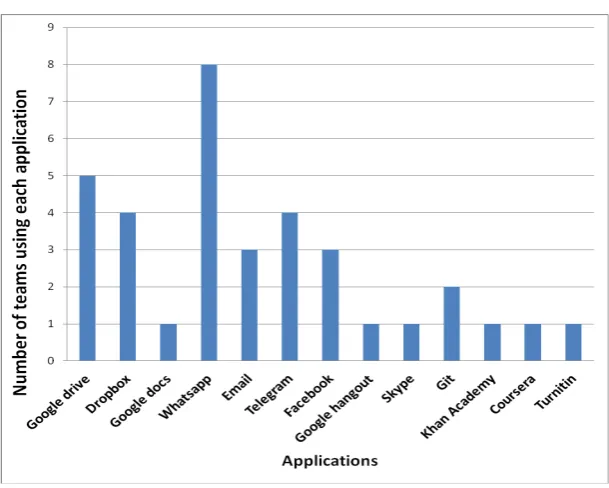
Figure 1: Total number of teams using each application
3.4
Research ethics
In ensuring the quality and reliability of the data, the questionnaire was checked to make sure all the sections were properly completed. The consent of the participants was sought – the students completed and signed a consent form. No personal details were gathered hence the anonymity of their responses in the survey was guaranteed. Participants were given the option to withdraw from participating at any time during the data gathering process.
The information provided through the survey was handled with utmost confidentiality. The ethics and confidentiality issues of research work of this nature are of great importance. Hence ethics approval was granted by the university’s ethics committee.
4
RESULTS
The responses from the studied teams showed that nine of the eleven teams used iKamva1 for some of their final year courses. However, this was not voluntary, as the course required them to use it. This result is corroborated by statements from the members of different teams:
The University gave it to us. (Team 4)
It is not really a choice. We have to use the platform in most cases to get information and also to make submissions. (Team 8)
Categories Applications Number of occurrences
Document sharing
Google Drive 15
Dropbox 3
Google Docs 2
Communication
WhatsApp 18
Email 17
Telegram 5
Facebook 4
Google Hangout 1
Skype 1
Course resources
Git 2
Khan Academy 1
Coursera 1
Plagiarism detection Turnitin 4
Table 1: Categorisation of the applications according to their function
Figure1shows the applications the teams used for learning and collaborating as a team in order to complete their projects. The project teams made use of different applications in order to bring their projects to completion. These applications have different functionalities: both Dropbox and Google Drive are cloud storage systems, Google Hangouts is a communication platform very similar to Skype; Google Docs is an on-line word-processor that allows collaboration in real-time; WhatsApp and Telegram are both instant messaging systems; Facebook is an on-line social networking system; Git is a version control system used for software development; Coursera and Khan Academy both provide online academic material; and Turnitin allows students to check for plagiarism. Most teams used a combination of two or more of these applications for their project. The majority of the teams made use of WhatsApp and Telegram – both mobile apps for communication – and Google Drive and Dropbox for document sharing.
Eight project teams stated that they made use of WhatsApp while only three project teams mentioned that they used email for communication. Two project teams mentioned they used Git for version control whilst Coursera, Skype, Google Hangout and Khan Academy were also mentioned. Turnitin occurred four times however only one project team mentioned they used it to check their work for plagiarism.
4.1
Categorisation of the applications used
The analysis identified the following 4 categories namely: “document sharing”, “communication”, “course resources” and “plagiarism detection”. Three applications were used for document sharing, six applications were used for communication, four applications were used for obtaining course resources and, only one application was used for plagiarism detection.
Keywords Number of occurrences
Communication 38
Ease of use 35
Access/Availability/Free 31
Information Sharing 20
Voice Call/Video Call/Instant Messaging 19
Document sharing 17
Effective 10
Online forum 8
Uploads and downloads 7
Convenient 6
Notification/reminders/bulletins 6
Course resources 5
Attractive 3
Archiving/storing 3
Scheduler 3
Innovative 2
Marks administration 2
Task Management 1
Plagiarism Detection 1
Posting Queries 1
application Google Drive occurred 15 times in the corpus. Five of the teams mentioned using Google Drive for document sharing. WhatsApp and email occurred 18 and 17 times respectively.
The analysis identified 20 keywords in the data (Table2). The table portrays the significance of these words by how extensively these words were used in the corpus. “Communication” had the highest number of occurrences namely 38, “ease of use” occurred 35 times, “information sharing” occurred 20 times and, “document sharing” and “access” both 17 times. The keywords “task management”, “plagiarism detection” and, “posting queries” all occurred once in the data and thus are considered to be important. Table2portrays the relevance of these words and shows how extensively they were used.
4.2
Observations
It was observed that:
‘Communication’ was a major keyword raised by all the project teams, occurring 38 times in the corpus.
Yes it is not easy to communicate when a member does not have a device (Team 3)
It was observed that all eleven teams mentioned communication in their responses and how it is an important determinant in their choice of the applications they decided to use.
‘Ease of use’ was amongst the major factors mentioned by all eleven teams, it appeared 35 times in the corpus. Team 11 mentioned that in order to collaborate, their choice of application was based on ease of use.
‘Access/availability’ was mentioned 29 times in relation to having access to Internet facilities and using mobile devices.
Yes some group members have no access to Internet in their environment (Team 1)
There is loss of interest if it (the Internet) is not easily available (Team 11)
‘Information sharing’ occurred 20 times in the corpus. This shows that it is very important for collaborative team work.
We use WhatsApp to communicate and email is also used to share information and documents within our team (Team 8)
‘Voice call/video call/instant messaging’ occurred 19 times. Real time instant messaging was appre-ciated by all the teams since they all mentioned it in different ways and used different applications to collaborate in their respective teams.
The group members see the messages instantly and it is ubiquitous (Team 6)
We use telegram and Google drive for document sharing (Team 6)
‘Effective’ occurred eight times in the corpus. Each team agreed that the combination of applications they adopted for their collaborative team projects were very effective.
Instant messaging and easy access to WhatsApp was used to communicate effectively in our team (Team 7)
We use WhatsApp to communicate and email is also used to share information and documents effectively within the team (Team 8)
‘Online forum’ was mentioned 7 times.
Forums, interaction with other individuals, other resources that can help with courses (Team 1)
Taking online quizzes and participating on forum discussions (Team 11)
‘Uploads’/‘downloads’ were mentioned 7 times.
Video uploads of lectures (Team 10)
File sharing (video docs) and video uploads (Team 3)
Downloading documents and posting queries (Team 9)
‘Convenient’ and ‘notification/reminders/bulletins were both mentioned 6 times, while ‘course resources’ occurred only 5 times in the corpus.
Bulletins and notices, course resources, planning (Team 2)
‘Attractive’, ‘archiving/storing’ and ‘scheduler’ were each mentioned 3 times in the corpus.
Forum discussions, Notification/ reminders for assignment submissions. This can be linked to students email addresses (Team 5)
‘Innovative’ and ‘marks administration’ each occurred 2 times in the corpus.
Timetable and marks systems (Team 10)
. . . marks administration . . . (Team 9)
‘Task management’, ‘plagiarism detection’ and ‘posting queries’ all appeared once in the corpus. The keyword ‘task management’ was mentioned by Team 1, while plagiarism detection and posting queries were both mentioned by Team 9.
5
DISCUSSION AND CONCLUSIONS
5.1
Discussion
It was observed that technology affordance determined what technologies were preferred by Com-puter Science student project groups. The students did not use a single or specific collaborative elearning platform for their team project, rather; they made use of combinations of applications to collaborate during their team project. The student groups were able to use these applications by identifying the affordances that the applications would provide for their respective groups. The data collected for this study was adequate to answer the research questions:
1. What collaborative elearning platforms or applications do Computer Science students use? Answer: The fuctionalities of iKamva – the university-wide elearning platform – were not used by the teams for their projects. They preferred using alternative applications.
2. What affordances are evident with students’ use of collaborative applications for learning when working on team projects?
Answer: This study identified four distinct affordances in the use of social and collaborative applications for student projects. They are:
• Communicative-affordance,
• Document share-affordance,
• Course resource-affordance, and
• Integrity-affordance2
The results agree with similar studies in terms of technology usage and adoption (Wang, 2007; F. Bankole et al., 2012). The analysis revealed that characteristic non-functional requirements such as ease of use, access/availability/free, effective, convenient, attractiveness and innovativeness are important determinants of usage and it also established in what combinations the applications were used. This was evident from the number of occurrences of these keywords in the discussions.
WhatsApp was the preferred instant messaging communication application. WhatsApp was mentioned together with the keywords, Voice Call, Video Call, and Instant Messaging. In addition to this, WhatsApp is appealing to students since most of them may already be making use of the app as a social media platform for communication with friends and family. Hence by simply creating a WhatsApp group for their team members, the students were able to communicate and work together. Email was used by most teams since all students have email accounts and it can easily be used for both communication and for transferring files such as programming codes and all other associated documentation required for their project. Furthermore, the authors determined – in terms of access to financial resources, ownership of smart devices as well as constant connection to the Internet – that the students were not all equal but had diverse opportunities and backgrounds. In cases where
some team members did not have access to the resources required by popular applications, the teams would resort to using email for most of their communication as well as document sharing.
Google Drive was the most used application for document sharing. The student university email service account is hosted by Google; therefore, all students have access to Google Plus applications. It was thus easy for the teams to manage their tasks, activities and share documents using Google Drive. A few teams employed Google Docs and Google Hangouts as well. Quite a few teams made use of Dropbox for document sharing. This was due to personal or individual preferences for this application. The teams that made use of Dropbox probably had team members that already used Dropbox and were familiar with its user interface and environment.
Each project team selected different combinations of applications which adequately coordinated the team members in such a way that each individual made an equal contribution. It was found that the types of applications used by the teams were the same, i.e. all the project teams made use of both communication and document sharing applications. However, the characteristics of the applications used to perform their team project tasks, were different and relative to each team’s perception of each application’s affordance. To effectively collaborate on their projects, the teams exhibited evidence of technology affordance in the way they selected the combination of the applications that they employed for their team work. The actions taken by the project teams in their collaborative work presented four affordances: communicative-affordance, document share-affordance, course resource-affordance, and integrity-affordance. This implies the need for affordances in using collaborative applications in order to carry out a team project. These made the students exploit their world and improvise, thus providing an effective means of team work and collaboration. This is a graduate attribute and skill that has been shown to benefit students when they eventually move on to professional workplaces (Solimeno, Mebane, Tomai, & Francescato, 2008).
The practical implication of this research is useful and can address the design such as concluded in Gasevic, Kovanovic, Joksimovic, and Siemens (2014) and development of collaborative elearning environment functionalities which are important for use in student team projects. More functional and user centric collaborative features can be developed when the appropriate affordances are identified at the early stage of the design of the application.
The limitation of this study – which future studies should seek to address – is that the findings of this research are based on data gathered from only one cohort of third year Computer Science students. Future research will source data from more student teams in different academic years and other departments in the Science Faculty.
5.2
Conclusion
student’s preference for using the particular applications they employed for their project.
The university elearning platform, iKamva, was not the preferred application for the students. However, some students used it because they were mandated to do so. Hence the use of iKamva was not voluntary.
This research forms part of a larger research project. Further research will be conducted with data collected from different year groups using a multi-method analysis approach.
6
ACKNOWLEDGEMENTS
Our thanks to the third-year Computer Science class of 2016 for allowing us to obtain rich data from their participation in this study. The financial assistance of the National Research Foundation (NRF) towards this research is hereby acknowledged. Opinions expressed and conclusions arrived at, are those of the authors and are not necessarily to be attributed to the NRF.
References
Alberola, J. M., Del Val, E., Sanchez-Anguix, V., Palomares, A., & Teruel, M. D. (2016). An artificial intelligence tool for heterogeneous team formation in the classroom.Knowledge-Based Systems,
101, 1–14.https://doi.org/10.1016/j.knosys.2016.02.010
Annala, J., Mákinen, M., Svárd, P., Silius, K., & Miilumáki, T. (2012). Online community environment promoting engagement in higher education.Studies for the Learning Society,2(2-3), 75–86.
https://doi.org/10.2478/v10240-012-0007-0
Bankole, F., Bankole, O., Brown, I., & Cloete, E. (2012). Cell phone banking: Revisiting predictors of adoption in South Africa. InProceedings of the Eighteenth Americas Conference on Informa-tion Systems (AMCIS). Retrieved from http://aisel.aisnet.org/amcis2012/proceedings/ ICTinGlobalDev/10
Bankole, O., Chigona, W., & Bankole, F. (2012). The use of blogs for political campaigning in a developing country context: The case of South Africa.TD: The Journal for Transdisciplinary Research in Southern Africa,8(1), 154–166.
Chai, C. S. & Tan, S. C. (2009). Professional development of teachers for computer-supported collaborative learning: A knowledge-building approach.Teachers College Record,111(5), 1296– 1327.
Chiang, T. H., Yang, S. J., & Hwang, G.-J. (2014). An augmented reality-based mobile learning system to improve students’ learning achievements and motivations in natural science inquiry activities.Journal of Educational Technology & Society,17(4), 352.
Fernandes, G., Pinto, E. B., Machado, R. J., Araújo, M., & Pontes, A. (2015). A program and project management approach for collaborative university-industry R&D funded contracts.Procedia Computer Science,64, 1065–1074.https://doi.org/10.1016/j.procs.2015.08.522
Gasevic, D., Kovanovic, V., Joksimovic, S., & Siemens, G. (2014). Where is research on massive open online courses headed? A data analysis of the MOOC Research Initiative.The International Review of Research in Open and Distributed Learning,15(5).https://doi.org/10.19173/irrodl. v15i5.1954
Giesbers, B., Rienties, B., Tempelaar, D., & Gijselaers, W. (2014). A dynamic analysis of the interplay between asynchronous and synchronous communication in online learning: The impact of motivation.Journal of Computer Assisted Learning,30(1), 30–50.https://doi.org/10.1111/ jcal.12020
Gress, C. L., Fior, M., Hadwin, A. F., & Winne, P. H. (2010). Measurement and assessment in computer-supported collaborative learning. Computers in Human Behavior, 26(5), 806–814. https : //doi.org/10.1016/j.chb.2007.05.012
Hsieh, H.-F. & Shannon, S. E. (2005). Three approaches to qualitative content analysis.Qualitative health research,15(9), 1277–1288.https://doi.org/10.1177/1049732305276687
Huang, J. J., Yang, S. J., Yueh-Min, H., & Hsiao, I. Y. (2010). Social learning networks: Build mobile learning networks based on collaborative services.Journal of Educational Technology & Society,
13(3), 78.
Ignatova, N., Dagiene, V., & Kubilinskiene, S. (2015). ICT-based learning personalization affordance in the context of implementation of constructionist learning activities.Informatics in Education,
14(1), 51. https://doi.org/10.15388/infedu.2015.04
Järvelä, S., Kirschner, P. A., Panadero, E., Malmberg, J., Phielix, C., Jaspers, J., . . . Järvenoja, H. (2015). Enhancing socially shared regulation in collaborative learning groups: Designing for CSCL regulation tools. Educational Technology Research and Development, 63(1), 125–142.
https://doi.org/10.1007/s11423-014-9358-1
Jeong, H. & Hmelo-Silver, C. E. (2016). Seven affordances of computer-supported collaborative learning: How to support collaborative learning? How can technologies help?Educational Psychologist,51(2), 247–265.https://doi.org/10.1080/00461520.2016.1158654
Ke, F. & Hsu, Y.-C. (2015). Mobile augmented-reality artifact creation as a component of mobile computer-supported collaborative learning. The Internet and Higher Education, 26, 33–41.
https://doi.org/10.1016/j.iheduc.2015.04.003
Koehler, M. J., Mishra, P., Kereluik, K., Shin, T. S., & Graham, C. R. (2014). The technological pedagogical content knowledge framework. In M. Spector, M. Merrill, J. Elen, & M. Bishop (Eds.), Handbook of research on educational communications and technology (pp. 101–111).
Springer.https://doi.org/10.1007/978-1-4614-3185-5%5F9
Laal, M.[Marjan]& Ghodsi, S. M. (2012). Benefits of collaborative learning.Procedia–Social and Behavioral Sciences,31, 486–490. https://doi.org/10.1016/j.sbspro.2011.12.091
Leonardi, P. M. (2011). When flexible routines meet flexible technologies: Affordance, constraint, and the imbrication of human and material agencies.MIS Quarterly, 147–167.
Lovejoy, J., Watson, B. R., Lacy, S., & Riffe, D. (2016). Three decades of reliability in communication content analyses: Reporting of reliability statistics and coefficient levels in three top journals.
Journalism & Mass Communication Quarterly,93(4), 1135–1159.https://doi.org/10.1177/ 1077699016644558
Manca, S. & Ranieri, M. (2013). Is it a tool suitable for learning? A critical review of the literature on Facebook as a technology-enhanced learning environment.Journal of Computer Assisted Learning,29(6), 487–504. https://doi.org/10.1111/jcal.12007
Neuendorf, K. A. (2016).The content analysis guidebook. Sage.
Sengupta, P., Kinnebrew, J. S., Basu, S., Biswas, G., & Clark, D. (2013). Integrating computational thinking with K-12 science education using agent-based computation: A theoretical framework.
Education and Information Technologies,18(2), 351–380. https://doi.org/10.1007/s10639-012-9240-x
Solimeno, A., Mebane, M. E., Tomai, M., & Francescato, D. (2008). The influence of students and teachers characteristics on the efficacy of face-to-face and computer supported collaborative learning.Computers & Education,51(1), 109–128.https://doi.org/10.1016/j.compedu. 2007.04.003
Song, Y. & Kong, S. C. (2017). Affordances and constraints of BYOD (Bring Your Own Device) for learning in higher education: Teachers’ perspectives. In S. Kong, T. Wong, M. Yang, C. Chow, & K. Tse (Eds.),Emerging practices in scholarship of learning and teaching in a digital era(pp. 105– 122). Springer.https://doi.org/10.1007/978-981-10-3344-5_7
Totten, S., Sills, T., Digby, A., & Russ, P. (1991). Collaborative learning: A guide to research. Scand-inavian Journal of Educational Research,33(4), 231–243.
Treem, J. W. & Leonardi, P. M. (2013). Social media use in organizations: Exploring the affordances of visibility, editability, persistence, and association.Annals of the International Communication Association,36(1), 143–189.https://doi.org/10.1080/23808985.2013.11679130
Tucker, S. I. (2016). The modification of attributes, affordances, abilities, and distance for learning framework and its applications to interactions with mathematics virtual manipulatives. In P. S. Moyer-Packenham (Ed.),International perspectives on teaching and learning mathematics with virtual manipulatives(pp. 41–69). Springer. https://doi.org/10.1007/978-3-319-32718-1%5F3
Wakeling, S. & Clough, P. (2015). Integrating mixed-methods for evaluating information access systems. In International Conference of the Cross-Language Evaluation Forum for European Languages(pp. 306–311). Springer.https://doi.org/10.1007/978-3-319-24027-5_33
Wang, Y.-M. (2007). Internet uses in university courses.International Journal on ELearning,6(2), 279.