University of New Orleans University of New Orleans
ScholarWorks@UNO
ScholarWorks@UNO
University of New Orleans Theses and
Dissertations Dissertations and Theses
Fall 12-17-2011
Android Memory Capture and Applications for Security and
Android Memory Capture and Applications for Security and
Privacy
Privacy
Joseph T. Sylve
University of New Orleans, [email protected]
Follow this and additional works at: https://scholarworks.uno.edu/td
Part of the Other Computer Sciences Commons
Recommended Citation Recommended Citation
Sylve, Joseph T., "Android Memory Capture and Applications for Security and Privacy" (2011). University of New Orleans Theses and Dissertations. 1400.
https://scholarworks.uno.edu/td/1400
This Thesis-Restricted is protected by copyright and/or related rights. It has been brought to you by
ScholarWorks@UNO with permission from the rights-holder(s). You are free to use this Thesis-Restricted in any way that is permitted by the copyright and related rights legislation that applies to your use. For other uses you need to obtain permission from the rights-holder(s) directly, unless additional rights are indicated by a Creative Commons license in the record and/or on the work itself.
Android Memory Capture and Applications for Security and Privacy
A Thesis
Submitted to the Graduate Faculty of the University of New Orleans
in partial fulfillment of the requirements for the degree of
Master of Science in
Computer Science Information Assurance
by
Joseph T. Sylve
B.S. University of New Orleans, 2010
ii
iii
Funding
This work was supported in part by a grant from
iv
Acknowledgements
I would like to express my most heartfelt gratitude to:
My advisor, Dr. Golden G. Richard III, for inspiring me to pursue a career in Digital Forensics.
Dr. Jaime Niño and Dr. Vassil Roussev for being on my thesis committee.
My co-researchers, Andrew Case, Neha Thakur, Dr. Lodovico Marziale, and Dr. Golden G. Richard III, for their contributions to the research that this thesis is based on.
v
Table of Contents
List of Tables ...vii
List of Figures ... viii
Abstract ...ix
Chapter 1: Introduction ... 1
1.1 Motivation for Live Forensics ... 1
1.2 Motivation for Privacy-Enhancing Technologies ... 1
1.3 Organization ... 2
Chapter 2: Android Live-Forensics ... 4
2.1 Related Work ... 4
2.1.1 Linux Volatile Memory Analysis ... 4
2.1.2 Linux Memory Acquisition ... 5
2.1.3 Android Memory Analysis ... 6
2.2 Acquiring Physical Memory ... 7
2.2.1 Preparing the Device... 7
2.2.2 Issues with Existing Memory Acquisition Models ... 9
2.3 Barriers to Device-Independent Acquisition ... 11
Chapter 3: DMD ... 14
3.1 The Acquisition Module ... 14
3.2 Interacting with the Developed Modules ... 15
3.2.1 Acquisition of Memory over TCP ... 15
3.2.2 Acquisition of Memory to the Device’s SD Card ... 17
3.3 Testing ... 18
3.4 Forensic Soundness of Acquisition Approach ... 20
Chapter 4: Android Forensic Analysis ... 23
4.1 Introduction ... 23
4.2 Volatile Storage Analysis ... 23
4.3 Securing Volatile Storage ... 26
4.3.1 Disconnection for a Specified WIFI Network ... 28
4.3.2 Expiration of a Pre-Set Timer ... 28
4.3.3 Direct Request by a User ... 28
4.4 Securing Non-Volatile Storage ... 29
Chapter 5: Privacy-Enhancing Proof-of-Concept ... 30
5.1 Introduction ... 30
5.2 Volatile Memory Proof-of-Concept ... 30
5.2.1 Basic Reboot Function ... 31
5.2.2 Option 1: Direct Reboot ... 31
5.2.3 Option 2: Reboot on Disconnection ... 31
5.2.4 Option 3: Timed Reboot ... 32
5.3 Non-Volatile Memory Proof-of-Concept ... 33
Chapter 6: Exploiting the Android Security Model ... 37
vi
6.2 Overview of Android Security Model ... 37
6.3 Permissions ... 38
6.4 Permission Model Implementation ... 39
6.4.1 PackageManagerService ... 39
6.4.2 Application Installation ... 41
6.4.3 Exploiting the Process ... 41
Chapter 7: Conclusions and Future Work ... 44
References ... 45
Appendix A: DMD Source Code ... 47
vii
List of Tables
viii
List of Figures
ix
Abstract
The Android operating system is quickly becoming the most popular platform for mobile devices. As Android’s use increases, so does the need for both forensic and privacy tools designed for the platform. This thesis presents the first methodology and toolset for acquiring full physical memory images from Android devices, a proposed methodology for forensically securing both volatile and non-volatile storage, and details of a vulnerability discovered by the author that allows the bypass of the Android security model and enables applications to acquire arbitrary permissions.
1
Chapter 1:
Introduction
1.1
Motivation for Live Forensics
The Android operating system now has a 48 percent share of the world-wide smart phone
market, with Apples iOS trailing in second with a 19 percent share [1]. The mass adoption of
Android and its projected growth make it vital that the forensics community be able to properly
acquire and analyze evidence from the platform. While a few research efforts have discussed
analysis of Android’s filesystem and analysis of process memory, the author is not aware of any
work to date that completely acquires physical memory from Android devices to allow
subsequent, coherent analysis of the acquired memory. Physical memory analysis is vital to
investigations, since it contains a wealth of information that is otherwise unrecoverable. This
evidence includes objects relating to both running and terminated processes, open files,
network activity, memory mappings, and more. Lack of such information can make certain
investigative scenarios impossible, such as when performing incident response or analyzing
advanced malware that does not interact with non-volatile storage.
1.2 Motivation for Privacy-Enhancing Technologies
Mobile computing technology offers access to information anytime and anywhere, providing
the opportunity for an enterprise to continue business which was previously delayed while
2
communication to the workforce reduces latency and enhances service delivery. Also, evolving
consumer capabilities for mobile computing devices are eagerly embraced by the younger
members of the technology workforce, and usage of these devices inspires them to integrate
their work and personal life. Current policies, however, severely limit this potential integration.
Many of the capabilities of enterprise level mobile computing devices are disabled due to
security concerns and in many cases, the use of personal mobile computing devices in the
workplace is discouraged or disallowed completely, leading to the necessity for workers to carry
at least two devices where connectivity is required.
The key to moving toward a reduction in the restrictions imposed on personal mobile devices is
to ensure that sensitive information is either not stored on the devices or is stored in a
cryptographically secure manner, since devices can be lost, stolen, or hacked. Possible
solutions must take into account both volatile and non-volatile storage. Software-based
solutions are preferable to those that are hardware-based, since they allow adoption on
existing devices. A properly implemented solution could pave a path for businesses and
government entities to allow mobile applications to access sensitive information in more
situations.
1.3 Organization
This thesis will discuss the results of research on both Android forensics and anti-forensics.
Chapter 2 will explore the technical issues associated with acquiring physical memory captures
3
memory captures. Chapter 3 will detail a developed acquisition tool based off of this
methodology, called DMD. Chapter 4 will present a software-based scheme for allowing
sensitive information to be viewed on Android devices that takes into account both volatile and
non-volatile storage. Chapter 5 will detail two proof-of-concept applications that test the
viability of the scheme. Chapter 6 will discuss a vulnerability in the implementation of the
Android security model that was discovered by the author during the course of this research.
Exploitation of this vulnerability allowed the utilization of protected Android operating system
APIs in the implementation of the aforementioned privacy scheme. Finally, Chapter 7 will
4
Chapter 2:
Android Live-Forensics
2.1 Related Work
2.1.1Linux Volatile Memory Analysis
In the last few years, there has been a substantial amount of memory analysis research
targeting Linux. The first systems presented for this purpose were the FATKit [2], and
memparser [3]. Inspired by the DFRWS 2008 challenge [4], additional efforts were made to
extract forensically relevant information from memory captures [5]. Since then, a number of
other research projects have been presented that perform deep analysis of Linux kernel data
structures as well as userland information [6] [7] [8]. The result of these projects is the ability
to gather numerous objects and data structures relevant to forensics investigations in an
orderly manner. A shortcoming of these projects, however, was their inability to properly
handle the vast number of Linux kernel versions and the large number of widely used Linux
distributions. Due to the issues investigators face when attempting to analyze one of a large
number of Linux kernel versions, a number of recent research projects have attempted to
automatically build kernel structure definitions through a combination of static and dynamic
analysis [7] [9] [10] [11]. There has also been recent work by the Volatility [12] developers to
automatically generate C kernel structure representations for different Linux kernel versions
using debugging information, which is similar to how Volatility handles different versions of the
5
While the these projects were able to recover both allocated and de-allocated instances of
kernel structures, many of them relied on either following references within data structures or
memory scanning using ad-hoc structure signatures. The ability to accurately find data
structures to which all references are removed is required in order to find completely freed
objects. The problem with current generation scanners, such as those discussed previously, is
that the signatures were created based on manual and informal source code review by the
project developers. Illustrating serious problems with this approach, including the ease in
which malware can bypass such weak signatures, were two publications that used virtual
machine introspection and formal methods to construct structure signatures [13] [14]. Using
the techniques presented in these publications, forensic investigators are able to scan for
instances of data structures with a degree of confidence, since malware is unable to easily
bypass the signatures and false negatives and false positives will be minimal.
2.1.2 Linux Memory Acquisition
Traditionally, memory captures on Linux were acquired by accessing the /dev/mem device,
which contained a map of the first gigabyte of RAM. This allowed acquisition of 896MB of
physical memory without the need to load code into the kernel. This approach did not work for
machines with more than 896MB of RAM. Due to security concerns, the /dev/mem device has
recently been disabled on all major Linux distributions, as it allowed for reading and writing of
kernel memory. In order to capture all physical memory, regardless of size, and to work around
the loss of the /dev/mem device, Ivor Kollar created fmem [15], a loadable kernel module that
6
incident response situations and is the defacto Linux memory acquisition tool. Another tool
similar to fmem is the crash [16] project by Redhat. For reasons we discuss later, the fmem
module does not work on Android devices.
2.1.3 Android Memory Analysis
There are currently three projects that support varying levels of Android memory analysis. The
first project, volatilitux [17], provides only limited analysis capabilities, including enumeration
of running processes, memory maps, and open files, and does not provide a method to acquire
memory from the phone.
The second related work was published in DFRWS 2010 [18]. This research project avoided the
technical issues with capturing physical memory on Android (which is solved in this work), by
focusing on specific, running processes, and using the ptrace functionality of the kernel to
dump specific memory regions of a process. The virtual memory captures are then analyzed to
discover evidence. While this is a good first step, many important aspects of the Android
device’s memory are not analyzed, including in-kernel structures, networking information, etc.
Another concern is that the approach requires memory to be extracted separately for each
process of interest, which requires a number of interactions with the live system and
potentially overwrites valuable evidence. The research presented in this thesis instead
concentrated on physical memory acquisition and analysis, which provides a superset of the
7
Finally, another tool that is capable of extracting process memory is memfetch [19]. This tool
dumps a running application’s address space, either on demand or when faults (e.g., SIGSEGV)
occur. memfetch is portable across a variety of Linux distributions, including Android, but
cannot acquire physical memory.
2.2
Acquiring Physical Memory
This section discusses memory acquisition for Android. The discussion is broken into a number
of sections for readability. Section 2.2.1 explains how to prepare a phone or other Android
device for memory acquisition, section 2.2.2 discusses issues with existing acquisition modules,
and section 2.2.3 discusses portability issues.
2.2.1 Preparing the Device
Preparation of the device for memory acquisition requires a number of steps, since Android
does not support a memory device that exposes physical memory and furthermore does not
provide APIs to support userland memory acquisition applications. This means that acquisition
of physical memory requires gaining root privileges on the phone so that code can be loaded
into the OS kernel to read and export a copy of physical memory. While not ideal, this
procedure is commonplace when live forensics analysis is performed on commodity operating
systems, virtually all of which have now removed or disabled devices that expose physical
memory (e.g., /dev/mem, \\Device\\PhysicalMemory). Unless Android adds the ability to
export memory directly from userland (which is unlikely) or manufacturers include hardware
8
into the running kernel to dump memory is the only method available to access privileged
memory and the memory of all running processes.
The first step in the preparation process, gaining root privileges on an Android device,
commonly referred to as “rooting”, is not difficult, as a number of methods exist that allow
elevation of a normal user process to root (user id 0) access. Examples of these include “Rage
against the Cage” [20] and a number of NULL pointer dereference exploits [21]. There are valid
concerns about using privilege escalation exploits to obtain root privileges, and an investigator
should only use rooting techniques that have been verified to work reliably on a particular
device and furthermore, verified not to have undesirable consequences, such as introduction of
malicious code. The chosen rooting technique should also not require the device to be reset,
which will likely wipe volatile memory. A “rooting toolkit” with verified functionality is
therefore a useful component of a live forensic investigator’s toolset, along with proper
acquisition tools. While this might seem like a radical idea, the situation is not unique to
Android devices. For example, if an investigator must obtain a copy of physical memory from a
live desktop machine for which no administrator privileges are available, privilege escalation
provides the only option for introducing kernel code to facilitate memory dumping.
Once exploited, an Android process continues to execute as root until closed, which provides a
vector for loading code into the kernel. The binary containing the exploit can be transferred to
the target phone in a number of ways, but the most portable method to transfer files to and
from the phone is through the adb application that is distributed with the Android SDK. adb
9
other tasks. Once the exploit is transferred, it can then be executed in the shell to gain root. Of
course the entire rooting process can be skipped on phones that were previously rooted by
their owner.
2.2.2 Issues with Existing Memory Acquisition Models
The initial aim of the presented research project was solely analysis of acquired memory. Upon
starting the research, it was discovered that existing Linux memory acquisition modules were
unusable against Android devices. The first module tested was fmem, which is widely used for
acquisition on Intel-based machines. The basic operation of fmem involves creation of a
character device /dev/fmem that supports read and seek operations backed by physical
memory. This allows dd and other similar userland applications to read memory from the
running operating system. Internally fmem works by:
1. Obtaining the starting offset specified by the read operation.
2. Checking that the page corresponding to this offset is physical RAM and not part of a hardware device's address space.
3. Obtaining a pointer to the physical page associated with the offset.
4. Writing the contents of the acquired page to the userland output buffer.
While attempting to use fmem, a number of issues were discovered. First, the function used to
implement step 2, page_is_ram, does not exist on the ARM architecture. This means that the
10
attempt to read from memory-mapped hardware device ranges, which could cause severe
instability and potentially crash the phone.
The second issue discovered was that the dd application bundled with common Android ROMs
does not handle file offsets above 0x80000000 correctly. This is because the Android dd uses
32-bit signed integers for offsets and storing 0x80000000 causes a 32-bit signed integer
overflow. It then uses a system call to interact with a kernel function that expects a 64-bit
signed integer. This means the kernel function receives a sign-extended 64-bit integer, which
will obviously produces incorrect results. In the case of 0x80000000, this transforms the
address used by the kernel function into 0xFFFFFFFF80000000. This incorrect handling of
integers makes dd unusable for memory acquisition on a number of Android devices.
Finally, during the testing phase which will be described in section 3.3, it was discovered that
fmem only recovers 80% of the original memory of devices from which it acquires memory.
This high percentage of overwritten memory (20%) is likely due to the fact that fmem requires
extensive interaction with userland. Particularly when used with dd, as is recommended by the
fmem author, a context switch and user-to-kernelland copying of data must occur thousands of
times during the memory imaging operation.
The other kernel module for memory acquisition, crash, faces the same issues with dd as it also
exposes a device driver to userland. This userland approach also creates the same issues with
11
2.3 Barriers to Device-Independent Acquisition
One issue that affects all kernel modules for Android phones, including the memory acquisition
module described in this thesis, is portability across a wide variety of phone models.
Unfortunately, loading kernel modules is a difficult task to perform in a kernel-version agnostic
manner. When attempting to load a kernel module, if module verification is enabled, the
kernel performs a number of sanity checks to ensure that the module was compiled for the
specific version of the running kernel. If any of these checks fail, then the kernel refuses to load
the module. While module verification is optional, every kernel tested (see Table 1) enabled it
and there is no reason to believe that verification will be disabled on other Android phones. A
bypass of the sanity checks is very difficult, since kernel modules are tagged with a number of
pieces of information about the kernel they were compiled against. While some of this is
superficial information, such as version information and strings that might easily be changed to
“trick” the kernel into loading a module, the module also stores CRCs of functions and
structures that it requires. Before loading, the kernel reads each symbol in the binary and
attempts to match its CRC against the corresponding code in the kernel. Again, if this check
fails, then the module does not load. Without the CRC information for particular kernels, the
location of which is discussed shortly, successfully loading a module that does not match the
required kernel version is extremely difficult, since it would require brute-forcing (on the
12
To work around the issues related to version-generic kernel modules, a popular root-only
Android application, No Dock, attempts to bypass many of the strict checking features [22].
First, the application comes with bare kernel modules compiled against a stock version of each
supported kernel for ARM. At load time it first uses uname in order to determine the running
kernel version and which bare module it should attempt to load. Next, it tries to read
/dev/kmem, a file mapping kernel memory, in order to locate the vermagic string. If it is able to
read this file and locate the string, it then patches the on-disk module with it in order to satisfy
the check. In order to bypass CRC checks, No Dock assumes that by loading a module compiled
against the same base kernel that CRC checks will pass. Unfortunately, this is not always the
case as functions can change between minor versions and this issue is documented on the
referenced page. Therefore No Dock is able to handle a fairly large number of kernel versions,
but it can still fail in a number of ways. For example, if /dev/kmem is not present, then the
loader is unable to read the correct version magic string. It will also fail if any of the CRC checks
fail. Ultimately, the No Dock approach is promising to increase the number of supported
phones for a kernel module, but it is not perfect.
Creating a module for every kernel version that might be deployed on an Android phone is
therefore not a trivial task. In order to compile a loadable kernel module, a number of
additional files are required, including the kernel source for the installed kernel. While a
number of manufacturers release the kernel source for their deployed kernel in order to
comply with the GPL, distributors of popular custom ROMs for rooted phones do not include
13
bypassing the previously mentioned CRC checks, since the Modules.symvers file, which contains
the CRCs of all symbols, cannot be obtained.
Module compilation also requires the kernel configuration file (.config) that was used when the
installed kernel was compiled. Normally there are two ways to acquire this file, the first being
from within the kernel sources distributed by the kernel creator and the second from
/proc/config.gz on the running kernel. While the kernel on some phones provides
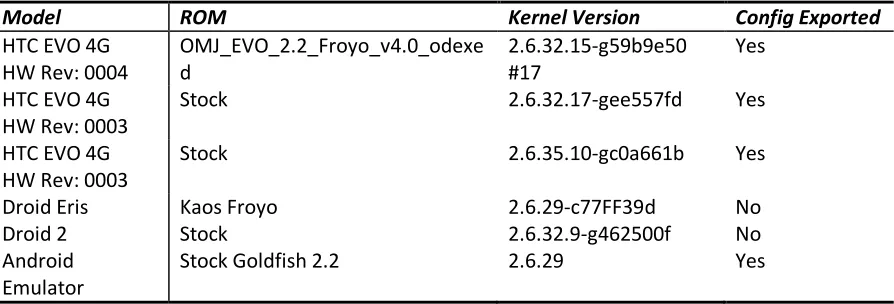
/proc/config.gz (see Table 1), it is unavailable on others.
Due to these issues, further research is needed to make a truly kernel-version agnostic module.
Support for stock kernels on Android phones is fairly straightforward, but procedures to safely
bypass the kernel version checking restrictions on custom kernels would have an immense
impact on module portability, both for this work and for other useful kernel modules. Although
it not yet possible to develop a truly portable kernel module, in the development of our tools
14
Chapter 3:
DMD
This will discuss the developed Android memory acquisition module – named Droid Memory
Dumper (DMD), address memory dumping over TCP and to an Android device’s Secure Digital
(SD) card, and offer thoughts on the forensics soundness of the approach.
3.1 The Acquisition Module
In order to support acquisition of kernel memory across all Android devices, a kernel module
was developed that acquires a copy of system RAM with minimal interaction from the
investigator. To work around the issues detailed in section 2.2.2 (problems with dd, disturbing
memory with context switching, etc.), DMD, takes a different, simpler, and less invasive
approach to acquiring memory. The module works by:
1. Parsing the kernel’s iomem_resource structure to learn the physical memory address
ranges of system RAM.
2. Performing physical to virtual address translation for each page of memory.
3. Reading all pages in each range and writing them to either a file (typically on the
15
When loading the module, the investigator provides either a directory path to copy the dump
to on the host device or a TCP port for the device to listen on. Physical address range
information is handled automatically in the kernel module. The memory dump is written
directly from the kernel to limit the amount of interaction with userspace and in particular, to
eliminate the need for userspace data copying programs such as dd. This saves a substantial
number of system calls and other kernel activity that is necessary when using userland tools
such as dd and cat, which must issue a read and write call for every block of data requested via
the memory device. The module also attempts to avoid the use of kernel file system buffers
and network buffers in order to minimize the contamination of volatile memory during the
acquisition process.
3.2 Interacting with the Developed Module
To illustrate the use of the described module, we will now walk through two examples of
acquiring memory from an Android device. We will first discuss the acquisition of memory over
a TCP connection, followed by a discussion of acquiring a memory dump via the phone’s SD
card. While these processes should be identical for all Android devices, in our example we will
use a rooted HTC EVO 4G, a popular Android phone.
3.2.1 Acquisition of Memory over TCP
The first step of the process is to copy the kernel module to the phone’s SD card using adb. adb
16
tethered via USB. We then use adb to setup a port-forwarding tunnel from a TCP port on the
device to a TCP port on the local host. The use of adb for network transfer eliminates the need
to modify the networking configuration on the device or introduce a wireless peer—all network
data is transferred via USB. For the example below, we have chosen TCP port 4444. We then
obtain a root shell on the device by using adb and su. To accomplish this we run the following
commands with the phone plugged into our computer and debugging enabled on the device1.
$ adb push dmd-evo.ko /sdcard/dmd.ko $ adb forward tcp:4444 tcp:4444
$ adb shell $ su
#
Memory acquisition over the TCP tunnel is then a two-part process. First, the target device
must listen on a specified TCP port and then we must connect to the device from the host
computer. When the socket is connected, the kernel module will automatically send the
acquired RAM image to the host device. The module first sends a fixed-size header, which lists
the physical memory address ranges for the device and their corresponding offsets in the
image. It then sends an image of each physical address range concatenated together.
In the adb root shell we install our kernel module using the insmod command. To instruct the
module to dump memory via TCP we set the path parameter to “tcp”, followed by a colon and
then the port number that adb is forwarding. On our host computer we connect to this port
with netcat redirect output to a file. When the acquisition process is complete, dmd will
terminate the TCP connection.
1
Enabling debugging involves a simple change in the phone’s settings.
2
17
The following command loads the kernel module via adb on the target Android device:
# insmod dmd path=tcp:4444
On the host, the following command captures the memory dump via TCP port 444 to the file
“evo.dump”:
$ nc localhost 4444 > evo.dump
3.2.2 Acquisition of Memory to the Device’s SD Card
In some cases, such as when the investigator wants to make sure no network buffers are
overwritten, disk-based acquisition may be preferred to network acquisition. To accommodate
this situation, DMD provides the option to write memory images to the device’s file system. On
Android, the logical place to write is the device’s SD card.
Since the SD card could potentially contain other relevant evidence to the case, the investigator
may wish to image the SD card first in order to save unallocated space. Unfortunately, some
Android phones, such as the HTC EVO 4G and the Droid series, place the removable SD card
either under or obstructed by the phone’s battery, making it impossible to remove the SD card
without powering off the phone (these phones will power down if the battery is removed, even
if they are plugged into a power source!). For this reason, the investigator needs to first image
the SD card, and then subsequently write the memory image to it. While this process violates
the typical “order of volatility” rule of thumb in forensic acquisition, namely, obtaining the most
18
Fortunately, imaging the SD card on an Android device that will be subjected to live forensic
analysis (including memory dumping) does not require removal of the SD card. Tethering the
device to a Linux machine, for example, and activating USB Storage exposes a /dev/sd? device
that can be imaging using traditional means (e.g., using dd on the Linux box). Activating USB
Storage mode unmounts the SD card on the Android device, so a forensically valid image can be
obtained.
With USB Storage mode deactivated we copy the dmd kernel module to the device using the
same steps described in the last section. When installing the module using insmod, we set the
path parameter to /sdcard to specify the directory in which the dump should be placed:
$ insmod dmd path=/sdcard
Once the acquisition process is complete, we can power down the phone, remove the SD card
from the phone, and transfer the memory dump to the examination machine. If the phone
cannot be powered down, the memory dump can be transferred to the investigator's machine
by using adb or by utilizing the phone’s USB storage mode as described earlier.
3.3 Testing
The developed kernel module was tested against a number of Android phones. Table 1 lists
these phones with the model, ROM, and kernel version. Other Android phones are similar, with
19
Model ROM Kernel Version Config Exported
HTC EVO 4G HW Rev: 0004
OMJ_EVO_2.2_Froyo_v4.0_odexe d
2.6.32.15-g59b9e50 #17
Yes
HTC EVO 4G HW Rev: 0003
Stock 2.6.32.17-gee557fd Yes
HTC EVO 4G HW Rev: 0003
Stock 2.6.35.10-gc0a661b Yes
Droid Eris Kaos Froyo 2.6.29-c77FF39d No
Droid 2 Stock 2.6.32.9-g462500f No
Android Emulator
Stock Goldfish 2.2 2.6.29 Yes
Table 1. Phones used as test platforms for DMD.
Since it would be infeasible to test every Android model on the market and the goal of this
effort is to provide memory acquisition capabilities for all Android devices, the module was
designed to work as simply as possible. The only functionality that the final version of the
module relies on is the ability to translate virtual to physical addresses, the ability to write to
files from the kernel, and the ability to communicate over TCP. If any of those facilities were
broken, the operating system would not operate correctly as these are basic operations
necessary for proper operation of the phone. Because only basic operating systems services
are used in the DMD module, I am confident that the module will work on all Android devices
as well as other architectures that support Linux.
Testing was performed using manual analysis of the acquired memory capture as well as testing
captures with Volatility functionality, which was developed by Andrew Case [23]. All phones
tested successfully allowed for acquisition of memory with no observed side effects to
20
3.4 Forensic Soundness of Acquisition Approach
For the developed acquisition approach to be of use to the forensic community, it must meet
the basic standards of forensic soundness. Adherence to these guidelines determines if
evidence will be admissible in court and usable in other legal settings. While live forensics
investigation on any computer inevitably disturbs some volatile data, just as a traditional
forensics investigation of a murder scene inevitably disturbs some characteristics of the crime
scene; careful steps can be made to minimize the impact. This approach meets basic forensic
soundness standards for a number of reasons. First, we attempt to minimize the impact on the
target device when transferring data to and from it. Second, only a USB connection with the
phone is needed for interaction. Once connected, only a single binary (the kernel module)
needs to be transferred and executed to perform the acquisition. Third, loading of the module
requires a minimal footprint, as the dmd module is very small (~70KB) and requires very few
kernel functions to acquire memory. As explained previously, minimal interaction with
userland is needed beyond loading the module, since all reading and writing of data to files or
via the network is handled within the kernel. This saves hundreds of system calls and other
function invocations that would otherwise need to be performed.
To quantitatively test the soundness of the module we turn to virtualization. The Android SDK
ships with a qemu-based emulator that runs the full Android stack all the way down to the
kernel. By launching the emulator with the flags –qemu –monitor stdio we are presented with a
command line interface that allows us to run commands to interact with the emulator. The
21
emulator, saves a dump of physical memory of the guest operating system, and then continues
execution of the guest operating system. This essentially allows us to capture a physical
memory snapshot of a virtual Android device. We then use this snapshot to establish “ground
truth” in our testing.
For our tests we repeatedly use pmemsave to take snapshots of memory on the virtual Android
device. When the snapshot is finished we immediately start a capture using DMD. We then
compare the two images for identical physical memory pages. The average results for 10 runs
of testing are provided in Table 2.
There was also interest in comparing the results to tools traditionally used in Linux memory
acquisition, namely fmem and dd. However, as we discussed in section 2.2.2, fmem does not
work properly on Android devices. fmem was modified to work around the issues we described
in step 2 of the fmem acquisition process. The modifications were minimal and only handled
how fmem determines if an address points to physical RAM. These modifications should not
affect the soundness of the capture. Since the Android emulator maps physical RAM starting at
address 0, the issues described with dd do not play a factor in acquiring memory from virtual
devices (but remain problematic for real devices). The same tests were run against the
22
Method Total # of Pages # of Identical Pages % of Identical Pages
dmd (TCP) 131072 130365 99.46%
dmd (SD Card) 131072 129953 99.15%
fmem (SD Card) 131072 105080 80.17%
Table 2. Average results from 10 runs of our testing procedure.
512MB RAM images collected using dmd were consistently over 99% identical to the pmemsave
snapshots. Since the copying of the image takes time, which allows other running processes to
perturb memory during the capture, I feel that this is a very reasonable result. When compared
to the modified fmem implementation dmd shows on average significantly better results: about
99% of pages are correctly captured versus about 80%. This supports the design decision to
minimize interactions with userland programs and eliminate the traditional method of exposing
a new memory device via a kernel module and then using a userland program such as dd to
capture memory contents through this device. Based on the design goals and the results of
testing, we state that the developed approach meets all the guidelines of a forensically sound
23
Chapter 4:
Android Forensic Analysis
4.1 Introduction
Modern mobile computing devices such as the Motorola Droid are powerful handheld
computers with large amounts of non-volatile storage and run multitasking operating systems
with complex data storage capabilities. Users may choose from a variety of browsers and tens
of thousands of downloadable applications. Data may be stored persistently on internal flash
memory or on removable flash storage. Data may also be resident in the device’s volatile
memory. The development of solutions to ensure that sensitive information accessed by one of
these mobile devices is not stored for a longer duration than needed required extensive
forensic evaluation of the devices to determine when, where, and how potentially sensitive
information might be stored. In this section we will discuss our analysis.
4.2 Volatile Storage Analysis
After acquiring full memory captures with DMD, a mix of standard Linux tools as well as custom
scripts were used to search for information that was insecurely freed. This process started by
running two passes of strings over the memory capture, one for ASCII data and one for
Unicode. The output was then manually inspected to determine if relevant information was
24
analysis, scripts were developed that were able to locate and parse binary structures from
memory.
The first application tested was version 2.2 of “Internet”, the stock Android web browser. This
test was performed by browsing to various webpages and then closing them. This test was
performed using the strings method mentioned previously. The output was then searched for
common page elements such as HTML tags, words contained on visited pages, and headers of
files loaded, such as images. Analysis revealed that a number of pieces of information were left
in memory after use – including visited pages, page contents, and other session information.
The second application tested was version 5.1.22460 of the Opera Mini web browser. Unlike
the “Internet” application, in order to conserve bandwidth in mobile environments, Opera Mini
proxies all of its requests through Opera’s server farms. The HTML is converted server-side into
a format called “Opera Binary Markup Language” [24]. The OBML binary is then sent to Opera
Mini for rendering. Opera Mini does not properly sanitize the OMBL binary from memory upon
exit. While future work is needed in analyzing the OBML format, by searching for static markers
that appear in all of our collected OBML files it was possible to identify OMBL file fragments in
the acquired memory dump. Recovery of this information was performed through a custom
script that was able to identify the OBML in memory. With further analysis and understanding
of the OMBL file format, it is likely that the complete webpages could be recovered from the
25
After testing Internet and Opera, two applications that handle very sensitive information
(passwords and financial transactions) were tested. Since these applications do not handle
multiple requests at once like web-browsers do with tabbing, we cannot simply open them in
different contexts. To remedy this we use a modified analysis methodology. First, while the
application is running we acquire a full memory dump of the device. We then terminate the
application’s process and collect a second memory dump. In order to end a target process, we
can use either the command line kill utility or the Advanced Task Killer (ATK) [25] application.
Noting that processes were fully terminated, as opposed to being sent to the background, is an
important distinction as the average Android user simply backgrounds processes when they are
no longer in use. Obviously this leaves all information intact in memory as the process is still
running and leaves room for a number of research avenues that target memory analysis of
specific Android applications.
The reason we acquire two memory dumps is so that we may first analyze the dump of the
running process to ensure that sensitive information can be recovered when the process is
running and to verify that our searching methodology is not flawed. We then can analyze the
dump of the terminated process to see if we can find the same information recovered from the
“live” dump.
The first application in this category, version 1.9.1 of KeePassDroid [26] – an application that
manages passwords, securely erased passwords and all other sensitive information after the
application exited. This application was tested by entering usernames and passwords to be
26
Usernames, keys, and passwords were recoverable from an unlocked database in the “live”
dump, but none of this information could be found in the “terminated” dump. The second
application in this category, the USAA online banking application [27], also securely erased
memory after a user logged out or the process exited. This was tested using the described
strings method as well as through the use of a developed script that searched for the integer
representation of the account numbers and other account information. Once again, account
numbers and balances were available in the “live” dump, but this information could not be
found after the process was terminated. While it is disappointing from a forensics perspective
that these applications handle memory securely, the privacy and security risks of them not
doing so would be dire, so the fact that they were secure was not completely unexpected.
4.3 Securing Volatile Storage
Analysis of Android’s volatile storage showed that it is clear that leakage occurs, which will
necessitate policies to sanitize RAM after accessing sensitive data using an Android phone. A
primary difficulty is that Android devices kill processes without warning to deal with low
memory situations, insecurely freeing potential sensitive data which might reside in the virtual
address space of the process being killed or in associated kernel structures.
In spite of these difficulties we still need a way to ensure that data is not left resident in the
device’s memory after a process exits. One idea was that no data would remain resident in the
device’s memory after a reboot of the phone. In order to validate this hypothesis we had to do
27
In order to test the validity of the hypothesis an application was written that allocates a large
amount of RAM and then fills RAM with a unique “fingerprint” that can be later searched for.
The program was run on a device and then a memory capture was acquired with DMD.
Analysis of the initial capture verified that we could find many instances of our fingerprint
throughout the memory capture. The device was then rebooted and DMD was used to acquire
another memory capture. No instances of the unique “fingerprint” were present in the capture
after a reboot, thus we can surmise that data located in volatile memory is not persistent across
reboots.
With these results we decided that a reasonable solution to the volatile data remanence
problem is to cause reboots of the device on a timed basis when the phone is inactive or
disconnected from a specified “secure” network. Rather than simply suggesting a policy of
phone rebooting, a software-based methodology was developed by the author in collaboration
with Neha Thakur that could help automate the process.
In order to ensure that no sensitive volatile information can be recovered from a device an
event-based software solution should reboot the phone under the following conditions:
Disconnection from a specified WIFI network
Expiration of a pre-set timer
28
4.3.1 Disconnection from a Specified WIFI Network
Devices connected to secure networks, such as those run by the Department of Defense, often
access data that is classified and should not be removed from secure facilities. In order to
prevent this data from remaining in the device’s memory, our proposed software solution
would automatically restart the device upon disconnection from a sensitive network. A list of
networks that should be considered “sensitive” would be pre-populated on the device and
would be customizable.
4.3.2 Expiration of a Pre-Set Timer
Automatic timer-based resets may also be desirable. For example you may wish to reset the
device every day when leaving the office. If you typically leave at 5PM your device can be set to
reboot at that time on work days. More sophisticated timer-based approaches are also
possible. For instance, a device could be set to reboot 5 minutes after a user checks their email
or 30 seconds after the GPS on the device detects that they have left a government facility.
4.3.3 Direct Request by a User
In some cases a simple, manual reboot may be desired to quickly destroy volatile data without
29
4.4 Securing Non-Volatile Storage
One method for securing non-volatile data is to provide an encrypted area for non-volatile data
stored by Android applications. This will allow secure erasure of the encryption key to provide
nearly instantaneous sanitation of non-volatile storage. Specifically, in order to prevent
recovery of sensitive information from non-volatile memory I suggest the following process:
An encrypted volume on the device is mounted with a given encryption key.
The filesystem root for the application being protected is set to the root of the
encrypted volume, to ensure that any changes to the filesystem by the application take
place only in the content of the encrypted volume.
When the application exits, the encrypted volume is un-mounted and the key securely
erased from memory, to ensure that no data is recoverable without the erased key.
If the same key can be re-generated (possibly with a password as a seed from the user),
then the same volume can be remounted and the application can regain control over its
30
Chapter 5:
Privacy-Enhancing Proof-of-Concept
5.1 Introduction
In order to test the effectiveness of the methodology two minimal proof-of-concept
applications were developed. The first was created in collaboration with co-researcher, Neha
Thakur, and demonstrates the ability to reboot the device upon disconnection from a specified
wireless network. The second demonstrates the feasibility of creating a per-process encrypted
volume and “jailing” the process to the volume to ensure that no data is written to disk outside
of the encrypted volume.
5.2 Volatile Memory Proof-of-Concept
31
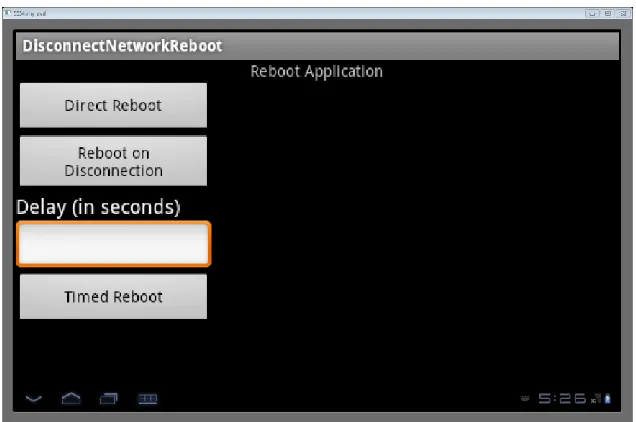
The three basic conditions that our prototype implements can be seen in Figure 1 and are
described in section 4.3. We will first describe how the application handles rebooting the device
and then will describe the three implemented options.
5.2.1 Basic Reboot Function
All three implemented options call a common function which instructs the device to reboot.
Android does not provide an interface for non-system applications to reboot the device.
Therefore the function must first elevate its privilege to “root” using the rooted device’s su
command and then execute the system command /system/bin/reboot. Any problems with this
process will be caught and presented to the user for troubleshooting.
5.2.2 Option 1: Direct Reboot
This option is the simplest option. If this option is selected the “reboot” function is immediately
called and the device is restarted, wiping volatile memory.
5.2.3 Option 2: Reboot on Disconnection
If the “Reboot on Disconnection” option is selected the program first determines whether a
user is currently connected to a wireless network. If the device is connected to a network it will
determine when the device disconnects from the network and then will call the “reboot”
32
The program calls the getSystemService method in order to acquire access to the WifiManager
class instance. This class provides the primary API for managing all aspects of Wi-Fi
connectivity.
WifiManager wifi = (WifiManager)getSystemService(Context.WIFI_SERVICE);
The WifiManager.getConnectionInfo function returns a WifiInfo class object. The WifiInfo class
describes the state of any WIFI connection that is active or is in the process of being set up.
WifiInfo wifiInfo= wifi.getConnectionInfo();
Once we have that information we can retrieve the service set identifier (SSID) for the current
WIFI network using the WifiInfo.getSSID function. If the SSID is an ASCII string, it will be
returned surrounded by double quotation marks. Otherwise, it is returned as a string of hex
digits. The SSID may be null if there is no network currently connected. Each time the
WifiManager notifies us of a change in the connection state we check the connection info. If
the device is no longer connected to the specified access point then the reboot function is
called and the device is restarted, wiping volatile memory.
5.2.4 Option 3: Timed Reboot
The “Timed Reboot” option allows a user to specify a delay (in seconds) the device should wait
before rebooting. When the “Timed Reboot” button is clicked we create a TimerTask class
instance which will call the “reboot” function. Java’s TimerTask class represents a task to run at
33
provided delay has expired. Once the delayed time has elapsed the TimerTask will be triggered
and the device will reboot, wiping volatile memory.
While this prototype is minimal, the functionality can be expanded in the future with event
triggers. One useful example would be to schedule a reboot 5 minutes after a scheduled
meeting ends or to reboot 10 seconds after the device’s screen is locked.
5.3 Non-Volatile Memory Proof-of-Concept
Figure 2 - Screenshot of Non-Volatile POC
Our second proof-of-concept application simulates a custom application launcher that utilizes
the techniques described in section 4.4 to ensure that any data written to the device’s
34
The Android operating system contains undocumented, private APIs that allow the creation,
use, and destruction of Twofish-encrypted volumes. Since these APIs are marked hidden, they
are not included in the Android SDK and therefore cannot be used directly in a traditional
manner. However, the Java runtime system that underlies application execution on Android
supports a feature called reflection that allows the dynamic loading and use of Java classes at
runtime. Since the private APIs do exist in the Android runtime system we can use reflection to
utilize these APIs.
A complication is that the private APIs require several undocumented application permissions
to be granted before they can be used. These permissions are defined with a protection level
of “signature”, which means that Android will not grant these permissions to applications
whose digital signature does not match that of the application who defined the permission [28].
In this case our application would need to be signed by Google in order to be granted the
needed permissions. There are several options for working around this restriction:
Re-implement the private APIs without including the need for special permissions. Since
the source of the APIs is available to us, it should be possible to write our own API which
would allow us to use encrypted volumes without the need for any system signed
35
Bypass the security model of the Android OS to use the APIs. A weakness exists in
Android’s security model and it is possible for us to bypass the protections and grant
ourselves the appropriate permissions to call the Google APIs2.
Many of the APIs to create, mount, un-mount, and destroy encrypted volumes on Android
devices are not included in the Software Development Kit. Therefore wrapper classes were
written that call these private APIs through Java’s reflection libraries, which allow dynamic
loading and execution of classes at runtime.
The application first uses a wrapper class to obtain an instance of the device’s MountService.
The MountService controls most aspects of creation and mounting of volumes on the device.
Since all encrypted volumes are backed by files on the device’s SD-card we must first ensure
that an SD-card is mounted. To accomplish this we use our wrapper class to call the function
MountService.getVolumeState and pass it the path of the SD-card. If the function returns
Environment.MEDIA_MOUNTED then we know the SD-card is mounted and it is safe to
continue.
Once we are sure that the SD-card is properly mounted then we can create an encrypted
volume. We use our wrapper class to call the function MountService.createSecureContainer
and pass it a generated 32-byte encryption key. We check the return value of this function to
check for any errors.
2
36
After creation of the secure container we then execute the system command chroot to change
the root file system of our running process to the mounted secure container. We can then
execute the application of our choosing and wait for it to exit.
When the application exits the program un-mounts the secure container and overwrites the
encryption key in memory. This ensures that all sensitive data that is written to disk by the
chosen application will be unrecoverable.
While the proof-of-concept is minimal and only supports running a single test application, the
functionality could be extended to allow the user to select any application of their choosing. A
37
Chapter 6:
Exploiting the Android Security Model
6.1 Introduction
To be able to execute the private API’s used in the proof-of-concept for non-volatile storage
protection, a number of protected permissions are required. In order to obtain these
permissions we take advantage of a vulnerability discovered by the author in the Android
security model that allows us to grant ourselves arbitrary permissions, regardless of their
protection level. The details of this vulnerability will be discussed in this chapter.
6.2 Overview of Android Security Model
By default no Android application has the ability to perform actions that may adversely impact
the operation or integrity of other applications or the operating system. All applications must
be digitally signed by the developer’s unique private key. Each application is assigned a uid by
the Android runtime system at install time. In most cases each application will be assigned a
unique uid; however, if two applications are signed by the same private key then the developer
may request that they be assigned the same uid. Android utilizes the standard Linux
access-rights model to ensure that the data directory of one application cannot be accessed by
another application with a different uid. Android also uses a permission-based model to restrict
38
open a network socket it must first be granted the android.permission.INTERNET permission.
Similarly, an application must be granted the android.permission.ACCESS_FINE_LOCATION
permission to be able to access GPS data. A list of all of the documented Android permissions
can be found on the Android Developer Website [29]. We will discuss the Android permission
model in detail in the next section. For more detailed information about the Android security
model see [30].
6.3 Permissions
Developers of Android applications include an AndroidManifest.xml file, which contains a list of
permissions for the application to be granted. Developers may also create their own set of
permissions in the AndroidManifest.xml files, so that they may expose their own
permissions-based APIs to other applications in order to share data or functionality. Each permission is
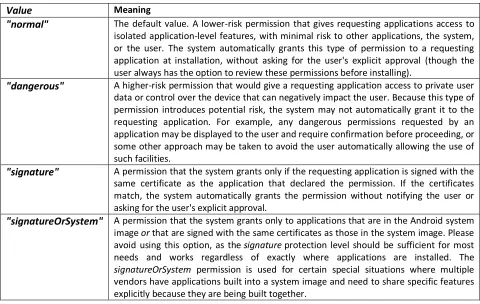
assigned a “protection” level (see Table 3) that helps determine whether the Android runtime
should grant the permission to a requesting application. When an application is being installed,
the Android runtime reads the AndroidManifest.xml file in the application package and uses the
protection level of each requested permission to determine whether it should grant the
permission, ask the user, or to deny the permission. An application may revoke its own
39
Value Meaning
"normal" The default value. A lower-risk permission that gives requesting applications access to isolated application-level features, with minimal risk to other applications, the system, or the user. The system automatically grants this type of permission to a requesting application at installation, without asking for the user's explicit approval (though the user always has the option to review these permissions before installing).
"dangerous" A higher-risk permission that would give a requesting application access to private user data or control over the device that can negatively impact the user. Because this type of permission introduces potential risk, the system may not automatically grant it to the requesting application. For example, any dangerous permissions requested by an application may be displayed to the user and require confirmation before proceeding, or some other approach may be taken to avoid the user automatically allowing the use of such facilities.
"signature" A permission that the system grants only if the requesting application is signed with the same certificate as the application that declared the permission. If the certificates match, the system automatically grants the permission without notifying the user or asking for the user's explicit approval.
"signatureOrSystem" A permission that the system grants only to applications that are in the Android system image or that are signed with the same certificates as those in the system image. Please avoid using this option, as the signature protection level should be sufficient for most needs and works regardless of exactly where applications are installed. The
signatureOrSystem permission is used for certain special situations where multiple vendors have applications built into a system image and need to share specific features explicitly because they are being built together.
Table 3. “Protection” levels of Android permissions.
6.4 Permission Model Implementation
6.4.1 PackageManagerService
On startup Android starts a PackageManagerService, which reads in the xml file
/data/system/packages.xml. This file is the central storage location that keeps track of all
permissions, their protection levels, and the application package in which these permissions
were created. The packages.xml file also contains a list of all applications, their assigned uid,
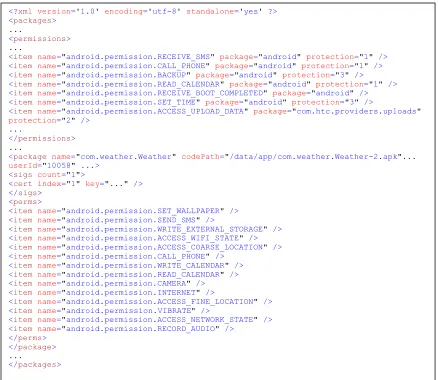
and a list of permissions that have been granted to them. A snippet of a packages.xml file can
40
Figure 3 – Snippet from packages.xml
For each permission listed, PackageManagerService checks the AndroidManifest.xml file of the
application package that defined the permission in order to determine if the protection level
has changed. The PackageManagerService then parses each listed package and grants them
the permissions listed. For permissions with a protection level of signature or higher the
PackageManagerService rechecks to ensure the application has the correct digital signature for
the permission. When the PackageManagerService shuts down (usually during device
shutdown) its in-memory structures are written to packages.xml for persistent storage.
<?xml version='1.0' encoding='utf-8' standalone='yes' ?> <packages>
...
<permissions>
...
<item name="android.permission.RECEIVE_SMS" package="android" protection="1" /> <item name="android.permission.CALL_PHONE" package="android" protection="1" /> <item name="android.permission.BACKUP" package="android" protection="3" /> <item name="android.permission.READ_CALENDAR" package="android" protection="1" /> <item name="android.permission.RECEIVE_BOOT_COMPLETED" package="android" /> <item name="android.permission.SET_TIME" package="android" protection="3" />
<item name="android.permission.ACCESS_UPLOAD_DATA" package="com.htc.providers.uploads"
protection="2" />
...
</permissions>
...
<package name="com.weather.Weather" codePath="/data/app/com.weather.Weather-2.apk"...
userId="10058" ...> <sigs count="1">
<cert index="1" key="..." /> </sigs>
<perms>
<item name="android.permission.SET_WALLPAPER" /> <item name="android.permission.SEND_SMS" />
<item name="android.permission.WRITE_EXTERNAL_STORAGE" /> <item name="android.permission.ACCESS_WIFI_STATE" /> <item name="android.permission.ACCESS_COARSE_LOCATION" /> <item name="android.permission.CALL_PHONE" />
<item name="android.permission.WRITE_CALENDAR" /> <item name="android.permission.READ_CALENDAR" /> <item name="android.permission.CAMERA" /> <item name="android.permission.INTERNET" />
<item name="android.permission.ACCESS_FINE_LOCATION" /> <item name="android.permission.VIBRATE" />
<item name="android.permission.ACCESS_NETWORK_STATE" /> <item name="android.permission.RECORD_AUDIO" />
</perms> </package>
...