A Desktop Quick Reference
IN A NUTSHELL
WEB SERVICES
TM
Covers
Java W
eb Ser
JAVA
™Other Java
™resources from O’Reilly
Related titles Enterprise JavaBeans™
Java™ & XML
Java™ Cookbook
Java™ Enterprise in a
Nutshell Java™ I/O
Java™ in a Nutshell
Java™ Performance Tuning
Java™ Programming with
Oracle SQLJ Java™ Security
JavaServer™ Pages
Java™ Swing
Learning Java™
Java Books Resource Center
java.oreilly.comis a complete catalog of O’Reilly’s books on Java and related technologies, including sample chap-ters and code examples.
OnJava.comis a one-stop resource for enterprise Java de-velopers, featuring news, code recipes, interviews, weblogs, and more.
Conferences O’Reilly & Associates bring diverse innovators together to nurture the ideas that spark revolutionary industries. We specialize in documenting the latest tools and sys-tems, translating the innovator’s knowledge into useful skills for those in the trenches. Visit conferences.or-eilly.com for our upcoming events.
JAVA
™WEB SERVICES
IN A NUTSHELL
Kim Topley
Chapter 3SAAJ
3
SAAJ
In the last chapter, you saw how to use JAX-RPC to create web services based around the use of remote procedure calls. Even though JAX-RPC uses an XML-based protocol, there was hardly any XML in evidence in Chapter 2. For the most part, JAX-RPC does a very good job of hiding the details of messages that are exchanged between a web service and its client during a remote procedure call. However, most of the more advanced JAX-RPC features require an under-standing of SOAP, the XML-based protocol on which JAX-RPC in particular, and web services in general, are based. This chapter paves the way for a more in-depth examination of JAX-RPC by introducing SOAP, together with SAAJ, which is a Java API for creating, sending, and receiving SOAP messages.
Introduction to SAAJ
SAAJ, which stands forSOAP with Attachments API for Java, provides a conve-nient API for constructing SOAP messages without having to directly create the XML yourself. SAAJ was originally part of the Java API for XML Messaging
(JAXM), which was developed by the JSR 67 expert group. The final release of this specification (JAXM Version 1.0) provided two different but related facilities:
• Core functionality concerned with manipulating SOAP messages in a generic way, together with the ability to send a SOAP message from one entity to another.
• A higher-level messaging facility that included reliable delivery of messages and support formessaging profiles, which require SOAP messages to be con-structed in specific ways.
otherwise have had the undesirable effect of making SAAJ 1.1 dependent on JAXM 1.1. The result is that it is possible to use SAAJ as a lightweight library for building and exchanging SOAP messages, without requiring the inclusion of JAXM 1.1, which provides facilities that go beyond the requirements of many web service clients. JAX-RPC, in particular, uses SAAJ to construct and decode SOAP messages, but it does not require reliable messaging and therefore is not depen-dent on the presence of a JAXM implementation.
The formal specifications for both SAAJ 1.1 and JAXM 1.1 can be downloaded fromhttp://jcp.org/jsr/detail/67.jsp. This chapter looks only at SAAJ and uses it as a convenient means of introducing SOAP messages; the more advanced messaging facilities provided by JAXM are covered in Chapter 4.
SAAJ Programming
Whereas JAX-RPC is concerned with allowing a client program to make a remote procedure call to a web service without exposing the underlying XML-based proto-cols that are used, SAAJ is a much lower-level API that is entirely concerned with the messages exchanged between the web service and its clients. Furthermore, while JAX-RPC applications look, for the most part, like ordinary Java applica-tions making local method calls, an application that uses SAAJ needs to construct SOAP messages piece by piece and extract information from response messages. Using SAAJ requires much more work on the part of the developer than JAX-RPC, so why would you bother to use it? Here are some of the circumstances in which you might want to use SAAJ and its close relative JAXM instead of JAX-RPC:
• JAX-RPC is convenient for accessing web services that present an RPC-like interface. However, the RPC model is not suitable for all services. In many cases, it is more convenient to simply send an XML message to a service, which the service interprets and then generates an XML response. The most commonly quoted example of this is a business-to-business service where the client sends a purchase order in the form of an XML document to which the service responds with a confirmation and an invoice, also encoded as an XML document. A simple service like this does not require method calls or arguments—all that is necessary is to exchange fragments of XML. SAAJ rep-resents a convenient way to encode and decode the SOAP messages that will carry these XML documents.
SAAJ
might take anything from several seconds to several days to reply. To imple-ment this type of loosely coupled messaging, it is appropriate to use JAXM, which is built on top of SAAJ and provides the ability to send and receive messages asynchronously.
• JAX-RPC works only when the client and the service are active at the same time and also assumes that there is an available network path that directly connects them. If the service is not available when the client initiates the request, or there are good reasons (perhaps security-related) why the client cannot be directly connected to the server, then you can’t use JAX-RPC. JAXM, on the other hand, provides a reliable delivery service without requir-ing the client application to be involved in how the reliability is provided and can also support routing of SOAP messages between hosts that cannot be directly connected.
SAAJ and JAXM provide a complete solution for XML-based messaging. The major differences between SAAJ and JAXM are as follows:
• SAAJ provides the API for the generic handling of SOAP messages; JAXM builds on this by adding the capability to create SOAP messages with preset content as required by messaging standards such as SOAP-RP and ebXML-TRP.
• SAAJ can be used to create a freestanding Java client that communicates directly with a web service. JAXM adds the concept of a messaging provider, which acts as an intermediary between the client and the eventual recipient of the message. The message provider can provide a reliable delivery service and can route messages to other intermediaries without the involvement of the client. JAXM clients that use a messaging provider must be hosted in a web container or an application server.
• SAAJ clients (and JAXM clients that choose not to use a messaging provider) can only engage in synchronous request/response message exchanges. How-ever, JAXM clients using a messaging provider have access to additional mes-sage exchange modes, including asynchronous delivery and receipt of messages. See Chapter 4 for further details.
The classes and interfaces that provide the SAAJ and JAXM APIs reside in different packages, and, to emphasize the fact that SAAJ does not require JAXM, they are distributed in separate JAR files, as shown in Table 3-1.
In the case of J2EE 1.4, JAXM is not supported and the SAAJ classes appear inlib\
j2ee.jar, which contains almost all of the packages in the reference
implementation.
Table 3-1. Packaging of the SAAJ and JAXM APIs
API Package JAR file
SAAJ javax.xml.soap saaj-api.jar (API)
saaj-ri.jar(reference implementation) JAXM javax.xml.messaging jaxm-api.jar(API)
Although we have used the terms “client” and “server” to describe the participants in a SAAJ message exchange, the programming model for both SAAJ and JAXM does not make a strong distinction between these two roles, because most of the API is concerned with the details of handling the messages rather than actually sending and receiving them. In fact, SAAJ messaging represents more of a peer-to-peer model in which it might be more appropriate to use the terms “sender” and “receiver” instead of “client” and “server.” In this chapter, however, all of the examples use SAAJ and are therefore limited to synchronous request/reply exchanges. For the sake of clarity, I will continue to use the term “client” to refer to the initiator of a service request, which will always be a freestanding J2SE applica-tion, and I will use “server” to mean the entity that receives and replies to the request.
For the JWSDP, to compile client applications that use SAAJ, your CLASSPATH
needs to include only thesaaj-api.jarfile. However, theCLASSPATHrequired to run a client application is much larger, consisting of the following JAR files, which can be found in various subdirectories of the JWSDP installation:
To run a SAAJ client application with J2EE 1.4, yourCLASSPATHneeds to include
lib\j2ee.jar, together with the following four files from the endorsed directory:
Aside from the handling of SOAP messages, SAAJ includes the ability to synchro-nously send a completed message to a given destination using HTTP as the underlying transport mechanism*and receive the reply (see “Creating and Sending
a SOAP Message Using SAAJ,” later in this chapter), but no specific provision is made for receiving a SOAP request in the server role. Servers are expected to reside in web containers or application servers, and need to make their own arrangements to receive SOAP messages. The JAXM specification includes a servlet (javax.xml.messaging.JAXMServlet) that can be used as the basis for a web container–based message receiver, but service providers are not required to use it. The example source code in this chapter uses a servlet that is very similar to
JAXMServlet, so that we can demonstrate SAAJ without introducing a dependency on JAXM. This servlet is described later in this chapter in the section “Receiving a SOAP Message.”
SOAP Messages
The format of SOAP messages is defined by a note submitted to the World Wide Web Consortium (W3C) in May 2000 by a group of companies including
saaj-api.jar saaj-ri.jar activation.jar commons-logging.jar
dom4j.jar mail.jar jaxp-api.jar dom.jar
sax.jar xalan.jar xercesImpl.jar xsltc.jar
dom.jar sax.jar xalan.jar xercesImpl.jar
SAAJ
Microsoft and IBM. This note, which describes Version 1.1 of SOAP and can be downloaded fromhttp://www.w3.org/TR/SOAP, is not a formally adopted W3C specification but it is, nevertheless, the specification on which all existing SOAP implementations, including SAAJ, are based. The W3C is working on a formal definition of the next revision of SOAP, to be called Version 1.2. At the time of this writing, the SOAP 1.2 specification is available for public review, and Sun plans to include support for SOAP 1.2 in SAAJ (and JAX-RPC) when the specifi-cation is finalized.*
SOAP defines a way to wrap information represented in XML so that it can be transmitted between peer entities that know how to interpret that information and, presumably, act on it to provide a service. Other than the fact that the useful content of the message (which is known as thepayload) must be encoded in XML, SOAP does not mandate a particular set of XML elements and attributes to be used to represent primitive items of data (such as integers, floating-point numbers, and strings) in terms of XML constructs, although it does specify an encoding mechanism for these data types and others, the use of which is encour-aged. In practice, these encoding rules, commonly referred to as “SOAP section 5 encoding,” have become ade factostandard and are the default encoding used by JAX-RPC to represent method arguments and return values. Although detailed coverage of these encoding rules is outside the scope this book, there are several examples of their use in this chapter; you’ll find a complete discussion of the SOAP encoding rules inJava and SOAP, by Robert Englander (O’Reilly). Applica-tions are free to use privately defined encodings instead of the SOAP section 5 rules if they wish.
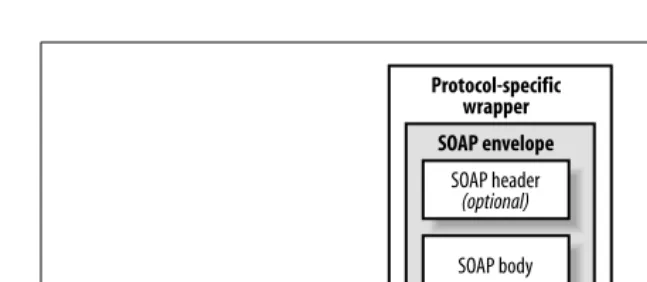
What SOAPdoesspecify is the overall structure of a message, together with rules for wrapping SOAP messages when the underlying transport protocol is HTTP. There are two slightly different ways to construct a SOAP message depending on whether the message has any attachments (the meaning of which is defined later). The SOAP Version 1.1 specification covers only the case where there are no attachments and requires that a message be constructed as shown in Figure 3-1. The outermost layer of the message is a protocol-specific wrapper, the nature of which is defined in the specification only for HTTP and which we’ll see later in this chapter. Inside this wrapper is the SOAP message itself, consisting of an enve-lope, a header part, a body part, and optional additional content.
The SOAPenvelopeis, as its name suggests, a top-level XML element that acts as a container for the rest of the message. The SOAP header is optional but, if present, must be the first element in the envelope. It is intended to be used to carry infor-mation that can be used in the processing or routing of the message payload, such as a digital signature to guarantee the integrity of payload data or authentication information to validate the identity of the message sender. There are specifica-tions, referred to in the JAXM documentation as profiles, that define specific SOAP headers to be used to communicate information to applications that are
aware of the profile. The reference implementation of JAXM includes messaging providers that can create SOAP messages that have pre-installed headers as required by the SOAP-RP or ebXML TRP specifications. For further information on these two profiles, see Chapter 4.
The SOAP body is the only mandatory part of the envelope and contains the actual payload intended for the ultimate recipient of the message. It must either follow the SOAP header or, if the header is omitted, be the first element in the envelope. Following the body, it is possible to include additional content, the interpretation of which, like the payload itself, is entirely dependent on the sending and receiving entities.
Everything within the SOAP envelopemustbe encoded in XML. For many applica-tions, this is not an acceptable restriction. For example, an online book store offering a web service interface might want to supply book details that include a photograph of the book’s cover, scanned copies of pages from the book, or a sample chapter in the form of a PDF document. In order to enable applications such as this, Microsoft and Hewlett Packard created an additional specification called “SOAP Messages with Attachments,” which can be downloaded fromhttp://
www.w3.org/TR/SOAP-attachments. Like the SOAP 1.1 document, this
specifica-tion has been submitted to the W3C, and although it has not been approved by W3C, it has become the de facto standard for packaging SOAP messages that require some element of non-XML content.
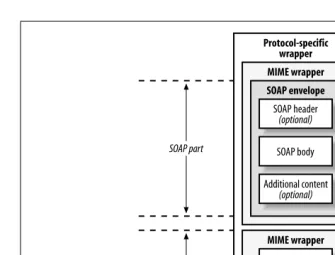
A SOAP message that has attachments is formatted as shown in Figure 3-2.
Attachmentstypically contain non-XML data, such as images, audio, or plain text. The first part of the message contains the SOAP envelope and its content, constructed as described by the SOAP 1.1 specification. Each object to be attached is then added as MIME content, and the whole message is packaged as a MIMEMultipart/Relatedmessage as defined by RFC 2387 (which can be found at http://www.ietf.org/rfc/rfc2387.txt). Each separate message part has its own MIME wrapper that specifies, among other things, the type of data that it contains—it may contain an identifier that can be used within the SOAP enve-lope to refer to it. Using SAAJ, you can construct SOAP messages with attachments that contain any type of data that has a MIME encoding. This topic is discussed in more detail in “SOAP with Attachments,” later in this chapter, where you’ll also see exactly what a typical message with attachments looks like when bound to the HTTP protocol.
Figure 3-1. A SOAP message with no attachments
SOAP header
(optional)
SOAP envelope
SOAP body Additional content
(optional)
SAAJ
Creating and Sending a SOAP Message Using SAAJ
In order to allow vendors to supply their own implementations, almost all of the SAAJ API is made up of interfaces and abstract classes. In particular, the
SOAPMessage class, which represents a SOAP message, is abstract and therefore cannot be directly instantiated. To create a SOAP message, you need to use a
MessageFactory.MessageFactory, which is part of thejavax.xml.soappackage, is itself an abstract class, an instance of which can be obtained using its static
newInstance( ) method:
public static MessageFactory newInstance( ) throws SOAPException;
To permit vendors to plug in their own implementations ofMessageFactory, this method looks at the system property javax.xml.soap.MessageFactory and in a couple of other places to select the subclass ofMessageFactorythat will be used. Refer to the description ofjavax.xml.soap.MessageFactoryin the reference section of this book for a complete description of the steps taken to find aMessageFactory. If a problem is encountered while instantiating the MessageFactory, a
SOAPExceptionis thrown.SOAPException, which is one of only four concrete classes in thejavax.xml.soappackage, is a checked exception that is thrown by many of the methods in the SAAJ API. It contains a message describing the reason for the exception and, for cases where the root cause is an exception thrown from a lower level, provides agetCause( ) method to provide access to the original exception.
Figure 3-2. A SOAP message with two attachments
SOAP header
(optional)
SOAP envelope
SOAP body Additional content
(optional)
Protocol-specific wrapper
MIME wrapper
Attachment
MIME wrapper
Attachment
MIME wrapper
SOAP part
MessageFactory has two methods that create SOAP messages:
public SOAPMessage createMessage( ) throws SOAPException;
public SOAPMessage createMessage(MimeHeaders headers, InputStream is) throws SOAPException;
The second of these two methods is used typically in a servlet to deserialize a message received from an input stream, an example of which we’ll see in “Receiving a SOAP Message,” later in this chapter. To create a SOAP message for transmission, you need to use the first method:
MessageFactory messageFactory = MessageFactory.newInstance( ); SOAPMessage message = messageFactory.createMessage( );
The message thatcreateMessage( )returns does not contain anything useful, but rather than pause here to introduce the API needed to add some content to it, let’s skip ahead a little and look at how to transmit the skeleton message. In order to send a message, you need an instance of theSOAPConnectionclass, which, since it is abstract, must be obtained from a factory:
SOAPConnectionFactory connFactory = SOAPConnectionFactory.newInstance( ); SOAPConnection conn = connFactory.createConnection( );
Just likeMessageFactory,SOAPConnectionFactoryis an abstract class that vendors can supply their own implementations of. The actual class that thenewInstance( )
method uses is determined by a procedure that is virtually identical to that used by the MessageFactoryclass, and which is described in the reference section for
javax.xml.soap.SOAPConnectionFactory, later in this book. If all else fails, the reference implementation returns its own implementation of
SOAPConnectionFactory (or throws aSOAPException if this class is not available).*
Once you have aSOAPConnection, you can use its call( )method to transmit a message:
public abstract SOAPMessage call(SOAPMessage request, Object destination) throws SOAPException;
The destinationobject determines where the message will be sent. The SAAJ specification requires that the following types be supported as valid destination arguments:
• An instance of thejava.net.URL class.
• An instance ofString, provided that its value can be converted to a valid URL using itsURL(String url) constructor.
• An instance of the classjavax.xml.messaging.URLEndpoint. This class, which wraps a URL, is part of the JAXM API and is therefore not likely to be used by pure SAAJ applications. It is accepted as a valid destination because Ver-sion 1.0 of the JAXM specification, which did not have SAAJ separated out as a freestanding API, defined the destination parameter of this method as being
SAAJ
of typejavax.xml.messaging.Endpoint. This is an abstract base class of which
URLEndpointis the only concrete implementation; therefore, supporting a des-tination of typeURLEndpoint provides backward-compatibility.
The reference implementation supports all of these possibilities; vendor imple-mentations are free to add their own destination types as required. All of these destination types resolve to a URL, but the structure of this URL depends entirely on the implementation of the receiver and the environment in which it is hosted. We’ll see a typical example in “Receiving a SOAP Message,” later in this chapter. As noted earlier in this section, a SAAJ client can only use a synchronous request/ response programming model; therefore, thecall( )method blocks having sent the message until a reply sent to the message is received, or until an error causes it to throw a SOAPException. The reply is returned to the method caller. Having received a reply, if you don’t need to make further use of the SOAPConnection
object, you should use itsclose( )method to release it; this method can be called only once. Once it is, any further invocations of call( ) method result in a
SOAPException.
The example source code for this chapter includes a client that creates a SOAP message, prints its content, and then sends it to a servlet that echoes it straight back. To run this example, start your web server or application server, open a command window and make chapter3\echoservice your working directory, and then use the following command to build and deploy the servlet:
ant deploy
Next, compile and run the client application using the command:
ant compile-client run-client
In the command window, you’ll see quite a lot of output, including the XML for the SOAPMessage that was transmitted (which has been reformatted to make it more readable):
1 <soap-env:Envelope xmlns:soap-env=
"http://schemas.xmlsoap.org/soap/envelope/"> 2 <soap-env:Header/>
3 <soap-env:Body/> 4 </soap-env:Envelope>
This is what the basic message returned by thecreateMessage( )method looks like if you don’t make any changes to it. Lines 1 and 4 contain the XML elements that represent the SOAP message envelope. As you can see, the element name is
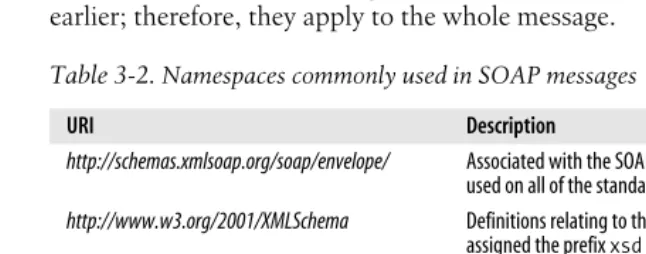
Envelopeand it is qualified using the namespace prefixsoap-env, which is associ-ated with the URLhttp://schemas.xmlsoap.org/soap/envelope. This URL identifies the entire SOAP message as being formatted according to the rules of SOAP Version 1.1. If a SOAP message whose envelope is qualified with any other namespace is received, then it should be treated as a SOAP version mismatch, and the receiver is required to reject the message by generating a SOAP fault (as described in “SOAP Fault Handling,” later in this chapter).
method, the header and body parts are both empty. Under normal circumstances, if you do not need any header content, you completely remove the header part. You’ll see how to do this later in this chapter.
SOAP messaging makes heavy use of XML namespaces and XML schema. A detailed discussion of these topics is outside the scope of this book and, although we’ll explain the use of namespaces and schemas as we encounter them, for a full treatment of XML namespaces and XML schema, refer toXML In a Nutshell,Second Edition, by Elliotte Rusty Harold and W. Scott Means (O’Reilly).
Receiving a SOAP Message
TheSOAPConnectionclass provides thecall( )method to allow a SOAP message to be transmitted, but there is no corresponding API that takes care of receiving a message. The example just shown uses a servlet as the target of the message. This is convenient because theSOAPConnectionclass uses HTTP as the default protocol when transmitting messages, and the servlet API contains everything that you need to handle a payload delivered over an HTTP connection, including a conve-nient API to handle the HTTP headers.
Thejava.xml.messagingpackage includes a servlet calledJAXMServletthat can be used to receive and handle SOAP messages. However, since this package is part of the JAXM API, using it would introduce a dependency on JAXM as well as SAAJ, which is not desirable because JAXM is not part of the J2EE 1.4 platform. To avoid this, the servlet used in the echoservice example is based on a slightly simpler version ofJAXMServletthat is provided in the sample code supplied with the JWSDP. The source code for this servlet can be found in the filechapter3\ servlet\ora\jwsnut\saaj\SAAJServlet.javarelative to the installation directory of the example code for this book. Most of the code is also shown in Example 3-1.
Example 3-1. A servlet that can receive SOAP messages
package ora.jwsnut.saaj; import java.io.IOException; import java.io.OutputStream; import java.util.Enumeration; import java.util.Iterator; import java.util.StringTokenizer; import javax.servlet.ServletConfig; import javax.servlet.ServletException; import javax.servlet.http.HttpServlet; import javax.servlet.http.HttpServletRequest; import javax.servlet.http.HttpServletResponse; import javax.xml.soap.MessageFactory;
import javax.xml.soap.MimeHeader; import javax.xml.soap.MimeHeaders; import javax.xml.soap.SOAPException; import javax.xml.soap.SOAPMessage; /**
SAAJ
* service within a web container. This is based * on ReceivingServlet.java in the JWSDP tutorial * examples.
*/
public abstract class SAAJServlet extends HttpServlet { /**
* The factory used to build messages */
protected MessageFactory messageFactory; /**
* Initialisation - create the MessageFactory */
public void init(ServletConfig config) throws ServletException { super.init(config);
try {
messageFactory = MessageFactory.newInstance( ); } catch (SOAPException ex) {
throw new ServletException("Failed to create MessageFactory", ex); }
} /**
* Handles a POST request from a client. The request is assumed * to contain a SOAP message with the HTTP binding.
*/
public void doPost(HttpServletRequest request, HttpServletResponse response) throws ServletException, IOException {
try {
// Get all the HTTP headers and convert them to a MimeHeaders object MimeHeaders mimeHeaders = getMIMEHeaders(request);
// Create a SOAPMessage from the content of the HTTP request SOAPMessage message = messageFactory.createMessage(mimeHeaders, request.getInputStream( )); // Let the subclass handle the message
SOAPMessage reply = onMessage(message);
// If there is a reply, return it to the sender. if (reply != null) {
// Set OK HTTP status, unless there is a fault. boolean hasFault = reply.getSOAPPart().getEnvelope( ) .getBody( ).hasFault( ); response.setStatus(hasFault ?
HttpServletResponse.SC_INTERNAL_SERVER_ERROR : HttpServletResponse.SC_OK);
// Force generation of the MIME headers if (reply.saveRequired( )) {
When SAAJServletreceives a SOAP message, it hands it to the abstractonMessage( )
method and sends the reply message returned by this method to the message sender. To provide specific message handling, subclass SAAJServletand imple-ment the required processing in theonMessage( ) method.
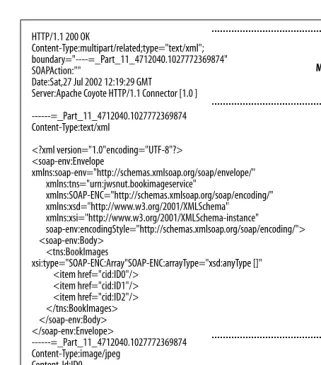
ThedoPost( )method of this servlet demonstrates how to receive a SOAP message from an HTTP connection. When transmitted over HTTP, the protocol-specific wrapper shown in Figure 3-1 and Figure 3-2 is represented as HTTP headers, and the rest of the message is written out as a stream of XML or, if the message has attachments, as aMultipart/RelatedMIME payload containing the XML and the encoded attachment data. Example 3-2 shows what an empty SOAP message looks like when bound into an HTTP request message.
reply.saveChanges( ); }
// Copy the MIME headers to the HTTP response setHttpHeaders(reply.getMimeHeaders( ), response); // Send the completed message
OutputStream os = response.getOutputStream( ); reply.writeTo(os);
os.flush( ); } else {
// No reply - set the HTTP status to indicate this response.setStatus(HttpServletResponse.SC_NO_CONTENT); }
} catch (SOAPException ex) {
throw new ServletException("SOAPException: " + ex); }
} /**
* Method implemented by subclasses to handle a received SOAP message. * @param message the received SOAP message.
* @return the reply message, or <code>null</code> if there is * no reply to be sent.
*/
protected abstract SOAPMessage onMessage(SOAPMessage message) throws SOAPException;
// HEADER HANDLING CODE NOT SHOWN...
}
Example 3-2. An empty SOAP message bound to the HTTP protocol
Content-Length: 17 1 SOAPAction: "" User-Agent: Java1.4.0 Host: localhost:5050
Accept: text/html, image/gif, image/jpeg, *; q=.2, */*; q=.2 Connection: keep-alive
SAAJ
When this HTTP request message is delivered to a servlet, the HTTP headers are automatically stripped off and made available via theHttpServletRequestobject, while the rest of the data, namely the XML itself, can be obtained by reading the
InputStream provided by the HttpServletRequest getInputStream( ) method. To convert the XML back into aSOAPMessage, the servlet uses aMessageFactorythat it creates when it is initialized, and calls the second variant of thecreateMessage( )
method that we saw in “Creating and Sending a SOAP Message Using SAAJ” earlier in this chapter, passing it the HTTP headers and the input stream containing the XML-encoded SOAP message:*
// Create a SOAPMessage from the content of the HTTP request
SOAPMessage message = messageFactory.createMessage(mimeHeaders, request. getInputStream( ));
The first argument supplied to this method is an object of typejavax.xml.soap. MimeHeaders, which encapsulates the HTTP headers that were received as part of the HTTP binding. We’ll look at this class and the way in which it is populated from the HTTP request in “SOAP Messages and MIME Headers.” later in this chapter.
Once theSOAPMessageis created, it is passed to theonMessage( )method. If this method returns a reply, it needs to be sent back to the caller in the servlet’s HTTP response message. Naturally, the reply needs to be wrapped in HTTP in the same way that the request was when it was transmitted by the sender. The original message was created as a result of calling the SOAPConnection call( ) method, which opens an HTTP connection to the servlet and takes care of building the HTTP wrapper for the message. Here, however, we can’t use this method because we want to return the message using the HTTP connection originally created by the client, so we have to create the HTTP binding for the reply message ourselves. This requires three steps:
1. Get any HTTP headers to be sent with the reply message from the message itself. This can be done by calling theSOAPMessage getMimeHeaders( )method, which returns them in the form of aMimeHeaders object.
2. Use the methods of the servlet’s HttpServletResponse object to install the HTTP headers in the reply.
3. Get the XML representation of the SOAPMessage itself and write it to the
OutputStream obtained from the HttpServletResponse getOutputStream( )
method.
<?xml version="1.0" encoding="UTF-8"?>
<soap-env:Envelope xmlns:soap-env="http://schemas.xmlsoap.org/soap/envelope/"> <soap-env:Header/>
<soap-env:Body/> </soap-env:Envelope>
* In case you are wondering why thecreateMessage( )method needs access to the HTTP headers as well as the XML content, it is because it uses theContent-Typeheader to decide whether the SOAP message has attachments, and decodes the rest of the HTTP request appropriately.
Before we can start this process, however, we need to ensure that the HTTP headers for theSOAPMessagehave been created. As you’ll see later, a newly created
SOAPMessage object does not actually contain any XML or any of the HTTP headers that will eventually be used when transmitting it over HTTP. Instead, it consists of a hierarchy of objects that represents the envelope, the header, the body, and so on, in much the same way as a DOM model represents an XML document. In order to force the headers to be created, we use the following code:
if (reply.saveRequired( )) { reply.saveChanges( ); }
ThesaveChanges( )method creates not only the headers, but also the XML repre-sentation of the message itself. The saveRequired( )method is used to discover whether it is actually necessary to perform this step—once saveChanges( ) is called, it does not need to be called again, andsaveRequired( )returns false until some change is made to theSOAPMessagethat causes either the headers or the XML to need to be updated. The actual code that gets the HTTP headers from the reply
SOAPMessageand installs them in the HTTP response is shown in the later section “SOAP Messages and MIME Headers.”
The XML representation of aSOAPMessagecan be written to anOutputStreamusing the followingSOAPMessage method:
public void writeTo(OutputStream os);
It is not necessary to call saveChanges( ) before invoking this method, since
writeTo( )calls it for itself (if necessary). Hence, the following code is all that is necessary to write the reply message back to the caller:
// Send the completed message
OutputStream os = response.getOutputStream( ); reply.writeTo(os);
os.flush( );
Incidentally, thewriteTo( )method is a useful debugging aid because you can use code like the following to dump the XML represented by a SOAPMessageto the standard output stream:
message.writeTo(System.out);
Note, however, that this method writes only the XML—it doesnot include the MIME headers, which must be obtained separately by callinggetMimeHeaders( ). This leaves only one open issue regarding the handling of SOAP messages in a servlet: what destination URL should the client application supply to the
SOAPConnection call( )method to arrange for the message to be delivered to the servlet? The simple answer is that it depends on how the servlet is deployed. In the case of theechoserviceexample used here, the message echoing is provided by a simple servlet that is derived fromSAAJServletand overrides itsonMessage( )
SAAJ
This servlet (together with its base class,SAAJServlet) is wrapped in a WAR file and then deployed as a web application calledSAAJEchoService. The web applica-tion’sweb.xml file looks like this:
<web-app>
<display-name>SAAJ Echo Service</display-name> <description>SAAJ Message Echo Service</description> <servlet>
<servlet-name>EchoService</servlet-name>
<display-name>Servlet for the SAAJ Message Echo Service </display-name>
<servlet-class>ora.jwsnut.chapter3.echoservice.EchoServlet </servlet-class>
</servlet>
<servlet-mapping>
<servlet-name>EchoService</servlet-name> <url-pattern>/*</url-pattern>
</servlet-mapping>
</web-app>
The url-patternelement means that all URLs that map to the web application
SAAJEchoServiceare directed to the servlet. Assuming that the web application is
Example 3-3. A servlet that logs and echoes a received SOAP message
public class EchoServlet extends SAAJServlet { /**
* Output stream used to save a SOAP message * for logging.
*/
private ByteArrayOutputStream os = new ByteArrayOutputStream( ); /**
* Handles a received SOAP message by simply * returning it.
*/
public SOAPMessage onMessage(SOAPMessage message) { // Convert the message to string representation // and log it.
try {
message.writeTo(os);
log("Received SOAP message:\n" + os.toString( )); os.reset( );
} catch (Exception ex) { log("Exception", ex); }
// Return the received message to the caller. return message;
deployed in a web server listening at port 8000 on your local machine, the client application may therefore use the following URL to send SOAP messages to the servlet:
http://localhost:8000/SAAJEchoService
If theurl-pattern element looks like this:
<url-pattern>/EchoServlet/*</url-pattern>
the result is that the required URL is:
http://localhost:8000/SAAJEchoService/EchoServlet
If you are writing a SAAJ client that is intended to communicate with an existing server, then the URL that you need to use should be obtained from the service provider. In some cases, the address of a service is not fully specified by a URL. An example of this might be a server implementation where all requests are initially handled by a single servlet and then routed internally to the appropriate web service based on something in the message itself. In order to aid with such an arrangement, the SOAP 1.1 specification defines an HTTP header called
SOAPActionthat can be used to provide a string that holds further information that can be used to identify the target web service. If a service does not require
SOAPAction, its value should be set to the empty string. This is, in fact, the default value for theSOAPActionheader when you create a newSOAPMessage, as you can see from Example 3-2. If the service you need to communicate with requires a specific SOAPAction value, you can install it using the MimeHeaders setHeader( )
method:
message.getMimeHeaders( ).setHeader("SOAPAction", "ServiceInfo");
The Anatomy of a SAAJ SOAP Message
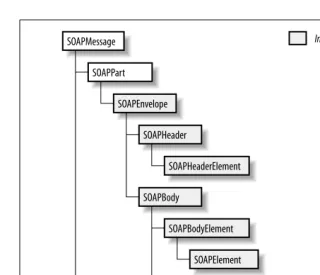
Although a SOAP message is transmitted as a set of characters encoded in UTF-8, holding the message in character form would make it difficult to manipulate. Instead, SOAPMessage contains a hierarchy of objects that represent the various parts of the message and the XML elements and text (if any) that it contains. The message is kept in this form until it is ready to be transmitted, at which point a UTF-8 byte stream is created from its content. Figure 3-3 shows a typical hier-archy of elements that might make up aSOAPMessage object.
A SOAPMessage object consists of a single SOAPPart and zero or more
AttachmentParts. The default message returned by the MessageFactory createMessage( ) method contains a SOAPPart but no attachments.
AttachmentParts, if they are required, must be explicitly created and added to create a SOAP with attachments message. The SOAPPart, in turn, contains a
SAAJ
SOAPMessage
SOAPMessage is an abstract class that represents the whole SOAP message. It contains methods that deal with the following:
MIME headers
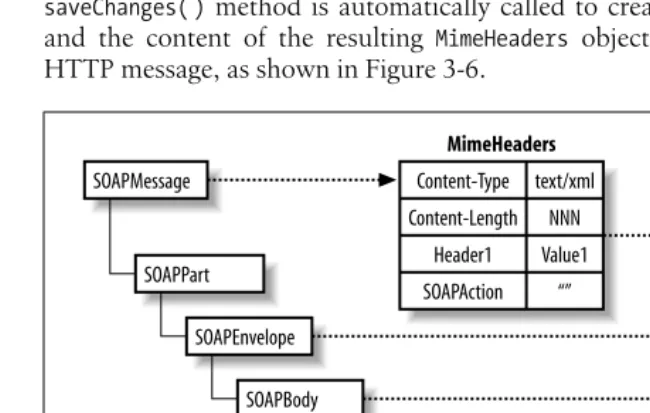
When a SOAP message is wrapped in a MIME-aware transport protocol such as HTTP or SMTP, MIME-related information must be included to identify the data being carried as an XML message. A SOAPMessageobject supplies default values for the MIME Content-Type, Content-Length, and SOAPAction
headers, but it also provides a method that returns the underlying
MimeHeadersobject that contains the associated MIME headers. You can use this object to retrieve the headers for a received message or to add additional ones for an outgoing message. See “SOAP Messages and MIME Headers” later in this chapter, for details.
SOAPMessagealso provides a convenience method to set or retrieve the value of the optionalContent-Descriptionheader, which is used to attach descriptive text to the message.
Conversion between object and byte format
A SOAP message is created and manipulated by application code as a tree of objects like that shown in Figure 3-3. For transmission, however, it must be converted to a byte stream that represents the XML itself. ThesaveChanges( )
Figure 3-3. Component parts of a SOAPMessage object with a single attachment
SOAPMessage SOAPPart
SOAPEnvelope SOAPHeader
SOAPHeaderElement SOAPBody
SOAPBodyElement SOAPElement SOAPBodyElement
SOAPElement Text AttachmentPart
method creates a byte array that represents the object tree and stores it within theSOAPMessageobject ready to be written by thewriteTo( )method. Since the creation of the byte representation is an expensive process, it should be performed only if it has not already been done, or if the content of the object tree has been modified since saveChanges( )was last called. The
saveRequired( )method can be used to determine whether it is necessary to call saveChanges( ). The writeTo( ) method calls both saveRequired( ) and
saveChanges( ) as necessary, so it is rarely necessary for client code to do anything other than callwriteTo( ).
Access to the SOAPPart object
The SOAPMessage getSOAPPart( ) method returns a reference to the SOAPPart
that contains the XML parts of the message:
public SOAPPart getSOAPPart( ) throws SOAPException;
Note that it is not possible to replace the SOAPPart associated with a
SOAPMessage.
Attachments
A SOAPMessage can have any number of attachments, each of which may contain data of any type that has a MIME encoding.SOAPMessageprovides the methods necessary to create theAttachmentPartobjects that represent indi-vidual attachments, add them to the message, retrieve them, and remove them. Attachments must be used if it is necessary to include non-XML content in a message; their use is described in detail in “SOAP with Attach-ments,” later in this chapter.
SOAPPart
TheSOAPPart object is a wrapper for the SOAP envelope and therefore contains the part of the message that must be represented in XML. For simple SOAP messages,SOAPPart does not really add anything other than the ability to access theSOAPEnvelopeobject, but for a SOAP message with attachments, it provides the ability to manipulate the content of the MIME wrapper for the SOAP part of the message, as shown in Figure 3-2.
Access to the SOAPEnvelope object
For most practical purposes, thegetEnvelope( ) method is the most impor-tant feature ofSOAPPart:
public SOAPEnvelope getEnvelope( ) throws SOAPException;
There is no direct way with the SAAJ API to create your ownSOAPEnvelope
object and use it to replace the one installed when aSOAPMessageis created. However, you can replace the entire content of the SOAPPart, as described next, which has the same effect but is less convenient.
MIME headers
SAAJ
SOAPPart content replacement
The getContent( ) and setContent( ) methods allow access to and replace-ment of the content of theSOAPPartin a form that can be manipulated by the JAXP APIs. ThesetContent( )method in particular can be used to replace the SOAP envelope with an alternative that is represented by a DOM tree or the content of an input stream encoded in XML. While this might have some practical applications, it would be more useful to be able to import XML in either of these forms into the SOAP body, but there is currently no API that supports this.*
SOAPEnvelope
This object represents the SOAP envelope, which must contain a singleSOAPBody
object and may contain aSOAPHeaderand additional XML elements. If these parts are present, they must appear in the following order: header, body, and addi-tional elements. Like SOAPPart, SOAPEnvelope is of little direct use to most applications, except as a means of accessing the header and body parts.
Access to the SOAP header and body parts
SOAPEnvelopeprovides methods that allow references to the header and body objects that it contains to be retrieved:
public SOAPBody getBody( ) throws SOAPException; public SOAPHeader getHeader( ) throws SOAPException;
The message created by the MessageFactory createMessage( ) method contains empty header and body parts.
Replacement of the SOAP header and body parts
It is possible to create and add a new header or a new body part to a SOAP message. This is useful when modifying the content of a received message in order to forward it or to use it as the basis for the reply to the sender:
public SOAPBody addBody( ) throws SOAPException; public SOAPHeader addHeader( ) throws SOAPException;
These methods create, install, and return an empty SOAPBody orSOAPHeader
object, respectively. These methods represent the only way to directly create instances of these objects. You can only install a new SOAPHeaderor a new
SOAPBodyif you have already removed the previous one. There are, however, no methods named removeHeader( ) or removeBody( ) that allow you to do this. Instead, you have to rely on the fact that bothSOAPBodyandSOAPHeader
(likeSOAPEnvelope) are derived from thejavax.xml.soap.Nodeinterface, which provides thedetachNode( )method to allow it to be removed from whatever it is contained in. Here, for example, is how you would remove theSOAPHeader
from aSOAPMessage and install a new, empty one:
// Remove the message header
SOAPEnvelope envelope = message.getSOAPPart( ).getEnvelope( ); envelope.getHeader( ).detachNode( );
// Add a new header
SOAPHeader header = envelope.addHeader( );
Nodes are discussed in “Nodes, Elements, and Names,” later in this chapter.
Creation ofName objects
For reasons of backwards-compatibility with Version 1.0 of JAXM (which contained the API that is now known as SAAJ),SOAPEnvelopeincludes factory methods that createNameobjects for use with XML elements within the enve-lope. In SAAJ 1.1, the preferred way to create Nameobjects is by using the
SOAPFactory class. Name objects are described in “Nodes, Elements, and Names,” later in this chapter.
SOAPHeader
SOAPHeader is a container for headers that determines the way in which the message payload is processed or interpreted. There are standardized uses of SOAP, such as SOAP-RP or ebXML-TRP, that specify the format of certain headers that are of meaning to receivers that implement these standards, but applications are free to define and use their own private headers.*SOAP itself does
not specify any standard headers, and therefore the API provided bySOAPHeaderis restricted to methods that add a new header entry or allow existing header entries to be accessed. SOAP headers are discussed in “SOAP Headers,” later in this chapter.
SOAPBody
SOAPBodyis the container that holds the real payload of the SOAP message. Logi-cally, the payload consists of one or more XML document fragments. However, in the SAAJ API, the payload is constructed as a hierarchy of elements and text nodes, represented by theSOAPElementandNodeinterfaces (described in the next section). The payload is typically included in the body by creating a
SOAPBodyElementto represent the root element of each fragment and then adding nested elements and text as necessary:
public SOAPBodyElement addBodyElement(Name name) throws SOAPException;
The body may also contain aSOAPFaultobject that reports a failure to properly process either a message header or the message payload itself.SOAPBodyprovides methods to add a SOAPFaultobject to the body and to handle one in a message that has been received. This API is covered in “SOAP Fault Handling,” later in this chapter.
Nodes, Elements, and Names
The SAAJ interfaces that we have seen so far provide the framework within which SOAP messages can be built, but the actual message content is constructed by
SAAJ
using four more basic interfaces that are described in this section. Here’s a brief description of these interfaces, which we’ll expand on by reference to an example in the rest of this section:
Name
In XML terms, aNameobject represents aqualified element name(orQName)— that is, a local name together with an optional namespace prefix and the associ-ated namespace URI. For example, in the case of the XML tag that represents the SOAP envelope:
<soap-env:Envelope xmlns:soap-env=
"http://schemas.xmlsoap.org/soap/envelope/">
Envelopeis the local name of the element,soap-envis the namespace prefix,
http://schemas.xmlsoap.org/soap/envelope/is the URI that uniquely identi-fies the namespace, and the combination soap-env:Envelopeis the qualified element name (qualified because it contains a namespace prefix).
Node
Nodeis the base interface for the nodes in the object tree that make up the content of a SOAP message. It provides the methods necessary to link itself to or remove itself from its parent node as well as to allow application code to discover its parent node. However, this interface does not provide a way to add child nodes and therefore represents a leaf in the object tree. SAAJ appli-cations usually do not deal directly withNodes—instead, they handle objects of the derived typesSOAPElement andText.
Text
Textis a type ofNodethat holds a text string.Textis always a leaf node and its content may represent an XML comment.
SOAPElement
SOAPElementis a subinterface ofNodethat adds the methods required to attach child nodes, and therefore need not always be a leaf in the object tree.
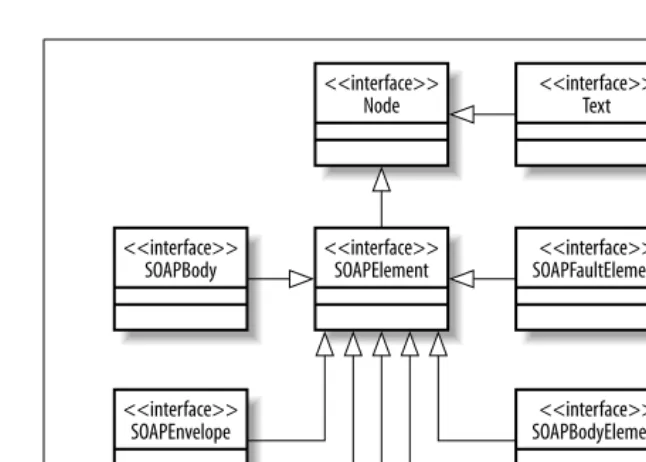
SOAPElementhas a number of subinterfaces that represent entities that can appear within the SOAPPart. These subinterfaces and their relationships toSOAPElement
andNode are shown in Figure 3-4.
It is interesting to note that SOAPEnvelope, SOAPBody, and SOAPHeader are all
SOAPElements, which implies that you can add content directly to them. This is, of course, true, although we’ll see later that bothSOAPBodyandSOAPHeaderhave their own specific SOAPElementvariants (SOAPBodyElementand SOAPHeaderElement) that are used as their immediate children and take special action when you attempt to add an arbitrarySOAPElementinstead. We’ll look at how a typical SOAP message is constructed by examining an example application that gets a list of O’Reilly book titles from a server and displays them in list form in a Swing-based user interface. Later in this chapter, we’ll extend this example so that it can fetch images of the front covers of these books from the server, as an illustration of the use of non-XML SOAP message attachments.
Before running this example, you need to compile and deploy the service imple-mentation, which is based on SAAJServlet. To do so, start your web server or application server, open a command window and make chapter3\
bookimageserviceyour working directory, and then use the following command to
build and deploy the servlet:
Next, compile and run the client application using the command:
ant compile-client run-client
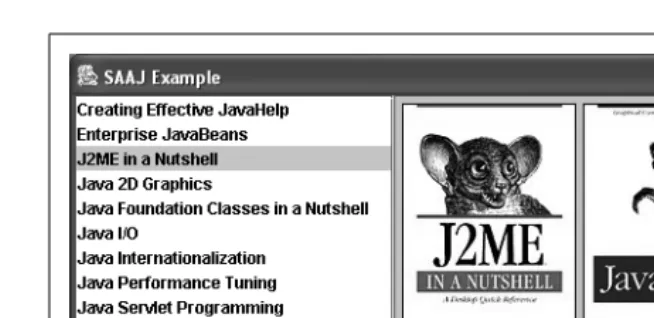
Once the client starts, you’ll see the list of books that it has obtained from the server, as shown in Figure 3-5.
Constructing the SOAP message to get the book titles
The SOAP message that is sent to get the list of book titles is shown in Example 3-4.
Figure 3-4. SAAJ interfaces used in building SOAP messages
Figure 3-5. SAAJ client showing a list of book titles obtained from a SAAJ server
<<interface>> Node
<<interface>> SOAPElement
<<interface>> Text
<<interface>> SOAPFaultElement
<<interface>> SOAPBodyElement <<interface>>
SOAPBody
<<interface>> SOAPEnvelope
<<interface>> SOAPHeader
<<interface>> DetailEntry
<<interface>> SOAPHeaderElement
<<interface>> Detail
SAAJ
There are three differences between this message and the empty one shown in Example 3-2:
• The SOAP header part has been removed because headers are not required by this application.
• The addition of a namespace declaration on theEnvelope element. • The SOAP body contains an application-defined element calledBookList. TheBookListelement is, of course, not defined by the SOAP 1.1 specification—it is a private element that is recognized by the web service as a request to send the list of book titles that it knows about. Since this request does not need any param-eters, all that is required is an empty element. However, since the BookList
element is private, we define an XML namespace for the web service, assign a prefix to it, and associate the prefix with the element name, so that there is no ambiguity about the meaning of the request.
The namespace itself is defined by thexmlnsattribute on theEnvelopeelement, as shown on line 3 of Example 3-4. In order to declare a namespace, we have to assign a prefix and associate it with the namespace’s URI. In this case, we chose to use the prefixtns. Although arbitrary, it is quite common to use this particular prefix for the namespace that refers to the service’s private elements, since the letterstnsserve as a useful mnemonic for “this namespace,” as distinct from the namespace used for the elements that are part of the SOAP envelope itself. The namespace URI is, again, arbitrary, although it should be unique, and the same value must be used by both the client and the web service implementation.*Here,
we choose to use a URN with a string value that identifies the service as the book image service from this book, but we could have used any other valid URI. The SOAP 1.1 specification does not actually require elements in the body of the SOAP message to be namespace-qualified, although it recommends that they are. From the point of view of the service implementation, it is just as well to require that the client supplies the namespace so it can unambiguously check that if it receives a BookList element from a client, the element actually represents the
BookList request that it provides, rather than a similarly named request for an entirely different service. You’ll see shortly how the service implementation makes this check. Incidentally, you don’t have to associate a namespace prefix with every
Example 3-4. A SOAP message sent to retrieve book titles from a web service
1 <?xml version="1.0" encoding="UTF-8"?>
2 <soap-env:Envelope xmlns:soap-env="http://schemas.xmlsoap.org/soap/envelope/" 3 xmlns:tns="urn:jwsnut.bookimageservice">
4 <soap-env:Body> 5 <tns:BookList/>
6 </soap-env:Body> 7 </soap-env:Envelope>
SOAP element. You can, if you wish, declare a default namespace on an element, like this:
<?xml version="1.0" encoding="UTF-8"?> <soap-env:Envelope xmlns:soap-env=
"http://schemas.xmlsoap.org/soap/envelope/"
xmlns="urn:jwsnut.bookimageservice"> <soap-env:Body>
<BookList/>
</soap-env:Body> </soap-env:Envelope>
An xmlns attribute without an associated namespace prefix specifies the namespace that will be associated with any element, such asBookList, that does not have an explicit namespace prefix. This default is in operation for the scope of the element to which thexmlns attribute is attached.
Now let’s look at the code that created theSOAPMessageshown in Example 3-4. This code is shown in Example 3-5.
The first part of this code (lines 2 to 6) creates an empty message, gets a reference to theSOAPEnvelope, and then removes the empty header part, which this applica-tion does not use. Line 9 adds the declaraapplica-tion of the private namespace used by this service using theSOAPElement addNamespaceDeclaration( ) method:
public SOAPElement addNamespaceDeclaration(String prefix, String uri) throws SOAPException;
In this case, the prefix and the URI supplied are declared as static strings within the class definition:
// The URI used to qualify elements for this service
private static final String SERVICE_URI = "urn:jwsnut.bookimageservice"; // The namespace prefix used in elements for this service
private static final String SERVICE_PREFIX = "tns";
TheaddNamespaceDeclaration( )method can be used to attach a namespace decla-ration to any SOAPElement. Its effect is scoped to that element and its child elements, and returns a reference to theSOAPElementon which it is invoked. In this case, we apply the declaration to theSOAPEnvelopeitself, so that it applies to the entire message.
Example 3-5. Constructing a SOAP message using the SAAJ APIs
1 // Build the message
2 SOAPMessage message = messageFactory.createMessage( ); 3
4 // Remove the message header
5 SOAPEnvelope envelope = message.getSOAPPart( ).getEnvelope( ); 6 envelope.getHeader( ).detachNode( );
7
8 // Set up the namespace declaration
9 envelope.addNamespaceDeclaration(SERVICE_PREFIX, SERVICE_URI); 10
SAAJ
Lines 12 and 13 are responsible for adding the BookList element to the SOAP body, using theSOAPBody addBodyElement( ) method:
public SOAPElement addBodyElement(Name name) throws SOAPException;
The Name object passed to this method determines the element name and the namespace within which it is defined. As you’ll see later in this chapter, there are several ways to create aNameobject. In this case, theNameis created using one of the methods provided by theSOAPFactory class:
// The name of the element used to request a book name list private static Name BOOK_LIST_NAME;
// SOAPFactory for message pieces private static SOAPFactory soapFactory; // Create the BookList element
soapFactory = SOAPFactory.newInstance( );
BOOK_LIST_NAME = soapFactory.createName("BookList", SERVICE_PREFIX, SERVICE_URI);
SOAPFactory is a factory for objects that can be added to SOAP messages, including SOAPElements, Detail objects (which are used in connection SOAP faults), andNames.*ANameobject is a representation of a fully qualified element
name and therefore requires the following attributes: • The local name of the element—in this case,BookList
• The URI of the namespace within which the name is defined • The prefix used to represent the namespace (tns in this example)
It is also possible to haveNames that are not namespace-qualified. In these cases, the URI and namespace prefix are bothnull.
Once theNameis created, theSOAPBody addBodyElement( )method creates the actual
SOAPBodyElementand installs it in the body. Since this element does not have any nested elements, it ends up looking like this:
<tns:BookList/>
You can see that the namespace prefix and the local name that were used to create theName object become part of the element.
Handling the BookList request in the service implementation
The book image service is implemented as a servlet derived from SAAJServlet, much of the code for which is shown in Example 3-6.
*SOAPFactoryis a new class added to SAAJ Version 1.1. The earlier API (JAXM 1.0) used the
SOAPEnvelope createName( )methods, which require access to theSOAPEnvelopeobject, to create
Example 3-6. A servlet that uses SAAJ to provide the book image web service
/**
* A servlet that uses SAAJ attachments to * serve images to a client.
*/
public class BookImageServlet extends SAAJServlet { // The XML Schema namespace
private static final String XMLSCHEMA_URI = "http://www.w3.org/2001/XMLSchema"; // The XML Schema instance namespace
private static final String XMLSCHEMA_INSTANCE_URI = "http://www.w3.org/2001/XMLSchema-instance"; // Namespace prefix for XML Schema
private static final String XMLSCHEMA_PREFIX = "xsd"; // Namespace prefix for XML Schema instance
private static final String XMLSCHEMA_INSTANCE_PREFIX = "xsi"; // The namespace prefix used for SOAP encoding
private static final String SOAP_ENC_PREFIX = "SOAP-ENC"; // The URI used to qualify elements for this service
private static final String SERVICE_URI = "urn:jwsnut.bookimageservice"; // The namespace prefix used in elements for this service
private static final String SERVICE_PREFIX = "tns"; // MessageFactory for replies from this service private static MessageFactory messageFactory; // SOAPFactory for message pieces
private static SOAPFactory soapFactory;
// The name of the element used to request a book name list private static Name BOOK_LIST_NAME;
// The name of the element used to reply to a book name list request private static Name BOOK_TITLES_NAME;
// The name of the element used to request a book image private static Name BOOK_IMAGE_REQUEST_NAME;
// The name of the element used to respond to a book image request private static Name BOOK_IMAGES_NAME;
// The name of the attribute used to hold the image encoding private static Name IMAGE_TYPE_ATTRIBUTE;
SAAJ
/**
* Handles a received SOAP message. */
public SOAPMessage onMessage(SOAPMessage message) throws SOAPException { if (messageFactory == null) {
// Create all static data on first call messageFactory = MessageFactory.newInstance( ); soapFactory = SOAPFactory.newInstance( );
BOOK_LIST_NAME = soapFactory.createName("BookList", SERVICE_PREFIX, SERVICE_URI);
BOOK_TITLES_NAME = soapFactory.createName("BookTitles", SERVICE_PREFIX, SERVICE_URI);
BOOK_IMAGE_REQUEST_NAME =
soapFactory.createName("BookImageRequest", SERVICE_PREFIX, SERVICE_URI);
BOOK_IMAGES_NAME = soapFactory.createName("BookImages", SERVICE_PREFIX, SERVICE_URI);
IMAGE_TYPE_ATTRIBUTE = soapFactory.createName("imageType", SERVICE_PREFIX, SERVICE_URI);
HREF_ATTRIBUTE = soapFactory.createName("href"); }
// Create the reply message and define the namespace // and encoding for the elements used in the reply. SOAPMessage reply = messageFactory.createMessage( );
SOAPEnvelope replyEnvelope = reply.getSOAPPart( ).getEnvelope( ); replyEnvelope.getHeader( ).detachNode( );
replyEnvelope.addNamespaceDeclaration(SERVICE_PREFIX, SERVICE_URI); replyEnvelope.addNamespaceDeclaration(SOAP_ENC_PREFIX,
SOAPConstants.URI_NS_SOAP_ENCODING); replyEnvelope.addNamespaceDeclaration(XMLSCHEMA_PREFIX, XMLSCHEMA_URI); replyEnvelope.addNamespaceDeclaration(XMLSCHEMA_INSTANCE_PREFIX,
XMLSCHEMA_INSTANCE_URI); replyEnvelope.setEncodingStyle(SOAPConstants.URI_NS_SOAP_ENCODING);
SOAPBody replyBody = reply.getSOAPPart().getEnvelope( ).getBody( ); // There are two requests - one for the list of
// book titles, the other for the image for a book.
SOAPBody requestBody = message.getSOAPPart().getEnvelope( ).getBody( ); Iterator iter = requestBody.getChildElements( );
if (iter.hasNext( )) {
// The child element contains the request SOAPElement element = (SOAPElement)iter.next( ); Name elementName = element.getElementName( ); if (elementName.equals(BOOK_LIST_NAME)) { handleBookListRequest(replyBody);
} else if (elementName.equals(BOOK_IMAGE_REQUEST_NAME)) { handleBookImageRequest(element, reply);
} else {
// Unrecognized request - this is a fault.
The first part of theonMessage( )method is concerned with creating objects such asNames that will be used to build a reply message the first time the service is used, and then creating the envelope for the reply message, which we’ll look at more closely very shortly. Before the reply can be constructed, however, the received message must be examined to identify the client request that it contains. To do this, it is necessary to find the first child element of the SOAP body and extract its element name. Here is the code that does this:
SOAPBody requestBody = message.getSOAPPart( ).getEnvelope( ) .getBody( );
Iterator iter = requestBody.getChildElements( ); if (iter.hasNext( )) {
// The child element contains the request SOAPElement element = (SOAPElement)iter.next( );
AlthoughSOAPBody does not provide any methods for accessing its content, the
SOAPElementinterface from which it is derived does provide this facility. In partic-ular, thegetChildElements( )method returns anIteratorthat can be used to step through all of the immediate child elements of the SOAPElement to which it is applied. In this case, we expect to find exactly one child element; if we don’t find any, then the message has been constructed incorrectly and the request will not be processed. Instead, a reply message containing a SOAP fault will be returned to the client, as described in “SOAP Fault Handling,” later in this chapter.
Assuming that we find a child element, the next step is to find out what it repre-sents. So far, we have only seen theBookListrequest, but in fact, this servlet can also handle a request for a cover image for a book with a given title, the imple-mentation of which we’ll look at when we discuss how to use SOAP attachments. It is therefore necessary to work out which of these two requests has been received:
Name elementName = element.getElementName( ); if (elementName.equals(BOOK_LIST_NAME)) { handleBookListRequest(replyBody);
} else if (elementName.equals(BOOK_IMAGE_REQUEST_NAME)) { handleBookImageRequest(element, reply);
} else {
createFault(replyBody, "soap-env:Client.UnknownRequest", "Unrecognized request", SERVICE_URI, elementName. getLocalName( ));
} } else {
// No request - this is a fault
createFault(replyBody, "soap-env:Client.MissingRequest", "Missing request", SERVICE_URI, "No request found"); }
return reply; }
// HELPER METHODS NOT SHOWN...
}
SAAJ
// Unrecognized request - this is a fault.
createFault(replyBody, "soap-env:Client.UnknownRequest",
"Unrecognized request", SERVICE_URI, elementName.getLocalName( )); }
TheSOAPElement getElementName( )method returns theNameobject that identifies the element, which contains the local element name and the URI for its associ-ated namespace. To determine which request has been received, we compare the element name against two fixed values,BOOK_LIST_NAMEandBOOK_IMAGE_REQUEST_ NAME, which are constructed (using the SOAPFactoryclass) with the appropriate local names and the private URN associated with this service. This is, of course, the same URN (urn:jwsnut.bookimageservice)used by the client. Notice that the comparison is performed using the equals( ) method, which, for Name objects, returns true if both the local names and the namespace URIs are the same.*
Depending on the result of the test, the handleBookListRequest( ) or the
handleBookImageRequest( ) method is called, or, if the element name does not match either of the expected values, a SOAP fault is returned to the client. Here, we are interested only in thehandleBookListRequest( )method. Before we look at its implementation, however, let’s examine the SOAP message that the service sends in reply to the client’sBookList request, which is shown in Example 3-7.
* In the case ofNames that do not have namespace qualifiers, this test still works because the namespace URI for such aName isnull.
Example 3-7. A SOAP message containing a list of book titles
<?xml version="1.0" encoding="UTF-8"?>
<soap-env:Envelope xmlns:soap-env="http://schemas.xmlsoap.org/soap/envelope/" xmlns:tns="urn:jwsnut.bookimageservice"
xmlns:SOAP-ENC="http://schemas.xmlsoap.org/soap/encoding/" xmlns:xsd="http://www.w3.org/2001/XMLSchema"
xmlns:xsi="http://www.w3.org/2001/XMLSchema-instance"
soap-env:encodingStyle="http://schemas.xmlsoap.org/soap/encoding/">
<soap-env:Body>
<tns:BookTitles xsi:type="SOAP-ENC:Array"
SOAP-ENC:arrayType="xsd:string[]">
<item>Java in a Nutshell</item> <item>J2ME in a Nutshell</item> <item>Java 2D Graphics</item> <item>Java I/O</item> <item>JavaServer Pages</item>
<item>Java Internationalization</item>
<item>Java Foundation Classes in a Nutshell</item> <item>Java Performance Tuning</item>
<item>Creating Effective JavaHelp</item> <item>Enterprise JavaBeans</item> <item>Java Servlet Programming</item> <item>Java Swing</item>