Journal of Computing and Security
AUBUE: An Adaptive User-Interface Based on Users’ Emotions
Fariba Noori
aMohammad Kazemifard
a,∗aDepartment of Computer Engineering, Razi University, Kermanshah, Iran.
A R T I C L E I N F O.
Article history: Received:09 June 2016
Revised:14 February 2017
Accepted:20 July 2017
Published Online:26 November 2017
Keywords:
Human-Computer Interaction, Affective Computing, Adaptive Interface, Emotion, Mood; Color Selection.
A B S T R A C T
This paper is an attempt to introduce AUBUE - Adaptive User-Interface Based on Users’ Emotions- in which users’ emotions are detected through the users‘ interactions with the keyboard; then a graphical user interface’s color is adapted in accordance with the users’ emotion. The emotions of joy, distress, and anger from the Ortony, Clore, and Collins (OCC) emotion model are utilized to replicate the emotional state of the user. After detection of emotions and their intensities, the current mood of the user is updated, and the appropriate colors for the background of the graphical user interface are chosen with regards to the user’s current mood. For evaluation of the AUBUE, we implemented a game for guessing picture name. The game included four elements: (1) logging the demographic information, (2) type speed estimator, (3) guessing picture name, and (4) help. An evaluation was accomplished in two modes: in mode 1, the background color is static, and in mode 2 where the background’s color based on users’ emotion is dynamic. The results are represented based on the demographic factors and categorized in four groups: English level, English typing level, gaming experience and gender.
c
2016 JComSec. All rights reserved.
1
Introduction
Nowadays, researchers are trying to create intelligent applications. They have realized the importance of emotions in attention, planning, learning, memory, and decision-making. This leads to efforts to create emotionally intelligent interactive systems, which can detect human emotions, express emotions, and act properly considering human’s emotions [1]. Emotional intelligent systems can be used in many ways, such as designing intelligent robots [2], household appliances [3], and user-interfaces [4]. The current study will focus on building emotionally intelligent software user-interfaces.
∗ Corresponding author.
Email addresses:[email protected](F. Noori), [email protected](M. Kazemifard)
ISSN: 2322-4460 c2016 JComSec. All rights reserved.
User interfaces are considered to be a critical part of software. Adaptive interfaces that automatically change and adapt with their function ,and interactions are an important research topic [5]. There are too many rules and principles to design a user-interface [6–8], but interactive applications still have remark-able usability problems. In other words, at this time user interfaces cannot understand users. Hence, users see an inappropriate feedback, and this may increase their frustration. This frustration can decrease users’ performance and concentration and increase the prob-ability of mistakes by them [9].
Human-Computer Interaction involves investigation, planning, and design of the interaction between people (users) and [10]. Affective computing is the study and devel-opment of systems and devices that can recognize, interpret, process, and simulate human emotions [1]. Cognitive Ergonomic is relevant to mental processes such as response and contributes to coordination of things that are associated with with people in terms of people’s needs, abilities and inadequacies [11]. The very nature of cognitive ergonomics is to adjust such cognitive tools and their usage in order to boost hu-man information processing with regards to improv-ing efficiency, reducimprov-ing mistakes and accidents and enhance health. [12].
The user experience emotions toward an interface’s style of interaction, its colors, pictures, or content [5]. One reason for the problems of user interface is that the interface does not adjust or tune into users’ emo-tional states and users see the same user interface in different emotional states. The main purpose of this research is to find the relationship and influence of color interface on users’ emotion. Our intelligent in-terface, a users’ emotions can be somewhat controlled so that feedback from the software does not intensify negative emotions. In our proposed model, interac-tions of a user with the keyboard are investigated with respect to several predefined parameters. Then, the keyboard interactions are interpreted as emotions and mapped into a mood. Finally, a color is selected for a background to coordinate with the user’s mood.
This paper is organized as follows. First, we describe related works. Then, we present the background of the study including the OCC emotion model, mood and fuzzy systems. In the fourth section we will present the AUBUE and explain the details of this framework in-cluding keyboard interpretation, event interpretation, mood update, and color selection. Following, we de-scribe implementation of a computer game developed to evaluate the AUBUE. Then, the evaluation results are presented. In seventh section, we will present the discussion and the last section offers the conclusion and the perspective of future work.
2
Related Works
There are many studies about emotion recognition. Researchers have identified four major methods for human emotion recognition [13]: (1) voice (prosody) [14]; (2) observable behavior,i.e.users’ actions in the interface (for example, typing speed, keystroke dura-tion, keystroke latency, accuracy of typing, and so on) [15, 16]; (3) facial expressions [17, 18]; and (4) physio-logical signs (blood volume pulse, muscle tension, skin conductivity, and heart rate) [19]. Alternatively, some
researchers have combined more than one method for emotional recognition. In other words, they made use of a multimodal emotion recognition [20]. For exam-ple, Schuller et al. [21] discussed innovative methods to automatically approximate a user’s emotional state utilizing the speech signal and tactual interaction on a mouse or via touch screens. In this paper, we utilize the observable behavior method since in comparison with the other methods it is simple in practicability and available in all computers.
Many researchers are addressing the adaptable user interface to enhance the interaction between human and computers by increasing accessibility and per-formance of users [22–29]. Robinson and Burns [22] suggested a multi-level user interface to satisfy the requirements of specific users; Khme and Schneider-Hufschmidt [23] offered a consistent interaction tech-nique, called direct composition, for both the design and usage of user interfaces. Spath and Weule [24] de-veloped an adaptable human-computer interface for software application on the basis of a user and task model. Akoumianakis and Stephanidis designed and implemented a prototype for a user modeling mod-ule (UMM) which is available to various user groups, including people with shortcomings [25]. Hung and Colomb [26] presented a modeling technique to fa-cilitate the development of adaptable user interface systems. Some studies were about adaptable user in-terfaces for disabled users (e.g.motor-impaired, color blind) [7, 30–32]. Encelle and Baptiste-Jessel [27] gen-erated a personalized multimodal user interface for browsing XML content by which user’s interfaces can be adapted according to the kind of content users de-sire to browse. An architecture and automatic frame-work were introduced for development and runtime management of multimodal interfaces in a pervasive environment by Avouac, Lalanda, and Nigay [29]. Mul-timodal interaction has to be tailored to dynamically tune into various computing and interaction settings, user profiles and application needs[29]. Hervs and Bravo [28] presented a ViMos framework to support visualization services for management of adaptable user interfaces with respect to context changes at run time.
User-system performance and the user similarity are two key elements in cognitive ergonomics [34]. Brinkman and Fine [34] presented a customized emo-tional design for exploration of the correlation between user personality and user interface skin preferences. The results showed that color and similarity-attraction are two fundamental factors in correlations between personality factors and skin preferences. Rauterberg [35] presented the AMME (Automatic Mental Model Evaluation) method promoted to aid with the process of the cognitive scientist studying user behavior [35].
3
Background
3.1 OCC Emotion Model
We have used the Ortony, Clore, and Collins (OCC) model of emotion [36] which indicates a computa-tional model for analyzing emotions. This model de-notes eleven positive/negative pairs of emotion. In this model depending on a person’s concern about events, actions, and objects, different emotions are elicited. In this research, only the following three emotions of OCC are used:
(1) Joy is the occurrence of a desirable event. (2) Distress is the occurrence of an undesirable
event.
(3) Anger is a compound emotion along with re-proach (express to (someone) one’s disapproval of or disappointment in their actions).
In [37] a computational model called GEmA is in-troduced to map the environmental events and tie an agent’s actions to emotional states. It is applied in the mood-updating element (discussed in Section 4.3).
3.2 Mood
The difference between emotion and mood is that mood is a longer lasting affective state. Mehrabian and Russell developed a psychological model called PAD to describe and measure emotions [38, 39]. In this model, mood was described with three traits: Pleasure (P), Arousal (A), and Dominance (D).
(1) The Pleasure-Displeasure Scale evaluates the extent to which an emotion could be pleasant. For example, both anger and fear are undesired emotions, and pain is high on the displeasure spectrum. However, joy is a delightful emotion [38].
(2) The Arousal-Nonarousal Scale investigates the severity of an emotion. For instance while both anger and rage are unpleasant or miserable emo-tions, rage has a higher severity on the contin-uum. On the contrary, boredom, which is also an
Table 1. Mood Octant of the Pad Space
+P+A+D Exuberant
+P+A-D Dependent
+P-A+D Relaxed
+P-A-D Docile
-P-A-D Bored
-P-A+D Disdainful
-P+A-D Anxious
-P+A+D Hostile
unpleasant mode, has a low arousal value [38]. (3) The Dominance-Submissiveness Scale embodies
the controlling and dominant aspect of the emo-tion. For example, while both fear and anger are unpleasant modes, anger is a much dominant emotion, and fear is a submissive one [38]. “This model defines mood as an average of a per-son’s emotional states across a representative variety of life settings. The three traits are nearly indepen-dent, and form a three dimensional mood space” [40]. In this space, each dimension takes a value between -1.0 to -1.0. Table 1 describes the classification of moods according to the position of their traits in the PAD mood space [40].
3.3 Fuzzy Systems
The fuzzy set theory provides a natural method for dealing with linguistic terms (i.e.easy, normal, and hard) of the linguistic variables (i.e. problem diffi-culty). A general fuzzy system includes the following elements [41]:
(1) Fuzzification converts the crisp value of input variables into fuzzy inputs using fuzzy member-ship functions (MF).
(2) The Knowledge base contains fuzzy rules based on the domain expert’s knowledge.
(3) Fuzzy inference converts fuzzy inputs into fuzzy outputs using the knowledge base.
(4) Defuzzification converts fuzzy outputs into crisp values.
We use fuzzification in this study. In other words, we utilized the membership functions to convert our inputs into a value between 0 and 1.
4
Method
Figure 1. The Architecture of AUBUE.
the following sections.
4.1 Keyboard Interpreter
This element detects pressed keys on the keyboard and calculates keyboard parameters. Keyboard parame-ters include typing speed (words per minute), number of backspaces (per minute), number of unrelated keys (per minute), and use of keyboard by the user (true or false). These parameters are sent to the event inter-preter element. We have two definitions for unrelated keys in our implementation: a user presses several keys rapidly without having any goals or expectations.
4.2 Event Interpreter
This element of AUBUE, converts the keyboard pa-rameters of the keyboard interpreter into keyboard events and then converts keyboard events into OCC emotions. Stathopoulou and et al. [42] specified some keyboard events. Their work has been extended here in two ways: using fuzzy sets instead of Boolean val-ues for each event and adding two new events: a user uses the backspace rarely, and a user hits unrelated keys rarely. Therefore, we have the following keyboard events:
• user types slowly (K1)
• user types normally (K2)
• user types quickly (K3)
• user uses the backspace rarely (K4)
• user uses the backspace often (K5)
• user hits unrelated keys rarely( K6)
• user hits unrelated keys often (K7)
• user doesn’t use the keyboard (K8)
These keyboard parameters are converted into a vector of keyboard events: (K1, K2, K3, K4, K5, K6, K7, K8) in which K1 to K7 take a value between 0 and 1 and K8 takes a Boolean value (0 or 1). The fuzzy
Figure 2. Fuzzy Set for Typing Speed Lower Than or Equal With 15 Words Per Minute.
set of typing speed is built at the beginning of our game for each user by a typing test since the typing speed of users are different. Given a user who types innately slow and with a static fuzzy set we may infer s/he feels sadness or anger when s/he type slowly and correctly. Hence, we have considered that a user types a sentence with speed X. If X is less or equal to 15 words per minute then the fuzzy set of Figure 2 is used, otherwise the fuzzy set of Figure 3 is used. We have considered that a minimum linguistic term for typing speed is 0-10, thus according to Figure 3, the minimum value of X is 15. The fuzzy set of unrelated keys and backspaces is shown in Figure 4 and Figure 5, respectively. Membership functions are used to set values of K1 to K7. For example, the membership function of typing speed receives the typing speed (word per minute) as an input parameter and returns a value between 0 and 1 for each typing speed (K1, K2, K3).
Figure 3. Fuzzy Set of Typing Speed Greater Than 15 Words Per Minute.
Figure 4. Fuzzy Set of Hitting Unrelated Keys.
Figure 5. Fuzzy Set of Hitting Backspace.
user [43]. On the grounds of this method the intensity of an emotion is calculated by Equation (1).
Ea[i] =Wi,K1K1 +Wi,K2K2 +Wi,K3K3+
Wi,K4K4 +Wi,K5K5 +Wi,K6K6+
Wi,K7K7 +Wi,K8K8 (1)
where Ea[i] is between 0 and 1 and it is the intensity of i-th active emotion: 1) joy, 2) distress, or 3) anger. Also, K1 to K8 refers to the value of the eight keyboard events. Another parameter is W which is the weight of an event. This means that the weight shows how much an emotion is influenced by a keyboard event. For example, W1,K2 presents the influence of normal typing (K2) on joy.
Weights are extracted according to the empirical study in [44]. With regards to the keyboard events, this study has the following results:
• when a user types normally, he may feel 55% neutral, 25% happiness, and 20% other emotions;
• when a user types quickly, he may feel 35% neu-tral, 43% happiness, and 22% other emotions;
• when a user types slowly, he may feel 20% neutral,
38% sadness, 27% anger, and 15% other emotions;
• when a user uses the backspace key often, he may feel 30% sadness, 60% anger, and 10% other emotions;
• when a user hits unrelated keys on the keyboard, he may feel 25% sadness, 40% anger, and 35% other emotions;
• when a user does not use the keyboard, he may feel 32% sadness, 27% anger, and 41% other emotions; Based on these results, we inferred that, for example, the weight of typing slowly in sadness is 0.38 and in anger is 0.27. For the weight of hitting backspace rarely (K4) and hitting unrelated keys rarely (K6), not provided in the above list, one half of the weight of hitting backspace often (K5) and hitting unrelated keys often (K7) are used, respectively. Based on our inference, since the summation of event weights of an emotion is greater than 1, we use a proportion of each weight. Hence, the equation of each emotion is in Equations (2), (3) and (4):
Happiness=(0.37∗K2) + (0.63∗K3)+ (0.165∗K4) + (0.123∗K6)+ (0.082∗(1−K8)) (2)
Sadness=(0.304∗K1) + (0.24∗K5)+ (0.2∗K7) + (0.256∗K8) (3)
Anger=(0.175∗K1) + (0.39∗K5)+ (0.26∗K7) + (0.175∗K8) (4) Therefore, the event interpreter returns the Emo-tion vector with the intensity of three emoEmo-tions (joy, distress, and anger).
4.3 Mood Update
This element maps the emotions generated by the event interpreter into the PAD mood space, and then updates the current mood. For mapping the OCC emotions into the PAD mood space a mapping table is used [40, 45]. This mapping table contains 16 OCC emotions and their corresponding points in the PAD space. Table 2 presents the mapping table between OCC emotion and PAD space for our three emotions.
Figure 6. Pull Function (Adapted From [40]).
Figure 7. Push Function (Adapted From [40]).
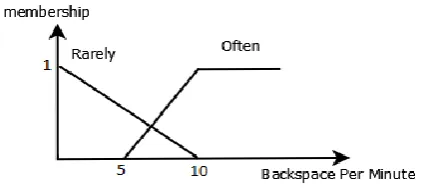
when the current mood position is between the PAD space’s zero point (0, 0, 0) and the emotion center. In the pull function, current mood is attracted towards the emotion center. The push function is active when the current mood position is either after or at the emotion center. In the push function, the current mood is pushed away from the emotion center [40]. Pull and push functions are illustrated in Figure 6 and Figure 7.
The output vector of the event interpreter is rep-resented asEa, current mood of user asM Cur, and average of mapped emotions (emotion center) asEc. Since we have two negative emotions and one positive emotion in Equation (8), a factor of two is considered for joy to equally distribute the influence of positive and negative emotions.
Ea= [e1, e2, e3];ei∈[0,1] (5)
M E2[i] = [ei∗αi1, ei∗αi2, ei∗αi3] (6)
αij = OCC to PAD matrix (Table 2) (7)
Ec= [
(2∗M E[1,1]) +M E[2,1]M E[3,1]
4 ,
(2∗M E[1,2]) +M E[2,2]M E[3,2]
4 ,
(2∗M E[1,3]) +M E[2,3]M E[3,3]
4 ] (8)
Now, for updating the current mood, Equation (9) is used (adapted from the practical certainty model in [41]). In this equation, Mcur[i] is the i-th dimension of Mcur. For example Mcur[46] is the pleasure’s value of Mcur.
Mood is a long lasting affective state which should not rapidly change. For example if a person is in a highly positive mood, a little negative emotion cannot turn this mood negative. Equation (9) prevents rapid changes in the current mood. In addition, this equation
causes either push or pulls events.
Mcur[i+1] =
Mcur[i] +Ec[i]∗(1−Mcur[i]),
Mcur[i], Ec[i]≤0
Mcur[i] +Ec[i]∗(1 +Mcur[i]),
Mcur[i], Ec[i]≥0 Mcur[i]+Ec[i]
1−min(Mcur[i],Ec[i]), otherwise
(9) The distance from the current mood to the PAD space’s zero point is measured to assign a name to the current mood to indicate its intensity. The maximum distance is 1.73, because the points in the PAD space take a value between -1 and 1. This distance is divided into three parts and then Table 3 is used to assign a name to the current mood. For instance, if the current mood is exuberant and its position in the PAD space is (0.2, 0.4, 0.1) then the current mood is slightly exuberant.
4.4 Color Selector
After specifying the current mood, it’s time to select an appropriate color for the current mood. In our view, an appropriate color to cope with a mood, especially a negative one, is a color causing the opposite mood. For example, when a user is in a bored mood (-P-A-D) we should select colors that cause an excited mood (+P+A+D). Table 4 is then used to map the PAD mood space to colors [47]. In Table 4, colors are based on the RAL Design System. In the RAL System Design (CIELAB LCh), each color is distinguished by the three parameters of lightness (L), chroma (C) and hue (h) [48]. According to [47], colors with a blue hue are more positive and dominant than the others. Hence, we select the colors in each group whose hue is the closest to the blue hue.
5
Implementation
Table 2. Mapping From OCC to PAD Space [40]
Emotion Pleasure (1) Arousal (2) Dominance (3) Mood Type
Joy (e1) 0.40 0.20 0.10 +P+A+D Exuberant
Distress (e2) -0.40 -0.20 -0.50 -P-A-D Bored
Anger (e3) -0.51 0.59 0.25 -P+A+D Hostile
Table 3. Mood Intensity Naming
Distance to PAD Space’S Center Intensity
0∼0.57 Slightly
0.58∼1.15 Moderate
1.16∼1.73 Fully
Table 4. Mapping Pad Space to Colors (Adapted From [47])
P A D Color
+ + +
+ +
-+ - +
+ -
-- + +
- + - Not Specified
- - +
- -
-2) dynamic background color based on users’ emotion (Figure 9). This game consists of four elements: (1) log-ging the demographic information; (2) typing speed estimator; (3) guessing picture name; and (4) help. These elements are described as follows for a user:
Logging the demographic information ele-ment logs demographic information of the user; namely, first name, last name, and age. This informa-tion will distinguish the logs of each user.
Typing speed estimator element estimates the typ-ing speed of users while typtyp-ing a sample sentence.
Guessing picture name element shows a picture to be guessed by the user. The number of guesses available is the number of the characters of the picture’s name. The user utilized the keyboard to provide this element. Here, we interpret the wrong characters as a backspace hits. We had a trial to estimate the keystroke latency in this element. Here, keystroke latency is the time elapsing from one key release to the next key press. In this trial, the mean times for pressing correct char-acters as well as pressing keys randomly and rapidly are computed for 20 pictures. The trial was conducted with a user who knows the game completely well and
guesses the letters very quickly. We assume other users will type slower. To have more confidence, we con-sider KLM (Keystroke Latency Mean) as the average for the mean time of pressing correct characters and pressing keys randomly and rapidly. If the user types quicker than the KLM, it is assumed that s/he is hit-ting unrelated keys. If a user cannot guess any letter, s/he can get help by clicking on the help button. The help element reveals one letter of the picture’s name. The help is disabled for the last remaining letter of the picture’s name. A score shows the reward and pun-ishment of correct and wrong guessing to encourage users to use help. If the user can correctly guess the picture’s name or the guessed letters are completed, then the “new word” button is enabled and s/he can go to the next picture.
Help element reveals one letter of the picture’s name. In this element, the user must type a sentence ran-domly selected from database. After typing, the user’s typing speed, number of backspaces, and number of unrelated keys are calculated. Here unrelated keys mean that the user presses some unexpected keys. There are buttons in this element that can change the computation of keyword parameters. When the user presses “I do not want help”, it means that s/he is re-gretting help and it is assumed that the user does not have patience for typing the sentence. In other words, the user may have bad feelings. Thus, this event in-creases negative emotions, sadness and anger. If a user remembers the name of the picture, s/he can select “I remember the name of picture” button. Selecting this button does not influence keyboard parameters. The length of the help sentences increases for each usage, meaning; the more help is used the longer the related sentences.
6
Evaluation
The viewpoint of users was collected by using three questionnaires namely: 1) demographic, 2) mode 1, and 3) mode 2.
Ques-Figure 8. Guessing Image Name Tool With Static Background’s Color (mode 1).
Figure 9. Guessing Picture Name Tool With Dynamic Background’s Color (mode 2), current mood of a user is detected as (+P+A+D), and background color has been changed to appropriate colors to cope with this mood.
tionnaire [53], the game satisfaction questionnaire [54], and three interface questions [55]. The subjects had to rate these questions on a 7-point Likert scale [56] from ‘strongly disagree’ (1) to ‘strongly agree’ (7). In the mode 2 questionnaire (17 questions), we designed three questions about the emotional states of users and changing color of interface.
6.1 Pilot Tests
We had five pilot tests to find an appropriate condition for evaluation of our game:
(1) Two users started playing with the game in mode 1 then a day later in mode 2. Users played in each mode for 30 minutes. In comparing mode 2 with mode 1, the satisfaction factor im-proved 6%, the interface factor decreased 11% ,
and the usefulness factor declined 6% . In this test, the changing of background color was not noticeable since the time between the tests was long (a day); hence, we started the pilot test (2). (2) Two users started playing with the game in
mode 2 then immediately changed to mode 1. Users played in each mode for 30 minutes. In comparing mode 2 with mode 1, both the sat-isfaction factor and interface factor remained the same or improved 0% while the usefulness factor improved by 19%. Mode 2 did not show any significant alterations; hence we started the pilot test (3).
inter-0 1 2 3 4 5 6 7
Pilot test 1 Pilot test 2 Pilot test 3 Pilot test 4 Pilot test 5
Likert
Figure 10. Effect of Background Color on Emotion in Pilot Tests (1-7 Is the Likert Scale).
face factor 4% and the usefulness factor 8%. The users’ satisfaction was significantly influenced by the duration of the play; hence we started the pilot test (4).
(4) Two users started playing with the game in mode 1 then immediately switched to mode 2. Users played in each mode for 15 minutes. In comparing mode 2 with mode 1, the satisfaction factor improved 47% , the interface factor 19% , and usefulness factor 30% . As the result showed, there was a significant outcome here.
(5) Two selected and motivated users started play-ing with the game in mode 1 then immediately switched to mode 2. Users played in each mode for 30 minutes. Users played with mode 2 sev-eral times before starting the test. In comparing mode 1 with mode 2, the improvement in the satisfaction factor was 81%, the interface fac-tor 106% and the usefulness facfac-tor 35%. While the results of this test were very significant, we did not find the users motivated enough to play our game several times more. Hence, we need to continue our evaluation with the procedures of the pilot test (4). Although this test implied significant improvement occurring during the long term playing with mode 2, we need more tests to prove this.
Figure 10 shows the effect of background color on emotion. According to this chart, the pilot test (5) is the most effective one, but as seen in the aforemen-tioned problems in pilot test (5), practicality issues are raised. Although the effect of background color in pilot test (3) is the same as in pilot test (4), the users played with the mode 2 game for a long time; hence, we used the pilot test (4) since the satisfaction of users was higher.
6.2 Experiments
For the evaluation of pilot test (4), we performed an experiment conducted with 13 students, three males and 10 females. First, users were asked to fill the de-mographic questionnaire. The results of this question-naire showed that the field of study of most users was computer science. The average age of the users was 23 years old. Their English proficiency level was interme-diate. They worked with the game in two modes: in mode 1 the background color is static and in mode 2 the background color is dynamic. Each subject partic-ipated in two 15 minutes experiments: one for mode 1 and the second for mode 2. Before beginning the periment, instructions and questionnaires were ex-plained to the subjects. Subjects played in mode 1 for 15 minutes and then immediately filled out the mode 1 questionnaire. Subsequently, in a second 15-minute period, subjects played the game in mode 2, with the proposed framework and changing background colors, and then they filled out the mode 2 questionnaire.
We categorized the results based on the demo-graphic factors: English level, typing level, gaming experience and gender. These result are discussed in more details in the following sections. Overall results of satisfaction, interface, and usefulness questions of mode 1 are compared with those of mode 2. There are three distinct questions in mode 2 which are dis-cussed separately: (1) effect of background color on emotion, (2) tangibility of changing background color and (3) annoyance of changing background color.
6.2.1 English level
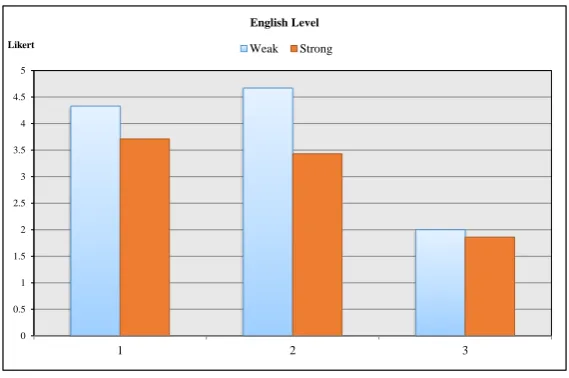
Fig-ure 11, results of satisfaction, interface and usefulness questions for the first group significantly improved. As showed in Figure 12, neutral and positive emotions of the first group were better than the second group. But negative emotions of the first group were also worse than the second group, possibly being the result of increased stress caused by lower scores. As shown in Figure 13, the effect of background color on emotion and the tangibility of a changing background color for the first group are better than the second group. The annoyance of a changing background color for both groups is almost the same.
6.2.2 Typing Level
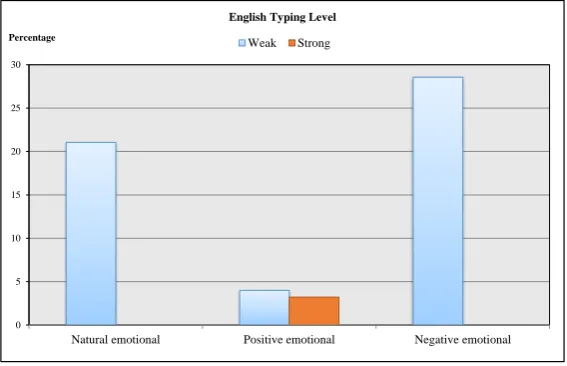
Based on typing level, the users were divided into two groups: (1) weak typing level (users with a likert scale less than, or equal to 4) and (2) strong typing level (users with a likert scale greater than 4). The first group included five users and second group included eight users. As showed in Figure 14, results of satis-faction and usefulness questions for the first group are improved significantly. But, the result of interface for the second group is better than that of the first group. As showed in Figure 15, neutral and positive emotions for the first group were better than the sec-ond group. But, negative emotion for the first group was worse than that of the second group since they may have been more stressed caused by lower scores. As shown in Figure 16, the effect of background color on emotion and the tangibility of a changing back-ground color for the first group was better than that of the second group. The annoyance of a changing background color for the first group is more than that of the second group.
6.2.3 Gaming Experience
Based on Gaming Experience, the users were divided into two groups: (1) little gaming experience (users with a likert scale less than, or equal to 4) and (2) high gaming experience (users with a likert scale greater than 4). The first group included six users and the second group included seven users. As showed in Fig-ure 17, results of satisfaction, interface and usefulness questions of the first group were improved significantly. As showed in Figure 18, neutral and negative emo-tions of the first group were worse than that of the second group. Conversely, positive emotion for the first group was better than the second group. As the shown in Figure 19, the effect of background color on emotion for both of them was the same. Tangibility of changing background color for the first group is better than that of the second group. The annoyance of a changing background color in the first group is worse than that of the second group.
6.2.4 Gender
Based on Gender, the users were divided into two groups: 1) female and 2) male. The first group in-cluded 10 users and second group inin-cluded three users. As shown in Figure 20, results of satisfaction, inter-face and usefulness questions of the first group were improved dramatically. As showed in Figure 21, the natural, positive and negative emotions of the second group were better than that of the first group. As the shown in Figure 22, the effect of background color on emotion for the first group was better than that of the second group. But the tangibility of a changing background color for the first group was worse than that of the second group. The annoyance of a chang-ing background color for the first group was better than that of the second group.
6.2.5 General
Generally, as mentioned before, the main purpose of this research is guiding the users to normal mood and positive emotions. As shown in Figure 23, results of satisfaction is improved significantly, but interface is decreased 2 per cent and usefulness has not varied in both modes. As displayed in Figure 24, the natural emotion, that is the main purpose, is significantly im-proved and it is about 20 percent. Positive emotions have also increased about 15 percent. Negative emo-tions increase 2 percent. As the shown in Figure 25, the effect of background color on emotion and tan-gibility of changing background color was 3.5 and 4. The annoyance of the changing background color is 1.5 which means changing background color was not an annoyance.
7
Discussion
The results showed that this game was more effective and more pleasant for people whose English level is weak since they may be more interested in learning English. It is more effective and more pleasant for people whose typing level is weak since they may be more interested in improving their typing speed. With regards to the gaming experience, the results showed that this game is more effective and more pleasant for people whose gaming experience was little since they may be more interested in learning English via a simple game. The interesting outcome from this evaluation is that is more effective and pleasant for females. This showed the change of color is more interesting and more pleasant for female than male.
-15 -10 -5 0 5 10 15 20 25 30
Satisfaction Interface Usefulness
Percentage
English Level
Weak Strong
Figure 11. Comparison of mode 2 With mode 1 Regarding English Level of Users for Satisfaction, Interface and Usefulness Questions.
-10 -5 0 5 10 15 20 25
Natural emotional Positive emotional Negative emotional
Percentage
English Level
Weak Strong
Figure 12. Comparison of mode 2 With mode 1 Regarding English Level of Users for Neutral, Positive and Negative Emotions Response to Interface.
0 0.5 1 1.5 2 2.5 3 3.5 4 4.5 5
1 2 3
Likert
English Level
Weak Strong
0 2 4 6 8 10 12 14
Satisfaction Interface Usefulness
Percentage
English Typing Level
Weak Strong
Figure 14. Comparison of mode 2 With mode 1 Regarding the English Typing Level of Users for Satisfaction, Interface and Usefulness Questions.
0 5 10 15 20 25 30
Natural emotional Positive emotional Negative emotional
Percentage
English Typing Level
Weak Strong
Figure 15. Comparison of mode 2 With mode 1 Regarding the English Typing Level of Users for Neutral, Positive and Negative Emotion Response to Interface.
0 5 10 15 20 25 30
Natural emotional Positive emotional Negative emotional
Percentage
English Typing Level
Weak Strong
-15 -10 -5 0 5 10 15 20 25 30
Satisfaction Interface Usefulness
Percentage
Gaming Experience
Weak Strong
Figure 17. Comparison of mode 2 With mode 1 Regarding the Gaming Experience of Users for Satisfaction, Interface and Usefulness Questions.
0 2 4 6 8 10 12
Natural emotional Positive emotional Negative emotional
Percentage
Gaming Experience
Weak Strong
Figure 18. Comparison of mode 2 With mode 1 Regarding the Gaming Experience of Users for Neutral, Positive and Negative Emotions Response to Interface.
0 0.5 1 1.5 2 2.5 3 3.5 4 4.5
1 2 3
Likert
Gaming Experience
Weak Strong
-15 -10 -5 0 5 10
Satisfaction Interface Usefulness
Percentage
Gender
Female Male
Figure 20. Comparison of mode 2 With mode 1 Regarding the Gender of Users for Satisfaction, Interface And Usefulness Questions.
-20 -10 0 10 20 30 40 50
Natural emotional Positive emotional Negative emotional
Percentage
Gender
Female Male
Figure 21. Comparison of mode 2 With mode 1 Regarding the Gender of Users for Neutral, Positive and Negative Emotions Response to Interface.
0 0.5 1 1.5 2 2.5 3 3.5 4 4.5 5
1 2 3
Likert
Gender
Female Male
-4.00 -2.00 0.00 2.00 4.00 6.00 8.00
Satisfaction Interface Usefulness Percentage
General
Comparison of mode 2 With mode 1 of Users
Figure 23. Comparison of mode 2 With mode 1 of Users for Satisfaction, Interface And Usefulness Questions.
0.00
2.00
4.00
6.00
8.00 10.00 12.00 14.00 16.00 18.00
20.00
Natural emotional Positive emotional Negative emotional Percentage
General
Comparison of mode 2 With mode 1 of Users
Figure 24. Comparison of mode 2 With mode 1 of Users for Neutral, Positive And Negative Emotions Response to Interface
0.00 0.50 1.00 1.50 2.00 2.50 3.00 3.50 4.00 4.50
1 2 3
Likert
General
Effects of Background Color
emotions in changing background color is significantly more than in static color. The satisfaction is also more effected on users. Tangibility of changing background color is normal and it is about 3.5, however, annoyance of changing background color is 2 (low).
8
Conclusion
In this paper, a framework for an intelligent user inter-face, namely, AUBUE was introduced which adjusts the background color of a user interface into the emo-tional states of a user. This framework consists of four elements:
(1) Keyboard interpretation: analyzing the interac-tions of the user with the keyboard
(2) Event interpretation: interpreting the keyboard interactions as emotions of the user
(3) Mood update: mapping emotions to a mood and updating the current mood of the user
(4) Color selector: selecting a color for the back-ground to cope with the user’s current mood Emotional states of a user are specified according to his/her interactions with the keyboard. For modeling the emotional state of the user, we used joy, distress, and anger from the OCC emotion model. After de-tection of emotions and their intensities, the current mood of the user is updated, and finally an appropri-ate color for the background of the user interface is selected with regards to the user’s current mood.
For evaluating the framework, we implemented a guessing framework for the name of the picture. The game includes four elements: (1) logging the demo-graphic information, (2) typing speed estimator, (3) guessing picture name, and (4) help. Three question-naires were utilized: 1) demographic questions, 2) a mode 1 questionnaire, and 3) a mode 2 questionnaire. Evaluation was accomplished in two modes: in mode 1, the background color is static, and in mode 2 the back-ground color, based on users’ emotion, is dynamic. Five pilot tests were undertaken to find the appropri-ate conditions for evaluating our game. According to the results, users should play the game in mode 1 for 15 minutes and then immediately change to mode 2 for another 15 minutes. The results were categorized into four categories based on the demographic factors: (1) English level, (2) typing level, (3) gaming experience and (4) gender. The results showed that this game was more effective and more pleasant for people whose English level, typing level and gaming experience were weak. Based on gender; satisfaction, usefulness and in-terface were more pleasant for females, and the effect of background color for females was more effective.
Some researchers may say when a novice types
slowly, we infer this behavior as sadness. But in this research this aspect has not been considered. In addi-tion, the accuracy of our system is not assessed. We are going to investigate accuracy in future. Since the accuracy of emotion detection using merely keyboard is low, we are planning to design a new framework method for emotion detection. In this framework, we are going to improve accuracy of our method using the memory-based methods to learning the interac-tion of users. The emointerac-tional states of a user are only specified according to his/her interactions with the keyboard. We used the keyboard since it is available in every computer and it is not an expensive device, but this method is not terribly accurate for model-ing the emotional state of a user. Usmodel-ing a multimode method could improve the recognition of emotions, such as both mouse and keyboard or obtaining the im-age of the user via webcam and processing the imim-age. Additionally, in this framework, we used joy, distress, and anger from the OCC emotion model; however, there are 19 other emotions that we should take into account in this model.
References
[1] Rosalind W Picard and Roalind Picard. Affective Computing, volume 252. MIT press Cambridge, 1997.
[2] R. W. Picard. Robots with emotional intelligence. In2009 4th ACM/IEEE International Conference on Human-Robot Interaction (HRI), pages 5–5, March 2009.
[3] R. M. Milasi, C. Lucas, and B. N. Araabi. Intel-ligent modeling and control of washing machine using LLNF modeling and modified BELBIC. In
2005 International Conference on Control and Automation, volume 2, pages 812–817 Vol. 2, June 2005. doi:10.1109/ICCA.2005.1528234.
[4] Matthew Willis. An Emotionally Intelligent User Interface: Modelling Emotion for User Engage-ment. In Proceedings of the 19th Australasian Conference on Computer-Human Interaction: En-tertaining User Interfaces, OZCHI ’07, pages 187– 190, New York, NY, USA, 2007. ACM. ISBN 978-1-59593-872-5. doi:10.1145/1324892.1324928. [5] Sylvia Assenova Tzvetanova. A design
method-ology for emotional interface. PhD thesis, The Hong Kong Polytechnic University, 2008. URL
http://hdl.handle.net/10397/3259.
[6] Theo Mandel. The Elements of User Interface Design. John Wiley & Sons, Inc., New York, NY, USA, 1997. ISBN 0-471-16267-1.
2014, 2014. URL http://asktog.com/atc/ principles-of-interaction-design/. [8] Wilbert O. Galitz. The Essential Guide to User
Interface Design: An Introduction to GUI De-sign Principles and Techniques. John Wiley & Sons, Inc., New York, NY, USA, 2007. ISBN 0470053429.
[9] Clayton Epp, Michael Lippold, and Regan L. Mandryk. Identifying Emotional States Using Keystroke Dynamics. In Proceedings of the SIGCHI Conference on Human Factors in Com-puting Systems, CHI ’11, pages 715–724, New York, NY, USA, 2011. ACM. ISBN 978-1-4503-0228-9. doi:10.1145/1978942.1979046.
[10] Alan Dix. Human-Computer Interaction, pages 1327–1331. Springer US, Boston, MA, 2009. ISBN 978-0-387-39940-9. doi:10.1007/978-0-387-39940-9 1doi:10.1007/978-0-387-39940-92.
[11] International Ergonomics Association. URL
http://www.iea.cc/. Accessed: 2014-07-10. [12] G. de Haan. ETAG, A Formal Model of
Compe-tence Knowledge for User Interface Design. PhD thesis, Vrije Universiteit Amsterdam, 2000. [13] Ronaldo Motola, Patr ˜Acia Augustin Jaques,
Margarete Axt, and Rosa Vicari. Architec-ture for animation of affective behaviors in pedagogical agents. Journal of the Brazilian Computer Society, 15:3 – 13, 12 2009. ISSN 0104-6500. doi:10.1007/BF03194509. URLhttp: //www.scielo.br/scielo.php?script=sci_ arttext&pid=S0104-65002009000400002& nrm=iso.
[14] Moataz El Ayadi, Mohamed S. Kamel, and Fakhri Karray. Survey on speech emo-tion recognition: Features, classification schemes, and databases. Pattern Recogni-tion, 44(3):572 – 587, 2011. ISSN 0031-3203. doi:https://doi.org/10.1016/j.patcog.2010.09.020. [15] A.F.M. Nazmul Haque Nahin, Jawad
Mo-hammad Alam, Hasan Mahmud, and Kamrul Hasan. Identifying emotion by keystroke dy-namics and text pattern analysis. Behaviour & Information Technology, 33(9):987–996, 2014. doi:10.1080/0144929X.2014.907343.
[16] Lisa M. Vizer, Lina Zhou, and Andrew Sears. Automated stress detection using keystroke and linguistic features: An exploratory study. In-ternational Journal of Human-Computer Stud-ies, 67(10):870 – 886, 2009. ISSN 1071-5819. doi:https://doi.org/10.1016/j.ijhcs.2009.07.005. [17] B. Fasel and Juergen Luettin. Automatic
fa-cial expression analysis: a survey. Pattern Recognition, 36(1):259 – 275, 2003. ISSN 0031-3203. doi:https://doi.org/10.1016/S0031-3203(02)00052-3.
[18] M. Pantic and L. J. M. Rothkrantz. Automatic
analysis of facial expressions: the state of the art. IEEE Transactions on Pattern Analysis and Machine Intelligence, 22(12):1424–1445, Dec 2000. ISSN 0162-8828. doi:10.1109/34.895976. [19] Choubeila Maaoui and Alain Pruski.
Emo-tion RecogniEmo-tion through Physiological Signals for Human-Machine Communication. In Cut-ting Edge Robotics 2010. InTech, Sep 2010. doi:10.5772/10312.
[20] Z. Zeng, M. Pantic, G. I. Roisman, and T. S. Huang. A Survey of Affect Recognition Meth-ods: Audio, Visual, and Spontaneous Expressions.
IEEE Transactions on Pattern Analysis and Ma-chine Intelligence, 31(1):39–58, Jan 2009. ISSN 0162-8828.
[21] B. Schuller, M. Lang, and G. Rigoll. Mul-timodal emotion recognition in audiovisual communication. In Proceedings. IEEE In-ternational Conference on Multimedia and Expo, volume 1, pages 745–748 vol.1, 2002. doi:10.1109/ICME.2002.1035889.
[22] J. Robinson and A. Burns. The use of Multi-Level Adaptable user Interfaces in Improving User-Computer Interaction, pages 169–177. Springer US, Boston, MA, 1985. ISBN 978-1-4613-2521-5. doi:10.1007/978-1-4613-2521-5 14.
[23] Thomas K¨uhme and Matthias Schneider-Hufschmidt. Direct Composition of Adapt-able Multimedia User Interfaces, pages 97–110. Springer Berlin Heidelberg, Berlin, Heidelberg, 1992. ISBN 978-3-642-77581-9. doi:10.1007/978-3-642-77581-9 8.
[24] D. Spath and H. Weule. Intelligent Support Mechanisms in Adaptable Human-Computer Interfaces. CIRP Annals - Manufacturing Technology, 42(1):519 – 522, 1993. ISSN 0007-8506. doi:https://doi.org/10.1016/S0007-8506(07)62499-8.
[25] D. Akoumianakis and C. Stephanidis. User modelling for adaptable interface de-sign. In Symbiosis of Human and Artifact, volume 20 of Advances in Human Fac-tors/Ergonomics, pages 1071 – 1076. Elsevier, 1995. doi:https://doi.org/10.1016/S0921-2647(06)80169-3.
[26] Hung Wing and R. M. Colomb. Behaviour shar-ing in adaptable user interfaces. In Proceed-ings Sixth Australian Conference on Computer-Human Interaction, pages 197–204, Nov 1996. doi:10.1109/OZCHI.1996.560011.
Conference on, pages 66–66, June 2007. doi:10.1109/CONIELECOMP.2007.77.
[28] Ramn Hervs and Jos Bravo. Towards the ubiquitous visualization: Adaptive user-interfaces based on the Semantic Web. In-teracting with Computers, 23(1):40–56, 2011. doi:10.1016/j.intcom.2010.08.002.
[29] P. A. Avouac, P. Lalanda, and L. Nigay. Adapt-able multimodal interfaces in pervasive environ-ments. In2012 IEEE Consumer Communications and Networking Conference (CCNC), pages 544– 548, Jan 2012. doi:10.1109/CCNC.2012.6181136. [30] C. Stephanidis, A. Paramythis, M. Sfyrakis, A. Stergiou, N. Maou, A. Leventis, G. Paparoulis, and C. Karagiannidis. Adaptable and adaptive user interfaces for disabled users in the AVANTI project, pages 153–166. Springer Berlin Heidel-berg, Berlin, HeidelHeidel-berg, 1998. ISBN 978-3-540-69343-7. doi:10.1007/BFb0056962.
[31] P. Biswas, S. Bhattacharya, and D. Samanta. User Model to Design Adaptable Interfaces for Motor-Impaired Users. InTENCON 2005 - 2005 IEEE Region 10 Conference, pages 1–6, Nov 2005. doi:10.1109/TENCON.2005.301277.
[32] Katherine Tsui, Holly Yanco, David Kontak, and Linda Beliveau. Development and Evalu-ation of a Flexible Interface for a Wheelchair Mounted Robotic Arm. InProceedings of the 3rd ACM/IEEE International Conference on Human Robot Interaction, HRI ’08, pages 105–112, New York, NY, USA, 2008. ACM. ISBN 978-1-60558-017-3. doi:10.1145/1349822.1349837.
[33] Sylvia Tzvetanova, Ming-Xi Tang, and Lorraine Justice. Modelling and Evaluation of Emotional Interfaces. InHuman-Computer Interaction. In-Tech, dec 2009. doi:10.5772/7728.
[34] Willem-Paul Brinkman and Nick Fine. Towards Customized Emotional Design: An Explorative Study of User Personality and User Interface Skin Preferences. In Proceedings of the 2005 Annual Conference on European Association of Cognitive Ergonomics, EACE ’05, pages 107–114.
University of Athens, 2005. ISBN 9-60254-656-5. URL http://dl.acm.org/citation.cfm? id=1124666.1124681.
[35] MATTHIAS RAUTERBERG. AMME: an Automatic Mental Model Evaluation to anal-yse user behaviour traced in a finite, discrete state space. Ergonomics, 36(11):1369–1380, 1993. doi:10.1080/00140139308968006. PMID: 8262030.
[36] Andrew Ortony, Allan Collins, and Gerald L Clore. The cognitive structure of emotions. Cam-bridge [England] ; New York : CamCam-bridge Uni-versity Press, 1988. ISBN 0521353645.
[37] Mohammad Kazemifard, Nasser Ghasem-Aghaee,
and Tuncer I. ren. Design and imple-mentation of GEmA: A generic emotional agent. Expert Systems with Applications, 38(3):2640 – 2652, 2011. ISSN 0957-4174. doi:https://doi.org/10.1016/j.eswa.2010.08.054. [38] Wikipedia. PAD emotional state model, 2017.
URL https://en.wikipedia.org/wiki/PAD_ emotional_state_model.
[39] Albert Mehrabian. Pleasure-arousal-dominance: A general framework for describing and measur-ing individual differences in Temperament. Cur-rent Psychology, 14(4):261–292, Dec 1996. ISSN 1936-4733. doi:10.1007/BF02686918.
[40] Patrick Gebhard. ALMA: A Layered Model of Affect. InProceedings of the Fourth International Joint Conference on Autonomous Agents and Multiagent Systems, AAMAS ’05, pages 29–36, New York, NY, USA, 2005. ACM. ISBN 1-59593-093-0. doi:10.1145/1082473.1082478.
[41] Jack Durkin and John Durkin. Expert Systems: Design and Development. Prentice Hall PTR, Upper Saddle River, NJ, USA, 1st edition, 1998. ISBN 0023309709.
[42] I.-O. Stathopoulou, E. Alepis, G.A. Tsihrintzis, and M. Virvou. On assisting a visual-facial affect recognition system with keyboard-stroke pattern information. Knowledge-Based Sys-tems, 23(4):350 – 356, 2010. ISSN 0950-7051. doi:https://doi.org/10.1016/j.knosys.2009.11.007. Artificial Intelligence 2009.
[43] Efthymios Alepis, Maria Virvou, and Katerina Kabassi.Requirements Analysis and Design of an Affective Bi-Modal Intelligent Tutoring System: The Case of Keyboard and Microphone, pages 9– 24. Springer Berlin Heidelberg, 2008. ISBN 978-3-540-77471-6. doi:10.1007/978-3-540-77471-6 2. [44] G. A. Tsihrintzis, M. Virvou, E. Alepis, and I. O. Stathopoulou. Towards Improving Visual-Facial Emotion Recognition through Use of Comple-mentary Keyboard-Stroke Pattern Information. InFifth International Conference on Information Technology: New Generations (itng 2008), pages 32–37, April 2008. doi:10.1109/ITNG.2008.152. [45] Z. Kasap, M. B. Moussa, P. Chaudhuri, and N. Magnenat-Thalmann. Making Them Re-memberEmotional Virtual Characters with Mem-ory. IEEE Computer Graphics and Applica-tions, 29(2):20–29, March 2009. ISSN 0272-1716. doi:10.1109/MCG.2009.26.
[46] K. Dalvand and M. Kazemifard. An Adaptive User-Interface Based on User’s Emotion. In2012 2nd International eConference on Computer and Knowledge Engineering (ICCKE), pages 161–166, Oct 2012. doi:10.1109/ICCKE.2012.6395371. [47] Hyeon-Jeong Suk and Hans Irtel. Emotional
Application, 35(1):64–77, 2010. ISSN 1520-6378. doi:10.1002/col.20554.
[48] Introduction to the cie lch & lab colour spaces. Available at http://www.colourphil.co.uk/ lab_lch_colour_space.shtml.
[49] Seyed Jalal Abdolmanafi Rokni and Neda Karimi. VISUAL INSTRUCTION : AN ADVANTAGE OR A DISADVANTAGE? : WHAT ABOUT ITS EFFECT ON EFL LEARNERS’ VOCAB-ULARY LEARNING? Asian journal of social sciences & humanities, 2(4):236–243, nov 2013. ISSN 2186-8484. URLhttp://ci.nii.ac.jp/ naid/40020018177/en/.
[50] Shana K. Carpenter and Kellie M. Olson. Are pictures good for learning new vocabulary in a foreign language? Only if you think they are not. Journal of Experimental Psychology: Learn-ing, Memory, and Cognition, 38(1):92–101, 2012. doi:10.1037/a0024828.
[51] Learn English with Pictures and Au-dio, 2012. Available at http://www. my-english-dictionary.com/.
[52] Igor Mayer. Towards a Comprehensive Method-ology for the Research and Evaluation of Serious Games. Procedia Computer Science, 15 (Supplement C):233 – 247, 2012. ISSN 1877-0509. doi:https://doi.org/10.1016/j.procs.2012.10.075. 4th International Conference on Games and Virtual Worlds for Serious Applications(VS-GAMES12).
[53] A. M. Lund. Measuring Usability with the USE Questionnaire. Usability Interface, 8(2): 3 – 6, 2001. URLwww.stcsig.org/usability/ newsletter/index.html.
[54] Rui Prada and Ana Paiva. Teaming up humans with autonomous synthetic characters. Artificial Intelligence, 173 (1):80 – 103, 2009. ISSN 0004-3702. doi:https://doi.org/10.1016/j.artint.2008.08.006. [55] James R. Lewis. IBM computer usability satis-faction questionnaires: Psychometric evaluation and instructions for use.International Journal of HumanComputer Interaction, 7(1):57–78, 1995. doi:10.1080/10447319509526110.
[56] Wikipedia. Likert scale, 2017. URLhttps://en. wikipedia.org/wiki/Likert_scale.
Fariba Noori received his M.Sc. in soft-ware engineering from University of Razi in 2016. His main research interests are Cogni-tive Science, Agents with emotion understand-ing ability, Effective Computunderstand-ing, Emotional agents modeling, Human-Computer Interac-tion , Multi Agent Systems, Agent Oriented Software Engineering, Pair programming , Ex-pert system, Adaptive/ Personalized Systems, User Modeling, Brain Computer Interface.

![Figure 6. Pull Function (Adapted From [40]).](https://thumb-us.123doks.com/thumbv2/123dok_us/39020.2004420/6.595.76.283.467.616/figure-pull-function-adapted-from.webp)
![Table 2. Mapping From OCC to PAD Space [40]](https://thumb-us.123doks.com/thumbv2/123dok_us/39020.2004420/7.595.71.276.294.445/table-mapping-occ-pad-space.webp)