Abstract—One reason for the separation between learning resources and learning activities is to facilitate reusability of learning resources. In this research, we built software agents to help instructors to search for learning objects in metadata, based user learning style and desires, hence to enable authoring adaptive course(s). The research also helps the authors of learning courses in reusing the learning objects and integrating them by using the mobile agents. We built mobile agents to travel to all nodes in a distributed system to gather learning objects created based on different e-learning standards and different formats, and return back to a server to unify the different formats of learning objects into one preferred learner format. Finally, the proposed model delivered the collected and unified learning objects to the learner based on his desires. To prove the research goal, a prototype was implemented using Java programming language and using the Aglet environment.
I. INTRODUCTION
Adaptive hypermedia and other adaptive Web systems (AWS) belong to the class of user-adaptive software systems [1]. One distinctive feature of an adaptive system is a user model. The user model is a representation of information about an individual user that is essential for an adaptive system to provide the adaptation effect, i.e., to behave differently for different users. Sleeman [2] suggested classifying user models by the nature and form of information contained in the model as well as the methods of working with it. Following his suggestions, we analyze user models along three layers: what is being modeled (nature), how this information is represented (structure) and how different kinds of models are maintained (user modeling approaches). Student Model represents information about the student's knowledge and learning profile. The importance of student modeling and its role in the education process has been recognized since mid 80’s, and since then it has magnetized researchers. Rambally [3] in 1986 have presented one of the early attempts for student modeling. Student's models can be classified according to different criteria such as: the nature of the contents, the type of representation and the methods used to initialize, construct and exploit student models. Three types of content-based models are distinguished [4]:
The Domain-dependent knowledge model: contains knowledge the system assumes that the student has about the domain. The Domain-independent-knowledge model: contains general or not domain-specific knowledge as well as areas of interests and general background of the student. The Psychological or Cognitive Model: is concerned with preferences, disabilities, abilities, and personality traits. For example, the system has to know the student’s preferences if it adapts its instruction to: The learning style or strategy preferred by the user (global vs. sequential, exploratory vs. directed learning), The motivation technique that is more effective for the user (curiosity, competition or confidence), The type of thinking – inductive (learning by examples) or deductive (logical deductions, problem-solving), The degree of concentration (recognized e.g. by typing errors, misuse of commands).
A. Student’s Learning Style
A learning style is defined as the unique collection of individual skills and preferences, that affect how a student perceives, gathers, and process learning materials. Each individual has his/her unique way of learning. Learning style greatly affects the learning process, and therefore the outcome [5]. We have reviewed about 30 learning style models, which have been developed over the past three decades. Only four of these models will be briefly reviewed in the following sections. Those models are chosen as they are the most commonly used recently. These models are Kolb’s Learning Style Model [6],[7], Dunn and Dunn's Learning Style Model, Herrmann Brain Dominance Model (Whole Brain Model) [7], and Felder-Silverman Learning Styles Model (FSLSM) [5], [6], [7]. Felder-Silverman Learning Styles Model (FSLSM) categorizes an individual’s preferred learning style by a sliding scale of five dimensions: sensing-intuitive, visual-verbal, inductive-deductive, active-reflective and sequential-global [5], [6], [7]. Currently, the inductive-deductive dimension has been deleted from the previous theory, because of pedagogical reasons. As shown in Error! Reference source not found., this theory defines student’s learning styles by basing on a sliding scale of four dimensions: active-reflective, sensing-intuitive, visual-verbal, sequential-global, and induction-deductive.
Reusing and Delivery E-Content Based on
Learner Desires and Style
TABLEI
FELDER’S LEARNING DIMENSIONS [5]
B. E-Learning Standards
In order to promote computer-based education and training, it is crucial to establish interoperability of learning contents, learner information, and learning system components. In both of the US, Europe and Asia, government, industry and academia are paying attention and exerting efforts toward this direction. Several learning technology standardization initiatives, are developing specifications covering quite large field, such as platform, multimedia data, learning contents, learner information, and competency definitions. This subsection discusses the different e-learning standards.
AICC (Aviation Industry CBT Committee), established in 1988, is a CBT (Computer-based Training) standardization organization, whose participants are airline carrier, aircraft industry, and educational system vendors. Among various specifications published by AICC, CMI-001 “CMI Guidelines for Interoperability” [8] and a series of CMI-related guidelines and specifications are most important; as they are related to today’s WBT (Web-based Training) system specification.
IMS (IMS Global Learning Consortium, Inc.) is a nonprofit organization established in 1997; consisting of members from governments, academic organizations, computer vendors, and educational service providers. One of the most important specifications developed by IMS is LOM [9]. LOM (Learning Object Metadata) specification, was published in February 1999. The LOM specification is for indexing, searching, and management of learning object in broad sense, including multimedia contents, courseware, educational software, tools, learning objectives, teachers, and educational organizations.
ADL (Advanced Distributed Learning) initiative is a program initiated by the US Department of Defense in 1997. ADL is working on the specification called SCORM (Shareable Courseware Object Reference Model) [10]. The SCORM specification is developed, incorporating CMI and LOM specification. Future version of SCORM will integrate content packaging and QTI.
IEEE P1484 LTSC (Learning Technology Standards Committee) established in 1996 is a standardization committee for computer-based education and training. It comprises 20
working groups dealing with broad range of learning technology, such as multimedia content, learner model, competency definitions, and so on. Among these WGs, WG2 [11] deals with leaner information, WG11 [9] deals with CMI specification together with AICC and ADL, and WG12 [12] deals with LOM specification in conjunction with IMS and ARIADNE (Alliance of Remote Instructional Authoring and Distribution Networks for Europe), an European organization for learning technology standardization.
Today, SCORM appears to be the most popular technical specification among e-learning developers. The reason is that SCORM adopts most of the above mentioned e-learning industrial standards and specifications to support comprehensive e-learning capabilities , enabling interoperability, accessibility, and reuse of Web-based learning content [13]. SCORM integrates technology developments from groups, such as IMS [14], AICC [14], ARIADNE [16], and the IEEE LTSC (17) – within a single reference model to specify consistent implementations, which can be used across the e-learning community.
The most relevant SCORM component is the SCORM Content Aggregation Model (CAM) which defines three main elements used to build a learning experience from learning resources. An asset is an electronic representation of media. It is worth mentioning that more than one asset can be collected together to build other assets. If this collection represents a single launchable learning object that utilizes SCORM RTE to communicate with a LMS, it is referred to as a SCO. The third component is called a Content Organization, a map that represents the intended use of the content through structured units of instruction (Activities). To deliver these elements to the LMS, SCORM defines the Content Package as a compressed file containing the physical resources, while the structured inventory of the content of the package was called a manifest. Concerning SCORM metadata which is based on IEEE LOM as mentioned before shows the elements and sub-elements in LOM.
II. THE PROPOSED SYSTEM ARCHITECTURE
Our system architecture has been built based on agent technology to satisfy the delivering of E-contents based on learner desires & style. Some of them are reducing the communication cost, platform independent, and mobility. As shown in figure 1, the system has several agents: mobile and stationary. The user agent accepts a request from the user (learner or instructor) and read the student learning style and sends a request to the database agentDB agent to retrieve data about learning objects that are suitable for the learner. The selected learning object metadata are stored temporally to be used by the main agent. The selected learning objects data are read by the main agent to create instances of mobile agents to migrate to the locations(URL) of the required learning objects to be returned to our system. .The stationary agent reads the
Definition Dimension Definitions Do it Active Reflective Think about it Learn facts Sensing Intuitive Learning concepts
Require Pictures
Visual Verbal Require reading or lecture Step by Step Sequential Global Big picture
From particulars
to generalities
learning objects from the local directory. Each mobile agent loads the required learning object from the remote machine and returns back to send the learning object to the converter agent. The converter agent receives the returned learning objects with different formats for unifying them to a single format and stores all learning objects in the unified format learning objects database. The deliver agent packages all suitable learning objects for a student in one package and delivers it to the user based on his desires. The learner desires include format of delivery of learning objects, and type of music (low, high, no) associated with the delivered learning objects.
Fig. 1. The proposed system for reusing and delivery E-content using software agents
III. DETAILED DESIGN
The following is the sequence diagram (dynamic model) that illustrates the interactions between different agents of the system. In this diagram, the learner selects learn button from the screen that is generated by user agent and enters his/her academic identification (ID). The user agent sends retrievesls(id) message to SLS_agent to retrieve the learning style for this student from student learning style database and returns the results to the user agent. The user agent sends the retrieveLOMD() message to the DBagent to retrieve the metadata of suitable learning object from SCORM-based Federated repository. The returned data is stored temporally in selected learning objects data (tables) to be used by the main agent. The returned metadata include the location (URL) of the required learning object.
The main agent reads the data from the temporally selected learning object, and sends a message to the static agent that retrieves the learning objects from the local learning objects and returns the results to format converter agent. The main agent also generates set of mobile agents to be migrated into remote machines. The destination of each mobile agent is defined by the URL that has been found in the selected
metadata.
Each generated mobile agent accepts the Migrate-to-dest() message to be migrate from the server location to the remote machine for retrieving the required learning object(s). The mobile agent must return back with the learning object (s) to the server and sends the Convert() message to the Format converter agent. The Format converter agent receives the returned learning objects from the static agent and mobile agents and converts them into Unified format learning objects that satisfy the learner desires. The delivery agent receives the deliver() message from format converter agent and reads the other desires of the learner from learner desires database (Tables a, b, and c) (such as low level music, high level music, , or quite) and load the required files to be linked with learning objects and presents all to the learner.
A. The learner desires tables structure
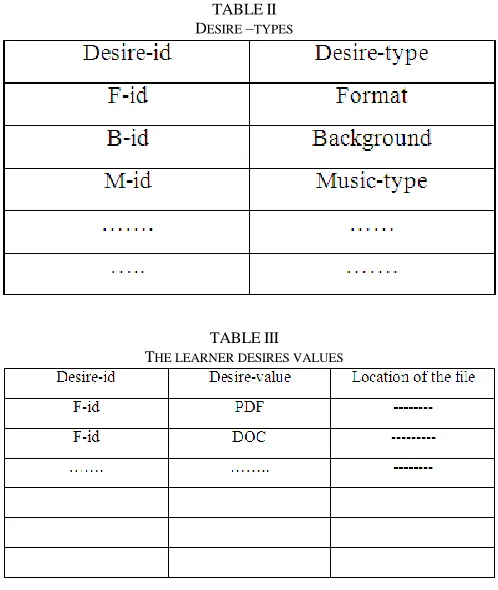
The learner desires tables includes three tables: Desire-types, learner desires values, and Actual desires of students.
TABLEII DESIRE –TYPES
TABLEIII THE LEARNER DESIRES VALUES
Table II has two columns: Desire-id, and Desire-type. Desire types include type of data format, background of the delivered materials and type music associated with the delivered materials and others.
Table III has three columns: Desire-id, desire-value, Location of the file that contains the desire value. Examples of desire values are PDF, DOC ….etc.
student-desire-value. It contains the actual desires of each student.
TABLEIV ACTUAL DESIRES OF STUDENTS
Fig. 2. The sequence Diagram of system agents
Example for delivering Scenario:
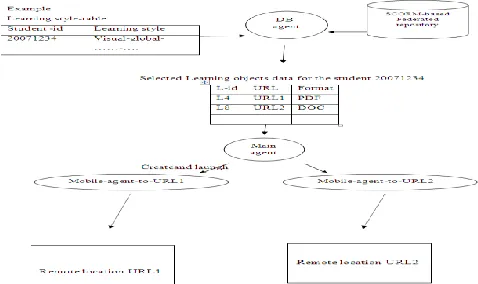
Fig. 3 illustrates an example for delivering the learning objects for a student based on his learning style and his desires. The learning style of the student is Visual-global,…….. The DB agent selects the learning objects for this student from the SCORM –based federated repository. Assume the selected learning objects are L4, and L8 as shown in the selected objects table. The main agent reads the URL of each selected object (L4, L8) and creates a mobile agent to travel to this URL for returning the material of the selected learning object. Materials are sent to format converter agent to unify them based on the user desires. The delivery agent sends the materials to the learner to be presented.
FIG.3 An example for delivering the learning objects
B. SCORM Adaptation
Concerning content adaptation, SCORM repeatedly mentions the importance of personalization in education. However, its current adaptation abilities are restricted and focused on two main aspects. On the one hand, SCORM allows defining several content organizations for the same course. The LMS (Learning Management System) is responsible for deciding which one suits the user profile better, before he/she begins the learning experience. On the other hand, sequencing information allows establishing a set of rules, mainly based on the completion of the objectives of the activities used by the LMS; to decide which one is the next activity to be shown. However, sequencing information cannot be considered adaptively; since it is centered in the instructor rather than in the learner.
C. SCORM LOM Reduction [18]:
On inspecting the required metadata for representing the LOM, we found that they comprise more than 70 items, which is considered to constitute a source for hard coding the metadata. We suggested using a minimum number of important metadata items to be mapped in the implementation.
Table V
THE REDUCED ELEMENTS IN LOM
These attributes are sufficient for query agents to investigate and automatically understand. They also enable query agents to ask questions based on status, metadata, technical, educational, rights, or relation data. Also, they require less effort from the authors of the metadata to produce them. These
Category Data element Used Attribute 1.General 1.1 Identifier dc:identifier
1.2 Title dc:title 1.3 Language dc:language 1.4 Description dc:description 1.5 Keyword dc:subject 1.7 Structure lom-gen:structure 1.8 AggregationLevel
lom-gen:aggregationLevel 2. LifeCycle 2.2 Status lom-life:status 3. Metadata 3.4 Metadata Scheme
lom-meta:metadataScheme 4.Technical 4.1 Format dc:format
4.2 Size dcterms:extent 4.3 Location lom-tech:location 4.7 Duration dcterms:extent 5.Educational 5.1 Interactivity Type
lom-edu:interactivityType 5.2 Learning resource
type
lom-edu:resourceType 5.3 Interactivity leve
lom-edu:interactivityLevel 5.4 Semantic desity lom-edu:semanticDensity 5.6 Context lom-edu:context 5.7 Typical Age lom-edu:AgeRange 5.8 Difficulty lom-edu:Difficulty 6.Rights 6.1 Cost lom-rights:cost 7.Relation 7.1 Kind dcterms:relation
attributes also represent a compromise between more abstract and more detailed annotation sets.
D. SCORM Adaptation with Content Ontology
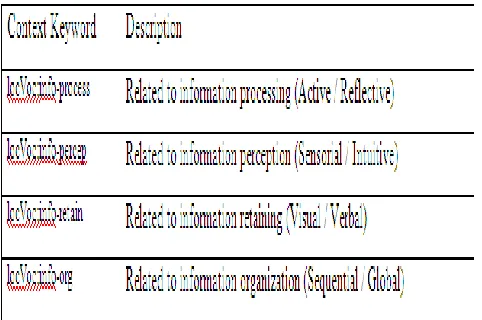
Learning material could be presented in one of the various learning contexts: as introduction, as analysis, as discussion, as conclusion, as example; or in one or more of the various presentation contexts: as text, as audio, as video, as figure; or in one of user contexts: for learner, for instructor, for developer. The context description enables context relevant searching for learning material according to the preferences of the user. For example, if the user needs a more detailed explanation of the topic, it is reasonable to find learning material which describes an example of the given topic. In order to achieve shared understanding about meaning of the context vocabulary (e.g. intro or introduction) a context ontology is used [19].
Table VI
ADDED ONTOLOGY RELATED TO CONTEXT
For example, in computer science courses, like Agents, the “Definition of agents” can be presented for the instructor in a brief definition within a Power Point presentation, while for student it is better to be a detailed definition with animation. Also, for the same user it may be in different presentation contexts. For example, in solving mathematical equations, it may be just plain steps to show the solution, or in the form of animation to show the solution, or in interactive form to be attractive for the learner.
E. SCORM Adaptation with learning styles
Learning material could be presented in one of the various learning contexts: as introduction, as analysis, as discussion, as conclusion, as example; or in one or more of the various presentation contexts: as text, as audio, as video, as figure; or in one of user contexts: for learner, for instructor, for developer. The context description enables context relevant searching for learning material according to the preferences of the user. For example, if the user needs a more detailed explanation of the topic, it is reasonable to find
learning material which describes an example of the given topic. In order to achieve shared understanding about meaning of the context vocabulary (e.g. intro or introduction) a context ontology is used [12].
TableVII
ADDED ONTOLOGY RELATED TO LEARNING STYLE
For example, in computer science courses, like Agents, the “Definition of agents” can be presented for the instructor in a brief definition within a Power Point presentation, while for student it is better to be a detailed definition with animation. Also, for the same user it may be in different presentation contexts. For example, in solving mathematical equations, it may be just plain steps to show the solution, or in the form of animation to show the solution, or in interactive form to be attractive for the learner.
IV. SYSTEM IMPLEMENTATION AND TESTING
During the system implementation, we have used number of tools to apply the scenario that depicted in figure 1. Firstly, we use OpenOffice.org because it is an open-source application and it supports the ISO/IEC standard Open Document Format (ODF) for data interchange as its default file format, as well as Microsoft Office formats among others [20]. Secondly, we use the JODConverter to convert documents between different office formats because JODConverter automates all conversions supported by OpenOffice.org [21]. We use Aglet to implement agent mobility [22, 23]. Aglet API is a set of java classes and interfaces that allows creating mobile agents, so the Aglet needs java to run. Finally, for the purpose of the testing, we test the changing the background color of pdf file. iText has been used to accomplish this task.
A. Implementation
Desired Agent. We introduce here a new agent that is called the Desired Agent which fills the learner desires database. Convertor Agent is an agent which request the learner information (such as subject name, type, sound and others ) from Desired Agent by using student ID through messages. In the following lines, we descripe the interaction between the agents to generate the learner desired context.
B. Testing
We have published a questioner on the following address: https://spreadsheets.google.com/viewform?hl=en&formkey=d HViR3g5VHJ4YWxDcUxMMzJMbGhET2c6MQ#gid=0
We sent number of mail messages to undergraduate and graduate students asking them to cooperate in filling the questioner. We do not ask the participation to write his/her name to guarantee the credibility in filling the questioner. The questionnaire divided into three sections to take the preference in the type of content file, the text and graphics formatting and playing sound. In the type of content file we focus on the most popular text file format that using to deliver content which are web page, PDF file, power point and word document. While in text format we focus in general formatting: color, size and boldness. We just distinguish between learners who prefer colored content or non colored. We do not put our attention in details of color preference because this out of our scope. In using graphics the important issue is the use of images, how often they used and the type of used images (static or animated). Some students prefer to hear special sounds as
FIG.4. Desires of three learners
background while reading the content, for that in sound section
FIG.5. Objects before conversion
we focus just in the type of background sound. Following are screenshots to show three learner preferences and the processes to generate the desired results. Fig. 4 shows the information required by three learners To test the conversion process from the subject type to the target type, Fig. 5 show two subjects are in doc format
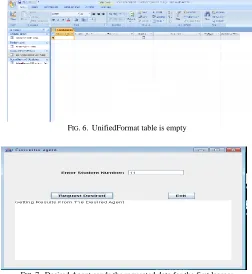
Fig. 6 shows the UnifiedFormat table that will store all the learner preferences. The table is empty before getting the learners desires.
FIG.6. UnifiedFormat table is empty
FIG.7. Desired Agent sends the requested data for the first learner
Fig.7 shows the program main window where Convertor Agent permits the user to enter the learner ID and press the Request Desired button that sends learner ID to the Desired Agent. Desired Agent will send the result to Convertor Agent. Convertor Agent will do the conversion and store other learner desires in UnifiedFormat database which showing on the next figure (Fig. 8).
FIG.8. Information of the first learner
the database
FIG.9 Convertor Agent converts doc to pdf file
Fig. 9 demonstrates that the second learner requested a subject in pdf format, so the Convertor Agent has been converted the doc file to pdf file
FIG.10. Pdf background is changed
From Fig. 4, we see that the learner number 22 request the background color is cyan, Fig. 10 shows the background of pdf file
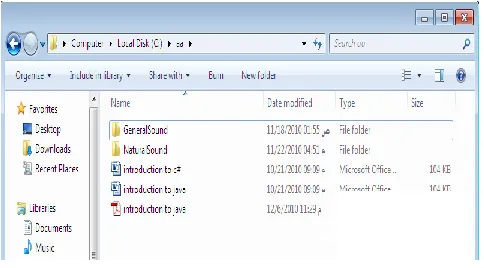
Fig. 11 shows all files required by all learners after the conversion process
Fig. 11. Shows all the subjects files are converted
V. CONCLUSION AND FUTURE WORK
In this research, we have built an agent-based software system for delivering learning materials to a learner based on his/her learning styles and desires. The system has many
mobile and stationary agents. The metadata of learning objects are stored in SCORM-based database. The system selects the suitable learning objects data for a learner from the SCORM database based on his learning styles. The system generates mobile agents to travel for bringing the learning objects themselves from remote sites. The returned learning objects are unified and delivered based on learner desires. The mobile agents of the system have the ability to return learning objects created based on SCORM ,IEEE, OR Dublin Core learning standards. The system also has the ability to return learning objects written in different data formats such as PDF, DOC, and others. The system has a database that contains desires of the learners such as screen background, data format, and type of music.
Since the system has been built based on software agent technology, then the system has a set of advantages.
1) The system is platform independent; this means it can run on any hardware and operating system.
2) The system is scalable; this means that the number of learning objects and the number of users can be increased without sacrificing the performance of the system.
Some agents of the system have been implemented in JVAA programming language under management of Aglets framework. The implemented agents have been tested as illustrated in the implementation section.
In the future, the system will be enhanced to deliver the learning objects based on learning strategy(defined by the instructor) in addition to learning styles of the learners. Also, the system will be enhanced to deliver the learning objects to learners on mobile devices.
ACKNOWLEDGMENT
This work was supported by King Abdulaziz University, Deanship of Scientific Research Project No. (034 / 001-14).
REFERENCES
[1] Schneider-Hufschmidt, M., Kühme, T., Malinowski, U. (eds.): Adaptive user interfaces: Principles and practice. Human Factors in Information Technology, North-Holland, Amsterdam (1993)
[2] Sleeman, D.H.: UMFE: a user modeling front end system. International Journal on the Man-Machine Studies 23 (1985) 71-88
[3] A practical Student Model in an Intelligent Tutoring System. Y.Zhou and M. Evens. s.l. : IEEE, 1998. In the Proceedings of the 11th IEEE International Conference on Tools with artificial Intelligence.
[4] Software Engineering for Adaptive Hypermedia Systems Reference Model, Modeling Techniques and Development Process. N. Parcus de Koch. 2001.
[5] H. Hong, Kinshuk. Lugano, Adaptation to Student Learning Styles in Web Based Educational Systems. Switzerland, June 21-26, 2004. In the Proceedings of ED-MEDIA 2004 - World Conference on Educational Multimedia,Hypermedia & Telecommunications. pp. 491-496. [6] D. Milošević and M. Br ković , “Adaptive Learning by Using SCOs
Metadata” 2007, Interdisciplinary Journal of Knowledge and Learning Objects, Vol. 3.
[7] C. Gŭneş. Learning Style Preferences Of Preparatory School Students. a thesis submitted to the graduate school of social sciences of middle east technical university, in partial fulfillment of the requirements for the degree of master of science in the department of educational sciences. September 2004.
[9] Learning Resource Metadata Information Model, 1.0, IMS. [Online] 1999.
http://www.imsglobal.org/metadata/imsmdv1p2p1/imsmd_infov1p2p1. html.
[10] ADL. Sharable Content Object Reference Mode, 1.1. [Online] Jan 2001. http://www.adlnet.gov/scorm/.
[11] IEEE. Draft Standard for Learning Technology –Public and Private Information (PAPI) for Learner. IEEE P1484.2/D6. [Online] 2000. http://ltsc.ieee.org.
[12] Learning Object Metadata (LOM), P1484.12/D4.0. IEEE LTSC. [Online] Feb 2000. http://ltsc.ieee.org/doc/wg12/LOM_WD4.htm. [13] SCORM: The E-Learning Standard,. [Online]
http://cbeta.digitalthink.com/dtfs/downloads/products_services/wp_stan dards.pdf.
[14] IMS Learning resource Meta-Data Best Practise and Implementation Guide. [Online] 2001. http://ltsc.ieee.org/doc/wg12/LOM3.6.html. [15] AICC - Aviation Industry CBT Committee. [Online]
http://www.aicc.org/.
[16] Alliance of Remote Instruction Authoring and Distribution Networks for Europe. [Online] http://www.ariadne-eu.org/.
[17] 1484.12.1 – IEEE Standard for Learning Object Metadata. s.l. : IEEE publications, 2002. http://ltsc.ieee.org/wg12/
[18] M. Saleh, "Building Interoperable Learning Objects Using Reduced Learning Object Metadata", E-Learning Journal, Vol. 2 No. 3, UK, 2005.
[19] M. Saleh, Towards Ontology-Based Reusable Learning Object Contents, The Egyptian Computer Journal, Institute of Statistical Studies & Research, Cairo Univ., Vol. 34, from Dec. 2006 to June 2007
[20] http://en.wikipedia.org/wiki/OpenOffice.org [21] http://www.artofsolving.com/opensource/jodconverter
[22] The Aglets 2.0.2 User's Manual , Aglets Development Group, March 12, 2006.