PYRAMIDAL
IMAGE
BLENDING
USING
CUDA
FRAMEWORK
PRITAM PRAKASH SHETE#1, VENKAT P. P. K.#2, S. K. BOSE#3 #
Computer Division, Bhabha Atomic Research Centre, Trombay, Mumbai, Maharashtra, India 400085
1
Abstract:
We propose and implement a pyramidal image blending algorithm using modern programmable graphic processing units. This algorithm is an essential part of an image stitching process for a seamless panoramic mosaic. The CUDA framework is a novel GPU programming framework from NVIDIA. We realize significant acceleration in computations of the pyramidal image blending algorithm by utilizing the CUDA as a computational resource. Specifically we demonstrate the efficiency of our system by parallelization of the algorithm and optimization of the memory resources of the GPU. We compare the execution time of the CPU as well as various CUDA based implementations. Just parallelization of the algorithm by the CUDA framework provides 20 times speedup, whereas optimizing the GPU memory IO gives more than 30 times speedup.
Keywords: CUDA, pyramidal image blending, panoramic image stitching.
1. Introduction
An image stitching [5] is a process of combining several individual images having some overlap into a high resolution composite image. It is an essential part of many applications like aviation photography [13], video conferencing, cylindrical 3600 panoramas [14] and spherical video views [15] of the environment. It consists of number of steps like image acquisition, finding matching features, remapping images and blending images etc. The image blending is a final and often very important step in creating seamless panoramic images. A simple copying and pasting of overlapping areas of source images may result in visible edges in a seam between images. These visible seams are present due to differences in a camera response, a scene illumination as well as due to geometrical alignment errors. The image blending techniques like an average filtering [6], a median filtering [6] and a distance map [16] based feathered blending [5] etc can hide these boundaries and reduce colour differences between source images.
The pyramidal image blending [3] [5] is one of the image blending technique used in the panoramic image stitching. It uses various image pyramids to work on different resolution levels of images. The algorithm starts with building Laplacian pyramids [4] for two input images and the Gaussian pyramid [4] [6] for the mask image. Then the combined Laplacian pyramid is formed from these image pyramids, which is finally collapsed to get a seamless panorama. This whole process is computationally expensive as well as time consuming and therefore it needs speedup.
Graphics Processing Units (GPUs) are high performance multi-core processors with a very high memory bandwidth. In recent years, the computation speed of GPUs has increased rapidly. NVIDIA GeForce 400 series has approximately 1345 GFLOPS in 2010 [1] whereas Intel Westmere-EP series is far behind with approximately just 100 GFLOPS. Today's GPUs provide incredible resources for both graphics as well as non graphics processing. The annual computation growth rate of GPUs is approximately up to 2.3x. In contrast to this, that of CPUs is 1.4x [8]. GPUs offer much more attractive solution to accelerate wide range of applications as they are affordable and easily available within most of work stations. At the same time, the GPU is becoming cheaper and cheaper.
In this paper we propose and implement the GPU based pyramidal image blending algorithm realized on NVIDIA’s Compute Unified Device Architecture (CUDA). Outline of our paper is as follows. In Section (2), we glimpse into the pyramidal image blending algorithm. Section (3) gives quick overview of the CUDA framework along with the previous image processing application acceleration efforts using same. We provide implementation details of our system in Section (4). In Section (5) we demonstrate the efficiency of our system. Finally we present our conclusions in Section (6).
2. Pyramidal Image Blending
surface, the image blending comes into picture. If all source images are in perfect registration and identically exposed, then solution is easy and any pixel combination will give good results. However for real images; visible seams due to exposure differences, blurring due to miss registration or ghosting due to moving objects can occur. We must decide which source image pixels contribute to the final panorama and how to weight or blend them in order to create the seamless attractive looking panorama.
The image blending techniques can hide these boundaries and reduce colour differences between source images. An average filtering [6] takes an average value at each pixel. This simple averaging usually does not work very well, since exposure differences, miss registrations and ghosting are visible. A median filtering [6] is used to remove ghosting, but miss registration is still a problem. A feathered blending [5] extends simple pixel averaging to a weighted averaging. Here pixels near the centre of image are weighted heavily as compare to pixels near image edges. This is achieved by computing a distance map [16] or a grassfire transform. This gives good results for blending over exposure differences, on the other hand blurring and ghosting are still there.
The image pyramids from Burt and Adelson [3] provide an attractive solution to this problem. First each source image is converted into a band pass (Laplacian) pyramid. Next masks associated with each source image are converted into low pass (Gaussian) pyramids. Now at each pyramid level, band pass source images are blended together using low pass mask images. Finally the seamless blended image is created by interpolating and summing all of the pyramid levels of band pass images. It effectively uses frequency adaptive width instead of using a single transition width. This algorithm successfully removes visible seams due to exposure differences, miss registration and ghosting. Before going into implementation details of our system, we glance through the algorithm.
2.1.Gaussian Blur
An input image convolved with a weighting kernel gives the Gaussian blurred [4] [6] image as shown in Equation (1). In the context of the image processing, an image convolution is just the scalar product of kernel weights with input pixels within a window surrounding each of output pixels.
)
,
(
)
,
(
)
,
(
i
j
W
m
n
I
i
m
j
n
G
K K m K K n+
+
∗
=
− = =− (1)Where, I is the input image, W is the weighting kernel with radius K and G is the Gaussian blurred image. Our implementation uses two separable 1D kernels (size equal to 5) to reduce number of multiplications.
2.2.REDUCE Operation
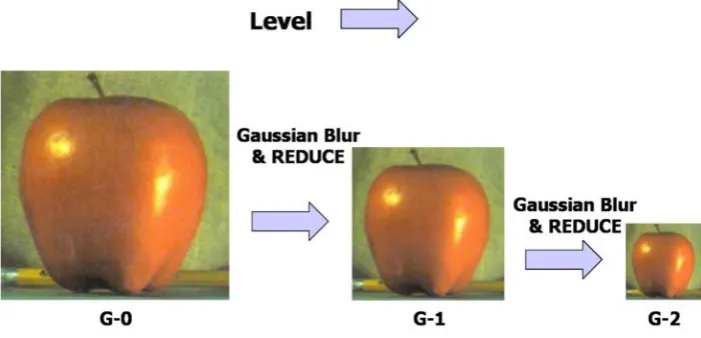
The REDUCE operation [3] [4] decreases both a sample density and a resolution in uniform one octave steps using a local averaging as shown in Equation (2). It is used in a construction of the Gaussian pyramid and the Laplacian pyramid as shown in Fig. 1 and Fig. 2.
)
2
,
2
(
)
,
(
)
,
(
i
j
W
m
n
G
1i
m
j
n
G
K K m K K n ll
=
∗
+
+
−
= =− −
(2)
Where, Gl-1 and Gl are Gaussian blurred images at level l-1 and l, whereas W is a weighting kernel with radius K.
2.3.EXPAND Operation
The EXPAND operation [3] [4] is reverse of the REDUCE operation as shown in Equation (3). Its effect is to expand an image by interpolating new node values between the given values. The EXPAND applied to Gl of the Gaussian pyramid gives Gl,1 which is same in size as Gl-1.
) 2 , 2 ( * ) , ( 4
) ,
( , 1
,
n j m i G n m W j
i G
K
K m
K
K n
b l b
l
+ +
=
−
= =− −
(3)
2.4.Gaussian Pyramid
The Gaussian pyramid [4] [6] is a sequence of low pass filtered Gaussian blurred images obtained by repeatedly convolving a small weighting function with an image. Here both sample density and resolution are decreased from level to level using the REDUCE operation resulting in pyramid structure as shown in Fig. 1.
2.5.Laplacian Pyramid
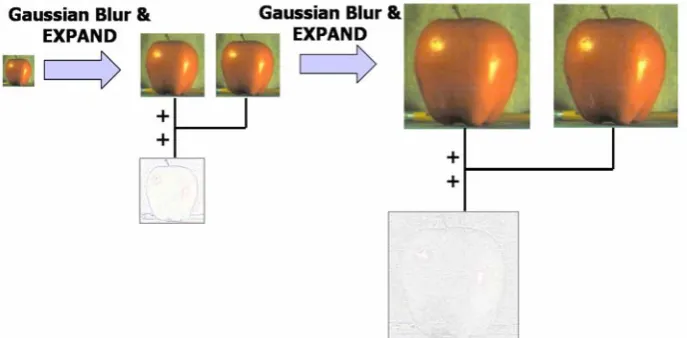
The Laplacian pyramid [3] [4] [6] is constructed from the Gaussian pyramid. Each level of the Laplacian pyramid is calculated as a difference between two levels of the Gaussian pyramid as shown in Equation (4). An image difference data shown in Fig. 2 and Fig. 3 is normalized and inverted for better appearance.
1 +
−
=
l ll
G
G
L
(4)Where, Gl and Gl+1 are the Gaussian blurred images at level l and l+1, whereas Ll is the image difference data at the Laplacian pyramid level l.
Fig. 2 Construction of Laplacian pyramid.
2.6.Algorithm
Algorithm-1: The pyramidal image blending algorithm works on a mask image Mask and two input images Left & Right respectively. The mask image denotes weights that are used to find out a contribution from Left & Right images to the final blended image.
1. Build Laplacian pyramids L-Left and L-Right from input images Left and Right. 2. Build the Gaussian pyramid G-Mask from the mask image Mask.
3. Form the combined Laplacian pyramid L-Output from L-Left and L-Right pyramids using nodes of G-Mask as Weights. L-Output ( i , j) = G-G-Mask( i , j) * L-Left(i , j) + (1-G-G-Mask( i , j)) * L-Right(i , j) 4. Collapse L-Output Laplacian pyramid to get the final blended image.
3. CUDA Framework
“Compute Unified Device Architecture” (CUDA) from NVIDIA is a novel promising framework to facilitate programming on GPUs. It assists developers in the general propose computing on GPU [19] without having any graphics pipeline knowledge. The emergence of the CUDA technology can meet demands of the GPGPU in some degree. Unlike shader based frameworks, it allows a random memory writes to the device memory, which makes it follow a canonical programming model. It uses constrained C language which is a function pointer free, a recursion free subset of the C language with NVIDIA extensions for the parallel computing. It supports the “Single Instruction Multiple Data” parallelism. In the context of the image processing, an operation performed on an image corresponds to “Single Instruction” and an image pixel data corresponds to “Multiple Data” operated on.
The CUDA manages a large number of computing threads. These are extremely light weight with very little creation overhead and fast switching. It organizes threads into a logical thread blocks. Threads within same logical thread block can read and write any shared memory location assigned to that thread block. Latency for the shared memory is two orders of magnitude lower than that of the device global memory. As a result, threads within same thread block can utilize this it for bandwidth reduction as well as for avoiding redundant computation by sharing results. All threads within a logical thread block can synchronize their execution by using the CUDA barrier primitives.
The CUDA has been used to accelerate graphical as well as non graphical applications in computational biology, cryptography and other fields by an order of magnitude or more. Ronghui Cheng et al. [9] have optimized the motion estimation algorithms like the full search algorithm, the diamond search algorithm and the four step algorithm, using the CUDA framework. Micikevicius et al [10] has used multiple GPUs for a computation of finite difference in 3D using the CUDA. The CUDA based H.264/AVC de-blocking filter by Ting Liu et al. [11] has shown performance improvement both at execution time level as well as at SNR level. Zhiyi Yang et al [12] has shown that, the CUDA implementation of the basic image processing algorithms like histogram computation, edge detection etc gives more speedup for high resolution images.
4. Implementation
In this section we discuss the application of the CUDA programming concepts to the pyramidal image blending. We call it as the Image Blending Library (IBL). It is implemented in an object oriented C++ language. It supports the pyramidal image blending using the CPU as well as the GPU. The cross platform Qt library from Nokia is used for an image IO. The implementation of the IBL is divided into number of stages. The first stage of the IBL uses the CPU for computation and it is called as the CPU implementation. Further stages use the CUDA C for the GPU programming. The pyramidal image blending algorithm is parallelized using the CUDA framework in the next stage. We name this stage as Simple-CUDA implementation, as it uses simple CUDA concepts for SIMD image processing parallelization. We further optimized the GPU memory and CPU memory IO, this stage is called as the IO-CUDA implementation.
4.1.CPU Implementation
Initially we use the CPU of the processor for various computations. We call it as a CPU implementation. It uses a single thread of execution. The image processing operations like construction of the Gaussian and the Laplacian pyramid, the REDUCE operation and the EXPAND operation etc are carried out sequentially.
4.1.1.Managing Image Data
using the CPU memory. The CPU memory is managed using inbuilt C++ functions. The new/delete operators are used for memory allocation/de-allocation, whereas memcpy function is used for copying image pixel data.
4.2.Simple-CUDA
The CPU implementation is computationally expensive. Hence for speedup, we go for its partial realization on the NVIDIA’s CUDA framework. We call it as the Simple-CUDA implementation. The Simple-CUDA parallelizes the pyramidal image blending algorithm using the CUDA C for the GPU programming.
4.2.1.Heterogeneous programming
The Simple-CUDA uses heterogeneous computing, where parallel portions of applications are executed on the GPU as kernels and the rest of the C program executes on the CPU. The CPU is the host whereas the kernel is running on the GPU serves as coprocessor.
4.2.2.Managing Image Data
The Simple-CUDA uses the host memory for storing computations as in the CPU implementation. Here before performing any operation on an image, each time its corresponding image pixel data is copied from the host memory into the device memory using memory copy functions. Now in the device, a respective operation is performed. Finally new computed values are read back into the host memory.
4.2.3.CUDA Programming Model
Input images are colour images having RGB components. One thread performs one logical operation on these colour components as a whole. Number of threads are grouped together to form one logical thread block. Only threads within a same logical thread block can cooperate with each other. Threads from different logical thread blocks cannot work together. In our implementation each logical thread block has 16x16 threads. Finally the whole image is divided into a number of such 2D thread blocks both horizontally as well as vertically to form a logical grid as shown in Fig. 4.
A 2D addressing is used for mapping a block ID and a thread ID to a pixel location in an image. Inbuilt CUDA variables (blockIdx, threadIdx and blockDim) are used for this mapping. Generic equations for this mapping are as follows.
column_index=blockIdx.x * blockDim.x + threadIdx.x row_index = blockIdx.y * blockDim.y + threadIdx.y index = (column_index+row_index*image_width) * 3
4.2.4.CUDA Kernels
Parallel portions of applications are executed on the GPU as kernels. The CUDA supports the SIMD parallelism. In the context of the image processing, an operation performed on an image corresponds to “Single Instruction” and an image pixel data corresponds to “Multiple Data” operated on. The pyramidal image blending requires construction of the Gaussian and the Laplacian pyramid and many more which benefit from the SIMD parallelism. Candidate image processing operations identified for the parallelization are as follows.
Kernel-1 : Pseudo kernel code for Gaussian blur using Simple-CUDA allocate device memory for input image
copy image data from host memory to device memory
allocate device memory for Gaussian blurred image for each logical block within image do
for each thread within logical block do
calculate Gaussian blurred value in device memory
synchronize threads
copy results from device memory to host memory
free device memory allocated for input & Gaussian blurred image.
Kernel-2 : Pseudo kernel code for image difference operation used for Laplacian using Simple-CUDA allocate device memory for input image
copy image data from host memory to device memory
allocate device memory for Gaussian blurred image
copy Gaussian blurred image data from host memory to device memory
allocate device memory for Laplacian image for each logical block within image do
for each thread within logical block do
perform image subtraction in device memory
synchronize threads
copy results from device memory to host memory
free device memory allocated for input image, Gaussian blurred image & Laplacian image.
Kernel-3 : Pseudo kernel code for REDUCE operation using Simple-CUDA allocate device memory for input image
copy image data from host memory to device memory
allocate device memory for reduced image for each logical block within image do
for each thread within logical block do
calculate average value in device memory
synchronize threads
copy results from device memory to host memory
free device memory allocated for input & Gaussian blurred image.
Kernel-4 : Pseudo kernel code for EXPAND operation using Simple-CUDA allocate device memory for input image
copy image data from host memory to device memory
allocate device memory for expanded image for each logical block within image do
for each thread within logical block do
calculate interpolated value in device memory synchronize threads
copy results from device memory to host memory
Kernel-5 : Pseudo kernel code for combining band pass images of Laplacian pyramid using Simple-CUDA for each pyramid level do
allocate device memory for band pass image at current level copy band pass image data from host memory to device memory
allocate device memory for resultant band pass image for each logical block within image do
for each thread within logical block do
calculate weighted average value in device memory synchronize threads
copy results from device memory to host memory
free device memory allocated for band pass image & resultant band pass image.
Kernel-6 : Pseudo kernel code for combining low pass images of Laplacian pyramid using Simple-CUDA allocate device memory for low pass image
copy low pass image data from host memory to device memory
allocate device memory for resultant low pass image for each logical block within image do
for each thread within logical block do
calculate weighted average value in device memory synchronize threads
copy results from device memory to host memory
free device memory allocated for low pass image & resultant low pass image.
Kernel-7 : Pseudo kernel code for image addition operation used for collapsing Laplacian pyramid using Simple-CUDA
allocate device memory for Gaussian blurred image
copy Gaussian blurred image data from host memory to device memory
allocate device memory for Laplacian image
copy Laplacian image data from host memory to device memory
allocate device memory for resultant image for each logical block within image do
for each thread within logical block do
perform image addition in device memory synchronize threads
copy results from device memory to host memory
free device memory allocated for Laplacian image, Gaussian blurred image & resultant image.
4.3.IO-CUDA
The Simple-CUDA imposes the host to the device and vice versa memory copy overhead. Both the host and the device are having their own separate memory spaces, referred to as a host memory and a device memory respectively. All threads can access the device global memory as shown in Fig. 5. We extend our partial implementation to get benefits of this device global memory. We name it as the IO-CUDA implementation. The IO-CUDA reduces memory copy overhead observed in the Simple-CUDA.
4.3.1.Managing Image Data
4.3.2.CUDA Kernels
All CUDA kernels listed in the Simple-CUDA implementation are modified to use the device global memory. These kernels use the CUDABuffer class for image IO.
Kernel-8 : Pseudo kernel code for Gaussian blur using IO-CUDA input image is in device memory
allocate device memory for Gaussian blurred image for each logical block within image do
for each thread within logical block do
calculate Gaussian blurred value in device memory synchronize threads
// Gaussian blurred image is in device memory
Kernel-9 : Pseudo kernel code for image difference operation used for Laplacian using IO-CUDA input image is in device memory
Gaussian blurred image is in device memory
allocate device memory for Laplacian image for each logical block within image do
for each thread within logical block do
perform image subtraction in device memory synchronize threads
// Laplacian image is in device memory
Kernel-10 : Pseudo kernel code for REDUCE operation using IO-CUDA input image is in device memory
allocate device memory for reduced image for each logical block within image do
for each thread within logical block do
calculate average value in device memory synchronize threads
// reduced image is in device memory
Kernel-11 : Pseudo kernel code for EXPAND operation using IO-CUDA input image is in device memory
allocate device memory for expanded image for each logical block within image do
for each thread within logical block do
calculate interpolated value in device memory synchronize threads
// expanded image is in device memory
Kernel-12 : Pseudo kernel code for blending band pass images of Laplacian pyramid using IO-CUDA for each pyramid level do
band pass image at current level is in device memory
allocate device memory for resultant band pass image for each logical block within image do
for each thread within logical block do
calculate weighted average value in device memory synchronize threads
// resultant band pass image is in device memory
Kernel-13 : Pseudo kernel code for blending low pass images of Laplacian pyramid using IO-CUDA Low pass image is in device memory
allocate device memory for resultant low pass image for each logical block within image do
for each thread within logical block do
calculate weighted average value in device memory synchronize threads
// resultant low pass image is in device memory
Kernel-14 : Pseudo kernel code for image addition operation used for collapsing Laplacian pyramid using IO-CUDA
Gaussian blurred image is in device memory
Laplacian image is in device memory
allocate device memory for resultant image for each logical block within image do
for each thread within logical block do
perform image addition in device memory synchronize threads
//resultant image data is in device memory
5. Results
In this section, we demonstrate performance of our system covering execution time comparison of various implementations along with key observations.
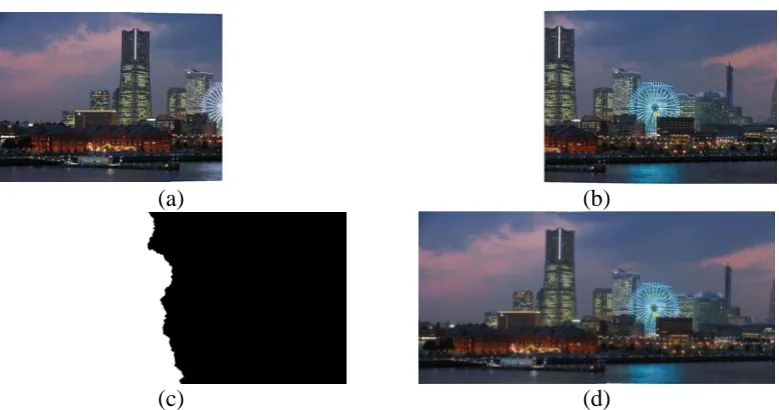
Input images include a low resolution as well as a high resolution images. Staring with a low resolution 128x128, each time a resolution is doubled both horizontally as well as vertically up to a high resolution 2048x2048. Along with these images, one set images having 1576x768 resolutions as shown in Fig. 6 are included to demonstrate application of the pyramidal image blending for the panoramic image stitching.
Table 1 shows the execution time taken by various implementations of the pyramidal image blending. The data transfer time between the host memory and the device memory is also considered while calculating the execution time for the CUDA based implementations. This data clearly indicates that the CUDA based implementations perform much better than the CPU implementation.
The IO-CUDA gives best timing. Now the pyramidal image blending algorithm is divided into number of steps. Table 2 shows the execution time required for these steps using the IO-CUDA for various image resolutions. From table it is evident that steps that require use of Gaussian blur like building Laplacian pyramid, building Gaussian pyramid and the Laplacian pyramid collapse are the most time consuming steps.
(a) (b)
(c) (d)
Fig. 6 (a) left image, (b) right image, (c) mask image & (d) blended image.
Image Resolution
CPU (sec)
Simple CUDA (sec)
IO CUDA
(sec)
128x128 0.249 0.048 0.035
256x256 1.067 0.095 0.060
512x512 4.353 0.265 0.162
1024x1024 17.647 0.947 0.557 1576x768 20.336 1.061 0.661 2048x2048 70.761 3.383 2.116
Table 1 Time comparison of various pyramidal image blending implementations.
Image Resolution
Pyramidal Image Blending Algorithm Steps
Left Laplacian
Pyramid (sec)
Right Laplacian
Pyramid (sec)
Mask Gaussian Pyramid (sec)
Combine Pyramids (sec)
Collapse Pyramid (sec)
128x128 0.028 0.003 0.002 0.0001 0.002
256x256 0.035 0.012 0.005 0.001 0.007
512x512 0.068 0.044 0.021 0.003 0.026
1024x1024 0.193 0.168 0.083 0.011 0.102
1576x768 0.230 0.195 0.095 0.013 0.128
2048x2048 0.687 0.662 0.326 0.044 0.397
In the CUDA C there is no explicit initialization function [1] [2] for the runtime. It initializes when the first time a runtime function is called. Table 3 illustrates the same thing. Here the blending algorithm is run multiple times in a loop. A first iteration takes slightly more time as it does initialization, where as rest of iterations take almost the same amount of time.
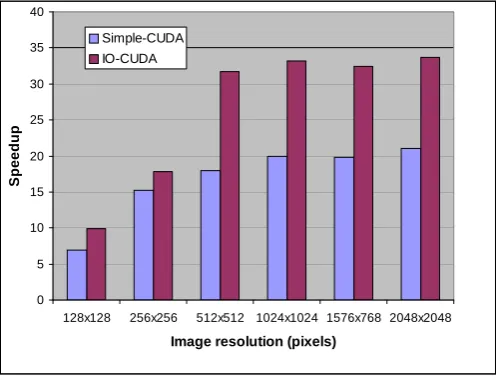
Fig. 7 shows speedup of the Simple-CUDA and the IO-CUDA over the CPU. Low resolution images give less speedup. But as the image resolution increases, the GPU improves the computing speed significantly. The Simple-CUDA gives speedup of about 20x, whereas the IO-CUDA gives best performance with more than 30x.
One important point to note is all input images are having dimensions multiple of 16 except one. Exceptional case is having a resolution of 1576x768 and for this set of images the speedup is less. This is justified as follows; in our implementation the block size for the thread group is 16x16. Here height is multiple of 16, but width is not. This results in some of idle threads and hence the performance is dropped.
6. Conclusions
In this system, we have realized the pyramidal image blending algorithm using the CUDA enabled GPU. We have identified the CUDA optimization strategies applicable for the image processing on the GPU. Based on the experimental results, we have shown that common desktop graphics hardware can accelerate the image processing applications like this more than 90 times over a state of the art CPU. For low resolution images speedup is less, but as a resolution increases speedup also increases. A meager parallelization of algorithms results in 20 times speedup. Optimizing the GPU memory IO improves results further to more than 30 times speedup for high resolution images. Basically most of the image processing algorithms like this are inherently SIMD, best suited for the CUDA computing. Obviously the CUDA provides us with a novel massively data parallel general computing method and is cheaper in a hardware implementation.
Acknowledgement
We are extremely grateful to Mr. A. G. Apte (Head of Computer Division) for offering us this excellent opportunity. We are also thankful to Mr. G. P. Srivastava, Director, E&I Group, Bhabha Atomic Research Centre for giving us this wonderful opportunity to work on this immerging topic. We would also like to thanks
Image Resolution
Iteration Number 1
(sec)
2 (sec)
3 (sec)
4 (sec)
128x128 0.029 0.005 0.005 0.005 256x256 0.039 0.015 0.015 0.015 512x512 0.077 0.053 0.052 0.053 1024x1024 0.213 0.188 0.191 0.188 1576x768 0.273 0.250 0.238 0.238 2048x2048 0.743 0.721 0.720 0.720
Table 3 Execution time for pyramidal image blending algorithm at various iterations.
0 5 10 15 20 25 30 35 40
128x128 256x256 512x512 1024x1024 1576x768 2048x2048
Image resolution (pixels)
S
p
eedup
Simple-CUDA IO-CUDA
consultants from VizExperts for their guidance in understanding basic concepts of CUDA framework. Last but not the least we are thankful to all our colleagues Dinesh M. Sarode, Mohini Laghate and many more whose timely help has proved quite valuable.
References
[1] “NVIDIA CUDA C Programming Guide”, Version 3.1.1, 2010, NVIDIA Corporation, Santa Clara, California, U. S.
[2] “CUDA C Best Practices Guide”, Version 3.1, 2010, NVIDIA Corporation, Santa Clara, California, U. S.
[3] Peter J. Burt & Edward H. Adelson, “A Multi-resolution Spline with Application to Image Mosaics”, ACM Transactions on Graphics,
October 1983.
[4] Peter J. Burt & Edward H. Adelson, “The Laplacian Pyramid as a Compact Image Code”, in IEEE Transactions on Communications,
April 1983.
[5] Richard Szeliski.: “Image alignment and stitching: A tutorial”, Foundations Trends in Computer Graphics and Computer Vision,
December 2006.
[6] Rafael C. Gonzalez and Richard E. Woods, “Digital Image Processing”, Second Edition, Pearson Education, ISBN 81-7808-629-8.
[7] http://www.nvidia.co.in/object/quadro_fx_5600_4600.html, “NVIDIA Quadro FX 4600”.
[8] Zhe Fan, Feng Qiu, Arie Kaufman and Yoakum-Stover, “GPU Cluster for High Performance Computing”, in Proceedings of the 2004
ACM/IEEE Conference on Supercomputing, 2004.
[9] Ronghui Cheng, Eryan Yang, Ting Liu, “Speeding up motion estimation algorithms on CUDA technology”, in Proceedings of Asia
Pacific Conference on Postgraduate Research in Microelectronics & Electronics, 2009. Prime-Asia 2009.
[10] Paulius Micikevicius, “3D finite difference computation on GPUs using CUDA”, in Proceedings of 2nd Workshop on General Purpose
Processing on Graphics Processing Units, ACM, 2009.
[11] Ting Liu, Eryan Yang, Ronghui Cheng, Ying Fu, “CUDA-based H.264/AVC de-blocking filtering”, in Proceedings of International
Conference on Audio Language and Image Processing (ICALIP), 2010.
[12] Zhiyi Yang, Yating Zhu, Yong Pu, “Parallel Image Processing Based on CUDA”, 2008 International Conference on Computer Science
and Software Engineering, 2008.
[13] J. Majumdar, S. Vinay and S. Selvi, “Registration and mosaicing for images obtained from UAV”, in Proceedings of International
Conference on Signal Processing and Communications 2004 (SPCOM-04), 2004.
[14] Richard Szeliski and Heung Yeung Shum, “Creating full view panoramic image mosaics and environment maps”, in Proceedings of
the 24th annual conference on computer graphics and interactive techniques, SIGGRAPH-97, 1997.
[15] Elliott Coleshill, Alexander Ferworn, “Panoramic Spherical Video - The Space Ball”, in Proceedings of the 2003 International
Conference on Computational Science and its Applications, ICCSA, 2003.
[16] M. H. Alsuwaiyel and D. M. Gavrila, "On the distance transform of binary images", in Proceedings of IEEE International Conference
![Fig. 4 Grid of thread blocks [1] [2].](https://thumb-us.123doks.com/thumbv2/123dok_us/9665487.1494406/5.595.198.382.478.733/fig-grid-thread-blocks.webp)
![Fig. 5 CUDA memory model [1][2].](https://thumb-us.123doks.com/thumbv2/123dok_us/9665487.1494406/8.595.169.408.74.326/fig-cuda-memory-model.webp)