
Modeling and Execution
David Grünert, Elke Brucker-Kley and Thomas KellerZHAW School of Management and Law, Institute for Business Information Management,
CH-8401 Winterthur, Switzerland, {grud, brck, kell}@zhaw.ch
Abstract. Traditional workflow management systems are suited to automate well-structured processes based on a strict sequence of user tasks and a top-down approach to model creation. Such a conventional approach does not comply with the bottom-up philosophy of social software and therefore makes it difficult to incorporate its strengths in process modeling and automation. Opportunistic Business Process Modeling (oBPM) aims to overcome these limitations by introducing a new paradigm for modeling and executing business processes that is both user- and document-centric, adequate for bottom-up modeling, agile process modification, opportunistic task scheduling and process mining.
Keywords: oBPM, Content-oriented workflow models, bottom-up model creation, artifact-centric workflow models, document-oriented workflow models.
1
Introduction
Automation projects are traditionally modeled in a top-down approach and within two consecutive project phases [13]. In the first phase, a model is created on a business level by business analysts, who are domain experts themselves or who gather insights from domain experts. In the second phase, the model is translated by software engineers into a technical and executable model. Although the two models might be created within the same BPM suite, there is no automated translation from the business to the technical model and no manual translation without profound technical know-how.
In the two phases of the automation project, the creation of the process model and the creation of the technical model, knowledge workers typically only have a consultative role. On the one hand, the reason might be hierarchical acting and thinking within the company, but on the other hand, separation is also caused by the process model itself. The complexity of the models and the required specific know-how of modeling semantics and syntax make it difficult to integrate knowledge workers [15]. Furthermore, most models show the processes from a top-down perspective that covers the activities of many roles. This perspective is not adequate
for knowledge workers to develop or change the process because they are only familiar with their own tasks, but often do not know the overall process [15].
Also the granularity of processes typically created in today’s automation projects is a problem in the context of social software. Social production as described in [11] requires a model adequate for agile development that allows combining the input from independent contributors [14]. This is only possible if changes to the model have limited or at least determinable side effects for the overall process and simultaneously applied process modifications.
Applying social software patterns [16] to “ground” traditional top-down business process management is not an easy task. The two-level approach during modeling and the separation of modeling and process execution conflicts with the idea of egalitarianism that intends to handle all contributors of a business process equally in order to get the best solution [12], [15]. The exclusion of business users from hands-on process definitihands-on and improvement is not primarily an organizatihands-onal problem, but caused by the fact that conventional BPM methods and technologies are simply not designed for business users. Business process modeling notations were introduced to provide a common ground for business analysts, who create top-level process models, and software engineers, who turn them into executable processes. BPMN and BPEL may successfully foster the consistent top-down traceability through multiple levels of processes and sub-processes (see [14]). However, they are targeted at BPM specialists and do not empower the business user, who executes the process, to influence the design or to change the execution of the process. Leaving this top-down perspective is a challenge with today’s BPM tools and practices. To achieve a user-centric model, business processes must be cut into small sequences that cover activities of only one role. A common approach for this is to define short user-centric processes triggered by ad-hoc events. Unfortunately, this model lacks an overall process perspective, making it difficult to define dependencies between such processes. Therefore, modeling with ad-hoc triggered user-centric mini-processes within today’s BPM suites is rather a workaround than a real modeling paradigm.
Another challenge is agile development and continuous improvement of business processes. If there is more than one model involved, or if the model is not understood by all users including knowledge workers, the development cycle becomes longer compared to an approach with a single model understood by everyone [17].
Another aspect related to egalitarianism is the strict execution order for tasks. The strict task order that is typical for process automation patronizes knowledge workers even if there is no need for such restrictions and makes the task execution not only less efficient but prevents knowledge workers from leveraging their expertise to effectively handle a diverse set of cases. However, modeling opportunistic scheduling using today’s process automation frameworks and tools is far more complex than implementing a task with strict order. Hence, it is very challenging to come up with a convincing business case for automating business processes that require a high degree of flexibility.
Opportunistic BPM (oBPM), as outlined in the following chapter, addresses these problems with a model that is simpler and closer to the daily working experience of business users, allowing them to understand and contribute to the model. Furthermore, oBPM includes a top-down as well as a bottom-up perspective that both allow seamless modification to the very same model. This approach makes it
unnecessary to synchronize multiple models, while still combining the advantage of the two model perspectives.
In contrast to simple user-centric ad-hoc processes modeled with BPMN, oBPM defines the dependencies between all these user-centric processes without making the model complicated. This results in a fine-grained model adequate for agile and simultaneous modification. oBPM also allows opportunistic task scheduling where users can decide what to do first.
All of the challenges mentioned above originate in the lack of a bottom-up perspective and flexibility. Social software enables participation and a dynamic approach to problem solving. But in order to make use of those advantages, a more opportunistic approach to business process modeling and execution is required.
2
Business Process Modeling with oBPM
Opportunistic BPM stands for designing processes with a minimum of control flow by modeling the states of artefacts involved in business processes. The rationale behind this approach is outlined in Section 1 and can also be found in [15] “The participation of end users on the collaborative design of business process models is particularly challenging because they do not master the existing formal business process modeling languages, and they regard business processes on a case-by-case perspective.” or in [17] “There is much to gain in supporting users to come up with better models in a shorter time-frame.” or in [18] “Embed processes in a social context. In many BPMSs, users have a very limited view of the processes in which they participate, often only seeing an in-tray as the interface. Instead, users should be given access to a wider context of the processes including information about other people that may contribute to the processes as well as histories of previous process executions.” However, oBPM is not meant to support unstructured communication and knowledge/information sharing as is the focus of pure social software.
The oBPM model is both user- and document-centric1 and has two different perspectives. The first perspective shows the top-down view based on standard UML diagrams (see also BPM lifecycle [21]). This perspective is useful for process owners or system administrators. The second perspective is used for the bottom-up model creation and allows knowledge workers to read, change and define their own processes as suggested in [16]. The following section introduces the top-down perspective while the bottom-up perspective is introduced in section 3.1.
2.1 The oBPM Model from Top-Down Perspective
This section defines all key elements of the oBPM process model and introduces a sample application. The workflow for any business process modeled with oBPM can be defined with:
one use case diagram,
one class diagram and
as many finite state machine diagrams as there are documents or artefacts used in the workflow.
The following three sections describe these diagrams and their usage in oBPM for a sample application. The sample application supports a process for refunding bills. The process starts when the administration receives bills and ends with the bill being either accepted or rejected. Bills that are accepted are refunded to the submitter by the finance department. Rejected bills are not refunded but the submitter is allowed to file an objection that must be judged by a lawyer. The validation of a bill consists of two independent checks: the check of the submitter for being a valid sender and the subject of the bill for being in line with the respective regulations. In addition, it must be possible to stop the validation process in case of death of a submitter at any time.
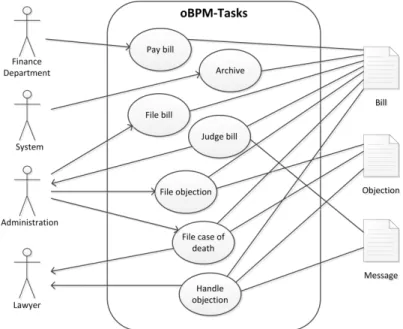
Use Case Diagram for Role, Task and Document Associations. The oBPM model
uses roles, tasks and documents and defines dependencies between these elements. First, the oBPM model associates every role with tasks that can be executed by this role. This association is directed and the direction defines whether the task is triggered by the role or the system. In the example shown in Fig. 1, users with role <Administration> can initiate the task <File objection>, while the task <Judge bill> is always triggered by the system. Second, the model associates each task with one or more documents used to execute the task. In the example shown in Fig. 1, lawyers need documents of the type <Bill>, <Objection> and <Message> to handle an objection. The role <System> is used to identify automated tasks that do not require user interaction.
Class Diagram for Case and Document Associations. The use case diagram in
Fig. 1 only identifies the type of document being used in tasks. It does neither say anything about the number of these documents nor about their dependency with a case. Therefore, the oBPM makes use of an additional model formatted as class diagram that defines the number of documents possibly used in a case as well as their associations. In the example shown in Fig. 2, each case can have an unlimited number of bills with one objection and up to two messages. This information is needed by the oBPM system when new cases are opened and when documents are added to a case. It is also needed to maintain cross references between documents.
State Machine Diagram for Document States. The last diagram used to complete
the oBPM model is a state machine diagram. This diagram is the key element of oBPM. It exists once for each document type being used in the use case and in the class diagram. The purpose of the state machine diagram is to define all possible
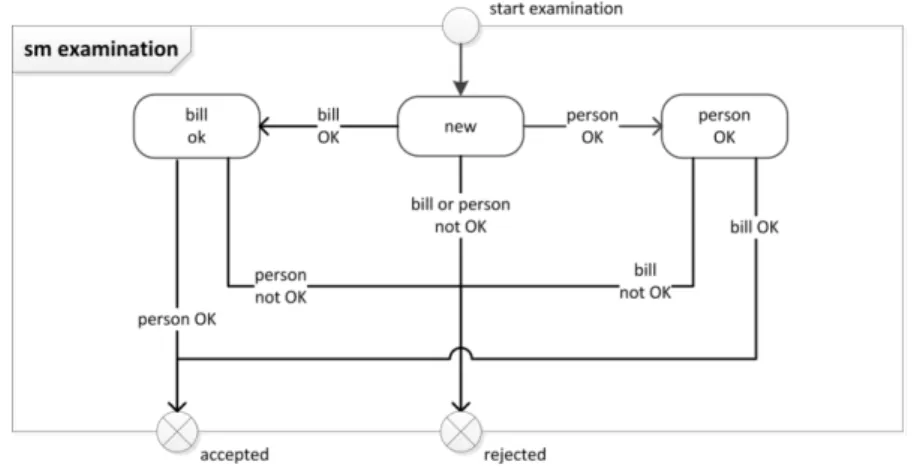
states and state transitions of a document and it also identifies the roles that can initiate these transitions. Fig. 3 and Fig. 4 show an example of such a state machine for the document named <Bill>. The state machine diagrams can make use of composite state and state hierarchy to model ad-hoc events. In addition, state transitions must be labeled with a guard and an event. The guard identifies the role that is allowed to initiate the transition. The event refers to the respective use case.
Fig. 2. Class diagram defining dependencies between documents and case
Fig. 3. State machine diagram defining possible state transitions for document <Bill>
Fig. 4. State machine diagram for sub state <examination>
3
Benefits of oBPM
oBPM supports bottom-up model creation, agile process definition, opportunistic task scheduling and process mining. How these benefits are achieved is described in sections 3.1 to 3.3.
3.1 Bottom-up Model Perspective and Agile Process Definition
The three diagrams introduced in chapter 2 show the top-down perspective of the oBPM model. This perspective is useful for process owners and system administrators but not for knowledge workers. On one hand, these diagrams require specific know-how of the respective diagram syntax, and on the other hand, the diagrams sknow-how many details not relevant for a specific user role. In the bottom-up perspective of the oBPM model, only tasks relevant for a selected role are shown. From this perspective, the following three questions must be answered:
1. Which tasks can I execute and who is responsible to trigger them? 2. Which documents or artefacts do I need to execute these tasks?
3. What are the possible state transitions for these documents during a task?
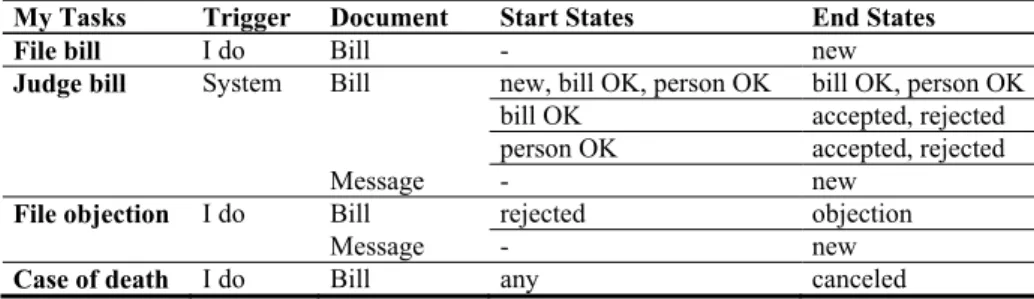
This information can be shown in a simple table. Table 1 shows all model information relevant for the role <Administration> as defined in the diagrams in Fig. 1 to Fig. 4. It is important to mention that this bottom-up perspective is not a local model. In opposite to the solution proposed in [19], where a type view containing the global model and an instance view containing local variations of the model is defined, oBPM uses a single model with two perspectives. Any modification made in bottom-up perspective alters the global model. Thus is no need to synchronize local and global models as it is the case in [19]. The interface used by end-users to define and change the workflow requires the following functionality:
Adding, changing and deleting tasks for the user’s role.
Adding and deleting documents to all of the user’s tasks.
Adding, changing and deleting possible state transitions for every document. By defining the required tasks incrementally, it is possible to specify the overall process in an agile way. Thereby the model remains executable, even if it is incomplete, as described in [19]. Deleting tasks, documents and transitions requires special handling for active cases. For instance, it must be considered that cases don’t end up in a dead lock. A dead lock can occur when state transitions are altered in such a way that there is no set of transitions possible leading to an end state. Most other modifications of the model can be applied to active cases without restrictions. Defining new document types might be restricted to system administrators in order to achieve proper linking of the documents to the case as required by Fig. 2.
Table 1. Model summary for role <Administration>
My Tasks Trigger Document Start States End States
File bill I do Bill - new
Judge bill System Bill new, bill OK, person OK bill OK, person OK bill OK accepted, rejected
person OK accepted, rejected
Message - new
File objection I do Bill rejected objection
Message - new
3.2 Model Execution and Opportunistic Task Scheduling
In the previous sections, we introduced the modeling aspect of oBPM. We will now address the question how a system can process this information and how the workflow is finally presented to the user.
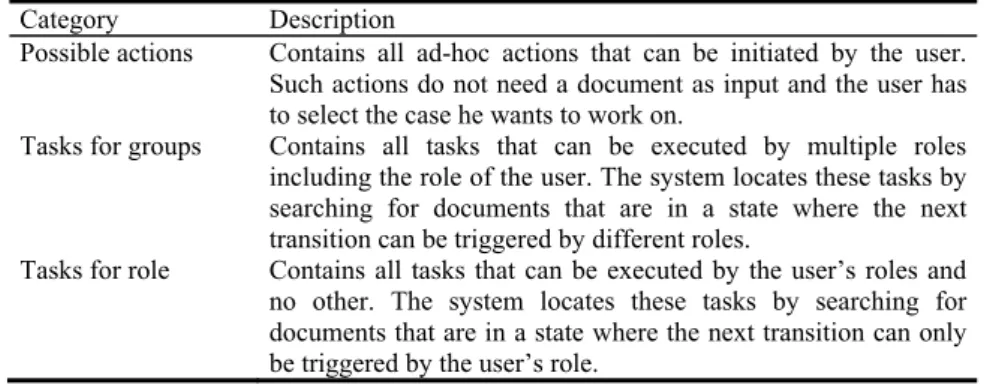
The system executing oBPM needs to manage the state of all documents and implement a fine-grained access control. This access control is based on document types, roles and on the current state of documents. By applying the model, the executing system is able to derive a role-dependent task list from these states. How this can be done is shown in the following example.
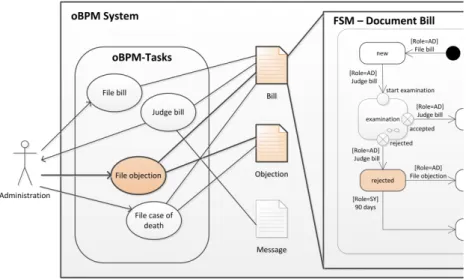
Assuming the system needs to evaluate if users with role <Administration> are currently allowed to file an objection. The system therefore searches the content of Table 1 for required documents and their states. The result of this search is that the documents <Message> and <Bill> are both required. Table 1 also defines that document <Bill> must be in state <rejected>, while for document <Message> no initial state is defined. Having no initial state means that the document can be created “on the fly”. Such documents do not define any prerequisites for a task. The system can now apply this rule to all cases and allow the action <File objection> for all cases having a document <Bill> in state <rejected> (see Fig. 5).
Finally, the result of this operation must be visualized for users. A possible solution is a role-dependent task list in combination with a filter. The filter defines which tasks are shown in the list and allows choosing between all tasks and the tasks for a selected case. The tasks shown in the list are grouped according to the categories introduced in Table 2 and can be started directly from there. For illustration, Table 3 assigns the tasks from the example workflow for role <Administration> to the defined categories.
Table 2. Types of user tasks
Category Description
Possible actions Contains all ad-hoc actions that can be initiated by the user. Such actions do not need a document as input and the user has to select the case he wants to work on.
Tasks for groups Contains all tasks that can be executed by multiple roles including the role of the user. The system locates these tasks by searching for documents that are in a state where the next transition can be triggered by different roles.
Tasks for role Contains all tasks that can be executed by the user’s roles and no other. The system locates these tasks by searching for documents that are in a state where the next transition can only be triggered by the user’s role.
Table 3. Types of user tasks
Category Description
Possible actions File bill: This task is shown because the only document associated is created during this activity.
File case of death: This is an ad-hoc task. It can be executed for any case that is in the state <alive>.
Tasks for groups File objection: A separate task is shown for every case where the document Bill is in the state rejected. From this state, the next state transition can either be triggered by the role <Administration> or, when the deadline is reached, by the system.
Tasks for role Judge bill: A separate task is shown for every case where the document Bill is in one of the states <new>, <bill OK> or <person OK>.
The way how oBPM is executed by the system also shows how the opportunistic behavior is achieved:
The tasks do not appear in the task list based on a predefined sequence. Tasks appear as soon as all preconditions in terms of document states are fulfilled.
In tasks modeled by sub states as shown in Fig. 4, the user is free to choose any execution path within the sub state machine.
Also in tasks without sub states, users are allowed to partially complete a task by editing only selected documents. The remaining documents can either be edited by users with access to the same task or even by any other role that is allowed to modify these documents. Therefore it is not even required that all users involved have access to the same task!
3.3 Process Mining
oBPM allows to execute a business case in various ways and it even supports continuous improvement of the processes with bottom-up model creation and editing. However, it seems likely that not all execution paths are equal in terms of overall
effort, throughput or other performance indicators. By logging the execution path of all cases, oBPM can offer a rich data set to identify the best execution paths for cases. This data set can even be aggregated with externally collected data like customer satisfaction and other performance data to further improve the selection of execution paths. That collected information is richer and more structured than using just e-Mail logs [15], since all the activities follow the rules set up in the state charts for the artefacts and therefore have a well-defined context.
As a result of such an execution path analysis, the system may suggest the most efficient execution paths to the users during execution. The result may also lead to a restriction of model execution to preferred paths by applying rules based on the above mentioned process mining results. With such restrictions, such a process model evolves from oBPM to a traditional well-structured business process. A sophisticated tool could even automate this transition by generating well-structured business processes in BPMN or other tool-specific modeling languages from the collected data sets.
4
Related Work
From an application perspective, oBPM combines Enterprise Content Management (ECM) with Business Process Management (BPM) and a variety of modeling techniques (see Fig. 6). All of these techniques and the approach to combine ECM and BPM applications, for example in document-centric workflow solutions, are nothing new, but there is no product or consulting practice that combines all of these aspects. The Blueprinting Framework, for instance [10] also combines ECM and BPM but does not implement object and state orientation like oBPM. There is also no other approach known for process modeling that is both user- and document-centric with the possibility for bottom-up model creation, agile model adaptation, opportunistic task scheduling and ability for process mining.
A concept closely related to oBPM is the so called content- or data-oriented workflow model. The term “content-oriented” first appeared in [1] and is used as an umbrella term for several scientific workflow approaches, namely "data-driven", "resource-driven", "artifact-centric", "object-aware" and "document-oriented" (see [8]). Common to all of these models is the definition of workflows based on documents, data records or other objects containing process data. Content-oriented workflow models are a topic of ongoing research and numerous publications are available ([2], [3], [6]).
Similar to oBPM, most content-oriented workflow models allow multiple execution paths of a business case similar to the opportunistic task order of oBPM. However, only few approaches make the linking of the document state machines as explicit as oBPM. Because of the content-centric approach, content-oriented workflow models are typically well suited for modeling ad-hoc events. What is new in oBPM is the combination of these aspects with the ability for bottom-up model creation, process mining and the definition of a formalized process model in UML.
Several sample implementations of content-oriented workflow models have been made for scientific purpose and could demonstrate their capabilities ([4], [5]). However, most of these implementations are addressing specific application domains
like the health sector or the automotive industry. So far, there is no general purpose business process modeling tool implementing a content-oriented workflow model, but there are software providers doing research on artifact-centric workflow models (see [7]).
Fig. 6. oBPM and related applications and techniques (Figure adapted from [9])
Fleischmann et al. [20] coined the term subject-oriented BPM (S-BPM), describing a bottom-up process modeling approach that pursues similar aims as the bottom-up perspective introduced in this paper. The common goal is to involve the end-users in order to decrease the complexity of the models and design methodology while increasing the acceptance of the resulting automation solutions. However, using our approach, the model captures more details of the process artefacts including full object-oriented artefact specification and finite state machines. Furthermore, our approach not only provides a bottom-up design methodology but also increases the number of task execution paths and therefore provides end-users with more flexible automation solutions.
5
Conclusion
Although still in an early prototype phase, we clearly see the potential of oBPM to bring business process modeling and execution power to the business user without sacrificing on proven modeling techniques. Both software providers and end-user organizations could benefit from oBPM, since it opens up the space of business process automation from large-scale implementations and highly structured processes to a larger variety of solutions: On the one hand, oBPM potentially lowers the entry barrier to the world of process automation for small and medium enterprises. On the other hand, oBPM supports the user-centric IT enablement for unstructured processes that have so far been out of scope of traditional business process automation initiatives. It leverages social software without losing the advantages of structured models.
6
References
1. Christoph P, et al. 2010. The alpha-Flow Use-Case of Breast Cancer Treatment - Modeling Inter-Institutional Healthcare Workflows by Active Documents. In: Proc of the 8th Int'l Workshop on Agent-based Computing for Enterprise Collab. (ACEC), Larissa, Greece. 2. Dominic Müller, Manfred Reichert, Joachim Herbst: Data-Driven Modeling and
Coordination of Large Process Structures. OTM Conferences (1) 2007: 131-149
3. Carolina Ming Chiao, Vera Künzle, Manfred Reichert: Integrated modeling of process- and data-centric software systems with PHILharmonicFlows. CPSM@ICSM 2013: 1-10. 4. COREPRO (Configuration-based Release Management Processes in the Automotive Sector)
(2005–2007), University of Twente.
5. PHILharmonic Flows - Process, Humans and Information Linkage for harmonic Business Flows, University of Ulm, Institute of Databases and Information Systems.
6. D. Cohn and R. Hull, Business Artifacts: A Data-centric Approach to Modeling Business Operations and Processes, Bulletin of the IEEE Computer Society Technical Committee on Data Engineering, Volume 32, Number 3, September, 2009.
7. Business Artifacts Research at IBM:
http://researcher.watson.ibm.com/researcher/view_project.php?id=2501
8. Wikipedia article, Content-oriented workflow models, http://en.wikipedia.org/wiki/Content-oriented_workflow_models, [23.05.2014]
9. Stefan Tanner, Opportunistic BPM: Ein Prototyp, Masterarbeit an der ZHAW in Wirtschaftsinformatik, Juni 2014, Winterthur, Switzerland.
10. Vom Brocke, J., Cleven, A., & Simons, A. (2011). Towards a business process-oriented approach to enterprice content management: the ECM-blueprinting framework. In Springer, Information Systems and e-Business Management (S. 475 - 496). Berlin Heidelberg: Springer-Verlag.
11. Y. Benkler, The Wealth of Networks: How Social Production Transforms Markets and Freedom, Yale University Press, 2006.
12. J. Surowiecki, The Wisdom of Crowds, Anchor, 2005.
13. David Grünert and Thomas Keller. Business Process Modeling using Activity Pattern. 12th International Conference on e-Society 2014, pp. 193-199. Madrid, Spain, 2014
13. Silver, B. BPMN Method and Style: A levels-based methodology for BPM process modeling and improvement using BPMN 2.0. Cody-Cassidy Press, 2009.
14. Mathiesen, P., et al., 2012. Applying Social Technology to Business Process Lifecycle Management. Business Process Management Workshops, Lecture Notes in Business Information Processing. Springer Berlin Heidelberg, pp. 231–241.
15.Martinho, D., Rito Silva, A., 2012. Non-intrusive Capture of Business Processes Using Social Software, in: Business Process Management Workshops, Lecture Notes in Business Information Processing. Springer Berlin Heidelberg, pp. 207–218.
16.Musser, J., 2006, Web 2.0 Principles and Best Practices. O’Reilly.
17.Koschmider, A., Song, M., Reijers, H.A., 2009. Social Software for Modeling Business Processes, in: Business Process Management Workshops. pp. 666–677.
18.Johannesson, P., Andersson, B., Wohed, P., 2009. Business Process Management with Social Software Systems – A New Paradigm for Work Organisation, in: Business Process Management Workshops. pp. 659–665.
19.Roto Silva, A., et al., 2010. AGILIPO: Embedding Social Software Features into Business Process Tools, in: Business Process Management Workshops. pp. 219–230.
20.Fleischmann, A. et. al,. 2012. Subject-oriented business process management. Springer Publishing.
21.Becker, Kugeler, Rosemann, M. 2001 Business Process Lifecycle Management, White paper
![Fig. 6. oBPM and related applications and techniques (Figure adapted from [9])](https://thumb-us.123doks.com/thumbv2/123dok_us/9710397.2460818/11.892.242.661.308.489/fig-obpm-related-applications-techniques-figure-adapted.webp)
