10
Module
Andreas Schleicher
and Mioko Saito
Data preparation
and management
Quantitative research methods
in educational planning
International Institute for Educational Planning/UNESCO 7-9 rue Eugène-Delacroix, 75116 Paris, France
Tel: (33 1) 45 03 77 00 Fax: (33 1 ) 40 72 83 66
e-mail: [email protected] IIEP web site: http://www.unesco.org/iiep
The designations employed and the presentation of material throughout the publication do not imply the expression of any opinion whatsoever on the part of UNESCO concerning the legal status of any country, territory, city or area or of its authorities, or concerning its frontiers or boundaries.
All rights reserved. No part of this publication may be reproduced, stored in a retrieval system, or transmitted in any form or by any means: electronic, magnetic tape, mechanical, photocopying, recording or otherwise, without permission in writing from UNESCO (International Institute for Educational Planning).
Graphic design: Sabine Lebeau Typesetting: Sabine Lebeau Printed in IIEP’s printshop September 2005 © UNESCO
Quantitative research methods in educational planning
These modules were prepared by IIEP staff and consultants to be used in training workshops presented for the National Research Coordinators who are responsible for the educational policy research programme conducted by the Southern and Eastern Africa Consortium for Monitoring Educational Quality (SACMEQ). The publication is available from the following two Internet Websites:
Data preparation and management
Module 10
Content
1. Introduction
1
Professional data management as an essential component
of educational surveys 1
Other related documentation 4
2. An overview of data management
for educational survey research
5
Integrating data management into the survey design 5 Setting-up a data management plan 6 Taking account of the data collection instruments 7 Taking account of field operations 8 The preparation of school and student record forms 9
1. School record forms 9
2. Student record forms 10
3. Planning coding and data entry 10
3. Data management and quality control
12
Common errors during data preparation 13
Preparation of a codebook 15
1. Datafiles, records, and variables 15
2. Identification, data, and control variables 16
Data preparation and management
Module 10
4. The preparation of a codebook
20
Elements in codebook 20
1. Codebook information for the school identification code 20 2. Codebook information for the student identification code 23 3. Codebook information for question 1: student sex 23 4. Codebook information for question 2: student age 23 5. Codebook information for question 3: regularity of meals 24 6. Codebook information for question 4: availability of books 25 7. Codebook information for questions 5 and 6: books at home
and reading activities 25
8. Codebook information for question 7: student possessions 25
An example of a codebook listing 26
5. The data entry manager software system
30
File construction 31
1. Specifying a filename 31
2. Defining the variables 31
3. Saving the electronic codebook 38
Coding of missing data 38
1. Key requirements 39
2. Basic categories of missing data 39
Data entry 43
1. Basic approaches to data entry 43
2. Using a text editor for data entry 44
3. Using a computer-controlled approach for data entry,
the dataentrymanager programme 47
WinDEM 50
1. Entering data 50
Content
6. Data verification
64
Data verification steps 66
1. Verification of file integrity 67
2. Special recodings 68
3. Value validation 68
4. Treatment of duplicate identification codes 69 5. Internal validation of an hierarchical identification system 69 6. Verification of the linkages between datafiles 69 7. Verification of participation indicator variables against data variables 70 8. Verification of exclusions of respondents 71 9. Checking for inconsistencies in the data 71
Data verification procedures using WinDEM 74
1. Unique ID check 74
2. Column check 74
3. Validation check 74
4. Merge check 75
5. Double coding check 75
7. Database construction and database
management
76
Introduction
Professional data management
as an essential component
of educational surveys
Whenever data are collected in educational survey research studies, two problems are often found at the data preparation phase. First, errors can be introduced in the entry of data into computers and as a result some data collections provide inaccurate and faulty results. Second, the computer entry and cleaning of data prior to the main data analyses can be extremely time consuming and therefore this information can rapidly become “out of date” and consequently lose its value to policy-makers.
The root causes of these two problems of “accuracy” and “timeliness” are sometimes associated with the selection of inappropriate research designs or the use of research designs that are not manageable within prevailing economic, administrative and socio-cultural constraints. In other cases, these two problems arise from the lack of a systematic analysis of decision-making requirements that can cause too many data of limited use to be collected.
Unfortunately, in many cases, a study is successful in addressing the need for appropriate research design and the data identification of required to be collected, but breaks down when the data reach head office. For example, a high quality data collection in the
Data preparation and management
Module 10 Introduction
field can be ruined when: (a) coding and data entry teams are insufficiently trained or supervised; (b) coding instructions and codebook specifications are incomplete or inadequate; or (c) the database management is inappropriate so that information is lost, composite variables are created incorrectly, data are used at the wrong level of analysis, or no attention is given to “adjusting” estimates for the structure of the sample design used.
The issues presented above illustrate the need for a great deal of thought to be given to the management of data prior to the commencement of an educational survey research study. In particular, close attention must be given to: (a) the type of data collected, (b) the data collection methods, (c) the design of data collection instruments, and (d) the administrative procedures and field operations.
In addition, adequate field monitoring and survey tracking instruments must be prepared, and good data entry and data verification procedures must be developed to implement these standards. Finally the organization of the data into adequate data structures is required in order to facilitate the manipulation, analysis, and reporting of information.
The following discussion places the spotlight on the broad field of “data management” for many issues related to the planning of large-scale educational survey research studies. In these studies, data may be collected from thousands of students selected by using quite complex sample designs. The discussion has been extended to cover the situation where data have been collected at different “levels” (for example, students, teachers, schools) and therefore may need to be merged, aggregated, and disaggregated prior to the main data analyses.
Data preparation and management
Module 10 Introduction
Scope and structure
There are several key steps in data management that are required to ensure that the quality of collected data is adequate, that data are turned into useful information, and that the more common data management problems are avoided. These steps include: (a) elaboration of data management issues during the preparation of the survey design, (b) setting data quality standards and the establishment of quality control mechanisms, (c) preparation of codebooks; (d) data coding and data entry in computer-readable format, (e) verification of data; and (f) database design and database management.
Data management issues will be addressed in the following
discussion from a conceptual point of view and also through a set of worked examples that lead step by step towards solving frequently-occurring problems in data management. Several examples have been presented to illustrate three of the most frequently collected types of quantitative educational research data: (a) achievement tests with multiple-choice or pre-coded free response items, (b) questionnaire data, and (c) numerical measurements.
The discussion commences with an analysis of those aspects of data management that need to be addressed in the initial phases of the design of an educational survey. This is accompanied by an analysis of approaches to the establishment of data quality standards and mechanisms of quality control. The chapter then deals with how to transform answers given to questions and achievement test items into numerical codes that a computer can interpret, and how to represent the data from questionnaires or achievement tests in a datafile so that they can be processed and analyzed by a computer. The chapter concludes with an examination of data entry and verification procedures, followed by a brief overview of procedures for organizing information into database systems.
Data preparation and management
Module 10
Other related documentation
Some of the examples given below are concerned with the entry, editing, and verification of data through the use of a software system for data management called the Windows DataEntryManager (WinDEM) program. A special version of this program is available from the IEA. This software has easy-to-learn features and comes with integrated file management and reporting capabilities. Using this programme, the deviation of data values from pre-specified validation criteria or data verification rules can be detected quickly, thereby allowing the user to correct errors shortly after the original survey materials arrive at the survey office. The manual for the WinDEM programme describes how to create new datafiles or to modify the structure of existing datafiles, and how to change coding schemes and range validation criteria for variables. The manual also contains an interactive tutorial through which the user can learn how to transform a questionnaire into an electronic codebook, how to set up a datafile, how to enter data into this datafile, and how to make backup copies of data on diskettes.
Data preparation and management
Module 10
An overview of data
management for educational
survey research
Integrating data management into the
survey design
Often researchers start to solve data management issues only after the field administration has been completed and the completed survey instruments have been returned. In these cases, the data management plan is prepared after the field administration has been completed and usually only involves data entry, data verification, and data analysis. However, in order to avoid unexpected problems, unnecessary corrective steps, and delays in data verification and data analysis, it is important to take data management issues into account during all phases of the research project.
From the very beginning of a survey, the following issues should be considered: (a) the type of data collected; (b) the data collection methods; (c) the design of the data collection instruments in terms of the development of coding rules and coding instructions; (d) the design of the administrative procedures including field monitoring and instrument receipt control; (e) the data entry and the type of data verification procedures required; (f) the timing and deadlines; (g) the data processing environment; and (h) the database design. It is therefore important that staff responsible for managing
Data preparation and management
Module 10 An overview of data management for educational survey research
educational survey research data by using computers are consulted from the very beginning of a study on all issues involving costs, administrative and practical constraints, timelines and needed technical/personnel resources.
Setting-up a data management plan
In the planning stage of a survey a detailed “data management plan” needs to be developed which recognizes that action will be required with respect to four major components.
First, the resources required for field operations, data entry, and data processing generally depend on the sample size that is to be used. In situations where there are severe constraints on resources, this will often require trade-offs to be made concerning various factors which influence the quality with which the survey can be carried out.
Second, the procedures for coding and data entry will depend to a great extent on the types of response required of the questions in the data collection instruments.
Third, the establishment of identification codes for data collection instruments depends upon the units of sampling and the units of analyses that are to be used. The resource implications required to establish linkages between information gathered from different units (for example: school heads, teachers, and students) is a point that also needs to be considered.
Finally, the complexity of data verification procedures depends on the nature of the response patterns in the data collection instruments. Special care needs to be taken in dealing with “filter” or “branching” questions because these can lead to substantial inconsistencies in responses which must then be dealt with during the analysis of the data.
Data preparation and management
Module 10 An overview of data management for educational survey research
Taking account of the data collection
instruments
When designing data collection instruments, it is essential to have a clear picture of the desired information and intended analyses, including the necessary analyses of reliability and validity. The amount and type of data preparation required before information can be used in the data analyses depends on the type of questions asked and on the kind of data collection instruments used. A variety of formats exist for asking questions. These range from simple pre-coded multiple-choice questions which can be transcribed directly into a computer-readable form, up to open-ended and free response questions of various kinds which require highly qualified coding personnel in order to transform responses into pre-defined categories and numerical codes. It is important to evaluate the implications of the use of different types of questions and response formats. For example, asking students to specify the occupation of their parents in free response format may result in a large variety of (often very confusing) answers, and these may be difficult and time consuming to classify and code. It should be remembered here that the use of open-ended test items usually requires the steps of coding and data entry to be separated, whereas with multiple-choice questions or test items these steps can be addressed in a single operation.
Thought also needs to be given to the physical layout of the instruments. For example, the instruments can be printed with codes for each response, coding columns, and control information. These improvements to layers often result in speeding-up and improving the accuracy of data entry.
Data preparation and management
Module 10 An overview of data management for educational survey research
Taking account of field operations
The integration of the procedures for the selection of a survey sample into the procedures for data management can often facilitate survey operations and reduce survey costs. For example, a list of selected sampling units based on a computerized sampling frame can be used to generate address labels, name-lists, and registration forms – all of which can be used for the purposes of instrument preparation, field monitoring, data entry, and data verification. The establishment of proper identification (ID) codes for schools, classes, teachers, and students is thereby critical, especially when the survey design requires the linkage of students to their schools, classes and teachers. The system for assigning these identification codes must ensure that students, teachers, classes, and schools are identified uniquely and that there is sufficient information that will permit verification to be made at the various stages of the survey.
In educational surveys involving different levels of data aggregation, it is often advantageous to identify respondents through a
hierarchical compound numbering system. In such a numbering system the first section classifies respondents within the next higher level of aggregation and, at the same time, identifies respondents within the classification units. For example, students in a survey may be assigned School IDs, Class IDs, and Student IDs. The Class ID would consist of the School ID plus an identification of the class within the school, and the Student ID in turn could then consist of the Class ID plus an identification of the student within the class. When such an identification system is used, the internal
consistency of the identifications can be verified by computer and the probability of an incorrect identification of respondents can be reduced because, during data entry, these identification codes can be automatically cross-validated on the basis of their common parts. Such a system can, for example, help to ensure that student data is linked reliably to teacher and school data.
Data preparation and management
Module 10 An overview of data management for educational survey research
It is crucial that unique identification codes are assigned to students, teachers, and classes, and that these identification codes are
carefully written onto all instruments that are prepared before the instruments are sent out. This should be supplemented by the use of survey tracking instruments by means of which respondents can be followed throughout survey.
The following illustration provides an example of the design of school and student record forms based on a two stage sample design in which first schools are selected and then intact classes are selected within schools.
The preparation of school and student
record forms
1. School record forms
This form should include the following items: (i) the official identification number of the school, (ii) the name, full address, and telephone number of the school, (iii) the name and telephone number of the person co-ordinating the assessment in the school, (iv) the number of classes in the target population in the school, and (v) the number of students in the target population in the school. Schools that, despite all efforts, do not co-operate in the assessment are often replaced with “similar” schools, for example, with schools of a similar type, size, location and context. This is accomplished through the association of each sampled school with a replacement school derived from a separately drawn replacement sample. Though the use of replacement schools should be discouraged because it may introduce a bias of unknown magnitude, it is
Data preparation and management
Module 10 An overview of data management for educational survey research
record form allows the researcher to trace such schools and to identify schools as replacement schools.
2. Student record forms
For the selected schools, Student Record Forms should be prepared. These will be of critical importance in various phases of the field trial. In particular, they provide information relating to: (i) the identification of students, (ii) the checking of the age and sex of students, (iii) which test booklets should be given to which students, (iv) the participation status of students in the test and questionnaire administration, (v) the students who have been excluded from the testing, (vi) the instruments that have been lost, and (vii) the checking of instruments against persons.
3. Planning coding and data entry
Once the data collection instruments are finalized the codebook can be prepared. The codebook provides a comprehensive description of the contents and layout of the data that are entered into a computer for analysis.
The largest part of the data collection costs are often caused by the coding, entry, and verification of the data. Careful thought must therefore be given to the establishment of consistent coding schemes that are easy to apply and that cover the potential
responses and different instances of missing data in an exhaustive and mutually exclusive way. It is important that there are enough personnel and enough technical resources in order to complete the entering and cleaning of the data in a timely fashion. What is especially important is that coders are well trained and that there is a head-coder to whom queries can be directed and who can decide what to do when there are problems with the coding.
Data preparation and management
Module 10 An overview of data management for educational survey research
Sometimes, the tasks of coding and data entry may be separated, especially where open-ended questions or test items are involved which require specially- trained personnel. For both coding and data entry, it is important to test all procedures on a sub-sample of questionnaires so that the researcher knows how much time will be required to complete this work.
Data preparation and management
Module 10
It is essential that, prior to the collection of data, a common framework of data management standards be agreed upon. Standards in this context comprise: (a) principles to which the results of data collections and data collection operations should conform, (b) measures by which the quality and accuracy of results and procedures can be judged, and (c) steps that must be undertaken to obtain adequate data in a timely manner.
The main reasons for establishing data management standards are to ensure the quality of the data, so as to guarantee the integrity of the data analyses, and to be confident of the adequacy of the results of these data analyses for answering the intended research and policy questions.
There are five main elements which must be addressed in order to ensure that data adheres to quality standards.
• A detailed prior analysis of potential fieldwork problems. • The specification of data verification rules.
• Adequate training of field administrators.
• The implementation of quality standards during data verification.
Data management and
quality control
Data preparation and management
Module 10
• The development of procedures for the analytical treatment and reporting of deviations from the quality standards.
The careful preparation of administrative procedures including manuals, survey tracking instruments, and identification systems are of critical importance for the verification of data quality standards.
Common errors during data preparation
The errors that can occur during data preparation are usually linked with the procedures adopted for instrument design, coding procedures, and the data collection and data entry methods. For example, the kinds of errors that occur when free response data are manually coded and transcribed into computer readable form differ from the kinds of errors that are likely to occur when data are entered directly into computers from machine-readable answer sheets. In the first situation, errors can occur when coders misread or misinterpret the answers of respondents, when coding rules are not correctly applied, or when the data are incorrectly transcribed, such as when data values are omitted, shifted or otherwise wrongly entered into the computer. For some of these problems it is often impossible to verify whether the errors have been caused by the respondent, during the field administration, the coding process, or during the data transcription.
The ten most common problems in terms of quality standards have been listed below:
• Respondents may have been assigned invalid or wrong
identification codes either during instrument preparation, field administration or data transcription. This can lead to difficulties if later analyses require linkages between different respondents or between different levels of data aggregation.
Data preparation and management
Module 10 Data management and quality control
• Questions may have accidentally been misprinted due to technical or organizational imperfections, thereby preventing respondents from giving appropriate answers.
• Questions may have been skipped, or not reached, by the respondents either in a randomized fashion or in a systematic way which results in “gaps” in the data to misleading results. • Respondents may give two or more responses when only one answer was allowed, or questions may have been answered in other unintended ways.
• Certain data values may not correspond to the coding specifications or range validation criteria.
• Answers to open-ended questions may contain outlier codes, that is, there may be respondents with codes which are improbably low or high even though they could be the valid answers.
• The values for certain data variables might not correspond to the values of certain control variables. (For example, the value of a control variable may state that a particular student did not respond to a particular question set, whereas the data variables for this question set indicate actual responses).
• Data from a respondent may contain inconsistent values. (That is, the values for two or more variables may not be in accord). • Inconsistencies between data values from different respondents
which belong to a certain group may occur for questions which are related to this group. (For example, for students in the same class there may be different values for variables which are related to the class).
• Inconsistencies may also occur between data values of different but related datafiles or levels of aggregation.
Data preparation and management
Module 10 Data management and quality control
Preparation of a codebook
1. Datafiles, records, and variables
Data are stored in computers in the form of units called datafiles. In general terms, a datafile can be described as a collection of related information. For example, a datafile can contain a number that identifies each member of a sample of students and gives the student responses for each item of an achievement test, and, in addition, provides descriptive background information for each student. Each datafile is referenced by a unique filename.
The most common form of a datafile is an ASCII raw datafile. In such a datafile, data are stored in fixed form ASCII format where ASCII refers to the American Standard Code for Information
Interchange. (If you use a computer other than a Personal Computer then other interchange format standards may be used which can usually be transformed into ASCII files). Fixed format implies that the data for each piece of information are recorded in the same columns of a datafile for each respondent. In a raw datafile the different pieces of information are represented next to each other (in columns) and respondents are represented below each other (in rows).
Most statistical data analysis systems can read and process raw datafiles. The user of these systems must “tell the system” in which location and in which format the data have been written. To simplify this process, many statistical data analysis systems employ their own system file format in which the data and all the technical information concerning the file structure, the data format, and the coding schemes are integrated. However, these system files can usually only be used with a specific software system and therefore are often not suitable for data transfer between different software systems.
Data preparation and management
Module 10 Data management and quality control
Each respondent is represented in the datafile through one or more records which comprise all of the data associated with the respondent. A record is usually represented as a single line in a raw datafile.
Each record in a datafile contains different categories of information, for example, the student identification codes, the student answers on the first test item, the student answers on the second test item, and so on. Each of these categories of information is represented in the computer by a variable. It is useful to
distinguish between identification variables, data variables, and control variables. Each variable is referred to by a variable name.
2. Identification, data, and control variables
Each respondent described in a datafile should be uniquely identified so that it is possible to distinguish respondents in later analyses. For example, in order to calculate school mean scores of student achievement, it is necessary to be able to identify which school a mean score refers to. To accomplish this, a special set of variables are defined in the codebook which provide a unique identification for each respondent from whom information has been collected. These variables are referred to as identification variables. In cases where data are collected on several hierarchically related levels (for example, students, classes, and schools), the identification of each level of aggregation should be defined as a separate variable so that in later analyses the connection between successive levels of the hierarchy can easily be established. In a hierarchical system the Class ID could for example consist of the School ID plus a sequential number of the class within the school and the Student ID could consist of the Class ID plus a sequential number of the student within the class (see also above).
The variables containing the actual responses from the respondents are referred to as data variables.
Data preparation and management
Module 10 Data management and quality control
Errors often occur during the entry of data into a computer when a number of variables have possible values within the same range and, at the same time, they appear in a sequence or are coded in a continuous string. These variables take values within the same range and therefore this leads to greater potential for column shifts. To guard against this type of error it is often useful to insert, at certain positions in the datafile, variables for which a certain fixed value (for example, a blank space) must be specified. Similarly, it is often useful to introduce variables that indicate the participation status of the respondent or that indicate reasons for excluding a respondent from the assessment. Variables that do not represent data from the respondents but that are introduced for checking purposes are usually referred to as control variables.
The purpose and use of a codebook
After the data collection instruments have been returned by the respondents, the responses must be entered into a datafile. In order to be useable in computer-based data analyses, these responses need to be transformed into numeric or alphanumeric codes. This is usually achieved by having each response associated with a well defined numerical code, that is usually represented by a fixed number of digits. For each possible response there should therefore be one, and only one, code. Questions for which more than one response can be given must be split into several variables, each corresponding to one response option.
Detailed instructions must be specified describing how data must be coded and how resultant codes are stored in computer readable form. The document providing these instructions is usually referred to as the codebook.
This codebook should be prepared in a standardized way, using defined naming, layout, and structural conventions. Some
Data preparation and management
Module 10 Data management and quality control
important pieces of information which the codebook should contain have been listed below:
• The codebook should contain an accurate reproduction of each question, including the identification of the question and its sequential number and/or position in the instrument.
• Each variable should be identified by a unique variable name. Multiple or split variables referring to the same question should be indicated as such, through a common stem in the variable names. It is advantageous if the variable names contain classificatory elements which, for example, may allow the identification of the population, the type of respondent, the kind of question, and the response type from the variable name. Note that most software packages for data analysis impose certain restrictions on the variable names.
There are four restrictions that apply to most standard software packages: (i) variable names should have a maximum length of 8 characters, (ii) the first character should be a letter but later characters can be letters, numbers, or underscores, (iii) blanks should not be included within variable names, and (iv) variable names should not contain special characters except for the underscore.
• Since the variable name can only include a limited amount of information in highly condensed form, each variable name should be supplemented by a descriptive label which indicates the content and/or classification categories of the variable. • For each pre-coded question there must be a list of all possible
answers along with the definition of the corresponding codes that are assigned to each of these answers. (Free response questions require scoring rules and classification schemes which assign data-values to defined categories).
Data preparation and management
Module 10 Data management and quality control
• The location and format of the data representation in the computer needs to be defined. (Codes are often represented in the form of fixed-form integers, rationales, or exponentials). • If a computer system is used for data transcription, then the
codebook should describe where on the screen the data have to be entered and how the data values can be accessed.
• The codebook should contain a description of the validation criteria and data verification rules that are associated with the corresponding variables, a list of the codes that are used to indicate the various instances of missing data, and instructions on how missing data are coded.
• The codebook may be supplemented with information useful to the researcher analyzing the data, e.g. information concerning the scale-type or measurement class of the variables.
As the proper analytical use of data will depend on appropriate coding, the coding must be completed according to the information in the codebook. It is therefore necessary that general rules
concerning the coding and entry of data are clear to the coders before they start entering data.
It is advisable to implement certain redundancy checks in the coding of responses which can be used for later data verification purposes. For example, a variable which indicates whether a
respondent was administered a particular questionnaire or test can be used to indicate whether missing data for this questionnaire or test means that the respondent was not administered the test or else took the test but did not respond to it.
Data preparation and management
Module 10
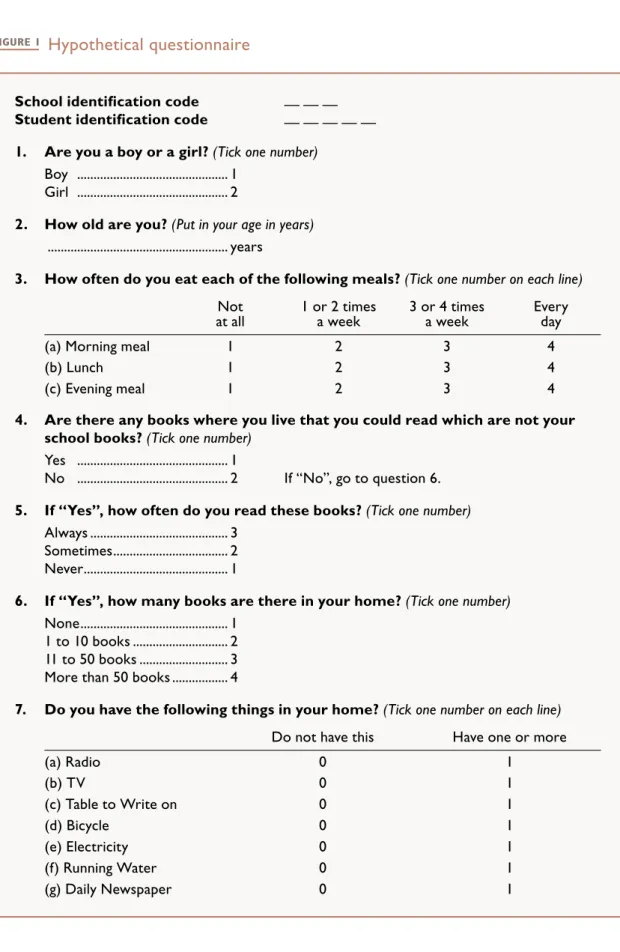
In the following discussion, an example in the preparation of a codebook has been illustrated for a short hypothetical questionnaire.
In preparing the codebook it is often useful to start with the
identification variables and then to continue with the data variables in the same sequence as they appear in the tests or questionnaires so that the coders can proceed with the coding in the same
sequence in which they read the data collection instruments. In the following example we will start the specification of the codebook with the school identification code which is presented in the header of the questionnaire.
Elements in codebook
1. Codebook information for the school
identification code
• Variable Name: Each variable must be identified by a unique variable name. In this example the school identification variable has been given the name IDSCHOOL.
• Variable Type: The type of coding that is used for the variable must now be defined. Usually a distinction is made between alphanumeric variables which are treated as categorical data and open-ended numerical codes which are treated as
The preparation of a
codebook
Data preparation and management
Module 10
numbers. Sometimes also a distinction between different types of numerical codes is made. Identification variables always have categorical codes but we can choose between an alpha or a numeric data representation.
• Variable Length and Recording Positions: The number of digits (including decimal places) which are required to code the data values of this variable and the positions in the datafile must then be specified. Starting the datafile with the school identification code we will put this into the columns 1-3 of the raw datafile.
• Number of Decimal Places: Where decimals are used in data codes it is necessary to specify how many decimal places are used. For the school identification code there will be no decimal places.
• Instrument Location: The codebook should also tell the coders about the location of information in the data collection instruments. For example, the coders should be informed that they will find school identification codes in the headers of assigned questionnaires.
• Variable Label: A brief descriptive label should be assigned to the variable that can help later users of the programme to remember what the short variable name stands for.
• Coding Scheme: For categorical variables it is necessary to specify the code for each possible category. In addition, for all types of variables it is necessary to specify the codes
associated with frequently-occurred data (such as missing, not administered, not reached, etc.).
• Range Validation Criteria: It is often useful to specify a valid range for the variable that determines which data values the user is allowed to enter into the computer. Such range validation criteria may take the form of a simple set of allowed codes or they may have a complex structure, relating the codes to responses to other questions or the responses of other respondents.
Data preparation and management
Module 10 The preparation of a codebook
School identification code — — —
Student identification code — — — — —
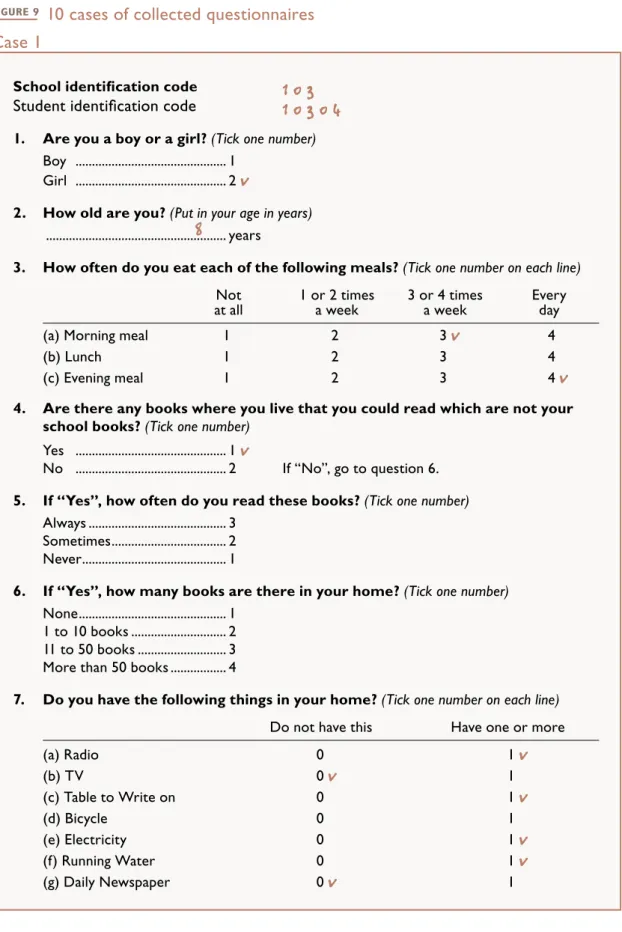
1. Are you a boy or a girl?(Tick one number)
Boy ... 1 Girl ... 2
2. How old are you?(Put in your age in years)
... years
3. How often do you eat each of the following meals?(Tick one number on each line)
Not
at all 1 or 2 times a week 3 or 4 times a week Every day
(a) Morning meal 1 2 3 4
(b) Lunch 1 2 3 4
(c) Evening meal 1 2 3 4
4. Are there any books where you live that you could read which are not your school books?(Tick one number)
Yes ... 1
No ... 2 If “No”, go to question 6.
5. If “Yes”, how often do you read these books?(Tick one number)
Always ... 3 Sometimes... 2 Never... 1
6. If “Yes”, how many books are there in your home?(Tick one number)
None... 1 1 to 10 books ... 2 11 to 50 books ... 3 More than 50 books ... 4
7. Do you have the following things in your home?(Tick one number on each line)
Do not have this Have one or more
(a) Radio 0 1 (b) TV 0 1 (c) Table to Write on 0 1 (d) Bicycle 0 1 (e) Electricity 0 1 (f) Running Water 0 1
Data preparation and management
Module 10 The preparation of a codebook
2. Codebook information for the student
identification code
The definition of the student identification code in the sample questionnaire is similar to the definition of the school identification code, except that a five-digit number should be used. With the school identification code occupying columns 1-3 in the datafile, the positions 4-8 could be allocated to the student identification code. We will give this variable the name IDSTUDENT.
3. Codebook information for question 1:
student sex
The first question in the sample questionnaire asks for the student’s sex. This question can be represented by the variable SSEX. This variable has a fixed set of categorical codes, namely “1” for “boy”, “2” for “girl”. The code “9” can be used to indicate missing data, and the code “8” to indicate that the student was not administered this question in the sample questionnaire. We therefore specify a categorical variable type. The length of the code is 1 character and there are no decimals. Since this question is the first question in the sample questionnaire, “Question 1” can be given for the instrument location. An appropriate variable label would be “Student sex”. For each valid data code a brief description is provided that indicates the meaning of the codes. These descriptions are usually referred to as value labels. The code “1” may be selected to specify “boy” and “2” to specify “girl”. The position of the code for the student sex in the raw datafile would be column 9.
4. Codebook information for question 2:
student age
The next variable in the codebook describes age in years. This variable can be represented by “SAGEY” for the variable name. Since students are requested to enter their age as an open-ended
Data preparation and management
Module 10 The preparation of a codebook
number, the code for this variable is open-ended and therefore it is necessary to specify an open-ended numerical variable type. The length is two characters in this case and there are no decimals. For the instrument location “Question 2” may be specified, and “Student age in years” for the variable label. A value of “99” can be used for the “missing” code and “98” for the “not administered” code. Assuming that the age of the students in the sample ranges between 8 and 16 years, values of “8” and “16” specify the extremes of the valid range. The position of the code for the student age in the raw datafile would be columns 10-11.
5. Codebook information for question 3:
regularity of meals
In the instructions to this question the student is asked to provide three answers, one concerning the morning meal, the second
concerning lunch, and the third concerning the evening meal. Since each variable can contain only one data value, it is necessary to represent this question by three separate variables with the names of: SMEALA, SMEALB, and SMEALC. These variables have a fixed set of categorical codes, namely “1” for “not at all”, “2” for “1 or 2 times a week”, “3” for “3 or 4 times a week”, “4” for “every day”, with “9” being used to indicate “missing” data, and “8” being used to indicate that the student was not administered this question. The code for this variable is a categorical type, a length of one character, and no decimals. “Question 3a”, “Question 3b”, and “Question 3c” are specified, respectively, for instrument locations, and the variable labels are “Frequency of meals/morning meals”, “Frequency of meals/lunch”, and “Frequency of meals/evening meals”, respectively. The valid data are 1, 2, 3, and 4 and for the corresponding value labels are “not at all”, “1 or 2 times a week”, “3 or 4 times a week”, and “every day” according to the instructions in the questionnaires. The position of the codes for the three variables on the regularity of meals in the raw datafile would be columns 12, 13, and 14.
Data preparation and management
Module 10 The preparation of a codebook
6. Codebook information for question 4:
availability of books
Question 4 asks about the availability of books and may be allocated the name of SBOOKAV. Note that the responses that follow this question will depend on the answer to this question. Such variables are described as filter variables. The position of the code for the question on availability of books would be column 15.
7. Codebook information for questions 5 and 6:
books at home and reading activities
Questions 5 and 6 are related to the number of books and the reading activities of the students. The answers to these questions depend on the answer to question 4. The coding is similar to the coding of question 1 with variable names of SBOOKRD and SBOOKS. The position of the code for the questions on the number of books at home and the reading activities would be columns 16 and 17. However, if the student answers “No” to Question 4, the coding for Questions 5 should be specially assigned (for the special reason of “missing”), and the coding for Question 6 should automatically become “1”.
8. Codebook information for question 7:
student possessions
Question 7 is again a “split” question which asks the student about home possessions. The coding is similar to question 3 except that there are now 7 distinct variables – each of which has valid data codes of 0 and 1. The variable names are SPOSSA, SPOSSB, SPOSSC, SPOSSD, SPOSSE, SPOSSF, and SPOSSG. The position of the code for the questions on student possessions would be columns 18, 19, 20, 21, 22, 23, and 24.
Data preparation and management
Module 10 The preparation of a codebook
An example of a codebook listing
In Figure 2, the codebook for the hypothetical questionnaire has been presented. This codebook was prepared as output from the DataEntryManagement (WinDEM) software when applied to the questionnaire presented in Figure 1. The different pieces of information contained in this hypothetical codebook are described below:
• The first column in the codebook (Var. No.) presents a sequential number for each variable in the Reading Literacy Codebook;
• The second column (Quest. No.) presents an identification of the background question and its location in the instruments; • The third column (Variable Name) presents the variable name;
• The fourth column (Variable Label) presents the variable label;
• The fifth column (Code R:Recode) presents the codes for the responses, and the recodes for variables for which recoding is necessary and where recoding is not covered by the general notes on recoding. Whenever actual numerical data are supplied in the response to the questions, this is indicated by the keyword “VALUE”. The missing-code presented in the codebook indicates “missing/non-response” values. The “not administered” code presented in the codebook indicates “not administered” values;
• The sixth column (Option) presents the response phrase (or an abbreviation of it) that corresponds to the code. For variables that contain actual numeric data, it contains an explanation and the permitted range of the value to be entered;
Data preparation and management
Module 10 The preparation of a codebook
• The seventh column (Location/Format) presents the location and format of the variable in the raw datafile. A variables format is the pattern used to write each value of the variable. It consists of the variable type, the first column in the raw datafile that is assigned to the variable, the last column the variable occupies in the raw datafile, and the length and the number of decimal places. In the seventh column of the codebook the first two numbers refer to the position of the first and last digit of the value of a variable within a record. “C” and “N” indicate the variable type (where N refers to “non-categorical” or open-ended numeric variables and C refers to “categorical” alpha-numeric values). The third number refers to the length (where the numeric code refers to the length of the value and the number of decimal places associated with the values) of each variable.
Data preparation and management
Module 10 The preparation of a codebook
Var. Variable Code
No. Question Name Variable Label R:Recode Option Location/Format 1 SCHOOLID IDSCHOOL SCHOOLIDENTIFICATIONCODE 999 missing 1- 3/N 3.0
998 not admin.
VLD: (IDSCHOOL>=1.AND.IDSCHOOL<=150).OR.IDSCHOOL=999.OR.
Flags: SCR: 1 / CAR:YES / CAT:D / DEF:
2 STUDENTID IDSTUD STUDENTIDENTIFICATIONCODE 99999 missing 4- 8/N 5.0
99998 not admin.
VLD: (IDSTUD>=1.AND.IDSTUD<=50000).OR.IDSTUD=99999.OR.ID
FLAGS: SCR: 2 / CAR:No / CAT:D / DEF:
3 QUEST 1 SSEX STUDENT’SGENDER 1 boy 9 /C 1.0
2 girl 9 missing 8 not admin.
VLD: SSEX$’1298’
Flags: SCR: 3 / CAR:No / CAT:B / DEF: 9
4 QUEST 2 SAGEY STUDENTAGEINYEARS 99 missing 10- 11/N 2.0
98 not admin.
VLD: (SAGEY>=8.AND.SAGEY<=16).OR.SAGEY=99.OR.SAGEY=98
Flags: SCR: 4 / CAR:No / CAT:B / DEF:
5 QUEST 3A SMEALA FREQUENCYOFMEALS / MORNINGMEALS 1 not at all 12 /C 1.0
2 1 or 2 times a week 3 3 or 4 times a week 4 every day 9 missing 8 not admin. VLD: SMEALA$’123498’
Flags: SCR: 5 / CAR:No / CAT:B / DEF: 9
6 QUEST 3B SMEALB FREQUENCYOFMEALS / LUNCH 1 not at all 13 /C 1.0
2 1 or 2 times a week 3 3 or 4 times a week 4 every day 9 missing 8 not admin. VLD: SMEALB$’123498’
Flags: SCR: 6 / CAR:No / CAT:B / DEF: 9
7 QUEST 3C SMEALC FREQUENCYOFMEALS / EVENINGMEALS 1 not at all 14 /C 1.0
2 1 or 2 times a week 3 3 or 4 times a week 4 every day 9 missing 8 not admin. VLD: SMEALC$’123498’
Flags: SCR: 7 / CAR:No / CAT:B / DEF: 9
8 QUEST 4 BOOKAV AVAILABILITYOFBOOKS 1 No 15 /C 1.0
2 Yes 9 missing 8 not admin.
VLD: BOOKAV$’1298’
Flags: SCR: 8 / CAR:No / CAT:B / DEF: 9
FIGURE 2 Codebook for the hypothetical questionnaire
Data preparation and management
Module 10 The preparation of a codebook
Var. Variable Code
No. Question Name Variable Label R:Recode Option Location/Format 9 QUEST 5 BOOKRD READINGFREQUENCY 1 Never 16 /C 1.0
2 Sometimes 3 Always 9 missing 8 not admin.
VLD: BOOKRD$’12398’
Flags: SCR: 9 / CAR:No / CAT:B / DEF: 9
10 QUEST 6 SBOOKS NUMBEROFBOOKSATHOME 1 none 17 /C 1.0
2 1 to 10 books 3 11 to 50 books 4 more than 50 books 9 missing
8 not admin.
VLD: SBOOKS$’123498’
Flags: SCR: 10 / CAR:No / CAT:B / DEF: 9
11 QUEST 7A SPOSSA HOMEPOSSESSIONS / RADIO 0 do not have this 18 /C 1.0
1 have one or more 9 missing
8 not admin.
VLD: SPOSSA$’0198’
Flags: SCR: 11 / CAR:No / CAT:B / DEF: 9
12 QUEST 7B SPOSSB HOMEPOSSESSIONS / TV 0 do not have this 19 /C 1.0
1 have one or more 9 missing
8 not admin.
VLD: SPOSSB$’0198’
Flags: SCR: 12 / CAR:No / CAT:B / DEF: 9
13 QUEST 7C SPOSSC HOMEPOSSESSIONS / TABLETOWRITEON 0 do not have this 20 /C 1.0
1 have one or more 9 missing
8 not admin.
VLD: SPOSSC$’0198’
Flags: SCR: 13 / CAR:No / CAT:B / DEF: 9
14 QUEST 7D SPOSSD HOMEPOSSESSIONS / BICYCLE 0 do not have this 21 /C 1.0
1 have one or more 9 missing
8 not admin.
VLD: SPOSSD$’0198’
Flags: SCR: 14 / CAR:No / CAT:B / DEF: 9
15 QUEST 7E SPOSSE HOMEPOSSESSIONS / ELECTRICITY 0 do not have this 22 /C 1.0
1 have one or more 9 missing
8 not admin.
VLD: SPOSSE$’0198’
Flags: SCR: 15 / CAR:No / CAT:B / DEF: 9
16 QUEST 7F SPOSSF HOMEPOSSESSIONS / RUNNINGWATER 0 do not have this 23 /C 1.0
1 have one or more 9 missing
8 not admin.
VLD: SPOSSF$’0198’
Flags: SCR: 16 / CAR:No / CAT:B / DEF: 9
17 QUEST 7G SPOSSG HOMEPOSSESSIONS / DAILYNEWSPAPER 0 do not have this 24 /C 1.0
1 have one or more 9 missing
8 not admin.
VLD: SPOSSG$’0198’
Data preparation and management
Module 10
There are software systems which allow one to create a codebook in an interactive way. The following discussion covers this step-by-step process using the WinDEM programme provided by the IEA (for more detailed information, refer to the programme manual of the WinDEM programme).
For each data file which you create with the WinDEM programme, the programme maintains an electronic codebook which contains all technical information required to define the file structure, the coding scheme, the data verification rules, and quality standards for the datafile. Whenever variables are modified, the programme updates the electronic codebook automatically.
To illustrate the operations of the WinDEM software, consider the preparation of a datafile that can hold the data from the sample questionnaire in Figure 1. This will require the following three steps: creating a new datafile, defining the variables to be included in the datafile, and saving the resulting electronic codebook. Each of these steps requires the user to provide input to the WinDEM programme through a series of questions and prompts. In the following discussion an example of this process has been presented along with a listing of the “dialogue” that occurs between the user and the computer.
The data entry manager
software system
Data preparation and management
Module 10
File construction
1. Specifying a filename
In order to create a new datafile, the programme will first ask you to give your datafile an alphanumeric name with a length of up to 8 characters, for example, SAMPLE1.
2. Defining the variables
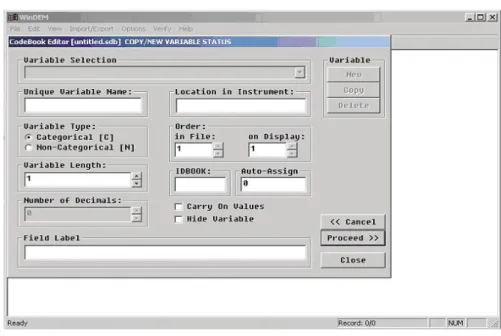
The next step is to define the information to be stored in the datafile. This can be done in the form of a “dialogue” with the computer, where the computer will ask you to specify the characteristics of the variables in the datafile.
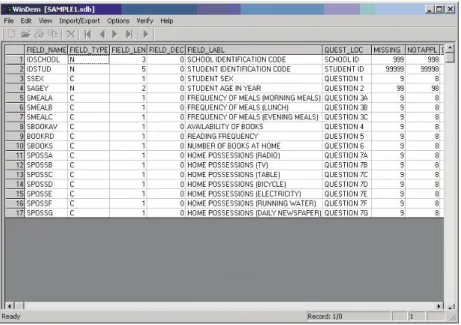
A display as shown in Figure 3 will appear where you can fill in the variable definitions in the codebook fields:
Data preparation and management
Module 10 The data entry manager software system
a. Essential information
The following pieces of information are essential for the definition of a variable.
Unique Variable Name: Each variable must be identified by a unique variable name. We will start with the school identification code which is presented in the header of the questionnaire. We have given it the name “IDSCHOOL”, so you would enter “IDSCHOOL” into the first blank field.
Variable Type: The next question asks about the type of coding that is used for the variable. The letter “C” indicates categorical variables with a fixed set of alphanumeric or numeric
categories. The letter “N” indicates non-categorical variables with open-ended numerical codes. While there are a fixed number of schools and therefore only a fixed set of possible school identification values, the number of possible values is very large and can be understood as quasi-open-ended, so you should enter “N” into the second blank field.
Variable Length: Afterwards you need to specify the number of digits (including decimal places) which are required to code the data values of this variable. Assuming that, in our example, there are 150 schools the identification codes of which are the numbers 1 to 150, we can use a three-digit code to identify the schools, so you would enter “3” into the codebook field for the length.
Decimals: Afterwards you can specify the number of decimal places to be used in the codes. In the school identification code there are no decimal places, so you would leave the “0” in this codebook field which is the default value and go to the next codebook field.
Location in Instrument: The next piece of information will tell the coders where (in the data collection instruments) they will find the question used as the source of information. You can
Data preparation and management
Module 10 The data entry manager software system
fill in a short description that helps to locate the information quickly. In our example, you could enter “School ID” into this codebook field to indicate that the codes for this variable are found in the identification part of the questionnaire.
The “Hide variable” Indicator: The question “Allow modification of variable?” asks you to specify whether a variable will be visible and editable in the WinDEM display when you enter data or not. “Y” indicates that the value will be displayed during the data entry stage, “N” indicates that the value will not be displayed. As the later users need to enter the school identification code, you should enter “Y” in this codebook field.
The “Carry on” Indicator: The question “Carry data values on as default?” asks you to specify whether the value of a variable is carried as a default value to the next record when you enter data. This is useful for variables which remain constant for a number of records. If the “Carry” indicator is set to “Y” for a particular variable, then every new record will have the data value from the previous record as the default value. You can then modify this default value as required. If the “Carry” indicator is set to “N”, then the default value for this variable will be the default value which was specified for this variable. As we may be entering many students for the same school, you should enter “Y”.
Order (Display): You can specify the sequential position in which variables will appear in the WinDEM display during data entry. If you do not specify anything, the programme will set these sequential positions so that the variables appear on the display in the sequence in which you define them.
Order (File): Similarly, you can specify the sequential position in which variables will be recorded in the datafiles. If you do not specify anything, the programme will set these sequential
Data preparation and management
Module 10 The data entry manager software system
positions so that the variables appear on the display in the sequence in which you define them.
Field Label: For the descriptive label you could fill in “School identification code”.
b. Optional coding information
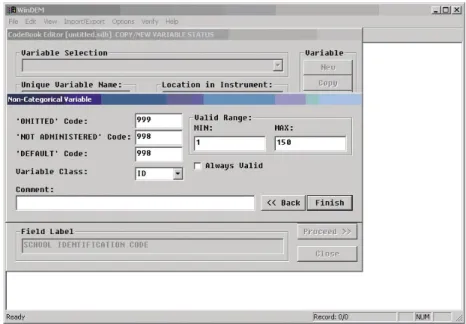
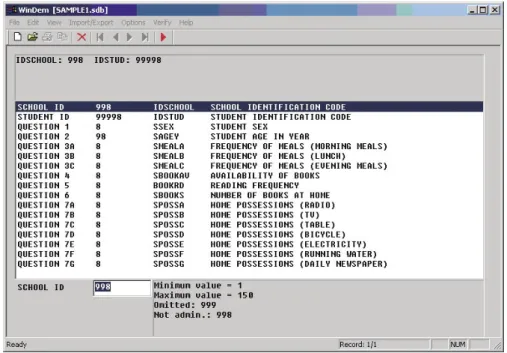
Afterwards the display will expand to the display as shown in Figure 4. These additional pieces of information should be filled in to provide further information on the coding of the variable.
FIGURE 4 The variable definition display (second part of dialogue)
Code for “Missing” Data: Following the above specifications, in the case of the variable IDSCHOOL you could enter the code “999” to indicate missing or omitted data.
Code for “Not Administered” Data: Correspondingly you could specify “998” to indicate “not administered” data for the variable IDSCHOOL.
Data preparation and management
Module 10 The data entry manager software system
“Default” Code: You can provide a code that will be used as a programme default when you create a new record in the datafile. In the case of the variable IDSCHOOL, you could leave this codebook field blank or specify 999 as its default code.
Valid Range: You can specify a valid range that determines which data values the user is allowed to enter when entering data. Assuming that in our example, there are 150 schools the identification codes of which are the numbers 1 to 150, you would enter the numbers 1 and 150 in the corresponding codebook fields.
Variable Class: You can classify variables according to their use in later data analyses. Since the variable IDSCHOOL is an identification variable, select the keyword “ID”. Note that only when the variable class is “ID” can the distinguish these variables as identification variables.
Comment: You can associate a descriptive comment with the variable which will be printed in the electronic codebook.
c. Adding variables
Having completed the definition of the variable, the
programme will bring you back to the tabular display where you can review your definitions or add new variables. In the following discussion you will find two more examples for the preparation of variables in the electronic codebook. The definition of the student identification code is similar to the definition of the school identification code, except that a five-digit number will be used. You would enter “IDSTUD” for the variable name, “N” for the variable type, “5” for the length, “0” for the number of decimals, “Student ID” for the instrument location, and “Student identification code” for the variable label. Then you could enter “99999” for the “missing” data code and “99998” for the “not administered” data code.
Data preparation and management
Module 10 The data entry manager software system
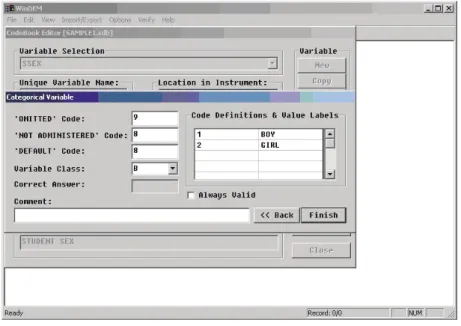
The first question in the sample questionnaire asks for the student’s sex. We have represented this question by the variable SSEX. You would therefore enter “SSEX” for the variable name. This variable has a fixed set of categorical codes, namely “1” for “boy”, “2” for “girl”, “9” to indicate missing data, and “8” to indicate that the student was not administered this question in the sample questionnaire. You should enter “C” for “categorical” into the codebook field for the variable type. For the length enter “1” and for the number of decimals enter “0”. Since this question is the first question in the sample questionnaire, you may enter “Question 1” into the codebook field instrument location. For the variable label enter “Student sex”. For the “missing” code and the “default” code enter “9” and for the “not administered” code enter “8”. The programme will then ask you to specify the number of valid data codes for this question. Note that codes for
“missing” and “not administered” data are not counted as valid data, so your answer should be “2” (for “boys” and “girls”). The programme will then ask you to define the valid codes:
Data preparation and management
Module 10 The data entry manager software system
For each valid code, you will find one row displayed in a small window. In the blank fields on the left hand side of this window you should enter the codes, and in the blank fields on the right hand side you should enter the meaning of the codes, which are referred to as the value labels. For the code “1” you would enter “boy” and for the code “2” you would enter “girl” (the codes and value labels should be based on the questionnaire presented in Figure 1).
For the variable class you should select “D” to indicate that this question refers to the student’s description. Also the remaining questions in this questionnaire will refer to the students’ description, so you should also select “D” for the variable class for the remaining variables.
FIGURE 6 Completed variable definition display
EXERCISE 1:
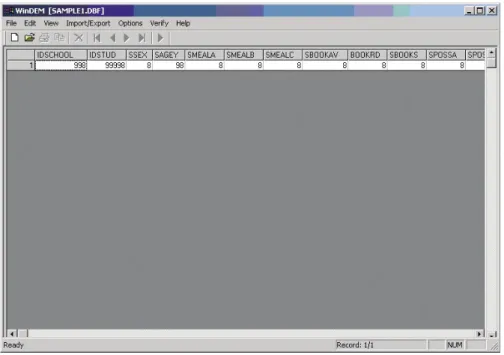
Complete defining all the variables in SAMPLE1 based on the questionnaire (Figure 1) and the printed codebook (Figure 2). You should have the following screen (Figure 6) when you finish:
Data preparation and management
Module 10 The data entry manager software system
3. Saving the electronic codebook
Once you have defined all variables in the electronic codebook, the programme will ask you to confirm that you want to save the codebook. Afterwards the programme will verify your definitions for formal correctness. If the programme detects any errors, these will be indicated on the display and the programme will bring you back into the tabular display with the definitions where you can correct these errors.
If no errors are found, the codebook will be saved and the
programme will bring you back into the main menu. You are now ready to enter data into the new datafile.
Coding of missing data
In preparing a codebook, careful thought has to be given to considering how to code different instances of missing data and how to treat these different categories of missing data in data analyses.
If you define none or too few categories of missing data, you may end up with severe problems in the data analyses. For example, to calculate the percentage of correct answers for an item in a reading test you may want to assume that the students who omitted an item could not answer it and will therefore be scored as wrong. However, it would be unfair to score some items as wrong which were not administered to the student because they were, for example, misprinted in the student booklet. If the coders do not assign different codes for each of these instances then you will not be able to make that distinction in the data analyses.
On the other hand, if you define too many categories of missing data for which there is no analytical use, it may be very difficult for
Data preparation and management
Module 10 The data entry manager software system
the coders to distinguish between the different instances of missing data, and the coding may be unnecessarily complicated.
Some distinctions between different instances of missing data must be made by the coders before the data are entered into the datafile, whereas there are other distinctions which can be derived later when the data are being processed.
1. Key requirements
The codes for missing data need to represent the different instances of missing data exhaustively. This means that each code in the datafiles should either represent a valid data value or one of the missing codes. There should never be a situation where a position in the datafile is just left blank. There should also never be a situation where there is no data from the respondent but none of the missing codes applies.
Secondly, the missing codes should be mutually exclusive. This means that there should be no ambiguity concerning which missing code to apply in each particular situation, and there need to be clear definitions and instructions on how to assign the missing codes. Finally, it should be clear how the missing codes are coded in the datafile and how the different instances of missing data are treated in the data analyses.
2. Basic categories of missing data
The minimum distinction which the coders must make when entering data is between: i) data that are missing because they were omitted by the respondents or answered in an invalid way; and ii) data that are missing because a question or test item was not administered.
Data preparation and management
Module 10 The data entry manager software system
a. Missing/omit
“Missing/omit” codes refer to questions/items which a
respondent should have answered but which he/she either did not answer or which were answered in an invalid way (though sometimes a finer distinction between these categories may be required). Some obvious reasons for assigning this code:
No Response: Where there was no response to a question or an item where there should be one.
Two or More Responses: Where there were two or more responses when only one answer was allowed.
Response Unreadable: Where the response was unreadable or uninterpretable. Often the codes “9”, “99”, “999” (depending on the length for a variable) are assigned to this type of missing data to distinguish them from the valid and “not applicable” data.
Sometimes a further distinction between questions that were omitted by a respondent and questions that have been answered in an invalid way is required but the analytical distinctions will then be very complicated.
b. Not administered
“Not administered” codes are assigned when data were not collected for an observation on a specific variable. There are some obvious cases when this code should be used:
Respondent Not Present: For example, if a student was not present in a particular testing session, then all variables referring to that session were supposed to be coded to “not administered”. However, if the student received the instrument but did not answer particular questions, then these questions must be coded as “missing”.