PHIN DIRECTORY EXCHANGE
IMPLEMENTATION GUIDE
Version 1.0
Revision Date: 5/16//2006 Page 2 of 55 Version # Implemented By Revision Date Approved By Approval Date Reason
0.1 Robb Chapman 02/25/2006 Initial Draft
0.2 Don Nestor 03/06/2006 Formatting changes
0.3 Tom Russell 04/17/2006 Addition modifications and
approval of reviewed items.
0.4 04/30/2007 Updates to multiple sections of
the document.
Revision Date: 5/16//2006 Page 3 of 55
1 INTRODUCTION...4
1.1 PHINDIRECTORY EXCHANGE... 4
1.2 WHAT IS AN IMPLEMENTATION GUIDE? ... 4
1.3 AUDIENCE... 4
1.4 DOCUMENT STRUCTURE... 4
1.5 CONTACTS... 5
2 APPLICATION REQUIREMENTS AND DATA FLOWS ...5
2.1 SENDING PARTNER TRANSLATOR FUNCTION: ... 7
2.2 PARTNER VOCABULARY FUNCTION... 7
2.3 SENDING PARTNER TRANSPORT FUNCTION... 8
2.4 RECEIVING PARTNER DSMLTRANSLATOR FUNCTION... 8
2.5 RECEIVING PARTNER TRANSPORT SERVICE FUNCTION... 8
3 CDC DSML TRANSLATOR TOOL ...10 4 MESSAGE DEFINITION...11 4.1 ORGANIZATION... 11 4.2 PERSON... 14 4.3 COMMUNICATION DEVICE... 21 5 EXAMPLE MESSAGES...28
6 APPENDIX A - DIRECTORY SERVICES MARKUP LANGUAGE (DSML)...34
6.1 INTRODUCTION... 34
6.2 ANOTE ON AMBIGUOUS TERMINOLOGY... 34
6.3 THE DSMLNAMESPACE URI ... 34 6.4 CONCEPTUAL OVERVIEW... 34 6.5 TOP-LEVEL STRUCTURE... 35 6.6 DIRECTORY ENTRIES... 36 6.7 DIRECTORY SCHEMA... 38 6.8 CONFORMANCE... 41 6.9 XMLSCHEMA FOR DSML ... 41 6.10 DTD FOR DSML ... 42
7 APPENDIX B - DSML VERSION 1.0 SCHEMA. ...44
8 APPENDIX C - DSML VERSION 1.0 DTD. ...47
9 APPENDIX D - ORGANIZATION TYPES...49
10APPENDIX E - DEVICE TYPES / COVERAGE’S...51
10.1 DEVICE TYPES... 51
10.2 COVERAGE’S... 51
11APPENDIX F - PUBLIC HEALTH ROLES ...53
Revision Date: 3/07/2006 Page 4 of 55 DE Implementation Guide.doc
1
INTRODUCTION
1.1 PHINDIRECTORY EXCHANGE
Information held in local instances of a public health directory must be sharable to ensure that partners have the most current contact information and can support cross-jurisdictional communications. Directory exchange is aimed at increasing directory accuracy, reducing redundant maintenance of information in local directories and distributing the burden of maintenance across organizational entities.
There are three main aspects involved in directory exchange: a common exchange schema is required to describe the attributes to be exchanged, a standard exchange protocol must be used to describe the content and the action to be taken by the recipient, and the exchange must be executed in adherence with secure transport requirements.
1.2 WHAT IS AN IMPLEMENTATION GUIDE?
A public health directory exchange implementation guide is a document that describes:
a) The circumstances under which directory exchange takes place. b) The data and schema for the information being exchanged.
c) Additional specifications and guidance to assist in directory exchange implementation.
1.3 AUDIENCE
This guide is designed to be used by analysts who need a better understanding of the requirements of directory exchange, and by implementers working to develop PHIN applications.
1.4 DOCUMENT STRUCTURE
The body of this document contains the following major sections:
• Application Requirements and Data Flows: describes the context and usage for directory exchange.
• Message Definition: describes the types of messages used to define directory attributes.
• Example Messages: additional information about sample messages that will be useful to implementers.
Revision Date: 5/16/2007 Page 5 of 55
• Appendices: contain information about DSML and vocabularies.
1.5 CONTACTS
For more information on this document, please contact: PHIN Help Desk
National Center for Public Health Informatics Phone: 1-800-532-9929 or 770-216-1299 Email: [email protected]
2
APPLICATION REQUIREMENTS AND DATA FLOWS
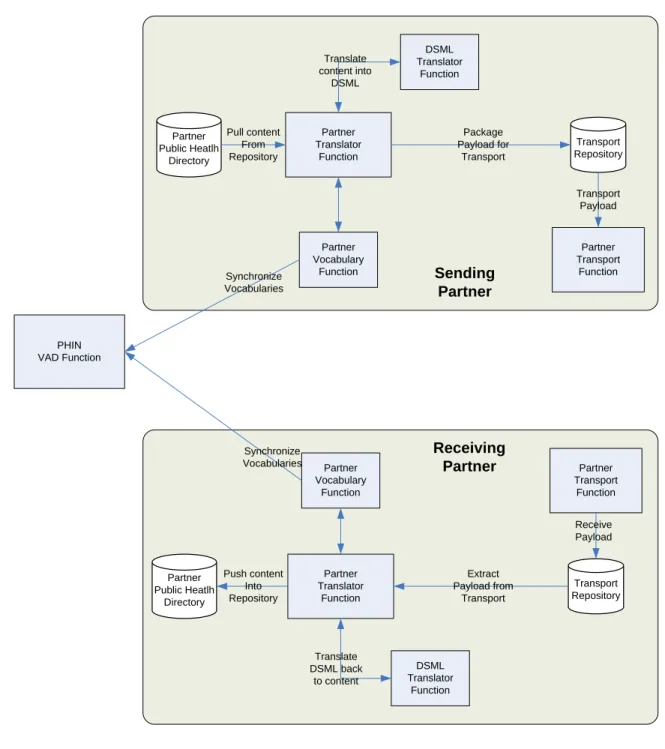
This guide addresses the functional requirements needed to accomplish Partner to Partner directory exchange using DSML version 1.0 for message construction and ebXML for message transmission. The diagram below outlines the functional data flows for the sending and receiving partners to implement a directory exchange process.
1
Directory Services Markup Language v1.0 (DSMLv1) is an open standard defined by OASIS. It is an XML implementation that describes the structure of data in a directory, the state of the directory and can be used to locate data into a directory.
Partner Translator Function Partner Vocabulary Function Partner Transport Function Partner Public Heatlh Directory Transport Repository Partner Translator Function Partner Vocabulary Function Partner Transport Function Transport Repository Partner Public Heatlh Directory PHIN VAD Function DSML Translator Function DSML Translator Function Translate content into DSML Translate DSML back to content Synchronize Vocabularies Synchronize Vocabularies Package Payload for Transport Transport Payload Receive Payload Extract Payload from Transport Pull content From Repository Push content Into Repository Sending Partner Receiving Partner
Figure 1: PHIN Directory Exchange system and process flows
The functions defined below should not be considered as a design specification. The diagram and associated functional descriptions should be used to help
developers understand the functionality required to implement directory exchange. Each section will describe the responsibilities of this functional area in the overall process of directory exchange. Each partner will design a system that supports these functions.
Revision Date: 5/16/2007 Page 7 of 55
The sending partner translator functions are responsible for extracting People, Communication Devices and Organization information from a local version of a public health directory and putting them into a DSML version 1.0 formatted document. Please refer to section “Sending Partner DSML Translator Function” below for more information on how to generate this document.
During the development of the DSML version 1.0 document, appropriate vocabularies must be applied to define things like Organization type and
communication device capabilities. Refer to the “Partner Vocabulary Services” section for a more detailed explanation of the vocabulary requirements.
In order to fulfill its responsibilities, a sending partner’s translator system needs to support the following functionalities.
• The ability to retrieve Person, Communication Devices and Organization information from the partner’s public health directory.
• The ability to support the functionality defined within the “Partner Vocabulary Services Function” defined below.
• The ability to support the “Sending Partner DSML Translator Function” defined below.
• The ability to support the functionality defined within the “Partner Transport Service Function” defined below.
2.2 PARTNER VOCABULARY FUNCTION
The Partner Vocabulary function is a set of processes that can either be
implemented manually or automated to maintain vocabularies required to support directory exchange. Having consistent maintainable vocabularies between partners is an important function in any directory exchange solution. Some of the
vocabularies required to support directory exchange will be stored and maintained in the PHIN VADS system while others that are more communication device specific are maintained within this implementation guide in Appendix E. Implementers of this function will be required to put a process in place to make sure the vocabularies are maintained.
In order to fulfill its responsibilities, a partner’s vocabulary system needs to support the following functionalities.
• The ability to synchronize local vocabularies with the PHIN VADS vocabulary service located at http://www.cdc.gov/PhinVSBrowser/StrutsController.do • The ability to maintain a local version of vocabularies required for alerting that
are not stored in the PHIN VADS system. These vocabularies are located in Appendix E.
Revision Date: 5/16/2007 Page 8 of 55
2.3 SENDING PARTNER TRANSPORT FUNCTION
The Partner Transport Function is responsible for preparing the message for transport to another exchange partner. The mechanism used to transport the data between partners must be compatible with the ebXML transport requirement identified in the PHIN Requirements.
In order to fulfill its responsibilities, a sending partner’s transport system needs to support the following functionalities.
• Provide the ability to store the metadata required to send the DSML document to an appropriate partner.
• Provide the ability to send a secure electronic message.
Note: If you would like to implement the PHINMS to fulfill this requirement, please refer to the PHINMS Web Site located at
http://www.cdc.gov/phin/software-solutions/phinms/
2.4 RECEIVING PARTNER DSMLTRANSLATOR FUNCTION
Each Receiving Partner is responsible for receiving and parsing one or more DSML version 1.0 formatted documents containing Person, Communication Device and Organization information using ebXML described in the “Partner Transport Function” section of this document.
The CDC has developed a DSML translator tool that is available to support this functionality. Please refer to the “CDC DSML Translator Tool” later in this section for additional information about this tool.
In order to fulfill its responsibilities, a receiving partner’s translator system needs to support the following functionalities.
• The ability to receive one or more DSML version 1.0 compliant documents from a sending partner.
• The ability to parse the DSML version 1.0 compliant documents into an appropriate format to be loaded into your local instance of a public health directory.
• The ability to use or map the vocabulary defined in the “Partner Vocabulary Function” section into a local form if needed.
2.5 RECEIVING PARTNER TRANSPORT SERVICE FUNCTION
The Receiving Partner Transport Function is responsible for receiving and extracting an ebXML compliant message from another exchange partner and
Revision Date: 5/16/2007 Page 9 of 55
used to transport the data between partners must be compatible with the ebXML transport requirement.
In order to fulfill its responsibilities, a receiving partner’s transport system needs to support the following functionalities.
• Provide the ability to receive a secure transport in accordance with the ebXML transport requirement.
• Provide the ability to map vocabularies as defined in section “Partner Vocabulary Function” section of this document to local vocabularies if needed.
• Provide the ability to acknowledge back to the sending transport system using the ebXML transport system.
Note: If you would like to implement the PHINMS to fulfill this requirement, please refer to the PHINMS Web Site located at http://www.cdc.gov/phin/software-solutions/phinms/
Revision Date: 5/16/2007 Page 10 of 55
3
CDC DSML TRANSLATOR TOOL
The CDC has a DSML translator tool available which consists of a basic database schema that defines three tables to structure People, Communication Devices and Organization information. This tool is distributed free by CDC. The tool assumes that the partner will populate this simple structure from their repository. The tool will then extract the information from the schema and generate an appropriate DSML version 1.0 compliant document suitable for transport to another partner. The tool can also be executed on the receiving partner’s side to parse the DSML version 1.0 document and populate the basic database schema previously described. The receiving partner would then be able to import the information from the basic schema back into their repository. The use of this tool is optional. Each partner can either use the tool as is, receive source code for the tool to modify as needed, or create their own tool to manage the generation of the appropriate DSML version 1.0 compliant document.
For more information on CDC’s DSML translator tool please contact the PHIN Help Desk (Email: [email protected]; Phone: 1-800-532-9929 or 770-216-1299)
Revision Date: 3/07/2006 Page 11 of 55 DE Implementation Guide.doc
4
MESSAGE DEFINITION
4.1 ORGANIZATION
Attribute Name Req Description Single / Multi Value
Example Special Note
Required LDAP Attributes for Organization
objectClass Y Object class of
the entry. Used by the server to determine required and allowed attributes for an entry. Multi <dsml:objectclass> <dsml:oc-value>top</dsml:oc-value> <dsml:oc- value>organizationalUnit</dsml:oc-value> <dsml:oc- value>PhinOrganization</dsml:oc-value> </dsml:objectclass>
The Object Class for Organization is pre-defined; you must use the structure above during directory exchange
cn (commonName) Y The Organization’s common name, usually references a unique identifier within the LDAP data file.
Single <dsml:attr name=”cn”> <dsml:value>
Centers for Disease Control and
Prevention. </dsml:value> </dsml:attr>
Any unique identifier can be used; however we suggest using the Organization’s name. Additional information may be added to make the reference unique in those cases where there are several organizations with the same name. Although this is not guaranteed to be unique, it is the most unique of the attributes being exchanged. This DSML schema was never meant to directly populate an LDAP repository and was only intended to support structured data exchange.
Revision Date: 5/16/2007 Page 12 of 55 Attribute Name Req Description Single
/ Multi Value
Example Special Note
externalUID N The organization’s Unique Identifier (UID) within the public health directory. This is a reference from the originating source of the data.
Single <dsml:attr name=”externalUID”> <dsml:value>
0.1.1.1</dsml:value> </dsml:attr>
This value will be used to help partners synchronize their data each time they get a new data set from a partner. Work with your exchange partner to determine the best mechanism for assigning and maintaining this attribute for each organization.
description N Text
description of the
organization.
Single <dsml:attr name=”description”> <dsml:value>
This is the Primary building for the State Health
Department. </dsml:value> </dsml:attr> Fax (facsimileTelephoneNumber) N The organization’s fax number.
Single <dsml:attr name=”fax”>
<dsml:value>+1 732 445 3088x123</dsml:value>
</dsml:attr>
Phone numbers should follow the following format +1 732 445 3088x123, which is the current recommended format for LDAP.
l (localityName) Y City or town in
which the organization is located.
Single <dsml:attr name=”l”>
<dsml:value>Atlanta</dsml:value> </dsml:attr>
Revision Date: 5/16/2007 Page 13 of 55 Attribute Name Req Description Single
/ Multi Value
Example Special Note
postalCode Y The postal code
for this address (e.g., United States ZIP code)
Single <dsml:attr name=”postalCodel”> <dsml:value>30333</dsml:value> </dsml:attr> st (stateOrProvinceName) Y State or province in which the organization is located.
Single <dsml:attr name=”st”>
<dsml:value>13</dsml:value> </dsml:attr>
This value is represented by the FIPS code for the associated state.
street Y Street address
at which the organization is located.
Muti <dsml:attr name=”street”> <dsml:value>Edward R. Royal Campus</dsml:value>
<dsml:value>1600 Clifton Road, NE</dsml:value>
</dsml:attr>
Each line of the address should be included as a separate value to the attribute. telephoneNumber Y The organization's primary contact telephone number. Single <dsml:attr name=”telephoneNumber”> <dsml:value>+1 732 445 3088x123</dsml:value> </dsml:attr>
Phone numbers should follow the following format +1 732 445 3088x123, which is the current recommended format for LDAP.
county Y The FIPS code
of the county in which an organization is located.
Single <dsml:attr name=”county”>
<dsml:value>13223</dsml:value> </dsml:attr>
This is based on the organization’s primary address.
Revision Date: 5/16/2007 Page 14 of 55 Attribute Name Req Description Single
/ Multi Value
Example Special Note
alertingJurisdictions Y A list of the county FIPS codes which define an organization’s jurisdictional boundary for alerting. Multi <dsml:attr name=”alertingJurisdictions”> <dsml:value>13223</dsml:value> <dsml:value>13067</dsml:value> </dsml:attr>
This is used to determine what responsibility an organization has for notifying surrounding counties during an event.
primaryOrganizationType Y An
organization’s primary organization type. Values for this attribute will come from the
standardized vocabulary lists.
Single <dsml:attr name=”county”>
<dsml:value>13223</dsml:value>
<dsml:value>13067</dsml:value> </dsml:attr>
Please refer to Appendix D for the list of vocabularies associated with this attribute
.
4.2 PERSON
Attribute Name Req Description Single / Multi Value
Revision Date: 5/16/2007 Page 15 of 55 Attribute Name Req Description Single /
Multi Value
Example Special Note
Required LDAP Attributes for Person
objectClass Y Object class of the entry. Used by the server to determine required and allowed attributes for an entry. Multi <dsml:objectclass> <dsml:oc-value>top</dsml:oc-value> <dsml:oc-value>person</dsml:oc-value> <dsml:oc-value>organizationalPerson</dsml:oc-value> <dsml:oc-value>inetOrgPerson</dsml:oc-value> <dsml:oc-value>PhinPerson</dsml:oc-value> </dsml:objectclass>
The Object Class for Person is pre-defined; you must use the structure above during directory exchange.
cn (commonName) Y The person's common name, which usually references a unique identifier within the LDAP data file.
Single <dsml:attr name=”cn”>
<dsml:value>[email protected]</dsml:value> </dsml:attr>
Any unique identifier can be used; however we suggest using the person’s email address. Although this is not guaranteed to be unique it is the most unique of the attributes being exchanged. This DSML schema was never meant to directly populate an LDAP repository and was only intended to support structured data exchange.
Revision Date: 5/16/2007 Page 16 of 55 Attribute Name Req Description Single /
Multi Value
Example Special Note
sn (surname) Y The person's
surname or last name. This field is required and will be used as part of a multi-field key in the de-duplication of records within the directory.
Single <dsml:attr name=”sn”>
<dsml:value> Smith</dsml:value> </dsml:attr>
This value is part of the multi-key field used for de-duplication. The complete key is made up of the givenName, sn and
email attributes.
externalUID N The person’s
Unique Identifier (UID) within the public health directory. This is a reference from the originating source of the data.
Single <dsml:attr name=”externalUID”> <dsml:value> 0.1.1.1</dsml:value> </dsml:attr>
This value will be used to help partners synchronize their data each time they get a new data set from a partner. Work with your exchange partner to determine the best mechanism for assigning and maintaining this attribute for each person.
description N Text description of
the person. This often includes their role or work assignment (e.g., Manager for the IT Services group).
Single <dsml:attr name=”description”> <dsml:value>
John Smith is currently on assignment in New York.
</dsml:value> </dsml:attr>
Revision Date: 5/16/2007 Page 17 of 55 Attribute Name Req Description Single /
Multi Value
Example Special Note
displayName N Preferred name of a
person, used when displaying directory entries. This is most often a
concatenation of given name and surname, but may include a nickname.
Single <dsml:attr name=”displayName”>
<dsml:value>John Smith</dsml:value> </dsml:attr>
givenName Y The person's given,
or first, name. This field is required and will be used as part of a multi-field key in the de-duplication of records within the directory.
Single <dsml:attr name=”givenName”> <dsml:value>John</dsml:value> </dsml:attr>
Revision Date: 5/16/2007 Page 18 of 55 Attribute Name Req Description Single /
Multi Value
Example Special Note
mail Y The person's
primary e-mail address. This field is required and will be used as part of a multi-field key in the de-duplication of records within the directory.
Single <dsml:attr name=”mail”>
<dsml:value>[email protected]</dsml:value> </dsml:attr>
A person’s email address can be used in association with the givenName, sn
attributes to determine uniqueness. Additional information may be required to determine uniqueness based on the data being exchanged. preferredLanguage N The person's
preferred language, such as English or Spanish.
Single <dsml:attr name=”preferredLanguage”> <dsml:value>EN</dsml:value> </dsml:attr>
Preferred Language is defined based on the ISO 639-2 letter language code.2 Currently we are only supporting one preferred language. Future releases may support multiple language references.
title N A person’s primary
job title related to Public Health.
Single <dsml:attr name=”title”>
<dsml:value> IT SPEC. (BT, MGM)</dsml:value>
</dsml:attr>
This is free form text that describes a person’s primary job title at the organization associated with the person.
2
Revision Date: 5/16/2007 Page 19 of 55 Attribute Name Req Description Single /
Multi Value
Example Special Note
roles N
(Y)
The Public Health Role(s) a person has within their primary organization.
Single <dsml:attr name=”roles”>
<dsml:value>Health Officer</dsml:value> <dsml:value>Chief Epidemiologist</dsml:value> </dsml:attr>
(Only required if the person is associated with the 35 Public Health Roles. These roles are referenced in Appendix F.) Roles are assigned within a specific Jurisdiction. The Roles can be used during alerting to support Direct and/or Cascade alerting.
Revision Date: 5/16/2007 Page 20 of 55 Attribute Name Req Description Single /
Multi Value
Example Special Note
roleJurisdiction N The FIPS code for the Jurisdiction where the person is assigned a role.
Single <dsml:attr name=”roleJurisdiction”> <dsml:value>13</dsml:value> </dsml:attr>
(Only required if the person is associated with the 35 Public Health Roles. These roles are referenced in Appendix F.)
This attribute is used to determine the Jurisdiction where a person plays a role and/or roles defined within the “role” attribute. In the examples defined for attributes
“roles” and “roleJurisdiction,” this
person is assigned the roles of Health Officer and Chief Epidemiologist for the State of Georgia. Because this is very limiting, a new Role object will be introduced in the next release of the schema. The new Role object will allow a person to be assigned roles in multiple Jurisdictions.
Revision Date: 5/16/2007 Page 21 of 55 Attribute Name Req Description Single /
Multi Value
Example Special Note
organizations Y Distinguished Name (DN) of the primary organization for this person. The DN is the Directory Server name to uniquely distinguish an entry.
Single <dsml:attr name=”organizations”> <dsml:value>
cn=Centers for Disease Control and Prevention,
ou= PHINOrganizations, DC=PHIN,DC=gov </dsml:value>
</dsml:attr>
This attribute defines the distinguished name reference to the primary organization for this person. This will match the <dsml:entry> reference in the organization that you are associating to this person. We will only support single value references for this initial release of the schema. Future releases will be able to support references of a person to multiple organizations.
4.3 COMMUNICATION DEVICE
Attribute Name Req Description Single / Multi Value
Revision Date: 5/16/2007 Page 22 of 55 Attribute Name Req Description Single /
Multi Value
Example Special Note
Required LDAP Attributes for Communication Device
objectClass Y Object class of the
entry. Used by the server to determine required and allowed attributes for an entry. Multi <dsml:objectclass> <dsml:oc-value>top</dsml:oc-value> <dsml:oc-value> AlertCommunicationDevice </dsml:oc-value> </dsml:objectclass>
The Object Class for Communication Device is pre-defined; you must use the structure above during directory exchange.
cn (commonName) Y The Organization’s
common name, which usually references a unique identifier within the LDAP data file.
Single <dsml:attr name=”cn”>
<dsml:value>Email1</dsml:value> </dsml:attr>
Any unique identifier can be used; however we suggest using a
descriptive name for the device. Additional
information may be added to make the reference unique in those cases where there are several organizations with the same name. Although this is not guaranteed to be unique it is the most unique of the attributes being exchanged. This DSML schema was never meant to directly populate an LDAP repository and was only intended to support structured data exchange.
Revision Date: 5/16/2007 Page 23 of 55 Attribute Name Req Description Single /
Multi Value
Example Special Note
description N Text description of
the communication device.
Single <dsml:attr name=”description”> <dsml:value>
John Smith primary email address. </dsml:value>
</dsml:attr>
deviceName Y This field contains
the unique name for each device. This name will be used in most user interfaces (UI) to select the
associated device.
Single <dsml:attr name=”deviceName”>
<dsml:value>Business Email</dsml:value> </dsml:attr>
deviceType Y This field contains
the type of device (e.g., e-mail, telephone, fax, pager).
Single <dsml:attr name=”deviceType”>
<dsml:value>Telephone</dsml:value> </dsml:attr>
Values for this attribute will come from the standardized vocabulary lists defined in Appendix E.
coverage Y This field contains
the type of coverage for the device (e.g., Normal Business Hours, After Hours, 24x7).
Single <dsml:attr name=”coverage”>
<dsml:value>BusinessHours</dsml:value> </dsml:attr>
Values for this attribute will come from the standardized vocabulary lists defined in Appendix E.
Revision Date: 5/16/2007 Page 24 of 55 Attribute Name Req Description Single /
Multi Value
Example Special Note
emailAddress Y This field contains
the e-mail address for the device. E-mail address is only valid for devices that support email addressing. Standard e-mail formatting applies.
Single <dsml:attr name=”emailAddress”>
<dsml:value>[email protected]</dsml:value> </dsml:attr>
(Required if Device Type is Email)
This value should only be populated when device type is equal to “E-Mail”
areaCode Y This field contains
the area code for the device.
Single <dsml:attr name=”areaCode”> <dsml:value>404</dsml:value> </dsml:attr>
(Required if device type is Fax, Mobile, Pager, Satellite or Telephone) This value should only be populated when device type is “Fax”, “Mobile”, “Pager”, “Satellite” or “Telephone”.
exchange Y This field contains
the exchange for the device, made up of the first three digits in a phone number not including the area code.
Single <dsml:attr name=”exchange”> <dsml:value>999</dsml:value> </dsml:attr>
(Required if device type is Fax, Mobile, Pager, Satellite or Telephone) This value should only be populated when device type is “Fax”, “Mobile”, “Pager”, “Satellite” or “Telephone”.
Revision Date: 5/16/2007 Page 25 of 55 Attribute Name Req Description Single /
Multi Value
Example Special Note
line Y This field contains
the line for the device, made up of the last four digits in a phone number.
Single <dsml:attr name=”line”>
<dsml:value>9999</dsml:value> </dsml:attr>
(Required if device type is Fax, Mobile, Pager, Satellite or Telephone) This value should only be populated when device type is “Fax”, “Mobile”, “Pager”, “Satellite” or “Telephone”.
rank N Rank defines the
contact order for devices. When contacting people, the alert system will follow this order until the person is reached. The rank is unique for all of a person’s communication devices.
Single <dsml:attr name=”rank”> <dsml:value>1</dsml:value> </dsml:attr>
Rank should start at one and increment by one until each device is assigned.
pin N This field contains
the pin associated with a device. This field is only valid for devices that require pins (e.g., pagers)
Single <dsml:attr name=”pin”>
<dsml:value>12345</dsml:value> </dsml:attr>
Revision Date: 5/16/2007 Page 26 of 55 Attribute Name Req Description Single /
Multi Value
Example Special Note
countryPrefix N Reserved for future
use.
Single internationalNumber N This field contains
the phone number for international numbers. This field is only valid for international phone numbers. Non-international numbers should use the areaCode, exchange and line attributes
previously defined.
Single <dsml:attr name=”internationalNumber”>
<dsml:value>011 55 99 9999 9999</dsml:value>
</dsml:attr>
The entire international number required for dialing should be included.
emergencyUseInd N This field indicates if the device can be used for emergency contact.
Single <dsml:attr name=”emergencyUseInd”> <dsml:value>true</dsml:value> </dsml:attr>
This is a Boolean field and should be set to “true” if selected. All other values will be interpreted as false.
Revision Date: 5/16/2007 Page 27 of 55 Attribute Name Req Description Single /
Multi Value
Example Special Note
homeInd N This field indicates
if the device is associated with a person’s home. This indicator should be used to protect the identity of the defined device that is associated with a person’s home.
Single <dsml:attr name=”homeInd”> <dsml:value>true</dsml:value> </dsml:attr>
This is a Boolean field and should be set to “true” if selected. All other values will be interpreted as false. If the identity of this device needs to be protected, this indicator should be set.
Revision Date: 5/16/2007 Page 28 of 55
5.1.1 Example Person Message
<?xml version="1.0" encoding="UTF-8"?> <dsml:dsml xmlns:dsml="http://www.dsml.org/DSML"> <dsml:directory-entries> <dsml:entry dn="[email protected],ou=US,ou=phindirPeople,DC=phindir,DC=gov"> <dsml:objectclass> <dsml:oc-value>top</dsml:oc-value> <dsml:oc-value>person</dsml:oc-value> <dsml:oc-value>organizationalPerson</dsml:oc-value> <dsml:oc-value>inetOrgPerson</dsml:oc-value> <dsml:oc-value>PhinPerson</dsml:oc-value> </dsml:objectclass> <dsml:attr name="cn"> <dsml:value>John Smith</dsml:value> </dsml:attr> <dsml:attr name="sn"> <dsml:value>Smith</dsml:value> </dsml:attr> <dsml:attr name="externalUID"> <dsml:value>AGDR-ADRS-234T-RT67</dsml:value> </dsml:attr> <dsml:attr name="description">
<dsml:value>John is a good Fellow!</dsml:value> </dsml:attr> <dsml:attr name="displayName"> <dsml:value>John T. Smith</dsml:value> </dsml:attr> <dsml:attr name="givenName"> <dsml:value>John</dsml:value> </dsml:attr> <dsml:attr name="mail"> <dsml:value>[email protected]</dsml:value> </dsml:attr> <dsml:attr name="preferredlanguage"> <dsml:value>en</dsml:value> </dsml:attr> <dsml:attr name="title"> <dsml:value>Program Manager</dsml:value> </dsml:attr> <dsml:attr name="roles"> <dsml:value>Role A</dsml:value> <dsml:value>Role B</dsml:value> </dsml:attr> <dsml:attr name="county"> <dsml:value>DeKalb</dsml:value> </dsml:attr> <dsml:attr name="organizations">
Revision Date: 5/16/2007 Page 29 of 55
</dsml:entry> </dsml:directory-entries> </dsml:dsml>
5.1.2 Example Communication Device / Telephone Message
<?xml version="1.0" encoding="UTF-8"?> <dsml:dsml xmlns:dsml="http://www.dsml.org/DSML"> <dsml:directory-entries> <dsml:entry dn="uid=Telephone1,[email protected],ou=US,ou=phindirPeople,DC=phindir,DC=gov"> <dsml:objectclass> <dsml:oc-value>top</dsml:oc-value> <dsml:oc-value>AlertCommunicationDevice</dsml:oc-value> </dsml:objectclass> <dsml:attr name="cn"> <dsml:value>Telephone1</dsml:value> </dsml:attr> <dsml:attr name="description">
<dsml:value>Main point of contact.</dsml:value>
</dsml:attr> <dsml:attr name="deviceType"> <dsml:value>Telephone</dsml:value> </dsml:attr> <dsml:attr name="coverage"> <dsml:value>BusinessHours</dsml:value> </dsml:attr> <dsml:attr name="areaCode"> <dsml:value>404</dsml:value> </dsml:attr> <dsml:attr name="exchange"> <dsml:value>444</dsml:value> </dsml:attr> <dsml:attr name="line"> <dsml:value>7777</dsml:value> </dsml:attr> <dsml:attr name="rank"> <dsml:value>1</dsml:value> </dsml:attr> </dsml:entry> </dsml:directory-entries> </dsml:dsml>
5.1.3 Example Communication Device / Email Message
Revision Date: 5/16/2007 Page 30 of 55 <dsml:entry dn="uid=email1,[email protected],ou=US,ou=phindirPeople,DC=phindir,DC=gov"> <dsml:objectclass> <dsml:oc-value>top</dsml:oc-value> <dsml:oc-value>AlertCommunicationDevice</dsml:oc-value> </dsml:objectclass> <dsml:attr name="cn"> <dsml:value>email1</dsml:value> </dsml:attr> <dsml:attr name="description">
<dsml:value>I can receive this e-mail on my blackBerry 24 hours a day</dsml:value> </dsml:attr> <dsml:attr name="deviceType"> <dsml:value>eMail</dsml:value> </dsml:attr> <dsml:attr name="coverage"> <dsml:value>24x7</dsml:value> </dsml:attr> <dsml:attr name="emailAddress"> <dsml:value>[email protected]</dsml:value> </dsml:attr> <dsml:attr name="rank"> <dsml:value>2</dsml:value> </dsml:attr> <dsml:attr name="emergencyUseInd"> <dsml:value>true</dsml:value> </dsml:attr> <dsml:attr name="homeInd"> <dsml:value>false</dsml:value> </dsml:attr> </dsml:entry> </dsml:directory-entries> </dsml:dsml>
5.1.4 Example Organization Message
<?xml version="1.0" encoding="UTF-8"?>
<dsml:dsml xmlns:dsml="http://www.dsml.org/DSML"> <dsml:directory-entries>
<dsml:entry dn="cn=Centers for Disease Control and
Prevention,ou=phindirOrganizations,DC=phindir,DC=gov"> <dsml:objectclass> <dsml:oc-value>top</dsml:oc-value> <dsml:oc-value>organizationalUnit</dsml:oc-value> <dsml:oc-value>PhinOrganization</dsml:oc-value> </dsml:objectclass> <dsml:attr name="cn">
Revision Date: 5/16/2007 Page 31 of 55 <dsml:value></dsml:value> </dsml:attr> <dsml:attr name="description"> <dsml:value>CDC Headquarters</dsml:value> </dsml:attr> <dsml:attr name="street">
<dsml:value>Edward R. Roybal Campus</dsml:value>
<dsml:value>1600 Clifton Road, NE</dsml:value>
</dsml:attr> <dsml:attr name="st"> <dsml:value>13</dsml:value> </dsml:attr> <dsml:attr name="l"> <dsml:value>Atlanta</dsml:value> </dsml:attr> <dsml:attr name="postalCode"> <dsml:value>30333</dsml:value> </dsml:attr> <dsml:attr name="county"> <dsml:value>13089</dsml:value> </dsml:attr> <dsml:attr name="telephoneNumber"> <dsml:value>404-639-3311</dsml:value> </dsml:attr> <dsml:attr name="fax"> <dsml:value>555-123-4567</dsml:value> </dsml:attr> <dsml:attr name="alertingJurisdictions"> <dsml:value></dsml:value> </dsml:attr> <dsml:attr name="primaryOrganizationType"> <dsml:value>Fed (HHS) CDC</dsml:value> </dsml:attr> </dsml:entry> </dsml:directory-entries> </dsml:dsml>
Revision Date: 5/16/2007 Page 34 of 55
Authors: James Tauber (Bowstreet), Todd Hay (Bowstreet), Tom Beauvais (Bowstreet), Mike Burati (Bowstreet), Andrew Roberts (Bowstreet)
Contributors: Bill Gengler (IBM), Jay Unger (IBM), Mark Brown (Microsoft), Michael Mullany (Netscape/Sun Alliance), Leif Pedersen (Novell), Michael P. Mesaros (Oracle), David Saslav (Oracle)
Last updated: 1999-12-02 6.1 INTRODUCTION
The Directory Services Markup Language, or DSML, provides a means for
representing directory structural information as an XML document. The intent of DSML is to allow XML-based enterprise applications to leverage profile and resource information from a directory in their native environment. DSML allows XML and directories to work together and provides a common ground for all XML-based applications to make better use of directories.
DSML is intended to be a simple XML schema definition that will enable directories to publish basic profile information in the form of an XML document so that it can be easily shared via native Internet protocols (such as HTTP or SMTP), as well as used by other applications. The principal goal is to ensure that directories are able to make a growing breed of XML based applications directory aware.
It is not an initial goal of DSML to specify the attributes that all directories must contain, or the method with which the directory information is accessed from the directory. The expectation is that standard protocols (such as LDAP), proprietary access protocols (such as Novell's NDAP) and proprietary APIs (such as Microsoft's ADSI) could produce DSML documents as an optional output.
6.2 ANOTE ON AMBIGUOUS TERMINOLOGY
Because this specification discusses both XML and directories, there is a danger of terminology from one domain being confused with that from the other. In particular, the words "attribute" and "schema" have meaning in both the XML and directory domains. For this reason, this specification always qualifies the word "attribute" as either XML attribute or a directory attribute and likewise with the word "schema".
6.3 THE DSMLNAMESPACE URI
In this specification, the prefix "dsml" is used on XML elements to indicate that they belong to the DSML Namespace. The prefix (as with all XML Namespace prefixes) is arbitrary and any suitable prefix may be used (or the namespace declared as default). It is the URI which ultimate identifies the namespace, not the prefix.
6.4 CONCEPTUAL OVERVIEW
Revision Date: 5/16/2007 Page 35 of 55
directory entry is a member of a number of object classes. An entry's object classes constrain the directory attributes the entry may take. Such constraints are described in a directory schema which may be included in the same DSML document or may be in a separate document.
6.5 TOP-LEVEL STRUCTURE
The document element of DSML is of the type dsml which may have a child element of the type directory-entries. This element, in turn, has child elements of the type entry. The dsml element may also (if the document contains a directory schema) have a child element of the type directory-schema which, in turn, has child elements of the type’s class and attribute-type.
At the top-level, the structure of a DSML document is thus: <dsml:dsml xmlns:dsml="http://www.dsml.org/DSML">
<!-- a document with only directory entries --> <dsml:directory-entries> <dsml:entry dn="...">...</dsml:entry> <dsml:entry dn="...">...</dsml:entry> <dsml:entry dn="...">...</dsml:entry> ... </dsml:directory-entries> </dsml:dsml> <dsml:dsml xmlns:dsml="http://www.dsml.org/DSML"> <!-- a document with only a directory schema --> <dsml:directory-schema>
<dsml:class id="..." ...>...</dsml:class>
<dsml:attribute-type id="..." ...>...</dsml:attribute-type> ...
</dsml:directory-schema> </dsml:dsml>
<dsml:dsml xmlns:dsml="http://www.dsml.org/DSML"> <!-- a document with both -->
<dsml:directory-schema>
<dsml:class id="..." ...>...</dsml:class>
<dsml:attribute-type id="..." ...>...</dsml:attribute-type> </dsml:directory-schema> <dsml:directory-entries> <dsml:entry dn="...">...</dsml:entry> <dsml:entry dn="...">...</dsml:entry> <dsml:entry dn="...">...</dsml:entry> ... </dsml:directory-entries>
Revision Date: 5/16/2007 Page 36 of 55
The top-level element dsml takes an optional XML attribute complete. A value of true indicates that the entries under directory-entries contain no external references. Either all attribute-types and classes referenced are found in the directory-schema section of the document or there are no references at all. A value of false indicates that at least one reference is to an external DSML document containing a directory schema. The default value is true.
6.6 DIRECTORY ENTRIES
6.6.1 The entry element type
Each entry represented in a DSML document is done so using an element of the type entry. The entry element contains elements representing the entry's directory attributes. The
distinguished name of the entry is indicated by the XML attribute dn.
NOTE: This specification does not provide a canonical form for distinguished names. Because normalization and ordering can vary between producers of DSML, some form of canonicalization would need to be performed by a consumer of DSML before string matching the values of the XML attribute dn.
It was decided to express the distinguished name as an XML attribute rather than a child element because of its identifying characteristic.
<dsml:entry dn="uid=prabbit,ou=development,o=bowstreet,c=us"> <dsml:objectclass> <dsml:oc-value>top</dsml:oc-value> <dsml:oc-value>person</dsml:oc-value> <dsml:oc-value>organizationalPerson</dsml:oc-value> <dsml:oc-value>inetOrgPerson</dsml:oc-value> </dsml:objectclass> <dsml:attr name="sn"><dsml:value>Rabbit</dsml:value></dsml:attr> <dsml:attr name="uid"><dsml:value>prabbit</dsml:value></dsml:attr> <dsml:attr name="mail"><dsml:value>[email protected]</dsml:value></dsml:attr> <dsml:attr name="givenname"><dsml:value>Peter</dsml:value></dsml:attr> <dsml:attr name="cn"><dsml:value>Peter Rabbit</dsml:value></dsml:attr> </dsml:entry>
6.6.2 Entry Object Class
The object classes of an entry are represented by oc-value child elements of an objectclass element. The content of each oc-value element indicates an object class to which the entry belongs. In the case where an object class has more than one name, only one name need be used. Both objectclass and oc-value have an optional XML attribute ref. An oc-value's ref is a URI Reference to a class element that defines the object class. An objectclass's ref is a URI
Revision Date: 5/16/2007 Page 37 of 55 <dsml:objectclass ref="#objectclass"> <dsml:oc-value ref="#person">person</dsml:oc-value> <dsml:oc-value ref="#org-person">organizationalPerson</dsml:oc-value> </dsml:objectclass> 6.6.3 Directory Attributes
Directory attributes (with the exception of "objectclass") are represented by an attr element. This element has a mandatory XML attribute name which indicates a name of the directory attribute. (A directory attribute may have more than one name, but only one need be expressed in the name attribute.)
The value or values of a directory attribute are expressed in child elements of the type value.
NOTE: the content of value is PCDATA and hence any XML markup (or characters that could be treated as markup, namely < or &) must be escaped via CDATA section, character reference or pre-defined entity.
Each attr element may have an optional ref XML attribute whose value is a URI reference (URI + XPointer) pointing to an attribute-type definition in a directory-schema in the same or different DSML document.
For example, if a DSML document with a directory-schema accessible at the URL http://www.bowstreet.com/schemata/physical-attributes.dsml has the attribute-type definition
<dsml:attribute-type id="eye-color">
<dsml:name>eyecolor</dsml:name>
<dsml:description>The color of the person's eyes</dsml:description> ...
</dsml:attribute-type>
then an entry in directory-entries might have a child element
<dsml:attr name="eyecolor" ref="http://www.bowstreet.com/schemata/physical-attributes.dsml#eye-color">
<dsml:value>blue</dsml:value> </dsml:attr>
6.6.4 Multi-valued Attributes
Where an entry has multiple values for a particular attribute, that attr element has multiple value children.
Revision Date: 5/16/2007 Page 38 of 55 <dsml:oc-value>person</dsml:oc-value> <dsml:oc-value>organizationalPerson</dsml:oc-value> <dsml:oc-value>inetOrgPerson</dsml:oc-value> </dsml:objectclass> <dsml:attr name="sn"><dsml:value>Rabbit</dsml:value></dsml:attr> <dsml:attr name="uid"><dsml:value>prabbit</dsml:value></dsml:attr> <dsml:attr name="mail"> <dsml:value>[email protected]</dsml:value> <dsml:value>[email protected]</dsml:value> </dsml:attr> <dsml:attr name="givenname"><dsml:value>Peter</dsml:value></dsml:attr> <dsml:attr name="cn"><dsml:value>Peter Rabbit</dsml:value></dsml:attr> </dsml:entry>
6.6.5 Binary Data
Directory attributes containing binary data are encoded using an encoding scheme identified by an XML attribute encoding on the value element. At present, DSML supports only base64 as a value, but the encoding XML attribute is included in order to enable support for other encoding schemes in the future.
NOTE: base64 encoding, as described in RFC 1521, allows for whitespace characters which
are to be ignored by any decoding software. Furthermore, base64 encoding does not introduce < or & characters and therefore no additional encoding is necessary to include base64 in XML character data.
<dsml:attr name="cacertificate"> <dsml:value encoding="base64"> MIICJjCCAY+... </dsml:value> </dsml:attr> 6.7 DIRECTORY SCHEMA 6.7.1 Object Classes
Each directory entry has a number of object classes, indicated by elements of the type objectclass.
An object class is defined with a class element in a directory-schema. The class element takes an ID XML attribute id to make referencing easier.
The object class definition for the "person" object class might look like: <dsml:class
Revision Date: 5/16/2007 Page 39 of 55
<dsml:name>person</dsml:name> <dsml:description>...</dsml:description>
<dsml:object-identifier>2.5.6.6</object-indentifier> <dsml:attribute ref="#sn" required="true"/>
<dsml:attribute ref="#cn" required="true"/>
<dsml:attribute ref="#userPassword" required="false"/> <dsml:attribute ref="#telephoneNumber" required="false"/> <dsml:attribute ref="#seeAlso" required="false"/>
<dsml:attribute ref="#description" required="false"/> </dsml:class>
1. id (XML attribute)
A locally unique identifier for the object class. This enables the object class to be referenced across the Web, in particular from the ref XML attribute of an entry's objectclass or a subclass's superior XML attribute.
2. superior (XML attribute)
The URI Reference of class(es) from which this one is derived.
3. type (XML attribute)
One of structural, abstract or auxiliary.
4. obsolete (XML attribute)
One of true or false. Defaults to false.
5. name (child element)
The NAME of the object class.
6. description (child element)
The optional DESC of the object class.
7. object-identifier (child element)
The object identifier (OID) of the object class.
8. attribute (child element)
A directory attribute type that entries of this class may or must have.
9. ref (XML attribute on attribute element)
The URI Reference of the directory attribute type.
10.required (XML attribute on attribute element)
One of true or false. Indicates whether entries of this class are required to have the directory attribute or not.
XML attributes were chosen in those cases where the information provides unique identification (using an ID attribute not only ensures uniqueness but allows for ease of reference via XPointer), is an enumeration (which, in a DTD, can only be constrained for attributes) or is a reference.
Revision Date: 5/16/2007 Page 40 of 55
Directory attribute types are defined in a similar way to object classes. For example: <dsml:attribute-type id="cn" superior="...#name"> <dsml:name>cn</dsml:name> <dsml:description>...</dsml:description> <dsml:object-identifier>2.5.4.3</dsml:object-identifier> </dsml:attribute-type> <dsml:attribute-type id="mail"> <dsml:name>mail</dsml:name> <dsml:description>...</dsml:description> <dsml:object-identifier>0.9.2342.19200300.100.1.3</dsml:object-identifier> <dsml:syntax bound="256">0.9.2342.19200300.100.3.5</dsml:syntax> </dsml:attribute-type> 1. id (XML attribute)
A locally unique identifier for the attribute type. This enables the attribute type to be referenced across the Web, in particular from the ref XML attribute of an entry's attr or a derived directory attribute's superior XML attribute.
2. superior (XML attribute)
The URI Reference of attribute type from which this one is derived.
3. obsolete (XML attribute)
One of true or false. Defaults to false.
4. single-value (XML attribute)
One of true or false. Defaults to false.
5. user-modification (XML attribute)
One of true or false. Defaults to true.
6. name (child element)
The NAME of the attribute type.
7. description (child element)
The optional DESC of the attribute type.
8. object-identifier (child element)
The object-identifier (OID) of the object class.
9. syntax (child element)
An OID indicating the allowed syntax of values of this attribute type.
Revision Date: 5/16/2007 Page 41 of 55
An OID indicating the equality matching rule.
12.ordering (child element)
An OID indicating the equality matching rule.
13.substring (child element)
An OID indicating the equality matching rule.
XML attributes were chosen in those cases where the information provides unique identification (using an ID attribute not only ensures uniqueness but allows for ease of reference via XPointer), is an enumeration (which, in a DTD, can only be contained for attributes) or is a reference.
6.8 CONFORMANCE
In defining conformance, it is useful to divide DSML documents into four types:
1. Documents containing neither directory schema nor any references to an external schema.
2. Documents containing no directory schema but containing at least one reference to an external schema.
3. Documents containing only a directory schema.
4. Documents containing both a directory schema and entries.
A producer of DSML must be able to produce documents of type 1. A producer of DSML
may, in addition, be able to produce documents of types 2 thru 4.
A producer that can produce documents of type 1 is said to be a level 1 producer. A producer than can produce documents of all four types is said to be a level 2 producer. Future specifications will provide a mechanism for specifying during a request to a level 2 producer, which type of document is to be returned.
A consumer of DSML must be able to handle all four document types although it need not be able to make use of the directory schema information (either local or externally
referenced).
A consumer that can handle DSML documents of all four types is said to be a level 1
consumer. A consumer that can additionally make use of the directory schema information (either local or externally referenced) is said to be a level 2 consumer.
6.9 XMLSCHEMA FOR DSML See http://www.dsml.org/1.0/dsml.xsd
Revision Date: 5/16/2007 Page 42 of 55
Revision Date: 5/16/2007 Page 44 of 55
<?xml version="1.0"?>
<!-- XML Schema Description for DSML --> <!-- Last updated: 1999-11-30 --> <schema targetNS="http://www.dsml.org/DSML" version="1.0" xmlns="http://www.w3.org/1999/09/24-xmlschema"> <!-- DATA TYPES --> <datatype name="true-false"> <basetype name="string"/> <enumeration> <literal>true</literal> <literal>false</literal> </enumeration> </datatype> <datatype name="oid"> <basetype name="string"/> </datatype> <datatype name="uri-ref"> <basetype name="string"/> </datatype> <datatype name="distinguished-name"> <basetype name="string"/> </datatype> <!-- DOCUMENT ELEMENT --> <element name="dsml"> <archetype>
<element ref="directory-schema" minOccurs="0"/> <element ref="directory-entries" minOccurs="0"/> <attribute name="complete" type="true-false"/> </archetype>
</element> <!-- SCHEMA -->
<element name="directory-schema"> <archetype>
<group order="choice" minOccurs="0" maxOccurs="*"> <element ref="class"/>
<element ref="attribute-type"/> </group>
</archetype> </element>
Revision Date: 5/16/2007 Page 45 of 55
<element name="object-identifier" type="oid"/> <element name="class">
<archetype>
<element ref="name" maxOccurs="*"/>
<element ref="description" minOccurs="0"/>
<element ref="object-identifier" minOccurs="0"/>
<element ref="attribute" minOccurs="0" maxOccurs="*"/> <attribute name="id" type="id" minOccurs="1"/>
<attribute name="sup" type="uri-ref"/>
<attribute name="obsolete" type="true-false" default="false"/> <attribute name="type" type="NCName" minOccurs="1">
<enumeration> <literal>structural</literal> <literal>abstract</literal> <literal>auxiliary</literal> </enumeration> </attribute> </archetype> </element> <element name="attribute"> <archetype content="empty">
<attribute name="ref" type="uri-ref" minOccurs="1"/>
<attribute name="required" type="true-false" minOccurs="1"/> </archetype>
</element>
<element name="attribute-type"> <archetype>
<element ref="name" maxOccurs="*"/>
<element ref="description" minOccurs="0"/>
<element ref="object-identifier" minOccurs="0"/> <element name="syntax" type="oid" minOccurs="0"/> <element name="equality" type="oid" minOccurs="0"/> <element name="ordering" type="oid" minOccurs="0"/> <element name="substring" type="oid" minOccurs="0"/> <attribute name="id" type="id" minOccurs="1"/>
<attribute name="sup" type="uri-ref"/>
<attribute name="obsolete" type="true-false" default="false"/> <attribute name="single-value" type="true-false" default="false"/> <attribute name="user-modification" type="true-false" default="true"/> </archetype>
</element>
<!-- ENTRIES -->
<element name="directory-entries"> <archetype>
<element ref="entry" minOccurs="0" maxOccurs="*"/> </archetype>
Revision Date: 5/16/2007 Page 46 of 55
<!-- minimum occur for objectclass and attr are zero to allow for an entry that only expresses objectclasses or non-objectclass directory attributes -->
<element ref="objectclass" minOccurs="0" maxOccurs="*"/> <element ref="attr" minOccurs="0" maxOccurs="*"/>
<attribute name="dn" type="distinguished-name" minOccurs="1"/> </archetype>
</element>
<element name="objectclass"> <archetype>
<attribute name="ref" type="uri-ref"/>
<element name="oc-value" maxOccurs="*" type="string"> <archetype>
<attribute name="ref" type="uri-ref"/> </archetype> </element> </archetype> </element> <element name="attr"> <archetype>
<element ref="value" maxOccurs="*"/>
<attribute name="name" type="string" minOccurs="1"/> <attribute name="ref" type="uri-ref"/>
</archetype> </element>
<element name="value" type="string"> <archetype>
<attribute name="encoding" type="string"/> </archetype>
</element> </schema>
Revision Date: 5/16/2007 Page 47 of 55
<!-- DTD for DSML --> <!-- Last updated: 1999-11-30 --> <!ENTITY % distinguished-name "CDATA">
<!ENTITY % uri-ref "CDATA"> <!-- [URI]#XPointer --> <!ENTITY % oid "#PCDATA">
<!ELEMENT dsml (directory-schema?,directory-entries?)> <!ATTLIST dsml
complete (true|false) "true" >
<!-- SCHEMA -->
<!ELEMENT directory-schema (class|attribute-type)*>
<!-- element types common to class and attribute-type --> <!ELEMENT name (#PCDATA)>
<!ELEMENT description (#PCDATA)> <!ELEMENT object-identifier (%oid;)>
<!ELEMENT class (name+,description?,object-identifier?, attribute*)> <!ATTLIST class
id ID #REQUIRED superior %uri-ref; #IMPLIED obsolete (true|false) "false"
type (structural|abstract|auxiliary) #REQUIRED >
<!ELEMENT attribute EMPTY> <!ATTLIST attribute
ref %uri-ref; #REQUIRED required (true|false) #REQUIRED > <!ELEMENT attribute-type ( name+, description?, object-identifier?, syntax?, equality?, ordering?, substring? )> <!ATTLIST attribute-type id ID #REQUIRED superior %uri-ref; #IMPLIED obsolete (true|false) "false" single-value (true|false) "false" user-modification (true|false) "true" >
<!ELEMENT syntax (%oid;)> <!ELEMENT equality (%oid;)> <!ELEMENT ordering (%oid;)>
Revision Date: 5/16/2007 Page 48 of 55
<!ELEMENT directory-entries (entry*)> <!ELEMENT entry (objectclass*,attr*)>
<!-- minimum occur for objectclass and attr are zero to allow for an entry that only expresses objectclasses or non-objectclass directory attributes -->
<!ATTLIST entry
dn %distinguished-name; #REQUIRED >
<!ELEMENT objectclass (oc-value+)> <!ATTLIST objectclass
ref %uri-ref; #IMPLIED >
<!ELEMENT oc-value (#PCDATA)> <!ATTLIST oc-value
ref %uri-ref; #IMPLIED >
<!ELEMENT attr (value+)> <!ATTLIST attr
name CDATA #REQUIRED ref %uri-ref; #IMPLIED >
<!ELEMENT value (#PCDATA)> <!ATTLIST value
encoding CDATA "base64" >
Revision Date: 5/16/2007 Page 49 of 55
PHIN has defined the following organization types: • Academic/Research Organization
• CDC all campuses • CDC Field Assignee • Clinic
• Clinical Professional Organization (such as AMA) • Fed HHS (CDC)
• Federal Government Agency • Foundation/Institute
• Health Care Facility • Hospital
• International Organization • Law Enforcement Agencies • Local Department of Health • News Organization
• Non-Government Organization (NGO) • Non-Profit Organization
• Other
• Other Federal Government
• Other Public Health Service Agency • Other State/Local Agency
• Private health laboratory
• Professional (and Advocacy) Organization • Protective and Social Services
• Public health laboratory • State Department of Health • University
Revision Date: 5/16/2007 Page 51 of 55
10.1 DEVICE TYPES
PHIN has defined the following device types for communication devices: • E-mail • Fax • Mobile • Pager • Satellite • Telephone 10.2 COVERAGE’S
The coverage attribute defines the time period the communication device covers. • 24x7
• After Hours • Business Hours