The World-Wide Web Gateway to Hyper-G:
Using a Connectionless Protocol to Access
Session-Oriented Services
Christian Derler
Gutachter: O.Univ.-Prof. Dr.phil. Dr.h.c. Hermann Maurer
Betreuer: Dipl.-Ing. Dr.techn. Frank Kappe
In this thesis, possibilities are studied how session-oriented services on the Internet can be made accessible to users of client programs that use a connectionless application-level protocol.
The concepts and properties of two Hypermedia Information Systems, the World-Wide Web (WWW) and Hyper-G, are described and a comparison between these two systems is given. A gateway program was developed which is used as a protocol converter between the session-oriented Hyper-G client-server protocol and the connectionless Hypertext Transfer Protocol (HTTP). A mechanism was implemented that allows to differentiate HTTP requests and to assign them to Hyper-G sessions. The gateway provides users of World-Wide Web clients with session-oriented access to information residing on Hyper-G servers.
2. The World-Wide Web...3
2.1. History...3
2.2. Architecture ...4
2.3. Uniform Resource Locator (URL)...5
2.3.1. Syntax ...6
2.3.2. The HTTP Scheme ...7
2.3.3. Encoding of Prohibited Characters...8
2.3.4. Security Considerations ...8
2.4. Hypertext Transfer Protocol (HTTP)...9
2.4.1. Request...10 2.4.1.1. Methods ...11 2.4.1.2. Headers ...12 2.4.2. Response...14 2.4.2.1. Status line...14 2.4.2.2. Headers ...17
2.4.3. Considerations about Log Information ...19
2.5. Hypertext Markup Language (HTML) ...19
2.5.1. Specification Levels...20
2.5.2. General Syntax ...21
2.5.3. Elements...22
2.5.3.1. Elements within the HEAD Element ...22
2.5.3.2. Anchors...23
2.5.3.3. Headings ...23
2.5.3.4. Character Highlighting ...23
2.5.3.5. Paragraphs...24
2.5.3.6. Lists ...24
2.5.3.7. Other Formatting Styles...25
2.5.3.8. Inline Images...25
2.5.4. Fill-Out Forms...26
2.5.5. HTML 3.0 ...29
3.2.2. Document Clusters...33
3.2.3. Link Management...34
3.3. Features ...34
3.3.1. Search Facilities...34
3.3.2. Navigation ...35
3.3.3. Identification Modes and Access Rights...35
3.3.4. Interoperability with other Information Systems ...36
3.3.5. Document Cache...37
3.4. Applications...38
3.5. Comparison between Hyper-G and WWW...39
4. Implementation of the Gateway ...43
4.1. Goal ...43
4.2. Basic Concept ...45
4.2.1. Providing Connection-Oriented Access with a Connectionless Protocol...45
4.2.2. Parallel Processing of Requests...48
4.2.3. Process Model ...49
4.2.4. Differentiation of Users ...55
4.2.5. URL Formation ...58
4.3. Comparison with an Alternative Concept ...61
4.4. Structure and Functionality of the Program ...63
4.4.1. The Main Module ...63
4.4.2. The Class WWWSlave...64
4.4.3. Implementation Details ...66
4.5. The User's View of the Gateway ...67
4.5.1. Entry Page ...68 4.5.2. Menu Line ...69 4.5.3. Collection Lists...71 4.5.4. Documents...72 4.5.5. Searching...73 4.5.6. Options Menu ...76 4.5.6.1. User Identification...76
4.6. Customization ...79
4.6.1. Use of Files for Building the User Interface ...79
4.6.1.1. Specification of Place Holders...80
4.6.1.2. Description of Files ...83
4.6.2. Gateway Commands ...87
4.6.3. Commandlineparameters and Environmentvariables ...90
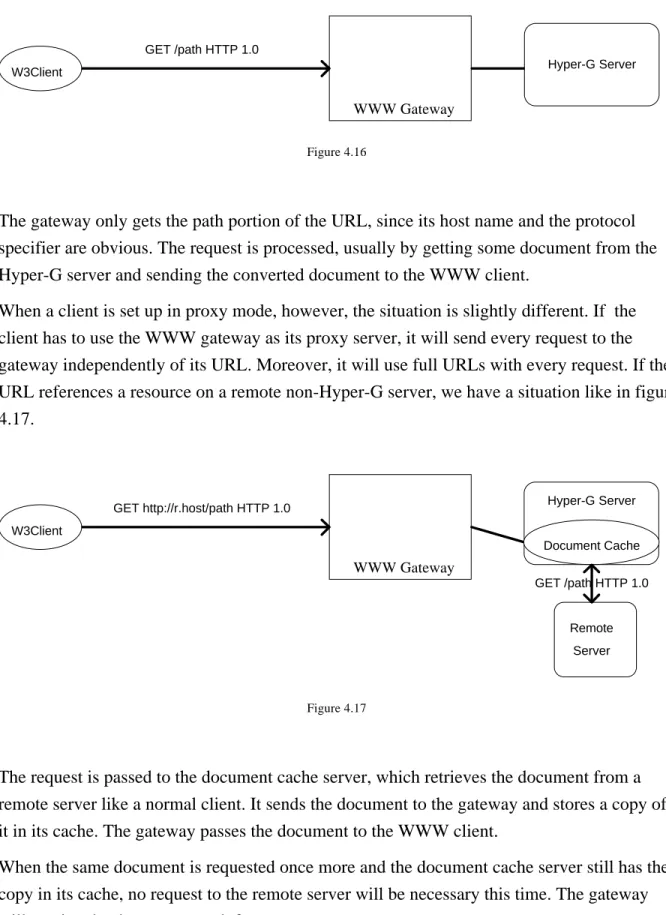
4.7. Proxy Gateway Support ...93
4.7.1. Proxy Server Concept ...93
4.7.2. Using the WWW Gateway as a Proxy Gateway ...94
modern hypermedia information systems are becoming more and more important on international information networks. At the moment, there are different systems already in wide use but also under development. Interoperability is therefore one of the key issues. In fact, different information systems, all based on the client-server principle, usually differ in the application-level protocols which they use for communication between clients and
servers. As long as this is only limited to diverse naming conventions and other "minor" differences, conversion between two protocols can easily be performed.
A problem arises, however, if one system uses a connectionless and totally stateless client-server protocol and the other system is based on a connection-oriented protocol that maintains a state between consecutive transactions. This is the case with the two hypermedia
information systems World-Wide Web and Hyper-G. Moreover, there are features that are only supported by one of these systems.
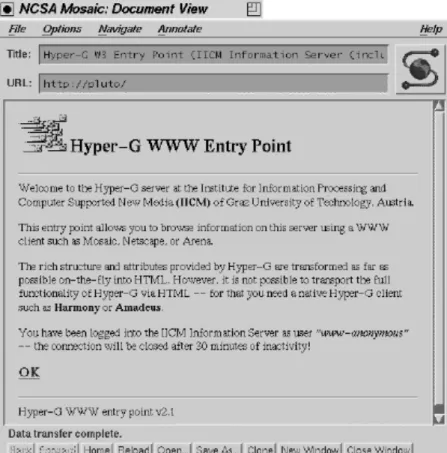
The main goal of this thesis is to study possibilities how a connection-oriented access to a Hyper-G server can be provided for users of WWW clients.
The approach taken for this project was to build a gateway that can be seen as a WWW server from the WWW client's view and as a Hyper-G client from the Hyper-G server's view. In fact, the gateway program is a complete WWW server since it meets two requirements.
• It talks the client-server protocol used by the WWW when communicating with clients.
• It is able to provide documents in formats used by the WWW.
The difference to a usual WWW server is that the gateway does not retrieve resources from a simple file system, but has a Hyper-G server as its back-end database.
The gateway is designed to work as a normal Hyper-G client which uses a connection-oriented client-server protocol and maintains an individual session for each user of a WWW client. For this purpose, a concept was developed that allows to distinguish requests from different WWW clients and to assign them to already opened Hyper-G sessions.
The fact that the gateway has now been in use with every Hyper-G server for some time may be seen as an indication that the project was a successful attempt to improve interoperability between Hyper-G and the World-Wide Web.
In chapter 2 of this thesis, an overview of the World-Wide Web project is given before the three key concepts of the WWW, the Hypertext transfer protocol, Uniform Resource Locators, and the Hypertext Markup Language are dealt with in some more detail. Chapter 3 describes Hyper-G, its concepts, features and applications. At the end of this chapter, a comparison between Hyper-G and the WWW is drawn as differences and similarities have an important impact on the design of the gateway.
Finally, the implementation of the gateway program is described in chapter 4. The goal of the project and the concepts developed are explained in detail. After the structure and the
functionality of the program is shown, a detailed description for users of the gateway is given. A separate section deals with possibilities of program customization. Last but not least, ways how to use the gateway together with the Hyper-G document cache as a proxy server are discussed.
called The Web) as a "wide-area hypermedia information retrieval system". Its aim is to give universal access to a large universe of documents. It is one of the information systems
currently working on top of the Internet and it is probably the most popular at the moment. Although it is strongly based on hypertext, it includes the handling of other types of data as well, such as image, sound, movie, etc. Being the first widespread hypermedia system available through the Internet, the Web has replaced some "traditional" information systems. Information about the WWW in general can be found for example in [BERNERS-LEE92], [BERNERS-LEE92a], [HUGHES93] and [BERNERS-LEE94a]. Useful information for the WWW user can be found in [KROL94], which also compares the WWW with other
information systems available on the Internet.
2.1. History
The birthplace of the World-Wide Web was the European Laboratory for Particle Physics
(CERN) located in Geneva, Switzerland. For a long time there has been a special need for
wide-area hypertext to support the research activities of particle physicists. The need arises from the geographical dispersion of research institutes working together on the same projects. Very often researchers including students and visiting scientists only work at one institute for a limited period of time before leaving for some other location. "New" researchers replacing them have to get "up to speed" on projects quickly. Much of the information they need is in fact available online, but retrieval always needed some special knowledge of the network. One had to remember complicated instructions for different protocols, host names, and terminal types. One of the original aims of the initiative at CERN was to provide a system with a "point-and click" interface.
The first project proposal dates from the year 1989 and was written by Tim Berners-Lee. In October 1990 the project proposal was reformulated with Robert Cailliau as co-author and in November of the same year a prototype of the initial WWW text browser/editor was
developed for the NeXT using the graphic user interface tools NeXTStep. At Christmas 1990 the NeXTStep and a line mode browser were presented at CERN. In May 1991 the line mode
browser (www) was released on central CERN machines. The National Center of
Supercomputing Applications (NCSA) at the University of Illinois, Urbana-Champaign,
started to develop a multi-platform interface to the World-Wide Web and in February 1993 the first alpha version of Marc Andreessen's "Mosaic for X" [ANDREESSEN93] was released. In September of the same year the NCSA released working versions of Mosaic for all major platforms including versions for PC/Windows and the Macintosh. At CERN the first international World-Wide Web Conference was held in May 1994.
A brief history, written by R. Cailliau, who has followed the development of the Web from the very beginning, can be found in [CAILLIAU95]. A detailed list of dates concerning the history of the WWW can be obtained from
http://info.cern.ch/hypertext/WWW/History.html
2.2. Architecture
The World-Wide Web, like many other applications on global networks, uses a client-server model. WWW clients, often called "WWW browsers", try to fetch information from remote servers, where the information resides and present the data to the user. WWW servers must make information available. This sometimes includes the ability to perform searches. The server is free to generate requested documents by sending real files or by generating virtual hypertext on the fly. This makes it possible that a "gateway" server could pass a hypertext image of another system to a WWW browser.
The advantages of such an architecture are that the user interface remains the same, no matter what type of server the client is connected to for a particular transaction and that the user need not understand the differences between protocols. The concept of hypertext is
sufficiently simple to require no training for a computer user. As hypertext is transferred in mark-up form, which is a logical representation compared to the actual form in which the information is presented to the user, the client program can make optimal use of fonts, colours, and other interface resources available on the user's computer.
To make this flow of information possible three major "standards" and conventions were defined. At first, a consistent address system using a compact syntax for a "Uniform Resource Locator" was defined. This is described in chapter 2.3. In addition to other protocols which may be used with the WWW a new protocol, the "Hypertext Transfer Protocol" was defined giving performance and features not otherwise available. This protocol is explained in chapter
2.4. A set of data formats can be used in which data can be transferred. One of them is a new data format, the Hypertext Markup Language, described in chapter 2.5., which is the main format for transmitting hypertext.
Ideally, these conventions should allow current and even future software systems to work together across different platforms.
Interoperability with other systems
Standard protocols used by the WWW are FTP, which allows access to archives of all kinds of information including software and documentation, and NNTP which is used to access network news. By the way, news articles make good examples of documents which can be converted into hypertext, as they contain references to other articles and news groups. Other protocols used by existing information systems are supported by the WWW. In
particular there are the Wide Area Information Service (WAIS) [KAHLE92], which allows searching through indexed material and finding articles based on what they contain, and Gopher [LINDNER94], which provides a menu system for browsing resources on the Internet. The functionality offered by WAIS can be used by WWW browsers as well as Gopher menus can easily be converted into a list of text elements with hypertext links to other documents. So the Gopher space can be used as part of the WWW.
Providing Information
One of the strategies of the WWW is that existing online information, no matter in what format it is stored, maintained and originally made available, may be "published" as part of the web. This can be achieved by giving access to data through small and simple server programs. Rather than having one single type of WWW server program, every server which understands at least one of the specified protocols and which can provide data in at least one of the specified formats used by the World-Wide Web is a "WWW server". This approach is probably one of the reasons why the use of the WWW is increasing so quickly.
2.3. Uniform Resource Locator (URL)
This chapter gives a definition of the Uniform Resource Locator as specified in [BERNERS-LEE94], which is also called the "URL specification" in this chapter.
In the first part, the general syntax is described. The second part deals only with the special rules which are applied to the HTTP protocol. Rules for other protocol schemes are omitted here. In the third part, the so-called URL encoding is described. And finally, some
considerations about security of this mechanism are mentioned in the fourth part. A URL is a formalized piece of information for location and access of resources on the Internet. The URL-scheme is derived from concepts introduced by the WWW global
information initiative. It has been successfully used by the World-Wide Web for quite a long time and is one of the main ideas that form the whole concept of the WWW.
2.3.1. Syntax
Originally, URLs are a mapping of physical addresses of objects which are retrievable using already established protocols. However, the generic syntax allows the design of new schemes for names to be resolved using protocols which have not been specified up to now.
A complete URL consists of a naming scheme specifier as the first element followed by a string. The way of defining a new URL scheme can easily be explained. If you can encode all protocol parameters necessary to access the object into a string with a prefix to identify the protocol, you will have a new scheme.
The exact format of the string is specific to the naming scheme. However, those schemes which are used in locators of information on the Internet have a common syntax for the string which is the so-called Internet protocol part. The naming scheme specifier is separated from the string by a colon.
Naming scheme specifiers
http Hypertext Transfer Protocol (see chapter 2.1.2.) ftp File Transfer Protocol
gopher The Gopher Protocol mailto Electronic mail address
news Usenet news
telnet, rlogin Reference to interactive sessions wais Wide Area Information Servers
and some others which are less important. Moreover, new schemes may be registered by future specifications.
The Internet protocol part
The second element of the URL consists of the Internet Protocol (IP) address part followed by the path.
The Internet Protocol (IP) address part
This starts with a double slash "//" and ends with the following slash "/". The double slash also indicates the presence of the IP address part in a certain URL. Within that part are
- a user name, which is optional and rarely used.
- the internet domain name of the host. Its format is specified in RFC1034
[MOCKAPETRIS87]. Instead of the domain name the IP address as a set of four decimal digits can be used.
- the port number, which is given in decimal notation after a colon if it is not the default port number for the protocol.
The path part
This is the rest of the locator and it includes information that should not be processed by the client. In general, the slash "/" indicates a level in a hierarchy, with the lower level part on the right side.
2.3.2. The HTTP Scheme
The HTTP protocol specifies that the path part is handled transparently. Only the servers de-reference URLs. The path is passed by the client to the server with any request, but is not actually understood by the client. According to [BERNERS-LEE92a], the document name usually contained in the path part should be composed of printable characters and should not contain any information about particular formats available for a document or its length. If the URL which is sent to the client refers to the same server that sends the URL, the host part is omitted. In this case, only the path part is sent by the server. However, when a server is being used as a gateway (especially a "proxy gateway"), then the complete URL is passed on
the HTTP command line. If there is a search part present, it is treated as part of the path and therefore sent as part of the HTTP command.
2.3.3. Encoding of Prohibited Characters
When a system has a local addressing scheme, it is often useful to define a mapping from local addresses into URLs. In this case, references to objects within the addressing scheme may be accessed (possibly via gateways) globally. The URL specification allows the
definition of any mapping scheme provided that it is unambiguous, reversible, and produces valid URLs. It is recommended that hierarchical structures in a given local naming scheme may be mapped onto the hierarchical URL path syntax. This allows the partial form of the URL to be used.
According to the encoding scheme proposed by the URL specification, any character which is not allowed in a URL, or any character whose use, although technically allowed, would possibly cause problems of corruption by imperfect gateways or because of different
character sets, should be encoded as follows. Characters in question should be represented in the URL by a percentage sign "%" followed by two hexadecimal digits (0-9, A-F) which represent the value of the character.
2.3.4. Security Considerations
It should be mentioned that there is no guarantee that objects which could be located by certain URLs at one time will be removed or moved to another location at some later time, which results in changed URLs. The same URL could even point to one object at one time and to another object at some other time.
Another point is that it is sometimes possible to construct a URL with the intention to perform a harmless operation, such as the retrieval of an object according to one protocol, that will in fact cause a destructive remote operation to occur. Typically, this is the case when the URL contains a non-standard port number for the given protocol. If the server is in fact running a different protocol on that port number, this could cause problems, especially when the instructions contained in the URL have a totally different meaning according to the other protocol.
Finally, as stated in the URL specification, the use of URLs containing passwords is clearly unwise.
2.4. Hypertext Transfer Protocol (HTTP)
In this chapter, the application-level protocol which is used by the World-Wide Web for information retrieval and manipulation is explained. This version of the HTTP protocol, known as HTTP 1.0, is an upgrade of the original protocol implemented in the earliest WWW releases.
The purpose of the Hypertext Transfer Protocol is to provide a fast and flexible mechanism for following references between units of information which are distributed at different locations across the Internet. Its name may be misinterpreted. It is not only a protocol for transferring hypertext, but for transferring all sorts of information with the efficiency that is needed for following links in a hypertext system.
The protocol is stateless and object-oriented. 8-bit transfer is always used. It provides several commands for retrieval, manipulation and searching of data in a distributed collaborative hypermedia information system. One of its properties is that the set of HTTP commands could easily be extended.
The process of retrieving or manipulating information using this stateless protocol always consists of two operations. A request is sent from the client to the information source, the server. This request contains the type of operation (retrieval, searching, etc. ) which the client wants the server to perform and secondly, some sort of identifier for the object on which this operation should be performed. The type of operation is set by the command, which is called the "method" of a HTTP request. The problem of referencing a certain object is solved by using the concept of Uniform Resource Locators which is described in chapter 2.3. In addition to that, for some types of operation the client has the possibility to send additional data to the server within the request. The server, after trying to fulfil the request, sends a
response to the client. The response of course depends on the request and on the fact, whether
or not the request has been processed successfully.
A connection between client and server is established by the client. Normally, when TCP/IP is used, the default port for HTTP transaction is the reserved number 80. But other port numbers may be used, if they are specified in the URL of the request. After setting up a connection, the client sends the request and waits for the response from the server. After that, the connection is closed by either both parties. In other words, a connection between client and server is only set up for one transaction.
2.4.1. Request
The client's request to the server consists of the following parts:
• The first line*
• The request headers (are explained in 2.4.1.2.).
• An empty line
• Data
All other parts except for the first line are optional. Their presence depends on the method and sometimes (for the headers) on the implementation. An empty line has to be sent to indicate the beginning of the data body. If no data body is present, an empty line indicates the end of the request.
The data body can be any MIME conforming message [BORENSTEIN92], therefore also binary data. Its length is given on a header line (see 2.4.2.2.).
To make clear how the server can know about the end of the request, this can be explained as follows. Lines can be read until an empty line occurs, which indicates that all header lines have been read. If a Content-length field is present in the header, it tells the server that the following data body contains the specified number of bytes. If the field is omitted, usually a method is used which implies that there is no data body following, as it is with GET, for example.
The first line is defined as: <Method> <URL> <Version>
<Method> is one of the commands described in 2.4.1.1.
<URL> is defined in 2.3. A partial URL is normally given here if the scheme (http:) and the server are obvious. Whereas, if the server is being used as a gateway, the complete URL is given (see 4.7.1.). The URL should be encoded using the mechanism described in 2.3.3. at least to a extend that spaces and control characters (decimal 0-31 and 128-159) are escaped. <Version> is the protocol Version which the client uses; usually this is: HTTP/1.0
* Lines are always terminated by CRLF. However, it is recommended that servers should be tolerant if lines
If <Version> is not present, it can be assumed that the client uses HTTP Version 0.9, which uses a simple form of request. This simple form is also allowed for HTTP 1.0 for back-compatibility.
The simple request is defined as: GET <URL> It has no request headers and no data body.
2.4.1.1. Methods
The method field which is the first element on the first line of a HTTP request indicates the operation to be performed on the object identified by the URL following as the second element.
What follows is a list of currently defined methods, as described in [BERNERS-LEE93]. GET means retrieve the object that is identified by the URL. This is also used
for searches, which is explained later.
HEAD is the same as GET, but returns only headers and no actual data.
POST creates a new object linked to the specified object. The new object is sent as the data body of the request.
PUT stores the object which is sent as the data body under the specified URL. The URL must already exist.
DELETE requests the deletion of the specified object. LINK links an existing object to the specified object. UNLINK removes the link from an object.
TEXTSEARCH Objects may be searched for with a text string. This is implemented using the search form of the GET method.
SPACEJUMP The object will accept a query which contains coordinates of a point within the object. Actual implementations use the GET method with special URLs as described later.
In addition to that, the following methods are defined: CHECKOUT, SHOWMETHOD, CHECKIN, SEARCH. These methods are not explained here because most of them are still
under discussion and not yet implemented. For details, the reader is referred to e.g. [BERNERS-LEE93].
Currently, only the methods GET and POST are widely used in implementations of WWW browsers. The method POST is usually used in connection with "fill-out" forms (see 2.5.4.). GET can also be used to perform searching. The URL used in this case is suffixed by a "?" character and the text to be searched for. Like in every other URL, prohibited characters have to be encoded. In search terms, keywords are separated by plus signs ("+").
Example: GET /info-server/searching?snowboard+races HTTP/1.0 Another use of GET is the implementation of image maps. By specifying a special URL, the client provides the server with information about certain coordinates within an image object. In reality, the user can click on a certain region of an image displayed by the browser. The browser then sends the coordinates of the point on which the user has clicked to the server. Example: GET /info-server/map/0.5+0.9 HTTP/1.0
2.4.1.2. Headers
The following header lines are sent by the client in a request. As some of the headers are not yet specified in detail, others may be changed, and perhaps new fields will be defined in future, this list only contains the most important headers. However, actual implementations only use some of these headers. In any case, header lines have a format which is defined in RFC 822 [CROCKER82]. It is recommended that unrecognized fields should be ignored by the server. The order in which the lines appear in the header is not significant.
From:
This field can be used to pass the e-mail address of the user to the server. There it can be used for logging purposes. Whereas, using it as a simple form of access protection seems to be very insecure.
Accept:
More than one line of this field is allowed. These lines build a list of representation schemes for the object the client is ready to accept from the server. The values are the same as for the Content-Type: field of the response (see 2.4.2.2.) except that only for the Accept: field an asterisk ("*") is allowed as a wildcard.
Example: Accept: text/plain; text/html Accept: image/gif
Accept: */* can be interpreted as "give me what you've got."
If there is no Accept: field, the server can assume that the client will at least accept text/plain and text/html.
Accept-Encoding:
This tells the server which encodings of the object are acceptable by the client. Example: Accept-Encoding: x-compress; x-zip
Accept-Language:
A list of preferred languages for the object in the response is given here. It is not illegal for the server to respond in a language that is not specified here.
User-Agent:
The name of the client software product is given on this line. The first white space delimited word must be the product name followed by an optional slash and a version number. If other products (e.g. program libraries ) are part of the client software, their names can be given as additional words on this line.
Example: User-Agent: Mozilla/0.94 Beta (X11; SunOS 5.3 sun4m)
Referer:
With this field the client can tell the server where the URL of the request was obtained from. The URL of the document which contained the link is given here. By gaining this information the server would be able to generate lists of back-links to objects and apart from logging purposes this allows bad links to be traced. Partial URLs are meant to be relative to the URL of the object.
Example: Referer: http://hgiicm.tu-graz.ac.at/
Authorization:
This line contains the name of the authorization scheme, a user name and an optional password. This provides only a low-level security as used by unmodified Telnet or FTP.
Example: Authorization: user myname:mypassword
However, this field could be used to provide other, more sophisticated, authorization schemes.
ChargeTo:
This line contains account information. It has been rarely used by actual implementations up to know. The format should be a function of the charging system. It is proposed that it could include a maximum cost for the transaction and a cost unit.
2.4.2. Response
The response from the server consists of the following parts:
• The status line (is explained in 2.4.2.1.).
• The response headers (are explained in 2.4.2.2.).
• An empty line
• Response data
In order to communicate with old servers which do not send a status line because they use the protocol originally implemented in the WWW, clients should tolerate such responses. In such cases, the client can assume that the response is a document of type text/html.
Response data may follow the headers in the format of a MIME conforming message body. The contents depends on the status code and the content type is given on a header line. The length of the message should be given on a header line with the Content-length field. As the connection is simply closed by the server after sending the last byte of data, the client can assume that all data has been read and the transaction is terminated when the connection was closed, even if no Content-length field was present in the header.
2.4.2.1. Status line
The status line, which is always the first line of the response, has the following syntax:
<http version> <status code> <reason>
<status code> is a numeric 3 digit code. The values are listed later.
<reason> is a human readable text that explains the status code. It can provide some sort of diagnostic information.
In the following list all status codes are described. The <reason>-fields added to the status codes are those used in [BERNERS-LEE93]. However, different servers use different texts, as only the numeric code is significant.
The first of the 3 digits indicates the main category to which the code belongs to. Codes starting with "2" have the meaning of success, "3" has something to do with redirection, codes with "4" or "5" as the first digit are error codes, where "4" means that the server recognises an error of the client and "5" is intended to be an indicator for an error of the server. The last two cases are often not distinguishable, so the difference is not very important.
If the status code indicates success, the data body is the requested object. In cases of an error or of an redirection code, the data body can contain a document which is a sort of error message with a detailed description of the error in human readable form. This document is intended to be presented to the user by the client.
Status codes 200 OK
The request was fulfilled. Data follows.
201 CREATED
As a response to a POST request, it indicates that the document was successfully created.
202 ACCEPTED
The request has been accepted, but processing has not been taken place because this is done through an asynchronous operation. There is no further possibility for indicating the actual result of such an asynchronous operation.
203 PARTIAL INFORMATION
This indicates that the returned metainformation is not from a server with a copy of the object, but may include annotation information about the object, for example, from a private overlaid web.
301 MOVED
The location of the requested object has changed; the change is permanent. The response must contain at least one of the header lines of the form:
URI: <url> string
<url> is the new URL of the object. string is an optional comment.
Browsers should automatically relink to the new URL, if they have the capability for link editing.
302 FOUND
This has the same meaning as 301 MOVED with the exception that the change is not permanent and the redirection may be altered on occasion.
303 METHOD
This also indicates that the client should try another URL. Moreover, a different method other than GET should be used. The response contains a header of the form:
Method: <method> indicating the alternate method (see 2.4.1.1. for a list of methods). The data body can contain parameters to be used for the method.
400 BAD REQUEST
This usually is an indication of an syntax error in the request.
401 UNAUTHORIZED
The user has no access rights for the requested object. The response should contain information about suitable authorization schemes. The client is intended to retry the request with an "Authorization:" header.
402 PAYMENT REQUIRED
Parameters in the response should contain specifications of the acceptable charging system. The client should retry with the proper "ChargeTo:" header.
403 FORBIDDEN
The user has no access rights for the requested object. Unlike for status code 401, authorization will not help.
404 NOT FOUND
The server was unable to resolve the specified URL. The object could not be found in the server's database.
500 INTERNAL ERROR
The server was prevented to fulfil the request by an unexpected condition.
501 NOT IMPLEMENTED
The server does not support the requested feature.
2.4.2.2. Headers
Like the header lines in the request (see 2.4.1.2.) all response headers are optional and the order in which they occur in the header is not significant. Unrecognized header fields should be ignored. The following list contains only the more important header fields. Only some of them are actually used by servers at the moment.
Allowed:
This line contains a list of methods (compare 2.4.1.1.) which are allowed for the specified URL.
Example: Allowed: GET HEAD PUT
If this is not present, the default methods are GET and HEAD.
Public:
This is the same as Allowed:, but lists only those methods which anyone may use. The default method is GET.
Content-length:
According to [BERNERS-LEE93], this implies that the data body is binary and should be read directly from the communications link, without parsing. However, this field is normally used in all responses in order to tell the client in advance how many bytes of data the client is going to receive. Clients can display this information, so that the user can estimate how long the transmission is approximately going to take.
This field is also used in requests, especially with method POST, where the data body is not empty.
Example: Content-length: 123
Content-type:
On this line the type of the document is given. Examples: Content-type: text/html
Content-type: image/gif Content-type: video/mpeg
In a POST request that contains the contents of a fill-out form (see 2.5.4.), the following header is usually used: Content-type: application/x-www-form-urlencoded
Date:
This is the creation date of the object in GMT. The format is defined in RFC850 [HORTON83].
Expires:
This field gives the date when the information will be not valid any more. This can be used to control the caching mechanism of the client.
Last-modified:
The last time the object was modified is given here. The format is the same as with Date.
Message-id:
A document should have a unique identifier. No other document, even no different version of the same document, may have the same message-id. The id must be unique in all time.
URI:
This gives a URL to be used for the object. This field is normally used in responses which cause an automatic redirection (compare 2.4.2.1.).
Language:
This line gives the language code for the language in which the document is written. The language code is an ISO 3316 language code.
Example: Language: en
Cost:
This gives the cost for retrieving the object. The format is not yet specified.
2.4.3. Considerations about Log Information
A HTTP server is able to collect personal data about information requested by users. Especially the Referer: field, which allows to draw reverse links, together with the From: field, which gives the user name, can provide information which could be very powerful. For example, reading habits of certain users can be exactly studied.
On the one hand this may be very useful for information providers, but on the other hand the log information may be abused. Handling or publishing such information may be restricted by law which is, of course, different from country to country.
2.5. Hypertext Markup Language (HTML)
The design of HTML is closely related to the World-Wide Web initiative. Although it is only one of the data representations used with WWW, it is probably the most important.
HTML was "invented" because the WWW needed a common basic language for hypertext documents. To be more precise, HTML is a language for communication. It should mainly be used for interchanging hypertext over the network. There is no need for servers that files are stored in HTML format because HTML should be so easy to generate by programs that texts can be converted into HTML on the fly with each request [BERNERS-LEE94a]. On the other
hand HTML is designed to be sufficiently simple in order to allow HTML documents to be easily produced by people, not only by machines.
One of the most important properties of HTML is that it is a SGML document type. The Standard Generalized Markup Language (SGML) [GOLDFARB90] can perhaps be thought of as a programming language for style sheets. Therefore HTML can be seen as a collection of styles described in a document type definition (DTD) according to the SGML standard. This means, in practical terms, that an HTML document can be parsed by an SGML parser provided with the HTML DTD.
This chapter consists of four parts. The first one gives a brief overview of different versions or levels of HTML specifications, because the further development of HTML is an important point of discussion on the Internet at the moment.
The specification of HTML is changing from time to time and there are several variants implemented in different WWW browsers. The description of the syntax and the elements of HTML given in the second and third part is mainly based on material found in [BERNERS-LEE93a].
2.5.1. Specification Levels
Specifications of HTML can be divided into 3 levels.
HTML level 1
This specifies a set of HTML properties which is understood by almost all WWW browsers at the moment. In addition to the HTML of the initial clients, it defines the use of inline images.
HTML level 2
This specification includes additional properties like forms for user input (compare 2.5.4.). Some of its features are already in use by various clients, for instance Mosaic, although the specification is still being refined.
HTML level 3
In addition to previous specifications, this defines more sophisticated features for HTML such as tables, figures, and mathematical equations. Sometimes this specification is also referred to
as HTML+. It is under construction at the moment. A brief overview of HTML 3.0 properties is given in 2.5.5.
The properties of HTML which are described in the following sections of this chapter (2.5.2. - 2.5.4.) are basically those of HTML level 1, plus a feature from HTML level 2, which is the fill-out form support. The reason for this is that almost all WWW clients and most of the WWW servers are currently working with this set of properties and also the implementation of the WWW Gateway for Hyper-G (see chapter 4.) was based on these features.
2.5.2. General Syntax
An HTML document consists of simple text, except that parts of the text are interpreted as markup. For this purpose, a number of elements was defined. Every element starts with a tag and every element that is not empty ends with a tag. A start tag looks like <tag> and an end tag looks like </tag>. The name of the element (here tag) is case insensitive and has to follow immediately the tag open delimiter.
A start tag can contain attributes. An attribute consists of a name, an equal sign "=" , and a value. The value is a string surrounded by single quotes or double quotes.
Whitespace is allowed between the element name and the closing delimiter ">", around attributes, and also around the equal sign within an attribute.
You can use character references or entity references to represent characters that would otherwise be recognized as markup. Characters available by the writer that are not part of the character set can be expressed this way. A character reference starts with &# followed by a decimal character number and a semicolon.
Example: <TITLE>Here is a less than sign < in a title</TITLE>
An entity reference starts with a & followed by an entity name and a semicolon. Some
important entities are &<; for the less than sign, &>; for the greater than sign, & for the ampersand sign & itself, and " for the double quote sign. A list of all entity names can be found in [BERNERS-LEE93a].
Example: Gr¨ße aus Österreich which results in: Grüße aus Österreich
2.5.3. Elements
Basically, HTML documents should contain an initial HEAD element followed by a BODY element, although this is not obligatory. The HEAD element contains all information about properties of the whole document, but it does not contain any text which is part of the document. All the information that belongs to the document is in the BODY element. Some elements that can appear in the HEAD element are listed in 2.5.3.1. All other sections (2.5.3.2. - 2.5.3.8.) describe elements which can only appear in the BODY element.
Browsers which do not support certain tags should ignore them. This allows new tags to be introduced easily.
2.5.3.1. Elements within the HEAD Element
The order in which these elements appear is not significant.
<TITLE>
The string between the start and the end tag should be the title of a document to be used in bookmark lists by the browser in order to label the displaying window, etc.
<BASE>
This allows the URL of the document to be specified for situations in which the document may be read out of context. Moreover, it gives a base address for resolving partial URLs found in anchors within the BODY of the document. If this element is not present, the browser will use the URL which was used to access the document to resolve partial URLs. The attribute HREF is used with this element.
Example: <BASE HREF="http://hyperg.tu-graz.ac.at/search.html"
<ISINDEX>
This tells the browser that the document may be queried with a keyword search. The browser usually reacts by displaying a keyboard entry field for entering keywords by the user.
Normally, this tag is inserted by the server automatically if the server has the capability for handling queries. Obviously, it does not make sense to insert such a tag by hand if the server has no search engine.
2.5.3.2. Anchors
The text between the anchor start tag <A> and the anchor end tag </A> is expected to specify a source or a destination anchor according to the optional attributes included in the start tag. Either HREF or NAME is necessary for the anchor to be useful.
If HREF= is used, this specifies a source anchor. The value of this attribute is the address (usually the URL) of the destination document, the identifier of a destination anchor within the same document prefixed by the hash sign "#", or the URL plus an identifier which refers to a certain destination anchor in a different document. The text of the anchor is "sensitive" ; for instance, it can be displayed "click-able" by the browser.
The value of NAME= is a string which forms the identifier of a destination anchor. It must be unique within the document. The text of the anchor is the destination of the link.
Examples: A <A HREF="http://info-server/descript">detailed description</A> is given here.
Go to the <A HREF="#first">first chapter.</A>
<A NAME="first">First chapter</A>
2.5.3.3. Headings
There are six levels of heading elements defined: <H1>, <H2>, <H3>, <H4>, <H5>, <H6>
The browser, of course, is responsible for a suitable rendering. That includes the generation of vertical whitespace before and after such heading elements. Therefore, it is not required to put a paragraph mark after a heading element.
Example: <H1>Main Title</H1>
2.5.3.4. Character Highlighting
The following tags allow the formatting of individual parts within the text in different styles. Some of the elements define more logical styles, others are closely related to their physical representation. Whenever possible, logical styles should be preferred.
<I> Italic <B> Boldface
<U> Underline <TT> Fixed-width font
<EM> Emphasis, typically rendered as italic <STRONG> Strong emphasis, typically boldface
There are several highlighting elements that should be used to format sections of text with specific contents. They provide a sort of semantic markup. The actual rendering is
configured by the browser. <CITE> A citation
<SAMP> A sequence of literal characters <CODE> Example of code
<KBD> Text typed by a user in a manual <VAR> A variable name
<DFN> A definition
2.5.3.5. Paragraphs
To separate two pieces of text, you can put the paragraph mark <P> in between. It has no end tag. Typically this results in a line brake with some additional vertical space between the paragraphs.
2.5.3.6. Lists
There are definition lists and simple lists defined for HTML.
A simple list can be composed by putting a number of list items between a list start tag and a list end tag. Each list item starts with the list item tag <LI>, which has no end tag. Two different list tags are possible. <OL> starts a ordered list, where each item is numbered in some way. An unnumbered list starts with <UL>. The rendering software often marks its list items with bullets.
Example of an unnumbered list:<UL>
<LI> list element <LI> list element </UL>
A definition list (or glossary) starts with the <DL> tag and contains term elements marked with <DT> and corresponding definition elements marked with <DD>. Term and definition
must appear in pairs. The attribute COMPACT can be used with the <DL> tag, which may result in a more compact rendering.
Example of a definition list: <DL>
<DT>-h <DD>help text <DT>-v <DD>debug output </DL>
2.5.3.7. Other Formatting Styles
A section of a document which contains the name and the address of the author can be enclosed between <ADDRESS> start and end tags. This usually results in a special rendering of that section, typically as a separate paragraph and formatted in italic.
Another possibility to format a section of text in another style is the <BLOCKQUOTE>
element. The section is usually put in a separate paragraph rendered with an extra indent and the text may have an italic font.
If you want to have parts of a document displayed in a fixed width font suitable for preformatted text, you can use the <PRE> tag.
2.5.3.8. Inline Images
An HTML document may contain embedded images. They are specified within the text using the <IMG> tag. The browser has to retrieve the image data whose URL is specified with the SRC attribute automatically. The difference to a normal link is that the image is not displayed as a separate document, but embedded within the text on the location of the <IMG> tag.
Attributes
SRC The value is the URL of the image document.
ALIGN This can have the values "TOP", "MIDDLE", or "BOTTOM". It defines whether the tops, the middles or the bottoms of the image and text should be aligned vertically. The attribute is optional with "BOTTOM" being the default.
ALT As not every browser is capable of displaying inline images, a text can be given as the value of this attribute which should be displayed instead of the image by text-only browsers.
2.5.4. Fill-Out Forms
Forms are probably one of the most interesting extension of the initial HTML specification. Their implementation in Mosaic for X 2.0 was perhaps the key for the widespread use by various information servers. The following section gives a brief description of fill-out Forms. See [BINA94] for details.
In order to introduce a form element into HTML the <FORM> tag together with the following attributes is defined.
ACTION The value is the URL of the location where the contents of the form should be submitted to. If this attribute is omitted, the browser will send the contents to the URL of the current document.
METHOD This specifies the HTTP 1.0 method (compare 2.4.1.1.) to be used for
submitting the form. Principally, there are two possibilities. If method GET is used, the contents will be prefixed with a question mark '?' and appended to the URL as if there was a normal query. However, it is recommended to use method POST because this results in sending the contents in a data body rather than as part of the URL.
ENCTYPE This can be used to specify the type of encoding for the form contents. At the moment, this is normally omitted because only one type, "application/x-www-form-urlencoded", is used.
There can be several different forms in one HTML document, but forms must not be nested. Within forms, three different elements, each of which with several attributes, are allowed. These are INPUT, SELECT, and TEXTAREA elements.
<INPUT>
This is a standalone tag; there is no end tag. It causes, depending on the type, various
interface elements (radio buttons, checkboxes, text entry fields, pushbuttons) to be displayed by the browser. The different attributes together with their possible values are as follows. TYPE
"TEXT" displays a text entry field. This is the default if no TYPE attribute is present with the INPUT tag.
"PASSWORD" is the same as TEXT except that entered characters are not echoed to the screen.
"CHECKBOX" shows a single toggle button (on or off).
"RADIO" is the same as CHECKBOX except that more tags of that type with the same value for the NAME attribute are grouped into a "one of many" behaviour.
"RESET" displays a pushbutton. When pressed, it causes all values of the input elements of a form to be reset to their initial values that were displayed right after receiving the document containing the form.
"SUBMIT" is a pushbutton that causes the contents of the whole form to be put into a query string and sent to the server. A submit button is always necessary in a form with the only exception that the form contains only a single input element which must be an INPUT tag with TYPE "TEXT" or "IMAGE". In these cases, the form is submitted when the user hits return in the text entry field or clicks on the image.
NAME Its value is the symbolic name for the input field. This must be present except for submit and reset buttons and is needed to form the name/value pairs which are sent to the server as the contents of the form.
VALUE has different meanings depending on the type of the input element. For pushbuttons the value specifies the label of the button. For text and password entry fields it specifies the initial contents. For checkboxes and radio buttons it specifies the value of the button when checked. This value is sent to the server. No name/value pair is sent for unchecked buttons. If no value attribute is present, the default value for checked radio buttons and checkboxes is "on".
CHECKED for checkboxes and radio buttons this attribute specifies if the button is initially checked. It has no value.
MAXLENGTH specifies the maximum number of characters accepted in text and password entry fields. If it is omitted, an unlimited number of characters is allowed, of course within a scrollable input field.
SIZE for text and password entry fields this gives the size of the input field in characters. Multiline input fields can be specified as SIZE="width, height" (e.g. SIZE="30,2"). If the attribute is not present, the default value is 20.
<TEXTAREA>
This element causes a multiline area with scrollbars for entering text to be displayed by the browser. Text between the start and the end tag must be plain text. This text is the initial contents of the area. Attributes are NAME, whose value is the symbolic name for the element, ROWS and COLS, which specify the height and the width of the text entry area in characters.
Example: <TEXTAREA NAME="message" ROWS="5" COLS="40"> Hello!
</TEXTAREA>
<SELECT>
These elements are usually represented as option menus and scrolled lists. Between the start and the end tag only a number of <OPTION> tags each followed by a piece of plain text is allowed.
The attributes of <SELECT> are as follows.
NAME gives the symbolic name for the element needed for submission.
SIZE If it is omitted, or if its value is "1", the select element is represented as option menu. If its value is "2" or more, a scrolled list will be displayed with the value specifying the number of visible elements.
MULTIPLE This has no value. If present, it allows multiple selections. Anyway, a scrolled list is displayed, regardless of the value of SIZE.
The <OPTION> tag can have the attribute SELECTED, which specifies that the marked option is initially selected. If MULTIPLE is present, more than one option can be marked with SELECTED.
Example: <SELECT NAME="menu" MULTIPLE> <OPTION SELECTED> First option
<OPTION> Second option </SELECT>
In conclusion, a remark may be made on the submission of the form contents. As stated before, either method GET or method POST may be used to submit the form to the server. In any case, the form contents are put into a query string made up of name/value pairs. This is the reason why NAME attributes are needed. Names and values are separated by equal signs "=" and the pairs are connected by ampersands "&".
Example: name1=value1&name2=value2&name3=value3
If method POST is used for submission, this string is sent as a data body. Its length should be given in the HTTP header field length: and its type is usually Content-type: application/x-www-form-urlencoded (compare 2.4.2.2.).
In case of method GET, the query string is prefixed with a question mark "?" and appended to the URL specified with the ACTION attribute.
2.5.5. HTML 3.0
This specification, which is currently being developed, tries to define the next generation of HTML which contains a lot of extended features. The WWW browser Arena [RAGGETT94] serves as a testbed for HTML 3.0.
The most important features are:
• Mathematical Equations and Formulae
• Resizable Tables
• Improved Layout Control (e.g. ALIGN="CENTER" etc. for headings and paragraphs, named horizontal tabs, control of textflow)
• Figures with Local Event Processing
• Document Specific Toolbars
2.6. Future Developments
• The goal of computer supported collaboration can only be reached if more powerful hypertext editors are developed which allow non-expert users to publish interlinked documents.
• The implementation of a name service that will allow documents to be referenced by name, no matter where the document actually resides, is desirable.
• Commercial publishers demand more sophisticated document type definitions.
• Specifications for charging and commercial use of the Internet have to be defined and applied by the WWW.
• Real-time features such as teleconferencing and virtual reality should be integrated into the WWW.
hypermedia system. The Hyper-G project has been in progress at the Institute for Information Processing and Computer Supported New Media (IICM) of Graz University of Technology for a number of years. Its aim is the development of a general purpose, large-scale,
distributed, hypermedia information system.
The first part of this chapter gives an overview of the concepts behind Hyper-G. The second part explains the organization of data in the Hyper-G system. For a detailed description the reader is referred to [KAPPE91a]. Information about the architecture of Hyper-G and the requirements of a modern hypermedia information system can also be found in [KAPPE91] and [KAPPE92]. The most important aspects of the internal concept are described in
[KAPPE92a].
Hyper-G provides high level navigation tools, different search strategies, a multi-lingual concept for both documents and user interface, and a user identification concept with different levels of identification. The third part of this chapter gives a short description of these features. A good overview of Hyper-G can be obtained from [KAPPE93b] and [KAPPE93a].
The fourth part takes a look at some applications of Hyper-G, some of them already in use, some existing only as a concept.
In the fifth part, certain features of Hyper-G are compared with those of the World-Wide Web and the advantages of the more complex concept behind Hyper-G for a distributed hypermedia system are explained. (see e.g. [ANDREWS94] and [ANDREWS95] for details).
3.1. Design Concepts
The Hyper-G system operates on a heterogeneous computer network. Not only data, but also processes are distributed.
Like most other modern information systems, Hyper-G is based on the client-server model. Its advantages over conventional terminal-based systems are obvious. The client program can use all the features of the local hardware and software (such as graphics, sound, etc.) to
produce a sophisticated user interface, which remains the same if the client connects to different server systems. In terminal-based systems, where the user logs into another system, the user interface may change depending on the server system. Also, the user interface has to be reduced to the smallest common denominator, which is usually that of a simple text terminal (e.g. VT100). In the client-server model, only the essential data is transmitted between client and server, usually in larger blocks. In conventional systems, every keypress has to be transmitted, which is a waste of bandwidth and, of course, leads to an unacceptable performance problem in case of a global distributed system.
Hyper-G is implemented in a very modular way. On the client side, rather than having a single client process running, you have a session manager controlling the entire Hyper-G session and a different viewer process for each document type. The Hyper-G server is not a single program either, but consists of concurrent processes, which may be distributed among a number of server machines. This increases performance and leads to an extensible system. The design of the Hyper-G system is very much influenced by object oriented principles. All major parts of the software are developed with C++.
In the concept of Hyper-G there is a separation between the user interface and the underlying Hypermedia engine. This allows to run Hyper-G with different user interface metaphors (compare [MAURER90]), which is one of the reasons why Hyper-G can be called a general purpose hypermedia system (see 3.4. for possible applications).
The concept allows great extendibility. As every document type is handled by a separate document manager on the client side, new document types can easily be introduced by
providing a new document manager. New user interface metaphors can be introduced without having much impact on the server.
3.2. Data Organization
3.2.1. Collection Hierarchy versus Hypertext
In Hyper-G, documents are members of so-called collections. Collections group together documents and other collections with related contents. As collections can contain other collections (called sub-collections) recursively, data can be organized in complex hierarchies.
This structure is not a tree, but a directed acyclic graph (DAG). This means that one document may belong to multiple collections, called parent collections of the document. But this is not the only way how information can be organized in Hyper-G. Also the node-link model of hypertext is supported. Of course, this is not limited to text documents, but to all kinds of multimedia document types. In addition to the simple node-link model, Hyper-G does not only allow to follow a link in one direction, but in both directions. Moreover, links can have types and even access rights, which is used to achieve different types of annotations. The link management is described in 3.2.3. in more detail.
Combining both concepts in one information system can make the user's navigation much easier. One positive effect of providing a hierarchical structure is that the number of links can be reduced. Links often have a bad effect on the orientation of the user in information space (compare [MAURER94]). Together with the advanced search facilities (they are described in 3.3.1.) this is a powerful means for decreasing disorientation of users browsing in large amounts of documents.
3.2.2. Document Clusters
Similar to a collection, a document cluster contains a number of documents that are
semantically related. The difference is the way in which they are presented to the user. When a cluster is selected, all components may be displayed simultaneously, whereas a collection is normally presented as a list of items with only their titles displayed.
Clusters are the way how multimedia documents are implemented in Hyper-G. If a cluster contains, for instance, a text document, a video document, and an audio document, the text and the video are shown in different windows while the audio clip is played. This can be done simultaneously because, as stated in the previous section, each document type is handled by its own document manager.
The cluster concept is also used to implement multilingual documents. A cluster may contain different versions of the same document, each written in another language. Depending on the setting of the preferred language by the user, the client will display the version written in the corresponding language, if available in the database. Together with the multilingual user interface provided by Hyper-G clients this concept meets the requirements of an international multi-user environment.
3.2.3. Link Management
As mentioned in 3.2.1., Hyper-G supports bidirectional links. Systems that support only unidirectional links can only show links that depart from the current document but not those that arrive at the document. The system cannot answer the question: 'What other documents refer to the current document?'. They are also unable to give an overview of the structure of the information network around the current document (graphical map). Such a map would decrease disorientation of users.
Supporting bidirectional links can easily be done by keeping links and anchors in a separate database, called the link server [compare KAPPE92a]. This link server is an object oriented database. It holds information about Hyper-G "objects", which can be links, anchors,
descriptions of documents, relations between such objects (e.g. which documents belong to which collection, which source anchors are attached to which destination anchors, which anchors are attached to which documents, etc.) and additional attributes such as title, author, creation date, modification date, etc.
Unique object IDs are assigned to Hyper-G objects. A modified object receives a new object ID. Even if a document is deleted, the object ID is never used again.
The separation of documents and links has another advantage. Modification of a link requires no modification of the document. Therefore, it is possible that a user who has no write access to a certain document may attach an annotation. Even a document that resides on a CD-ROM can be annotated in this way.
As mentioned previously, Hyper-G supports typed links, which is used to implement different types of annotations. Links can also have access rights and, therefore, private links are
possible.
3.3. Features
3.3.1. Search Facilities
Principally, two types of searching are possible. Every Hyper-G object has a number of associated attributes, which can be searched for. The most important attributes in connection with searching are title, keywords, author, creation date, and modification date. Because of
the separate link server (compare 3.2.3.), storing all these attributes, complex queries (including boolean combinations of attributes) over the whole database or parts of it (collections) can be specified and searches can be performed efficiently.
Secondly, the contents of text documents can be searched by using fulltext queries since all text documents are automatically indexed when they are inserted into the database. The result of such a query is a ranked list of document titles with a score for each document indicating its relevance.
In both modes, the user can specify the scope of the search. Searches can be performed on the whole database or on certain collections (including their sub-collections) only. Of course, searching in a limited set of collections can be performed much faster.
3.3.2. Navigation
The previous explanations have shown that different navigation paradigms are implemented in Hyper-G. The organization of data in collections provide hierarchical navigation, the
hyperlink concept allows navigation by following links, and the advanced search facilities are
another tool for navigation. In addition, the bidirectional link concept (see 3.2.3.) allows the creation of a graphical view of the link structure around a given document. This feature is called a local map, as it shows incoming and outgoing hyperlinks of a document.
The power for navigation in the "information space" lies in the combination of these different paradigms. The user does not have to stick to one means of navigation, but may change it in a flexible way. For example, a user may issue a search to receive a list of documents and
collection titles, then take a look at some documents or browse through the collection hierarchy to see 'what else' is available for a certain context, and then, when reading documents, the user may follow hyperlinks to related material.
3.3.3. Identification Modes and Access Rights
Hyper-G controls the extent to which a user is allowed to modify, insert, or retrieve data by using access rights. Not only user names are supported, but also group names may be specified. A user may belong to a particular user group, which automatically gives him/her certain access rights that are common for the group.
One disadvantage with identified users is that the information system may store information about every single command the individual user issues when using the system, which is possibly referred to as the "Big Brother" scenario. The approach taken in Hyper-G allows not only anonymous and identified users, but supports four modes of identification.
Anonymous In this mode no monitoring of individual users is possible. On the other hand, no write permission is granted to anonymous users. Anonymously Identified Anonymous users may choose pseudonyms and passwords by
which they are identified. However, the system does not know their real identity, but can recognize the user in later sessions and can restore user configurations and preferences. Write operations are only allowed for documents that are not visible to the public. Semi-Identified Identified users may choose a pseudonym and a password to use
the system in semi-identified mode. The real identity is still known to the system but not to other users reading mail, annotations, etc. A user may use more than one pseudonym.
Identified The identity of the user is known to the system and also to other users when looking at the "who-is-online" list, receiving mail, or reading annotations from identified users.
In connection with user identification another feature has to be mentioned. Hyper-G supports so-called home collections, which also work as individual entry points to the system. If a user identifies him-/herself, the client will display the user's home collection.
The user can copy references to other documents or other collections to the home collection using it as a personal "bookmarks/hotlist" for items of interest. This allows faster navigation to these documents when needed in subsequent sessions.
3.3.4. Interoperability with other Information Systems
In the design of Hyper-G, interaction with other existing information systems plays asignificant role. An important aspect is that for the user, a remote databases should look like an integral part of Hyper-G preserving a consistent user interface.
The Hyper-G server is able to store "remote objects" (i.e. Hyper-G objects in the link database that are pointers to remote systems) for accessing WWW, Gopher and WAIS
servers. This allows Hyper-G clients to contact such remote systems and presenting a "Hyper-G view" (as far as possible) of information on non-Hyper-"Hyper-G servers. Text documents from WWW servers are transformed into Hyper-G text documents, Gopher menus into Hyper-G collections, and WAIS queries into Hyper-G queries.
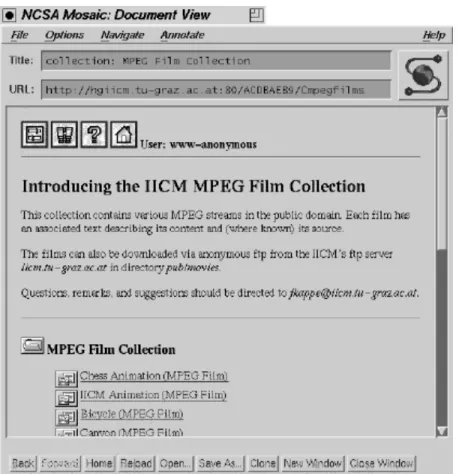
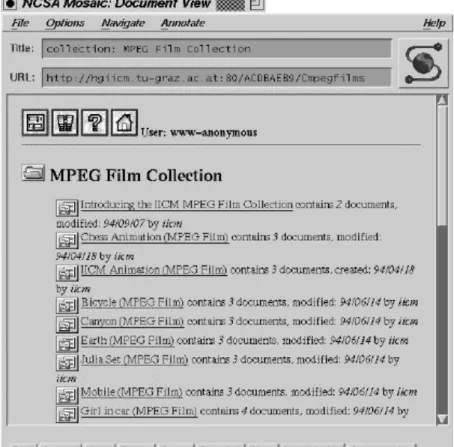
In the other direction, it is possible for Gopher and WWW client programs to connect to Hyper-G servers through gateways. For a Gopher client, the collection hierarchy is mapped into a Gopher menu. However, hyperlinks cannot be represented in the "Gopher world". When a WWW client requests a Hyper-G collection, the WWW gateway (see chapter 4.) will generate an HTML document containing a list of documents (including sub-collections) belonging to the collection with hypertext links to all these items. HTF* documents are
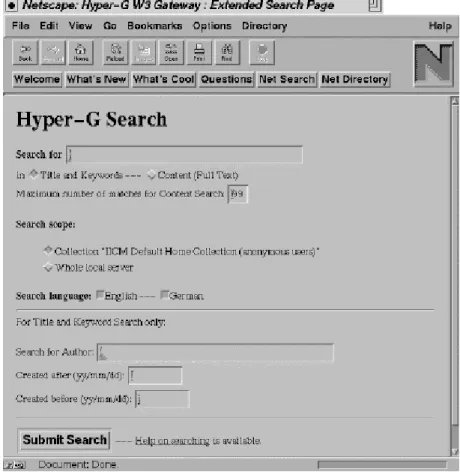
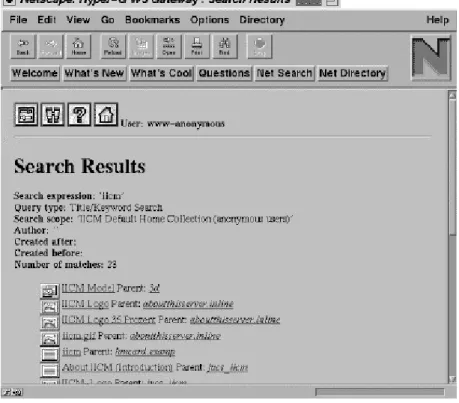
converted to HTML documents. All data in a Hyper-G server can be searched for using the search menu generated by the WWW gateway.
Online sessions (Telnet) to remote systems are possible when necessary, although not ideal because they destroy the consistent user interface.
3.3.5. Document Cache
One problem of wide area networks is the sometimes slow access to documents because of network delay. Caching is a technique often used to improve performance of an information system. This is why in the Hyper-G system, r