Behavior-based Spyware Detection
Engin Kirda and Christopher Kruegel
Secure Systems Lab
Technical University Vienna
{
ek,chris
}
@seclab.tuwien.ac.at
Greg Banks, Giovanni Vigna, and Richard A. Kemmerer
Department of Computer Science
University of California, Santa Barbara
{
nomed,vigna,kemm
}
@cs.ucsb.edu
Abstract
Spyware is rapidly becoming a major security is-sue. Spyware programs are surreptitiously installed on a user’s workstation to monitor his/her actions and gather private information about a user’s behavior. Current spyware tools operate in a way similar to traditional anti-virus tools, where signatures associated with known spy-ware programs are checked against newly-installed ap-plications. Unfortunately, these techniques are very easy to evade by using simple obfuscation transformations.
This paper presents a novel technique for spyware de-tection that is based on the characterization of spyware-like behavior. The technique is tailored to a popular class of spyware applications that use Internet Explorer’s Browser Helper Object (BHO) and toolbar interfaces to monitor a user’s browsing behavior. Our technique uses a composition of static and dynamic analysis to determine whether the behavior of BHOs and toolbars in response to simulated browser events should be considered mali-cious. The evaluation of our technique on a representa-tive set of spyware samples shows that it is possible to reliably identify malicious components using an abstract behavioral characterization.
Keywords: spyware, malware detection, static analysis, dynamic analysis.
1
Introduction
Spyware is rapidly becoming one of the major threats to the security of Internet users [20, 23]. A compre-hensive analysis performed by Webroot (an anti-spyware software producer) and Earthlink (a major Internet Ser-vice Provider) showed that a large portion of Internet-connected computers is infected with spyware [1], and that, on average, each scanned host has 25 different spy-ware programs installed [7].
Different from other types of malware, such as viruses and worms, the goal of spyware is generally not to cause
damage or to spread to other systems. Instead, spyware programs monitor the behavior of users and steal private information, such as keystrokes and browsing patterns. This information is then sent back to the spyware dis-tributors and used as a basis for targeted advertisement (e.g., pop-up ads) or marketing analysis. Spyware pro-grams can also “hijack” a user’s browser and direct the unsuspecting user to web sites of the spyware’s choos-ing. Finally, in addition to the violation of users’ privacy, spyware programs are also responsible for the degrada-tion of system performance because they are often poorly coded.
A number of anti-spyware products, whose goal is the identification and removal of unwanted spyware, have been developed. These tools are mostly based on the same technology used by anti-virus products. That is, they identify known spyware instances by comparing the binary image of these programs with a number of uniquely-characterizing signatures. These signatures are manually generated by analyzing existing samples of spyware. As a consequence, these anti-spyware tools suffer from the same drawbacks as signature-based anti-virus tools, including the need for continuous updating of their signature set and their inability to deal with simple obfuscation techniques [4].
This paper presents a novel spyware detection tech-nique that overcomes some of the limitations of exist-ing anti-spyware approaches. Our technique is based on an abstract characterization of the behavior of a popu-lar class of spyware programs that relies on Internet Ex-plorer’s Browser Helper Object (BHO) and toolbar inter-faces to monitor a user’s browsing behavior. More pre-cisely, our technique applies a composition of static and dynamic analysis to binary objects to determine if a com-ponent monitors users actions and reports its findings to an external entity. This characterization is independent of the particular binary image and therefore can be used to identify previously unseen spyware programs, and, in addition, it is resilient to obfuscation.
The main contributions of this paper are as follows: • We introduce a novel characterization of the
behav-ior of spyware components that are implemented as Browser Helper Objects or toolbars.
• We present novel static and dynamic analysis tech-niques to reliably identify malicious behavior in Browser Helper Objects and toolbar components. • We present experimental results on a substantial
body of spyware and benign samples that demon-strate the effectiveness of our approach.
The remainder of this paper is structured as follows. In Section 2, we present related work in the field of behavior-based malware detection in general and spy-ware detection in particular. Section 3 provides some background information on Browser Helper Objects and toolbars. It also shows how they are exploited by spy-ware programs to monitor user behavior and to hijack browser actions. In Section 4, we describe our abstract characterization of spyware-like behavior. In Section 5, we motivate the use of static and dynamic analysis for spyware detection, and we provide the details of our technique in sections 6 and 7. Section 8 discusses possi-ble limitations of our proposed system. In, Section 9 we provide an experimental evaluation of the effectiveness of our technique. Finally, Section 10 briefly concludes and outlines future work.
2
Related Work
Spyware is difficult to define. There are many types of spyware that behave in different ways and perform ac-tions that represent different levels of “maliciousness.” For example, “adware” programs that present targeted advertisements to the user are considered less malicious than other forms of spyware, such as key-loggers, which record every single key pressed by the user. Regardless of the type of privacy violation performed, spyware is generally undesirable code that the user wants to remove from his/her system.
The increasing sensitivity of consumers to the spyware problem prompted a number of anti-spyware commer-cial products. For example, both AdAware [2] and Spy-Bot [22] are popular tools that are able to remove a large number of spyware programs. Recently, Microsoft re-leased a beta version of an anti-spyware tool, aptly called Windows AntiSpyware [14].
Current spyware detection tools use signatures to de-tect known spyware, and, therefore, they suffer from the drawback of not being able to detect previously un-seen malware instances. This is a deficiency shared by
other malware-detection tools, such as anti-virus prod-ucts and many network-based intrusion detection sys-tems [17, 19]. Recently, researchers have tried to over-come these limitations by proposing behavior-based mal-ware detection techniques. These techniques attempt to characterize a program’s behavior in a way that is inde-pendent of its binary representation. By doing this, it is possible to detect entire classes of malware and to be re-silient to obfuscation and polymorphism.
For example, in [5] the authors characterize different variations of worms by identifying semantically equiv-alent operations in the malware variants. Another ap-proach is followed in [11], which characterizes the be-havior of kernel-level rootkits. In this case, the authors use static analysis to determine if a loadable kernel mod-ule is accessing kernel memory locations that are typi-cally used by rootkits (e.g., the system call table).
There are many advantages to representing malware in an abstract way. For instance, by using behavioral characterizations to detect malicious applications, one can obviate the need for a large data base of signatures to identify each known piece of malware. Another im-portant benefit is that the characterization is resilient to malware variants and allows for the detection of pre-viously unseen malware instances. An example of us-ing behavior characterization is Microsoft’s Strider Gate-keeper [24]. This tool monitors auto-start extensibility points(ASEPs) to determine if software that will be exe-cuted automatically at startup is being surreptitiously in-stalled on a system.
Our approach is similar to the one pursued by Strider Gatekeeper, because our goal is to model spyware-like behavior. Consequently, our behavioral classifications are not specifically tailored to a single spyware program, but, instead, they are able to detect entire classes of spy-ware applications. However, our technique is more pow-erful than the one used by Strider Gatekeeper, because it identifies a more general behavior pattern, which is the acquisition of private information and the leaking of this information outside the boundaries of the application. In addition, our technique uses a combination of static and dynamic analysis, which allows for a very precise char-acterization of the behavior of an application in reaction to browser events, thus, reducing the chance of false pos-itives.
The use of static analysis to analyze the behavior of malware has been proposed previously in [5]. However, the technique proposed by Christodorescu et al. is tai-lored to detect different variations of the same malware (e.g., different versions of the NetSky worm). Our tech-nique, instead, focuses on abstract, spyware-like behav-ior and is not limited to detecting just one spyware pro-gram and its variants.
The technique presented in this paper, however, is not completely general. We focus explicitly on one type of spyware, that is, malware that exploits the hooks pro-vided by Microsoft’s Internet Explorer to monitor the actions of a user. This is done by using the Browser Helper Object (BHO) interface or by acting as a browser toolbar object. Our initial focus is justified by the fact that the overwhelming majority of spyware has a com-ponent based on one of these two technologies. This is confirmed not only by our own experience in ana-lyzing various spyware components but also by a recent study [24], which found that out of 120 distinct spyware programs, just under 90 used BHOs as an entry point to monitor user activity and approximately 46 used the IE toolbar mechanism (note that some spyware programs used both mechanisms). In addition to these findings, a US-CERT report [8] names BHOs as one of the more frequently used techniques employed by spyware along with browser session hijacking and stand-alone applica-tions. Other forms of spyware (e.g., stand-alone appli-cations) are not currently being addressed but are open questions for future work. Additionally, we recognize that spyware does not only affect the Microsoft Win-dows platform or the Internet Explorer browser. Mozilla products also have their problems [15], and have not been completely free from spyware [9, 26]. Other plat-forms also contain ASEP hooks similar to those found in Windows as described in [24]. However, as of to-day the occurrence of spyware affecting other platforms and browsers is significantly lower than that affecting both Microsoft Windows and Internet Explorer. Still, the growing popularity of alternatives make this an impor-tant consideration for the future.
Because of the relevance of the Component Object Model (COM) architecture and the hooks that Internet Explorer provides, the next section presents some back-ground material to help the reader who is not familiar with these concepts. The following sections then present the details of our detection technique.
3
Spyware, Browser Helper Objects, and
Toolbars
Spyware authors have many options on a Windows host when it comes to looking for good vantage points from which to glean personal information about users. For ex-ample, Layered Service Providers, which sit between the application-level network APIs (Application Program-ming Interfaces) and the kernel, can filter network traffic and/or collect information about users. Another exam-ple is represented by background processes that are au-tomatically executed at startup to monitor user actions. Because sensitive information is often accessed through
web-based interfaces, browser plug-ins are another pop-ular mechanism to collect sensitive data and monitor user actions. Internet Explorer plug-ins, and in particular Browser Helper Objects (BHOs) and toolbars, as men-tioned previously, are used in the majority of spyware programs as a mechanism to access information about a user’s browsing habits or to control the browser’s behav-ior.
Browser Helper Objects and toolbars are binary ob-jects that conform to the Component Object Model (COM). COM is a binary standard developed by Mi-crosoft to support, among other things, a component-based software market [25]. Every COM object im-plements a set of interfaces, each of which is a well-defined contract that describes what functionality the ob-ject provides. The COM standard guarantees that the virtual tables of interfaces remain the same across com-pilers, allowing COM objects to be implemented and used by any language that supports calling functions through a table of function pointers. The IUnknown
interface must be implemented by all COM objects. It contains reference-counting functionality and the func-tionQueryInterface, which allows one to query for the other interfaces that an object might implement.
A Browser Helper Object is in essence a simple COM object that implements the IObjectWithSite inter-face. Toolbar objects work in a way similar to BHOs and, in addition, implement a few more interfaces and include a graphical component.
At startup, Internet Explorer loads all the BHOs that are registered as COM servers and whose Class Identifiers (CLSIDs) are included under the registry key \HKLM\SOFTWARE\Windows\CurrentVersion\ Explorer\Browser Helper Objects. Toolbars are loaded in a similar fashion with their CLSIDs being present under several other keys. Then, for each loaded BHO or toolbar, the browser calls theSetSitemethod exported by theIObjectWithSiteinterface, passing a reference to the browser’sIUnknown interface as a parameter. This reference can then be used by a BHO or toolbar to query for other interfaces implemented by the browser. Interfaces of interest includeIWebBrowser2, which allows a BHO or toolbar to access the current document and Uniform Resource Locator (URL) as well as to load specific pages, and IConnectionPoint, which allows a BHO to monitor the browser events specified inDWebBrowserEvents2. Toolbar objects access browser interfaces in a similar way.
By invoking the methods provided by the browser in-terfaces, BHOs and toolbars can completely control the browser’s behavior and access sensitive data entered by the user during navigation. Because of this, BHOs and toolbars are often used as the core components in spy-ware applications.
4
Spyware Characterization
A distinctive characteristic of spyware is the fact that a spyware component (or process) collects data about user behavior and forwards this information to a third party. Since we restrict our focus to spyware that is im-plemented as a BHO or toolbar, we have to identify the mechanisms that these components employ(i)to moni-tor user behavior and(ii)to leak the gathered data to the attacker.
The most straightforward mechanism to monitor user behavior is to subscribe to browser events (using the browser’sIConnectionPointinterface). When sub-scribing to these events, a component is notified in re-sponse to almost all browser actions or state changes. For example, events are generated when a new URL is opened, when a requested page cannot be found, or when the download of a resource has completed. In response to an event, the browser extension can request more infor-mation using the COM interfaces offered by the browser. In particular, the BHO or toolbar can request a handle to the document that was accessed, so that it can perform further analysis. In addition, a BHO or toolbar can react to an event by directing the browser to another page or opening a pop-up window. In summary, we expect to see the spyware component interact with the web browser by invoking browser functions in response to events.
After the spyware component has extracted the desired information, its next task is to transmit the data to a third party (the attacker). To this end, the information must be either directly transfered over the network, passed to a cooperating process running on the same host, or stored locally (for example, in a file on disk or in the Windows Registry). In any case, the spyware component has to in-teract with the operating system to be able to deliver the data to the intended recipient.1 Even when data is
tem-porarily kept in memory, eventually an operating system service has to be invoked to leak the data.
Because the interaction with the operating system is necessary for a spyware component, we analyze the op-erating system services that the component requests. In particular, we focus on the Windows API 2 calls that
a component can use to leak information from the cur-rent process. Again, we are only interested in the Win-dows API calls that are performed in response to events. The reason is that for a Browser Helper Object, event handling code is the only code that is executed after the
1Note that we are not taking into account the possibility of using covert channels to leak the information from the BHO or toolbar to the outside environment. Typically, these channels are either bandwidth-limited or generate distinctive patterns of execution.
2The Windows API provides a large number of procedures that can be invoked to access the complete functionality of the Windows oper-ating system (this includes kernel services, the graphical device inter-faces, and other user interfaces).
component’s startup phase. With a toolbar, code can also be executed when the user clicks on a user interface ele-ment belonging to the toolbar. However, there is the sig-nificant risk that the web browser will be closed without ever making use of the toolbar. In this case, all informa-tion would be lost because the spyware code is simply not run. Thus, information can only be reliably leaked in event handling code (the last chance at which this is possible being in response to the event that signals the browser is being closed).
There is one important exception to the assumption above: A spyware component could attempt to set up an additional path through which events can be leaked by starting another thread or by registering a timer with an appropriate callback function. In response to a browser event, the collected user information would not be leaked immediately, but it would first be stored in a globally accessible data structure. Later, the second thread or the timer callback function could flush out this informa-tion without being detected. To eliminate this possibility for evading detection, we chose a conservative approach. That is, whenever a component can create either a thread or a timer,allWindows API calls that this component can invoke are included in the analysis, not only those invoked in response to events.
We realize, of course, that benign components may in-teract with the web browser in response to events to pro-vide some service to the user, such as automatically dis-playing the page source in a separate frame. Benign com-ponents may also interact with the operating system (via Windows API calls). For example, a component could read some configuration parameters from a file, write en-tries to a log-file, or download updates to the software at startup. The key insight here is that each of the two char-acteristics on their own does not generally warrant suspi-cion, but together they are strong indicators of malicious behavior. Therefore, we classify a browser helper object or a toolbar as spyware if the component, in response to browser events,
1. monitors user behavior by interacting with the web browserand
2. invokes Windows API calls that can potentially leak information about this behavior (e.g., calls to save the data to a file or transmit information to a remote host).
Note that our classification is more general than the one used by virus scanners and signature-based intrusion detection systems, as we are looking for intrinsic behav-ioral characteristics of spyware instead of byte strings specific to particular malware instances.
Our detection approach can take advantage of the proposed spyware classification in one of two ways.
First, we can compare the results of our analysis (that is, the identification of BHO/toolbar-to-browser and BHO/toolbar-to-OS interactions in response to events) to ana prioriassembled list of browser COM functions and Windows API calls that we deem malicious. In this way, we define our behavioral characterization based on prior experience and use this characterization to detect previously unknown instances of spyware. The second method is to automatically generate a behavioral charac-terization by comparing the behavior of known benign components to the behavior of known malicious ones. More precisely, the characterization is automatically de-rived by identifying the browser functions and Windows API calls performed by malicious BHOs and toolbars that are not also executed by benign samples. This char-acterization would then be used to identify previously unseen spyware samples.
In the following, we apply the first approach described above. We then use the second approach as a way to validate our choice of characterizing browser functions and Windows API calls.
5
Component Analysis
Given our characterization of spyware, the task of the analysis phase is to extract the behavior of an unknown BHO or toolbar. That is, we are interested in the interac-tion of an unknown sample with the browser and with the operating system in response to browser events. Based on the results of the analysis, we can then classify the sample appropriately.
As a first step, we propose a dynamic analysis tech-nique that exposes a suspicious component to crafted browser events (which simulate user activity) and ana-lyzes the component’s response. In particular, we dy-namically record both the browser COM functions and the Windows API functions that the component calls. This approach exhibits some commonalities with black-box testing in that data is sent to a component under ex-amination and its behavior is analyzed, without knowing anything about the component’s implementation.
An interesting problem is to determine events and in-put that are suitable to capture the behavior of a com-ponent. When performing black-box testing, it is typ-ically a significant challenge to devise a set of test in-puts that exercise the bulk of the functionality (or code paths) of the object under test. In our case, the situa-tion is exacerbated by the fact that we have no a pri-oriknowledge about the functionality of the (potentially malicious) component. Thus, it may be difficult to gen-erate input that will reveal spyware-like behavior with a sufficiently high probability. Consider, for example, a spyware component that scans all web pages that are fetched by the browser for the occurrence of certain
key-words (e.g., “car insurance”). The corresponding URL is logged to a file onlywhen these keywords appear on the page. Thus, we would observe suspicious behavior (in the form of a file system call) only if one of the test pages actually contains the words “car insurance.” An-other problem is that spyware often does not react consis-tently to identical events. For example, a spyware devel-oper might decide that a user would be exceedingly an-noyed if a pop-up window containing an advertisement appeared every time a page with a specific keyword was accessed. Therefore, the pop-up would be opened only occasionally, and, as a consequence dynamic black-box testing alone might not be enough to observe all interest-ing reactions.
Before discussing appropriate extensions to our anal-ysis, an important point in the previous discussion is the fact that the lack of coverage in the dynamic test affects (almost) exclusively the interaction of the com-ponent with the operating system and not its interaction with the web browser. The reason is that a component has to monitor the user behavior by interacting with the web browserbeforeany decision can be made. For ex-ample, before a page can be scanned for the occurrence of a certain keyword, the spyware component has to first request the page source from the browser. Also, a spy-ware component might not necessarily log all URLs that a user visits. However, before the decision to write the URL to a log-file can be made, the visited URL must be retrieved from the browser. A spyware component might decide to record only certain pieces of information or engage with the environment only under certain circum-stances. However, as a first step, it is always necessary to extract information about the current document from the web browser. Thus, the results of the dynamic analysis with regards to the interaction with the web browser are sufficiently comprehensive.
To capture all possible reactions of a component with regards to its interaction with the operating system, we complement the dynamic testing with a static analysis step. To be more precise, we use dynamic analysis to locate the entry point into the code of the component that is responsible for handling events (i.e., the object’s
Invoke function). Starting from this entry point, the static analysis step extracts the control flow graph of all code regions that are responsible for handling events. The key observation is that this control flow graph con-tains (or encodes) all possible reactions of the component to events. As a consequence, there is no need to confine the analysis to the API calls that are actually observed during dynamic testing. Instead, we can analyze all Win-dows API calls that this component can possibly invoke when receiving events. Following up on the example of the spyware that scans for “car insurance” in fetched pages, we extract the control flow graph of the code that
handles a “web page received” event during our analysis and determine that the component might perform a file system access under certain circumstances. Note that it is necessary to confine the static analysis to those code regions that are responsible for handling events. Other-wise, the analysis could end up including API function invocations that cannot be used for leaking information (e.g., API calls during program startup). Taking into ac-count these additional function calls could lead to incor-rect classification results.
As static analysis is already required to identify the in-teraction of a component with the operating system, one might consider dropping the dynamic analysis step. That is, one could attempt to solely rely on static analysis to recover the interaction of a component both with the web browser and with the operating system. This is difficult for a number of reasons. One problem is that Browser Helper Objects or toolbars often contain a number of dif-ferent COM objects. Usually, it is nota priorievident which of these objects will register for browser events. Even when the correct COM object can be identified, lo-cating the code regions that are responsible for handling events is not straightforward. Finally, COM function in-vocations are implemented as indirect function calls (via the COM object’s virtual function table). Thus, it would be significantly more difficult to statically recover the in-teraction of the BHO or toolbar with the web browser.
To summarize, both static and dynamic analysis tech-niques have their advantages. The dynamic analysis step can precisely pinpoint the COM object and the code re-gions that handle browser events. In addition, the interac-tions between a component and the web browser can be accurately captured. Static analysis, on the other hand, is more comprehensive in identifying possible interac-tion of a component with the operating system. Thus, we believe that a combination of dynamic and static analy-sis is most suitable to analyze the behavior of unknown browser helper objects and toolbars.
In the previous discussion, we have not considered the fact that a spyware component might react differently to different events. That is, the dynamic analysis step pro-duces a single list of COM browser functions that are called by the component under test, and the static anal-ysis step yields a single list of Windows API calls that can be reached in response to events. However, it might be beneficial to distinguish between responses associated with different events. For example, a component might perform a suspicious Windows API call only in response to a certain event that conveys no relevant information about a user’s actions (e.g., an event that signals that the browser window has been resized). In this case, the sus-picious API call may not leak any information, and ex-cluding it from the list could reduce false positives. Un-fortunately, restricting automatic analysis to certain
rel-evant events offers spyware a way to evade detection. To see this, consider a spyware component that moni-tors user behavior (via browser COM functions) in re-sponse to events, but, instead of immediately leaking this information, stores it temporarily in memory. Later, the collected information is flushed in response to an event that is not considered by our analysis. Therefore, we de-cide to take the more conservative approach in order to be more resilient to evasion.
As was mentioned in the previous section, our tech-nique makes use of a more general characterization of malware behavior than that used by current signature-based systems. However, the methods used to realize this detection strategy are not without their drawbacks. While both our tool and the signature-based systems can be classified as detection engines, the latter are much faster and are practical for common desktop usage, while our technique is more appropriate for analysts who are looking to classify unknown instances of malware in an automated fashion.
In the following sections, we explain in detail the dy-namic and static analysis steps that we perform to deter-mine behavioral characterizations for spyware. We then discuss possible methods of evasion for our technique. Finally, we present experimental data that demonstrates that our detection technique is capable of effectively dis-tinguishing malicious and benign components.
6
Dynamic Analysis Step
The basis for our detection technique, as discussed in the previous sections, is to extract behavioral characteriza-tions based on how spyware interacts with(i)the browser and(ii) the underlying operating system in response to events. To this end, we make use of both dynamic and static analysis techniques.
The goal of the dynamic analysis step is twofold. First, it has to monitor the interaction of the component with the browser and record all the browser’s COM functions that are invoked in response to events. Second, it has to determine the code regions that are responsible for handling events, thereby providing the necessary start-ing points for the static analysis step. These tasks are accomplished with the help of three core elements.
The first element is a “fake” WebBrowser COM ob-ject, which provides the component under analysis with an environment similar to the one that would be present when being hosted by an instance of Internet Explorer. The second element is our COM object host application, which properly instantiates all involved components and sends the relevant browser events to the BHO or tool-bar component under evaluation. The final element is a program that traces the execution of our host
applica-tion to extract those code regions that handle the various browser events that are delivered.
6.1
Recording Browser Function Calls
The “fake” WebBrowser and the host application provide a controlled environment in which we can instantiate a suspicious component, send events, and monitor the component’s reaction. The purpose of the “fake” Web-Browser COM object is to host the component under analysis. This involves the provision of an environment that is “convincing” to a BHO or toolbar. To this end, the WebBrowser element must offer all Internet Explorer functionality expected by the browser extensions. Oth-erwise, a BHO or toolbar might fail during initialization, preventing any further analysis. Therefore, the Web-Browser COM object implements several key interfaces expected by a BHO or toolbar. Most importantly, it implements IConnectionPointContainer,IConnectionPoint, and IWebBrowser2. The two interfaces related to ConnectionPoint are required so that a BHO or toolbar is able to notify our WebBrowser COM object about its interest in receiving events (using theIConnectionPoint::Advise()
function). TheIWebBrowser2 interface is the main interface used to interact with the browser. More precisely, a browser component invokes the functions of this interface to collect browsing information such as the current page or URL and to influence browser behavior. Since we are interested in the interaction between a possible spyware component and the browser, we pay particular attention to calls to the IWebBrowser2
interface.
The WebBrowser element also implements sev-eral other interfaces that are expected by a toolbar. These include IOleWindow,IInputObjectSite,
IOleCommandTarget, and IServiceProvider. Note that implementing an interface does not necessar-ily imply that it is necessary to faithfully simulate the functionality of all its procedures. Instead, we usually provide a stub for every function. This stub always re-turns success and logs the invocation. However, for cer-tain frequently-used functions (e.g., those that request the document or the location of the current page), ap-propriate objects are returned.
The host application provides the “glue” that will hold the various components together. To this end, the pro-gram registers the component under analysis with the Windows operating system, initializes the COM library, and instantiates both our WebBrowser and the BHO or toolbar.
Before events can be sent to a component, its
SetSite method has to be called (with a pointer to the IUnknowninterface of our WebBrowser as an
ar-gument). If the component is actually interested in re-ceiving events, it will respond by querying for the Web-Browser’s IConnectionPointinterface and call its
Advisefunction. At his point, the host application can obtain a reference to the IDispatchinterface imple-mented by the browser extension and start to send events. Note that all events are delivered through a single func-tion (theInvokemethod of theIDispatchinterface), using the first parameter of the function to indicate the type of the event.
To be able to generate events that are as realistic as possible, we recorded an actual event stream created by Internet Explorer over the course of five days. To this end, we developed our own BHO that logged all relevant event information while the browser was used. These events were then replayed to perform our dynamic tests.
6.2
Locating Event-Handling Code
Given the infrastructure to send browser events to a Browser Helper Object or toolbar, the next task is to de-termine the regions of the code that handle events. More-over, we are interested in determining theseparatecode regions associated with each event. Then, we can use static analysis to extract the control flow graphs that cor-respond to these events.
If each different type of event would be passed to a separate function, the start address for the static analy-sis process could be easily determined as the start ad-dress of the respective function. Unfortunately, as men-tioned in the previous section, all events are delivered through the singleInvokefunction. Thus, if we were to use the start address of theInvokefunction, we would be unable to determine which API calls are associated with which events. To obtain the API calls made in re-sponse to a specific event, we have to look deeper into the component under analysis and find the first instruc-tion in the code that is responsible for handling the event. We call this instruction the first event-specific instruc-tion. Of course, it is also possible that a component is not interested in a certain event and provides no special handling code. The execution typically runs through a default path, ignoring the information contained in the event. In this case, there is no event-specific code.
To determine the first event-specific instructions, we collect execution traces of the BHO or toolbar when pro-cessing different events. That is, we send one event of each type to the component and record the correspond-ing sequences of machine instructions that are executed in response. To record the machine instruction traces, we use the Windows Debug API [21]. The Windows Debug API offers an interface that is comparable to the ptrace mechanism provided by some UNIX implementations, and it provides a parent process with complete control
over the execution of a child process. This includes the possibility to read and write the registers as well the ad-dress space of the child process, which allows one to set breakpoints or run a process in single-step mode. By switching to single-step mode before sending a browser event, we can record each executed machine instruction and obtain the desired traces.
The tracing component collects an execution trace for each of thenevents being analyzed. Then the applica-tion performs a pairwise comparison between all traces. The idea is to identify the first event-specific instruction for each event by checking for the first instruction that is unique to the corresponding trace. More formally, a trace
tefor an eventecan be considered as a string whose
sym-bols are the (addresses of the) instructions that are exe-cuted. To identify the first event-specific instruction in
te, we determine the longest common prefixes between
teand all other tracesti : 0≤i < n, e=i. Assuming
that the longest of the prefixes has a length ofl, then the (l+ 1)st instruction in traceteis the first event-specific
one. The rationale behind this approach is that we search for the first instruction for which the trace te deviates
fromall other traces. As a consequence, when two or more traces contain the same sequence of instructions, then these traces have no event-specific instructions and are considered to represent the default path (as the differ-ent types of evdiffer-ents had no influence on the execution).
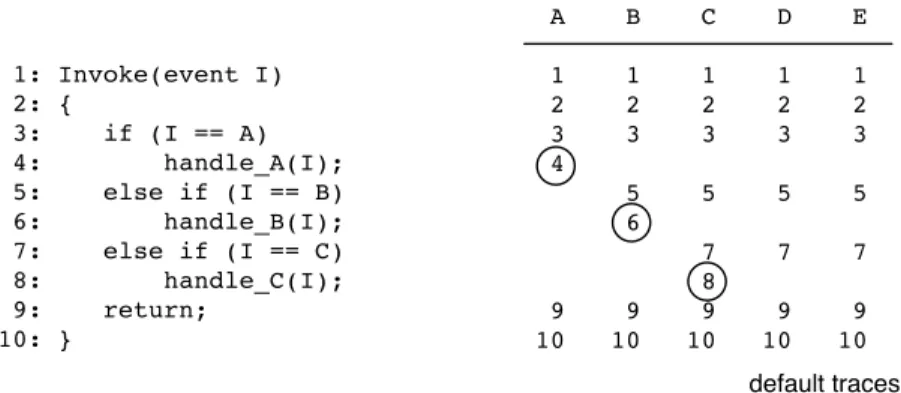
Consider the example shown in Figure 1. Note that in this case, we demonstrate the identification of event-specific instructions using source code. However, the real analysis is done on binary code. The figure shows the traces generated for five events. As expected, the correct event-specific instructions are found for the first three events (line 4 for event A, line 6 for event B, and line 8 for event C), while the last two events (D and E) represent the default path. Note that even though the first instruction in trace B that is different from trace A is on line 5, there is a longer common sequence of this trace with trace C (as well as D and E). Thus, the event-specific instruction for event B is determined to be on line 6.
When collecting traces for Browser Helper Objects or toolbars, only the instructions that are executed in the context of the component itself are used to determine event-specific instructions. Thus, we remove all instruc-tions that belong to dynamically loaded libraries from the traces. The reasons are twofold: First, we are interested in finding the first unique instructionwithin the compo-nentfor the static analysis process. Second, a library can contain initialization code that is executed when one of its functions is used for the first time. This introduces spurious deviations into the traces that do not correspond to actual differences in the code executed by the BHO or toolbar component.
In addition to restricting our analysis to code within the BHO or toolbar, subsequent repetitions of identical instruction sequences that are executed as part of a loop are collapsed into a single instance of this sequence. The reason is that we occasionally observed that the traces for two events were identical before and after a loop, while the loop itself was executed for a different number of times in each case. This happened, for example, with a spyware component that was going through an array of identifiers to determine whether the current event (given its identifier) should be processed. For different event identifiers, the loop terminated after a different number of iterations because the respective event identifiers were found at different positions in the array. However, for both traces execution continued on the same path for a number of instructions until control flow eventually branched into the event-specific parts. In such situations, collapsing multiple loop iterations into one allows us to identify the actual event-specific handling code.
7
Static Analysis Step
The goal of the static analysis step is to determine the interaction of a BHO or toolbar component with the op-erating system. To this end, we statically examine certain code regions of a component for the occurrence of oper-ating system calls.
Before the component is actually analyzed, we check its API function import table for the occurrence of calls relevant to the creation of threads or timers (e.g.,
CreateThreadorSetTimer). As explained in Sec-tion 4, if a component could launch threads or create timers, we have to conservatively assume that any im-ported API function can be invoked in response to an event. In this case, no further analysis of the binary is necessary because we can directly use the calls listed by the function import table. When neither of these func-tions is present, however, the static analysis step is re-quired to identify those API functions that can be called in response to events.
The first task of the static analysis step is to disassem-ble the target binary and generate a control flow graph from the disassembled code. A control flow graph (CFG) is defined as a directed graph G = (V, E) in which vertices u, v ∈ V represent basic blocks and an edge
e∈E:u→vrepresents a possible flow of control from
utov. A basic block describes a sequence of instructions without any jumps or jump targets in the middle. We use IDA Pro [6] to disassemble the binary. Since IDA Pro is a powerful disassembler that already provides compre-hensive information about the targets of control flow in-structions, the CFG can be generated in a straightforward manner using a custom-written IDA Pro plug-in. Note that if our detection technique were to be deployed in
1: Invoke(event I) 2: { 3: if (I == A) 4: handle_A(I); 5: else if (I == B) 6: handle_B(I); 7: else if (I == C) 8: handle_C(I); 9: return; 10: } A B C D E 1 1 1 1 1 2 2 2 2 2 3 3 3 3 3 4 5 5 5 5 6 7 7 7 8 9 9 9 9 9 10 10 10 10 10 default traces
Figure 1: Dynamic traces for different types of events.
the general public, the disassembly and CFG generation would be done using a custom disassembler optimized for our task. During our experiments, we encountered a number of spyware samples that were compressed with UPX [16], a packer tool for executables. If this was the case, we uncompressed the samples prior to performing static analysis (using the available UPX unpacking util-ity). Otherwise, IDA Pro would not be able to extract any valid instructions.
Based on the CFG for the entire component, the next step is to isolate those parts of the graph that are respon-sible for handling events. In particular, we are interested in all subgraphs of the CFG that contain the code to han-dle the different events. To this end, we use the event-specific addresses collected during dynamic analysis and traverse the entire subgraph reachable from each of those addresses. While traversing the graph, the static analy-sis process inspects all instructions to identify those that represent operating system calls. More specifically, we make a list of all possible Windows API calls that can be reached from each event-specific address. Finally, the event specific lists are merged to obtain a list of all API calls that are invoked in response to events. At this point, the analysis process has collected all the information nec-essary to characterize the component (i.e., browser COM functions and Windows API calls executed in response to events).
Note that while the Windows API is the common way to invoke Microsoft Windows services, current versions of Windows (starting with Windows NT and its suc-cessors) also offer a lower-level interface. This inter-face is called the Windows NT Native API, and it can be compared to the system call interface on UNIX sys-tems. Both the Native API kernel interface and the Win-dows API are offered to accommodate the micro-kernel architecture of Windows. That is, instead of providing one single operating system interface, Windows NT of-fers several different operating system interfaces (e.g.,
OS/2, DOS, POSIX). This allows one to execute applica-tions that were developed for different operating systems. The different OS interfaces are implemented by different operating environment subsystems, which are essentially a set of system-specific APIs implemented as DLLs that are exported to client programs. All subsystems are lay-ered on top of the Native API, with the Windows API being the most popular subsystem. Because applications typically use the Windows API and not the Native API, we monitor calls to the Windows API to capture the be-havior of components under analysis. However, to as-sure that no spyware can bypass our detection technique by relying directly on the Native API, any direct access to this interface is automatically characterized as suspi-cious.
8
Evading Detection
In this section, we discuss the limitations of our detec-tion technique. In particular, we explore possible mech-anisms that a spyware author can use to evade detection and countermeasures that can be taken in order to prevent such evasion.
Before revisiting our technique, it is important to note that due to the nature of the component object model a component that “plugs” into our WebBrowser com-ponent must use the interfaces it exposes (or the ones it expects Internet Explorer to expose) in order to ex-tract information about the user at runtime. These in-terfaces are well documented and are essentially a con-tract between the COM client and the COM server. Since we control our WebBrowser component, we see all the interface calls and the queries for different interfaces. Just as our a priori list of suspicious Windows API calls is subject to change as we discover new suspicious calls, so are the various COM functions and interfaces used. This contract also applies to events. If a com-ponent wants to receive events from the WebBrowser
itmustcall theAdvisefunction on the WebBrowser’s
IConnectionPointinterface. Since we are in con-trol of our WebBrowser object we can monitor calls to this interface and reliably discover if a component is in-terested in events and, if it is, the address of the function that handles those events.
Recalling our behavioral characterization of spyware, we note that a BHO or toolbar component must both col-lect user data via browser functions and leak this infor-mation to the adversary via Windows API calls. Thus, to evade detection, a malware author could either attempt to hide the fact that the BHO monitors user data via browser COM calls, or disguise the fact that the collected data is leaked.
Covering the footprints that indicate user data is being collected is likely the more difficult task. We use dy-namic analysis to monitor all the functions that the BHO component invokes in our web browser. To avoid invok-ing the browser functions, a spyware component could attempt to read interesting user data directly from mem-ory. This is possible because both the BHO and the web browser share the same address space. However, this is difficult because a non-standard access to memory re-gions in a complex and undocumented COM application, such as Internet Explorer, is not likely to yield a robust or portable monitoring mechanism. Thus, reading data directly from memory is not considered to be a viable approach.
A more promising venue for a spyware component to evade our detection is to attempt to conceal the fact that data is leaked to a third-party via API calls. We have previously mentioned the possible existence of covert channels, and concluded that their treatment is outside the scope of this paper. However, a spyware component could attempt to leak information using means other than API calls, or it could prevent the static analysis process from finding their invocations in the code of the BHO.
One possible way to leak information without using the Windows API is to make use of the functionality of-fered by Internet Explorer itself. For example, a spy-ware component could use the Internet Explorer API to request a web resource on a server under the control of the attacker. Sensitive information could be transmitted as a parameter of the URL in this request. The current limitation of not taking browser calls into account can be addressed in two ways. First, we could extend the static analysis step to also flag certain COM calls to the browser as suspicious. The problem with this solution is that COM calls are invoked via function pointers and, thus, are not easily resolvable statically. The second pos-sibility would be to extend the dynamic analysis step. We already record the browser functions that a BHO invokes to determine when user data could be leaked. Thus, it would be straightforward to additionally take into
con-sideration browser calls that a component invokes after user data has been requested. However, for this, one has to enlarge the set of test inputs used for the dynamic anal-ysis step to ensure better test coverage.
As mentioned previously, another evasion venue is to craft the BHO code such that it can resist static analy-sis. Static analysis can be frustrated by employing anti-disassembling mechanisms [13], or code obfuscation. If these techniques are used, then our static analysis step could be forced into missing critical Windows API calls that must be recognized as suspicious. Again, we have two options to deal with this problem. First, the static analysis step could be made more robust to tolerate ob-fuscation (e.g., by using a disassembler that handles anti-disassembler transformations [12]). Also, strong obfus-cation typically leads to disassembly errors that in itself can be taken as sufficient evidence to classify a compo-nent as spyware. A second approach is to expand the dy-namic analysis step to also monitor Windows API func-tions. This could be achieved by hooking interesting API calls [10] before the spyware component is executed. Us-ing these hooks, all Windows API calls made by the spy-ware component could be observed. Again, the set of test data would have to be enlarged to improve test coverage. While there are a number of possible ways that a spy-ware component could attempt to evade our current de-tection system, we have shown how to counter these threats. Furthermore, in the next section we show how in its current form our system was successful in correctly identifying all spyware components that we were able to collect. Thus, our proposed techniques significantly raise the bar for spyware authors with respect to tradi-tional signature based techniques.
9
Evaluation
In order to verify the effectiveness of our behavior-based spyware detection technique, we analyzed a total of 51 samples (33 malicious and 18 benign); 34 of them were BHOs and 17 were toolbars. The process of collecting these samples in the “wild” is both a tedious and non-trivial task. This is confirmed by a recent study [3] in which the authors traversed 18,237,103 URLs discov-ering 21,200 executables, of which there were just 82 unique instances of spyware as identified by popular spy-ware scanners. The problem is further exacerbated by the fact that popular spyware dominates the set of infected files, making it hard to obtain a well rounded collection. Thus, we obtained all of the malicious samples in our fi-nal test set from an anti-virus company and collected all of the benign samples from various shareware download sites. Note that we pickedallsamples (benign and mali-cious) that we collected and that either registered them-selves as BHOs or as toolbars. While collecting the
be-nign samples, we verified that the applications were in-deed benign by checking both anti-spyware vendor and software review web sites. Furthermore, we selected samples from different application areas, including anti-spyware utilities, automated form-fillers, search toolbars, and privacy protectors. Note that our tool was developed while analyzing only seven (two benign and five mali-cious) samples from our final test set. The remaining samples were effectively unknown, with respect to our tool, thereby validating the effectiveness of our charac-terization on new and previously unseen malware com-ponents. Given the difficulty of collecting samples, we consider this to be a well rounded and significant sample set with which to evaluate our technique.
Table 1 presents our detection results in terms of both correctly and incorrectly classified samples. In addition to the detection results for our proposed combined ap-proach, this table also includes the results that are achiev-able when taking into account the information provided by only the static analysis or only the dynamic analy-sis step. In particular, we show detection results when the classification is solely based on statically analyzing
allAPI calls invoked by the sample (Strategy 1) or only those API calls in response to events (Strategy 2). More-over, we present the results obtained when a BHO or toolbar sample is classified as spyware if it subscribes to browser events (Strategy 3) or solely based on its inter-action with the browser via COM functions (Strategy 4). Finally, Strategy 5 implements our proposed detection technique, which uses a composition of static and dy-namic analysis. The aim is to demonstrate that the com-bined analysis is indeed necessary to achieve the best re-sults.
Given our detection results, it can be seen that mali-cious spyware samples are correctly classified by all five strategies, even the most simple one. Since every strat-egy focuses on the identification of one behavioral aspect present in our characterization of spyware, these results indicate that the proposed characterization appears to ac-curately reflect the actual functioning of spyware. How-ever, simple strategies also raise a significant number of false alarms. The reason is that certain behavioral as-pects of spyware are also exhibited by benign samples. In the following paragraphs, we discuss in more detail why different detection strategies incorrectly classify certain samples as malicious. The discussion sheds some light on the shortcomings of individual strategies and moti-vates the usage of all available detection features.
As mentioned in Section 4, we need a list of Win-dows API calls that contains all suspicious functions that can be used by a spyware component to leak informa-tion to the attacker. As a first step, we manually assem-bled this list by going through the Windows API calls, in particular focusing on functions responsible for handling
network I/O, file system access, process control, and the Windows registry. Figure 2 shows an excerpt of the 59 suspicious calls that were selected. The calls that are de-picted are representative of commonly used registry, file access, and networking functions.
The first detection strategy (Strategy 1) uses the list of suspicious API functions to statically detect spyware. To this end, static analysis is used to extract allAPI calls that a sample could invoke, independent of events. This can be done in a straightforward fashion, using available tools such as PEDump [18]. Then, the extracted API calls are compared to the list of suspicious functions. A sample is classified as spyware if one or more of the sam-ple’s API calls are considered suspicious.
Using the first strategy,allbenign samples are incor-rectly detected as spyware. In many cases, samples re-quire Windows registry, file, or network access during the startup and initialization phase. In other cases, be-nign samples such as the Google search toolbar use sus-picious calls such asInternetConnectAto connect to the Internet (in the case of the Google toolbar, the sam-ple sends search queries to Google). However, such calls are typically not done in response to events; in fact, many samples do not even register for browser events.
If we restrict the static analysis to only those Win-dows API calls that are invokedin responseto browser events, only five of the 18 benign samples are incorrectly classified (Strategy 2). Two of these false positives are easy to explain. One is a BHO called Airoboform, a tool that supports users by filling in web forms auto-matically. In response to every event that signals that a new page is loaded, this tool scans the page for web forms. If necessary, it loads previously provided content from a file to fill in forms or it stores the current form content to this file. Because web forms can also contain sensitive information (such as passwords), one can argue thatAiroboformactually behaves in a way that is very similar to a spyware application. The only exception is that in the case of spyware, the file content would prob-ably be transmitted to an attacker through an additional helper process.
Besides Airoboform, the benign Privacy Preferences Project (P3P) Client BHO also exhibits spyware-like behavior. P3P is emerging as an industry standard for providing a simple and automated way for users to control the use of their personal information on web sites they visit. To this end, theP3P Clienthas to check the P3P settings of every web page that is visited. More precisely, whenever the user visits a web site, the BHO connects to that site and tries to retrieve its P3P-specific privacy policy. This is implemented by opening a connection via the Windows API functionInternetConnectAin response to the event that indicates that a document has been loaded.
Detection Strategy Spyware Components Benign Components Correct Incorrect Correct Incorrect
1. All Windows API calls (static) 33 0 0 18
2. Windows API calls in response to events (static) 33 0 13 5 3. Subscription to browser events (dynamic) 33 0 10 8 4. Browser COM method invocations (dynamic) 33 0 15 3
5. Combined static and dynamic analysis 33 0 16 2
Table 1: Results for different detection strategies.
Figure 2: Excerpt ofa prioriassembled list of suspicious Windows API calls.
Two other false positives are Spybot and the
T-Onlinetoolbar. In both cases, the static analysis re-sults indicate that a suspiciousWriteFilecall could be invoked in response to some events. This would allow the browser extensions to write event-specific informa-tion into a file for later retrieval. Although writes to a file are generally suspicious in response to events, there are also cases in which such an action is legitimate. For example, we discovered that theT-Onlinetoolbar, a benign application that allows users to send SMS mes-sages, uses a caching mechanism to store images in files.
Spybot, a benign anti-spyware application, uses black lists to block web access to spyware distribution sites and keeps a cache to track cookies. The fifth false posi-tive isMicrogarden, a BHO that extends Internet Ex-plorer with the ability to open multiple tabs in a single browser window. Although no suspicious API calls are invoked directly in response to events, this BHO makes use of timers. As a result, we have to conservatively con-sider all Windows API calls that this sample can possibly call (among which, a number of suspicious functions are found). The last three false positive examples suggest that the static analysis of Windows API calls may not de-liver optimal detection results. Instead, one should seek to combine the results of our static analysis with those of our dynamic analysis to lower the number of false posi-tives.
Taking a step back, a simple dynamic technique to identify spyware (Strategy 3) is to classify all BHO and toolbar components as malicious if they register as event sinks. As expected, all of the spyware samples receive browser events from Internet Explorer to monitor user behavior. In comparison, only eight of the 18 benign samples registered as event sinks. This observation sug-gests that many benign applications use BHO and toolbar extensions to improve Internet Explorer, but do not need to listen to events to implement their functionality. On the other hand, nearly half of the benign samples also use event information, for example, to display or modify the source of visited pages or to block pop-up windows.
For Strategy 4, the dynamic analysis is extended to monitor the interaction of the BHO or toolbar with the web browser. As mentioned previously, this is realized by recording the invocation of COM functions provided by theIWebBrowser2interface. To compile the list of suspicious COM functions, we analyzed this interface for functions that allow a browser extension to obtain infor-mation about the page or the location that a user is visit-ing. The complete list is shown in Figure 3. Of particular interest is theget Document() method, which pro-vides anIHTMLDocument2pointer to the Document Object Model (DOM) object of the web page that is be-ing displayed. Usbe-ing this pointer, a BHO or toolbar can modify a page or extract information from its source.
Figure 3:A prioriassembled list of suspicious COM browser functions.
Using the list of suspicious COM functions, dynamic analysis classifies a sample as spyware when at least one invocation of a suspicious function is observed in response to events. Unfortunately, this also results in more false positives than necessary. The reason is that several browser extensions interact with the browser in response to events. For example, theLost Goggles
toolbar requests a pointer to the DOM object of a loaded page to integrate thumbnails into search results returned by Google.
In our characterization of spyware, we claim that a ma-licious component both monitors user behavior and leaks this information to the environment. Thus, we expect the lowest number of false positives when employing a com-bination of dynamic and static analysis techniques. This is indeed confirmed by the detection results shown in Ta-ble 1 for Strategy 5. Compared to the results delivered by static analysis only, the misclassification of the be-nignSpybotandT-Onlinesamples is avoided. The reason for this is that although these browser extensions might invoke aWriteFileAPI call in response to an event, the dynamic analysis confirms that they are not monitoring user behavior by calling any of the suspicious COM functions. Microgardenis also correctly clas-sified as benign. Even though this toolbar uses timers, it does not access any relevant information in response to events. AiroboformandP3P Client, on the other hand, are still classified as spyware. The reason is that in addition to suspicious API calls, they also request the lo-cation of loaded pages via theget LocationURL()
function. However, as discussed previously, this is no surprise as these BHOs do indeed monitor surfing be-havior and store (possibly sensitive) user information in files.
Table 2 shows the various execution times for each step in the analysis on a 1.7 GHz Pentium M proces-sor with 1 GB of RAM. The execution time for dynamic analysis may be slower than one might expect. This is due to the fact that this analysis must be done in a vir-tual environment because we must execute the possibly malicious code. Furthermore, once this code is invoked the performance of the machine tends to degrade signif-icantly. The execution time for static analysis, on the other hand, is split in two. This is because the running time for static analysis is highly dependent on how many events a sample is listening for. Thus, we give the
execu-tion time for disassembly and CFG creaexecu-tion along with a separate measure for the execution time to analyze a sin-gle event. We consider these performance measures to be acceptable for a prototype analysis tool and note that the running times could be significantly improved with optimization.
9.1
API Call Blacklist Derivation
Until now, we have been using lists of suspicious Win-dows API calls and suspicious COM functions that were generateda priori. An alternate method, as discussed in Section 4, is to generate these lists automatically. More precisely, by applying our approach to both a set of known benign samples and a set of known malicious samples, one can cross-reference the two resulting sets of calls made in response to browser events (from both static and dynamic analysis), to identify calls that are frequently observed for spyware, but never observed for benign BHOs or toolbars.
The major benefit of the automatic list generation ap-proach is that it obviates the need to generate a list of suspicious callsa priori. Also, over time, as more sam-ples are collected and analyzed, the list will become more refined, eliminating those calls that show up only in ma-licious samples by chance, and revealing new functions that were not considered before. These results are useful even in the case where one uses a list of calls generated
a priori as the basis for detection, because there are a plethora of Windows API calls to consider, and the anal-ysis can be used to update the “suspicious function” list with new calls as they begin to be utilized by spyware.
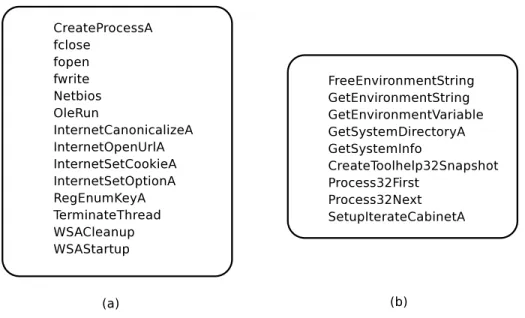
In the following, we briefly discuss our experience when automatically generating the list of suspicious Windows API functions. We refrained from applying au-tomatic generation to the list of suspicious browser COM functions. The reason is that theIWebBrowser2COM interface contains considerably less functions than the Windows API and these functions are well-documented, making this list more suitable fora prioricompilation. Figure 4 shows an excerpt of where the Windows API list we generateda prioriand the list we generated auto-matically converged (a), as well as some additional ma-licious API calls that were discovered (b). These lists do indeed match up well with our initial intuition. In-terestingly, new calls that we did not originally consider,
Analysis Step Execution Time Mean Standard Deviation
1. Dynamic Analysis 30.97s 21.61s
2. Static Analysis (disassembly and CFG generation) 64.86s 137.94s 3. Static Analysis (per event CFG analysis) 80.01s 100.01s
Table 2: Performance for different analysis steps.
Figure 4: Excerpts of extracted calls that (a) also appear in thea priorilist and (b) are unique to the automatically derived list.
such asCreateToolHelp32Snapshot, which takes a snapshot of the processes currently running on a sys-tem and should probably not be called in response to browser events, can be added to the list of possibly ma-licious calls. The results indicate that our static list does a good job of detecting spyware, while our generated list can be used to further improve detection results as spy-ware authors try to adapt in order to evade detection.
Automated list generation, however, is not without its drawbacks. The reason is that we will likely be remov-ing certain calls thatdorepresent possible malicious in-tent. For example, when applied to our evaluation set, one of these calls would be the Windows API function
WriteFile. BecauseWriteFileappears in both our benign and malicious sets of samples, we would disre-gard it as a common call that should not be taken into ac-count when analyzing new and possibly malicious sam-ples. This should reduce the number of false positives, but at the same time, it could result in an increase in the number of false negatives.
10
Conclusions and Future Work
Spyware is becoming a substantial threat to networks both in terms of resource consumption and user privacy violations. Current anti-spyware tools predominately use signature-based techniques, which can easily be evaded through obfuscation transformations.
In this paper, we present a novel characterization for a popular class of spyware, namely those components based on Browser Helper Objects (BHOs) or toolbars developed for Microsoft’s Internet Explorer. This char-acterization is based on the observation that a spyware component first obtains sensitive information from the browser and then leaks the collected data to the outside environment. We developed a prototype detection tool based on our characterization that uses a composition of dynamic and static analysis to identify the browser COM functions and the Windows API calls that are invoked in response to browsing events. Based on this informa-tion, we are able to identify an entire class of spyware, thus making our approach more powerful than standard signature based techniques. In addition, our technique will provide a forensic analyst with detailed information
about the behavior of unknown browser helper objects and toolbars.
Our approach was evaluated on a large test set of spy-ware and benign browser extensions. The results demon-strate that the approach is able to effectively identify the behavior of spyware programs without any a pri-oriknowledge of the programs’ binary structure, signif-icantly raising the bar for malware authors who want to evade detection.
Future work will focus on extending our approach to spyware programs that do not rely on the Browser Helper Object or toolbar interfaces to monitor the user’s behav-ior. We also plan to extend our characterization with more sophisticated data-flow analysis that would allow one to characterize the type of information accessed (and leaked) by the spyware program. This type of character-ization would enable a tool to provide an assessment of the level of “maliciousness” of a spyware program.
Acknowledgments
This research was supported by the Austrian Science Foundation (FWF), under grant No. P18157, the Se-cure Business Austria competence center, the U.S. Army Research Office, under agreement DAAD19-01-1-0484, and by the National Science Foundation, under grants CCR-0238492 and CCR-0524853.
References
[1] A hidden menace. The Economist, June 2004. [2] Ad-Aware. http://www.lavasoftusa.
com/software/adaware/, 2005.
[3] Steven D. Gribble Alexander Moshchuk, Tanya Bragin and Henry M. Levy. A Crawler-Based Study of Spyware on the Web. In Pro-ceedings of the Annual Network and Distributed System Security Symposium (NDSS), San Diego, CA, February 2006.
[4] M. Christodorescu and S. Jha. Testing Malware De-tectors. InProceedings of the 2004 ACM SIGSOFT International Symposium on Software Testing and Analysis (ISSTA 2004), pages 34–44, Boston, MA, July 2004.
[5] M. Christodorescu, S. Jha, S. A. Seshia, D. Song, and R.E. Bryant. Semantics-Aware Malware Detec-tion. InProceedings of the 2005 IEEE Symposium on Security and Privacy (Oakland 2005), Oakland, CA, USA, May 2005.
[6] Data Rescure. IDA Pro: Disassembler and Debugger. http://www.datarescue.com/ idabase/, 2005.
[7] Earthlink and Webroot Release Second SpyAu-dit Report. http://www.earthlink.net/ about/press/pr_spyAuditReport/, June 2004.
[8] Aaron Hackworth. Spyware. US-CERT publica-tion, 2005.
[9] Jan Hertsens and Wayne Porter. Anatomy of a Drive-By Install- Even on Firefox.http://www. spywareguide.com/articles/anatomy_ of_a_drive_by_install__72.%html, 2006.
[10] Galen Hunt and Doug Brubacher. Detours: Binary Interception of Win32 Functions. InProceedings of the 3rd USENIX Windows NT Symposium, pages 135–144, Seattle, WA, 1999.
[11] C. Kruegel, W. Robertson, and G. Vigna. Detect-ing Kernel-Level Rootkits Through Binary Analy-sis. InProceedings of the Annual Computer Secu-rity Applications Conference (ACSAC), pages 91– 100, Tucson, AZ, December 2004.
[12] C. Kruegel, F. Valeur, W. Robertson, and G. Vigna. Static Analysis of Obfuscated Binaries. In Proceed-ings of the Usenix Security Symposium, 2004. [13] C. Linn and S. Debray. Obfuscation of Executable
Code to Improve Resistance to Static Disassembly. InACM Conference on Computer and Communica-tions Security (CCS), 2003.
[14] Microsoft. Windows AntiSpyware (Beta): Analysis approach and categories. http: //www.microsoft.com/athome/
security/spyware/software/isv/ analysis.%mspx, March 2005.
[15] Known Vulnerabilities in Mozilla Products.
http://www.mozilla.org/projects/ security/known-vulnerabilities. html, 2006.
[16] M. Oberhumer and L. Molnar. UPX: Ulti-mate Packer for eXecutables. http://upx. sourceforge.net/, 2004.
[17] V. Paxson. Bro: A System for Detecting Network Intruders in Real-Time. InProceedings of the 7th USENIX Security Symposium, San Antonio, TX, January 1998.
[18] M. Pietrek. Peering Inside the PE: A Tour of the Win32 Portable Executable File Format. Microsoft Systems Journal, March 1994.
[19] M. Roesch. Snort - Lightweight Intrusion Detection for Networks. InProceedings of the USENIX LISA ’99 Conference, Seattle, WA, November 1999. [20] S. Saroiu, S.D. Gribble, and H.M. Levy.
Measure-ment and Analysis of Spyware in a University En-vironment. In Proceedings of the ACM/USENIX Symposium on Networked Systems Design and Im-plementation (NSDI), San Francisco, CA, March 2004.
[21] S. Schreiber. Undocumented Windows 2000 Se-crets: A Programmer’s Cookbook. Addison-Wesley Professional, 2001.
[22] Spybot Search & Destroy. http://www. safer-networking.org/, 2005.
[23] R. Thompson. Why Spyware Poses Multiple Threats to Security. Communications of the ACM, 48(8), August 2005.
[24] Y. Wang, R. Roussev, C. Verbowski, A. John-son, M. Wu, Y. Huang, and S. Kuo. Gate-keeper: Monitoring Auto-Start Extensibility Points (ASEPs) for Spyware Management. In Proceed-ings of the Large Installation System Administra-tion Conference (LISA), Atlanta, GA, November 2004. USENIX.
[25] S. Willliams and C. Kindel. The Component Object Model: A Technical Overview. Microsoft Techni-cal Report, October 1994.
[26] Onload XPI installs should be blocked by de-fault. https://bugzilla.mozilla.org/ show_bug.cgi?id=238684, 2004.