Department of Computer Science and Engineering CHALMERS UNIVERSITY OF TECHNOLOGY Göteborg, Sweden, June 2009
Use Case Explorer
A Use Case Tool
Master of Science Thesis in Software Engineering and Technology
J
ohan Helldahl
Usman Ashraf
The Author grants to Chalmers University of Technology and University of Gothenburg the non-exclusive right to publish the Work electronically and in a non-commercial purpose make it accessible on the Internet.
The Author warrants that he/she is the author to the Work, and warrants that the Work does not contain text, pictures or other material that violates copyright law.
The Author shall, when transferring the rights of the Work to a third party (for example a publisher or a company), acknowledge the third party about this agreement. If the Author has signed a copyright agreement with a third party regarding the Work, the Author warrants hereby that he/she has obtained any necessary permission from this third party to let Chalmers
University of Technology and University of Gothenburg store the Work electronically and make it accessible on the Internet.
Use Case Explorer A Use Case Tool Johan Helldahl Usman Ashraf
© Johan Helldahl & Usman Ashraf, June 2009. Examiner: Rogardt Heldal
Department of Computer Science and Engineering Chalmers University of Technology
SE-412 96 Göteborg Sweden
Abstract
English
Use case modeling is a popular way to specify software requirements for a system. When working with use cases, it is important that they are easy to read and of high quality. In this report several ideas for improving readability and supporting the author in producing high quality use cases have been developed. These ideas have been included in the tool UseCaseExplorer which has been implemented as a part of this thesis. The UseCaseExplorer includes an interactive activity diagram representation of use cases as well as support for structuring use cases. Moreover, the
UseCaseExplorer has functionality for quickly constructing scenarios through a use case. This scenario function can be especially helpful in use cases with several dependencies to other use cases.
Evaluations performed on the tool suggest that it improves readability, navigation, standardization, structure and quality when it comes to use cases. Moreover, the reader gets a better overview of a use case.
Keywords: Use cases, action blocks, requirements specification, visualization
Svenska
Att använda användarfall är en populär metod för att specificera kraven för ett mjukvarusystem. När man arbetar med användarfall är det viktigt att de är lätta att läsa och att de är skrivna med hög kvalitet. I den här rapporten presenteras ett flertal idéer om hur läsbarheten kan förbättras samt hur författaren till ett användarfall kan få stöd för att uppnå ökad kvalitet. Dessa idéer har integrerats i verktyget UseCaseExplorer som har utvecklats som en del av detta arbete. UseCaseExplorer inkluderar en interaktiv aktivitetsdiagrams-representation av användarfall liksom stöd för att strukturera dessa. Utöver det så har UseCaseExplorer också en funktion för att snabbt konstruera scenarier genom ett användarfall. Scenariofunktionen kan vara särskilt användbar i användarfall som har flera beroenden till andra användarfall.
Utvärderingar som har genomförts på verktyget visar på att dess funktioner förbättrar läsbarhet, navigation, standardisering, struktur och kvalitet i användarfall. Förutom det så får läsaren också en bättre överblick.
Preface
This report is the result of a master's thesis at the department of Computer Science and Engineering at Chalmers University of Technology in Gothenburg, Sweden. The supervisor for the thesis has been Rogardt Heldal.
The work on structuring use case event flows in this thesis builds on Rogardt Heldal's research on action blocks (1). The software tool that has been constructed is based on the Prefuse Visualization Framework (2).
The work on the different parts of this thesis work have been joint efforts by Johan Helldahl and Usman Ashraf.
We would like to thank the people who have helped us with our report. We especially want to thank our supervisor Rogardt Heldal for his advice and support. We are also grateful for the feedback we have received from the people we have interviewed.
Table of Contents
Introduction...1
Problem ...1
Aim ...2
Demarcations...2
Structure of the report ...2
Background...3
Use Cases ...3
Action Blocks ...5
Method ...7
Analysis ...9
Navigation and overview ... 10
Implicit assumptions in the flow of events... 12
Syntax and semantics of referencing alternative flows ... 13
Loops ... 16
Different views with different levels of detail ... 18
Scenarios ... 18
Links ... 18
Existing Use Case Tools ... 19
Results ... 20
Assume Step in Action Block ... 20
A Meta Model ... 22
Interactive Activity Diagram (IAD) Representation... 24
Automatically Generated Traditional Representation ... 25
Numbering Scheme ... 26
Scenario Visualization and Construction ... 27
Links ... 27 UseCaseExplorer ... 28 Evaluation ... 29 Discussion ... 33 Future work ... 35 Related work ... 38 Conclusion ... 39
Bibliography... 41
Appendices ... 43
Appendix A. Development of UseCaseExplorer... 43
System Description ... 44
Use Case Graph Structure... 44
Layout Algorithm... 45
Controls ... 46
Attributes of the Graph Nodes ... 46
Appendix B. User Manual ... 47
IMPORTANT! ... 47
Adding steps ... 47
Editing Text ... 48
Adding Alternative Flows ... 49
Connecting Alternative Flows Back to the Parent Flow ... 49
Deleting a Step ... 50 Include ... 50 Extend ... 51 Links ... 51 Loops ... 52 Scenario Mode ... 53 Export to RTF Document ... 54 Save/ Open ... 55 Zoom in/out ... 55 Assume Steps ... 55 Action Blocks ... 56
1
Introduction
The technique of use cases for user requirement modeling was devised by Ivar Jacobson in 1986s (3). By the mid 1990s, use case modeling was recognized as a technique and part of the Unified Modeling Language (UML) specification supervised by OMG (Object Management Group) (3). The motivation behind the idea of use cases was to capture the functional requirements of a system. Use cases have been widely used with different approaches of software development. It is a very useful and light-weight technique to acquire the functional requirements of the system and to model the design based on those.
A use case is a description of a set of actions that a system performs and it generatesan observable result of value to an actor. It clarifies what the system is supposed to do. The use case diagramming technique allows a developer to start specifying the system requirements at a high level. It will also help in presenting these requirements back to the users of the system.
A use case clearly describes how a specific user action initiates a named process to deliver a specific outcome to the user. Correctly specified use cases provide a direct link to help users and developers develop a common understanding of the user requirements for a system. They are a proven and powerful software development tool (4).
The most important part of a use case is the flow of events which describes the interaction between the system and actor and their behavior in a sequence of steps. There can be numerous alternative ways in which a use case can unfold depending on particular conditions. Hence there are a number of alternative paths within the flow of events.
Moreover, flows of events in different use cases can be linked to each other through include and extend relationships.
Problem
Use cases are specified in the UML specification (3). However, that specification is not very detailed and leaves a lot up to the user in terms of what information to include and how to structure that information. Consequently, there are many different approaches, recommendations and templates for specifying a use case. When it comes to the flow of events there is a vast difference in the formality between different approaches but in general most approaches are quite flexible and informal.
There are risks and problems associated with both having too much formality as well as too little. If too much formality is introduced the use case approach will be harder to learn and might require more effort. More importantly, it will also be harder for stakeholders in the project to understand the use cases. A very informal approach on the other hand creates other problems. With little structure and guidelines the use cases can be harder to read because the information is disorganized. Moreover, in this case use cases written by different people are likely to be quite different from each
2 other. The quality of the use cases will be a lot up to the writer of the use case. Consequently there is a need for an approach that achieves a good balance between simplicity, flexibility and structure. Apart from the issues with structure, the way use cases are traditionally documented in a word processor also introduces problems. Since the flow of events contain a possibly large number of different paths it can be hard to read, comprehend and get an overview. This is especially true when there are a lot of include and extend relationships that further add to the complexity.
Aim
The work described in this report is focused on improving the flow of events of a use case by making it easier to comprehend as well as supporting high quality writing of event flows. The aim is to construct a tool that achieves this. In particular the tool should deal with the problem of readability when a use case is complex and contains several include and extend relationships and numerous alternative flows. It should also address the lack of structure in the flow of events.
To achieve this, the tool should build on the idea of action blocks (1) to introduce more structure into use cases. Furthermore, a better graphical representation of the main flow, alternative flows and exceptional paths in the flow of events should be developed. An efficient way to construct and visualize scenarios is also a part of the aim.
Demarcations
As stated above the focus of the work in this report is on the flow of events. That is seen as the most important part of a use case. Thus other parts of a use case like pre- and post-conditions, goal etc. will not be considered.
When it comes to the flow of events the focus will be limited to readability, navigability and supporting high quality writing. The work on the flow of events is limited to the structure and presentation of the flow of events, hence the formulation of the text in the flow will not be considered.
Structure of the report
This report starts with a background section which describes use cases more in detail as well as the concept of action blocks. A section describing the method used in this thesis work then follows together with an analysis section where issues with use cases are analyzed. After that the results section presents the tool that was developed together with results from evaluations of the tool. The report ends with a discussion of the performed work, results and conclusions.
3
Background
Use Cases
Use case is a technique used for capturing the system functionality during the analysis phase in a software development process. They are widely used in software industry for modeling functional requirements in a manageable format. It is an easy and flexible approach for stakeholders to get an understanding of the system. Use cases specify the system functionally by representing it in the form of a flow of events.
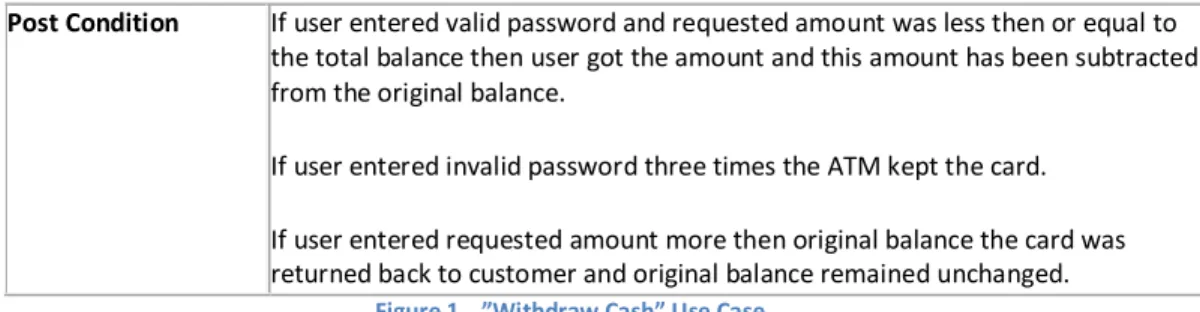
A use case consists of one or many system actors performing a series of actions to achieve a particular goal. The following example in Figure 1 shows an actor’s interaction with an ATM (Automatic teller machine) system to perform the system operation “withdraw cash” (1).
Name Withdraw Cash
Description This use case describes the steps needed for cash withdrawal from an ATM system.
Precondition The connection between ATM system and bank is up. Input User inserts cards to withdraw money.
Main Flow 1. User inserts cards to withdraw money.
2. System reads the bank id and account number from the card, validate them and prompts user to enter password.
3. User enters password.
4. System validates the password.
5. Use enters the amount of money to withdraw. 6. System validates the account balance.
7. System subtracts the amount from the original account balance. 8. System dispenses card and cash.
Alternative flow 2a. Card is not a valid bank card or a destroyed one. Skip step 2 to 8 and return back to step 1.
4a. Wrong password less than three times. System increments the number of wrong attempts. Return back to step 3.
4a. Wrong password attempts more than three times. Skip step 4 to 8 and keep customers card.
6a. Not enough account balance. System prompts user that account does not have enough money. The total balance remains the same. System dispenses card. Exceptions ATM looses network connectivity with bank.
Electrical power failure at any stage. Output User gets the required amount of money.
4 Post Condition If user entered valid password and requested amount was less then or equal to
the total balance then user got the amount and this amount has been subtracted from the original balance.
If user entered invalid password three times the ATM kept the card. If user entered requested amount more then original balance the card was returned back to customer and original balance remained unchanged.
Figure 1 ”Withdraw Cash” Use Case
In the above example the name gives a general idea about the use case while the description provides more details about the overall contents. Furthermore, the precondition specifies the prerequisites which should be fulfilled in order to get the desired output from the system as specified in the postcondition.
The section that follows precondition concerns input to the system. This input can come from a real user or another system. The flow of events of a use case includes a main flow, which is the main success scenario and alternative flows, which depict alternate courses of action.
An exception can possibly occur during the life time of a particular operation. Exception steps in the above example indicate those exceptions so that precautionary measures can be taken against them. While the output step specifies the value returned to user as a response to the input. After returning the output, the system also makes sure that a particular postcondition has been satisfied. This postcondition refers to those circumstances which should be true after a use case has ended. The above example depicts only one template for the contents of a use case while in practice this template may take different shapes. The idea behind using a template is to provide more structure to the description and to make it easier for the user to follow the contents. However, the UML
specification (3) does not specify what a template should look like. This means that it is up to the use case author to specify his own template. Usually templates include name, actors, short description, goal, pre/post condition and main and alternative flows.
The main and alternative flows form the flow of events for a particular use case. This flow of events is regarded as the most critical part of a use case. It specifies the course of action for the actor and the system to meet the goal of the use case. This does not mean that the flow of events only deals with system operations, rather it includes the interaction between user and system.
The main or basic flow is written first with a specific numbering scheme showing all the steps placed in a sequence. The main flow is followed by alternative flows with a similar pattern of numbering. A step can be detailed or just an outline of the operation it performs. The contents are clearly specified with an identified start and end of the flow. A clear sequence of steps in this regard is considered helpful for readability. Moreover, the events specified in the flow are within the system boundary and irrelevant events are left out (5).
A use case can have relationship with other use cases. The type of relationship is identified as "include" and "extend". A use case can be included in the details of another use case. In simple terms an including use case invokes an included use case and uses its behavior. This concept promotes reuse between use cases.
5 The other relationship between use cases is "extend". It is a bit different from "include" as it includes a condition. When the condition is fulfilled in the use case being extended the extending use case enhances the functionality of extended use case. The particular condition is recognized as an extension point. So extending use case adds to the behavior of an extended use case at an extension point. The motivation behind this concept is to minimize the code duplication and support reuse.
Action Blocks
Action blocks were originated by Rogardt Heldal (1). The concept advocates that there is a certain representation flaw in general use case modeling approaches, as these do not efficiently structure the information. A solution in this regard is to use action blocks to structure the flow of events. It is an attempt to make use cases easier to read and support authors to write higher quality use cases. The idea of action blocks is not an exotic concept. It is a structured way of writing the flow of events. A previously recognized step is named as action step in this world of Action blocks. While, an action block is a set of action steps of the following types:
1. Input 2. Validation
3. System responsibility 4. Output
An input step is recognized as an input to the system from an actor. While a validation step specifies how the input should be verified before proceeding further. If the input is valid, the system performs its responsibility. Responsibility can be manipulation on data, calculations or storing of data. After the system performs its responsibility the output is returned to the actor. These steps form an action block and many action blocks construct a use case.
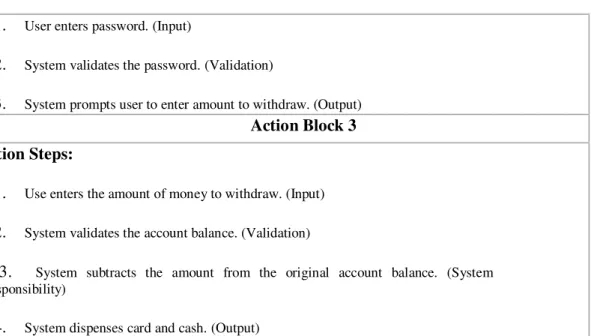
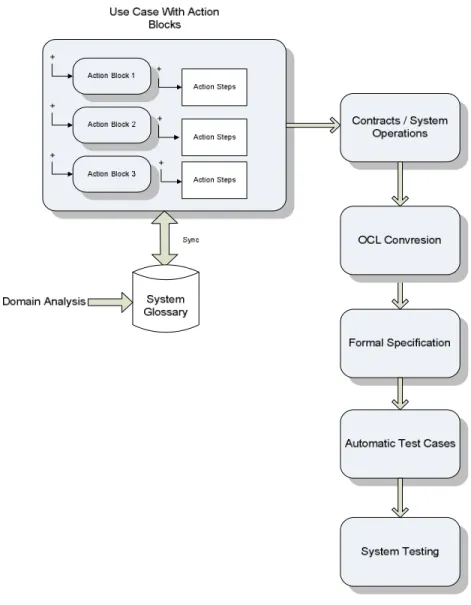
An action block can consist of any subset of the above step types but they should be ordered as above. This division of the flow of events into separate action blocks promises to introduce better structure to use cases. The following Figure 2 represents the action block concept by considering an ATM system. It divides the whole system into three action blocks containing three, three and four action steps respectively. Each action block portrays a particular dialogue between actor and system.
Action Block 1 Action Steps:
1. User inserts cards to withdraw money. (Input)
2. System validates the bank id and account number from the card. (Validation)
3. System prompts user to enter password. (Output)
Action Block 2 Action Steps:
6 1. User enters password. (Input)
2. System validates the password. (Validation)
3. System prompts user to enter amount to withdraw. (Output)
Action Block 3 Action Steps:
1. Use enters the amount of money to withdraw. (Input)
2. System validates the account balance. (Validation)
3. System subtracts the amount from the original account balance. (System
Responsibility)
4. System dispenses card and cash. (Output)
Figure 2 Use Case with Action Blocks
7
Method
To achieve the goal stated in section Aim, a method was followed to develop and evaluate the thesis work empirically and experimentally. To construct and evaluate the work and to get more accurate results, the following set of steps were followed.
• Study of books and research articles regarding use case problems • Data acquisition from Interviews with industry personnel
• Weekly meeting with supervisor • Analysis of the findings
• Design and implementation • Evaluation and review
These steps comprise the method used in this thesis. They are interlinked as the result of each step satisfies the sequential approach to reach the project goal. Hence, these steps ensure the
implementation of the approach to compile the results near to the project aim.
More descriptively, the work started with a literature study with the aim of getting insight into the subject and to learn about different problems in handling use cases. Many research articles and books have been explored in order to get a solid knowledge to base improvement ideas on. Apart from the literature study, weekly discussions have been held with supervisor Rogardt Heldal. The result of the literature study and the discussions were a number of ideas about how to improve use cases and the flow of events in particular. To get some feedback on our ideas and learn about how use cases are used in industry, interviews were conducted.
Two interviews were performed at Ericsson, one at Saab Microwave Systems and one at another big IT company that wishes to remain anonymous. The interviews included questions about how use cases are used in each organization and the interviewees' view on the main strengths and problems with use cases. Furthermore, the interviewees were asked about what tool support would be useful for them when it comes to use cases. After that an initial prototype was presented to them and the ideas for further development were explained. They were then asked to provide feedback and suggest improvements.
The results from the interviews were analyzed and very much considered in the continued
development of the tool. Several features suggested by the interview subjects have been included in the final prototype.
Apart from industry feedback the tool has been presented to two researchers at Chalmers who have given their thoughts on the tool and the underlying ideas. This has also been considered in the development. Moreover, two of the main commercial use case tools have been studied to find functions and solutions that could be built on and improved.
At this stage a tool was implemented to realize the ideas resulting from the literature study and the interviews. The prototype tool was validated in three different ways.
8 Initially the tool was evaluated by inserting sample use cases into the tool. This was done to see if the use cases could fit in to the structure and format used in the tool as well as to evaluate the different implemented features.
Secondly, the tool was presented to four engineers at Saab, Ericsson and a third company. The functionality of the tool was explained together with the rationale behind the features. After that the engineers were asked to provide feedback on the different features.
Finally, an evaluation was performed with the help of a quality assurance engineer at a big software company. He was guided through the different features of the tool and then handed a copy of it together with a short user manual. He used it to input some use cases from a project that he was currently working on and provided feedback on his test of the tool.
9
Analysis
The analysis section focuses on some areas and issues in the flow of events where possibilities for improvements were identified.
First of all there is a need to identify the intended users and their needs. Use cases most often use natural text to describe requirements. This can make it possible for all the stakeholders in a project to understand the requirements and thus use cases act as means of communication within the project and with customers and users. When working to improve the flow of events in use cases, all of these stakeholders have to be considered.
To be able to improve use cases one must first clarify what makes a good use case. A high quality use case is defined by Denger, Paech and Freimut (6) as having the following attributes: "consistency, completeness, correctness, unambiguity, verifiability (testability), changeability, traceability and prioritization... comprehensibility (easy to read for all stakeholders) and feasibility (necessary for designers) as well as adequate level of detail (avoiding over- and underspecification)". Of these, the first four are general criteria for documents, the following four stress what is important for
developers and the last three concern other stakeholders.
For use cases to be used by all of the above stakeholders they have to have an event flow that is:
• Easy to grasp and understand • Easy to read
• Easy to navigate
• Gives a good overview of the use case
The needs of use case authors include the following:
• Support for producing high quality use cases. • Support for producing high readability use cases.
• Controls for building use cases by including different use case components. • Ease of writing the use cases.
• Paper friendly format for use case reviews. • Version control functionality
• Support for achieving standardized use cases in a project or organization. • A solution that is quick for authors to learn how to use
Developers' needs:
• Clear precise requirements
• The information for developing a certain function or part of the system is easily extractable
from the use cases.
Other needs concerning all stakeholders:
• Possibility to have different views that show different levels of detail in the use case or in
10 Moreover, for a solution to be effective and attractive for companies to use has to be resource efficient. Therefore the new representation of a use case should be constructed with little or no extra effort from the author. During the interviews, it was clear that the interviewees were open to an alternative representation of use cases but only if it was complemented with the traditional use case view. A reason mentioned for needing the traditional view is that it is more paper-friendly which is needed for handouts and reviews. Consequently the solution developed in this thesis needs to include the traditional representation along with any new representation or visualization of use cases.
To improve and support the use case approach so that it better meets the needs identified above, a number of different issues were analyzed. The rest of this section describes that analysis in detail.
Navigation and overview
The flow of events of a use case can often be long and complicated with many alternative and exceptional paths. The flow of events is usually written with numbered steps starting with the main flow. After the main flow the alternative flows are written. Where each one of those can have its own alternatives which will follow the parent alternative in the document. The alternatives will have a reference to the number of the step that they are associated with.
The problem with this representation can be that it is hard to get an overview of the use case. When reading the main flow there is no indication of where there are alternative paths and the conditions for those. Therefore the reader needs to read through the alternative flows and see where they fit into the main flow. One problem here is that in most cases, the alternative flow will be on a different page than the parent flow and the reader hence needs to flip back and forth between the pages to understand the behavior described by the use case. This makes it harder to understand the different paths that exist in a use case and decreases overall readability.
The same problem that is described above is even worse in the case of include and extend relationships in use cases. An included use case is described in a separate document from the use case where it is included. This means that to understand the behavior of the paths of a use case the reader has to switch back and forth between different documents. To improve the readability the information in the flow of events has to be organized in a different way.
The problem of the extend and include relationships were confirmed during the interviews. The interviewees described the problems with using these concepts and were instead trying to replace the use of these with duplicating text in different use cases. The mentioned reason for this was that it was problematic to have the requirements in different documents when reading it. Moreover, it was easy to introduce errors when changing an extend use case or an included use case when it was referenced by several different use cases. Although, the changes may be compatible with one of the use cases that reference the changed use case, they might introduce errors in others.
Several authors (7) (8) point to the fact that it is hard to get an overview of a use case. To solve this problem, the use of activity diagrams is suggested (8). Automatic generation of activity diagrams (10) is a feature included in two commercial use case tools, Case Complete (11) and Visual Use Case (12).
11 Activity diagrams show the paths through the use case and provide an overview that the traditional use case representation lacks. The information is also organized in a way so that there is less need for switching between different parts of the document when reading, e.g. to look up an alternative flow. The benefits of the activity diagram view were the reason why this representation was chosen as a starting point for the work on an improved representation in this thesis.
A problem with activity diagrams is that they can get very big and incomprehensible when use cases are complex and contain many steps. In this case it can be hard to follow the paths through the use case, especially if the steps contain a lot of text, since the activity diagram will then be very cluttered. This is something that a solution based on activity diagrams have to address.
Another possibility to improve the flow of events is by introducing more structure into it in order to support the author in producing high quality use cases.
Supporting writing of the flow of events
When it comes to writing, the informal nature of use cases can cause problems. The lack of structure and rules for writing use cases leaves it a lot up to the writer to produce high quality use cases. This has been recognized by several authors (8) (6) (13) who present a wealth of guidelines for writing effective use cases. These are however, mostly focused on the actual text within the use cases but not on the structure and presentation of the flow of events, which is the focus of this report. There are many possible ways to introduce more formality in the flow of events. There are several ideas from different researchers that try to address this (see Related Work). An example of such an idea involves adding an underlying layer to a use case that adds formality to it (14). A problem with many of these ideas is that they interfere with some of the strengths of use cases namely flexibility and readability. If more formality is going to be added it should be done in a way that as much as possible limits negative impact on simplicity, flexibility and understandability.
During the interviews that were performed as a part of this thesis, several of the interviewees used a form of structure that was similar to action blocks with a division into different types of steps. The step types and structure were however different from action blocks and were also different between the interviewees. This suggests that introducing structure in the way action blocks do, can be an effective solution.
One of the ideas behind action blocks is that by introducing some more structure into the use case flow, writers will be able to produce use cases of higher quality. Heldal and Staron (15) have done an experiment that points to action blocks as being effective in improving use case quality. Based on this the action block idea was chosen as a starting point for the work on supporting event flow writing in this thesis.
Increased structure in the flow of events could also be part of a solution to a problem that was voiced during the industry interviews. That problem is that use cases produced in a project are not standardized. Interviewees responded that they had guidelines for use case writing to achieve standardized and similar-style use cases. However, these guidelines were only partly effective. The
12 chances of achieving good standardization can be increased by having more structure in the flow of events.
Another way to support writing of use cases is by analyzing the text that the use case author is writing. By using language analysis it can be judged if the use case is likely to be of good quality. The author could then be prompted for tips on how to change his or her writing style to improve quality. Work towards achieving such functionality is presented in the article Supporting Use-Case Reviews (16). However, there is much work left in this area before the functionality described above could be implemented. Therefore, this path was not pursued in this thesis.
A further aspect of writing and changing use cases is avoiding errors, for example referencing the wrong step of the parent flow in an alternative or making a mistake in the numbering of a step. By using a tool where use cases are constructed by using functions for inserting the different elements into use cases the risk of such errors should be reduced.
Implicit assumptions in the flow of events
Increasing the structure of a use case can help to make it clearer. Another issue of insufficient clarity in use cases is implicit assumptions in the flow of events.
The main flow or the main success scenario is supposed to represent the behavior of a system in the "normal" case or in the case of no errors. In the book Use Case Modeling (6) the main flow is defined as "the normal, expected path through the use case" and Writing Effective Use Cases (13) uses the definition "a case in which nothing goes wrong". These definitions are very imprecise and it can be very hard for someone to know what assumptions are made when continuing to the next step in the main flow. Lets take a local taxi service in Gothenburg as an example. A part of the event flow of a use case for such a service can look like this:
Main flow:
1. Customer enters the taxi and tells the driver the address that he or she wants to go to 2. Driver confirms address and drives the customer to the desired destination
3. Driver asks customer for payment 4. Customer pays for the trip
5. Driver hands the customer a receipt Alternative flows:
2a. Address is not in Gothenburg
1. Driver informs customer that the taxi service is only for addresses within Gothenburg.
In the use case above the reader of the use case will be unaware of the restrictions on where the taxi service operates after reading the main flow. It is not until reading the alternative flows that this becomes clear. There is nothing in the main flow that indicates to the reader that an assumption is
13 made at step 2 in the use case. To know this the user has to read the alternative flows. It might therefore be beneficial to indicate where assumptions are made in the main flow, i.e. where there are alternatives, to give the reader a better understanding of the main flow. Also what the "main scenario" or "main success scenario" means can be clarified by explicitly stating the assumption that is made when continuing down the main flow.
The validate step in action blocks does help to point out places at which the execution path of the use case is dependent on a particular input. However, it does not necessarily specify the condition or assumption on the input that is made when continuing down the main flow. This shows a need for a mechanism that makes these implicit assumptions clearer and also clarifies the meaning of the main success scenario.
Syntax and semantics of referencing alternative flows
When it comes to clarity in use cases a further topic of importance is the syntax and semantics of referencing alternative flows.
The flow of events can contain a large number of paths through it. This is achieved by alternative flows whose executions depend on some condition at a certain position in a parent flow. One issue with alternative flows is the syntax and semantics of how they refer to a particular step in the parent flow. The way that this referencing is done can affect the readability of the use case.
There are numerous different ways to reference used by different authors. Two common ways to reference are by using the number of the step in the parent flow and by including labels in the parent flow.
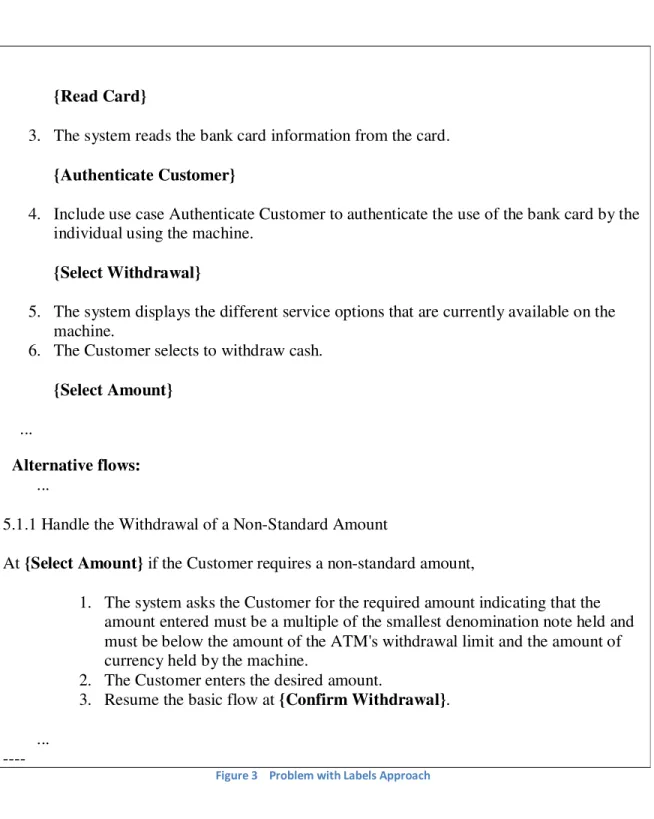
The problem with the labels approach can be seen in Figure 3 (6) below is that if there is a need for many labels in the parent flow that can cause it to be cluttered and less readable. The benefit is that if a label has a descriptive name, then it becomes easier to know where in the parent flow an alternative is referring without actually having to look in the parent flow.
----
Basic flow:
{Insert Card}
1. The use case begins when the actor Customer inserts a bank card into the card reader on the ATM.
2. The system allocates an ATM session identifier to enable errors to be tracked and synchronized between the ATM and the Bank System.
14 {Read Card}
3. The system reads the bank card information from the card. {Authenticate Customer}
4. Include use case Authenticate Customer to authenticate the use of the bank card by the individual using the machine.
{Select Withdrawal}
5. The system displays the different service options that are currently available on the machine.
6. The Customer selects to withdraw cash. {Select Amount}
...
Alternative flows: ...
5.1.1 Handle the Withdrawal of a Non-Standard Amount
At {Select Amount} if the Customer requires a non-standard amount,
1. The system asks the Customer for the required amount indicating that the amount entered must be a multiple of the smallest denomination note held and must be below the amount of the ATM's withdrawal limit and the amount of currency held by the machine.
2. The Customer enters the desired amount.
3. Resume the basic flow at {Confirm Withdrawal}. ...
----Figure 3 Problem with Labels Approach
The other approach, that references the parent flow by step type, does not have the problem with cluttering. However this makes it a lot harder to know by heart where in the parent flow that the alternative refers to and there is therefore an increased need to search back and forth in the document.
There are also examples of less structured ways of writing the alternatives like Figure 4 (17) below. In this case the alternative does not have an exact reference to where in the main flow it fits in. This is instead described in the text in the alternative which is a much less exact way of referencing than the two referencing techniques described above. For this simple use case the imprecise referencing still works fairly well but for more complex use cases it would cause readability problems and unclear requirements.
15 ---
Use Case - Process Received Shipment Documentation:
Basic Course
The Receiving Clerk ensures that the Line Items listed on the Purchase Order match the physical items. The Clerk waves the bar code on the packing slip under the sensor at the receiving station.
The system changes the status of the Purchase Order to “fulfilled” and updates the quantity on hand values for the various Books. The Clerk hands the Books off to the Inventory Clerk. Alternate Course
If the Receiving Clerk finds a mismatch between the Purchase Order and the physical items, the Clerk stops processing of the shipment until he or she is able to make a match.
---
Figure 4 Example of Less Structured Use Case
The activity diagram solution does not require this type of referencing. However, the use case tool should support the traditional use case view as well and in that view referencing will be needed. Since the traditional view is auto-generated from the activity diagram view only the step number referencing can be done without extra user input.
When it comes to the precise syntax and semantics of referencing alternative flows by step numbers it differs between different authors. The technique that was found most readable was preceding the condition of the alternative flow with a number reference to the parent flow as shown in Figure 5 (13).
---
Main success scenario:
1. User selects to buy stocks over the web.
2. PAF gets name of web site to use (E*Trade, Schwabb, etc.) 3. PAF opens web connection to the site, retaining control. 4. User browses and buys stock from the web site.
5. PAF intercepts responses from the web site, and updates the user's portfolio. 6. PAF shows the user the new portfolio standing.
Extensions:
2a. User wants a web site PAF does not support:
2a1. System gets new suggestion from user, with option to cancel use case. 3a. Web failure of any sort during setup:
16 3a2. User either backs out of this use case, or tries again.
4a. Computer crashes or gets switched off during purchase transaction: 4a1. (What do we do here?)
4b. Web site does not acknowledge purchase, but puts it on delay: 4b1. PAF logs the delay, sets a timer to ask the user about the outcome. 4b2. (see use case Update questioned purchase)
5a. Web site does not return the needed information from the purchase:
5a1. PAF logs the lack of information, has the user Update questioned purchase. 5b. Disk crash or disk full during portfolio update operation:
5b1. On restart, PAF detects the log inconsistency, and asks the user to Update questioned purchase.
---
Figure 5 A Better Approach to Specify Alternative Flow
This example also shows the semantics that were chosen for the numbering scheme in this thesis. 4a means that this alternative replaces step 4 in the main flow if the condition is true. The alternative would be that 4a follows step 4 if the condition evaluates to true.
Loops
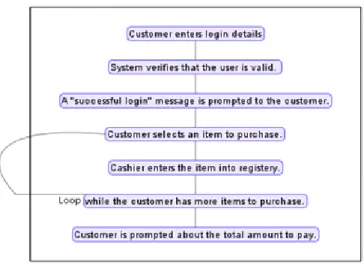
Sometimes when writing use cases there arises a need to repeat a section a certain number of times or until a condition is false. An example of this is in the case of a check out registry at a supermarket. The cashier will use the same procedure to enter all the customer's items. One way of doing this in use cases is by writing the condition for repetition inside the flow. In this case the step following the last step of entering an item will contain a condition like "while the customer has more items go to step number X". The following Figure 6 illustrates this example.
17
Figure 6 Specifying Repetition by Loop
This repetition can be expressed using alternative paths. In the above example the condition of the alternative flow would be "the customer has more items". The alternative would then connect back to the parent flow at the point where the cashier enters a new item into the registry as shown in the following Figure 7.
Figure 7 Specifying Repetition by Alternative Step
Both of these approaches to repetition in use cases have their advantages. Using alternative paths makes use cases simpler with less concepts and it constitutes a uniform way of handling control statements in use cases. Using an explicit loop concept on the other hand has the advantage of working in a similar way to many programming languages and may thus be more intuitive and easier to understand for most people. The benefits of having a loop concept were seen to weigh the heaviest.
18
Different views with different levels of detail
Use cases written for complex system can be long in nature. Since there is no industry standard for use case length and degree of detail those can vary a lot between use cases. A use case's main aim is to provide the details without the reader getting lost and loosing focus. So while designing a use case one should make sure that even long use cases can be read easily and the reader comprehends what the use case is attempting to describe (8). A way to alleviate this problem can be to provide
functionality to hide and show different information/details. This can help the reader to comprehend the big picture of the use case while still having a complete specification (8).
The above reasoning was confirmed during the industry interviews, where a need for the tool to provide several views, showing different levels of detail of the use case was expressed repeatedly. Such a function can enhance communication by adjusting the level of detail depending on the purpose for which the use case is viewed. It should also be possible to show the details of a part of the use case while the rest is shown at a high level. In that way the readers get the context of what they want to study in a good way.
Scenarios
Apart from increasing readability and structure in use cases another aim of this thesis work was to provide a quick and convenient way to visualize scenarios through a use case. The need for constructing scenarios was confirmed by the interviews that were conducted. The interviewees expressed a need to have scenarios as a base for verifying and reviewing use cases as well as to gain in-depth understanding of them.
The problem of creating scenarios in use cases has been addressed by Heldal, Samuelson and Sundin (18) who present a tool for exploring scenarios through a use case. However, that tool requires extra effort from the use case author to enter the use cases into the tool. This reduces the usefulness of the tool and the tool produced in this thesis should aim to minimize the effort needed to construct scenarios.
Links
Use cases can be a base for many other artifacts e.g. software requirements specification, test cases, sequence diagrams, class diagrams and state charts. Consistency and traceability between a use case and these other document can be controlled by providing a tagging function where tags can be inserted in the use case with references to other documents. Use cases should potentially be able to have tagged lines or words for later implementation in other documents. This technique can be very useful even for the justification of the use case from other documents, increase traceability and result in a better system-requirements fit.
19
Existing Use Case Tools
Many other commercial software tools which deal with use case creation have been analyzed during the analysis phase. Of these there are two major tools that are made especially for use cases, Case Complete (11) and Visual Use Case (12). They both have similar functionality when it comes to the flow of events. They both include a glossary function with highlighting of glossary terms in the flow of events. The flow of events in both tools has two representations, the traditional flow of events representation with a sequence of numbered steps and an activity diagram representation.
The traditional representations include hyperlinks to make it quicker to open included and extending use cases, however they are still opened in a separate document. Moreover the tools do not address the problem of having to jump back and forth between pages when reading the use case.
The activity diagram representations in the tools do give an overview of use cases but are not well suited for large use cases with a lot of text. The activity diagrams in Visual Use Case are hard to follow and it is not evident which is the main flow.
Both tools also include a lot of other functionality like requirements tracing, collaboration and versioning.
20
Results
The analysis part gives an understanding of the problem domain. It depicts the issues while dealing with use cases and possible solutions. After a detailed analysis of the problem all efforts were put on developing solutions to these problems. Many ideas, e.g. using action blocks, providing an interactive activity diagram etc. were considered. These ideas have been discussed with the supervisor, faculty members and with industry people. The feedback regarding these ideas helped a lot to reach the results. There have been much brainstorming and modification to the initial concepts in order to improve on them and achieve a quality outcome. The following section presents the results of that work including the software tool which includes functionality to support the ideas that were developed in this thesis.
Assume Step in Action Block
The work on structuring the flow of events has resulted in a development and slight amendment of the concept of action blocks. The idea of action block initially had four basic step types, input, validation, system responsibility and output. A modification has been made concerning the validation step as it has been replaced by a step called "assume". The other steps remain unchanged and must still appear in the mentioned order. However, the assume step can be inserted anywhere in an action block and does not adhere to any ordering restrictions.
The assume step is a step which specifies assumptions that are made in different places throughout the flow of events. It can be assumptions on the user input, e.g. that the user has entered the correct PIN into the system. It can also be an assumptions on the outcome of system responsibilities, e.g. the system was able to successfully store a file to the hard drive in a save operation. In this way the assume step can include the information that was previously in the validation step but the assume step is more flexible.
Moreover, the assume step can help to make the assumptions made in the flow of events more clear and explicit. It is intended to address the problem of implicit assumptions which was described in the analysis section. With this in mind, a restriction has been added to the flow of events. The restriction is that alternative flows can only branch from, or be
connected to, assume steps. The rationale behind this is that if there is an alternative, different assumptions will lead to different paths through the use case. Thus, an assumption is made when continuing down the current flow. There is also an assumption associated with following one of the alternative flows connected to that step. By restricting alternatives to only be associated with assume steps there will always be an indication that some
assumption is made when continuing down the current flow and not following an alternative. With assumptions, included in the flows at all branch points, it can be made clearer what is the actual meaning of the "main success scenario".
The following example, which is based on ATM illustrates the concept of action block in more detail as it shows an action block with a validation step and later the same action block modified by adding
21 an assume step to it.
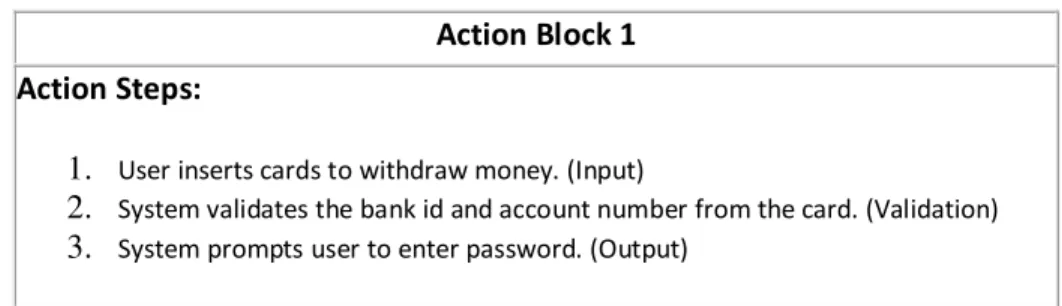
The following table in Figure 8 represents the first action block of an ATM. Action Block 1
Action Steps:
1. User inserts cards to withdraw money. (Input)
2. System validates the bank id and account number from the card. (Validation) 3. System prompts user to enter password. (Output)
Figure 8 Action Block Without Assume Step
The same action block is modified to use an assume step and gets the following shape as shown in the following Figure 9.
Action Block 1 Action Steps:
1. User inserts cards to withdraw money. (Input) 2. Bank id and account number is valid. (Assume) 3. System prompts user to enter password. (Output)
Figure 9 Action Block With Assume Step
In the above example assume step is a deciding body among the main flow and alternative flow. An alternative flow to action block 1 can be seen below in Figure 10.
Alternative to Action Block 1 Action Steps:
1. User inserts cards to withdraw money. (Input) 2. Bank id and account number is invalid. (Assume)
3. System prompts user that bank id or account number is invalid. (Output) Figure 10 Alternative Flow to Action Block 1
The above example indicates that an assume step is nothing but an assumption to follow a particular course. Consequently, an assume step can be linked to an alternative path. In order to decide between main and alternative, one need to make an assumption.
22
A Meta Model
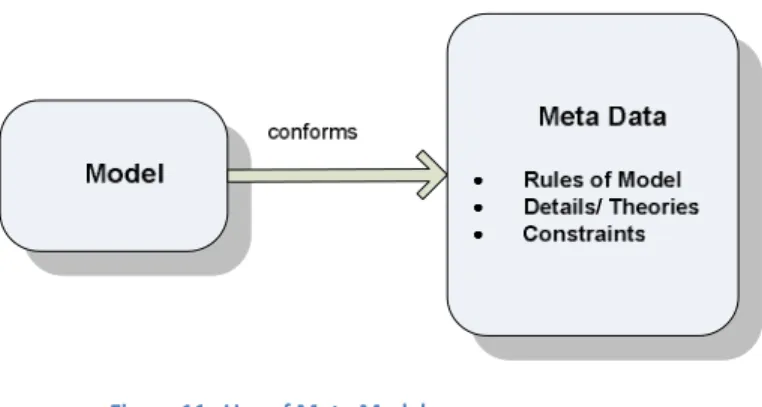
To specify the structure of the flow of events that was the result of this work a meta model was constructed. A meta model depicts the properties of actual models, i.e. it contains the rules, details and constraints on models as shown in Figure 11.
Figure 11 Use of Meta Model
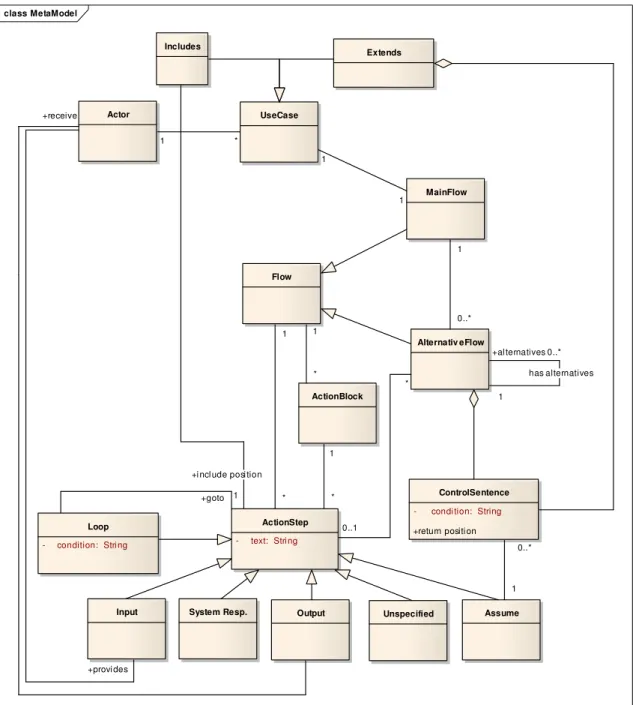
The meta model for the use case flow of events that resulted from this thesis is presented in Figure 12 below.
23 Figure 12 The meta model for the use case flow of events
The meta model in Figure 12 shows how the flow of events is structured and how action blocks fit into the flow of events. The flow of events consists of a number of flows, one main flow and any number of alternative flows. Each flow consists of steps and/or action blocks where the action blocks themselves contain steps. This means that all the steps in the flow of events do not have to be included in action blocks. The meta model permits flows of events with all or no steps included into action blocks. This makes it possible to enter use cases with sections that cannot be easily made to conform to the action block structure. Mainly, this can be the case in the start of alternative flows. The step types of the modified action block concept are included in the meta model as well as a step named unspecified. The rationale behind this is that there can be steps that include information that
class MetaModel Flow Actor UseCase MainFlow Alternativ eFlow ActionBlock ActionStep - text: Stri ng ControlSentence
- condi tion: String
Input System Resp. Output Loop - condition: Stri ng Assume Includes Extends Unspecified 1 * * 1 * 1 0..* 1 1 0..* 1 has alternatives +al ternatives 0..* +goto 1 1 1 +provi des +receive
+i ncl ude posi tion 1
*
*
+return positi on 0..1
24 is not well described by any of the action block step types. What can also be seen in Figure 12 is that loops are implemented as steps. A loop consists of a step which includes a condition for which to loop back to a previous step. The reasons for implementing loops in this way were covered in the analysis section.
A flow represents the body of a use case but there can also be include and extend relationships among two different use cases. This relationship is catered by include and extend domain objects. An included use case is attached to a particular step in the event flow. Similarly, an extended use case is connected to a step in the flow of events. However, extended use cases are connected to assume steps through a control sentence.
Interactive Activity Diagram (IAD) Representation
The results presented so far have mainly considered the structure of use cases. The work in this thesis has also involved the representation of use cases and the most important result in this regard is an interactive activity diagram (IAD) representation of the flow of events.
The IAD representation is an activity diagram with interactive features that lets the reader
manipulate the view of the use case. The reader can control which information is visible and navigate through the different paths of the use case using different navigation and zoom controls.
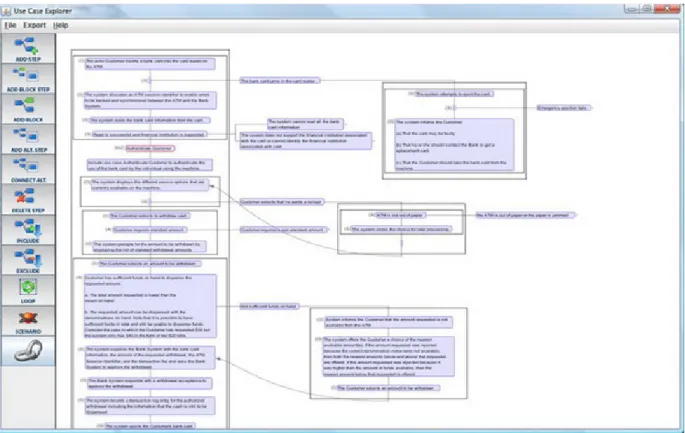
25 Figure 13 shows an overview of a use case entered into UseCaseExplorer which shows it as an interactive activity diagram. The box surrounding the leftmost flow represents the main flow. There are conditions to the right of the main flow that are connected to steps within the main flow. These are the conditions of alternatives connected to those steps. By clicking these conditions the reader can expand and contract the alternative flows as he or she likes. In this way the information in the alternative flows is easily available to the reader. Also the IAD is intended to give the reader a clear overview of the use case and make it easier to see where the alternatives fit in to their parent flows. This is helped further by the inclusion of zoom controls.
The IAD also addresses the problem with having to switch between different documents when there are include or extend use cases. In the IAD the include and extend use cases are represented by a node. By clicking this node the include or extend use case can be expanded into the current use case. A second click will again contract that use case back into the node.
Automatically Generated Traditional Representation
As explained in the analysis section there was a need for a traditional representation of use cases to accompany a new representation. The way this has been solved is by automatically generating the traditional representation from the IAD. The IAD contains all the information that is in the traditional view of the flow of events. Therefore it has been possible to develop an algorithm that achieves this automatic generation. Figure 14 below shows a part of a use case in the traditional representation which has been generated from an IAD.
26 The algorithm has been implemented in UseCaseExplorer where the IAD is represented by a graph. The algorithm works by traversing the graph flow by flow starting with the main flow. In each flow the texts are fetched from the nodes together with any alternative flows that are attached to the nodes. After one flow has finished the alternatives in that flow are processed one by one. The algorithm also assigns numbers to each node so that the steps can be numbered in the generated flow of events.
Numbering Scheme
When it comes to the traditional use case representation the numbering scheme of the flow of events is an important factor for being able to follow the different paths through the use case. There is no specific UML specification regarding the numbering scheme of the event flow. Instead it is up to writer to specify the numbering which can lead to an ambiguous scheme. A result of the work in this thesis is a numbering format which aims at being clear and easy to read. This format takes the shape shown in Figure 15 below.
Main Flow
1. Main flow step 1 2. Main flow step 2 3. Main flow step 3 ...
Alternatives:
1a. Condition for entering this alternative flow (replaces step 1 in the main flow if condition is true)
1a|1. Step 1 in alt. flow 1a. 1a|2. Step 2 in alt. flow 1a. ...
Return to 3 (execution continues at step 3 in the main flow) Alternatives to alternative 1a.
1a|2a. Condition (if true: replaces step 2 in flow 1a.) 1a|2a|1. Step 1 in flow 1a|2a.
1a|2a|2. Step 2 in flow 1a|2a. ...
Return to 1a|5 (execution continues at step 5 in alternative 1a) 1b. Condition (Second alternative to step 1 in the main flow.) 1b|1. Step 1 in alt. flow 1b.
1b|2. Step 2 in alt. flow 1b. ...
27 2a. Condition (if true: replaces step 2 in main flow)
2a|1. Step 1 in flow 2a. 2a|2. Step 2 in flow 2a. ...
Figure 15 A Better Numbering Scheme
The steps numbered 1, 2, 3 and so on make up the main flow. The alternative flows are specified after the main flow in the document. The numbering of the alternative flows includes a reference to the step which they are connected to in the parent flow. Alternative "1a" represents the first alternative to the first step of the main flow where "1" indicates the step and "a" indicates that it is alternative "a" of that step. In the same way alternative "1b" represents the second alternative of the same step. Alternative flows can themselves have alternatives and alternative "1a|2a" indicates the first alternative to the second step of alternative "1a".
The step to which an alternative refers to is the step that will be replaced by the first step of the alternative if the condition is true. Where to continue the execution after the end of an alternative is specified by a "return to" statement which indicates the return step. If there is no "return to" statement the use case ends.
Scenario Visualization and Construction
One of the main aims of this thesis was to provide a way of constructing and visualizing scenarios in use cases. This has been done by utilizing the IAD representation. UseCaseExplorer includes a scenario mode and when that mode is active the user can construct scenarios by clicking the
conditions that are true in the intended scenario. The rightmost flow, which normally represents the main flow, represents the scenario in scenario mode. Therefore when clicking a condition the alternative associated with that condition is shifted into/included in the scenario. This can enable quick construction of scenarios which are visualized by an IAD.
Links
To support traceability of requirement was one of the requirements that were identified in the analysis. This has been addressed by introducing the possibility to add links to action steps. These links are comprised of a description and a path to a particular file or document. In this way other requirements documents can be referenced. Moreover, this function can be used to attach documents that can include details of and further specify the requirements in a particular step.
28
UseCaseExplorer
UseCaseExplorer is a Java based standalone application designed to support the concepts that have been presented above, e.g. action blocks, and to provide the better readability of use case
descriptions. UseCaseExplorer has been built using Prefuse (2) which is an open source data visualization framework. Prefuse serves as a base for the implementation of the interactive activity diagram (IAD) representation of use cases.
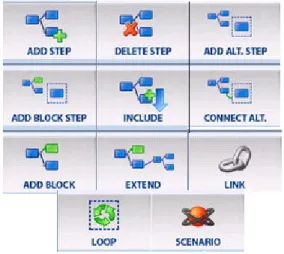
UseCaseExplorer implements the IAD representation of use cases as described above. The use case is represented by a graph within use case explorer where the different steps are the nodes in the graph. Constructing use cases is supported by adding different elements like action steps, action blocks and include use cases into the current use case. These elements are added by using the controls in the menu at the left side of the screen as seen in Figure 16. Moreover, the controls also include a button for entering the scenario mode which works as described above. The controls are implemented with the help of the observer design pattern. Events are generated when the user clicks items in the view and those events are propagated to the controls which respond dependent on the current mode of the program.
Figure 16 Controls in UseCaseExplorer
After adding steps to a use case they can be edited using an integrated text editor which also lets the user select the appropriate step type. This text editor is an adaptation of the open source text editor TextEditor++ (19).
The user can navigate through a particular use case by viewing its main flow and following the alternative flows. The alternative flows are hidden initially to provide the main success scenario of the use case. An alternative attached to an action step can be reached by pressing the condition of that alternative. Arrows are present to indicate the flow in a precise way which can prevent user from loosing focus. When contracting and expanding steps the transitions between the different states are animated.
UseCaseExplorer supports linking documents to action steps with the link control shown in Figure 16 above. Linked documents are stored in UseCaseExplorer as a description of the link together with a relative file path to the file from the use case. A URL can also be attached in similar fashion to get
29 access to any web page. A list of the linked documents can be reached by just clicking on an action step.
UseCaseExplorer, as stated earlier, supports automatic generation of a traditional use case description. This is achieved through the function "export as RTF" which generates the traditional representation in the form of an RTF (Rich Text Format) document. This RTF document is very much similar to an MS Word document in its nature.
The export as RTF function is implemented by an algorithm that traverses the graph representing the use case and collects the text and other information associated with each node along with any alternative flows attached. The use case is traversed flow by flow and numbers are assigned to each step. To generate the RTF document the open source software iText (20) is used.
When it comes to saving use cases they are stored in a file format called GraphML. The GraphML format is built on XML (eXtensible Markup Language) which means that it is a generic
interchangeable format which can be easily opened later on.
Evaluation
The evaluation of UseCaseExplorer has been done through three techniques. Initially, a handful of sample text book use cases have been written into the tool by the authors. These use cases were up to 14 pages in length and were structured using action blocks to evaluate the applicability of that concept.
All use cases were possible to input into the tool and most of the event flows were possible to structure with action blocks. However, the start of alternative flow was frequently found hard to fit in to an action block. The overall picture of use cases was seen as more clear and the content was easier to comprehend when they had been input into UseCaseExplorer. However, one function that is lacking is the possibility to specify exceptional paths or alternative flows which can be reached from several steps in the flow of events. Use cases that include such paths are not completely supported.
A second form of evaluation that has been performed is that the tool has been presented at three different companies.
The feedback that was received was as follows: Interactive activity diagram representation Pros
• Easier and quicker to understand a use case • Gives a good overview of the use case
o Good indication of alternatives
• Improved navigation
30
• Improves standardization within a project/company • Easier to make changes to use cases
• Reduced risk of mistakes when writing use cases • Supports linking
o Good for including diagrams
o Good for referring to special requirements
• Faster to construct use cases
Cons
• An alternative flow that, depending on certain conditions, returns to different places in the
parent flow is not supported.
• Linking function could be improved
o Could be better visualized o Could be more flexible
o Could include user defined tags, e.g. differently colored tags
• Should include a communication view showing communication between actors and system • Lack of synchronization concept
• No support for versioning
Automatic Generation of Traditional Representation Pros
• Gives support for handouts • Needed for reviews
• Numbering scheme quite clear
Cons
• Main flow should indicate where there are alternatives • Links specified in the IAD should be included
• The layout and structure of the generated document could be improved
Scenario Mode Pros
• Good for quickly creating scenarios for testing • Good for showing customer
• Good for reviews
31
• Should be more clearly indicated what is the scenario
• Should be possible to hide the alternatives once the scenario is completely constructed
Action Blocks Pros • Improves standardization • Improves structure • Improves quality Cons •
The overall feedback was positive and the tool was thought as something that would clearly be useful in a mature version.
Finally, a quality assurance engineer tested the tool by inputting use cases from the project he was currently working on. The results of this evaluation were as follows in Figure 17 (taken from the evaluation report written by the evaluator).
---Pros:
• It provides an easy way to present and discuss requirements with stakeholders. Usually, traditional use case documentation requires a lot of effort to read through and comprehend. • Export feature gives an edge to synchronize with traditional documentation practices. • The notations, e.g. ‘I’ for input, make it easier to understand different types of action.
Cons (Suggestions):
• The possible improvement area is the usability or more specifically ease to learn. One suggestion in this regard is to get it somewhat compliant with other UML tools. • Since agile methods are getting wide proliferation in software development industry
nowadays. So, it would be nice to introduce some new features to facilitate that community needs as well. For instance, Acceptance Test Driven Development is warmly embraced in agile community for requirement elicitation and subsequently for testing. A little bit expansion of the tool will be sufficient enough to cope with these needs. Though, it’s not a shortcoming and maybe it’s not in the scope of the current effort as well, but it could be a note for an enhancement in future.
Conclusion:
The tool seems very promising when we come to requirement elicitation and getting further feedback from stakeholders. Moreover, the export feature let us to stay compliant with our
32 will make it a perfect choice for us.
33
Discussion
Thorough system testing and evaluation is highly encouraged to deliver efficient, high quality software. This also decides the future success of software. UseCaseExplorer has gone through some testing and evaluation in this sense as described above. For example, a handful of use case experts have evaluated the software with positive feedback. However, more evaluation can be made to further verify the concepts and ideas in this report and make them more mature. More research in the form of quantitative and qualitative studies can make the applicability and usefulness of the results of this thesis clearer.
The evaluation phase pointed out some things that can be improved in the present version of the UseCaseExplorer. One such shortcoming concerns alternative flows (or exceptions) that can be reached from several different places in the flow of events. The way UseCaseExplorer is currently implemented such an alternative flow has to be duplicated at all the steps from where it can be reached. This negatively impacts the usability of UseCaseExplorer on use cases of that type. Another left out feature is related to an alternative flow which returns to different places in the parent flow depending on a particular condition. An example of this is an alternative that returns to step number 15 in the parent flow if a condition is true but if that condition is false it returns to step number 12. This functionality is not supported in the UseCaseExplorer so a user is a bit restricted when dealing with the IAD. This restriction can have an influence on usability of the UseCaseExplorer as all use cases cannot be easily entered. To enter such a use case the two versions of that
alternative have to be entered as two separate alternative flows which causes text duplication. UseCaseExplorer is certainly equipped with features which facilitate for the user to write and read use cases. Most of its features are based on research studies conducted in this context while some originate from feedback from industry. Some of the requirements resulting from the industry interviews have been left out. One of those is related to the level of details a use case should provide e.g. a use case description should have many levels of detail based on the current user (i.e. client or developer) or purpose. In other words, what text is visible in each action step should be possible to choose depending on the purpose f