Washington University in St. Louis
Washington University Open Scholarship
Engineering and Applied Science Theses &
Dissertations McKelvey School of Engineering
Summer 8-15-2018
The Example Guru: Suggesting Examples to
Novice Programmers in an Artifact-Based Context
Michelle Ichinco
Washington University in St. Louis
Follow this and additional works at:https://openscholarship.wustl.edu/eng_etds
Part of theComputer Sciences Commons
Recommended Citation
Ichinco, Michelle, "The Example Guru: Suggesting Examples to Novice Programmers in an Artifact-Based Context" (2018).
Engineering and Applied Science Theses & Dissertations. 366.
WASHINGTON UNIVERSITY IN ST.LOUIS School of Engineering & Applied Science Department of Computer Science and Engineering
Dissertation Examination Committee: Caitlin Kelleher, Chair
Roger Chamberlain Sanmay Das Bjoern Hartmann
Alvitta Ottley
The Example Guru: Suggesting Examples to Novice Programmers in an Artifact-Based Context
by
Michelle Ichinco
A dissertation presented to The Graduate School of Washington University in
partial fulfillment of the requirements for the degree
Table of Contents
List of Figures... x
List of Tables... xiii
Acknowledgments... xv
Abstract ... xvii
Chapter 1: Introduction... 1
1.1 Resources for novice programmers ... 2
1.2 Examples... 3
1.3 Approach... 4
1.3.1 The Example Guru system overview ... 6
1.3.2 Looking Glass ... 8 1.4 Hypotheses ... 10 1.4.1 Hypothesis 1... 10 1.4.2 Hypothesis 2... 11 1.4.3 Hypothesis 3... 11 1.5 Contributions ... 11 1.6 Summary... 12 1.6.1 Related work ... 12
1.6.2 Hypothesis 1: Studies of novices using examples... 12
1.6.3 Hypothesis 2: Suggesting example code to novices with the Example Guru... 13
1.6.4 Hypothesis 3: Generating large-scale suggestion systems ... 13
1.6.5 Summary and future work ... 13
2.1.1 Analogical problem solving ... 15
2.1.2 Worked examples for learning... 17
2.1.3 Takeaways... 20
2.2 Comprehending and presenting example code in programming and software engineering ... 20
2.2.1 Code comprehension... 21
2.2.2 Code example use ... 21
2.2.3 Quality of examples ... 22
2.2.4 Code summarization... 23
2.2.5 Code visualization ... 23
2.2.6 Takeaways... 24
2.3 Supporting access of relevant examples ... 24
2.3.1 Recommendations for API or command usage ... 24
2.3.2 Recommendations to improve code quality... 26
2.3.3 Recommendations to fix errors ... 28
2.3.4 Providing examples as a way of recommending examples... 30
2.3.5 Takeaways... 32
Chapter 3: Understanding Novice Example Use... 33
3.1 Introduction... 33
3.2 Exploratory study ... 35
3.2.1 Materials ... 35
3.2.2 Study design... 37
3.2.3 Participants... 39
3.2.4 Analysis and results ... 40
3.3 Hurdles and strategies ... 45
3.3.1 Content distraction hurdle ... 45
3.3.2 Example comprehension hurdle... 45
3.3.3 Programming environment hurdle ... 46
3.3.4 Code misconception hurdle ... 47
3.3.6 Idea generation strategy ... 48
3.3.7 Code-example comparison strategy... 48
3.3.8 Example emphasis strategy... 49
3.4 Task behavior groups ... 49
3.4.1 Long conclusion group ... 50
3.4.2 Slow start group ... 51
3.4.3 No realization group... 52
3.4.4 Quick group ... 53
3.5 Threats to validity... 56
3.6 Discussion... 56
3.6.1 Implications of slow start behavior ... 57
3.6.2 Implications of long conclusion behavior ... 57
3.6.3 Implications for the design of the Example Guru ... 58
3.7 Conclusion ... 61
Chapter 4: Towards Better Code Snippets: Exploring How Code Snippet Recall Differs with Programming Experience ... 62
4.1 Related work: novice and expert chunking in recall ... 64
4.2 Methods ... 65 4.2.1 Participants... 65 4.2.2 Materials ... 66 4.2.3 Study setup ... 68 4.3 Analysis ... 70 4.3.1 Metrics ... 70
4.3.2 Comparing responses to correct code snippets... 73
4.4 Results... 73
4.4.1 Overall ... 74
4.4.2 Which elements do programmers initially recall? ... 74
4.4.3 What did programmers fill in after the first attempt? ... 79
4.6 Lessons learned: recommendations for improving code examples ... 83
4.6.1 Selecting or creating effective code for examples ... 84
4.6.2 Purposely position elements within example ... 84
4.6.3 General emphasis and deemphasis ... 85
4.6.4 Example-specific emphasis and deemphasis ... 86
4.6.5 Emphasize important arguments ... 86
4.6.6 Emphasize tokens that stray from the norm ... 87
4.6.7 Deemphasize unimportant early code elements... 87
4.7 Implications for the Design of the Example Guru ... 87
4.7.1 Selecting effective examples... 88
4.7.2 Emphasizing elements... 88
4.8 Conclusion ... 89
Chapter 5: Exploring Suggestion and Rule Design through Expert Content Creation... 90 5.1 Methods ... 91 5.1.1 Materials ... 92 5.1.2 Study procedures... 94 5.1.3 Participants... 96 5.2 Analysis ... 96 5.2.1 Suggestions ... 97 5.2.2 Rule pseudocode... 97 5.2.3 Rule implementation ... 98 5.3 Results... 98 5.3.1 Suggestions ... 99 5.3.2 Rule pseudocode... 102 5.3.3 Rule implementation ... 104 5.4 Threats to validity... 108 5.5 Discussion... 108
5.5.1 Quality in expert created content ... 108
5.6 Implications for the design of the Example Guru ... 110
5.6.1 Suggestions ... 111
5.6.2 Rules ... 111
5.7 Conclusion ... 111
Chapter 6: Designing and Evaluating the Example Guru for Suggesting API Methods... 113
6.1 Introduction... 113
6.2 The Example Guru design... 115
6.2.1 System design methods ... 115
6.3 Evaluation ... 121
6.3.1 Documentation condition ... 121
6.3.2 Participants... 122
6.3.3 Methods ... 123
6.3.4 Study procedures... 125
6.3.5 Data collection and analysis... 127
6.4 Results... 129
6.4.1 Access and use of suggestions and documentation... 130
6.4.2 Do participants’ demographics affect how they used suggestions and documentation? ... 136
6.4.3 Do participants take advantage of API information features? ... 139
6.4.4 Threats to validity ... 140
6.5 Discussion... 141
6.5.1 Learning APIs... 142
6.5.2 Gender and the Example Guru ... 143
6.6 Conclusion ... 144
Chapter 7: Large-Scale Suggestions: Semi-Automatic Generation... 145
7.1 Related work ... 147
7.2 Programming environment & suggestion system ... 148
7.2.1 Looking Glass programming environment ... 149
7.3.1 Input repository ... 151 7.3.2 Initial setup... 152 7.3.3 Example extraction ... 153 7.3.4 Example grouping... 153 7.3.5 Human moderation ... 155 7.3.6 Generate rules... 156
7.4 Comparison of semi-automatically generated to hand-authored suggestions ... 157
7.4.1 Comparison methods ... 158
7.4.2 Comparison results ... 158
7.5 User study: novices’ interaction with semi- automatically generated suggestions vs. tutorials ... 161
7.5.1 Tutorial control condition ... 161
7.5.2 Study protocol ... 162
7.5.3 Participants... 164
7.5.4 Data and analysis ... 165
7.5.5 Study results ... 167
7.6 Threats to validity... 173
7.7 Discussion... 173
7.7.1 How our approach generalizes... 174
7.7.2 Potential of suggestions to increase use and learning ... 174
7.7.3 Effect of the code repository on suggestion generation ... 175
7.7.4 Personalization... 176
7.8 Conclusion ... 176
Chapter 8: Summary and Future Work... 178
8.1 Summary... 178
8.2 Future work ... 180
8.2.1 How can we apply large-scale in-context suggested content to help people learn other topics? ... 181
8.2.2 How can we automatically generate context-relevant support at a large scale? ... 183
8.2.3 What types of user interaction can help users learn and improve
sug-gestion relevance? ... 184
References ... 186
Appendix A: Understanding How Novices Use Examples Study Materials. [208] A.1 Computing history survey ... [208]
A.2 Intro instructions ... [209]
A.3 Task programs and solutions... [211]
A.4 Interview questions ... [217]
Appendix B: Comparing Novices and Experts Study Materials... [218]
B.1 Instructions... [218]
B.2 Demographic survey... [219]
B.3 Tasks... [220]
B.4 Post-task survey... [225]
Appendix C: Exploring Types of Suggestions Study Materials ... [226]
C.1 Skill trees ... [226]
C.2 Programs and pre-made suggestions ... [231]
C.3 Template ... [236]
Appendix D: Example Guru for API Methods Study Materials... [237]
D.1 Instruction sheets ... [237]
D.2 Templates... [239]
D.3 Suggestions, rules, and examples ... [243]
D.4 Surveys ... [253]
D.4.1 Demographic history Survey ... [253]
D.4.2 Learning style survey... [253]
D.4.3 In-task survey questions ... [254]
Appendix E: Semi-automatic Suggestion Generation Study Materials... [255]
E.1 Surveys ... [255]
E.1.1 Demographic and computing history survey ... [255]
E.3 Templates... [257]
E.4 Tutorials ... [259]
E.4.1 Turn the character’s head. ... [259]
E.4.2 Increase the walk pace of a character ... [259]
E.4.3 Make the flash happen multiple times. ... [259]
E.4.4 Make actions happen together ... [259]
E.4.5 Make Alice wave three times ... [260]
E.4.6 Make a character jump multiple times... [260]
E.4.7 Make the two objects move together ... [260]
E.4.8 Make the set of actions happen multiple times ... [260]
E.4.9 Make a character talk and walk at the same time. ... [261]
E.4.10 Make an object change size and color at the same time... [261]
E.4.11 Make a character turn and turn back multiple times ... [261]
E.4.12 Make the dolphins flip at the same time ... [262]
E.4.13 Make the jump more realistic ... [262]
E.5 Suggestions and examples ... [262]
List of Figures
Figure 1.1: (A) Looking Glass programming environment. (B) List of suggestions. (C) An opened/accessed suggestion. (D) The two code examples with the primary one selected. (E) The code for this suggestion, with thedo
together parallel execution block emphasized. (F) Preview execution
of the code. ... 6
Figure 1.2: Looking Glass ... 9
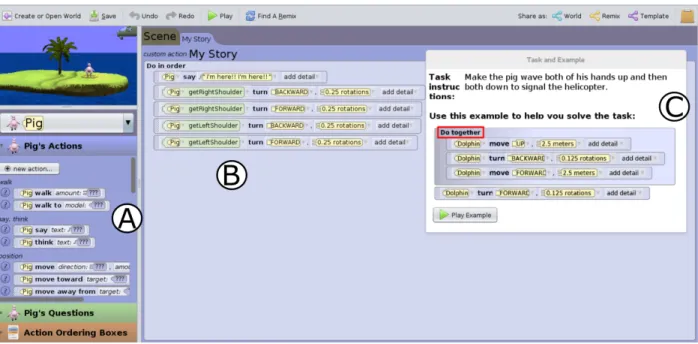
Figure 3.1: The augmented Looking Glass with a task and an example. A) Looking Glass programming environment. B) Task code designed by the researcher. C) Example code and task instructions dialog box... 36
Figure 3.2: Study protocol ... 38
Figure 3.3: Time before realization point vs. time after realization point, with correctness and behavior group annotated with color and shape... 54
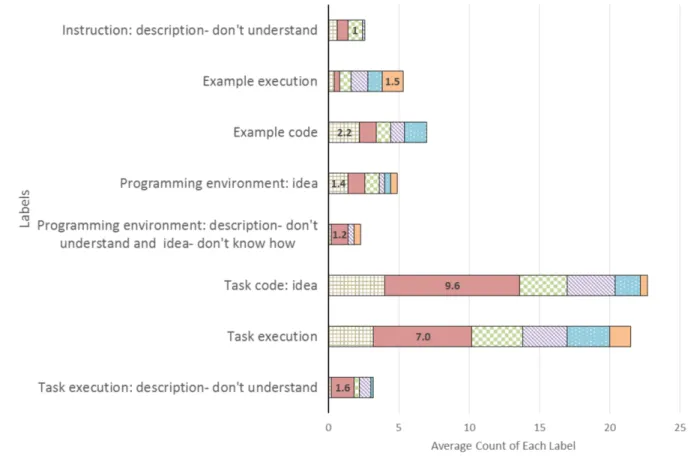
Figure 3.4: Important labels and the average count for each of the behavior groups. The largest value is shown for each label... 55
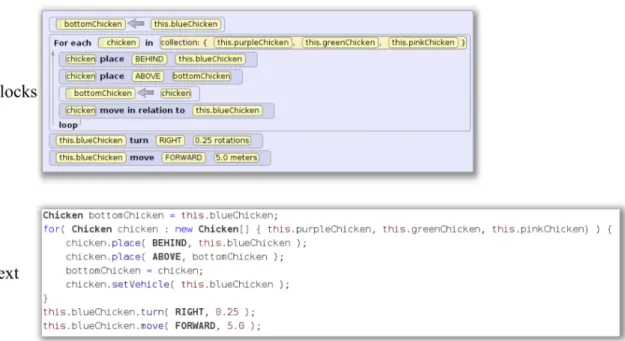
Figure 4.1: An example of block and text versions for the same code snippet. ... 67
Figure 5.1: Skill group diagram... 93
Figure 5.2: Suggestion type category hierarchy. ... 100
Figure 5.3: Suggestion novelty category hierarchy... 101
Figure 5.4: Example of a rule ... 102
Figure 5.5: Iteration style category hierarchy... 103
Figure 6.1: The Example Guru implemented within Looking Glass. (A) List of all suggestions. (B) Code annotation button to open the most recently added suggestion. (C) Contrasting examples such as ‘walk fast’ and ‘walk slow’. (D) ‘Show me’ button that users can click to see the
location of the suggested block. ... 117
Figure 6.2: In-application API Documentation condition. (A) Users can access documentation using the ‘?’ button available beside APIs. (B) Exam-ples with different values and the description. (C) The play button can be used to execute the code. (D) Button to expand or collapse the parameters information. (E) Users can navigate to other doc using these buttons. ... 123
Figure 6.3: API information accessed and used grouped by frequency of API use by novice programmers. ... 131
Figure 7.1: (A) Looking Glass programming environment. (B) List of suggestions. (C) An opened/accessed suggestion. (D) The two code examples with the primary one selected. (E) The code for this suggestion, with thedo together parallel execution block emphasized. (F) Preview execution of the code. ... 148
Figure 7.2: (A) An accessed tutorial. (B) List of tutorials, which always has the same set of 13 tutorials for everyone in the condition. (C) A short video that shows how to complete the step. (D) Written instructions. (E) Next button to go to the next step of the tutorial. ... 162
Figure 7.3: The number of suggestions and tutorials participants accessed. ... 169
Figure A.1: The intro task sheet. ... [210]
Figure A.2: Do together task... [211]
Figure A.3: For each loop task... [212]
Figure A.4: Function task... [213]
Figure A.5: API method task ... [214]
Figure A.6: While loop task ... [215]
Figure A.7: Repeat loop task ... [216]
Figure B.1: For each loop block code snippet... [221]
Figure B.4: Repeat While loop text code snippet ... [222]
Figure B.5: Simple Repeat loop block code snippet... [223]
Figure B.6: Simple Repeat loop text code snippet ... [223]
Figure B.7: Conditional block code snippet ... [224]
Figure B.8: Conditional text code snippet... [224]
Figure B.9: Difficulty Scale ... [225]
Figure B.10: Mental Effort Scale ... [225]
Figure C.1: Skill tree for ‘Jane’... [227]
Figure C.2: Skill tree for ‘Mike’ ... [228]
Figure C.3: Skill tree for ‘Molly’ ... [229]
Figure C.4: Skill tree for ‘Pete’ ... [230]
Figure C.5: One of the pre-made suggestions for ‘Jane’... [231]
Figure C.6: One of the pre-made suggestions for ‘Pete’ ... [232]
Figure C.7: One of the pre-made suggestions for ‘Mike’ ... [233]
Figure C.8: One of the pre-made suggestions for ‘Molly’, part 1 ... [234]
Figure C.9: One of the pre-made suggestions for ‘Molly’, part 2 ... [235]
Figure E.1: First Training Task ... [256]
Figure E.2: Second Training Task ... [257]
Figure E.3: Seaworld template... [257]
Figure E.4: Templates for open-ended programming... [258]
Figure E.5: Transfer task 1 ... [268]
Figure E.6: Transfer task 2 ... [269]
Figure E.7: Transfer task 3 ... [270]
List of Tables
Table 3.1: Labels ... 44
Table 4.1: Participants’ programming experience ... 66
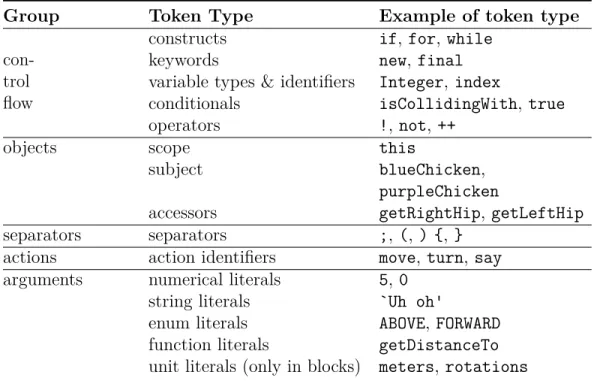
Table 4.2: Token Types ... 71
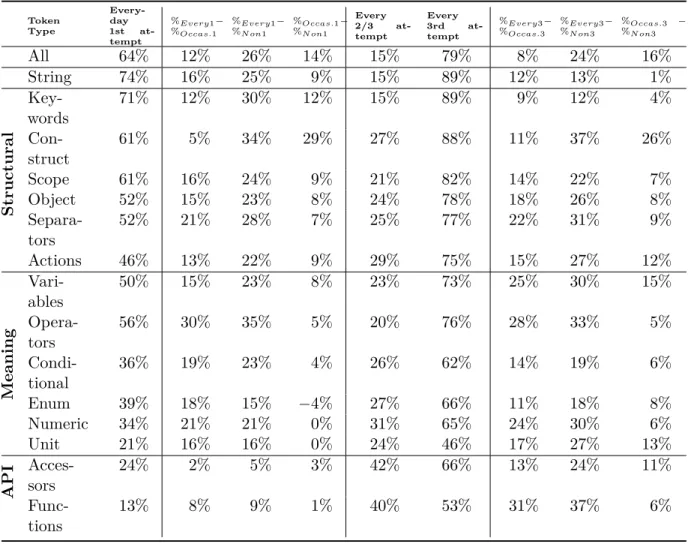
Table 4.3: Average % of tokens recalled by everyday programmers and differences between groups for 1st and 3rd attempts. ... 72
Table 4.4: Comparing blocks and text ... 76
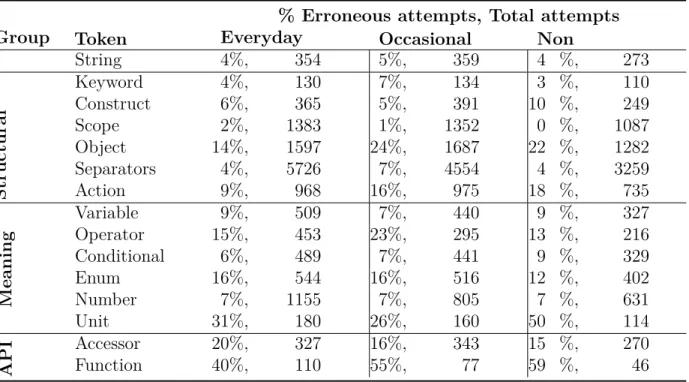
Table 4.5: % of errors for each token and total errors and attempts made by each programmer group ... 77
Table 4.6: Correlation between token types and line number for first, second and third, and total. * p < .05, *** p < .001 ... 79
Table 4.7: Error Type ... 83
Table 5.1: Rules, rule issues, and percentages of programs receiving suggestions for participant rules... 107
Table 6.1: Unsuccessful design attempts in formative testing ... 119
Table 6.2: Rules, suggestions and examples ... 121
Table 6.3: Time participants spent on the tasks ... 127
Table 6.4: Categories of responses from suggestion participants about why they accessed and used, accessed and did not use or did not access sugges-tions. ... 134
Table 6.5: Participant characteristics and information access and API usage. ... 136
Table 6.6: Participants accessed the API information all of the different ways in both conditions ... 140
Table 7.2: Human moderation criteria ... 156 Table 7.3: Left: Hand-authored suggestions. Right: Semi-automatic suggestions
and the numbers of suggestions received and accessed by children in our study. ... 160 Table 7.4: Transfer task scores... 172 Table 7.5: Participants responded to Likert scales from 1-7. ∧p=.1... 172
Table E.1: The 7 suggestions and rules for repeat and the suggestions and rules for do together with 10 or more examples in the cluster. ... [267]
Acknowledgments
I am most grateful to my advisor, Caitlin Kelleher. From encouraging me to pursue a PhD during my summer REU through faculty job interviews, Caitlin taught me not only how to do research, but how to believe that I am a researcher. She knew when to push me to improve and when to tell me to take care of myself. I could not have asked for a better mentor for this journey. I hope to someday be as good of a mentor to my students as Caitlin has been for me.
Thank you to my committee members for their valuable feedback and support: Caitlin Kelleher, Roger Chamberlain, Sanmay Das, Bjoern Hartmann, Alvitta Ottley, and Robert Pless. This work was supported by NSF grants 1054587 and 1440996 and the Spencer T. and Ann W. Olin Fellowship.
A huge thank you to my lab mates and collaborators, especially: Kyle Harms, Wint Hnin, Dennis Cosgrove. To Kyle, for being a great friend, colleague, and best teacher of the tricks to running a successful user study at WashU. To Wint, for saving the day with secret snacks during long study sessions, for being an amazing editor, and for all of your hard work on our papers. To Dennis, for the generous code, editing, and teaching knowledge and for being an uplifting force throughout my PhD.
Thank you to my WashU Computer Science, Olin Fellowship, and HCI conference friends. I can’t imagine this journey without these communities. Special thanks to Jordyn Maglalang for throwing things at the wall with me when times were tough, to Rebecca Gilson for all of the coffee shop work sessions, yoga, and hugs, and to Austin Henley for the conference and job-search camaraderie.
Thank you to Alana Lustenberger, Jessica Scolnic, Joanna Sebik, and Allie Wahrenberger for the many trips, chats, and love from afar!
Thank you to my family for believing in me, making numerous trips to St. Louis, and for making some of my most productive work sessions possible at the beach. My family has taught me to love learning, put me in a position where I was prepared and able to go to graduate school, and has been an amazing and endless source of encouragement.
Thank you to my partner, Randy. Randy has not only supported me through actions like last minute copy-editing, dinner breaks, and lemon bars, but also in his unwavering belief in me and his kind, yet firm encouragement to take care of myself over all else.
Michelle Ichinco
Washington University in Saint Louis August 2018
ABSTRACT OF THE DISSERTATION
The Example Guru: Suggesting Examples to Novice Programmers in an Artifact-Based Context
by
Michelle Ichinco
Doctor of Philosophy in Computer Science Washington University in St. Louis, 2018
Professor Caitlin Kelleher, Chair
Programmers in artifact-based contexts could likely benefit from skills that they do not realize exist. We define artifact-based contexts as contexts where programmers have a goal project, like an application or game, which they must figure out how to accomplish and can change along the way. Artifact-based contexts do not have quantifiable goal states, like the solution to a puzzle or the resolution of a bug in task-based contexts. Currently, programmers in artifact-based contexts have to seek out information, but may be unaware of useful information or choose not to seek out new skills. This is especially problematic for young novice programmers in blocks programming environments. Blocks programming environments often lack even minimal in-context support, such as auto-complete or in-context documentation. Novices programming independently in these blocks-based programming environments often plateau in the programming skills and API methods they use. This work aims to encourage novices in artifact-based programming contexts to explore new API methods and skills. One way to support novices may be with examples, as examples are effective for learning and highly available. In order to better understand how to use examples for supporting novice programmers, I first ran two studies exploring novices’ use and focus on example code. I used those results to design a system called the Example Guru. The
Example Guru suggests example snippets to novice programmers that contain previously unused API methods or code concepts. Finally, I present an approach for semi-automatically generating content for this type of suggestion system. This approach reduces the amount of expert effort required to create suggestions. This work contains three contributions: 1) a better understanding of difficulties novices have using example code, 2) a system that encourages exploration and use of new programming skills, and 3) an approach for generating content for a suggestion system with less expert effort.
Chapter 1
Introduction
Many novices who begin learning to program on their own in artifact-based contexts plateau in skills. Artifact-based contexts refer to situations where a programmer defines their own goals, without strict constraints, solutions, or pre-defined outputs. The artifacts learners typically create in these contexts usually involve more code than assignments or puzzles. While artifact-based contexts are often motivating, independent learners often fail to gain new skills or do so very slowly. Researchers have demonstrated this issue in blocks environments like App Inventor and Scratch [232, 234]. Plateauing in skills could lead to inappropriate work-arounds or inability to create complex and motivating projects. One reason novices do not seek out new skills may be their unawareness of the possibilities [112]. Because artifact-based contexts do not have specified solutions, systems cannot give hints or suggestions artifact-based on a task’s goal state or expected output. Instead, many children can only rely on existing online resources, since they often use artifact-based programming environments informally. The goal of this thesis is to encourage novice programmers to explore and use new code in artifact-based contexts. To do this, we designed a system called the Example Guru.
The Example Guru suggests new code to novice programmers through example code in an artifact-based blocks programming environment for creating 3D animations. This work fits into a space that currently lacks significant research: in-context support and feedback for independent novice programmers in artifact-based blocks programming environments. To design a system to encourage new code exploration and use, we leverage the theoretical research on examples and learning, the availability of code examples, and the popularity of code example use in programming.
1.1 Resources for novice programmers
Many young novice programmers, especially in the US, who begin programming in artifact-based contexts lack the support of a traditional learning environment [97]. If they had access to an effective classroom context, instruction and feedback would likely foster new skills through a specified curriculum. Classrooms also typically involve projects where teachers or peers provide feedback. This personalized feedback on projects can point out misconceptions or missing skills that assignments with specified solutions may not catch. If programming environments could provide the type feedback typically provided in a classroom to novices as they work on motivating projects, novices might gain relevant and timely skills.
In order to learn these skills, independent novices in artifact-based contexts must seek out support that often requires them to leave their programming environment or current context. Most novice programming environments provide resources like documentation [214], tutorials [197, 218], or forums [113, 195]. They also often enable users to share programs so that novices can learn from each other. Many novice programming environments have online communities, such as Scratch, App Inventor, Looking Glass, Greenfoot, and Kodu [71, 114, 121, 196]. Novices can also seek out tasks to learn specific skills, like puzzles [6, 76] or online
courses [107]. All of these options require that the user seek out information outside of their programming context, which many novices will choose to do infrequently or not at all [83]. Despite whether novices have access to or seek out learning resources, many of these methods of learning inside and outside the classroom, including the one presented in this thesis, employ examples in some form.
1.2 Examples
Our approach uses example code for three reasons: the effectiveness of examples in learning, their large-scale availability, and their importance in the work-flow of programmers. Providing feedback in the form of examples may be a productive and scalable method for supporting novice programmers in artifact-based contexts. However, studies of less experienced program-mers have indicated that reusing example code can be problematic [185]. This prompted our work to better understand novices’ example use in order to employ examples in a support system.
Research has shown that providing examples to learners, especially in the form of worked examples, can be highly effective for learning [12, 35, 212]. Worked example theory and design are informed by cognitive load theory, which indicates that learning materials should limit the amount of cognitive load required [224]. Researchers have begun to explore how worked examples can help novices learn coding using subgoal labels and self-explanation [131, 149, 150]. Subgoal labels can reduce cognitive load when solving problems with examples as they segment the examples and describe the steps. Self-explanation is an effective strategy for learning from examples, as novices work to understand the example using context and reasoning [41]. The related work section provides an in-depth explanation of the theories and studies of worked examples in educational psychology research.
In addition to being effective learning resources, examples for programming are commonly available within online resources like code repositories, documentation, and forums. Code repositories, like GitHub [29], have code submitted by millions of users. Not all of the code within these repositories may be valuable as code examples, but many open-source projects likely have well-designed code that programmers use. Documentation or other static content, like written tutorials, often include code examples. Web forums for programmers, like Stack Overflow [203], contain many code snippets within questions and answers. These questions and answers often cover large portions of information, such as 87% of the Android API classes [163], and provide valuable example code snippets [155]. The availability of code examples makes them a common resource for current programmers and a potential resource for future systems that involve example code.
Programmers of varying skill level use available example code resources on an everyday basis. Experienced programmers often search for examples that they can find on the web or within programming environments [23, 84]. Non-expert programmers also attempt to utilize available example code to learn or fix errors. However, novices often have difficulties using examples without support [89, 183]. In order to be able to leverage the large quantity of available example code to support novices learning independently, this thesis first aims to better understand the difficulties in using examples before using the findings to design a system that suggests example code.
1.3 Approach
This dissertation aims to: 1) better understand the challenges novices have using examples in order to design support for examples, and 2) reduce novices’ unawareness of relevant API methods and programming concepts by suggesting example code. To do this, we ran two
studies to understand how novices struggle when using example code. We then used these results, along with a study of experts making suggestions, to inform the design of a system that suggests API methods and programming concepts to novice programmers as they work on code projects. Finally, we designed an approach to generate content for this type of suggestion system with less human effort.
The system we designed to suggest example code to novices during artifact-based programming is called the Example Guru. The Example Guru contains a set of suggestions that introduce new skills. Each suggestion has a rule that checks a novice program for the opportunity to make the suggestion. The suggestions each have two example code snippets that demonstrate the skill and have associated descriptions.
Imagine a novice programmer named Joanna coding an animation with a bunny walking a far distance. The default speed for the bunny walking is very slow, which frustrates Joanna. She does not realize that the walk method has a parameter to change the speed called walkPace. The Example Guru analyzes her code and triggers a suggestion to change the speed of the walk animation. Joanna notices the suggestion and chooses to explore it by clicking on it. When she opens the suggestion, it has two examples: one that shows a character walking faster and another that shows a character walking slower. Joanna views both of the examples, which helps her figure out what speed she wants to use for the parameter. However, Joanna does not know where to find the walkPace parameter to change it, so she clicks the ‘show me how’ button. This button triggers the interface to provide instructions that demonstrate where to modify the walkPace. Now Joanna is able to change her program to make her bunny walk faster. She is happy that her animation looks better and has also learned about a feature of the API. As users gain skills, the suggestions introduce more complex API methods and programming skills, like joint movements to improve a simple turn, or parallel execution to make an object move diagonally.
Figure 1.1: (A) Looking Glass programming environment. (B) List of suggestions. (C) An opened/accessed suggestion. (D) The two code examples with the primary one selected. (E) The code for this suggestion, with the do together parallel execution block emphasized. (F) Preview execution of the code.
1.3.1 The Example Guru system overview
The Example Guru implements an approach for suggesting new code concepts to programmers throughout the programming process. It has three main elements: rules, suggestions, and examples.
Rules
Rules statically analyze novices’ programs for opportunities to make suggestions. Each suggestion has an associated rule, which triggers the suggestion when it finds a pre-defined combination of code. Rules statically analyze the abstract syntax tree of a program to find combinations of code that indicate opportunities to suggest API methods or programming skills.
Rules execute after a novice programmer executes their program. The point at which a programmer executes their program is likely when they want to check whether their code works correctly or when they have completed an idea. The rules execute at this point because this is likely to be a time when novices are most open to receiving suggestions about their programs.
Suggestions
The Example Guru makes suggestions to novice programmers as they program. Each suggestion encourages users to improve their artifact in a particular way using a code block that the user has not yet used. Users can choose to interact with suggestions, but are not required to, as the suggestions use anegotiated interruption strategy. Negotiated interruptions make information available, but allow the user to chose when and if they want to interact with the content [140]. This has been an effective interruption strategy for end-user debugging [179]. Novices can access the suggestions from a list of titles in a panel (see Figure 6.1-B) or from an annotation on the code block related to the suggestion. Hovering over the annotation shows the title of the suggestion. Once accessed, users can view two code examples and execute the examples. Hovering over the code triggers a tool tip to appear that explains how the code works and where users can find the new code block.
Code examples
Each suggestion shows two code examples. The user can execute each of the examples to see how they work by clicking on the scene (see Figure 6.1-D). The code examples demonstrate the code that enables novice programmers to implement the suggested idea. Each code example has a description of the output of the code, rather a description of the code itself. The idea is that the description should explain the effect of the example, rather than describe the code. The Example Guru’s two code examples show contrasting information for API methods or similar information to reinforce programming concepts. Ideally, the two code examples will encourage the novice programmer to perform self-explanation [41]. By explaining to themselves how the two examples are similar and different, the novice programmer will likely better understand the concepts demonstrated.
1.3.2 Looking Glass
I implemented the Example Guru within a novice programming environment called Looking Glass. Looking Glass is a blocks-based novice programming environment designed for middle school children aged 10 to 15 to make 3D animations, as shown in Figure 1.2. Looking Glass is based on the Storytelling Alice programming environment [105] and is available online for free [121]. Looking Glass code is written in the Java programming language and uses the object-oriented paradigm. Blocks-based programming environments have been designed to reduce the complexity of the syntax for novice programmers and prevent novices from making syntactic errors. Looking Glass enables users to create animation programs by dragging and dropping blocks to animate objects rather than by typing code.
Figure 1.2: Looking Glass
plants, and other props. For example, Figure 1.2 shows a scene with a pig on an island and a helicopter. In general, Looking Glass programmers can choose a pre-created scene or can create their own. In the context of this work, we provided users with pre-created scenes in order to focus on programming rather than scene creation.
Children can create animations by dragging and dropping blocks of code that operate on the objects in the scenes or they can change the order of the actions. The code blocks allow users to make objects perform actions like move, turn, change size, and change appearance. Scene objects can also speak with speech bubbles to advance the story line. Figure 1.2 shows
code blocks that make the pig speak and then turn its shoulders to make it wave. Many code blocks require users to fill in argument values, like the direction to turn or the distance to move. They also commonly have optional arguments, like the duration or speed of an action. ‘Action ordering’ code blocks include basic programming concepts like simple parallel execution (‘Do together’), a simple loop with a numerical iterator (‘Repeat loop’), variables, conditional logic, and more complex loops. Once a programmer has added code blocks, they can click ‘Play’ to execute their program, which allows them to watch the animation they have created.
I chose to complete this work within Looking Glass because users primarily focus on creating artifacts, or animations. They can select their preferred scene and use code to create a story that they choose. This process is similar to many other artifact-based coding contexts where users do not typically receive feedback when working outside of a classroom, such as Scratch and App Inventor. Looking Glass is not as well known as other systems, making it easier to recruit participants unfamiliar with the system and API. Looking Glass also already had a built-in static code analysis system, making it more efficient to implement rules for the Example Guru.
1.4 Hypotheses
This dissertation has three main hypotheses surrounding suggestions and examples.
1.4.1 Hypothesis 1
Studies of novices using examples will indicate the challenges novices have using example code and will provide new directions for how to support example code use for novice programmers.
1.4.2 Hypothesis 2
Suggesting example code to novice programmers in artifact-based contexts will increase the number of new API methods and programming concepts novice programmers add to their programs compared to existing, static, forms of support.
1.4.3 Hypothesis 3
A support system for novice programmers can be created with less human effort than hand-authoring. The support system content will be equivalent to the hand-authored content.
1.5 Contributions
• My study of children using examples to solve tasks suggests that one main reason novices have trouble using examples is that they do not realize which element within the example is important [91].
• My study comparing novices and experts recalling example code suggests that novices focus on different elements than experts and cannot retain as much information [92]. • My study of adults making suggestions and authoring rules provides an understanding
of how experienced programmers might make suggestions to novices and indicates what makes good suggestions and rules [94].
• I designed and built the Example Guru system, an example of how to implement the approach within a novice programming environment for animation creation which can be a model for systems in similar contexts [90]. This system could be easily translated to other similar novice programming environments.
• My studies show that suggesting content during artifact-based programming is more effective than static support for encouraging children to explore programming concepts. This approach likely applies broadly to artifact-based programming [90, 93].
• I designed an approach for semi-automatically generating suggestions and rules, which produced similar suggestions to a hand-authored set with less human effort [93].
1.6 Summary
The following chapters discuss related work, studies addressing my three hypotheses, and future work.
1.6.1 Related work
Chapter 2 provides an overview of related work and background in example use in pro-gramming and education. It also provides a summary of research on systems that suggest information to learn and use in artifact-based contexts. This work is related to the general idea of the Example Guru and also includes automatic and semi-automatic generation of support for programmers.
1.6.2 Hypothesis 1: Studies of novices using examples
Chapters 3 and 4evaluate the hypothesis that studies of novices using examples will clarify the challenges of example use for novices. These chapters describe two studies exploring novice example use: 1) a study where children attempted to solve programming problems with example code available, and 2) a study comparing how novices and experts recalled
1.6.3 Hypothesis 2: Suggesting example code to novices with the
Example Guru
Chapter 5 describes an exploratory study of experts creating suggestions and rules that informs the types of suggestions and rules implemented in the Example Guru. Chapter 6
evaluates the hypothesis that suggested examples will increase novices’ use of new program-ming skills. It provides a detailed description of the design of the Example Guru, rationale for design decisions, and a study comparing suggestions to documentation. The study showed that novices chose to access suggestions about three times as often as documentation and used new API methods from suggestions more often than from documentation.
1.6.4 Hypothesis 3: Generating large-scale suggestion systems
Chapter 7 describes a method for semi-automatic suggestion generation. The evaluation of novice programmers using semi-automatically generated suggestions and comparison to hand-authored suggestions support the potential of this semi-automatic generation approach.
1.6.5 Summary and future work
Chapters 8 discusses the potential impact of this work and the possibilities for future work. The future work section discusses the following questions:
• How can we apply large-scale in-context suggested content to help people learn other topics?
• How can we automatically generate context-relevant support at scale? • How can learners contribute to and engage with the support model?
Chapter 2
Related Work
Existing work related to this thesis spans from theories of learning to systems that support programmers. Educational psychologists have a long history of studying the cognitive processes behind learning, especially learning using examples. This body of work supports the benefits of incorporating examples into learning systems, provides a theoretical basis for thinking about learning with examples, and models ways to explore how learners use examples. As programming has become more popular, researchers have begun to focus on the cognitive processes programmers use when understanding code or examples, as these are critical and common activities for programmers. The existing research supports ways to help programmers comprehend large software projects, but does not specifically address comprehension of example code. Instead, much of the work surrounding examples for programmers focuses on making the example code more accessible. Many systems support programmers in accessing example code for more efficient software development, but none suggest examples to novices in artifact-based contexts with the goal of encouraging exploration of unused code. Research motivating and related to this thesis spans three major topics: 1)
examples for programmers, and 3) systems for making useful examples available to learners and programmers.
2.1 Examples and learning from a cognitive
perspec-tive
A significant body of research supports and studies the value of examples for problem solving and learning. This work has been important in the ideation and design of our studies of novices using examples and the Example Guru. In order to understand novice programmers’ difficulties using examples, we draw on the theoretical groundwork of: 1) analogical problem solving, and 2) worked examples.
2.1.1 Analogical problem solving
In essence, analogical problem solving has the same properties as problem solving using an example. Cognitive psychologists define analogical problem solving as using one provided problem and solution (the base) to solve another problem (the target) [60, 62]. Although the base problem is not often called an example in the literature, it essentially functions in a similar way to an example. Novice programming with examples is most closely related to the research on analogical reasoning in mathematics [175]. In mathematics, a student might be asked to solve the problem 3x+ 2 = 11using an example 2x−4 = 6. The student
must first map the related elements of the problem and example. This problem and example pair has three sets of related elements: the 3x and 2x, the +2 and −4, and the =11 and =5.
Understanding the relationships between these elements is critical to benefit from a provided example. If a learner can understanding these mappings, it may help them to adapt the steps in the example to their problem. Prior work is divided on whether an understanding
of the mappings between base and target problems is necessary or sufficient in solving the task. Gentner describes the structure-mapping theory, arguing that the base problem and the target have equivalent sets of relations between problem elements [60]. The analogy is a mapping between the set of relations for the base and target problems. Gentner’s work suggests that the primary difficulty associated with solving a problem using an analogy comes from mapping the example and the target. If learners can correctly map the example and target, they can likely solve the problem correctly. In contrast, Novick and Holyoak’s research suggests that a learner must understand the mappings between the example and target problems, but that the mappings may not be sufficient to enable a learner to solve a task [158]. When learners need to adapt an example to fit their target problem, some learners may succeed at mapping but struggle to construct a full solution [158]. One study looking at analogical reasoning in novice programming supported Novick’s theories, finding a weak correlation between a mapping task and programming task success [89]. This indicates that mappings may be one element of the difficulties using examples.
Because understanding the mappings likely benefits learners to some extent, systems should try to support learners in finding and understanding the mappings. One way to do this may be to make the base and target problems have high surface similarity, which learners often find easier to map [61]. Surface similarity means that the problem and example elements that are correlated are also similar, such having the same location within the problem. As a learner becomes more familiar with a concept, reducing the surface similarity could then help them to gain a deeper understanding. Another related way to support learners in using examples may be integrating cognitive load theory in the design of worked examples.
2.1.2 Worked examples for learning
The body of research surrounding worked examples supports the integration of examples into a system for independent learning. We first provide an overview of cognitive load theory, which is used in the design of worked examples.
Cognitive load theory
Cognitive load theory is a theory for reducing the information processing load typically employed in educational research to support learning of cognitively complex information [211]. This type of content typically requires the understanding of many interacting elements, which need to be understood individually and also together in order to gain a deep understanding. However, the short-term memory, or working memory, that processes these components is a highly limited, but critical resource for learning [13, 146]. Learners must use their short term memory to process new information until they create schema, structures that organize knowledge and are stored in long-term memory. In order to create schema, learners must be able to accommodate the amount of cognitive load associated with the new information. In addition to the cognitive load of the content being learned, cognitive load can also come from the design of the instructional information, like if learners must spend extra effort connecting important elements or figuring out directions. When creating instructional information, it is critical to reduce the cognitive load imposed by the format of the presentation.
Cognitive load theory specifies three types of cognitive load that play into difficulty learning complex information and the design of worked examples: intrinsic cognitive load, germane cognitive load, and extraneous cognitive load. The intrinsic cognitive load of learning certain content is determined by the element interactivity of the components [211]. In many cases, the many interacting elements of complex information must be learned simultaneously, due
to the importance of how they interact. Modifying the instructional format cannot change the intrinsic cognitive load of content. The only way to reduce intrinsic cognitive load is to alter the type of information or problem presented. Germane and extraneous cognitive load are controlled by the instructional designer. When the instructional design supports schema formation, it imposes germane cognitive load. When it interferes and prevents schema formation, the instructional design imposes extraneous cognitive load. One common case of imposed extraneous load is when tasks require that the learner seek out information from a different location in the content [161]. This interrupts learners’ focus on the information they need to actually learn. One instructional method, worked examples, has been shown to reduce the extraneous cognitive load imposed on learners.
Worked examples
Worked examples are problems with worked solutions designed based on cognitive load theory [212]. Worked examples can be highly effective for learning topics like mathematics and science [12, 212]. Learners often receive worked examples alongside problems to solve in order to aid them in solving their problem. A mathematics or physics solution naturally breaks down into steps, but the design of a worked example for programming is less clear. Their integration into programming education contexts is becoming more common, as researchers build systems to help educators create them more easily [122] and as systems provide interactive worked examples, like the Problem Solving Tutor [120]. Researchers integrating worked examples into programming contexts are also integrating cognitive science findings about worked examples, like the benefits of: self-explanation, providing multiple worked examples, providing subgoal labels, and faded worked examples.
their understanding [41, 171, 174]. Self-explanation is an example of an instructional practice that increases germane cognitive load in order to further learning. Studies have found that self-explanation questions helped students in learning programming [165], especially if they included extra questions to help focus the explanation [222]. Recent work has applied self-explanation to programming and combined it with subgoals by having novice programmers author subgoal labels [130, 150]. Recent work has also shown that having novices write in comments has been effective in helping them to solve programming problems [221]. This research supports the idea of combining self-explanation with examples in systems for novice programming.
Multiple Examples: Providing multiple worked examples for learners to study can help
them to grasp content [12, 63]. However, Catrambone and Holyoak showed that multiple examples only support learners in solving problems when the learners are instructed to use the similarities between the examples [37]. This prompts the learners to perform self-explanation. Subgoal Labels: More recently, researchers have begun to focus on the design and effectiveness of worked examples for programming using subgoal labels. Research on worked examples overall indicates that subgoal labels can likely help learners better understand programming examples [36]. Adding subgoal labels to instructional information as a way of simulating a worked example has been effective for programming [128, 129, 149]. Researchers have also designed a way to crowdsource subgoal labels for videos, engaging learners in self-explanation [109].
Fading: Fading worked examples can also help learners. Faded worked examples are sequences
of worked examples in which stages of the worked examples are removed in order to fade from a fully worked example to only a problem [172, 173, 193]. Fading reduces the extraneous cognitive load of worked examples by reducing the amount of information learners need to
figure out on their own until they are ready for it. Researchers have shown that faded worked examples can be effective for programming [70].
2.1.3 Takeaways
This body of work addressing how to best design instructional material and support problem solving has inspired both our work on novices’ issues using example code, as well as the design of the Example Guru. While existing work provides some insight into ways to help people learn from examples, it does not address the problems novices may have when they do not understand example code. Another body of work, rooted primarily in software engineering, looks at how programmers comprehend code and ways to help programmers comprehend code more efficiently.
2.2 Comprehending and presenting example code in
programming and software engineering
In order to be effective software engineers and for software to be robust, programmers need to be able to quickly comprehend code. In order to be able to support code comprehension, researchers have begun to look at how programmers comprehend and use code, as well as beneficial ways of summarizing and visualizing code examples to better support programmers. This research inspires both our studies of novices’ difficulties using example code, as well as to the design of the Example Guru’s example presentation. This section discusses related work in the areas of: code comprehension, code example use, the quality of examples, code summarization, and code visualization.
2.2.1 Code comprehension
Code comprehension is a core element of using code examples, as well as programming in general. Researchers have developed both theoretical and empirical bodies of work on code comprehension.
Review papers cover the extensive body of work on code comprehension and emphasize two main high-level theories: top-down and bottom-up [204, 223]. In top down theories, expert programmers use beacons, programming plans, and rules to make sense of code [25]. In bottom-up theories, programmers chunk related elements during comprehension based on high-level schema in long-term memory [199].
Empirical work on code comprehension has used a variety of methods. Researchers have evaluated code comprehension through eye tracking [32, 33], cerebral blood flow measurement [154], answering questions [14, 229], code modification [115], and debugging [219]. Research in computer science education has shown that code comprehension activities can effectively assess programming knowledge, as well as help students learn [202, 208]. While code comprehension at a high level likely affects the way people comprehend examples, the work often addresses code at a much larger scale than a code snippet. Researchers have also looked at how programmers try to use examples.
2.2.2 Code example use
Several studies seek to understand how programmers use example code naturally, though some focus on experienced programmers as opposed to novices. One such study explores experienced programmers reusing example code and, similar to this work, describes the programmers’ behaviors during tasks using example code [185]. Rosson and Carroll find
that expert programmers ‘debugged into existence’ and only used examples as an initial source of information. It is important to note that this study took place before example code was widely available online. Another study looked at how programmers search the internet throughout programming tasks and found that programmers used online code examples for learning and reminding themselves of what they already know [23]. They also discovered that programmers started to use code they found before fully understanding it and made mistakes while adapting copied code. However, we do not know how these behaviors and problems apply to novices.
Few studies focus on non-expert programmers and those that do only briefly discuss code examples and reuse as a part of larger works. In analyzing the practices of informal web development, Rosson, Ballin and Nash found that programmers often use example code as a model when looking for general ideas of ways to design websites [183]. However, when they try to use the code, the programmers cannot effectively integrate it into their projects. One factor that may play into programmers’ abilities to effectively use example code is the quality of the existing examples.
2.2.3 Quality of examples
Researchers have looked at the effective qualities of code examples to establish how to design code examples for documentation. Studies have looked at how programmers rated examples and what they wanted in code examples. They found that programmers preferred concise code examples that highlight relevant code [213], are segmented and described [155], provide placeholders to indicate where to insert new code, and have understandable names and variables [31]. Another study found completeness and correctness to be important qualities [213]. Several of these studies list ‘readability’ and ‘understandability’ as important features,
providing natural language explanations to improve examples [38, 80]. However, this type of work has focused mainly on more experienced programmers who are often adults using text programming languages. Much of the work addressing how to help programmers comprehend and quickly make sense of code has been in the areas of code summarization and visualization.
2.2.4 Code summarization
Code summarization is the process of creating or generating brief descriptions or shorter code snippets, like summarizing English text. Code summary generators often use heuristics, information retrieval techniques, or machine learning to automatically create the summaries [74, 148, 235]. Researchers have explored what programmers think is important, using eye-tracking [182], and by asking programmers to manually create code summarizations [236]. They found that programmers spent more time looking at method signatures and often included structural components and ‘easy to miss’ code, but did not focus on control flow keywords, method invocations, or exception handlers. Many researchers motivate code summarization work with the inefficiencies of code maintenance. They do not address code summarization for novice programmers, which could explain more about which parts of code novices think are important.
2.2.5 Code visualization
Beyond code summarization, another way to make it easier for programmers to use code or code examples is to provide visualizations. Researchers have developed effective interactive visualizations for helping novice programmers understand animation programs [238]. Others have developed rich code visualization support for text programs, and found that code visualization can reduce time needed to answer questions about code, compared to basic
syntax highlighting [11]. However, work on code visualization has focused more on large-scale program understanding than code examples that demonstrate specific concepts.
2.2.6 Takeaways
Better understanding how programmers understand and use code, as well as using that information to better present code, is critical in supporting programmers in maintaining large software projects and learning new programming skills. The findings often align with cognitive load theory, in terms of code comprehension theory and properties of effective examples. The findings also support the need for a better understanding of novice programmers, who have particular difficulties integrating and understanding example code.
2.3 Supporting access of relevant examples
In addition to presenting examples in ways that novices can understand, novices need to receive example code relevant to their program at the correct time. Like the Example Guru, many systems try to help programmers gain access to relevant examples. Existing systems typically focus on supporting programmers in accomplishing programming tasks, rather than learning new skills. These systems try to make examples accessible in order to: 1) help programmers use correct API methods or commands, 2) fix code quality, or 3) fix errors.
2.3.1 Recommendations for API or command usage
APIs, as well as other complex software systems, commonly have many available methods and commands. Many features remain unknown by users, due to users being unaware of the possible capabilities or because of naming issues. Chapter 6 describes a study in which the
help users better use the full capabilities, researchers have developed support systems for APIs and complex software that provide recommendations to users. These systems typically base the recommendations on community data or individual usage.
Recommendations from community data
Some existing systems leverage overall community usage and sets of community-created artifacts to make suggestions for API methods and commands. The Example Guru also uses a repository of programs as a basis for designing suggestions, but focuses more on introducing previously unused API methods.
One way systems provide API and software support is by using community data to recommend commonly used commands. Some of these systems provide rankings of commands by basic counts of how often they are used, such as by: providing lists of API methods in a programming environment [86], providing lists of commands within software [135], or by emphasizing more commonly used API methods in documentation [206]. Other recommendation tools use collaborative filtering algorithms, which classify a user’s behavior within community usage data in order to recommend API methods [139] or software commands [119, 134].
Research has also leveraged communities of user examples, Q&A information, and code completion methods for making recommendations. Rather than making recommendations directly, these systems typically try to improve example code retrieval by recommending examples using the programmer’s context. They do this by: comparing users’ code against repositories [87], mining patterns of APIs often used together [239], matching related words to find code examples for similar types of functionality [15], or using input and output types [124, 215]. For more project-specific examples in open-source projects, recommendations have been based on the program history and types of tasks [47, 123]. Other than examples,
systems also use community resources to inform relevant Q&A recommendation [46], code completion [10, 26], and parameter completion [9, 237].
Recommending support based on individual usage
Rather than using community data, other systems provide recommendations for effective programming, APIs, or software commands based on either the user’s behavior or the artifact they are working on and pre-defined suggestion criteria.
Research has used current or past behavior to recommend support to users of complex software and APIs. AmbientHelp recommends information based on the commands a user is working with at any point in time [133]. Similarly, CoDis suggests unfamiliar commands based on command patterns and the time elapsed since the user’s last activity [241]. Another tool bases API recommendations on the user’s programming history [178].
Some systems only use the artifact a user is creating to recommend help for APIs, programming, and commands in complex software. Tools for recommending APIs consider the structure of code to recommend API methods, such as by looking for redundant code [104] or using identifiers from a class’s abstract syntax tree [82]. Documentation recommendations can also rely on artifacts, like by connecting method invocations to documentation [51], or by relating software interface elements to documentation [108]. Systems also recommend commands to users in sketching software based on the drawing artifacts that users create [58, 95, 152].
2.3.2 Recommendations to improve code quality
Like helping users learn complex APIs and software systems, existing systems support programmers in improving their code quality through suggestions. Improving code quality is
7. In order for code projects to be maintainable, they need to follow best practices in code style, like keeping methods short and using abstraction appropriately. Three types of systems define and assess code quality more automatically: code smell detection methods, tools for code style checkers, and a subset of automatic grading systems.
Code smells
Code smells are patterns of code, such as long methods or duplicated code, which may indicate a problem in the maintainability of code and can be used to detect issues. These definitions and the implementation of the definitions closely align with the Example Guru’s rules. Fowler and Beck developed categorizations and definitions of “code smells” [57]. Based on these definitions, a body of research has investigated humans and metrics as detectors of code smells. Several studies explore human evaluations of code smells, finding low agreement for detection of complex code smells [126, 127, 192]. Mantyla, Vanhanen and Lassenius developed a taxonomy to enable better understanding of code smells for human detection [125]. They found that their taxonomy aligns with correlations software developers noted between code smells. DECOR and “detection strategies” [132, 147] enable humans to operationalize code smells using software metrics, while another set of systems use metrics to automatically detect code smells [57, 106, 116, 151]. Based on code smells, Cunha, Fernandes, Ribeiro and Saraiva identified smells in spreadsheet code and created a tool to find these smells [48].
Code style checkers
Similar to code smells, a number of tools allow programmers to check the quality and style of their code. PMD, Klokwork, SourceMonitor, QJ-Pro, and StyleCop are a few examples of these types of tools [45, 111, 166, 201, 205]. These tools provide standard metrics and
allow customization of metrics, but are aimed at professional programmers and do not have support for suggesting new programming concepts or skills.
Automatic grading
On a smaller scale than code smells and style checkers, a number of automatic grading systems measure the quality of student code using standards and structural properties. Some systems use standard metrics as code quality measures for student assignments, like the ISO/IEC 9126 standard [1, 24] or Berry and Meekings’ style metrics [20, 98]. Other automatic grading systems consider the structure of code. For example, one framework employs cyclomatic complexity [138, 217], while another study uses LOGISCOPE to find knots [143]. Cyclomatic complexity and knots find problematic code by looking at the paths through a program. These evaluation techniques focus on complex structural and style issues or aspects of code such as whitespace, all of which novices can often ignore while learning basic programming concepts.
Suggestions to help programmers learn APIs and improve their style of code most closely relate to the Example Guru’s suggestions for artifact-based programming. The set of systems that support programmers in fixing errors and incorrect solutions through suggestions use relevant strategies for providing information, but do not need to consider the programmer’s motivation.
2.3.3 Recommendations to fix errors
Researchers have made progress on suggested support to help programmers for: solving programming assignments and resolving bugs.
Automatic grading and intelligent tutoring systems
Automated grading, similar to rules in the Example Guru, check code correctness in pro-gramming assignments and can provide quick feedback to a large number of students. A variety of automated grading systems allow teachers to specify assignments and tests that evaluate the correctness of code output [7, 21, 55, 59, 88, 101, 187]. While these systems require assignments with defined answers, independent learners using novice programming systems often work on artifact-based programs that do not have right or wrong answers. Researchers also use automated evaluation of code to provide programmers with hints along the way [169]. However, these systems and tools focus on contexts where learners are working toward a specific solution, making it possible to generate hints based on the differences between the learner’s code and the correct solution. The Example Guru is designed to support programmers in unbounded contexts, where there is no specific solution.
Finding bugs
Methods for evaluating source code to locate bugs and errors are also similar to Example Guru rules, which often affect whether code executes correctly. PREfix and PREfast are systems that successfully determine the density of defects by analyzing code [153]. Static code analysis can also find issues in large-scale multi-threaded programs and detect security vulnerabilities [8, 103, 225]. However, novice programmers, focused on learning programming constructs, are mainly shielded from these complex bugs.
Studies have used crowd-sourcing to assist new programmers in understanding compilation errors and bugs. HelpMeOut, BlueFix and Crowd::Debug utilize example code from a database of users’ error fixes, in conjunction with expert explanations, to assist novice programmers in understanding and fixing bugs [5, 79, 226].
Software systems and programming environments suggest information to users based on errors. Tools for non-expert programmers recommend information to try to help users who have hit a barrier in completing a code task [100] or who have errors in their code [79]. Two specific scenarios where recommendations based on errors can be especially useful are: in pasting and adapting code examples [54], and in complex software systems where commands are easily mistaken for each other [117]. While these systems effectively suggest examples to help resolve errors, they do not necessarily introduce new skills and require that the user has hit a problem in order to know what to suggest.
2.3.4 Providing examples as a way of recommending examples
Another way of providing examples is to make it easier to access them through repositories or search. Educational systems and systems for programmers provide specific examples or support programmers searching for examples. While not specifically recommended, the methods used to select and support these examples are often similar to the ways context-sensitive suggestions are triggered.Educational systems
Educational systems for programming often provide examples similar to the Example Guru, where code is available along with the ability to run the code. Researchers have worked on example selection [28], as well as presenting examples as learning material for learning programming [27, 156, 227]. One of these tools, the ‘Explainer’, provides support for learning from programming examples, by allowing programmers to view multiple forms of the example as well as programming plans [170]. With Explainer, participants were more consistent and direct in how they completed tasks. Yet, these studies focus primarily on the design of the
systems, as opposed to understanding how novice programmers use examples and what issues they have.
Supporting code search and example integration
End-user programming systems focus on enabling correct selection of examples and supporting the re-purposing of example code, but tell us little about what programmers are confused about as they try to use the examples. Some tools, like Blueprint and Fishtail, integrate example search into programming environments, improving programmers’ abilities to search for examples without having to switch contexts [22, 188]. Other tools integrate with web browsers. Mica and Codetrails augment searches to improve the results for programmers looking for examples [68, 207]. In addition to improved example search, Snipmatch also supports integration into code, similar to Codelets and Webcrystal [38, 159, 230]. On the other hand, Looking Glass provides a way for novice programmers to select which part of a larger program they want to reuse [72]. These studies often compare programmers’ success with and without the tools, but do not address the behaviors of programmers using examples. In this work, we seek to describe how novices utilize examples when programming.
Processes for selecting relevant code use varying levels and types of extra context. Some take short queries to find related code [40, 142, 186, 216]. Others utilize broader code structures [16, 85, 157] or add in more information, like the frequency of terms [167, 207], the programming language and framework [22], or timing [240]. Very closely related to our method, some systems determine the behavior of code using information retrieval techniques on the text of the code and text about code [190, 209].