This is the author-manuscript version of this work - accessed from
http://eprints.qut.edu.au
Ouyang, Chun and La Rosa, Marcello and ter Hofstede, Arthur H.
and Dumas, Marlon and Shortland, Katherine (2008) Towards
Web-Scale Workflows for Film Production.
Towards Web-Scale Workflows for Film Production
Chun Ouyang
Marcello La Rosa
Arthur H.M. ter Hofstede
Queensland University of Technology, Australia
Marlon Dumas
University of Tartu, Estonia
Katherine Shortland
Australian Film, Television, and Radio School, Australia
Abstract
The screen business encompasses all creative and man-agement aspects related to film, television, and new me-dia content, from concept to production and distribution. Companies in this industry face increasing competition due to market globalisation. To stay competitive, they are turning to contemporary technology-enabled business improvement methods, such as business process manage-ment. Processes in the screen business, particularly film production, generally consist of highly interdependent steps that manipulate heterogeneous data and involve a va-riety of stakeholders in a distributed and mobile work en-vironment. Despite its potential benefits, the use of work-flow systems for automating film production processes is largely unexplored. This paper presents a case study that highlights some of the key challenges that lie ahead on the road to Web-scale workflows for film production.
Film Production Automation: Requirements
The screen business is characterized by business pro-cesses with high demands for creativity and flexibility. These processes span a value chain consisting of four ma-jor phases: development, pre-production, production, and post-production. The production phase involves many stakeholders and it is usually the most expensive phase. For example, most cast and crew are contracted during production. Furthermore, additional costs are associated to the rental of the shooting equipment, such as cameras, cranes, and action vehicles.
The production process includes daily shooting ities over a period of weeks or months. Shooting activ-ities include acting, camera and sound recording. These activities are interdependent and involve heterogeneous data, e.g. logs and technical notes, time-sheets for cast and crew, daily shooting progress report, next-day’s shooting schedule, and revisions of cast, crew and locations.
At present, shooting is a highly manual activity. It involves processing rather large amounts of data on a daily basis and coordinating many geographically dis-tributed stakeholders, which is time-consuming and error-prone. Not surprisingly, delays in the schedule are
fre-quent. For example, the production manager – who makes sure all departments operate within the budget and time constraints – often has to wait until the day after to fin-ish the previous day’s shooting progress report, due to de-lays in the completion of the on-set documents by other stakeholders. There is an opportunity to optimize and automate film production processes to reduce production costs. Moreover, by saving time otherwise spent in costly and tedious activities, the production team can invest more on creative activities, like the shooting, thus increasing the quality of the final product.
Despite its potential benefits, the use of workflow man-agement for film production is a direction yet to be ex-plored. Major challenges hindering the application of workflow systems in this domain include:
• The variety of independent entities involved.
• The distribution and mobility of stakeholders.
• The degree of data heterogeneity.
• The need for high degree of flexibility.
These requirements closely match those that web-scale workflow management is meant to fulfill [3]. Indeed, web-scale workflows promote the encapsulation of capabili-ties as Web services with self-described and openly ac-cessible interfaces, in line with the principles of Service-Oriented Architectures (SOA). These independent ser-vices are composed and orchestrated by means of a work-flow system that is itself structured according to the prin-ciples of SOA. The resulting web-scale workflow archi-tecture naturally supports the coordination of independent and distributed entities in a flexible manner, while the use of the eXtensible Markup Language (XML) across the ar-chitecture addresses the data heterogeneity requirement.
Below, we articulate the results of a hands-on investi-gation into the automation of film production processes using an open-source workflow management system, namely YAWL (Yet Another Workflow Language) [1]. This ongoing work has led to the development of an ap-plication platform, namely YAWL4Film, that exploits the principles of web-scale workflow in order to coordinate work distribution within production teams, to automate the collection of documents and data on a daily basis,
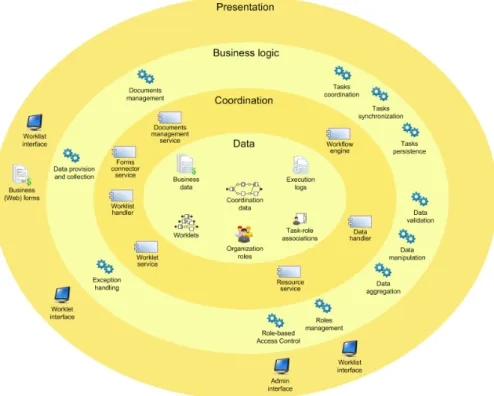
Figure 1. The YAWL system architecture: the YAWL services in the coordination layer access the data layer to support one or more functions in the business logic layer and/or to interact with users via the presentation layer.
to generate reports, to ensure data synchronization across different (disconnected) nodes, and to document experi-ences gained in a production project (especially with re-spect to exception resolution) for reuse in future projects.
The YAWL System
The YAWL system is structured according to the prin-ciples of SOA. It consists of a number of independent services that expose endpoints accessible through stan-dard technology – XML over Hypertext Transfer Protocol (HTTP) – and described by means of publicly accessible interfaces. The architecture, shown in Figure 1, follows a multi-tier model where services composing the workflow system form a coordination layer blended between the tra-ditional data and business logic layers.
The core service is theworkflow engine. This service is responsible for creating and routing work items according to a YAWL process model and managing the coordination data (e.g. active tasks and execution traces). A work item is an instantiation of a task in a process model, together with its associated data. The workflow engine routes work items either to a user (manual task) or to software appli-cations exposed as services in the coordination layer (au-tomatic task).
Theworklist handleris responsible for offering and al-locating manual work items to users and transferring the associated data. This service provides an interface through
which the set of active work items can be queried, work items can be checked-out (indicating the start of the work) and checked-in (indicating completion of the work). Since communication with the worklist handler (as well as other services in the YAWL system) is via XML, it is possible to build customized Web applications on top of the worklist handler to expose work-lists and work-items to end users. The system is shipped with a default renderer that gen-erates Web forms with a basic layout. Alternatively, the
forms connector servicecan be combined with the work-list handler to enable connections to custom-made Web forms. The organization and storage of data entries may be delegated to adocument management service.
The routing of manual work items is governed by a role-based access control mechanism handled via the re-source service and based on the task-role associations specified in the process model. Roles and their capabilities are defined in an organization model and can be loaded to the resource service via an administration interface.
The data entered by the user through a Web form is validated by thedata handler. This service also provides data manipulation and aggregation capabilities. For exam-ple, the data handler may be used to generate reports by aggregating data from multiple work items. Aggregation functions are defined as XQuery expressions.
The worklet service allows users to dynamically change the process model at runtime, by plugging self-contained sub-processes (calledworklets) drawn from a
repository. This capability, offered via the worklet inter-face, is used to handle both expected and unexpected ex-ceptions and to store information allowing users to better deal with such exceptions in future occasions.
Why YAWL?
In the screen business, information needs to be available to the production team at the right time and with a pro-fessional look & feel. The YAWL language, based on in-sights gained from the workflow patterns research [2] and on concepts from Petri nets, can capture sophisticated or-der dependencies among tasks.
The production process involves many stakeholders and involves complex data that need to be validated, an-alyzed and aggregated for decision-making and report generation. The YAWL system offers such capabilities and provides a resource service that supports complex re-source allocation policies. Moreover, by relying on the interfaces of the various YAWL services, the integration with third-party applications (e.g. a script editing applica-tion) can be achieved in a seamless manner, in line with the principles of Web-scale workflow management.
As an alternative to YAWL, we could have consid-ered using a workflow engine based on the Web Services Business Process Execution Language (WS-BPEL) [5]. WS-BPEL by itself does not support resource allocation nor task management and rendering. These features fall in the scope of two extensions to WS-BPEL, namely BPEL4People and WS-HumanTask [4]. At the time of writing, these WS-BPEL extensions are still the subject of debate, and will likely remain under development un-til achieving standardisation [7]. In addition, open-source BPEL engines do not yet fully support these extensions and in the context of small and medium-budget film pro-duction projects it is difficult to justify the licensing costs of commercial BPEL engines.
The Production Process Model
A YAWL model capturing a film production process is shown in Figure 2. Tasks are represented as rectangles that may have an icon indicating whether they are manual or automatic. A task without an icon is an “empty” task that appears only for routing purposes.
Tasks may also have “decorators” to denote how the flow of control from multiple incoming branches joins prior to the execution of the task (join decorators) and conversely, how the flow of control splits into multiple outgoing branches after execution of the task (split dec-orators). There are three types of decorators: AND deco-rators, i.e. AND-splits and AND-joins, that denote the cre-ation and synchronizcre-ation of parallel threads, XOR deco-rators corresponding to alternative branches, and OR dec-orators that behave either as an AND or as an XOR deco-rator depending on the context.
In Figure 2, an instance of the process model begins with the collection of documents (e.g. “cast list”, “crew
list”, “location notes”, and “shooting schedule”) available from the pre-production phase. Next, the shooting pro-cess starts and is carried out on a daily basis. Each day, tasks are performed along two main parallel streams. One stream focuses on the production of a “call sheet”, as cap-tured by the flow of tasks starting fromBegin Call Sheet
toFinish Call Sheet. A “call sheet” is a daily shooting schedule for a specific day. It is usually maintained by the Production Office and is sent out to all cast and crew one day in advance. A draft call sheet can be created from the shooting schedule. It may go through any number of revi-sions before it is finalized, and most of the revirevi-sions result from the changes to the “shooting schedule”.
The other stream is specified by the flow of tasks start-ing fromKick Off OnsettoDistribute DPR. At first, tasks are executed on-set to record the logs and technical notes about individual shooting activities into a number of docu-ments. These are: “continuity log” and “continuity daily” which are filled by the Continuity person, “sound sheet” by Sound Recordist, “camera sheet” by Camera Assistant, and “2nd Assistant Director (AD) report” by 2nd AD. It is possible to stop filling “continuity log” and “2nd AD re-port” in the middle, e.g., for a meal break, and then resume the work after the break. Also, there can be many camera and sound sheets to fill during a shooting day. Upon com-pletion of the above on-set documents, a “daily progress report” (DPR for short) can be generated and passed onto the Production Manager for review. After the review is finished, the DPR is sent to certain crew members such as Producer and Executive Producer.
It is worth mentioning how the OR-join associated with taskend a daybehaves. Before the first shoot day starts, an instance of the “call sheet” branch is executed for pro-ducing the first day’s “call sheet”. Since it is the only active incoming branch to taskend a day, the task will be performed once the “call sheet” has completed, with-out waiting for the completion of a DPR. In this case, the OR-join behaves like an XOR-join. On the other hand, if both the “call sheet” and “DPR” branches are active, the OR-join behaves like an AND-join.
Data Handling
In YAWL, all data is represented in XML. Working data is stored inprocess variableswhose type is specified us-ing the XML Schema language. At runtime, when a work item is checked-out, the engine supplies data to it, and upon completion, the work item is expected to produce new data. The data consumed and produced by a work item is captured by means of input and output parameters. Figure 3 shows that taskUpdate Call Sheethas three pa-rameters: GeneralInfo(input only),CallSheetInfo(input and output) andFinalise(output only). When a work item of typeUpdate Call Sheetis checked-out, the values of its input parameters are determined from the contents of the process variables by means of a set ofinbound map-pings. Inbound mappings are defined using the XQuery language. An example of the data extracted by the
in-Fill Continuity Daily Fill Continuity Log
Fill Sound Sheet
Fill Camera Sheet
Fill 2nd AD Report Kick off on-set Input Cast List Input Crew List Input Location Notes Begin Call Sheet Create Call Sheet Update Call Sheet Distribute Call Sheet Finish Call Sheet Revise Shooting Schedule Input Production start end End a Day Distribute DPR Review DPR Create DPR
last day? finalize?
more days? partial submission? another roll? another roll? NO NO YES YES NO YES YES YES NO NO NO Input Shooting Schedule input condition output condition AND-split task XOR-split task AND-join task XOR-join task OR-join task Manual task Automatic task Atomic task condition Symbols Icons Start a Day another roll? YES NO YES
Figure 2. The film production process in YAWL.
bound mappings is shown in the shaded box inside the task symbol ofUpdate Call Sheetin Figure 3. Later, when the work item is checked-in, the output parameters of the task are used to update one or multiple process variables. The mapping between output parameters and process variables is specified by a set ofoutbound mappings.
Figure 3. Sample data for task
Update Call Sheet.
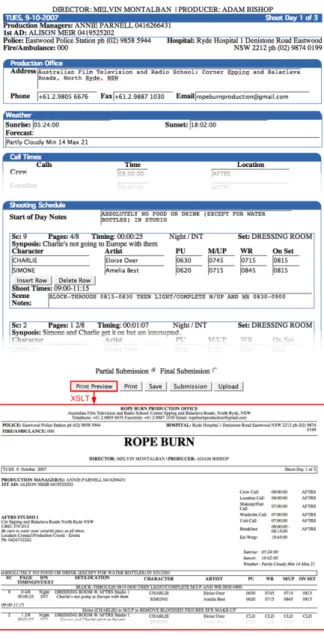
The data that the process instance supplies to the work item is used to populate a Web form for the Call Sheet
(shown in Figure 4. Using this form, the user may per-form updates to the call sheet, such as inserting “start-of-day notes” and she may indicate whether to finalize the Call Sheet (final submission) or to keep updating it (partial submission). This decision is captured in param-eterFinalise. When the work itemUpdate Call Sheetis checked-in later, the updated call sheet and the value of parameterFinaliseare stored in the process variables. The value ofFinaliseis then used to determine which outgoing flow of the XOR-split will be taken.
User Interaction
Most of the tasks in the film production process are man-ual tasks that require input from the user by means of forms. In order to support templates used in professional filmmaking, we chose to create custom-made Web forms and to link these forms to the worklist handler by means of the forms connector service. Figure for example de-picts the Web form for the taskUpdate Call Sheet (see Figure 3), as seen by the Production Manager.
The custom forms were developed using standard Java technology. Item lists that appear in the forms are dy-namically handled via Asynchronous Javascript and XML (AJAX), allowing the user to insert or drop items in a lightweight manner. Each form can load an XML file (complying with the schema of the work item), save the user input into a local XML file, and submit the form back
Figure 4. From the screen to the printer: an example of Web form for film production.
to the worklist handler once it has been completed by the user. Upon submission, the documents management ser-vice stores a backup copy into the server.
Moreover, each form provides data validation upon save and submission to prevent the generation of invalid XML documents. This first stage of validation, realized via JavaScript on the client-side, is interactive: any field of the form which has been filled out with invalid data is reported to the user with suggestions for correction. This function is particularly useful when the forms are very complex and thus error-prone. The second stage of val-idation is provided by default by the engine on the server-side, and is not interactive. This is used to prevent the engine from processing invalid data that would block the execution of the process.
Finally, a print function allows the user to generate a printer-ready document from the Web form, that resem-bles the hard copy format used in practice in this business. The printed out version can then be distributed to the crew members, as in the case of the Call Sheet shown in Fig-ure 3, which has been generated from the Web form for
Update Call Sheet. This function relies on XSL transfor-mations to convert the XML of the form to HTML.
Pilot Scenarios:
Rope Burn
and
Family Man
The Australian Film Television and Radio School (AF-TRS) is the national training and research facility for Graduate Diploma, Masters courses and short courses in film, and TV production. The YAWL system for automat-ing the film production process was deployed on two film production projects in the AFTRS in 2007.
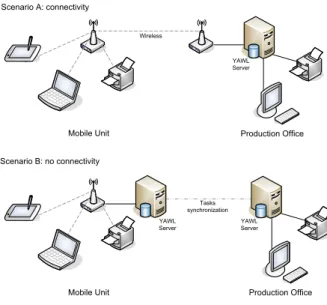
Project 1, Rope Burn, was a three-day shoot in stu-dio with 30 onset crew, 6 cast and 6 production office crew. The office was run by a professional Production Manager, and supervised by a student Producer. Project 2,Family Man, was a three-day shoot on location and in studio with 35 crew, 5 cast and 4 production office crew. A semi professional Production Manager was contracted and supervised by a student Producer. In both projects, the connection for communication between the produc-tion office and shooting unit was available all the time via wired/wireless networks, as illustrated in Figure 5 - Sce-nario A. For hardware set up, both laptops and tablet PCs (with stylus-enabled user input) were used by onset crew members, Continuity and 2nd AD1.
In both productions, the YAWL system shadowed the process of Call sheet generation, DPR generation, and Cast and Crew database update. ForRope Burnthe system was used on-set alongside the traditional paper method of data capture for Continuity and 2nd AD; and later for
Family Manthe system totally replaced paper method for both crew members.
1In both projects, Camera and Sound students were not part of the
testing and the system supervisor and technical assistant entered their data manually into the system.
From the feedback from both projects, it was clear that the system would save time, and create more precise doc-umentation:
“I have managed over a dozen productions offices, and the amount of time this device2could save is incredible. Seeing the system up and running makes me realize how manual and laborious many of the activities are in any production office.”(Production Manager inRope Burn)
“I found the electronic form simple and easy to fill in. It was really just the same as using a paper form, but much cleaner and neater, e.g., no messy handwriting, smudges or crumpled paper.”(2nd AD inFamily Man)
“I so often make errors when calculating DPR or even the Call Sheet, it is much easier to use the tool to double check figures and ratios.”(Production Manager inFamily Man)
The feedback also indicated that, once users became familiar with the tablet PC, the data input was significantly streamlined:
“There is a bit of a knack to filling in the details using an electronic tablet and pen, but with a small amount of practice I found a way to do it that I was most comfortable with.”(2nd AD inRope Burn)
“Writing on the machine should as fast as handwriting. The system in itself is pretty easy to use.” (Continuity in
Family Man)
Finally, the crew members in both projects indicated that the more information one could store, such as scripts and schedule, the more useful the tool could become. Such feedback suggests that the YAWL system should be used right from the pre-production phase, e.g., during script reading and schedule editing, so that information gathered during the pre-production phase can be exploited to better coordinate the production phase.
Ready for Feature-Length
The next deployment project is for a medium-budget, live-action feature film to be shot in the near future. The entire shooting block will take place in the Australian outback. The production office will be set up in the nearest country town, and a mobile unit will be employed for the shooting on location.
Since the designated location has no standard Internet or phone coverage to facilitate communication between the production office and the shooting unit, it is not possi-ble to rely on a single workflow system. Indeed, given the budget constraints, it is not feasible to set up a dedicated wireless connection to cover the whole area between the production office and the unit – which can be up to 50km away.
Thus, the infrastructure used for the projects at AF-TRS (Figure 5 – Scenario A) must be revised. Instead of deploying a single centralized YAWL system, we will deploy two YAWL systems: one at the production office
2In both projects, users often employed terms like “device” and
“tool” to refer to the YAWL system.
and one at the shooting location. Deploying two YAWL systems implies executing two instances of the production process model (one in each system). Every shooting day, the instance running at the production office will be di-rectly responsible for the production of the Call Sheet and the review and distribution of the DPR, while the instance running at the shooting unit will be responsible for co-ordinating the completion of the shooting documents and generating the DPR.
These two process instances are dependent on each other, as the former requires the DPR for revision and dis-tribution, while the latter requires the Call Sheet for prepa-ration of the shooting documents to be filled out by the unit crew. Therefore, daily synchronization between the two process instances will need to occur at tasksKick off on-set(where the unit needs the Call Sheet of the day be-fore) andReview DPR(where the production office needs the DPR of the current day). Specifically, all tasks be-tweenKick off on-set andReview DPRwill be executed off-line at the shooting location, and their execution logs will be replayed back at the production office after each shooting day, so that the YAWL system in the production office gets all the data gathered during the shooting day. A number of tasks will then be performed in the produc-tion office in the evening and the execuproduc-tion logs of the tasks performed during the evening will be replayed the next morning in the YAWL system running at the shoot-ing site. These operations will be achieved by means of the “log replay” functionality of the YAWL engine, which allows one to brings the execution state of the YAWL en-gine to a given state by replaying logs.
Logistically, the execution logs from the shooting unit will be physically brought to the production office by a courier at the end of every shooting day, whereas the logs from the production office will be brought back to the unit in the morning of the day after, before starting the new shooting session. This scenario is illustrated in Figure 5 – Scenario B.
Where Next?
Over the course of this project, we have extended the core YAWL system with a number of additional modules tai-lored to the needs of the film production industry, includ-ing customized renderers, form generators, report genera-tors and data synchronization modules. We are incremen-tally packaging these additional modules into an applica-tion platform that supports the manifold requirements of film production processes by following the principles of web-scale workflows.
We are now turning our attention to other phases of the screen business value chain, particularly pre-production. Also, we envisage deploying the YAWL4Film platform in the context of high-budget production projects, where we expect an increased demand for supporting autonomy and flexibility. For example, Hollywood movies usually involve multiple production teams spread across multiple
Wireless
Mobile Unit Production Office
Tasks synchronization Scenario A: connectivity
Scenario B: no connectivity
Mobile Unit Production Office
YAWL Server YAWL Server YAWL Server
Figure 5. Two deployment scenarios.
locations and employing several shooting units.
One particularity of the screen business, when com-pared to traditional application domains of workflow tech-nology, is that each production project requires different process models. Processes for medium-budget film pro-duction have commonalities with low-budget and high-budget ones, but they also have important differences. Production projects for TV also share commonalities with those for cinema, while differing in many respects. Other factors such as the shooting medium may also affect the production process. In the end, it is rare that two pro-duction projects follow exactly the same process model. Dealing with this variability, while achieving maximum reuse, is a major challenge. With this requirement in mind, we are investigating the applicability of process configura-tion approaches [8]. Such approaches allow us to capture variation points in process models and to support the con-figuration of these variation points to fit the needs of each specific project. Our ongoing work [6] has demonstrated that such approaches can be used to capture variability in high-level process models for film production, but more work is needed to apply these techniques to the automated generation of executable process models for film produc-tion projects.
References
[1] W. M. P. van der Aalst and A. H. M. ter Hofstede. YAWL: Yet Another Workflow Language. Informa-tion Systems, 30(4):245–275, 2005.
[2] W. M. P. van der Aalst, A. H. M. ter Hofstede, B. Kie-puszewski, and A.P. Barros. Workflow Patterns. Dis-tributed and Parallel Databases, 14(1):5–51, 2003.
[3] M. B. Blake and M. Huhns. Web-scale workflows: Integrating distributed services. IEEE Internet Com-puting, 12, January 2008.
[4] T. Holmes, M. Vasko, and S. Dustdar. VieBOP: Extending BPEL Engines with BPEL4People. In
16th IEEE Euromicro International Conference on Parallel, Distributed and Network-based Processing, Toulouse, France, February 2008.
[5] D. Jordan and J. Evdemon. Web Services Business Process Execution Language Version 2.0. Committee Specification. OASIS WS-BPEL TC, January 2007. Available via http://www.oasis-open.org/ committees/download.php/22475/
wsbpel-v2.0-CS01.pdf.
[6] M. La Rosa, J. Lux, S. Seidel, M. Dumas, and A. H. M. ter Hofstede. Questionnaire-driven Configura-tion of Reference Process Models. InProceedings of the 19th International Conference on Advanced Infor-mation Systems Engineering (CAiSE’07), Trondheim, Norway, 11-15 June 2007.
[7] J. McEndrick. Bpel4people advances toward the mainstream. Blog entry accessed on 22 February 2007 at http://blogs.zdnet.com/
service-oriented/?p=1061.
[8] M. Rosemann and W. M. P van der Aalst. A Config-urable Reference Modelling Language. Information Systems, 32(1):1–23, 2007.