Software
Engineering
Issues for Ubiquitous
Computing
Gregory
D. Abowd
College of Computing
& GVU Center
Georgia Institute
of Technology
Atlanta,
GA 30332-0280 USA
+404-894-7512
abowdcc.gatech.edu
ABSTRACT
In the last decade, we have experienced the advent of the paradigm of ubiquitous computing, with the goal of making computational services so pervasive throughout an environment that they become transparent to the human user. Research in ubiquitous computing raises many challenging issues for computer science in gen- eral, but successful research in ubiquitous computing requires the deployment of applications that can sur- vive everyday use, and this in itself presents a great software engineering challenge. In our experience, we have found three features common across many ubiq- uitous computing applications -transparent interfaces that provide appropriate alternatives to the desktop- bound traditional graphical user interface, the ability to modify behavior of a application based on knowledge of its context of use, and the ability to capture live expe- riences for later recall. Building ubiquitous computing applications with these features raises software engineer- ing problems in toolkit design, software structuring for separation of concerns and component integration. We will clarify these problems and discuss our approaches towards their solution.
Keywords
Ubiquitous computing, transparent interfaces, context- aware computing, automated capture, toolkit design, software structure, component integration
1 INTRODUCTION
The history of computing is peppered with paradigm shifts in how the relationship between humans and com- puters is perceived. The most recent paradigm shift is
ubiquitous computing, or ubicomp for short [27, 28, lo].
The ubicomp vision pushes computational services out of conventional desktop interfaces and into the envi- ronment in increasingly transparent forms. In this pa- per, we discuss the software engineering problems that
Permission to make digital or hard copies of all or part of this work fol personal or classroom use is granted without fee provided that copies are oat made or distributed for profit or commercial advaotage and that copies bear this notice and the full citation on the first page. To copy otherwise, to republish, to post on servers or to redistribute lo lists. requires prior specific permission and/or a fee.
ICSE ‘99 Los Angclcs CA
arise in conducting research toward this vision of future computer-enhanced environments.
Ubicomp research is experimental in nature [28]. Good research in the field should satisfy the following criteria:
There should be a motivating application. In the words of Mark Weiser, applications are the whole point of ubiquitous computing [28].
The Gystem built should address some notion of scale. Scale in this case can refer to the physi- cal spa+ covered, the number of people involved, the number and variety of devices supported or the amount of time over which an application is run. The system should be subjected to real and every- day use. This characteristic is especially important because of the next criteria.
The use of the system should be evaluated to de- termine its impact on the user community.
These last two criteria are very important, because to- gether they present a serious robustness challenge in an uncommon computing domain. Ubiquitous computing applications attempt to invade our everyday lives. Sig- nificant evaluation can only occur when the novelty of some new service wears off and the new service is ex- pected by its user population. This means the applica- tion must be robust enough to run continuously for long stretches of time. Whereas many business and safety critical systems also face this “24 by 7” constraint, it is not common for everyday computing tasks, and even less common for systems which use a variety of different devices.
Ubicomp applications evolve organically. Even though they begin with a motivating application, it is often not clear up front the best way for the application to serve its intended user community. The best approach is of- ten to prototype a solution rapidly, put it into place and solicit feedback from the user population. Con- stant evaluation of this sort often results in the need to modify the application, often without the luxury of
much downtime. This rapid prototyping model is not a new one to software engineering, but it brings particu- lar challenges in ubicomp research that we will discuss later.
Adhering to the experimental model of research, and taking an applications focus, we have built several ubi- camp applications at Georgia Tech over the past four years.l We will discuss two projects in some detail in this paper, for they will help to illustrate the major con- tributions of this paper:
l There are three general features that are shared across a wide variety of ubicomp applications. These features are the ability to provide transpar- ent interfaces, the ability to automatically adapt the behavior of a program based on knowledge of the context of its use, and the ability to automate the capture of live experiences for later recall.
l Rapid prototyping of ubicomp applications with the above three features requires advances in the toolkits or libraries made available for ubicomp pro- grammers, specific software structuring to support the correct separation of concerns, and lightweight componentintegration techniques that support the lowest common denominator among a wide variety of devices and operating systems.
These questions arise out of a number of years design- ing, implementing and evaluating a variety of ubiquitous computing applications at Georgia Tech.
Overview of paper
The thesis of this paper is that software engineering ad- vances are required to support the research endeavors in ubiquitous computing. In Section 2 we will present two ubiquitous computing projects conducted at Geor- gia Tech -the Classroom 2000 project and the Cyber- guide project. These projects will be used in Section 3 to help define the three common features of ubicomp appli- cations -transparent interfaces, context-awareness and automated capture. We then categorize the important software engineering issues that must be met in order to support continued ubicomp research. These issues are toolkit design (Section 4), software structuring for separation of concerns (Section 5), and component in- tegration(Section 6).
2 TWO UBICOMP PROJECTS
Much of our insight has been gained from practical ex- perience building ubicomp applications. Since the con- crete details of particular systems will help in express- ing challenges raised later on, we will describe here two
‘Specific details on our projects can be obtained at http://www.c.gatech.edu/fce.
projects. The first project, Classroom 2000, is an ex- periment to determine the impact of ubiquitous com- puting in education and involves the instrumentation of a room. The second project, Cyberguide, is a suite of flexible mobile tour guide applications that cover an area ranging in size from a building to a campus.
Classroom 2000
Classroom 2000 is an experiment to determine the im- pact of ubiquitous computing technology in education through instrumented classrooms [2, 6, 1, 41. In a class- room setting, there are many streams of information presented to students that are supplemented by discus- sions and visual demonstrations. The teacher typically writes on some public display, such as a whiteboard or overhead projector, to present the day’s lesson. It is now common to present supplemental information in class via the World Wide Web. Additional dynamic teaching aids such as videos, physical demonstrations or computer-baaed simulations can also be used. Taken in combination, all of these information streams provide for a very information-intensive experience that is eas- ily beyond a student’s capabilities to record accurately, especially if the student is trying to pay attention and understand the lesson at the same time! Unfortunately, once the class has ended, the record from the lecture experience is usually a small reflection of what actually happened. One potential advantage of electronic me- dia used in the classroom is the ability to preserve the record of class activity. In the Classroom 2000 project, we are exploring ways in which the preservation of class activity enhances the teaching and learning experience. The instrumented classroom, shown in Figure 1 makes it easy to capture what is going on during a normal lec- ture. In essence, the room is able to take notes on behalf of the student and the entire lecture experience is turned into a multimedia authoring session. Figure 2 shows a sample of the kind of notes that are provided automati- cally to the students within minutes of the conclusion of class. This particular class was an introductory software engineering course. Web pages and presented slides are all available and presented in a timeline. The timeline and lecturer annotations on slides can ,be used to index into an audio or video recording of the lecture itself. A necessary pre-condition for the evaluation of Class- room 2000 is that it be perceived by a large user popula- tion as providing a reliable service over an extended pe- riod of time, minimally a 10 week quarter. The project began in July 1995 and the first quarter-long classroom experiment was in January 1996. Within one year, a purpose-built classroom was opened and has been op- erational for the past 18 months, supporting over 40 graduate and undergraduate classes in the College of Computing, Electrical and Computer Engineering and Mathematics. By the end of 1998, variations of the
initial prototype classroom environment will have been installed in 5 locations on Georgia Tech’s campus and at single locations at three other universities in Geor-gia. This project has satisfied the difficult criteria for ubiquitous computing set out in Section 1, largely due to engineering successes. This level of success simply would not have been possible without engineering a soft-ware system to automate much of the preparation, live recording and post-production of class notes. The soft-ware system supporting Classroom 2000 is called Zen*, and we will discuss what features of Zen* lead to the current success of the project and which features need further research.
Cyberguide
When a traveller visits an unfamiliar location, it is use-ful to have some sort of information service to provide background about the location. A very effective infor-mation service is the human tour guide, who provides some organized overview of a area, but is often able to answer spontaneous questions outside of the prepared overview. The Cyberguide project was an attempt to replicate this human tour guide service through use of mobile and hand-held technology and ubiquitous posi-tioning and communication services [3, 14, 13]. Over the course of two years, we built a suite of tour guide sys-tems for various indoor and outdoor needs within and around the Georgia Tech campus. One example sup-ports a community of users in pursuit of refreshment at neighborhood establishments around the Georgia Tech campus. This prototype, called CyBARguide, used a Newton MessagePad and a GPS receiver to cover
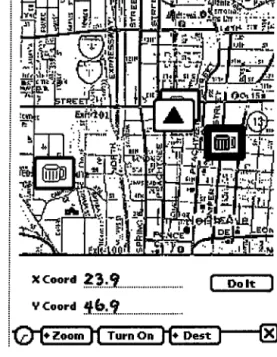
ap-proximately 12 square miles of midtown Atlanta, using multiple maps at varying levels of detail. The inter-face on the Newton is shown in Figures 3 and 4. Users driving around Atlanta can find out the location of es-tablishments that satisfy certain requirements (special offers, free parking, good ambience). Deciding on a par-ticular location results in an interactive map that pro-vides directions to the establishment. In addition, after visiting an establishment, the user can leave comments that are then available to future users.
The various Cyberguide prototypes varied over whether they supported indoor or outdoor (or mixed) tours and whether they provided support for individuals or groups (synchronous and asynchronous). Positioning informa-tion was used to inform the interface where the user was located. That information could then be used to provide information automatically about the surrounding envi-ronment. Different modes of interaction were also made possible, ranging from hand-held, pen-based interactive books to hands-free interaction with heads-up displays or audio-only interfaces. Positioning information ranged from commercially available services, such as GPS, or home-grown beacon systems for indoor use. The his-tory of where a tourist had travelled over time was used to provide an automated compilation of a travel diary and to make suggestions on places of interest to visit based on past preferences. Communication was pro-vided either through an asynchronous docking metaphor
XCoord . . . . . .
23.9
[Dolt- Y Coord W6.8 . . . . .@J
Figure 3: The interactive map of the CyBARguide pro-
totype indicating the user’s location (the triangle) and
the location of establishments previously visited (the
beer mugs).
or wireless/cellular connections.
Ultimately, this project was not as successful for ubi-
camp research as it could have been. Though succes-
sive prototypes were similar in functionality, very little
was preserved from version to version. User evaluation
indicated the need for major modifications and these
modifications were not easy to do quickly, so no single
prototype experienced extended use. As a proof of con-
cept, Cyberguide was very useful. As a research pro-
totype that allowed for investigation of how ubicomp
affects our everyday lives, it was not successful. Unfor-
tunately, too many ubicomp research projects fall into
this category.
3 COMMON FEATURES OF UBICOMP AP-
PLICATIONS
Having briefly outlined two ubicomp research projects,
we can now define some common features that stretch
across almost any ubicomp application. We will define
each theme, and demonstrate its relevance in terms of
the above projects and some other related work. Un-
derstanding these features of ubicomp applications will
seed discussion of the challenges of providing these fea-
tures in the rapid prototyping model of research.
Transparent interaction
It has long been the objective of interface design to re-
Highlktder 2000 Monroe Dr. Midtown Atlanta, GA 30332
+ Hours + Parking Lot: ye$
Parking Information Rating Price 1 Food&Drink 1 Ambiance 1
I
Recreation I Specialities I Personal Comment5 daFigure 4: CyBARguide’s user-modifiable database sup-
ports the long-term collection of group comments for a
location.
move the physical interface as a barrier between a user
and the work she wishes to accomplish via the computer.
While many of the advances in usability have come from
the development of techniques that allow a designer to
build a system based on modeiling of the user’s tasks
and mental models, we are still largely stuck with the
same input devices (keyboard, mouse and tiny display
monitor) that have been commercial standards for 15
years; This physical interface is anything but transpar- ent to the user and it violates ubicomp vision of per-
vasive computation without intrusion. As the vision
of ubicomp is fulfilled and computational services are
spread throughout an environment, advances are needed
to provide alternative interaction techniques.
For example, in Classroom 2000, it is.important that
the electronic whiteboard look and feel like a white-
board and not a computer. In a traditional classroom,
the lecturer comes to class and only has to pick up a
marker or chalk to initiate writing on the board. Inter-
action with the electronic whiteboard needs to be that
simple. Our initial Zen* system required a lecturer to
launch a browser, point to the ZenPad Web Ipage, select the class, give a lecture title, set up the audio and video
encoding machines and authenticate themselves to the
system before class could begin. As class begun, three
people were needed to “start” the system, synchronizing
the beginning of three different streams of information.
vided human assistance to set up the class, we would not have had so many adopters early on. What we lacked in an automated transparent entry to the system we had to make up in human support. Today, the situation is still not ideal, but the start up procedure is limited to starting a single program, entering the title for the lec- ture and pressing a button to begin lecture. The goal is to make the system vanish even further, ultimately returning to the situation in which the’lecturer simply enters the room, picks up the pen and begins to lecture. As another example, the Cyberguide prototypes varied quite a bit in the interface provided to the end user. The goal was to reproduce the flexibility of a human tour guide, which meant allowing for questions at arbitrary times with constant knowledge of where the traveller was located. This knowledge can be used to provide an apparently flexible and “intelligent” interface. Lim- ited speech interaction is augmented by knowing what a person is attending to and preparing the system to recognize utterances with related keywords. In addition to providing end-user flexibility, there is a development challenge to provide similar functionality across varied interfaces and interaction techniques.
Transparent interaction techniques is a very active area of research which includes handwriting and gesture recognition, freeform pen interaction, speech, computa- tional perception, tangible user interfaces (using phys- ical objects to manipulate electronic information) and manipulation interfaces (embedding sensors on compu- tational devices to allow for additional modes of inter- action).
Context-awareness
An application like Cyberguide can take advantage of user mobility by adapting behavior based on knowledge of the user’s current location. This location can re- fer to the position and orientation of a single person, many people, or even of the application itself. Loca- tion is a simple example of conte~:t, that is, information about the environment associated with an application. Context-aware computing involves application develop- ment that allows for collection of context and dynamic program behavior dictated by knowledge of this envi- ronment. Researchers are increasing our ability to sense the environment and to process speech and video ‘and turn those signals into information that expresses some understanding of a real-life situation. In addition to dealing with raw context information such as position, a context-aware application is able to assign meaning to the events in the outside world and use that information effectively.
Context-awareness is not unique to ubiquitous comput- ing. For example, explicit user models used to pre- dict the level of user expertise or mechanisms to pro-
vide context-sensitive help are good examples used in many desktop systems. With increased user mobility, and with increased sensing and signal processing capa- bilities, there is a wider variety of context available to tailor program behavior. Moreover, context-awareness is a critical feature for a ubiquitous computing system because important context changes are more frequent. In a ubiquitous computing environment it is likely that the physical interfaces will not be “owned” by any one user. When a user owns the interface -as is usu- ally the case with personal digital assistant or a laptop computer- over time this interface can be personalized to the user. Context can be useful in these situations, as has been demonstrated by location-aware computing applications. When the user does not own the interface, it is likely that the same physical interface will be used by many people. Any single user (or group of users) will prefer to have the interface personalized for the dura- tion of the interaction. Context-awareness will allow for this rapid personalization of computing services. The restricted context-awareness based on position was the focus of Cyberguide and many other research efforts have focussed on location-aware computing [25, 21, 26, 221. In Classroom 2000, a different kind of context was necessary. We used information about the location of the electronic whiteboard and the schedule of classes to automatically predict what class was beginning and drastically streamline start-up activities. It was also important to determine focus of class discussion (Web page or electronic whiteboard slide) in order to decorate the timeline of the captured notes (shown in Figure 2) with the relevant item. In variations of the Zen* system that we have built to support informal and unscheduled meetings, we use a number of different sensing tech- niques to determine when a recorded session should be- gin and who is in attendance, all of which is contextual information.
Automated capture
One of the potential features of a ubiquitous computing environment is that it could be used to capture our ev- eryday experiences and make that record available for later use. Indeed, we spend much time listening to and recording, more or less accurately, the events that sur- round us, only to have that one important piece of in- formation elude us when we most need it. We can view many of the interactive experiences of our lives as gen- erators of rich multimedia content. A general challenge in ubiquitous computing is to provide automated tools to support the capture, integration and access of this multimedia record. The purpose of this automated sup- port is to have computers do what they do best, record an event, in order to free humans to do what they do best, attend to, synthesize, and understand what is hap- pening around them, all with full confidence that the
specific details will be available for later perusal. Auto- mated capture is a paradigm for simplified multimedia authoring.
In Classroom 2000, the Zen* system was built with this capture problem foremost in th.e minds of the design- ers. The classroom experience was viewed as producing a number of streams of relevant :information -prepared information presented as a sequence of slides, annota- tions on the electronic whiteboard, a series of Web pages viewed, what is said by the lecturer and what is seen by the students. The objective of the system was to facili- tate the capture of all of these streams and the prepara- tion of visualizations that allow a student to effectively relive the classroom experience. Many other researchers have developed similar note-taking or meeting capture applications [18, 12, 29, 24, 30, 9, 20, 71.
Cyberguide can also be seen as a capture problem. As a tourist travels from location to location, a record of what was visited, what was seen there, and even per- sonal comments, results in a captured trail that can be revisited later. Various prototypes created a historian component with the responsibility of capturing signif- icant events and preparing summaries that were then made available to the user in a variety of formats.
4 TOOLKIT DESIGN ISSUES
Having established three important functional features of ubicomp applications, we can now further discuss the software engineering challenges that they present.
Language requirements
The landmark work of Douglas Engelbart and his team of researchers at SRI in the 60’s demonstrated the power of building toolkits to bootstrap the development of in- creasingly sophisticated interactive systems. Each of the functional themes discussed above provide opportunities for developing toolkits which augment the programming capabilities to implement applications.
For the development of more applications that support transparent interaction, we must be able to treat other forms of input as easily as we treat keyboard and mouse input. A good example justifying the need for transpar- ent interaction toolkits is freeform, pen-based interac- tion. Much of the interest in pen-based computing has focussed on recognition techniques to convert pen input to text. But many applications, such as the note-taking in Classroom 2000, do not require conversion from pen to text. Relatively little effort has been put into stan- dardizing support for freeform, pen input. Some for- mats for exchanging pen input between platforms exist, such as JOT, but no support for using pen input effec- tively within an application.
For example, Tivoli provides basic support for creating ink data, distinguishing between uninterpreted ink data
and special gestures [15, 171. A particularly important feature of these other data types is the ability to clus- ter them. In producing Web-based notes in Classroom 2000, we want annotations done with a pen to link to au- dio or video. The annotations are timestamped, but it is not all that useful to associate an individual penstroke to the exact time it was written in class. We used a temporal and spatial heuristic to statically cluster pen- strokes together and assign them some more meaningful, word-level time. Chiu and Wilcox have produced a more general and dynamic clustering algorithm to link audio and ink [8]. Clustering of freeform ink is also useful in real-time to allow for a variety of useful whiteboard in- teractions (e.g., insert a blank line between consecutive lines) and implicit structuring has been used to do this [16]. These clustering techniques need to become stan- dard and available to all applications developers who wish to create freeform, pen-based interfaces.
Designing context-aware applications is difficult for a number of reasons. One example comes from our ex- perience with location-awareness in Cyberguide. We used many different positioning systems throughout the project, both indoor and outdoor. Each prototype had its own positioning-system specific code to handle the idiosyncracies of the particular positioning system used. A location-aware application should be written to a sin- gle location-aware API, but this does not exist.
An analogy to GUI programming is appropriate here. GUI programming is simplified by having toolkits with predefined interactors or widgets that can be easily used. In theory, a toolkit of commonly used context ob- jects would be useful, but what would be the building blocks of such a toolkit? The context that has been most useful is that which provides location information, iden- tification, timing and an association of sensors to enti- ties in the physical world. While desktop computing ex- ists with a WIMP (windows, icons, menus and pointers) interface, we are suggesting that context-aware comput- ing exists with a TILE (time, identity, location, entities) interface. In the next section, we will return to the is- sue of a context-aware infrastructure that separates the concerns of the environment from those.of tbe applica- tion.
Our collected experience building a variety of capture applications has lead to the development of a cap- ture toolkit to enable rapid development. The prim- itives of this toolkit are captured objects (elements created at some time that are aggregated to create a stream of information), capture surfaces (the logical container for a variety of streams of captured objects), service providers (self-contained systems that produce streams of recorded information) capture clients (in- teractive windows that control one or more capture surfaces and service providers), capture servers (mul-
tithreaded servers that maintain relationships between capture clients and service providers and handles stor- age and retrieval to a multimedia database), and access clients (programs that aggregate captured material for visualization and manipulation).
Perhaps the biggest open challenge for toolkit design is the scalable interface problem. We deal with a variety of physical devices, and they differ greatly in their size and interaction techniques. This variability in the physical interface currently requires an application programmer to essentially rewrite an application for each of the dif- ferent devices. The application, in other words, does not scale to meet the requirements of radically different physical interfaces.
One approach to scaling interfaces is through automated transformation of the interaction tree representing the user interface. There has been some initial research on ways to transform an interface written for one device into an equivalent application on a different device. For example, the Mercator project automatically converts an X-based graphical interface into an auditory interface for blind users [19]. Similar transformation techniques were employed by Smith to automatically port a GUI interface to a Pilot [23]. The focus of this prior work has been transformation of an existing application. Another avenue to be pursued would be more abstract interface toolkits that can be bound to appropriate physical inter- faces for different devices. Just as a windowing system promotes a model of an abstract terminal to support a variety of keyboard and pointing/selection devices, so too must we look for the appropriate interface abstrac- tions that will free the programmer from the specifics of desktop, hand-held and hands-free devices.
5 SOFTWARE STRUCTURING ISSUES
In Section 1, we explained why rapid prototyping and frequent iteration with minimal downtime were neces- sary in ubicomp applications development. In Brooks’ terms, ubicomp applications need to grow organically [5]. One barrier that stands in the way of this goal is the difficulty of modifying an existing system made up of a complex collection of interacting parts. If the designer is not careful, modifications to one part of the system can easily have undesirable ramifications on other parts of the system.
In Classroom 2000, the initial system contained a sin- gle electronic whiteboard surface with audio recording. Over time, and due to requests from users (both teach- ers and students) we included an extended whiteboard, an instrumented Web browser (initially built by one of the users and integrated into the system in a matter of days), video, and improved HTML notes. While this growing of the system was not without pain, we never experienced a downtime during a quarter’s classes and
frequently introduced new functionality in the middle of a quarter. This evolution was possible because very early on we adopted a structure to the capture problem that separated different concerns cleanly. This struc- turing divides the capture problem into four separate phases [2]:
pre-production to prepare materials for a cap-
tured lecture;
live recording to synchronize and capture all rel-
evant streams;
post-production to gather and integrate all cap-
tured streams; and
access to allow end-users to view the captured in-
formation
Clear boundaries between the phases allowed for a suc- cession of evolved prototypes with improved capabilities and minimal down-time. The lesson here is an old one: structuring a problem so as to separate concerns deter- mines long-term survivability.
We did not have the same experience of organic evo- lution with Cyberguide. Nor did we have this success with one other major context-aware project, CyberDesk [ll]. The main reason for this is that we have not yet succeeded in separating issues of context gathering and interpretation from the triggering of application behav- ior. The analogy with GUI programming mentioned in Section 4 is again appropriate here. One of the main advantages of a GUI toolkits and user interface manage- ment systems is that they are successful in separating concerns of the application from concerns of the user interface. This allows flexibility in changing one (usu- ally the presentation) without affecting the other. For context-aware computing, we need to be able to effec- tively separate the concerns of the application from the concerns of the environment. That is why we are cur- rently developing a generic context server which holds pieces of contextual information (time, identity, loca- tion, and entities associated with sensors) organized in a way that allows an application to register interest in parts of the environment’s context and be automatically informed of relevant changes to that context. It is the responsibility of the context server to gather and inter- pret raw contextual information.
The requirements on the context server are more com- plex, however. Context is dynamic. The source of a piece of context may change while an application is running. For example, as a tracked individual walks outside, a GPS receiver may broadcast updates on his location. Stepping inside would mean a switch to any number of positioning systems. The context server must
hide these details from the application, which is only in- terested in where the person is, not how that location is determined.
Context sensing devices differ in the accuracy with which they record information. GPS might be accu- rate to within 100 feet, but a building location sys- tem might have a finer resolution. Different positioning systems can deliver the same information but in differ- ent forms. GPS delivers latitude/longitude, whereas an Active Badge [25] indoor system delivers position via cell identities that are separately mapped to building- relevant locations. The context server needs to insulate the application from these worries.
Finally, different forms of context can become avail- able at different times. In essence, an application may not know what kinds of context are available to it un- til run-time. The context server needs to be able to discover context-generating resources dynamically and inform running applications appropriately. An exam- ple of this resource discovery problem occurs in Class- room 2000. Different instrumented classrooms provide different recording capabilities and those recording ca- pabilities do not always work. A context server that serves the Zen* system would inform particular capture clients of the functionality of recording streams in its en- vironment, allowing the client to customize its interface appropriately.
6 COMPONENT INTEGRATION
Ubicomp presents a rather arduous requirement of ro- bustness, reliability and availability to the end user. No single researcher has the time or desire to develop all portions of a ubicomp application and be confident that it will satisfy that requirement on the variety of de- vices that a user will want. The only hope is to rely on third-party software, which leaves the challenge of glu- ing together pieces of a system, or component integra- tion. Though there is a wealth of academic research and commercial products that provide very general compo- nent integration technologies, they are not appropriate for ubicomp application development. This is because those integration technologies are not universally avail- able on the range of devices and operating systems that are required.
Our requirement for component integration is a some standard method for communication and control that can be realized across the wide array of devices and op- erating systems. One strategy would be to adopt TCP, as it provides a lowest common denominator for com- munications for a large array of devices. At a higher level, a lightweight communications protocol as HTTP is desirable. HTTP serGers are available in any lan- guage you desire and are simple enough to run on the limited resources of most embedded devices. Most
HTTP servers now also support the extensible standard markup language XML. X,ML is a text-based protocol, so it will again be supportable for a wide variety of devices. While there may ultimately be limitations to this lightweight approach to component integration, it is sufficient at present to support the ad hoc integra- tion that is required for rapid prototyping of ubicomp applications.
7 CONCLUSIONS
Ubiquitous computing provides a tantalizing vision of the future and hard problems that engage researchers from many subdisciplines of computer science. To con- duct ubicomp research effectively, there are significant software engineering challenges that in themselves pro- vide direction for that research community. Ubicomp research is inherently empirical and relies on a rapid prototyping development cycle that can rea.ct to feed- back from user evaluation. Development under these conditions requires technical advances.
Ubicomp applications share several functional features. Specifically, they strive to produce transparent interac- tion techniques, they adapt their behavior in accordance with changes to the context of their use, and they pro- vide automated services to capture live experiences for later access. Engineering software solutions that pro- vide these functional features requires advances in the design of toolkits used to build ubicomp applications, the structuring of software systems to separate concerns of environmental context and phases .of capture, and the adoption of lightweight component integration tech- niques.
Acknowledgements
The author would like to thank all of the researchers in the Future Computing Environments (FCE) Group in the College of Computing and GVU Center at Geor- gia Tech. Their abundant energy, enthusiasm and sweat have fed the ideas expressed in this paper as they have germinated over the past few years. Further informa- tion on the research of the FCE Group can be found at http: //waw . cc. gatech. edu/f ce. This work is spon- sored by the National Science Foundation, through a Faculty CAREER grant IRI-9703384 arid by DARPA, through the EDCS project MORALE.
REFERENCES
[l] G. D. Abowd, C. G. Atkeson, J. Brotherton, T. En- qvist, P. Gulley, and J. LeMon. Investigating the capture, integration and access problem Iof ubiqui- tous computing in an educational setting. In Pro-
ceedings of the 1998 conference on Human Factors
in Computing Systems - CHI’98, pages 440-447,
May 1998.
[31 PI [51 PI 171
PI
PI
PO1
PI
WI
P31C. Hmelo, R. Kooper, S. Long, N. Sawhney, and M. Tan. Teaching and learning as multimedia authoring: The classroom 2000 project. In Pro-
ceedings of the ACM Conference on Multimedia -
Multimedia’96, pages 187-198, 1996.
G. D. Abowd, C. G. Atkeson, J. Hong, S. Long, R. Kooper, and M. Pinkerton. Cyberguide: A mo- bile context-aware tour guide. ACM Wireless Net-
works, 3:421-433, 1997.
G. D. Abowd, J. Brotherton, and J. Bhalodia. Au- tomated capture, integration, and visualization of multiple media streams. In Proceedings of the 1998
IEEE conference on Multimedia and Computing
Systems, 1998.
F. Brooks. Mythical Man-Month. Addison Wesley, 20th anniversary edition edition, 1995.
J. A. Brotherton and G. D. Abowd. Rooms take note: Room takes notes! In Proceedings of the
i998 Spring AAAI Symposium on Intelligent En-
vironments, pages 23-30, 1998. Published as AAAI
Technical Report SS-98-02.
P. Brown. The stick-e document: a framework for creating context-aware applications. In Proceedings
of Electronic Publishing ‘96, pages 259-272. Uni-
versity of Kent, Canterbury, September 1996. P. Chiu and L. Wilcox. A dynamic grouping tech- nique for ink and audio. In Proceedings of UIST’98,
page ???, 1998.
L. Degen, R. Mander, and G. Salomon. Work- ing with audio: Integrating personal tape recorders and desktop computers. In Proceedings of ACM
CHI’92 Conference, pages 413-418, May 1992.
A. J. Demers. Research issues in ubiquitous com- puting. In Proceedings of the Thirteenth An-
nual ACM Symposium on Principles of Distributed
Computing, pages 2-8, 1994.
A. Dey, G. D. Abowd, and A. Wood. Cyberdesk: A framework for dynamic integration of desktop and network-based applications. Iinowldege-Based
Systems, 11:3-13, 1998.
M. Lamming and M. Flynn. Forget-me-not: Inti- mate computing in support of human memory. In
Proceedings of FRIEND2I: International Sympo-
sium on Next Generation Human Interfaces, pages 125-128. RANK XEROX, 1994.
S. Long, D. Aust, G. D. Abowd, and C. G. Atke- son. Rapid prototyping of mobile context-aware applications: The cyberguide case study. In Pro-
ceedings of the 1996 conference on Human Factors
P41 P51
iI61
P71W31
WI
WI
WIP21
P31in Computing Systems - CHI’96, pages 293-294,
1996. Short paper in Conference Companion. S. Long, R. Kooper, G. D. Abowd, and C. G. Atke- son. Rapid prototyping of mobile context-aware ap- plications: The cyberguide case study. In Proceed-
ings of the 2nd Annual International Conference
on Mobile Computing and Networking, November
1996.
S. Minneman, S. Harrison, B. Janseen, G. Kurten- bath, T. Moran, I. Smith, and B. van Melle. A confederation of tools for capturing and access- ing collaborative activity. In Proceedings of the
ACM Conference on Multimedia - Multimedia’95,
November 1995.
T. Moran, P. Chiu, and B. van Melle. Finding and using implicit structure in human-organized spatial layouts of information. In Proceedings of CHI’96,
pages 346-353, 1996.
T. P. Moran, P. Chiu, and W. van Melle. Pen-based interaction techniques for organizing material on an electronic whiteboard. In Proceedings of the ACM
Symposium on User Interface Software and Tech-
nology - UIST’97, pages 45-54. ACM Press, Oc-
tober 1997.
T. P. Moran, L. Palen, S. Harrison, P. Chiu, D. Kimber, S. Minneman, W. van Melle, and P. Zel- weger. “I’ll Get That Of the Audio”: A case study of salvaging multimedia meeting records. In Pro-
ceedings of ACM CHI’97 Conference, pages 202-
209, March 1997.
E. D. Mynatt. Transforming graphical interfaces into auditory interfaces for blind users. Human
Computer Interaction, 12(1&a), 1997.
H. Richter, P. Schuchhard, and G. D. Abowd. Au- tomated capture and retrieval of architectural ra- tionale. In The First Working IFIP Conference on
Software Architecture (WICSAI), February 1999.
To appear as technical note.
B. N. Schilit, N. I. Adams, and R. Want. Context- aware computing applications. In Proceedings of
1st International Workshop on Mobile Computing
Systems and Applications, pages 85-90. XEROX
PARC, December 1994.
W. N. Schilit. System architecture for context-
aware mobile computing. PhD thesis, Columbia
University, 1995.
I. Smith. Support For Multi-Viewed Interfaces.
PhD thesis, Georgia Tech College of Computing, 1998.
[24] L. Stifelman. The Audio Notebook. PhD thesis, MIT Media Laboratory, 1997.
[25] R. Want, A. Hopper, V. Fa.lcao, and J. Gibbons. The active badge location system. ACM Transac-
tions on Information Systems, 10(1):91-102, Jan-
uary 1992.
[26] R. Want, B. Schilit, N. Adams, R. Gold, K. Pe- tersen, J. Ellis, D. Goldberg, and M. Weiser. The PARCTAB ubiquitous computing experiment. Technical Report CSL-95-1, Xerox Palo Alto Re- search Center, March 1995.
[27] M. Weiser. The computer of the 21st century. Sci-
entific American, 265(3):66-75, September 1991.
[28] M. Weiser. Some computer science issues in ubiq- uitous computing. Communications of the ACM,
36(7):75-84, July 1993.
[29] S. Whittaker, P. Hyland, and M. Wiley. Filochat: Handwritten notes provide access to recorded con- versations. In Proceedings of ACM CHI’94 Confer-
ence, pages 271-277, April 1994.
[30] L. D. Wilcox, B. N. Schilit, and N. Sawhney. Dynomite: A dynamically organized ink and audio notebook. In Proceedings of CHI’97, pages 186-