C H A P T E R
9
E L E C T RO N I C C O M M E RC E
S O F T W A RE
L E A R N I N G O B J E C T I V E S In this chapter, you will learn about:
● Finding and evaluating Web hosting services ● Basic functions of electronic commerce software ● Advanced functions of electronic commerce software
● Electronic commerce software for small and midsize businesses ● Electronic commerce software for midsize to large businesses ● Electronic commerce software for large businesses that have an
existing information technology infrastructure
I N T R O D U C T I O N
In 1996, Australian Phillip Merrick startedwebMethodsin Fairfax, Virginia. Merrick wanted to create a
company that could exploit a new technology called XML (about which you learned in Chapter 2) in helping get B2B electronic commerce off the ground. Since then, the company has installed software in more than 1200 of the world’s largest organizations that helps those organizations conduct electronic commerce with their suppliers.Covisint, the auto industry procurement portal you learned about in
Chapter 6, uses webMethods software to integrate its Oracle database system with its Commerce One procurement and auction software, its Supply Solution supply chain execution software, and a variety of other vendors’ software products.
Businesses on the Internet can face challenges when trying to exchange information with each other—information such as invoices and inventory tracking information—using XML. With XML and webMethods software, a manufacturing company’s order can be translated into a Web page that both the manufacturer’s software and the Web server can understand. One of webMethods’ largest custom-ers, Dun & Bradstreet, compiles financial and credit information. It uses webMethods software to translate data from proprietary systems into a common format that any Dun & Bradstreet customer’s computer can understand. Dun & Bradstreet’s customers save money when they use webMethods software instead of writing their own customized programs to interpret Dun & Bradstreet data. Dun & Bradstreet benefits because it no longer has to worry about supporting many different financial data and credit information formats in its regional data centers; webMethods software takes care of translating the different formats into a single form. As you will learn in this chapter, companies that engage in online business activities often combine software and tools from different vendors to accomplish their goals. Although small companies can sometimes use a single vendor to supply all their electronic commerce software, most larger companies need to integrate a number of software products, each of which performs a particular task or process particularly well.
W E B
H O S T I N G
A L T E R N A T I V E S
When companies need to incorporate electronic commerce components, they may opt to run servers in-house; this is calledself-hosting. This is the option used most often by large companies. Other companies, especially midsize and smaller companies, often decide that a third-party Web hosting service provider is a better choice than self-hosting. Many small Web stores use a third-party host provider for both Web services and electronic com-merce functions, particularly when the Web site is small or the company sells a limited number of products.
As you learned in Chapter 2, a number of companies, called Internet service provid-ers (ISPs), are in the business of providing Internet access to companies and individuals. Many of these companies offer Web hosting services as well. To distinguish themselves from companies that provide only Internet access services, these hosting service firms sometimes call themselves something other than ISPs. Because the hosting services they offer are designed to help companies conduct electronic commerce, these hosting service 398
firms sometimes call themselvescommerce service providers (CSPs). These firms often offer Web server management and rent application software (such as databases, shopping carts, and content management programs) to businesses; thus, these companies also sometimes call themselvesmanaged service providers (MSPs)orapplication service providers (ASPs). Despite the increasing variety of acronyms, many companies that pro-vide some or all of these additional services still call themselves ISPs.
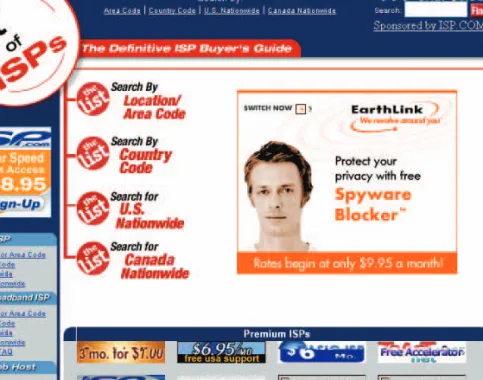
Service providers offer clients hosting arrangements that include shared hosting, dedi-cated hosting, and co-location.Shared hostingmeans that the client’s Web site is on a server that hosts other Web sites simultaneously and is operated by the service provider at its location. Withdedicated hosting, the service provider makes a Web server available to the client, but the client does not share the server with other clients of the service provider. In both shared hosting and dedicated hosting, the service provider owns the server hardware and leases it to the client. The service provider is responsible for maintaining the Web server hardware and software, and provides the connection to the Internet through its routers and other network hardware. In a co-location (also spelled collocation and colocation) service, the service provider rents a physical space to the client to install its own server hardware. The client installs its own software and maintains the server. The ser-vice provider is responsible only for providing a reliable power supply and a connection to the Internet through its routers and other networking hardware. You can find service pro-viders by looking in your local telephone directory or by using a Web directory such asThe List, which appears in Figure 9-1.
FIGURE 9-1 The List Web host directory
TheHostIndexsite provides a convenient collection of Web pages that compare Web hosts.TopHosts.comand HostSearch also provide comprehensive link collections to companies researching Web hosting alternatives and services. Major Web directories can be helpful sources; the Google Directory of Web Host Directories is especially comprehensive.
When making Web server hosting decisions, a company should ask whether the hard-ware platform and softhard-ware combination can be upgraded when the traffic on its Web site increases. A company’s Web server requirements are directly related to its electronic com-merce transaction volume and Web site traffic. The best hosting services provide Web server hardware and software combinations that arescalable, which means they can be adapted to meet changing requirements when their clients grow.
B A S I C
F U N C T I O N S
O F
E L E C T R O N I C
C O M M E R C E
S O F T W A R E
The size and objectives of electronic commerce sites vary greatly; thus, a variety of soft-ware and hardsoft-ware products are used to build those sites. At the inexpensive end of the spectrum of electronic commerce solutions are choices such as externally hosted stores that provide software tools to build an online store on a host’s site. At the other end of the range are sophisticated electronic commerce software suites that can handle high trans-action volumes and include a broad assortment of features and tools.
The type of electronic commerce software an organization needs depends on several factors. One of the most important factors is the expected size of the enterprise and its pro-jected traffic and sales. A high-traffic electronic commerce site with thousands of catalog inquiries each minute requires different software than a small online shop selling a dozen items. Another determining factor is budget. Creating an online store can be much less expensive than building a chain of retail stores. The start-up cost of an electronic commerce operation can be much lower than the cost of creating a brick-and-mortar sales and distribution channel that includes warehouses and multiple retail outlets. A traditional store requires a physical location with leases, employees, utility payments, and maintenance. The cost of creating the infrastructure for an online business can be much lower.
Another early decision is whether the company should use an external host or host the electronic commerce site in-house. Companies that have an existing information technol-ogy (IT) staff of programmers, Web designers, and network engineers are more likely to choose an in-house hosting approach. If a company does not have or cannot easily hire people with the skills required to set up and maintain an electronic commerce site, it can outsource all or part of the job to a service provider. Companies that are located outside of major metropolitan areas and want to host sites themselves must also consider whether their Internet connections are sufficient. In many cases, these companies find that they are not close enough to a major Internet access point or that their connections do not have sufficient bandwidth to handle large volumes of traffic efficiently. Even if these compa-nies have employees with sufficient skills, they might decide to use a service provider to host their electronic commerce sites.
The specific duties that electronic commerce software performs range from a few fun-damental operations to a complete solution—from catalog display to fulfillment notification. All electronic commerce solutions must at least provide:
● A catalog display
● Shopping cart capabilities ● Transaction processing
Larger and more complex electronic commerce sites also use software that adds other features and capabilities to the basic set of commerce tools. These additional software com-ponents can include:
● Middleware that integrates the electronic commerce system with existing com-pany information systems that handle inventory control, order processing, and accounting
● Enterprise application integration ● Web services
● Integration with enterprise resource planning (ERP) software ● Supply chain management (SCM) software
● Customer relationship management (CRM) software ● Content management software
● Knowledge management software
Tools required by all electronic commerce sites are described in the following sections. The more advanced functions used by larger sites are covered later in this chapter.
Catalog Display
A catalog organizes the goods and services being sold. To further organize its offerings, a retailer may break them down into departments. As in a physical store, merchandise in an online store can be grouped within logical departments to make locating an item, such as a camping stove, simpler. Web stores often use the same department names as their physical counterparts. In most physical stores, each product is kept in only one place. A Web store has the advantage of being able to include a single product in multiple categories. For example, running shoes can be listed as both footwear and athletic gear.
A small commerce site can have a very simple static catalog. Acatalogis a listing of goods and services. Astatic catalogis a simple list written in HTML that appears on a Web page or a series of Web pages. To add an item, delete an item, or change an item’s listing, the company must edit the HTML of one or more pages. Larger commerce sites are more likely to use a dynamic catalog. Adynamic catalogstores the information about items in a database, usually on a separate computer that is accessible to the server that is running the Web site itself. A dynamic catalog can feature multiple photos of each item, detailed descriptions, and a search tool that allows customers to search for an item and determine its availability. The software that implements a dynamic catalog is often included in larger electronic commerce software packages; however, some companies write their own soft-ware to link their existing databases of product information to their Web sites.
Most of the Web stores you read about in earlier chapters are large, well-known sites. These sites include many features and have a professional look. Figure 9-2 shows the Web page of a small electronic commerce site that sells guitars and other musical instruments.
This site uses simple, inexpensive electronic commerce software and has a clean look with few features beyond those necessary to make sales.
Small Web stores that sell fewer than 30 or 40 items, such as the store shown in
Figure 9-2, need only a simple list of products or categories. Organization of the items is not par-ticularly important. Companies that offer only a small number of items can provide a photo of each item on the Web page that is a link to more information about the product. A static cata-log is sufficient for their needs. Larger electronic commerce sites require the more sophisti-cated navigation aids and better product organization tools that are a part of dynamic catalogs.
Good sites give buyers alternative ways to find products. Besides offering a well-organized catalog, large sites with many products can provide a search engine that allows customers to enter descriptive search terms, such as “men’s shirts,” so they can quickly find the Web page containing what they want to purchase. Remember, the most impor-tant rule of all commerce is: Never stand in the way of a customer who wants to buy something.
FIGURE 9-2 Small electronic commerce site 402
Shopping Cart
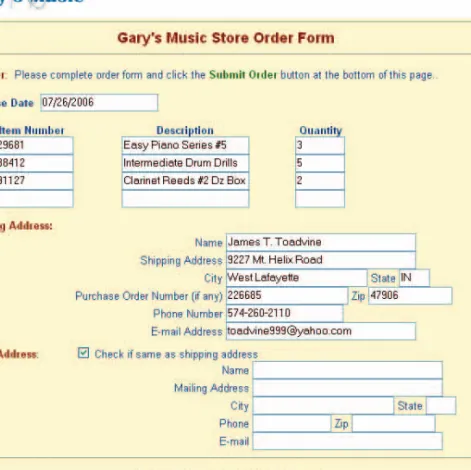
In the early days of electronic commerce, shoppers selected items they wanted to purchase by filling out online forms. Using text box and list box form controls to indicate their choices, users entered the quantity of an item in the quantity text box, the SKU (stock-keeping unit) or product number in another text box, and the unit price in yet another text box. This system was awkward for ordering more than one or two items at a time.
One problem with forms-based shopping was that shoppers had to write down product codes, unit prices, and other information about the product before going to the order form, which was inevitably on another page. Another problem was that customers sometimes for-got whether they had clicked the submit button to send in their orders. As a result, they either sent the same order twice (pressing the submit button when they had already done so) or thought they had submitted the order when they really had not (consequently failing to sub-mit the order). The forms-based method of shopping was confusing and error prone.
Figure 9-3 illustrates the problems that shoppers faced with forms-based ordering systems. First, many customers found it difficult to remember the exact descriptions of the products. Second, customers had to enter the item numbers, which were located on a different Web page, in the text boxes. Thus, the customers needed to either write down or memorize the numbers.
FIGURE 9-3 Using a form to enter an order
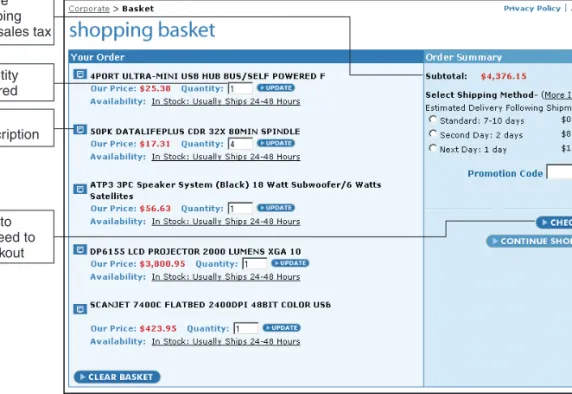
The forms-based method of ordering has given way to electronic shopping carts. Today, shopping carts are a standard of electronic commerce. As you learned in Chapter 4, a shop-ping cart, also sometimes called a shopshop-ping bag or shopshop-ping basket, keeps track of the items the customer has selected and allows customers to view the contents of their carts, add new items, or remove items. To order an item, the customer simply clicks that item. All of the details about the item, including its price, product number, and other identify-ing information, are stored automatically in the cart. If a customer later changes his or her mind about an item, he or she can view the cart’s contents and remove the unwanted items. When the customer is ready to conclude the shopping session, the click of a button executes the purchase transaction. Figure 9-4 shows a typical shopping basket page at a site that sells computer equipment.
Clicking the Checkout button usually displays a screen that asks for billing and ship-ping information and that confirms the order. As you can see from the figure, the shop-ping cart software keeps a running total of each type of item. The shopshop-ping cart calculates a total as well as sales tax and shipping costs.
Some shopping cart software allows the customer to fill a shopping cart with purchases, put the cart in virtual storage, and come back days later to confirm and pay for the purchases. A number of companies, including BIZNET Internet Services, CartIt!, SalesCart, and
WebGenie Software, sell shopping cart software that sellers can add to their Web sites. quantity ordered item description total cost of items ordered before shipping and sales tax
click to proceed to checkout
FIGURE 9-4 Typical shopping basket page 404
These software packages range in price from a few hundred dollars to several thousand dol-lars, plus an ongoing monthly fee. The shopping cart software sold by SalesCart works with several different Web site design tools, as shown in Figure 9-5 on page 408.
Because the Web is a stateless system—unable to remember anything from one trans-mission or session to another—shopping cart information must be stored explicitly for the shopper to retrieve later. Furthermore, it must distinguish one shopper from another so that the purchases are not mixed up. One way to uniquely identify users and store informa-tion about their choices is to create and store cookies, which, as you learned in earlier chap-ters, are bits of information stored on a client computer. When a customer returns to a site
shopping cart software for several different Web design tools
FIGURE 9-5 SalesCart shopping cart software
that issued a particular cookie, the shopping software reads either the cookie from the cus-tomer’s computer or the database record from the merchant’s server.
If a shopper’s browser does not allow storage of cookies, sites can use another way to preserve shopping cart information from one browser session to another. Some elec-tronic commerce software packages, such asShopSite, do this by automatically assigning a shopper a temporary number. The number is added to the end of the shopper’s URL and persists as he or she navigates from one Web site to another. When the customer returns, the URL still contains the bits of information about his or her shopping cart. When the cus-tomer closes the browser, the temporary number is discarded and thus cannot be reused, even if the customer later reopens the browser and returns to the same Web site.
L E A R N I N G
F R O M
F A I L U R E S
PDG Software
PDG Softwareis a company based in Tucker, Georgia, that sells electronic commerce soft-ware to companies that operate small and midsize electronic commerce Web sites. PDG sells shopping cart software, auction software, shopping mall software, and a number of other packages. Although it sells some of its software directly to the companies that use it, most of its sales are through resellers—firms that use PDG software as part of Web sites that they design, build, and deliver to customers as complete units.
In April 2001, an attacker discovered a vulnerability in the PDG software that allowed an intruder to enter the shopping cart and open the file that contained customer names, contact information, and credit card numbers. PDG developed a patch that would repair the software the same day it found out about the intrusions. PDG posted the patch on its Web site so that companies using the software could download and install the patch. Both PDG and the FBI issued press releases immediately to warn users of the problem with the shopping cart software and encourage them to obtain the patch. Unfortunately, the users of the software that had purchased it as part of a complete electronic commerce Web site were, in many cases, unaware that their sites included the PDG shopping cart software.
Because it took so long—several months, in some cases—to find and contact the com-panies using the software, online offenders had an excellent opportunity to exploit this vulnerability and collect thousands of credit card numbers. In most cases such as this, the difficulty of finding the sites that are running the vulnerable software helps slow down the attackers. Unfortunately, in this case, the intruder who discovered the opening also found that entering a specific word in a search engine’s search expression would instantly return a list of the thousands of sites running the PDG software.
Most of the Web sites found out about the problem when their customers called them, suspicious because their credit card information had been compromised. The lesson from this failure is that companies that operate electronic commerce Web sites must know the source of the software used in creating and maintaining their sites and must monitor news about the security of that software.
Transaction Processing
Transaction processingoccurs when the shopper proceeds to the virtual checkout counter by clicking a checkout button. Then the electronic commerce software performs any nec-essary calculations, such as volume discounts, sales tax, and shipping costs. At check-out, the customer’s Web browser software and the seller’s Web server software both switch into a secure state of communication. You will learn more about how Web clients and serv-ers establish these secure communication states in the next two chaptserv-ers.
Transaction processing can be the most complex part of the online sale. Computing taxes and shipping costs are important parts of this process, and site administrators must continually check tax rates and shipping tables to make sure they are current. Some soft-ware enables the Web server to obtain updated shipping rates by connecting directly to ship-ping companies to retrieve information.
Other calculation complications include provisions for coupons, special promotions, and time-sensitive offers; for example, “purchase a round-trip ticket before the end of the month and receive a 50 percent discount.” Some shopping cart software designed for small and midsize companies provides connections to accounting software so that Web sales can be entered simultaneously in the company’s accounting system. In larger companies, the integration of the Web site’s transaction processing into the accounting and operation-control systems of the company can be very complex. The next section discusses some of the advanced functions that larger companies look for in electronic commerce software.
A D V A N C E D
F U N C T I O N S
O F
E L E C T R O N I C
C O M M E R C E
S O F T W A R E
In this section, you will learn about the features that larger companies need in their electronic commerce software. Although there are exceptions, such as Amazon.com and Buy.com, most large companies that have electronic commerce operations also have sub-stantial business activity that is not related to electronic commerce. Thus, integrating elec-tronic commerce activities into the company’s other operations is very important.
Middleware
Larger companies usually establish the connections between their electronic commerce software and their existing accounting system by using a type of software called middleware. Some large companies that have sufficient IT staff write their ownmiddleware; however, most companies purchase middleware that is customized for their businesses by the middle-ware vendor or a consulting firm. Thus, most of the cost of middlemiddle-ware is not the soft-ware itself, but the consulting fees needed to make the softsoft-ware work in a given company. Making a company’s information systems work together is calledinteroperabilityand is an important goal of companies when they install middleware.
The total cost of a middleware implementation can range from $50,000 to several mil-lion dollars, depending on the complexity of the company’s underlying operations and its existing information systems. Major middleware vendors include BEA Systems,
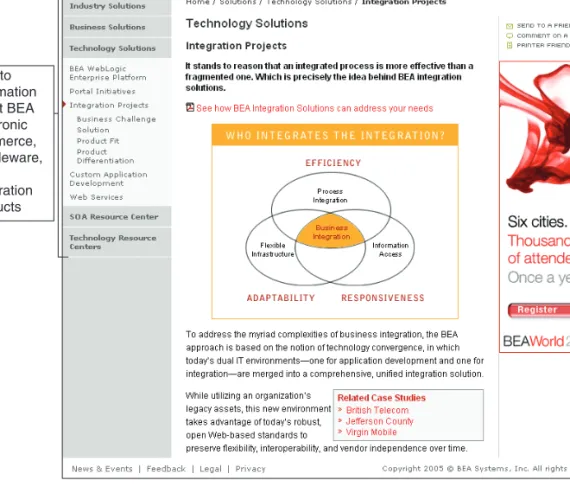
Broadvision,Digital River, andIBM Tivoli Systems. As the market for this type of soft-ware has matured, the companies that provide this softsoft-ware have worked to build prod-ucts that can integrate software throughout the enterprise with company Web sites. The BEA Integration Projects Web page appears in Figure 9-6.
Enterprise Application Integration and Databases
A program that performs a specific function, such as creating invoices, calculating payroll, or processing payments received from customers, is called an application program, application softwareor, more simply, anapplication. Anapplication serveris a computer that takes the request messages received by the Web server and runs application pro-grams that perform some kind of action based on the contents of the request messages. The actions that the application server software performs are determined by the rules used in the business. These rules are calledbusiness logic. An example of a business rule is: When a customer logs in, check the password entered against the password file in the database.
In many organizations, the business logic is distributed among many different applica-tions that are used in different parts of the organization. In recent years, many IT depart-ments have devoted significant resources to the creation of links among these scattered applications so that the organization’s business logic can be interconnected. This activity is calledapplication integrationorenterprise application integration. The integration is
links to information about BEA electronic commerce, middleware, and integration products
FIGURE 9-6 BEA Technology Solutions page 408
accomplished by programs that transfer information from one application to another. For example, a program might transfer information from order entry systems in several dif-ferent divisions to a single accounts receivable and sales system that integrates all enterprise-wide sales activity. In many cases, the data formats in the various programs are different and the transfer programs must edit and reformat the data before transfer-ring it. Increasingly, programmers are using XML data feeds to move data from one appli-cation to another in enterprise integration implementations.
Application servers are usually grouped into two types: page-based and component-based systems. Page-based application systems return pages generated by scripts that include the rules for presenting data on the Web page with the business logic. Common page-based server systems include Macromedia ColdFusion, JavaServer Pages (JSP), Microsoft Active Server Pages (ASP), and PHP: Hypertext Preprocessor (PHP). These page-based systems work quite well for small and midsize Web sites. Because they combine the page presentation logic with the business logic, however, they can be difficult to revise and update. Larger businesses often prefer to use acomponent-based application system that separates the presentation logic from the business logic. Each component of logic is created in its own module. This makes updating and changing elements of the system much easier—especially on large electronic commerce sites that are built and maintained by teams of programmers. The most common component-based systems in use today are
Enterprise JavaBeans (EJBs),Microsoft Component Object Model (COM), and the Object Management GroupCommon Object Request Broker Architecture (CORBA).
Application servers usually obtain the business logic information they use to build Web pages from databases. Adatabase manageris software that stores information in a highly struc-tured way. The structure of the database makes it easy for the database manager software to retrieve the information stored in the database. Smaller electronic commerce sites can use low-cost databases such as Microsoft Access. Larger sites need the power of more expensive data-base management software such as IBM DB2, Microsoft SQL Server, or Oracle. These database management software packages can be quite expensive. Typical installations cost between $5000 and $200,000. Companies with very large databases that have operations in many locations must make their data available to users in those locations. Large informa-tion systems that store the same data in many different physical locainforma-tions are calleddistributed information systems, and the databases within those systems are calleddistributed data-base systems. The complexity of these systems leads to their high cost.
Most companies that can afford it do use commercial database products; however, an increasing number of companies and other organizations are beginning to use MySQL, which was developed and is maintained by a community of programmers on the Web. Simi-lar to the Linux operating system you learned about in earlier chapters,MySQLis open-source software that can be downloaded and used at no cost. The termopen sourceis used to describe such software because the source code of the software is freely available, or “open.” The MySQL home page appears in Figure 9-7.
Except for small sites offering only a few products, companies should consider data-base support as they evaluate electronic commerce software. Most Web stores selling many products use a database that stores product information, including size, color, type, and price details. Usually, the database that serves an online store is the same one that is used by the existing corporate clients. It is better to have one database serving two separate enti-ties because it eliminates parallel but distinct databases—something companies should
avoid if possible. If a company has existing inventory and product databases, then it should evaluate only electronic commerce software that supports these systems.
Web Services
Companies are beginning to extend the idea of application server systems so that these programs can communicate across organizational boundaries. Although a generally accepted definition has not yet evolved, many IT professionals defineWeb servicesas a combination of software tools that let application software in one organization communi-cate with other applications over a network by using a specific set of standard protocols known by their acronyms: SOAP, UDDI, and WSDL (these protocols are described below). Another definition of Web services that IT professionals use is: a self-contained, modular unit of application logic that provides some business functionality to other applications through an Internet connection.
What Web Services Can Do
Companies are using Web services to offer improved customer service and reduce costs. In some companies, Web services are used to provide the XML data feeds that flow from one application to another in enterprise application integration efforts. In other applications,
FIGURE 9-7 MySQL page 410
Web services provide data feeds between two different companies. J.P. Morgan Chase & Co., a major investment bank, uses Web services in its investment information portal. The Web services pull information, such as general economic forecasts, financial analyses of spe-cific companies, industry forecasts, and financial markets results into continually updated online reports that customers can obtain on the J.P. Morgan Chase portal site. The bank’s customers could obtain all of this information themselves, but the aggregation is a ser-vice that the bank provides. The information flow in this case is from the bank to its customers.
Nationwide Building Society, a mortgage company in Swindon, England, uses a Web ser-vices tool to automate its communications with mortgage application service companies. These service companies obtain information from consumers who want mortgages and then forward the information in a prescribed XML format to Nationwide. The Nationwide Web services software reformats the submission and submits it to Nationwide’s enterprise com-puter system. When a lending decision has been reached, the Web services tool conveys the decision back to the mortgage application service company. This Web services approach has reduced costs and decreased turnaround time for loan decisions at Nationwide.
CUNA Mutual Group sells services to credit unions throughout the United States from its headquarters in Madison, Wisconsin. These services include everything from check clearing to construction management. CUNA provides many of its services by running pro-grams on old computer systems that have been in operation for years. Instead of repro-gramming everything so it could be accessible on the Web, CUNA created a Web services layer that takes information from the old computer systems and generates Web pages that its customers can use to obtain those services.
How Web Services Work
A key element of the Web services approach is that programmers can write software that accesses these units of business application logic without knowing the details of how each unit is implemented. Web services can be mixed and matched with other Web services to execute a complex business transaction. Thus, Web services allow programs written in dif-ferent languages on difdif-ferent platforms to communicate with each other and accomplish transaction processing and other business tasks.
The common format of this machine-to-machine communication was originally HTML; however, most newer Web services implementations use XML. As you learned in Chap-ter 2, organizations can use XML to mark up content with agreed upon sets of descriptive tags. As Web services become more fully implemented, businesses will be able to con-nect their operations quickly and cheaply. Thus businesses will be able to reduce transac-tion costs and improve customer service at the same time. Customers and employees will find it easier to access companies’ Web resources from a variety of devices such as PDAs and mobile phones.
The first Web services were information sources. The Web services model allowed pro-grammers to incorporate these information sources into software applications. For example, a company that wanted to collect all of its financial management information into one spreadsheet could use Web services to obtain bank account and loan balances, stock portfolio holdings, and current interest rates on financial instruments. If this information is available through Web services, the spreadsheet program can use those services to update itself automatically. Some of the information might be available as a Web service at no
cost; other information access might require a subscription. But Web services can make automated access of the information much easier.
A more advanced example would be a company that uses purchasing software to help manage that activity. That software can use Web services to obtain price information from a variety of vendors. After the purchasing agent reviews the price and delivery informa-tion and authorizes the purchase, the software can submit the order and track it until the shipment is received. On the other side of this transaction, the vendor’s software can use Web services (in addition to providing price and delivery information) to check the buy-er’s credit and contract with a freight company to handle the shipment.
SOAP, WSDL, and UDDI Specifications
Three rule sets (usually called protocols or specifications) let programs work with the for-matted (using XML or HTML) data flows to accomplish the communication that makes Web services work. TheSimple Object Access Protocol (SOAP)is a message-passing pro-tocol that defines how to send marked up data from one software application to another across a network. You can see the full SOAP specification and learn more about SOAP at the
W3C SOAP Page.
The characteristics of the logic units that make up specific Web services are described using theWeb Services Description Language (WSDL). Today, programmers can use the information in a WSDL description to modify an application program so it can connect to a Web service. When Web services become more complex, WSDL descriptions allow pro-grams to configure themselves to connect to multiple Web services. You can learn more about WSDL and related topics at theW3C Web Services Activitypages.
Programmers (and, eventually, the programs themselves) need to find the location of Web services before they can interpret their characteristics (described in WSDL) or com-municate with them (using SOAP). The set of protocols that identify locations of Web ser-vices and their associated WSDL descriptions is called the Universal Description, Discovery,and Integration (UDDI) specification. TheUDDI.orgWeb site is a good source of information about this specification and includes the current UDDI Business Registry, which provides a catalog of currently available Web services.
A number of major software vendors have embraced the idea of Web services in new technology initiatives such asMicrosoft .NETand theSun Java 2 Platform, Enterprise Edition. Many companies that have used Web services to accomplish application integra-tion have found it to be less expensive to implement than older approaches that required programmers to write or adapt multiple middleware software programs. Merrill Lynch was able to use Web services to implement an integration project for $30,000 that would have cost $800,000 using its older application integration approach.
The Future of Web Services
The idea behind Web services is a major change in the way business does computing. The IT industry has historically resisted standards and has frequently used programming lan-guages that cannot communicate with each other. For years, large businesses and other organizations have hired armies of programmers to write middleware software to inte-grate their hodgepodge of programs for financial management, inventory control, market-ing, and other functions. The idea of connecting software within an organization is still 412
revolutionary—connecting software across organizational boundaries is even more revolutionary. Some industry analysts report companies are using Web services in 25 per-cent of all current data integration projects.
Despite the promise of Web services, there are some potential pitfalls. Much of the data in Web services applications is stored and transmitted in XML format. Because there are so many variations of XML in use today, it is critical that data-providing and data-using part-ners agree on which XML implementation to use. As Web services become more common-place, individual companies’ software applications will become more dependent on them. This means that Web services must include quality of service and service level specifica-tions on which applicaspecifica-tions developers at each company can rely. At present, there are no Web services management standards or history of best practices. This lack of stan-dards means that each Web services subscriber needs a detailed agreement (specifying ser-vice levels, quality of serser-vice standards, and so on) with each Web serser-vices provider. Security can be a problem with Web services. By its very nature, a Web services data feed connects directly into a company’s internal applications, bypassing any security features installed at the company’s perimeter (you will learn more about perimeter security defenses in Chapter 10). These are not insurmountable issues, but they do prevent Web services from being a simple matter.
Despite the hurdles that must be overcome, some companies have begun to imple-ment Web services successfully. For example, theMSN Moneysite buys stock quotes from the Interactive Data Corporation through its ComStock Web service. An MSN Money stock quote page with theComStockWeb services acknowledgment appears in Figure 9-8.
Integration with ERP Systems
Larger firms have extranets and intranets requiring tools and capabilities different from those needed to implement simpler electronic commerce Web sites. In the case of large B2B interactions, both the buyer and seller have complex systems. In general, B2B sites require security tools not standard in B2C systems, such as encryption and authentication, as well as signed receipt notices.
Many B2B Web sites must be able to connect to existing information systems such as enterprise resource planning software. Enterprise resource planning (ERP) software packages are business systems that integrate all facets of a business, including account-ing, logistics, manufacturaccount-ing, marketaccount-ing, plannaccount-ing, project management, and treasury functions. The major ERP vendors include Baan, Oracle, PeopleSoft (now a part of Oracle), andSAP. A typical installation of ERP software costs between $2 million and $25 million; thus, companies that are already running these systems have made a significant
ComStock Web services data feed provides stock quotes
FIGURE 9-8 ComStock Web services on MSN Money stock quote page 414
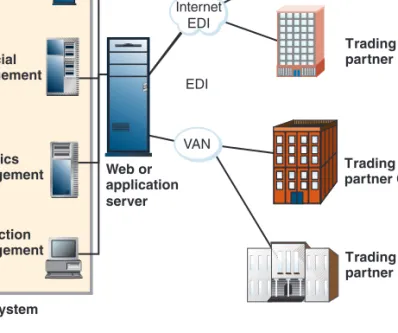
investment in them and expect their electronic commerce sites to integrate with them. Fig-ure 9-9 shows a typical architectFig-ure for a B2B Web site that connects to several existing information systems, including the ERP system within the company and its trading part-ners’ systems through EDI connections.
E L E C T R O N I C
C O M M E R C E
S O F T W A R E
F O R
S M A L L
A N D
M I D S I Z E
C O M P A N I E S
In this section you will learn about software that small and medium-sized businesses can use to implement online business Web sites. In most cases, these companies can create a Web site that stands alone in its business activities and does not need to be coordinated completely with the business’ other activities.
Basic Commerce Service Providers
Using a service provider’s shared or dedicated hosting services instead of building an in-house server or using a co-location service means that the staffing burden shifts from the company to the Web host. CSPs have the same advantages as ISP hosting services, includ-ing spreadinclud-ing the cost of a large Web site over several “renters” hosted by the service. The biggest single advantage—low cost—occurs because the host provider has already pur-chased the server and configured it. The host provider has to worry about keeping it work-ing through lightnwork-ing storms and power outages.
CSPs offer free or low-cost electronic commerce software for building electronic com-merce sites that are then kept on the CSP’s server. Services in this category usually cost
Order management Financial management Logistics management Trading partner A Trading partner B Trading partner C Trading partner D Web or application server Production management ERP system VAN Internet EDI EDI
FIGURE 9-9 ERP system integration with EDI
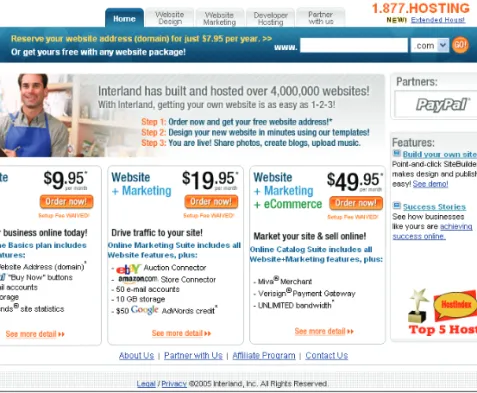
less than $20 per month, and the software is built into the CSP’s site, allowing companies to immediately begin building and storing a storefront using the Web interface of the software. These services are designed for small online businesses selling only a few items (usually no more than 50) and having relatively low transaction volumes (fewer than 20 transactions per day).ValueWeb, operating since 1996, is an example of a CSP. ValueWeb offers businesses comprehensive electronic commerce hosting services including shared hosting, dedicated hosting, and co-location services.ProHosting.comandInterlandare other examples of Web hosting companies serving the small and midsize company market. Because these companies offer a variety of services, they might be called ISPs, CSPs, MSPs, or ASPs by different users, depending on the service they are seeking. Figure 9-10 shows the home page of Interland, which outlines its CSP offerings.
FIGURE 9-10 Interland Web hosting services home page 416
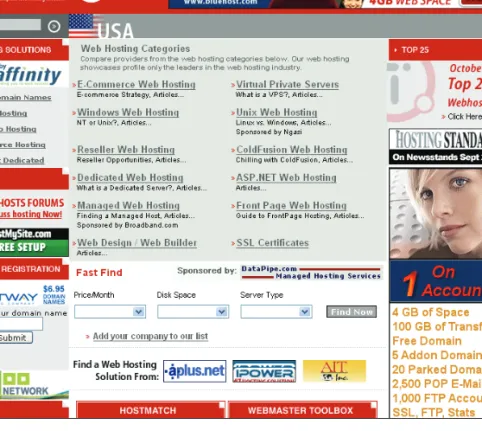
TopHosts.com(see Figure 9-11) features a comprehensive presentation about CSPs and hosting issues. This site contains hundreds of links and much good information. Yahoo! offers a wide range of Web hosting and electronic commerce services for companies of all sizes. Its commerce services are offered on its Yahoo! Small Business Merchant SolutionsWeb page, shown in Figure 9-12.
FIGURE 9-11 TopHosts.com home page
Mall-Style Commerce Service Providers
Mall-style CSPs provide small businesses with an Internet connection, Web site creation tools, and little or no banner advertising clutter. Web hosts in this group charge a monthly fee that is often higher than that of lower-end providers, and may also charge one-time setup fees. Some of these providers also charge a percentage of or fixed amount for each cus-tomer transaction. These Web hosts also provide high-quality tools, storefront templates, an easy-to-use interface, and quick Web page-generation capabilities and page maintenance.
Mall-style CSPs provide shopping cart software or the ability to use another vendor’s shopping cart software. They also furnish customer payment processing so that custom-ers can choose to purchase their goods and services with a credit card or other form of payment. The CSP processes the acceptance and authorization of credit cards on behalf of the merchant. Another benefit is that because they are paying a monthly fee to the CSP, sites do not have to display any Web banners, which can be unattractive and distracting. The fourth benefit of the mall-style CSPs is that they provide higher-quality Web store build-ing and maintenance tools than do the basic CSPs.
One CSP that offers mall-style commerce services iseBay Stores. One CSP that offers a mall-style service isBigstep, but it no longer uses the mall structure. Mall-style CSPs offer Web site construction tools that can be used by small and midsize businesses to take their businesses online.
You can learn how capable these Web hosting services are by trying them. Some of these services have a 30-day trial period. The eBay Stores service does not offer a free trial, but the charges are minimal and are based on the number of products listed and graphic images used. Creating an eBay test store with only a few items costs less than $20.
FIGURE 9-12 Yahoo! Small Business Merchant Services page 418
Bigstephas received many industry awards for its CSP offering. Bigstep provides two different storefront packages that can meet the electronic commerce software needs of a range of small and midsize businesses. The Bigstep home page, which shows the two lev-els of service offered, appears in Figure 9-13.
To create a store, merchants must register with Bigstep. The registration process iden-tifies the user with an e-mail address and password. As with Yahoo!, the store’s URL is a subdomain of Bigstep unless the merchant pays an additional fee. After logging on with a store owner e-mail address and password, the merchant can create and manage the elec-tronic store.
Bigstep’s reports provide data-mining capabilities that search through site data col-lected in log files.Data mining—looking for hidden patterns in data—can help businesses find customers with common interests and discover previously unknown relationships among the data. Reports can indicate problematic pages in a store’s design where, for example, a large number of customers get stuck and then leave the Web site. Other facts that Bigstep reports can reveal include the number of pages an average customer must load and display before locating the merchandise he or she wants. If customers have to load too many pages, they might become impatient and leave without making a purchase.
If a merchant has a brick-and-mortar store, Bigstep’s built-in map locator can display the location of the store. Additional Bigstep store features include automatic calculation of taxes and shipping, collection of customer data, merchant e-mail notification of sales, and customer e-mail confirmation when products ship.
FIGURE 9-13 Bigstep home page
Estimated Operating Expenses for a Small Web Business
The following table shows an estimate of the first-year expenses that a small business owner might incur to put a store on the Web. The estimate assumes that the Web site will offer fewer than 50 different items for sale. The total omits payment processing charges, which might average 50 cents per transaction and 2 percent of each sale’s total. The costs shown are averages. Depending on which hosting service and electronic commerce software options are chosen, the actual costs could be somewhat lower or considerably higher.
Operating Costs Cost Estimate
Initial site setup fee $ 200
Annual maintenance fee (12 x $100) 1200
Domain name registration 70
Scanner for photo conversion or digital camera 300
Photo editing software 100
Occasional HTML and site design help 400 Merchant credit card setup fee 200
Total first-year cost $2470
The preceding costs are typical, but they can vary because different Web hosting sites charge a range of fees for various services. Additional payment processing fees can run into hundreds and thousands of dollars, but those fees occur only when a site makes sales. A reasonable guideline for payment processing fees that would be charged to a new mer-chant opening a business on the Web is about 3 percent of gross sales. Thus, if a site’s annual gross sales are $50,000, then the payment processing fees should be approximately $1500. That estimate would include both the per-transaction fixed costs and the percentage of total sales costs charged by most merchant credit card processing agencies.
Contrast the preceding costs with comparable estimated costs for self-hosting a Web site. Setup and Web site maintenance costs include equipment, communications, physical location, and staff. Equipment—a server and networking gear—has a one-time cost rang-ing from $3000 to $20,000. A T1 connection or fraction thereof (see Chapter 2) costs from $1200 to $12,000 per year. A server must be housed in a room that is both secure and con-venient to communications access. The cost to secure a room, properly air-condition it, and install a chemical fire extinguishing system would run about $5000 a year. A self-hosted system requires a staff of experts well versed in a variety of Web programming and scripting languages, electronic commerce packages, and database management systems. Technicians will likely be required to monitor and maintain equipment. Minimum staff costs range from $50,000 to $100,000 annually. In total, annual operating costs for self-hosting approach $60,000 to $100,000 or more the first year. Costs for subsequent years will be about the same. Companies should carefully compare self-host cost estimates with the fees charged by various hosting services.
The costs previously discussed are for a small electronic commerce site. Costs for larger sites are much more difficult to estimate. The cost of integrating the Web site with the existing systems of the company is often the largest element of the total cost. Midsize busi-nesses typically incur start-up costs ranging from $100,000 to $500,000 and recurring annual costs of about half that amount. Large businesses typically spend between $1 mil-lion and $50 milmil-lion to launch an electronic commerce site and then spend another 50 420
learn more about managing the costs of Web site implementation and operation for large organizations in Chapter 12.
Next, you will learn about midrange electronic commerce packages. Midrange pack-ages are suitable for running larger businesses. These software packpack-ages have more fea-tures, are capable of handling more inventory items and types of transactions, and thus are more expensive than the template-driven CSP offerings described above.
E L E C T R O N I C
C O M M E R C E
S O F T W A R E
F O R
M I D S I Z E
T O
L A R G E
B U S I N E S S E S
This section includes a discussion of software that midsize and large companies can use to implement electronic commerce features on their Web sites. It also includes an outline of Web site development tools that can be used for that purpose and an overview of three specific midrange electronic commerce software products that are representative of the types of products available.
These midrange packages allow the merchant to have explicit control over merchan-dising choices, site layout, internal architecture, and remote and local management options. In addition, the midrange and basic electronic commerce packages differ on price, capa-bility, database connectivity, software portacapa-bility, software customization tools, and com-puter expertise required of the merchant.
Web Site Development Tools
Although they are more often used for creating small business sites, it is possible to con-struct the elements of a midrange electronic commerce Web site using the Web page cre-ation and site management tools you learned about in Chapter 2. For example, recent versions of Macromedia Dreamweaver include integrated development environments. Experienced Web designers using this tool can create the elements of dynamic Web pages as easily as static Web pages.
Other Web page design tools, such asMicrosoft FrontPage, can also be used to build the framework of a functional midrange electronic commerce site. The remaining ele-ments of the dynamic pages needed to create catalog, customer service, and transaction-processing pages can be added with development tools such as Microsoft’sVisual Studio .NETproduct.
After creating the Web site with these development tools, the designer can add pur-chased software elements, such as shopping carts and content management software, to the site. The final step is to create the middleware that connects the site to the company’s existing product and transaction-processing databases.
Buying and using midrange electronic commerce software is significantly more expen-sive than using one of the CSPs described in the previous section, with annual costs rang-ing from $2000 to $50,000. Midrange software traditionally offers connectivity to database systems that store catalog information. Having the catalog stored in a database simplifies updates and changes. Several of the midrange systems provide connections into existing inventory and ERP systems. This can yield savings because there is no need to run duplicate inventory systems, and the cost of the existing systems is spread across several software systems.
Three midrange electronic commerce systems are described in this section. They are representative of the whole group, yet are different from one another in important ways. The systems are Intershop Enfinity MultiSite, WebSphere Commerce Suite by IBM, and Commerce Server 2002 by Microsoft.
Intershop Enfinity
Intershop Enfinity MultiSiteprovides search and catalog capabilities, electronic shopping carts, online credit card transaction processing, and the ability to connect to existing back-end business systems and databases. Intershop Enfinity MultiSite has setup wizards and good catalog and data management tools. It provides many built-in storefront templates. Management and editing of a storefront are done through a Web browser—either locally at the server or remotely through any Internet connection. The products inventory manage-ment module tracks inventory levels and allows merchants to view the quantity of items available, create a list of inventory transactions, and enter new products into the inventory. Discount rules are also easy to enter. Merchants define the business rules for a discount and dates during which special discounts apply. Bundled with the software is a database man-agement system. Alternatively, Enfinity can work with DB2 (IBM’s relational database) or Oracle databases. The software includes an automated e-mail facility that can send order confirmations to customers. Enfinity includes support for secure transactions. A wide vari-ety of site and customer reports are available to track Web page visits and customer activities.
IBM WebSphere Commerce Professional Edition
IBM produces theWebSphere Commerce Professional Edition, which is a family of elec-tronic commerce packages. IBM WebSphere is a set of software components that pro-vides software suitable for midsize to large businesses to sell goods and services on the Internet. It includes catalog templates, setup wizards, and advanced catalog tools to help companies create attractive and efficient electronic commerce sites. WebSphere Com-merce Professional Edition can be used both for business and business-to-consumer applications and provides a smooth connection to existing corporate systems, such as inventory databases and procurement systems.
WebSphere Commerce products run on many different operating systems. Merchants can begin with a small store and then move up to a bigger, more capable store as necessary. A wizard leads the merchant through the process of creating a starter store. Once that is up and working, more functionality can be added by executing commands and writing code. With the basic pages built, the merchant can populate the catalog with products, prices, and product pictures. The WebSphere Commerce Professional Edition also accommodates electronic download products, such as audio tracks or software.
WebSphere offers a large collection of functions, utility programs, and commands that allow a merchant to create a customized online store experience. However, JavaScript, Java, or C++ expertise is required. Typical of commerce programs in this class, Web-Sphere can connect to existing databases and other legacy systems through DB2 or Oracle databases. A single store or several different stores can be administered from the same browser-based interface. A large number of midrange electronic commerce sites use 422
WebSphere software. Enough IT professionals are involved in installing, maintaining, and customizing WebSphere that a magazine,WebSphere Advisor, is devoted to it.
The system has all the standard electronic commerce features, including tools for a shopping cart, e-mail notifications upon sale completion, secure transaction support, pro-motions and discounting, shipment tracking, links to legacy accounting systems, and browser-based local and remote administration. WebSphere Commerce Professional Edi-tion costs $155,000 per processor. The less powerful Professional EdiEdi-tion of the soft-ware costs $99,000 per processor.
Microsoft Commerce Server 2002
MicrosoftCommerce Server 2002allows businesses to sell products or services on the Web using tools such as user profiling and management, transaction processing, product and service management, and target audience marketing. Commerce Server 2002 is not an out-of-the-box solution. Wizards help users build a site in several steps, but program code must be written to make the software meet specific user needs. The Microsoft Visual Studio .NET tools, bundled with Commerce Server 2002, allow companies to customize the sites they build.
Like other midrange electronic commerce software, Commerce Server 2002 has tools that help companies engage the customer (through marketing and advertising), com-plete an order, and analyze the sales information after the sale. Commerce Server 2002 also includes tools for advertising, promotions, cross-selling, and customer targeting and personalization.
Commerce Server 2002 provides many predefined reports for analyzing site activities and product sales data. Commerce Server 2002 can grow with increasing business demands. The system provides several storefront templates, wizards for setting up and ini-tializing a store, and database connections. In addition, Commerce Server 2002 provides a shopping cart, confirms completed sales transactions by e-mail, and supports secure transactions. It can connect to existing accounting systems, and the administrator can oversee the site through a Web browser. Commerce Server 2002 licenses are available in a Standard Edition for up to two servers at a cost of $7000 per processor and in an Enter-prise Edition for an unlimited number of servers at a cost of $20,000 per processor.
E L E C T R O N I C
C O M M E R C E
S O F T W A R E
F O R
L A R G E
B U S I N E S S E S
Larger businesses require many of the same advanced capabilities as midsize firms, but the larger firms need to handle higher transaction loads. In addition, they need dedicated software applications to handle specific elements of their online business. In this section, you will learn about electronic commerce software that has higher transaction-load capa-bility, and you will learn about software that accomplishes specific tasks in large busi-nesses, such as customer relationship management, supply chain management, content management, and knowledge management.
The distinction between midrange and large-scale electronic commerce software is much clearer than the one between basic systems and midrange systems. The telltale sign is price. Other elements, such as extensive support for business-to-business commerce, also indicate that the software is in this category. Commerce software in this class is some-times calledenterprise-class software. The term “enterprise” is used in information sys-tems to describe a system that serves multiple locations or divisions of one company and encompasses all areas of the business or enterprise. Enterprise-class electronic com-merce software provides tools for both B2B and B2C comcom-merce. In addition, this software interacts with a wide variety of existing systems, including database, accounting, and ERP systems. As electronic commerce has become more sophisticated, large companies have demanded that their Web sites and supporting information infrastructure do more things. The cost of these enterprise systems for large companies ranges from $200,000 for basic sys-tems to $10 million and more for comprehensive solutions.
Enterprise-Class Electronic Commerce Software
Enterprise-class electronic commerce software running large online organizations usually requires several dedicated computers—in addition to the Web server system and any nec-essary firewalls. Examples of enterprise-class products that can be used to run a large online business with high transaction rates includeIBM WebSphere Commerce Business Edition, Oracle E-Business Suite, andBroadvision One-To-One Commerce.
Enterprise-class software typically provides good tools for linking to and supporting sup-ply and purchasing activities. A large part of B2B commerce is ordering supplies from trad-ing or business partners and issutrad-ing the appropriate documents, such as purchase orders. For a selling business, e-business software provides standard electronic commerce activi-ties, such as secure transaction processing and fulfillment, but it can also do more. For instance, it can interact with the firm’s inventory system and make the proper adjust-ments to stock, issue purchase orders for needed supplies when they reach a critically low point, and generate other accounting entries in ERP, legacy accounting, or file systems. In contrast, both basic and midrange electronic commerce packages usually require an administrator to check inventory manually and place orders explicitly for items that need to be replenished.
In B2C situations, customers use their Web browsers to locate and browse a compa-ny’s catalog. For electronic goods (software, research papers, music tracks, and so on), cus-tomers can download the items directly from the site, or they can complete order forms and have the hard-copy versions of the products shipped to them. The Web server is linked to back-end systems, including a database management system, a merchant server, and an application server. The database usually contains millions of rows of information about products, prices, inventory, user profiles, and user purchasing history. The history pro-vides a way to recommend to a user on a return visit related items that he or she might wish to purchase. A merchant server houses the e-business system and key back-end software. It processes payments, computes shipping and taxes, and sends a message to the fulfill-ment departfulfill-ment when it must ship goods to a purchaser. Figure 9-14 shows a typical enterprise-class electronic commerce architecture.
As you learned in Chapter 4, companies are storing data about site visitors in large data-bases and analyzing it to improve their relationships with those customers. These click-streams track the path a visitor takes through a Web site, including which pages were 424
viewed, the amount of time spent on each page, and the sequence in which pages were viewed. Thus, large electronic commerce sites must include customer relationship manage-ment software. In Chapter 5, you learned how companies are using the Web to integrate their supply chains. As a result, enterprise-class commerce Web sites must include or work with supply chain management software.
In Chapter 6, you learned about companies that were building business portal sites to engage their customers and suppliers. A significant part of that strategy is providing use-ful, fresh content to attract site visitors to the portal. This need has given rise to software that automatically manages and rotates content on Web sites. Some companies have even developed software that helps them manage the knowledge that exists in their businesses. An enterprise-class Web site often includes several of these types of software packages in its design. The next four sections discuss software that works with electronic commerce software in large companies to help those companies achieve all of their electronic com-merce objectives.
✦❉❇◆❒❅ ✙✍✑✖
Consumer Shopping Web site Back-end
Shopping
Web server Buying
Wallet
Payment server that authorizes and settles credit card transactions
Merchant server Product
catalog
Page build tools
Certificate authority security server Acquiring banks Private net Merchant account Consumer account Fulfillment (inventory and EDI)
Accounting Browser Issuing banks Internet Databases
FIGURE 9-14 Typical enterprise-class electronic commerce architecture
Customer Relationship Management Software
You learned about the philosophy and techniques of customer relationship management (CRM) in Chapter 4. The goal of CRM is to understand each customer’s specific needs and then customize a product or service to meet those needs. The idea is that a customer whose needs are being met exactly is willing to pay more for the goods or services that are meet-ing those needs. Although companies of all sizes can practice CRM techniques, large com-panies can afford to buy and implement expensive software products that automate many of CRM’s principles.
Customer relationship management (CRM) softwaremust obtain data from opera-tions software that conducts activities such as sales automation, customer service center operations, and marketing campaigns. The software must also gather data about cus-tomer activities on the company’s Web site and any other points of contact the company has with its existing and potential customers. CRM software uses this data to help manag-ers conduct analytical activities, such as gathering business intelligence, planning market-ing strategies, customer behavior modelmarket-ing, and customizmarket-ing the products and services to meet the needs of specific customers or categories of customers. In its most basic form, CRM uses information about customers to sell them more (or more profitable) goods or services. More advanced CRM is about delivering extremely attractive and positive expe-riences regularly to customers. CRM can be very important in maintaining customer loy-alty in businesses where the purchase process is long and complex. Companies that design and install custom machinery, software products, or office workflow systems often find themselves involved in these types of long and complex processes. CRM software can help maintain positive and consistent contacts with multiple employees at the purchasing company.
Some companies create their own CRM software using outside consultants and their own IT staffs. In recent years, software vendors have increased the quality and variety of their offerings and today, most large companies are likely to buy a CRM software package.
Siebel Systemswas the first company to specialize in CRM software and it has a large share of the market. In 2005, Oracle announced that it had agreed to buy Siebel and merge its operations with itsOracle CRMbusiness. Other major software firms have created prod-ucts in this market, includingMySAP CRM. Prices for these systems start around $30,000 (on average, about $1500 per user); large implementations can cost millions of dollars. One of the most interesting new developments in the CRM software market has come from com-panies that offer the software for use on their Web site. That is, the buyer does not have to install the CRM software on its own servers. The buyer’s employees simply log in to the CRM vendor’s Web site and use the software. The cost of this software is much lower; in fact, it can be under $1000 per user per year.Salesforce.comis one of the leading ven-dors of this type of online CRM software. The Salesforce.com home page is shown in Fig-ure 9-15.
In the early days of CRM software implementation (approximately 1996 through 2000), companies spent many millions of dollars to buy CRM systems that promised to monitor and improve relationships with existing customers. Most of these systems were focused on giving companies the information they needed to identify changing customer prefer-ences and respond very quickly to those changes. By responding quickly, companies hoped that they would be able to gain sales that might otherwise be lost to competitors that could respond better to the new customer preferences. In addition to gaining sales, the use of 426
CRM software would help retain customers and reduce the need to spend money on mar-keting to find new customers. The goal was to instantly make available perfect informa-tion about all customer behaviors from all customer-interacinforma-tion points throughout the company.
Most companies did not realize these benefits and CRM software sales dropped from 2000 through 2003. Many industry analysts pronounced that CRM was just another busi-ness fad that was dying as quickly as it had become fashionable. Starting in 2003, how-ever, CRM software sales began growing again. Companies had learned from the bad experiences in which they invested large amounts of money to revamp their customer interaction strategies completely. Those companies became less likely to view CRM soft-ware as a tool for changing their overall customer strategy, and instead began using CRM software to solve smaller and more specific problems. For example, a cable company might use CRM to track service outages and repair team responses in real time, but would not expect the CRM system to calculate the profitability of on-demand video services on a con-tinual basis.
FIGURE 9-15 Salesforce.com home page