Setup Manual
Cat. No. V062-E1-04NT31 and NT31C
NT31 and NT31C
Programmable Terminals
Setup Manual
Revised September 2007
POWER RUNNotice:
OMRON products are manufactured for use according to proper procedures by a qualified operator and only for the purposes described in this manual.
The following conventions are used to indicate and classify precautions in this manual. Always heed the information provided with them. Failure to heed precautions can result in injury to people or dam-age to property.
!DANGER
Indicates an imminently hazardous situation which, if not avoided, will result in death or serious injury. Additionally, there may be severe property damage.!WARNING
Indicates a potentially hazardous situation which, if not avoided, could result in death or serious injury. Additionally, there may be severe property damage.!Caution Indicates a potentially hazardous situation which, if not avoided, may result in minor or moderate injury, or property damage.
OMRON Product References
All OMRON products are capitalized in this manual. The word “Unit” is also capitalized when it refers to an OMRON product, regardless of whether or not it appears in the proper name of the product. The abbreviation “Ch,” which appears in some displays and on some OMRON products, often means “word” and is abbreviated “Wd” in documentation in this sense.
The abbreviation “PLC” means Programmable Controller. “PC” is used, however, in some Program-ming Device displays to mean Programmable Controller.
Visual Aids
The following headings appear in the left column of the manual to help you locate different types of information.
Note Indicates information of particular interest for efficient and convenient opera-tion of the product.
1,2,3... 1. Indicates lists of one sort or another, such as procedures, checklists, etc.
OMRON, 2000
All rights reserved. No part of this publication may be reproduced, stored in a retrieval system, or transmitted, in any form, or by any means, mechanical, electronic, photocopying, recording, or otherwise, without the prior written permission of OMRON.
No patent liability is assumed with respect to the use of the information contained herein. Moreover, because OMRON is con-stantly striving to improve its high-quality products, the information contained in this manual is subject to change without notice. Every precaution has been taken in the preparation of this manual. Nevertheless, OMRON assumes no responsibility for errors or omissions. Neither is any liability assumed for damages resulting from the use of the information contained in
TABLE OF CONTENTS
PRECAUTIONS . . . .
xv
1 Intended Audience . . . xvi
2 General Precautions . . . xvi
3 Safety Precautions . . . xvi
SECTION 1
General. . . .
1
1-1 Role and Operation of the NT31/NT31C . . . 2
1-2 Functions of the NT31/NT31C . . . 4
1-3 System Configuration . . . 15
1-4 Communications with the Host . . . 16
1-5 Communications Using Memory Links . . . 19
1-6 Before Operating . . . 21
SECTION 2
Preparing for Connection . . . .
23
2-1 Method for Connection to the Host . . . 24
2-2 Names and Functions of Parts . . . 27
SECTION 3
Hardware Settings and Connections. . . .
29
3-1 Installation . . . 30
3-2 Connecting to the Support Tool . . . 33
3-3 Connecting a Printer . . . 34
3-4 Connecting a Bar Code Reader . . . 34
3-5 Using a Memory Unit . . . 36
SECTION 4
Connecting to the Host from the RS-232C Port. . . .
45
4-1 Connecting to the RS-232C Port at the Host . . . 46
SECTION 5
Connecting to the Host from the RS-422A/485 Port . . . .
79
5-1 Connecting to the Host’s RS-232C Port . . . 80
5-2 Connecting to the Host’s RS-422A/485 Port. . . 94
SECTION 6
System Menu Operation. . . 131
6-1 System Menu Operation Flow . . . 133
6-2 Starting the NT31/NT31C . . . 133
6-3 Operation Modes and the System Menu . . . 135
TABLE OF CONTENTS
6-5 Operations in the System Installer Mode. . . 150
6-6 Transmitting the Screen Data . . . 155
6-7 Setting Conditions for Communications with Host by Using Memory Switches . . . 158
6-8 Starting Operation . . . 169
6-9 System Settings . . . 169
6-10 Setting the Bar Code Reader Input Function. . . 189
6-11 System Maintenance . . . 191
6-12 Programming Console Function . . . 219
6-13 Device Monitor Function. . . 225
6-14 Version Display . . . 228
SECTION 7
Troubleshooting and Maintenance . . . 231
7-1 Troubleshooting . . . 232
7-2 Responding to Displayed Error Messages. . . 235
7-3 Maintenance of the NT31/NT31C . . . 241
7-4 Inspection and Cleaning . . . 245
Appendices
A Specifications . . . 247B Dimensions . . . 255
C Using an RS-232C/RS-422A Adapter . . . 259
D Transporting and Storing the NT31/NT31C . . . 265
E Making the Cable . . . 267
F Making the Cable for Connecting a PLC . . . 269
G Making the Cable for Connection to a Bar Code Reader . . . 271
H Making the Cable for Connection to a Printer . . . 273
I Relationship between System Program and Hardware . . . 275
J Model List . . . 279
K Option List . . . 285
Index. . . 289
About this Manual:
This manual describes connecting the NT-series NT31 and NT31C Programmable Terminals to a PLC (Programmable Controller) or other host and peripheral devices and the settings required for communi-cations and applicommuni-cations. It includes the sections described below.
Please read this manual carefully and be sure you understand the information provided before attempting to install and operate the Programmable Terminal.
Section 1 provides fundamental information about the functions and features of the PTs, types of
con-nection, communications methods, etc. This information will enable you to understand the applications of the PTs.
Section 2 describes the connection methods that are possible with the PTs, and the functions of the
parts of PTs, as the required knowledge before connecting to the host and to the peripheral devices.
Section 3 describes the settings of the PTs and methods for connection to peripheral devices.
Section 4 describes the method for connecting to the host using the RS-232C port of the PT.
Section 5 describes the method for connecting to the host using the RS-422A/485 port of the PT.
Section 6 describes the operation of the System Menu, focusing on the procedure to start the PT.
Functions that are convenient when using the PT and those that are useful for system maintenance are also explained here.
Section 7 describes the action to take when errors occur in the PT, and how to carry out maintenance
and inspection to prevent the occurrence of errors.
The Appendices provide specifications, dimensions, procedures for using an RS-232C/RS-422A
Adapter, procedures for transporting and storing the PT, information on cable preparation, information on the relationship between the system program and hardware, and product lists.
!WARNING
Failure to read and understand the information provided in this manual may result in per-sonal injury or death, damage to the product, or product failure. Please read each section in its entirety and be sure you understand the information provided in the section and related sections before attempting any of the procedures or operations given.Related Manuals:
Related manuals are listed below.
The @ symbol at the end of the catalog number is the revision number.
Connecting and Setting Up the Programmable Terminal
• NT31 and NT31C PT Setup Manual (V062-E1-@, this manual)
This manual describes connecting the Programmable Terminals to a host and peripheral devices and settings required for communications and applications.
The functions and actual operating methods for the NT31 and NT31C PTs are provided in the Refer-ence Manual (V064-E1-@).
Programmable Terminal Functions and Operation
• NT31/31C/631/631C PT Reference Manual (V064-E1-@)
This manual is used for any of the following PTs: NT31, NT31C, NT631, and NT631C. It describes screen configurations, part functions, host control methods, and other application information.
PT connection and setup procedures are described in the NT31 and NT31C PT Setup Manual (V062-E1-@).
Creating and Transferring Screen Data, and Installing the
System Program
• NT-series Support Tool for Windows Ver. 4.@ Operation Manual (V061-E1-@)
The screens displayed on the NT31 and NT31C PTs are created with the Support Tool and transferred to the PT. This manual describes how to create and transfer screen data. It also describes how to download a system program to a PT using the System Installer.
The NT-series Support Tool for Windows is normally referred to as merely the Support Tool.
Connecting to Controllers Not Made by OMRON
• PLC Connection Manual (V042-E1-@)
The NT31 and NT31C PTs can be connected to controllers in the following series: Mitsubishi A Series and FX Series. This manual describes the connection and setup methods for these controllers. The NT-series Support Tool for Windows Version 4.@ is required to connect the NT31 and NT31C PTs to these controllers.
• NT31/NT631 Multi Vendor Connection Manual (V060-E1-@)
The NT31 and NT31C PTs can be connected to controllers in the following series: Allen-Bradley SLC 500 Series, GE Fanuc 90-20 and 90-30 Series, and Siemens S7-300 and S7-400 Series. This manual describes the connection and setup methods for these controllers.
Read and Understand this Manual
Please read and understand this manual before using the product. Please consult your OMRON representative if you have any questions or comments.
Warranty and Limitations of Liability
WARRANTY
OMRON's exclusive warranty is that the products are free from defects in materials and workmanship for a period of one year (or other period if specified) from date of sale by OMRON.
OMRON MAKES NO WARRANTY OR REPRESENTATION, EXPRESS OR IMPLIED, REGARDING NON-INFRINGEMENT, MERCHANTABILITY, OR FITNESS FOR PARTICULAR PURPOSE OF THE
PRODUCTS. ANY BUYER OR USER ACKNOWLEDGES THAT THE BUYER OR USER ALONE HAS DETERMINED THAT THE PRODUCTS WILL SUITABLY MEET THE REQUIREMENTS OF THEIR INTENDED USE. OMRON DISCLAIMS ALL OTHER WARRANTIES, EXPRESS OR IMPLIED.
LIMITATIONS OF LIABILITY
OMRON SHALL NOT BE RESPONSIBLE FOR SPECIAL, INDIRECT, OR CONSEQUENTIAL DAMAGES, LOSS OF PROFITS OR COMMERCIAL LOSS IN ANY WAY CONNECTED WITH THE PRODUCTS, WHETHER SUCH CLAIM IS BASED ON CONTRACT, WARRANTY, NEGLIGENCE, OR STRICT LIABILITY.
In no event shall the responsibility of OMRON for any act exceed the individual price of the product on which liability is asserted.
IN NO EVENT SHALL OMRON BE RESPONSIBLE FOR WARRANTY, REPAIR, OR OTHER CLAIMS REGARDING THE PRODUCTS UNLESS OMRON'S ANALYSIS CONFIRMS THAT THE PRODUCTS WERE PROPERLY HANDLED, STORED, INSTALLED, AND MAINTAINED AND NOT SUBJECT TO CONTAMINATION, ABUSE, MISUSE, OR INAPPROPRIATE MODIFICATION OR REPAIR.
Application Considerations
SUITABILITY FOR USE
OMRON shall not be responsible for conformity with any standards, codes, or regulations that apply to the combination of products in the customer's application or use of the products.
At the customer's request, OMRON will provide applicable third party certification documents identifying ratings and limitations of use that apply to the products. This information by itself is not sufficient for a complete determination of the suitability of the products in combination with the end product, machine, system, or other application or use.
The following are some examples of applications for which particular attention must be given. This is not intended to be an exhaustive list of all possible uses of the products, nor is it intended to imply that the uses listed may be suitable for the products:
• Outdoor use, uses involving potential chemical contamination or electrical interference, or conditions or uses not described in this manual.
• Nuclear energy control systems, combustion systems, railroad systems, aviation systems, medical equipment, amusement machines, vehicles, safety equipment, and installations subject to separate industry or government regulations.
• Systems, machines, and equipment that could present a risk to life or property. Please know and observe all prohibitions of use applicable to the products.
NEVER USE THE PRODUCTS FOR AN APPLICATION INVOLVING SERIOUS RISK TO LIFE OR PROPERTY WITHOUT ENSURING THAT THE SYSTEM AS A WHOLE HAS BEEN DESIGNED TO ADDRESS THE RISKS, AND THAT THE OMRON PRODUCTS ARE PROPERLY RATED AND INSTALLED FOR THE INTENDED USE WITHIN THE OVERALL EQUIPMENT OR SYSTEM.
PROGRAMMABLE PRODUCTS
OMRON shall not be responsible for the user's programming of a programmable product, or any consequence thereof.
Disclaimers
CHANGE IN SPECIFICATIONS
Product specifications and accessories may be changed at any time based on improvements and other reasons.
It is our practice to change model numbers when published ratings or features are changed, or when significant construction changes are made. However, some specifications of the products may be changed without any notice. When in doubt, special model numbers may be assigned to fix or establish key
specifications for your application on your request. Please consult with your OMRON representative at any time to confirm actual specifications of purchased products.
DIMENSIONS AND WEIGHTS
Dimensions and weights are nominal and are not to be used for manufacturing purposes, even when tolerances are shown.
PERFORMANCE DATA
Performance data given in this manual is provided as a guide for the user in determining suitability and does not constitute a warranty. It may represent the result of OMRON's test conditions, and the users must correlate it to actual application requirements. Actual performance is subject to the OMRON Warranty and Limitations of Liability.
ERRORS AND OMISSIONS
The information in this manual has been carefully checked and is believed to be accurate; however, no responsibility is assumed for clerical, typographical, or proofreading errors, or omissions.
PRECAUTIONS
This section provides general precautions for using the Programmable Terminal.
The information contained in this section is important for the safe and reliable application of the Programmable Terminal. You must read this section and understand the information contained before attempting to set up or operate a Programmable Terminal.
1 Intended Audience . . . xvi 2 General Precautions . . . xvi 3 Safety Precautions . . . xvi
Intended Audience
1
1
Intended Audience
This manual is intended for the following personnel, who must also have knowledge of electrical systems (an electrical engineer or the equivalent).
• Personnel in charge of introducing FA systems into production facilities. • Personnel in charge of designing FA systems.
• Personnel in charge of installing and connecting FA systems. • Personnel in charge of managing FA systems and facilities.
2
General Precautions
The user must operate the product according to the performance specifica-tions described in the operation manuals.
Before using the product under conditions which are not described in the manual or applying the product to nuclear control systems, railroad systems, aviation systems, vehicles, combustion systems, medical equipment, amuse-ment machines, safety equipamuse-ment, and other systems, machines and equip-ment that may have a serious influence on lives and property if used improperly, consult your OMRON representative.
Make sure that the ratings and performance characteristics of the product are sufficient for the systems, machines, and equipment, and be sure to provide the systems, machines, and equipment with double safety mechanisms. This manual provides information for using the Programmable Terminal. Be sure to read this manual before attempting to use the software and keep this manual close at hand for reference during operation.
!WARNING
It is extremely important that Programmable Terminals and related devices be used for the specified purpose and under the specified conditions, especially in applications that can directly or indirectly affect human life. You must con-sult with your OMRON representative before applying Programmable Termi-nals to the above-mentioned applications.!WARNING
Do not use input functions such as PT touch switches for applications where danger to human life or serious damage is possible, or for emergency switch applications.3
Safety Precautions
Read these safety precautions carefully and make sure you understand them before using the Programmable Terminal so that you can use it safely and cor-rectly.
Safety Conventions and Their Meanings
This operation manual uses the following conventions and symbols to indicate cautions, warnings, and dangers in order to ensure safe use of the NT31/31C. The cautions, warnings, and dangers shown here contain important informa-tion related to safety. The instrucinforma-tions in these cauinforma-tions, warnings, and dan-gers must be observed.
!WARNING
Indicates a potentially hazardous situation which, if not avoided, could result in death or serious injury.Safety Precautions
3
!Caution Indicates a potentially hazardous situation which, if not avoided, may result in minor or moderate injury, or property damage.
WARNING
Do not attempt to take the unit apart and do not touch any internal parts while the power is being supplied. Doing either of these may result in electrical shock.
WARNING
Switch OFF the NT31/NT31C power before replacing the backlight. Otherwise you could sustain an electric shock.
CAUTION
Do not touch the backlight immediately after switching OFF the power supply.
Otherwise burn injuries may result due to the high temperatures.
SECTION 1
General
This section provides fundamental information about the functions and features of the PTs, types of connection, communications methods, etc. This information will enable you to understand the applications of the PTs.
1-1 Role and Operation of the NT31/NT31C . . . 2
1-1-1 Operation of an NT31/NT31C at an FA Production Site . . . 2
1-1-2 Operations of the NT31/NT31C . . . 3
1-2 Functions of the NT31/NT31C. . . 4
1-2-1 Features . . . 4
1-2-2 Comparison between NT31 and NT31C . . . 6
1-2-3 Comparison between NT30/NT30C and NT31/NT31C . . . 7
1-2-4 Principal Functions of NT31/NT31C. . . 8
1-2-5 Displays . . . 10
1-3 System Configuration . . . 15
1-3-1 Peripheral Devices That Can Be Connected . . . 15
1-3-2 Connecting to the Host. . . 16
1-4 Communications with the Host . . . 16
1-4-1 Direct Connection Function . . . 16
1-4-2 Host Link . . . 17
1-4-3 NT Link . . . 17
1-4-4 Connecting to other Companies’ PLCs . . . 19
1-5 Communications Using Memory Links . . . 19
1-5-1 Memory Link . . . 19
1-5-2 Comparison between Direct Connection and Memory Link . . . 20
1-5-3 Memory Link Online Transfer Function . . . 20
Role and Operation of the NT31/NT31C
Section 1-1
1-1
Role and Operation of the NT31/NT31C
The NT31/NT31C is a sophisticated display unit (Programmable Terminal) which automatically displays information and can also be used for operations when necessary. The following gives a general description of the role and operation of the NT31/NT31C for those using a programmable terminal (PT) for the first time.
1-1-1
Operation of an NT31/NT31C at an FA Production Site
Production Line Status Monitoring
The NT31/NT31C displays real-time information about the system and equip-ment operating status, etc. Its power of expression is enhanced by graphs and other visuals, making the displays easy to understand.
Directions to Workers on the Shop Floor
The NT31/NT31C warns of system or equipment failures and prompts the appropriate remedial action.
Panel Switch Functions Setting touch switches on the NT31/NT31C allows workers to use the NT31/ NT31C as an operating panel; the results of the operations are transmitted to the host. Production Control (3) Product % achieved Today's target 560 441 Current production 305 275 Number defective 2 8 Number repaired 7 15
Alarm
Assembly line B Positioning pinis defective. Line stopped. Check the following. 1. Defective pin L3 2. Position of dog M2 3. Mounting of photosensor P5 Electroplating control Transport Clamp Unclamp Int. stop Adv. Rev. Wash Electr. head Wash.
head Corr. prv. head
Electro-lyte
Corr. prv.fluid
Role and Operation of the NT31/NT31C
Section 1-1
1-1-2
Operations of the NT31/NT31C
Displays Screens The information to be displayed (screen data) can be created on a computer using the Support Tool and stored in the NT31/NT31C. The screen data can be displayed on the NT31/NT31C in response to instructions from the host or touch switch operation.
Receives Data from a Host The NT31/NT31C can be connected to the host by a host link or NT link and receive necessary data from the host.
Sends Data to a Host Data input using the touch panel (switch ON/OFF statuses, numeric values, character strings) can be transmitted to the host.
Screen Data The screen data to be displayed on the NT31/NT31C can be created on a sonal computer using the Support Tool. Connect the NT31/NT31C to the per-sonal computer with an RS-232C cable and transmit the screen data to the NT31/NT31C.
Host
The screen data designated by instructions from the host or touch switch operation is displayed.
Host link, NT link
Host
Touch panel
Host
ON/OFF information, numeric data, etc.
Create screen data.
Screen data RS-232C
When the host is connected at serial port A, the personal computer is only connected when communicating screen data between the NT31/NT31C and Support Tool.
Personal computer (Support Tool)
Functions of the NT31/NT31C
Section 1-2
1-2
Functions of the NT31/NT31C
The NT31/NT31C has the following features.
1-2-1
Features
Downsized Body • Slim body (50 mm or less in the panel*).
• The communications cable connectors are housed in the unit so that they do not protrude from the unit.
*When mounted in a panel of the recommended thickness (page 30).
Construction Best Suited to the FA Environment
• The panel is an STN monochrome LCD type with backlight for the NT31 and an STN color LCD type with backlight for the NT31C.
• The backlight unit and battery can be replaced at the operation site. • Protection equivalent to oil-proof IP65*, and waterproof structure
equiva-lent to the NEMA4 standard.
*The panel may not be usable in environments where it is exposed to oil for long periods.
Touch Switch Operation Contrast and brightness are adjustable by touch switch operations.
Compatibility with Other PTs
• There is upward compatibility between the NT31/NT31C and the following models for screen data and user programs: NT11S, NT20S, NT30, NT30C, NT600S, NT610G, NT610C, NT620S, NT620C, NT625C, NT631, NT631. (After being read to the Support Tool, screens must be modified in accordance with the screen size. Depending on the function used, partial modification of programs may also be necessary. For details on the com-patibility of screen data, refer to the NT31/NT31C/NT631/NT631C Pro-grammable Terminal Reference Manual and the NT-series Support Tool Operation Manual.
• The dimensions of the panel cut-out to accommodate the NT31/NT31C are the same as for the NT30/NT30C.
Two Ports Featured as Standard:
Port A for Common Use by Support Tool/Host and Port B for Exclusive Use by the Host
• Communications with the host are possible via another port while con-nected to the Support Tool.
• Reading bar code data from a bar code reader is possible via another port while communicating with the host.
POWER
RUN
320 dots
240 dots
Functions of the NT31/NT31C
Section 1-2
Rapid System Program & Screen Data Changes Possible Using a Memory Unit
• Installing a Memory Unit (model NT-MF261) on the rear of the NT31/ NT31C makes it easy to write screen data into the NT31/NT31C on site. This enables a rapid response to setup changes.
• NT31/NT31C can store a system program into a Memory Unit. This enables the system to handle more flexible setups.
Screen Data Check Function
Screen data can be checked simply by operations at the NT31/NT31C system menu, without connecting up to the Support Tool.
Increased Screen Data Capacity
The data capacity of 1 MB is twice that of the NT30/NT30C, enabling storage of a larger quantity of screen data.
Large Increase in Maximum Number of Registered Elements
The number of elements that can be registered on one screen has been con-siderably increased, making it possible to create more expressive screens. For details, refer to Display Restrictions in Appendix A Specifications of the
NT31/NT31C/NT631/NT631C Programmable Terminal Reference Manual. Binary Data can be Read
to/Written from the Host
It is now possible to write binary data stored in words at the host directly to the NT31/NT31C. This makes data conversion by a program at the host unneces-sary, reducing the load on the host.
Character Display Using
High Definition Fonts Any quadrupled characters are displayed with a 32 dot high-definition font. Simple Version Upgrades By using the system installer supplied with the Support Tool (Type
NT-ZJCAT1-EV4), the system program at the NT31/NT31C can be changed eas-ily from a personal computer.
Complies with
International Standards
The NT31/NT31C meets UL/CSA standards and EC directives.
Compatible with Other Vendors’ Devices
Compatible with Sequencers in the following series: Mitsubishi A-series (Cal-culator Link) and FX-series (Programming Console), Allen-Bradley SLC 500 Series, GE Fanuc 90-20 and 90-30 Series, and Siemens S7-300 and S7-400 Series. Specialized system programs can be installed that allow the NT31/ NT31C to be controlled from other companies’ Sequencers.
Multiple Windows Up to 3 windows can be displayed simultaneously in the normal screen. A 9-word window control area has been allocated to the host; the contents of these 9 words can be changed from the Host to open, close, and move win-dows.
High-speed 1:N NT Link The V2 versions are compatible with the high-speed 1:N NT Link as well as the earlier standard 1:N NT Link.
Additional Mathematical
Functions Operands (values referenced by formula) can be registered to allow the PT toperform calculations automatically and write the results of those calculations
to numeral memory tables or words in the host.
Device Monitor Function The new device monitor function can be used to change the PLC’s operating mode or display/change values in the PLC’s memory areas. The present val-ues (PVs) of several words can be listed with the device monitor.
Interlock Function PT operations and inputs can be disabled from the PLC if interlock bits have been allocated in the PLC for the corresponding PT touch switches, numeric inputs, or string inputs.
Improved Lamp/Touch Switch Labels
The following displays can be performed with lamp or touch switch labels: • Display several lines of labels.
Functions of the NT31/NT31C
Section 1-2
• Display the numeral memory table contents as labels.• Display the string memory table contents as labels.
NT30/NT30C and NT620S/ NT620C/NT625C
Emulation
The word configuration of the PT status control area and PT status notify area can be set to emulate those of the NT30/NT30C or NT620S/NT620C/ NT625C; this mode is called NT30/620 compatible mode.
When the PT is operating in NT30/620 compatible mode, it will be equivalent to an NT30/NT30C or NT620S/NT620C/NT625C in the functions listed below. The PT retains full V2 functionality in all functions other than the ones listed below. Refer to Appendix C in the NT31/NT31C/NT631/NT631C Programma-ble Terminal Reference Manual for more details.
• Word configuration and functions of the PT status control area and PT status notify area
• Image/library codes
• Insertion of image/library data into character strings
Additional CS/CJ-series Data Areas Accessible
Data areas in CS/CJ-series PLCs that were previously inaccessible can be accessed. The data areas listed below can be accessed (read/written).
All banks in the EM area, timer completion flags (TU), counter completion flags (CU), Work areas (WR), Task flags (TK), and the HR area.
Recipe Function You can set the data (numeric values) for multiple words in record units using the tabular elements on the PT screen, and write these settings in a single operation to words on the host (i.e., PLC or PT memory) using a touch switch operation on the PT Unit. Also, multiple words of numeric data can be read from the host in one operation. In this way, groups of parameter settings can be edited at the PT Unit, and written to or read from the host.
Adjusting Contrast and Brightness During PT Operation
You can display the brightness and contrast adjustment screen using either the touch switch or commands from the host, even while the PT is in opera-tion.
1-2-2
Comparison between NT31 and NT31C
Two NT31 models — the NT31, which is capable of versatile graphic displays, and the NT31C, which is also capable of color display — are available. The differences between the NT31 and NT31C are tabled below:
Beige and black are the front panel colors of each NT31/NT31C types.
Function NT31 NT31C
Type NT31-ST123-EV3 (Beige) NT31-ST123B-EV3 (Black)
NT31C-ST143-EV3 (Beige) NT31C-ST143B-EV3 (Black) Display panel STN monochrome LCD display
type (with white backlight)
STN color LCD type (with white backlight)
Functions of the NT31/NT31C
Section 1-2
1-2-3
Comparison between NT30/NT30C and NT31/NT31C
*1 This is the capacity of the flash memory that stores screen data.
*2 The values are the same as the NT30/NT30C when the PT is in NT30/620 compatible mode.
For differences in programming, refer to Appendix B in the NT31/NT31C/NT631/NT631C Programmable Termi-nal Reference Manual.
Item NT30/NT30C NT31/NT31C
Support Tool used NT-ZJCAT1-EV4 or NT-
ZA3AT-EV2
NT-ZJCAT1-EV4
DIP switches On rear of PT None (software settings)
Use of B7A Unit Possible Not possible
Use of Memory Unit Not possible Possible
RS-232C interface Connector (9-pin) also used as
port for screen data transfer.
• Serial port A connector (also used for screen data transfer, 9-pin) • Serial port B connector (for host communications only, 25-pin)
RS-422A/485 interface Terminal block Serial port B (25-pin D-SUB connector)
Backlight color White/red (selectable) White only
Replacement backlight NT30-CFL01/NT30C-CFL01 NT31C-CFL01 (Same for both the NT31-ST121@-EV2 and
NT31C-ST141@-EV2).
The backlight cannot be replaced by the user for the NT31-ST122@-EV2,
NT31C-ST142@-EV2, NT31-ST123@-EV3, and NT31C-ST143@-EV3.)
NT31/NT31C system program data
NT-ZS3AT-EV1
(including system installer)
The system installer and system program data are supplied with the Sup-port Tool.
High-speed 1:N NT Link Not possible Possible
Memory Link
System program Exclusive use by Memory Link Same as OMRON connection
Screen data Shared with OMRON connection Exclusive use by Memory Link
LCD contrast adjustment By a control on the rear of the PT By touch panel operation
Backlight brightness adjustment Not possible By touch panel operation
Number of user-registered screens
Maximum of 2000 Maximum of 3999
Screen data capacity*1 (User program memory)
512 KB 1 MB
Numeral string data Maximum of 1000 Maximum of 2000
Character string data Maximum of 1000 Maximum of 2000
Bit data 256 Maximum of 1000
Mathematical tables None 256 max.
Calculations can be executed automatically in the PT.
Image data Maximum of 224 Maximum of 4095*2
Library data Maximum of 896 Maximum of 12288*2
Method for storing numeric val-ues
(numeral memory data and PT status control area)
Fixed as BCD (binary coded dec-imal)
Selectable from BCD (binary coded decimal) or binary
PT status control area size 4 words 5 words (partial change of contents)*2
PT status notify area size 3 words 2 words (partial change of contents)*2
Window control area size None 9 CH
Registering continuous screen Possible Not possible (Use a screen switchover as a substitute.)
Lamp/Touch switch labels Fixed display (1 line only) • Multiple lines can be displayed
• ON/OFF switching is possible • Numeral display is possible • Character string display is possible
Interlock function None Operations can be disabled from the PLC by allocating interlock bits to
the corresponding touch switch, numeral input, or character string input.
Device monitor function Not possible Possible
Recipe function None Possible
Accessible CS/CJ-series PLC data areas
--- The data areas listed below can be accessed in addition to the data
areas accessible with the NT30/NT30C. • EM banks (EM_0 to EM_C)
• Timer completion flags (TU) • Counter completion flags (CU) • Work areas (WR)
• Task flags (TK) • HR area
Functions of the NT31/NT31C
Section 1-2
1-2-4
Principal Functions of NT31/NT31C
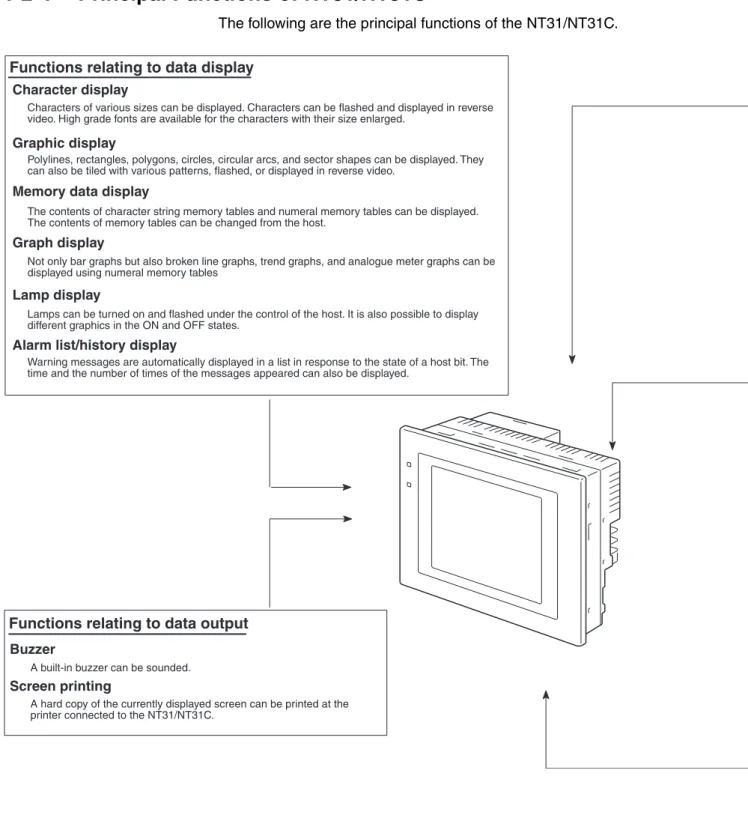
The following are the principal functions of the NT31/NT31C.
Functions relating to data display Character display
Graphic display
Memory data display
Graph display
Lamp display
Alarm list/history display
Functions relating to data output Buzzer
A built-in buzzer can be sounded.
Screen printing
Warning messages are automatically displayed in a list in response to the state of a host bit. The time and the number of times of the messages appeared can also be displayed.
Lamps can be turned on and flashed under the control of the host. It is also possible to display different graphics in the ON and OFF states.
Not only bar graphs but also broken line graphs, trend graphs, and analogue meter graphs can be displayed using numeral memory tables
The contents of character string memory tables and numeral memory tables can be displayed. The contents of memory tables can be changed from the host.
Polylines, rectangles, polygons, circles, circular arcs, and sector shapes can be displayed. They can also be tiled with various patterns, flashed, or displayed in reverse video.
Characters of various sizes can be displayed. Characters can be flashed and displayed in reverse video. High grade fonts are available for the characters with their size enlarged.
A hard copy of the currently displayed screen can be printed at the printer connected to the NT31/NT31C.
Functions of the NT31/NT31C
Section 1-2
Functions relating to the system System menu
System settings and maintenance can be performed by selecting from system menus displayed on the screen.
Creation of screen data
Screen data created using the Support Tool at a personal computer can be transferred and stored in the built-in screen data memory.
Resume function
Screen saver function
This function serves to extend the service life of the backlight and prevent the formation of an afterimage on the screen.
Clock function
The time can be displayed in accordance with the internal clock data.
Programming Console function
Device Monitor function
System program install function
Screen display history function/alarm history function
Trend graph logging function and background function
Mathematical function
Functions relating to data input Input by touch switches
Pop-up window function
Numeral/character string setting function
Recipe function
Several words of numeric data can be edited at the PT Unit, and written to or read from the host in one operation.
Input from a bar code reader
Data read with a bar code reader can be input to a character string input field.
Functions relating to communications Communications with the host
This function allows calculations to be executed continuously during PT operation when mathematical table has been set in screen data. Arithmetic operations, bit operations, logic operations, and comparison operations can be performed. Operations Changes in the contents of numeral memory tables displayed in trend graphs can be recorded (logging function). Also, the record can be maintained even when the trend graph is not displayed (background function).
The screen display history function records the time at which specific screens are displayed and the number of times they are displayed. The alarm history function records the time at which specific bits at the host are turned ON and the number of times they are turned ON.
The system program of the NT31/NT31C can be changed by using the system installer supplied with the Support Tool (NT-ZJ3AT1/ZJCAT-EV2). It can also be installed by using a memory unit (NT-MF261).
When the PT is connected to a PLC in a 1:1 NT Link or 1:N NT Link, the PT can be used for operations such as changing the PLC's operating mode, displaying or changing the PVs of words, or reading the error log.
The PT can perform the same operations as a C200H-PR027-E Programming Console when the PT is connected to a CPM1, CPM2A, CPM2C, CQM1, CQM1H, C200HX/HG/HE-(Z)E, or SRM1 PLC in a 1:1 NT Link connection, or a CS/CJ-series PLC in a 1:N NT Link connection.
The status and memory table contents of the NT31/NT31C immediately before its operation is stopped can be stored while operation is stopped, or while the power is off, and then displayed on the screen again when operation is restarted.
The NT31/NT31C can communicate with the host by four methods: host link, 1:1 NT Link, 1:N NT link (standard or high-speed), and Memory link. Data can be read from the host, and data input by means of touch switches and numeral/character string settings can be sent to the host. It is also possible to connect with other model PLCs.
Numeric keys and character keys can be assigned to touch switches so that numeric values and character strings can be input at the operation site.
The input data is written to numeral/character string memory tables and also sent to the host. It is also possible to disable input by control from the host.
A window overlaying the currently displayed screen can be alternately opened and closed by pressing a touch switch. In addition to fixed character and graphic displays, control keys and character keys created as touch switches can also be set inside the window. A maximum of three windows can be displayed simultaneously. Since the window need only be opened when input is required, the screen can be used efficiently.
Data can be input by simply touching touch switches displayed on the screen.
The possible functions of touch switches include sending data to the host and changing the screen display. Inputs can be enabled and disabled from the host when interlock bits have been allocated.
Functions of the NT31/NT31C
Section 1-2
1-2-5
Displays
The NT31/NT31C can display various kinds of elements such as characters, numeric values, graphs, lamps, and touch switches, on a screen. The screen data displayed by the NT31/NT31C are created by using the Support Tool at a personal computer.
Fixed Displays Characters and various graphics (circles, circular arcs, sectors, polylines, polygons and rectangles) whose display does not have to be changed, and mark data, image data, and library data that has already been registered, can be written directly onto the screen.
Marks are graphics comprising 16 by 16 dots that can be used as characters. They can be used as custom characters within character strings.
Image data are graphics comprising any required area of dots. They are regis-tered in advance and as many as required can be displayed at any position on the screen.
Windows bit map (BMP) data can be used for images.
There is a two-color mode, in which the display color and background color of the image are specified when it is registered in a screen, and an eight-color mode in which colors are assigned to the image in advance.
Since image data is composed of dots, it requires a large data size but offers great powers of expression.
Library data are combinations of fixed display graphics registered as a single graphic. They are registered in advance and as many as required can be dis-played at any position on the screen.
Since it is generated by combining graphics, library data has a small data size.
Lamps Touch switches
Bar graph
Line 1 Status Stop Restart
Machine name: NT31C-ST143 Production qty.: 137 units
Stage 2 Check 2 Check 1 Stage 1 0% 50% 100% 25% Characters (fixed display) Characters
(character string display) Numeric values (numeral display)
Polyline Polygon Rectangle
Circle Arc Sector
* A continuous straight line with up to 256 points can be drawn.
* A polygon with up to 255 vertices can be drawn.
Functions of the NT31/NT31C
Section 1-2
Lamps These are graphics whose display status changes in accordance with the states of bits at the host. Squares, circles, sectors and polygons can be used for lamps (normal (standard) lamps). In accordance with the status of the host bit, they can be lit (displayed in reverse video) or flashed (repeated alternation between normal and reverse video display states).
Lamps can also display different image/library data for the ON and OFF states of the host bit (such lamps are called image/library lamps).
There are four standard lamp labels: fixed display character strings, ON/OFF switching character strings, numeral displays, and character string displays. When fixed display character strings or ON/OFF switching character strings are used, several lines of labels can be displayed.
Normal (Standard) Lamps
Image Library Lamps
Touch Switches These switches can be set at any location on the screen. Pressing a touch switch on the screen where a touch switch has been set can have the follow-ing effects:
• Notification to a host bit (input notification function)
• Changing the displayed screen (screen switching function) • Input of a numeric value or character string (input key function) • Copying of a numeric value or character string (copy key function)
• Shifting to another numeric value or character string input field (cursor moving key function)
• Obtaining a hard copy of the screen (screen print function) • Opening / Closing a window
• Moving a window
Touch switches can be made to light or flash in accordance with the status of a host bit in the same way as lamps.
Mark Image data Library data
ON ON Host
Unlit state Lit state
ON
Unlit state Lit state Host
Functions of the NT31/NT31C
Section 1-2
The following 8 types of display graphic can be used for touch switches: Stan-dard, shadow, 3-dimension, no display frame, rectangle, circle, polygon, sec-torWhen rectangle, circle, polygon, or sector is selected as the shape, the area within which pressing of the touch switch is sensed (the touch switch area) can be set independently of the position where the display graphic is set.
There are four touch-switch labels: fixed display character strings, ON/OFF switching character strings, numeral displays, and character string displays. When fixed display character strings or ON/OFF switching character strings are used, several lines of labels can be displayed.
Numeral Displays Numeric values stored in the numeral memory tables are displayed. The dis-played numerals can be changed by changing the data stored in the numeral memory tables.
Hexadecimal values can also be displayed.
When decimal values are displayed, the number of digits for the integral part and fractional part of displayed values can be specified in advance.
String Displays Character strings stored in the character string memory tables are displayed. The displayed character strings can be changed by changing the data stored in the character string memory tables.
Numeral Inputs Numeric values can be input at the PT by using touch switches. The input numeric values can also be stored in a numeral memory table and notification sent to the host.
Numeral inputs can be enabled and disabled from the host when an interlock bit has been allocated.
String Inputs Character strings can be input at the PT by using touch switches, bar code readers, etc. The input character strings can also be stored in a character string memory table and notification sent to the host.
String inputs can be enabled and disabled from the host when an interlock bit has been allocated.
Function executed Touch switch area Display frame When this position is pressed... Shown in reverse video 7 8 9 4 5 6 1 2 3 0 . 12345678 Window Input ± NT31C NT31C NT31 NT631C
Character string setting input field
Display Input
Functions of the NT31/NT31C
Section 1-2
Thumbwheel Switches Numeric values can be input by incrementing or decrementing each digit with the corresponding touch switch (+, –). The input numeric values can also be stored in a numeral memory table and notification sent to the host.
Thumbwheel switch inputs can be enabled and disabled from the host when an interlock bit has been allocated.
Graphs These are graphics whose display changes in accordance with the numeric values stored in numeral memory tables. There are the following four types.
Bar Graphs
Bar graphs display the present value in a numeral memory table converted to a percentage within the range –100% to +100% of a preset value.
Analog Meters
Analogue meters display, using a quarter, half, or full circle shape, the present value in a numeral memory table converted to a percentage within the range – 100% to +100% of the preset value. Users can choose from moving pointer type and filling area type displays. Users can also add graduation to the graph.
Broken Line Graphs
Broken line graphs display, in an easy-to-read form, a sequence of numeral memory table values converted to a percentage within the range –100% to +100% of a preset value.
Trend Graphs
Trend graphs display chronological changes in the value in a numeral memory table, converting the value to a percentage within the range –100% to +100% of a preset value. The trend graph shifts position with the passage of time. Past data can also be recorded, and the numeral memory table can be read (sampled) even while the trend graph is not being displayed.
The user can choose to stop sampling, restart sampling, or display past data, by pressing touch switches.
60%
60%
100%
*100%
0%
Example showing a series of 11 numeral memory table values (with a check mark set for the display sign)
Functions of the NT31/NT31C
Section 1-2
Alarm List/History The alarm list/history function displays messages in list form, or graphics (image/library data), in accordance with changes in bit memory table sta-tuses.
For the alarm list, a series of bit memory tables are monitored, and messages (contents of character string memory tables) set for bit memory tables that come ON are displayed.
For the alarm history, bit memory tables for which the history property is set are continually monitored, and the time when they come ON and number of times they come ON are recorded and displayed together with the message (character string) set for the bit memory table.
The NT31/NT31C allows selection of the display order as the newest record first or the oldest record first by memory switch setting.
The alarm list function is used to determine which bits are ON at the present time. The alarm history function is used to determine the times at which alarms occurred in the past and how many times alarms have occurred.
Alarm List
Alarm History
Recipe You can set several words of numeric data at the PT in tabular format, and write it to the host. You can also read several words of numeric data from the host and display it on the PT screen.
0 1 0 Bit A000000 L001003 D010015 1(ON) No.13 No.14 No.15
Character string table No. 32 HOST
Image/library data 113C
Message (character string table No. 32) set for bit memory table No. 14
When the message displayed is pressed, the image/library data (113C) set for bit memory table No. 14 is displayed.
Character string table No. 50 Image/library data 1002 Character string table No. 32 Image/library data 113C Character string table No. 54 Image/library data 1125
No. 22 No. 23 No. 24
Recorded data
Character string table No. 13 Character string table No. 12
When the upper message displayed is pressed, the image/library data (102B) set for bit memory table No. 13 is displayed.
Image/library data 102B
Message (character string table No. 13) set for bit memory table No. 24
Character string table No. 11 Image/library data 005F Character string table No. 12 Image/library data 102A Character string table No. 13 Image/library data 102B
Bit memory table No. 24 97/12/04 11:19:20 Bit memory table No. 23 97/12/04 11:25:12
System Configuration
Section 1-3
1-3
System Configuration
This section shows the configuration of a system that uses an NT31/NT31C. For details on product models, refer to Appendix J Model List.
1-3-1
Peripheral Devices That Can Be Connected
The following peripheral devices can be connected to an NT31/NT31C.
• Bar code reader (page 34) • Recommended printers (page 34)
It is also possible to use printers that can emulate an NEC PC-PR201H (using the NEC PC-PR201PL control protocol), and printers that comply with one of the following EPSON control standards: ESC/P 24-J83C (col-or), or ESC/P 24-J82 (monochrome).
• Memory Unit (page 36) NT-MF261 (made by OMRON) • Support Tool (page 33)
NT-series Support Tool Version 4.@ for Windows (Made by OMRON) • NT-ZJCAT1-EV4 (CD-ROM version)
• System installer (page 33)
System installer (made by OMRON)
The system installer is supplied as a standard accessory with the Support Tool (NTZJCAT1-EV4).
Reference: The following optional devices are available. All of them can be used either with NT31 or NT31C.
Host
Host Link: CS/CJ-series, C-series, and CVM1/CV-series PLCs, SRM1
NT Link: CS/CJ-series, C-series, and CVM1/CV-series PLCs, SRM1
Memory Link: Can be connected to a personal computer, FA computer, etc. Other companies' PLCs can also be connected.
Bar code reader
Printer
Personal computer
Support Tool
System installer
Memory unit NT31/NT31C
Can be connected to CPU Units and SRM1. However, connection is not possible to some models.
Can be connected to CPU Units, Host Link Units, and SRM1. However, connection is not possible to some models of CPU Unit and SRM1.
Controls the NT31/NT31C as required while controlling machines and monitoring the production line.
RS-232C cable (max. 15 m) or RS-422A/485 cable (max. 500 m) Running Windows 95/98/NT
Used to create screens for the NT31/NT31C at the personal computer and transmit them to the NT31/NT31C, and to make NT31/NT31C settings.
Used to change the system program of the NT31/NT31C.
Can store screen data and system program to be read out
automatically at startup.
Displays production line monitoring and instructions to the operation site, and notifies the host of the switch ON/OFF status and numeric value inputs. When a 1:N NT Link is being used, up to 8 PTs can be connected to a single PLC.
For printing out the currently displayed NT31/NT31C screen. Bar codes can be read as character strings.
Communications with the Host
Section 1-4
Reflection-suppressing protective sheet NT30-KBA04Chemical-resistant cover NT30-KBA01
Replacement battery 3G2A9-BAT08
1-3-2
Connecting to the Host
The NT31/NT31C has the following two communications ports. • Serial port A:
• D-SUB 9-pin connector
• For RS-232C use only (The Support Tool and bar code readers can be connected here.)
• Serial port B:
• D-SUB 25-pin connector
• For RS-232C or RS-422A/485 (Selectable by memory switch) • (The Support Tool and bar code readers cannot be connected here.) The host can be connected at either of these two ports.
The connection methods for each communications method at the PT and host sides are indicated below. Make the settings in accordance with the communi-cations method that can be used with the PLC to be connected and the condi-tions at the operation site.
Reference: When using an RS-232C/422A Adapter (NT-AL001) with the host link or NT link (1:1) communications method, RS-485 cannot be used. The connection must be made with RS-232C or RS-422A.
1-4
Communications with the Host
The NT31/NT31C is connected to the host by one of the following communi-cations methods.
The following communications can be used to connect an OMRON PLC: • Host link
• 1:1 NT Link
• 1:N NT Link (standard or high-speed)
The following communications can be used to connect another companies’ PLC or FA computer:
• Communications protocol supported by the other company’s PLC • Memory link
In all of these communications methods that can be used with NT31/NT31C, data communications with host are by direct connection (Memory link is, how-ever, a quasi-direct connection).
In the following, the host link and NT link that carry out the direct connection will be discussed. Memory links will be explained in 1-5 Communications Using Memory Links.
1-4-1
Direct Connection Function
With the NT31/NT31C, the bits and words referring to data required for dis-play, and those for storing input data, can be allocated to any part of the PLC memory area.
Communications with the Host
Section 1-4
The NT31/NT31C can directly write to and read from such allocated bits and words to change the display status of the elements on the PT screen, control the PT operating status, and notify the host of the status.This function, which directly reads and writes the statuses of words and bits without using a PLC program is called the direct connection function.
The words and bits allocated for direct connection are called the allocated words and allocated bits.
The direct connection function allows the data to be displayed at the NT31/ NT31C to be read from the memory area in the PLC and written to memory tables in the NT31/NT31C. Also, the data input at the NT31/NT31C can be written to the memory area in the PLC. The NT31/NT31C screen can be changed in accordance with statuses in the PLC memory area, and the NT31/ NT31C’s status data can be written to the PLC’s memory area.
Features of the Direct Connection Function
The direct connection function has the following features.
• The bits and words referring to operating status and work instruction infor-mation and those for storing input data can be freely allocated to almost any area of the PLC memory.
• Since the NT31/NT31C can directly refer to PLC bit and word data without using the program at the PLC, it can be connected to the PLC without changing the PLC program which controls the currently running produc-tion line.
• The area to control and provide notification of NT31/NT31C status, includ-ing display screens, display/no display status, and buzzer output, can be freely allocated to any part of the PLC data area. This means that the PLC status can be read and controlled just by reading this area at the PLC side, without preparing a special communications program.
The direct connection function allows the NT31/NT31C to directly read and write almost all bits and words in the PLC and to automatically change the NT31/NT31C screen display. This function can reduce the load on the PLC so that its program development efficiency is improved.
1-4-2
Host Link
The host is connected to a PT in a 1:1 connection, and the words and bits of the host are read and displayed by host link communications. This method can be used for connection to the majority of PLC types.
1-4-3
NT Link
NT link is a method for high-speed communications with a PLC using the direct connection function. The PLCs that can be connected with the NT link are as follows.
• When using the built-in host link function of a CPU Unit or SRM1:
CPM1, CPM2A, CPM2C, CQM1, CQM1H, C200HS, C200HX/HG/HE(-Z)E, CS1G/CS1H-E(V1), CS1D, CJ1G/CJ1H/CJ1M, CVM1/CV-series PLC (-EV1 or later version), SRM1
PLC NT31/NT31C
DM area I/O relay area
Communications with the Host
Section 1-4
Besides the 1:1 NT Link method, in which one PLC is connected to one PT, the NT31/NT31C can also use the 1:N connection NT Link method, which allows a maximum of eight PTs to be connected to one PLC port.PLCs that can be connected with the 1:N connection NT Link method are as follows: CQM1H, C200HX/HG/HE (-Z)E, CS1G/CS1H-E(V1), CS1G/CS1H-H CS1D, CJ1G/CJ1H/CJ1M PLCs.
The NT31/NT31C also supports OMRON’s high-speed 1:N NT Link that pro-vides faster 1:N communications. The only PLCs that support the high-speed 1:N NT Link are the -EV1 and higher versions or the high-speed versions of the CS1G/CS1H PLCs and the CS1D and CJ1G/CJ1H/CJ1M PLCs.
In the following sections, the term NT Link is used to refer to the NT Link com-munications method in general, the term 1:1 NT Link is used to refer specifi-cally to NT Links with a 1:1 connection, and the term 1:N NT Link is used to refer to both standard and high speed NT Links with 1:N connections. When necessary, the standard 1:N NT Link is distinguished from the high-speed 1:N NT Link.
Features of the NT Link The NT link has the following features.
• High-speed communications with specific types of PLCs can be executed. The NT31/NT31C also supports OMRON’s high-speed 1:N NT Link. • Writing in units of bits to the PLC memory area is possible.
This enables the other bits of words to which a touch switch has been al-located to be alal-located for other purposes (e.g. a lamp).
However, since data is written to the DM area in word units, the other bits of words allocated to touch switches in this area cannot be used for other purposes.
• The NT link can be used even when the PLC is in the RUN mode. (When the host link method is used, the NT31/NT31C switches to the monitor mode when the PLC is in the RUN mode.)
• In the case of PTs that support the standard 1:N NT Link (NT20S, NT31, NT31C, NT600S, NT620S, NT620C, NT625C, NT631, NT631C) up to 8 PTs can be connected to one port of the PLC and used at the same time. Up to 8 PTs (NT31, NT31C, NT631, and NT631C) can also be connected simultaneously when the high-speed 1:N NT Link is being used.
All of the PTs connected to a PLC port must use either the standard or high-speed 1:N NT Link; the two communications systems cannot share a single port.
• When using a C200HX/HG/HE-(Z)E PLC and standard 1:N NT Links, up to three 1:N NT Link systems (i.e., 24 PTs) can be connected by installing a Communications Board in the option slot of the CPU Unit. (Only the standard 1:N NT Link can be used.) For details on the Communications Board, refer to the SYSMAC Communications Board Operation Manual
(W304-E1-@).
• When using a CQM1H PLC and standard 1:N NT Links, multiple 1:N NT Link systems can be connected by installing Serial Communications Boards in the Inner Board slots. For details on the Serial Communications Board, refer to the CQM1H Serial Communications Board Operation Man-ual (W365-E1-@).
Communications Using Memory Links
Section 1-5
• Multiple 1:N NT Link systems (standard or high-speed) can be connected by installing a Communications Board in the Inner Board slot of the CPU Unit for a CS1G/H/D PLC or installing a Serial Communications Unit on the Backplane for a CS1G/H/D or a CJ1G/M/H PLC. For details on the Communications Board/Communications Unit, refer to the CS/CJ-series Serial Communications Board/Unit Operation Manual (W336-E1-@). • If the PLC used supports the Programming Console function, the NT31/NT31C can be used as a Programming Console.
• If the PLC being used supports the Device Monitor function, the NT31/ NT31C can be used to change the PLC’s operating mode and read/ change data in the PLC’s memory areas.
The NT link is compatible with the host link. The NT31/NT31C screen data and PLC programs used with the host link direct connection method can be used with the NT link method as they are.
1-4-4
Connecting to other Companies’ PLCs
Installing a system program for multi-venders by using a specific system installer enables the NT31/NT31C to be connected to the PLCs of other mod-els in direct connection. This system installer is supplied with the Support Tool (NT-ZJCAT1-EV4).
Compatible PLC The NT31/NT31C can be connected to the following model PLCs. • Mitsubishi A series programmable controller (computer link module) • Mitsubishi FX series programmable controller
• SLC 500 Series by Allen-Bradley • 90-20 and 90-30 Series by GE Fanuc • S7-300 and S7-400 Series by Siemens
For details on the procedure for connecting to other model PLCs, refer to the
PLC Connection Manual or NT31/631 Multi Vendor Connection Manual.
1-5
Communications Using Memory Links
In this section, a communications method other than the direct connection, called the memory link, is discussed.
1-5-1
Memory Link
Memory link is a method to send and receive data between a personal puter or a FA computer and the NT31/NT31C by using RS-232C/422A com-munications.
In memory link, there is an area called PT Memory, as shown below, inside the NT31/NT31C, and this area is treated as a virtual area on the PLC. This allows PT memory and the display elements of the NT31/NT31C to make a quasi-direct connection. By sending a command for the memory link, the host can make the NT31/NT31C execute processes through PT memory. Fre-quently used commands are kept handy for read and write tasks of the numeral memory table, character-string memory table, and bit memory table.
Communications Using Memory Links
Section 1-5
In the memory link method, the only difference is that the NT31/NT31C finds its communications target inside instead of outside. In the memory link method, therefore, change of the target is all that is needed to be capable of using the exact screen data that is acquired by the direct connection. (With the NT31/NT31C, the Support Tool must be used to convert the data to screen data for the memory link.)
When compared to the direct connection of the host link or NT link methods, the memory link method has some restrictions regarding the use of some functions, as described below.
• The Programming Console and Device Monitor functions cannot be used. • The following strobes of PT status notify bits do not turn ON (page 7 to
27).
Screen switching strobe Numerals input strobe Character-string input strobe
• The usable area for allocation is the PT memory only.
1-5-2
Comparison between Direct Connection and Memory Link
The major differences between the direct connection and the memory link are as follows:
• In the memory link method, the communications with the host should be carried out by using commands. Compared to the ordinal direct connec-tion, which can be used requiring almost no programs, the memory link method requires a program that is necessary for interchange of com-mands. This, however, gives advantages to the memory link method by using a large variety of functions available in the direct connections from major models such as a personal computer and a FA computer equipped with RS-232C/RS-422A communications means, allowing the PT to be suited for larger usage.
• Actual PLCs have many kinds of areas, where as PT memory is a single area with only one kind. When creating screen data by using the memory link methods, it is always necessary to allocate display parts in the PT memory.
For communications between the host and the PT by the memory link method and for handling screen display elements, refer to the NT31/NT31C/NT631/ NT631C Programmable Terminal Reference Manual.
1-5-3
Memory Link Online Transfer Function
When memory link communications are being used, the NT31/NT31C can be switched to Transmit mode from the host even if the NT31/NT31C is operating and screen data can be written. (The NT31/NT31C can be returned to RUN mode after the screen data is written.)
Lamp PT memory PT PLC NT31/NT31C Direct connection Numeral memory table RS-232C/422A communications
Before Operating
Section 1-6
The memory link online transfer function can be used to replace screen data at a fixed time each day or replace screen data with maintenance screen data for maintenance.For more details on the memory link online transfer function, refer to informa-tion on the memory link online transfer funcinforma-tion in the NT31/NT31C/NT631/ NT631C Programmable Terminal Reference Manual.
1-6
Before Operating
Follow the procedure given below to start the system of the NT31/NT31C.
*1 System program installation is only done in special circumstances, for
example when changing the system program, or to recover the original status of the installed program. This operation is not normally necessary. When using other PLC models (sequencers), however, it is necessary to install specific system programs.
*2 Display of the system menu, and all change operations, can be inhibited.
This enables you to prevent the accidental deletion or alteration of screens and settings.
Reference: • For the system program, use the NT31/NT31C system program supplied as an accessory with the NT-series Support Tool (NT-ZJCAT1-EV4). • For the Support Tool, use NT-series Support Tool for Windows (Ver. 4.@). Host
Set the host settings.
Create the host program.
Start operation.
NT31/NT31C
Connect the power supply.
Install the system program.*1
Transmit the screen data.
Set the memory switches.
Connect to the host.
Support Tool
Create the screens. Install the Support Tool at the computer. Install the PT in the
operation panel.
Make the settings in the system installer mode.*2
Confirm the settings and check communications. Connect to the
NT31/NT31C.
(Refer to the NT31/NT31C/NT631/NT631C Programmable Terminal Reference Manual and the Support Tool Operation Manual.)
When RS-232C used at the PT: refer to section 4 When RS-422A/485 used at the PT: refer to section 5
(Refer to the manual for the Support Tool.)
• For the host link, refer to pages 46 and 96, and the manuals for the host link unit and peripheral tools. • For the NT link (1:1), refer
to pages 61 and 107. • For the NT link (1:N), refer
to pages 64 and 109. • For the high-speed NT link
(1:N), refer to pages 69 and 113.
• For the Memory link, refer to pages 72 and 115.
(page 30)
(page 31)
(Refer to page 151 and the Support Tool manual.)
(page 151)
(page 155)