• Spotlight on the pr
esent
er
Brigitt e Hertz A s tudy int o pr esent ations of c onf er enc e paper s with P ow erP ointA study into presentations of
conference papers with PowerPoint
Spotlight on the presenter
A study into presentations of conference papers
with PowerPoint
Thesis committee
PromotorProf. Dr C.M.J. van Woerkum
Emeritus Professor of Communication and Innovation Studies Wageningen University
Co-promotor Prof. Dr P. Kerkhof Professor of Social Media VU University Amsterdam Other members
Prof. D.K. Farkas, University of Washington Prof. dr. J.C. de Jong, Leiden University Prof. dr. ir. A.E. J. Wals, Wageningen University Dr. C. H. van Wijk, Tilburg University
This research was conducted under the auspices of the Wageningen School of Social Sciences (WASS)
Spotlight on the presenter
A study into presentations of conference papers
with PowerPoint
Brigitte Hertz
Thesis
submitted in fulfilment of the requirements for the degree of doctor at Wageningen University
by the authority of the Rector Magnificus Prof. dr. A.P.J. Mol,
in the presence of the
Thesis Committee appointed by the Academic Board to be defended in public
on Wednesday 9 September 2015 at 1.30 p.m.in the Aula.
Brigitte Hertz
Spotlight on the presenter. A study into presentations of conference papers with PowerPoint 200 pages.
PhD thesis, Wageningen University , Wageningen, NL (2015) With references, with summary in English
•
Spotlight
•
on the
•
presenter
•
Spotlight
•
on the
•
presenter
Abstract 4 1. Introduction 8 2. Method 9 3. Results 11 4. Conclusions 14 Samenvatting 15 1. Introductie 18 2. Methode 19 3. Resultaten 18 4. Conclusies 21 1. Introduction 241. 1. Reasons for research into the use of PowerPoint 25 1. 2. The History of PowerPoint and its use 29 1. 3. Alternative programs 33 1. 4. Focus 35 1. 4. 1. Presentations at scientific conferences 35 1. 4. 2. Delivery 37 1. 5. Problem definition and research questions 39 1. 6. Thesis outline 40 1. 7. References 42
2. PowerPoint: from dubious default to detrimental decisions
- a literature review 46
2. 1. Introduction 47 2. 2. Slide layout 50 2. 2. 1. Advice on slides 52 2. 2. 2. Criticism regarding slides 54 2. 2. 3. Research on the use of slides 55 2. 2. 4. Conclusion on instruction, criticism and research on slide layout 60 2. 3. Presenter behavior 61 2. 3. 1. Advice on presenter behavior 62 2. 3. 2. Criticism regarding presentation behavior 63 2. 3. 3. Conclusion on presenter behavior 65 2. 4. Effects of using PowerPoint in presentations 65 2. 4. 1. Student appreciation 66 2. 4. 2. Classroom interaction 68 2. 4. 3. Improving student grades 69
Contents
2. 5. Studies of PowerPoint effects outside the classroom 72 2. 6. Conclusion and discussion 73 2. 7. References 76
3. Presentations of Conference Papers with PowerPoint. Detrimental
Software or Bad Presenters? Empirical Data for an On-going Debate 86 3. 1. Introduction 87 3. 2. Use of text and pictures 90 3. 3. Verbal presenter behavior 95 3. 4. Research questions 97 3. 5. Method 99 3. 5. 1. Use of text and pictures and types of slide 99 3. 5. 2. Physical behavior 99 3. 5. 3. Verbal behavior 100 3. 5. 4. Relation between type of slide and behavior 101 3. 6. Results 101 3. 6. 1. Type of slide 101 3. 6. 2. Physical behavior 102 3. 6. 3. Verbal behavior 103 3. 6. 4. Relationship between the use of text and pictures, type of slide and physical and verbal behavior 103 3. 7. Discussion 104 3. 8. References 107
4. Why do scholars use PowerPoint the way they do? An empirical study of reasons behind ineffective use of PowerPoint 114
4. 1. Introduction 115 4. 1. 1. Guidelines for effective PowerPoint presentations 117 4. 2. Method 121 4. 3. Results 124 4. 3. 1. Reasons For Using PowerPoint 124 4. 3. 2. Presenting without PowerPoint 126 4. 3. 3. Use of pictures 128 4. 3. 4. Use of text 131 4. 3. 5. Disadvantages of Using PowerPoint 132 4. 4. Discussion 134 4. 5. Practical implications for the teaching of business communication 138 4. 5. 1. Teaching rhetoric skills 138 4. 5. 2. Designing slides 139 4. 5. 3. Presenting with PowerPoint 140
Contents
2
|
4. 6. Concluding remarks 141 4. 7. References 141
5. PowerPoint slides as speaking notes: The influence of speaking anxiety
on the use of text on slides. 146
5. 1. Introduction 147 5. 2. Speaking Anxiety 149 5. 3. Study overview 153 5. 4. Method 154 5. 4. 1. Measures 155 5. 5. Results 156 5. 6. Discussion 160 5. 6. 1. Limitations and further research 161 5. 7. Conclusion 162 5. 8. References 163
6. Conclusion and discussion: PowerPoint, the double-edged sword 168 6. 1. Introduction 169 6. 2. Research focus 170 6. 3. Main findings 172 6. 3. 1. How do scholars present with PowerPoint? 172 6. 3. 2. Why do presenters use PowerPoint in this way? 173 6. 3. 3. Does PowerPoint influence presentations in a detrimental way? 174 6. 4. Discussion 175 6. 4. 1. Motives and behavior of the presenter 176 6. 4. 2. Complex interaction 177 6. 4. 3. Need for training 178 6. 4. 4. Limitations and future research 180 6. 5. New developments 183 6. 6. Concluding remarks 184 6. 7. References 185
Acknowledgements 191
Abstract
A
1. Introduction
PowerPoint is the most widely used presentation software tool. As of 2012, PowerPoint had more than 200 million presenters world-wide. Presenters all over the world use the program. Some use it for university teaching, others for business meetings and some even use PowerPoint to deliver a sermon. But the program doesn’t always seem to be used to the satisfaction of the audience. In many critical articles, presenters are accused of using too many words on their slides and too often looking at the projection instead of keeping eye contact with the audience. Some authors also criticize the program itself for what they see as a negative influence on presentations.
If these critical observations are valid, then PowerPoint presenta-tions don’t conform to the advice given in instruction books nor to the outcome of research into human information processing. This advice usually proposes the use of minimal text on slides, and instead using pictures or other graphics. This would help the audience process the information. In addition, the instruction books stress the importance of maintaining eye contact with the audience. It is remarkable that the program is so frequently used, while it is so often criticized for what seem to be valid reasons.
There has been some research into PowerPoint use in the class-room, investigating the effects on student appreciation and grades.
Abstract
|
5• Spotlight • on the • presenter
Much of this research does not describe how nor why the program is used in these situations. The critical articles on PowerPoint are mainly based on personal experiences and not on research. So there has not been much empirical evidence that presenters actually do use too many words or that they look too often at the projection, nor has the influence of PowerPoint on the presentation been established. In addition it is not clear why so many presenters don’t seem to follow the advice in instruction books, which say to use a minimum amount of text on a slide and which stress the importance of maintaining eye contact with the audience.
This dissertation focuses on the role of the presenter. It investigates how presenters use PowerPoint and if they are guilty of the negative behavior mentioned above. If they are guilty, what are the reasons they use PowerPoint in this way? Some authors have suggested that presenters use PowerPoint not only for the benefit of the audience, but that they also use the words on the slides as speaking notes. In par-ticular, presenters suffering from speaking anxiety might be afraid of being “lost for words” or forgetting the structure of their presentation. They would then be able to turn to the text on the slides as support. This dissertation will investigate the possible role of speaking anxiety and how it affects PowerPoint usage.
The research looks at the use of PowerPoint by scholars presenting conference papers. Conferences play a central role in the network of scientific communication and are important for a researcher’s profile. The majority of scholars present their work at conferences several times a year and these presentations can be demanding and chal-lenging. In contrast with writing and publishing a paper, conferences
Abstract
6
|
allow scholars to interact with an audience of their peers who will evaluate their work by posing critical questions.
Challenging exposure of this kind might well engender or increase speaking anxiety in the presenter.
Clearly there is a need for empirical research on PowerPoint use, research focused on the program’s use in delivering scholarly presen-tations. Questions to be answered by the research include:
• How do scholars use PowerPoint?
• Why do scholars use PowerPoint in the way that they do? • Does speaking anxiety influence the way that scholars use
Power Point?
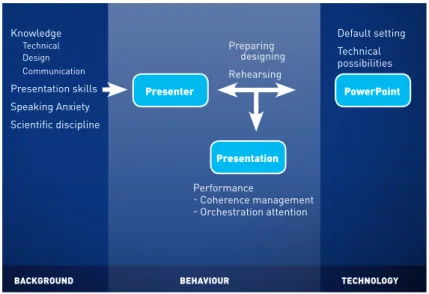
• Does PowerPoint influence the quality of presentations? This thesis studies the use of PowerPoint in a real life setting and looks at presentations as being complex interactions among slides, presenter behavior and audience. An overview of the different elements regarding the presenter, his/her background, the presentation, the presenter’s behavior and the PowerPoint program itself can be found in Figure 1.
Abstract
8
|
Figure 1 Elements of PowerPoint presentations
bACkgrOund behAviOur teChnOlOgy
Knowledge Technical Design Communication Presentation skills Speaking Anxiety Scientific discipline Presenter Presentation PowerPoint Preparing designing Rehearsing Default setting Technical possibilities Performance - Coherence management - Orchestration attention
2. Method
There is a literature review and three empirical studies. The litera-ture review compares the program with its predecessors and describes the software, slide design and the user’s presentation behavior, focusing on the interaction of these elements. Instruction books and articles on PowerPoint, criticism and empirical research on the topics of slide de-sign, presentation behavior and its effects on audiences are discussed.
In the first empirical study, fifteen scientific presentations of language scientists are analyzed on the use of text and pictures on the slides. The physical and verbal behavior of the presenter has also been studied, specifically investigating how often presenters look at the pro-jection and if they verbally introduce a slide. Furthermore the relation
between the slides and the presenter’s behavior has been analyzed. The second empirical study employs interviews with scholars about their reasons for PowerPoint use. It distinguishes between first-year PhD students (beginners) and advanced, prize winning scholars from different disciplines of science (humanities, physical science, social science and medical science). Special attention is given to the acquisi-tion of PowerPoint skills.
The third study consists of a survey using social scientists and focuses on the influence of speaking anxiety on the use of PowerPoint. It tests if speaking anxiety causes presenters to spend more time on preparing and rehearsing the presentation, and analyzes the possible relationships among speaking anxiety, time spent on preparing and rehearsing a presentation, and the use of words on a slide.
3. Results
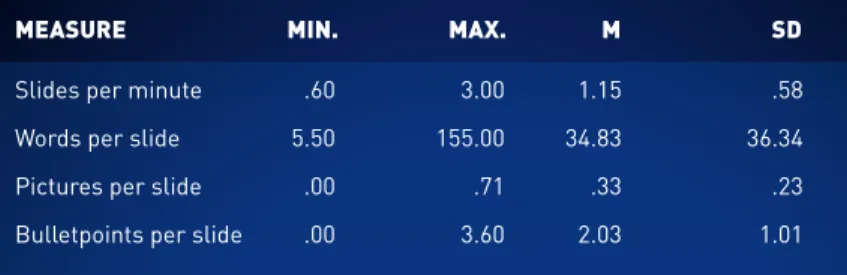
Certain characteristics of PowerPoint such as its default-settings and the ability to use slides on the Internet and as handouts may tempt the presenter to increase the amount of text on slides. These choices, however, are not necessary, and are decisions made by the presenter. The scholars in our study used a relatively large number of words when compared to what instruction books advise (a maximum of 20 to 36 words per slide, depending on the author). An average number of 35 (language scientists) and 50 (social scientists) per slide was found. Many of the scholars used a small number of pictures (depending on the scientific discipline).
Presenters look on average 73 times at the projection during their
presentation of 20 minutes (more than three times a minute). Looking at the projection to indicate a new slide or ‘new’ elements on a slide seems to be characteristic for the use of PowerPoint. Presenters turn away from the audience and break eye contact, something which is considered negative in making presentations. The critics of PowerPoint clearly have a point when they complain about the high number of words on the slides and about presenters looking towards the projec-tion.
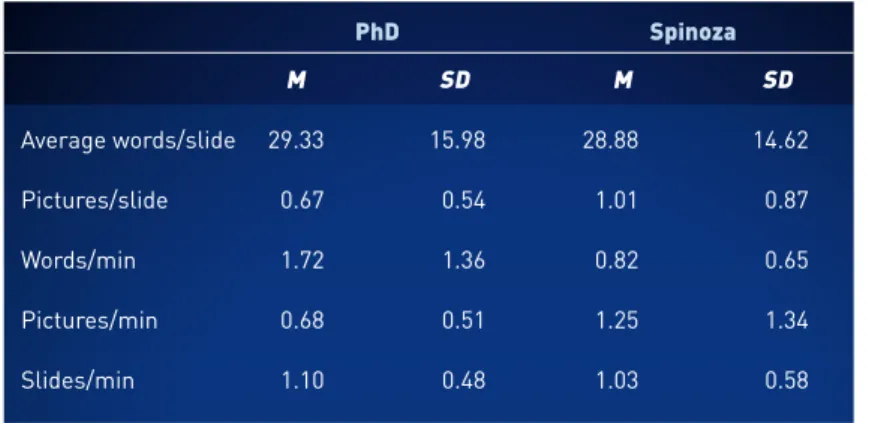
There are differences, however, between beginning and advanced presenters. Beginners use more than twice as many words per minute than advanced presenters and only half as many pictures. In maintain-ing contact with the audience there is also a difference between begin-ning and advanced scholars. Advanced presenters often like to present without the use of PowerPoint because this allows more contact with their audience.
Some scholars say that they use the text on the slides as speaking notes. Many have also said that they use pictures almost exclusively for the benefit of the audience. Beginners probably use more text and fewer pictures because they suffer more from speaking anxiety than advanced presenters. They might be more concerned with their own performance. Advanced scholars on the other hand have indicated that they have their audience in mind when preparing and delivering a presentation. Speaking anxiety, in an indirect way, also plays a role in the number of words used on the slides. Anxious presenters spend more time rehearsing the presentation; this is related to the number of words used on the slides.
Scholars often seem to lack knowledge about how to use
Power-Abstract
10
|
Point in an appropriate manner. Instead of receiving training in using PowerPoint, they learn to present with the program by experimenting and by observing colleagues and designing slides on the basis of common sense, which is often against the advice in instruction books. Moreover some scholars erroneously think that PowerPoint makes rhetorical skills redundant.
4. Conclusions
The concept of “performance” seems to be appropriate in descri-bing all the elements that matter in the presentation itself: speech, animated slides, working with projections, physical motion and main-taining eye contact with the audience. Presenters need an understan-ding of how audiences process different sources of information, and they must then be able to orchestrate their presentation skills in appropriate ways. If we look at PowerPoint presentations as perfor-mances, we can see that presenters must be designers, actors and directors at the same time.
It is clear that PowerPoint elicits behavior that is not always con-sistent with what is considered to be good presentation form. This, however, is not the fault of the program. The apparent user friendliness of PowerPoint might disguise the fact that presentations with the pro-gram are in fact complex. It is not PowerPoint itself which causes some bad presentations, but the choices and behavior of the presenters who must deal with all the new possibilities and requirements inherent in this program.
Presenters should be educated in appropriate slide design. They
also should be taught how to direct the attention of the audience. It is not sufficient to teach presenters how they should design and present their slides, however, if they aren’t helped to learn how to reduce their speaking anxiety in ways other than using the PowerPoint slides as support. This thesis suggests ways of teaching these skills.
Abstract
Samenvatting
S
1. Introductie
PowerPoint is niet meer weg te denken bij presentaties. Het pro-gramma kende wereldwijd meer dan 200 miljoen gebruikers in 2012. Sommigen wenden het aan voor hun colleges, anderen voor zakelijke besprekingen en weer anderen voor de ondersteuning van hun preek. Maar het programma lijkt niet altijd op waardering van het publiek te kunnen rekenen. In veel kritische artikelen over PowerPoint presenta-ties worden de presentatoren ervan beschuldigd dat zij teveel tekst op hun slides zetten en te vaak naar de projectie kijken waarbij zij het oogcontact met het publiek verbreken. Sommige critici stellen zelfs dat het programma een slechte invloed heeft op presentaties.
Als de observaties van de critici over tekstgebruik en het kijken naar de projectie correct zijn, dan zijn PowerPoint presentaties in ieder geval niet in overeenstemming met de richtlijnen uit instructieboeken voor presenteren of met het onderzoek naar informatieverwerking. Beiden adviseren om weinig tekst op een slide te zetten en in plaats van tekst een beeld te gebruiken om het publiek te helpen de infor-matie te verwerken. Bovendien benadrukken de instructieboeken het belang van het onderhouden van oogcontact met het publiek. Het is dus opmerkelijk dat het gebruik van het programma zo wijdverbreid is, terwijl het bekritiseerd wordt om, wat lijkt, legitieme redenen.
Er is empirisch onderzoek gedaan naar het gebruik van
Power-Samenvatting
|
15• Spotlight • on the • presenter
Point, maar dat concentreerde zich voornamelijk op de effecten van het gebruik op scholen. Er is geen onderzoek naar hoe het programma wordt gebruikt of waarom het op een dergelijke manier wordt ingezet. De kritische artikelen over PowerPoint zijn vooral gebaseerd op per-soonlijke ervaringen en niet op onderzoek. Er is dus nog geen weten-schappelijk bewijs dat presentatoren werkelijk teveel tekst gebruiken en te vaak naar de projectie kijken, noch is de invloed van PowerPoint op presentaties vastgesteld. Bovendien is het niet duidelijk waarom zo weinig presentatoren het advies uit de instructieboeken lijken op te volgen.
Deze dissertatie richt zich op de rol van de presentator. Onderzocht wordt hoe presentatoren PowerPoint gebruiken; of zij zich schuldig maken aan het bovengenoemde gedrag. En als dit het geval is, waarom zij PowerPoint op deze manier gebruiken. Sommige auteurs hebben gesuggereerd dat presentatoren PowerPoint niet alleen ten behoeve van het publiek inzetten, maar dat de woorden op de slide voor de presentator zelf als spiekbrief dienen. In het bijzonder zou dit kunnen gelden voor presentatoren met spreekangst die bang zijn om de tekst of de structuur van de presentatie te vergeten. De mogelijke rol van spreekangst bij het gebruik van PowerPoint wordt daarom ook betrok-ken in het onderzoek.
Het onderzoek richt zich op de presentaties van wetenschappers op conferenties. Conferenties spelen een centrale rol in het netwerk van wetenschappelijke communicatie en zijn belangrijk voor het profiel van een wetenschapper. De meerderheid van wetenschappers presenteert hun werk een paar keer per jaar en deze presentaties kunnen uitda-gend en veeleisend zijn. In tegenstelling tot het schrijven en publiceren
Samenvatting
16
|
van een artikel, treden wetenschappers op een conferentie direct in contact met hun collega’s die kritische vragen kunnen stellen en hun werk beoordelen. Deze confrontatie zou kunnen bijdragen aan spreek-angst.
Er is behoefte aan empirisch onderzoek naar het gebruik van PowerPoint. In dit onderzoek worden de volgende vragen beantwoord: • Hoe gebruiken wetenschappers PowerPoint?
• Waarom gebruiken wetenschappers PowerPoint op deze manier?
• Beïnvloedt spreekangst de manier waarop wetenschappers PowerPoint gebruiken?
• Beïnvloedt PowerPoint de kwaliteit van presentaties?
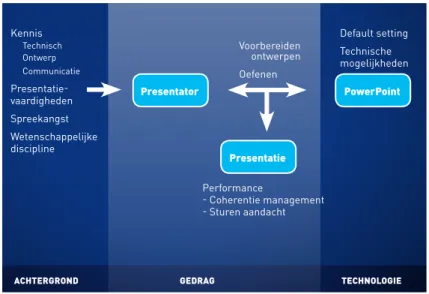
Het gebruik van PowerPoint in de praktijk wordt bestudeerd en de pre-sentaties worden beschouwd als een complexe interactie tussen slides, presentatorgedrag en publiek. Een overzicht van de verschillende elementen met betrekking tot de presentator, zijn/haar achtergrond, de presentatie, presentatorgedrag en het programma zelf worden in Figuur 1 in kaart gebracht.
Samenvatting
18
|
Figuur 1 Elementen van PowerPoint presentaties
AChtergrOnd gedrAg teChnOlOgie
Kennis Technisch Ontwerp Communicatie Presentatie-vaardigheden Spreekangst Wetenschappelijke discipline Presentator Presentatie PowerPoint Voorbereiden ontwerpen Oefenen Default setting Technische mogelijkheden Performance - Coherentie management - Sturen aandacht
2. Methode
Een literatuuronderzoek en drie empirische studies zijn uitgevoerd. Het literatuuronderzoek vergelijkt PowerPoint met zijn voorgangers en beschrijft de complexe interactie tussen slideontwerp en presentator-gedrag. Instructieboeken en artikelen over PowerPoint, kritiek en empirisch onderzoek op het gebied van slide ontwerp, presentatie-gedrag en effecten op het publiek worden besproken.
In het eerste empirische onderzoek worden vijftien wetenschappe-lijke presentaties geanalyseerd op het gebruik van tekst en beelden op de slides, op fysiek en verbaal gedrag van de presentator en de relatie tussen de slides en presentatorgedrag. De tweede empirische studie maakt gebruik van interviews met wetenschappers over hun redenen
om PowerPoint te gebruiken. De studie onderscheidt eerstejaars pro-movendi (beginners) en gevorderde, prijswinnende wetenschappers uit verschillende wetenschappelijke disciplines (geesteswetenschappen, exacte wetenschappen, sociale wetenschappen en geneeskunde).
Speciale aandacht wordt gegeven aan de verwerving van Power-Point vaardigheden. De derde empirische studie is een survey onder sociale wetenschappers en focust op de invloed van spreekangst op het gebruik van PowerPoint. De studie test of spreekangst ervoor zorgt dat presentatoren meer tijd besteden aan het voorbereiden en oefenen van een presentatie en analyseert de mogelijke relatie tussen spreek-angst, tijd die besteed is aan voorbereiden en oefenen, en het gebruik van de hoeveelheid woorden op een slide.
3. Resultaten
Bepaalde karakteristieken van PowerPoint, zoals de default set-tings en de mogelijkheid om de slides op het Internet te zetten of te gebruiken als hand-outs kunnen de presentator in de verleiding bren-gen om veel tekst op de slides te zetten. Dit zijn echter geen verplich-tingen, maar keuzes van de presentatoren. De wetenschappers in dit onderzoek gebruikten een relatief hoog aantal woorden op hun slides, vergeleken met wat de instructieboeken voorschrijven (een maximum van 20 tot 36 worden per slide, afhankelijk van de auteur). We vonden een gemiddelde van 35 (taalwetenschappers) tot 50 (sociaal weten-schappers) woorden per slide. Veel wetenschappers gebruikten een klein aantal beelden (afhankelijk van de wetenschappelijke discipline).
Presentatoren kijken gemiddeld 73 keer naar de projectie in een
presentatie van 20 minuten. Dat is meer dan drie keer per minuut. Nieuwe elementen op de slide, of een nieuwe slide introduceren door naar de projectie te kijken lijkt karakteristiek voor PowerPoint ge-bruik. Presentatoren wenden zich af van het publiek en verbreken het oogcontact, terwijl het houden van oogcontact juist als een belangrijk onderdeel gezien wordt van een goede presentatie. Critici van Power-Point hebben dus een punt als ze klagen over de hoeveelheid tekst en het kijken naar de projectie.
Er zijn wel verschillen tussen beginners en gevorderden. Begin-ners gebruikten meer dan twee keer zoveel woorden per minuut als de gevorderde wetenschappers, en slechts de helft zoveel beelden. Zij verschillen ook in het behouden van contact met het publiek. Gevor-derde presentatoren zouden vaak liever zonder PowerPoint presen-teren omdat ze hierdoor meer contact met het publiek kunnen maken.
Sommige wetenschappers gebruiken de tekst op de slides als spiekbrief. Velen gaven aan dat zij de beelden vrijwel uitsluitend ten behoeve van het publiek gebruikten. Beginners gebruiken waarschijn-lijk meer tekst en minder beelden omdat zij meer last hebben van spreekangst dan gevorderde presentatoren. De eersten maken zich mogelijk meer zorgen over hun eigen optreden, terwijl gevorderde presentatoren juist aangeven dat zij aan het publiek denken wanneer zij een presentatie voorbereiden en geven. Spreekangst speelt daarbij ook een rol, op een indirecte manier. Presentatoren met meer spreek-angst besteden meer tijd aan het oefenen van de presentatie en dit is gerelateerd aan het aantal woorden op de slide; hoe meer men oefent hoe meer woorden men gebruikt.
Wetenschappers blijken weinig kennis te hebben over het juiste
Samenvatting
20
|
gebruik van PowerPoint. Ze hebben daar geen training in gekregen, maar hebben geleerd te presenteren met PowerPoint door te experi-menteren en het observeren van collega’s. Ze ontwerpen de slides op basis van common sense. Dat is echter vaak niet conform de richtlijnen van instructieboeken. Sommigen hebben zelfs het idee dat PowerPoint retorische vaardigheden overbodig maakt.
4. Conclusies
Het concept van een ‘performance’ lijkt goed alle elementen van een PowerPoint presentatie te beschrijven: gesproken woord, (geani-meerde) slides, werken met de projectie, non-verbaal gedrag, en het houden van oogcontact met het publiek. Presentatoren zouden moeten weten hoe het publiek de verschillende informatiebronnen verwerkt en zouden de aandacht van het publiek op de juiste manier moeten weten te dirigeren. Wanneer we een PowerPoint presentatie zien als een performance, dan kun je zeggen dat presentatoren tegelijkertijd ontwerpers, sprekers, en regisseurs moeten zijn.
Het is duidelijk dat PowerPoint gedrag uitlokt dat niet altijd con-form de richtlijnen van een goede presentatie is. Dit is echter niet de fout van het programma. Presentatoren zouden onderwijs moeten krijgen in effectief slide ontwerp. De schijnbare gebruikersvriendelijk-heid kan het feit verhullen dat presentaties met het programma in feite complex zijn. Het is niet PowerPoint per se dat slechte presentaties veroorzaakt, maar de keuzes en het gedrag van de presentator die met alle nieuwe mogelijkheden en vereisten moet zien om te gaan.
Presentatoren zouden onderwezen moeten worden in het ontwerp
Samenvatting
22
|
van slides en de manieren om de aandacht van het publiek te sturen. Dit is echter niet voldoende wanneer ze niet tegelijkertijd ook geholpen worden om hun spreekangst te overwinnen op andere manieren dan met tekstslides. In dit proefschrift worden mogelijkheden beschreven om het juiste gebruik van PowerPoint te onderwijzen.
Introduction
1
|
25 • Spotlight • on the • presenterThis thesis describes research into the use of PowerPoint. One could make the argument that the use of this ubiquitous software needs no further study. The program has become a central part of most pre-sentations and most academics know the basics of its use. Or do they? When observed more closely, interesting aspects of both the program and its use can be identified, aspects that can have an influence on our perception, appreciation and recall of presentations.
PowerPoint is the most widely used presentation software tool. Authors have different ways of estimating the number of PowerPoint users, by market share, number of Microsoft Office users or by the number of presentations made. As of 2012, PowerPoint had captured 95% of the market in presentation graphics, being installed on at least 1 billion computers with more than 200 million presenters worldwide. The frequency of its use in presentations is estimated at around 350 per second globally (Lane and Wright, 2013; Parks, 2012;Thielsch & Perabo, 2012). Gaskins (2012), the inventor of PowerPoint, reports, 25 years after its release, that he could not have expected that PowerPoint would be used for university teaching, children’s school reports, church
1. 1. Reasons for research into the use of
PowerPoint
sermons and supertitles for opera houses.
My interest in the use of PowerPoint originated in my work as a presentation trainer for scholars. Since the 1990’s I have trained scholars to present their work at research meetings and conferences and for committees charged with issuing grants. I have worked with beginners as well as advanced presenters, with biologists, as well as psychologists, theologians and physicists. Earlier, presenters were working with overhead transparencies. Now PowerPoint is the over-whelming method of choice.
One of my previous studies demonstrated that when scholars are members of the audience they enjoy enthusiasm, vision and humour in a presentation (Hertz, 2011). Presentations using PowerPoint, however, did not seem to achieve these goals. My early impressions of Power-Point presentations was expressed by Blokzijl and Naeff (2004) who compared PowerPoint with a magic box of options and the presenter serving as a kind of stagehand.
With the introduction of PowerPoint, an extra training objective became to help presenters to understand that they themselves, and not the PowerPoint slides should be the focus of attention. Another point of concern was how text and pictures were used on the slides. Presenters often use lots of text and relatively few pictures. They often look at the screen and read the words aloud, breaking (eye)contact with the audi-ence. It is remarkable that presenters often exhibit this behavior when they themselves tell me that they find this behavior annoying when part of an audience. It doesn’t seem to be an effective way of presenting and I speculated that presenters kept too close to the written text of their papers and did not understand the proper uses of pictures in their presentations, perhaps finding them too frivolous (Hertz, 2006).
1. Introduction
26
|
The beginnings of my research into PowerPoint (and of this thesis) were prompted when I found empirical studies on the effectiveness of pictures, combined with the spoken word. These were studies by Mayer and his colleagues, describing his cognitive theory of multimedia learning. This puts forward an active process of information proces-sing in which a limited amount of information is selected, organized, and integrated (Mayer, 2009). Mayer proposes two different channels of information processing: an auditive channel for spoken words and a visual channel for pictures and written words. The working memory connects the presented auditive information and the presented visual information. It is this active integration between pictures and spoken words – which he calls the multimedia effect – that causes superior processing and comprehension of the material. Mayer also found that words, projected on a slide as we see in PowerPoint presentations, im-pair the processing of information because they have to be processed in the visual channel and therefore must compete with pictures for limited processing space. He calls this the “modality effect.” When spoken words were presented simultaneously with text, Mayer found a second detrimental effect at work that impaired the processing of information; he suggests that this is due to the duplication of textual information, called the “verbal redundancy effect.”
One of the consequences of Mayer’s findings is that presenters should use pictures on their slides instead of text. My efforts to imple-ment these findings in my training programs, advising presenters to find and use relevant pictures instead of words in their presentations were not really successful. I found that presenters were often reluctant to do so.
The second input for this thesis arose from the numerous papers
expressing criticism on PowerPoint use. These often focused on the slide design (too much text and too many bullet-points) and on the behavior of the presenter (looking too often at the projection) (e.g. Cornelis & Tielens, 2004; Cyphert, 2004; Keller, 2003). Some of these papers also criticized the PowerPoint program itself by saying that “the PowerPoint style routinely disrupts, dominates, and trivializes content (Tufte, 2003, p.2). Critics complained that PowerPoint seduces presen-ters into using simplified and fragmented topic lists, and encourages dull oral presentations of bullet-points. They say that PowerPoint limits possibilities for improvisation and interaction with the audience (Hanft, 2003; James, Burke, & Hutchins, 2006; Keller, 2003; Vik, 2004).
PowerPoint has not only been accused of causing bad presenta-tions. Some authors feel that the use of PowerPoint had even more far reaching consequences: that the nature of “presentation,” “lecture” and even of “learning” itself are altered (Gabriel, 2008). Kjeldsen (2006) states that the software makes us think and speak in isolated blocks, instead of with coherent narratives and linear reasoning and that it invites a conformity of visual style.
Other writers argue, however, that PowerPoint itself is not the problem, but the way it is used by its presenters. “A bad PowerPoint presentation is a symptom of the writer’s failure to employ simple slide design principles, basic communication skills, and -most importantly- fundamental rhetorical techniques” (Shwomm and Keller, 2003, p.2). The idea that the behavior and the underlying motives of the presenter are the most important variables to study became the central element of this thesis.
Most of the articles on PowerPoint and its use are written from personal experiences and mainly cover presentations in a classroom
1. Introduction
28
|
setting. On the one hand everybody seems to use PowerPoint, and on the other there is much criticism on its use. But how much text and how many pictures do presenters actually use? How often do they look at their projections? If presenters are instructed about the use of text and pictures on their slides (as is the case with my training programs), why are they so reluctant to change their faulty behavior? Scientific studies on presenter behavior with PowerPoint outside the classroom were unfortunately lacking; there is clearly a need for these.
An extra input for this thesis came at a later stage, when the inven-tor of PowerPoint, Bob Gaskins, published his Notes about inventing PowerPoint (2012). In his book he discusses several ways in which presenters don’t use PowerPoint in the way he envisioned its use. Technical developments have influenced the choices of presenters he claims, who use PowerPoint without sufficient knowledge about its purpose or the communication principles behind it.
Before describing the research approach and research questions of this thesis, the history of PowerPoint, its developments and the ideas behind it will be discussed first.
1. 2. The history of PowerPoint and its use
Gaskins started working on a presentation software program in 1984. On its initial release, it was called “Presenter.” In 1987, it was renamed to “PowerPoint,” the idea for the name coming from Gaskins himself. He recalls thinking of the name “PowerPoint” one morning. Later that day a sales representative, returning from a trip, saw the same name out the plane’s window along the runway and mentioned this to Gaskins. Gaskins saw this as a positive omen and decided to
adopt the name. An extra internal upper-case letter, the “P”, was used because PowerPoint was originally a Macintosh computer program and this spelling was required for Macintosh software.
Three pre-computer formats were the original models for Power-Point: overhead transparencies, 35mm slides, and “multimedia” shows using sequenced and synchronized 35mm projectors. By 1992, Power-Point made all three different formats easier to prepare. There was still a clear distinction among the uses of different formats for different purposes says Gaskins, because physical media still imposed strict limits. Overheads had to be black-and-white in order to be laser-printed and photocopied onto transparency film. They had the lowest level of finish and were appropriate for internal business meetings, academic talks, and classroom use, as well as for almost any other everyday purpose. Colour 35mm slides, which had a higher degree of finish, took more time and money to prepare, because they were sent away to a special department to be processed. These were appropriate for formal sales presentations or for speeches in front of large audiences. Multi-media shows, with the most polished finish, were delivered by connec-ting a computer directly to a video projector; these were rarely available. These presentations were appropriate for highly theatrical occasions before large audiences and with entertainment as the main goal.
These distinctions started to fade in the 1990s when the combina-tion of powerful laptops and small, less expensive video projectors dis-placed previous projection devices. Advanced technical options became available to all presenters who could now mix the features of all three styles. Most presentations had previously used overheads; they now began to add features formerly used only with 35mm slides (such as clip art, or shaded backgrounds), and sound effects -
attention-1. Introduction
30
|
grabbing transitions between slides, moving text and bullet points formerly used only in multimedia shows. Gaskins was surprised that the technical possibilities seemed to open the doors for presenters to use all options, instead of leading them to carefully consider questions about their suitability.
‘With no constraints from physical media, presenters had no limitation and increasingly no firm intuition as to what was appropriate’ (Gaskins, 2012, p.19).
This was also the time when PowerPoint was included in the Microsoft Office suite of programs, which made it even more popular.
(www.kubero.ntfn.org/powerpoint/history.php).
By the end of the 1990s, serious criticisms of the use of clip-art, sound effects and transitions in presentations were expressed. Some of this criticism was directed toward sound - and animation effects and the default setting used with bullet- points. Critics enjoyed using variations on the name of the program to express their discontent. “PowerPointless” was a term popularized by McKenzie (in McDonald 2004, p.160) describing fancy transitions, sounds and other effects with no discernible purpose, or benefit, and “PowerPoint: Shot with its own bullets” was the title of a critical article on the default setting of a PowerPoint slide containing a title and several lines of text preceded by bullet-points (Norvig, 2003).
One former feature of PowerPoint which caused a lot of resistance was the AutoContent wizard. This was a set of pre-written PowerPoint presentations, with a list of general topics from which to choose. The criticism was that the presentations it contained were devoid of meaningful content. Parker (2001) supposes that this wizard was added when Microsoft learned that some presenters found it hard to begin,
presented with a blank PowerPoint page. Parker imagines a Microsoft developer saying: “What we need is some automatic content... Push the button and you’ll have a presentation.”. “Microsoft took the idea and kept the name -- a rare example of a product named in outright mockery of its target customers” (Parker, 2001, ¶ 22).
Gaskin (2012), who had already left the company when the Auto-Content wizard was introduced, thinks that the designers must have imagined that users would understand that they should edit the pre-written general content to make it their own. He learned, however, that many people were using these pre-written work forms unchanged. Similarly, the default slide provided in the program containing a title and several lines of text preceded by bullet-points was used by many people unchanged. Gaskins says that the real mystery to him is “why PowerPoint - including its default presentation style based on traditional business presentations - has been adopted so widely in other contexts” (2012, p. 421). He says that the defaults can easily be changed; he doesn’t understand why the “presentation style”, which was designed for marketing and sales presentations, has been adopted for classroom teaching and other kinds of presentations.
Clearly, then, many presenters were seduced by the technical pos-sibilities of PowerPoint to use the program for purposes for which it wasn’t designed and they interpreted the default settings as the only way of operating the program.
More recent technical developments have once again extended the possible uses of PowerPoint. Yates and Orlikowski (2007) observe that PowerPoint is not only used for the primary function for which it was initially designed, facilitating live presentations, but that PowerPoint slides have been produced and consumed in a wide variety of contexts.
1. Introduction
32
|
The authors mention the use of PowerPoint slides on the internet in Web-based slideshows and in printed “decks” used as hand-outs during or after the presentation. PowerPoint slides can be saved in a PDF file and sent via email, or posted in that format on the internet (for instance on the website www.slideshare.net). Schoeneborn (2013) suggests another purpose -- as project documentation. One conse-quence of these new ways of using PowerPoint is that presenters now might use more text on their slides, since the slides can have an extra life outside the presentations, and since the accompanying verbal comments are lacking.
1. 3. Alternative programs
The focus of this thesis is on the use of PowerPoint as a presenta-tion tool. There is other presentapresenta-tion software as well, for example Apple’s Keynote or Google Docs Presentations. These programs work in a fashion similar to PowerPoint. They are used by few people and are not discussed here. A relatively new competitor which is considered by some to be a serious alternative to PowerPoint is Prezi.
Launched in 2009, Prezi is regarded by some as much more dynamic and attractive than PowerPoint and a possible “PowerPoint killer” (e.g. www.frankwatching.com/archive/2010/06/10/prezi-de-powerpoint-killer). The major difference between Prezi and PowerPoint is that the former uses a single infinite canvas, mirroring a whiteboard, on which different elements, such as text blocks or pictures can be designed. The result resembles a mind-map or other type of graphic organizer. Instead of a deck of slides in a fixed order, as is the case with PowerPoint, Prezi allows presenters to move from one element
to another in a non-linear way, thereby leaving room for improvisation. Furthermore, presenters can zoom in and out on elements, making them smaller or larger, thereby creating hierarchy instead of using bullet-points for this purpose (Van Groenendaal, 2010).
There seem to be some disadvantages as well. Designing a Prezi canvas seems more difficult than creating individual PowerPoint slides, and using a Prezi canvas might require more presentation skills than using PowerPoint slides. One must decide in Prezi before and during the presentation which route from one element to another on the can-vas to choose. (We have observed that the transfer from one element to another can be an issue, since reactions to Prezi presentations often mention a feeling of “seasickness.”). Moreover, the urge to improvise during the presentation might be small for most presenters.
Much like the use of PowerPoint at its beginning, there are both positive and negative evaluations of Prezi; these are mostly based on personal impressions. Little empirical data on the use of the program and its effects are yet available, apart from the study by Casteleyn, Mottart and Valcke (2013). They found that the use of Prezi in a univer-sity course revealed no statistically relevant differences in cognitive load, self-efficacy and knowledge gain by students between the two programs.
The students who received a Prezi lecture in this experiment appre-ciated the presentation more than the group receiving the PowerPoint lecture. The authors suggest that this perception might be a novelty effect that would soon wear off. They conclude that presentations are a complex kind of communication and that the use of PowerPoint or Prezi is only one of the contributing factors in creating audience appre-ciation and understanding. This conclusion is in line with the approach
1. Introduction
34
|
to PowerPoint use, and the emphasis on the role of the presenter in this thesis.
1. 4. Focus
The focus of this thesis emphasizes the behavior of the presenter in one of the main settings in which PowerPoint is used – scientific conferences. This differs from the perspective of other PowerPoint critics who focus on the presentation software, but it is in line with the work of others who maintain that the use of PowerPoint can’t be studied by looking at the slides alone (see for instance Farkas, 2010; Bucher & Niemann, 2012).
1. 4. 1. Presentations at scientific conferences
Many of the studies into the use of PowerPoint deal with the pro-gram used in a classroom setting. The focus in this thesis is on presen-tations of scholars, being the participants in my training programs and important contributors in the dissemination of scientific knowledge. We are looking specifically at presentations of scientific papers at con-ferences. The use of PowerPoint at conferences is ubiquitous (Hertz, 2011); one can’t image a scientific conference without (Lobin, 2009). The majority of scholars present their work at conferences several times a year, and find such presentations important for their work (Hertz, 2011).
At a conference, scholars present their research results, discuss their findings with their peers and negotiate knowledge claims. Recei-ving feedback from peers on one’s work is one of the most important objectives for presenters (Hashemi & Hokmabadi, 2011; Webber 2002).
Reasons for those who attend conferences might be to keep up-to-date by learning about research-in-progress and unpublished research results, identification of interesting lines of research, research “dead-ends” to avoid, peer recognition (Clarke, 2009), establishing new contacts, collaborating with other research groups and getting funding (Hashemi & Hokmabadi, 2011).
Conferences play a central role in the network of scientific commu-nication (Rowley-Jolivet, 2002; Shalom, 2002). They also form a crucial element in the development of a researcher’s profile (Ventola, Shalom, & Thompson, 2002) and are considered demanding and challenging (Heino, Tervonen & Tommola, 2002; Ochs & Jacoby, 1997). In contrast with writing and publishing a paper, conferences allow scholars to interact with the audience in a less formalized setting.
Lobin (2009) sees scientific presentations as an attempt to combine the specific advantages of a written text (objectivity and distance) with verbal communication (connection with the audience). Because there is personal input of the presenter (who is speaking), it is, according to Lobin, possible to apply rhetorical strategies. This is a rare moment where scholars have direct contact with their colleagues and competi-tors, unlike publishing in journals. It is a moment where their peers will be able to directly evaluate their work by posing critical questions. One could say that the presenters’ work, and, indirectly, they them-selves, are being tested and such exposure might well cause speaking anxiety.
There are important differences between lectures (most studies on PowerPoint deal with classroom situations) and scientific presen-tations. A lecture is mainly meant to transfer knowledge; a scientific presentation may have, as has been shown, other objectives as well.
1. Introduction
36
|
The audience for lectures and scientific presentations may also differ. At a conference the scientist doesn’t meet students, but meets his peers. Peers attend the conference out of interest and free will and invest time and money in doing so. An audience which is so motivated, is probably more critical of the presentations. If we compare the pre-sentations from the point of view of the presenter, we suspect, in view of the different objectives, that for a presenter there is more at stake with presenting at a conference.
Because conferences are so important for scholars and because presenting one’s work to peers might be daunting and a potential cause of speaking anxiety, it is worthwhile to investigate how scholars use PowerPoint at conferences.
1. 4. 2. Delivery
Bucher and Niemann (2012) describe PowerPoint presentations as a multimodal event, or a “performance,” in which all the different elements like speech, text, pictures, design, and pointing activities interact; the presenter has to “orchestrate” the attention of the audi-ence. Schnettler and Knoblauch (2007, p. 20) define performance, as “temporary, bodily and multimedia implementation of communicative actions which can be observed in real-time”. In studying presenter behavior, the most important element during the presentation might be “contact with the audience.” This crucial element of a presentation is in one of the canons of rhetoric; “delivery”.
According to McCroskey (2006), a strong delivery produces more at-titude change and a poor delivery tends to inhibit the effect of a verbal message. Good delivery should be natural, he claims, and should not call attention to itself or distract. Lucas (2004) has a similar description
and adds that a good delivery should convey the speaker’s ideas clearly, interestingly, and without distracting the audience. McCroskey goes on to say that an important feature of delivery is the interaction with the audience. He describes it as a circular process in which the presenter observes the reaction of the audience, adapts, the audience in turn responds, and the presenter adapts again. Direct eye contact, he says, contributes more to the establishment of a circular response between speaker and audience than does any other element in delivery. Direct eye contact makes the audience feel they are part of the communica-tive event. Other elements are the effeccommunica-tive use of voice, effeccommunica-tive bodily action, variety and immediacy. The latter refers to the degree of per-ceived physical or psychological distance among people in a relation-ship. Because formal public speaking tends to generate a low level of immediacy, a presenter should make every effort to increase the level, mainly by making eye contact with the audience.
Lucas (2004) says that delivery is mainly a matter of nonverbal communication; it is how you use your voice and body to convey the message expressed by your words. He distinguishes four basic methods of delivering a speech. The first one is reading verbatim from a script without looking at the audience. In doing so, presenters turn away from the audience and we have seen that having such little con-tact is not considered to be successful in engaging interest. The second method is reciting a memorized text, but, according to Lucas, this has the danger of concentrating too much on the words instead of on the audience.
The third method is impromptu speaking (without preparation or planning), which is difficult for most presenters and probably not applicable to conference presentations. The fourth kind of delivery is to
1. Introduction
38
|
speak extemporaneously (combining preparation with the spontaneity and enthusiasm of an unrehearsed talk, by planning major speaking points without memorizing the precise language). Lucas believes this is the best method to deliver a verbal presentation.
Both McCroskey and Lucas consider “contact with the audience” and eye contact to be the most important factor for a good delivery. They believe that looking away from the audience, for example to look at the words on a PowerPoint slide, is a bad way of presenting.
McCroskey (2006) couples the delivery of presentations with spea-king anxiety. Apart from very experienced presenters and naturally talented speakers, all presenters suffer from this kind of nervousness (Coy & Pias, 2009; Hertz, 2011). McCroskey finds that the reason many people are “bad” presenters is that they are not audience-centered but self-centered, and that this is increased through nervousness. One of the reasons for PowerPoint presenters to use texts on their slides could be that this helps them to control anxiety. The possibility of using words on a slide might have replaced the use of speaking-notes (see also Cornelis & Tielens, 2004 and Farkas, 2005). PowerPoint slides containing the wording and structure of the speech can help presenters who fear they will be lost for words, forget a topic, or present the topics in the wrong order. This thesis will examine whether speaking anxiety indeed plays a role in the use of words on PowerPoint slides.
1. 5. Problem definition and research questions
Presenters in general do not appear to be at their best when pre-senting with PowerPoint. This impression from the training programs is supported by many articles on the use of the program. There is little
research, however, into this subject, apart from empirical studies in the classroom which unfortunately do not reflect the situations studied in this thesis. The focus is, instead, on scholars presenting at conferences, which are important venues for disseminating scientific knowledge and often critical for their work and careers.
It is hoped that this dissertation will contribute to a better understan-ding of the use of PowerPoint in presentations by proviunderstan-ding valuable empirical data. A better understanding of the actual use of PowerPoint might help to advise presenters how to use PowerPoint more effec-tively. The dissertation focuses on the following questions:
• How do scholars use PowerPoint?
• Why do scholars use PowerPoint in the way that they do? • Does speaking anxiety influence the way that scholars use PowerPoint?
• Does PowerPoint influence the quality of presentations?
1. 6. Thesis outline
This thesis comprises a literature review and three empirical studies, which are presented in subsequent chapters. All of these studies have either been published or submitted/accepted for publica-tion. Each chapter is self-contained, with its own abstract, introduction, discussion and reference list.
The first chapter presents a review of literature on PowerPoint. It compares the program with its predecessors and describes the
1. Introduction
40
|
1
complex interaction between program, slide design and presentation behavior. Instruction books and articles, criticism and empirical re-search on the topics of slide design, presentation behavior and effects on audiences are discussed. The chapter addresses the question of how PowerPoint influences the quality of presentations.
The second chapter describes an empirical study into the use of PowerPoint by scholars presenting at a conference. This study investi-gates, in a real life setting, if PowerPoint brings a new configuration to presentations. Fifteen scientific presentations were analyzed with at-tention paid to the use of text and pictures on the slides, on the physi-cal and verbal behavior of the presenter and on the relation between the slides and the presenter’s behavior.
In chapter three, the interviews which were held with scholars about the reasons for their use of PowerPoint are discussed. Twelve first-year PhD students and twelve advanced, prize winning scholars were interviewed: three in each discipline of science (humanities, physical science, social science and medical science). The questions represented different topics including: acquisition of PowerPoint skills, preparation of a presentation, advantages and disadvantages of PowerPoint use, the purpose of the various slides, and the appreciation of and feelings about PowerPoint presentations when given by others. Implications for the teaching of PowerPoint use are presented.
Chapter four describes the empirical study which focuses on the influence of speaking anxiety on the use of PowerPoint. One reason why presenters choose to use words on slides rather than pictures might be that words function as speaking notes and help to reduce speaking anxiety. A survey was conducted amongst social scientists.
1. Introduction
|
414
2
Ninety-seven respondents answered the questions on speaking anxiety, preparation and rehearsing and sent in their most recent PowerPoint presentation. The outcomes of the survey were related to the use of words and pictures on PowerPoint slides.
Chapter five describes the answers to the research questions and discusses the theoretical and practical implications of the research. Suggestions for improving presentations with PowerPoint are pre-sented.
1. 7. References
Barett, D.J. The Power of PowerPoint: Providing MBAs a leadership Edge
Proceedings of the 2004 Association for Business Communication Annual Convention www.businesscommunication.org/conventions/Proceedings/2004/PDFs/14ABC04.PDF (Retrieved: August, 3, 2007)
Blokzijl, W., & Naeff, R. (2004). The instructor as stagehand: Dutch student responses to PowerPoint. Business Communication Quarterly, 67, 70–77. Casteleyn, J. (2011) Nooit meer PowerPoint? [ PowerPoint never again? ] Ad rem – Tijdschrift voor zakelijke communicatie. vol. 5, pp. 9-12.
Casteleyn , J., Mottart, A., & Valcke, M. (2013) The impact of graphic organisers on learning from presentations, Technology, Pedagogy and Education, 22:3, 283-301, DOI: 10.1080/1475939X.2013.784621
Cornelis, L., & Tielens, T. (2004). Boodschap in beeld. Professioneel presenteren met PowerPoint. [Message in the picture. Professional presentations with PowerPoint]. Den Haag, The Netherlands: Academic Service.
Cyphert, D. (2004). The problem of PowerPoint: Visual aid or visual rhetoric? Business Communication Quarterly, 67, 80-84.
Gabriel, Y. (2008). Against the tyranny of PowerPoint: Technology-in-use and technology abuse. Organization Studies, 29, 255-276.
1. Introduction
42
|
5
Gaskins, R. (2012) Sweating Bullets. Notes about inventing PowerPoint. The PowerPoint Quadranscentennial Edition. San Francisco:Vinland Books. Retrieved from: www.robert- gaskins.com/powerpoint-history/sweating-bullets/gaskins-sweating-bullets-webpdf-isbn-9780985142414.pdf
Groenendaal, H. van, (2010). Presenteren met Prezi. [Presenting with Prezi] Pearson Educa-tion Benelux bv, Amsterdam
Hashemi, M. & Hokmabadi, M., (2011). Effective English Presentation and Communication in an International Conference. Procedia - Social and Behavioral Sciences. 30, 2104 – 2111. Hertz, B. (2006). De verbeelding van wetenschap bij mondelinge presentaties. [The use of pictures in scientific presentations] In B. A. Broekhans, P. Dijkstra, P. Groenewegen, & C. Koolstra (Eds.), Verbeelding van kennis. Jaarboek kennissamenleving (pp. 105-118). Amsterdam, The Netherlands: Aksant.
Hertz, B. (2011). Presenteren van onderzoek. [Presenting research]. Amsterdam, The Netherlands: Boom.
Hertz, van Woerkum, Kerkhof ( 2014). Why do scholars use PowerPoint the way they do? Submitted for publication.
Keller, J. Is PowerPoint the devil? In: Chicago Tribune. Chicago Tribune on the Internet at www.chicago.tribune.com. Posted Jan. 22, 2003. Retrieved from: www.faculty.winthrop. edu/kosterj/WRIT465/management/juliakeller1.htm www.physics.ohio-state-edu/~wilkins/ group/powerpt.html
Kjeldsen, J. The Rhetoric of PowerPoint. www.seminar.net/volume-2-issue-1-2006/the-rhetoric-of-powerpoint
Lane, R. & Wright, R. And the research says? PowerPoint meets cognitive science. www. office.microsoft.com/en-us/help/and-the-research-says-powerpoint-meets-cognitive-science-HA010198311.aspx. Retrieved on February, 19, 2013.
Lobin, H. (2009). Inszeniertes Reden auf der Medienbühne. Campus Verlag, Frankfurt/New York.
Lucas, S. E. (2004). The art of public speaking. New York, NY: McGraw-Hill.
Mayer, R. E. (2009). Multimedia Learning. New York, NY: Cambridge University Press.
McCroskey, J.C. (2006). An introduction to rhetorical Communication. A western rhetorical perspective. New York. Pearson Education.
McDonald, K. (2004). Examining PowerPointlessness. Cell Biology Education, Vol. 3, 155–161.
Microsoft® Powerpoint® History. www.kubero.ntfn.org/powerpoint/history.php. Retrieved 2014-1-10.
N.N. (2010). Learn Prezi. Retrieved from www.prezi.com/learn
Norvig, P. (2003). PowerPoint: Shot with its own bullets. The Lancet, 362, 343-344. Parker, I. Absolute PowerPoint. Can a software package edit our thoughts. The New Yorker - May 28, 2001. Retrieved from: www.physics.ohio-state-edu/~wilkins/group/powerpt.html. 2014-1-11.
Parks, B. (2012-08-30). Death to PowerPoint. www.businessweek.com/articles/2012-08-30/ death-to-powerpoint Bloomberg Businessweek, retrieved 2013-01-11).
Prezi: de PowerPoint Killer!, 10 juni 2010. Retrieved 24 February 2014. www.frankwatching.com/archive/2010/06/10/prezi-de-powerpoint-killer/
Rendle-Short, J. (2006). The academic presentation. Situated talk in action. Aldershot, England: Ashgate.
Rowley-Jolivet, E. (2002). Visual discourse in scientific conference papers. A genre-based study. English for Specific Purposes, 21, 19-40.
Schoeneborn, D. (2013). The Pervasive Power of PowerPoint: How a Genre of Professional Communication. Organization Studies, 34(12) 1777–1801.
Thielsch, M.T., Perabo, I. (2012). Use and evaluation of presentation software. Technical Communication, Vol. 59, Number 2.
Tufte, E. R. (2003). PowerPoint is evil. Wired. Retrieved from www.wired.com/wired / archive/11.09/pp2.html
Tufte, E. R. (2006). The cognitive style of PowerPoint. Chesire, CT: Graphic Press. Yates, J. and W. Orlikowski. The PowerPoint presentation and its corollaries: How genres shape communicative action in organizations. In: Mark Zachry and Charlotte Thralls, (Eds). The cultural turn: Communicative practises in workplaces and the professions. Amityville, NY: Baywood Publishing, 2007.
1. Introduction
PowerPoint:
from
dubious
default to
detrimental
decisions
-a literature review
1
2
1 Submitted for publication
2. Power Point: a dubious default to detrimental decisions - a literature review
|
47In order to assess how PowerPoint influences the quality of presenta-tions, this review compares the characteristics of PowerPoint with its predecessors and describes the complex interactions between the pro-gram, slide lay-out and presenters’ behavior. Advice given in instruction books, criticisms of the use of PowerPoint, empirical research, presen-tation behavior and effects on an audience are discussed. PowerPoint may encourage behavior, such as using much text on slides, that was not present to the same extent when using PowerPoint’s predecessors. The choices of the presenter however, much more than the
characteristics of the presentation software itself, affect the quality of presentations.
2. 1. Introduction
Since the introduction of the blackboard we have seen a succession of instruments for the visual support of presentations. These include 35 mm slides, overhead transparencies and computer programs which generate slides such as Prezi, Keynote and PowerPoint, the latter being the most popular and widespread presentation tool in educa-tional, academic and business settings. Approximately 96% of presen-ters use PowerPoint (Thielsch & Perabo, 2012). Some ten years ago, the program was heavily criticized in articles with titles that left no doubt about what experts considered its detrimental influence.
• Spotlight • on the • presenter
See for instance Tufte’s often cited website article PowerPoint is evil (2003), or his discussion about the accident with the Columbia Shuttle, which he attributes to a PowerPoint presentation of a technical report in which important information was “hidden” in the 6th sublevel of hierarchy on the slide (Tufte, 2006). Authors offer harsh criticism on the excessive use of texts and bullet-points on slides, on the fragmentation of the presentation by the use of too many slides and on the behavior of presenters who are too preoccupied with technical aspects, are looking at the projection instead of the audience, and are reading the texts out loud (see among others: Cornelis & Tielens, 2004; Cyphert, 2004; Keller, 2003). Tufte (2006, p.3) describes a ‘cognitive style of Power-Point’ in which PowerPoint templates weaken reasoning and corrupt statistical analysis. He attributes to the tool ‘a smirky commercialism that turns information into a sales pitch and presenters into marke-teers’. Others, however, agree with Shwomm and Keller (2003, p. 2) who argue that bad PowerPoint presentations show ‘a failure to employ simple slide design principles, basic communication skills, and -most importantly- fundamental rhetorical techniques’. In other words, PowerPoint itself is not the problem, but rather the way in which it is used.
Nowadays the criticism seems to have mostly disappeared; hardly anyone questions the use of PowerPoint or studies its influence on presentations. We agree with Barett (2004), however, that PowerPoint is so widespread that it is important to understand how it should and should not be used. This is true especially since it would seem that presenters have little understanding of the rhetorical effects of the program (Craig & Armenic, 2006) and that its use might affect ‘not
2. Power Point: a dubious default to detrimental decisions - a literature review
48
|
only the way we present and teach, but also the way we think, learn and understand’ (Kjeldsen, 2006, p.1). Nevertheless, evidence-based knowledge on how PowerPoint affects presentations remains scarce and scattered. ‘It seems that digital presentations have slipped through the cracks of academic rigor’ say Lane and Wright (2013, ¶.2). One reason for this might be that the program is so easily understood that there is no discussion about the medium itself (Stoner, 2007). Another reason might be that, according to Gabriel (2008, p. 255), ‘PowerPoint may initially have given the appearance of accomplishing what earlier technologies did (overhead transparencies, slides, chalk and black-board) only more efficiently, more stylishly, but just as the introduction of email changed organizational communication, PowerPoint is having some far reaching consequences’.
What makes it difficult to formulate an opinion about PowerPoint, its use and its influence, is that different authors discuss different parts of the program. Some discuss a single element such as bullet-points, while others condemn the whole program for its ‘communication style.’ According to Farkas (2006), there is even ambiguity surrounding basic terms such as ‘bullet-point’ or ‘PowerPoint ‘ itself. The latter could refer to the live presentation, the PowerPoint presentation on a web-site, a handout, or an email attachment in pdf or ppt format (Stark & Paravel, 2008).
In this paper we will examine the relevant available information: the instruction books and articles, the criticism, and above all, the empiri-cal data. We will address the following question: How has PowerPoint influenced the nature and quality of presentations?
In order to provide a balanced overview, we discuss the program
2. Power Point: a dubious default to detrimental decisions - a literature review
50
|
on the detailed level of the slide and its content, as well as on the level of the whole presentation. This consists of the interaction of different elements, including the behavior of the presenter. We will then address the question of how the use of PowerPoint influences the presenta-tion’s impact on the audience and the audience’s ability to remember the information. We will start by discussing the program on the level of the individual slide.
2. 2. Slide layout
We must first look at the central element of PowerPoint -- a slide with a rectangular form and landscape orientation. Presenters can design the background with different colors and graphic forms or pictures and add texts, pictures, videos or functional website links. The different elements on a PowerPoint slide can be made to appear and disappear from the slide (animation) with different effects, timing and sounds. Animations can be used to make text appear gradually, line by line. Bucher, Krieg and Nieman (2010) differentiate between static slides (the information is shown at once) or dynamic slides (lines of text or pictures are animated). The default PowerPoint slide contains a headline (title), a subtitle and bullet-points to start new lines of text. The bullet-points present a summing up, sometimes with more hierar-chical levels. This default setting can be switched off. All the slides together form a ‘deck.’ Gross and Harmon (2009) feel that the crucial unit of analysis is not the individual slide, but the extent to which the individual slide is integrated into the deck. Characteristics of a deck are the number of slides and its coherence (in subject and in design).
2. Power Point: a dubious default to detrimental decisions - a literature review
|
51One can compare a PowerPoint slide with an “old” slide, a small piece of film in a frame -- the 35 mm carousel slide. Slides had to be ordered from specialists well in advance. Presenters today design PowerPoint slides on their own computer, make last-minute changes, print the slides as hand-outs and post them on the internet so that anyone, even those who were not present in the audience, can see them. During the presentation, the PowerPoint slides are in a fixed order (like the slides in a carousel), making it difficult to skip slides or improvise (Müller-Prove, 2009).
One can also compare the PowerPoint slide with another prede-cessor, the overhead transparency. The text on the PowerPoint slide can be typed with all the possible fonts and colors a word processor allows, whereas the first overhead transparencies were hand-written. Later, one could copy or print the text unto the transparency. Power-Point slides are in a fixed order, while with the use of transparencies presenters could change or correct artifacts during the presentation and improvise with the order of information (Reedy, 2008). Another difference is that with PowerPoint presentations, presenters can indicate certain elements of the projection while turning away from the audience, while with overhead transparencies, one could point at the transparencies themselves and simultaneously keep contact with the audience. Using PowerPoint, presenters can show a new slide by using the keyboard, mouse or a remote device. There are no other differences for the rest of the presentation. The positive characteristics of Power-Point slides are the ease with which one can produce slides with pic-tures and animation effects, and the possibility of printing handouts or uploading the slides unto the internet. Negative characteristics are that