Procedia Technology 14 ( 2014 ) 108 – 115
2212-0173 © 2014 The Authors. Published by Elsevier Ltd. This is an open access article under the CC BY-NC-ND license (http://creativecommons.org/licenses/by-nc-nd/3.0/).
Peer-review under responsibility of the Organizing Committee of ICIAME 2014. doi: 10.1016/j.protcy.2014.08.015
ScienceDirect
2nd International Conference on Innovations in Automation and Mechatronics Engineering,
ICIAME 2014
Design and implementation of Remote Mechatronics Laboratory for
e-Learning using LabVIEW and Smartphone and Cross-Platform
Communication Toolkit (SCCT)
Poorna chandra B R, Geevarghese K P, K V Gangadharan
SOLVE Lab, Centre for System Design, National Institute of Technology, Karnataka, Surathkal, Mangalore, India-575025
Abstract
This paper reports a work-in progress at the SOLVE, Students Online Laboratory Through Virtual Instrumentation, at the National Institute of Technology, Surathkal, Karnataka on the design and implementation of a remote lab utilizing emerging technologies.
The paper focuses on the basic implementation of a remote laboratory using the publisher-subscriber architecture. Control system and Vibration experiments were chosen for practical implementation which could be monitored and controlled by students using internet. This enabled the remote users to gain a better understanding of the concept of vibrations and control system by performing the real experiment at a time and place of their choice. Both publisher and subscriber were developed using LabVIEW and SCCT add-on for communication. SCCT provides high performance data communication on conventional platforms like LabVIEW, Android, HMTL5, Java, JavaScript, thereby making it multiplatform approach. The method followed for data acquisition by the experimental server, architecture followed at the publisher and subscriber end, brief description about the performable experiments is explained in the present paper.
© 2014 The Authors. Published by Elsevier Ltd.
Selection and/or peer-review under responsibility of the Organizing Committee of ICIAME 2014.
Keywords:Remote laboratory; e-learning; virtual lab; Mechatronics laboratory
Corresponding author. Tel.: +91-9740235957;
E-mail address:[email protected]
© 2014 The Authors. Published by Elsevier Ltd. This is an open access article under the CC BY-NC-ND license (http://creativecommons.org/licenses/by-nc-nd/3.0/).
1. Introduction
A remote laboratory is defined as a computer-controlled laboratory that can be accessed and controlled over some communication medium [1]. The Remote triggered virtual labs has evolved with the advances in information and telecommunication technologies and has emerged as a powerful tool with regard to experimentation[2]. It is envisaged that the Remote Triggered Virtual Labs are the future scope for learning. In the IEEE Engineering Education Conference 2010 – The Future of Global Learning in Engineering Education” (EDUCON 2010) survey it was reflected that virtual and Remote Labs are more likely to improve engineering education [3]. In India, the MHRD (Ministry of Human Resource Development, Govt. Of India) under the National mission on education through information and communication technology has taken up the initiative for e-learning through the concept of remote laboratories in some of the selected institutes in India.
Different architectures can be used to support e-learning environments [4, 5, 6, 7]. Some are based on proprietary software solutions such as LabVIEW, while others are supported by open-source software such as PHP, JavaScript, Java, Python, AJAX, etc. The solution proposed in this paper uses LabVIEW at both server and client end for development. The student at the client only needs to run the application file with LabVIEW Run-time engine installed.
2. Laboratory and hardware architecture
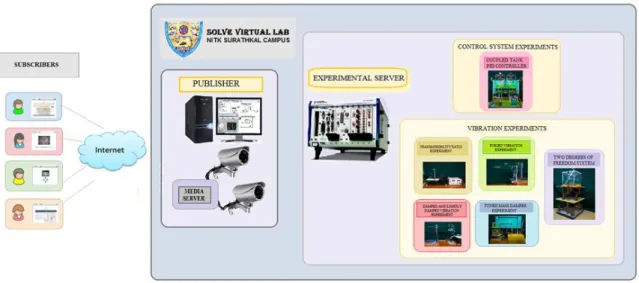
The following figure 1 shows the architecture used for the implementation of the Remote laboratory. It follows the Publisher-Subscriber architecture where the Publisher acts as the server and the Subscriber behaves as the client.
Fig. 1. Publisher-Subscriber architecture used for implementation The experimental set-ups at the SOLVE, Virtual Lab at NITK Surathkal are as follows:
1. PID Controlled coupled tank. 2. Tuned Mass Damper.
3. Transmissibility Ratio of vibrating table. 4. Forced vibration of cantilever beam.
The above setups were connected to a single experimental server, an industrial computer called the NI PXI-1042. The PXI was used both as the experimental server and the lab server as it had both the windows operating system, with Pentium processor and also the embedded controller, NI PXI-8110.
Table 1. Sensors and actuators used in the experimental setups
Experiment Analog
channels
Digital channels
Sensors Actuators Type No. Type No. PID controlled
Coupled Tank
2 12 Water level sensors 2
On-off level switch 2
Solenoid valves 11 Pumps 2 Tuned Mass
Damper
4 4 Water level sensors 2
On-off level switch 2 Accelerometers 2
Solenoid valves 2 Pumps 2 DC Motor 1 Damped and Lightly
damped free vibration
2 1 Accelerometers 2 Electromagnet 1 Forced vibration of cantilever beam 1 1 Accelerometer 1 DC Motor 1 Transmissibility ratio measurement
2 1 Accelerometers 2 Vibrating table 1
The above Table 1 gives the sensors and actuators used for respective experimental setups. All the sensing and actuation connections were done to a single experimental server as shown in the figure 2.
The water level sensors values are received by the SCB-68 connector block analog channel. The LED indicators receive inputs from the SCB-68 which is connected to the NI PXI 6229 multifunction DAQ. NI PXI 6229 has 32 analog input channels, 48 digital input channels, 4 analog output channels. The PWM counter output is given to the motor drivers which run the motors of Tuned Mass Damper, Forced vibration experiment setup. Analog output channel drives the vibrating table.
NI PXI 2565 Relay driver module drives the relay banks of pumps, valves and electromagnet used in the setups. The pumps and valves are supplied the required 230V AC, 24V DC respectively through the relay banks.
The accelerometer data are collected by the NI PXI-4496. Power supply to experiment sensors like level sensors is supplied directly.
3. SOFTWARES USED
3.1 LabVIEW
LabVIEW is an graphical programming environment introduced by National Instruments (NI) for developing, testing, and controlling systems using intuitive graphical icons, known as Virtual Instruments (VIs). LabVIEW is scalable across multiple Operating Systems (OSs) such as Windows, Mac, and Linux, thereby acts an tool for development in multiple platforms [8].
LabVIEW’s features like Web Publishing Tools, Mobile Module, Web Services, Shared Libraries or Dynamic Link Libraries (DLL) can be used in the implementation of remote laboratory.
3.2 Smart phone Cross-platform Communication Toolkit
SCCT provides communication libraries for bidirectional communication between a server and a pool of applications called clients [9]. It was chosen over other remote communication techniques for the following advantages:
x Multi-platform compatibility over platforms like Android, Java, HTML5, Linux, LabVIEW in Windows. x Security: SCCT allows filtering of valid and invalid addresses (white and black lists) in order to simplify
the realization of applications that need access monitoring, operation logging.
x SCCT handles both the broadcasting and point to point communication, so that it is possible to choose who is allowed or not to receive your data.
The Remote Lab’s publisher-subscriber architecture is realized using Communication libraries provided by SCCT in LabVIEW.
x PUBLISHER LIBRARY - This library helps to create a full-featured publisher, which authenticates incoming subscribers, check connection status and sends data to all active publishers and passes their request to the application. Publisher takes care of server side communication system.
x SUBSCRIBER LIBRARY - This library helps to create a subscriber which handles all communication details with a publisher. It receives data packages and presents them to front end application according to their data types. SCCT simplifies data exchange among applications. SCCT handles many connections at the time and publishes data in different formats according to subscriber’s capabilities.
4. Publisher of Remote Lab:
Publisher is the server part and acts as a bridge between the subscribers and the experiments. The publisher is developed using LabVIEW. The SCCT add-on is used along with LabVIEW which provides communication libraries.
Fundamental feature of MIT ILAB’s architecture design was the support of scalability of user access [3]. This was incorporated in the publisher development where there is an opportunity for many users to monitor the experiments and only one user controlling the experiment.
a b
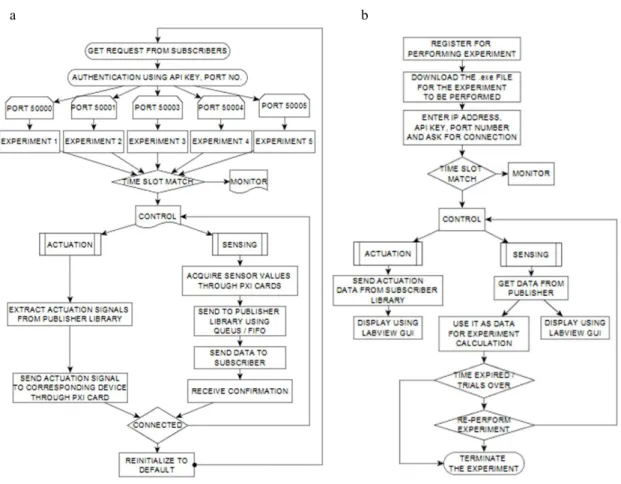
Fig 3. (a) Publisher algorithm; (b) Subscriber algorithm
The figure 3(a) shows the flow chart of the publisher. At the publisher, communication libraries gets request from multiple subscribers simultaneously. The subscriber is authenticated according to the API key and the port number. According to the port number the subscribers are directed towards the corresponding experiments. The student can monitor or control the particular experiment depending on the time slot.
The actuation signals are extracted from the publisher library and sent to the corresponding devices using the PXI card. The sensor values are collected by the NI PXI cards and sent to the publisher library using queues so that the data is not lost. The data is then sent to the subscriber communication library and confirmation is received. After the experiment is performed, the parameters are restored to default and the control is given to the subscriber who is waiting.
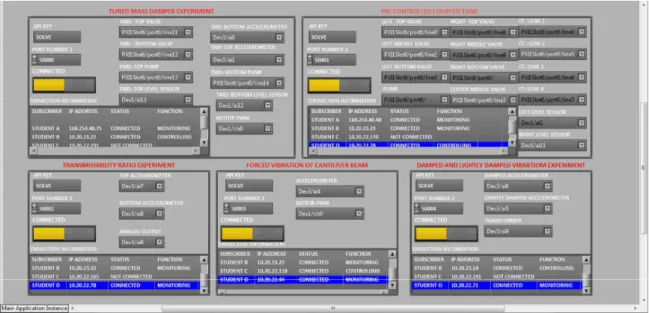
The figure 4 shows the front panel developed using LabVIEW. The front panel gives information about the subscribers who are connected to the experiment and the IP address of the controlling and monitoring subscribers. The subscribers can be monitored by white listing or black listing the subscribers using the SCCT communication libraries. The PXI channels used for actuation and control can be dynamically varied at the publisher end.
Fig 4. Publisher front panel
5. Subscriber of Remote lab
The subscriber gets an application file which is developed using LabVIEW and SCCT add-on for communication. The students as subscribers will try to access the publisher from distant locations using the application file.
Fig. 5. Subscriber front panel of PID controlled coupled tank
The figure 3(b) shows the flow chart of the subscriber process. After downloading the application file and installing LabVIEW Run-Time engine, the subscriber will try to connect to the publisher by writing the API key and port number. The subscriber will be set to monitor mode or control mode according to the time slot.
The actuation signals from the controlling subscriber will be sent from the SCCT subscriber library to the publisher. The sensed data is extracted and used in the calculations of the experiment.
The students can re-perform the experiment within the time frame allotted to him. The subscriber can get access to the publisher for a particular number of trials and time after which the connectivity is terminated.
The figure 5 shows the application file for conducting the PID controlled coupled tank experiment. After the student logs in, using the API key and port number, the connection status is inducated. In the control mode of operation, the student can perform the experiment and in the monitor mode he can only visualize the progress of other students. The subscriber gets a live video and audio feed for better feel of the experiment.
Setup 1: PID controlled coupled tank experiment:
This experiment uses PID control algorithm for controlling the inflow of water into two tanks and the level is maintained according to the set levels, despite of the leakages through the bottom valves. The students can vary the parameters of the PID controller to see the behaviour of the system
Setup 2: Tuned Mass Damper:
In the Tuned Mass Damper experiment, sacrificial load is given to the top tank to reduce the vibration of the whole system. The vibration is caused due to the unbalanced motor whose speed can be controlled by the student as shown in the figure 6(a). The student can vary the top tank mass and bottom tank mass to study the vibration behaviour
a b
Figure 6. (a) Tuned mass damper front panel; (b) Transmissibility Ratio front panel Setup 3: Transmissibility Ratio of vibrating table:
In this experimental setup a cantilever beam is placed on a vibrating table and accelerometers are mounted at the two ends of the beam. The vibration table is actuated at a particular frequency set by the student and vibration data is acquired from the accelerometers. The student will study the vibration transmitted from the fixed lower end to the free top end of the beam by calculating the transmisssibility ratio as shown in figure 6 (b)
Setup 4: Damped and lightly damped vibration of a cantilever beam:
The student excites, two cantilever beams using an electromagnet . One of the beam’s vibration is dampened by a damping tape stuck on it and the other is free to vibrate. The vibration data got from the accelerometers, is used to calculate the beam stiffness and damping ratio. The front panel is as shown in figure 7(a).
Setup 5: Forced vibration of the cantilever beam:
The student actuates the cantilever beam using a unbalanced motor and observes the different mode shapes and natural frquency as shown in figure 7(b).
a b
Figure.7. (a) Damped vibration front panel; (b) Forced vibration front panel
6. Conclusion and ongoing activity
This paper has given the Remote Lab design and implementation being developed at National Institute of Technology, Karnataka, Surathkal. The remote lab had several state of the art features like multiple user support, queues, real time video observation, experiment monitoring, secure access. The purpose of the above remote lab implementation is to set up an advanced remote laboratory, which can be applied to enhance today’s education of experiments. Future research in this area will concentrate on :
a. Separating lab server into experimental server and publisher server to achieve better safety to server and using the experimental server NI PXI in Real-Time mode to achieve greater precision and speed.
b. Exception handling to take care of failure of either the Lab server or the Experimental server. c. Channel optimization using Switch Matrix.
Acknowledgements
Our thanks to Center of System Design, NITK Surathkal and Ministry of Human Resource Development (MHRD), India for the constant financial and technical support.
References
[1] National Instruments “Distance-Learning Remote Laboratories using LabVIEW.”
[2] Javier García-Zubia, Pablo Orduña, Diego López-de-Ipiña, and Gustavo R. Alves, (2009),“Addressing Software Impact in the Design of Remote Laboratories”, Industrial Electronics, IEEE Transactions on (Volume:56 , Issue: 12 ), 4757 - 4767
[3] Javier García Zubía, Gustavo R. Alves, (2013),“Using Remote Labs in Education", Industrial Electronics Magazine, IEEE , Volume: 7, 67 – 68
[4] Gomes, L., and J. Garcia-Zubía, Advances on remote laboratories and e-learning experiences. Univ. Deusto, Bilbao, 2007.
[5] Coito, F., and L. Brito Palma, “A Remote Laboratory Environment for Blended Learning”, PTLIE Workshop - Pervasive Technologies in E/M Learning and Internet based Experiments, 1st ACM International Conference on Pervasive Technologies Related to Assistive Environments (PETRA 2008), July 16-18, Athens – Greece, 2008.
[6] Coito, F., P. Almeida, and L. Brito Palma, “SMCRVI – A LabVIEW/Matlab based Tool for Remote Monitoring and Control”, 10th IEEE International Conference on Emerging Technologies and Factory Automation, Sept 19-22, Catania, Italy, 2005.
[7] Amadou, M., M. Saad, J. Kenné, and V. Nerguizian, “Virtual and Remote Laboratories”, 1st IEEE International Conference on E-Learning in Industrial Electronics, Dec. 18-20, Hammamet - Tunisia, 2006.
[8] National Instruments Web Page: www.ni.com