Evaluating the Navigation in Software Visualization in
Augmented Reality with Speech Processing
BACHELORARBEIT
für die Prüfung zum
Bachelor of Engineering
im Studiengang Informationstechnik
an der Dualen Hochschule Baden-Württemberg Mannheim
von
Adrian Stock
Bearbeitungszeitraum 24.06.2019 bis 15.09.2019
Kurs TINF16ITIN
Matrikelnummer 4808954
Ausbildungsfirma Deutsches Zentrum für Luft- und Raumfahrt e.V. Köln Gutachter der Ausbildungsfirma Prof. Dr. Nico Hochgeschwender
Ehrenwörtliche Erklärung
Gemäß §5 (3) der „Studien- und Prüfungsordnung DHBW Technik“ vom 22. Septem-ber 2011.
Ich habe die vorliegende Arbeit selbstständig verfasst und keine anderen als die ange-gebenen Quellen und Hilfsmittel verwendet.
Abstract
Architecture of software systems is complex and abstract. Visualizing it is one ap-proach to improve comprehension of software architecture. The recent developments in the area of virtual reality and augmented reality allow software to be visualized in a three-dimensional environment.
This representation of software architecture enables users to navigate through the diffe-rent elements of an application. In Augmented Reality, gestures are used to explore the components of the software and their dependencies. However, the number of gestures is limited to only a few. Therefore, a speech assistant was developed to provide users more functionalities when exploring software systems.
This thesis examines the navigation in an application for software visualization in Aug-mented Reality using speech processing. A comparative user study, which compares the navigation with speech to gestures, is carried out. This study evaluates whether speech processing enhances the usability of software visualization in augmented reality. The objective of the present work is to discuss both the theoretical and technical aspects when setting up the study. Different definitions of usability are considered which serves as a foundation for the study. Furthermore, the developed speech assistant is integrated into an application for software visualization.
Based on the results of the user study, the usability of speech processing for exploring the architecture of software systems is evaluated.
Kurzfassung
Die Architektur von Software ist komplex und abstrakt. Sie zu visualisieren ist ei-ne Möglichkeit um das Verständnis der Softwarearchitektur zu verbessern. Aktuelle Entwicklungen im Bereich der Virtual Reality und Augmented Reality ermöglichen es Software im dreidimensionalen Raum dargestellt zu werden.
Durch die Darstellung der Softwarearchitektur können Benutzer durch die unterschied-lichen Elemente einer Applikation navigieren. Gesten werden in Augmented Reality verwendet, um die unterschiedlichen Komponenten einer Software und deren Abhän-gigkeiten zu erforschen. Die Anzahl der Gesten ist jedoch auf einige wenige beschränkt. Um bei der Erkundung von Software mehr Funktionalitäten bereitzustellen wurde ein Sprachassistent entwickelt.
Die vorliegende Thesis untersucht die Navigation mit Sprachsteuerung in einer Appli-kation zur Softwarevisualisierung in Augmented Reality. Dazu wird eine vergleichende Nutzerstudie durchgeführt. Diese vergleicht die Navigation mit Sprach- und Gesten-steuerung. Die Studie evaluiert, ob Sprachverarbeitung die Usability von Softwarevi-sualisierung in Augmented Reality verbessert.
Diese Arbeit untersucht sowohl den theoretischen als auch den technischen Aspekt beim Erstellen der Studie. Unterschiedliche Definitionen von Usability werden vergli-chen und als Grundlage der Nutzerstudie verwendet. Des Weiteren wird der entwickelte Sprachassistent in eine Applikation zur Softwarevisualisierung eingebunden.
Basierend auf den Ergebnissen der Nutzerstudie wird die Usability der Sprachverarbei-tung zur Erkundung der Architektur von Software evaluiert.
Contents
List of Figures VIII
List of Tables IX
Listings X
List of Abbreviations XI
1. Introduction 1
1.1. Motivation . . . 2
1.2. Structure of the Thesis . . . 3
2. Technical Background 4 2.1. The Framework OSGi . . . 4
2.2. Visualizing OSGi-based Software . . . 5
2.3. Storing the Data of a Software System . . . 10
2.4. Software Visualization in Mixed Reality . . . 11
2.5. Adding a Central Coordination Unit to IslandViz . . . 17
2.6. Adding Functionalities with Speech Processing . . . 17
2.6.1. Understanding Natural Language . . . 18
2.6.2. Database Queries to Access Further Information . . . 19
2.6.3. Manlike Interaction with Natural Language . . . 20
2.7. Including the Context in Speech Processing . . . 21
2.9. Related Work . . . 22
3. Creating Hypotheses for the Evaluation of Usability 24 3.1. Utility and Usability . . . 24
3.2. Analyzing the Definition of Usability . . . 27
3.3. Putting Forward the Hypotheses . . . 28
4. Study Concept 30 4.1. Target Group . . . 31
4.2. Gesture and Speech Control . . . 33
4.3. Adding New Intents . . . 35
4.4. Study Design . . . 36
4.5. Setting Up the Tasks . . . 38
4.6. Examining the Satisfaction . . . 41
5. Establishing Technical Conditions 44 5.1. Implementing Navigation Actions . . . 45
5.1.1. Shifting the View on the Application . . . 46
5.1.2. Zooming into the Application . . . 53
5.2. Map Intents to Actions . . . 56
5.3. Adding the Scenarios . . . 59
5.3.1. Implementing the Scenarios . . . 60
6. Evaluating the Results 63 6.1. Carrying out the User Study . . . 63
6.2. Evaluating the Different Aspects of the Usability Study . . . 65
6.2.1. Examining the Results of the Tasks . . . 65
6.2.2. Analysing the Results of the SUS . . . 69
6.2.3. Review of the User Comments . . . 71
6.3. Evaluation of the Hypotheses . . . 75
Bibliography 83
A. Introduction to the User Study 87
B. SUS Results 89
List of Figures
2.1. An overview over IslandViz shows the ocean and many different islands 5
2.2. Different views on an island . . . 6
2.3. Visualization of a dependency between two packages . . . 7
2.4. Diagram of the new architecture of IslandViz . . . 9
2.5. Example of a workflow in RCE . . . 11
2.6. The different visualization methods on the Mixed Reality Continuum . 12 2.7. Controller in IslandViz . . . 12
2.8. Bounding box to reposition the visualization . . . 13
2.9. Shown view in the state_inspectIsland . . . 14
5.1. Different interpretations of the action Move to the right . . . 47
5.2. Vector from the user to the visualization projected on the plane. . . 48
5.3. Sigmoid function to progress the move process . . . 51
5.4. Zooming without adjusting the center of the visualization . . . 54
5.5. Adjust the user’s focus to a position on the panel . . . 54
5.6. Shifting the application back after zooming . . . 55
5.8. Starting view for a scenario . . . 61
6.1. The times the users spent performing the six tasks. . . 66
6.2. Amount of activities performed per task. . . 68
List of Tables
2.1. Summary of the different metaphors . . . 7
2.2. Mean time to finish different tasks in the VR IslandViz . . . 8
2.3. The effect of different gestures while being in different levels . . . 16
2.4. Representation of the elements in a software system using the city metaphor 22 3.1. Different definitions of usability . . . 25
4.1. Characteristics of the target user of IslandViz . . . 32
4.2. Different executions for an action using gesture or voice control . . . . 34
4.3. Different executions for navigation actions using gesture or voice control 37 4.4. Estimation of the actions used to perform the first scenario . . . 39
4.5. Number of lines of code per building on both islands . . . 40
B.1. Summed up SUS scores for gesture control. . . 89
Listings
5.1. Store the different vectors . . . 48
5.2. Project a vector into the pane . . . 49
5.3. Shifting the visualization using Lerp . . . 52
5.4. Adjust the scale of the visualization . . . 55
5.5. Mapping the intents to a KeywordType . . . 57
5.6. Definition of a Command object in IslandViz . . . 57
5.7. Linking commands to tasks . . . 58
List of Abbreviations
AR Augmented Reality
CI Conversational Interface
DLR German Aerospace Center (Deutsches Zentrum für Luft- und Raumfahrt)
GUI Graphical User Interface
IVS Intelligent and Distributed Systems
LoC Lines of code
MVC Model-View-Controller
NLG Natural Language Generation
NLU Natural Language Understanding
OSGi Open Service Gateway initiative
PDA Personal Digital Assistant
RCE Remote Component Environment
REST Representational State Transfer
VR Virtual Reality
1. Introduction
Over time, growing software projects become more confusing and complex [1]. Due to the interaction of many classes, the overview over the different dependencies is quickly lost. Especially people who have not been involved in the development process so far are severely affected [1]. This makes maintaining sustainable software, which displays one of the most costly aspects in software engineering [2], more difficult.
In order to counteract these problems the usage of software visualization is proposed. It allows software to be visualized at a higher level of abstraction [3]. Furthermore, it strengthens the understanding of the software. Hence, different attempts have already been made to visualize software [4]. The software presented in this thesis, IslandViz, uses theisland metaphor for visualizing the architecture of a software system [5]. IslandViz (island visualization) was developed in the Department of Intelligent and Distributed Systems of the Institute of Simulation and Software Technology at DLR. It serves to visualize software based on OSGi in a three-dimensional space. OSGi is a framework for Java, which adds the concepts of bundles and services to the already existing Java functions to increase the modularization of the code. OSGi projects also make use of XML files which contain meta information of the software. Common methods, such as UML diagrams, are hardly sufficient for visualizing these relation-ships. Therefore, the approach of visualization in 3-dimensional space was chosen. In 2017 the development of IslandViz started and was implemented for virtual reality (VR) [5]. One year later, in 2018, the application was ported to another medium, augmented reality (AR) [6]. This work focuses on the implementation of IslandViz in AR.
1.1. Motivation
In [7], a user study was carried out to evaluate the usability of IslandViz in comparison to a two-dimensional software visualization application. The study shows that some simple tasks in IslandViz are cumbersome to perform. Some of these tasks, however, are crucial to exploring a new software. This results in the necessity of providing new options to enhance exploring in IslandViz. In AR the user executes actions by using different gestures [8], wherease in VR the same actions can be performed with controllers. AR limits the number of possible actions through the small number of available gestures, though. Thus, in order to give the application more functionalities, a concept was developed to extend IslandViz with a conversational interface [9]. This conversational interface can be seen as a speech assistant which helps the user to explore the software in IslandViz. The user uses voice commands to operate the conversational interface. The conversational interface uses a service developed in prior work[10]. The so-called NLU service receives a written phrase, which represents the voice command entered by the user, and interprets which action the user wants to perform. Before the development of this conversational interface is further pursued, it is to be checked how the addition of such a feature impacts the usability of IslandViz. This leads to the following research question: Does a conversational interface improve the usability of IslandViz? In order to examine this question, a user study is carried out. On the basis of the results, the usability of the conversational interface is evaluated and the research question answered.
1.2. Structure of the Thesis
Chapter 2 discusses the application IslandViz and the OSGi-based software RCE is briefly introduced. The latter is used in this thesis as an example to be visualized by IslandViz. Furthermore, the extension of the software architecture of IslandViz by a conversational interface is presented.
Chapter 3 introduces the concept of usability and derives hypotheses, which are ex-amined and used to answer the actual research question.
Chapter 4 focuses on the process of creating a user study. This study is designed in such a way that its results are used to confirm or deny the hypotheses previously created. Since the conversational interface is still under development, IslandViz in its current form cannot be used for the user study yet. In order to conduct the study in a representative manner, some changes to the application were necessary. Chapter 5 therefore implements new code in order to be able to use the functions of
voice control in the program. Afterwards, the user study is carried out.
Chapter 6 then discusses the results of the study and evaluates the different hypothe-ses on this basis. Subsequently, the actual research question is examined.
Chapter 7 evaluates and summarizes the results. Furthermore, recommendations are given on how to continue the development of IslandViz.
2. Technical Background
IslandViz serves to visualize software that is based on OSGi in a three-dimensional environment. The application uses different elements as metaphors to portray the components of an OSGi-based software. In previous work, a concept was discussed to include a speech processing service, the conversational interface, to IslandViz [9].
2.1. The Framework OSGi
OSGi (Open Services Gateway initiative) is a framework that supports the implemen-tation of component-based, service-oriented applications in Java [11]. It addresses two problems which are inherent in the modular system in Java:
• The information hiding principle is applied to the level of classes. Hence, every public class can be accessed from every other class. As a consequence, a system can easily end up highly coupled.
• The modular system is static. Modules cannot be updated during runtime. The application has to be restarted to add, remove, or change a module.
In 1998, the OSGi Alliance has proposed the OSGi framework[11]. It provides a dy-namic, component-based, service-oriented modular system for Java. OSGi systems are built around independent modules, which provide well-defined services. These modules are called bundles. The life cycle of those bundles is specified by the OSGi standard within a runtime infrastructure. This allows developers to dynamically add and remove
them during runtime.
A bundle is divided into several packages which are divided into several classes. To use a class as a service, it needs to be defined in an XML file as such. The manifest, which is also stored in the bundle, is used to declare static information about the bundle, such as the packages it imports and exports. Exporting a package allows other bundles to import it and therefore access the services within this package.
2.2. Visualizing OSGi-based Software
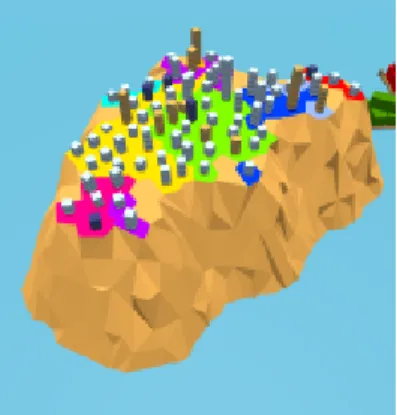
The software system visualized by IslandViz is represented as an ocean filled with islands. Fig. 2.1 shows an overview over many different islands. However, in this
Figure 2.1.: An overview over IslandViz shows the ocean and many different islands
perspective, the islands are hardly recognizable. The images in Fig. 2.2 show more detailed views.
Each island represents a different bundle. An island is divided into several regions which each visualize a package within this bundle. Fig. 2.2a1 shows a more detailed
(a) An island with different regions
(b) Close up view of the buildings
Figure 2.2.: Different views on an island
view of an island. The different colours on the ground visualize the packages. Fig. 2.2b2
shows a close-up look of the different buildings on an island. Each building represents an individual class type, e.g. classes or services, and is placed in on of the regions. All buildings standing on the same coloured region belong to the same package. The size of an island is proportional to the number of buildings on it. The height of a building indicates the number of lines of code of the belonging class.
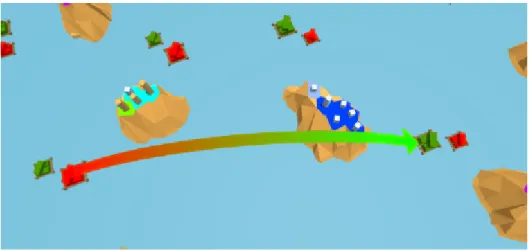
Two ports, a red one and a green one, are added to each island. The green port represents the imports of the corresponding bundle, while the red one shows the exports. Fig. 2.33 shows several islands and a specific dependency, depicted by the arrow.
The different metaphors described in this section are summed up in Table 2.1.
2taken from [5], p.34 3taken from [12]
Figure 2.3.: Visualization of a dependency between two packages
Component Visualization
Software system Ocean
Bundle Island
Package Region
Individual class type Buildings
Number of lines of code Height of a building
Dependencies Ports
Considering Previous Usability Evaluations
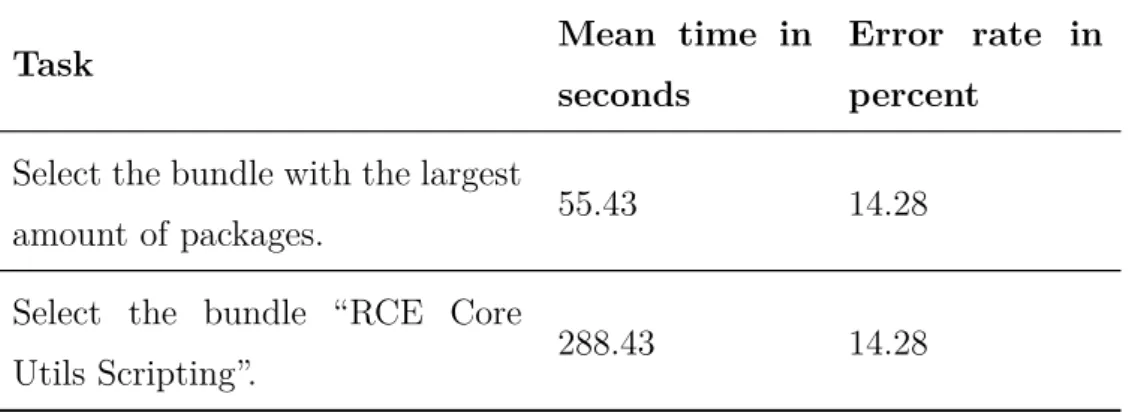
The interactions with the environment are limited to gestures. More complex tasks cannot be performed easily. In [7] a usability evaluation has shown that simple tasks are cumbersome to perform. In the evaluation, seven test users had to perform five tasks. Table 2.2 shows two of them and the average time the users needed to finish the task. These tasks have been performed using the VR application. However, the problems portrayed in the evaluation in [7] apply to the AR implementation as well.
Task Mean time in
seconds
Error rate in percent
Select the bundle with the largest
amount of packages. 55.43 14.28
Select the bundle “RCE Core
Utils Scripting”. 288.43 14.28
Table 2.2.: Mean time to finish different tasks in the VR IslandViz
Especially the process of selecting a specific bundle or any other unit is meant to be a common use case and, therefore, must be easy to perform. However, the mean time for this task is about five minutes. Due to the limitations of the controllers and gestures, the user has to visit each island until he finds the desired unit. This is an elaborate process, especially compared to the simplicity of the task. The same goes for the task
Select the bundle with the largest amount of packages. In this case, the mean time is a lot lower, as the user can make use of the provided visual help, as the size of an island scales with the number of belonging bundles. However, a mean time of one minute is still a lot of time, compared to the task’s simplicity. To enhance the user experience and lower the amount of time for simple tasks, IslandViz was extended by a conversational interface.
Extending the Architecture of IslandViz
IslandViz was extended with a conversational interface as a new modality to enhance its usability. In order to add this functionality, the former software architecture, consisting of just a device to display the visualization and a repository, which holds the data that is to be visualized, was exchanged by a MVC (Model-View-Controller) based approach. The so-called reference architecture is shown in Fig. 2.44. The proposed architecture
Figure 2.4.: Diagram of the new architecture of IslandViz
allows to spread different competences among several components. This results in a loose coupling of the different components. The components Repository, Device, and Controller implement the MVC pattern.
To understand how this architecture is applied to IslandViz, the following sections focus on the different components and their purpose. At first, the Repository, Device, and Controller are discussed. Thereafter, the different Conversational Services and their purpose are brought into focus. Finally, the remaining component, Context Monitor is described.
2.3. Storing the Data of a Software System
The Repository is a database that contains the data about the software that is to be visualized. Every software project based on OSGi can be stored in the Repository. On start, IslandViz parses the data stored in the Repository and builds the visualization accordingly. While the application is running, the Repository can be queried by the Controller. This is important for the conversational interface and is further discussed in Section 2.6.
In this thesis, the software RCE is exemplary visualized by IslandViz. Therefore, data about its structure is stored in the Repository.
RCE
RCE (Remote Component Environment) is an open source project based on OSGi. This software framework uses a GUI to support the creation and execution of work-flows. A workflow consists of several components, which are connected to each other. These components can reach from simple components, that store certain variables in a file, to complex ones, that perform all kinds of simulations. The users are able to integrate components themselves. RCE is mostly used by engineers to manage complex simulations [13].
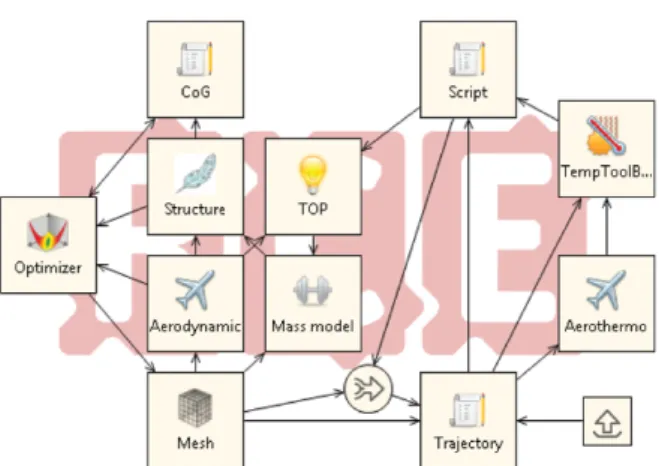
Fig. 2.5 shows an example of a workflow in RCE. Here, the workflow serves to minimize the mass of an intercontinental winged passenger transport [14]. The different compo-nents, portrayed as squares or circles, are connected to each other. Each connection is directed, visualized by an arrow, to show the direction of the data flow.
Figure 2.5.: Example of a workflow in RCE
2.4. Software Visualization in Mixed Reality
The physical device is the gadget that is used to visualize the application. The Device addressed in the reference architecture (see Fig. 2.4) refers to the software running on this physical device. Its only purpose is to visualize the data stored in the Repository and communicate with the Controller and the Context Monitor. Further responsibili-ties are outsourced to the Controller and different services. This enables the Device to run smoothly when visualizing the data.
IslandViz is implemented for two different devices. The first development of IslandViz was made for theHTC Vife[5], which is a device to simulate a virtual reality. Addition-ally, IslandViz was ported to the Microsoft HoloLens one year later[6]. The HoloLens is a device to display an augmented reality.
In Fig. 2.6 a continuum is displayed, which puts the Real environment on the left side and the Virtual environment on the right sight. Virtual reality is placed on the very right of the continuum, as the user does not see any element of the real environment in VR. AR, however, is placed left from the middle in the continuum. It includes virtual elements within the field of view of a user. However, for the most part, the user sees elements of the real environment.
Fig. 2.6 serves to show, that AR and VR are not completely different from another. Instead, they can both be placed on the same scale on different positions.
Figure 2.6.: The different visualization methods on the Mixed Reality Continuum
The implementations of IslandViz for VR and AR are presented in the following para-graphs.
IslandViz in Virtual Reality
The user has two controllers to navigate through the application, zoom in and out, and rotate the visualization. The controllers can also be used to select different units, such as islands, buildings, etc. The left controller can be turned around to see the virtual PDA (Personal Digital Assistant). The PDA shows information about the selected unit. The right controller can also be used to set different options in the PDA. Fig. 2.7
Figure 2.7.: Controller in IslandViz
The selected unit is highlighted and related information are shown on the PDA.
Extending IslandViz to Augmented Reality
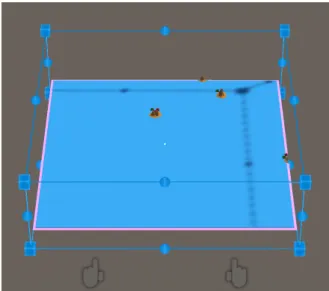
The AR implementation does not use any controllers. Instead, both one-handed and two-handed gestures are used to navigate through the application. Furthermore, in the AR implementation, IslandViz uses a state machine. Besides some initial states, the application consists of five states. The gestures have different effects in different states. [8] explains how to perform the different gestures. The next paragraphs focus on the different states and the gestures the user can perform being in this certain state. In thestate_setup, the visualization is surrounded by a blue grid as shown in Fig. 2.8. By performing a Tap-and-Hold, the user can position the visualization as desired. To
Figure 2.8.: Bounding box to reposition the visualization
confirm the position and go to the next state, the user must perform an Air-Tap. IslandViz uses a physic engine. Furthermore, it scans the environment and recognizes physical objects in the surrounding area. Due to this, the application takes the en-vironment into account during the repositioning of the visualization. For example, it cannot be dragged inside of a table. However, the visualization can be perfectly placed
on top of it. Therefore, it seems like the ocean, which is a digital object, stands on top of a table, which is a physical object.
After exiting the state_setup, IslandViz gets to the next state, the state_main. In this view, the user can navigate freely through the application. In the images shown in Fig. 2.1, IslandViz is in the state_main. By performing a Tap-and-Hold, the user can drag the ocean and move the content of the visualization into every direction. The Two-handed Tap-and-Hold allows the user to zoom in and out. Tapping via the Air-Tap selects the island which is currently focused and gives a close-up view of it. The focus is a white dot in the middle of the field of view. Hence, a focused island
refers to the island which is currently beneath this white dot, respectively the focus. When selecting an island, the application goes into a new state, thestate_inspectIsland.
state_inspectIsland shows a more detailed view on a selected island as shown in Fig. 2.9a. As explained above, packages, compilation units, imports, and exports of the
(a) Close-up view on an island (b) Panel with information about the selected bundle
Figure 2.9.: Shown view in the state_inspectIsland
bundle corresponding to the selected island are visualized. Furthermore, the panel in the background enlarges and presents information about the bundle. Fig. 2.9b shows
a close-up view on this panel. It depicts the packages, exports, and imports of the selected bundle.
In this state, the gestures have different effects than when being in the state_setup. The Air-Tap has different effects, depending on the focused object by the user. Per-forming the Air-Tap while focusing a package or a compilation unit, the user selects either the focused package or the package which contains the focused compilation unit. When the user does an Air-Tap while having the island itself or the ocean focused de-selects the island. The application then goes back into the state_setup. Air-Tapping while focusing a harbour shows either the imports or exports of this bundle, depend-ing on which harbour is currently focused. The Tap-and-Hold gesture allows the user to rotate the view around the island, and thus, viewing the island from different angles.
When selecting a package, IslandViz goes into state_inspectRegion. The view does not change. However, the selected package is highlighted. Furthermore, the text on the panel changes, as it now presents information about the package. The names of the bundle, package, and the contained compilation units are displayed on the panel. Being in this state, the user can select a compilation unit, select another package within this bundle, show imports or exports, or deselect the package by performing the Air-Tap. The Tap-and-Hold still allows the user to rotate the view around the island.
When selecting a compilation unit, IslandViz changes to the last of the five states considered in this section,state_inspectBuilding. Again, the view does not differ from the view of state_inspectIsland or state_inspectRegion and the Tap-and-Hold still al-lows the user to rotate the view. The Air-Tap gesture can be used to select another class with this package, select another package, select imports or exports, or deselect the class. Furthermore, the selected compilation unit is highlighted and the panel shows information about it. The names of the bundle, package, and compilation unit are displayed on the panel. Furthermore, it shows the number of lines of code, the so-called Access Modifier, which states whether the class is public or private, and the type of the unit. The type can be something like Class, Interface, Enum, etc.
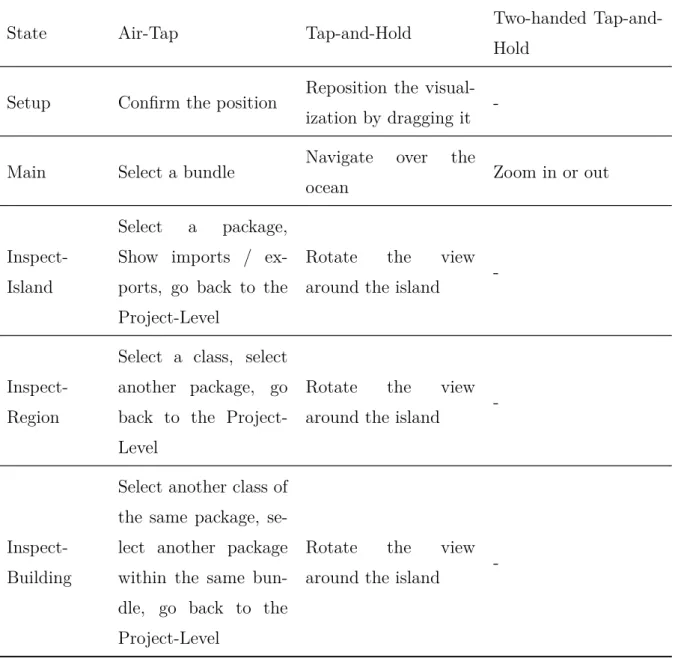
The effect of a gesture while being in a certain state is depicted in Table 2.3. The
State Air-Tap Tap-and-Hold Two-handed
Tap-and-Hold
Setup Confirm the position Reposition the visual-ization by dragging it
-Main Select a bundle Navigate over the
ocean Zoom in or out
Inspect-Island
Select a package, Show imports / ex-ports, go back to the Project-Level
Rotate the view around the island
- Inspect-Region
Select a class, select another package, go back to the Project-Level
Rotate the view around the island
- Inspect-Building
Select another class of the same package, se-lect another package within the same bun-dle, go back to the Project-Level
Rotate the view around the island
-Table 2.3.: The effect of different gestures while being in different levels
start of this section states, that the Device is solely responsible for visualizing and communicating with the Controller and the Context Monitor. With the addition of the conversational interface, which is explained later in this chapter, Text-to-Speech and Speech-to-Text are mandatory. The Microsoft HoloLens offers the possiblity to connect to such a services, which run extern. These services can only be used by the
HoloLens. Hence, the HoloLens is also responsible for making use of this services. The development has shown that this does not cause any issues for the Device when running IslandViz.
The user study carried out in this thesis focuses on the implementation of IslandViz in AR. Therefore, the term IslandViz is used for the further course of this work as a reference to the implementation of the application in AR.
2.5. Adding a Central Coordination Unit to IslandViz
The Controller serves as a central unit which establishes the exchange of data between the Device and the Repository. Furthermore, the integration of different services is simplified by the usage of a Controller. The division of the components in IslandViz in Repository, Device, and Controller ensures that not only the services of the conver-sational interface, as shown in the reference architecture, but any kind of service can be integrated into IslandViz.
2.6. Adding Functionalities with Speech Processing
The proposed conversational interface consists of three different services. After the Device receives a spoken input by the user, it makes use of the Speech-to-Text service and transforms the input into a string. This string is sent to the Controller, which forwards it to theNLU Service (Natural Language Understanding).
The NLU Service interprets the sentence and breaks it down to an intent and several entities. The intent states the key message of the utterance and what the user wants to achieve by saying this sentence. The entities give additional information to specify the sentence. The concept of intent and entities is further discussed later in this section. After receiving the intent and entities from the NLU Service, the Controller can make use of the Intent to Query Service to query the Repository for further information to
process the user’s utterance, if needed.
Based on the results of the preceding two services, theNLG Service (Natural Language Generation) creates an utterance which is given to the user as an answer.
2.6.1. Understanding Natural Language
When saying a sentence to a system that processes speech inputs, the user desired to achieve a certain goal. The goal of the utterance Please zoom in on the application
enlarge the components visualized so that the user is able to examine these components more closely. The sentence can be mapped to an intent zoom_in. Hence, the intent displays the basic statement of the user without storing the whole sentence. Further-more, several expressions can be mapped to the same intent. Sentences like Give me a closer look on the application or Show me a close-up view of the visualization can be interpreted so that the user wants to zoom into the application. However, in many cases, extracting only the intent is not enough to display the content of a statement. If a user expresses the sentence Select the component de rcenvironment core compo-nent, the intent of the statement can be summarized as select_component. This intent does not represent the whole content of the expression, as it does not state, which component is to be selected. One might argue, that the intent should be extended toselect_component_de_rcenvironment_core_component. However, this means, that for every bundle, a new intent had to be added to the service. This does not scale well, as for every system displayed by IslandViz, the NLU Service has to be adjusted. To solve this problems, the NLU Service makes use of entities as well. Entities store the information that are not covered by the intent. In the preceding example, the entityde rcenvironment core component is added to the intentselect_component. This combination of intent and entities cover the most important aspects of an utterance. Each sentence is mapped to exactly one sentence, which is extended by any number of entities.
In [10] a first implementation of the NLU Service was developed. The current version of the NLU Service is able to recognize seven different intents:
– Zoom_in /Zoom_out: Use the conversational interface to zoom in or out with-out using the controllers.
– Select_component: Ask for a specific entity of the software architecture to be selected.
– Select_biggest_component /Select_smallest_component: Ask for the biggest / smallest entity within another entity to be selected. For example “show the biggest class in the bundle core gui help”.
– Count_components: Ask for the number of a specific entity type within an-other entity. For example “how many classes are in the bundle core gui help”. – Summarize_information: Ask the chatbot to summarize the information
about an entity.
The intents are predefined. The NLU Service can map sentences only to one of those intents. The entities, however, are not predefined. Through the context provided by utterance, the system is able to recognize the entities on its own.
Currently, the model learns from 2200 different utterances. 70% of these utterances are used for the training itself, while the other 30% are used to test the model. The training results in a model with an accuracy of about 90%, which means that out of ten utterances, nine are classified correctly[10].
2.6.2. Database Queries to Access Further Information
The seven intents presented above can be put into categories. The intents Zoom_in,
Zoom_out. andSelect_component are used to navigate within the application. The re-maining four intents can be used to gain information about the application. Especially the intents to select the biggest or smallest component and to count components need to query the database within the Repository to gain access to the desired information. The Intent to Query Service makes use of the data extracted by the NLU Service to
gather such information.
Currently, this service is not implemented. As this thesis focuses on the intents that are used to navigate in IslandViz, the service is not required anyways. However in future development, the Intent to Query Service is crucial to enable the full potential of IslandViz.
2.6.3. Manlike Interaction with Natural Language
The NLG service generates a natural sentence in response to a user input. In the above example, such an answer could beHere is the Island you are looking for. This sentence could then be given after the application has navigated to the required island. What at first sight seems to be a nice feature to make the interaction with IslandViz more human can also offer additional value to the application. For example, if the NLU service has a low confidence in classifying the sentence, the response sentence could help the user understand what the application has done. For example, if the user says the phrase show me the biggest island, the application should navigate to the largest of the displayed islands and output a corresponding response phrase. However, if the NLU service fails and interprets the intent as select_smallest_component, a spoken response like This is the smallest island in the software system might indicate to the user that the application was not performing the action the user originally wanted. Similar to the Intent to Query Service, the NLG Service is not implemented yet, but not necessary either to carry out the user study. Even though the NLG service allows a morereal communication with the device and allows conclusions to be drawn about possible sources of error, should the application fail, it is not absolutely necessary. As the intents are used to navigate within the application, the users can actually see, whether the performed action was according to their intent. Hence, as reaction in form of a speech answer is not crucial in the present work.
2.7. Including the Context in Speech Processing
The remaining component presented in Fig. 2.4, the Context Monitor, serves as an addition for the conversational interface. It allows an even more natural and easier handling of IslandViz. By using the Context Monitor, the current context can be taken into account in the user’s input. After the user has selected an island, sentences likeselect the biggest building in this island can be understood by IslandViz. The word
this then refers to the island selected.
Similar to the prior to services, the Context Monitor is not implemented yet, but is not crucial for the user study.
2.8. Communication Between Different Components
The different components of the reference architecture are executed on different hard-ware components. For example, the device can be implemented by the HoloLens, while the controller can be executed on a computer. This means that it must be defined how and with which protocol the components communicate with each other. IslandViz uses Hyper Text Transfer Protocol (HTTP) to establish the communication between the components via a web interface. While the code of the Device and the Controller are written in C and used built-in methods to use HTTP, the NLU service, which is based on Python, uses the microframework Flask. Flask is a lightweight microframework based on Python. It can be used to build RESTful web services [15].
As a consequence of this loose coupling, each component can be exchanged during runtime.
2.9. Related Work
IslandViz makes use of islands as a metaphor to visualize software based on OSGi. However, different metaphors are possible for this purpose. Both two-dimensional and three-dimensional approaches are conceivable. In 2011, Caserta and Zendra give an overview over different software visualization systems [1].
Graham et al. proposed to visualize software through a solar system in a two-dimensional environment in 2004 [16]. A virtual galaxy represents the software system. Planets, which symbolize the classes, are in the orbit of a central star, which visualizes the be-longing package. In its current form, however, the approach is not suitable to represent software based on OSGi, as the bundles cannot be represented yet.
Due to the recent developments in VR and AR, software visualization in a three-dimensional environment becomes more common. In [17], the city metaphor is used in order to visualize software in a virtual, three-dimensional environment. It displays a common approach to represent software in virtual reality. Possible metaphors are shown in Table 2.4 (compare [17]).
This approach can easily be extended, e.g. by grouping different cities and let this Visualization Level Code Element
World Software system
Country Directory structure, e.g. package in Java City File from the software system
District Class
Building Method
Table 2.4.: Representation of the elements in a software system using the city metaphor
group represent a package. Therefore, the country does not visualize the packages any-more, but the bundles. Hence, the city metaphor is also a possible approach to display OSGi-based systems. [5] takes a closer look both the city and the island metaphor and compares them. Misiak describes the city metaphor as not always intuitive. This is
one of the reasons why IslandViz makes use of the island metaphor [5].
The other main aspect discussed in this thesis is the usage of a conversational interface. The integration of a conversational interface for controlling applications in virtual real-ity is the subject of recent researches [18][19]. Int [19], a three-dimensional VR system for managing and controlling data in air traffic is extended by voice recognition. The addition of speech assistants to software visualization systems, however, is a new area of research. In [20], Bieliauskas and Schreiber examined the usage of a con-versational interface for software visualization in an application in a two-dimensional environment. Adding a conversational interface to a software visualization system in a virtual environment, respectively in the present case in augmented reality, is a not widely explored area. This thesis aims to create new insights in this field.
3. Creating Hypotheses for the
Evaluation of Usability
This thesis discusses the usability of the conversational interface of IslandViz. Different aspects of usability are therefore introduced and examined in this chapter. Besides the usability, the utility is briefly discussed as well. Both terms can be summarized in the term usefulness [21].
The ISO norm 9241-11 gives a definition of the term usability. Section 3.2 gives a detailed view on this norm.
Thereafter, three hypotheses are put forward. The evaluation of IslandViz will be carried out taking these hypotheses into account. To verify them, a user study is conducted. The user study is further discussed in the next chapter.
3.1. Utility and Usability
In [21, p. 24], Nielsen uses the term usefulness to summarize utility and usability. He defines usefulness as the issue of whether the system can be used to achieve some desired goal.
The term utility addresses whether the system provides the functionality that is needed for the system. As this thesis focuses on the usability of IslandViz, the utility does not represent the central aspect of the examination. However, the utility should still be considered when evaluating the results as it might give additional suggestions on how
to improve IslandViz.
For usability, there is no uniform definition, currently. While he describes utility to address whether a function is provided, Nielsen describes usability as how well users can use the functionality provided by a system [21]. The ISO standards 9126 and 9241-11 give definitions of usability as well. However, all definitions differ from each other. The different definitions considered in this work are shown in Table 3.1. In [22], Abran et
Source Definition of usability Nielsen in [21, p.
25]
Usability applies to all aspects of a system with which a human might interact, including installation and maintenance procedures.
ISO 9126
The capability of the software product to be understood, learned, used and attractive to the user, when used under specified condi-tions.
ISO 9241-11
The extent to which a product can be used by specified users to achieve specified goals with effectiveness, efficiency and satisfaction in a specified context of use.
Table 3.1.: Different definitions of usability
al. attribute the reason for the different definitions to the fact that each definition has a different perspective on the topic of usability. Abran et al. carve out three different audiences for a software system: end-users, managers and software developers. Each of these groups has a different viewpoint on usability.
• To the end-user, software usability is important as it increases his performance when working with the software system.
• Managers expect usability for a software system, as it enhances the learnability of the product and, therefore, leads to more customers consuming this product.
• Software developers interpret usability as attributes like design quality and doc-umentation maintainability.
As the each group has a different view on usability, their definitions differ from each other. In this work, the definition of the viewpoint of the managers has to be inspected closer. As DLR, which is responsible for the development of IslandViz, is a research institute, it does not try to sell its products to consumers. Nevertheless, the projects managers have a similiar viewpoint on usability. They want to justify their research in this area and, therefore, learnability is crucial to give the executives a quick impression of why this system is being developed.
The definitions listed in Table 3.1 cover different aspects of usability. Nielsen’s defi-nition leaves a lot of room for interpretation as he does not address concrete aspects. The ISO norms focus on concrete aspects, such as learnability and effectiveness. While the ISO 9126 was defined by a group of software engineering experts, the ISO 9241 was defined by a group of experts in Human Computer Interaction [22]. Thus, the definition of usability from the ISO 9241 will be used over the course of this thesis. The evaluation carried out in this thesis focuses on the interaction between IslandViz, respectively the conversational interface, and the user. Furthermore, this definition gives concrete aspects to examine and evaluate. Therefore, this definition of usability is fitting for the problem and is further discussed in this work.
There are many more definitions of usability, e.g. by IEEE [22] and a definition by Nielsen [21, p. 26] which is more detailed than the one given in Table 3.1. Each def-inition uses different approaches to explain usability and have their advantages and disadvantages. The ISO 9241-11 is a compact definition developed by people special-ized in the field of Human Computer Interaction. Therefore, this portrays a fitting foundation for evaluating IslandViz.
3.2. Analyzing the Definition of Usability
As shown in Table 3.1, the ISO 9241-11 is defined as follows:
“The extent to which a product can be used by specified users to achieve specified goals with effectiveness, efficiency and satisfaction in a specified context of use.”
This definition contains several variables. In this case, the product refers to Island-Viz. The termspecified context refers to navigating through IslandViz. Thus, specified goals refers to finding a particular component or obtaining information about it. The termseffectiveness,efficiency, andsatisfactionindicate the aspects for which IslandViz needs to be examined.
In [23], effectiveness, efficiency and satisfaction are defined as follows:
• Effectiveness: the accuracy and completeness with which users achieve specified goals.
• Efficiency: the resources expended in relation to the accuracy and completeness with which users achieve goals.
• Satisfaction: freedom from discomfort, and positive attitude to the use of the product.
When evaluating IslandViz, all three aspects are considered. The application will be examined in regards to three hypotheses, which will be introduced in the next section.
3.3. Putting Forward the Hypotheses
IslandViz is examined to evaluate whether the addition of a conversational interface is successful in supporting the user navigating through the application. Therefore, three hypotheses are put forward. The goal of the evaluation is to either verify or negate the hypotheses. Based on these results, a conclusion can be drawn as to whether adding the speech assistant is successful in improving the usability of IslandViz. The evaluation considers the aspects of effectiveness, efficiency, and satisfaction. Each hypothesis focuses on a different aspect. Together, the hypotheses are to be used to answer the initial research question, whether a conversational interface improves the usability in IslandViz.
Effectiveness
H1 Adding a conversational interface to IslandViz does not affect the user’s effec-tiveness in performing tasks.
In this case, the term effectiveness refers to the amount of activities a user needs to perform a task. The fewer activities a user has to perform for a certain task, the higher the effectiveness. To calculate the effectiveness, however, the term activity needs to be defined.
The definition of an activity is dependent on whether the user uses gesture control or voice control. Using gestures, an activity is a single gesture. As described in Sec-tion 2.4, IslandViz supports three different gestures, the Air-Tap, the Tap-and-Hold and the Two-handed Tap-and-Hold. In the context of voice control a spoken sentence represents an activity, as long as the NLU Service is able to recognize the intent. Similar to other researches [24][25], only activities that are recognized by the system are taken into account for evaluating the effectiveness.
Efficiency
H2 The completion of tasks in IslandViz via a conversational interface takes less time than with the use of gesture control.
While the first hypothesis focuses on the amount of activities necessary to perform a task, this hypothesis takes a look on the time spent to perform the same task. The time considered is the time that has passed from the beginning of the task to its end. Hence, activities not recognized by the system are implicitly taken into account as well, as they occur during this time span. H1 however only refers to the activities recognized by the system. The difference in both approaches must be considered when evaluating the hypotheses.
Satisfaction
H3 The addition of a dialog interface affects user satisfaction.
Contrary to the effectiveness and the efficiency, satisfaction can not be measured as a number by the results of the tasks. Thus, another metric is required. A common ap-proach to measure the satisfaction is a questionnaire. Section 4.6 deals with measuring the satisfaction and whether a questionnaire is used.
To evaluate the hypotheses, IslandViz must be tested. The goal of this testing process is to receive information which can be displayed on a metric. The information can then be used to support or refute the hypotheses and ultimately answer the research question. Several tasks are created to test the effectiveness and the efficiency. For measuring the satisfaction, a questionnaire is set up.
4. Study Concept
The hypotheses serve to examine the different aspects of usability defined in ISO 9241-11. The effectiveness and the efficiency can be measured, as the hypotheses imply the metrics time and amount of actions. To evaluate the usability of IslandViz, a group of users is selected. They are asked to perform several tasks using either gesture control or the conversational interface. The results of this examination is then taken into consideration during the following evaluation.
The examination serves to evaluate whether the conversational interface improves the usability of the navigation in IslandViz. Therefore, it compares the navigation with gesture control to the navigation with an additional speech assistant. To make a comparative study possible, the different elements of gesture control and voice control are compared with each other. The tasks within the user study are chosen based on the result of this comparison.
Contrary to effectiveness and efficiency, satisfaction is not measured by asking users to perform several tasks. Instead, the users use the system and are then asked about their view on the system. This can be achieved by handing out a questionnaire [21]. Another approach to measure the satisfaction is by giving the users the choice whether they use gesture control or the conversational interface to execute a certain task, after they have already worked with the system for some time. Both options are weighted at the end of this chapter.
Section 4.1 discusses the profile of the people that are asked to participate in the user study. Next, the comparison of the different control types is described. New intents are added in Section 4.3 to the NLU Service to make a comparative study possible.
Section 4.4 compares two different ways to design the user study. Section 4.5 focuses on the creation of the different tasks carried out during the study. Finally, Section 4.6 discusses the options for measuring user satisfaction and which method is included in the user study.
4.1. Target Group
IslandViz is an application that focuses on a very specific topic, the visualization of software systems. Therefore, only relatively few people come into contact with this application. Thus, the group of people considered for the user study ought to meet several expectations.
IslandViz visualizes software systems by portraying its architecture via islands, build-ings and, harbours. Thus, the target user is already familiar with both computer science and the concept of software architecture. Software systems which can be visualized by IslandViz must be based on OSGi. However, this thesis discusses the addition of a conversational interface to any sort of software visualization application, regardless of whether it is based on OSGi or not. IslandViz is used exemplarily, but the statement of this work aims to apply to any sort of visualization software. Therefore, the target user does not have to be familiar with OSGi. In the user study, however, the user receives a small introduction to OSGi to understand the representation of the different components in IslandViz.
IslandViz is designed to support the onboarding of new employees. Nevertheless, dif-ferent use cases are possible in the future. For example, the visualization of software could be used during a review process. In this case, the user of IslandViz is likely to have experience with the visualized software. Hence, both users that are experienced and inexperienced in the visualized software are likely to use IslandViz. Hence, it is irrelevant, whether the user has worked with the visualized software already. Anyway, the target user is in any case supposed to be involved in developing the visualized software. These characteristics are represented in Table 4.1. The people participating
The person... Yes No Irrelevant
is familiar with OSGi x
has knowledge in the field of Computer Science x is familiar with Software-Engineering / the
con-cept of Software-Architecture x
has already worked with the visualized software x is supposed to support the development of the
vi-sualized software x
Table 4.1.: Characteristics of the target user of IslandViz
in the user study must at least meet the 2nd and 3rd requirement. The last charac-teristic, that users of IslandViz are supposed to develop the visualized software, is not considered in the study. Otherwise, the number of possible participants would be too small and too few results would be obtained. Furthermore, it has no impact on the user study whether a user is actually supposed to support the software visualized. Hence, regarding the user study, it does not matter whether the user is involved in developing the software after using the application.
The number of people participating in the user study must also be specified. There are different opinions on how many people should participate. In [26], Nielsen states that the best results come from testing five users only. According to Nielsen, five users discover roughly 80% of the usability problems. If the test is performed with additional users, more design errors will be detected. However, the effort increases disproportion-ately. In [27], Hwang et al. go into this statement. According to their researches, five people are not sufficient to reach 80% discovery rate. They claim that the number of people participating in the study to detect the majority of usability issues must be about 10. Therefore they set up the 10±2 rule. This means, that depending on the used method for the usability evaluation, eight to twelve users are required to discover
80% of the usability problems. This rule, however, refers to the so-called usability eval-uation methods Think Aloud, Heuristic Evaleval-uation, and Cognitive Walkthrough. The thesis on hand creates user tests to evaluate the usability of IslandViz. Hence, none of these three methods matches to the problem described in this thesis. Alroobaea et al. did another research and came to yet another conclusion. They set up the 16±4 rule to specify the optimal number of participants to achieve the 80% discovery rate for user testing [28]. This rule also covers the statement from each of the previous presented studies that more users naturally discover more usability errors. Hence, this thesis makes use of the 16±4 rule.
4.2. Gesture and Speech Control
Voice control does not offer new capabilities to IslandViz. Each action that can be performed using the conversational interface can be performed by using gesture control as well. Table 4.2 compares the activities of voice control with those of gesture control.
The first four actions reflect the aspect of exploration. Currently, gesture control is even superior to voice control in this aspect, as voice control does not offer the possibility to navigate through IslandViz. The presented concept of voice control allows the users to say the name of a specific bundle and the application navigates there. However, they can not move the camera around freely. This presents a problem, as the user study is aimed to be a comparative study, where each action can be executed by gesture and voice control. This issue is further discussed at a later stage in this section.
When selecting a unit via gesture control, the user needs to perform an Air-Tap. In this case, they need to focus the corresponding unit with the HoloLens before tapping. Only the focused unit is selected when performing the Air-Tap. In the case of voice control, the user needs to give an utterance like “select [name of the unit]” to select the corresponding unit. If they do not know the name, they can focus the unit to display its name. Thus, voice control has an advantage in selecting a unit, as the user can
Action Gesture control Voice control (correspond-ing intent)
Zoom Two-handed Tap-and-Hold zoom_in, zoom_out
Navigate Tap-and-Hold
-Select a unit Air-Tap select_component
Deselect a unit Air-Tap
-Select the biggest or small-est unit
Examine all units that should be considered and select the largest or smallest of them
select_biggest_component, select_smallest_component
Receive information about a unit
Select the corresponding
unit and check the panel summarize_information Count the number of units Count the units manually count_components
search for a specific name. Using gesture control, the users have to navigate through the application until they find the unit they are looking for, as described in Section 2.2. This advantage presents a problem as well. The two elements compared in the user study must provide the same services. In the present case, both gesture and voice control offer advantages over each other that must be considered when setting up the tasks.
The last three actions described in Table 4.2 contain a logic. Gesture control does not provide an activity to perform these actions. Instead, the user has to do them manually, e.g. by counting units or comparing the size of different units. Voice control offers activities that take on the task. The user can give an utterance like “what is the number of classes in [name of the unit]” to perform the task of counting components. If they perform such tasks with speech control, the user will most likely achieve much better results than if they perform the task with gesture control. Using these actions in the user study would falsify the results. The intents were explicitly added to voice control to perform these actions, since gesture control does not provide such features. Hence, these actions do not represent features that can be compared within the user study. Accordingly, only the actions that focus exploring IslandViz are considered. The actions used to explore IslandViz are the first four entries in Table 4.2 (Zoom, Navigate, Select a unit, Deselect a unit).
4.3. Adding New Intents
In its current form, the NLU Service can process seven intents. Only three of them are used for navigating through IslandViz application: zoom_in, zoom_out, and se-lect_component. In terms of navigation, gesture control offers an advantage, as the user can use the Tap-and-Hold gesture to shift the ocean. Furthermore, the user can deselect a unit and go back to an upper level. Currently, neither of these actions can be performed using voice control.
control aims to be an improvement compared to gesture control, every function avail-able using gesture control needs to be transferred to voice control. Hence, new intents are necessary. It is important to mention that these intents are not included to the NLU Service in order to carry out the user study. In fact, creating the user study showed, that the NLU Service is missing some fundamental intents and must therefore be extended.
Five intents are added to cover the functionalities. To shift the ocean into different di-rections, the intents move_left, move_right, move_up, and move_down are included. From here on these are calledmovement intents. One could assume that this approach would have the disadvantage, that the user can only navigate in four different direc-tions, while gesture control allows the user to move into any possible direction and at any angle. However, Section 5.1 shows, that the proposed implementation is capable of moving the visualization into any direction as well. Hence, both gesture control and voice control offer the same capabilities in terms of navigating through IslandViz. The fifth intent added is deselect_component. As already mentioned, this intent is used to deselect the currently selected component and switch to a prior state.
With these changes, the NLU Service provides every intent necessary to navigate through IslandViz. Table 4.3 shows the new intents inserted in Table 4.2. The up-dated table solely includes the actions considered in the user study, that is, the actions related to navigation.
4.4. Study Design
The study described in this thesis compares the navigation via gesture control to speech control. To do this, three tasks are set up that each user is ought to perform. Each task is performed both with speech and gesture control. For the execution of the user study, two different designs are possible. In a study based on thewithin-subject design
users perform each task using both navigation types. Hence, they perform each task twice. The between-subject design states that a user is assigned to one of two groups.
Action Gesture control Voice control (correspond-ing intent)
Zoom Two-handed Tap-and-Hold zoom_in, zoom_out
Navigate Tap-and-Hold move_right, move_left,
move_up, move_down
Select a unit Air-Tap select_component
Deselect a unit Air-Tap deselect_component
Table 4.3.: Different executions for navigation actions using gesture or voice control
One group performs the three tasks using gesture control, the other using voice control. A disadvantage of the within-subject design is the learning process. After executing a task using gesture control, the user is aware of the situation and the solution of this task. So if users execute a task with voice control after performing the same task with gestures they are most likely faster than when executing the task with voice control for the first time. The learning process must not occur, as it falsifies the results. In the case of IslandViz, this phenomenon can be circumvented by choosing different islands for the same tasks based on the selected control type. For example, in the first task, the user must navigate to a preselected island. Based on whether the task is performed via speech or gestures, the users must select different islands. Consequently, the learning process is circumvented.
One might argue, that in different tasks, the user does not fully understand the task itself before starting it. In this case, the learning effect occurs again. Users finish a task and then know the way how to solve it. If they are then prompted to execute the task again, they show a better performance than in their first try. To prevent this, the tasks are designed to be short and easy to understand. Furthermore, the order in which way a task is executed is randomized. Some users perform a task using gesture control first and voice control afterwards. In the other cases, the order is the other way around.
With the learning effect being prevented, the evaluation can be designed based on the within-subject design. The main advantage of this design over the between-subject design is the creation of larger amounts of data. In the case of a between-subject design, two groups are created, where each group consists of 1
2 ·n users, wheren is the
total number of users. Hence, only 12·nresults can be established for each control type. Using the within-subject design,n results are established for each control type.
4.5. Setting Up the Tasks
Three different tasks are set up for the user study. As the study makes use of the within-subject design, each task is implemented with two different solutions, one solution for gesture control and one for voice control. This section focuses on the different tasks and which solution is chosen for which control type.
Demo
Before executing the tasks, the users can experience IslandViz using a Demo environ-ment. Here, the users can get to know all actions, both for gesture and speech control. Before executing the tasks, the users are introduced to this environment so that they get comfortable using the different control types and actions. When starting to per-form the tasks, the user should focus solely on perper-forming the tasks, not on learning the control types.
First task: Select the highlighted island
In the first task, the view on the application is zoomed out so that every island of the visualized software is visible. A particular island is highlighted. In order to perform this task the user must navigate to this island and select it.
This task is easy to perform and serves as an introduction for the user to understand how the different tasks are carried out. Additionally, navigating through the application and finding a particular island is a main part of IslandViz.
When performing the scenario using gesture control, the island that is highlighted and must be selected is called RCE Components Switch GUI. Using voice control, RCE Database Component Execution is the island to select.
Table 4.4 highlights the actions the user is expected to perform. Zoom and Navigate
Action Gesture control Voice control
(correspond-ing intent)
Zoom Two-handed Tap-and-Hold zoom_in, zoom_out
Navigate Tap-and-Hold move_up, move_down,
move_right, move_left
Select a unit Air-Tap select_component
Deselect a unit Air-Tap deselect_component
Table 4.4.: Estimation of the actions used to perform the first scenario
is necessary to navigate to the correct island. After navigating, the island must be selected.
Second task: Find the smallest building on a particular island
On the start of this task, the view on the application is the same as in the preceding task. Again, an island is highlighted. The island contains five buildings of different
sizes. This time, users must not only navigate to and select the island. To finish the task, they must name the smallest building. As three out of the five buildings contain about the same number of lines of code (LoC), their height is the same. Thus, users must select each of the three buildings and check their LoC on the information panel. Only then, they are able to name the smallest building.
The islands chosen for this task are called RCE XML Loader Component GUI for gesture control and RCE Excel Component Execution for voice control. Table 4.5 shows the number of LoC for each class within the two islands.
RCE XML Loader Component GUI Name building # LoC # floors XMLLoaderInputs-OutputsSection 38 2 XmlLoaderCompo-nentSection 146 4 XmlLoaderCompo-nentFilter 34 2 XmlLoaderHistory- DataItemSubtree-Builder 97 3 Messages 41 2
RCE Excel Component Execution Name building # LoC # floors ExcelComponent-Validator 182 4 Messages 64 3 ExcelRCECompo-nent 101 3 ExcelComponent 363 6 ExcelPersistent- ComponentDescrip-tionUpdater 88 3
Table 4.5.: Number of lines of code per building on both islands
In RCE XML Loader Component GUI, the three buildings with the same height have two floors each and the smallest building, XmlLoaderComponentFilter, contains 34 LoC. InRCE Excel Component Execution, three buildings are made up of three floors. The smallest of these buildings,Messages, consists 64 LoC.