Security in Online Banking Services –
A Comparative Study
Samir Pakojwar
1, Dr. N. J. Uke
2P.G. Student, Department of Information Technology, Sinhgad College of Engineering, Pune, Maharashtra, India1
Professor & Head, Department of Information Technology, Sinhgad College of Engineering, Pune, Maharashtra, India2
ABSTRACT: Today’s world is one with increasing use of online access to services. One part of this which is growing
hurriedly is Internet Banking. To provide customers with safe, consistent,robust online environment to do online banking the banks should implement “best of breed“ technologies to authenticate customers identities when they log in, to guarantee that their data is transmitted securely and consistently Bank should have best backup and contingency strategies and should formulate best security plans and practices. This paper tries to explore several of Technologies and Security Standards the different researchers have recommended to banks for safe internet banking and comparison of number of security systems based on the recommendations given by these authors for secure online banking.
KEYWORDS: Internet Banking, Security Standards, Contingency Strategies.
I. INTRODUCTION
Online banking systems have become quite popular in the last ten years [1]. It is an online payment system that enables different customers to conduct online financial transactions on a website. Customers from an online bank can manage their accounts with their own electronic devices as long as an Internet connection is available. Online banking is also referred as e-banking, virtual banking, Internet banking and by other term’s [2].
There are mainly two phases in any online banking system, registration phase and login phase. Registration phase of all the banks are having nearly same structure. Login phase is divided into two security levels, first is using user id and transaction password and second level password security is using advanced system like one time password, grid authority card, QR code, Biometric systems, Security questions and E-token etc. All this security systems are developed to protect customer's bank accounts from any black hat community member. Bank information can be compromised by expert criminal hackers by modifying a financial institution’s online information system, spreading malicious viruses, corrupt data, and degrade the quality of an information system’s performance[3]. So, High level password security systems are used by banks to protect from such type of attacks. This survey will cover detailed study of high level password security systems used by different banks and the comparison of nationalized and private sector bank with different perspective.
Paper is organized as follows. Section II describes Security issues in online banking.Existing survey is given in Section III, which presents security systems for online banking, comparison of several banks in India and how to protect yourself online. Finally, Section IV presents conclusion.
II. SECURITY ISSUES IN ONLINE BANKING
Delicate information such as personal data and identity, passwords are frequently related with personal property, secrecy and may present security concerns if leaked. Illegal right of entry and usage of private data may result in consequence such as identity stealing, as well as theft of assets. Diverse causes of information security breaches include:
2.1 Phishing: Phishing is a kind of scam where the scammers masquerade as a trustworthy source in attempt to gain
2.2 Internet scams: Internet scams are patterns that betray the user in several ways in attempt to take benefit of them. This attacks are created to make the fraud with private assets of customer directly rather than personal data through false undertakings, assurance tricks and more.
2.3 Malware: Malware, mainly spyware, is malicious software camouflaged as legitimate software planned to
accumulate and transmit private data, such as PINs, without the customer's consent or knowledge. They are often spread through software, e-mail and files from unofficial places. Malware is one of the most prevalent safety apprehensions as frequently it is impossible to decide whether a file is infected, in spite of the source of the file [4].
2.4 Identity theft: Identity theft is a crime in which a fraudster obtains key pieces of personal data, such as bank
information, date of birth or driver's license numbers, in order to impersonate somebody. The personal data exposed is then used criminally to apply for credit, buying goods and services, or gain right of entry to bank accounts.
2.5 Investment or share sale (boiler room) fraud: Boiler room fraud is a attack in which illegal or aggressive
miss-selling of bogus, valueless or vastly expensive stocks are takes place by share fraudster. If the victim mistakenly invest money with this fraudster, he will surely lose his all money invested.
2.6 Keystroke capturing/logging: Keystroke capturing or logging attacks are takes place with the help of software or
hardware key logger. Anything that user type on system can be captured and stored in a storage. This actually create a log file of user activities and at a particular instance of a day mail is automatically forwarded to the attacker. This log file contains id and password of different users and attacker can use this for his own purpose. This attack mainly takes place at internet cafes. An updated antivirus and a good firewall can protect any system from this types of attacks.
2.7 Lottery fraud: In this type of fraud attacker send fake letters or e-mail messages, which recommend the user that
he have won a lottery. To take the benefits of this, they are asked to respond email message with some private banking information of victim,this include his bank account details, complete personal information. Then, after getting this mail from victim attacker can use this information to commit further fraud.
2.8 Pharming: In Pharming attack fraudster create false website, so that people will visit them by mistake. This
attack takes place when user mistype a website or a fraudster can redirect traffic from genuine website to a fake one. The main purpose of pharmer is to obtain victims personal information for further frauds.
2.9 Spyware: Spyware can enter in any system as hidden components of free programs. They can monitor web usage,
keystroke logging and virtual snooping on user’s computer activity.
2.10 Trojan horse/Trojan: Trojan horse are the most dangerous type of attack in which attacker can directly gain
unauthorized access to victims systems. This virus enters in victim system with the help of different legitimate software. An updated antivirus and firewall can protect any user from this kind of attacks.
2.11 Virus: Virus is a computer program that designed to replicate itself from one computer to another. It can slow
down user system or corrupt its memory and files. Email and file-sharing facilities are the main reason for spreading viruses.
2.12 Worm: This is a malicious program that replicate or reproduce itself until all the storage space on a computer
III.EXISTING SURVEY
3.1Present Security Systems for Online Banking
3.1.1User id & Transaction Password: Firstly, New York introduces online banking using user id and text password
in the early 1980s. To access online banking facilities, a customer have to register himself with a unique id and password for user verification [2]. The new User id must be 6 to 19 characters and the password must be 8 to 17 characters and must contain at least 2 alpha and 2 numeric characters. Customer can set security data to email address, Security Queries, Authentication Pass Phrase & Computer Registration. Now, user can access and take full benefits of internet banking services [6].
3.1.2OTP: One-Time Password (OTP) Service Using Mobile Phone Applied to Personal Internet Banking was
implemented first time in japan, 2007. This is an authentication service that makes use of an OTP in addition to the conventional ID and password for personal identification. User can use this OTP for better security during online transaction by downloading special password-generation software to their mobile phone. User can perform authentication by entering an OTP displayed by the mobile phone application in addition to their normal ID and password. The one-time passwords are specific to each user, and a new password is generated every minute. Even if the password is obtained by a third party fraudulently, it cannot be used outside its lifetime [7].
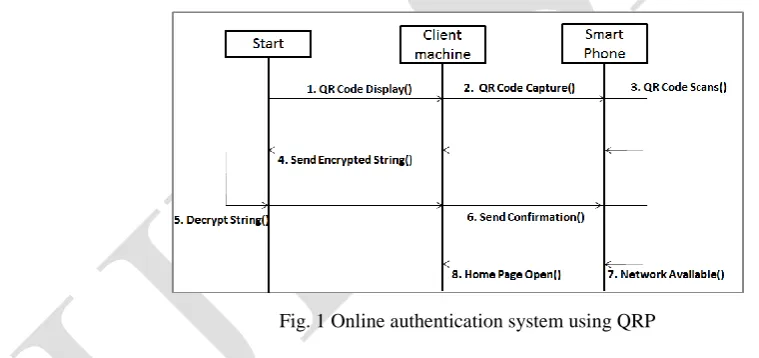
3.1.3QRP: code - QRP that is Quick Response Protocol, is a secure authentication system that uses a two factor
authentication by combining a password and a camera equipped mobile phone, where mobile phone is acting as a authentication token. It is very secure and also very easy to use for encrypted data. It is very secure protocol for use on untrusted computers. The actual working of QRP system is as covered in figure 1 [8].
Fig. 1 Online authentication system using QRP
3.1.4 Biometric:Biometric is specifically used for secure ATM transaction. In such a transaction, the use of a biometric
mechanism such as iris/retinal scan, hand geometry or fingerprint scan can greatly improve overall security. All customers need to do is register their biometric information at a bank’s branch. Then they will be able to withdraw money from ATM by just providing their biometric password and providing their date of birth and Pin number. Currently there are 80,000 biometric enabled ATMs in japan used by more than 15 million users [11].
3.1.5 OTP and QR code: To eliminate threat of phishing and to confirm user identity the system with the combination
Fig. 2 Working of Authentication System
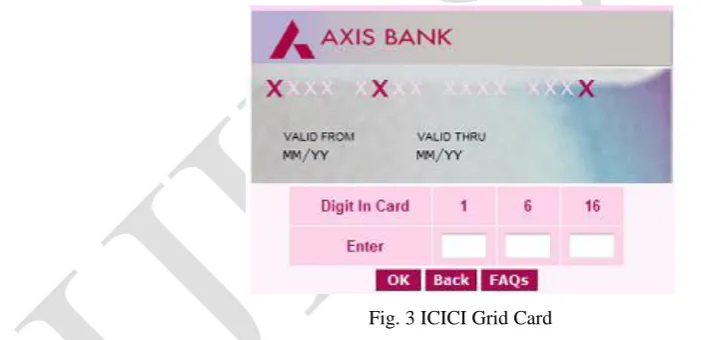
3.1.6 Grid Authority Card: Grid authority Card is a card that helps in preventing the fraud at the initial stage itself
such that the fraud could not take part. In this system, the customer submit his/her credit card credentials along with the respective Grid Characters on the grid card associated with the credit card. Grid card contains the alphabets associated with the numeric numbers printed on it. These grid codes are generated randomly by the user interface application through which the customer is connecting to the Payment Gateway via secure internet connection. Without the Grid Card, no one can do the online payments in case of credit card theft or lost. It helps in get rid of online frauds. The sample of ICICI grid card is as shown in the figure 3. [10].
Fig. 3 ICICI Grid Card
3.1.7 E-Token: Secure Token provides an additional security feature when logging on to Internet Banking. The
E-Secure Token provides a “One-Time-PIN” (OTP), which should be used to access the Internet Banking sites, together with username and password. Each OTP is only valid for one session; therefore the E-Secure Token should be used to generate an OTP with every login. To obtain login OTP user have to switch on his E-Secure Token using the On/Off Button. Then he have to enter his 4 digit secret pin. User’s E-Secure Token LCD screen message will then display his login OTP. HSBC security device for secure online banking is as shown in the figure 4 [12].
3.1.8 Security Question: Based on research for multifactor authentication (MFA) and fraud risk mitigation, the
response, the second safety challenge question was presented and the user again had two opportunities to provide the correct answer. If the user was still unable to offer a correct response, the third safety challenge question was presented
Fig. 4 HSBC Security Device
and the user had one opportunity to respond correctly. At that time, if the user was incapable to answer correctly, the customer was locked out of Internet Banking until customer service unlocked or reset the MFA setting for the user.
3.1.9 SMS banking: SMS Banking is a service that provide customers to access their account information via mobile
handset. SMS banking facilities are functioned using equally push and pull messages. Push messages are those that the bank selects to send out to a user's handset, without the consumer initiating a request for the information. Pull messages are those that are introduced by the customer, for obtaining information, using a mobile phone or executing a transaction in the bank account. Account balance Inquiry, Transaction Inquiry, Cheque status Inquiry, Password Change are the different services provided by SMS banking. To utilize this SMS banking facility user have to enrol himself in his specific branch of bank [13].
3.1.10 Secure Connection: Distinct banks are using different types of security algorithms and protocols for secure
connection during any type of online transaction. Table 1 shows network connection security adopted by some banks in specific countries.
Bank Security Provider Encrypted
Connection Algorithm
Message Authentication Algorithm
Key Exchange Mechanism Algorithm
Security Protocol
State Bank Of India Symantec Corp. (US) RC_4 128 bit MD5 RSA TLS 1.0
Bank Of America Symantec Corp. (US) RC_4 128 bit SHA1 RSA TLS 1.0
HSBC(Hong Kong) Symantec Corp.(US) RC_4 128 bit MD5 RSA TLS 1.0
ICICI (india) Symantec Corp. (US) RC_4 128 bit MD5 RSA TLS 1.0
Axis (India) Symantec Corp. (US) RC_4 128 bit SHA1 RSA TLS 1.0
KFW (Germany) Comodo (US) AES_256_ SHA1 RSA TLS 1.0
Oversea-Bank (Singapore)
Symantec Corp.(US) RC_4 128 bit SHA1 RSA TLS 1.0
ZürcherKantonal Bank(Switzerland)
Symantec Corp. (US) AES_128_GC
M
Hang Seng Bank (Hong Kong)
Symantec Corps.
(US)
RC_4 128 bit SHA1 RSA TLS 1.0
Deutsche Bank
(Germany)
Symantec Corps.(US) AES_128_GC
M
- ECDHA-RSA TLS 1.0
Table 1.Network Connection's Security for Online Banking
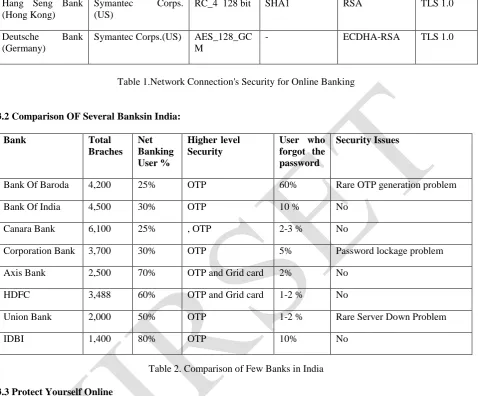
3.2 Comparison OF Several Banksin India:
Bank Total
Braches Net Banking User %
Higher-level
Security
User who forgot the password
Security Issues
Bank Of Baroda 4,200 25% OTP 60% Rare OTP generation problem
Bank Of India 4,500 30% OTP 10 % No
Canara Bank 6,100 25% , OTP 2-3 % No
Corporation Bank 3,700 30% OTP 5% Password lockage problem
Axis Bank 2,500 70% OTP and Grid card 2% No
HDFC 3,488 60% OTP and Grid card 1-2 % No
Union Bank 2,000 50% OTP 1-2 % Rare Server Down Problem
IDBI 1,400 80% OTP 10% No
Table 2. Comparison of Few Banks in India
3.3 Protect Yourself Online
3.3.1 Make certain you have the up-to-date security updates: From time to time, flaws are discovered from the
programs running on your computer. These flaws can be misused by any black hate community member to gain access to workstations. As such, publishers will issue updates to correct these flaws.
3.3.2 Install effective anti-virus software: You may already using anti-virus software, but the software should be
updated regularly to provide complete system protection. There are various effective plans to select from, but the most common profitable products contain Symantec, McAfee, Trend Micro, Sophos and F-Secure. It is also credible to use free anti-virus shield from Microsoft Security Essentials, Grisofts AVG, Avast and Clam Win. However, be aware to visit the genuine site as there are number of forged products claiming to safeguard your system.
3.3.3 Use a personal firewall: It is a minor program that assistances to protect your workstation and its contents from
3.3.4 Use an anti-spyware program: This is actually used to define programs that run on your workstation which monitor and record the way you surf the internet and the sites you visit. It can also be downloaded deprived of your permission or awareness and used to see personal data that you have entered online, counting passwords, telephone numbers, identity card numbers and credit card numbers. Anti-spyware programs currently available include Ad Aware, Microsoft Defender (free), Spyware Blaster, Spy Sweeper, Microsoft Defender (free), Spyware Blaster and Sunbelt Software Security Spy.
3.3.5 Block spam e-mail: Spam e-mails are specially used for phishing attacks, tempting you to click on links that can
directly download malware to your computer or direct you to a fake website. That’s why, for security purpose it is better to remove any e-mail form an unrecognized source as soon as possible. A spam filter is there which can separate spam e-mail in separate spam folder, so that you can easily identify it. Removing unwanted spam without reading will protect your system from phishing attack.
3.3.6 Be aware to potential fraud: Be alert that there are some fake websites designed to pretend you and gather your
private data. Sometimes links to such websites are enclosed in e-mail messages asserting to come from financial institutions or further trustworthy organizations. Never monitor a link enclosed in an e-mail, even if it seems to come from your bank.
3.3.7 Keep your passwords secure: Keep your password to yourself only, Make them hard to guess, differ them: Try
to use unlike passwords for different services, Change your passwords frequently and never write them down.
3.3.8 Be cautious where you go online: Avoid using Banking or any other internet facilities that necessitate passwords
at internet cafe’s, libraries or any other public sites to avoid the risk of information being copied and abused later you leave.
3.3.9 Always log off: Always remember to log off from banking site and close your browser after completion of your
online banking. This will remove all traces of your stopover from the workstation's memory.
3.3.10 Password-protect your computer:Never forget to give a strong administrative and master password to your
computer. This will avoid other customers from using it if it is stolen or left unattended.
3.3.11 Don’t use administrator mode: Don't use administrative mode because anyone who gain access to it will then
have nearly boundless rights to see downloaded software or stored information. It's far superior to make a user account and log in with that for every day usage [14].
IV. CONCLUSION
REFERENCES
[1] Sven Kiljan, Harald Vranken, Koen Simoensd, Danny De Cocke, Marko van Eekelena, “Technical report: security of online banking systems” Open University, Netherlands, February 10, 2014
[2] http://en.wikipedia.org/wiki/Online_banking
[3] Rajpreet Kaur Jassal1 , Dr. Ravinder Kumar Sehgal, “Comparative Study of Online Banking Security System of various Banks in India” International Journal of Engineering, Business and Enterprise Applications (IJEBEA) 6(1), September-November., 2013, pp. 90-96
[4] http://en.wikipedia.org/wiki/Internet_safety
[5] https://www.hsbc.com/internet-banking/types-of-online-attack
[6] “Online Banking Quick Reference User Guide” Community Banks of Colorado, N.A. Rev. 05/12
[7] “One-Time Password Service Using Mobile Phone Applied to Personal Internet Banking for the First Time in Japan” NTT data corporation, June 18, 2007
[8] Sonawane Shamal1, Khandave Monika, Nemade Neha, “Secure Authentication for Online Banking Using QR Code” International Journal of Emerging Technology and Advanced Engineering(IJETAE), Volume 4, Issue 3, March 2014
[9] Abhishek Gandhi, Bhagwat Salunke, Snehal Ithape, Varsha Gawade, Prof. Swapnil Chaudhari, “Advanced Online Banking Authentication System Using One Time Passwords Embedded in Q-R Code” International Journal of Computer Science and Information Technologies(IJCSIT), Vol. 5 (2) , 2014.
[10] Nayani Sateesh , “An Approach For Grid Based Authentication Mechanism To Counter Cyber Frauds With Reference To Credit Card Payments” Global Journal of Computer Science and Technology(GJCST), Volume 11 Issue 1 Version 1.0 February 2011
[11] Abhishekh Kumar Sinha, “Financial transaction get personalized and secure with biometrics” [12] “E-secure manual”, Bank Windhoek
[13] “Enroll and manage Security Questions for Multifactor Authentication (MFA)”, First Commercial Bank [14] http://www.hsbc.com/1/2/onlinesecurity
BIOGRAPHY
SAMIR A. PAKOJWAR
Research Scholar(Master of Engineering), Department of Information Technology, Sinhgad College of Engineering, Pune, India
Dr. NILESH J. UKE Professor and Head,